warning MERCEDES-BENZ SPRINTER 2011 MY11 Operator’s Manual
[x] Cancel search | Manufacturer: MERCEDES-BENZ, Model Year: 2011, Model line: SPRINTER, Model: MERCEDES-BENZ SPRINTER 2011Pages: 292, PDF Size: 6.75 MB
Page 121 of 292
Resuming the stored speed
G
Warning
Only select a stored speed if you know what
that speed is
and whether it is suitable for the
current driving and traffic situation. You can
otherwise endanger yourself and others by
unintentionally triggering sudden
acceleration or braking.
X Briefly pull the cruise control lever in the
direction of arrow 0047.
X Release the accelerator pedal.
Cruise control is
activated and resumes the
vehicle's speed to the last speed stored.
i When you first move the cruise control
lever in the direction of arrow 0047 after
starting the engine, cruise control is
activated and the current road speed is
stored.
Setting the speed G
Warning
The rate at which you increase the speed in
increments of 1 mph (1 km/h) may be faster
than your vehicle is able to accelerate. Your
vehicle may
then continue to accelerate up to
the newly set speed even after you have
released the cruise control lever.
Only increase the speed as the prevailing
conditions permit. Sudden acceleration could
otherwise endanger you and others.
X Briefly push the cruise control lever
upwards 0046 to increase the speed or
downwards 008A to reduce the speed.
The last speed stored is increased/
reduced in increments of 1 mph
(1 km/h
).
or
X Press and hold the cruise control lever
up 0046 or down 008A until the desired speed
has been reached.
X Release the cruise control lever.
The current speed is stored. i
Cruise control is not deactivated if you
depress the accelerator pedal. If you
accelerate briefly, e.g. to overtake, and
then ease off the accelerator pedal again,
cruise control adjusts the vehicle's speed
to the last speed stored.
Deactivating cruise control There are various ways to deactivate cruise
control:
X
Briefly push the cruise control lever
forwards 0088.
or
X Apply the brakes.
The last speed set remains stored.
i The last speed set is deleted when you
switch off the engine.
i Cruise control is deactivated
automatically when:
R you apply the brakes.
R you apply the parking brake and the
0066 indicator lamp in the instrument
cluster lights up.
R you are driving slower than 20 mph
(30 km/h).
R ESP ®
or ASR intervenes.
R you shift the automatic transmission to
neutral position N while the vehicle is in
motion.
R there is a malfunction in the ESP ®
, ASR
or ABS system. PARKTRONIC
General notes G
Warning
PARKTRONIC is only an aid and may not
detect all obstacles. It is not a substitute for
attentive driving.
You are always responsible for safety and
must continue to pay attention to your Driving systems
119
Controls
Z
Page 122 of 292
immediate surroundings when parking and
maneuvering. You could otherwise endanger
yourself and others.
G
Warning
Make sure that no persons or animals are in
the maneuvering range. Otherwise, they
could be injured.
PARKTRONIC is an electronic parking aid.
PARKTRONIC indicates visually and audibly
the distance between your vehicle and an
object.
Your vehicle features
two sound emitters with
different frequencies for the warning tones.
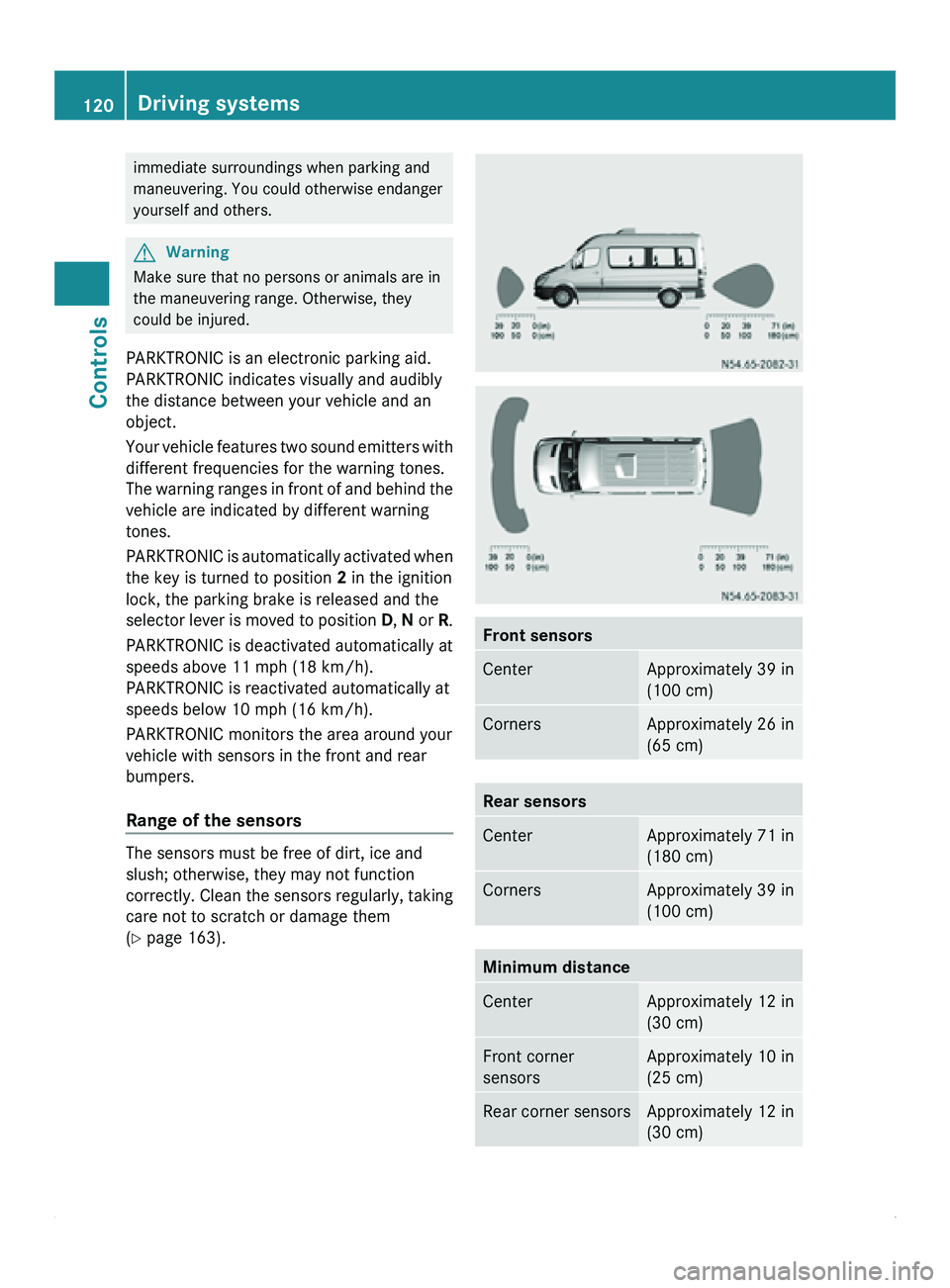
The warning ranges in front of and behind the
vehicle are indicated by different warning
tones.
PARKTRONIC is automatically activated when
the key is turned to position 2 in the ignition
lock, the parking brake is released and the
selector lever is moved to position D, N or R.
PARKTRONIC is deactivated automatically at
speeds above 11 mph (18 km/h).
PARKTRONIC is reactivated automatically at
speeds below 10 mph (16 km/h).
PARKTRONIC monitors the area around your
vehicle with sensors in the front and rear
bumpers.
Range of the sensors The sensors must be free of dirt, ice and
slush; otherwise, they may not function
correctly. Clean
the
sensors regularly, taking
care not to scratch or damage them
(Y page 163). Front sensors
Center Approximately 39 in
(100 cm)
Corners Approximately 26 in
(65 cm)
Rear sensors
Center Approximately 71 in
(180 cm)
Corners Approximately 39 in
(100 cm)
Minimum distance
Center Approximately 12 in
(30 cm)
Front corner
sensors Approximately 10 in
(25 cm)
Rear corner sensors Approximately 12 in
(30 cm)120
Driving systems
Controls
Page 123 of 292
If an obstacle is within this range, all
segments of
the
warning displays light up and
you hear a warning tone. If the distance
between the vehicle and the obstacle falls
below the minimum range, it is possible that
the distance may no longer be displayed.
! Pay particular attention to obstacles
above or below the sensors when parking,
such as flower pots or trailer towbars.
PARKTRONIC does not recognize such
objects when they are in the immediate
vicinity of the vehicle. You could damage
the vehicle or objects.
PARKTRONIC can suffer interference from:
R ultrasonic sources such as a lorry's
compressed-air brakes, an automatic car
wash or a pneumatic drill
R attachments to the vehicle, e.g. rear
mounted racks
R number plates (vehicle license plates)
that are not affixed flat against the
bumper
R dirty or icy sensors
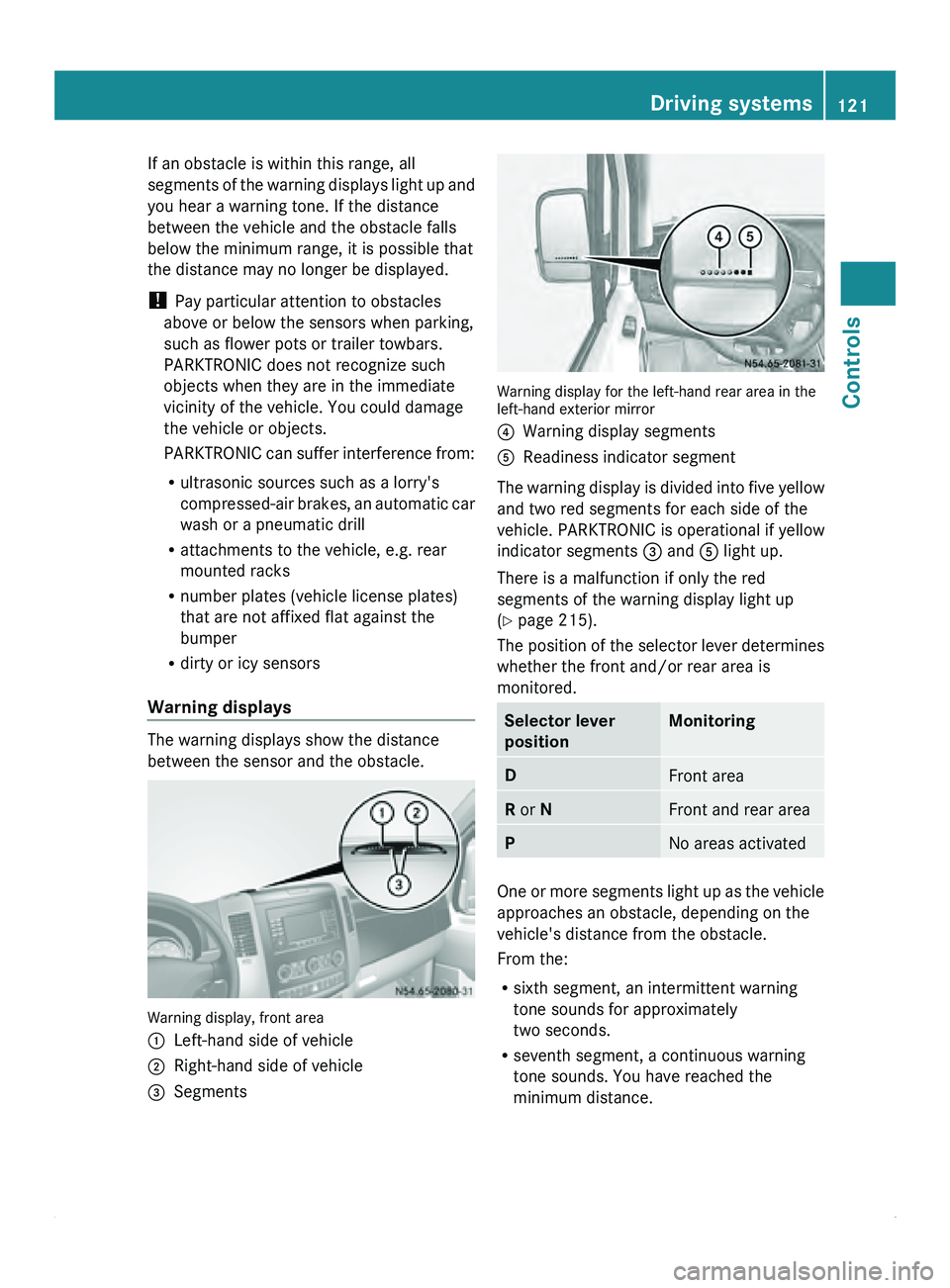
Warning displays The warning displays show the distance
between the sensor and the obstacle.
Warning display, front area
0046
Left-hand side of vehicle
0047 Right-hand side of vehicle
008A Segments Warning display for the left-hand rear area in the
left-hand exterior mirror
0088
Warning display segments
0086 Readiness indicator segment
The warning display is divided into five yellow
and two red segments for each side of the
vehicle. PARKTRONIC is operational if yellow
indicator segments 008A and 0086 light up.
There is a malfunction if only the red
segments of the warning display light up
(Y page 215).
The position of
the selector lever determines
whether the front and/or rear area is
monitored. Selector lever
position Monitoring
D
Front area
R or N Front and rear area
P
No areas activated
One or more segments light up as the vehicle
approaches an obstacle, depending on the
vehicle's distance from the obstacle.
From the:
R
sixth segment, an intermittent warning
tone sounds for approximately
two seconds.
R seventh segment, a continuous warning
tone sounds. You have reached the
minimum distance. Driving systems
121
Controls Z
Page 124 of 292
Roll-back warning
PARKTRONIC automatically monitors the
area behind the vehicle if the vehicle begins
to roll backwards without reverse gear
engaged, e.g. after stopping on an uphill
gradient.
If PARKTRONIC recognizes an obstacle at a
distance of at most 31 in (80 cm), all the
segments in the warning display light up. A
continuous warning tone also sounds as the
vehicle approaches the obstacle and for a
further two seconds after the vehicle has
come to a halt.
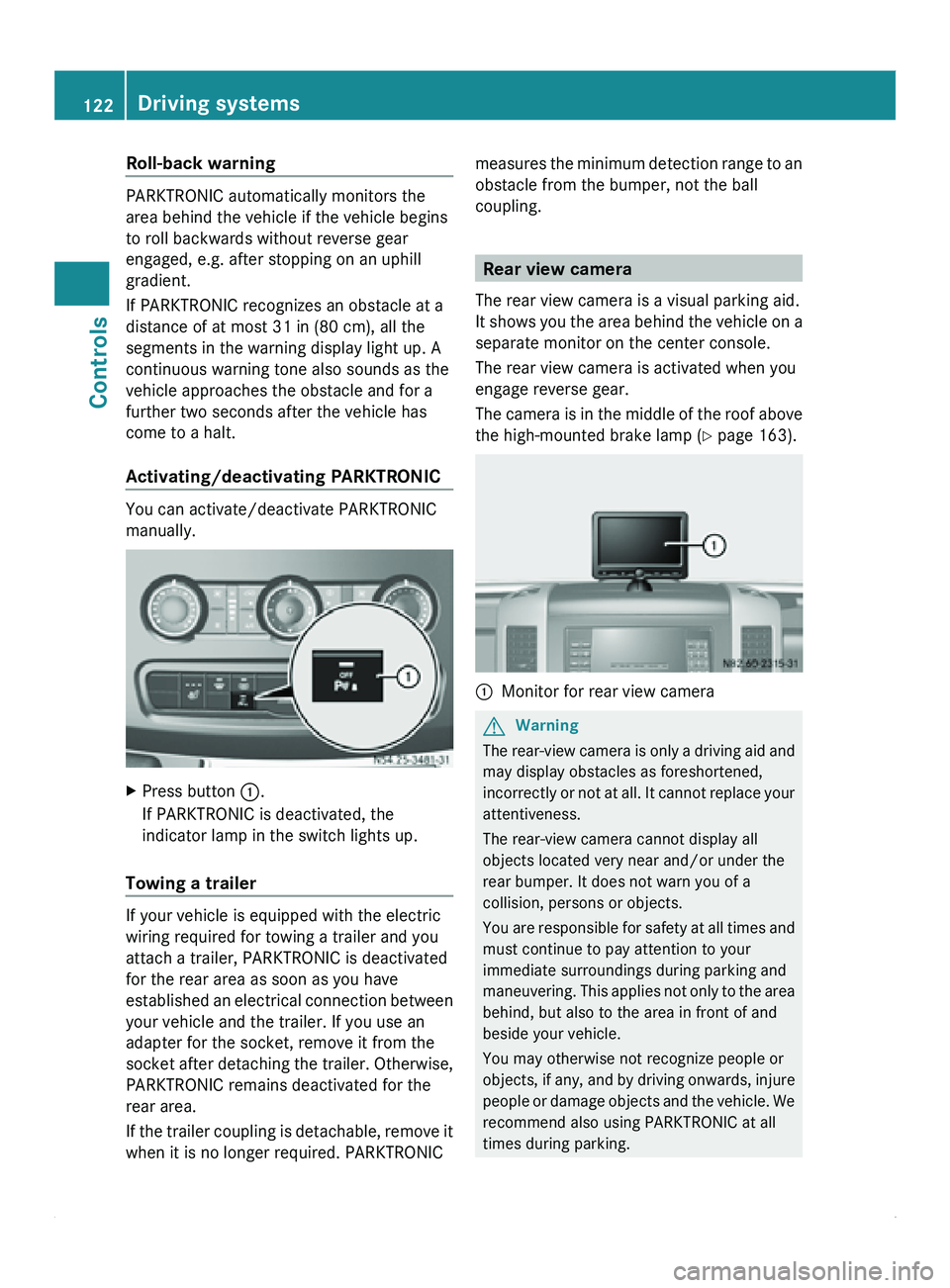
Activating/deactivating PARKTRONIC You can activate/deactivate PARKTRONIC
manually.
X
Press button 0046.
If PARKTRONIC is deactivated, the
indicator lamp in the switch lights up.
Towing a trailer If your vehicle is equipped with the electric
wiring required for towing a trailer and you
attach a trailer, PARKTRONIC is deactivated
for the rear area as soon as you have
established an
electrical
connection between
your vehicle and the trailer. If you use an
adapter for the socket, remove it from the
socket after detaching the trailer. Otherwise,
PARKTRONIC remains deactivated for the
rear area.
If the trailer coupling is detachable, remove it
when it is no longer required. PARKTRONIC measures the minimum detection range to an
obstacle from the bumper, not the ball
coupling.
Rear view camera
The rear view camera is a visual parking aid.
It shows you
the area behind the vehicle on a
separate monitor on the center console.
The rear view camera is activated when you
engage reverse gear.
The camera is in the middle of the roof above
the high-mounted brake lamp ( Y page 163). 0046
Monitor for rear view camera G
Warning
The rear-view camera is only a driving aid and
may display obstacles as foreshortened,
incorrectly or not
at all. It cannot replace your
attentiveness.
The rear-view camera cannot display all
objects located very near and/or under the
rear bumper. It does not warn you of a
collision, persons or objects.
You are responsible for safety at all times and
must continue to pay attention to your
immediate surroundings during parking and
maneuvering. This applies not only to the area
behind, but also to the area in front of and
beside your vehicle.
You may otherwise not recognize people or
objects, if any, and by driving onwards, injure
people or damage objects and the vehicle. We
recommend also using PARKTRONIC at all
times during parking. 122
Driving systems
Controls
Page 125 of 292
G
Warning
Make sure that no persons or animals are in
the maneuvering range. Otherwise, they
could be injured. G
Warning!
The rear-view camera could either stop
functioning or function incorrectly if:
R it is raining very heavily or snowing, or it is
foggy.
R the parking space is located in a very dark
place.
R the camera is
exposed to very strong white
light. White stripes may appear on the
display.
R the surrounding area is illuminated with
fluorescent light. The display may flicker.
R there is a rapid change in temperature, e.g.
if you drive out of the cold during winter into
a heated garage.
R ambient temperatures are very high.
R the camera lens is dirty or obstructed.
R the rear of the vehicle is damaged. In this
case, have the position and setting checked
at a qualified specialist workshop that has
the necessary specialist knowledge and
tools to carry out the work required. For this
reason, we recommend an authorized
Sprinter Dealer.
You will find information about cleaning the
camera in the "Operation" section
(Y page 163).
Switching on the rear view camera X
Make sure
that the ignition is switched on.
X Engage reverse gear.
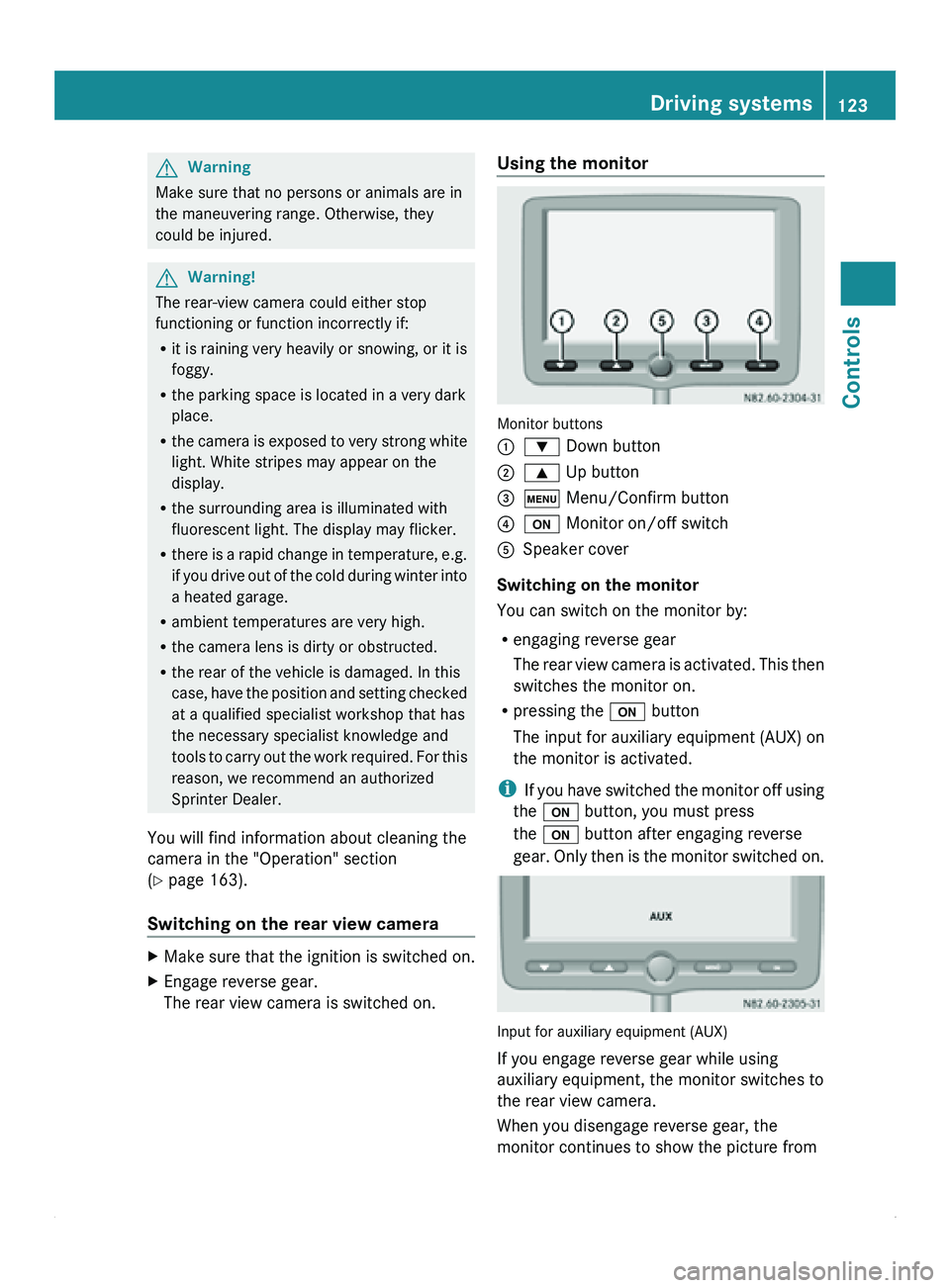
The rear view camera is switched on. Using the monitor
Monitor buttons
0046
003D Down button
0047 003C Up button
008A 0093 Menu/Confirm button
0088 0094 Monitor on/off switch
0086 Speaker cover
Switching on the monitor
You can switch on the monitor by:
R engaging reverse gear
The rear
view
camera is activated. This then
switches the monitor on.
R pressing the 0094 button
The input for auxiliary equipment (AUX) on
the monitor is activated.
i If you have switched the monitor off using
the 0094 button, you must press
the 0094 button after engaging reverse
gear. Only then is the monitor switched on. Input for auxiliary equipment (AUX)
If you engage reverse gear while using
auxiliary equipment, the monitor switches to
the rear view camera.
When you disengage reverse gear, the
monitor continues to show the picture from Driving systems
123
Controls Z
Page 131 of 292
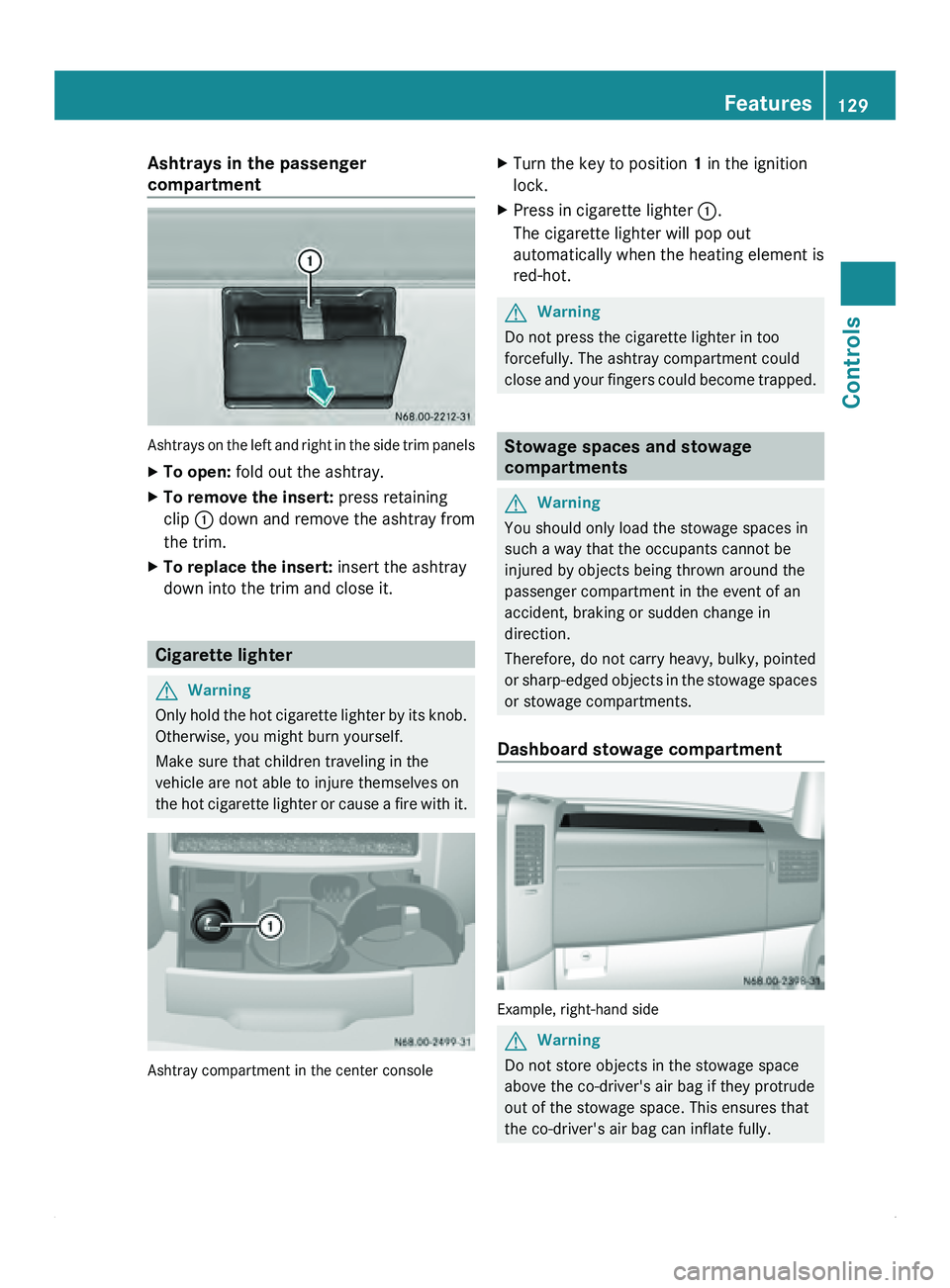
Ashtrays in the passenger
compartment
Ashtrays on the left and right in the side trim panels
X
To open: fold out the ashtray.
X To remove the insert: press retaining
clip 0046 down and
remove the ashtray from
the trim.
X To replace the insert: insert the ashtray
down into the trim and close it. Cigarette lighter
G
Warning
Only hold the hot cigarette lighter by its knob.
Otherwise, you might burn yourself.
Make sure that children traveling in the
vehicle are not able to injure themselves on
the hot cigarette
lighter or cause a fire with it.Ashtray compartment in the center console X
Turn the key to position 1 in the ignition
lock.
X Press in cigarette lighter 0046.
The cigarette lighter will pop out
automatically when the heating element is
red-hot. G
Warning
Do not press the cigarette lighter in too
forcefully. The ashtray compartment could
close and your
fingers could become trapped. Stowage spaces and stowage
compartments
G
Warning
You should only load the stowage spaces in
such a way that the occupants cannot be
injured by objects being thrown around the
passenger compartment in the event of an
accident, braking or sudden change in
direction.
Therefore, do not carry heavy, bulky, pointed
or sharp-edged objects
in the stowage spaces
or stowage compartments.
Dashboard stowage compartment Example, right-hand side
G
Warning
Do not store objects in the stowage space
above the co-driver's air bag if they protrude
out of the stowage space. This ensures that
the co-driver's air bag can inflate fully. Features
129
Controls Z
Page 134 of 292
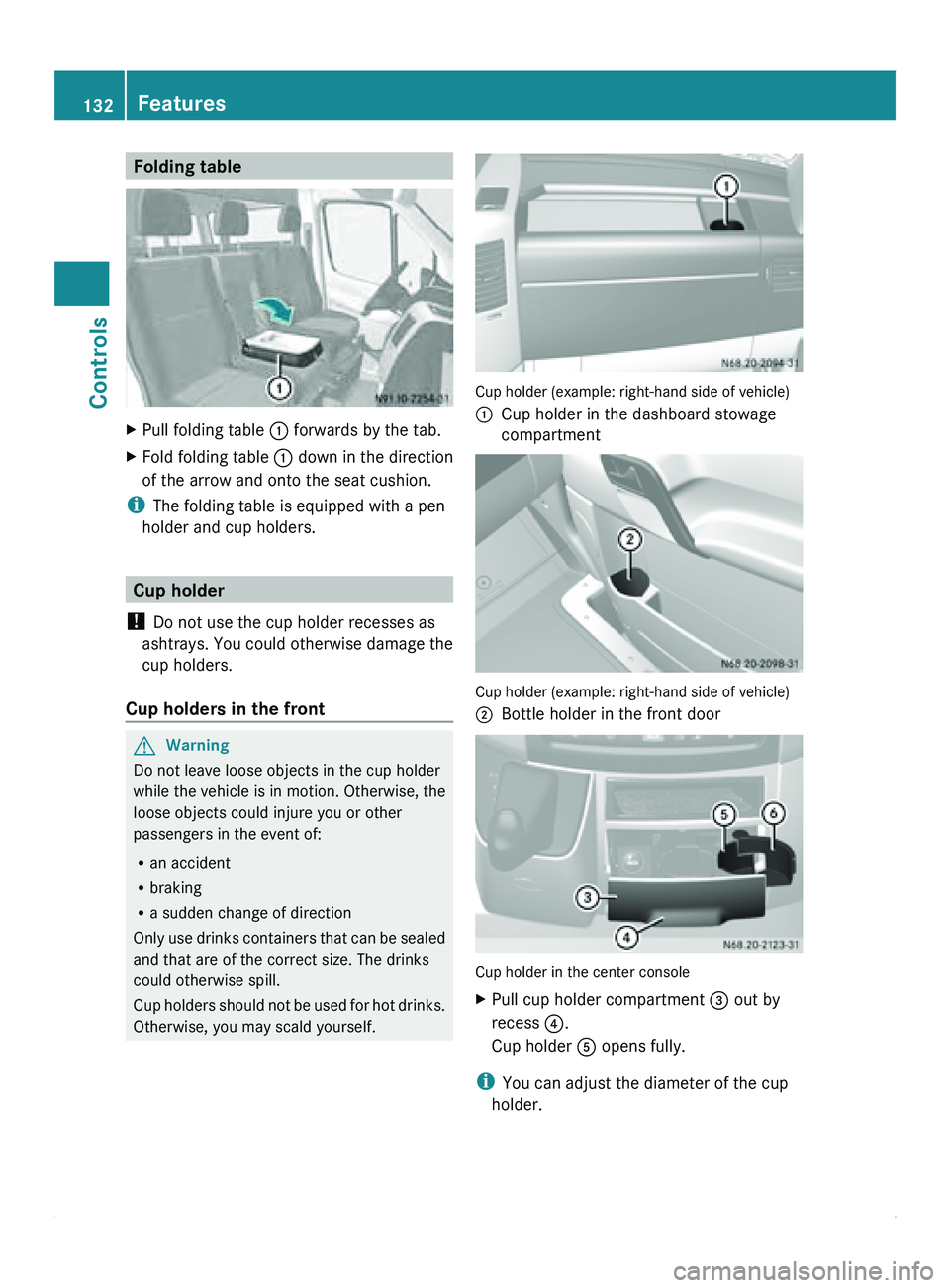
Folding table
X
Pull folding table 0046 forwards by the tab.
X Fold folding table 0046 down in the direction
of the arrow and onto the seat cushion.
i The folding table is equipped with a pen
holder and cup holders. Cup holder
! Do not use the cup holder recesses as
ashtrays. You could
otherwise damage the
cup holders.
Cup holders in the front G
Warning
Do not leave loose objects in the cup holder
while the vehicle is in motion. Otherwise, the
loose objects could injure you or other
passengers in the event of:
R an accident
R braking
R a sudden change of direction
Only use drinks
containers that can be sealed
and that are of the correct size. The drinks
could otherwise spill.
Cup holders should not be used for hot drinks.
Otherwise, you may scald yourself. Cup holder (example: right-hand side of vehicle)
0046
Cup holder in the dashboard stowage
compartment Cup holder (example: right-hand side of vehicle)
0047
Bottle holder in the front door Cup holder in the center console
X
Pull cup holder compartment 008A out by
recess
0088.
Cup holder 0086 opens fully.
i You can adjust the diameter of the cup
holder. 132
Features
Controls
Page 135 of 292
X
Place the beverage container in cup
holder 0086.
X Push clamping arm 0087 against the
container.
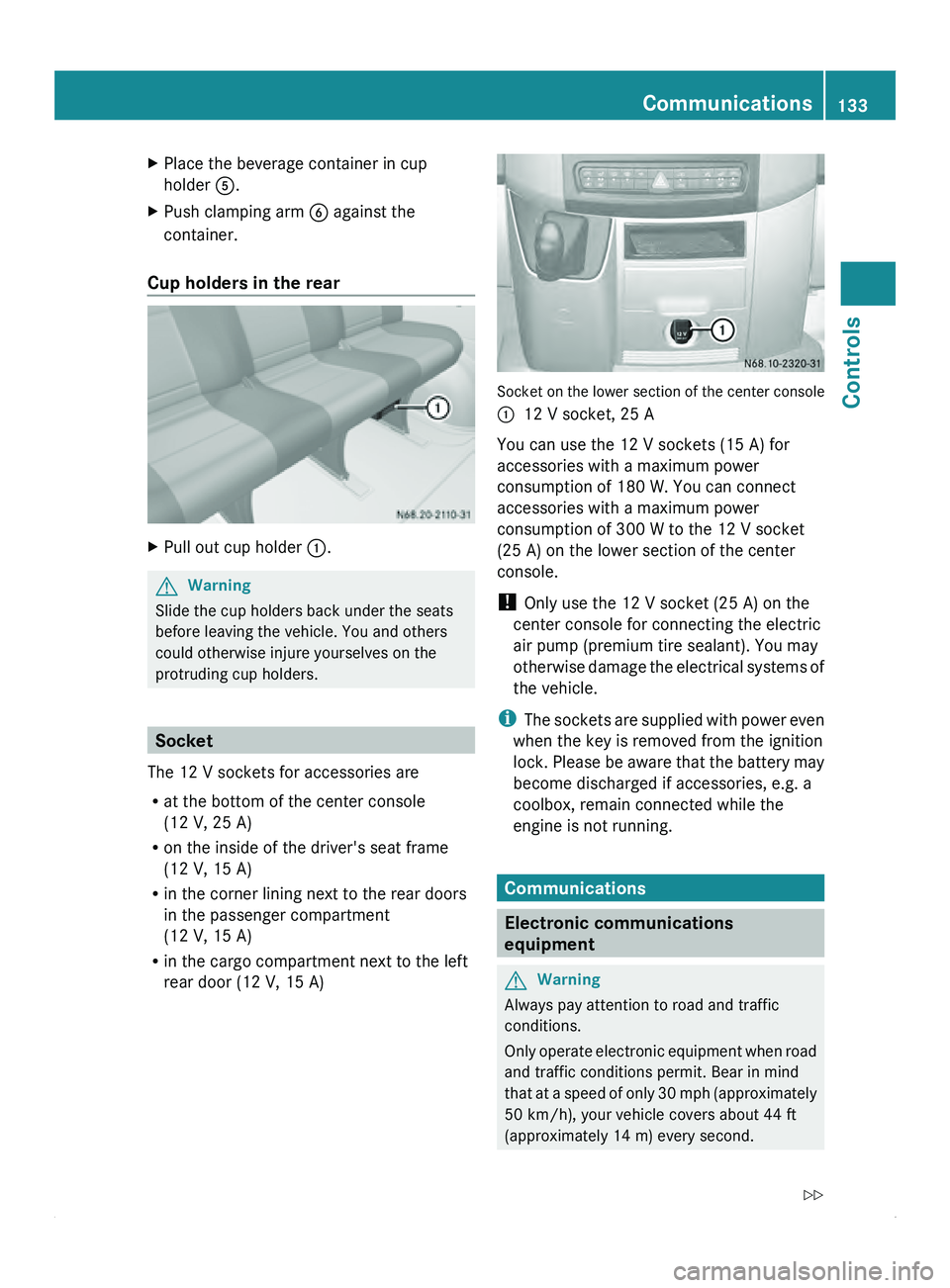
Cup holders in the rear X
Pull out cup holder 0046.G
Warning
Slide the cup holders back under the seats
before leaving the vehicle. You and others
could otherwise injure yourselves on the
protruding cup holders. Socket
The 12 V sockets for accessories are
R at the bottom of the center console
(12 V, 25 A)
R on the inside of the driver's seat frame
(12 V, 15 A)
R in the corner lining next to the rear doors
in the passenger compartment
(12 V, 15 A)
R in the cargo compartment next to the left
rear door (12 V, 15 A) Socket on the lower section of the center console
0046
12 V socket, 25 A
You can use the 12 V sockets (15 A) for
accessories with a maximum power
consumption of 180 W. You can connect
accessories with a maximum power
consumption of 300 W to the 12 V socket
(25 A) on the lower section of the center
console.
! Only use the 12 V socket (25 A) on the
center console for connecting the electric
air pump (premium tire sealant). You may
otherwise
damage the electrical systems of
the vehicle.
i The sockets are supplied with power even
when the key is removed from the ignition
lock. Please be aware that the battery may
become discharged if accessories, e.g. a
coolbox, remain connected while the
engine is not running. Communications
Electronic communications
equipment
G
Warning
Always pay attention to road and traffic
conditions.
Only operate electronic
equipment when road
and traffic conditions permit. Bear in mind
that at a speed of only 30 mph (approximately
50 km/h), your vehicle covers about 44 ft
(approximately 14 m) every second. Communications
133
Controls
Z
Page 136 of 292
A navigation system does not supply
information on the load-bearing capacity of
bridges or the overhead clearance of
underpasses.
The driver remains responsible for the safety
of the vehicle at all times.
Observe legal requirements.
Telephones, two-way
radios
and fax machines
without an exterior antenna could interfere
with the vehicle electronics and thus
compromise the operational safety of the
vehicle. There is an increased risk of accident.
Do not use this equipment while the vehicle
is in motion.
Failure to observe the Sprinter installation
specifications can result in the invalidation of
your vehicle's operating permit.
You will find information on retrofitting
electrical or electronic equipment in the
"Technical data" section ( Y page 277).Telephone
G
Warning
A driver's attention to the road must always
be his/her primary focus when driving. For
your safety and the safety of others, we
recommend that you pull over to a safe
location and stop before placing or taking a
telephone call. If you choose to use the
telephone while driving,
please use the hands-
free device and only use the telephone when
weather, road and traffic conditions permit.
Some jurisdictions prohibit the driver from
using a mobile phone while driving a vehicle.
Bear in mind that at a speed of just 30 mph
(approximately 50 km/h ), your vehicle is
covering a distance of 44 feet (approximately
14 m) every second. G
Warning
Excessive electromagnetic radiation may
constitute a health hazard to yourself and
others. Use of an exterior antenna gives consideration to scientific discussion
surrounding the
possible
health risk posed by
electromagnetic fields.
The exterior antenna should only be installed
at a qualified specialist workshop which has
the necessary specialist knowledge and tools
to carry out the work required. We
recommend that you use an authorized
Sprinter Dealer for this purpose. In particular,
work relevant to safety or on safety-related
systems must be carried out at a qualified
specialist workshop.
We recommend the use of an approved
exterior antenna for operating the mobile
phone. Only in this way can optimal mobile
phone reception quality in the vehicle be
ensured and mutual interference between the
vehicle electronics and mobile phones
minimized.
Observe the legal requirements for each
individual country.
The mobile phone fitting includes a hands-
free system integrated into the vehicle. The
microphone for the hands-free system is
installed in the overhead control panel or in
the overhead stowage compartment together
with the front interior light.
In order to use the hands-free system, you will
need a special bracket. The Sprinter range of
accessories includes brackets for various
mobile phone models.
i Mobile phone brackets which are
available from various manufacturers on
the open market are not compatible with
the Sprinter telephone system. You can
recognize suitable phone brackets for your
mobile, by the printed star and the B6 in the
part number on the rear of the phone
bracket.
Detailed instructions for use can be found in
the operating instructions for the mobile
phone bracket and in the separate operating
instructions for the mobile phone fittings.
i The mobile phone battery is charged
depending on the condition of charge 134
Communications
Controls
Page 140 of 292
Vehicle equipment
i Diese Betriebsanleitung beschreibt alle
Modelle, Serien- und
Sonderausstattungen
Ihres Fahrzeugs, die zum Zeitpunkt des
Redaktionsschlusses dieser
Betriebsanleitung erhältlich waren.
Länderspezifische Abweichungen sind
möglich. Beachten Sie, dass Ihr Fahrzeug
nicht mit allen beschriebenen Funktionen
ausgestattet sein könnte. Dies betrifft auch
sicherheitsrelevante Systeme und
Funktionen. Driving tips
Breaking-in
It is of decisive importance for the operating
life, reliability and
economy of the vehicle that
the engine is not subjected to its full rated
load during the breaking-in period.
Up to 1000 miles (1500 km)
R Run the vehicle in carefully. Drive at varying
road and engine speeds.
R Avoid heavy loads (driving at full throttle)
and high engine speeds. Do not exceed ¾
of the maximum speed for each gear.
R Do not change down a gear manually in
order to brake.
R Avoid depressing the accelerator pedal
beyond the pressure point (kickdown) and
only engage gear 4, 3, 2 or 1 while driving
slowly.
After 1000 miles (1500 km)
R Gradually bring the vehicle up to full road
and engine speeds.
i These instructions must also be observed
if you have the engine, the transmission, or
the rear axle differential of your vehicle
replaced. Driving abroad
An extensive network of authorized Sprinter
Dealers is also
at your disposal when you are
traveling abroad. The respective workshop
directories are available from any authorized
Sprinter Dealer.
In some countries, only fuels with a lower
octane rating or a higher sulfur content are
available.
You will find information about fuel in the
"Service products" section (Y page 153).
If you are traveling in countries where
vehicles are driven on the opposite side of the
road to that in which the vehicle is registered,
you must have the headlamps:
R partially masked (halogen headlamps)
R switched over (Bi-Xenon headlamps) G
Warning
Masking the headlamps incorrectly can
impair your visibility when driving with the
headlamps switched on. You could also
impede other road users. Oncoming traffic
may be dazzled.
Always have the headlamps masked/
switched over at a qualified specialist
workshop which has
the necessary specialist
knowledge and tools to carry out the work
required.
For this we recommend an authorized
Sprinter Dealer. All work relevant to safety or
on safety-related systems must be carried out
at a qualified specialist workshop. Driving off-road
When driving the vehicle, particularly on
rough terrain, ensure that the driven wheels
always have sufficient traction.
Avoid letting the drive wheels spin. Spinning
drive wheels can damage the differential.
! Always observe the ground clearance of
the vehicle and avoid obstacles, e.g. deep
ruts. 138
Driving tips
Operation