lights MERCEDES-BENZ SPRINTER 2012 MY12 Operator’s Manual
[x] Cancel search | Manufacturer: MERCEDES-BENZ, Model Year: 2012, Model line: SPRINTER, Model: MERCEDES-BENZ SPRINTER 2012Pages: 292, PDF Size: 6.75 MB
Page 109 of 292
Setting the switch-on time
On-board computer without steering
wheel buttons
X
Use the same method to select a switch-on
time as described in the "Preselecting a
switch-on time" section.
X Press the 0048 reset button on the
instrument cluster to set the desired
switch-on time.
The hour display flashes.
X Use the 0069 and 006A buttons on the
instrument cluster to set the hours.
X Press the 0048 reset button.
The minute display flashes.
X Use the 0069 and 006A buttons to set the
minutes.
On-board computer with steering wheel
buttons
X Use the same method to select a switch-on
time as described in the "Preselecting a
switch-on time" section.
X Press the 0029 menu button on the
steering wheel.
The Hours submenu is shown in the
display.
X Press the 005A or 005B button on the
steering wheel to set the hours.
X Press the 0029 button.
The Minutes submenu is shown in the
display.
X Press the 005A or 005B button to set the
minutes.
X Press the 0059 button.
The switch-on time is set and selected.
Heater booster function If the outside temperature is lower than
39 ‡ (4 †), the fuel-operated auxiliary
heating heats the vehicle as quickly as
possible when the engine is running. The auxiliary heating automatically switches
to heater booster mode after the engine is
started.
i
If the outside temperature rises above
39 ‡ (4 †),
the auxiliary heating and heater
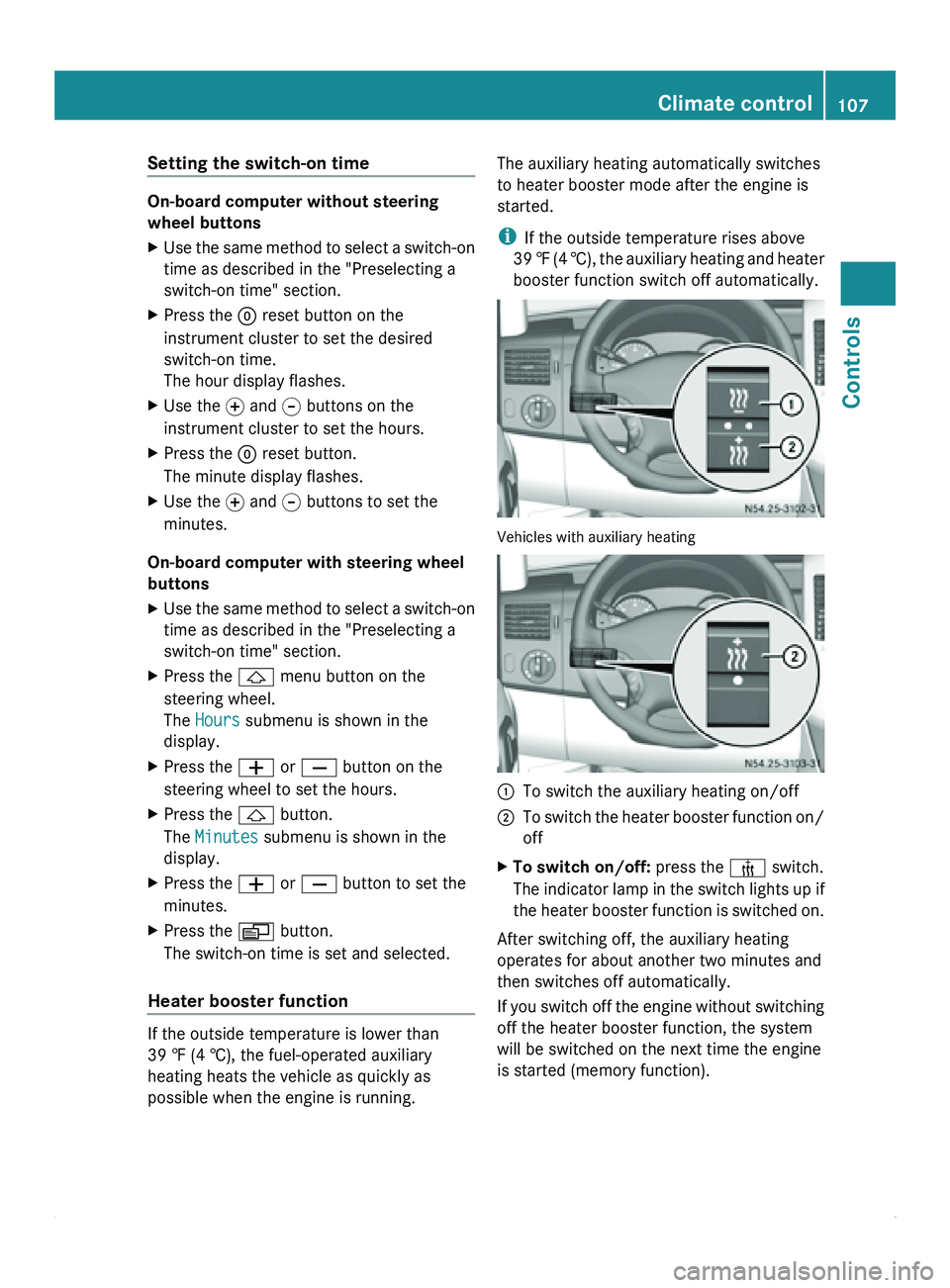
booster function switch off automatically. Vehicles with auxiliary heating
0046
To switch the auxiliary heating on/off
0047 To switch the heater booster function on/
off
X To switch on/off: press the 006C switch.
The indicator lamp
in the switch lights up if
the heater booster function is switched on.
After switching off, the auxiliary heating
operates for about another two minutes and
then switches off automatically.
If you switch
off the engine without switching
off the heater booster function, the system
will be switched on the next time the engine
is started (memory function). Climate control
107
Controls Z
Page 112 of 292
Starting the engine
X
Turn the key to position 2 in the ignition
lock.
The 0028 preglow indicator lamp in the
instrument cluster lights up.
X When the 0028 preglow indicator lamp
goes out, turn the key to position 3 in the
ignition lock and release it as soon as the
engine is running.
i You can start
the engine without preglow
when the engine is warm.
i Depending on the equipment installed,
the vehicle either automatically locks
centrally after switching on the ignition or
after pulling away. The locking knobs in the
doors drop down.
You can open the doors from the inside at
any time.
Automatic door locking can be deactivated
(Y page 55). Driving off
G
Warning
Do not downshift for additional engine
braking on a
slippery road surface. This could
cause the drive wheels to lose their grip and
the vehicle could skid. You could lose control
of the vehicle and cause an accident.
i After pulling away or switching on the
ignition, the vehicle automatically locks
centrally. The locking knobs in the doors
drop down.
You can open the doors from the inside at
any time.
Automatic door locking can be deactivated
(Y page 55). X
Depress the brake pedal and keep it
depressed.
The selector lever lock is released.
X Release the parking brake ( Y page 112).
The 0066 indicator lamp in the instrument
cluster goes out.
X Move the selector lever to position D or R.
i On vehicles with a reverse warning
feature, a warning signal sounds when
reverse gear is
engaged to alert other road
users.
! Only shift into reverse gear when the
vehicle is stationary. You could otherwise
damage the transmission.
X Release the brake pedal.
X Carefully depress the accelerator pedal. General driving tips
Steering G
Warning
Do not switch off the engine while the vehicle
is in motion.
There is no
power assistance for the steering
or the service brake when the engine is not
running.
Steering and braking require significantly
more effort and you could lose control of the
vehicle and cause an accident as a result.
! Do not hold the steering wheel at full
steering angle for a long time, e.g. when
turning or maneuvering.
The hydraulic pump could be damaged if
the hydraulic fluid temperature increases.
Overrun cut-off If you take your foot off the accelerator pedal,
the diesel fuel supply is cut off in overrun
mode when the
engine speed is out of the idle
speed control range. 110
Driving and parking
Controls
Page 115 of 292
Applying the parking brake
X
Pull brake lever 0046 up as far as the last
possible detent.
The 0066 indicator lamp in the instrument
cluster lights up.
i On vehicles with
a folding brake lever, you
can then press lever 0046 down to the stop.
Releasing the parking brake i
On vehicles with
a folding brake lever, you
must first pull brake lever 0046 up to the stop.
X Raise brake lever 0046 slightly and press
release knob 0047.
X Guide brake lever 0046 down to the stop.
The 0066 indicator lamp in the instrument
cluster goes out.
Emergency braking As a rule, you may only apply the parking
brake when the vehicle is stationary.
In exceptional cases, the parking brake can
be used for emergency braking if the service
brake fails.
X
Keep release knob 0047 pressed and
carefully apply brake lever 0046.G
Warning
If the brake lever is applied abruptly, the rear
wheels could lock. The vehicle could then go
into a skid.
Make sure that you apply the brake lever
carefully to ensure
that braking application is
moderated. Automatic transmission
Overview
The automatic transmission adapts to your
individual driving style by continuously
adjusting its shift points. These shift point
adjustments take into account the current
operating and driving conditions. If the operating or driving conditions change, the
automatic transmission reacts by adjusting
the gearshift program.
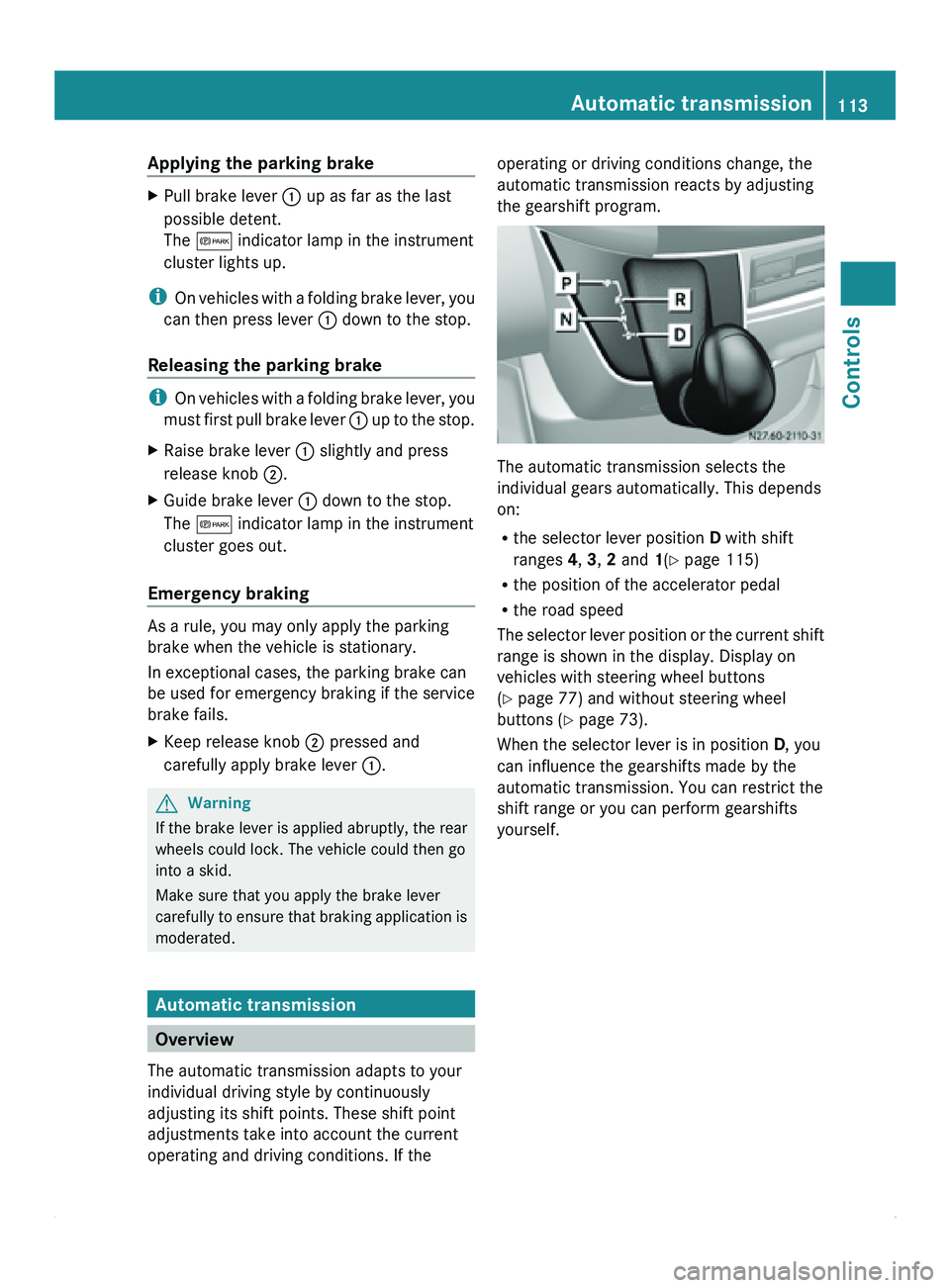
The automatic transmission selects the
individual gears automatically. This depends
on:
R
the selector lever position D with shift
ranges 4, 3, 2 and 1(Y page 115)
R the position of the accelerator pedal
R the road speed
The selector lever
position or the current shift
range is shown in the display. Display on
vehicles with steering wheel buttons
(Y page 77) and without steering wheel
buttons ( Y page 73).
When the selector lever is in position D, you
can influence the gearshifts made by the
automatic transmission. You can restrict the
shift range or you can perform gearshifts
yourself. Automatic transmission
113
Controls Z
Page 118 of 292
vehicle. Otherwise, the vehicle could roll
away.
Driving the vehicle
Exhaust gas aftertreatment
The exhaust gas aftertreatment requires a
reducing agent, Diesel
Exhaust Fluid (DEF), in
order to function correctly. Filling up the DEF
tank is usually part of the service scope. DEF
consumption depends on operational and
driving conditions; the supply does not have
to suffice until the next scheduled service. For
this reason, refill the DEF tank regularly
during vehicle operation, or, at the latest,
after the first warning message has been
received from the on-board computer.
To conform with emission regulations, you
must operate the vehicle with DEF and refill
the supply regularly. If you try to operate the
vehicle without DEF, with diluted DEF, or with
a different reduction agent, the engine
management detects this and issues a
warning message, after which the engine
cannot be restarted.
If the DEF supply drops below
1.5 US gal (5.5 l), you receive the first warning
message and you hear a warning tone. After
the first message appears, the remaining DEF
supply suffices for approximately 1000 miles
(1600 km) in normal driving conditions.
Then, the reserve range of 0.8 US gal (3.0 l)
is reached. Once the reserve range has been
reached, you receive the next warning
message and you hear a series of warning
tones. After the first message appears, the
DEF reserve suffices for approximately
1200 miles (1900 km). You can, however,
only start the engine another 16 times.
You should now, at the latest, fill up with at
least 2.0 US gal (7.6 l) of DEF (Y page 143)
or have the DEF tank filled at a qualified
specialist workshop. When the number of remaining engine starts
is 0, the engine management prevents the
engine from being started.
If the
00BB
check engine indicator lamp lights
up, the exhaust gas aftertreatment is faulty or
an emission-relevant malfunction has
occurred (Y page 195). You can then drive a
maximum of 50 miles (80 km) before the
engine management limits the number of
remaining engine starts.
If the exhaust gas aftertreatment is faulty,
have it checked and repaired at a qualified
specialist workshop. We recommend that you
use an authorized Sprinter Dealer for this
purpose.
You will find further information on DEF in the
"Service products" section (Y page 155).
Level indicator You will find further information about DEF
consumption in the "Driving tips" section
(Y
page 140).
Vehicles without steering wheel buttons
If the DEF supply is less than
1.5 US gal (5.5 l), the 00E4 indicator lamp in
the instrument cluster lights up and the
009BdEF Chk message appears in the
display.
If the DEF supply drops below the reserve
level of 0.8 US gal (3.0 l), the 00E4 indicator
lamp in the instrument cluster lights up and
the 009BStArtS RE
xx
message is shown in
the display. xx refers to the number of
remaining engine starts (from 16 to 0).
Vehicles with steering wheel buttons
If the DEF supply is less than
1.5 US gal (5.5 l), the Check Diesel
Exhaust Fluid See Operator's Manual
message appears in the display.
If the DEF supply drops below the reserve
level of 0.8 US gal (3.0 l), the 00E4xx
starts remaining message appears in the
display. xx refers to the number of remaining
engine starts (from 16 to 0).116
Driving the vehicle
Controls
Page 119 of 292
ADR (working speed governor)
When activated, the working speed governor
(ADR) automatically increases the engine
speed to a preset or adjustable speed
(Y page 117).
i After a cold start, the idling speed of the
engine is increased automatically. If the
preset working speed is lower than the
increased idling speed, the working speed
is only reached once the engine has
completed the warm-up phase.
It is only possible to activate ADR with the
vehicle stationary and the parking brake
applied.
The selector lever must be in position P.
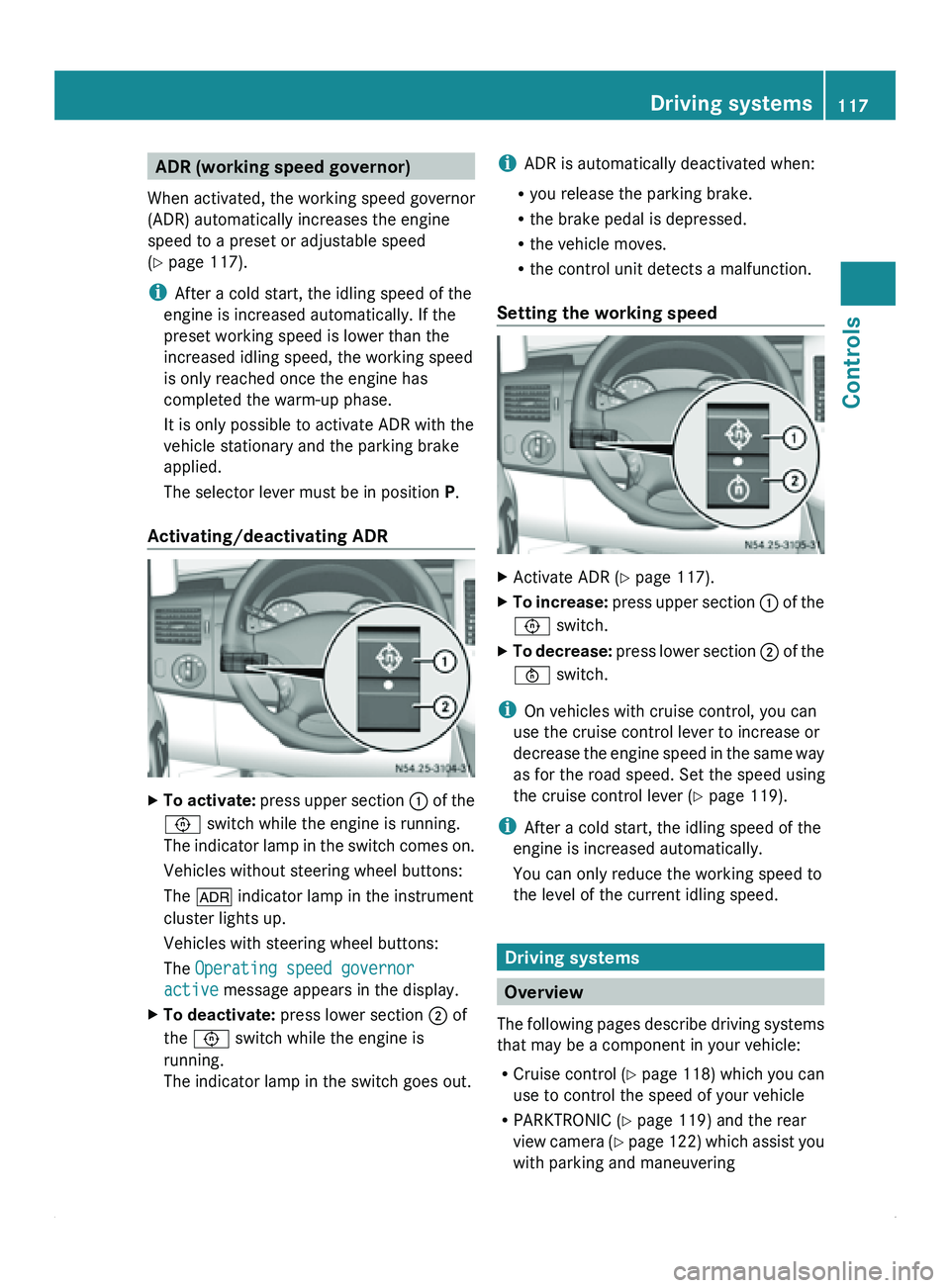
Activating/deactivating ADR X
To activate: press upper
section 0046 of the
0093 switch while the engine is running.
The indicator lamp in the switch comes on.
Vehicles without steering wheel buttons:
The 004E indicator lamp in the instrument
cluster lights up.
Vehicles with steering wheel buttons:
The Operating speed governor
active message appears in the display.
X To deactivate: press lower section 0047 of
the 0093 switch while the engine is
running.
The indicator lamp in the switch goes out. i
ADR is automatically deactivated when:
R you release the parking brake.
R the brake pedal is depressed.
R the vehicle moves.
R the control unit detects a malfunction.
Setting the working speed X
Activate ADR (
Y page 117).
X To increase: press upper
section 0046 of the
0093 switch.
X To decrease: press lower
section 0047 of the
0094 switch.
i On vehicles with cruise control, you can
use the cruise control lever to increase or
decrease the engine
speed in the same way
as for the road speed. Set the speed using
the cruise control lever (Y page 119).
i After a cold start, the idling speed of the
engine is increased automatically.
You can only reduce the working speed to
the level of the current idling speed. Driving systems
Overview
The
following pages
describe driving systems
that may be a component in your vehicle:
R Cruise control ( Y page 118) which you can
use to control the speed of your vehicle
R PARKTRONIC ( Y page 119) and the rear
view camera (Y page 122) which assist you
with parking and maneuvering Driving systems
117
Controls Z
Page 120 of 292
Cruise control
General notes Cruise control maintains the speed of the
vehicle for you.
Use cruise control if road and traffic
conditions make it appropriate to maintain a
steady speed
for
a prolonged period. You can
set any speed from 20 mph upwards in
increments of 1 mph.
i If you have set km/h as the unit for the
digital speedometer , you can set any speed
from 30 km/h upwards in increments of
1 km/h. G
Warning
Cruise control is unable to take account of
road and traffic conditions.
Always pay attention
to the traffic conditions,
even when cruise control is activated.
Cruise control is only an aid designed to assist
driving. You are always responsible for the
vehicle's speed and for braking in good time.
If there is a change of drivers, make sure that
you inform the new driver about the set cruise
speed. Otherwise, sudden acceleration or
braking could endanger you or others. G
Warning
Do not use cruise control:
R in road and traffic conditions which do not
allow you to
maintain a constant speed (e.g.
heavy traffic or winding roads). You could
otherwise cause an accident.
R on slippery roads. Braking or accelerating
could cause the drive wheels to lose
traction and the vehicle could then skid.
R when there is poor visibility, e.g. due to fog,
heavy rain or snow
i Cruise control may not be able to
maintain the stored speed on uphill or
downhill gradients. The stored speed is
resumed if the gradient evens out and the
vehicle's speed does not fall below 20 mph
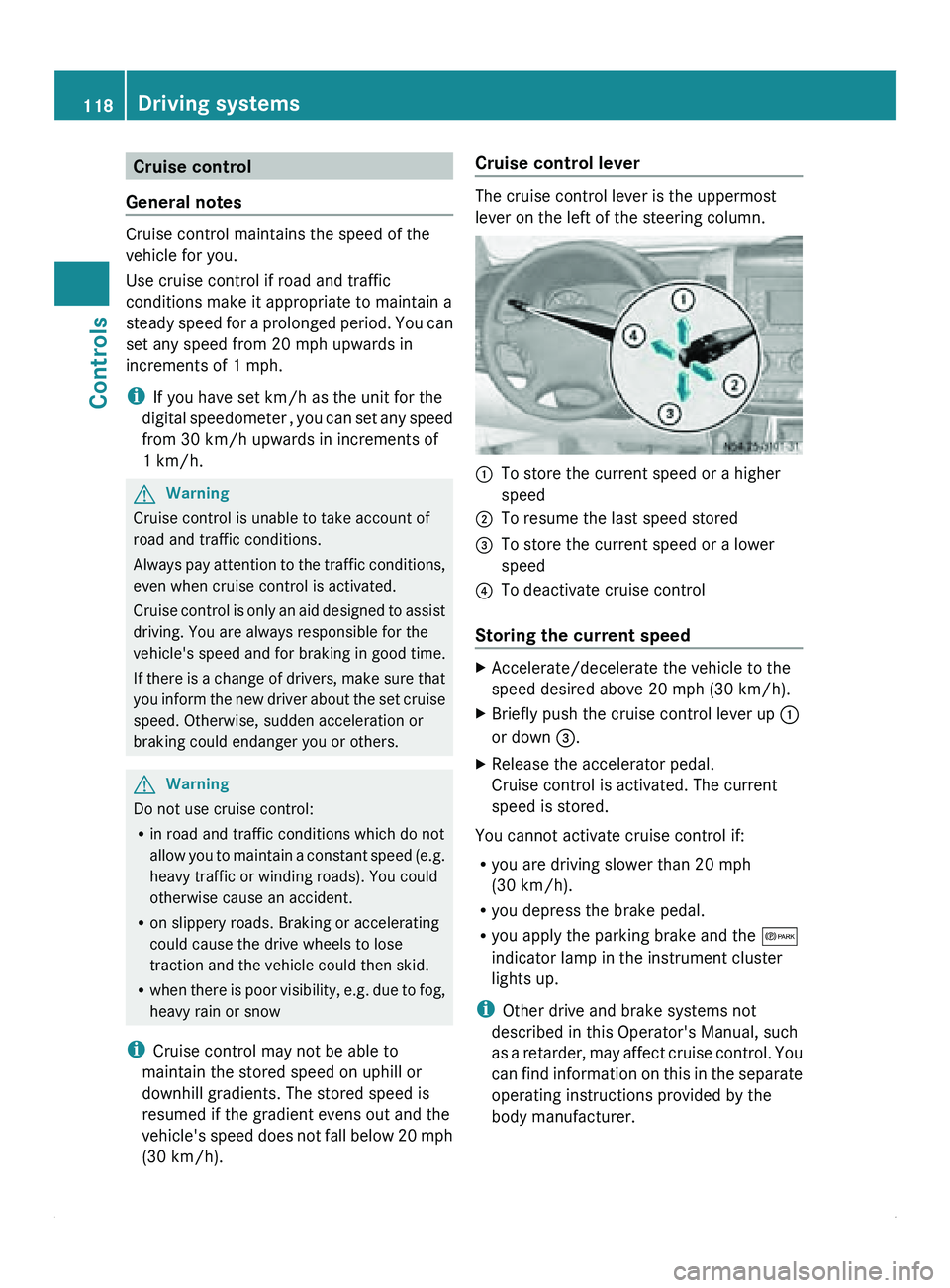
(30 km/h). Cruise control lever The cruise control lever is the uppermost
lever on the left of the steering column.
0046
To store the current speed or a higher
speed
0047 To resume the last speed stored
008A To store the current speed or a lower
speed
0088 To deactivate cruise control
Storing the current speed X
Accelerate/decelerate the vehicle to the
speed desired above 20 mph
(30 km/h).
X Briefly push the cruise control lever up 0046
or down 008A
.
X Release the accelerator pedal.
Cruise control is activated. The current
speed is stored.
You cannot activate cruise control if:
R you are driving slower than 20 mph
(30 km/h).
R you depress the brake pedal.
R you apply the parking brake and the 0066
indicator lamp in the instrument cluster
lights up.
i Other drive and brake systems not
described in this Operator's Manual, such
as a
retarder,
may affect cruise control. You
can find information on this in the separate
operating instructions provided by the
body manufacturer. 118
Driving systems
Controls
Page 121 of 292
Resuming the stored speed
G
Warning
Only select a stored speed if you know what
that speed is
and whether it is suitable for the
current driving and traffic situation. You can
otherwise endanger yourself and others by
unintentionally triggering sudden
acceleration or braking.
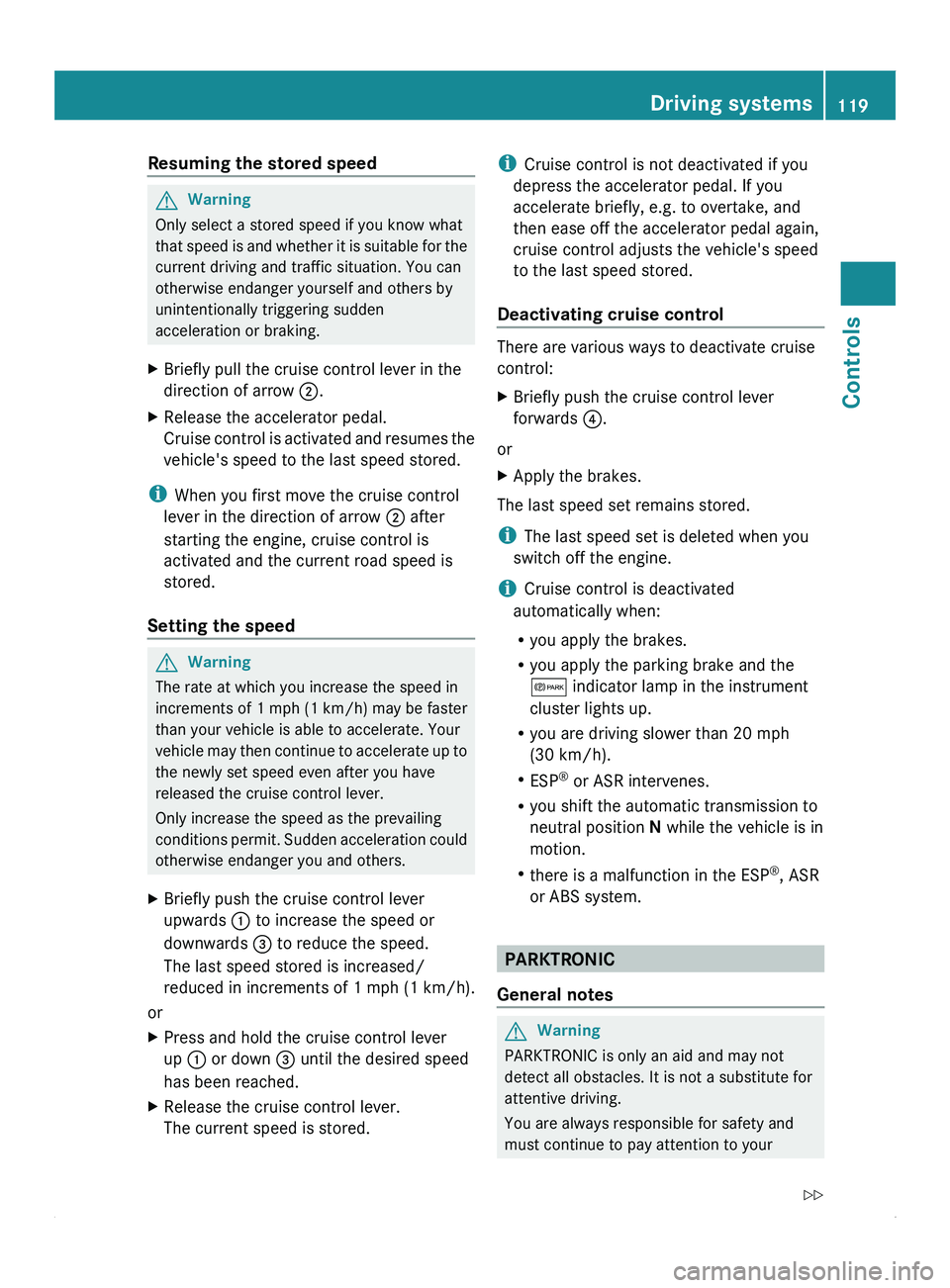
X Briefly pull the cruise control lever in the
direction of arrow 0047.
X Release the accelerator pedal.
Cruise control is
activated and resumes the
vehicle's speed to the last speed stored.
i When you first move the cruise control
lever in the direction of arrow 0047 after
starting the engine, cruise control is
activated and the current road speed is
stored.
Setting the speed G
Warning
The rate at which you increase the speed in
increments of 1 mph (1 km/h) may be faster
than your vehicle is able to accelerate. Your
vehicle may
then continue to accelerate up to
the newly set speed even after you have
released the cruise control lever.
Only increase the speed as the prevailing
conditions permit. Sudden acceleration could
otherwise endanger you and others.
X Briefly push the cruise control lever
upwards 0046 to increase the speed or
downwards 008A to reduce the speed.
The last speed stored is increased/
reduced in increments of 1 mph
(1 km/h
).
or
X Press and hold the cruise control lever
up 0046 or down 008A until the desired speed
has been reached.
X Release the cruise control lever.
The current speed is stored. i
Cruise control is not deactivated if you
depress the accelerator pedal. If you
accelerate briefly, e.g. to overtake, and
then ease off the accelerator pedal again,
cruise control adjusts the vehicle's speed
to the last speed stored.
Deactivating cruise control There are various ways to deactivate cruise
control:
X
Briefly push the cruise control lever
forwards 0088.
or
X Apply the brakes.
The last speed set remains stored.
i The last speed set is deleted when you
switch off the engine.
i Cruise control is deactivated
automatically when:
R you apply the brakes.
R you apply the parking brake and the
0066 indicator lamp in the instrument
cluster lights up.
R you are driving slower than 20 mph
(30 km/h).
R ESP ®
or ASR intervenes.
R you shift the automatic transmission to
neutral position N while the vehicle is in
motion.
R there is a malfunction in the ESP ®
, ASR
or ABS system. PARKTRONIC
General notes G
Warning
PARKTRONIC is only an aid and may not
detect all obstacles. It is not a substitute for
attentive driving.
You are always responsible for safety and
must continue to pay attention to your Driving systems
119
Controls
Z
Page 124 of 292
Roll-back warning
PARKTRONIC automatically monitors the
area behind the vehicle if the vehicle begins
to roll backwards without reverse gear
engaged, e.g. after stopping on an uphill
gradient.
If PARKTRONIC recognizes an obstacle at a
distance of at most 31 in (80 cm), all the
segments in the warning display light up. A
continuous warning tone also sounds as the
vehicle approaches the obstacle and for a
further two seconds after the vehicle has
come to a halt.
Activating/deactivating PARKTRONIC You can activate/deactivate PARKTRONIC
manually.
X
Press button 0046.
If PARKTRONIC is deactivated, the
indicator lamp in the switch lights up.
Towing a trailer If your vehicle is equipped with the electric
wiring required for towing a trailer and you
attach a trailer, PARKTRONIC is deactivated
for the rear area as soon as you have
established an
electrical
connection between
your vehicle and the trailer. If you use an
adapter for the socket, remove it from the
socket after detaching the trailer. Otherwise,
PARKTRONIC remains deactivated for the
rear area.
If the trailer coupling is detachable, remove it
when it is no longer required. PARKTRONIC measures the minimum detection range to an
obstacle from the bumper, not the ball
coupling.
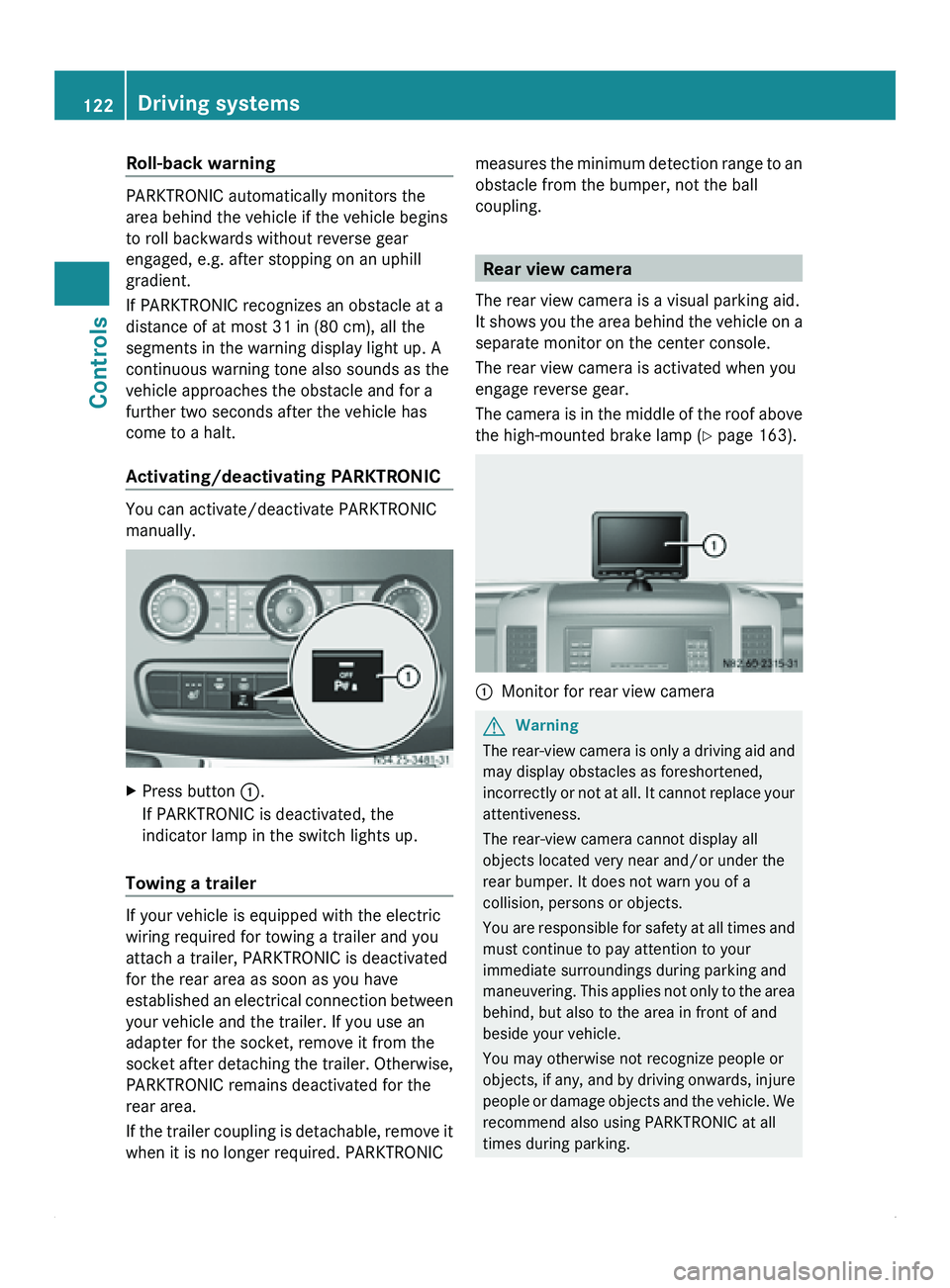
Rear view camera
The rear view camera is a visual parking aid.
It shows you
the area behind the vehicle on a
separate monitor on the center console.
The rear view camera is activated when you
engage reverse gear.
The camera is in the middle of the roof above
the high-mounted brake lamp ( Y page 163). 0046
Monitor for rear view camera G
Warning
The rear-view camera is only a driving aid and
may display obstacles as foreshortened,
incorrectly or not
at all. It cannot replace your
attentiveness.
The rear-view camera cannot display all
objects located very near and/or under the
rear bumper. It does not warn you of a
collision, persons or objects.
You are responsible for safety at all times and
must continue to pay attention to your
immediate surroundings during parking and
maneuvering. This applies not only to the area
behind, but also to the area in front of and
beside your vehicle.
You may otherwise not recognize people or
objects, if any, and by driving onwards, injure
people or damage objects and the vehicle. We
recommend also using PARKTRONIC at all
times during parking. 122
Driving systems
Controls
Page 153 of 292
X
Make sure that the automatic transmission
is set to position P.
X Engage the vehicle's parking brake.
X Close the rear doors.
X Couple the trailer.
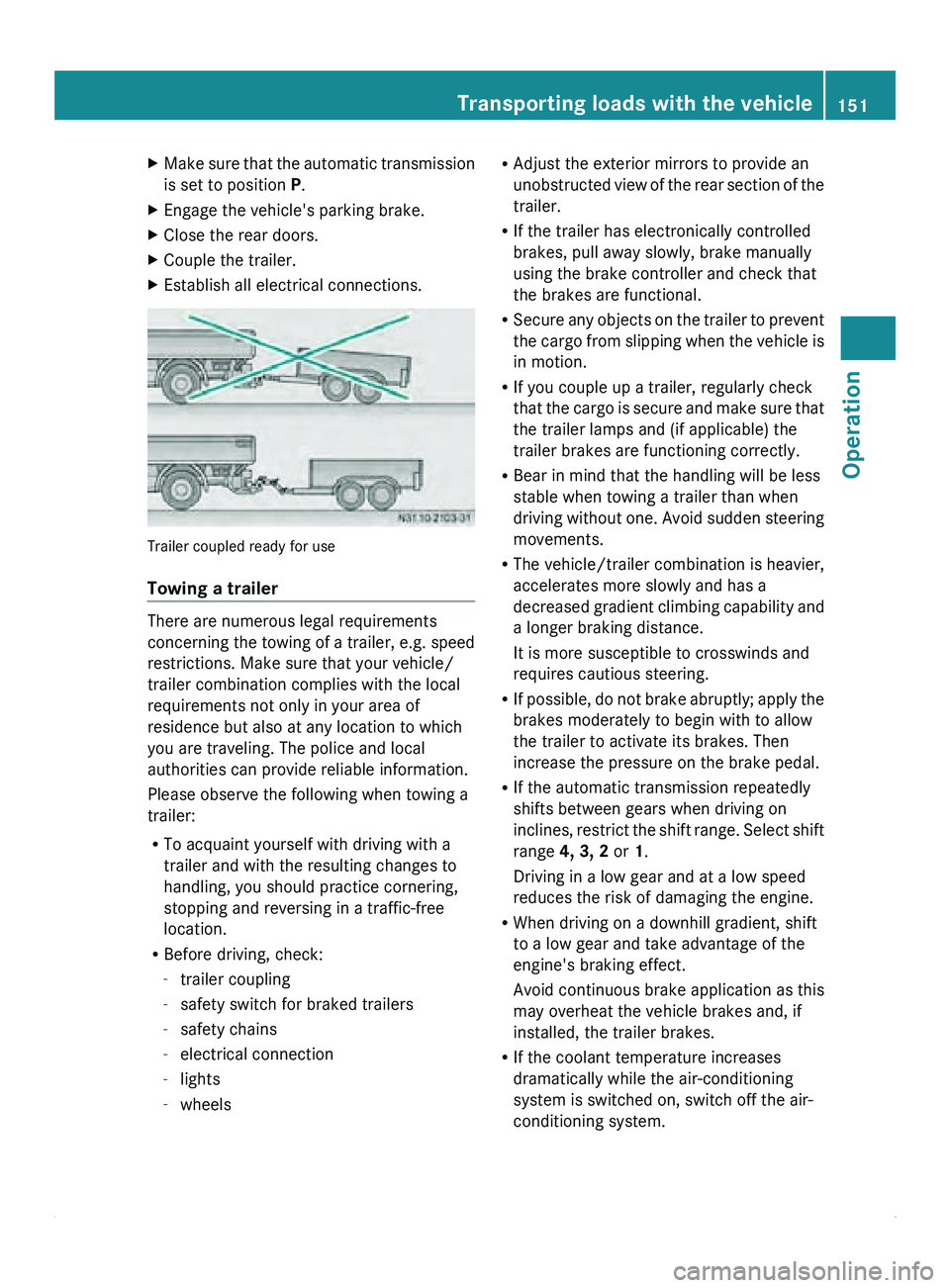
X Establish all electrical connections. Trailer coupled ready for use
Towing a trailer
There are numerous legal requirements
concerning the
towing
of a trailer, e.g. speed
restrictions. Make sure that your vehicle/
trailer combination complies with the local
requirements not only in your area of
residence but also at any location to which
you are traveling. The police and local
authorities can provide reliable information.
Please observe the following when towing a
trailer:
R To acquaint yourself with driving with a
trailer and with the resulting changes to
handling, you should practice cornering,
stopping and reversing in a traffic-free
location.
R Before driving, check:
-trailer coupling
- safety switch for braked trailers
- safety chains
- electrical connection
- lights
- wheels R
Adjust the exterior mirrors to provide an
unobstructed view of
the rear section of the
trailer.
R If the trailer has electronically controlled
brakes, pull away slowly, brake manually
using the brake controller and check that
the brakes are functional.
R Secure any objects on the trailer to prevent
the cargo from slipping when the vehicle is
in motion.
R If you couple up a trailer, regularly check
that the cargo is secure and make sure that
the trailer lamps and (if applicable) the
trailer brakes are functioning correctly.
R Bear in mind that the handling will be less
stable when towing a trailer than when
driving without one. Avoid sudden steering
movements.
R The vehicle/trailer combination is heavier,
accelerates more slowly and has a
decreased gradient climbing capability and
a longer braking distance.
It is more susceptible to crosswinds and
requires cautious steering.
R If possible, do not brake abruptly; apply the
brakes moderately to begin with to allow
the trailer to activate its brakes. Then
increase the pressure on the brake pedal.
R If the automatic transmission repeatedly
shifts between gears when driving on
inclines, restrict the shift range. Select shift
range 4, 3, 2 or 1.
Driving in a low gear and at a low speed
reduces the risk of damaging the engine.
R When driving on a downhill gradient, shift
to a low gear and take advantage of the
engine's braking effect.
Avoid continuous brake application as this
may overheat the vehicle brakes and, if
installed, the trailer brakes.
R If the coolant temperature increases
dramatically while the air-conditioning
system is switched on, switch off the air-
conditioning system. Transporting loads with the vehicle
151
Operation Z
Page 192 of 292
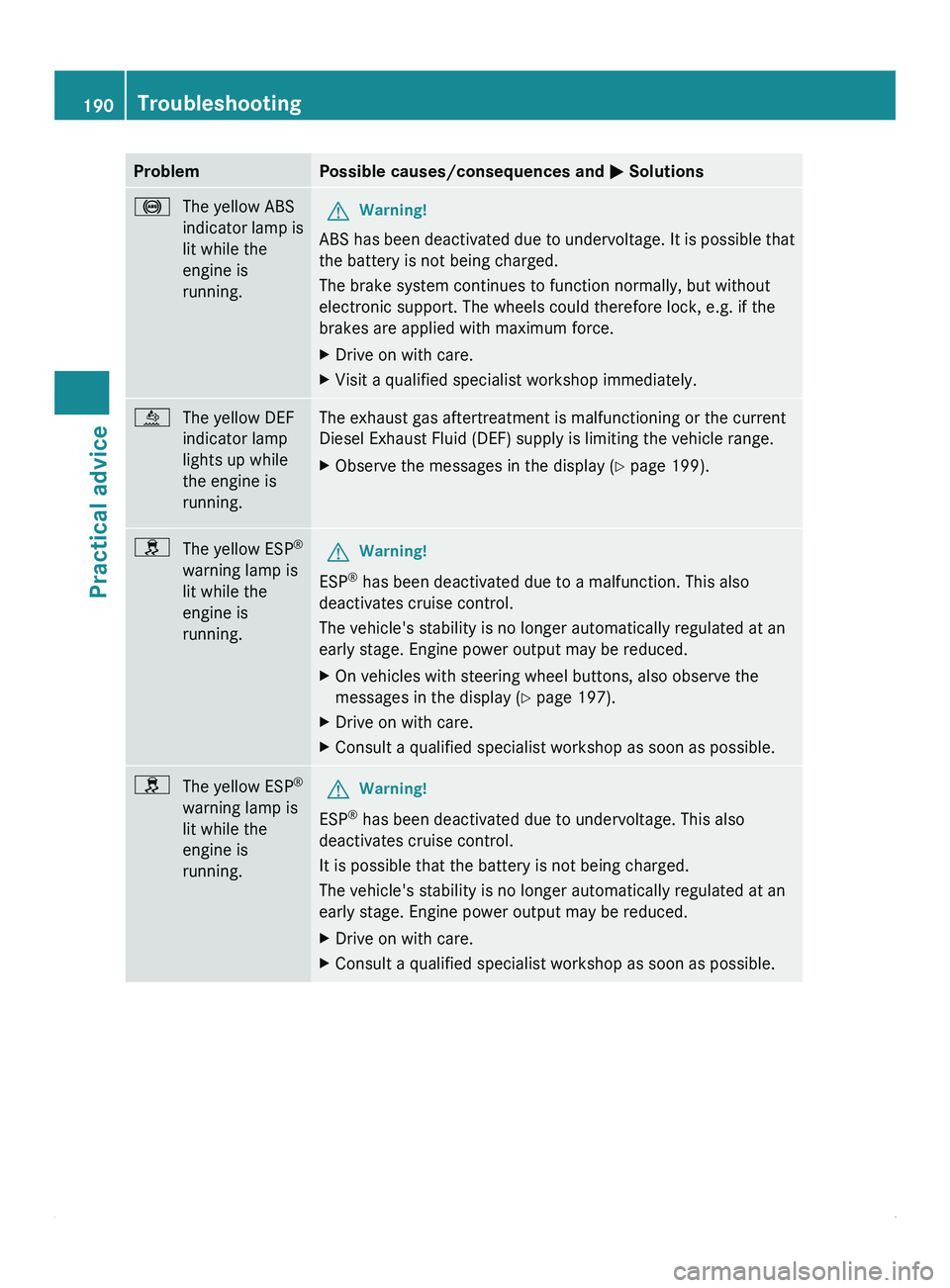
Problem Possible causes/consequences and
0050 Solutions0031
The yellow ABS
indicator lamp is
lit while the
engine is
running. G
Warning!
ABS has been deactivated due to undervoltage. It is possible that
the battery is not being charged.
The brake system continues to function normally, but without
electronic support. The wheels could therefore lock, e.g. if the
brakes are applied with maximum force.
X Drive on with care.
X Visit a qualified specialist workshop immediately. 00E4
The yellow DEF
indicator lamp
lights up while
the engine is
running. The exhaust gas aftertreatment is malfunctioning or the current
Diesel Exhaust Fluid (DEF) supply is limiting the vehicle range.
X
Observe the messages in the display ( Y page 199).009E
The yellow ESP ®
warning lamp is
lit while the
engine is
running. G
Warning!
ESP ®
has been deactivated due to a malfunction. This also
deactivates cruise control.
The vehicle's stability is no longer automatically regulated at an
early stage. Engine power output may be reduced.
X On vehicles with steering wheel buttons, also observe the
messages in the display ( Y page 197).
X Drive on with care.
X Consult a qualified specialist workshop as soon as possible. 009E
The yellow ESP ®
warning lamp is
lit while the
engine is
running. G
Warning!
ESP ®
has been deactivated due to undervoltage. This also
deactivates cruise control.
It is possible that the battery is not being charged.
The vehicle's stability is no longer automatically regulated at an
early stage. Engine power output may be reduced.
X Drive on with care.
X Consult a qualified specialist workshop as soon as possible.190
TroubleshootingPractical advice