lights MERCEDES-BENZ SPRINTER 2012 MY12 Operator’s Manual
[x] Cancel search | Manufacturer: MERCEDES-BENZ, Model Year: 2012, Model line: SPRINTER, Model: MERCEDES-BENZ SPRINTER 2012Pages: 292, PDF Size: 6.75 MB
Page 74 of 292
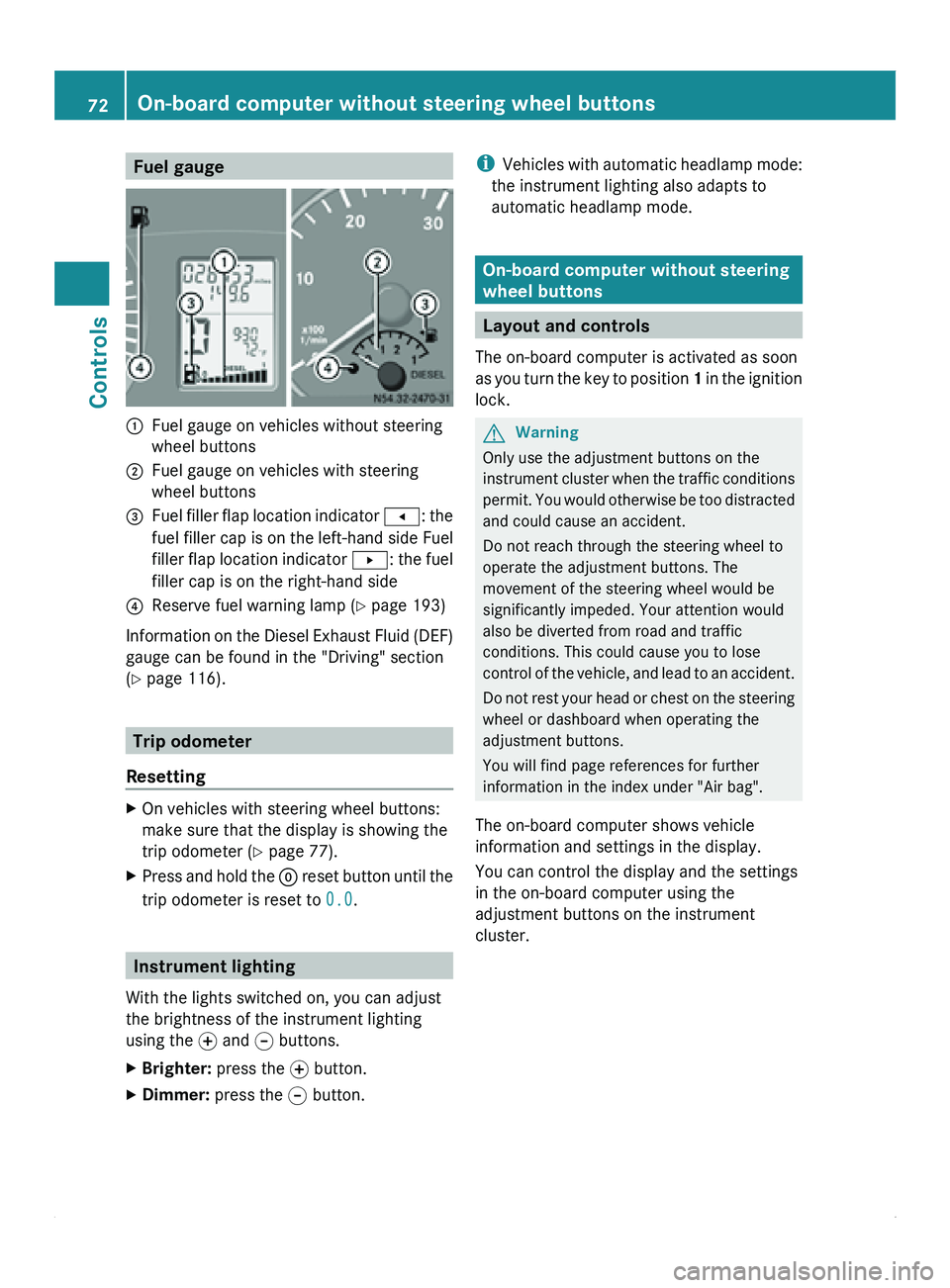
Fuel gauge
0046
Fuel gauge on vehicles without steering
wheel buttons
0047 Fuel gauge on vehicles with steering
wheel buttons
008A Fuel filler flap location indicator
0081: the
fuel filler
cap is on the left-hand side Fuel
filler flap location indicator 0082: the fuel
filler cap is on the right-hand side
0088 Reserve fuel warning lamp ( Y page 193)
Information on the Diesel Exhaust Fluid (DEF)
gauge can be found in the "Driving" section
(Y page 116). Trip odometer
Resetting X
On vehicles with steering wheel buttons:
make sure that the display is showing the
trip odometer (Y
page 77).
X Press and hold the 0048 reset button
until the
trip odometer is reset to 0.0.Instrument lighting
With the lights switched on, you can adjust
the brightness of the instrument lighting
using the 0069
and 006A buttons.
X Brighter: press the 0069 button.
X Dimmer: press the 006A button. i
Vehicles with automatic
headlamp mode:
the instrument lighting also adapts to
automatic headlamp mode. On-board computer without steering
wheel buttons
Layout and controls
The on-board computer is activated as soon
as you turn
the key to position 1 in the ignition
lock. G
Warning
Only use the adjustment buttons on the
instrument cluster when
the traffic conditions
permit. You would otherwise be too distracted
and could cause an accident.
Do not reach through the steering wheel to
operate the adjustment buttons. The
movement of the steering wheel would be
significantly impeded. Your attention would
also be diverted from road and traffic
conditions. This could cause you to lose
control of the vehicle, and lead to an accident.
Do not rest your head or chest on the steering
wheel or dashboard when operating the
adjustment buttons.
You will find page references for further
information in the index under "Air bag".
The on-board computer shows vehicle
information and settings in the display.
You can control the display and the settings
in the on-board computer using the
adjustment buttons on the instrument
cluster. 72
On-board computer without steering wheel buttons
Controls
Page 91 of 292
Lamp failure indicator
The bulb failure indicator monitors all lamps
of the exterior lighting with the exception of
the front position lamps and the trailer
lighting. If a bulb fails, either the
0055( Y page
197)
indicator lamp lights up or
a corresponding message is shown in the
display ( Y page 209).
i Depending on the equipment, the bulb
failure indicator can be omitted for all
lamps with the exception of the turn signal
lamps. G
Warning
The bulb failure indicator is only an aid. You
are responsible for the proper functioning of
the vehicle lighting. Insufficient or non-
functioning vehicle lighting
puts the operating
safety of the vehicle at risk. You could cause
an accident and injure yourself or others.
Therefore, check the lighting equipment of
the vehicle before each journey and, if
necessary, check the operation and condition
of the trailer lighting equipment. Light switch
Configuration You can switch the vehicle lighting on or off
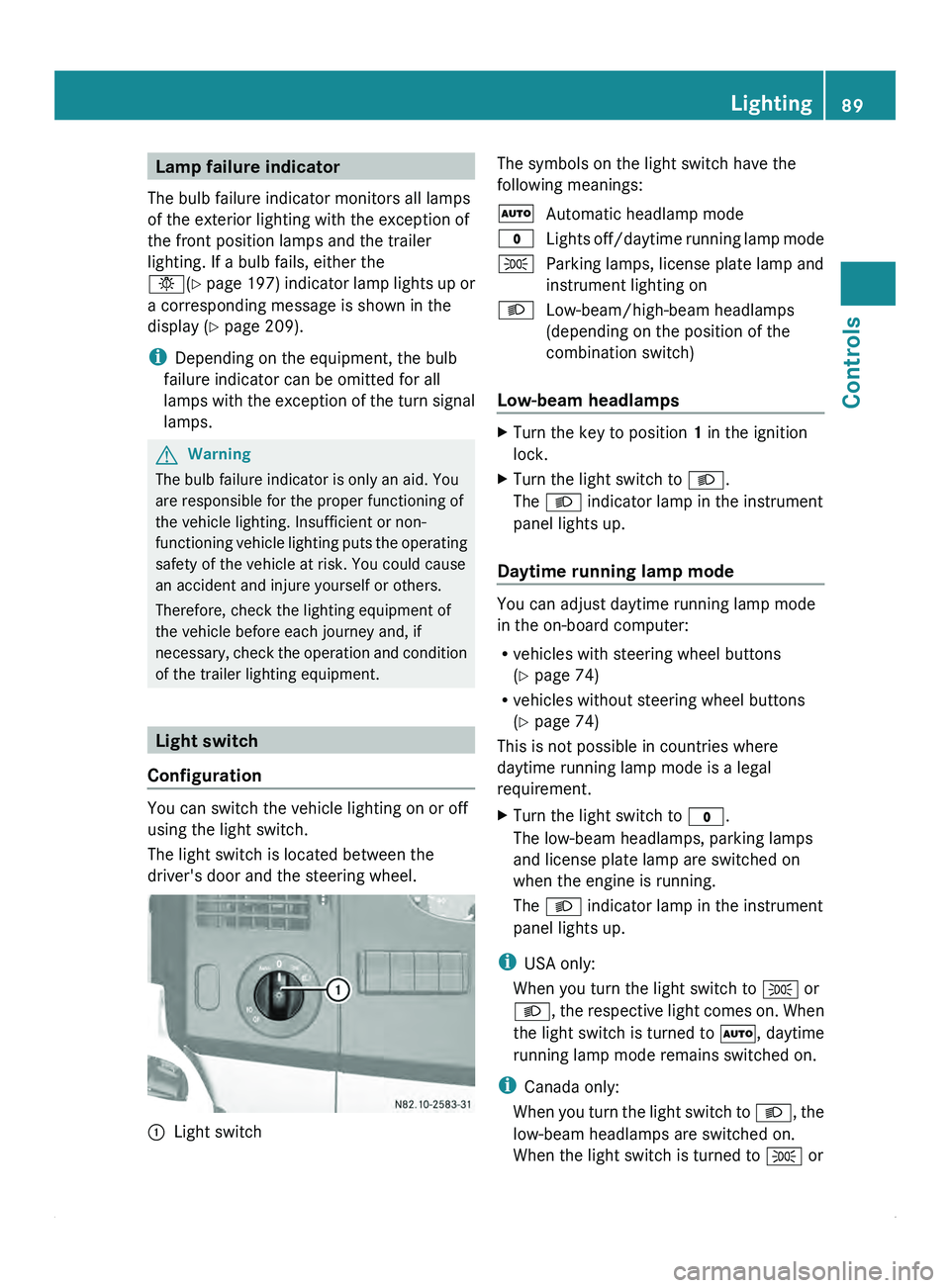
using the light switch.
The light switch is located between the
driver's door and the steering wheel.
0046
Light switch The symbols on the light switch have the
following meanings:
005A
Automatic headlamp mode
0027 Lights off/daytime
running lamp mode
006C Parking lamps, license plate lamp and
instrument lighting on
0064 Low-beam/high-beam headlamps
(depending on the position of the
combination switch)
Low-beam headlamps X
Turn the key to position 1 in the ignition
lock.
X Turn the light switch to 0064.
The 0064 indicator lamp in the instrument
panel lights up.
Daytime running lamp mode You can adjust daytime running lamp mode
in the on-board computer:
R
vehicles with steering wheel buttons
(Y page 74)
R vehicles without steering wheel buttons
(Y page 74)
This is not possible in countries where
daytime running lamp mode is a legal
requirement.
X Turn the light switch to 0027.
The low-beam headlamps, parking lamps
and license plate lamp are switched on
when the engine is running.
The 0064 indicator lamp in the instrument
panel lights up.
i USA only:
When you turn the light switch to 006C or
0064, the respective
light comes on. When
the light switch is turned to 005A, daytime
running lamp mode remains switched on.
i Canada only:
When you turn the light switch to 0064, the
low-beam headlamps are switched on.
When the light switch is turned to 006C or Lighting
89
Controls Z
Page 92 of 292
005A, daytime running lamp mode remains
switched on.
Automatic headlamp mode Parking lamps, low-beam headlamps and the
license plate lamp are switched on
automatically depending on the ambient
light.
G
Warning!
If the light switch is set to 005A,
the low-beam
headlamps will not come on automatically if
it is foggy. This could endanger you and
others. Therefore, turn the light switch to
0064
in fog.
The automatic headlamp feature is only an
aid. The driver is responsible for the vehicle's
lighting at all times.
X Turn the light switch to 005A.
The parking lamps are switched on/off
automatically when the key is in position
1 in the ignition lock.
Parking lamps, low-beam headlamps and
the license plate
lamp are switched on/off
automatically, depending on ambient light
conditions, when the engine is running.
Front fog lamps/rear fog lamp X
Turn light switch 0046 to 0064 or 006C.
i If your vehicle is only equipped with rear
fog lamps, you
must turn the light switch to
0064.
X Front fog lamps: pull light switch 0046 out
to the first stop.
The green 0067 indicator lamp next to the
light switch lights up.
X Rear fog lamp: pull light switch 0046 out to
the second stop.
The yellow 006A
indicator lamp next to the
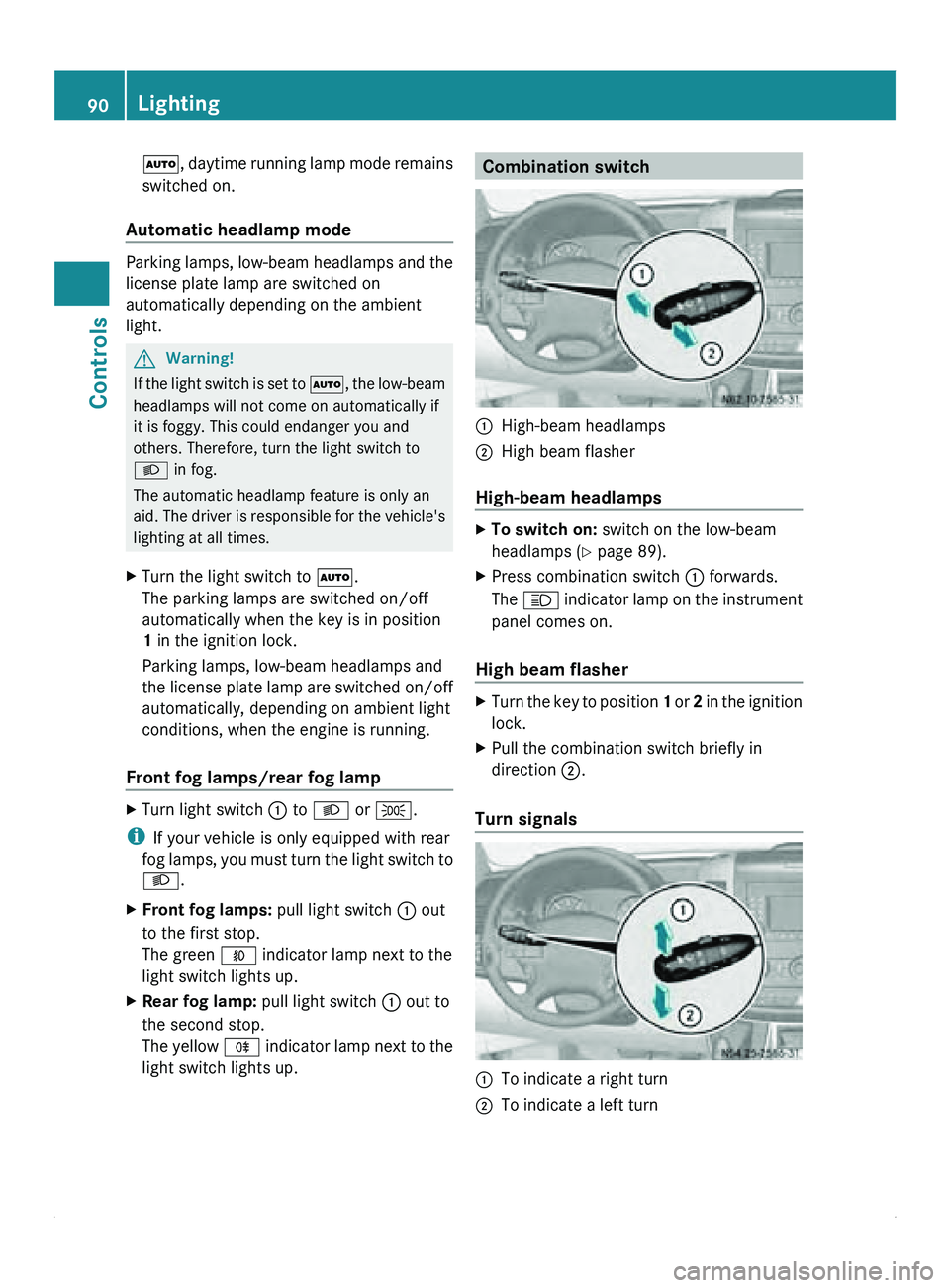
light switch lights up. Combination switch
0046
High-beam headlamps
0047 High beam flasher
High-beam headlamps X
To switch on: switch on the low-beam
headlamps ( Y page 89).
X Press combination switch
0046 forwards.
The 0063 indicator lamp
on the instrument
panel comes on.
High beam flasher X
Turn the key to position 1 or 2
in the ignition
lock.
X Pull the combination switch briefly in
direction 0047.
Turn signals 0046
To indicate a right turn
0047 To indicate a left turn90
Lighting
Controls
Page 93 of 292
X
To indicate: press the combination switch
in desired direction 0046 or 0047, until it
engages.
The combination switch automatically
returns to its original position after large
steering movements.
X To indicate briefly: press the
combination
switch briefly in desired direction 0046
or 0047.
The corresponding turn signal flashes three
times. Cornering light function (vehicles
with Bi-Xenon headlamps)
When the low-beam
headlamps are switched
on, the cornering light function improves the
illumination of the road in the direction you
are turning.
The cornering light function switches on
automatically, if:
R you are traveling at a speed of less than
25 mph (40 km/h) and you switch on the
indicator lamp or turn the steering wheel.
R you are traveling at a speed of between
25 mph (40 km/h) and 43 mph
(70 km/h) and you turn the steering wheel.
The cornering light may continue to be lit for
a short time, but is deactivated automatically
after a maximum of three minutes. Hazard warning lamps
The hazard warning lamps work even when
the ignition is
switched off. They are activated
automatically when an air bag is deployed or
after heavy brake application from a speed of
more than 43 mph (70 km/h) that brings the
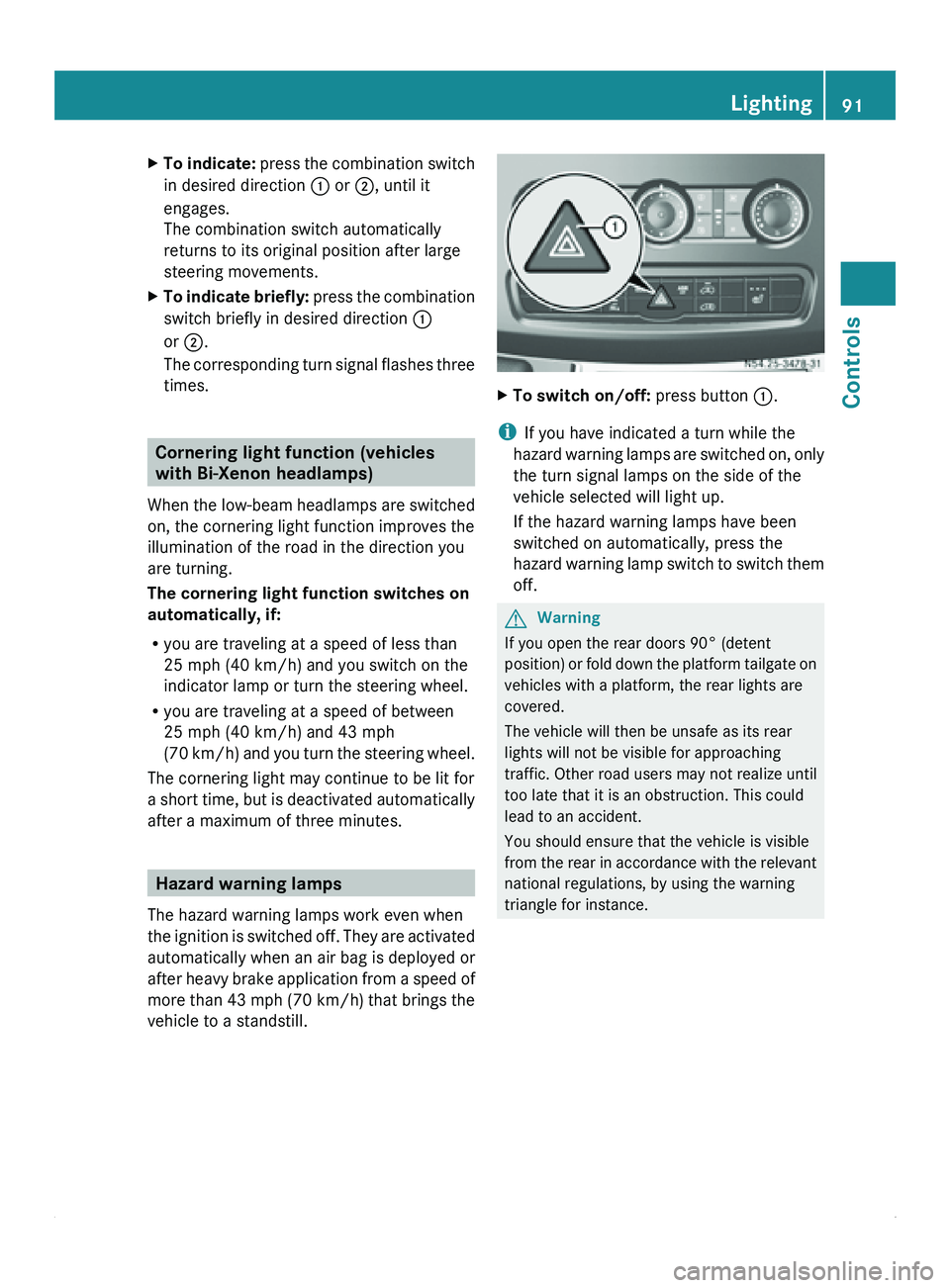
vehicle to a standstill. X
To switch on/off: press button 0046.
i If you have indicated a turn while the
hazard warning lamps
are switched on, only
the turn signal lamps on the side of the
vehicle selected will light up.
If the hazard warning lamps have been
switched on automatically, press the
hazard warning lamp switch to switch them
off. G
Warning
If you open the rear doors 90° (detent
position) or fold
down the platform tailgate on
vehicles with a platform, the rear lights are
covered.
The vehicle will then be unsafe as its rear
lights will not be visible for approaching
traffic. Other road users may not realize until
too late that it is an obstruction. This could
lead to an accident.
You should ensure that the vehicle is visible
from the rear in accordance with the relevant
national regulations, by using the warning
triangle for instance. Lighting
91
Controls Z
Page 94 of 292
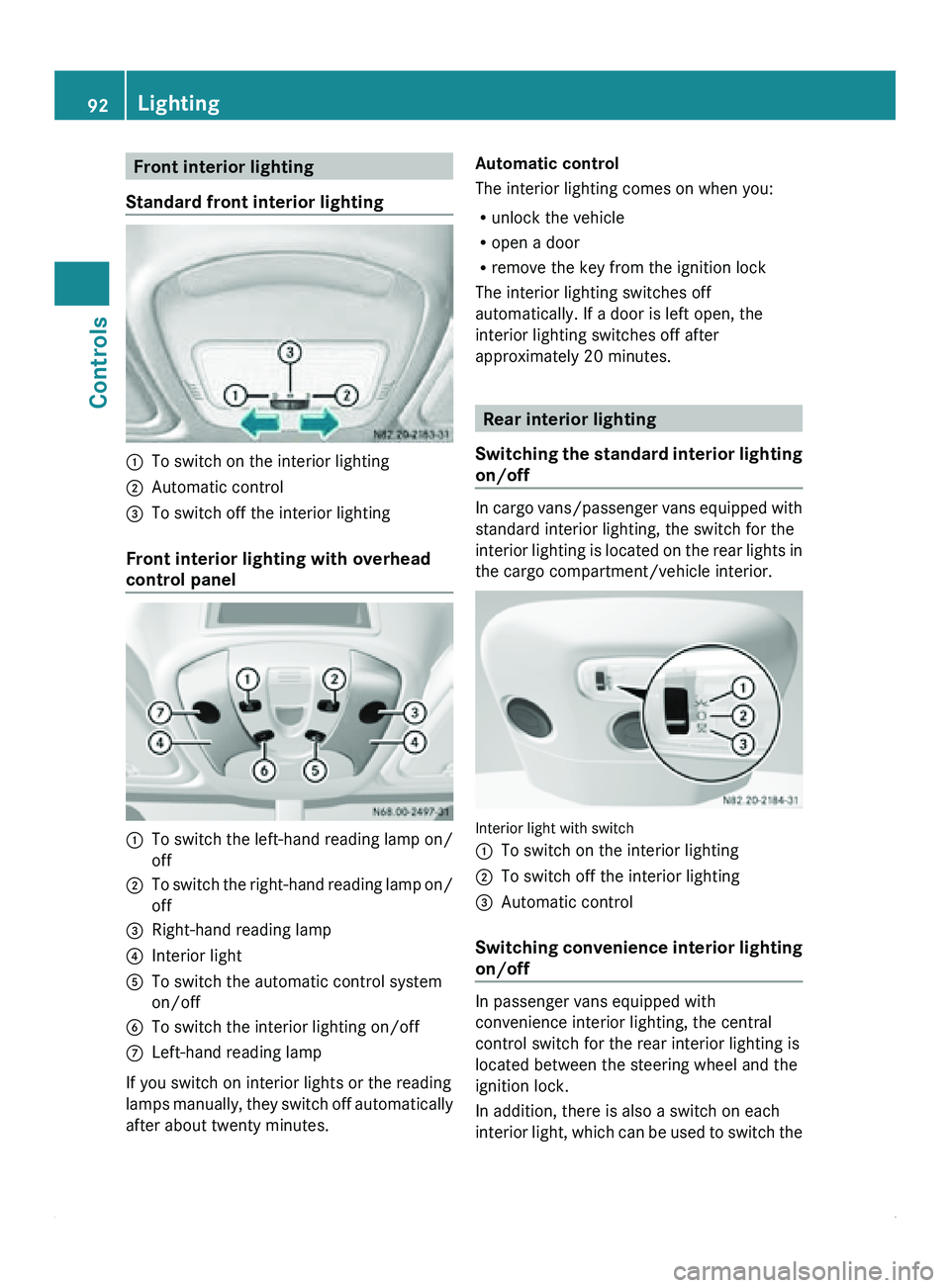
Front interior lighting
Standard front interior lighting 0046
To switch on the interior lighting
0047 Automatic control
008A To switch off the interior lighting
Front interior lighting with overhead
control panel 0046
To switch the left-hand reading lamp on/
off
0047 To switch the right-hand reading lamp on/
off
008A Right-hand reading lamp
0088 Interior light
0086 To switch the automatic control system
on/off
0087 To switch the interior lighting on/off
006E Left-hand reading lamp
If you switch on interior lights or the reading
lamps manually,
they
switch off automatically
after about twenty minutes. Automatic control
The interior lighting comes on when you:
R
unlock the vehicle
R open a door
R remove the key from the ignition lock
The interior lighting switches off
automatically. If a door is left open, the
interior lighting switches off after
approximately 20 minutes. Rear interior lighting
Switching the standard
interior lighting
on/off In cargo
vans/passenger vans equipped with
standard interior lighting, the switch for the
interior lighting is
located on the rear lights in
the cargo compartment/vehicle interior. Interior light with switch
0046
To switch on the interior lighting
0047 To switch off the interior lighting
008A Automatic control
Switching convenience
interior lighting
on/off In passenger vans equipped with
convenience interior lighting, the central
control switch for the rear interior lighting is
located between the steering wheel and the
ignition lock.
In addition, there is also a switch on each
interior light,
which
can be used to switch the92
Lighting
Controls
Page 95 of 292
lights on/off separately, depending on the
position of the central control switch.
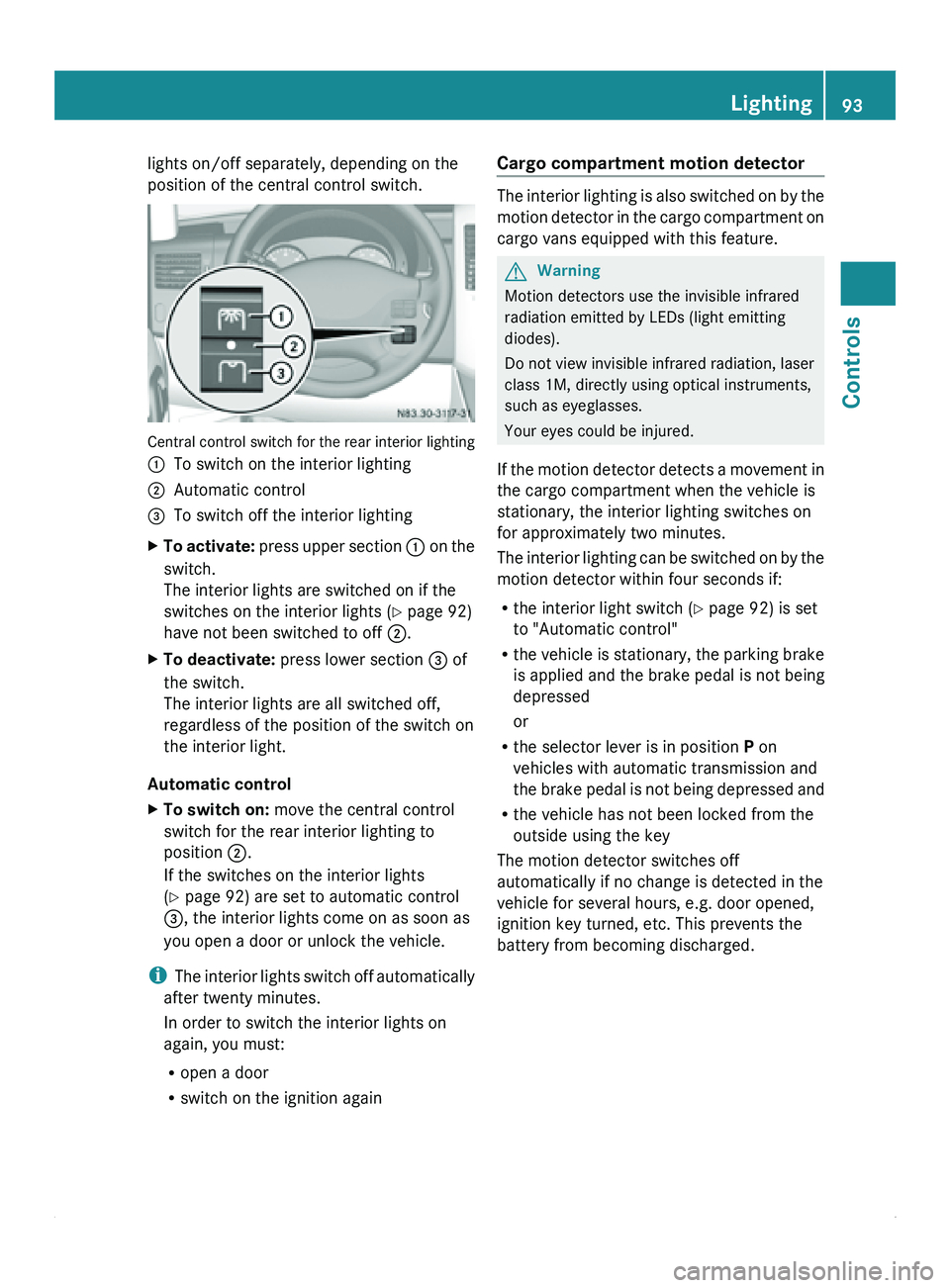
Central control switch for the rear interior lighting
0046
To switch on the interior lighting
0047 Automatic control
008A To switch off the interior lighting
X To activate: press
upper section 0046 on the
switch.
The interior lights are switched on if the
switches on the interior lights (Y page 92)
have not been switched to off 0047.
X To deactivate: press lower section 008A of
the switch.
The interior lights are all switched off,
regardless of the position of the switch on
the interior light.
Automatic control
X To switch on: move the central control
switch for the rear interior lighting to
position 0047.
If the switches on the interior lights
(Y page 92) are set to automatic control
008A, the interior lights come on as soon as
you open a door or unlock the vehicle.
i The interior
lights
switch off automatically
after twenty minutes.
In order to switch the interior lights on
again, you must:
R open a door
R switch on the ignition again Cargo compartment motion detector The interior lighting is also switched on by the
motion detector
in
the cargo compartment on
cargo vans equipped with this feature. G
Warning
Motion detectors use the invisible infrared
radiation emitted by LEDs (light emitting
diodes).
Do not view invisible infrared radiation, laser
class 1M, directly using optical instruments,
such as eyeglasses.
Your eyes could be injured.
If
the motion detector detects a movement in
the cargo compartment when the vehicle is
stationary, the interior lighting switches on
for approximately two minutes.
The interior lighting can be switched on by the
motion detector within four seconds if:
R the interior light switch (Y page 92) is set
to "Automatic control"
R the vehicle is stationary, the parking brake
is applied and the brake pedal is not being
depressed
or
R the selector lever is in position P on
vehicles with automatic transmission and
the brake pedal is not being depressed and
R the vehicle has not been locked from the
outside using the key
The motion detector switches off
automatically if no change is detected in the
vehicle for several hours, e.g. door opened,
ignition key turned, etc. This prevents the
battery from becoming discharged. Lighting
93
Controls Z
Page 102 of 292
Rear-compartment air-conditioning
system
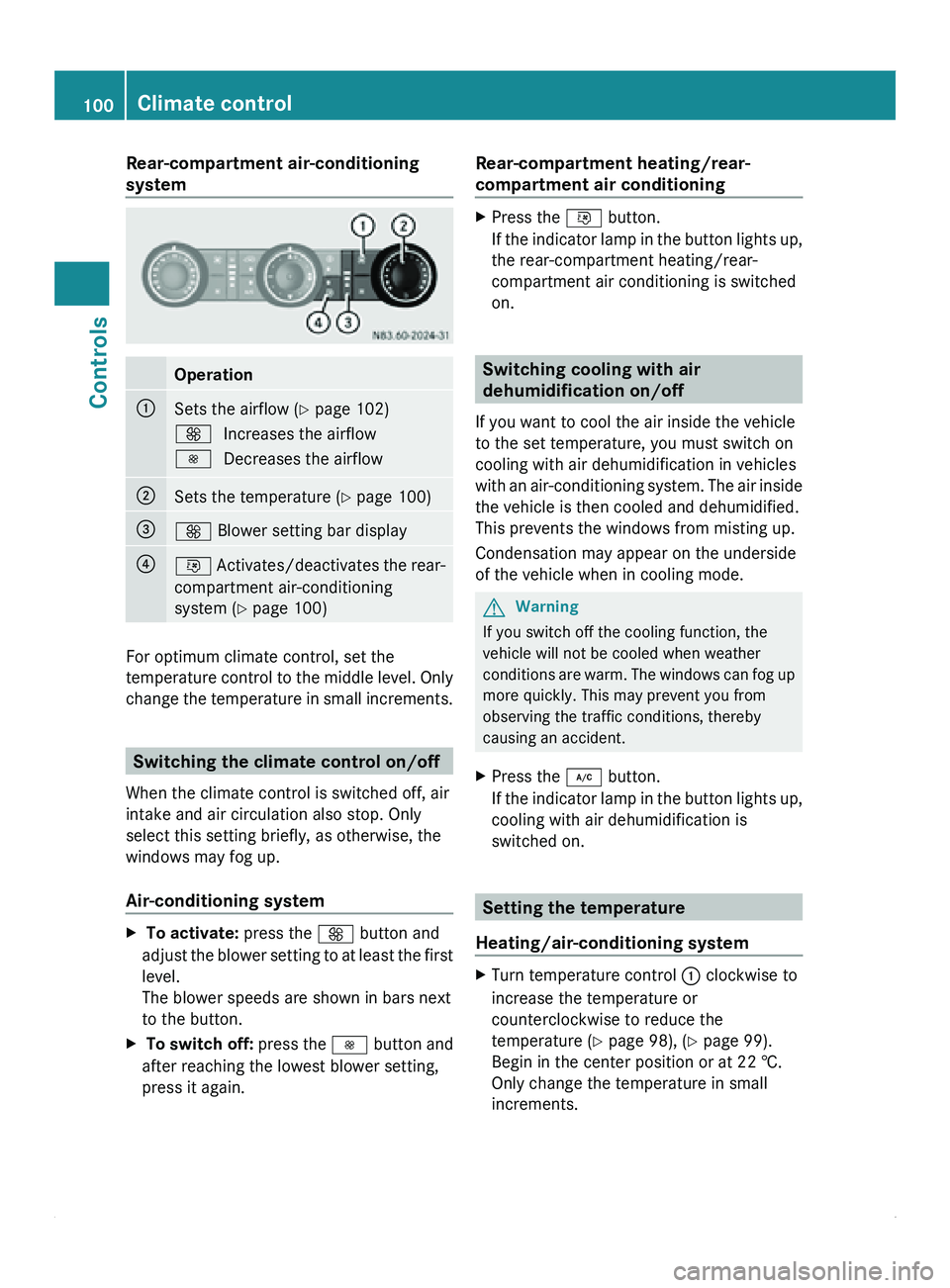
Operation
0046
Sets the airflow (
Y page 102)
0099 Increases the airflow
0097 Decreases the airflow 0047
Sets the temperature (
Y page 100)008A
0099 Blower setting bar display
0088
0076 Activates/deactivates the rear-
compartment air-conditioning
system ( Y
page 100)For optimum climate control, set the
temperature control to
the middle level. Only
change the temperature in small increments. Switching the climate control on/off
When the climate control is switched off, air
intake and air circulation also stop. Only
select this setting briefly, as otherwise, the
windows may fog up.
Air-conditioning system X
To activate: press the 0099 button and
adjust the blower
setting to at least the first
level.
The blower speeds are shown in bars next
to the button.
X To switch off: press the 0097
button and
after reaching the lowest blower setting,
press it again. Rear-compartment heating/rear-
compartment air conditioning X
Press the 0076 button.
If the indicator
lamp in the button lights up,
the rear-compartment heating/rear-
compartment air conditioning is switched
on. Switching cooling with air
dehumidification on/off
If you want to cool the air inside the vehicle
to the set temperature, you must switch on
cooling with air dehumidification in vehicles
with an air-conditioning
system. The air inside
the vehicle is then cooled and dehumidified.
This prevents the windows from misting up.
Condensation may appear on the underside
of the vehicle when in cooling mode. G
Warning
If you switch off the cooling function, the
vehicle will not be cooled when weather
conditions are warm.
The windows can fog up
more quickly. This may prevent you from
observing the traffic conditions, thereby
causing an accident.
X Press the 005C button.
If the indicator
lamp in the button lights up,
cooling with air dehumidification is
switched on. Setting the temperature
Heating/air-conditioning system X
Turn temperature control 0046 clockwise to
increase the temperature or
counterclockwise to reduce the
temperature ( Y page 98), (Y page 99).
Begin in the center position or at 22 †.
Only change the temperature in small
increments. 100
Climate control
Controls
Page 105 of 292
Air-conditioning system/rear-
compartment air conditioning
X
On vehicles with rear-compartment air
conditioning, make sure that the rear-
compartment climate control is activated
(Y page 100).
X Press the 0097 button to reduce or the
0099 button to increase the airflow.
The blower speeds are shown in bars next
to the buttons. Defrosting the windows
G
Warning
Clear all windows of ice or snow before setting
off. Otherwise, impaired visibility could
endanger you and others.
Only use the following settings until the
windows are clear again.
X Vehicles with window heating:
switch on
the front and/or rear window defroster
(
Y page 95).
Heating X
Set temperature control 0046 and airflow
control 0047 to 0087 (Y page 98).
X Set air-distribution control 0088 to
0080 0087 (Y page 98).
X Close the center air vents and the air
outlets for the headroom and the rear
compartment (
Y
page 101).
X Direct the side air vents towards the side
windows and open the demister vents for
the side windows ( Y page 101).
Air-conditioning system X
Set temperature control 0046 to
0087 (Y page 99).
X Press the 0099 button until the maximum
blower output is reached.
All bars in the display next to the button
light up. X
Set air-distribution control 0086 to
0080 0087 (Y page 99).
X Close the center air vents and the air
outlets for the headroom and the rear
compartment (Y
page 101).
X Direct the side air vents towards the side
windows and open the demister vents for
the side windows ( Y page 101). Defrosting windows
Windows fogged up on the inside Only use the following settings until the
windows are clear again.
X
Vehicles with window heating: switch on
the front and/or rear window defroster
(
Y page 95).
X Switch off air-recirculation mode
(Y page 104).
Heating
X Set temperature control 0046 to a higher
temperature ( Y page 98).
X Set airflow control 0047 to a higher blower
setting. It should
be set at least to level two
(Y page 98).
X Set air-distribution control 0088 to
0080 0087 (Y page 98).
If the windows still fog up, set the control as
described for defrosting (Y page 103).
Air-conditioning system
X Activate cooling with air dehumidification
(Y page 100).
X Press the 0068 button.
The reheat function is switched on. The
indicator lamp in the switch lights up.
To switch off
the reheat function, press the
0068 button again. The indicator lamp in
the button goes out. Climate control
103
Controls Z
Page 106 of 292
Windows fogged up on the outside
Only use the following settings until the
windshield is clear again.
X
Switch on the windshield wipers
(Y page 94).
X Adjust air distribution to the footwell
(Y page 102).
X Close the air vents ( Y page 101).Switching air-recirculation mode on/
off
You can deactivate the intake of fresh air if
unpleasant odors enter the vehicle from
outside. The air
inside the vehicle will only be
circulated. G
Warning
At low outside temperatures, only switch over
to air-recirculation mode for brief periods.
Otherwise, the windows could fog up, thus
impairing visibility and endangering yourself
and others. This may prevent you from
observing the traffic conditions and thereby
cause an accident.
Heating/air-conditioning system X
Press the 008C button.
If the indicator
lamp in the button lights up,
air-recirculation mode is activated.
Air-recirculation mode switches off
automatically after about 10 to 30 minutes,
depending on the outside temperature.
Rear-compartment heating/rear-
compartment air conditioning If your vehicle is equipped with rear-
compartment heating
and
rear-compartment
air conditioning, you can activate/deactivate
the air-recirculation mode of the rear-
compartment climate control.
X To activate: set temperature
control of the
rear-compartment heating 008A(Y page 99)
or or temperature control of the rear- compartment air conditioning
0047
(Y page 100) to the center position.
Only one of the two climate control
systems in the rear compartment is
activated and is in air-recirculation mode.
X To deactivate: turn temperature
control of
the rear-compartment heating
008A(Y page 99) or temperature control of
the rear-compartment air conditioning 0047
(Y page 100) clockwise or
counterclockwise. Only change the
temperature in small increments. Auxiliary heating
Important safety notes G
Warning
Exhaust fumes are produced while the
auxiliary heating system
is in operation. If you
breathe in these exhaust fumes, you could be
poisoned. Therefore, always switch off the
auxiliary heating in enclosed spaces without
an extraction system, e.g. a garage. G
Warning
Parts of the vehicle can become very hot
during operation of the auxiliary heating.
Make sure that the exhaust system does not
under any circumstances come into contact
with highly flammable material such as dry
grass or fuels. Otherwise, the highly
flammable material could ignite and set the
vehicle alight.
Auxiliary heating operation is prohibited at
gas stations or when your vehicle is being
refueled. Therefore, the auxiliary heating
must be switched off at gas stations. G
Warning
When transporting hazardous materials,
always observe the relevant safety
regulations.
Spray canisters and gas cartridges or other
pressurized containers carried in the vehicle 104
Climate control
Controls
Page 108 of 292
X
To switch off the auxiliary heating: press
the 0086
switch.
or
X Turn the key to position 0 in the ignition
lock.
The red indicator lamp in the switch goes
out.
The auxiliary heating operates for about
another two minutes
and then switches off
automatically.
Selecting a switch-on time You can use the on-board computer to define
up to
three
switch-on times, one of which can
be selected.
On-board computer without steering
wheel buttons
X Turn the SmartKey to position 2 in the
ignition lock.
X Press the 0086 switch.
The 0086 symbol in the display flashes.
or
X Press the 007B menu button on the
instrument cluster repeatedly until the
0086 symbol flashes in the display.
X Use the 0069 or 006A
buttons on the instrument
cluster to select switch-on time 1 to 3
The switch-on time selected is displayed.
X Wait 10 seconds for the standard display to
appear.
The switch-on time is selected. The yellow
indicator lamp in the 0086 switch comes
on.
If you have not preselected a switch-on time
and --:-- is
shown
in the display, this means
that automatic switch-on mode is
deactivated. The yellow indicator lamp in the
0086 switch goes out.
i If you turn the key to position 0 in the
ignition lock, the yellow indicator lamp in
the 0086 switch goes off after 30 minutes. The red indicator lamp in the
0086 switch
comes on when the auxiliary heating
switches on.
On-board computer with steering wheel
buttons
X Turn the SmartKey to position 2 in the
ignition lock.
X Press the 0086 switch.
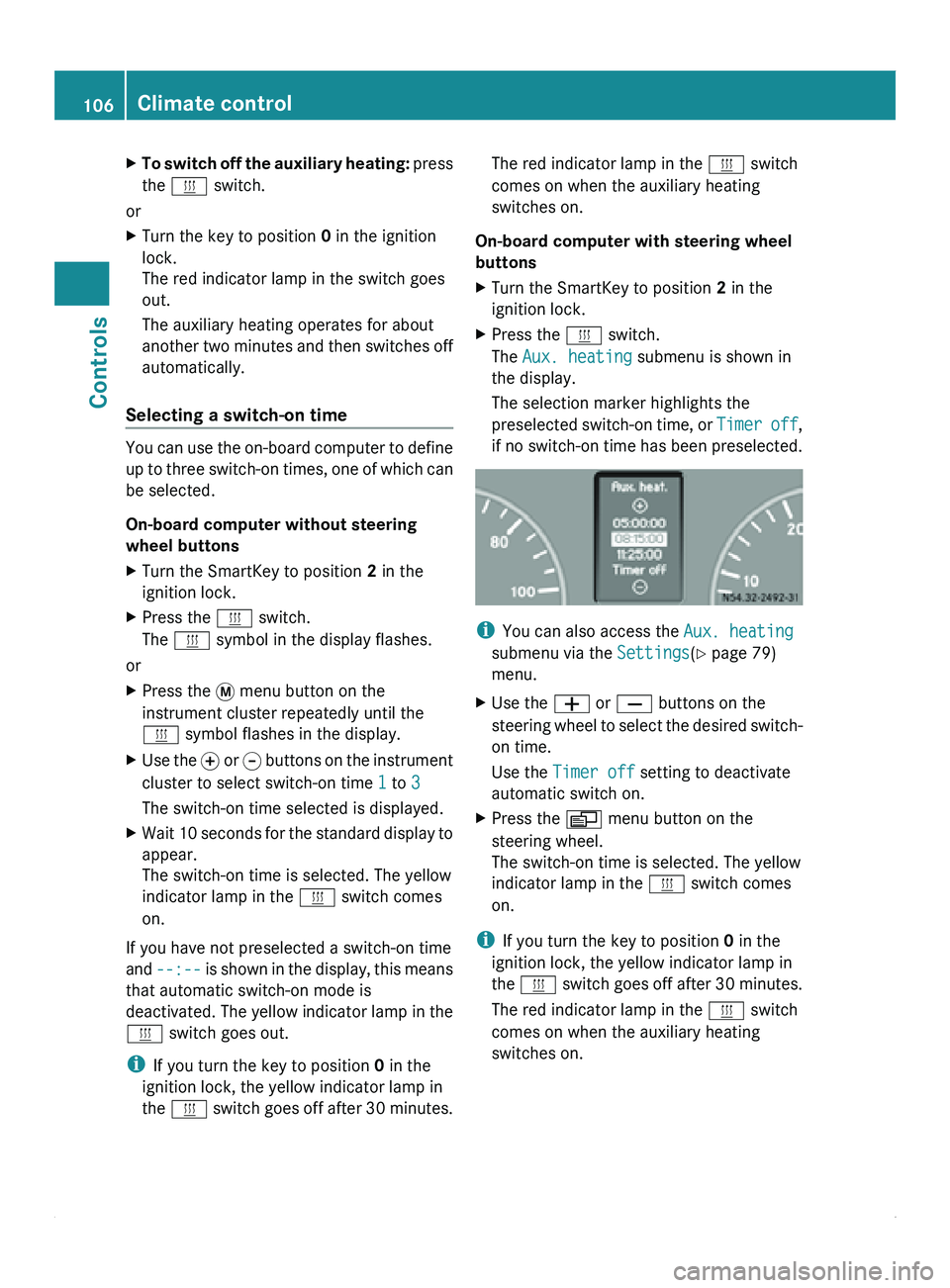
The Aux. heating submenu is shown in
the display.
The selection marker highlights the
preselected switch-on
time,
or Timer off,
if no switch-on time has been preselected. i
You can also access the Aux. heating
submenu via the Settings(Y page 79)
menu.
X Use the 005A or 005B buttons on the
steering wheel
to
select the desired switch-
on time.
Use the Timer off setting to deactivate
automatic switch on.
X Press the 0059 menu button on the
steering wheel.
The switch-on time is selected. The yellow
indicator lamp in the 0086 switch comes
on.
i If you turn the key to position 0 in the
ignition lock, the yellow indicator lamp in
the 0086 switch goes
off after 30 minutes.
The red indicator lamp in the 0086 switch
comes on when the auxiliary heating
switches on. 106
Climate control
Controls