fog light MERCEDES-BENZ SPRINTER 2013 MY13 Operator’s Manual
[x] Cancel search | Manufacturer: MERCEDES-BENZ, Model Year: 2013, Model line: SPRINTER, Model: MERCEDES-BENZ SPRINTER 2013Pages: 334, PDF Size: 3.88 MB
Page 99 of 334
correctly at all times. Have the headlamp
setting checked regularly.
R Always switch off the vehicle's lighting
system before changing a bulb.
This will prevent a short circuit.
R Do not touch the glass tube of new bulbs
with your bare hands. Always use a clean,
lint-free cloth or only touch the base of the
bulb when installing.
Even minor contamination can burn into
the glass surface and reduce the service life
of the bulbs.
R Do not use a bulb that has bee ndropped or
that has scratches on its glass tube.
The bulb could may explode.
R Only use bulbs in closed lamps which have
been designed for this purpose.
R Only use spare bulbs of the same type and
with the prescribed voltage
R Protect the bulbs from moisture when in
use.
If the new bulb still does not light up, consult
a qualified specialist workshop.
R Have the LEDs and bulbs of the following
lamps changed at a qualified specialist
workshop:
- the additional turn signals in the exterior
mirrors
- the high-mounted brake lamp
- the Bi-Xenon bulbs
- front fog lamps
If you require assistance changing bulbs,
consult a qualified specialist workshop. Fron
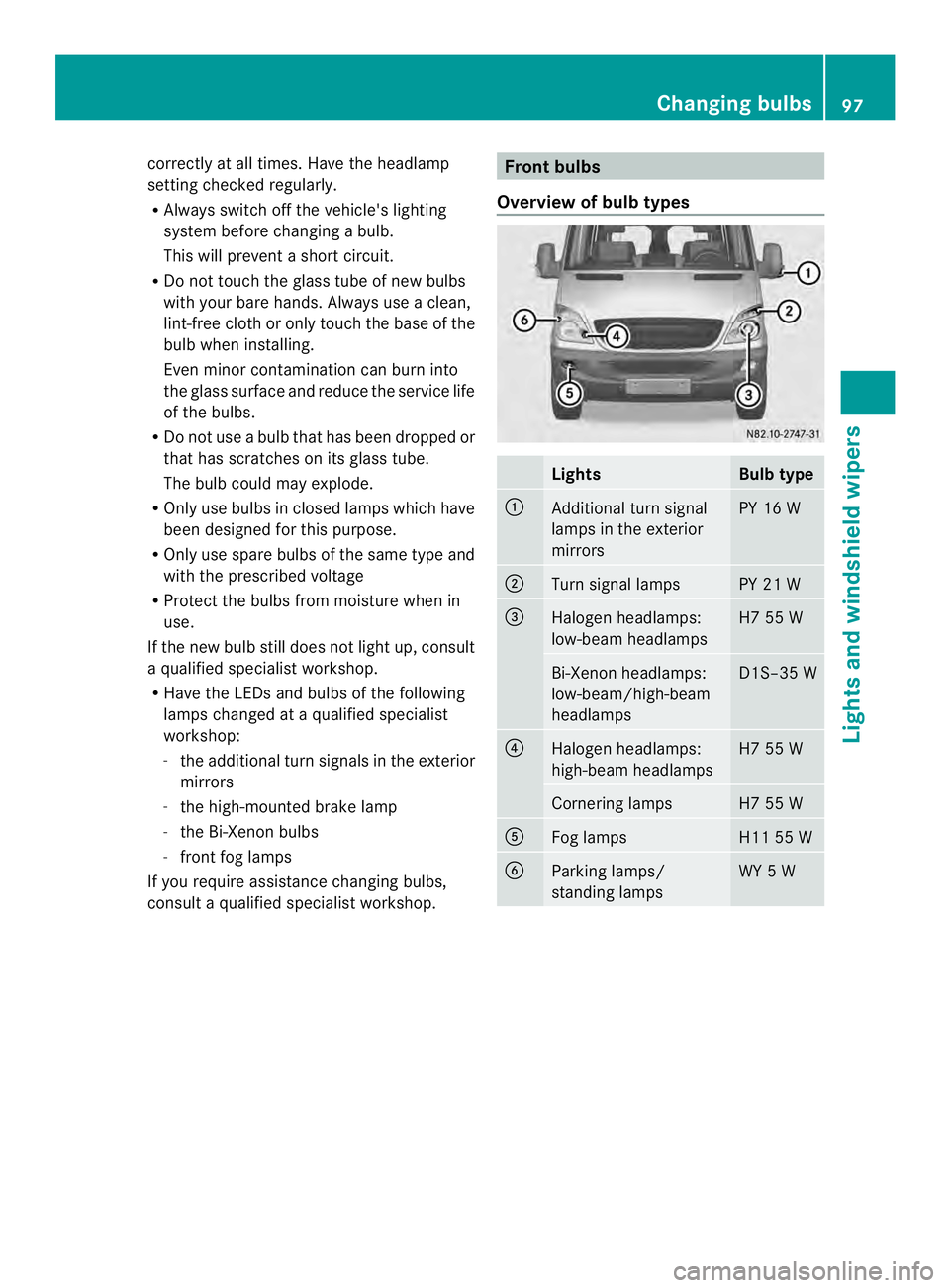
tbulbs
Overview of bulb types Lights Bulb type
0005
Additional turn signal
lamps in the exterior
mirrors PY 16 W
0006
Turn signal lamps PY 21 W
0026
Halogen headlamps:
low-bea mheadlamps H7 55 W
Bi-Xenon headlamps:
low-beam/high-beam
headlamps D1S–35 W
0025
Halogen headlamps:
high-beam headlamps H7 55 W
Cornering lamps H7 55 W
0023
Fog lamps H11 55 W
0024
Parking lamps/
standing lamps WY 5 WChanging bulbs
97Lights and windshield wipers Z
Page 101 of 334
X
Switch off the lighting system.
X Ope nthe hood (Y page 240).
X Turn housing cover 0005counter-clockwise
and remove it.
X Pull out the bulb holder with the bulb.
X Pull the bulb out of the bulb holder.
X Press a new bulb into the bulb holder.
X Insert the bulb holder into the lamp.
X Position housing cover 0005and turn it
clockwise as far as it will go.
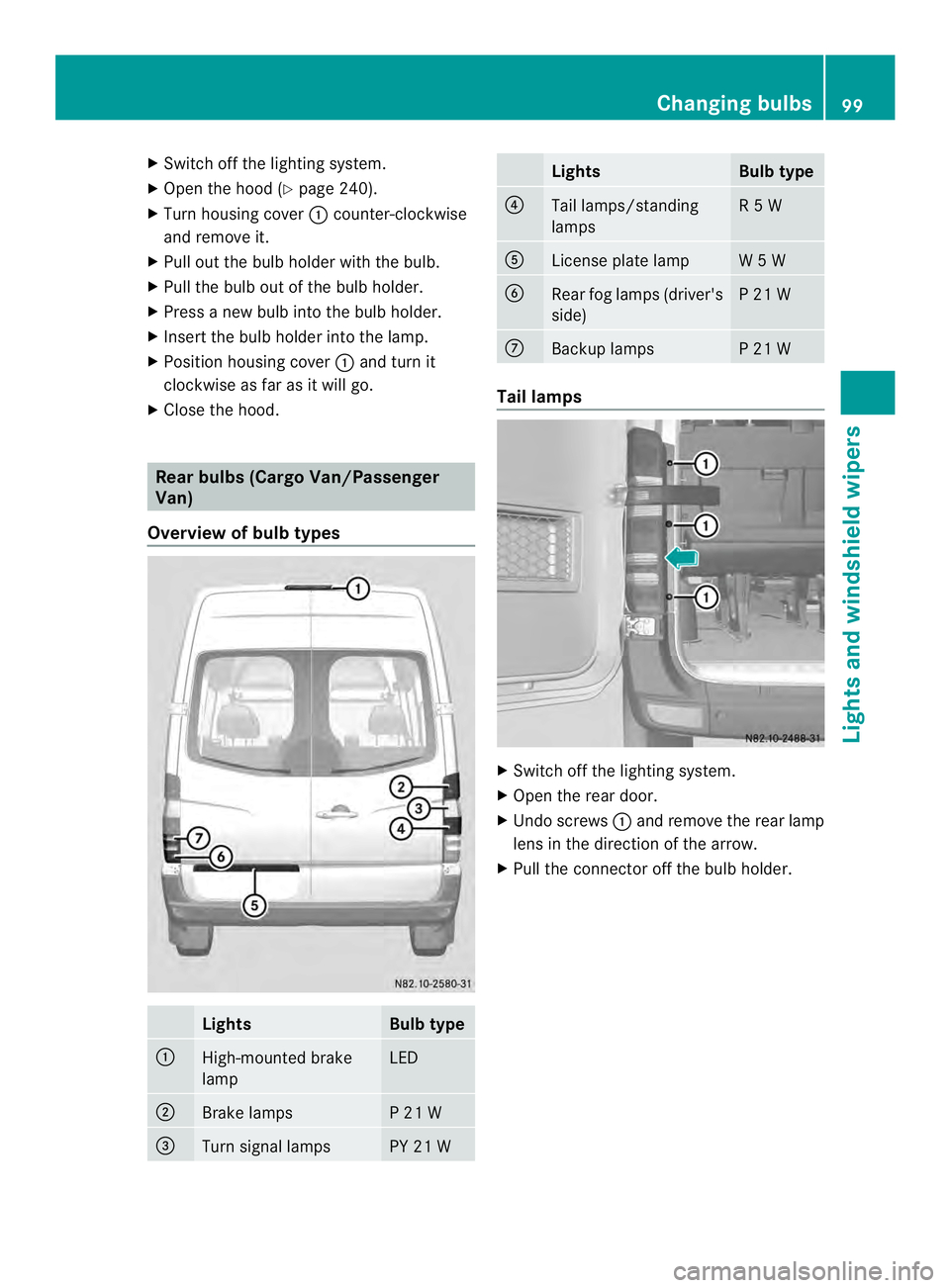
X Close the hood. Rear bulbs (Cargo Van/Passenger
Van)
Overview of bulb types Lights Bulb type
0005
High-mounted brake
lamp LED
0006
Brake lamps P 21 W
0026
Turn signal lamps PY 21 W Lights Bulb type
0025
Tail lamps/standing
lamps R 5 W
0023
License plate lamp W 5 W
0024
Rear fog lamps (driver's
side) P 21 W
0018
Backup lamps P 21 W
Tail lamps
X
Switch off the lighting system.
X Open the rear door.
X Undo screws 0005and remove the rear lamp
lens in the direction of the arrow.
X Pull the connector off the bulb holder. Changing bulbs
99Lights and windshield wipers Z
Page 102 of 334
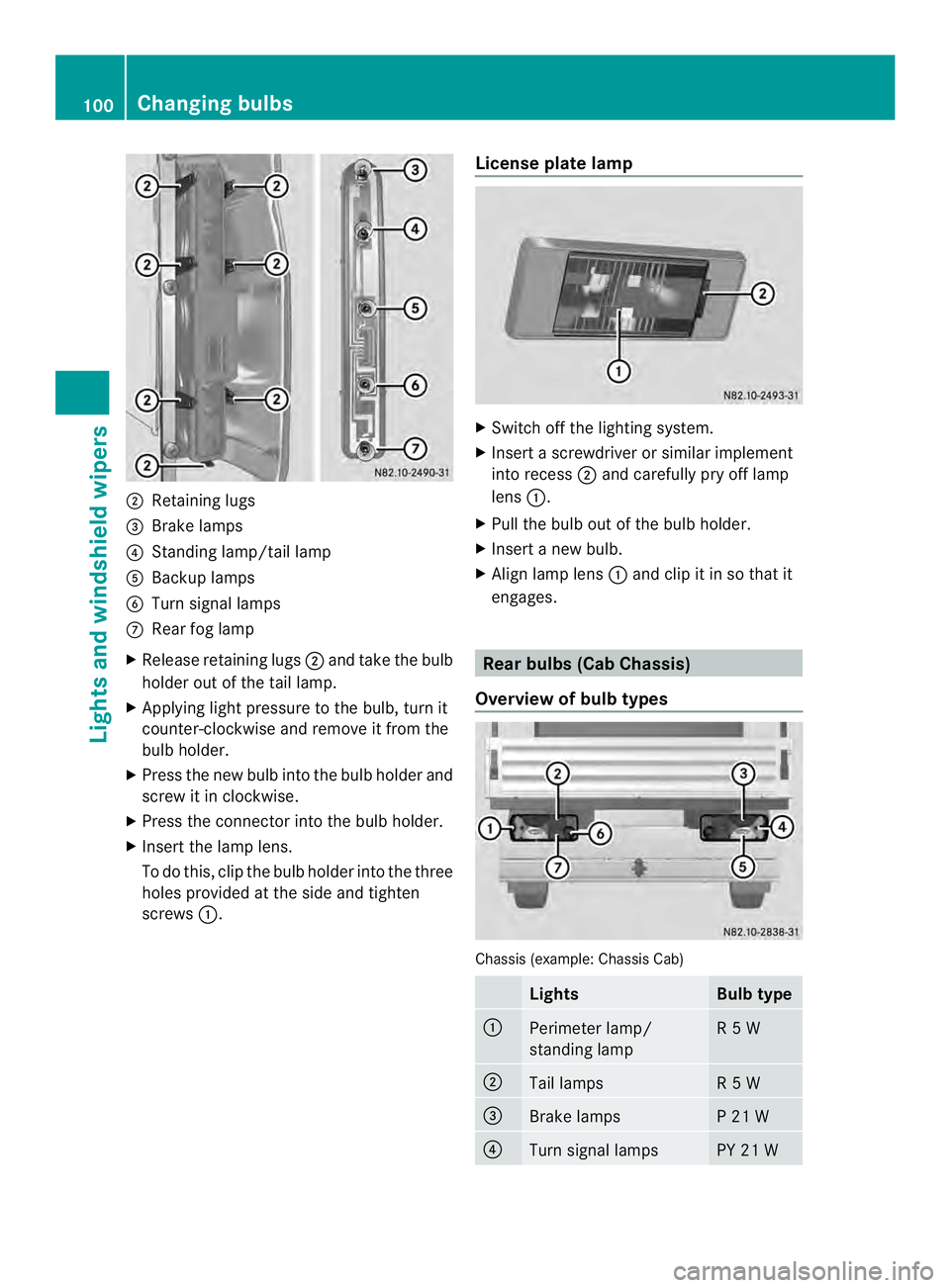
0006
Retaining lugs
0026 Brake lamps
0025 Standing lamp/tail lamp
0023 Backup lamps
0024 Turn signal lamps
0018 Rear fog lamp
X Release retaining lugs 0006and take the bulb
holder out of the tail lamp.
X Applying ligh tpressure to the bulb, turn it
counter-clockwise and remove it from the
bulb holder.
X Press the new bulb into the bulb holder and
screw it in clockwise.
X Press the connector into the bulb holder.
X Insert the lamp lens.
To do this, clip the bulbh older into the three
holes provided at the side and tighten
screws 0005. License plate lamp X
Switch off the lighting system.
X Insert a screwdriver or similar implement
into recess 0006and carefully pry off lamp
lens 0005.
X Pull the bulb out of the bulb holder.
X Insert a new bulb.
X Align lamp lens 0005and clip it in so that it
engages. Rear bulbs (Cab Chassis)
Overview of bulb types Chassis (example: Chassis Cab)
Lights Bulb type
0005
Perimeter lamp/
standing lamp R 5 W
0006
Tail lamps R 5 W
0026
Brake lamps P 21 W
0025
Turn signal lamps PY 21 W100
Changing bulbsLights and windshiel
dwipers
Page 103 of 334
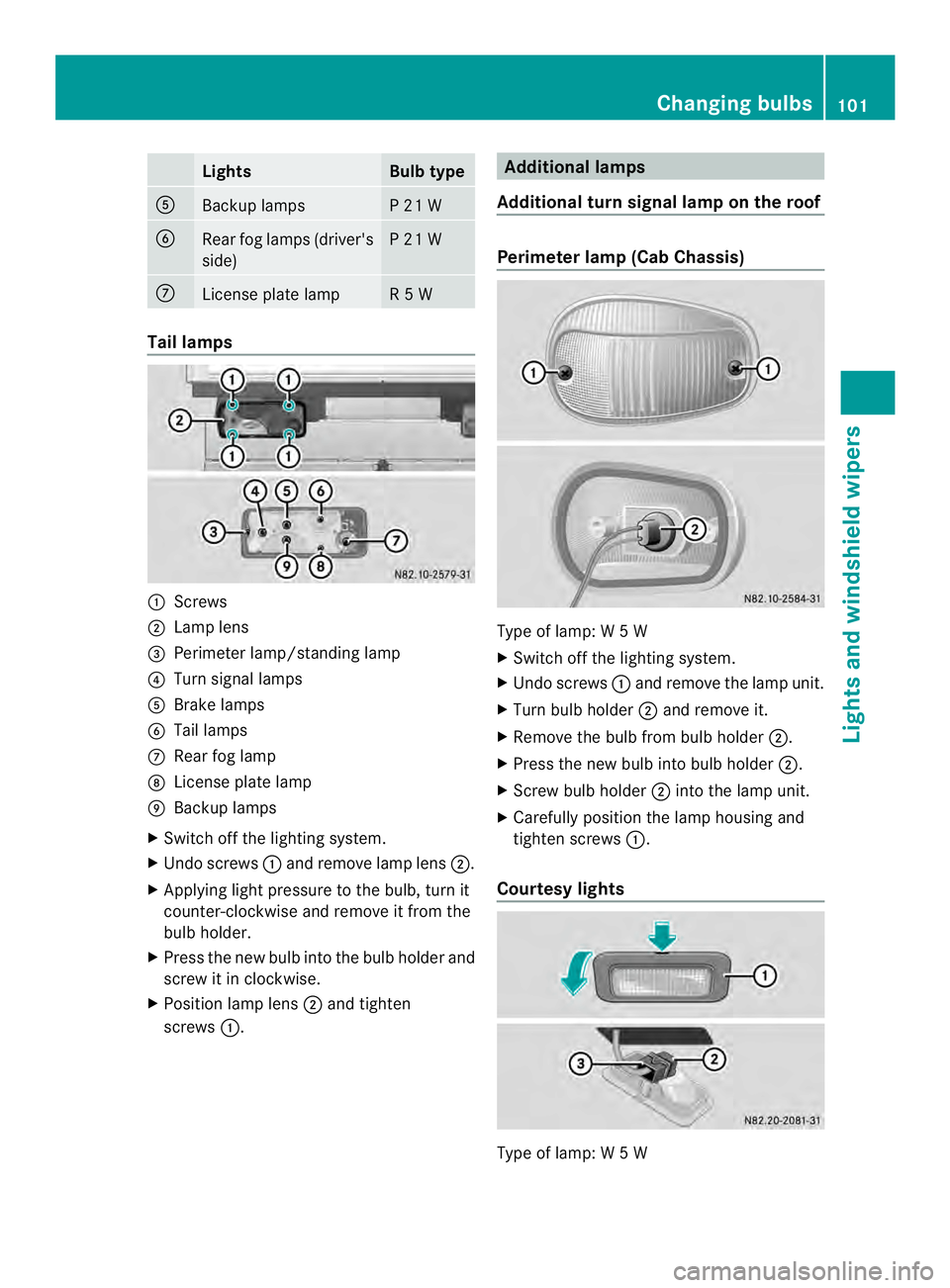
Lights Bulb type
0023
Backup lamps P 21 W
0024
Rear fog lamps (driver's
side) P 21 W
0018
License plate lamp R 5 W
Tail lamps
0005
Screws
0006 Lamp lens
0026 Perimete rlamp/standing lamp
0025 Turn signal lamps
0023 Brake lamps
0024 Tail lamps
0018 Rear fog lamp
0019 License plate lamp
001A Backup lamps
X Switch off the lighting system.
X Undo screws 0005and remove lamp lens 0006.
X Applying light pressure to the bulb, tur nit
counter-clockwise and remove it from the
bulb holder.
X Press the new bulb into the bulb holder and
screw it in clockwise.
X Position lamp lens 0006and tighten
screws 0005. Additional lamps
Additional turn signal lamp on the roof Perimete
rlamp (Cab Chassis) Type of lamp: W
5W
X Switch off the lighting system.
X Undo screws 0005and remove the lamp unit.
X Turn bulb holder 0006and remove it.
X Remove the bulb from bulb holder 0006.
X Press the new bulb into bulb holder 0006.
X Screw bulb holder 0006into the lamp unit.
X Carefully position the lamp housing and
tighten screws 0005.
Courtes ylights Type of lamp: W
5W Changing bulbs
101Lights an dwindshield wipers Z
Page 112 of 334
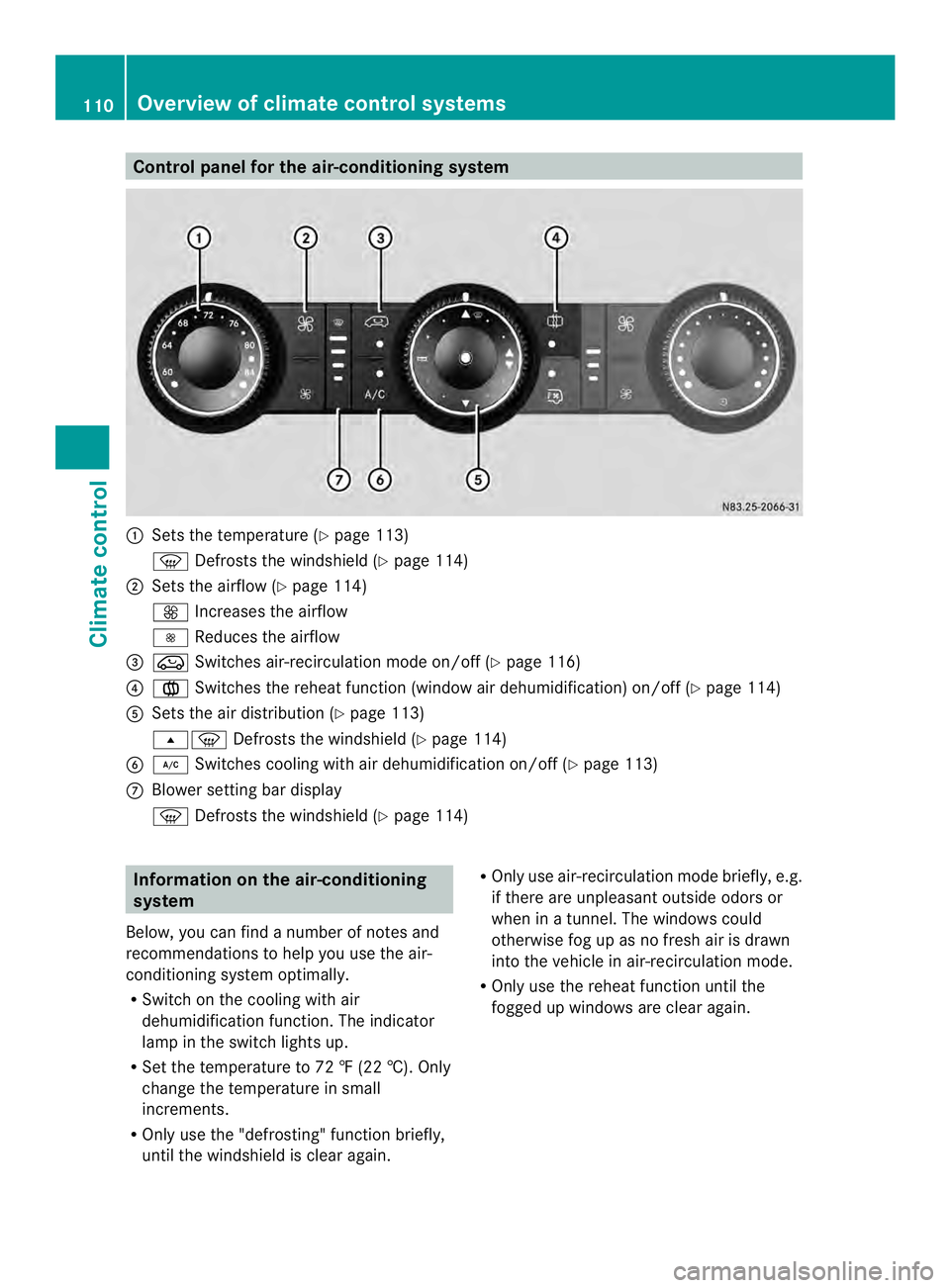
Control panel for the air-conditioning system
0005
Sets the temperature (Y page 113)
0021 Defrosts the windshield (Y page 114)
0006 Sets the airflow (Y page 114)
0026 Increases the airflow
0025 Reduces the airflow
0026 0022 Switches air-recirculation mode on/off (Y page 116)
0025 001F Switches the reheat function (window air dehumidification) on/of f(Ypage 114)
0023 Sets the air distribution (Y page 113)
000B0021 Defrosts the windshield (Y page 114)
0024 0008 Switches cooling with air dehumidification on/off ( Ypage 113)
0018 Blower setting bar display
0021 Defrosts the windshield (Y page 114)Information on the air-conditioning
system
Below, you can find a number of notes and
recommendations to help you use the air-
conditioning system optimally.
R Switch on the cooling with air
dehumidification function .The indicator
lamp in the switch lights up.
R Set the temperature to 72 ‡ (22 †). Only
change the temperature in small
increments.
R Only use the "defrosting" function briefly,
until the windshield is clear again. R
Only use air-recirculation mode briefly, e.g.
if there are unpleasant outside odors or
when in a tunnel. The windows could
otherwise fog up as no fresh air is drawn
into the vehicle in air-recirculation mode.
R Only use the reheat function until the
fogged up windows are clear again. 110
Overview of climate control systemsClimate control
Page 115 of 334
Activating/deactivating rear-
compartment climate control via the
control panel X
Turn the key to position 2in the ignition
lock.
Vehicle with rear-compartment heating/
rear-compartment air conditioning
X To switch on/off: press the001Bswitch.
If the indicator lamp in the butto nlights up,
the rear-compartment heating/rear-
compartmen tair conditioning is switched
on. Switching the cooling with air
dehumidification function on/off
Important information If you switch off the "Cooling with air
dehumidification" function, the air inside the
vehicle will not be cooled (in warm weather)
or dehumidified. The windows could fog up
more quickly.
The cooling with air dehumidification function
is only available when the engine is running.
The air inside the vehicle is cooled and
dehumidified according to the temperature
selected.
Condensatio nmay appear on the underside
of the vehicle when in cooling mode. This is
normal and not a sign that there is a
malfunction.
Switching on/off Vehicle with air conditioning
X
Press the 0008button.
If the indicator lamp in the butto nlights up,
cooling with air dehumidification is
switched on. Setting the temperature
Increasing/reducing temperature in
the front compartment via the control
panel Only change the temperature in small
increments. Start at the center position, or at
22 †.
X
Switch on climate control (Y page 112).
X Turn temperature control 0005clockwise to
increase or counterclockwise to reduce the
temperature (Y page 110).
Increasing/reducing temperature in
the rear compartment via the control
panel Only change the temperature in small
increments.
X
Switch on climate control (Y page 112).
X Turn rear-compartment temperature
control 0026(Ypage 111) or rear-
compartment air-conditioning system 0006
(Y page 112) clockwise to increase or
counterclockwise to reduce the
temperature.
i Vehicles with additional air conditioning
and heating in the rear compartment: if you
set the temperature control to the center
position, only one of the two climate
control systems works in the rear
compartmen tand in air-recirculation mode
(Y page 116). Setting the air distribution
Ai rd istribution settings The air distribution symbols have the
following meanings:
0027
Directs air through the center
and side air vents
000B0021 Directs air to the windshield and
the air vents Operating the climate control system
113Climate control
Page 116 of 334
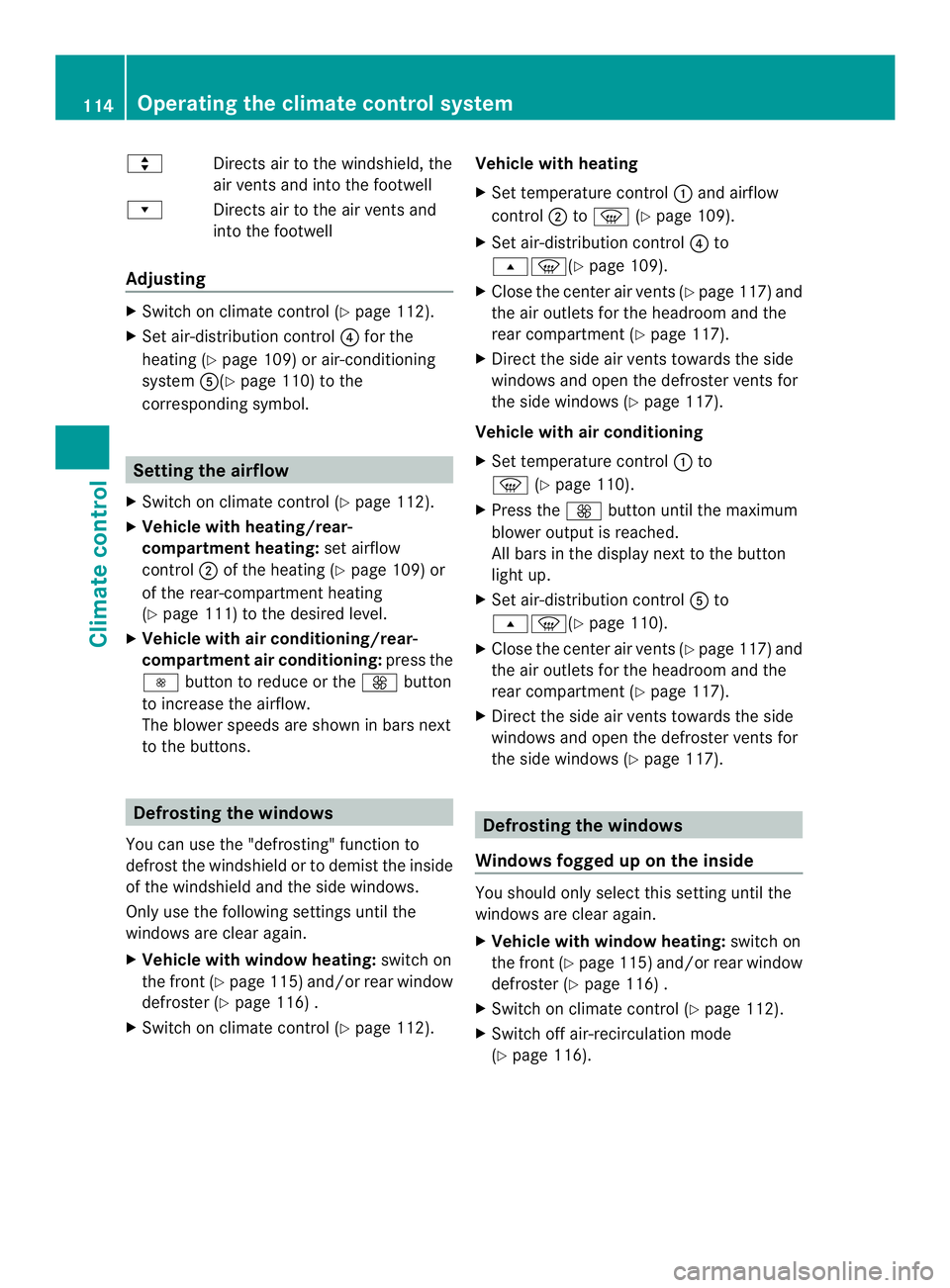
000C
Directs airto the windshield, the
air vents and into the footwell
000D Directs air to the air vents and
into the footwell
Adjusting X
Switch on climate control (Y page 112).
X Set air-distribution control 0025for the
heating (Y page 109) or air-conditioning
system 0023(Ypage 110) to the
corresponding symbol. Setting the airflow
X Switch on climate control (Y page 112).
X Vehicle with heating/rear-
compartment heating: set airflow
control 0006of the heating (Y page 109) or
of the rear-compartment heating
(Y page 111) to the desired level.
X Vehicle with air conditioning/rear-
compartment air conditioning: press the
0025 button to reduce or the 0026button
to increase the airflow.
The blower speeds are shown in bars next
to the buttons. Defrosting the windows
You can use the "defrosting" function to
defrost the windshield or to demist the inside
of the windshield and the side windows.
Only use the following settings until the
windows are clear again.
X Vehicle with window heating: switch on
the front (Y page 115) and/or rear window
defroster (Y page 116) .
X Switch on climate control (Y page 112).Vehicle with heating
X
Set temperature control 0005and airflow
control 0006to0021 (Ypage 109).
X Set air-distribution control 0025to
000B0021(Y page 109).
X Close the center air vents (Y page 117) and
the air outlets for the headroom and the
rear compartment (Y page 117).
X Direct the side air vents towards the side
windows and open the defroster vents for
the side windows (Y page 117).
Vehicle with air conditioning
X Set temperature control 0005to
0021 (Ypage 110).
X Press the 0026button until the maximum
blower output is reached.
All bars in the display next to the button
light up.
X Set air-distribution control 0023to
000B0021(Y page 110).
X Close the center air vents (Y page 117) and
the air outlets for the headroom and the
rear compartment (Y page 117).
X Direct the side air vents towards the side
windows and open the defroster vents for
the side windows (Y page 117). Defrosting the windows
Windows fogged up on the inside You should only select this setting until the
windows are clear again.
X
Vehicle with window heating: switch on
the front (Y page 115) and/or rear window
defroster (Y page 116) .
X Switch on climate control (Y page 112).
X Switch off air-recirculation mode
(Y page 116). 114
Operating the climate control systemClimate control
Page 117 of 334
Vehicle with heating
X
Set temperature control 0005to a higher
temperature (Y page 109).
X Set airflow control 0006to a highe rblower
setting. It should be set at least to level two
(Y page 109).
X Set air-distribution control 0025to
000B0021(Y page 109).
i If the windows still fog up, set the control
as described for defrosting (Y page 114).
Vehicle with air conditioning
X Activate cooling with air dehumidification
(Y page 113).
X Press the 0011button (Y page 110).
The reheat function is switched on. The
indicator lamp in the switch lights up.
To switch off the reheat function, press the
0011 button again. The indicator lamp in
the button goes out.
Windows fogged up on the outside You should only selec
tthis setting until the
windshield is clear again.
X Switch on the windshield wipers
(Y page 103).
X Switch on climate control (Y page 112).
X Adjust air distribution to the footwell
(Y page 113).
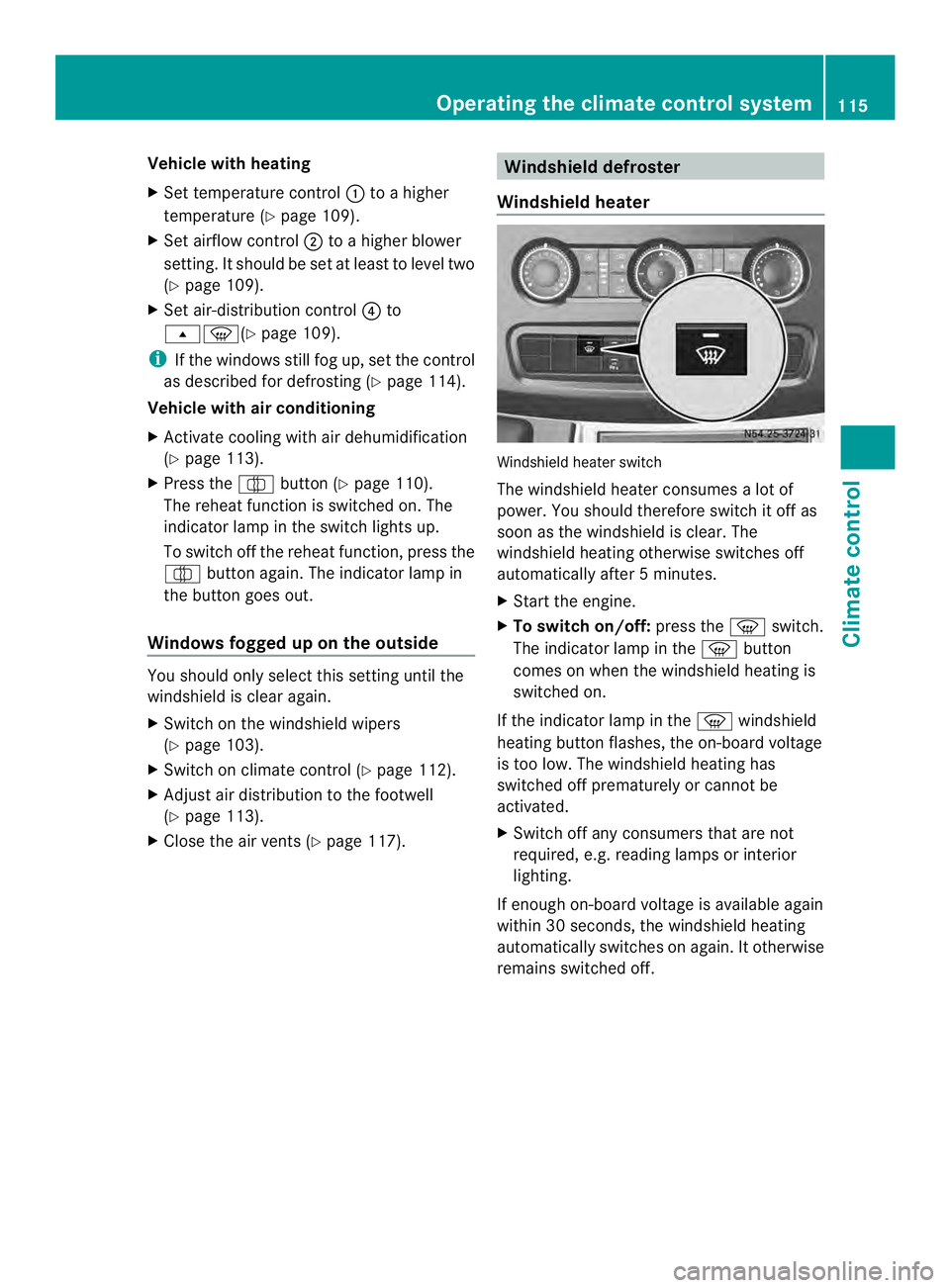
X Close the air vents (Y page 117). Windshield defroster
Windshield heater Windshield heater switch
The windshield heater consumes
alot of
power. You should therefore switch it off as
soon as the windshield is clear. The
windshield heating otherwise switches off
automatically after 5minutes.
X Start the engine.
X To switch on/off: press the0021switch.
The indicator lamp in the 0021button
comes on when the windshield heating is
switched on.
If the indicator lamp in the 0021windshield
heating button flashes, the on-board voltage
is too low. The windshield heating has
switched off prematurely or cannot be
activated.
X Switch off any consumers that are not
required, e.g. reading lamps or interior
lighting.
If enough on-board voltage is available again
within 30 seconds, the windshield heating
automatically switches on again. It otherwise
remains switched off. Operating the climate control system
115Climate control
Page 118 of 334
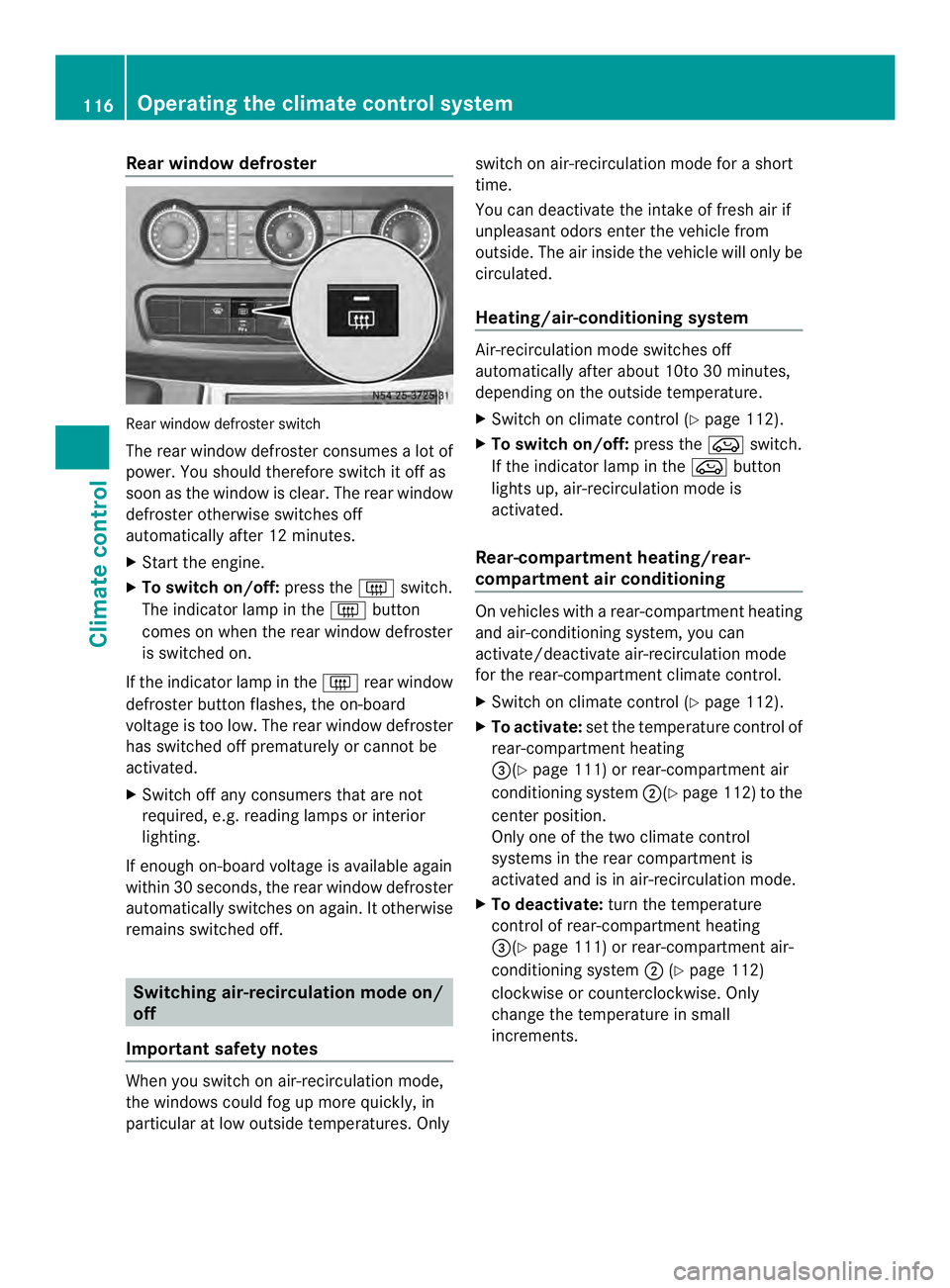
Rear window defroster
Rear window defroste
rswitch
The rear window defroster consumes a lot of
power. You should therefore switch it off as
soon as the window is clear .The rear window
defroster otherwise switches off
automatically after 12 minutes.
X Start the engine.
X To switch on/off: press the0019switch.
The indicator lamp in the 0019button
comes on when the rear window defroster
is switched on.
If the indicator lamp in the 0019rear window
defroster button flashes, the on-board
voltage is too low. The rear window defroster
has switched off prematurely or cannot be
activated.
X Switch off any consumers that are not
required, e.g. reading lamps or interior
lighting.
If enough on-board voltage is available again
within 30 seconds, the rear window defroster
automatically switches on again. It otherwise
remains switched off. Switching air-recirculation mode on/
off
Important safety notes When you switch on air-recirculation mode,
the windows could fog up more quickly, in
particular at low outside temperatures. Only switch on air-recirculation mode for a short
time.
You can deactivate the intake of fresh air if
unpleasant odors enter the vehicle from
outside. The air inside the vehicle will only be
circulated.
Heating/air-conditioning system
Air-recirculation mode switches off
automatically after about 10to 30 minutes,
depending on the outside temperature.
X
Switch on climate control (Y page 112).
X To switch on/off: press the0022switch.
If the indicator lamp in the 0022button
lights up, air-recirculation mode is
activated.
Rear-compartment heating/rear-
compartment air conditioning On vehicles with a rear-compartment heating
and air-conditioning system, you can
activate/deactivate air-recirculation mode
for the rear-compartment climate control.
X Switch on climate control (Y page 112).
X To activate: set the temperature control of
rear-compartment heating
0026(Y page 111) or rear-compartment air
conditioning system 0006(Ypage 112) to the
center position.
Only one of the two climate control
systems in the rear compartment is
activated and is in air-recirculation mode.
X To deactivate: turn the temperature
control of rear-compartment heating
0026(Y page 111) or rear-compartment air-
conditioning system 0006(Ypage 112)
clockwise or counterclockwise. Only
change the temperature in small
increments. 116
Operating the climate control systemClimate control
Page 164 of 334
for safe maneuvering and parking. When
maneuvering and parking, make sure that
there are no persons, animals or objects in
the maneuvering area.
The rear view camera is
avisual parking aid.
It shows you the area behind the vehicle on a
separate monitor on the center console.
The camera is in the middle of the roof above
the high-mounted brake lamp (Y page 259).
The rear view camera may show obstacles in
perspectival distortion, incorrectly or not at
all. The rear view camera cannot display all
objects located very near and/or under the
rear bumper. It does not warn you of a
collision, persons or objects.
The area behind the vehicle is displayed in a
mirrored fashion, as in the rear-view mirror or
the exterior mirrors. The guide lines displayed
assist you in backing up.
The function of the rear view camera may be
partially or completely impaired in the
following circumstances:
R it is raining very heavily or snowing, or it is
foggy.
R the parking space is located in a very dark
place.
R the camera is exposed to very strong white
light .White stripes may appearont he
display.
R the surrounding area is illuminated with
fluorescent light. The displaym ay flicker.
R if the temperature changes very quickly, for
example if you drive int oaheated garage
in the winter.
R ambient temperatures are very high.
R the camera lens is dirty or obstructed.
R the rear of the vehicle is damaged. In this
case, have the position and setting
checked at a specialist workshop.
The rear view camera is switched on when
you engage reverse gear R.
You can find information on cleaning the
camera in the "Maintenance and care"
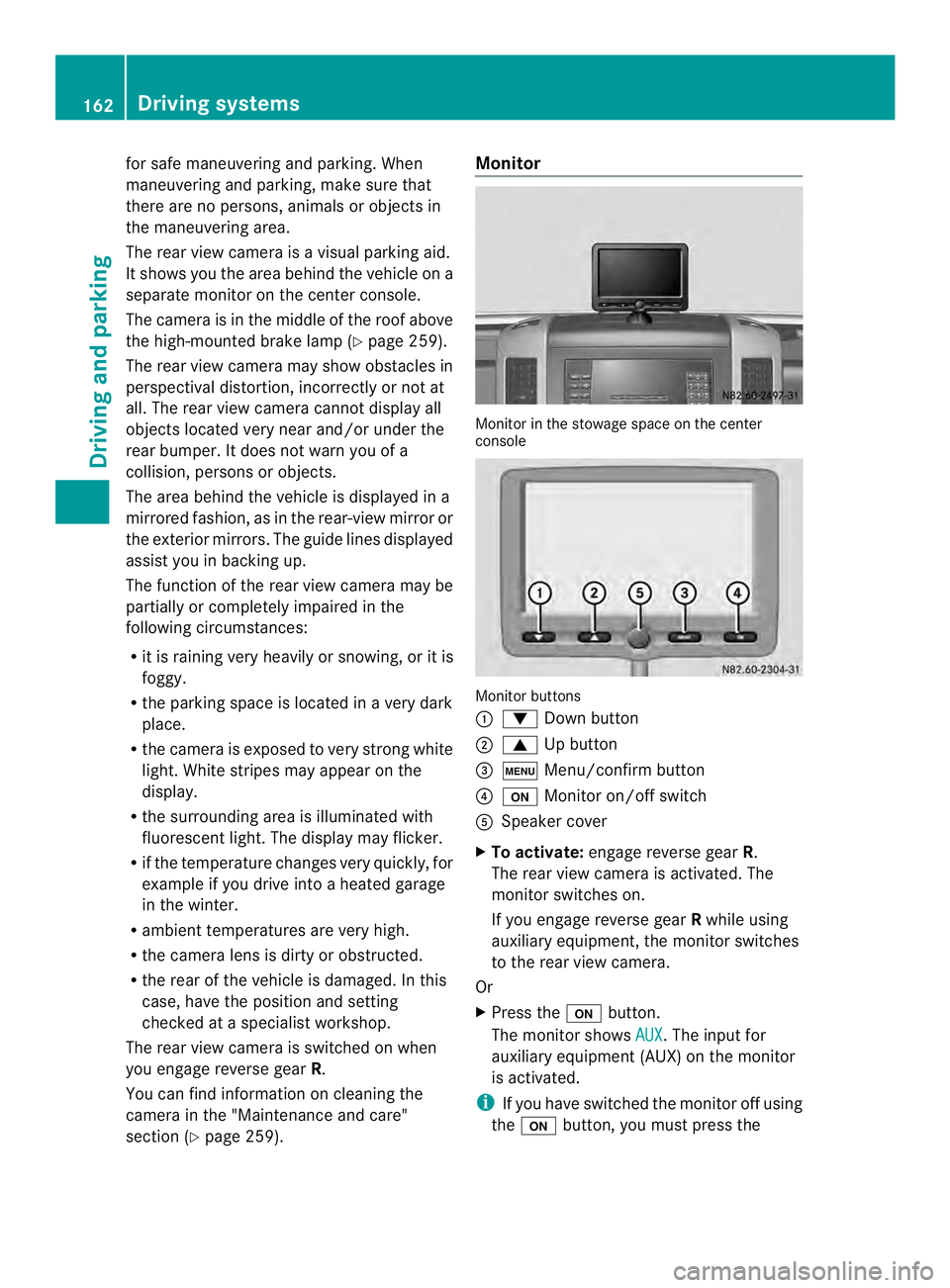
section (Y page 259). Monitor
Monitor in the stowage space on the center
console
Monitor buttons
0005
0008 Down button
0006 0006 Up button
0026 0003 Menu/confirm button
0025 0004 Monitor on/off switch
0023 Speaker cover
X To activate: engage reverse gear R.
The rear view camera is activated. The
monitor switches on.
If you engage reverse gear Rwhile using
auxiliary equipment, the monitor switches
to the rear view camera.
Or
X Press the 0004button.
The monitor shows AUX .T
he input for
auxiliary equipment (AUX) on the monitor
is activated.
i If you have switched the monitor off using
the 0004 button, you must press the 162
Driving systemsDriving and parking