tire pressure MERCEDES-BENZ SPRINTER 2013 MY13 Operator’s Manual
[x] Cancel search | Manufacturer: MERCEDES-BENZ, Model Year: 2013, Model line: SPRINTER, Model: MERCEDES-BENZ SPRINTER 2013Pages: 334, PDF Size: 3.88 MB
Page 174 of 334
available from the police and local
authorities.
Observe the following when towing a trailer:
R
Practice driving around bends, stopping
and backing up at a place where there is no
traffic. This enables you to gain experience
and get used to the new handling
characteristics.
R Before driving, check:
-that the trailer tow hitch and ball
coupling are secure
- that the safety switch for a braked trailer
is functioning properly
- that the safety chains are secure and not
damaged
- that the electrical connections are
secure
- that the lights are working
- that the wheels are in good order and the
tire pressure is correct
R Adjust the exterior mirrors to provide an
unobstructed view of the rear sectio nofthe
trailer.
R If the trailer has electronically controlled
brakes, pull the vehicle/trailer
combination away carefully. Brake
manually using the brake controller and
check that the brakes are working.
R Secure the load on the trailer according to
the applicable specifications and current
standards on securing loads
(Y page 234).
R When driving with a trailer, check at regular
intervals that the load is secured and that
the brakes and lights are working.
R Bear in mind that the handling will be less
stable when towing a trailer than when
driving without one. Avoid sudden steering
movements.
R The vehicle/trailer combination is heavier,
accelerates more slowly and has a
decreased gradient climbing capability and
a longer braking distance.
It is more susceptible to crosswinds and
requires cautious steering. R
If possible, do not brake suddenly, but
rather moderately at first so that the trailer
can activate its brakes. Then increase the
force on the brake pedal.
R If the automatic transmission repeatedly
shifts between gears when driving on
inclines, restrict the shift range. Select shift
range 4,3,2or 1.
Driving in a low gear and at a low speed
reduces the risk of damaging the engine.
R When driving on a downhill gradient, shift
to a low gear and take advantage of the
engine's braking effect.
Avoid continuous brake application as this
may overheat the vehicle brakes and, if
installed, the trailer brakes.
R If the coolant temperature increases
dramatically while the air-conditioning
system is switched on, switch off the air-
conditioning system.
Coolant heat can also be dissipated by
switching the airflow and the temperature
of the heater/air conditioning to the
maximum level. Open the windows if
necessary.
R When overtaking, pay particular attention
to the extended length of your vehicle/
trailer combination.
Due to the length of your vehicle/trailer
combination you need an additional
distance before you can return to your
original lane. Uncoupling
atrailer G
WARNING
If you uncouple a trailer with the overrun
brake engaged, you could trap your hand
between the vehicle and the trailer drawbar.
There is a risk of injury.
Do not uncouple a trailer if the overru nbrake
is engaged.
! Do not disconnect a trailer with an
engaged overru nbrake. Otherwise, your 172
Towing
atrailerDriving an d parking
Page 181 of 334
Menus in the on-board computer
Overview If you wish to exit a menu and go to the
standard display:
X Press the 0004menu button for longer than
one second.
Or
X Do not press any button for 10 seconds.
The display accepts the changed settings.
Using the 000E,000F,0004or0007 adjustment
buttons, you can select the following
functions:
R Calling up the service due date
(Y page 249)
R Checking the oil level (Y page 242)
R Preselecting/setting the auxiliary heating
switch-on time ( Ypage 119)
R Tire pressure monitor (Y page 281)
R Setting the time (Y page 179)
R Setting daytime running lamp mode
(Y page 179)
Setting the time X
Turn the key to position 2in the ignition
lock.
X Press the 0004menu button repeatedly until
the hours figure flashes.
X Press the 000Eor000F button to set the hour.
X Press the 0007reset button.
The minute display flashes.
X Press the 000Eor000F button to set the minute.
i If you keep the 000Eor000F button pressed,
the value will change continuously.
Setting daytime running lamp mode For safety reasons, it is only possible to
change this setting when the vehicle is
stationary. The factory setting is
On in
countries in which daytime running lamp
mode is mandatory. X
Turn the key to position 2in the ignition
lock.
X Press the 0004menu button repeatedly until
the 0004 indicator lamp flashes and the
on or
OFF message appears in the display.
X Press the 000Eor000F button to activate or
deactivate daytime running lamp mode.
If you have activated daytime running lamp
mode and the light switch is set to 000C, the
following light up automatically when the
engine is running:
R Parking lamps
R Low-beam headlamps
R Tail lamps
R License plate lamp
i USA only:
If you turn the light switch to 000Bor
0004, the corresponding light switches on.
If you turn the light switch to 0007, daytime
running lamp mode stays switched on.
Canada only:
If you turn the light switch to 0004, the low-
beamh eadlamps switch on. If you turn the
light switch to 000Bor0007, daytime
running lamp mode stays switched on. On-boar
dcomputer (vehicles without steering wheel buttons)
179On-board computer and displays Z
Page 183 of 334
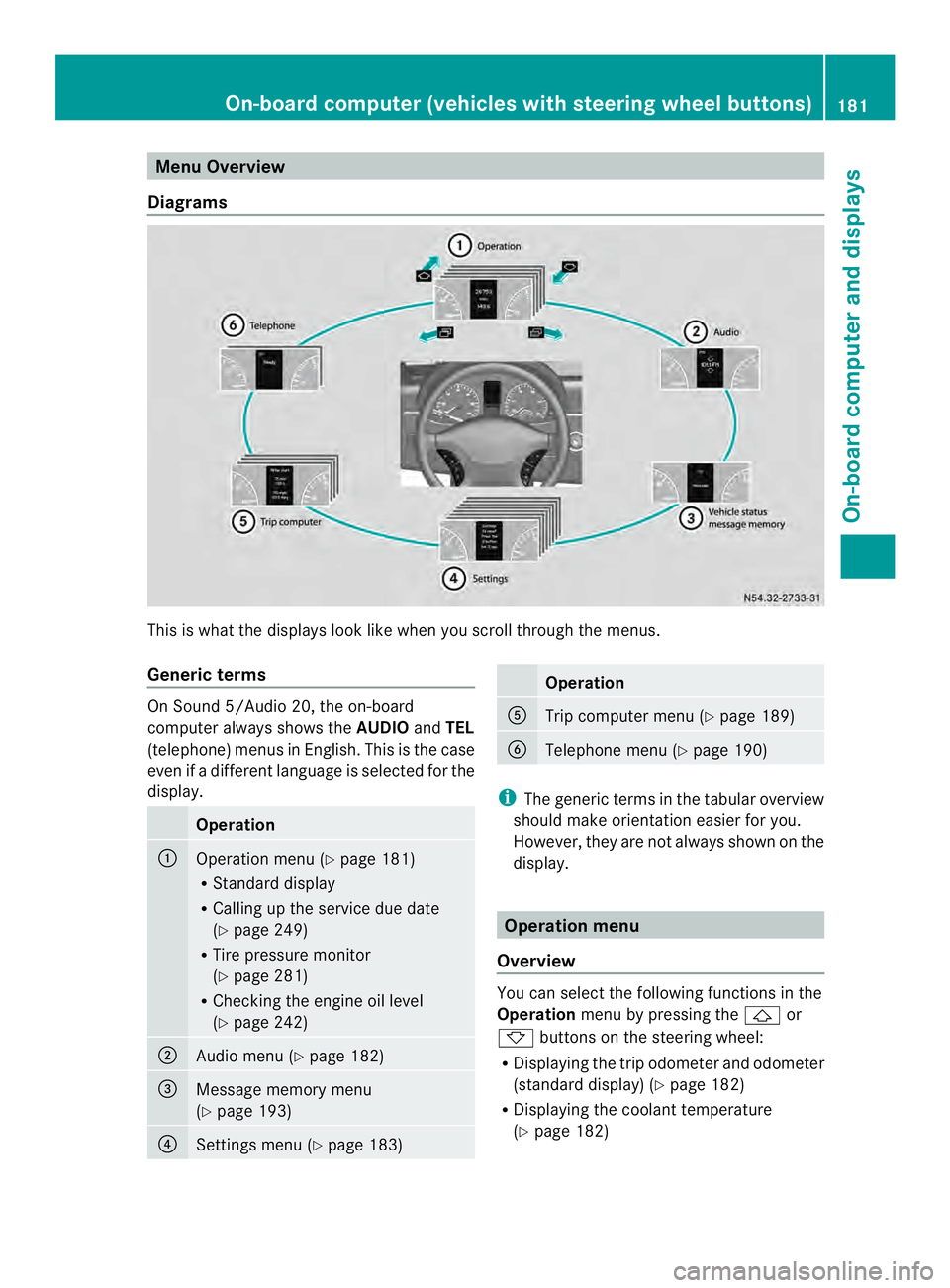
Menu Overview
Diagrams This is whatt
he displays look like when you scroll through the menus.
Generic terms On Sound 5/Audio 20, the on-board
computer always shows the
AUDIOandTEL
(telephone) menus in English. This is the case
even if a different language is selected for the
display. Operation
0005
Operation menu (Y
page 181)
R Standard display
R Calling up the service due date
(Y page 249)
R Tire pressure monitor
(Y page 281)
R Checking the engine oil level
(Y page 242) 0006
Audio menu (Y
page 182) 0026
Message memory menu
(Y
page 193) 0025
Settings menu (Y
page 183) Operation
0023
Trip computer menu (Y
page 189) 0024
Telephone menu (Y
page 190) i
The generic terms in the tabular overview
should make orientation easier for you.
However, they are not always shown on the
display. Operation menu
Overview You can select the following functions in the
Operation
menu by pressing the 0001or
0009 buttons on the steering wheel:
R Displaying the trip odometer and odometer
(standard display) (Y page 182)
R Displaying the coolant temperature
(Y page 182) On-board computer (vehicles with steering wheel buttons)
181On-board computer and displays Z
Page 184 of 334
R
Calling up the service due date
(Y page 249)
R Tire pressure monitor (Y page 281)
R Checking the oil level (Y page 242)
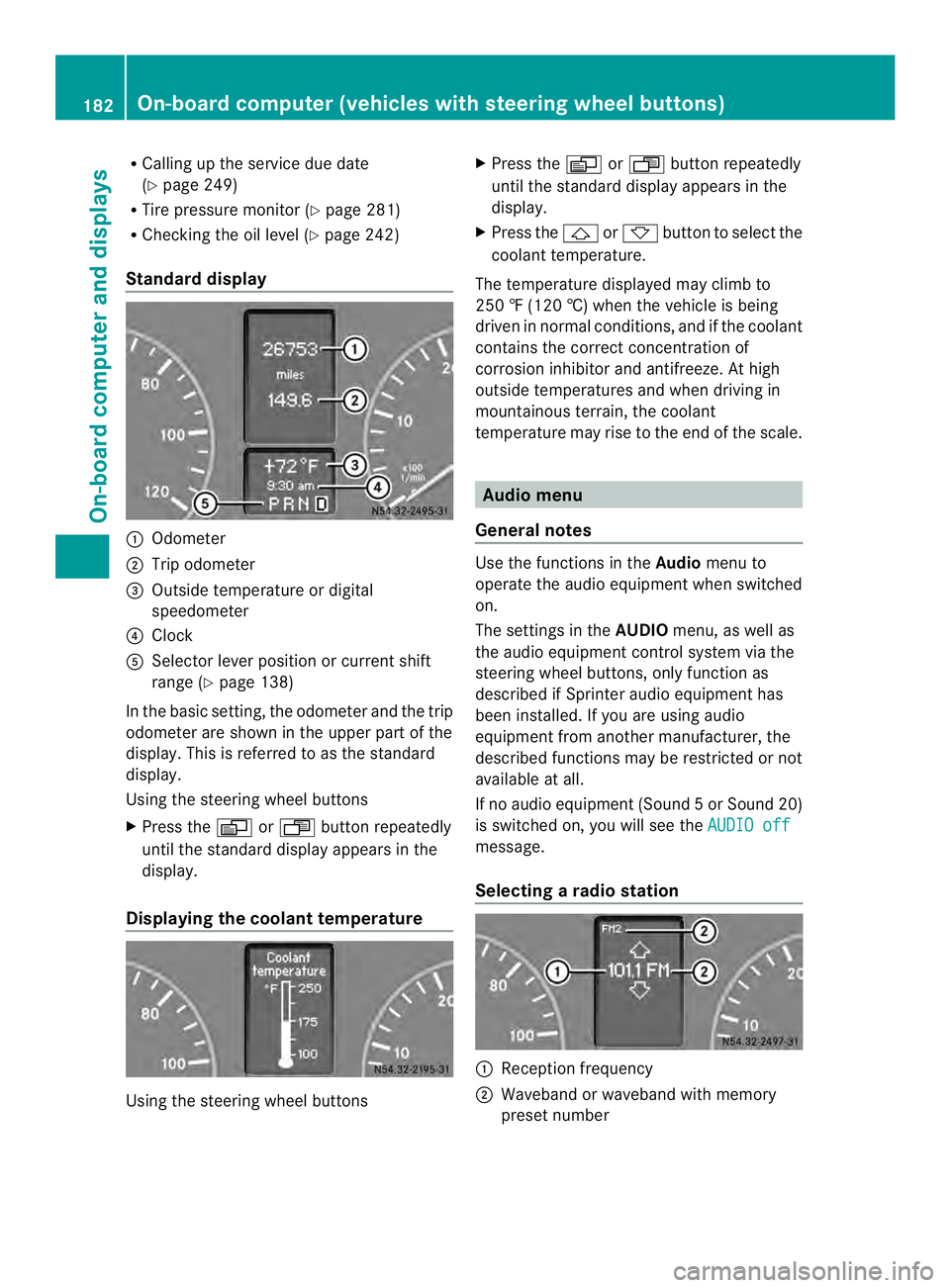
Standard display 0005
Odometer
0006 Trip odometer
0026 Outside temperature or digital
speedometer
0025 Clock
0023 Selector lever position or current shift
range (Y page 138)
In the basic setting, the odometer and the trip
odometer are shown in the upper part of the
display. This is referred to as the standard
display.
Using the steering wheel buttons
X Press the 0010or0007 buttonrepeatedly
until the standard display appears in the
display.
Displaying the coolant temperature Using the steering wheel buttons X
Press the 0010or0007 button repeatedly
until the standard display appears in the
display.
X Press the 0001or0009 button to select the
coolant temperature.
The temperature displayed may climb to
250 ‡ (120 †) when the vehicle is being
driven in normal conditions, and if the coolant
contains the correct concentration of
corrosion inhibitor and antifreeze. At high
outside temperatures and when driving in
mountainous terrain, the coolant
temperature may rise to the end of the scale. Audio menu
General notes Use the functions in the
Audiomenu to
operate the audio equipment when switched
on.
The settings in the AUDIOmenu, as well as
the audio equipment control system via the
steering wheel buttons, only function as
described if Sprinter audio equipment has
been installed. If you are using audio
equipment from another manufacturer, the
described functions may be restricted or not
available at all.
If no audio equipment (Sound 5orSound 20)
is switched on, you will see the AUDIO off message.
Selecting
aradio station 0005
Receptio nfrequency
0006 Waveband or waveband with memory
prese tnumber 182
On-boar
dcomputer (vehicles with steering wheel buttons)On-board computer and displays
Page 188 of 334
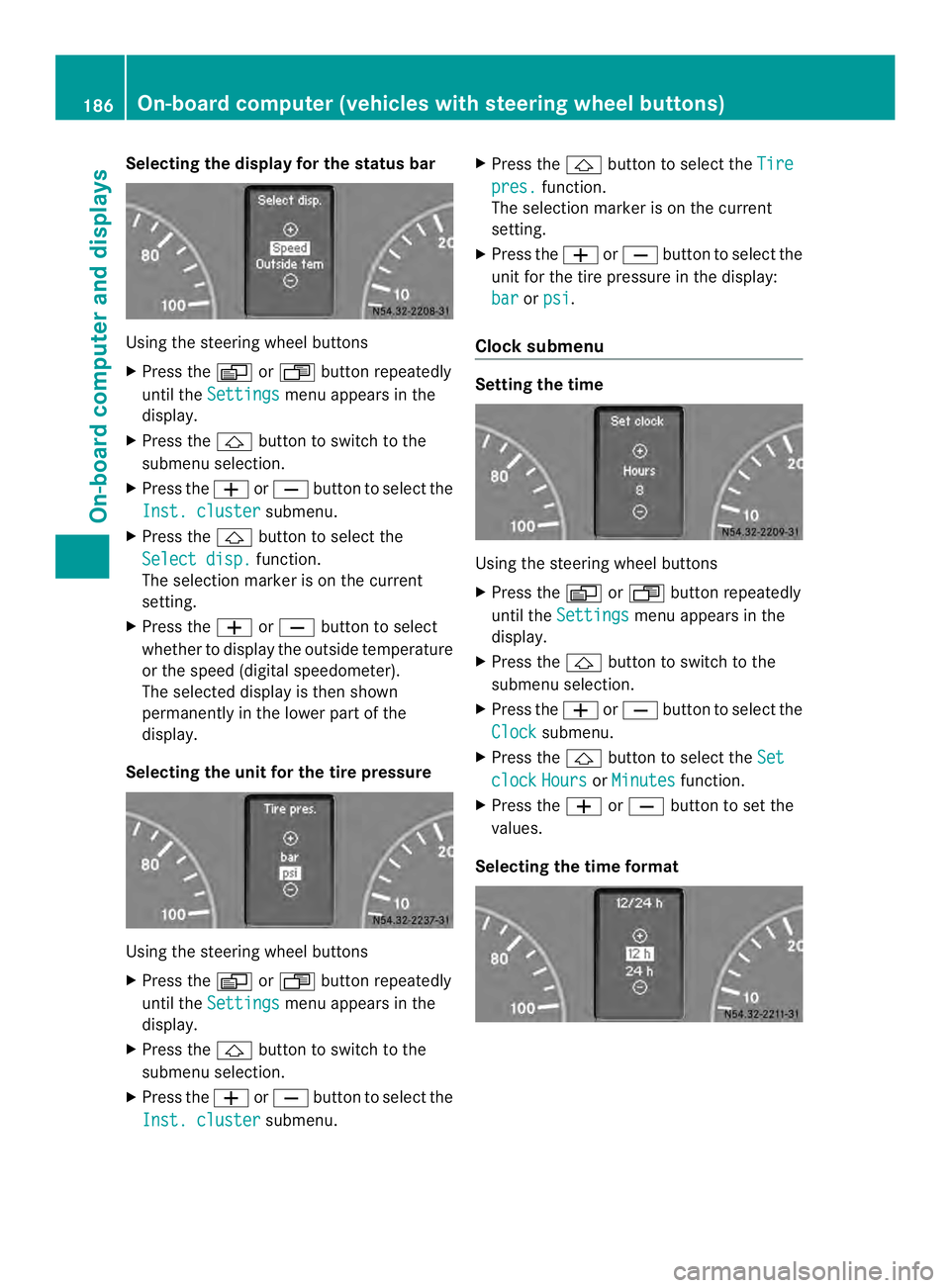
Selecting the display for the status bar
Using the steering wheel buttons
X
Press the 0010or0007 button repeatedly
until the Settings menu appears in the
display.
X Press the 0001button to switch to the
submenu selection.
X Press the 0011or0012 button to select the
Inst. cluster submenu.
X Press the 0001button to select the
Select disp. function.
The selection marker is on the current
setting.
X Press the 0011or0012 button to select
whether to display the outside temperature
or the speed (digital speedometer).
The selected display is then shown
permanently in the lower part of the
display.
Selecting the unit for the tire pressure Using the steering wheel buttons
X
Press the 0010or0007 button repeatedly
until the Settings menu appears in the
display.
X Press the 0001button to switch to the
submenu selection.
X Press the 0011or0012 button to select the
Inst. cluster submenu.X
Press the 0001button to select the Tire pres. function.
The selection marker is on the current
setting.
X Press the 0011or0012 button to select the
unit for the tire pressure in the display:
bar or
psi .
Clocks ubmenu Setting the time
Using the steering wheel buttons
X
Press the 0010or0007 button repeatedly
until the Settings menu appears in the
display.
X Press the 0001button to switch to the
submenu selection.
X Press the 0011or0012 button to select the
Clock submenu.
X Press the 0001button to select the Set clock Hours or
Minutes function.
X Press the 0011or0012 button to set the
values.
Selecting the time format 186
On-board computer (vehiclesw
ith steering wheel buttons)On-board computer and displays
Page 196 of 334
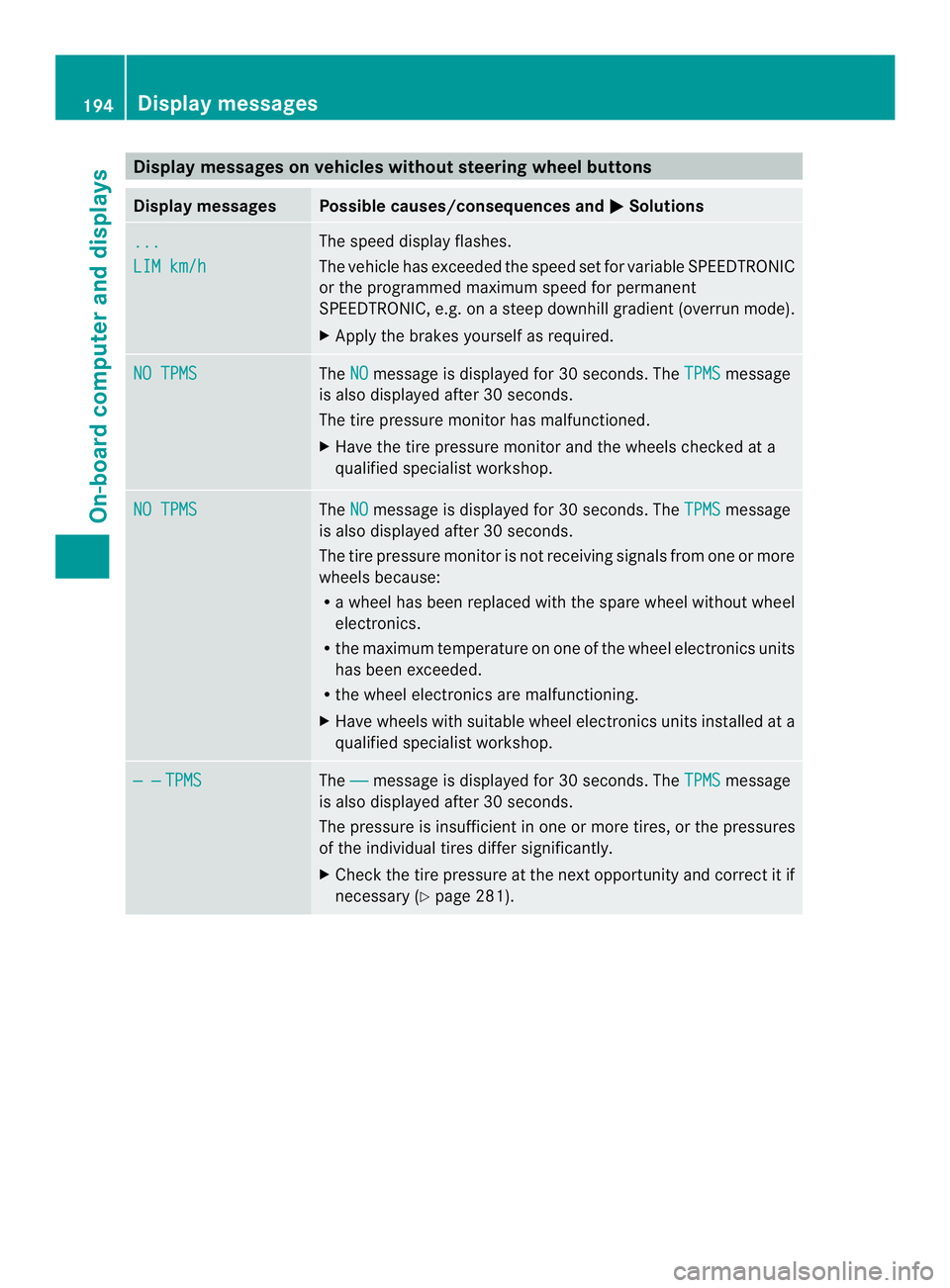
Display messages on vehicles withou
tsteering wheel buttons Display messages Possible causes/consequences and
0004 Solutions
...
LIM km/h The speed display flashes.
The vehicle has exceeded the speed se
tfor variable SPEEDTRONIC
or the programmed maximum speed for permanent
SPEEDTRONIC, e.g. on a steep downhill gradient (overrun mode).
X Apply the brakes yourself as required. NO TPMS The
NO message is displayed for 30 seconds. The
TPMS message
is also displayed after 30 seconds.
The tire pressure monitor has malfunctioned.
X Have the tire pressure monitor and the wheels checked at a
qualified specialist workshop. NO TPMS The
NO message is displayed for 30 seconds. The
TPMS message
is also displayed after 30 seconds.
The tire pressure monitor is not receiving signals from one or more
wheels because:
R a wheel has been replaced with the spare wheel without wheel
electronics.
R the maximum temperature on one of the wheel electronics units
has been exceeded.
R the wheel electronics are malfunctioning.
X Have wheels with suitable wheel electronics units installed at a
qualified specialist workshop. — — TPMS The
—— message is displayed for 30 seconds. The
TPMS message
is also displayed after 30 seconds.
The pressure is insufficient in one or more tires, or the pressures
of the individual tires differ significantly.
X Check the tire pressure at the next opportunity and correc titif
necessary (Y page 281).194
Display messagesOn-board computer and displays
Page 209 of 334
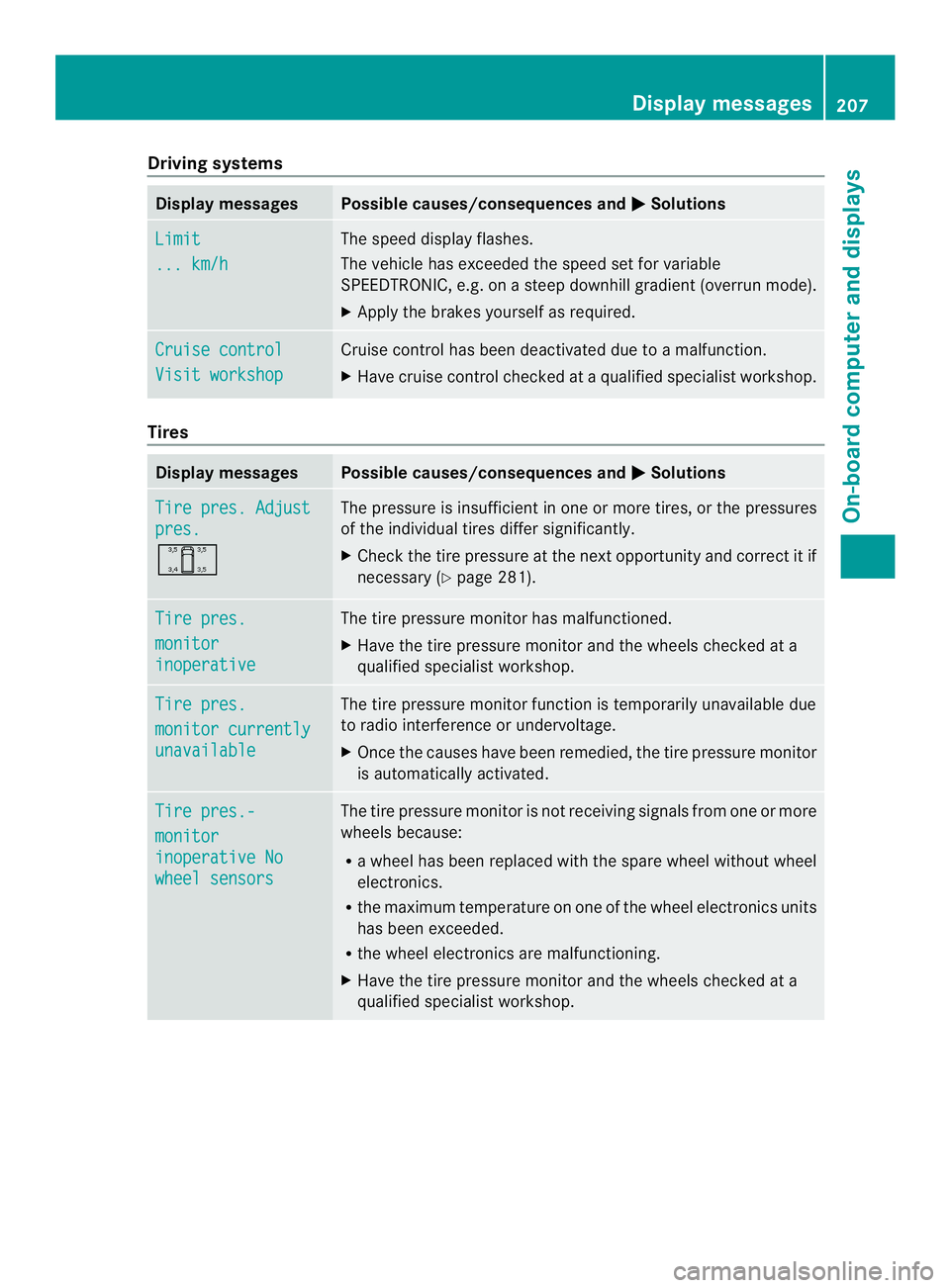
Driving systems
Display messages Possible causes/consequences and
0004 Solutions
Limit
... km/h The speed display flashes.
The vehicle has exceeded the speed set fo
rvariable
SPEEDTRONIC, e.g .onasteep downhill gradient (overrun mode).
X Apply the brakes yourselfa s required.Cruise control
Visit workshop Cruise control has been deactivated due to a malfunction.
X Have cruise control checked at a qualified specialist workshop. Tires
Display messages Possible causes/consequences and
0004 Solutions
Tire pres. Adjust
pres.
0001 The pressure is insufficient in one or more tires, or the pressures
of the individual tires differ significantly.
X
Check the tire pressure at the next opportunity and correct it if
necessary (Y page 281). Tire pres.
monitor
inoperative The tire pressure monitor has malfunctioned.
X
Have the tire pressure monitor and the wheels checked at a
qualified specialist workshop. Tire pres.
monitor currently
unavailable The tire pressure monitor function is temporarily unavailable due
to radio interference or undervoltage.
X
Once the causes have been remedied, the tire pressure monitor
is automatically activated. Tire pres.-
monitor
inoperative No
wheel sensors The tire pressure monitor is not receiving signals from one or more
wheels because:
R a wheel has been replaced with the spare wheel without wheel
electronics.
R the maximum temperature on one of the wheel electronics units
has been exceeded.
R the wheel electronics are malfunctioning.
X Have the tire pressure monitor and the wheels checked at a
qualified specialist workshop. Display messages
207On-board computer and displays Z
Page 210 of 334
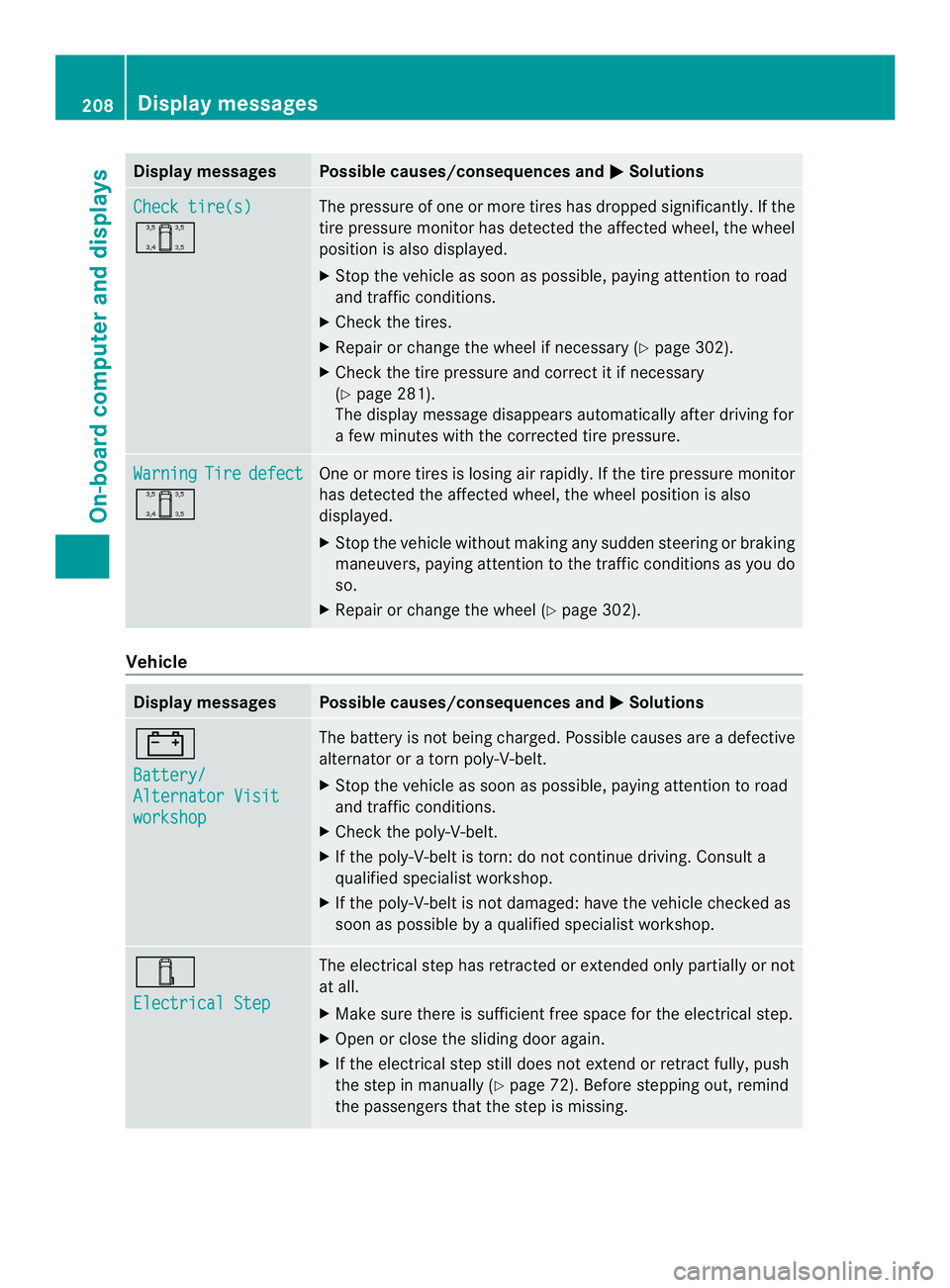
Display messages Possible causes/consequences and
0004 Solutions
Check tire(s)
0001 The pressure of one or more tires has dropped significantly. If the
tire pressure monitor has detected the affected wheel, the wheel
position is also displayed.
X
Stop the vehicle as soo naspossible, paying attention to road
and traffic conditions.
X Check the tires.
X Repairorc hange the wheel if necessary (Y page 302).
X Check the tire pressure and correct it if necessary
(Y page 281).
The display message disappears automatically after driving for
a few minutes with the corrected tire pressure. Warning Tire defect
0001 One or more tires is losing air rapidly.Ift
he tire pressure monitor
has detected the affected wheel, the wheel position is also
displayed.
X Stop the vehicle without making any sudden steering or braking
maneuvers, paying attention to the traffic conditions as you do
so.
X Repair or change the wheel (Y page 302).Vehicle
Display messages Possible causes/consequences and
0004 Solutions
0010
Battery/
Alternator Visit
workshop The battery is not being charged. Possible causes are a defective
alternator or a torn poly-V-belt.
X
Stop the vehicle as soon as possible, paying attention to road
and traffic conditions.
X Check the poly-V-belt.
X If the poly-V-belt is torn: do not continue driving. Consult a
qualified specialist workshop.
X If the poly-V-belt is not damaged: have the vehicle checked as
soon as possible by a qualified specialist workshop. 0001
Electrical Step The electrical step has retracted or extended only partially or not
at all.
X
Make sure there is sufficient free space for the electrical step.
X Open or close the sliding door again.
X If the electrical step still does not extend or retract fully, push
the step in manually (Y page 72). Before stepping out, remind
the passengers that the step is missing. 208
Display messagesOn-board computer and displays
Page 220 of 334
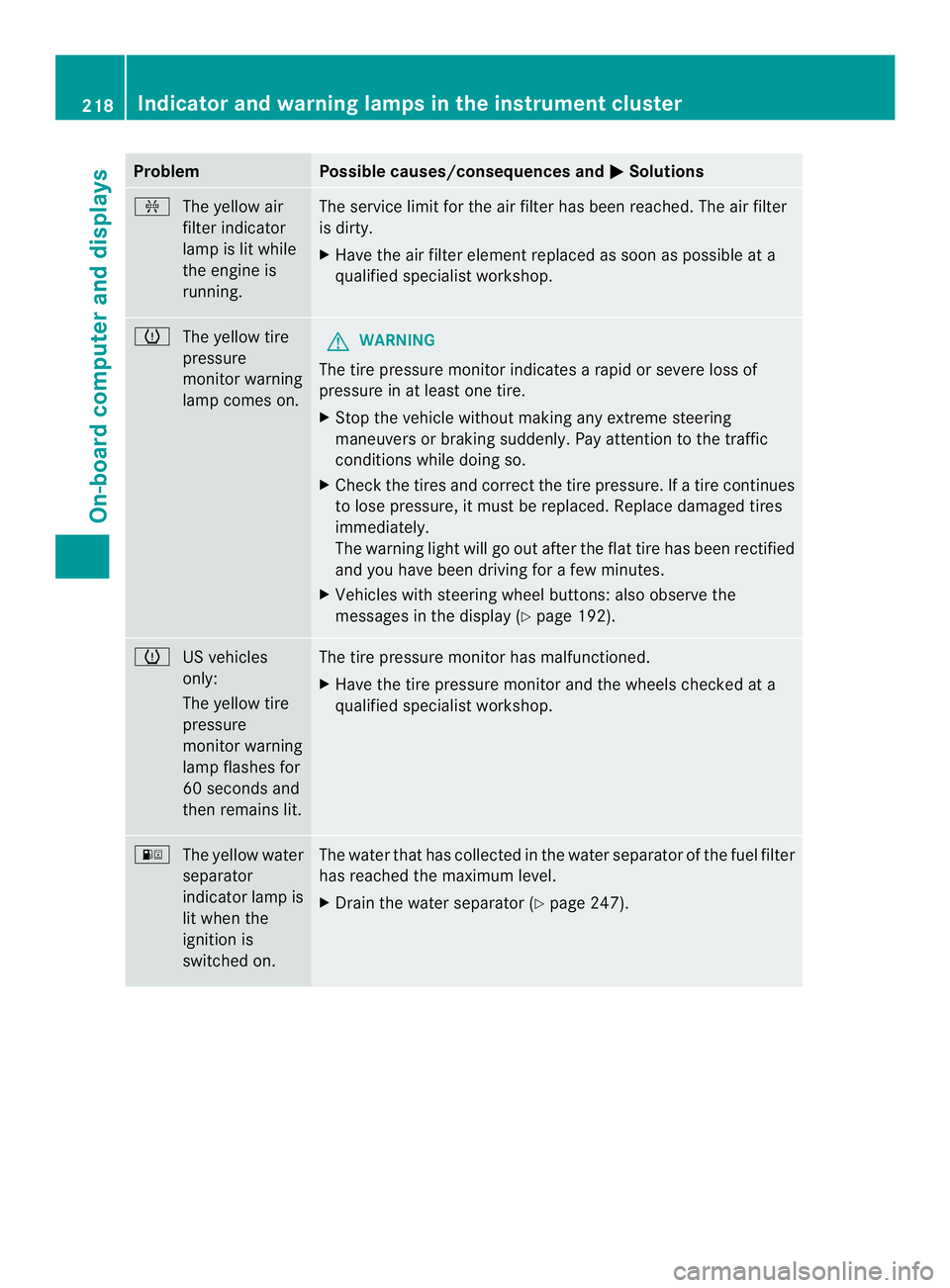
Problem Possible causes/consequences and
0004 Solutions
0013
The yellow air
filter indicator
lamp is lit while
the engine is
running. The service limit for the air filter has been reached. The air filter
is dirty.
X
Have the air filter element replaced as soon as possible at a
qualified specialist workshop. 000A
The yellow tire
pressure
monitor warning
lamp comes on. G
WARNING
The tire pressure monitor indicates a rapid or severe loss of
pressure in at least one tire.
X Stop the vehicle without making any extreme steering
maneuvers or braking suddenly. Pay attention to the traffic
conditions while doing so.
X Check the tires and correctt he tire pressure. If a tire continues
to lose pressure, it must be replaced. Replace damaged tires
immediately.
The warning light will go out after the flat tire has been rectified
and you have been driving for a few minutes.
X Vehicles with steering wheel buttons: also observe the
messages in the display (Y page 192).000A
US vehicles
only:
The yellow tire
pressure
monitor warning
lamp flashes for
60 seconds and
then remains lit. The tire pressure monitor has malfunctioned.
X
Have the tire pressure monitor and the wheels checked at a
qualified specialist workshop. 000E
The yellow water
separator
indicator lamp is
lit when the
ignition is
switched on. The water that has collected in the water separator of the fuel filter
has reached the maximum level.
X
Drain the water separator (Y page 247).218
Indicator and warning lamps in the instrument clusterOn-board computer and displays
Page 235 of 334
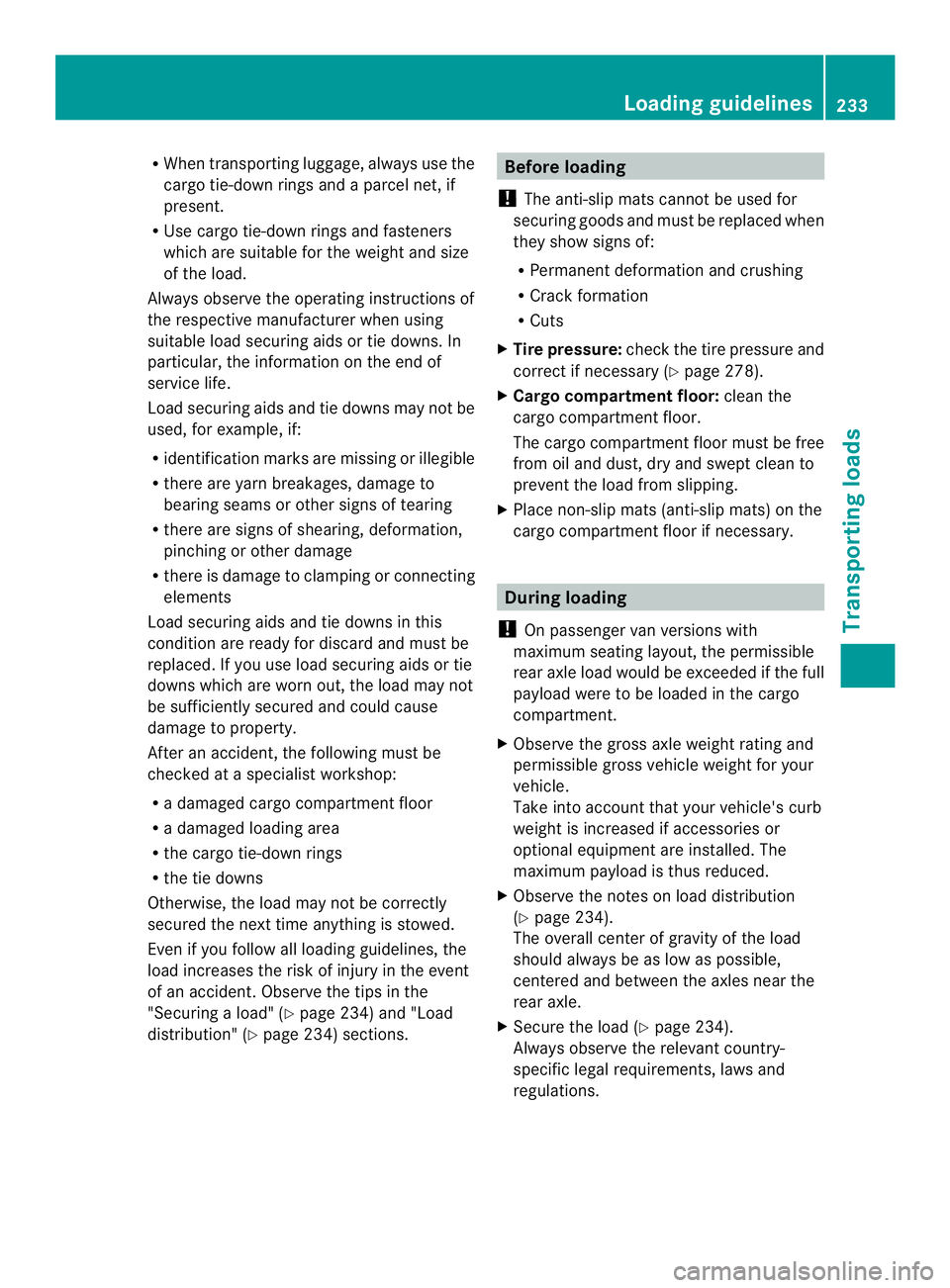
R
When transporting luggage, always use the
cargo tie-down rings and a parcel net, if
present.
R Use cargo tie-down rings and fasteners
which are suitable for the weight and size
of the load.
Always observe the operating instructions of
the respective manufacturer when using
suitable load securing aids or tie downs. In
particular, the information on the end of
service life.
Load securing aids and tie downs may not be
used, for example, if:
R identification marks are missing or illegible
R there are yarn breakages, damage to
bearing seams or other signs of tearing
R there are signs of shearing, deformation,
pinching or other damage
R there is damage to clamping or connecting
elements
Load securing aids and tie downs in this
condition are ready for discard and must be
replaced. If you use load securing aids or tie
downs which are worn out, the load may not
be sufficiently secured and could cause
damage to property.
After an accident, the following must be
checked at a specialist workshop:
R a damaged cargo compartment floor
R a damaged loading area
R the cargo tie-down rings
R the tie downs
Otherwise, the load may not be correctly
secured the nextt ime anything is stowed.
Even if you follow all loading guidelines, the
load increases the risk of injury in the event
of an accident. Observe the tips in the
"Securing a load" (Y page 234) and "Load
distribution" (Y page 234) sections. Before loading
! The anti-slip mats cannot be used for
securing goods and must be replaced when
they show signs of:
R Permanent deformation and crushing
R Crack formation
R Cuts
X Tire pressure: checkthe tire pressure and
correct if necessary (Y page 278).
X Cargo compartment floor: clean the
cargo compartment floor.
The cargo compartmentf loor must be free
fro mo il and dust, dry and swept clean to
prevent the load fro mslipping.
X Place non-slip mats (anti-slip mats) on the
cargo compartment floor if necessary. During loading
! On passenger van versions with
maximum seating layout, the permissible
rear axle load would be exceeded if the full
payload were to be loaded in the cargo
compartment.
X Observe the gross axle weight rating and
permissible gross vehicle weight for your
vehicle.
Take into account that your vehicle's curb
weight is increased if accessories or
optional equipmen tare installed. The
maximu mpayload is thus reduced.
X Observe the notes on load distribution
(Y page 234).
The overall cente rofgravity of the load
should always be as low as possible,
centered and between the axles near the
rear axle.
X Secure the load (Y page 234).
Always observe the relevant country-
specific legal requirements, laws and
regulations. Loading guidelines
233Transporting loads Z