brake light MERCEDES-BENZ SPRINTER 2013 MY13 Operator’s Manual
[x] Cancel search | Manufacturer: MERCEDES-BENZ, Model Year: 2013, Model line: SPRINTER, Model: MERCEDES-BENZ SPRINTER 2013Pages: 334, PDF Size: 3.88 MB
Page 159 of 334
Deactivating cruise control
There are various ways to deactivate cruise
control:
X Briefly press the cruise control lever
forwards 0025.
Or
X Apply the brakes.
The last speed set remains stored. The last
speed stored is deleted when you switch off
the engine.
Cruise control is deactivated automatically
when:
R you apply the brakes
R you apply the parking brake and the 000B
indicator lamp in the instrument cluster
lights up
R you are driving slower than 20 mph
(30 km/h)
R you shift the automatic transmissio nto
neutral position Nwhile the vehicle is in
motion
R ESP ®
or ASR intervenes
R there is a malfunction in the ESP ®
, ASR or
ABS system
Problems with cruise control On vehicles with steering wheel buttons, the
speed canno
tbe set when cruise control is
activated.
The display is showing a message of high
priority and cannot therefore show a change
in speed.
X Proceed as instructed by the message in
the display.
X Deactivate cruise control PARKTRONIC
Important safety notes PARKTRONIC is only an aid. It cannot replace
your own awareness of the immediate
surroundings. You are responsible for safe maneuvering, parking and pulling away. When
maneuvering, parking and pulling away, make
sure that there are no persons, animals or
objects in the maneuverin
garea.
PARKTRONIC does not account for obstacles
that are:
R beneath its detection range, e.g. persons,
animals or objects
R above its detection range, e.g. overhanging
loads, overhangs or truck loading ramps
PARKTRONIC is an electronic parking aid with
ultrasonic sensors. It indicates the distance
between yourv ehicle and an objec tvisually
and audibly.
Your vehicle features two separate sound
emitters with different frequencies for the
warning tones. The warning ranges in front of
and behind the vehicle are indicated by
different warning tones.
PARKTRONIC is activated automatically when
you:
R tur nthe key to position 2in the ignition lock
R release the parking brake and
R move the selector lever to D,Nor R.
PARKTRONIC is deactivated at speeds above
11 mph (18 km/h). PARKTRONIC is
reactivated at speeds below 10 mph
(16 km/h).
PARKTRONIC monitors the area around your
vehicle with sensors in the front and rear
bumpers.
Range of the sensors !
Pay particular attention to obstacles
above or below the sensors when parking,
such as flower pots or trailer towbars.
PARKTRONIC does not recognize such
objects when they are in the immediate
vicinity of the vehicle. You could damage
the vehicle or objects. Driving systems
157Driving and parking Z
Page 160 of 334
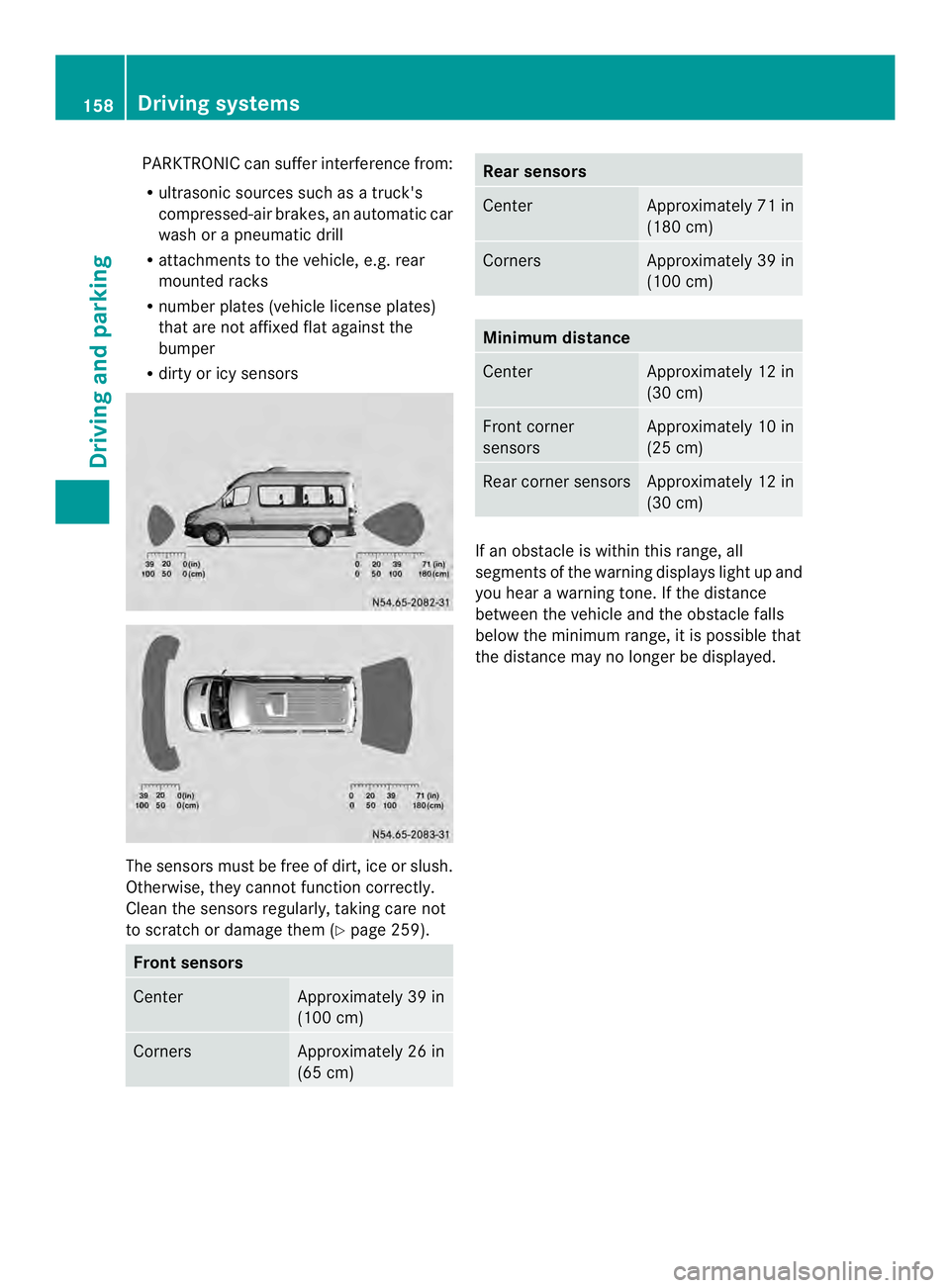
PARKTRONIC can suffer interferenc
efrom:
R ultrasonic sources such as atruck's
compressed-ai rbrakes, an automatic car
wash or a pneumatic drill
R attachments to the vehicle, e.g. rear
mounted racks
R number plates (vehicle license plates)
that are not affixed flat against the
bumper
R dirty or icy sensors The sensors must be free of dirt, ice or slush.
Otherwise, they cannot function correctly.
Clean the sensors regularly, taking care not
to scratch or damage them (Y
page 259).Fron
tsensors Center Approximately 39 in
(100 cm)
Corners Approximately 26 in
(65 cm) Rea
rsensors Center Approximately 71 in
(180 cm)
Corners Approximately 39 in
(100 cm)
Minimum distance
Center Approximately 12 in
(30 cm)
Front corner
sensors Approximately 10 in
(25 cm)
Rear corner sensors Approximately 12 in
(30 cm)
If an obstacle is within this range, all
segments of the warning displays light up and
you hear a warning tone. If the distance
between the vehicle and th
eobstacle falls
below the minimum range, it is possible that
the distance may no longer be displayed. 158
Driving systemsDriving and parking
Page 164 of 334
for safe maneuvering and parking. When
maneuvering and parking, make sure that
there are no persons, animals or objects in
the maneuvering area.
The rear view camera is
avisual parking aid.
It shows you the area behind the vehicle on a
separate monitor on the center console.
The camera is in the middle of the roof above
the high-mounted brake lamp (Y page 259).
The rear view camera may show obstacles in
perspectival distortion, incorrectly or not at
all. The rear view camera cannot display all
objects located very near and/or under the
rear bumper. It does not warn you of a
collision, persons or objects.
The area behind the vehicle is displayed in a
mirrored fashion, as in the rear-view mirror or
the exterior mirrors. The guide lines displayed
assist you in backing up.
The function of the rear view camera may be
partially or completely impaired in the
following circumstances:
R it is raining very heavily or snowing, or it is
foggy.
R the parking space is located in a very dark
place.
R the camera is exposed to very strong white
light .White stripes may appearont he
display.
R the surrounding area is illuminated with
fluorescent light. The displaym ay flicker.
R if the temperature changes very quickly, for
example if you drive int oaheated garage
in the winter.
R ambient temperatures are very high.
R the camera lens is dirty or obstructed.
R the rear of the vehicle is damaged. In this
case, have the position and setting
checked at a specialist workshop.
The rear view camera is switched on when
you engage reverse gear R.
You can find information on cleaning the
camera in the "Maintenance and care"
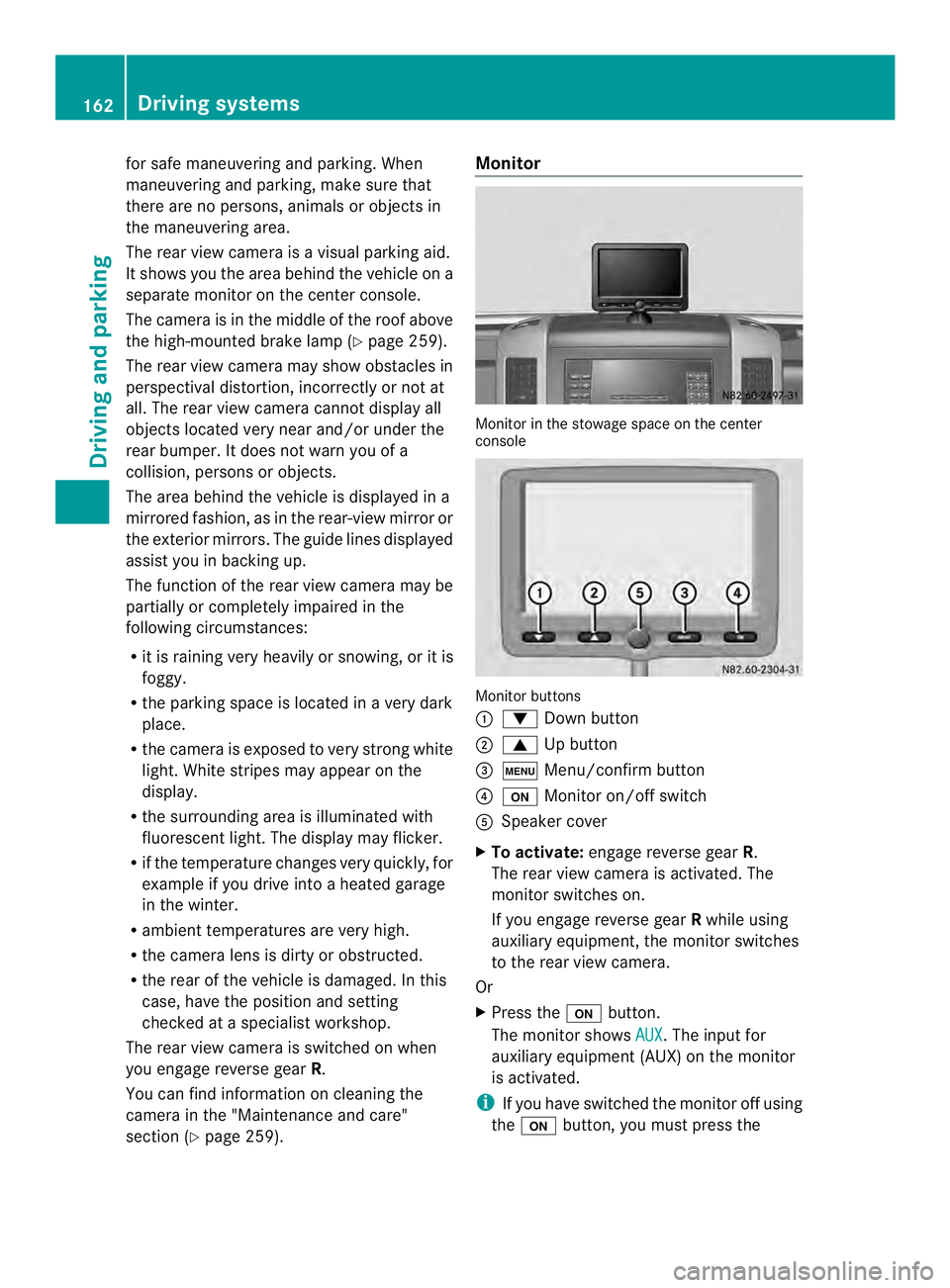
section (Y page 259). Monitor
Monitor in the stowage space on the center
console
Monitor buttons
0005
0008 Down button
0006 0006 Up button
0026 0003 Menu/confirm button
0025 0004 Monitor on/off switch
0023 Speaker cover
X To activate: engage reverse gear R.
The rear view camera is activated. The
monitor switches on.
If you engage reverse gear Rwhile using
auxiliary equipment, the monitor switches
to the rear view camera.
Or
X Press the 0004button.
The monitor shows AUX .T
he input for
auxiliary equipment (AUX) on the monitor
is activated.
i If you have switched the monitor off using
the 0004 button, you must press the 162
Driving systemsDriving and parking
Page 169 of 334
Problems with the rear view camera
Problem Possible causes/consequences and
0004 Solutions
After reverse gear is
selected, white lines
appear on the monitor
or the picture flickers. The rear view camera is exposed to very bright white light or
fluorescent light.
X
Check whether the rear view camera works at another location. The rear view camera is
functioning incorrectly
or not at all. R
The surrounding area is very dark.
R The outside temperature has changed rapidly or is very high.
R The camera lens is dirty or obstructed.
X Check the rear view camera and clean the camera lens if
necessary (Y page 259). Working mode
ADR (working speed governor)
General notes When activated, ADR automatically increases
the engine speed to a preset speed or a speed
you have set.
i After a cold start, the idling speed of the
engine is increased automatically. If the
preset working speed is lower than the
increased idling speed, the working speed
is only reached once the engine has
completed the warm-up phase.
It is only possible to activate ADR with the
vehicle stationary and the parking brake
applied.
The selector lever of the automatic
transmission must be in position P.Activating/deactivating ADR X
To activate: press the upper section of the
0023 switch while the engine is running.
The indicator lamp in the switch comes on.
The 0004 indicator lamp in the instrument
cluster lights up or the display shows the
following message: Operating speed governor active .
X To deactivate: press lower section of the
0023 switch while the engine is running.
The indicator lamp in the switch goes out.
ADR is automatically deactivated if:
R you release the parking brake.
R the brake pedal is depressed.
R the vehicle moves.
R the control unit detects a malfunction. Working mode
167Driving and parking Z
Page 174 of 334
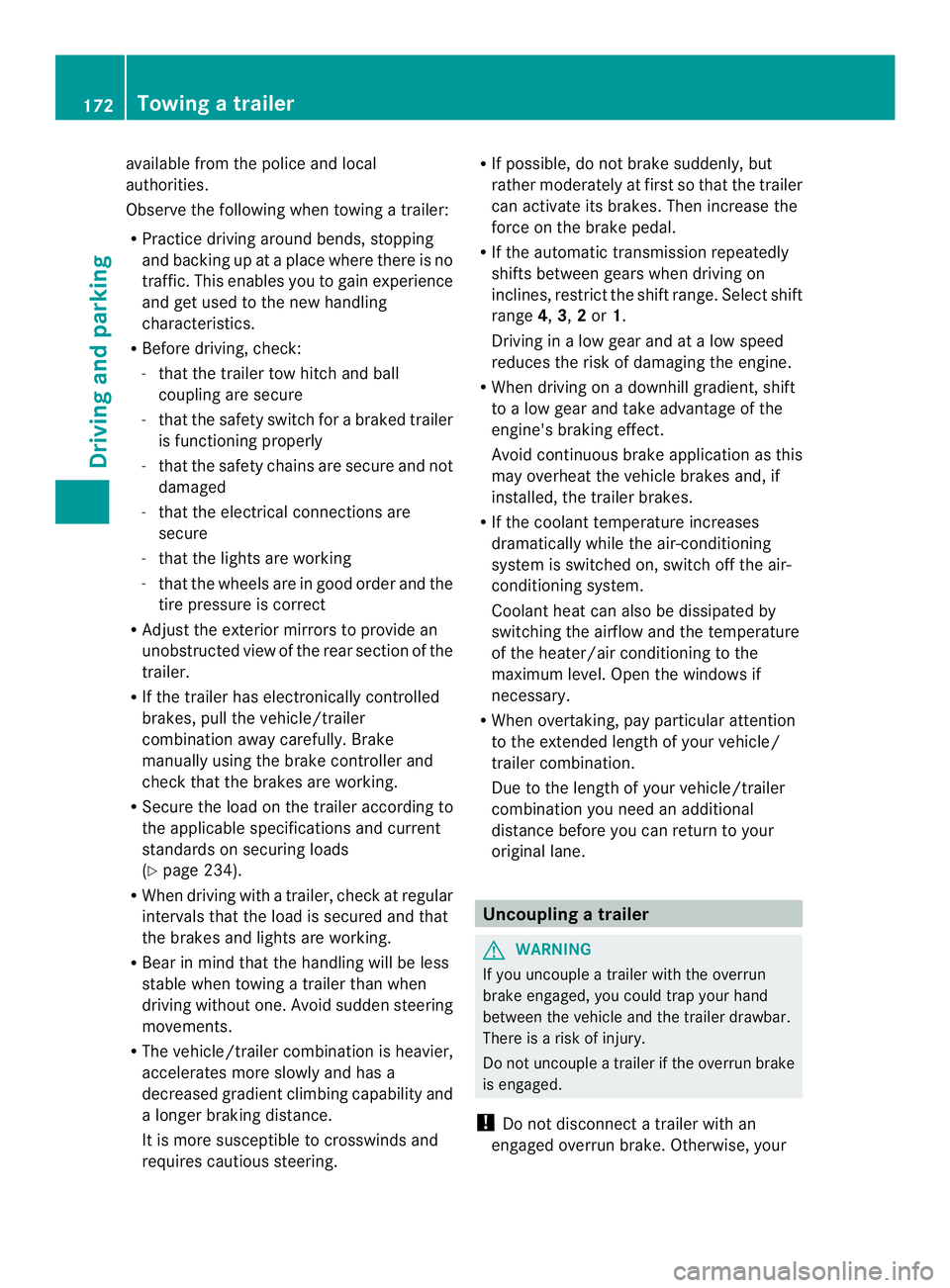
available from the police and local
authorities.
Observe the following when towing a trailer:
R
Practice driving around bends, stopping
and backing up at a place where there is no
traffic. This enables you to gain experience
and get used to the new handling
characteristics.
R Before driving, check:
-that the trailer tow hitch and ball
coupling are secure
- that the safety switch for a braked trailer
is functioning properly
- that the safety chains are secure and not
damaged
- that the electrical connections are
secure
- that the lights are working
- that the wheels are in good order and the
tire pressure is correct
R Adjust the exterior mirrors to provide an
unobstructed view of the rear sectio nofthe
trailer.
R If the trailer has electronically controlled
brakes, pull the vehicle/trailer
combination away carefully. Brake
manually using the brake controller and
check that the brakes are working.
R Secure the load on the trailer according to
the applicable specifications and current
standards on securing loads
(Y page 234).
R When driving with a trailer, check at regular
intervals that the load is secured and that
the brakes and lights are working.
R Bear in mind that the handling will be less
stable when towing a trailer than when
driving without one. Avoid sudden steering
movements.
R The vehicle/trailer combination is heavier,
accelerates more slowly and has a
decreased gradient climbing capability and
a longer braking distance.
It is more susceptible to crosswinds and
requires cautious steering. R
If possible, do not brake suddenly, but
rather moderately at first so that the trailer
can activate its brakes. Then increase the
force on the brake pedal.
R If the automatic transmission repeatedly
shifts between gears when driving on
inclines, restrict the shift range. Select shift
range 4,3,2or 1.
Driving in a low gear and at a low speed
reduces the risk of damaging the engine.
R When driving on a downhill gradient, shift
to a low gear and take advantage of the
engine's braking effect.
Avoid continuous brake application as this
may overheat the vehicle brakes and, if
installed, the trailer brakes.
R If the coolant temperature increases
dramatically while the air-conditioning
system is switched on, switch off the air-
conditioning system.
Coolant heat can also be dissipated by
switching the airflow and the temperature
of the heater/air conditioning to the
maximum level. Open the windows if
necessary.
R When overtaking, pay particular attention
to the extended length of your vehicle/
trailer combination.
Due to the length of your vehicle/trailer
combination you need an additional
distance before you can return to your
original lane. Uncoupling
atrailer G
WARNING
If you uncouple a trailer with the overrun
brake engaged, you could trap your hand
between the vehicle and the trailer drawbar.
There is a risk of injury.
Do not uncouple a trailer if the overru nbrake
is engaged.
! Do not disconnect a trailer with an
engaged overru nbrake. Otherwise, your 172
Towing
atrailerDriving an d parking
Page 203 of 334
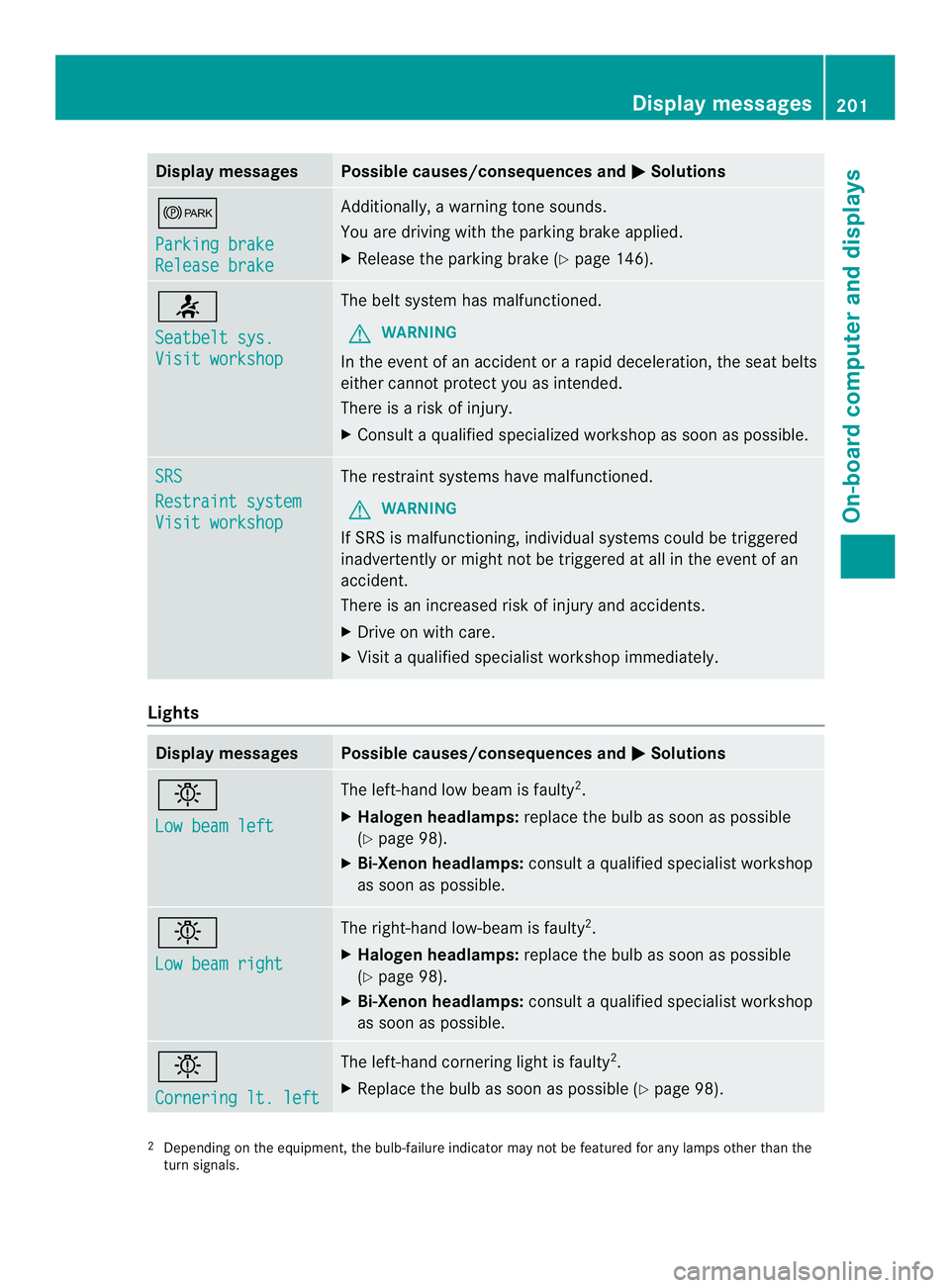
Display messages Possible causes/consequences and
0004 Solutions
000B
Parking brake
Release brake Additionally, a warning tone sounds.
You are driving with the parking brake applied.
X
Release the parking brake ( Ypage 146). 0014
Seatbelt sys.
Visit workshop The belt system has malfunctioned.
G WARNING
In the event of an acciden torarapid deceleration, the seat belts
either cannot protect you as intended.
There is a risk of injury.
X Consult a qualified specialized workshop as soon as possible. SRS
Restraint system
Visit workshop The restraint systems have malfunctioned.
G WARNING
If SRS is malfunctioning, individual systems could be triggered
inadvertently or might not be triggered at all in the event of an
accident.
There is an increased risk of injury and accidents.
X Drive on with care.
X Visi taqualified specialist workshop immediately. Lights
Display messages Possible causes/consequences and
0004 Solutions
0002
Low beam left The left-hand low beam is faulty
2
.
X Halogen headlamps: replace the bulb as soon as possible
(Y page 98).
X Bi-Xenon headlamps: consult a qualified specialist workshop
as soon as possible. 0002
Low beam right The right-hand low-beam is faulty
2
.
X Halogen headlamps: replace the bulb as soon as possible
(Y page 98).
X Bi-Xenon headlamps: consult a qualified specialist workshop
as soon as possible. 0002
Cornering lt. left The left-hand cornering light is faulty
2
.
X Replace the bulb as soon as possible (Y page 98).2
Depending on the equipment ,the bulb-failure indicator may not be featured for any lamps other than the
turn signals. Display messages
201On-board computer and displays Z
Page 204 of 334
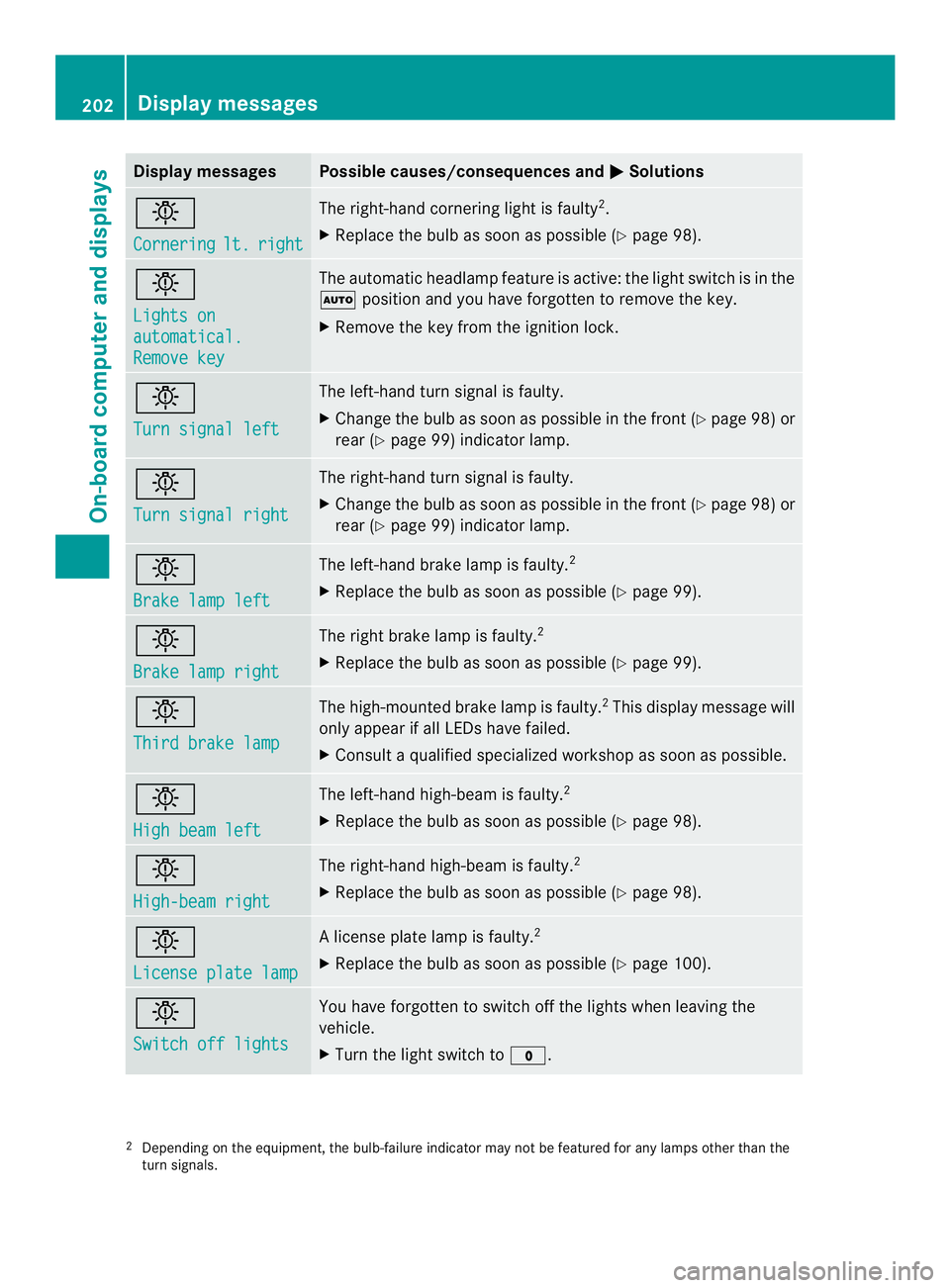
Display messages Possible causes/consequences and
0004 Solutions
0002
Cornering
lt. right The right-hand cornering ligh
tis faulty 2
.
X Replace the bulb as soon as possible (Y page 98).0002
Lights on
automatical.
Remove key The automatic headlamp feature is active: the light switch is in the
0007
position and you have forgotten to remove the key.
X Remove the key from the ignition lock. 0002
Turn signal left The left-hand turn signal is faulty.
X
Change the bulb as soon as possible in the front (Y page 98) or
rear (Y page 99) indicator lamp. 0002
Turn signal right The right-hand turn signal is faulty.
X
Change the bulb as soon as possible in the front (Y page 98) or
rear (Y page 99) indicator lamp. 0002
Brake lamp left The left-hand brake lamp is faulty.
2
X Replace the bulb as soon as possible (Y page 99).0002
Brake lamp right The right brake lamp is faulty.
2
X Replace the bulb as soon as possible (Y page 99).0002
Third brake lamp The high-mounted brake lamp is faulty.
2
This display message will
only appearifa ll LEDs have failed.
X Consult a qualified specialized workshop as soon as possible. 0002
High beam left The left-hand high-beam is faulty.
2
X Replace the bulb as soon as possible (Y page 98).0002
High-beam right The right-hand high-beam is faulty.
2
X Replace the bulb as soon as possible (Y page 98).0002
License plate lamp Al
icense plate lamp is faulty. 2
X Replace the bulb as soon as possible (Y page 100).0002
Switch off lights You have forgotten to switch off the lights when leaving the
vehicle.
X
Turn the light switch to 000C.2
Depending on the equipment, the bulb-failure indicator may not be featured for any lamps other than the
turn signals. 202
Display messagesOn-board computer and displays
Page 216 of 334
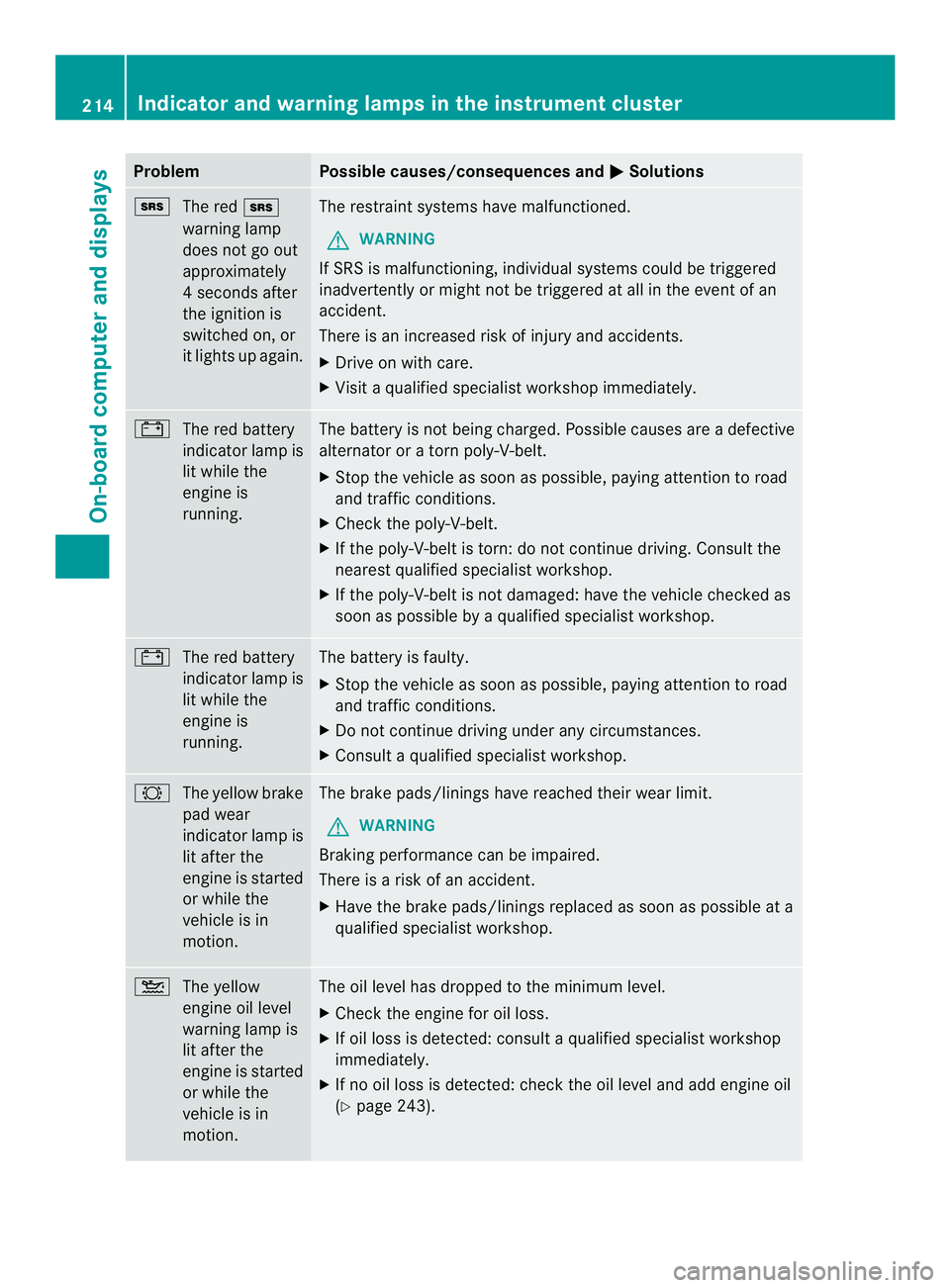
Problem Possible causes/consequences and
0004 Solutions
0008
The red 0008
warning lamp
does not go out
approximately
4s econds after
the ignition is
switched on, or
it lights up again. The restraint systems have malfunctioned.
G WARNING
If SRS is malfunctioning, individual systems could be triggered
inadvertently or might not be triggered at all in the event of an
accident.
There is an increased risk of injury and accidents.
X Drive on with care.
X Visit a qualified specialist workshop immediately. 0010
The red battery
indicator lamp is
lit while the
engine is
running. The battery is not being charged. Possible causes are a defective
alternator or a torn poly-V-belt.
X
Stop the vehicle as soon as possible, paying attention to road
and traffic conditions.
X Check the poly-V-belt.
X If the poly-V-belt is torn: do not continue driving. Consult the
nearest qualified specialist workshop.
X If the poly-V-belt is not damaged: have the vehicle checked as
soon as possible by a qualified specialist workshop. 0010
The red battery
indicator lamp is
lit while the
engine is
running. The battery is faulty.
X
Stop the vehicle as soon as possible, paying attention to road
and traffic conditions.
X Do not continue driving under any circumstances.
X Consult a qualified specialist workshop. 0005
The yellow brake
pad wear
indicator lamp is
lit after the
engine is started
or while the
vehicle is in
motion. The brake pads/linings have reached their wear limit.
G WARNING
Braking performance can be impaired.
There is a risk of an accident.
X Have the brake pads/linings replaced as soon as possible at a
qualified specialist workshop. 001D
The yellow
engine oil level
warning lamp is
lit after the
engine is started
or while the
vehicle is in
motion. The oil level has dropped to the minimum level.
X
Check the engine for oil loss.
X If oil loss is detected: consult a qualified specialist workshop
immediately.
X If no oil loss is detected: chec kthe oil level and add engine oil
(Y page 243). 214
Indicator and warning lamps in the instrument clusterOn-board computer and displays
Page 257 of 334
X
Recharge the removed battery. Observe
the notes in the operating instructions for
your battery charger.
X Install the battery. Observe the notes on
reconnecting the battery.
i If batteries are no tbeing used, you should
charge them once a month.
It is also possible to charge the starter
battery using the jump-starting connection
point in the engine compartment
(Y page 267). Care
! Dirty battery clamps and battery surfaces
cause leak currents which lead to the
batteries discharging.
! Do not use cleaning agents containing
fuel. Cleaning agents containing fuel
corrode the battery housing.
! If dirt gets into the battery cell, battery
self-discharge will increase and the battery
may be damaged.
The following points on battery care must be
observed:
X Regularly chec kthe battery terminals and
the fastening of the negative cable to the
chassis to ensure that they are firmly
seated.
X Always keep the battery terminals and
battery surfaces clean and dry.
X Lightly grease the undersides of the battery
terminals with acid-resistant grease.
X Only clean the batteries when the caps are
screwed on.
Otherwise, dirt could get into the battery
cells.
X Unscrew the caps and clean blocked
breathers with a suitable tool such as a
piece of wire.
If you do not unscrew the caps for cleaning,
there is a risk of short circuit. The breathers in the caps and the cell
ventilation tubes must be open. Otherwise,
gas cannot escape.
X Only clean the battery casing with a
commercially available cleaning product. Care
Notes on care
G
WARNING
If you use openings in the bodywork or
detachable parts as steps, you could:
R slip and/or fall
R damage the vehicle and cause yourself to
fall.
There is a risk of injury.
Always use secure climbing aids, e.g. a
suitable ladder.
! For cleaning your vehicle, do not use any
of the following:
R dry, rough or hard cloths
R abrasive cleaning agents
R solvents
R cleaning agents containing solvents
Do not scrub.
Do not touch the surfaces or protective
films with hard objects, e.g. a ring or ice
scraper. You could otherwise scratch or
damage the surfaces and protective film.
! Do not park the vehicle for an extended
period straight after cleaning it, particularly
after having cleaned the wheels with wheel
cleaner. Wheel cleaners could cause
increased corrosion of the brake discs and
brake pads/linings. For this reason, you
should drive for a few minutes after
cleaning. Braking heats the brake discs and
the brake pads/linings, thus drying them.
The vehicle can then be parked. Care
255Maintenance and care Z
Page 258 of 334
H
Environmental note
Only clean your vehicle at specially designed
wash bays. Dispose of empt ycontainers and
used cleaning products in an environmentally
responsible manner. H
Environmental note
Dispose of empty packaging and cleaning
cloths in an environmentally responsible
manner.
Regula rcare of your vehicle is a condition for
retaining the quality in the long term.
Use care products and cleaning agents
recommended and approved for Sprinter
vehicles. Washing the vehicle and cleaning the
paintwork
Automatic car wash G
WARNING
Braking efficiency is reduced after washing
the vehicle .There is a risk of an accident.
After the vehicle has been washed, brake
carefully while paying attention to the traffic
conditions until full braking power is restored.
! Never clean your vehicle in a Touchless
Automatic Car Wash as these use special
cleaning agents. These cleaning agents can
damage the paintwork or plastic parts.
! Make sure that the automatic car wash is
suitable for the size of the vehicle.
Before washing the vehicle in an automatic
car wash, fold in the exterior mirrors and
remove any additional antennas.
Otherwise, the exterior mirror, antenna or
the vehicle itself could be damaged.
Make sure that the exterior mirrors are fully
folded out again and that any additional
antennas are re-installed when you leave
the automatic car wash. !
Make sure that:
R the side windows and the roof are
completely closed
R the climate control blower is switched off
R the windshield wiper switch is at position
0
The vehicle could otherwise be damaged.
You can wash the vehicle in an automatic car
wash from the very start.
Wash off excess dirt before cleaning the
vehicle in an automatic car wash.
After putting the vehicle through an
automatic car wash, wipe off wax from:
R the rear view camera lens (Y page 259)
R the windshield
R the windshield wiper blades
This will prevent smears and reduce wiping
noises caused by residue on the
windshield.
Washing by hand In some countries, washing by hand is only
allowed at specially equipped washing bays.
Observe the legal requirements for each
individual country.
X
Do not use hot water and do not wash the
vehicle in direct sunlight.
X Use a soft car sponge.
X Use a mild cleaning agent, e.g. a car
shampoo approved for use with Sprinter
vehicles.
X Thoroughly hose down the vehicle with a
gentle jet of water.
X Do not point the water jet directly towards
the air inlets.
X Use plenty of water and rinse out the
sponge frequently.
X Rinse the vehicle with clean water and dry
thoroughly with a chamois.
X Do not let the cleaning agents dry on the
paintwork. 256
CareMaintenance and care