window MERCEDES-BENZ SPRINTER 2013 MY13 Operator’s Manual
[x] Cancel search | Manufacturer: MERCEDES-BENZ, Model Year: 2013, Model line: SPRINTER, Model: MERCEDES-BENZ SPRINTER 2013Pages: 334, PDF Size: 3.88 MB
Page 78 of 334
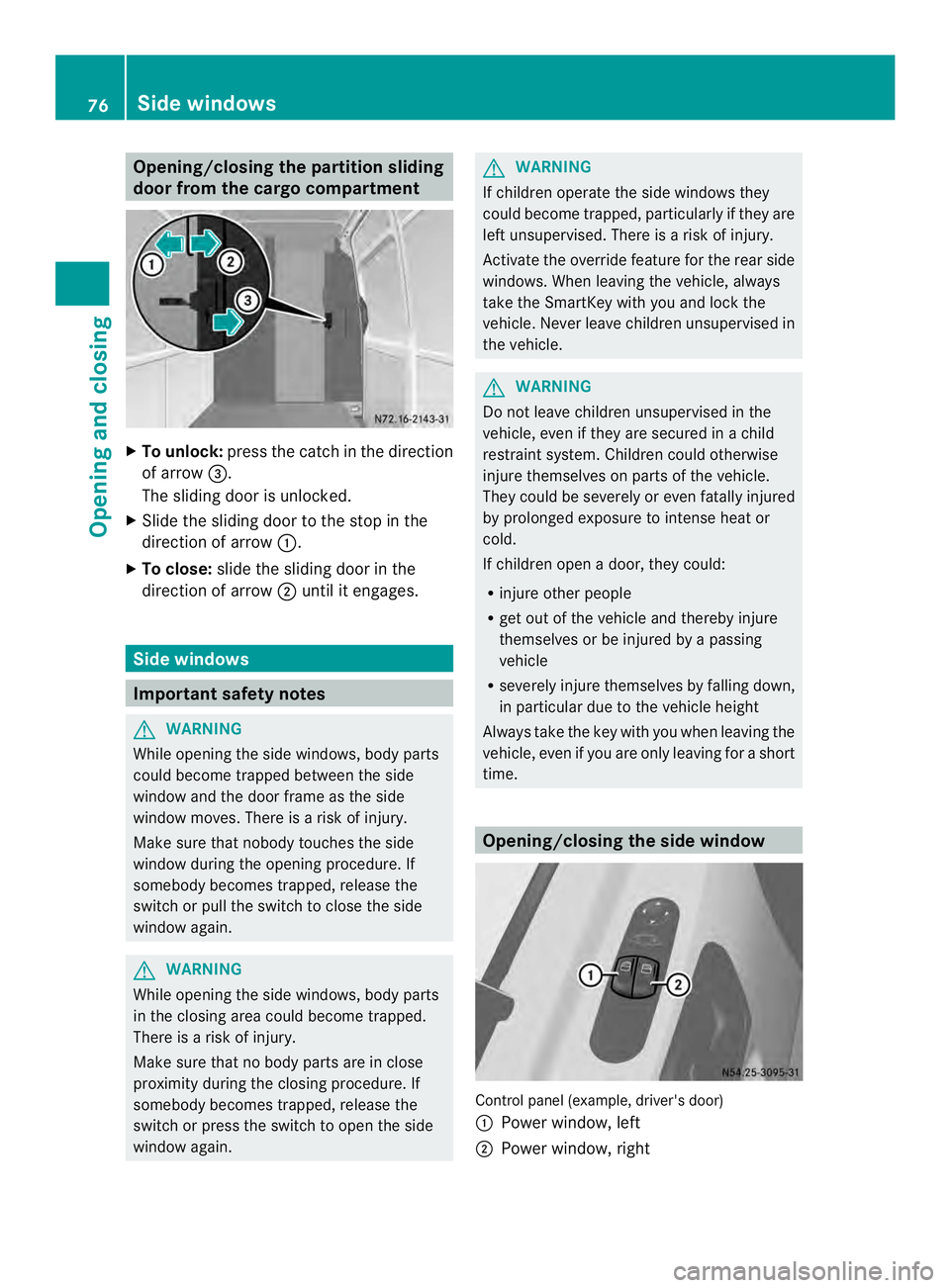
Opening/closing the partition sliding
door from the cargo compartment
X
To unlock: press the catch in the direction
of arrow 0026.
The sliding door is unlocked.
X Slide the sliding door to the stop in the
direction of arrow 0005.
X To close: slide the sliding door in the
direction of arrow 0006until it engages. Side windows
Important safety notes
G
WARNING
While opening the side windows, body parts
could become trapped between the side
window and the door frame as the side
window moves. There is a risk of injury.
Make sure that nobody touches the side
window during the opening procedure. If
somebody becomes trapped, release the
switch or pull the switch to close the side
window again. G
WARNING
While opening the side windows, body parts
in the closing area could become trapped.
There is a risk of injury.
Make sure that no body parts are in close
proximity during the closing procedure. If
somebody becomes trapped, release the
switch or press the switch to open the side
window again. G
WARNING
If children operate the side windows they
could become trapped, particularly if they are
left unsupervised. There is a risk of injury.
Activate the override feature for the rear side
windows. When leaving the vehicle, always
take the SmartKey with you and lock the
vehicle. Never leave children unsupervised in
the vehicle. G
WARNING
Do not leave children unsupervised in the
vehicle, even if they are secured in a child
restraint system. Children could otherwise
injure themselves on parts of the vehicle.
They could be severely or even fatally injured
by prolonged exposure to intense heat or
cold.
If children open a door, they could:
R injure other people
R get out of the vehicle and thereby injure
themselves or be injured by a passing
vehicle
R severely injure themselves by falling down,
in particular due to the vehicle height
Always take the key with you when leaving the
vehicle, even if you are only leaving for a short
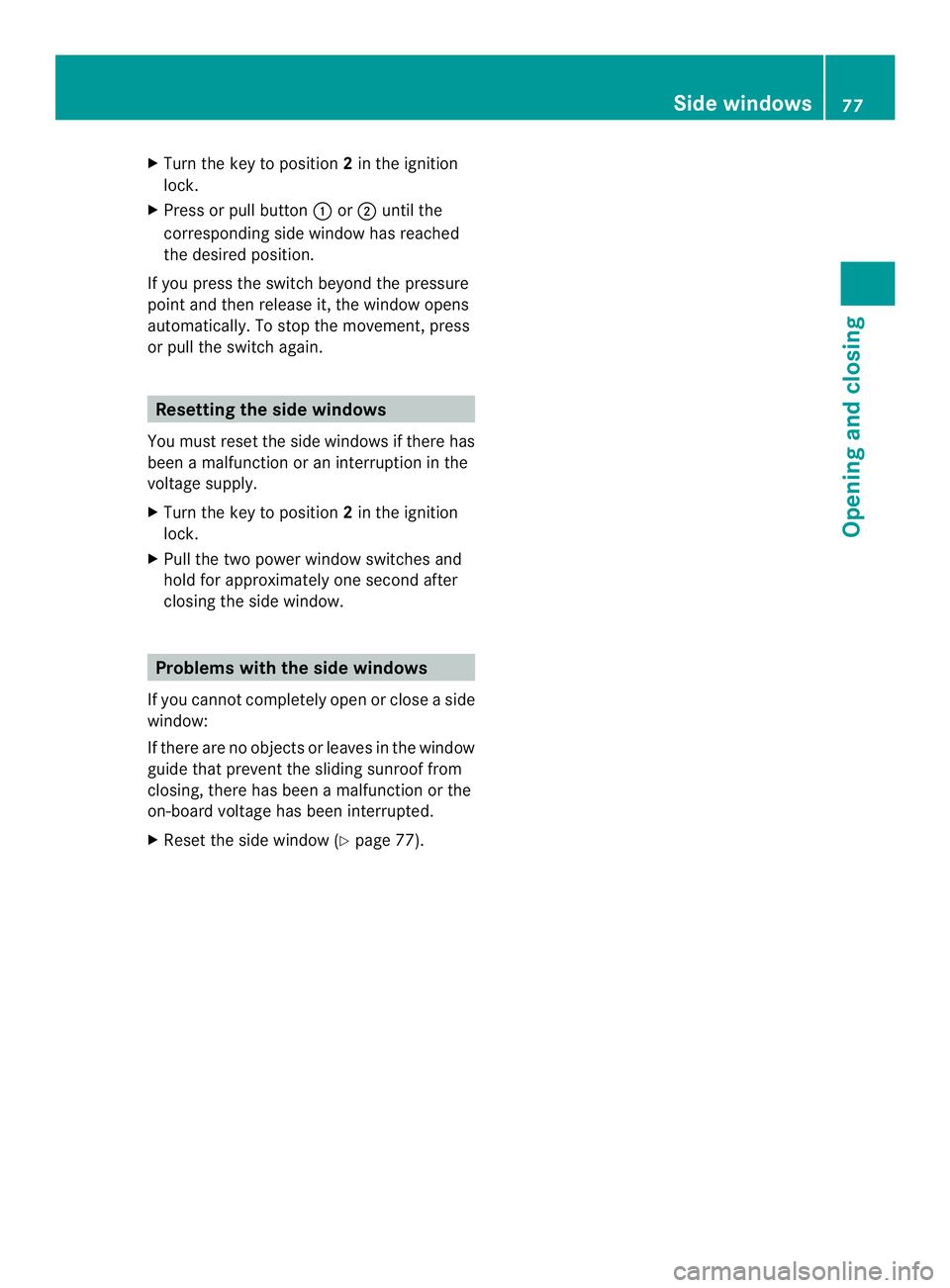
time. Opening/closing the side window
Control panel (example, driver's door)
0005
Power window, left
0006 Power window, right 76
Side windowsOpening and closing
Page 79 of 334
X
Turn the key to position 2in the ignition
lock.
X Press or pull button 0005or0006 until the
corresponding side window has reached
the desired position.
If you press the switch beyond the pressure
point and then release it, the window opens
automatically. To stop the movement, press
or pull the switch again. Resetting the side windows
You must reset the side windows if there has
been a malfunction or an interruption in the
voltage supply.
X Turn the key to position 2in the ignition
lock.
X Pull the two power window switches and
hold for approximately one second after
closing the side window. Problems with the side windows
If you cannot completely open or close a side
window:
If there are no objects or leaves in the window
guide that prevent the sliding sunroof from
closing, there has been a malfunction or the
on-board voltage has been interrupted.
X Reset the side window (Y page 77). Side windows
77Opening and closing Z
Page 106 of 334
X
Turn the key to position 1or 2in the
ignition lock.
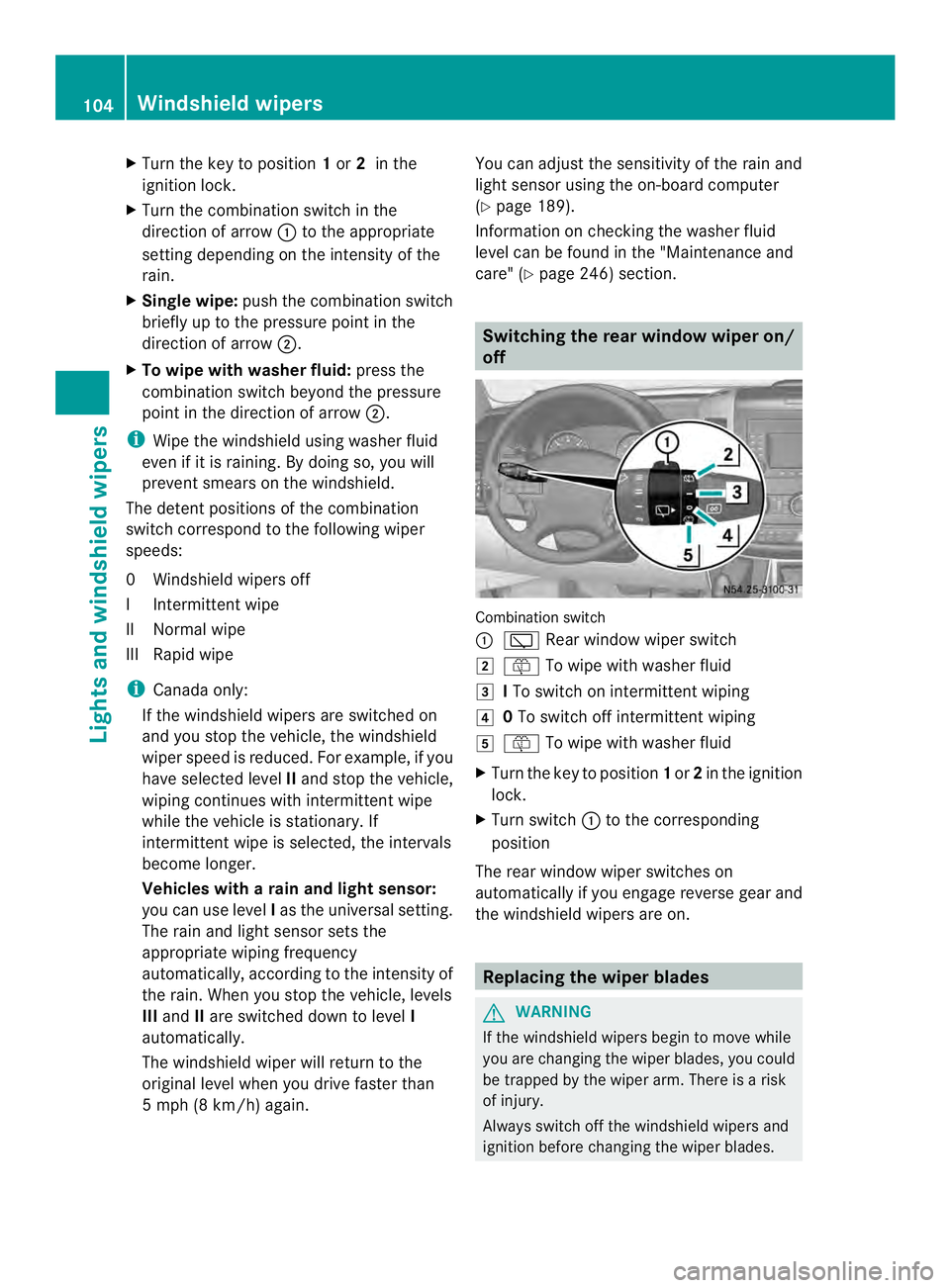
X Turn the combination switch in the
direction of arrow 0005to the appropriate
setting depending on the intensity of the
rain.
X Single wipe: push the combination switch
briefly up to the pressure point in the
direction of arrow 0006.
X To wipe with washer fluid: press the
combination switch beyond the pressure
point in the direction of arrow 0006.
i Wipe the windshield using washer fluid
even if it is raining. By doing so, you will
prevent smears on the windshield.
The detent positions of the combination
switch correspond to the following wiper
speeds:
0W indshield wipers off
II ntermittent wipe
II Normal wipe
III Rapid wipe
i Canada only:
If the windshield wipers are switched on
and you stop the vehicle, the windshield
wipe rspeed is reduced. For example, if you
have selected level IIand stop the vehicle,
wiping continues with intermitten twipe
while the vehicle is stationary. If
intermitten twipe is selected, the intervals
become longer.
Vehicles with arain and light sensor:
you can use level Ias the universal setting.
The rai nand light sensor sets the
appropriate wiping frequency
automatically, according to the intensity of
the rain. Whe nyou stop the vehicle, levels
III and IIare switched down to level I
automatically.
The windshield wiper will return to the
original level when you drive faster than
5 mph (8 km/h) again. You can adjust the sensitivity of the rain and
light sensor using the on-board computer
(Y
page 189).
Information on checking the washer fluid
level can be found in the "Maintenance and
care" (Y page 246) section. Switching the rear window wiper on/
off
Combination switch
0005
0001 Rear window wiper switch
0009 0006 To wipe with washer fluid
000A ITo switch on intermittent wiping
000E 0To switch off intermittent wiping
000F 0006 To wipe with washer fluid
X Turn the key to position 1or 2in the ignition
lock.
X Turn switch 0005to the corresponding
position
The rear window wiper switches on
automatically if you engage reverse gear and
the windshield wipers are on. Replacing the wiper blades
G
WARNING
If the windshield wipers begin to move while
you are changing the wiper blades, you could
be trapped by the wiper arm. There is a risk
of injury.
Always switch off the windshield wipers and
ignition before changing the wiper blades. 104
Windshield wipersLights and windshiel
dwipers
Page 107 of 334
!
Never open the hood if a windshield wiper
arm has been folded away from the
windshield.
Never fold a windshield wiper arm without
a wiper blade back onto the windshield/
rear window.
Hold the windshield wiper arm firmly when
you change the wiper blade. If you release
the windshield wiper arm without a wiper
blade and it falls onto the windshield, the
windshield may be damaged by the force of
the impact.
We recommend that you have the wiper
blades replaced at a qualified specialist
workshop.
! Only hold the wiper blade by the wiper
arm. You could otherwise damage the
wiper rubber.
The windshield will no longer be wiped
properly if the wiper blades are worn. Replace
the wiper blades twice a year, ideally in spring
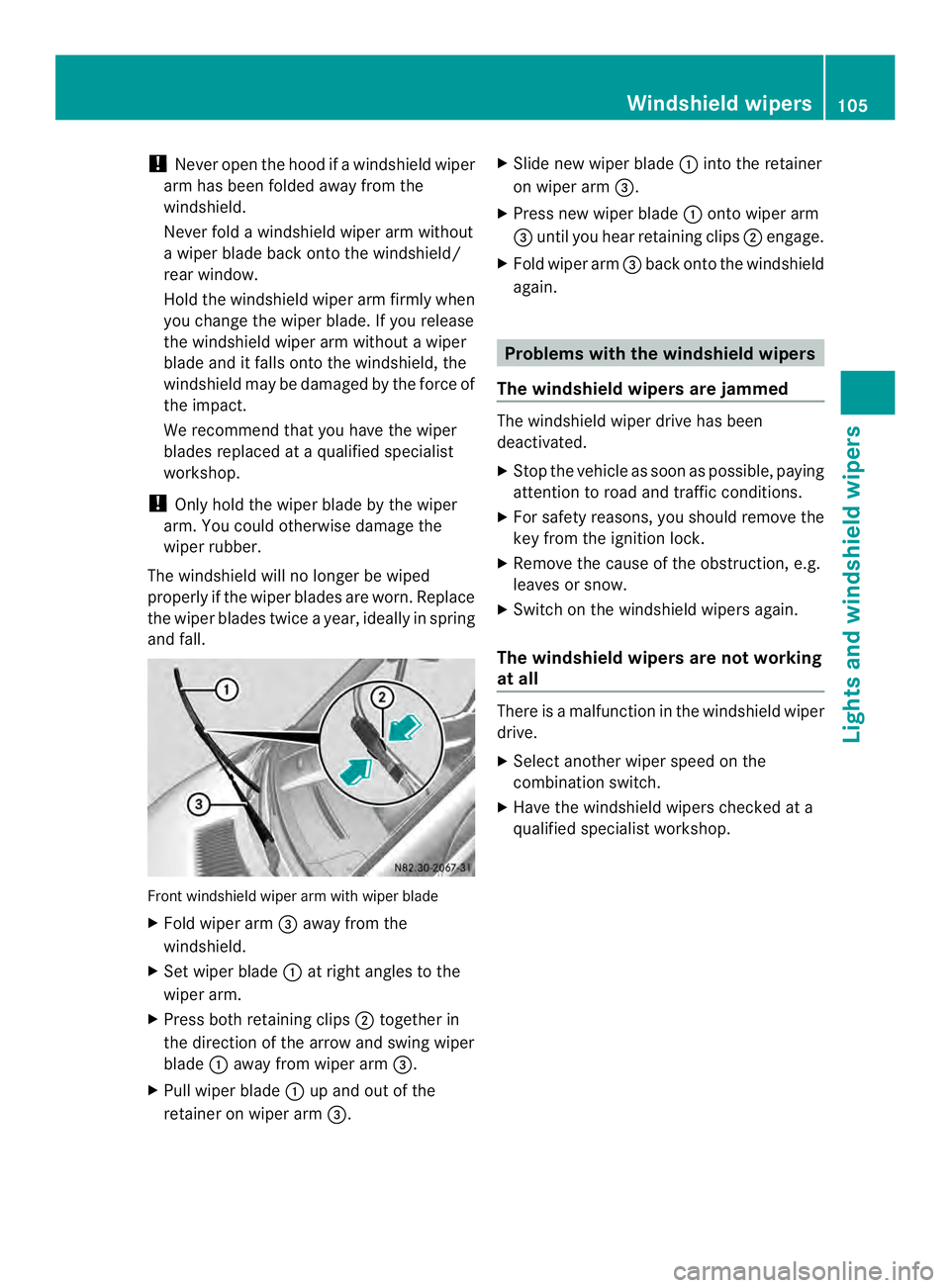
and fall. Front windshield wiper arm with wiper blade
X Fold wiper arm 0026away from the
windshield.
X Set wiper blade 0005at right angles to the
wiper arm.
X Press both retaining clips 0006together in
the direction of the arrow and swing wiper
blade 0005away from wiper arm 0026.
X Pull wiper blade 0005up and out of the
retainer on wiper arm 0026. X
Slide new wiper blade 0005into the retainer
on wiper arm 0026.
X Press new wiper blade 0005onto wiper arm
0026 until you hear retaining clips 0006engage.
X Fold wiper arm 0026back onto the windshield
again. Problems with the windshield wipers
The windshield wipers are jammed The windshield wiper drive has been
deactivated.
X
Stop the vehicle as soon as possible, paying
attention to road and traffic conditions.
X For safety reasons, you should remove the
key from the ignition lock.
X Remove the cause of the obstruction, e.g.
leaves or snow.
X Switch on the windshield wipers again.
The windshield wipers are not working
at all There is a malfunction in the windshield wiper
drive.
X
Select another wiper speed on the
combination switch.
X Have the windshield wipers checked at a
qualified specialist workshop. Windshield wipers
105Lights and windshield wipers Z
Page 110 of 334
Useful information
This Operator's Manual describes all models
as well as standard and optional equipment
of your vehicle that were available at the time
of going to print. Country-specific variations
are possible. Note that your vehicle may not
be equipped with all of the described
functions. This also applies to systems and
functions relevant to safety.
Read the information on qualified specialist
workshops (Y page 26). Overview of climate control systems
Important safety notes
Observe the recommended settings on the
following pages. Otherwise, the windows
could fog up.
Climate control regulates the temperature
and the humidity in the vehicle interior and
filters undesirable substances from the air.
Climate control is only operational when the
engine is running. The system only functions
optimally when the side windows are closed.
i Ventilate the vehicle for a brief period
during warm weather. In order to cool the
vehicle more rapidly, switch climate control
to air-recirculation mode briefly. This will
speed up the cooling process and the
desired vehicle interior temperature will be
reached more quickly.
i The integrated filter can filter out most
particles of dust and completely filters out
pollen. Aclogged filter reduces the airflow
into the vehicle interior .For this reason,
you should always observe the interval for
replacing the filter, which is specified in the
Maintenance Booklet .As it depends on
environmental conditions, e.g. heavy air
pollution, the interval may be shorter than
stated in the Maintenance Booklet. 108
Overview of climate control systemsClimate control
Page 111 of 334
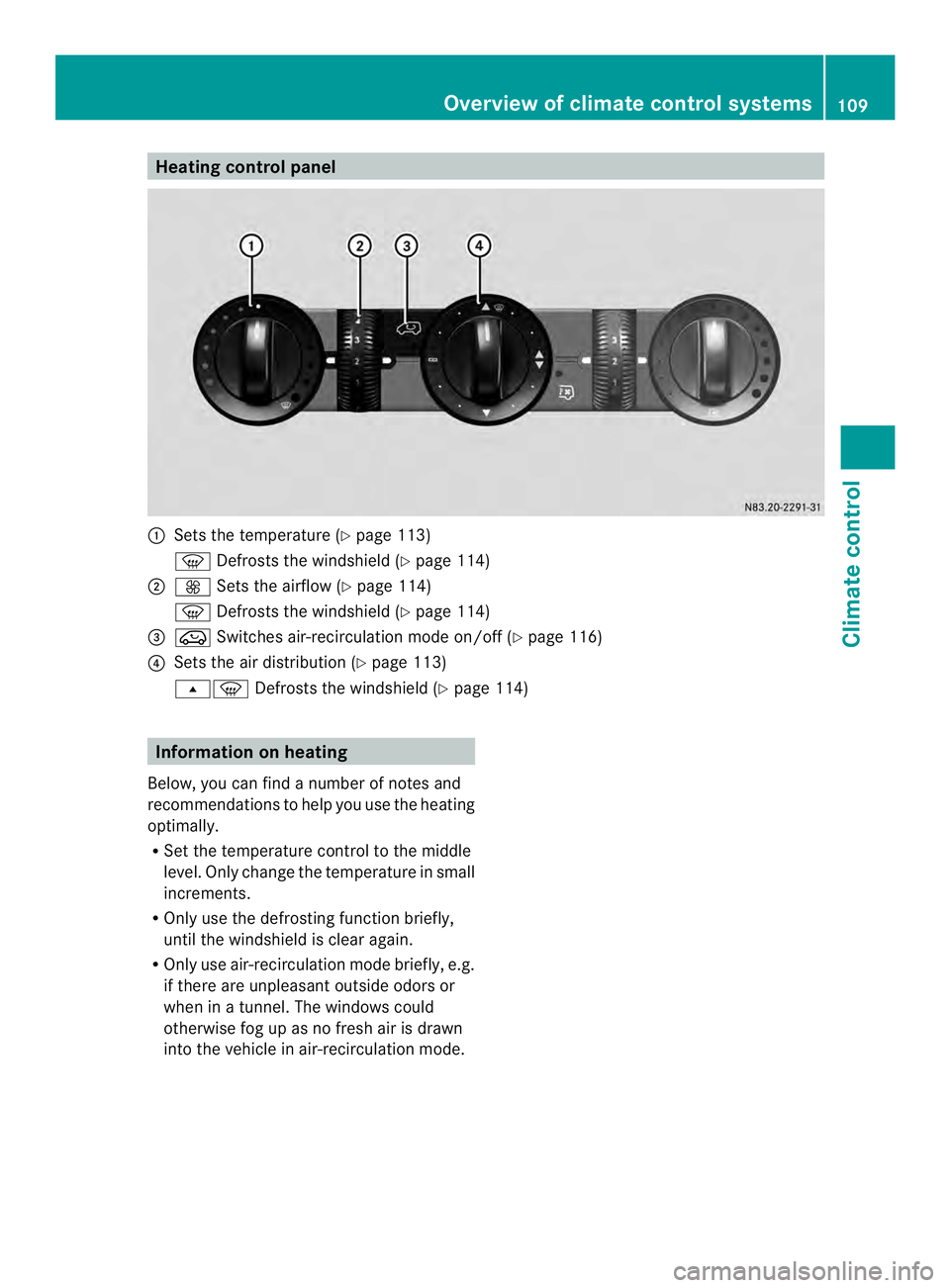
Heating control panel
0005
Sets the temperature (Y page 113)
0021 Defrosts the windshield (Y page 114)
0006 0026 Sets the airflow (Y page 114)
0021 Defrosts the windshield (Y page 114)
0026 0022 Switches air-recirculation mode on/off (Y page 116)
0025 Sets the air distribution (Y page 113)
000B0021 Defrosts the windshield (Y page 114)Information on heating
Below, you can find a number of notes and
recommendations to help you use the heating
optimally.
R Set the temperature control to the middle
level. Only change the temperature in small
increments.
R Only use the defrosting function briefly,
until the windshield is clea ragain.
R Only use air-recirculation mode briefly, e.g.
if there are unpleasant outside odors or
when in a tunnel. The windows could
otherwise fog up as no fresh air is drawn
into the vehicle in air-recirculation mode. Overview of climate control systems
109Climate control
Page 112 of 334
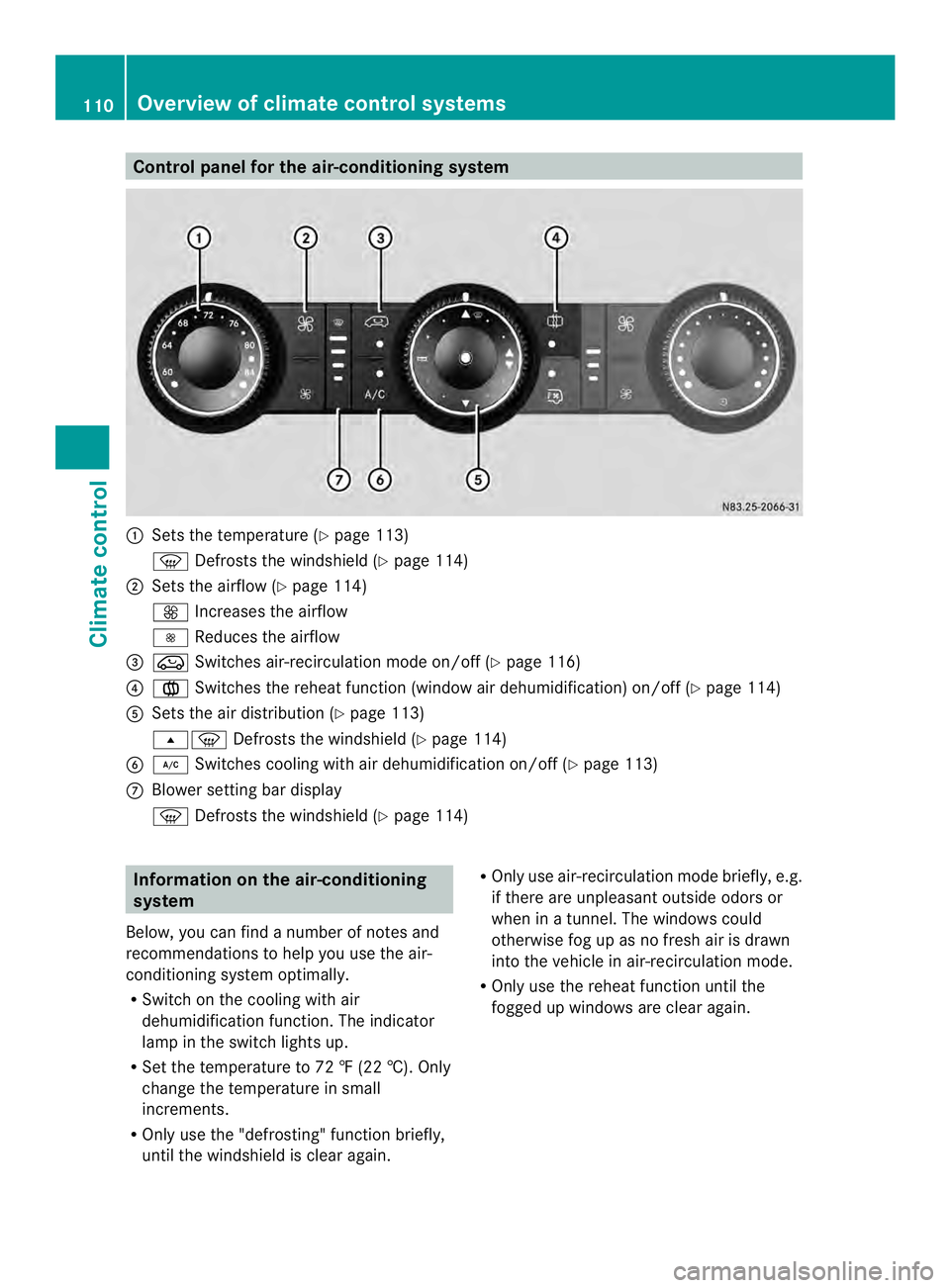
Control panel for the air-conditioning system
0005
Sets the temperature (Y page 113)
0021 Defrosts the windshield (Y page 114)
0006 Sets the airflow (Y page 114)
0026 Increases the airflow
0025 Reduces the airflow
0026 0022 Switches air-recirculation mode on/off (Y page 116)
0025 001F Switches the reheat function (window air dehumidification) on/of f(Ypage 114)
0023 Sets the air distribution (Y page 113)
000B0021 Defrosts the windshield (Y page 114)
0024 0008 Switches cooling with air dehumidification on/off ( Ypage 113)
0018 Blower setting bar display
0021 Defrosts the windshield (Y page 114)Information on the air-conditioning
system
Below, you can find a number of notes and
recommendations to help you use the air-
conditioning system optimally.
R Switch on the cooling with air
dehumidification function .The indicator
lamp in the switch lights up.
R Set the temperature to 72 ‡ (22 †). Only
change the temperature in small
increments.
R Only use the "defrosting" function briefly,
until the windshield is clear again. R
Only use air-recirculation mode briefly, e.g.
if there are unpleasant outside odors or
when in a tunnel. The windows could
otherwise fog up as no fresh air is drawn
into the vehicle in air-recirculation mode.
R Only use the reheat function until the
fogged up windows are clear again. 110
Overview of climate control systemsClimate control
Page 114 of 334
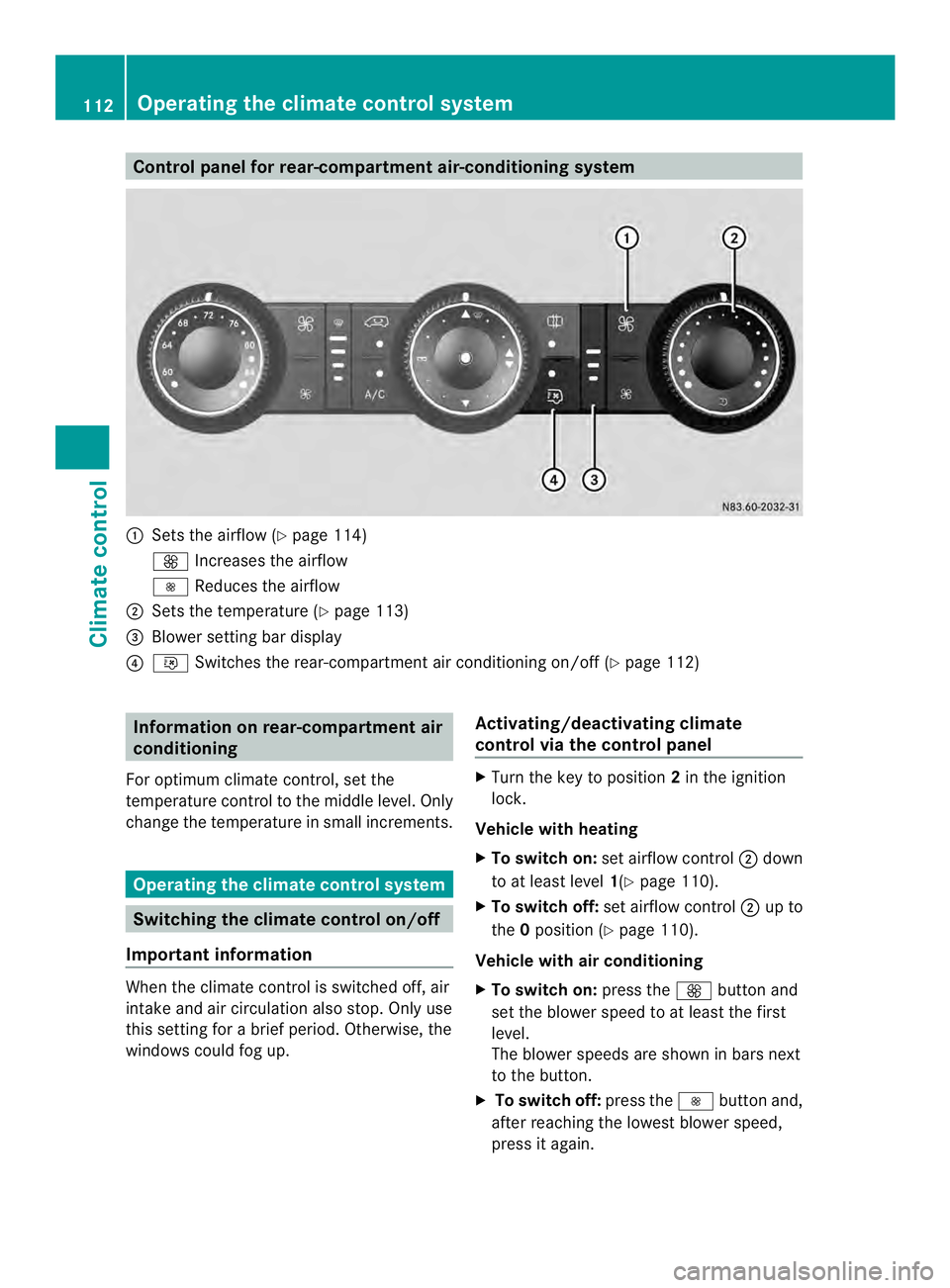
Control panel for rear-compartment air-conditioning system
0005
Sets the airflow (Y page 114)
0026 Increases the airflow
0025 Reduces the airflow
0006 Sets the temperature (Y page 113)
0026 Blower setting bar display
0025 001B Switches the rear-compartment air conditioning on/off (Y page 112)Information on rear-compartment air
conditioning
For optimum climate control, set the
temperature control to the middle level. Only
change the temperature in small increments. Operating the climate control system
Switching the climate control on/off
Important information When the climate control is switched off, air
intake and air circulation also stop. Only use
this setting for a brie
fperiod. Otherwise, the
windows could fog up. Activating/deactivating climate
control via the control panel X
Turn the key to position 2in the ignition
lock.
Vehicle with heating
X To switch on: set airflow control 0006down
to at least level 1(Ypage 110).
X To switch off: set airflow control 0006up to
the 0position (Y page 110).
Vehicle with air conditioning
X To switch on: press the0026button and
set the blower speed to at least the first
level.
The blower speeds are shown in bars next
to the button.
X To switch off: press the0025button and,
after reaching the lowest blower speed,
press it again. 112
Operating the climate control systemClimate control
Page 115 of 334
Activating/deactivating rear-
compartment climate control via the
control panel X
Turn the key to position 2in the ignition
lock.
Vehicle with rear-compartment heating/
rear-compartment air conditioning
X To switch on/off: press the001Bswitch.
If the indicator lamp in the butto nlights up,
the rear-compartment heating/rear-
compartmen tair conditioning is switched
on. Switching the cooling with air
dehumidification function on/off
Important information If you switch off the "Cooling with air
dehumidification" function, the air inside the
vehicle will not be cooled (in warm weather)
or dehumidified. The windows could fog up
more quickly.
The cooling with air dehumidification function
is only available when the engine is running.
The air inside the vehicle is cooled and
dehumidified according to the temperature
selected.
Condensatio nmay appear on the underside
of the vehicle when in cooling mode. This is
normal and not a sign that there is a
malfunction.
Switching on/off Vehicle with air conditioning
X
Press the 0008button.
If the indicator lamp in the butto nlights up,
cooling with air dehumidification is
switched on. Setting the temperature
Increasing/reducing temperature in
the front compartment via the control
panel Only change the temperature in small
increments. Start at the center position, or at
22 †.
X
Switch on climate control (Y page 112).
X Turn temperature control 0005clockwise to
increase or counterclockwise to reduce the
temperature (Y page 110).
Increasing/reducing temperature in
the rear compartment via the control
panel Only change the temperature in small
increments.
X
Switch on climate control (Y page 112).
X Turn rear-compartment temperature
control 0026(Ypage 111) or rear-
compartment air-conditioning system 0006
(Y page 112) clockwise to increase or
counterclockwise to reduce the
temperature.
i Vehicles with additional air conditioning
and heating in the rear compartment: if you
set the temperature control to the center
position, only one of the two climate
control systems works in the rear
compartmen tand in air-recirculation mode
(Y page 116). Setting the air distribution
Ai rd istribution settings The air distribution symbols have the
following meanings:
0027
Directs air through the center
and side air vents
000B0021 Directs air to the windshield and
the air vents Operating the climate control system
113Climate control
Page 116 of 334
000C
Directs airto the windshield, the
air vents and into the footwell
000D Directs air to the air vents and
into the footwell
Adjusting X
Switch on climate control (Y page 112).
X Set air-distribution control 0025for the
heating (Y page 109) or air-conditioning
system 0023(Ypage 110) to the
corresponding symbol. Setting the airflow
X Switch on climate control (Y page 112).
X Vehicle with heating/rear-
compartment heating: set airflow
control 0006of the heating (Y page 109) or
of the rear-compartment heating
(Y page 111) to the desired level.
X Vehicle with air conditioning/rear-
compartment air conditioning: press the
0025 button to reduce or the 0026button
to increase the airflow.
The blower speeds are shown in bars next
to the buttons. Defrosting the windows
You can use the "defrosting" function to
defrost the windshield or to demist the inside
of the windshield and the side windows.
Only use the following settings until the
windows are clear again.
X Vehicle with window heating: switch on
the front (Y page 115) and/or rear window
defroster (Y page 116) .
X Switch on climate control (Y page 112).Vehicle with heating
X
Set temperature control 0005and airflow
control 0006to0021 (Ypage 109).
X Set air-distribution control 0025to
000B0021(Y page 109).
X Close the center air vents (Y page 117) and
the air outlets for the headroom and the
rear compartment (Y page 117).
X Direct the side air vents towards the side
windows and open the defroster vents for
the side windows (Y page 117).
Vehicle with air conditioning
X Set temperature control 0005to
0021 (Ypage 110).
X Press the 0026button until the maximum
blower output is reached.
All bars in the display next to the button
light up.
X Set air-distribution control 0023to
000B0021(Y page 110).
X Close the center air vents (Y page 117) and
the air outlets for the headroom and the
rear compartment (Y page 117).
X Direct the side air vents towards the side
windows and open the defroster vents for
the side windows (Y page 117). Defrosting the windows
Windows fogged up on the inside You should only select this setting until the
windows are clear again.
X
Vehicle with window heating: switch on
the front (Y page 115) and/or rear window
defroster (Y page 116) .
X Switch on climate control (Y page 112).
X Switch off air-recirculation mode
(Y page 116). 114
Operating the climate control systemClimate control