service MERCEDES-BENZ SPRINTER 2014 MY14 Operator’s Manual
[x] Cancel search | Manufacturer: MERCEDES-BENZ, Model Year: 2014, Model line: SPRINTER, Model: MERCEDES-BENZ SPRINTER 2014Pages: 338, PDF Size: 6.78 MB
Page 159 of 338
Limited braking performance on salt-
treated roads When driving on salted roads, salt may start
to build up on the brake disks and brake pads.
This can increase braking distances consid-
erably.
Maintain a greater distance to the vehicle in
front.
To remove any build up of salt that may have
formed:
X Apply the brakes at the start of the journey,
occasionally during journey and at the end
of the journey. Make sure that you do not
endanger other road users when doing so.
Parking brake G
WARNING
If you must brake the vehicle with the parking
brake, the braking distance is considerably
longer and the wheels could lock. There is an
increased danger of skidding and accidents.
Only use the parking brake to brake the vehi-
cle when the service brake is faulty. Do not
apply the parking brake too firmly. If the
wheels lock, release the parking brake until
the wheels begin turning again.
When driving on wet roads or dirt-covered
surfaces, road salt and/or dirt may get into
the parking brake. This causes corrosion and
a reduction of braking force.
In order to prevent this, drive with the parking
brake lightly applied from time to time. When
doing so, drive for a distance of approximately
110 yds (100 m) at a maximum speed of
12 mph (20 km/h).
The brake lamps are not illuminated when you
brake the vehicle using the parking brake. Driving in wet conditions
Braking on wet road surfaces If you have been driving for a long time in
heavy rain without braking, there may be a
delayed response when you first apply the
brakes. This may also occur after driving
through a car wash or deep water.
You must depress the brake pedal more
firmly. Maintain a longer distance to the vehi-
cle in front.
While paying attention to the traffic condi-
tions, you should brake the vehicle firmly
after driving on a wet road surface or through
a car wash. This heats the brake discs, so that
they dry more quickly, which protects them
against corrosion.
Hydroplaning G
WARNING
There is a danger of hydroplaning occurring,
even if you are driving slowly and your tires
have sufficient tread depth, depending on the
depth of water on the road. There is a risk of
an accident.
For this reason, avoid tire ruts and brake care-
fully.
Therefore, in heavy rain or other conditions in
which hydroplaning can occur, drive as fol-
lows:
R reduce your speed
R avoid tire ruts
R apply the brakes with care
Driving on flooded roads !
Do not drive through flooded areas.
Check the depth of any water before driving
through it. Drive slowly through standing
water. Otherwise, water may enter the
vehicle interior or the engine compartment.
This can damage the electronic compo-
nents in the engine or the automatic trans-
mission. Water can also be drawn in by the Driving tips
157Driving and parking Z
Page 161 of 338
You can find further information on winter
tires and snow chains in the "Wheels and
tires" section (Y page 288). Driving off-road
Important safety notes G
WARNING
If you drive on a steep incline at an angle or
turn when driving on an incline, the vehicle
could slip sideways, tip and rollover. There is
a risk of an accident.
Always drive on a steep incline in the line of
fall (straight up or down) and do not turn the
vehicle. G
WARNING
When driving off-road, your body is subject to
forces from all directions, due to the uneven
surface. You could be thrown from your seat,
for instance. There is a risk of injury.
Always wear a seat belt, even when driving off-
road. G
WARNING
If you drive over obstacles or in ruts, the steer-
ing wheel may jerk out of your grip, causing
injury to your hands.
Always hold the steering wheel firmly with
both hands. When driving over obstacles, you
must expect steering forces to increase
briefly and suddenly. G
WARNING
Flammable material such as leaves, grass or
twigs may ignite if they come into contact with
hot parts of the exhaust system. There is a
risk of fire.
When driving off road or on unpaved roads,
check the vehicle's underside regularly. In
particular, remove parts of plants or other
flammable materials which have become
trapped. In the case of damage, contact a
qualified specialist workshop. !
When driving off-road or on unpaved sur-
faces, check the underside of the vehicle
and the wheels and tires at regular inter-
vals. In particular, remove any trapped for-
eign objects, e.g. stones and branches.
Such foreign objects may:
R damage the chassis, the fuel tank or the
brake system
R cause imbalances and thus vibrations
R be flung out when you continue driving
If there is any damage, inform a qualified
specialist workshop.
! If there are steep gradients while driving
off-road, a sufficient filling level in the DEF
tank must be ensured. Make sure for this
reason that there is a minimum fill level of
ten liters before driving off-road.
When driving off-road and on construction
sites, sand, mud and water mixed with oil, for
example, may get into the brakes. This may
lead to a reduction in braking performance or
total brake failure, also as a result of
increased wear. The braking characteristics
will vary depending on the material that has
got into the system. Clean the brakes after
driving off-road. If you then notice reduced
braking performance or hear scraping noises,
have the brake system checked at a qualified
specialist workshop. Adjust your driving style
to the changed braking characteristics.
Driving off-road or on construction sites
increases the possibility of vehicle damage
which may in turn lead to the failure of certain
assemblies and systems. Adapt your driving
style to the off-road driving conditions. Drive
carefully. Have any vehicle damage rectified
at a qualified specialist workshop as soon as
possible.
When driving on rough terrain, do not shift the
transmission into the neutral position. You
could lose control when attempting to brake
the vehicle with the service brake. If your
vehicle cannot manage an uphill slope, drive
back down the slope in reverse gear. Driving tips
159Driving and parking Z
Page 163 of 338
X
Clean the front and rear license plates.
X Clean the windshield, windows and exterior
mirrors.
X Clean the steps, door sills and grab han-
dles.
This increases safety of footing.
X Clean the wheels/tires, wheel housings
and the underbody of the vehicle with a
water jet.
This increases road grip, especially on wet
road surfaces.
X Check the wheels/tires and wheel hous-
ings for trapped foreign objects and
remove them.
Trapped foreign objects can damage the
wheels/tires and may be flung out from the
vehicle when you continue driving.
X Check the underbody for trapped branches
or other parts of plants and remove them.
Trapped branches or other parts of plants
increase the risk of fire and can cause dam-
age to fuel lines, brake hoses and the rub-
ber bellows of axle joints and drive shafts.
X Clean the brake disks, brake pads and axle
joints, particularly after operation in sand,
mud, grit/gravel, water or similarly dirty
conditions.
X Check the entire floor assembly, the tires,
wheels, bodywork structure, brakes, steer-
ing, chassis and exhaust system for any
damage.
X Check the service brake for operating
safety, e.g. carry out a brake test.
X If you notice strong vibrations after driving
off-road, check the wheels and drive train
for foreign objects again. Remove any for-
eign objects which can lead to imbalances
and thus cause vibrations. Driving systems
Cruise control
Important safety notes Observe the notes on braking in the "Driving
tips" section (Y
page 156).
If you fail to adapt your driving style or if you
are inattentive, cruise control can neither
reduce the risk of an accident nor override the
laws of physics. Cruise control cannot take
road, weather and traffic conditions into
account. Cruise control is only an aid. You are
responsible for the distance to the vehicle in
front, for vehicle speed and for braking in
good time.
Do not use cruise control:
R in traffic conditions that are unsuitable for
driving at a constant speed, e.g. in heavy
traffic, on winding roads or off-road
R on slippery roads. Braking or accelerating
may cause the drive wheels to lose traction
and the vehicle could then skid.
R when there is poor visibility, e.g. due to fog,
heavy rain or snow
If there is a change of drivers, make sure that
you inform the new driver about the set cruise
speed.
General notes Cruise control maintains the speed of the
vehicle for you.
Use cruise control if road and traffic condi-
tions make it appropriate to maintain a steady
speed for a prolonged period. You can set any
speed from 20 mph upwards in increments of
1 mph.
Use cruise control if road and traffic condi-
tions make it appropriate to maintain a steady
speed for a prolonged period. You can set any
speed from 20 mph upwards in increments of
1 mph.
i If you have set km/h as the unit for the
digital speedometer ( Ypage 192), you can Driving systems
161Driving and parking Z
Page 184 of 338
Useful information
This Operator's Manual describes all models
as well as standard and optional equipment
of your vehicle that were available at the time
of going to print. Country-specific variations
are possible. Note that your vehicle may not
be equipped with all of the described func-
tions. This also applies to systems and func-
tions relevant to safety.
Read the information on qualified specialist
workshops (Y page 26). Important safety notes
G
WARNING
If you are driving and reach through the steer-
ing wheel to operate the adjustment knob,
you could lose control of the vehicle. There is
a risk of an accident and injury.
Only operate the adjustment knobs when the
vehicle is stationary. Do not reach through the
steering wheel when driving. G
WARNING
If you operate information systems and com-
munication equipment integrated in the vehi-
cle while driving, you will be distracted from
traffic conditions. You could also lose control
of the vehicle. There is a risk of an accident.
Only operate the equipment when the traffic
situation permits. If you are not sure that this
is possible, park the vehicle paying attention
to traffic conditions and operate the equip-
ment when the vehicle is stationary. G
WARNING
If the instrument cluster has failed or mal-
functioned, you may not recognize function
restrictions in systems relevant to safety. The
operating safety of your vehicle may be
impaired. There is a risk of an accident.
Drive on carefully. Have the vehicle checked
at a qualified specialist workshop immedi-
ately. If uncertainties regarding the operating safety
of the vehicle arise when continuing the jour-
ney, stop the vehicle, paying attention to road
and traffic conditions. Instrument cluster
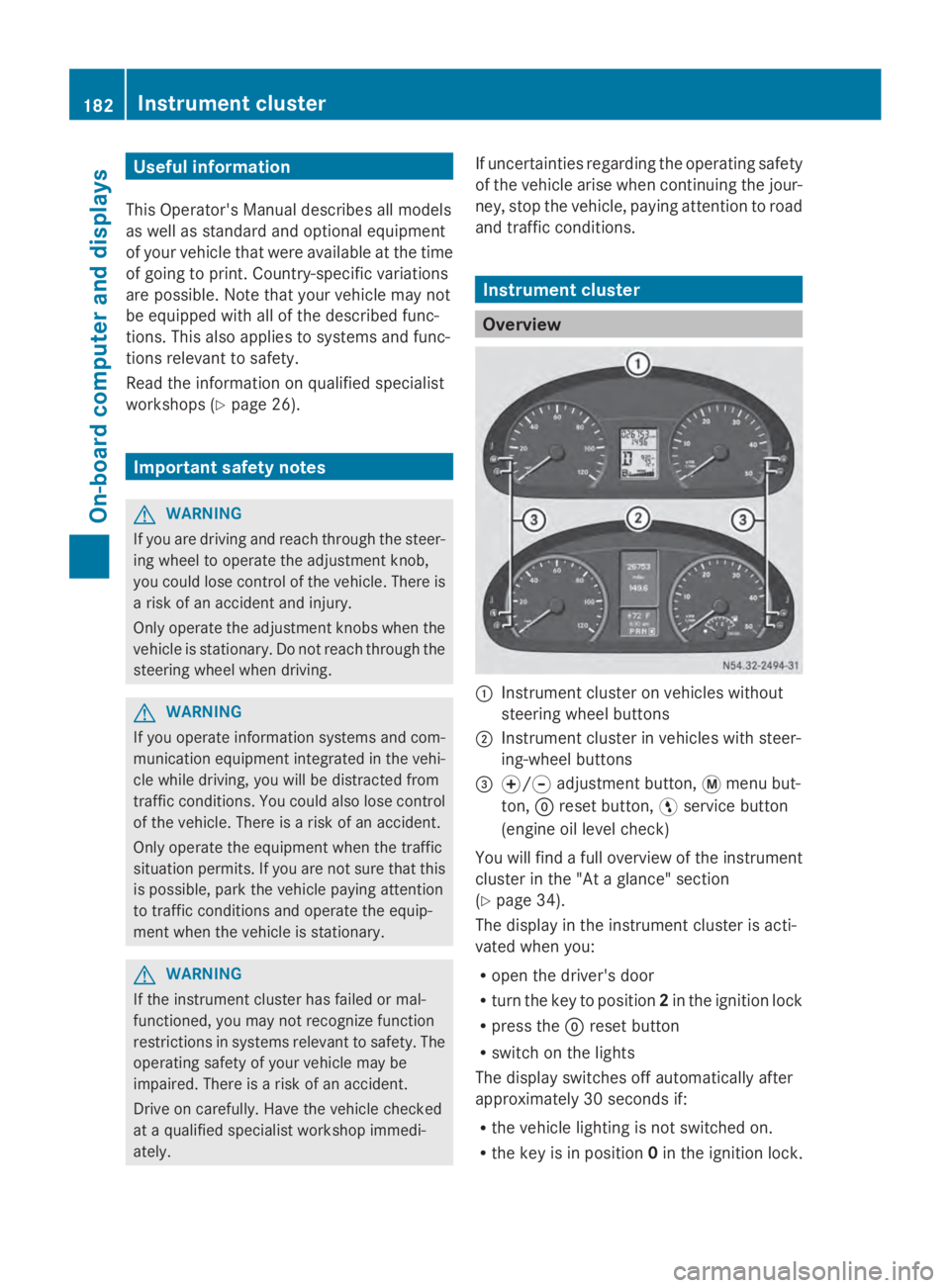
Overview
0043
Instrument cluster on vehicles without
steering wheel buttons
0044 Instrument cluster in vehicles with steer-
ing-wheel buttons
0087 0074/0075 adjustment button, 0079menu but-
ton, 0045reset button, 0098service button
(engine oil level check)
You will find a full overview of the instrument
cluster in the "At a glance" section
(Y page 34).
The display in the instrument cluster is acti-
vated when you:
R open the driver's door
R turn the key to position 2in the ignition lock
R press the 0045reset button
R switch on the lights
The display switches off automatically after
approximately 30 seconds if:
R the vehicle lighting is not switched on.
R the key is in position 0in the ignition lock. 182
Instrument clusterOn-board computer and displays
Page 186 of 338
DEF gauge
Vehicles without steering wheel but-
tons If the supply of DEF is less than 1.5 US gal
(5.5 l), the 00E2indicator lamp lights up and
the 0099 dEF Chk
dEF Chk display message appears.
If the supply of DEF falls below the reserve
range of 0.8 US gal (3.0 l), the 00E2indicator
lamp lights up and the 0099StArtS RExx
StArtS RExx
display message appears. In the display, xx
xx
corresponds to the number of possible
remaining engine starts (16 16to0
0).
Further information on DEF consumption can
be found in the "Service products and filling
capacity" section (Y page 324).
Vehicles with steering wheel buttons If the supply of DEF is less than 1.5 US gal
(5.5 l), the Check Diesel Exhaust Fluid
Check Diesel Exhaust Fluid
See
See Operator's
Operator's Manual
Manualmessage is shown
in the display.
If the supply of DEF falls below the reserve
range of 0.8 US gal (3.0 l), the 00E2xx
xx
starts remaining starts remaining message is displayed. In
the display, xx
xxcorresponds to the number of
possible remaining engine starts ( 16
16to0
0).
Further information on DEF consumption can
be found in the "Service products and filling
capacity" section (Y page 324).On-board computer (vehicles without
steering wheel buttons) Operating the on-board computer
General notes The on-board computer is activated as soon
as you turn the key to position 1in the ignition
lock.
The on-board computer shows vehicle infor-
mation and settings in the display. You can control the display and the settings
in the on-board computer using the adjust-
ment buttons on the instrument cluster.
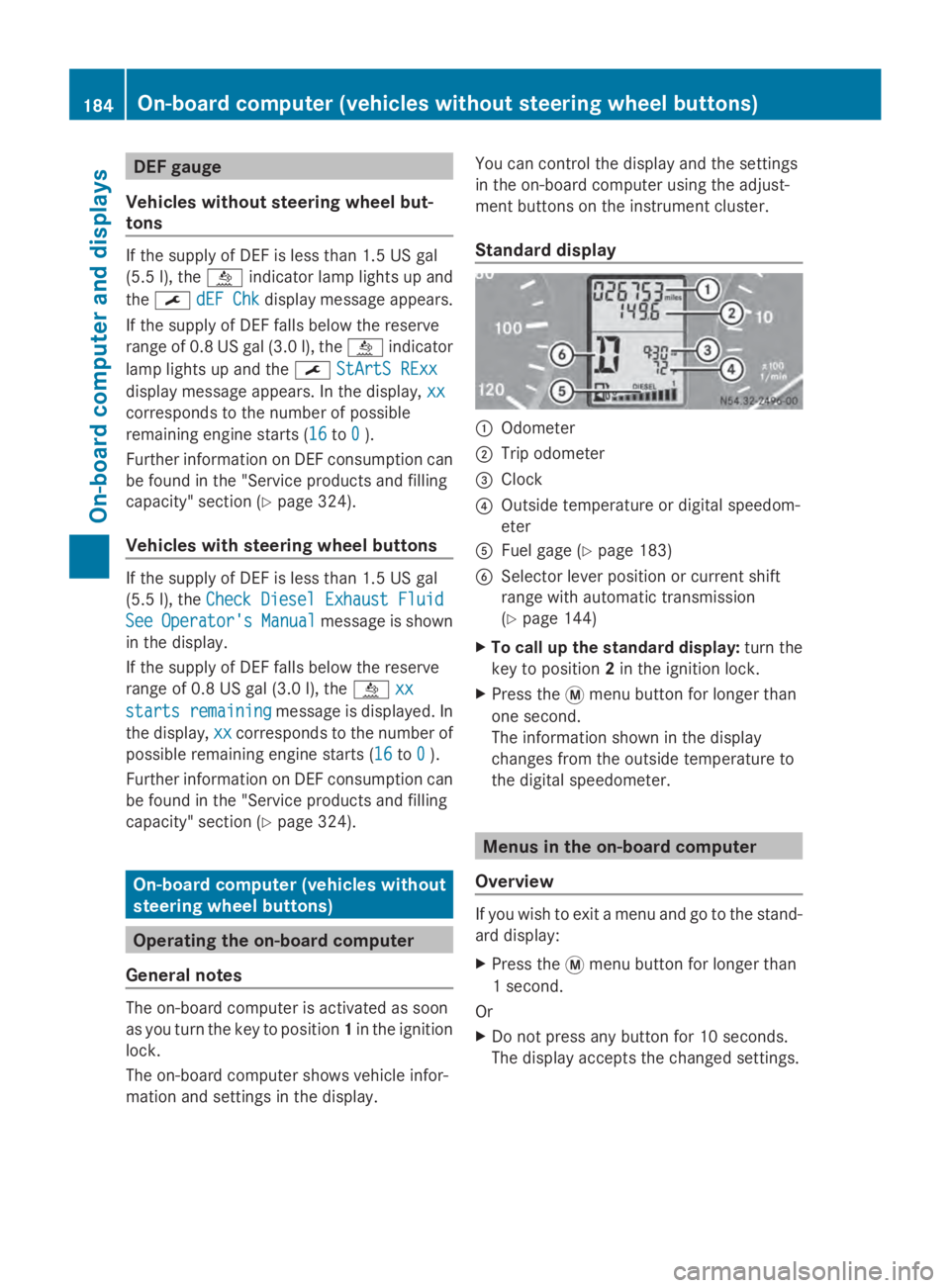
Standard display
0043
Odometer
0044 Trip odometer
0087 Clock
0085 Outside temperature or digital speedom-
eter
0083 Fuel gage (Y page 183)
0084 Selector lever position or current shift
range with automatic transmission
(Ypage 144)
X To call up the standard display: turn the
key to position 2in the ignition lock.
X Press the 0079menu button for longer than
one second.
The information shown in the display
changes from the outside temperature to
the digital speedometer. Menus in the on-board computer
Overview If you wish to exit a menu and go to the stand-
ard display:
X
Press the 0079menu button for longer than
1 second.
Or
X Do not press any button for 10 seconds.
The display accepts the changed settings. 184
On-boa
rdcompu ter (vehicles without steering wheel buttons)On-board computer and displays
Page 187 of 338
Using the
0074,0075,0079or0045 adjustment but-
tons, you can select the following functions:
R Calling up the service due date
(Y page 260)
R Checking the oil level (Y page 252)
R Checking the DEF supply (Y page 184)
R Preselecting/setting the auxiliary heating
switch-on time (Y page 124)
R Tire pressure monitor (Y page 293)
R Setting the time (Y page 185)
R Activating/deactivating Highbeam Assist
(Y page 194)
R Setting the daytime running lamps
(Y page 185)
Setting the time X
Turn the key to position 2in the ignition
lock.
X Press the 0079menu button repeatedly until
the hours figure flashes.
X Press the 0074or0075 button to set the hour.
X Press the 0045reset button.
The minute display flashes.
X Press the 0074or0075 button to set the minute.
i If you keep the 0074or0075 button pressed,
the value will change continuously.
Activating/deactivating Highbeam
Assist X
Turn the key to position 2in the ignition
lock.
X Press the 0079menu button repeatedly until
the 00CE indicator lamp flashes and the
on
on orOFF
OFF message appears in the display.
X Use the 0074or0075 button to switch High-
beam Assist on/off.
Switching the daytime running lamps
on/off If you switch the daytime running lights
ON ON,
the daytime running lights will automatically
light up when the engine is running. For safety reasons, it is only possible to
change this setting when the vehicle is sta-
tionary. The factory setting is
ON ONin countries
in which constant headlamp mode or daytime
running lights are mandatory.
X Turn the key to position 2in the ignition
lock.
X Press the 0079menu button repeatedly until
the 0058 indicator lamp flashes and the
on on orOFF
OFF message appears in the display.
X Press the 0074or0075 button to activate or
deactivate the daytime running lamps.
i USA only:
If you turn the light switch to 0060or
0058, the corresponding light switches on.
If you turn the light switch to 0058, the
daytime running lamps remain switched
on.
Canada only:
If you turn the light switch to 0058, the low-
beam headlamps switch on. If you turn the
light switch to 0060or0058, the daytime
running lamps remain switched on. On-board computer (vehicles without steering wheel buttons)
185On-board computer and displays Z
Page 190 of 338
Menu Overview
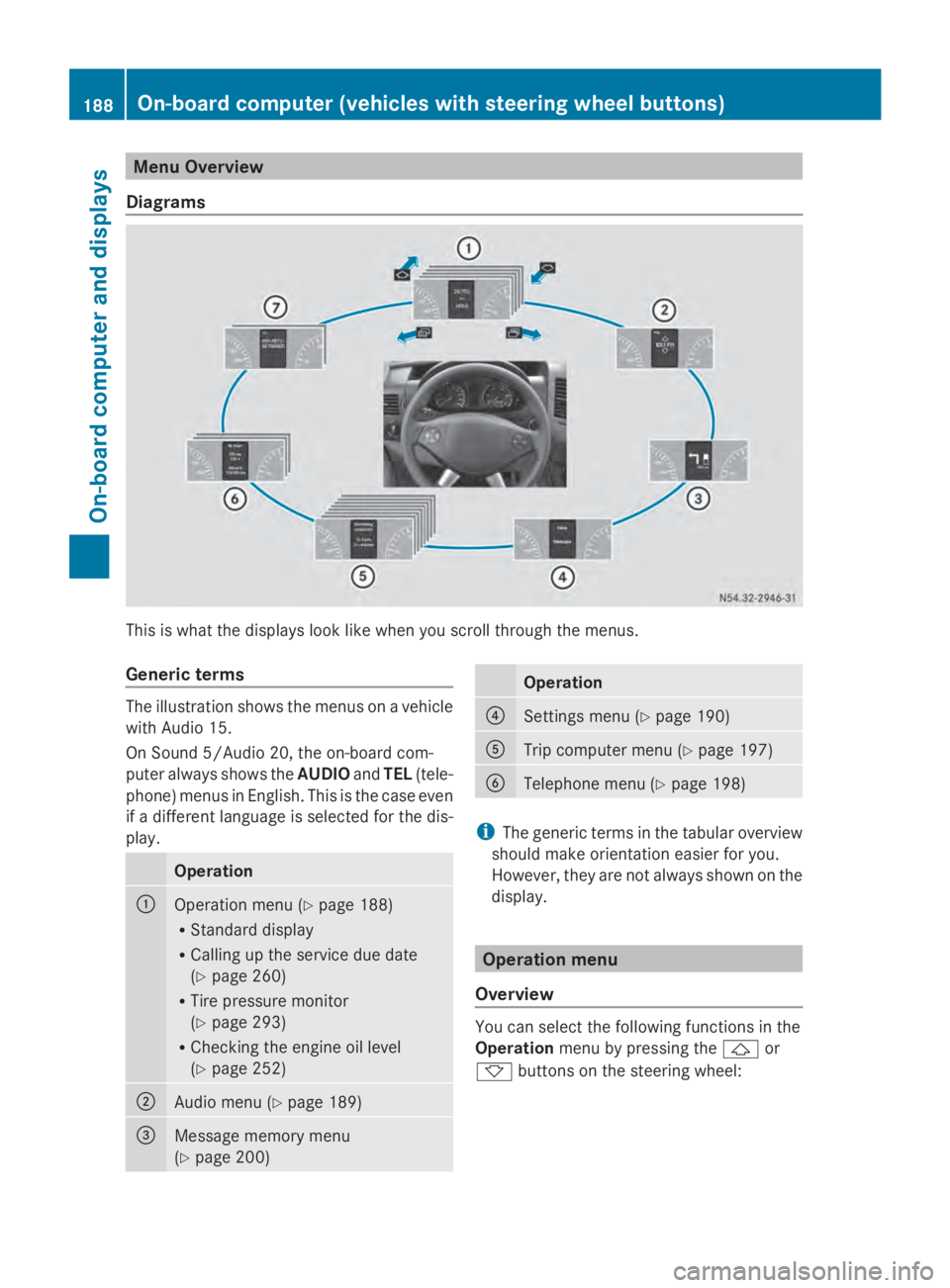
Diagrams This is what the displays look like when you scroll through the menus.
Generic terms The illustration shows the menus on a vehicle
with Audio 15.
On Sound 5/Audio 20, the on-board com-
puter always shows the AUDIOandTEL (tele-
phone) menus in English. This is the case even
if a different language is selected for the dis-
play. Operation
0043
Operation menu (Y
page 188)
R Standard display
R Calling up the service due date
(Y page 260)
R Tire pressure monitor
(Y page 293)
R Checking the engine oil level
(Y page 252) 0044
Audio menu (Y
page 189) 0087
Message memory menu
(Y
page 200) Operation
0085
Settings menu (Y
page 190) 0083
Trip computer menu (Y
page 197) 0084
Telephone menu (Y
page 198) i
The generic terms in the tabular overview
should make orientation easier for you.
However, they are not always shown on the
display. Operation menu
Overview You can select the following functions in the
Operation
menu by pressing the 0041or
0068 buttons on the steering wheel: 188
On-board computer (vehicles with steering wheel buttons)On-board computer and displays
Page 191 of 338
R
Displaying the trip odometer and odometer
(standard display) (Y page 189)
R Displaying the coolant temperature
(Y page 189)
R Calling up the service due date
(Y page 260)
R Tire pressure monitor (Y page 293)
R Checking the oil level (Y page 252)
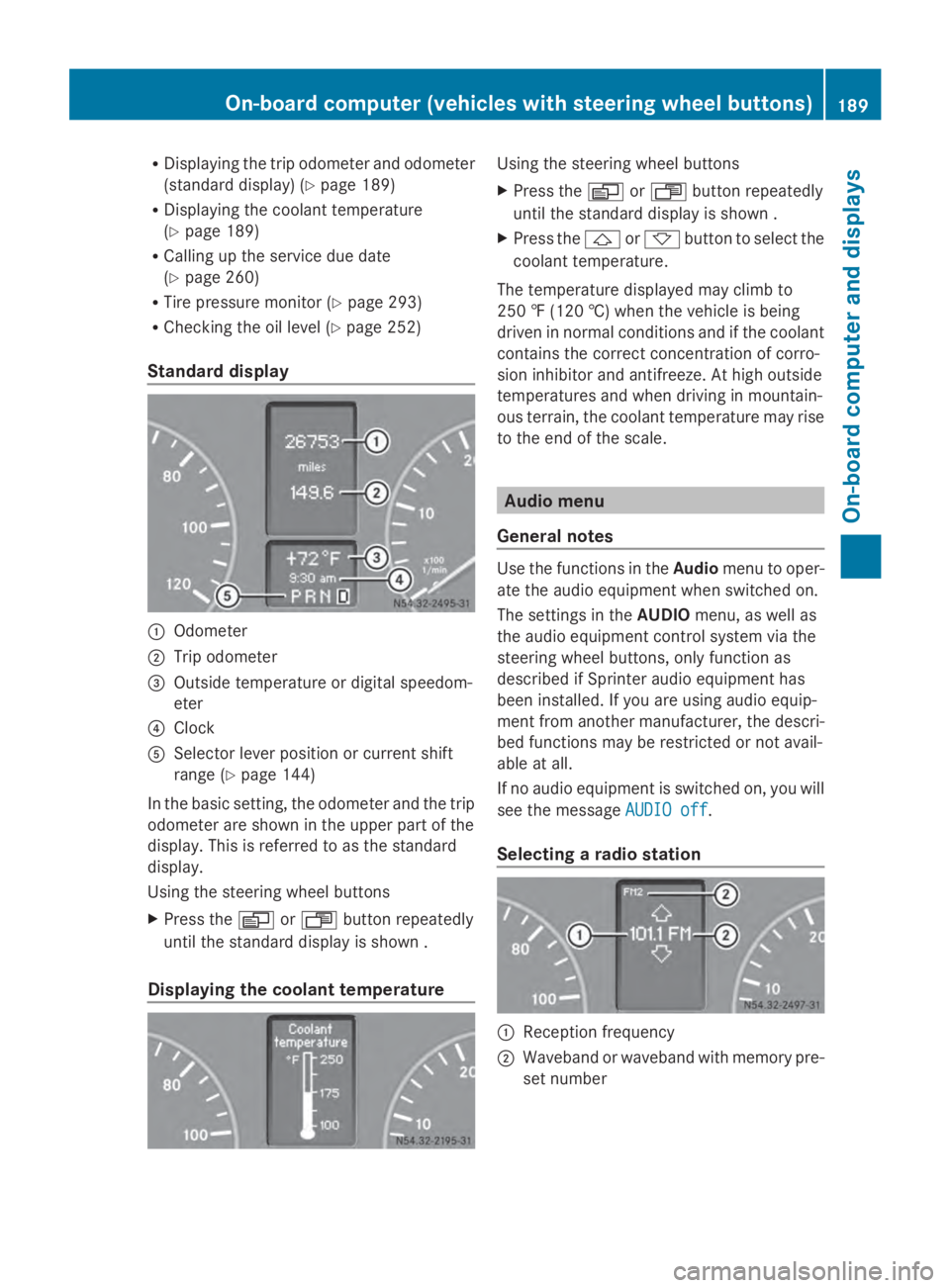
Standard display 0043
Odometer
0044 Trip odometer
0087 Outside temperature or digital speedom-
eter
0085 Clock
0083 Selector lever position or current shift
range (Y page 144)
In the basic setting, the odometer and the trip
odometer are shown in the upper part of the
display. This is referred to as the standard
display.
Using the steering wheel buttons
X Press the 0080or007F button repeatedly
until the standard display is shown .
Displaying the coolant temperature Using the steering wheel buttons
X
Press the 0080or007F button repeatedly
until the standard display is shown .
X Press the 0041or0068 button to select the
coolant temperature.
The temperature displayed may climb to
250 ‡ (120 †) when the vehicle is being
driven in normal conditions and if the coolant
contains the correct concentration of corro-
sion inhibitor and antifreeze. At high outside
temperatures and when driving in mountain-
ous terrain, the coolant temperature may rise
to the end of the scale. Audio menu
General notes Use the functions in the
Audiomenu to oper-
ate the audio equipment when switched on.
The settings in the AUDIOmenu, as well as
the audio equipment control system via the
steering wheel buttons, only function as
described if Sprinter audio equipment has
been installed. If you are using audio equip-
ment from another manufacturer, the descri-
bed functions may be restricted or not avail-
able at all.
If no audio equipment is switched on, you will
see the message AUDIO off AUDIO off.
Selecting a radio station 0043
Reception frequency
0044 Waveband or waveband with memory pre-
set number On-board computer (vehicles
with steering wheel buttons)
189On-board computer and displays Z
Page 201 of 338
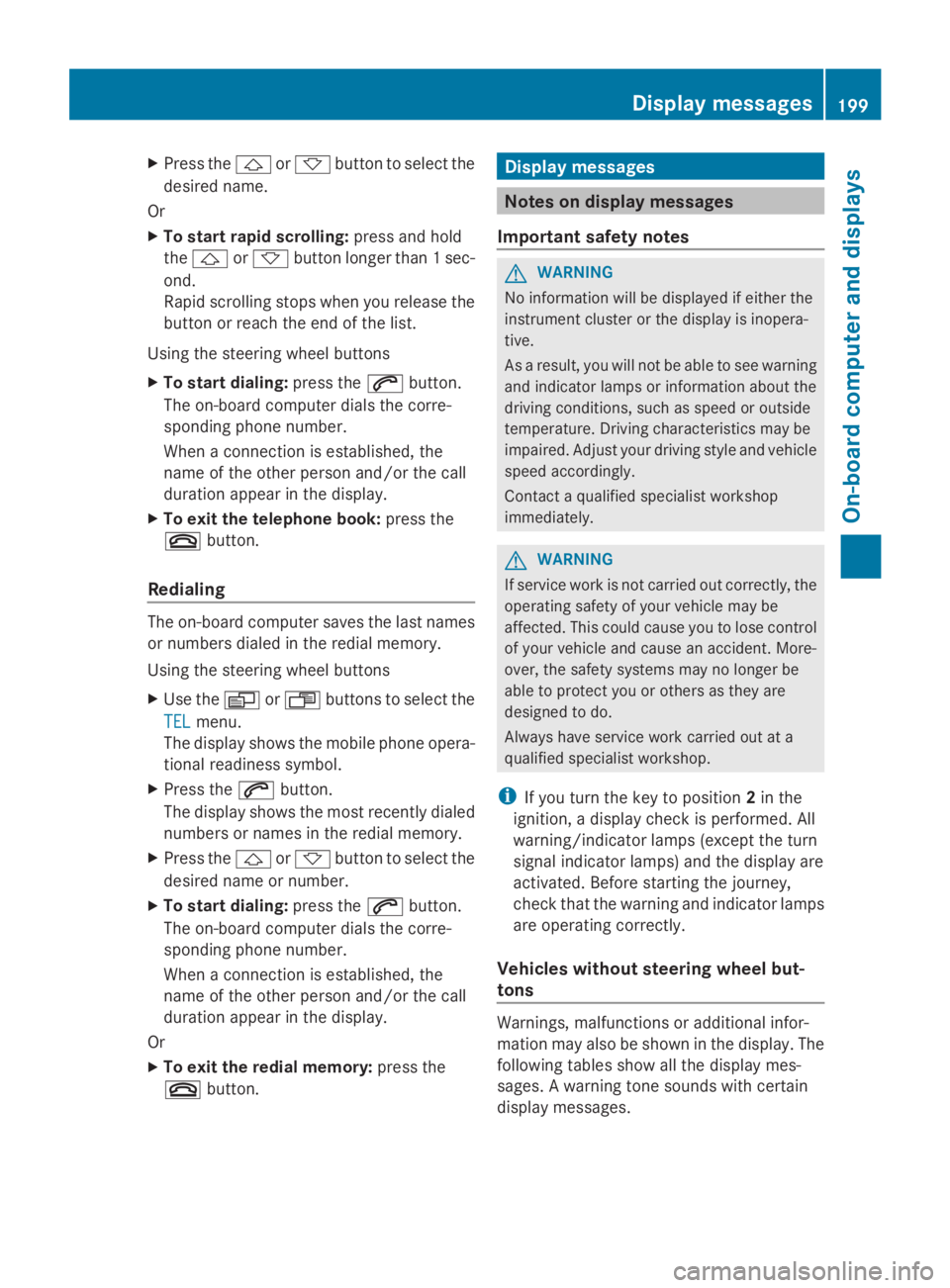
X
Press the 0041or0068 button to select the
desired name.
Or
X To start rapid scrolling: press and hold
the 0041 or0068 button longer than 1 sec-
ond.
Rapid scrolling stops when you release the
button or reach the end of the list.
Using the steering wheel buttons
X To start dialing: press the0061button.
The on-board computer dials the corre-
sponding phone number.
When a connection is established, the
name of the other person and/or the call
duration appear in the display.
X To exit the telephone book: press the
0076 button.
Redialing The on-board computer saves the last names
or numbers dialed in the redial memory.
Using the steering wheel buttons
X Use the 0080or007F buttons to select the
TEL
TEL menu.
The display shows the mobile phone opera-
tional readiness symbol.
X Press the 0061button.
The display shows the most recently dialed
numbers or names in the redial memory.
X Press the 0041or0068 button to select the
desired name or number.
X To start dialing: press the0061button.
The on-board computer dials the corre-
sponding phone number.
When a connection is established, the
name of the other person and/or the call
duration appear in the display.
Or
X To exit the redial memory: press the
0076 button. Display messages
Notes on display messages
Important safety notes G
WARNING
No information will be displayed if either the
instrument cluster or the display is inopera-
tive.
As a result, you will not be able to see warning
and indicator lamps or information about the
driving conditions, such as speed or outside
temperature. Driving characteristics may be
impaired. Adjust your driving style and vehicle
speed accordingly.
Contact a qualified specialist workshop
immediately. G
WARNING
If service work is not carried out correctly, the
operating safety of your vehicle may be
affected. This could cause you to lose control
of your vehicle and cause an accident. More-
over, the safety systems may no longer be
able to protect you or others as they are
designed to do.
Always have service work carried out at a
qualified specialist workshop.
i If you turn the key to position 2in the
ignition, a display check is performed. All
warning/indicator lamps (except the turn
signal indicator lamps) and the display are
activated. Before starting the journey,
check that the warning and indicator lamps
are operating correctly.
Vehicles without steering wheel but-
tons Warnings, malfunctions or additional infor-
mation may also be shown in the display. The
following tables show all the display mes-
sages. A warning tone sounds with certain
display messages. Display messages
199On-board computer and displays Z
Page 230 of 338
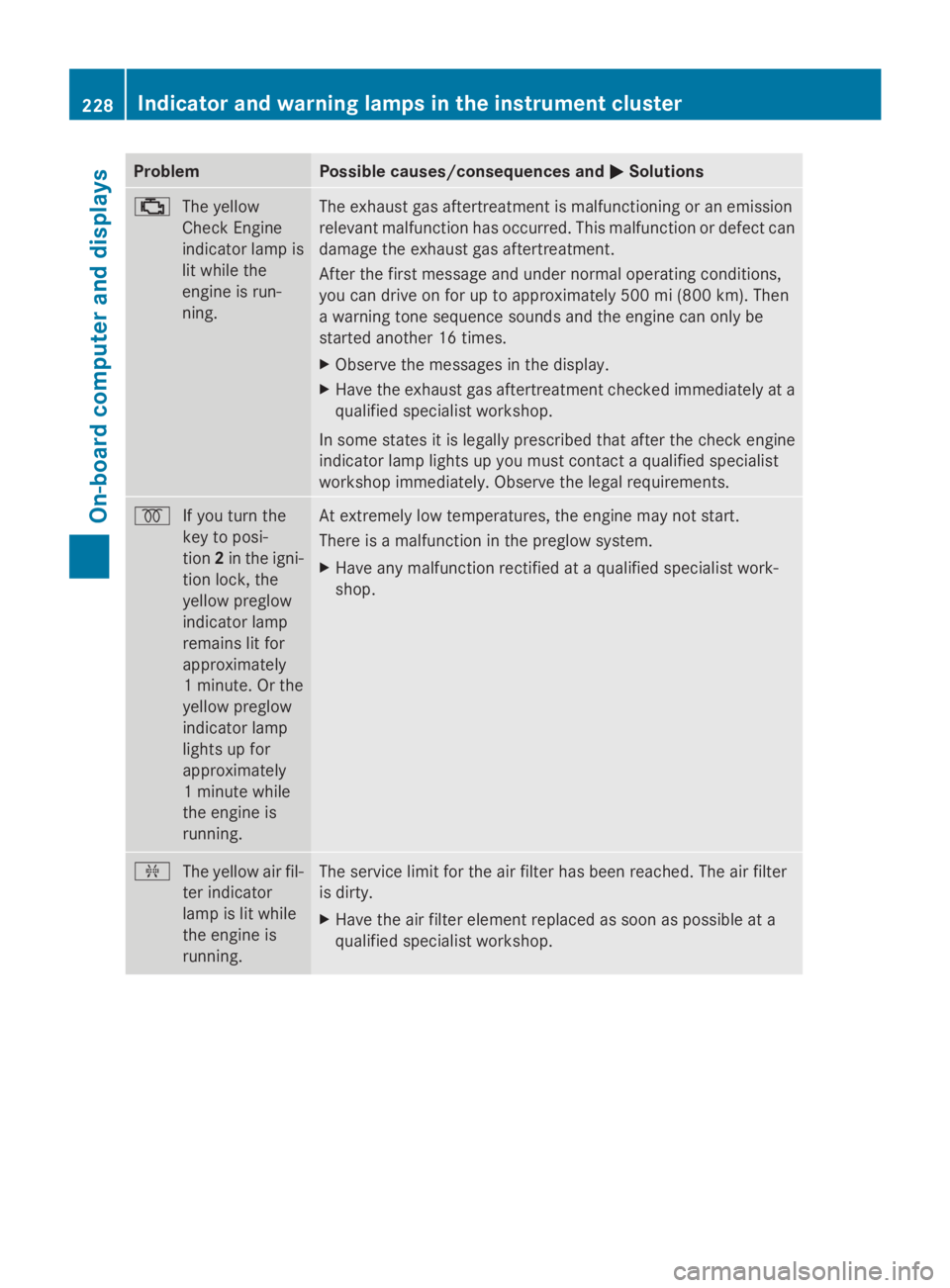
Problem Possible causes/consequences and
0050
0050Solutions 00B9
The yellow
Check Engine
indicator lamp is
lit while the
engine is run-
ning. The exhaust gas aftertreatment is malfunctioning or an emission
relevant malfunction has occurred. This malfunction or defect can
damage the exhaust gas aftertreatment.
After the first message and under normal operating conditions,
you can drive on for up to approximately 500 mi (800 km). Then
a warning tone sequence sounds and the engine can only be
started another 16 times.
X
Observe the messages in the display.
X Have the exhaust gas aftertreatment checked immediately at a
qualified specialist workshop.
In some states it is legally prescribed that after the check engine
indicator lamp lights up you must contact a qualified specialist
workshop immediately. Observe the legal requirements. 0028
If you turn the
key to posi-
tion2in the igni-
tion lock, the
yellow preglow
indicator lamp
remains lit for
approximately
1 minute. Or the
yellow preglow
indicator lamp
lights up for
approximately
1 minute while
the engine is
running. At extremely low temperatures, the engine may not start.
There is a malfunction in the preglow system.
X
Have any malfunction rectified at a qualified specialist work-
shop. 009F
The yellow air fil-
ter indicator
lamp is lit while
the engine is
running. The service limit for the air filter has been reached. The air filter
is dirty.
X
Have the air filter element replaced as soon as possible at a
qualified specialist workshop. 228
Indicator and warning lamps in the instrument clusterOn-board computer and displays