fog light MERCEDES-BENZ SPRINTER 2015 MY15 Operator’s Manual
[x] Cancel search | Manufacturer: MERCEDES-BENZ, Model Year: 2015, Model line: SPRINTER, Model: MERCEDES-BENZ SPRINTER 2015Pages: 334, PDF Size: 5.94 MB
Page 102 of 334
R
Do not use a bulb that has been dropped or
that has scratches on its glass tube.
The bulb could explode.
R Only use bulbs in closed lamps which have
been designed for this purpose.
R Only use spare bulbs of the same type and
with the prescribed voltage
R Protect the bulbs from moisture when in
use.
If the new bulb still does not light up, consult a qualified specialist workshop.
R Have the LEDs and bulbs of the following
lamps changed at a qualified specialist
workshop:
- the additional turn signals in the exterior
mirrors
- the high-mounted brake lamp
- LED daytime running lamps (Bi-Xenon
headlamps)
- Bi-Xenon lamps (Bi-Xenon headlamps)
- front fog lamps
If you require assistance changing bulbs, con-
sult a qualified specialist workshop. Front bulbs
Overview of bulb replacement – bulb
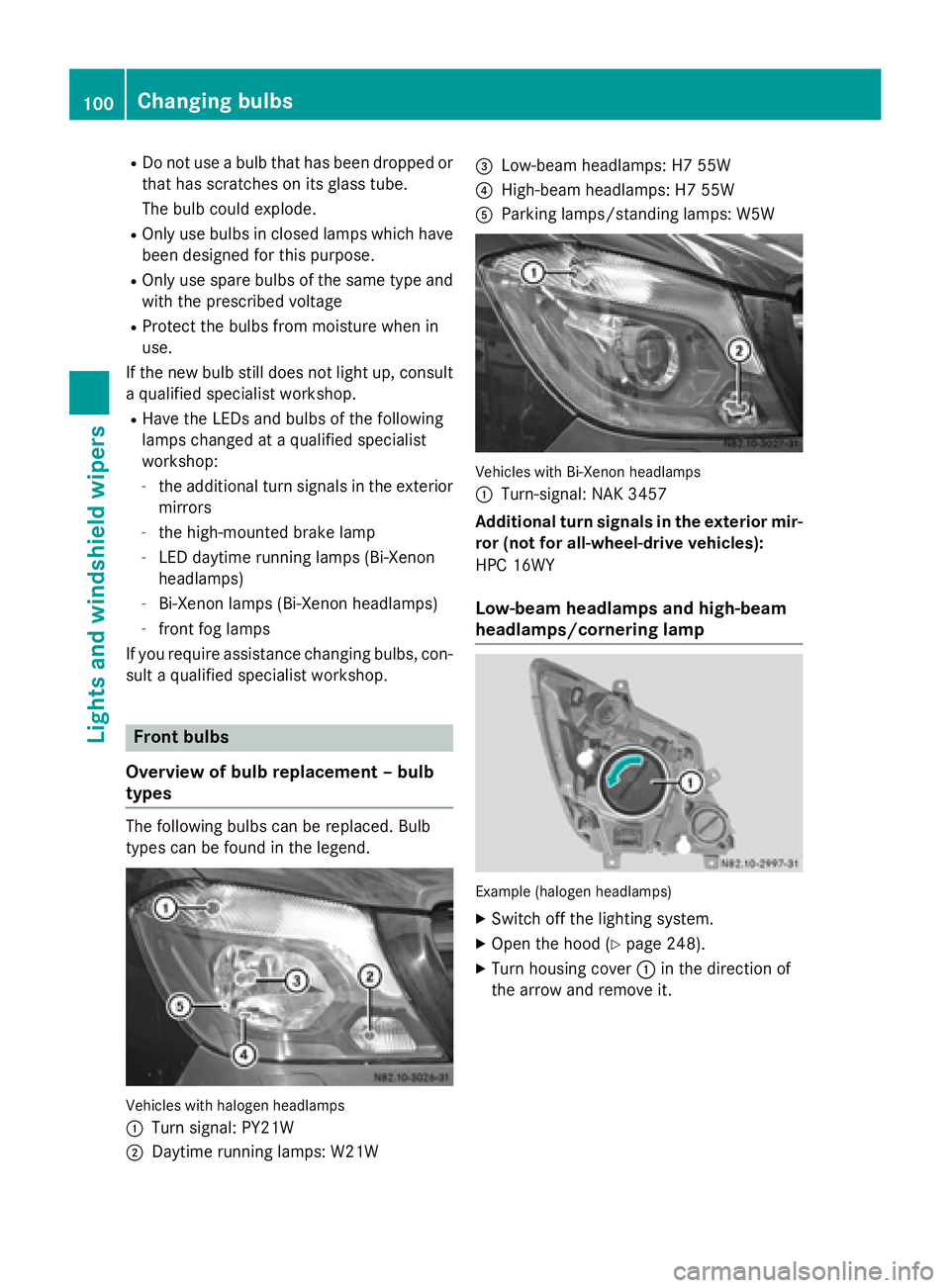
types The following bulbs can be replaced. Bulb
types can be found in the legend. Vehicles with halogen headlamps
0043
Turn signal: PY21W
0044 Daytime running lamps: W21W 0087
Low-beam headlamps: H7 55W
0085 High-beam headlamps: H7 55W
0083 Parking lamps/standing lamps: W5W Vehicles with Bi-Xenon headlamps
0043
Turn-signal: NAK 3457
Additional turn signals in the exterior mir-
ror (not for all-wheel-drive vehicles):
HPC 16WY
Low-beam headlamps and high-beam
headlamps/cornering lamp Example (halogen headlamps)
X Switch off the lighting system.
X Open the hood (Y page 248).
X Turn housing cover 0043in the direction of
the arrow and remove it. 100
Changing bulbsLights and
windshield wipers
Page 104 of 334
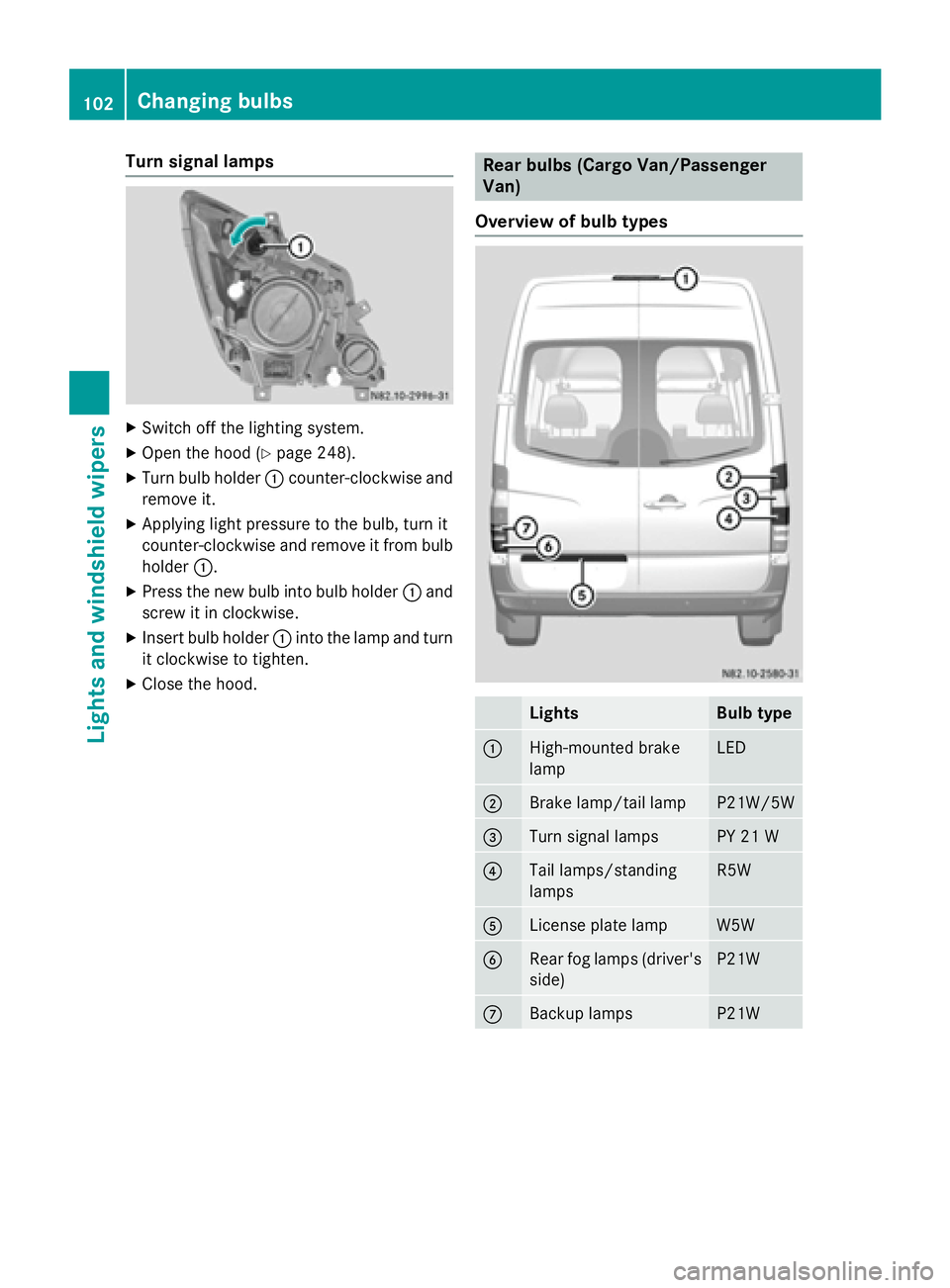
Turn signal lamps
X
Switch off the lighting system.
X Open the hood (Y page 248).
X Turn bulb holder 0043counter-clockwise and
remove it.
X Applying light pressure to the bulb, turn it
counter-clockwise and remove it from bulb
holder 0043.
X Press the new bulb into bulb holder 0043and
screw it in clockwise.
X Insert bulb holder 0043into the lamp and turn
it clockwise to tighten.
X Close the hood. Rear bulbs (Cargo Van/Passenger
Van)
Overview of bulb types Lights Bulb type
0043
High-mounted brake
lamp LED
0044
Brake lamp/tail lamp P21W/5W
0087
Turn signal lamps PY 21 W
0085
Tail lamps/standing
lamps R5W
0083
License plate lamp W5W
0084
Rear fog lamps (driver's
side) P21W
006B
Backup lamps P21W102
Changing bulbsLights and
windshield wipers
Page 105 of 334
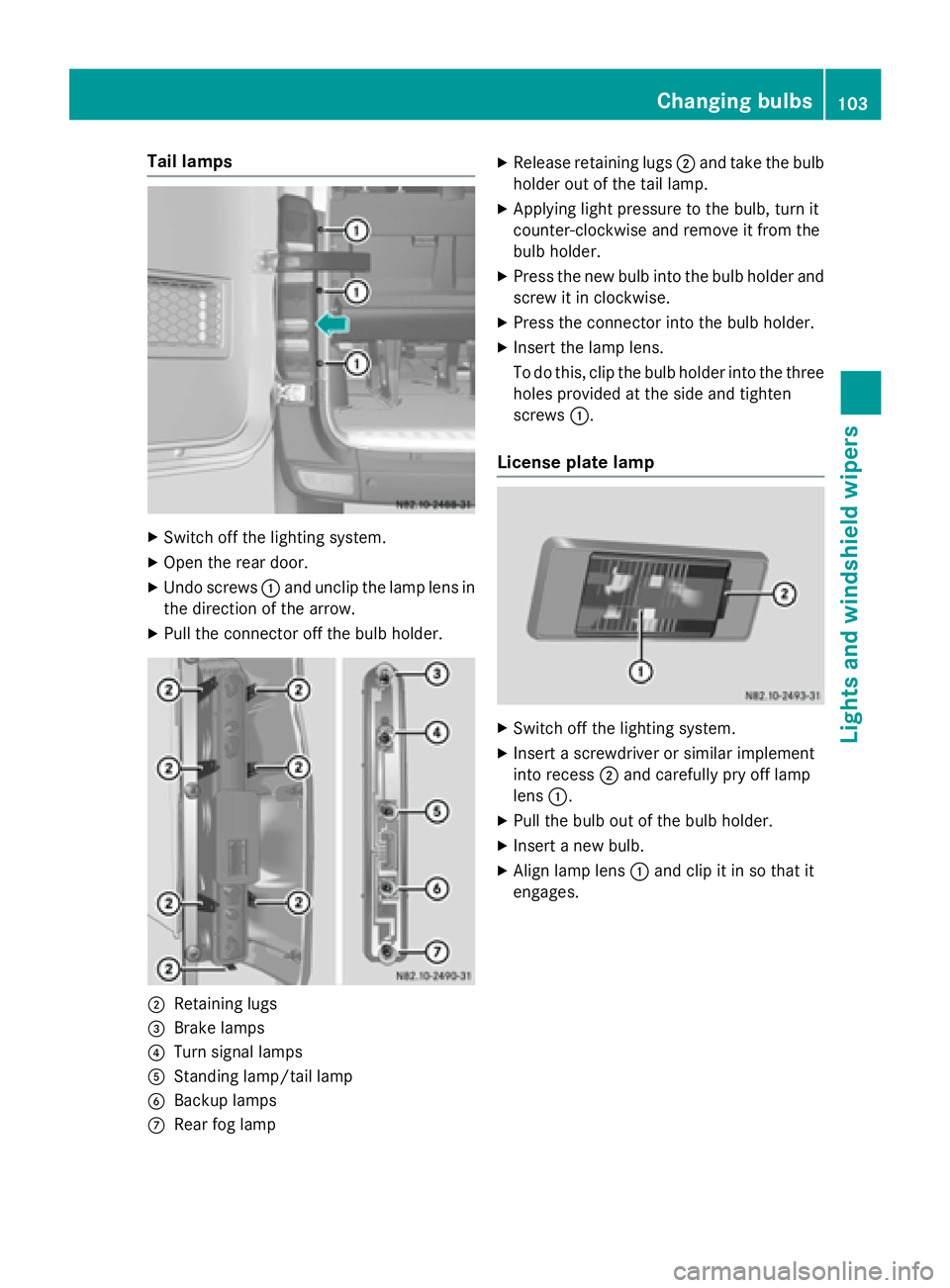
Tail lamps
X
Switch off the lighting system.
X Open the rear door.
X Undo screws 0043and unclip the lamp lens in
the direction of the arrow.
X Pull the connector off the bulb holder. 0044
Retaining lugs
0087 Brake lamps
0085 Turn signal lamps
0083 Standing lamp/tail lamp
0084 Backup lamps
006B Rear fog lamp X
Release retaining lugs 0044and take the bulb
holder out of the tail lamp.
X Applying light pressure to the bulb, turn it
counter-clockwise and remove it from the
bulb holder.
X Press the new bulb into the bulb holder and
screw it in clockwise.
X Press the connector into the bulb holder.
X Insert the lamp lens.
To do this, clip the bulb holder into the three
holes provided at the side and tighten
screws 0043.
License plate lamp X
Switch off the lighting system.
X Insert a screwdriver or similar implement
into recess 0044and carefully pry off lamp
lens 0043.
X Pull the bulb out of the bulb holder.
X Insert a new bulb.
X Align lamp lens 0043and clip it in so that it
engages. Changing bulbs
103Lights andwindshield wipers Z
Page 106 of 334
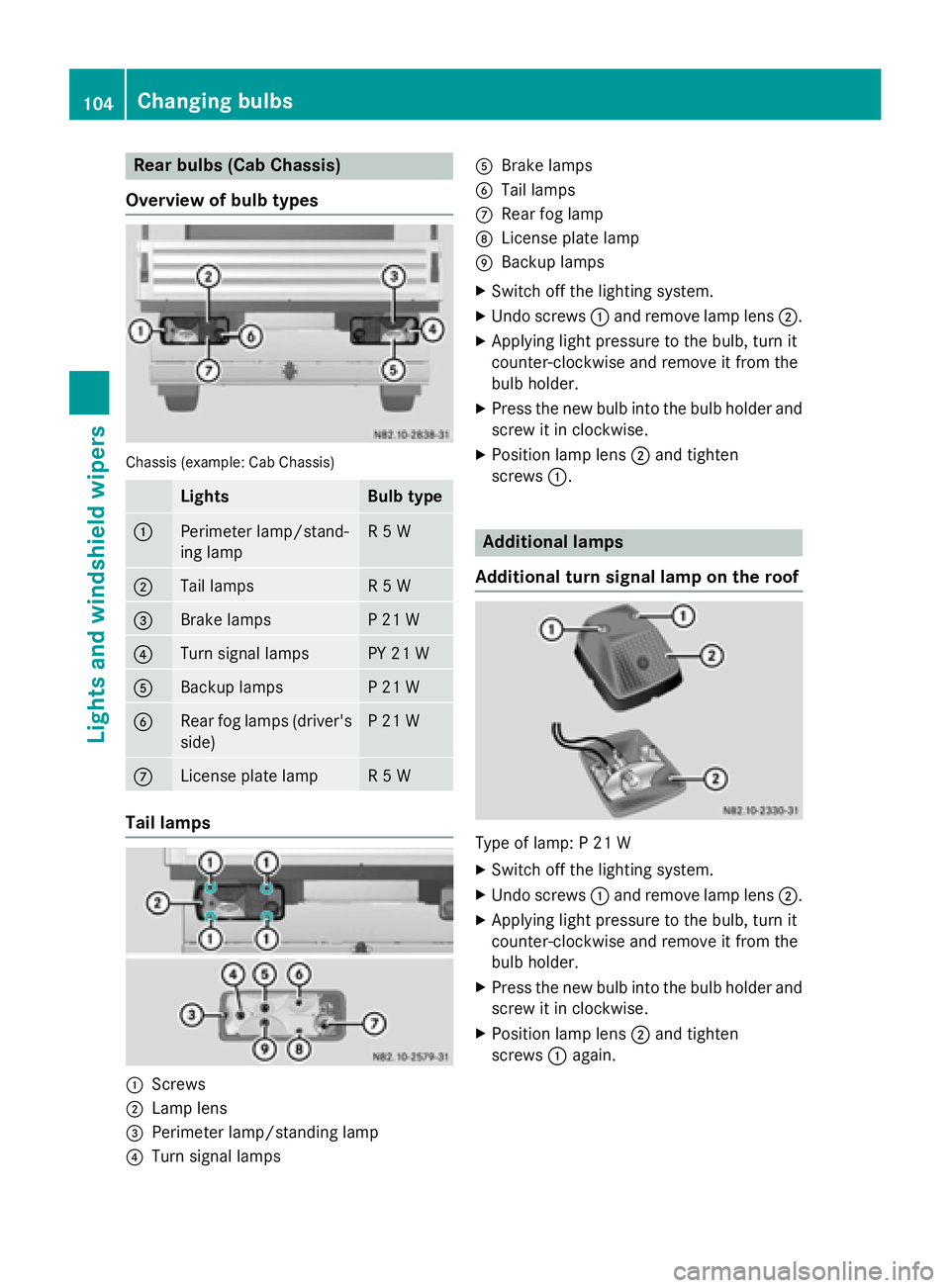
Rear bulbs (Cab Chassis)
Overview of bulb types Chassis (example: Cab Chassis)
Lights Bulb type
0043
Perimeter lamp/stand-
ing lamp R 5 W
0044
Tail lamps R 5 W
0087
Brake lamps P 21 W
0085
Turn signal lamps PY 21 W
0083
Backup lamps P 21 W
0084
Rear fog lamps (driver's
side) P 21 W
006B
License plate lamp R 5 W
Tail lamps
0043
Screws
0044 Lamp lens
0087 Perimeter lamp/standing lamp
0085 Turn signal lamps 0083
Brake lamps
0084 Tail lamps
006B Rear fog lamp
006C License plate lamp
006D Backup lamps
X Switch off the lighting system.
X Undo screws 0043and remove lamp lens 0044.
X Applying light pressure to the bulb, turn it
counter-clockwise and remove it from the
bulb holder.
X Press the new bulb into the bulb holder and
screw it in clockwise.
X Position lamp lens 0044and tighten
screws 0043. Additional lamps
Additional turn signal lamp on the roof Type of lamp: P 21 W
X
Switch off the lighting system.
X Undo screws 0043and remove lamp lens 0044.
X Applying light pressure to the bulb, turn it
counter-clockwise and remove it from the
bulb holder.
X Press the new bulb into the bulb holder and
screw it in clockwise.
X Position lamp lens 0044and tighten
screws 0043again. 104
Changing bulbsLights and windshield wipers
Page 116 of 334
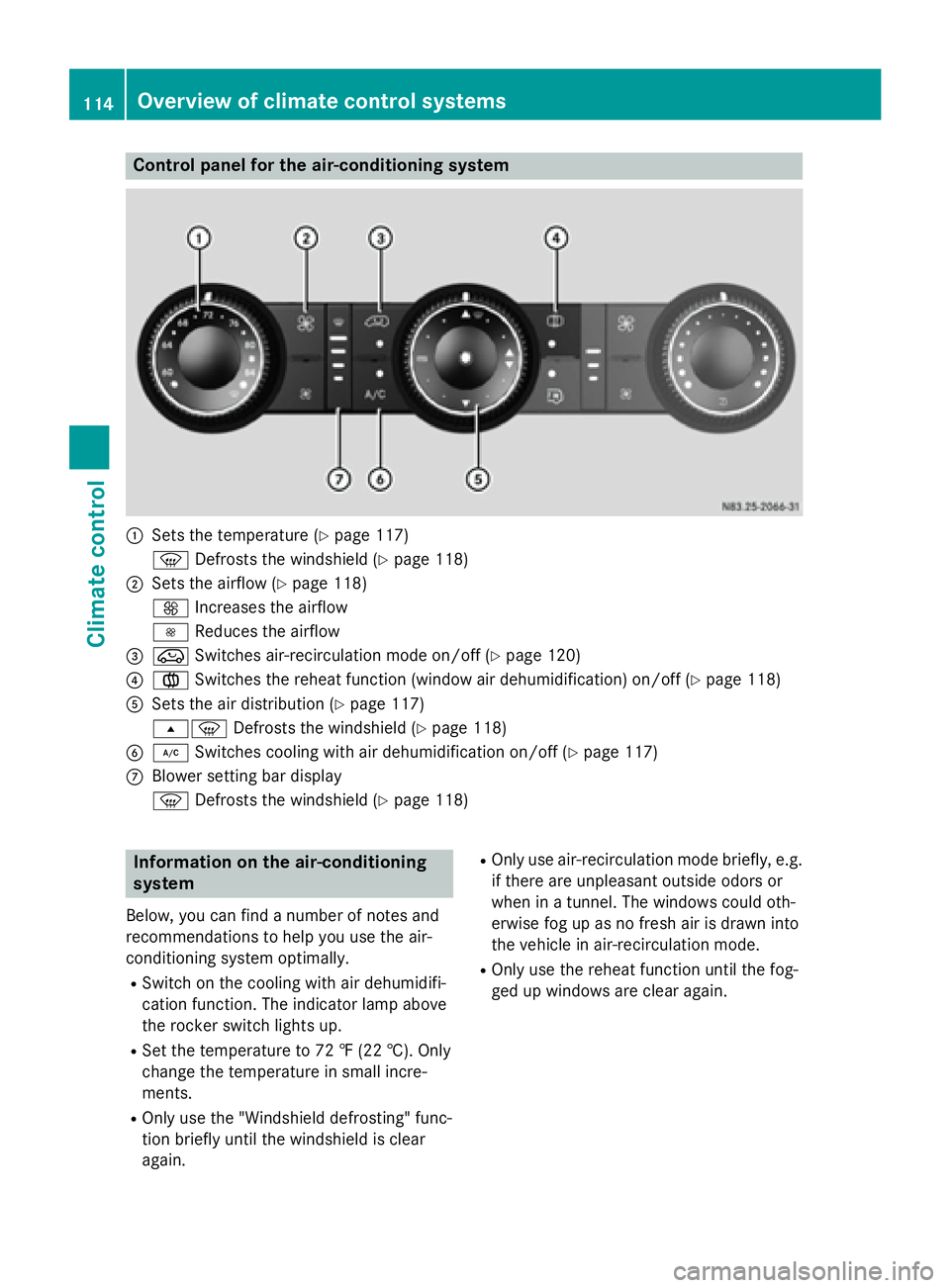
Control panel for the air-conditioning system
0043
Sets the temperature (Y page 117)
0085 Defrosts the windshield (Y page 118)
0044 Sets the airflow (Y page 118)
0097 Increases the airflow
0095 Reduces the airflow
0087 008A Switches air-recirculation mode on/off (Y page 120)
0085 0083 Switches the reheat function (window air dehumidification) on/off (Y page 118)
0083 Sets the air distribution (Y page 117)
007E0085 Defrosts the windshield (Y page 118)
0084 005A Switches cooling with air dehumidification on/off (Y page 117)
006B Blower setting bar display
0085 Defrosts the windshield (Y page 118)Information on the air-conditioning
system
Below, you can find a number of notes and
recommendations to help you use the air-
conditioning system optimally.
R Switch on the cooling with air dehumidifi-
cation function. The indicator lamp above
the rocker switch lights up.
R Set the temperature to 72 ‡ (22 †). Only
change the temperature in small incre-
ments.
R Only use the "Windshield defrosting" func-
tion briefly until the windshield is clear
again. R
Only use air-recirculation mode briefly, e.g.
if there are unpleasant outside odors or
when in a tunnel. The windows could oth-
erwise fog up as no fresh air is drawn into
the vehicle in air-recirculation mode.
R Only use the reheat function until the fog-
ged up windows are clear again. 114
Overview of climate control systemsClimate control
Page 119 of 334
Activating/deactivating rear-compart-
ment climate control via the control
panel X
Turn the key to position 2in the ignition
lock.
Vehicle with rear-compartment heating/
rear-compartment air conditioning
X To switch on/off: press the0074switch.
If the indicator lamp in the button lights up, the rear-compartment heating/rear-com-
partment air conditioning is switched on. Switching the cooling with air dehu-
midification function on/off
Important information If you switch off the "Cooling with air dehu-
midification" function, the air inside the vehi- cle will not be cooled (in warm weather) or
dehumidified. The windows could fog up morequickly.
The cooling with air dehumidification function
is only available when the engine is running.
The air inside the vehicle is cooled and dehu- midified according to the temperature selec-
ted.
Condensation may appear on the underside
of the vehicle when in cooling mode. This is
normal and not a sign that there is a malfunc- tion.
Switching on/off Vehicle with air conditioning
X Press the 005Abutton.
If the indicator lamp in the button lights up, cooling with air dehumidification is
switched on. Setting the temperature
Increasing/reducing temperature in
the front compartment via the control
panel Only change the temperature in small incre-
ments. Start at the center position, or at 72 ‡
(22 †).
X Switch on climate control (Y page 116).
X Turn temperature control 0043clockwise to
increase or counterclockwise to reduce the temperature (Y page 114).
Increasing/reducing temperature in
the rear compartment via the control
panel Only change the temperature in small incre-
ments.
X Switch on climate control (Y page 116).
X Turn rear-compartment temperature con-
trol 0087(Ypage 115) or rear-compartment
air-conditioning system 0044(Ypage 116)
clockwise to increase or counterclockwise
to reduce the temperature.
i Vehicles with additional air conditioning
and heating in the rear compartment: if you set the temperature control to the center
position, only one of the two climate con-
trol systems works in the rear compart-
ment and in air-recirculation mode
(Y page 120). Setting the air distribution
Air distribution settings The air distribution symbols have the follow-
ing meanings:
0078
Directs air through the center and
side air vents
007E
0085 Directs air to the windshield and the
air vents Operating the climate control system
117Climate control
Page 120 of 334
007C
Directs air to the windshield, the air
vents and into the footwell
007D Directs air to the air vents and into
the footwell
Adjusting X
Switch on climate control (Y page 116).
X Set air-distribution control 0085for the heat-
ing (Y page 113 )or air-conditioning system
0083 (Ypage 114) to the corresponding sym-
bol. Setting the airflow
X Switch on climate control (Y page 116).
X Vehicle with heating/rear-compart-
ment heating: set airflow control 0044of the
heating (Y page 113) or of the rear-com-
partment heating (Y page 115) to the
desired level.
X Vehicle with air conditioning/rear-com-
partment air conditioning: press the
0095 button to reduce or the 0097button
to increase the airflow.
The blower speeds are shown in bars next
to the buttons. Defrosting the windows
You can use the "defrosting" function to
defrost the windshield or to demist the inside of the windshield and the side windows.
Only use the following settings until the win-
dows are clear again.
X Vehicle with window heating: switch on
the front (Y page 119) and/or rear window
defroster (Y page 119) .
X Switch on climate control (Y page 116).
Vehicle with heating
X Set temperature control 0043and airflow
control 0044to0085 (Ypage 113).
X Set air-distribution control 0085to007E
0085 (Ypage 113). X
Close the center air vents (Y page 121) and
the air outlets for the headroom and the
rear compartment (Y page 121).
X Direct the side air vents towards the side
windows and open the defroster vents for
the side windows (Y page 121).
Vehicle with air conditioning X Set temperature control 0043to
0085 (Ypage 114).
X Press the 0097button until the maximum
blower output is reached.
All bars in the display next to the button
light up.
X Set air-distribution control 0083to007E
0085 (Ypage 114).
X Close the center air vents (Y page 121) and
the air outlets for the headroom and the
rear compartment (Y page 121).
X Direct the side air vents towards the side
windows and open the defroster vents for
the side windows (Y page 121). Clearing condensation from the win-
dows
Windows fogged up on the inside You should only select this setting until the
windows are clear again.
X Vehicle with window heating: switch on
the front (Y page 119) and/or rear window
defroster (Y page 119) .
X Switch on climate control (Y page 116).
X Switch off air-recirculation mode
(Y page 120).
Vehicle with heating
X Set temperature control 0043to a higher tem-
perature (Y page 113).
X Set airflow control 0044to a higher blower
setting. It should be set at least to level two
(Y page 113).
X Set air-distribution control 0085to007E
0085 (Ypage 113). 118
Operating the climate control systemClimate control
Page 121 of 334
i
If the windows still fog up, set the control
as described for defrosting (Y page 118).
Vehicle with air conditioning
X Activate cooling with air dehumidification
(Y page 117).
X Press the 0066button (Y page 114).
The reheat function is switched on. The
indicator lamp in the switch lights up.
To switch off the reheat function, press the
0066 button again. The indicator lamp in
the button goes out.
Windows fogged up on the outside You should only select this setting until the
windshield is clear again.
X Switch on the windshield wipers
(Y page 107).
X Switch on climate control (Y page 116).
X Adjust air distribution to the footwell
(Y page 117).
X Close the air vents (Y page 120).Window heating
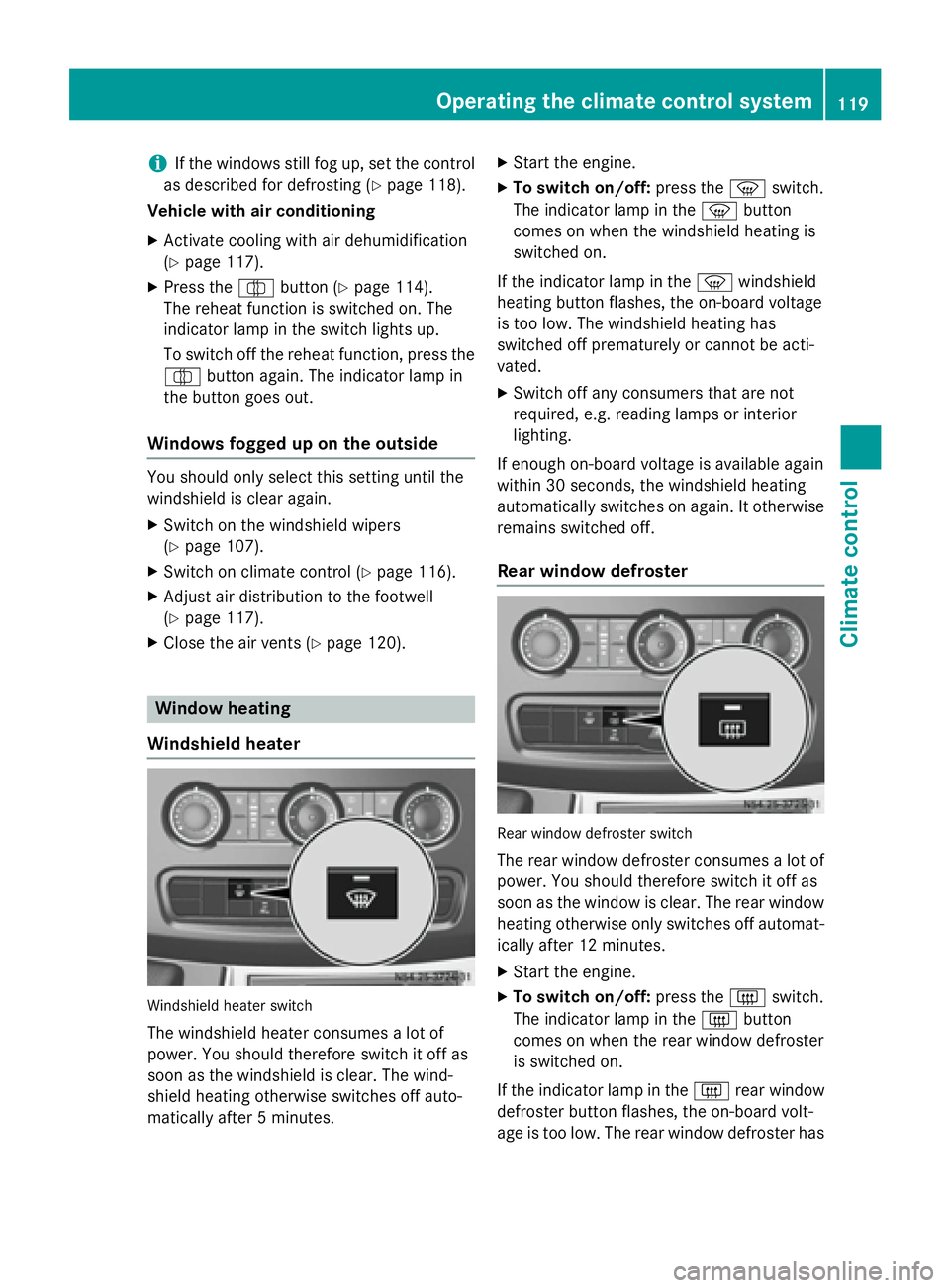
Windshield heater Windshield heater switch
The windshield heater consumes a lot of
power. You should therefore switch it off as
soon as the windshield is clear. The wind-
shield heating otherwise switches off auto-
matically after 5 minutes. X
Start the engine.
X To switch on/off: press the0085switch.
The indicator lamp in the 0085button
comes on when the windshield heating is
switched on.
If the indicator lamp in the 0085windshield
heating button flashes, the on-board voltage
is too low. The windshield heating has
switched off prematurely or cannot be acti-
vated.
X Switch off any consumers that are not
required, e.g. reading lamps or interior
lighting.
If enough on-board voltage is available again
within 30 seconds, the windshield heating
automatically switches on again. It otherwise
remains switched off.
Rear window defroster Rear window defroster switch
The rear window defroster consumes a lot of
power. You should therefore switch it off as
soon as the window is clear. The rear window
heating otherwise only switches off automat- ically after 12 minutes.
X Start the engine.
X To switch on/off: press the0071switch.
The indicator lamp in the 0071button
comes on when the rear window defroster
is switched on.
If the indicator lamp in the 0071rear window
defroster button flashes, the on-board volt-
age is too low. The rear window defroster has Operating the climate control system
119Climate control
Page 122 of 334
switched off prematurely or cannot be acti-
vated.
X Switch off any consumers that are not
required, e.g. reading lamps or interior
lighting.
If enough on-board voltage is available again
within 30 seconds, the rear window heating
automatically switches on again. It otherwise
remains switched off. Switching air-recirculation mode
on/off
Important safety notes When you switch on air-recirculation mode,
the windows could fog up more quickly, in
particular at low outside temperatures. Only
switch on air-recirculation mode for a short
time.
You can deactivate the intake of fresh air if
unpleasant odors enter the vehicle from out-
side. The air inside the vehicle will only be
circulated.
Heating/air-conditioning system Air-recirculation mode switches off automat-
ically after about 10 to 30 minutes, depending
on the outside temperature.
X Switch on climate control (Y page 116).
X To switch on/off: press the008Aswitch.
If the indicator lamp in the 008Abutton
lights up, air-recirculation mode is activa-
ted.
Rear-compartment heating/rear-com-
partment air conditioning On vehicles with a rear-compartment heating
and air-conditioning system, you can acti-
vate/deactivate air-recirculation mode for
the rear-compartment climate control.
X Switch on climate control (Y page 116).
X To activate: set the temperature control of
rear-compartment heating 0087(Ypage 115) or rear-compartment air conditioning sys-
tem
0044(Ypage 116) to the center position.
Only one of the two climate control sys-
tems in the rear compartment is activated
and is in air-recirculation mode.
X To deactivate: turn the temperature con-
trol of rear-compartment heating 0087
(Y page 115) or rear-compartment air-con-
ditioning system 0044(Ypage 116) clock-
wise or counterclockwise. Only change the
temperature in small increments. Adjusting the air vents
Important safety notes
G
WARNING
Very hot or very cold air can flow from the air vents. This could result in burns or frostbite in the immediate vicinity of the air vents. There
is a risk of injury.
Make sure that all vehicle occupants always
maintain a sufficient distance to the air out-
lets. If necessary, redirect the airflow to
another area of the vehicle interior.
The center and side air vents are adjustable.
On vehicles with a rear-compartment air-con-
ditioning system, you can also adjust the air
vents in the roof duct.
i For virtually draft-free ventilation, adjust
the sliders of the center air vents to the
center position.
In order to ensure the direct flow of fresh air
through the air vents into the vehicle interior, please observe the following notes:
R keep the air inlet grille on the hood free of
blockages, such as ice, snow or leaves.
R never cover the vents or the ventilation
grilles in the vehicle interior. 120
Adjusting the air ventsClimate control
Page 166 of 334
radar system only. Removal, tampering, or
altering of the device will void any warran-
ties, and is not permitted by the FCC. Do
not tamper with, alter, or use in any non-
approved way.
Any unauthorized modification to this
device could void the user’s authority to
operate the equipment.
Monitoring range of the sensors
In particular, the detection of obstacles can
be impaired in the case of:
R dirt on the sensors or anything else cover-
ing the sensors
R poor visibility, e.g. due to fog, heavy rain or
snow
R narrow and short vehicles, e.g. motorcy-
cles or bicycles
R very wide lanes
R narrow lanes
R vehicles not driving in the middle of their
lane
R barriers or other road boundaries
Vehicles in the monitoring range are then not
indicated. Blind Spot Assist monitors the area approx-
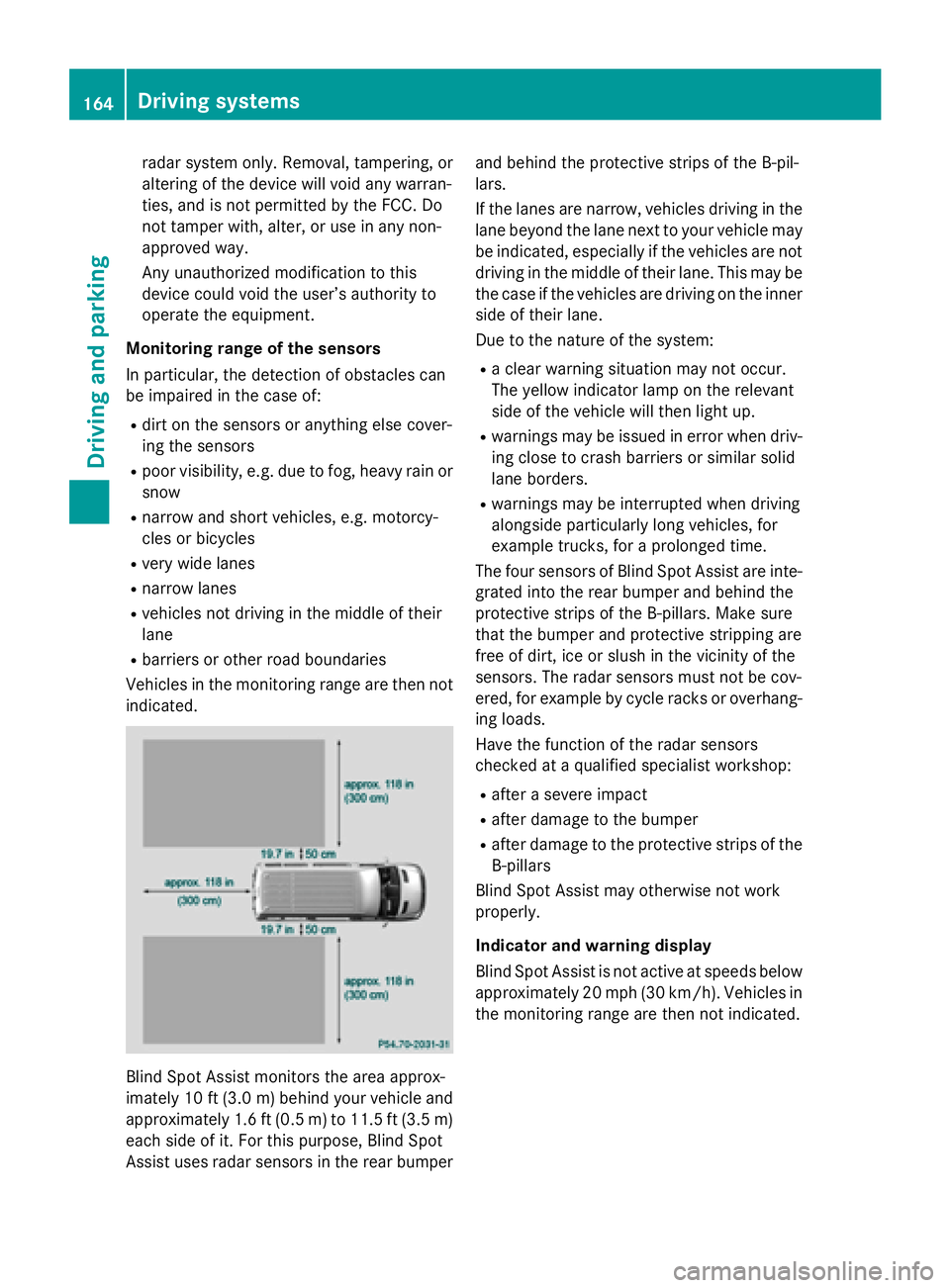
imately 10 ft (3.0 m)behind your vehicle and
approximately 1.6 ft (0.5 m) to 11.5 ft (3.5 m) each side of it. For this purpose, Blind Spot
Assist uses radar sensors in the rear bumper and behind the protective strips of the B-pil-
lars.
If the lanes are narrow, vehicles driving in the
lane beyond the lane next to your vehicle may
be indicated, especially if the vehicles are not
driving in the middle of their lane. This may be the case if the vehicles are driving on the inner
side of their lane.
Due to the nature of the system:
R a clear warning situation may not occur.
The yellow indicator lamp on the relevant
side of the vehicle will then light up.
R warnings may be issued in error when driv-
ing close to crash barriers or similar solid
lane borders.
R warnings may be interrupted when driving
alongside particularly long vehicles, for
example trucks, for a prolonged time.
The four sensors of Blind Spot Assist are inte-
grated into the rear bumper and behind the
protective strips of the B-pillars. Make sure
that the bumper and protective stripping are
free of dirt, ice or slush in the vicinity of the
sensors. The radar sensors must not be cov-
ered, for example by cycle racks or overhang- ing loads.
Have the function of the radar sensors
checked at a qualified specialist workshop:
R after a severe impact
R after damage to the bumper
R after damage to the protective strips of the
B-pillars
Blind Spot Assist may otherwise not work
properly.
Indicator and warning display
Blind Spot Assist is not active at speeds below approximately 20 mph (30 km/h). Vehicles in the monitoring range are then not indicated. 164
Driving systemsDriving and parking