fog light MERCEDES-BENZ SPRINTER 2015 MY15 Operator’s Manual
[x] Cancel search | Manufacturer: MERCEDES-BENZ, Model Year: 2015, Model line: SPRINTER, Model: MERCEDES-BENZ SPRINTER 2015Pages: 334, PDF Size: 5.94 MB
Page 168 of 334
0043
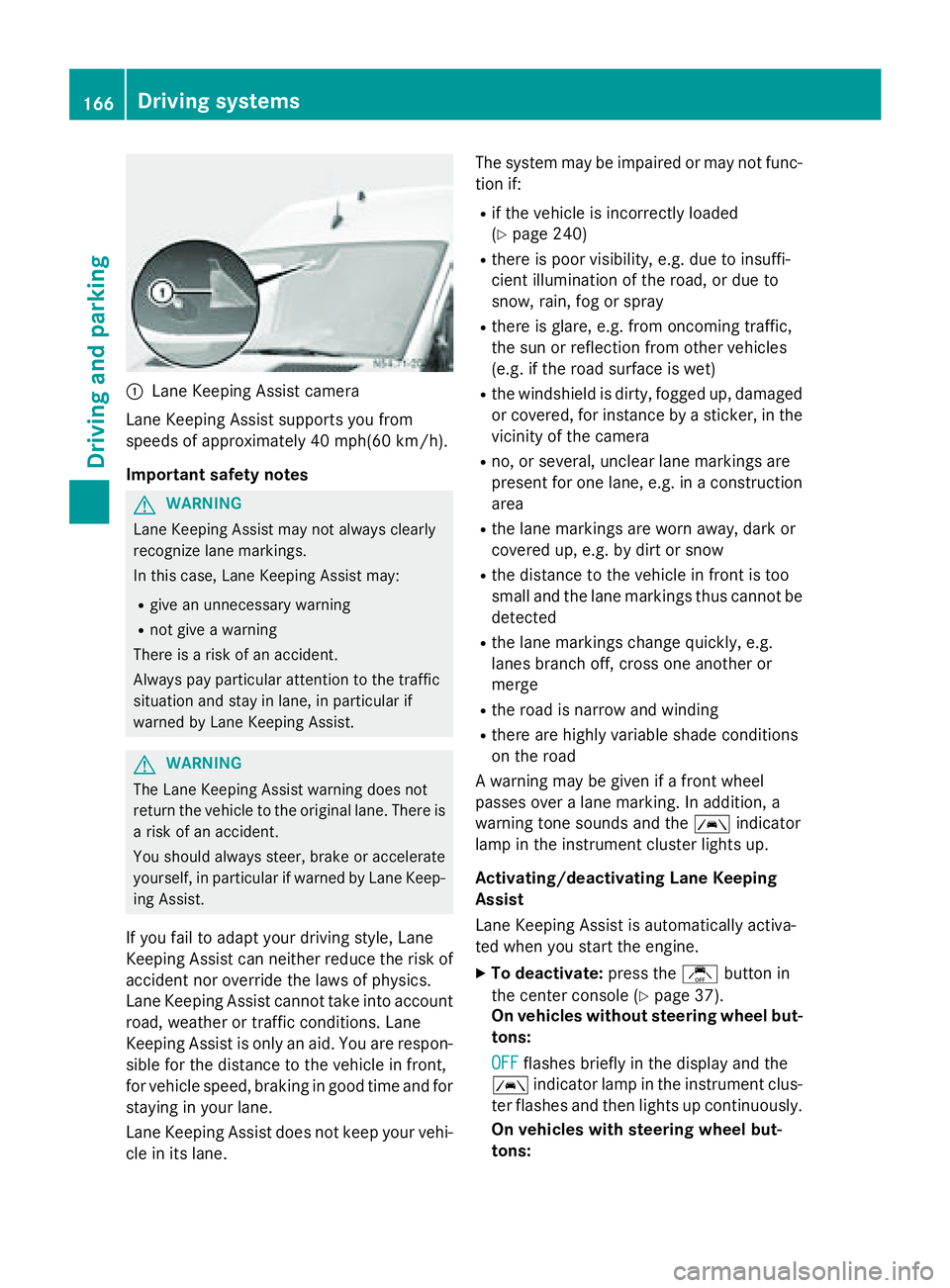
Lane Keeping Assist camera
Lane Keeping Assist supports you from
speeds of approximately 40 mph(60 km/h).
Important safety notes G
WARNING
Lane Keeping Assist may not always clearly
recognize lane markings.
In this case, Lane Keeping Assist may:
R give an unnecessary warning
R not give a warning
There is a risk of an accident.
Always pay particular attention to the traffic
situation and stay in lane, in particular if
warned by Lane Keeping Assist. G
WARNING
The Lane Keeping Assist warning does not
return the vehicle to the original lane. There is a risk of an accident.
You should always steer, brake or accelerate
yourself, in particular if warned by Lane Keep-ing Assist.
If you fail to adapt your driving style, Lane
Keeping Assist can neither reduce the risk of
accident nor override the laws of physics.
Lane Keeping Assist cannot take into account road, weather or traffic conditions. Lane
Keeping Assist is only an aid. You are respon-
sible for the distance to the vehicle in front,
for vehicle speed, braking in good time and for
staying in your lane.
Lane Keeping Assist does not keep your vehi- cle in its lane. The system may be impaired or may not func-
tion if:
R if the vehicle is incorrectly loaded
(Y page 240)
R there is poor visibility, e.g. due to insuffi-
cient illumination of the road, or due to
snow, rain, fog or spray
R there is glare, e.g. from oncoming traffic,
the sun or reflection from other vehicles
(e.g. if the road surface is wet)
R the windshield is dirty, fogged up, damaged
or covered, for instance by a sticker, in the
vicinity of the camera
R no, or several, unclear lane markings are
present for one lane, e.g. in a construction
area
R the lane markings are worn away, dark or
covered up, e.g. by dirt or snow
R the distance to the vehicle in front is too
small and the lane markings thus cannot be
detected
R the lane markings change quickly, e.g.
lanes branch off, cross one another or
merge
R the road is narrow and winding
R there are highly variable shade conditions
on the road
A warning may be given if a front wheel
passes over a lane marking. In addition, a
warning tone sounds and the 00B0indicator
lamp in the instrument cluster lights up.
Activating/deactivating Lane Keeping
Assist
Lane Keeping Assist is automatically activa-
ted when you start the engine.
X To deactivate: press thejbutton in
the center console (Y page 37).
On vehicles without steering wheel but-
tons:
OFF
OFF flashes briefly in the display and the
00B0 indicator lamp in the instrument clus-
ter flashes and then lights up continuously.
On vehicles with steering wheel but-
tons: 166
Driving systemsDriving and parking
Page 174 of 334
The camera is in the middle of the roof above
the high-mounted brake lamp (Y page 269).
The rear view camera may show obstacles in perspectival distortion, incorrectly or not at
all. The rear view camera cannot display all
objects located very near and/or under the
rear bumper. It does not warn you of a colli-
sion, persons or objects.
The area behind the vehicle is displayed in a
mirrored fashion, as in the rear-view mirror or
the exterior mirrors.
The function of the rear view camera may be
partially or completely impaired in the follow-
ing circumstances:
R it is raining very heavily or snowing, or it is
foggy.
R the parking space is located in a very dark
place.
R the camera is exposed to very strong white
light. White stripes may appear on the dis-
play.
R the surrounding area is illuminated with flu-
orescent light. The display may flicker.
R if the temperature changes very quickly, for
example if you drive into a heated garage in the winter.
R ambient temperatures are very high.
R the camera lens is dirty or obstructed.
R the rear of the vehicle is damaged. In this
case, have the position and setting
checked at a specialist workshop.
The rear view camera is activated when you
engage reverse gear R.
You can find information on cleaning the cam-
era in the "Maintenance and care" section
(Y page 269). Working mode
ADR (working speed governor)
General notes When activated, ADR automatically increases
the engine speed to a preset speed or a speed
you have set.
i After a cold start, the idling speed of the
engine is increased automatically. If the
preset working speed is lower than the
increased idling speed, the working speed
is only reached once the engine has com-
pleted the warm-up phase.
It is only possible to activate ADR with the
vehicle stationary and the parking brake
applied.
The selector lever of the automatic trans-
mission must be in position P.
Activating/deactivating ADR X
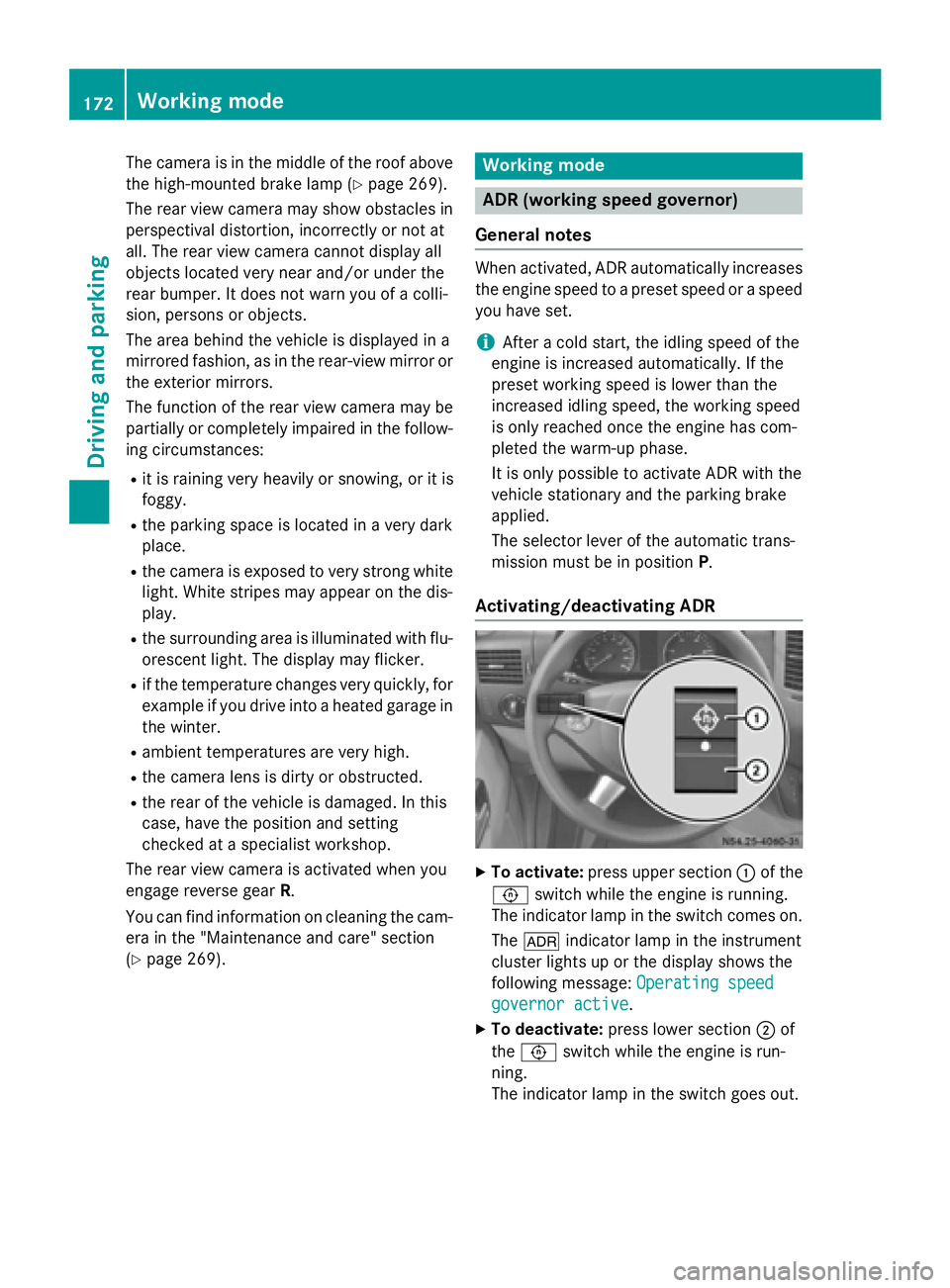
To activate: press upper section 0043of the
0091 switch while the engine is running.
The indicator lamp in the switch comes on.
The 004E indicator lamp in the instrument
cluster lights up or the display shows the
following message: Operating speed Operating speed
governor active
governor active.
X To deactivate: press lower section 0044of
the 0091 switch while the engine is run-
ning.
The indicator lamp in the switch goes out. 172
Working modeDriving and parking
Page 195 of 334
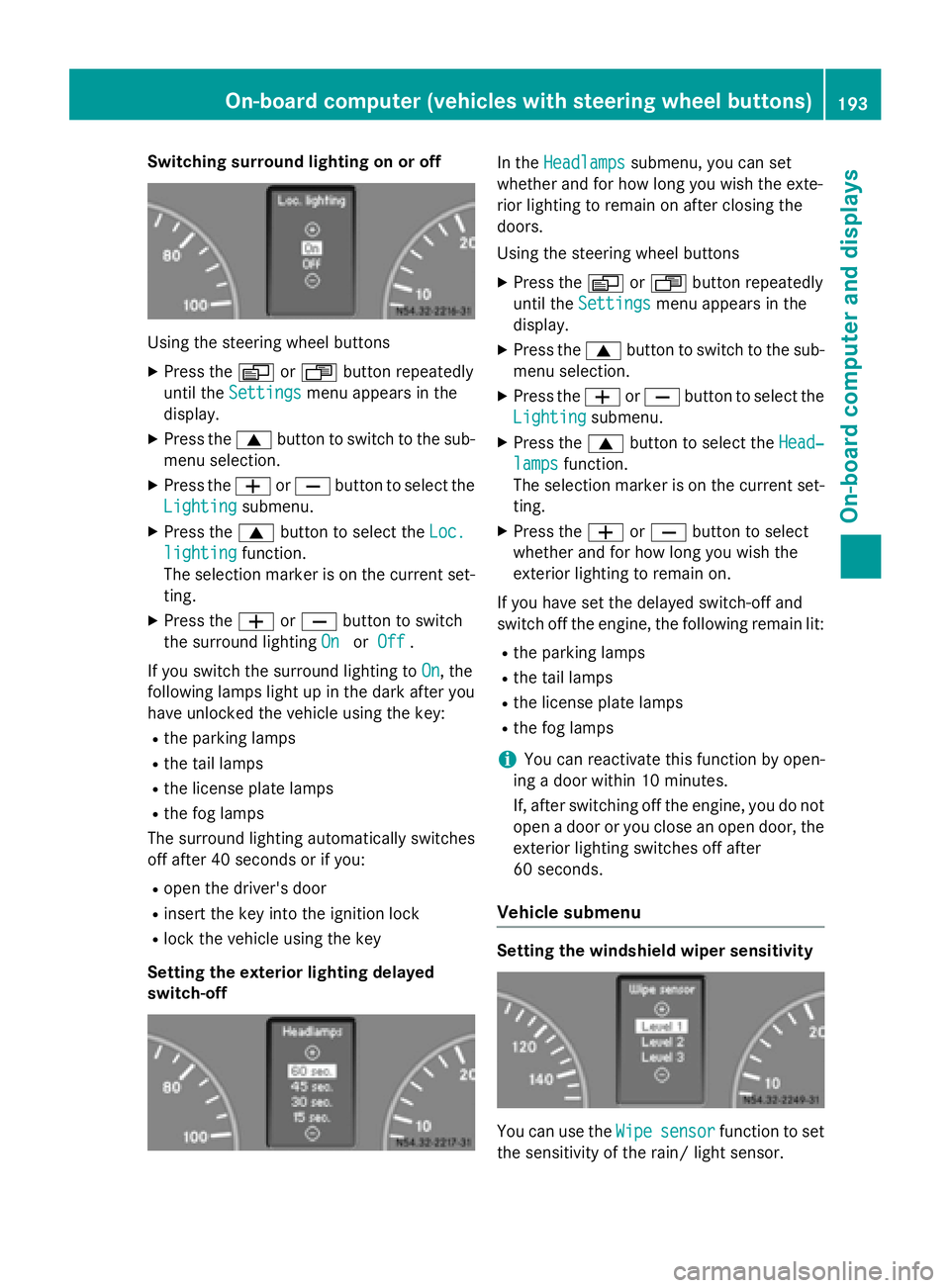
Switching surround lighting on or off
Using the steering wheel buttons
X Press the 0080or007F button repeatedly
until the Settings
Settings menu appears in the
display.
X Press the 0063button to switch to the sub-
menu selection.
X Press the 0081or0082 button to select the
Lighting
Lighting submenu.
X Press the 0063button to select the Loc.
Loc.
lighting
lighting function.
The selection marker is on the current set-
ting.
X Press the 0081or0082 button to switch
the surround lighting On
OnorOff
Off .
If you switch the surround lighting to On
On, the
following lamps light up in the dark after you
have unlocked the vehicle using the key:
R the parking lamps
R the tail lamps
R the license plate lamps
R the fog lamps
The surround lighting automatically switches
off after 40 seconds or if you:
R open the driver's door
R insert the key into the ignition lock
R lock the vehicle using the key
Setting the exterior lighting delayed
switch-off In the
Headlamps Headlamps submenu, you can set
whether and for how long you wish the exte-
rior lighting to remain on after closing the
doors.
Using the steering wheel buttons
X Press the 0080or007F button repeatedly
until the Settings Settings menu appears in the
display.
X Press the 0063button to switch to the sub-
menu selection.
X Press the 0081or0082 button to select the
Lighting
Lighting submenu.
X Press the 0063button to select the Head‐
Head‐
lamps
lamps function.
The selection marker is on the current set-
ting.
X Press the 0081or0082 button to select
whether and for how long you wish the
exterior lighting to remain on.
If you have set the delayed switch-off and
switch off the engine, the following remain lit:
R the parking lamps
R the tail lamps
R the license plate lamps
R the fog lamps
i You can reactivate this function by open-
ing a door within 10 minutes.
If, after switching off the engine, you do not open a door or you close an open door, the
exterior lighting switches off after
60 seconds.
Vehicle submenu Setting the windshield wiper sensitivity
You can use the
Wipe Wipesensor
sensor function to set
the sensitivity of the rain/ light sensor. On-board computer (vehicles with steering wheel buttons)
193On-board computer and displays Z
Page 202 of 334
Display messages
Possible causes/consequences and
0050
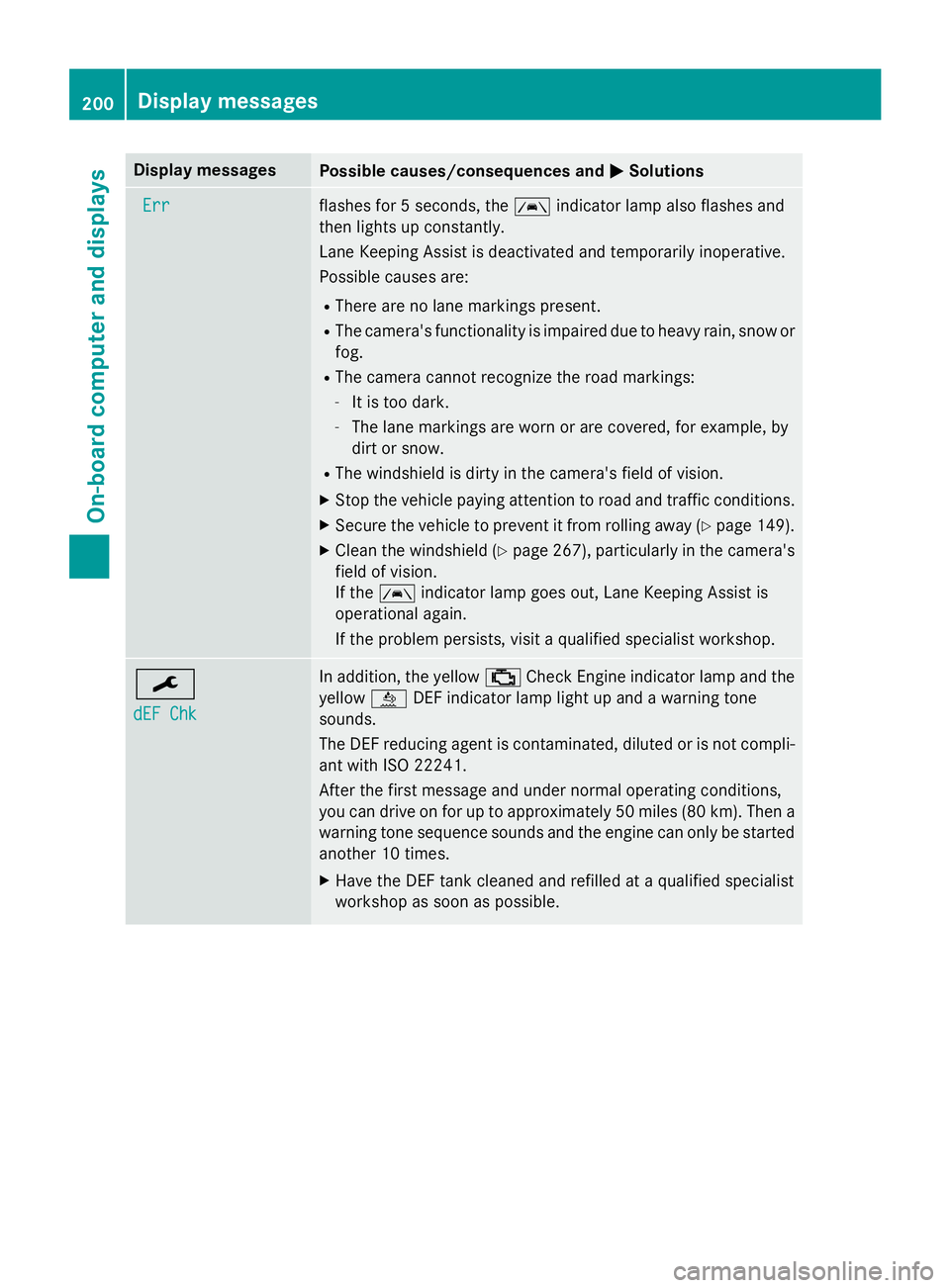
0050Solutions Err
Err flashes for 5 seconds, the
00B0indicator lamp also flashes and
then lights up constantly.
Lane Keeping Assist is deactivated and temporarily inoperative.
Possible causes are:
R There are no lane markings present.
R The camera's functionality is impaired due to heavy rain, snow or
fog.
R The camera cannot recognize the road markings:
- It is too dark.
- The lane markings are worn or are covered, for example, by
dirt or snow.
R The windshield is dirty in the camera's field of vision.
X Stop the vehicle paying attention to road and traffic conditions.
X Secure the vehicle to prevent it from rolling away (Y page 149).
X Clean the windshield (Y page 267), particularly in the camera's
field of vision.
If the 00B0 indicator lamp goes out, Lane Keeping Assist is
operational again.
If the problem persists, visit a qualified specialist workshop. 0099
dEF Chk dEF Chk In addition, the yellow
00B9Check Engine indicator lamp and the
yellow 00E2DEF indicator lamp light up and a warning tone
sounds.
The DEF reducing agent is contaminated, diluted or is not compli-
ant with ISO 2224 1.
After the first message and under normal operating conditions,
you can drive on for up to approximately 50 miles (80 km). Then a warning tone sequence sounds and the engine can only be started
another 10 times.
X Have the DEF tank cleaned and refilled at a qualified specialist
workshop as soon as possible. 200
Display messagesOn-board computer and displays
Page 204 of 334
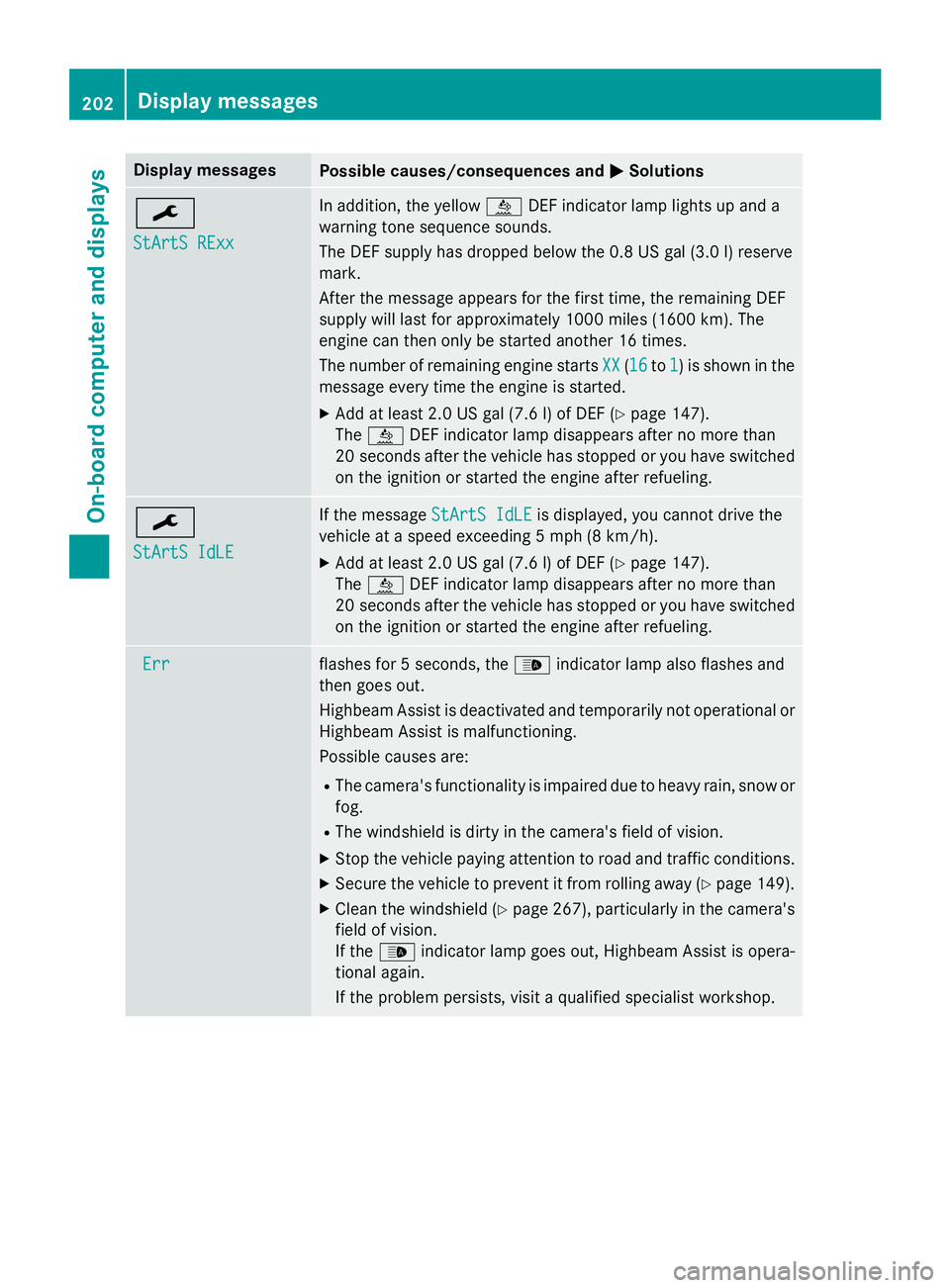
Display messages
Possible causes/consequences and
0050
0050Solutions 0099
StArtS RExx StArtS RExx In addition, the yellow
00E2DEF indicator lamp lights up and a
warning tone sequence sounds.
The DEF supply has dropped below the 0.8 US gal (3.0 l) reserve
mark.
After the message appears for the first time, the remaining DEF
supply will last for approximately 1000 miles (1600 km). The
engine can then only be started another 16 times.
The number of remaining engine starts XX XX(1616 to1
1) is shown in the
message every time the engine is started.
X Add at least 2.0 US gal (7.6 l) of DEF (Y page 147).
The 00E2 DEF indicator lamp disappears after no more than
20 seconds after the vehicle has stopped or you have switched
on the ignition or started the engine after refueling. 0099
StArtS IdLE StArtS IdLE If the message
StArtS IdLE
StArtS IdLEis displayed, you cannot drive the
vehicle at a speed exceeding 5 mph (8 km/h).
X Add at least 2.0 US gal (7.6 l) of DEF (Y page 147).
The 00E2 DEF indicator lamp disappears after no more than
20 second safter the vehicle has stopped or you have switched
on the ignition or started the engine after refueling. Err
Err flashes for 5 seconds, the
00CEindicator lamp also flashes and
then goes out.
Highbeam Assist is deactivated and temporarily not operational or
Highbeam Assist is malfunctioning.
Possible causes are:
R The camera's functionality is impaired due to heavy rain, snow or
fog.
R The windshield is dirty in the camera's field of vision.
X Stop the vehicle paying attention to road and traffic conditions.
X Secure the vehicle to prevent it from rolling away (Y page 149).
X Clean the windshield (Y page 267), particularly in the camera's
field of vision.
If the 00CE indicator lamp goes out, Highbeam Assist is opera-
tional again.
If the problem persists, visit a qualified specialist workshop. 202
Display messagesOn-board computer and displays
Page 211 of 334
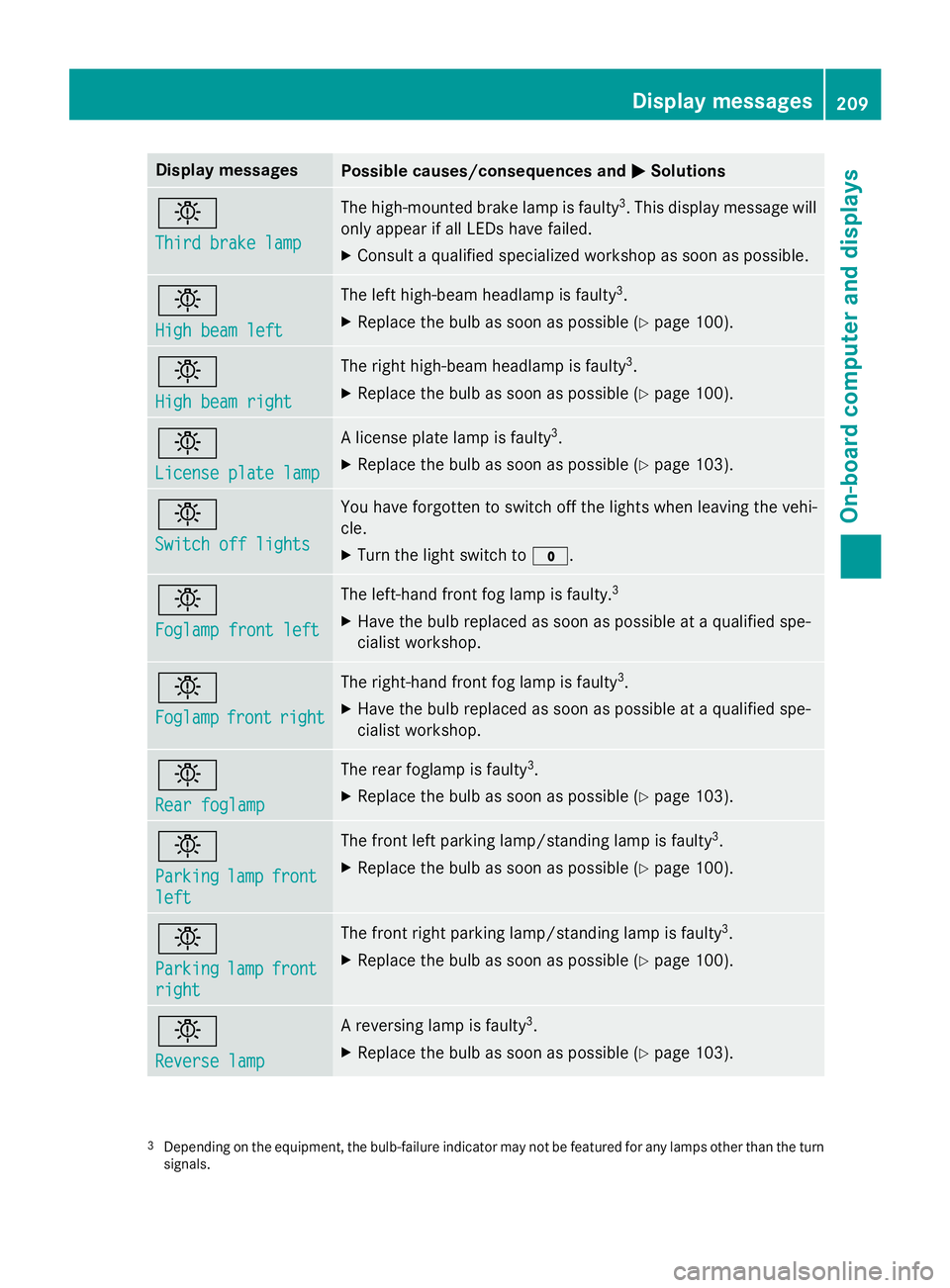
Display messages
Possible causes/consequences and
0050
0050Solutions 0049
Third brake lamp Third brake lamp The high-mounted brake lamp is faulty
3
. This display message will
only appear if all LEDs have failed.
X Consult a qualified specialized workshop as soon as possible. 0049
High beam left High beam left The left high-beam headlamp is faulty
3
.
X Replace the bulb as soon as possible (Y page 100).0049
High beam right High beam right The right high-beam headlamp is faulty
3
.
X Replace the bulb as soon as possible (Y page 100).0049
License plate lamp License plate lamp A license plate lamp is faulty
3
.
X Replace the bulb as soon as possible (Y page 103).0049
Switch off lights Switch off lights You have forgotten to switch off the lights when leaving the vehi-
cle.
X Turn the light switch to 003F.0049
Foglamp front left Foglamp front left The left-hand front fog lamp is faulty.
3
X Have the bulb replaced as soon as possible at a qualified spe-
cialist workshop. 0049
Foglamp Foglamp
front
frontright
right The right-hand front fog lamp is faulty
3
.
X Have the bulb replaced as soon as possible at a qualified spe-
cialist workshop. 0049
Rear foglamp Rear foglamp The rear foglamp is faulty
3
.
X Replace the bulb as soon as possible (Y page 103).0049
Parking Parking
lamp
lampfront
front
left
left The front left parking lamp/standing lamp is faulty
3
.
X Replace the bulb as soon as possible (Y page 100).0049
Parking Parking
lamp
lampfront
front
right
right The front right parking lamp/standing lamp is faulty
3
.
X Replace the bulb as soon as possible (Y page 100).0049
Reverse lamp Reverse lamp A reversing lamp is faulty
3
.
X Replace the bulb as soon as possible (Y page 103).3
Depending on the equipment, the bulb-failure indicator may not be featured for any lamps other than the turn
signals. Display
messages
209On-board computer and displays Z
Page 216 of 334
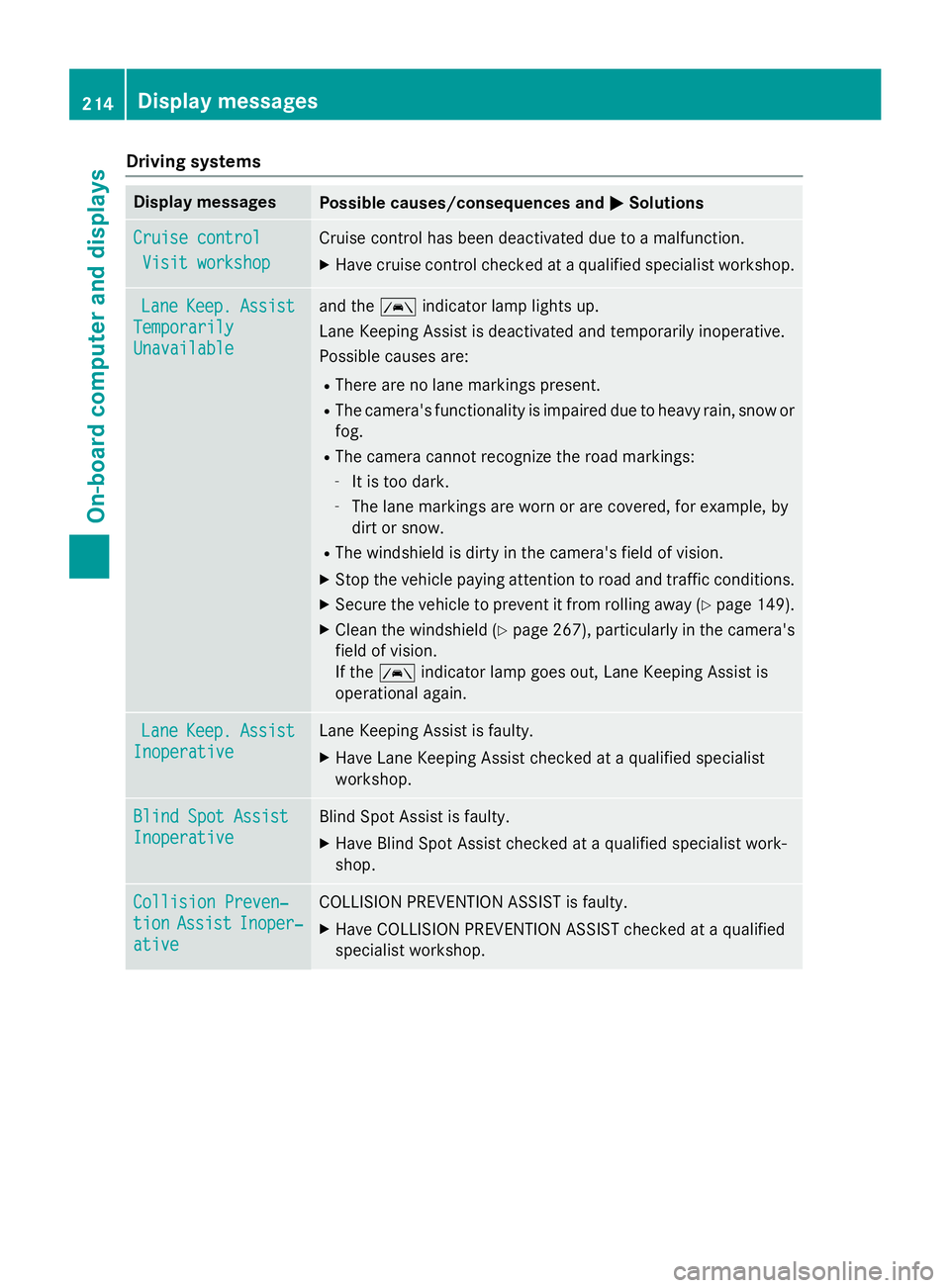
Driving systems
Display messages
Possible causes/consequences and
0050
0050Solutions Cruise control
Cruise control
Visit workshop
Visit workshop Cruise control has been deactivated due to a malfunction.
X Have cruise control checked at a qualified specialist workshop. Lane
Lane
Keep.
Keep. Assist
Assist
Temporarily
Temporarily
Unavailable Unavailable and the
00B0indicator lamp lights up.
Lane Keeping Assist is deactivated and temporarily inoperative.
Possible causes are:
R There are no lane markings present.
R The camera's functionality is impaired due to heavy rain, snow or
fog.
R The camera cannot recognize the road markings:
- It is too dark.
- The lane markings are worn or are covered, for example, by
dirt or snow.
R The windshield is dirty in the camera's field of vision.
X Stop the vehicle paying attention to road and traffic conditions.
X Secure the vehicle to prevent it from rolling away (Y page 149).
X Clean the windshield (Y page 267), particularly in the camera's
field of vision.
If the 00B0 indicator lamp goes out, Lane Keeping Assist is
operational again. Lane Lane
Keep.
Keep. Assist
Assist
Inoperative
Inoperative Lane Keeping Assist is faulty.
X Have Lane Keeping Assist checked at a qualified specialist
workshop. Blind Spot Assist Blind Spot Assist
Inoperative Inoperative Blind Spot Assist is faulty.
X Have Blind Spot Assist checked at a qualified specialist work-
shop. Collision Preven‐
Collision Preven‐
tion tion
Assist
Assist Inoper‐
Inoper‐
ative
ative COLLISION PREVENTION ASSIST is faulty.
X Have COLLISION PREVENTION ASSIST checked at a qualified
specialist workshop. 214
Display
messagesOn-board computer and displays