tire pressure MERCEDES-BENZ SPRINTER 2015 MY15 Operator’s Manual
[x] Cancel search | Manufacturer: MERCEDES-BENZ, Model Year: 2015, Model line: SPRINTER, Model: MERCEDES-BENZ SPRINTER 2015Pages: 334, PDF Size: 5.94 MB
Page 155 of 334
cific maintenance work must be carried out at
regular intervals and in accordance with the
service requirements of the dealer listed here
on the inside title page. Details can be found
in the Maintenance Booklet. Short journey
! If the vehicle is predominantly used for
short-distance driving or is stationary for
long periods, this could lead to a malfunc-
tion in the automatic cleaning function for
the diesel particle filter. This can lead to
blockage of the diesel particle filter. This
can also result in fuel collecting in the
engine oil and cause engine failure.
Therefore, if you mainly drive short distances,
drive on a highway or an inter-urban road for
20 minutes every 300 miles (500 km). This
facilitates the diesel particle filter's burn-off
process. Speed limiter
G
WARNING
Exceeding the stated tire load-bearing capa-
city and the approved maximum speed could
lead to tire damage or the tire bursting. There is a risk of accident.
Therefore, only use tire types and sizes
approved for your vehicle model. Observe the
tire load rating and speed rating required for
your vehicle.
As the driver, you must find out about the
maximum speed of the vehicle and the result-
ing permissible maximum speed of the tires
(tire and tire pressure). In particular, also
observe the tire approval regulations for each
country.
You must not exceed the speed limit for the
tires listed in the tire pressure tables. You can find information on tire pressures in the
"Wheels and tires" section (Y page 288).You can permanently limit the maximum
speed of your vehicle to 55 mph (90 km/h),
60 mph (100 km/h) or 75 mph (120 km/h).
We recommend that you use an authorized
Sprinter Dealer for the programming of the
maximum speed.
Before overtaking, take into consideration
that the engine speed limiter prevents the
speed increasing beyond the programmed
maximum speed. Driving abroad
Service An extensive network of authorized Sprinter
Dealers is also at your disposal when you are
traveling abroad. Nevertheless, please bear in
mind that service facilities or replacement
parts may not always be immediately availa-
ble. You can obtain a list of workshops at any
authorized Sprinter Dealer.
Fuel In some countries, only fuels with a higher
sulfur content are available.
Unsuitable fuel can cause engine damage.
Information on fuel (Y page 318).
Low-beam headlamps If you are traveling in countries where vehi-
cles are driven on the opposite side of the
road to that in which the vehicle is registered,
you will need to:
R have the halogen headlamps partially
masked
R have the Bi-Xenon headlamps set to sym-
metrical low beam
This prevents glare to oncoming traffic and no
longer illuminates the edge of the road to the same height and distance.
Have the headlamps masked or adjusted at a qualified specialist workshop before you
cross the border, but as close to it as possi-
ble. Driving tips
153Driving and parking Z
Page 160 of 334
cable and a folding spade are carried in the
vehicle.
X Wheels and tires: check the tire tread
depth (Y page 285) and tire pressure
(Y page 288).
Rules for driving off-road !
Always bear the vehicle's ground clear-
ance in mind and avoid obstacles, e.g. deep ruts.
Obstacles may damage the following parts
of the vehicle:
R the chassis
R the drive train
R the fuel and supply tanks
For this reason, you should always drive
slowly when driving off-road. If you have to drive over obstacles, have the co-driver
direct you.
i We recommend that you additionally
carry a shovel and a recovery rope with
shackle in the vehicle.
R Ensure that loads and items of luggage are
securely stowed or lashed down
(Y page 240).
R Before driving off-road, stop the vehicle and
shift to a low gear.
R If the surface demands it, temporarily deac-
tivate ASR when pulling away (Y page 58).
R Only drive off-road with the engine running
and a gear engaged.
R Drive slowly and smoothly. Walking pace is
necessary in many situations.
R Avoid spinning the drive wheels.
R Make sure that the wheels always remain in
contact with the ground.
R Drive with extreme care over unknown ter-
rain where you can only see for a short dis-
tance. As a precaution, get out of the vehi-
cle to take a look at the route to be taken in
advance.
R Check the water depth before fording. R
Watch out for obstacles (e.g. rocks, holes,
tree stumps and ruts).
R Avoid edges where the surface could crum-
ble or break away.
Checklist after driving off-road !
If you detect damage to the vehicle after
driving off-road, have the vehicle checked
immediately at a qualified specialist work-
shop.
Off-road driving places a higher demand on
your vehicle than normal road operation.
Check your vehicle after driving on rough ter- rain. By doing so you will notice any damage in
good time and reduce the risk of an accident for yourself and other road users. Clean your
vehicle thoroughly before driving on public
roads.
Observe the following points after driving off-
road, on construction sites and before driving on public roads:
X Activate ASR (Y page 58).
X Clean the headlamps and tail lamps and
check them for damage.
X Clean the front and rear license plates.
X Clean the windshield, windows and exterior
mirrors.
X Clean the steps, door sills and grab han-
dles.
This increases safety of footing.
X Clean the wheels/tires, wheel housings
and the underbody of the vehicle with a
water jet.
This increases road grip, especially on wet
road surfaces.
X Check the wheels/tires and wheel hous-
ings for trapped foreign objects and
remove them.
Trapped foreign objects can damage the
wheels/tires and may be flung out from the
vehicle when you continue driving.
X Check the underbody for trapped branches
or other parts of plants and remove them.
Trapped branches or other parts of plants
increase the risk of fire and can cause dam- 158
Driving tipsDriving and parking
Page 178 of 334
X
Remove the objects that are preventing the
trailer from rolling, e.g. wheel chocks.
X Release the trailer parking brake.
i The subharness of the vehicle has a cable
connection to the brake lamp indicator
lamp.
Observe the maximum permissible trailer
dimensions (width and length).
Most federal states and all Canadian provin-
ces require by law:
R safety chains between the towing vehicle
and the trailer. The chains should be cross-
wound under the trailer drawbar. They must be fastened to the vehicle's trailer cou-
pling, not to the bumper or the axle.
Leave enough slack in the chains. This
allows you to drive round tight corners.
R a separate brake system for certain types
of trailer.
R a safety switch for braked trailers. Find out
the specific requirements according to the
applicable laws.
If the trailer detaches from the towing vehi- cle, the safety switch applies the trailer's
brakes. Towing a trailer
There are numerous legal requirements con-
cerning the towing of a trailer, e.g. speed
restrictions. Make sure your vehicle/trailer
combination complies with local laws. This
not only means where you live, but also any-
where you are driving to. Information is avail-
able from the police and local authorities.
Observe the following when towing a trailer:
R Practice driving around bends, stopping
and backing up at a place where there is no
traffic. This enables you to gain experience and get used to the new handling charac-
teristics.
R Before driving, check:
- that the trailer tow hitch and ball cou-
pling are secure
- that the safety switch for a braked trailer
is functioning properly
- that the safety chains are secure and not
damaged
- that the electrical connections are
secure
- that the lights are working
- that the wheels are in good order and the
tire pressure is correct
R Adjust the exterior mirrors to provide an
unobstructed view of the rear section of the
trailer.
R If the trailer has electronically controlled
brakes, pull the vehicle/trailer combina-
tion away carefully. Brake manually using
the brake controller and check that the
brakes are working.
R Secure the load on the trailer according to
the applicable specifications and current
standards on securing loads (Y page 242).
R When driving with a trailer, check at regular
intervals that the load is secured and that
the brakes and lights are working.
R Bear in mind that the handling will be less
stable when towing a trailer than when driv-
ing without one. Avoid sudden steering
movements.
R The vehicle/trailer combination is heavier,
accelerates more slowly and has a
decreased gradient climbing capability and
a longer braking distance.
It is more susceptible to crosswinds and
requires cautious steering.
R If possible, do not brake suddenly, but
rather moderately at first so that the trailer
can activate its brakes. Then increase the
force on the brake pedal.
R If the automatic transmission repeatedly
shifts between gears when driving on 176
Towing a trailerDriving and pa
rking
Page 185 of 334
Menus in the on-board computer
Overview If you wish to exit a menu and go to the stand-
ard display:
X Press the 0079menu button for longer than
1 second.
or
X Do not press any button for 10 seconds.
The display accepts the changed settings.
Using the 0074,0075,0079or0045 adjustment but-
tons, you can select the following functions:
R Calling up the service due date
(Y page 258)
R Checking the oil level (Y page 250)
R Checking the DEF supply (Y page 182)
R Preselecting/setting the auxiliary heating
switch-on time (Y page 124)
R Tire pressure monitor (Y page 291)
R Setting the time (Y page 183)
R Activating/deactivating Highbeam Assist
(Y page 192)
R Setting the daytime running lamps
(Y page 92)
Setting the time X
Turn the key to position 2in the ignition
lock.
X Press the 0079menu button repeatedly until
the hours figure flashes.
X Press the 0074or0075 button to set the hour.
X Press the 0045reset button.
The minute display flashes.
X Press the 0074or0075 button to set the minute.
i If you keep the
0074or0075 button pressed,
the value will change continuously. Activating/deactivating Highbeam
Assist X
Turn the key to position 2in the ignition
lock.
X Press the 0079menu button repeatedly until
the 00CE indicator lamp flashes and the on on
or OFF
OFF message appears in the display.
X Use the 0074or0075 button to switch High-
beam Assist on/off.
Switching the daytime running lamps
on/off If you switch the daytime running lamps
on on,
the daytime running lamps will automatically
light up when the engine is running.
For safety reasons, it is only possible to
change this setting when the vehicle is sta-
tionary. The factory setting is on onin countries
in which daytime running lamp mode or day-
time running lamps are mandatory.
X Turn the key to position 2in the ignition
lock.
X Press the 0079menu button repeatedly until
the 0058 indicator lamp flashes and the on on
or OFF
OFF message appears in the display.
X Press the 0074or0075 button to activate or
deactivate the daytime running lamps.
i USA only:
If you turn the light switch to 0060or0058,
the corresponding light switches on. If you
turn the light switch to 0058, the daytime
running lamps remain switched on.
Canada only:
If you turn the light switch to 0058, the low-
beam headlamps switch on. If you turn the light switch to 0060or0058, the daytime
running lamps remain switched on. On-board computer (vehicles without steering wheel buttons)
183On-board computer and displays Z
Page 188 of 334
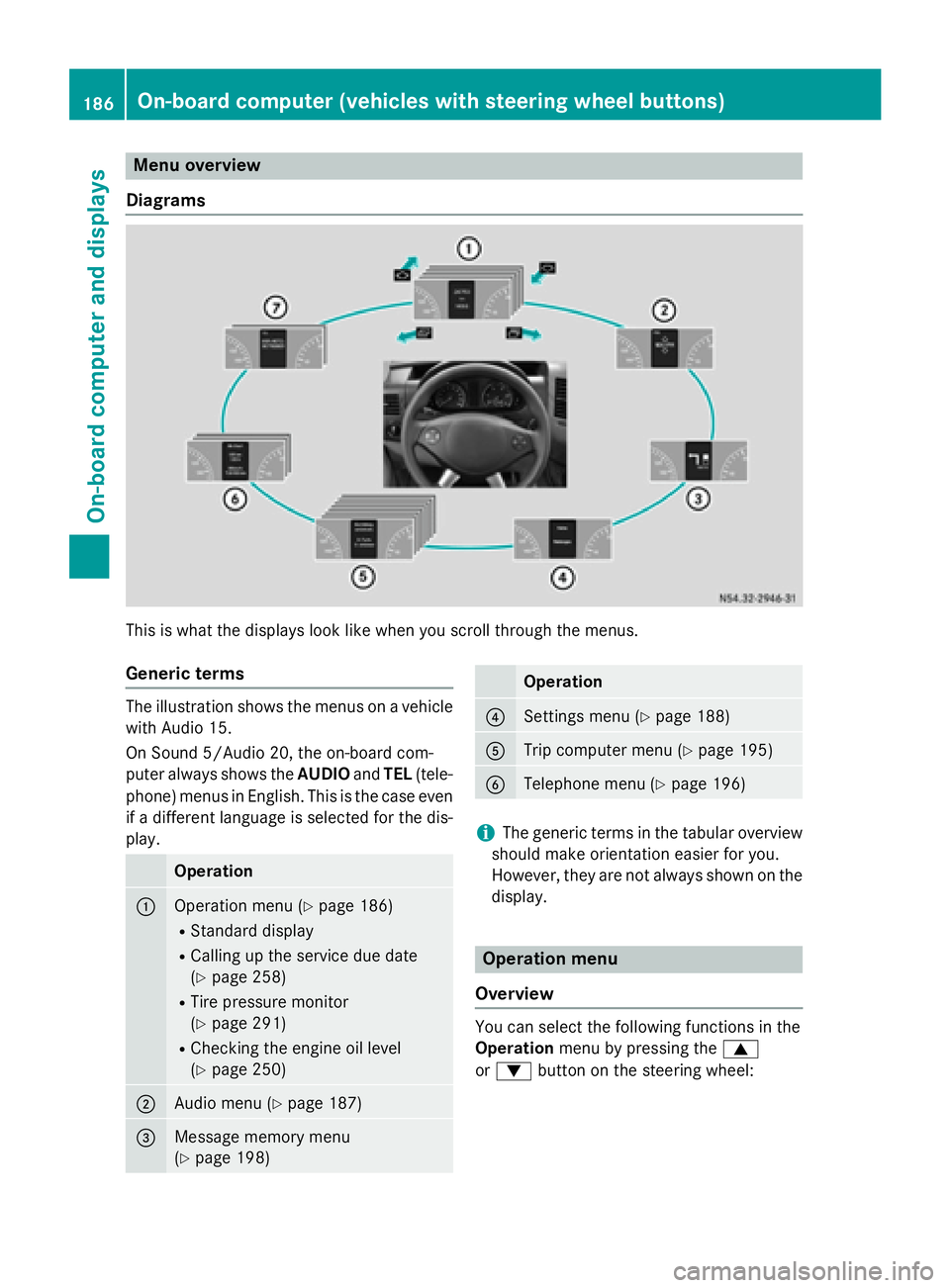
Menu overview
Diagrams This is what the displays look like when you scroll through the menus.
Generic terms The illustration shows the menus on a vehicle
with Audio 15.
On Sound 5/Audio 20, the on-board com-
puter always shows the AUDIOandTEL (tele-
phone) menus in English. This is the case even
if a different language is selected for the dis- play. Operation
0043
Operation menu (Y
page 186)
R Standard display
R Calling up the service due date
(Y page 258)
R Tire pressure monitor
(Y page 291)
R Checking the engine oil level
(Y page 250) 0044
Audio menu (Y
page 187) 0087
Message memory menu
(Y
page 198) Operation
0085
Settings menu (Y
page 188) 0083
Trip computer menu (Y
page 195) 0084
Telephone menu (Y
page 196) i
The generic terms in the tabular overview
should make orientation easier for you.
However, they are not always shown on the display. Operation menu
Overview You can select the following functions in the
Operation
menu by pressing the 0063
or 0064 button on the steering wheel: 186
On-board computer (vehicles with steering wheel buttons)On-board computer and displays
Page 189 of 334
R
Displaying the trip odometer and odometer
(standard display) (Y page 187)
R Displaying the coolant temperature
(Y page 187)
R Calling up the service due date
(Y page 258)
R Tire pressure monitor (Y page 291)
R Checking the oil level (Y page 250)
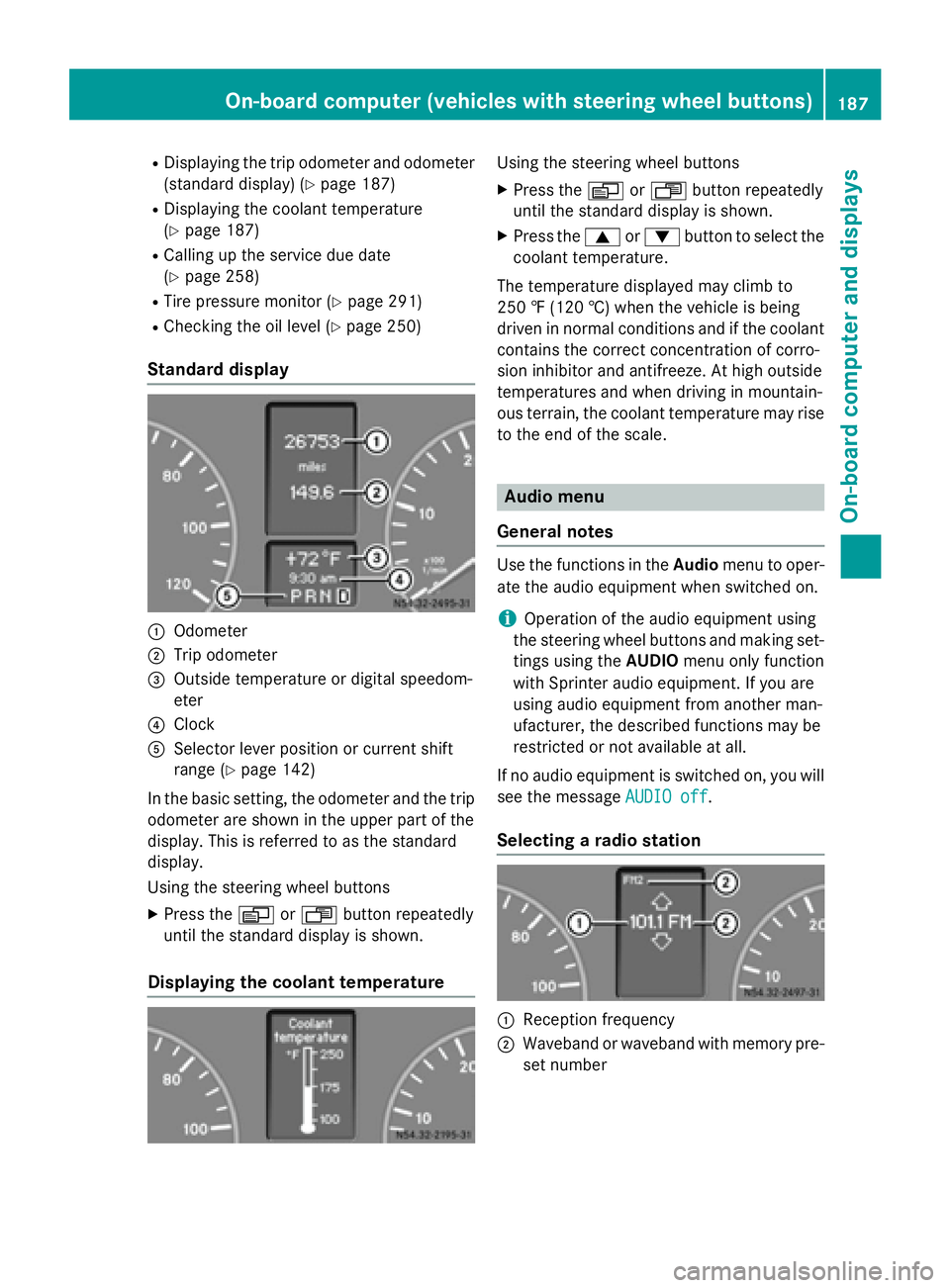
Standard display 0043
Odometer
0044 Trip odometer
0087 Outside temperature or digital speedom-
eter
0085 Clock
0083 Selector lever position or current shift
range (Y page 142)
In the basic setting, the odometer and the trip
odometer are shown in the upper part of the
display. This is referred to as the standard
display.
Using the steering wheel buttons
X Press the 0080or007F button repeatedly
until the standard display is shown.
Displaying the coolant temperature Using the steering wheel buttons
X Press the 0080or007F button repeatedly
until the standard display is shown.
X Press the 0063or0064 button to select the
coolant temperature.
The temperature displayed may climb to
250 ‡ (120 †) when the vehicle is being
driven in normal conditions and if the coolant
contains the correct concentration of corro-
sion inhibitor and antifreeze. At high outside
temperatures and when driving in mountain-
ous terrain, the coolant temperature may rise
to the end of the scale. Audio menu
General notes Use the functions in the
Audiomenu to oper-
ate the audio equipment when switched on.
i Operation of the audio equipment using
the steering wheel buttons and making set-
tings using the AUDIOmenu only function
with Sprinter audio equipment. If you are
using audio equipment from another man-
ufacturer, the described functions may be
restricted or not available at all.
If no audio equipment is switched on, you will
see the message AUDIO off AUDIO off.
Selecting a radio station 0043
Reception frequency
0044 Waveband or waveband with memory pre-
set number On-board computer (vehicles
with steering wheel buttons)
187On-board computer and displays Z
Page 193 of 334
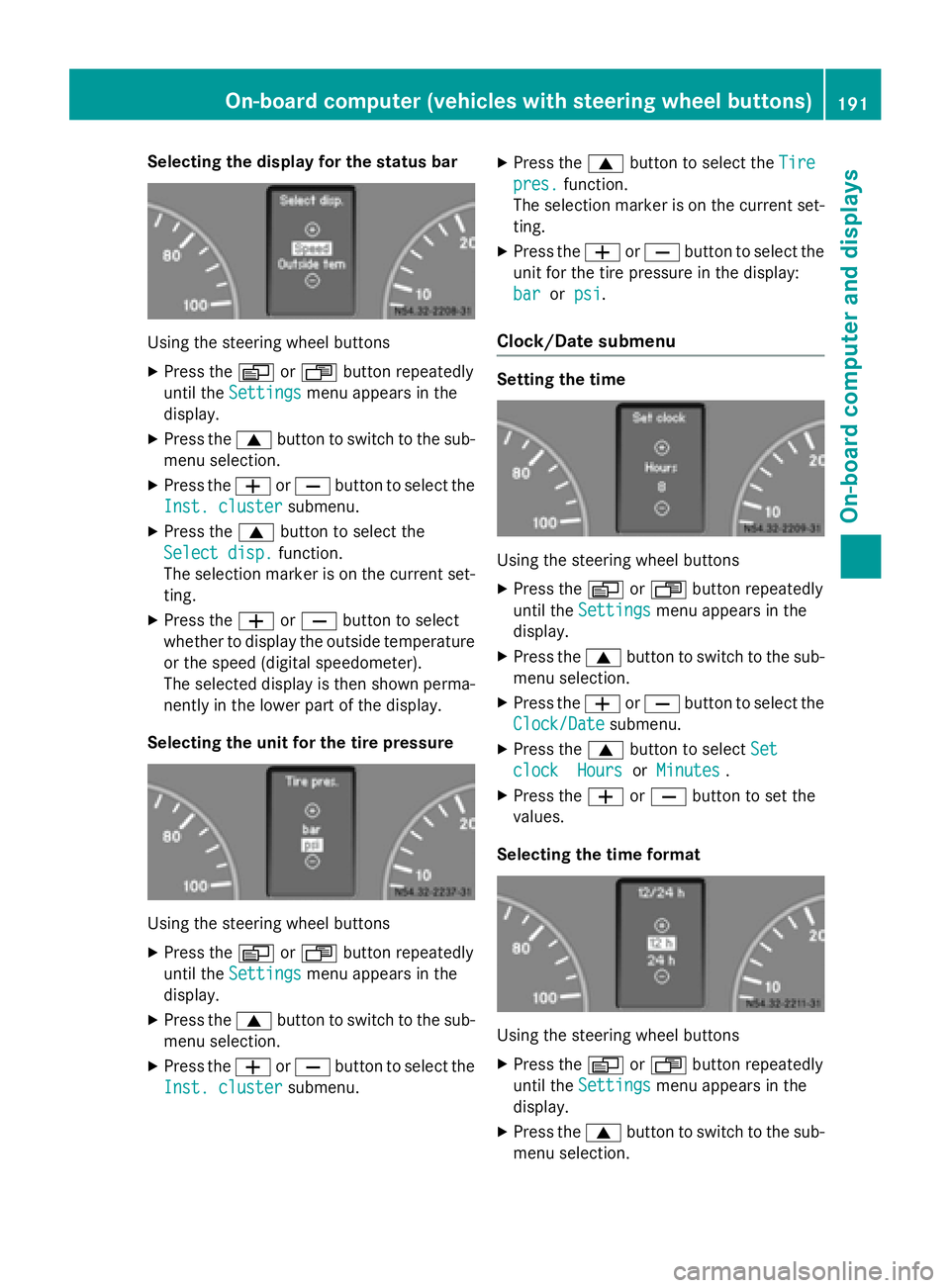
Selecting the display for the status bar
Using the steering wheel buttons
X Press the 0080or007F button repeatedly
until the Settings
Settings menu appears in the
display.
X Press the 0063button to switch to the sub-
menu selection.
X Press the 0081or0082 button to select the
Inst. cluster
Inst. cluster submenu.
X Press the 0063button to select the
Select disp.
Select disp. function.
The selection marker is on the current set-
ting.
X Press the 0081or0082 button to select
whether to display the outside temperature or the speed (digital speedometer).
The selected display is then shown perma-
nently in the lower part of the display.
Selecting the unit for the tire pressure Using the steering wheel buttons
X Press the 0080or007F button repeatedly
until the Settings Settings menu appears in the
display.
X Press the 0063button to switch to the sub-
menu selection.
X Press the 0081or0082 button to select the
Inst. cluster Inst. cluster submenu. X
Press the 0063button to select the Tire Tire
pres. pres. function.
The selection marker is on the current set-
ting.
X Press the 0081or0082 button to select the
unit for the tire pressure in the display:
bar
bar orpsi
psi.
Clock/Date submenu Setting the time
Using the steering wheel buttons
X Press the 0080or007F button repeatedly
until the Settings
Settings menu appears in the
display.
X Press the 0063button to switch to the sub-
menu selection.
X Press the 0081or0082 button to select the
Clock/Date
Clock/Date submenu.
X Press the 0063button to select Set
Set
clock
clock Hours
HoursorMinutes
Minutes .
X Press the 0081or0082 button to set the
values.
Selecting the time format Using the steering wheel buttons
X Press the 0080or007F button repeatedly
until the Settings
Settings menu appears in the
display.
X Press the 0063button to switch to the sub-
menu selection. On-board computer (vehicles with steering wheel buttons)
191On-board computer and displays Z
Page 201 of 334
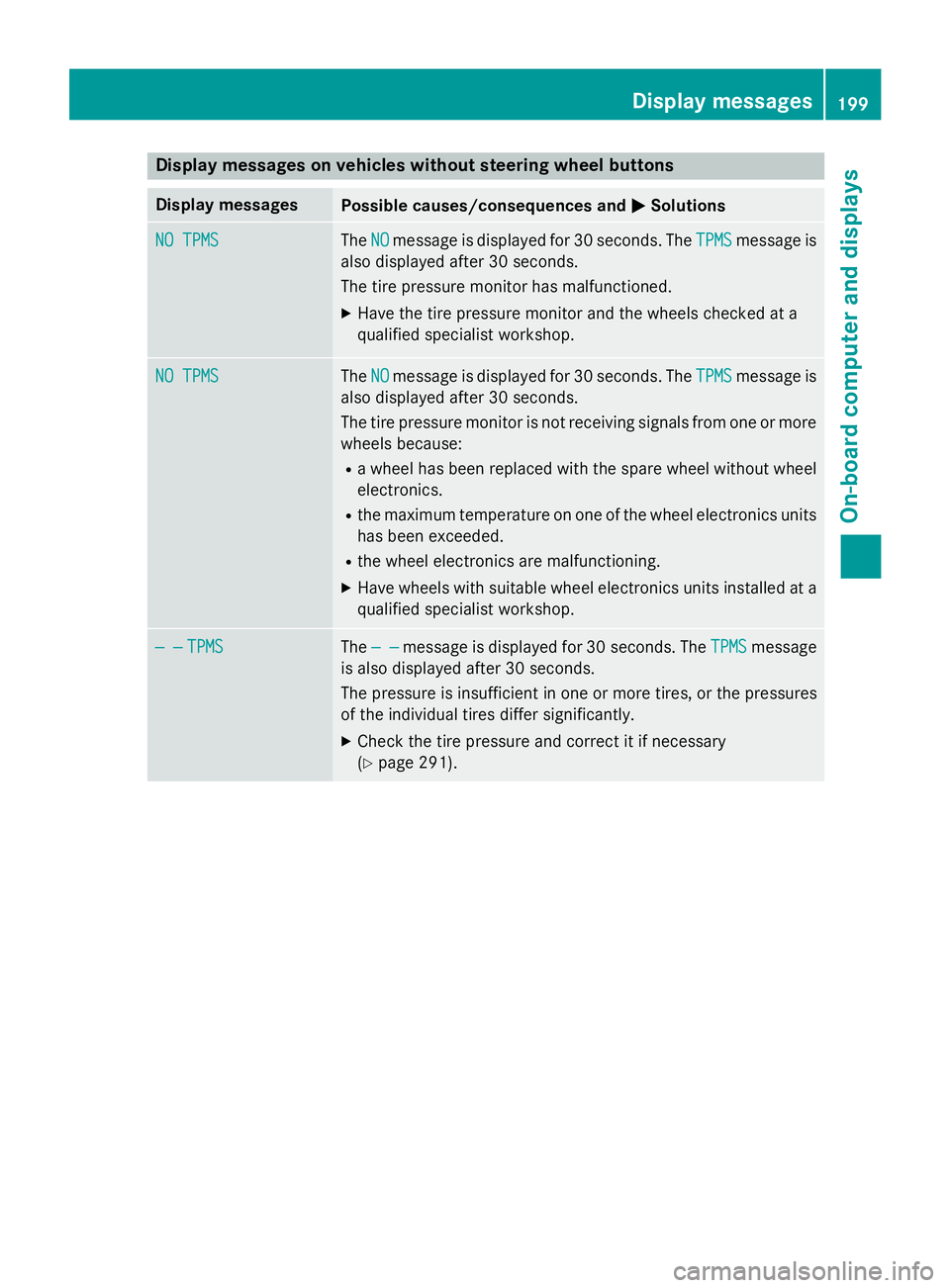
Display messages on vehicles without steering wheel buttons
Display messages
Possible causes/consequences and
0050
0050Solutions NO TPMS
NO TPMS The
NO
NOmessage is displayed for 30 seconds. The TPMS
TPMSmessage is
also displayed after 30 seconds.
The tire pressure monitor has malfunctioned.
X Have the tire pressure monitor and the wheels checked at a
qualified specialist workshop. NO TPMS NO TPMS The
NO
NOmessage is displayed for 30 seconds. The TPMS
TPMSmessage is
also displayed after 30 seconds.
The tire pressure monitor is not receiving signals from one or more wheels because:
R a wheel has been replaced with the spare wheel without wheel
electronics.
R the maximum temperature on one of the wheel electronics units
has been exceeded.
R the wheel electronics are malfunctioning.
X Have wheels with suitable wheel electronics units installed at a
qualified specialist workshop. — — — —
TPMS
TPMS The
— —
— — message is displayed for 30 seconds. The TPMS
TPMSmessage
is also displayed after 30 seconds.
The pressure is insufficient in one or more tires, or the pressures
of the individual tires differ significantly.
X Check the tire pressure and correct it if necessary
(Y page 291). Display
messages
199On-board computer and displays Z
Page 217 of 334
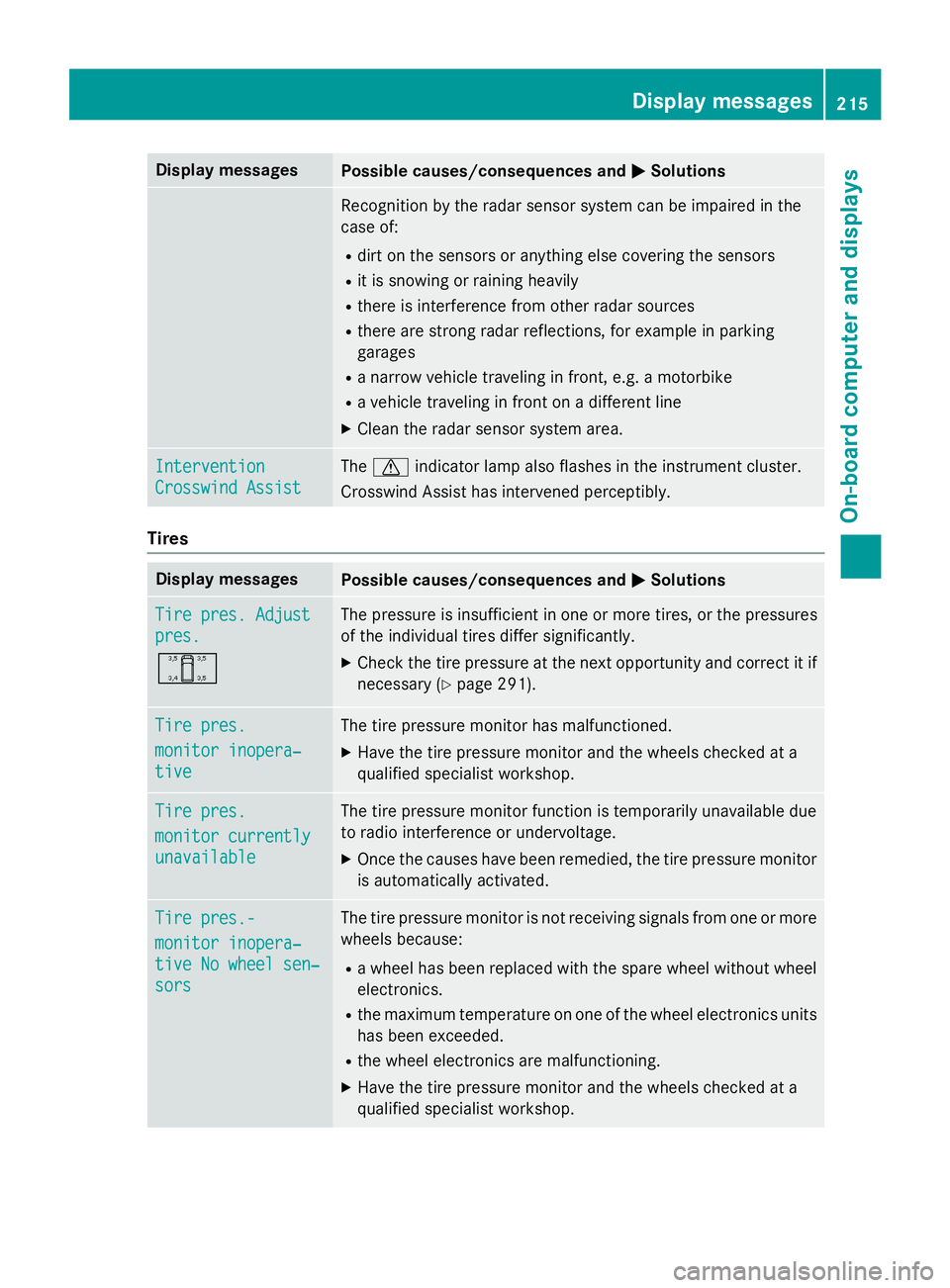
Display messages
Possible causes/consequences and
0050
0050Solutions Recognition by the radar sensor system can be impaired in the
case of:
R dirt on the sensors or anything else covering the sensors
R it is snowing or raining heavily
R there is interference from other radar sources
R there are strong radar reflections, for example in parking
garages
R a narrow vehicle traveling in front, e.g. a motorbike
R a vehicle traveling in front on a different line
X Clean the radar sensor system area. Intervention Intervention
Crosswind Assist Crosswind Assist The
0072 indicator lamp also flashes in the instrument cluster.
Crosswind Assist has intervened perceptibly. Tires
Display messages
Possible causes/consequences and
0050
0050Solutions Tire pres. Adjust
Tire pres. Adjust
pres. pres.
0054 The pressure is insufficient in one or more tires, or the pressures
of the individual tires differ significantly.
X Check the tire pressure at the next opportunity and correct it if
necessary (Y page 291). Tire pres. Tire pres.
monitor inopera‐ monitor inopera‐
tive tive The tire pressure monitor has malfunctioned.
X Have the tire pressure monitor and the wheels checked at a
qualified specialist workshop. Tire pres.
Tire pres.
monitor currently monitor currently
unavailable unavailable The tire pressure monitor function is temporarily unavailable due
to radio interference or undervoltage.
X Once the causes have been remedied, the tire pressure monitor
is automatically activated. Tire pres.- Tire pres.-
monitor inopera‐ monitor inopera‐
tive No wheel sen‐ tive No wheel sen‐
sors sors The tire pressure monitor is not receiving signals from one or more
wheels because:
R a wheel has been replaced with the spare wheel without wheel
electronics.
R the maximum temperature on one of the wheel electronics units
has been exceeded.
R the wheel electronics are malfunctioning.
X Have the tire pressure monitor and the wheels checked at a
qualified specialist workshop. Display
messages
215On-board computer and displays Z
Page 218 of 334
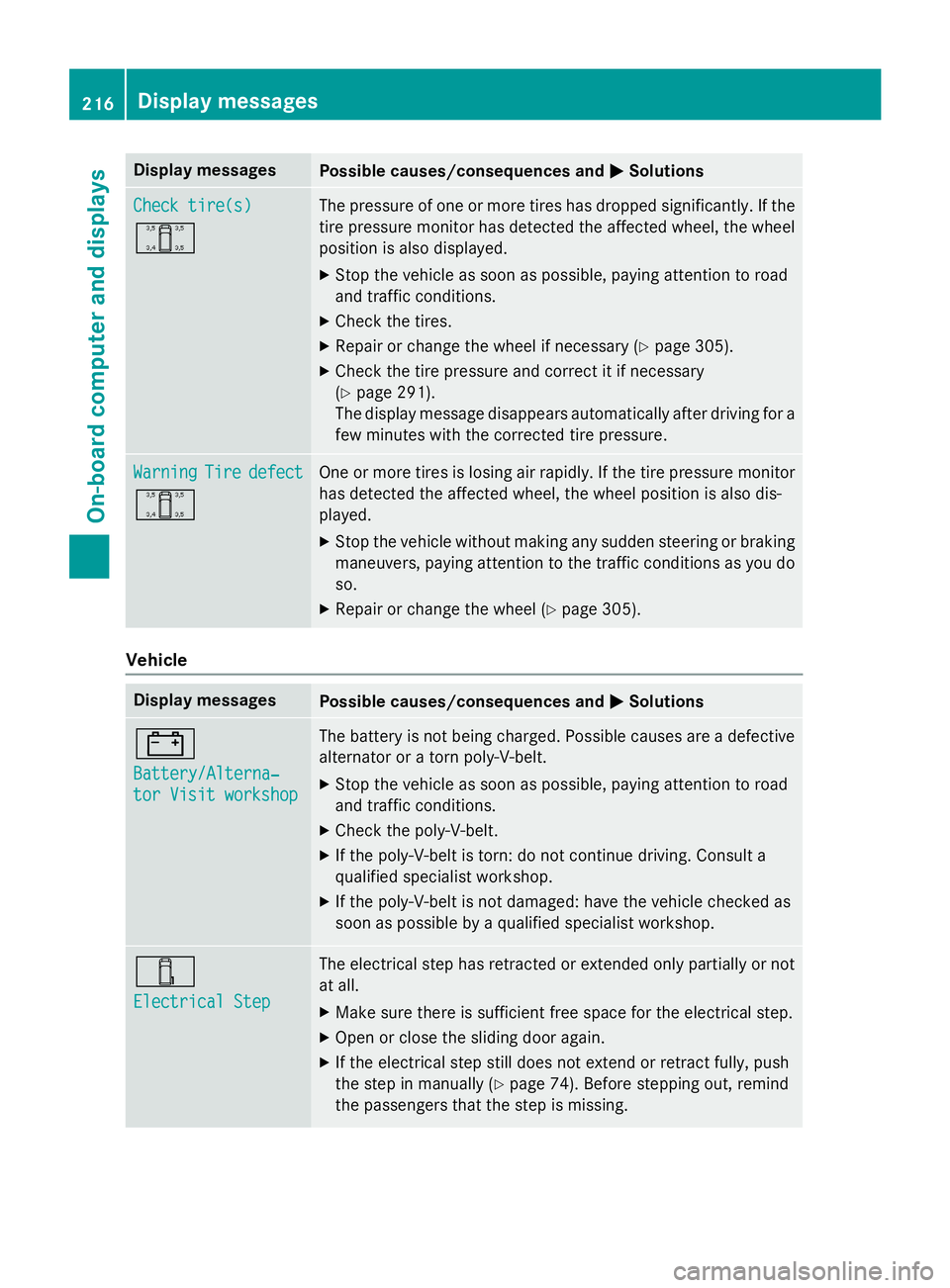
Display messages
Possible causes/consequences and
0050
0050Solutions Check tire(s)
Check tire(s)
0054 The pressure of one or more tires has dropped significantly. If the
tire pressure monitor has detected the affected wheel, the wheel
position is also displayed.
X Stop the vehicle as soon as possible, paying attention to road
and traffic conditions.
X Check the tires.
X Repair or change the wheel if necessary (Y page 305).
X Check the tire pressure and correct it if necessary
(Y page 291).
The display message disappears automatically after driving for a
few minutes with the corrected tire pressure. Warning Warning
Tire
Tiredefect
defect
0054 One or more tires is losing air rapidly. If the tire pressure monitor
has detected the affected wheel, the wheel position is also dis-
played.
X Stop the vehicle without making any sudden steering or braking
maneuvers, paying attention to the traffic conditions as you do so.
X Repair or change the wheel (Y page 305).Vehicle
Display messages
Possible causes/consequences and
0050 0050Solutions 003D
Battery/Alterna‐ Battery/Alterna‐
tor Visit workshop tor Visit workshop The battery is not being charged. Possible causes are a defective
alternator or a torn poly-V-belt.
X Stop the vehicle as soon as possible, paying attention to road
and traffic conditions.
X Check the poly-V-belt.
X If the poly-V-belt is torn: do not continue driving. Consult a
qualified specialist workshop.
X If the poly-V-belt is not damaged: have the vehicle checked as
soon as possible by a qualified specialist workshop. 00E6
Electrical Step Electrical Step The electrical step has retracted or extended only partially or not
at all.
X Make sure there is sufficient free space for the electrical step.
X Open or close the sliding door again.
X If the electrical step still does not extend or retract fully, push
the step in manually (Y page 74). Before stepping out, remind
the passengers that the step is missing. 216
Display
messagesOn-board computer and displays