ECU MERCEDES-BENZ SPRINTER 2015 MY15 Operator’s Manual
[x] Cancel search | Manufacturer: MERCEDES-BENZ, Model Year: 2015, Model line: SPRINTER, Model: MERCEDES-BENZ SPRINTER 2015Pages: 334, PDF Size: 5.94 MB
Page 77 of 334
X
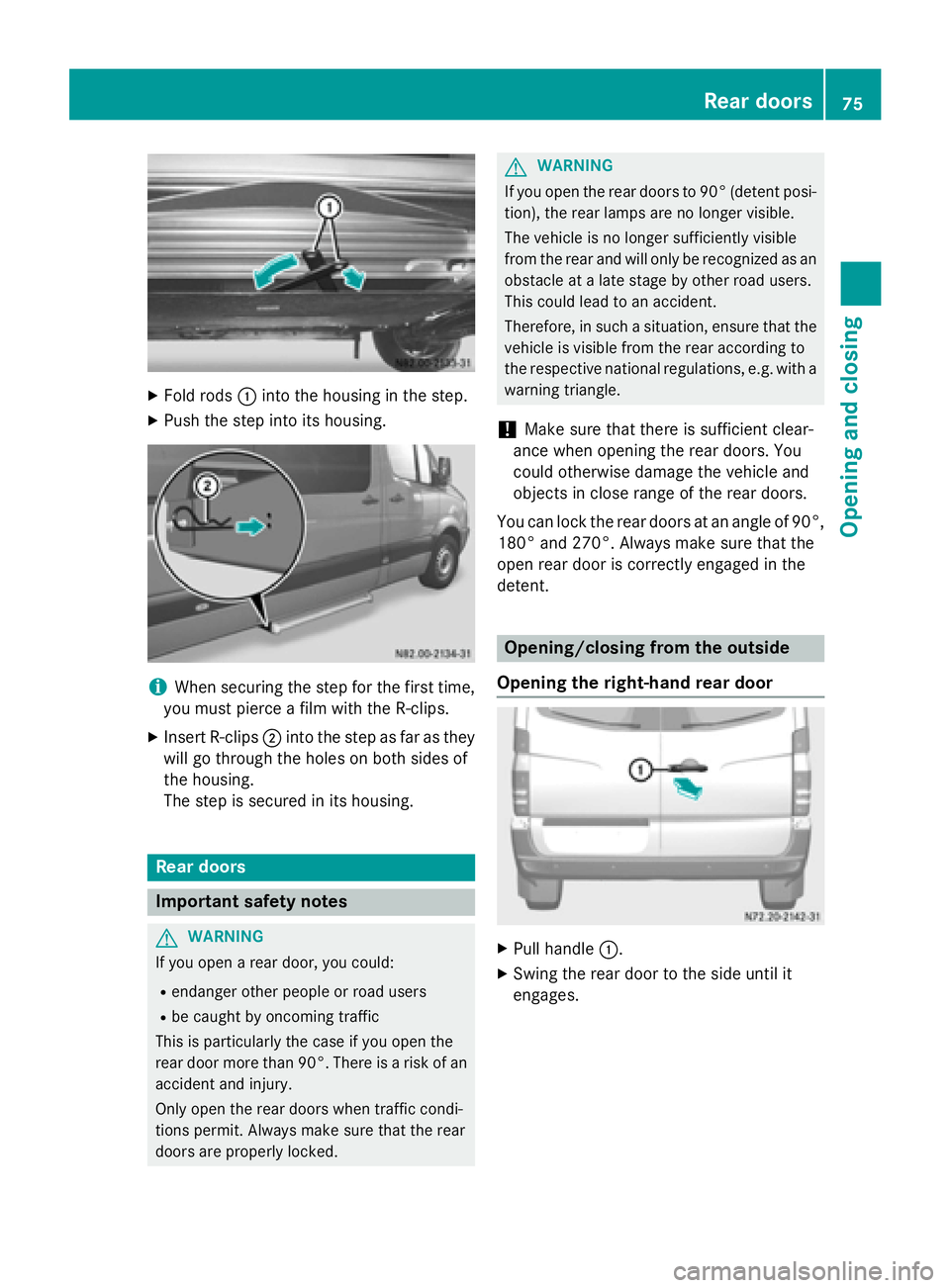
Fold rods 0043into the housing in the step.
X Push the step into its housing. i
When securing the step for the first time,
you must pierce a film with the R-clips.
X Insert R-clips 0044into the step as far as they
will go through the holes on both sides of
the housing.
The step is secured in its housing. Rear doors
Important safety notes
G
WARNING
If you open a rear door, you could:
R endanger other people or road users
R be caught by oncoming traffic
This is particularly the case if you open the
rear door more than 90°. There is a risk of an
accident and injury.
Only open the rear doors when traffic condi-
tions permit. Always make sure that the rear
doors are properly locked. G
WARNING
If you open the rear doors to 90° (detent posi- tion), the rear lamps are no longer visible.
The vehicle is no longer sufficiently visible
from the rear and will only be recognized as an
obstacle at a late stage by other road users.
This could lead to an accident.
Therefore, in such a situation, ensure that the vehicle is visible from the rear according to
the respective national regulations, e.g. with a
warning triangle.
! Make sure that there is sufficient clear-
ance when opening the rear doors. You
could otherwise damage the vehicle and
objects in close range of the rear doors.
You can lock the rear doors at an angle of 90°,
180° and 270°. Always make sure that the
open rear door is correctly engaged in the
detent. Opening/closing from the outside
Opening the right-hand rear door X
Pull handle 0043.
X Swing the rear door to the side until it
engages. Rear doors
75Opening and closing Z
Page 80 of 334
X
To unlock: press the catch in the direction
of arrow 0087.
The sliding door is unlocked.
X Slide the sliding door to the stop in the
direction of arrow 0043.
X To close: slide the sliding door in the direc-
tion of arrow 0044until it engages. Side windows
Important safety notes
G
WARNING
While opening the side windows, body parts
could become trapped between the side win- dow and the door frame as the side window
moves. There is a risk of injury.
Make sure that nobody touches the side win-
dow during the opening procedure. If some-
body becomes trapped, release the switch or pull the switch to close the side window again. G
WARNING
While closing the side windows, body parts in the closing area could become trapped. There is a risk of injury.
When closing make sure that no parts of the
body are in the closing area. If somebody
becomes trapped, release the switch or press
the switch to open the side window again. G
WARNING
If children operate the side windows they
could become trapped, particularly if they are left unsupervised. There is a risk of injury.
Activate the override feature for the rear side
windows. When leaving the vehicle, always
take the SmartKey with you and lock the vehi-
cle. Never leave children unsupervised in the
vehicle. G
WARNING
Do not leave children unsupervised in the
vehicle, even if they are secured in a child
restraint system. Children could otherwise injure themselves on parts of the vehicle.
They could be severely or even fatally injured
by prolonged exposure to intense heat or
cold.
If children open a door, they could:
R injure other people
R get out of the vehicle and thereby injure
themselves or be injured by a passing vehi-
cle
R severely injure themselves by falling down,
in particular due to the vehicle height
Always take the key with you when leaving the
vehicle, even if you are only leaving for a short time. Opening/closing the side window
Control panel (example: driver's door)
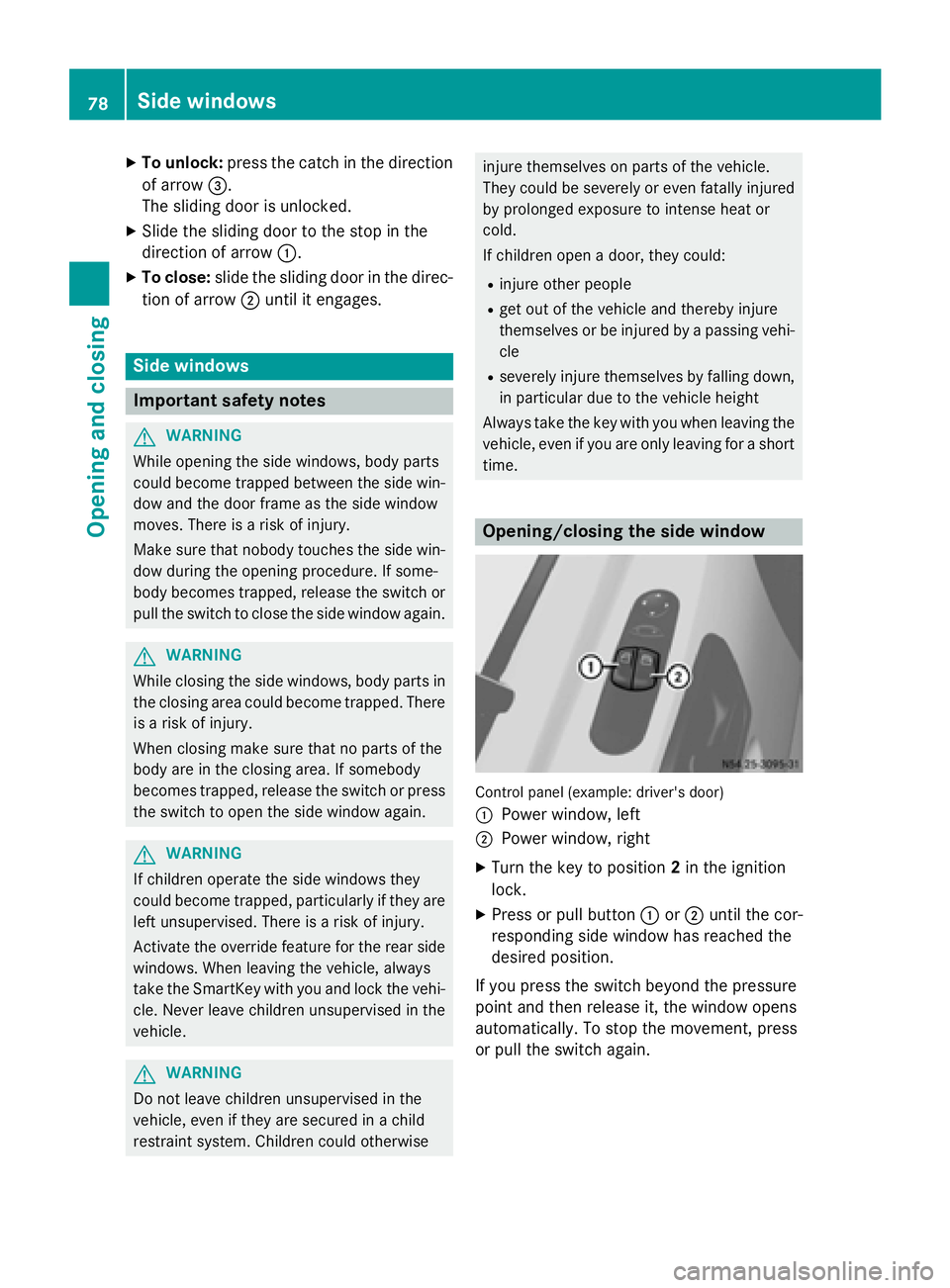
0043
Power window, left
0044 Power window, right
X Turn the key to position 2in the ignition
lock.
X Press or pull button 0043or0044 until the cor-
responding side window has reached the
desired position.
If you press the switch beyond the pressure
point and then release it, the window opens
automatically. To stop the movement, press
or pull the switch again. 78
Side windowsOpening and closing
Page 101 of 334
Motion detector
G
WARNING
The motion detector sends the invisible infra- red radiation emitted by LEDs (light emitting
diodes).
These LEDs are classified as class 1M lasers
and can damage the retina if you:
R look directly into the unfiltered laser beam
of the motion detector for an extended
period
R look directly into the laser beam of the
motion detector using optical instruments,
e.g. eyeglasses or a magnifying glass.
There is a risk of injury.
Never look directly into the motion detector.
The cargo compartment lighting is also
switched on by the motion detector in the
cargo compartment of Cargo Vans equipped
with this feature.
If the motion detector detects a movement in the cargo compartment when the vehicle is
stationary, the cargo compartment lighting
switches on for approximately two minutes.
The cargo compartment lighting can be
switched on by the motion detector within
four seconds if:
R the rear interior light switch (Y page 98) is
set to automatic control.
R the vehicle is stationary, the parking brake
is applied and the brake pedal is not being
depressed
Or
R the selector lever is in position Pon vehi-
cles with automatic transmission and the
brake pedal is not being depressed and
R the vehicle has not been locked from the
outside using the key
The motion detector switches off automati-
cally if no change is detected in the vehicle for
several hours, e.g. if a door is opened, if the
ignition key is turned, etc. This prevents the
battery from becoming discharged. Changing bulbs
Important safety notes
G
DANGER
Xenon bulbs carry a high voltage. You can get an electric shock if you remove the cover of
the Xenon bulb and touch the electrical con-
tacts. There is a risk of fatal injury.
Never touch the parts or the electrical con-
tacts of the Xenon bulb. Always have work on
the Xenon bulbs carried out at a qualified spe-
cialist workshop. G
WARNING
Bulbs, lamps and connectors can get very hot when operating. If you change a bulb, you
could burn yourself on these components.
There is a risk of injury.
Allow these components to cool down before changing a bulb.
! Make sure the bulbs are always securely
installed.
If your vehicle is equipped with Bi-Xenon
bulbs, you can recognize this by the following: the cone of light from the Xenon bulbs moves
from the top to the bottom and back again
when you start the engine. For this to be
observed, the low-beam headlamps must be
switched on before starting the engine.
The bulbs and lamps are an essential compo- nent of vehicle safety. You must therefore
make sure that these function correctly at all
times. Have the headlamp setting checked
regularly.
R Always switch off the vehicle's lighting sys-
tem before changing a bulb.
This will prevent a short circuit.
R Do not touch the glass tube of new bulbs
with your bare hands. Always use a clean,
lint-free cloth or only touch the base of the bulb when installing.
Even minor contamination can burn into
the glass surface and reduce the service life
of the bulbs. Changing bulbs
99Lights and windshield wipers Z
Page 140 of 334
Key positions
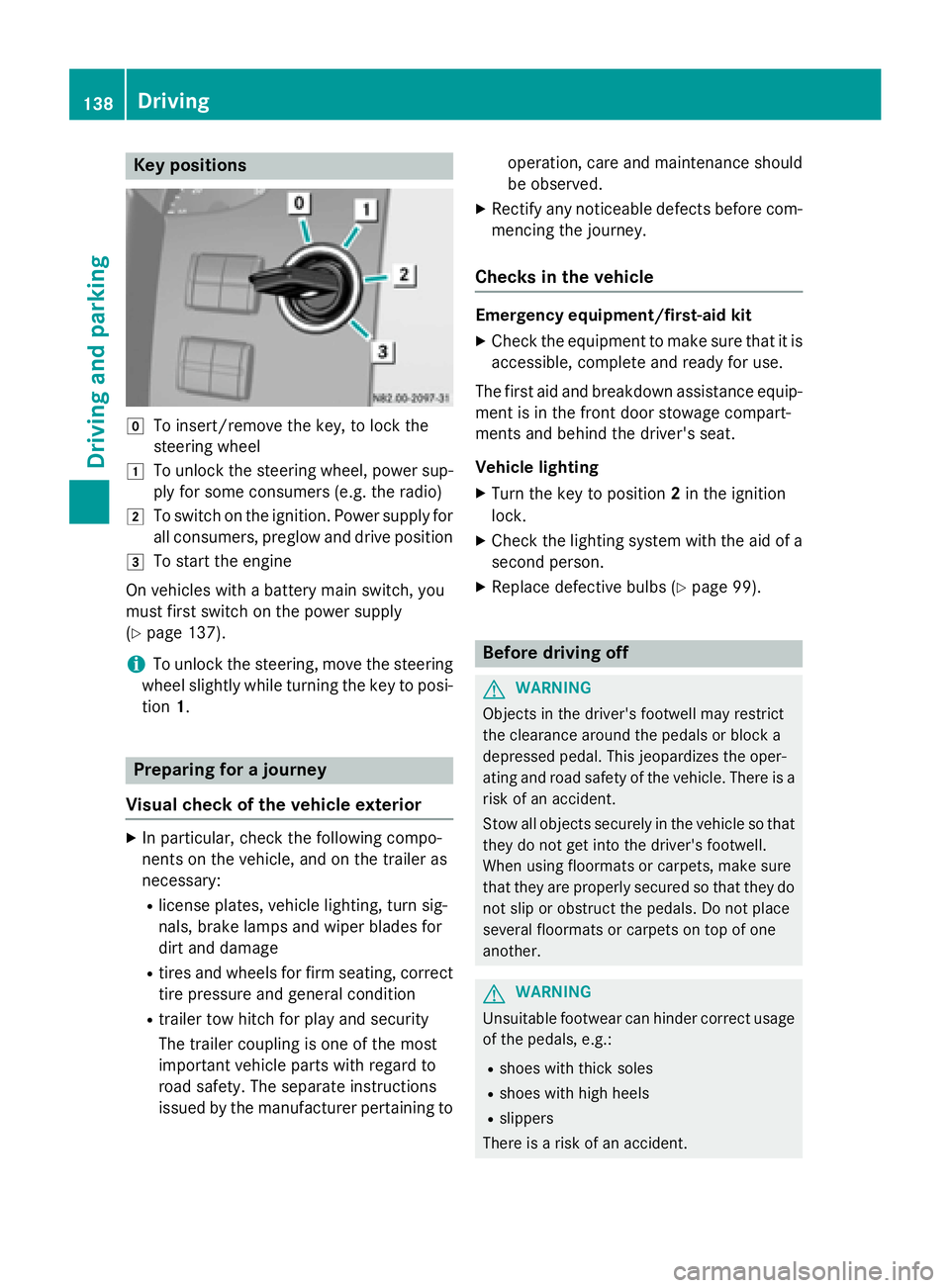
005A
To insert/remove the key, to lock the
steering wheel
0047 To unlock the steering wheel, power sup-
ply for some consumers (e.g. the radio)
0048 To switch on the ignition. Power supply for
all consumers, preglow and drive position
0049 To start the engine
On vehicles with a battery main switch, you
must first switch on the power supply
(Y page 137).
i To unlock the steering, move the steering
wheel slightly while turning the key to posi- tion 1. Preparing for a journey
Visual check of the vehicle exterior X
In particular, check the following compo-
nents on the vehicle, and on the trailer as
necessary:
R license plates, vehicle lighting, turn sig-
nals, brake lamps and wiper blades for
dirt and damage
R tires and wheels for firm seating, correct
tire pressure and general condition
R trailer tow hitch for play and security
The trailer coupling is one of the most
important vehicle parts with regard to
road safety. The separate instructions
issued by the manufacturer pertaining to operation, care and maintenance should
be observed.
X Rectify any noticeable defects before com-
mencing the journey.
Checks in the vehicle Emergency equipment/first-aid kit
X Check the equipment to make sure that it is
accessible, complete and ready for use.
The first aid and breakdown assistance equip-
ment is in the front door stowage compart-
ments and behind the driver's seat.
Vehicle lighting
X Turn the key to position 2in the ignition
lock.
X Check the lighting system with the aid of a
second person.
X Replace defective bulbs (Y page 99). Before driving off
G
WARNING
Objects in the driver's footwell may restrict
the clearance around the pedals or block a
depressed pedal. This jeopardizes the oper-
ating and road safety of the vehicle. There is a risk of an accident.
Stow all objects securely in the vehicle so that
they do not get into the driver's footwell.
When using floormats or carpets, make sure
that they are properly secured so that they do not slip or obstruct the pedals. Do not place
several floormats or carpets on top of one
another. G
WARNING
Unsuitable footwear can hinder correct usage of the pedals, e.g.:
R shoes with thick soles
R shoes with high heels
R slippers
There is a risk of an accident. 138
DrivingDriving and pa
rking
Page 141 of 334
Wear suitable footwear to ensure correct
usage of the pedals.
X Secure the load as per the loading guide-
lines (Y page 240).
X Make sure that the floormats and carpets
are properly secured so that they cannot
slip and obstruct the pedals.
X Close all doors. Starting the engine
G
WARNING
Combustion engines emit poisonous exhaust
gases such as carbon monoxide. Inhaling
these exhaust gases leads to poisoning. There is a risk of fatal injury. Therefore never leave
the engine running in enclosed spaces with-
out sufficient ventilation.
! Do not depress the accelerator pedal
when starting the engine.
X Before starting the engine, make sure that:
R all the doors are closed.
R all the vehicle occupants are wearing
their seat belts correctly.
R the parking brake is applied.
i If you depress the brake pedal before
starting the engine, the pedal travel is short
and pedal resistance is high.
If you depress the brake pedal again after
starting the engine, pedal travel and resist-
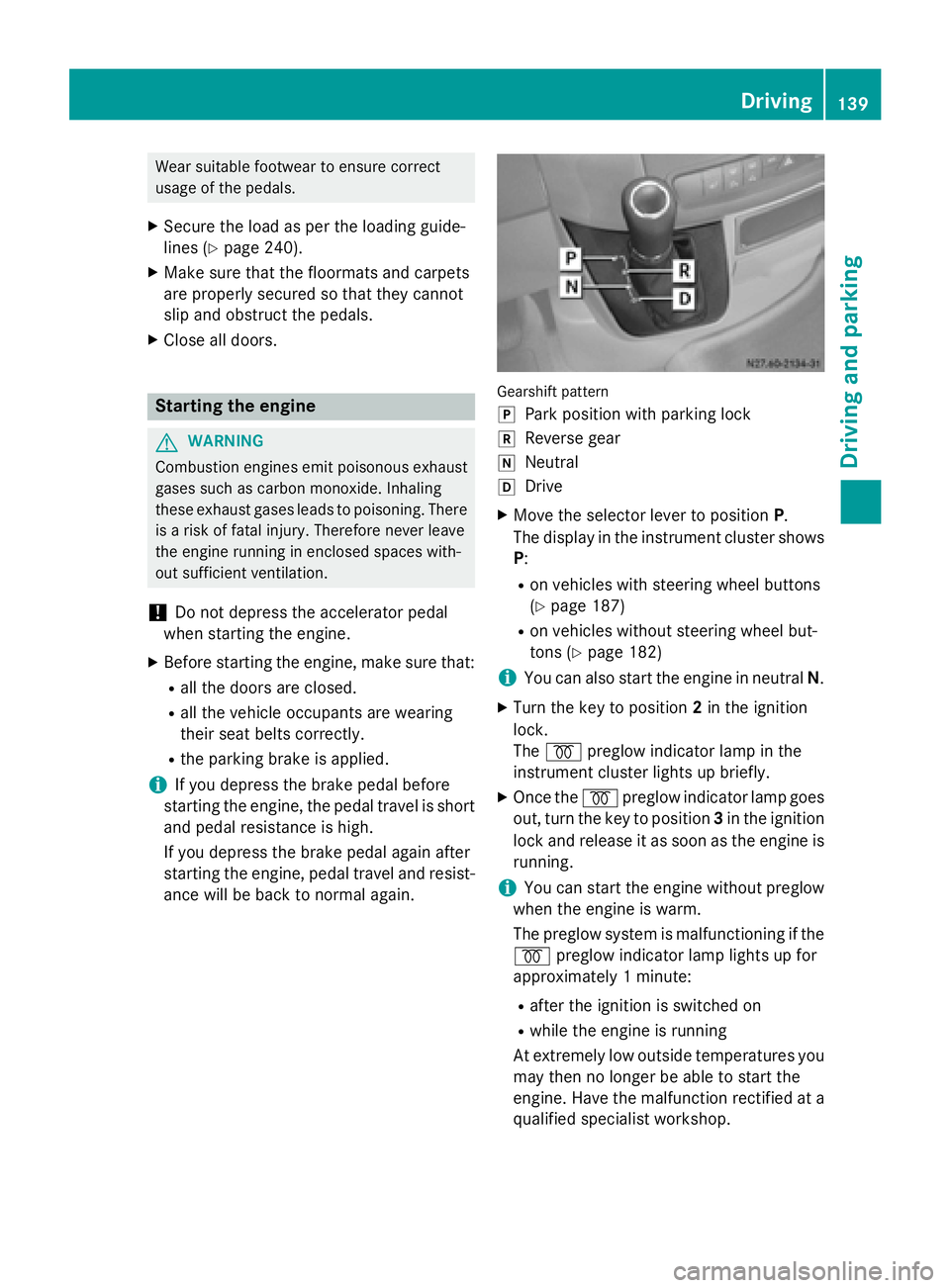
ance will be back to normal again. Gearshift pattern
005D
Park position with parking lock
005E Reverse gear
005C Neutral
005B Drive
X Move the selector lever to position P.
The display in the instrument cluster shows
P:
R on vehicles with steering wheel buttons
(Y page 187)
R on vehicles without steering wheel but-
tons (Y page 182)
i You can also start the engine in neutral
N.
X Turn the key to position 2in the ignition
lock.
The 0028 preglow indicator lamp in the
instrument cluster lights up briefly.
X Once the 0028preglow indicator lamp goes
out, turn the key to position 3in the ignition
lock and release it as soon as the engine is running.
i You can start the engine without preglow
when the engine is warm.
The preglow system is malfunctioning if the
0028 preglow indicator lamp lights up for
approximately 1 minute:
R after the ignition is switched on
R while the engine is running
At extremely low outside temperatures you
may then no longer be able to start the
engine. Have the malfunction rectified at a qualified specialist workshop. Driving
139Driving and parking Z
Page 151 of 334
Parking
Important safety notes
G
WARNING
Flammable material such as leaves, grass or
twigs may ignite if they come into contact with hot parts of the exhaust system or exhaust
gas flow. There is a risk of fire.
Park the vehicle so that no flammable mate-
rials come into contact with parts of the vehi- cle which are hot. Take particular care not to
park on dry grassland or harvested grain
fields. G
WARNING
If you switch off the ignition while driving,
safety-relevant functions are only available
with limitations, or not at all. This could affect, for example, the power steering and the brake
boosting effect. You will require considerably
more effort to steer and brake. There is a risk of an accident.
Do not switch off the ignition while driving. G
WARNING
If you leave children unsupervised in the vehi- cle, they could set it in motion by, for example:
R release the parking brake.
R shift the automatic transmission out of the
parking position P.
R start the engine.
In addition, they may operate vehicle equip-
ment and become trapped. There is a risk of
an accident and injury.
When leaving the vehicle, always take the
SmartKey with you and lock the vehicle. Never
leave children unsupervised in the vehicle.
! A moving vehicle can lead to damage to
the vehicle or damage to the drive train.
! When the vehicle is parked, always
remove the key to prevent the battery from becoming discharged. On vehicles with a battery isolating switch,
switch off the power supply if the vehicle isto be out of use for a longer period of time.
Always park your vehicle safely and according
to legal requirements and secure it against
rolling away.
To ensure that the vehicle is properly secured against rolling away unintentionally:
R the parking brake must be firmly applied
R the selector lever must be in position Pand
the key must be removed from the ignition lock
R on steep uphill or downhill gradients, the
front wheels must be turned towards the
curb
R the rear axle must be secured, e.g. with a
wheel chock, on steep uphill or downhill
gradients
Use the wheel chock (Y page 151) to do so.
If you leave the vehicle parked for more than
three weeks:
R connect the batteries to a trickle charger or
R disconnect the vehicle's starter battery or
R switch off the electrical system using the
battery main switch (Y page 137) and
R disconnect the vehicle's auxiliary battery
Otherwise, you need to check the battery's
condition of charge every three weeks, since standby power consumption can drain the
battery. If the battery voltage is lower than
12.2 V, the battery must be charged. Other-
wise, the battery may be damaged by exhaus-
tive discharging.
Be sure to observe the notes on disconnect-
ing and charging the batteries under "Bat-
tery“ (Y page 258). You can obtain informa-
tion about trickle chargers from a qualified
specialist workshop. Parking
149Driving and parking Z
Page 153 of 334
X
Apply the parking brake.
X Turn the key to position 0in the ignition
lock and remove it.
The immobilizer is activated.
X Secure the vehicle to prevent it from rolling
away (Y page 149). Wheel chock
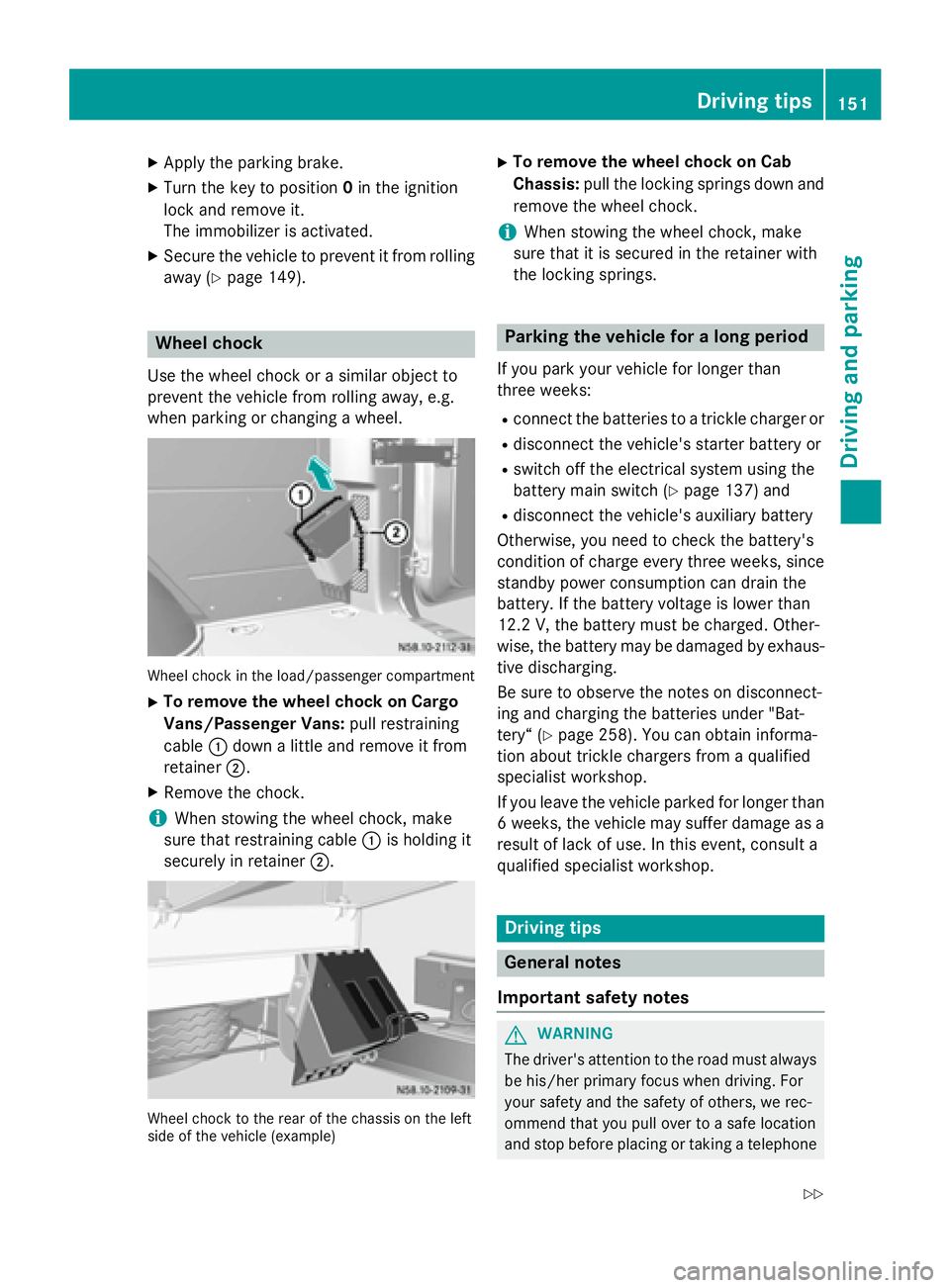
Use the wheel chock or a similar object to
prevent the vehicle from rolling away, e.g.
when parking or changing a wheel. Wheel chock in the load/passenger compartment
X To remove the wheel chock on Cargo
Vans/Passenger Vans: pull restraining
cable 0043down a little and remove it from
retainer 0044.
X Remove the chock.
i When stowing the wheel chock, make
sure that restraining cable 0043is holding it
securely in retainer 0044. Wheel chock to the rear of the chassis on the left
side of the vehicle (example) X
To remove the wheel chock on Cab
Chassis: pull the locking springs down and
remove the wheel chock.
i When stowing the wheel chock, make
sure that it is secured in the retainer with
the locking springs. Parking the vehicle for a long period
If you park your vehicle for longer than
three weeks: R connect the batteries to a trickle charger or
R disconnect the vehicle's starter battery or
R switch off the electrical system using the
battery main switch (Y page 137) and
R disconnect the vehicle's auxiliary battery
Otherwise, you need to check the battery's
condition of charge every three weeks, since standby power consumption can drain the
battery. If the battery voltage is lower than
12.2 V,the battery must be charged. Other-
wise, the battery may be damaged by exhaus-
tive discharging.
Be sure to observe the notes on disconnect-
ing and charging the batteries under "Bat-
tery“ (Y page 258). You can obtain informa-
tion about trickle chargers from a qualified
specialist workshop.
If you leave the vehicle parked for longer than
6 weeks, the vehicle may suffer damage as a result of lack of use. In this event, consult a
qualified specialist workshop. Driving tips
General notes
Important safety notes G
WARNING
The driver's attention to the road must always be his/her primary focus when driving. For
your safety and the safety of others, we rec-
ommend that you pull over to a safe location
and stop before placing or taking a telephone Driving
tips
151Driving an d parking
Z
Page 160 of 334
cable and a folding spade are carried in the
vehicle.
X Wheels and tires: check the tire tread
depth (Y page 285) and tire pressure
(Y page 288).
Rules for driving off-road !
Always bear the vehicle's ground clear-
ance in mind and avoid obstacles, e.g. deep ruts.
Obstacles may damage the following parts
of the vehicle:
R the chassis
R the drive train
R the fuel and supply tanks
For this reason, you should always drive
slowly when driving off-road. If you have to drive over obstacles, have the co-driver
direct you.
i We recommend that you additionally
carry a shovel and a recovery rope with
shackle in the vehicle.
R Ensure that loads and items of luggage are
securely stowed or lashed down
(Y page 240).
R Before driving off-road, stop the vehicle and
shift to a low gear.
R If the surface demands it, temporarily deac-
tivate ASR when pulling away (Y page 58).
R Only drive off-road with the engine running
and a gear engaged.
R Drive slowly and smoothly. Walking pace is
necessary in many situations.
R Avoid spinning the drive wheels.
R Make sure that the wheels always remain in
contact with the ground.
R Drive with extreme care over unknown ter-
rain where you can only see for a short dis-
tance. As a precaution, get out of the vehi-
cle to take a look at the route to be taken in
advance.
R Check the water depth before fording. R
Watch out for obstacles (e.g. rocks, holes,
tree stumps and ruts).
R Avoid edges where the surface could crum-
ble or break away.
Checklist after driving off-road !
If you detect damage to the vehicle after
driving off-road, have the vehicle checked
immediately at a qualified specialist work-
shop.
Off-road driving places a higher demand on
your vehicle than normal road operation.
Check your vehicle after driving on rough ter- rain. By doing so you will notice any damage in
good time and reduce the risk of an accident for yourself and other road users. Clean your
vehicle thoroughly before driving on public
roads.
Observe the following points after driving off-
road, on construction sites and before driving on public roads:
X Activate ASR (Y page 58).
X Clean the headlamps and tail lamps and
check them for damage.
X Clean the front and rear license plates.
X Clean the windshield, windows and exterior
mirrors.
X Clean the steps, door sills and grab han-
dles.
This increases safety of footing.
X Clean the wheels/tires, wheel housings
and the underbody of the vehicle with a
water jet.
This increases road grip, especially on wet
road surfaces.
X Check the wheels/tires and wheel hous-
ings for trapped foreign objects and
remove them.
Trapped foreign objects can damage the
wheels/tires and may be flung out from the
vehicle when you continue driving.
X Check the underbody for trapped branches
or other parts of plants and remove them.
Trapped branches or other parts of plants
increase the risk of fire and can cause dam- 158
Driving tipsDriving and parking
Page 173 of 334
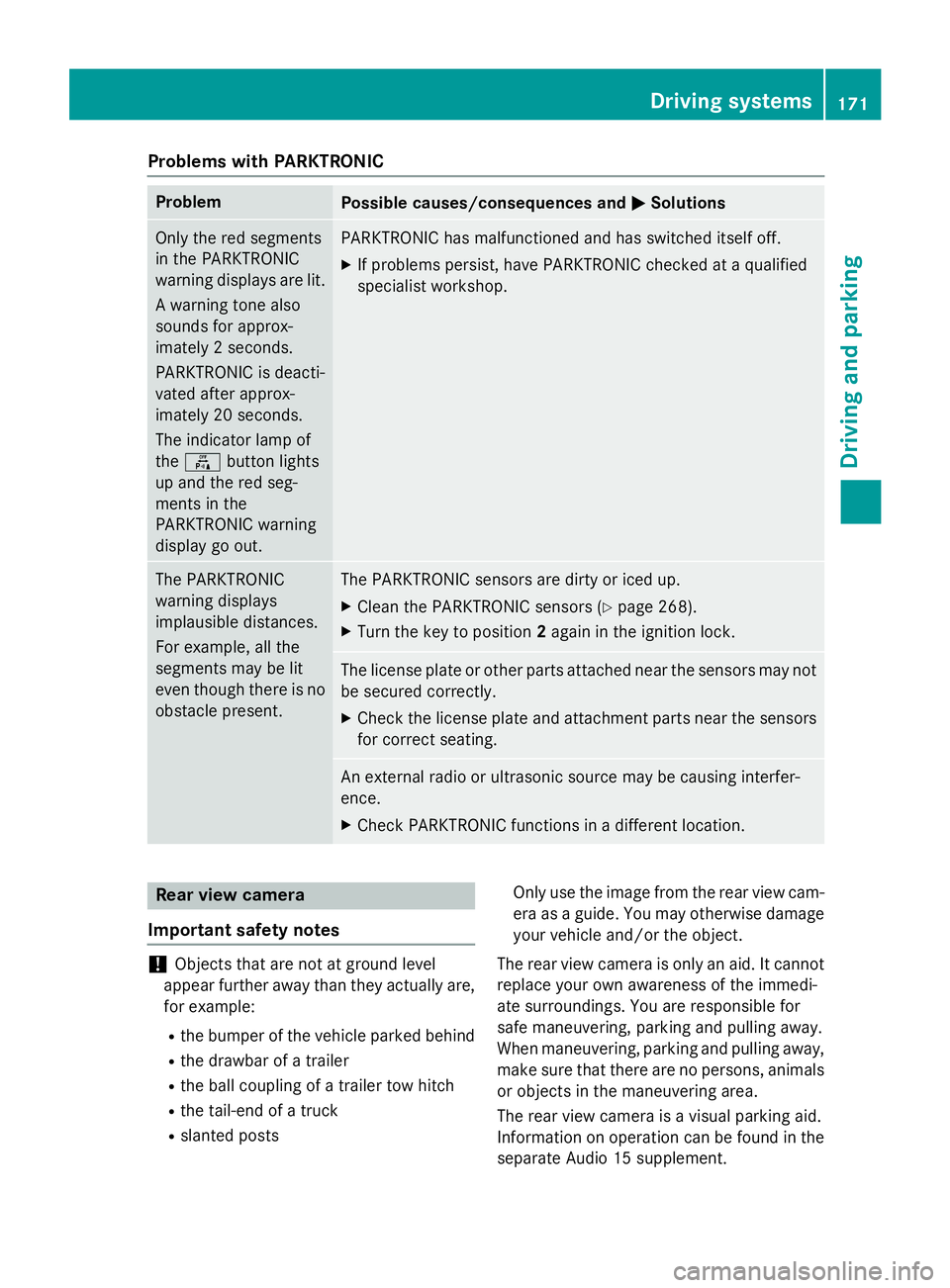
Problems with PARKTRONIC
Problem
Possible causes/consequences and
0050
0050Solutions Only the red segments
in the PARKTRONIC
warning displays are lit.
A warning tone also
sounds for approx-
imately 2 seconds.
PARKTRONIC is deacti-
vated after approx-
imately 20 seconds.
The indicator lamp of
the 0069 button lights
up and the red seg-
ments in the
PARKTRONIC warning
display go out. PARKTRONIC has malfunctioned and has switched itself off.
X If problems persist, have PARKTRONIC checked at a qualified
specialist workshop. The PARKTRONIC
warning displays
implausible distances.
For example, all the
segments may be lit
even though there is no
obstacle present. The PARKTRONIC sensors are dirty or iced up.
X Clean the PARKTRONIC sensors (Y page 268).
X Turn the key to position 2again in the ignition lock. The license plate or other parts attached near the sensors may not
be secured correctly.
X Check the license plate and attachment parts near the sensors
for correct seating. An external radio or ultrasonic source may be causing interfer-
ence.
X Check PARKTRONIC functions in a different location. Rear view camera
Important safety notes !
Objects that are not at ground level
appear further away than they actually are, for example:
R the bumper of the vehicle parked behind
R the drawbar of a trailer
R the ball coupling of a trailer tow hitch
R the tail-end of a truck
R slanted posts Only use the image from the rear view cam-
era as a guide. You may otherwise damageyour vehicle and/or the object.
The rear view camera is only an aid. It cannot
replace your own awareness of the immedi-
ate surroundings. You are responsible for
safe maneuvering, parking and pulling away.
When maneuvering, parking and pulling away, make sure that there are no persons, animals
or objects in the maneuvering area.
The rear view camera is a visual parking aid.
Information on operation can be found in the
separate Audio 15 supplement. Driving systems
171Driving and parking Z
Page 175 of 334
ADR is automatically deactivated if:
R you release the parking brake.
R the brake pedal is depressed.
R the vehicle moves.
R the control unit detects a malfunction.
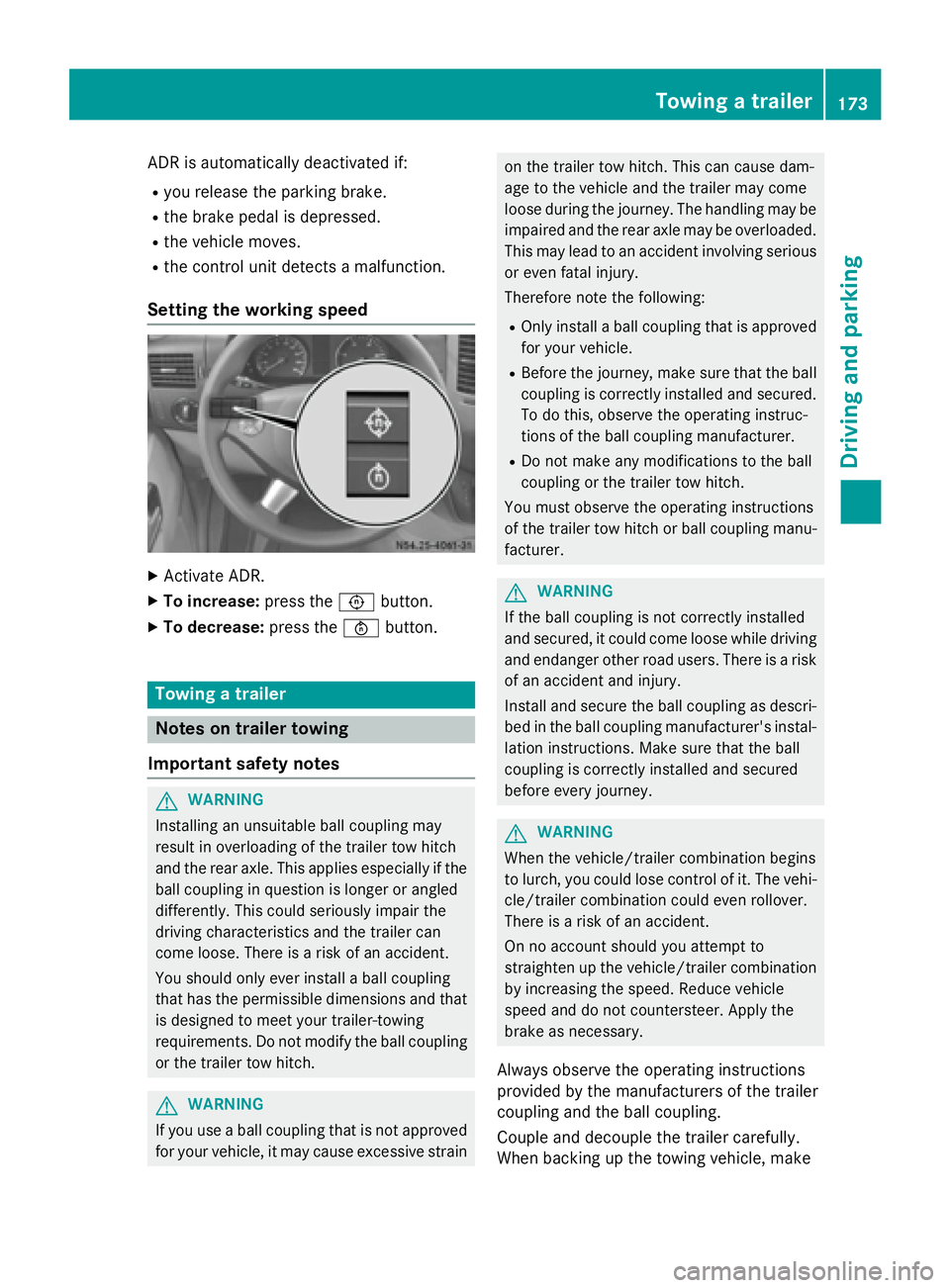
Setting the working speed X
Activate ADR.
X To increase: press the0091button.
X To decrease: press the0092button. Towing a trailer
Notes on trailer towing
Important safety notes G
WARNING
Installing an unsuitable ball coupling may
result in overloading of the trailer tow hitch
and the rear axle. This applies especially if the ball coupling in question is longer or angled
differently. This could seriously impair the
driving characteristics and the trailer can
come loose. There is a risk of an accident.
You should only ever install a ball coupling
that has the permissible dimensions and that
is designed to meet your trailer-towing
requirements. Do not modify the ball coupling
or the trailer tow hitch. G
WARNING
If you use a ball coupling that is not approved for your vehicle, it may cause excessive strain on the trailer tow hitch. This can cause dam-
age to the vehicle and the trailer may come
loose during the journey. The handling may be
impaired and the rear axle may be overloaded.
This may lead to an accident involving serious
or even fatal injury.
Therefore note the following:
R Only install a ball coupling that is approved
for your vehicle.
R Before the journey, make sure that the ball
coupling is correctly installed and secured.
To do this, observe the operating instruc-
tions of the ball coupling manufacturer.
R Do not make any modifications to the ball
coupling or the trailer tow hitch.
You must observe the operating instructions
of the trailer tow hitch or ball coupling manu-
facturer. G
WARNING
If the ball coupling is not correctly installed
and secured, it could come loose while driving and endanger other road users. There is a risk
of an accident and injury.
Install and secure the ball coupling as descri-
bed in the ball coupling manufacturer's instal- lation instructions. Make sure that the ball
coupling is correctly installed and secured
before every journey. G
WARNING
When the vehicle/trailer combination begins
to lurch, you could lose control of it. The vehi- cle/trailer combination could even rollover.
There is a risk of an accident.
On no account should you attempt to
straighten up the vehicle/trailer combination
by increasing the speed. Reduce vehicle
speed and do not countersteer. Apply the
brake as necessary.
Always observe the operating instructions
provided by the manufacturers of the trailer
coupling and the ball coupling.
Couple and decouple the trailer carefully.
When backing up the towing vehicle, make Towing a trailer
173Driving and parking Z