ESP MERCEDES-BENZ SPRINTER 2015 MY15 Operator’s Manual
[x] Cancel search | Manufacturer: MERCEDES-BENZ, Model Year: 2015, Model line: SPRINTER, Model: MERCEDES-BENZ SPRINTER 2015Pages: 334, PDF Size: 5.94 MB
Page 77 of 334
X
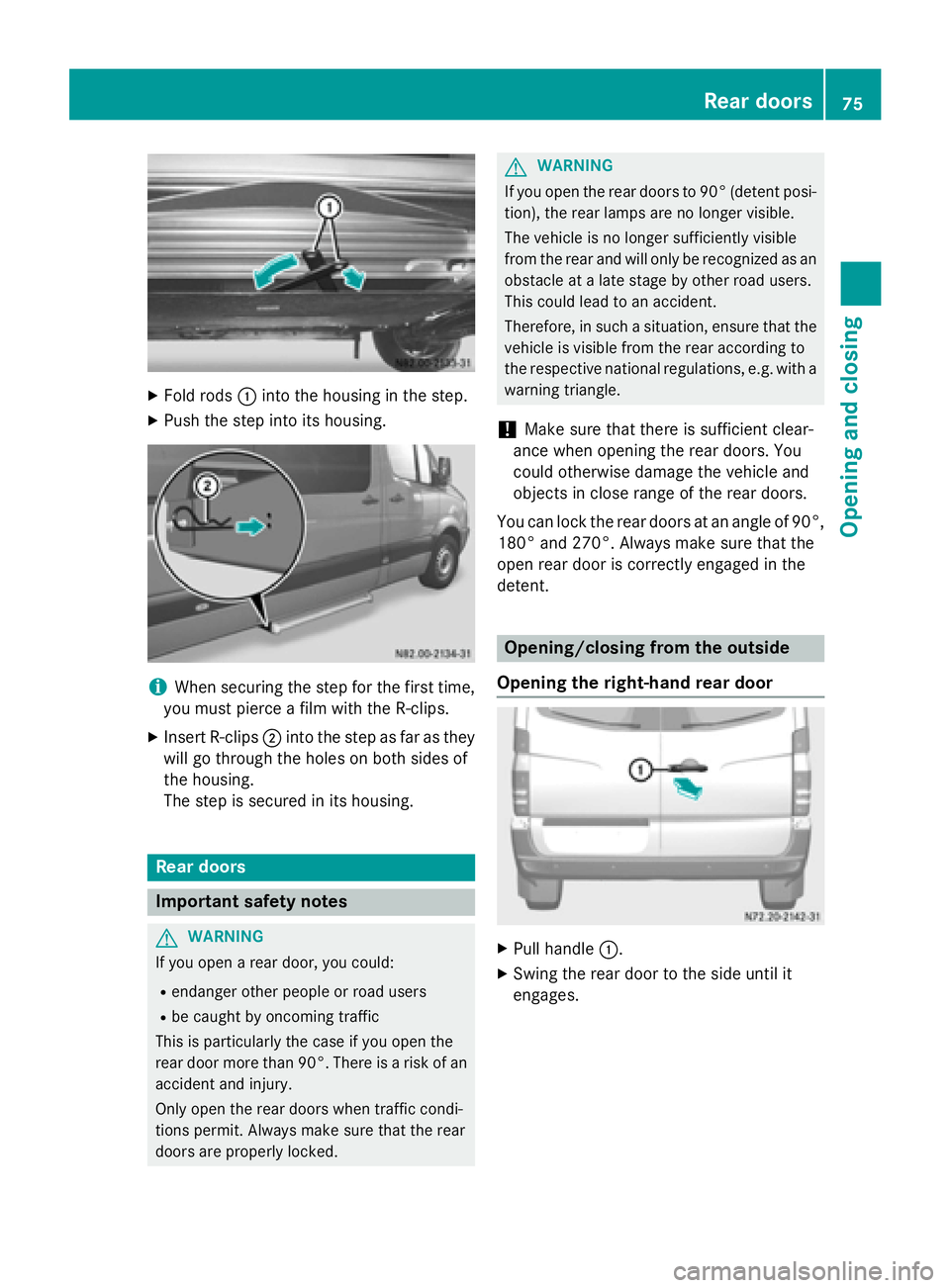
Fold rods 0043into the housing in the step.
X Push the step into its housing. i
When securing the step for the first time,
you must pierce a film with the R-clips.
X Insert R-clips 0044into the step as far as they
will go through the holes on both sides of
the housing.
The step is secured in its housing. Rear doors
Important safety notes
G
WARNING
If you open a rear door, you could:
R endanger other people or road users
R be caught by oncoming traffic
This is particularly the case if you open the
rear door more than 90°. There is a risk of an
accident and injury.
Only open the rear doors when traffic condi-
tions permit. Always make sure that the rear
doors are properly locked. G
WARNING
If you open the rear doors to 90° (detent posi- tion), the rear lamps are no longer visible.
The vehicle is no longer sufficiently visible
from the rear and will only be recognized as an
obstacle at a late stage by other road users.
This could lead to an accident.
Therefore, in such a situation, ensure that the vehicle is visible from the rear according to
the respective national regulations, e.g. with a
warning triangle.
! Make sure that there is sufficient clear-
ance when opening the rear doors. You
could otherwise damage the vehicle and
objects in close range of the rear doors.
You can lock the rear doors at an angle of 90°,
180° and 270°. Always make sure that the
open rear door is correctly engaged in the
detent. Opening/closing from the outside
Opening the right-hand rear door X
Pull handle 0043.
X Swing the rear door to the side until it
engages. Rear doors
75Opening and closing Z
Page 80 of 334
X
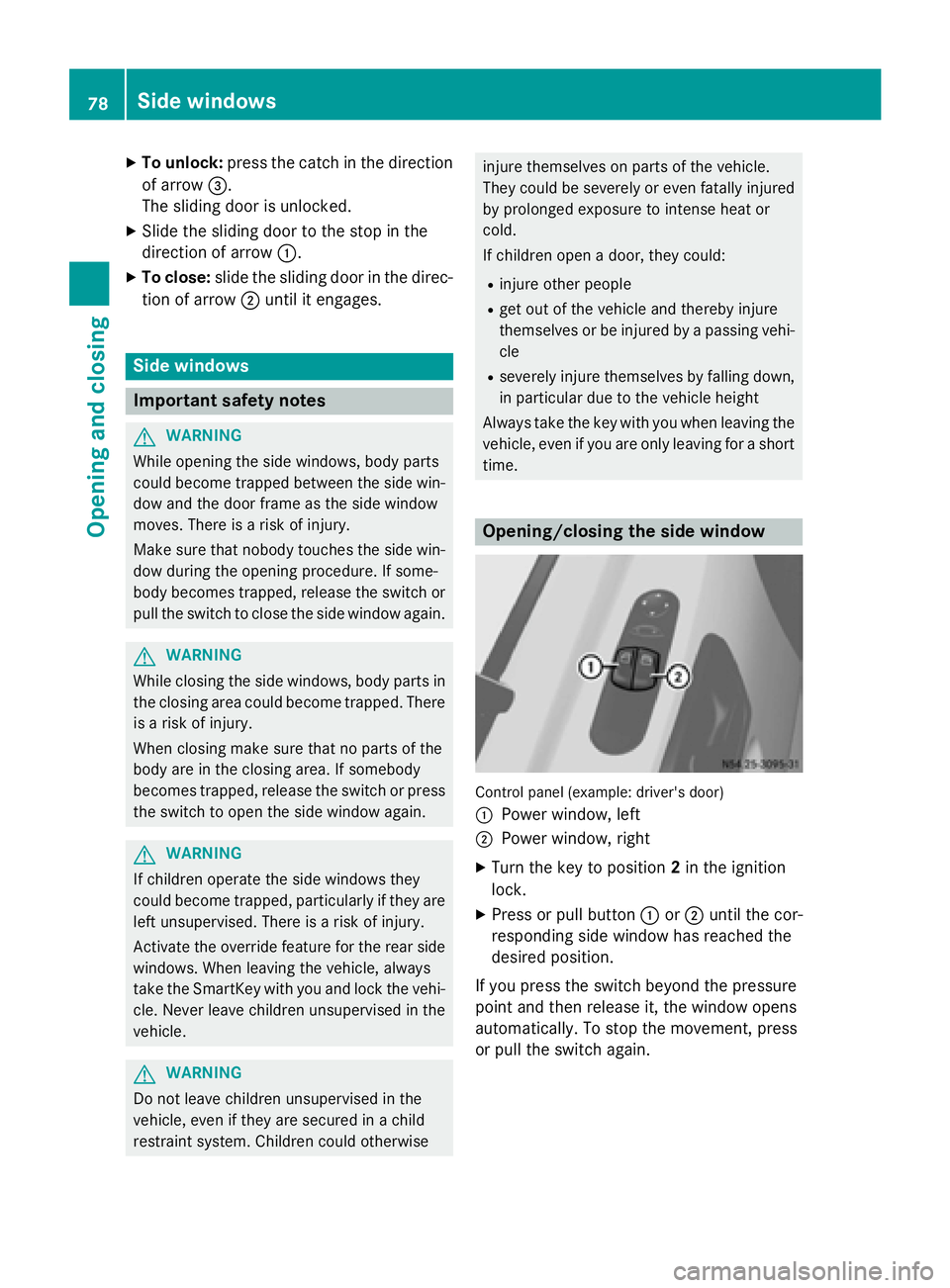
To unlock: press the catch in the direction
of arrow 0087.
The sliding door is unlocked.
X Slide the sliding door to the stop in the
direction of arrow 0043.
X To close: slide the sliding door in the direc-
tion of arrow 0044until it engages. Side windows
Important safety notes
G
WARNING
While opening the side windows, body parts
could become trapped between the side win- dow and the door frame as the side window
moves. There is a risk of injury.
Make sure that nobody touches the side win-
dow during the opening procedure. If some-
body becomes trapped, release the switch or pull the switch to close the side window again. G
WARNING
While closing the side windows, body parts in the closing area could become trapped. There is a risk of injury.
When closing make sure that no parts of the
body are in the closing area. If somebody
becomes trapped, release the switch or press
the switch to open the side window again. G
WARNING
If children operate the side windows they
could become trapped, particularly if they are left unsupervised. There is a risk of injury.
Activate the override feature for the rear side
windows. When leaving the vehicle, always
take the SmartKey with you and lock the vehi-
cle. Never leave children unsupervised in the
vehicle. G
WARNING
Do not leave children unsupervised in the
vehicle, even if they are secured in a child
restraint system. Children could otherwise injure themselves on parts of the vehicle.
They could be severely or even fatally injured
by prolonged exposure to intense heat or
cold.
If children open a door, they could:
R injure other people
R get out of the vehicle and thereby injure
themselves or be injured by a passing vehi-
cle
R severely injure themselves by falling down,
in particular due to the vehicle height
Always take the key with you when leaving the
vehicle, even if you are only leaving for a short time. Opening/closing the side window
Control panel (example: driver's door)
0043
Power window, left
0044 Power window, right
X Turn the key to position 2in the ignition
lock.
X Press or pull button 0043or0044 until the cor-
responding side window has reached the
desired position.
If you press the switch beyond the pressure
point and then release it, the window opens
automatically. To stop the movement, press
or pull the switch again. 78
Side windowsOpening and closing
Page 87 of 334
Twin co-driver's seat
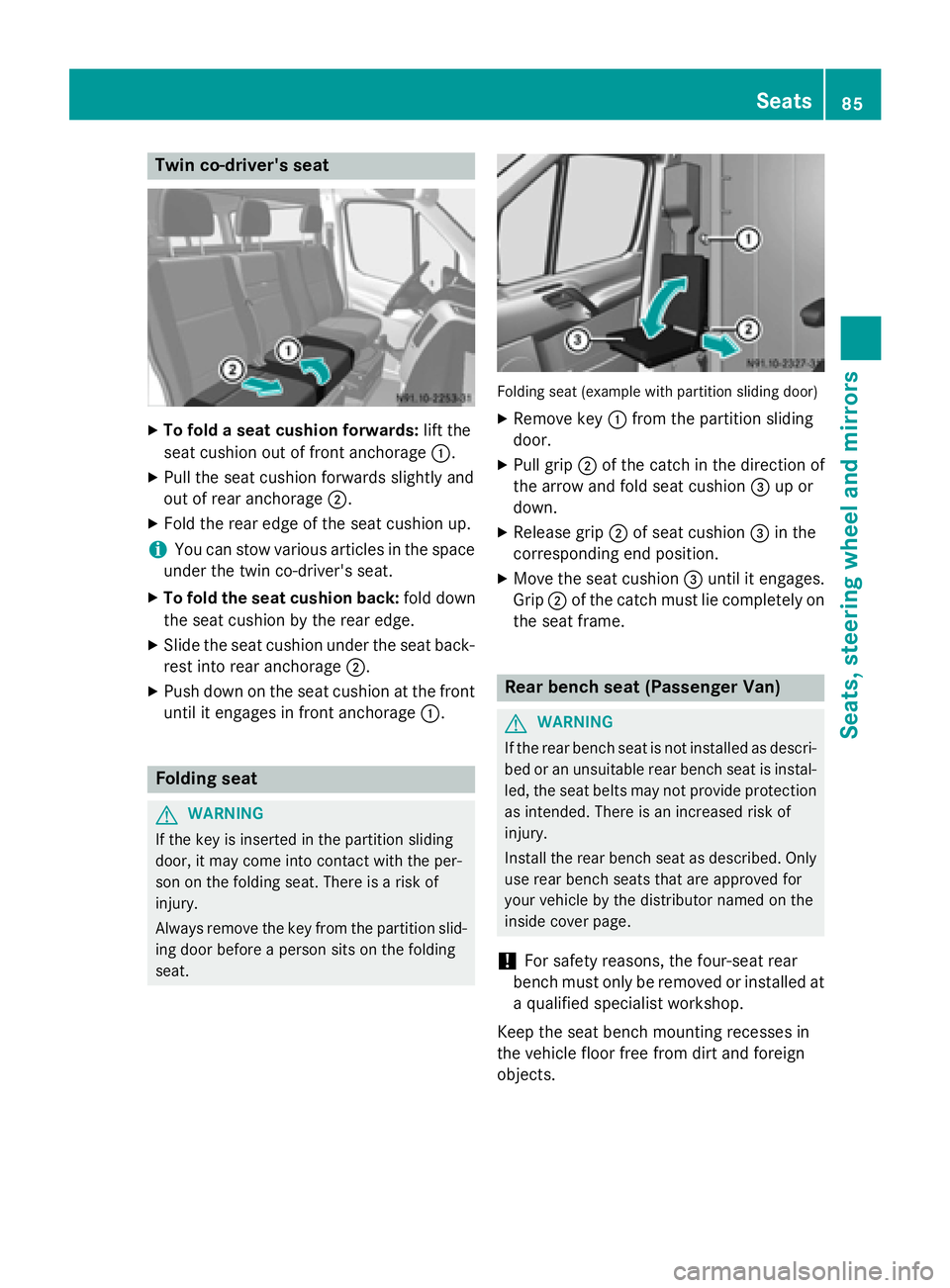
X
To fold a seat cushion forwards: lift the
seat cushion out of front anchorage 0043.
X Pull the seat cushion forwards slightly and
out of rear anchorage 0044.
X Fold the rear edge of the seat cushion up.
i You can stow various articles in the space
under the twin co-driver's seat.
X To fold the seat cushion back: fold down
the seat cushion by the rear edge.
X Slide the seat cushion under the seat back-
rest into rear anchorage 0044.
X Push down on the seat cushion at the front
until it engages in front anchorage 0043.Folding seat
G
WARNING
If the key is inserted in the partition sliding
door, it may come into contact with the per-
son on the folding seat. There is a risk of
injury.
Always remove the key from the partition slid- ing door before a person sits on the folding
seat. Folding seat (example with partition sliding door)
X Remove key 0043from the partition sliding
door.
X Pull grip 0044of the catch in the direction of
the arrow and fold seat cushion 0087up or
down.
X Release grip 0044of seat cushion 0087in the
corresponding end position.
X Move the seat cushion 0087until it engages.
Grip 0044of the catch must lie completely on
the seat frame. Rear bench seat (Passenger Van)
G
WARNING
If the rear bench seat is not installed as descri- bed or an unsuitable rear bench seat is instal-
led, the seat belts may not provide protection as intended. There is an increased risk of
injury.
Install the rear bench seat as described. Only
use rear bench seats that are approved for
your vehicle by the distributor named on the
inside cover page.
! For safety reasons, the four-seat rear
bench must only be removed or installed at
a qualified specialist workshop.
Keep the seat bench mounting recesses in
the vehicle floor free from dirt and foreign
objects. Seats
85Seats, steering wheel and mirrors Z
Page 88 of 334
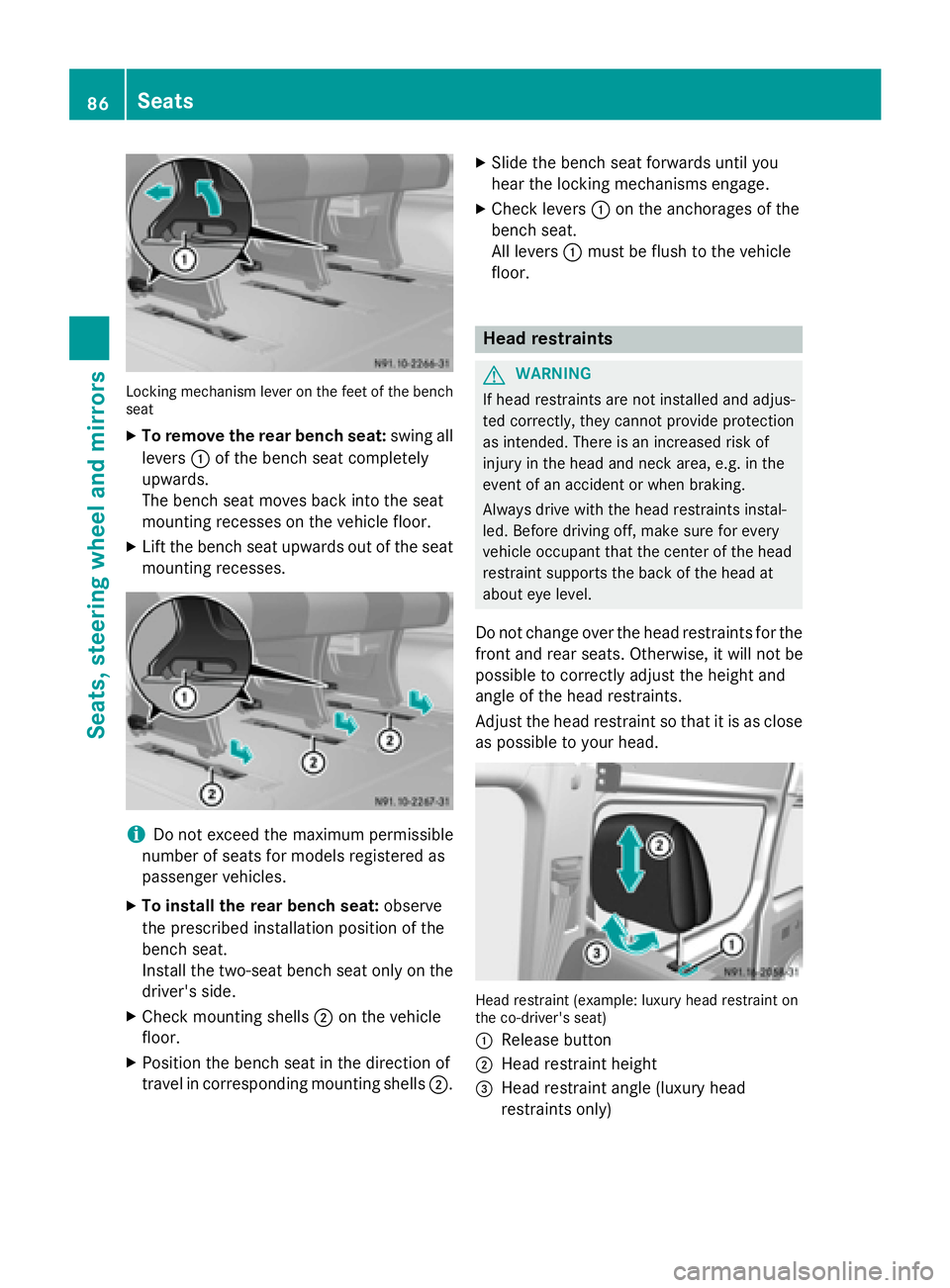
Locking mechanism lever on the feet of the bench
seat
X To remove the rear bench seat: swing all
levers 0043of the bench seat completely
upwards.
The bench seat moves back into the seat
mounting recesses on the vehicle floor.
X Lift the bench seat upwards out of the seat
mounting recesses. i
Do not exceed the maximum permissible
number of seats for models registered as
passenger vehicles.
X To install the rear bench seat: observe
the prescribed installation position of the
bench seat.
Install the two-seat bench seat only on the
driver's side.
X Check mounting shells 0044on the vehicle
floor.
X Position the bench seat in the direction of
travel in corresponding mounting shells 0044.X
Slide the bench seat forwards until you
hear the locking mechanisms engage.
X Check levers 0043on the anchorages of the
bench seat.
All levers 0043must be flush to the vehicle
floor. Head restraints
G
WARNING
If head restraints are not installed and adjus-
ted correctly, they cannot provide protection
as intended. There is an increased risk of
injury in the head and neck area, e.g. in the
event of an accident or when braking.
Always drive with the head restraints instal-
led. Before driving off, make sure for every
vehicle occupant that the center of the head
restraint supports the back of the head at
about eye level.
Do not change over the head restraints for the
front and rear seats. Otherwise, it will not be
possible to correctly adjust the height and
angle of the head restraints.
Adjust the head restraint so that it is as close as possible to your head. Head restraint (example: luxury head restraint on
the co-driver's seat)
0043 Release button
0044 Head restraint height
0087 Head restraint angle (luxury head
restraints only) 86
SeatsSeats, steering wheel and mirrors
Page 94 of 334
Useful information
This Operator's Manual describes all models
as well as standard and optional equipment of your vehicle that were available at the time of going to print. Country-specific variations are
possible. Note that your vehicle may not be
equipped with all of the described functions.
This also applies to systems and functions
relevant to safety.
Read the information on qualified specialist
workshops (Y page 25). Exterior lighting
Important safety notes
For reasons of safety, we recommend that
you drive with the lights switched on even
during the daytime. There may be differences
in operation due to legal requirements and
voluntary recommendations in some coun-
tries. Bulb failure indicator
The bulb failure indicator is only an aid. You
are responsible for the proper functioning of
the vehicle lighting. Insufficient or non-func-
tioning vehicle lighting puts the operating
safety of the vehicle at risk.
For this reason, check the condition and func-
tion of your vehicle's lighting system and, if
necessary, that of the trailer before each jour- ney.
The bulb failure indicator monitors all of the
exterior lighting lamps, except the perimeter
lamp and the trailer lighting. If a bulb fails,
either the 0049(Ypage 35) indicator lamp
lights up, or you will see a corresponding
message in the display (Y page 208).
i Depending on the equipment, the bulb
failure indicator can fail for all lamps with
the exception of the turn signal lamps. Light switch
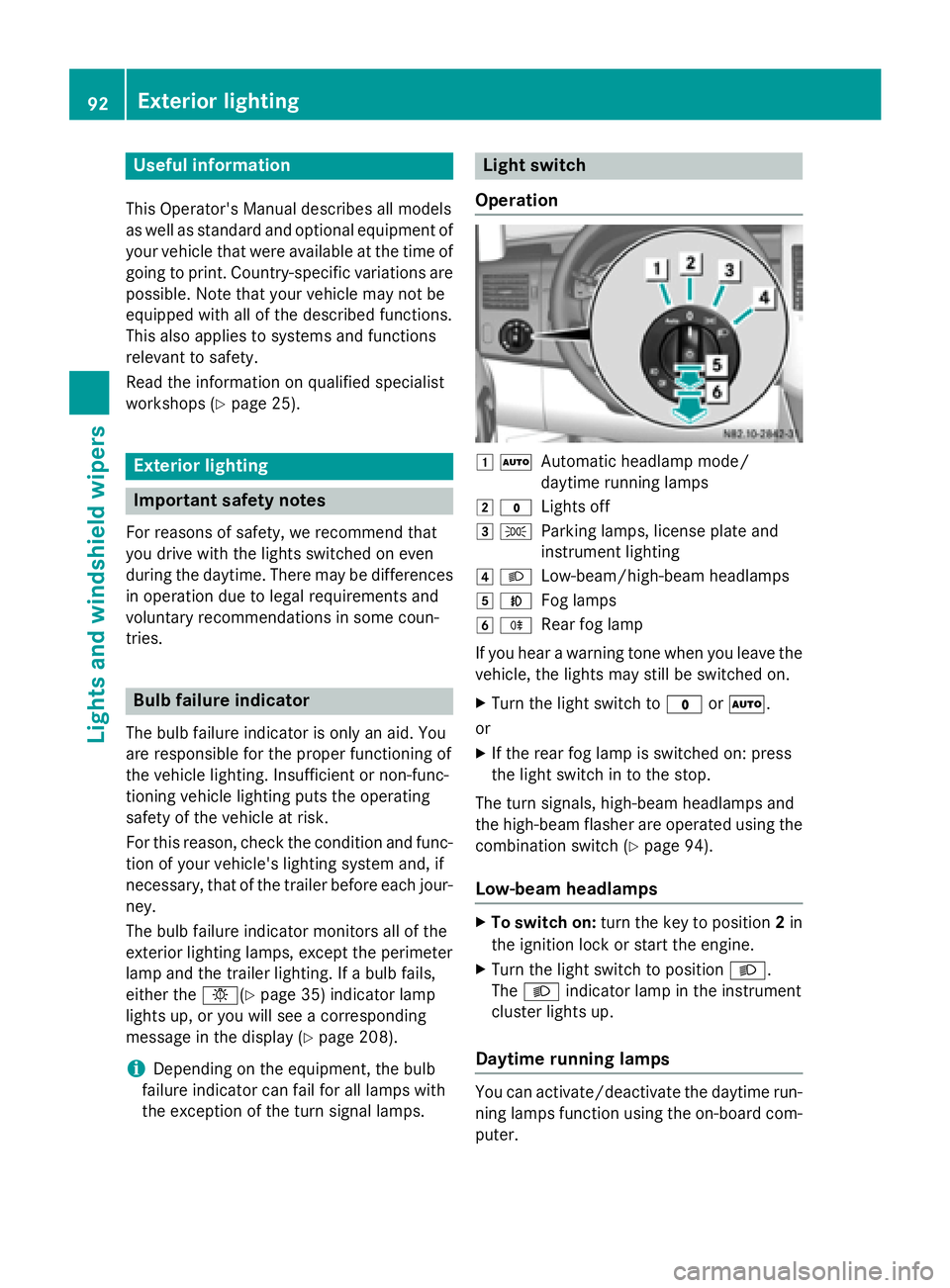
Operation 0047
0058
Automatic headlamp mode/
daytime running lamps
0048 003F
Lights off
0049 0060
Parking lamps, license plate and
instrument lighting
004A 0058
Low-beam/high-beam headlamps
004B 005A
Fog lamps
004C 005E
Rear fog lamp
If you hear a warning tone when you leave the
vehicle, the lights may still be switched on.
X Turn the light switch to 003For0058.
or
X If the rear fog lamp is switched on: press
the light switch in to the stop.
The turn signals, high-beam headlamps and
the high-beam flasher are operated using the combination switch (Y page 94).
Low-beam headlamps X
To switch on: turn the key to position 2in
the ignition lock or start the engine.
X Turn the light switch to position 0058.
The 0058 indicator lamp in the instrument
cluster lights up.
Daytime running lamps You can activate/deactivate the daytime run-
ning lamps function using the on-board com-
puter. 92
Exterior lightingLights and windshield wipers
Page 95 of 334
This is not possible in countries where day-
time running lamps are a legal requirement.
The daytime running lamps function must be
activated using the on-board computer:
R vehicles with steering wheel buttons
(Y page 192)
R vehicles without steering wheel buttons
(Y page 183)
X To switch on: turn the light switch to the
003F position.
The low-beam headlamps, parking lamps
and license plate lamp are switched on
when the engine is running. The 0058indi-
cator lamp in the instrument cluster lights
up.
i USA only:
If you turn the light switch to the 0060or
0058 position, the parking lamps or low-
beam headlamps switch on. If you turn the light switch to the 0058position, the day-
time running lamps remain switched on.
i Canada only:
If you turn the light switch to the 0058
position, the low-beam headlamps are
switched on. If you turn the light switch to
the 0060 or0058 position, the daytime
running lamps remain switched on.
Automatic headlamp mode G
WARNING
When the light switch is set to 0058, the low-
beam headlamps may not be switched on
automatically if there is fog, snow or other
causes of poor visibility due to the weather
conditions such as spray. There is a risk of an
accident.
In such situations, turn the light switch to
0058.
Automatic headlamp mode is only a driving
aid. You are responsible for the vehicle light-
ing at all times.
Depending on ambient light, the rain and light sensor automatically switches on the parking lamps, low-beam headlamps and the license
plate lamp. This excludes weather-related
impairments to visibility, such as snow, fog or
spray.
If there is fog, snow or spray, turn the light
switch quickly from 0058to0058. You could
otherwise briefly interrupt operation of the
headlamps.
X To switch on automatic headlamp
mode: turn the light switch to 0058.
Key in position 1in the ignition lock: the
parking lamps switch on or off automati-
cally depending on the ambient light.
When the engine is running: if you activate
the "daytime running lamps" function using the on-board computer, the daytime run-
ning lamps are switched on. The parking
lamps and low-beam headlamps also
switch on or off automatically, depending
on the ambient light.
When the low-beam headlamps are
switched on, the 0058indicator lamp in the
instrument cluster lights up.
Fog lamps/rear fog lamp G
WARNING
If you suspect that driving conditions will be
foggy, turn the light switch to 0058before you
start your journey. Your vehicle may other-
wise not be visible and you could endanger
yourself and others. G
WARNING
In low ambient lighting or foggy conditions,
only switch from position 0058to0058 with
the vehicle at a standstill in a safe location.
Switching from 0058to0058 will briefly
switch off the headlamps. Doing so while driv-
ing in low ambient lighting conditions may
result in an accident.
X Turn the ignition key to position 2in the
ignition lock or start the engine.
X Turn the light switch to 0058or0060. Exterior lighting
93Lights and windshield wipers Z
Page 96 of 334
i
If your vehicle is only equipped with one
rear fog lamp, you must turn the light
switch to 0058.
i When the light switch is set to
0058, you
cannot switch on the front or rear fog
lamps.
X To switch on the front fog lamps: pull the
light switch out to the first locking point.
The green 005Aindicator lamp on the light
switch lights up.
X To switch on the rear fog lamp: pull the
light switch out to the second locking point.
The yellow 005Eindicator lamp on the light
switch lights up.
X To switch off the front fog lamps/rear
fog lamp: push in the light switch to the
stop.
The 005E and005A indicator lamp on the
light switch go out. Combination switch
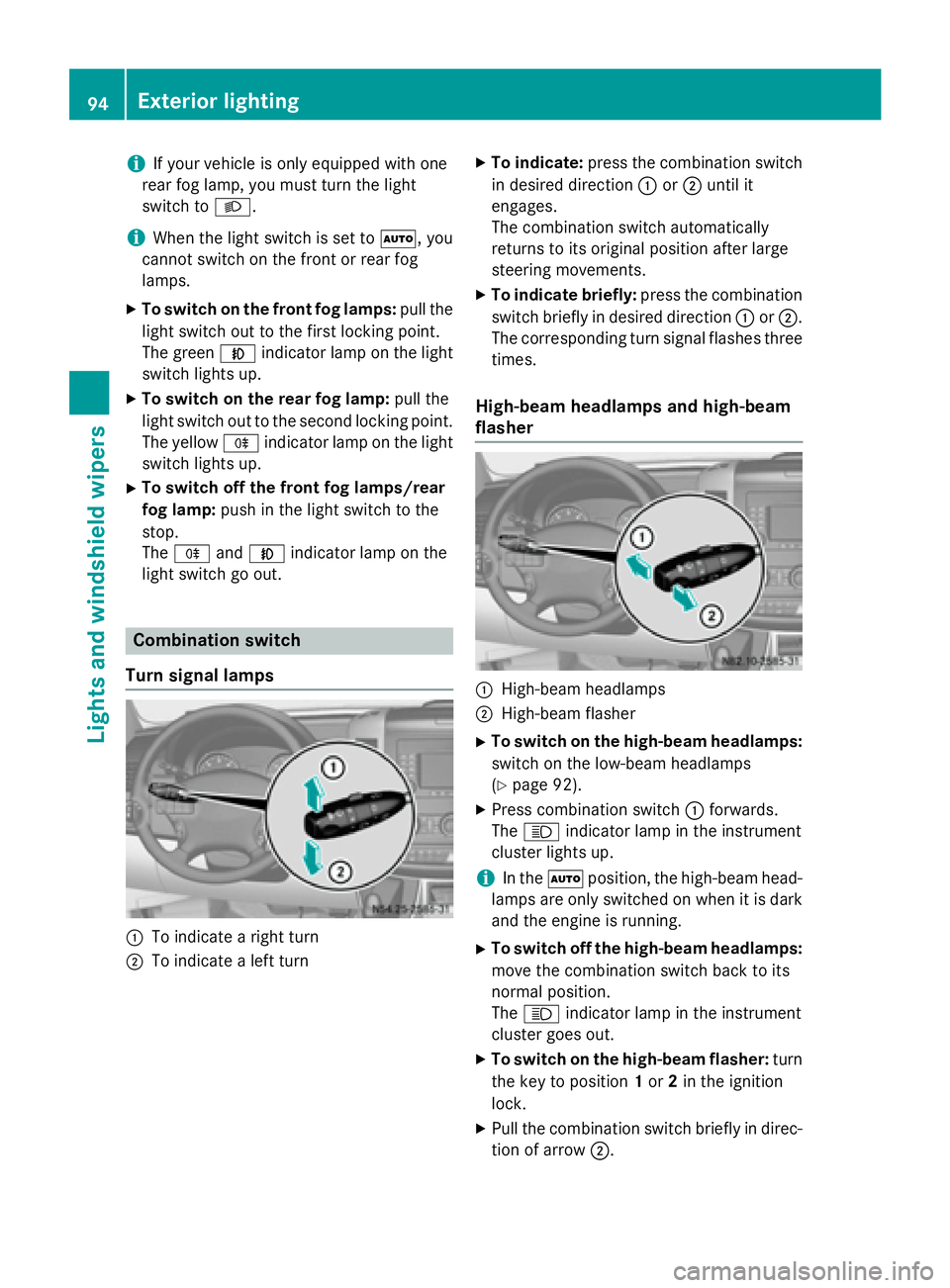
Turn signal lamps 0043
To indicate a right turn
0044 To indicate a left turn X
To indicate: press the combination switch
in desired direction 0043or0044 until it
engages.
The combination switch automatically
returns to its original position after large
steering movements.
X To indicate briefly: press the combination
switch briefly in desired direction 0043or0044.
The corresponding turn signal flashes three
times.
High-beam headlamps and high-beam
flasher 0043
High-beam headlamps
0044 High-beam flasher
X To switch on the high-beam headlamps:
switch on the low-beam headlamps
(Y page 92).
X Press combination switch 0043forwards.
The 0057 indicator lamp in the instrument
cluster lights up.
i In the
0058position, the high-beam head-
lamps are only switched on when it is dark
and the engine is running.
X To switch off the high-beam headlamps:
move the combination switch back to its
normal position.
The 0057 indicator lamp in the instrument
cluster goes out.
X To switch on the high-beam flasher: turn
the key to position 1or 2in the ignition
lock.
X Pull the combination switch briefly in direc-
tion of arrow 0044.94
Exterior lightingLights and windshield wipers
Page 98 of 334
Highbeam Assist
General notes You can use this function to set the head-
lamps to change between low beam and high beam automatically. The system recognizes
vehicles with their lights on, either approach-
ing from the opposite direction or traveling in front of your vehicle, and consequently
switches the headlamps from high beam to
low beam.
Once the system no longer detects any other
vehicles, it reactivates the high-beam head-
lamps.
The system's optical sensor is located behind the windshield near the overhead control
panel.
Important safety notes G
WARNING
Highbeam Assist does not recognize road
users:
R who have no lights, e.g. pedestrians
R who have poor lighting, e.g. cyclists
R whose lighting is blocked, e.g. by a barrier
In very rare cases, Highbeam Assist may fail to
recognize other road users who have lights, or
may recognize them too late. In this or similar situations, the automatic high-beam head-
lamps will not be deactivated or will be acti-
vated regardless. There is a risk of an acci-
dent.
Always carefully observe the traffic conditions and switch off the high-beam headlamps in
good time.
Highbeam Assist cannot take into account
road, weather or traffic conditions. Highbeam Assist is only an aid. You are responsible for
adjusting the vehicle's lighting to the prevail-
ing light, visibility and traffic conditions. In particular, the detection of obstacles can
be restricted if there is:
R poor visibility, e.g. due to fog, heavy rain or
snow
R dirt on the sensors or anything else cover-
ing the sensors
Activating/deactivating Highbeam
Assist X
To activate: switch on the Highbeam
Assist function using the on-board com-
puter (Y page 192).
X Turn the light switch to the 0058position.
X Press the combination switch beyond the
pressure point in the direction of arrow 0043
(Y page 94).
Highbeam Assist is active.
The 00CE or indicator lamp in the
multifunction display lights up when it is
dark and the light sensor activates the low-
beam headlamps.
If you are driving at speeds above approx-
imately 22 mph (35 km/h) and no other
road users have been detected:
The high-beam headlamps are switched on
automatically. The 0057indicator lamp in
the instrument cluster also lights up.
If you are driving at speeds below approx-
imately 19 mph (30 km/h), other road
users are recognized or the roads are ade-
quately lit:
The high-beam headlamps are switched off automatically. The 0057indicator lamp in
the instrument cluster goes out. The 00CE
or indicator lamp in the multifunc-
tion display remains lit.
X To deactivate: move the combination
switch back to its normal position or move the light switch to another position.
The 00CE or indicator lamp in the
multifunction display goes out. 96
Exterior lightingLights and windshield wipers
Page 103 of 334
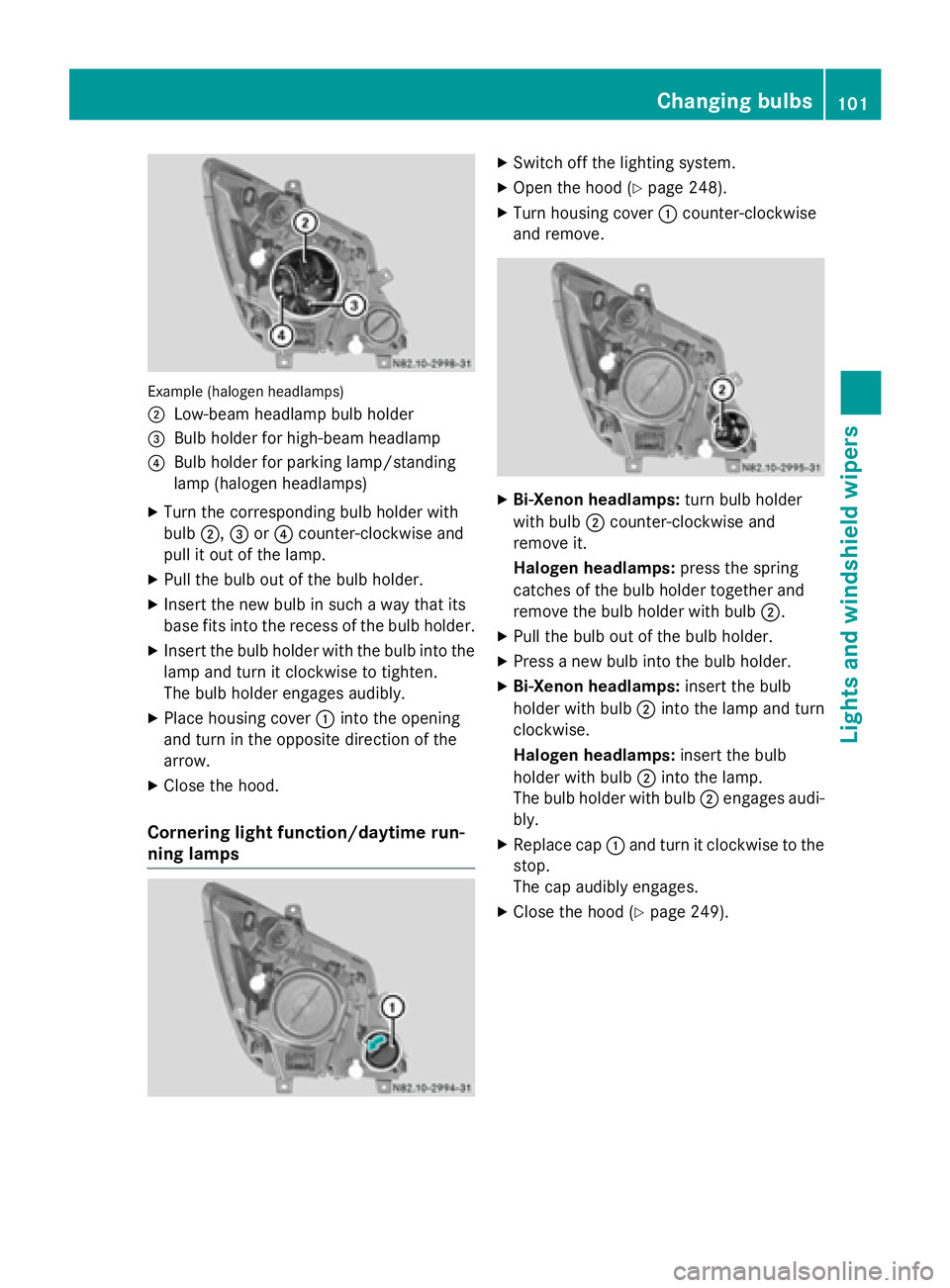
Example (halogen headlamps)
0044
Low-beam headlamp bulb holder
0087 Bulb holder for high-beam headlamp
0085 Bulb holder for parking lamp/standing
lamp (halogen headlamps)
X Turn the corresponding bulb holder with
bulb 0044,0087or0085 counter-clockwise and
pull it out of the lamp.
X Pull the bulb out of the bulb holder.
X Insert the new bulb in such a way that its
base fits into the recess of the bulb holder.
X Insert the bulb holder with the bulb into the
lamp and turn it clockwise to tighten.
The bulb holder engages audibly.
X Place housing cover 0043into the opening
and turn in the opposite direction of the
arrow.
X Close the hood.
Cornering light function/daytime run-
ning lamps X
Switch off the lighting system.
X Open the hood (Y page 248).
X Turn housing cover 0043counter-clockwise
and remove. X
Bi-Xenon headlamps: turn bulb holder
with bulb 0044counter-clockwise and
remove it.
Halogen headlamps: press the spring
catches of the bulb holder together and
remove the bulb holder with bulb 0044.
X Pull the bulb out of the bulb holder.
X Press a new bulb into the bulb holder.
X Bi-Xenon headlamps: insert the bulb
holder with bulb 0044into the lamp and turn
clockwise.
Halogen headlamps: insert the bulb
holder with bulb 0044into the lamp.
The bulb holder with bulb 0044engages audi-
bly.
X Replace cap 0043and turn it clockwise to the
stop.
The cap audibly engages.
X Close the hood (Y page 249). Changing bulbs
101Lights andwindshield wipers Z
Page 109 of 334
Windshield wipers
Switching the windshield wiper
on/off
! Do not operate the windshield wipers
when the windshield is dry, as this could
damage the wiper blades. Moreover, dust
that has collected on the windshield can
scratch the glass if wiping takes place when the windshield is dry.
If it is necessary to switch on the windshield wipers in dry weather conditions, always
use washer fluid when operating the wind-
shield wipers.
! If the windshield wipers leave smears on
the windshield after the vehicle has been
washed in an automatic car wash, wax or
other residues may be the reason for this.
Clean the windshield using washer fluid
after washing the vehicle in an automatic
car wash.
! Vehicles with rain/light sensor:
Switch the wipers off in dry weather. Oth-
erwise, dirt or optical effects may cause
undesired windshield wiper sweeps. This
could then damage the windshield wiper
blades or scratch the windshield.
The windshield will no longer be wiped prop-
erly if the wiper blades are worn. Replace the wiper blades twice a year (Y page 108), ide-
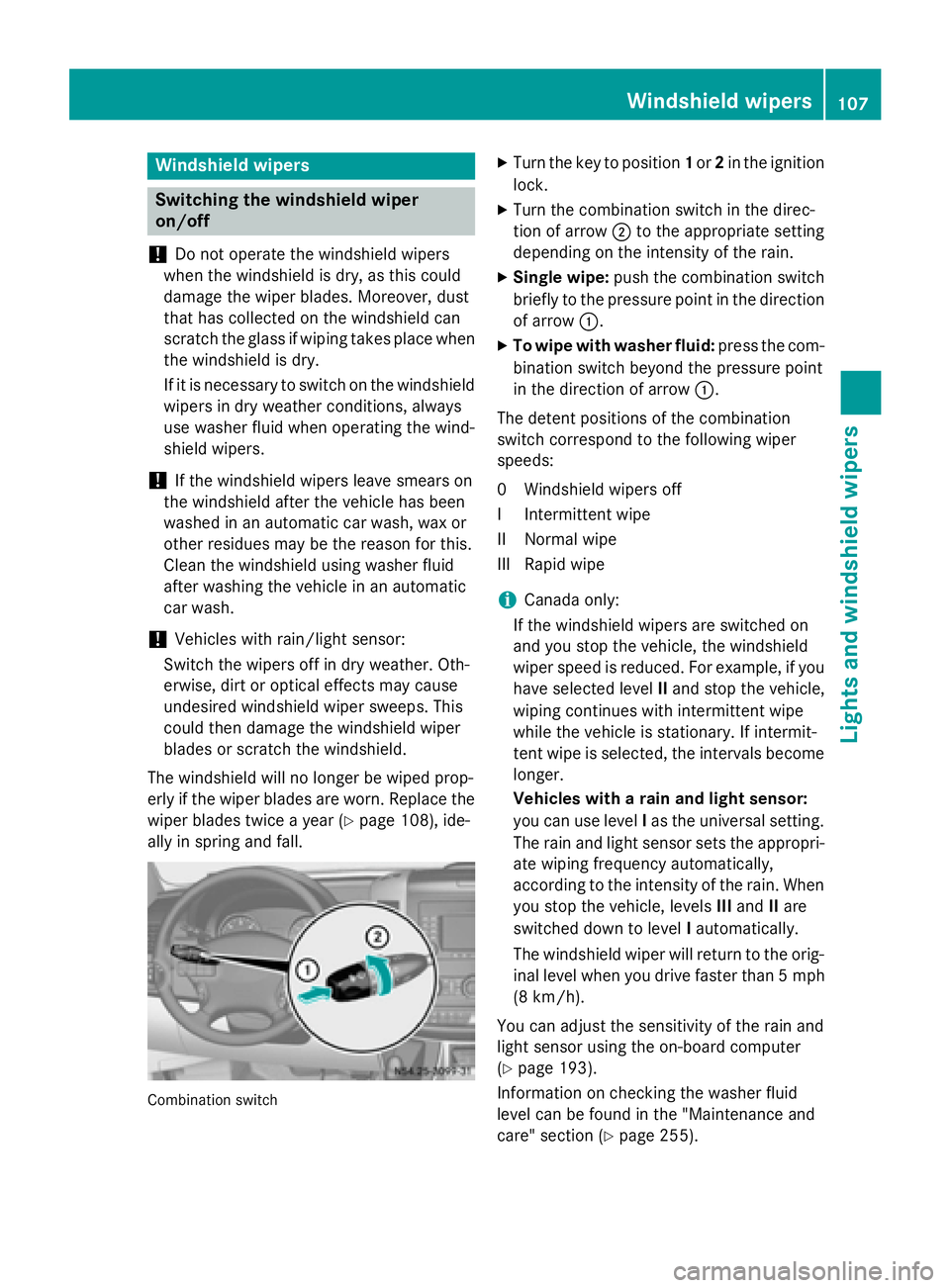
ally in spring and fall. Combination switch X
Turn the key to position 1or 2in the ignition
lock.
X Turn the combination switch in the direc-
tion of arrow 0044to the appropriate setting
depending on the intensity of the rain.
X Single wipe: push the combination switch
briefly to the pressure point in the direction
of arrow 0043.
X To wipe with washer fluid: press the com-
bination switch beyond the pressure point
in the direction of arrow 0043.
The detent positions of the combination
switch correspond to the following wiper
speeds:
0W indshield wipers off
II ntermittent wipe
II Normal wipe
III Rapid wipe
i Canada only:
If the windshield wipers are switched on
and you stop the vehicle, the windshield
wiper speed is reduced. For example, if you have selected level IIand stop the vehicle,
wiping continues with intermittent wipe
while the vehicle is stationary. If intermit-
tent wipe is selected, the intervals become
longer.
Vehicles with a rain and light sensor:
you can use level Ias the universal setting.
The rain and light sensor sets the appropri-
ate wiping frequency automatically,
according to the intensity of the rain. When
you stop the vehicle, levels IIIand IIare
switched down to level Iautomatically.
The windshield wiper will return to the orig- inal level when you drive faster than 5 mph
(8 km/h).
You can adjust the sensitivity of the rain and
light sensor using the on-board computer
(Y page 193).
Information on checking the washer fluid
level can be found in the "Maintenance and
care" section (Y page 255). Windshield wipers
107Lights andwindshield wipers Z