mirror MERCEDES-BENZ SPRINTER 2015 MY15 Operator’s Manual
[x] Cancel search | Manufacturer: MERCEDES-BENZ, Model Year: 2015, Model line: SPRINTER, Model: MERCEDES-BENZ SPRINTER 2015Pages: 334, PDF Size: 5.94 MB
Page 167 of 334
0043
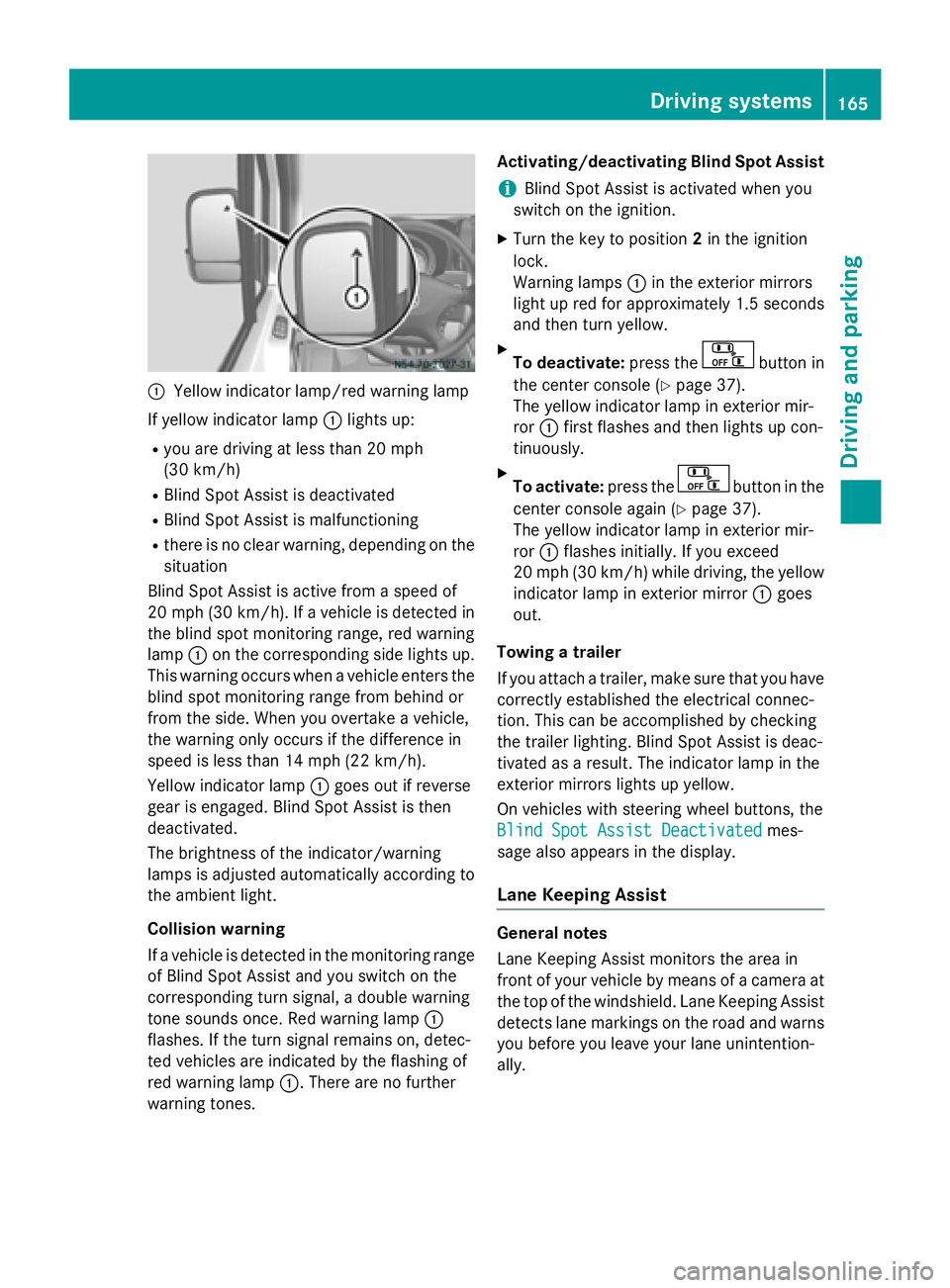
Yellow indicator lamp/red warning lamp
If yellow indicator lamp 0043lights up:
R you are driving at less than 20 mph
(30 km/h)
R Blind Spot Assist is deactivated
R Blind Spot Assist is malfunctioning
R there is no clear warning, depending on the
situation
Blind Spot Assist is active from a speed of
20 mph (30 km/h). If a vehicle is detected in
the blind spot monitoring range, red warning
lamp 0043on the corresponding side lights up.
This warning occurs when a vehicle enters the blind spot monitoring range from behind or
from the side. When you overtake a vehicle,
the warning only occurs if the difference in
speed is less than 14 mph (22 km/h).
Yellow indicator lamp 0043goes out if reverse
gear is engaged. Blind Spot Assist is then
deactivated.
The brightness of the indicator/warning
lamps is adjusted automatically according to
the ambient light.
Collision warning
If a vehicle is detected in the monitoring range of Blind Spot Assist and you switch on the
corresponding turn signal, a double warning
tone sounds once. Red warning lamp 0043
flashes. If the turn signal remains on, detec-
ted vehicles are indicated by the flashing of
red warning lamp 0043. There are no further
warning tones. Activating/deactivating Blind Spot Assist
i Blind Spot Assist is activated when you
switch on the ignition.
X Turn the key to position 2in the ignition
lock.
Warning lamps 0043in the exterior mirrors
light up red for approximately 1.5 seconds
and then turn yellow.
X To deactivate: press the button in
the center console (Y page 37).
The yellow indicator lamp in exterior mir-
ror 0043first flashes and then lights up con-
tinuously.
X To activate: press the button in the
center console again (Y page 37).
The yellow indicator lamp in exterior mir-
ror 0043flashes initially. If you exceed
20 mph (30 km/h) while driving, the yellow
indicator lamp in exterior mirror 0043goes
out.
Towing a trailer
If you attach a trailer, make sure that you have
correctly established the electrical connec-
tion. This can be accomplished by checking
the trailer lighting. Blind Spot Assist is deac-
tivated as a result. The indicator lamp in the
exterior mirrors lights up yellow.
On vehicles with steering wheel buttons, the
Blind Spot Assist Deactivated
Blind Spot Assist Deactivated mes-
sage also appears in the display.
Lane Keeping Assist General notes
Lane Keeping Assist monitors the area in
front of your vehicle by means of a camera at
the top of the windshield. Lane Keeping Assist detects lane markings on the road and warns you before you leave your lane unintention-
ally. Driving systems
165Driving and parking Z
Page 171 of 334
Warning displays
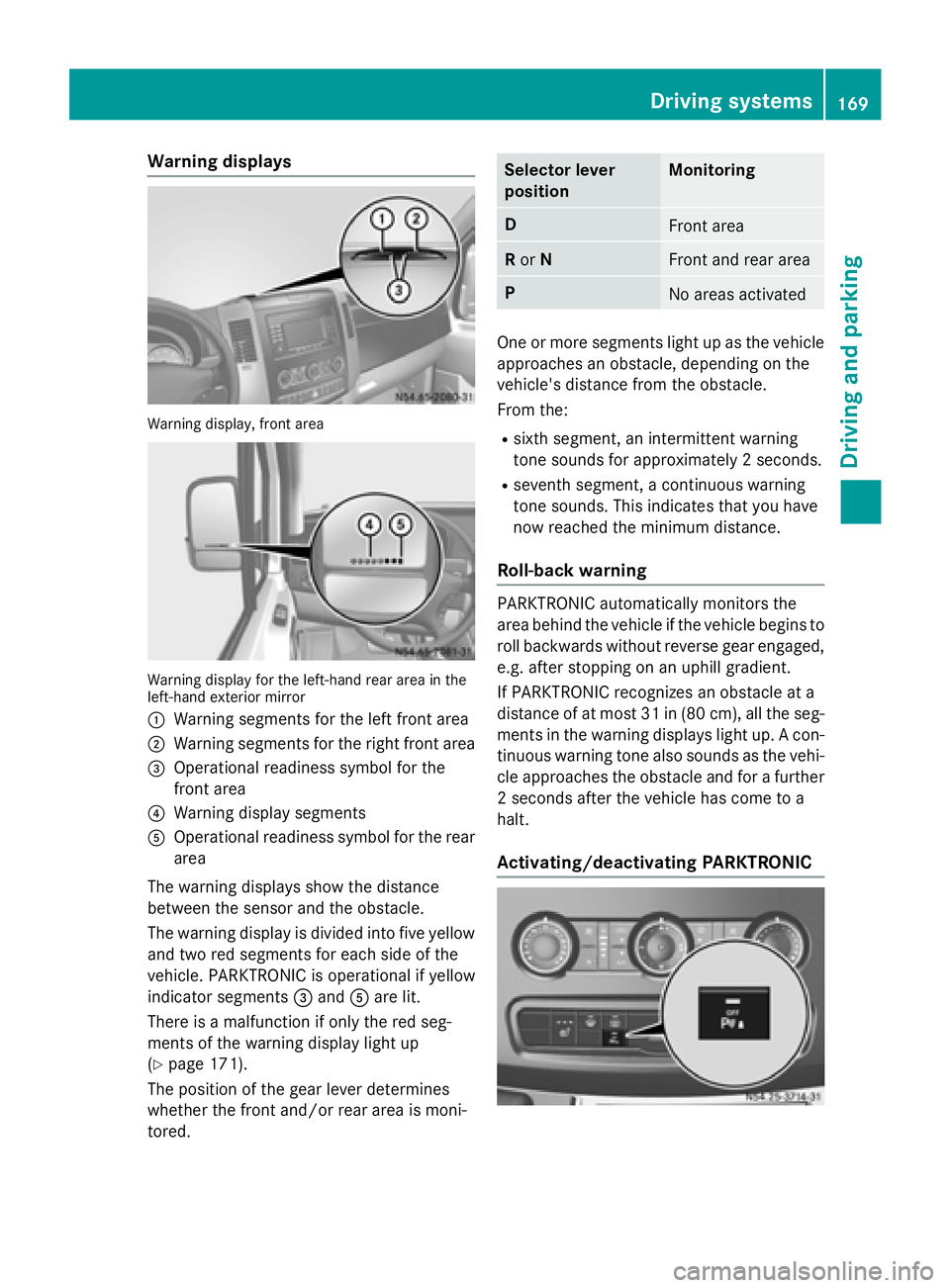
Warning display, front area
Warning display for the left-hand rear area in the
left-hand exterior mirror
0043 Warning segments for the left front area
0044 Warning segments for the right front area
0087 Operational readiness symbol for the
front area
0085 Warning display segments
0083 Operational readiness symbol for the rear
area
The warning displays show the distance
between the sensor and the obstacle.
The warning display is divided into five yellow and two red segments for each side of the
vehicle. PARKTRONIC is operational if yellow
indicator segments 0087and 0083are lit.
There is a malfunction if only the red seg-
ments of the warning display light up
(Y page 171).
The position of the gear lever determines
whether the front and/or rear area is moni-
tored. Selector lever
position Monitoring
D
Front area
R
or N Front and rear area
P
No areas activated
One or more segments light up as the vehicle
approaches an obstacle, depending on the
vehicle's distance from the obstacle.
From the:
R sixth segment, an intermittent warning
tone sounds for approximately 2 seconds.
R seventh segment, a continuous warning
tone sounds. This indicates that you have
now reached the minimum distance.
Roll-back warning PARKTRONIC automatically monitors the
area behind the vehicle if the vehicle begins to
roll backwards without reverse gear engaged,
e.g. after stopping on an uphill gradient.
If PARKTRONIC recognizes an obstacle at a
distance of at most 31 in (80 cm), all the seg- ments in the warning displays light up. A con-
tinuous warning tone also sounds as the vehi- cle approaches the obstacle and for a further
2 seconds after the vehicle has come to a
halt.
Activating/deactivating PARKTRONIC Driving systems
169Driving and parking Z
Page 174 of 334
The camera is in the middle of the roof above
the high-mounted brake lamp (Y page 269).
The rear view camera may show obstacles in perspectival distortion, incorrectly or not at
all. The rear view camera cannot display all
objects located very near and/or under the
rear bumper. It does not warn you of a colli-
sion, persons or objects.
The area behind the vehicle is displayed in a
mirrored fashion, as in the rear-view mirror or
the exterior mirrors.
The function of the rear view camera may be
partially or completely impaired in the follow-
ing circumstances:
R it is raining very heavily or snowing, or it is
foggy.
R the parking space is located in a very dark
place.
R the camera is exposed to very strong white
light. White stripes may appear on the dis-
play.
R the surrounding area is illuminated with flu-
orescent light. The display may flicker.
R if the temperature changes very quickly, for
example if you drive into a heated garage in the winter.
R ambient temperatures are very high.
R the camera lens is dirty or obstructed.
R the rear of the vehicle is damaged. In this
case, have the position and setting
checked at a specialist workshop.
The rear view camera is activated when you
engage reverse gear R.
You can find information on cleaning the cam-
era in the "Maintenance and care" section
(Y page 269). Working mode
ADR (working speed governor)
General notes When activated, ADR automatically increases
the engine speed to a preset speed or a speed
you have set.
i After a cold start, the idling speed of the
engine is increased automatically. If the
preset working speed is lower than the
increased idling speed, the working speed
is only reached once the engine has com-
pleted the warm-up phase.
It is only possible to activate ADR with the
vehicle stationary and the parking brake
applied.
The selector lever of the automatic trans-
mission must be in position P.
Activating/deactivating ADR X
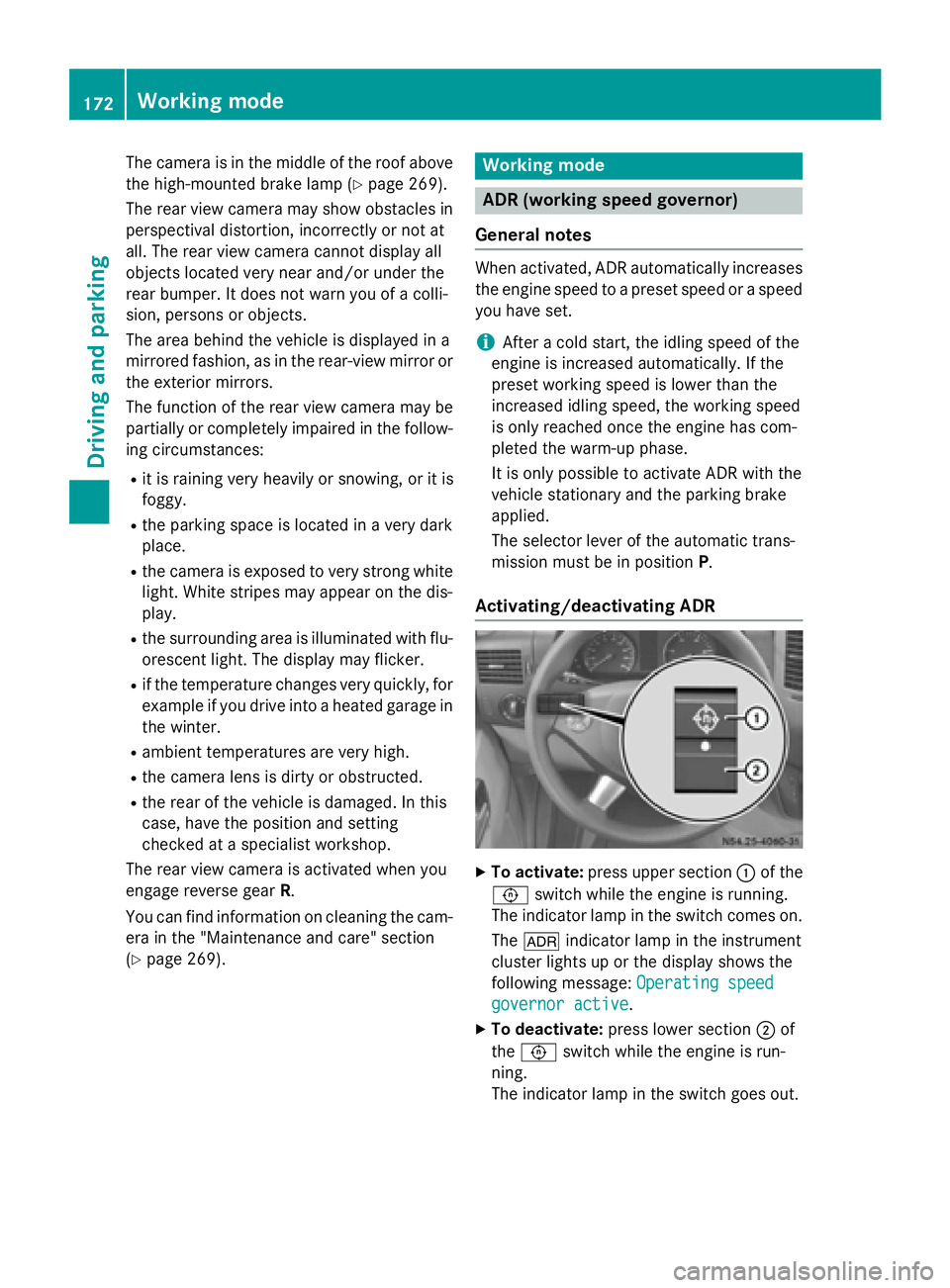
To activate: press upper section 0043of the
0091 switch while the engine is running.
The indicator lamp in the switch comes on.
The 004E indicator lamp in the instrument
cluster lights up or the display shows the
following message: Operating speed Operating speed
governor active
governor active.
X To deactivate: press lower section 0044of
the 0091 switch while the engine is run-
ning.
The indicator lamp in the switch goes out. 172
Working modeDriving and parking
Page 178 of 334
X
Remove the objects that are preventing the
trailer from rolling, e.g. wheel chocks.
X Release the trailer parking brake.
i The subharness of the vehicle has a cable
connection to the brake lamp indicator
lamp.
Observe the maximum permissible trailer
dimensions (width and length).
Most federal states and all Canadian provin-
ces require by law:
R safety chains between the towing vehicle
and the trailer. The chains should be cross-
wound under the trailer drawbar. They must be fastened to the vehicle's trailer cou-
pling, not to the bumper or the axle.
Leave enough slack in the chains. This
allows you to drive round tight corners.
R a separate brake system for certain types
of trailer.
R a safety switch for braked trailers. Find out
the specific requirements according to the
applicable laws.
If the trailer detaches from the towing vehi- cle, the safety switch applies the trailer's
brakes. Towing a trailer
There are numerous legal requirements con-
cerning the towing of a trailer, e.g. speed
restrictions. Make sure your vehicle/trailer
combination complies with local laws. This
not only means where you live, but also any-
where you are driving to. Information is avail-
able from the police and local authorities.
Observe the following when towing a trailer:
R Practice driving around bends, stopping
and backing up at a place where there is no
traffic. This enables you to gain experience and get used to the new handling charac-
teristics.
R Before driving, check:
- that the trailer tow hitch and ball cou-
pling are secure
- that the safety switch for a braked trailer
is functioning properly
- that the safety chains are secure and not
damaged
- that the electrical connections are
secure
- that the lights are working
- that the wheels are in good order and the
tire pressure is correct
R Adjust the exterior mirrors to provide an
unobstructed view of the rear section of the
trailer.
R If the trailer has electronically controlled
brakes, pull the vehicle/trailer combina-
tion away carefully. Brake manually using
the brake controller and check that the
brakes are working.
R Secure the load on the trailer according to
the applicable specifications and current
standards on securing loads (Y page 242).
R When driving with a trailer, check at regular
intervals that the load is secured and that
the brakes and lights are working.
R Bear in mind that the handling will be less
stable when towing a trailer than when driv-
ing without one. Avoid sudden steering
movements.
R The vehicle/trailer combination is heavier,
accelerates more slowly and has a
decreased gradient climbing capability and
a longer braking distance.
It is more susceptible to crosswinds and
requires cautious steering.
R If possible, do not brake suddenly, but
rather moderately at first so that the trailer
can activate its brakes. Then increase the
force on the brake pedal.
R If the automatic transmission repeatedly
shifts between gears when driving on 176
Towing a trailerDriving and pa
rking
Page 205 of 334
Display messages
Possible causes/consequences and
0050
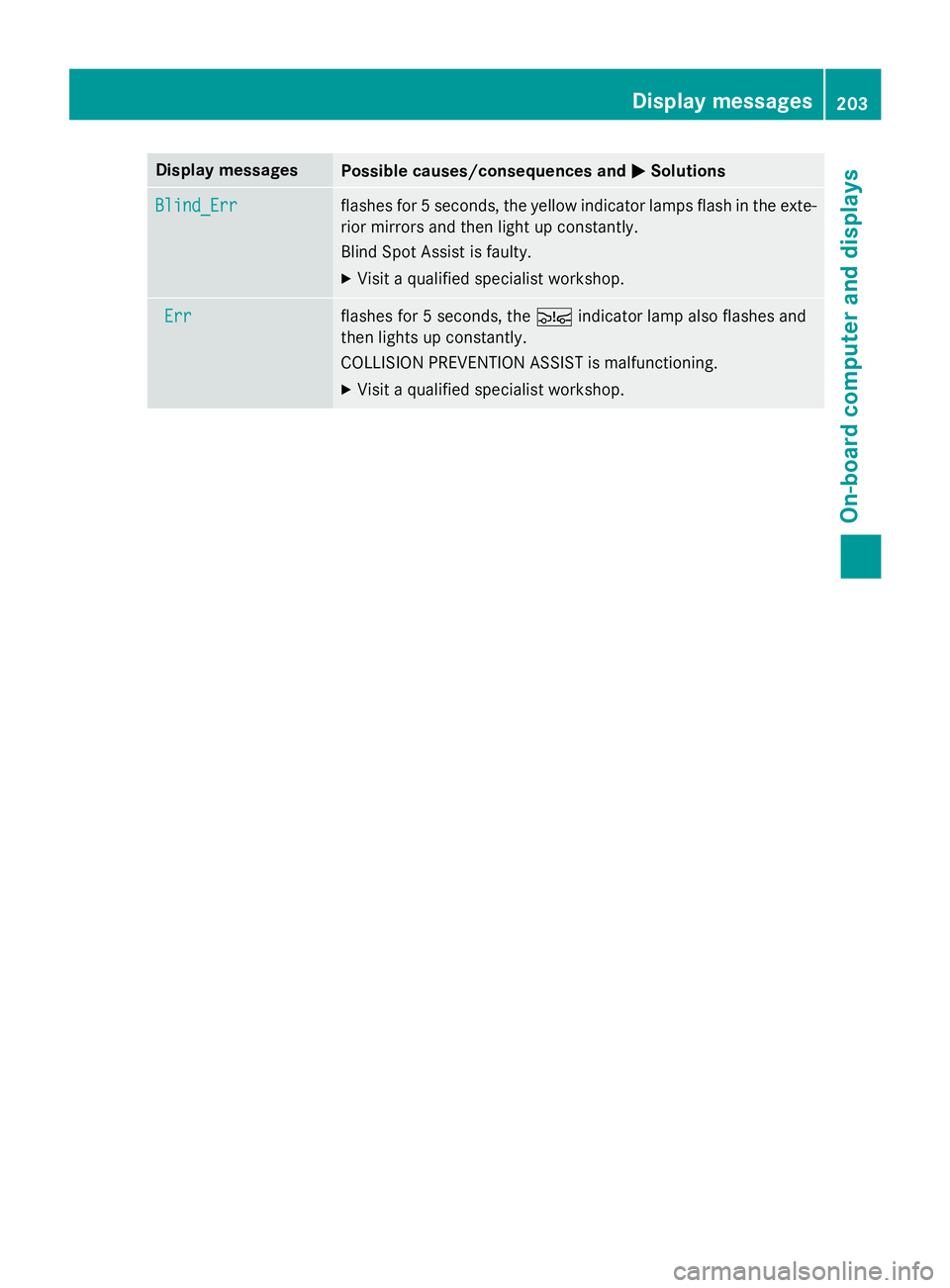
0050Solutions Blind_Err
Blind_Err flashes for 5 seconds, the yellow indicator lamps flash in the exte-
rior mirrors and then light up constantly.
Blind Spot Assist is faulty.
X Visit a qualified specialist workshop. Err Err flashes for 5 seconds, the
00C7indicator lamp also flashes and
then lights up constantly.
COLLISION PREVENTION ASSIST is malfunctioning.
X Visit a qualified specialist workshop. Display
messages
203On-board computer and displays Z
Page 267 of 334
Care
Notes on care
G
WARNING
If you use openings in the bodywork or
detachable parts as steps, you could:
R slip and/or fall
R damage the vehicle and cause yourself to
fall.
There is a risk of injury.
Always use secure climbing aids, e.g. a suita-
ble ladder.
! For cleaning your vehicle, do not use any
of the following:
R dry, rough or hard cloths
R abrasive cleaning agents
R solvents
R cleaning agents containing solvents
Do not scrub.
Do not touch the surfaces or protective
films with hard objects, e.g. a ring or ice
scraper. You could otherwise scratch or
damage the surfaces and protective film.
! Do not park the vehicle for an extended
period straight after cleaning it, particularly after having cleaned the wheels with wheel cleaner. Wheel cleaners could cause
increased corrosion of the brake discs and
brake pads/linings. For this reason, you
should drive for a few minutes after clean-
ing. Braking heats the brake discs and the
brake pads/linings, thus drying them. The
vehicle can then be parked. H
Environmental note
Only clean your vehicle at specially designed
wash bays. Dispose of empty containers and
used cleaning products in an environmentally
responsible manner. H
Environmental note
Dispose of empty packaging and cleaning
cloths in an environmentally responsible man- ner.
Regular care of your vehicle is a condition for
retaining the quality in the long term.
Use care products and cleaning agents rec-
ommended and approved for Sprinter vehi-
cles. Washing the vehicle and cleaning the
paintwork
Automatic car wash G
WARNING
Braking efficiency is reduced after washing
the vehicle. There is a risk of an accident.
After the vehicle has been washed, brake
carefully while paying attention to the traffic
conditions until full braking power is restored.
! Never clean your vehicle in a Touchless
Automatic Car Wash as these use special
cleaning agents. These cleaning agents can damage the paintwork or plastic parts.
! Make sure that the automatic car wash is
suitable for the size of the vehicle.
Before washing the vehicle in an automatic car wash, fold in the exterior mirrors and
remove any additional antennas. Other-
wise, the exterior mirror, antenna or the
vehicle itself could be damaged.
Make sure that the exterior mirrors are fully
folded out again and that any additional
antennas are re-installed when you leave
the automatic car wash.
! Make sure that:
R the side windows and the roof are com-
pletely closed
R the climate control blower is switched off
R the windshield wiper switch is at position
0 Care
265Maintenance and care Z
Page 270 of 334
brake pads/linings. For this reason, you
should drive for a few minutes after clean-
ing. Braking heats the brake discs and the
brake pads/linings, thus drying them. The
vehicle can then be parked.
If you clean the wheels with a power washer,
observe the safety notes for the power
washer (Y page 266). You could otherwise
damage the tires.
Cleaning the wiper blades G
WARNING
You could become trapped by the windshield wipers if they start moving while cleaning the
windshield or wiper blades. There is a risk of
injury.
Always switch off the windshield wipers and
the ignition before cleaning the windshield or
wiper blades.
! Do not fold the windshield wipers away
from the windshield unless the hood is
closed. Otherwise, you could damage the
hood.
! Do not pull the wiper blade. Otherwise,
the wiper blade could be damaged.
! Do not clean wiper blades too often and
do not rub them too hard. Otherwise, the
graphite coating could be damaged. This
could cause wiper noise.
! Hold the wiper arm securely when folding
back. The windshield could be damaged if
the wiper arm smacks against it suddenly.
X Turn the key to position 0in the ignition
lock or remove it.
X Fold the windshield wiper arms away from
the windshield until you feel them engage.
X Carefully clean the wiper blades with a
damp cloth.
X Fold back the wiper arms before switching
on the ignition. Cleaning the exterior lighting !
Only use cleaning agents or cleaning
cloths which are suitable for plastic light
lenses. Unsuitable cleaning agents or
cleaning cloths could scratch or damage
the plastic light lenses.
X Clean the plastic covers of the exterior
lighting with a damp sponge and a mild
cleaning agent, e.g. car shampoo for
Sprinter vehicles, or with cleaning cloths.
Cleaning the mirror turn signal !
Only use cleaning agents or cleaning
cloths that are suitable for plastic lenses.
Unsuitable cleaning agents or cleaning
cloths could scratch or damage the plastic lenses of the mirror turn signals.
X Clean the plastic lenses of the mirror turn
signals in the exterior mirror housing using
a wet sponge and mild cleaning agent, e.g.
car shampoo or cleaning cloths.
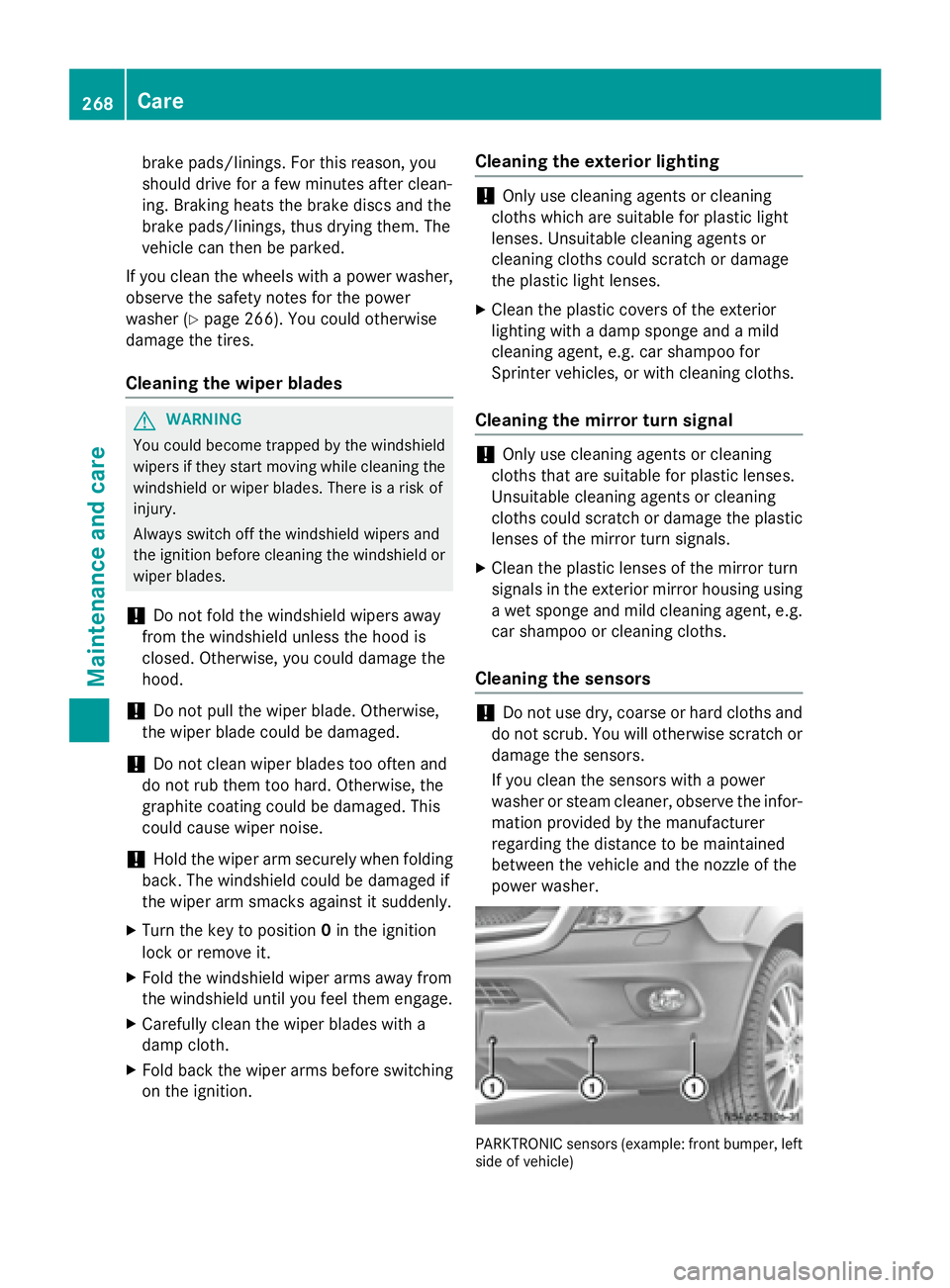
Cleaning the sensors !
Do not use dry, coarse or hard cloths and
do not scrub. You will otherwise scratch or
damage the sensors.
If you clean the sensors with a power
washer or steam cleaner, observe the infor- mation provided by the manufacturer
regarding the distance to be maintained
between the vehicle and the nozzle of the
power washer. PARKTRONIC sensors (example: front bumper, left
side of vehicle) 268
CareMaintenance and care