wheel MERCEDES-BENZ SPRINTER 2015 MY15 Operator’s Manual
[x] Cancel search | Manufacturer: MERCEDES-BENZ, Model Year: 2015, Model line: SPRINTER, Model: MERCEDES-BENZ SPRINTER 2015Pages: 334, PDF Size: 5.94 MB
Page 153 of 334
X
Apply the parking brake.
X Turn the key to position 0in the ignition
lock and remove it.
The immobilizer is activated.
X Secure the vehicle to prevent it from rolling
away (Y page 149). Wheel chock
Use the wheel chock or a similar object to
prevent the vehicle from rolling away, e.g.
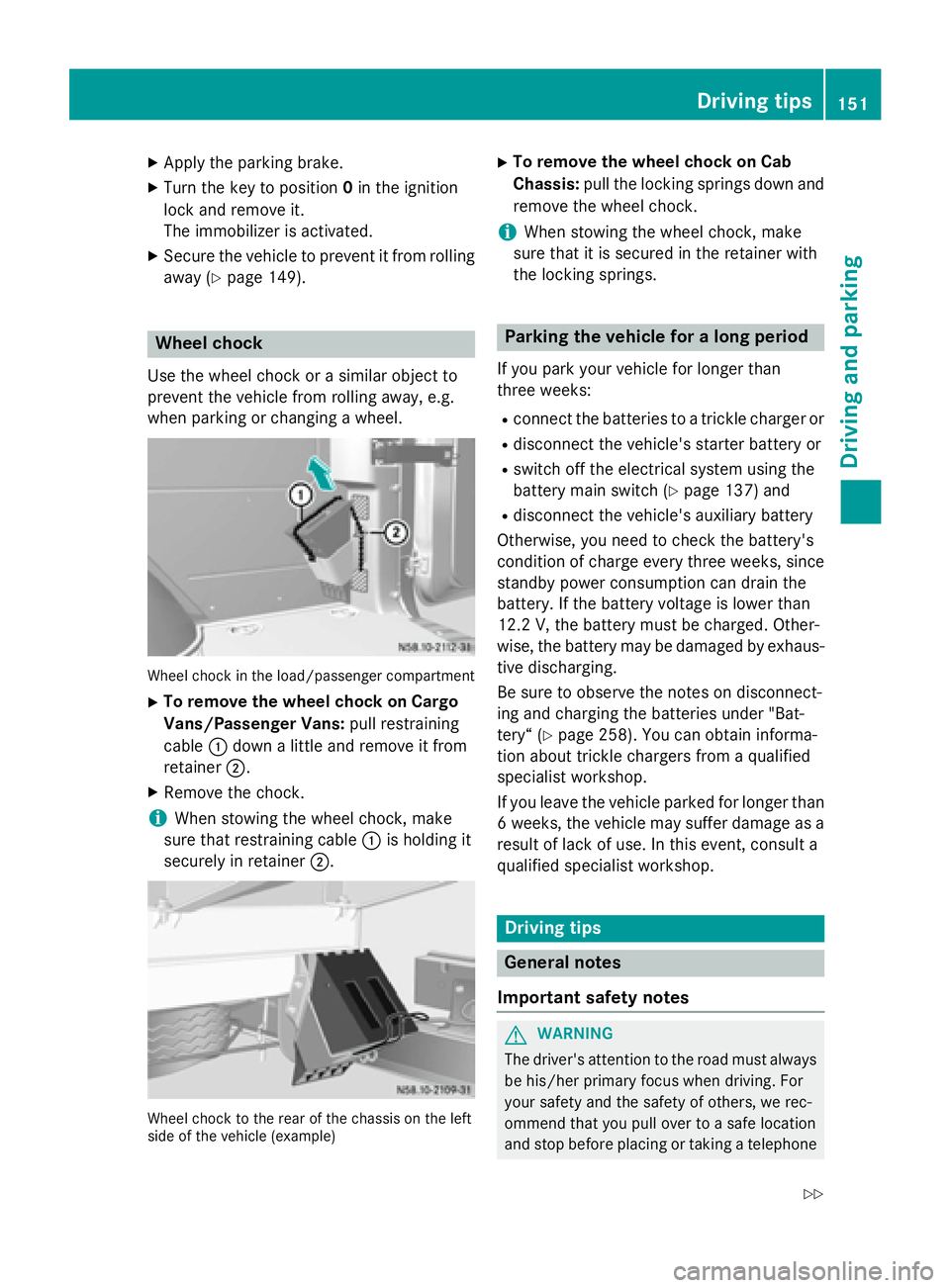
when parking or changing a wheel. Wheel chock in the load/passenger compartment
X To remove the wheel chock on Cargo
Vans/Passenger Vans: pull restraining
cable 0043down a little and remove it from
retainer 0044.
X Remove the chock.
i When stowing the wheel chock, make
sure that restraining cable 0043is holding it
securely in retainer 0044. Wheel chock to the rear of the chassis on the left
side of the vehicle (example) X
To remove the wheel chock on Cab
Chassis: pull the locking springs down and
remove the wheel chock.
i When stowing the wheel chock, make
sure that it is secured in the retainer with
the locking springs. Parking the vehicle for a long period
If you park your vehicle for longer than
three weeks: R connect the batteries to a trickle charger or
R disconnect the vehicle's starter battery or
R switch off the electrical system using the
battery main switch (Y page 137) and
R disconnect the vehicle's auxiliary battery
Otherwise, you need to check the battery's
condition of charge every three weeks, since standby power consumption can drain the
battery. If the battery voltage is lower than
12.2 V,the battery must be charged. Other-
wise, the battery may be damaged by exhaus-
tive discharging.
Be sure to observe the notes on disconnect-
ing and charging the batteries under "Bat-
tery“ (Y page 258). You can obtain informa-
tion about trickle chargers from a qualified
specialist workshop.
If you leave the vehicle parked for longer than
6 weeks, the vehicle may suffer damage as a result of lack of use. In this event, consult a
qualified specialist workshop. Driving tips
General notes
Important safety notes G
WARNING
The driver's attention to the road must always be his/her primary focus when driving. For
your safety and the safety of others, we rec-
ommend that you pull over to a safe location
and stop before placing or taking a telephone Driving
tips
151Driving an d parking
Z
Page 155 of 334
cific maintenance work must be carried out at
regular intervals and in accordance with the
service requirements of the dealer listed here
on the inside title page. Details can be found
in the Maintenance Booklet. Short journey
! If the vehicle is predominantly used for
short-distance driving or is stationary for
long periods, this could lead to a malfunc-
tion in the automatic cleaning function for
the diesel particle filter. This can lead to
blockage of the diesel particle filter. This
can also result in fuel collecting in the
engine oil and cause engine failure.
Therefore, if you mainly drive short distances,
drive on a highway or an inter-urban road for
20 minutes every 300 miles (500 km). This
facilitates the diesel particle filter's burn-off
process. Speed limiter
G
WARNING
Exceeding the stated tire load-bearing capa-
city and the approved maximum speed could
lead to tire damage or the tire bursting. There is a risk of accident.
Therefore, only use tire types and sizes
approved for your vehicle model. Observe the
tire load rating and speed rating required for
your vehicle.
As the driver, you must find out about the
maximum speed of the vehicle and the result-
ing permissible maximum speed of the tires
(tire and tire pressure). In particular, also
observe the tire approval regulations for each
country.
You must not exceed the speed limit for the
tires listed in the tire pressure tables. You can find information on tire pressures in the
"Wheels and tires" section (Y page 288).You can permanently limit the maximum
speed of your vehicle to 55 mph (90 km/h),
60 mph (100 km/h) or 75 mph (120 km/h).
We recommend that you use an authorized
Sprinter Dealer for the programming of the
maximum speed.
Before overtaking, take into consideration
that the engine speed limiter prevents the
speed increasing beyond the programmed
maximum speed. Driving abroad
Service An extensive network of authorized Sprinter
Dealers is also at your disposal when you are
traveling abroad. Nevertheless, please bear in
mind that service facilities or replacement
parts may not always be immediately availa-
ble. You can obtain a list of workshops at any
authorized Sprinter Dealer.
Fuel In some countries, only fuels with a higher
sulfur content are available.
Unsuitable fuel can cause engine damage.
Information on fuel (Y page 318).
Low-beam headlamps If you are traveling in countries where vehi-
cles are driven on the opposite side of the
road to that in which the vehicle is registered,
you will need to:
R have the halogen headlamps partially
masked
R have the Bi-Xenon headlamps set to sym-
metrical low beam
This prevents glare to oncoming traffic and no
longer illuminates the edge of the road to the same height and distance.
Have the headlamps masked or adjusted at a qualified specialist workshop before you
cross the border, but as close to it as possi-
ble. Driving tips
153Driving and parking Z
Page 156 of 334
When you return from your journey, and as
close to the border as possible, you will need
to:
R remove the adhesive surfaces from your
halogen headlamps and clean the glass of
the headlamps if necessary
R have the Bi-Xenon headlamps reset to
asymmetrical low beam at a qualified spe-
cialist workshop Transport by rail
Transporting your vehicle by rail may be sub-
ject to certain restrictions or require special
measures to be taken in some countries due
to varying tunnel heights and loading stand-
ards.
You can obtain further information from any
authorized Sprinter dealer. Braking
Important safety notes G
WARNING
If you shift down on a slippery road surface in an attempt to increase the engine's braking
effect, the drive wheels could lose their grip.
There is an increased danger of skidding and
accidents.
Do not shift down for additional engine brak-
ing on a slippery road surface. G
WARNING
If you rest your foot on the brake pedal while
driving, the braking system can overheat. This increases the stopping distance and can even
cause the braking system to fail. There is a
risk of an accident.
Never use the brake pedal as a footrest. Never
depress the brake pedal and the accelerator
pedal at the same time.
! Depressing the brake pedal constantly
results in excessive and premature wear to
the brake pads. Downhill gradients !
Depressing the brake pedal constantly
results in excessive and premature wear to
the brake pads.
On long and steep downhill gradients, you
should change down to shift range 0048or0047
in good time. This should be observed in par- ticular when driving with a laden vehicle and
when towing a trailer.
i You must also change the shift range in
good time when cruise control is switched
on.
You thereby make use of the braking effect of the engine and do not have to brake as oftento maintain the speed. This relieves the load
on the service brake and prevents the brakes
from overheating and wearing too quickly.
Heavy and light loads G
WARNING
If you rest your foot on the brake pedal while
driving, the braking system can overheat. This increases the stopping distance and can even
cause the braking system to fail. There is a
risk of an accident.
Never use the brake pedal as a footrest. Never
depress the brake pedal and the accelerator
pedal at the same time.
! Depressing the brake pedal constantly
results in excessive and premature wear to
the brake pads.
If the brakes have been subjected to a heavy load, do not stop the vehicle immediately.
Drive on for a short while. The brakes are
cooled down more quickly in the airflow.
Wet road surfaces If you have been driving for a long time in
heavy rain without braking, there may be a
delayed response when you first apply the
brakes. This may also occur after driving
through a car wash or deep water. 154
Driving tipsDriving and parking
Page 157 of 334
You must depress the brake pedal more
firmly. Maintain a longer distance to the vehi- cle in front.
While paying attention to the traffic condi-
tions, you should brake the vehicle firmly
after driving on a wet road surface or through
a car wash. This heats the brake discs, so that they dry more quickly, which protects them
against corrosion.
Limited braking performance on salt-
treated roads When driving on salted roads, salt may start
to build up on the brake disks and brake pads.
This can increase braking distances consid-
erably.
Maintain a greater distance to the vehicle in
front.
To remove any build up of salt that may have
formed:
X Apply the brakes at the start of the journey,
occasionally during journey and at the end
of the journey. Make sure that you do not
endanger other road users when doing so.
Parking brake G
WARNING
If you must brake the vehicle with the parking brake, the braking distance is considerably
longer and the wheels could lock. There is an
increased danger of skidding and accidents.
Only use the parking brake to brake the vehi- cle when the service brake is faulty. Do not
apply the parking brake too firmly. If the
wheels lock, release the parking brake until
the wheels begin turning again.
When driving on wet roads or dirt-covered
surfaces, road salt and/or dirt may get into
the parking brake. This causes corrosion and a reduction of braking force.
In order to prevent this, drive with the parking
brake lightly applied from time to time. When
doing so, drive for a distance of approximately 110 yds (100 m) at a maximum speed of
12 mph (20 km/h).
The brake lamps are not illuminated when you
brake the vehicle using the parking brake. Driving in wet conditions
Hydroplaning G
WARNING
There is a danger of hydroplaning occurring,
even if you are driving slowly and your tires
have sufficient tread depth, depending on the depth of water on the road. There is a risk of
an accident.
For this reason, avoid tire ruts and brake care- fully.
Therefore, in heavy rain or other conditions in which hydroplaning can occur, drive as fol-
lows:
R reduce your speed
R avoid tire ruts
R apply the brakes with care
Driving on flooded roads !
Do not drive through flooded areas.
Check the depth of any water before driving
through it. Drive slowly through standing
water. Otherwise, water may enter the
vehicle interior or the engine compartment.
This can damage the electronic compo-
nents in the engine or the automatic trans- mission. Water can also be drawn in by the engine's air suction nozzles and this can
cause engine damage.
If you have to drive on stretches of road on
which water has collected, please bear in
mind that:
R the water level of standing water should not
be above the lower edge of the front
bumper
R do not drive faster than walking speed Driving tips
155Driving and parking Z
Page 158 of 334
Driving in winter
General notes G
WARNING
If you shift down on a slippery road surface in an attempt to increase the engine's braking
effect, the drive wheels could lose their grip.
There is an increased danger of skidding and
accidents.
Do not shift down for additional engine brak-
ing on a slippery road surface. G
DANGER
If the exhaust pipe is blocked or adequate
ventilation is not possible, poisonous gases
such as carbon monoxide (CO) may enter the vehicle. This is the case, e.g. if the vehicle
becomes trapped in snow. There is a risk of
fatal injury.
If you leave the engine or the auxiliary heating
running, make sure the exhaust pipe and area
around the vehicle are clear of snow. To
ensure an adequate supply of fresh air, open a window on the side of the vehicle that is not
facing into the wind.
Have your vehicle winterproofed at a qualified specialist workshop in good time at the onset of winter.
i Do not cover the radiator, e.g. with a win-
ter cover. The measurements of the on-
board diagnostic system may otherwise
return inaccurate values. Some of these
values are legally prescribed and must
therefore always be exact.
Observe the notes in the "Winter operation"
section (Y page 286).
Slippery road surfaces G
WARNING
If you shift down on a slippery road surface in an attempt to increase the engine's braking
effect, the drive wheels could lose their grip.
There is an increased danger of skidding and
accidents. Do not shift down for additional engine brak-
ing on a slippery road surface. G
WARNING
The outside temperature indicator is not
designed to serve as an ice-warning device
and is therefore unsuitable for that purpose.
Indicated temperatures just above the freez-
ing point do not guarantee that the road sur-
face is free of ice. The road may still be icy,
especially in wooded areas or on bridges.
! Vehicles with automatic transmission
may roll only briefly in the neutral position
N. Prolonged rolling of the wheels, e.g.
when being towed, will result in transmis-
sion damage.
If the vehicle threatens to skid or cannot be
stopped when moving at low speed:
X Shift the transmission to neutral position
N.
X Try to maintain control of the vehicle using
corrective steering.
Drive particularly carefully on slippery roads.
Avoid sudden acceleration, steering and
braking maneuvers. Do not use cruise con-
trol.
You can find further information on winter
tires and snow chains in the "Winter opera-
tion" section (Y page 286). Driving off-road
Important safety notes G
WARNING
If you drive on a steep incline at an angle or
turn when driving on an incline, the vehicle
could slip sideways, tip and rollover. There is a risk of an accident.
Always drive on a steep incline in the line of
fall (straight up or down) and do not turn the
vehicle. 156
Driving tipsDriving and pa
rking
Page 159 of 334
G
WARNING
When driving off-road, your body is subject to forces from all directions, due to the uneven
surface. You could be thrown from your seat,
for instance. There is a risk of injury.
Always wear a seat belt, even when driving off-
road. G
WARNING
If you drive over obstacles or in ruts, the steer- ing wheel may jerk out of your grip, causing
injury to your hands.
Always hold the steering wheel firmly with
both hands. When driving over obstacles, you must expect steering forces to increase
briefly and suddenly. G
WARNING
Flammable material such as leaves, grass or
twigs may ignite if they come into contact with hot parts of the exhaust system. There is a risk of fire.
When driving off road or on unpaved roads,
check the vehicle's underside regularly. In
particular, remove parts of plants or other
flammable materials which have become
trapped. In the case of damage, contact a
qualified specialist workshop.
! When driving off-road or on unpaved sur-
faces, check the underside of the vehicle
and the wheels and tires at regular inter-
vals. In particular, remove any trapped for- eign objects, e.g. stones and branches.
Such foreign objects may:
R damage the chassis, the fuel tank or the
brake system
R cause imbalances and thus vibrations
R be flung out when you continue driving
If there is any damage, inform a qualified
specialist workshop.
When driving off-road and on construction
sites, sand, mud and water mixed with oil, for
example, may get into the brakes. This may
lead to a reduction in braking performance or total brake failure, also as a result of
increased wear. The braking characteristics
will vary depending on the material that has
got into the system. Clean the brakes after
driving off-road. If you then notice reduced
braking performance or hear scraping noises,
have the brake system checked at a qualified specialist workshop. Adjust your driving style
to the changed braking characteristics.
Driving off-road or on construction sites
increases the possibility of vehicle damage
which may in turn lead to the failure of certain assemblies and systems. Adapt your driving
style to the off-road driving conditions. Drive
carefully. Have any vehicle damage rectified
at a qualified specialist workshop as soon as
possible.
When driving on rough terrain, do not shift the transmission into the neutral position. You
could lose control when attempting to brake
the vehicle with the service brake. If your
vehicle cannot manage an uphill slope, drive
back down the slope in reverse gear.
When loading your vehicle for driving off-road or on a construction site, keep the vehicle's
center of gravity as low as possible.
Checklist before driving off-road X
Check the fuel and DEF levels (Y page 181)
and top up (Y page 148).
X Engine: check the oil level (Y page 250)
and add oil (Y page 252).
Before driving up or down steep gradients,
fill the oil to the maximum level.
i If you drive up or down steep gradients,
the 00B2 symbol may appear in the display.
The engine operating safety is not put at
risk if you have filled the engine oil to the
maximum level before the journey.
X Vehicle tool kit: check that the jack is
working (Y page 274).
X Make sure that a lug wrench (Y page 274),
wooden underlay for the jack, a robust tow Driving tips
157Driving and parking Z
Page 160 of 334
cable and a folding spade are carried in the
vehicle.
X Wheels and tires: check the tire tread
depth (Y page 285) and tire pressure
(Y page 288).
Rules for driving off-road !
Always bear the vehicle's ground clear-
ance in mind and avoid obstacles, e.g. deep ruts.
Obstacles may damage the following parts
of the vehicle:
R the chassis
R the drive train
R the fuel and supply tanks
For this reason, you should always drive
slowly when driving off-road. If you have to drive over obstacles, have the co-driver
direct you.
i We recommend that you additionally
carry a shovel and a recovery rope with
shackle in the vehicle.
R Ensure that loads and items of luggage are
securely stowed or lashed down
(Y page 240).
R Before driving off-road, stop the vehicle and
shift to a low gear.
R If the surface demands it, temporarily deac-
tivate ASR when pulling away (Y page 58).
R Only drive off-road with the engine running
and a gear engaged.
R Drive slowly and smoothly. Walking pace is
necessary in many situations.
R Avoid spinning the drive wheels.
R Make sure that the wheels always remain in
contact with the ground.
R Drive with extreme care over unknown ter-
rain where you can only see for a short dis-
tance. As a precaution, get out of the vehi-
cle to take a look at the route to be taken in
advance.
R Check the water depth before fording. R
Watch out for obstacles (e.g. rocks, holes,
tree stumps and ruts).
R Avoid edges where the surface could crum-
ble or break away.
Checklist after driving off-road !
If you detect damage to the vehicle after
driving off-road, have the vehicle checked
immediately at a qualified specialist work-
shop.
Off-road driving places a higher demand on
your vehicle than normal road operation.
Check your vehicle after driving on rough ter- rain. By doing so you will notice any damage in
good time and reduce the risk of an accident for yourself and other road users. Clean your
vehicle thoroughly before driving on public
roads.
Observe the following points after driving off-
road, on construction sites and before driving on public roads:
X Activate ASR (Y page 58).
X Clean the headlamps and tail lamps and
check them for damage.
X Clean the front and rear license plates.
X Clean the windshield, windows and exterior
mirrors.
X Clean the steps, door sills and grab han-
dles.
This increases safety of footing.
X Clean the wheels/tires, wheel housings
and the underbody of the vehicle with a
water jet.
This increases road grip, especially on wet
road surfaces.
X Check the wheels/tires and wheel hous-
ings for trapped foreign objects and
remove them.
Trapped foreign objects can damage the
wheels/tires and may be flung out from the
vehicle when you continue driving.
X Check the underbody for trapped branches
or other parts of plants and remove them.
Trapped branches or other parts of plants
increase the risk of fire and can cause dam- 158
Driving tipsDriving and parking
Page 161 of 334
age to fuel lines, brake hoses and the rub-
ber bellows of axle joints and drive shafts.
X Clean the brake disks, brake pads and axle
joints, particularly after operation in sand,
mud, grit/gravel, water or similarly dirty
conditions.
X Check the entire floor assembly, the tires,
wheels, bodywork structure, brakes, steer-
ing, chassis and exhaust system for any
damage.
X Check the service brake for operating
safety, e.g. carry out a brake test.
X If you notice strong vibrations after driving
off-road, check the wheels and drive train
for foreign objects again. Remove any for-
eign objects which can lead to imbalances
and thus cause vibrations. Driving systems
Cruise control
General notes Cruise control maintains the speed of the
vehicle for you.
Use cruise control if road and traffic condi-
tions make it appropriate to maintain a steady speed for a prolonged period. You can set any
speed from 20 mph upwards in increments of
1 mph.
i If you have set km/h as the unit for the
digital speedometer (Y page 190), you can
set any speed from 30 km/h upwards in
increments of 1 km/h.
Cruise control should not be activated when
driving off-road or on construction sites.
Cruise control may not be able to maintain the
stored speed on uphill or downhill gradients.
If the gradient evens out and the vehicle's
speed does not fall below 20 mph (30 km/h), the stored speed is resumed. Important safety notes Observe the notes on braking (Y
page 154).
If you fail to adapt your driving style or if you
are inattentive, cruise control can neither
reduce the risk of an accident nor override the laws of physics. Cruise control cannot take
road, weather and traffic conditions into
account. Cruise control is only an aid. You are responsible for the distance to the vehicle in
front, for vehicle speed, for braking in good
time and for staying in lane.
Do not use cruise control:
R in traffic conditions that are unsuitable for
driving at a constant speed, e.g. in heavy
traffic, on winding roads or off-road.
R on slippery roads. Braking or accelerating
may cause the drive wheels to lose traction
and the vehicle could then skid.
R when there is poor visibility, e.g. due to fog,
heavy rain or snow.
If there is a change of drivers, make sure that you inform the new driver about the set cruisespeed.
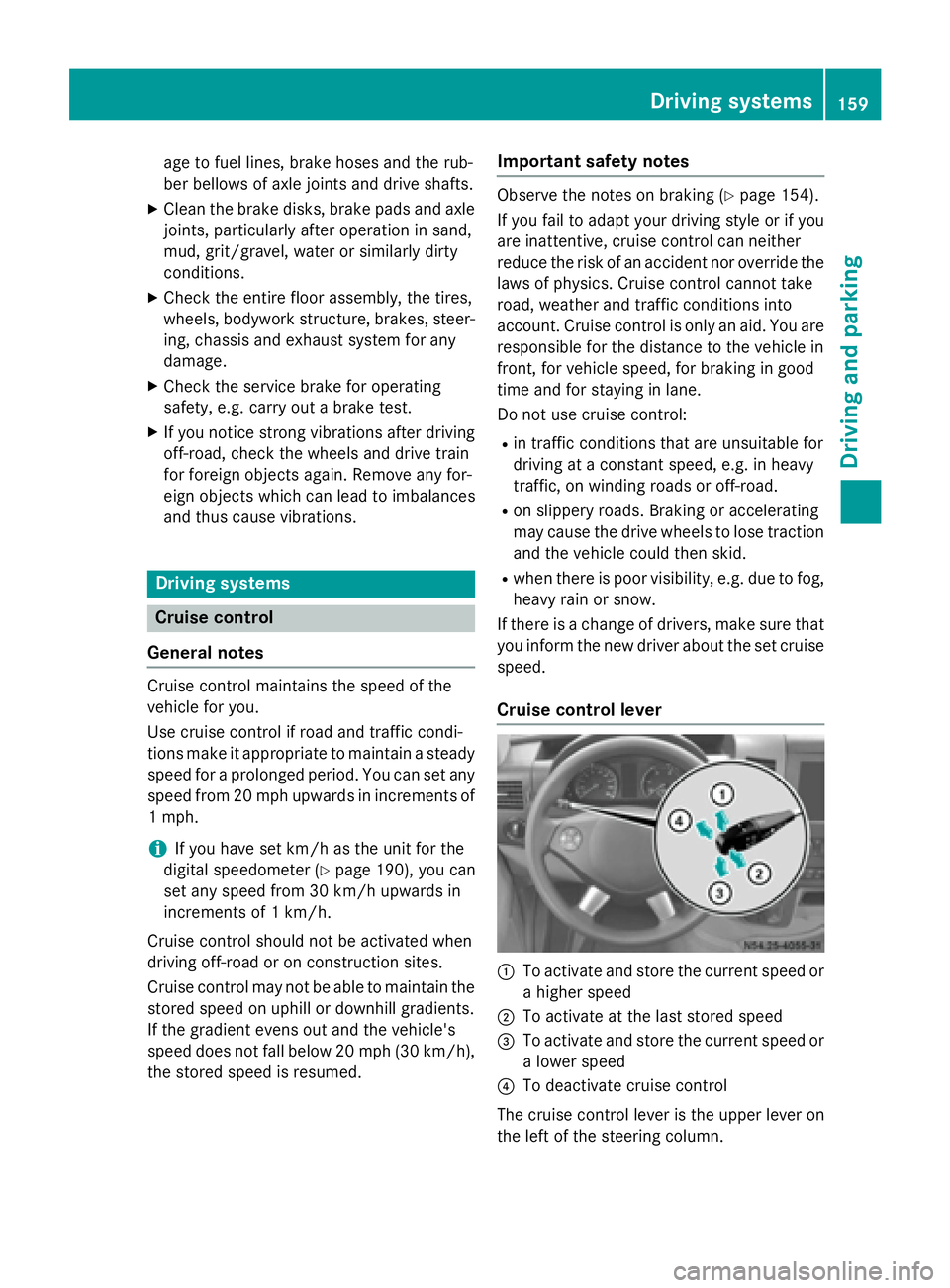
Cruise control lever 0043
To activate and store the current speed or
a higher speed
0044 To activate at the last stored speed
0087 To activate and store the current speed or
a lower speed
0085 To deactivate cruise control
The cruise control lever is the upper lever on
the left of the steering column. Driving systems
159Driving and parking Z
Page 163 of 334
Problems with cruise control
Problem
Possible causes/consequences and
0050
0050Solutions On vehicles with steer-
ing wheel buttons, the
speed cannot be set
when cruise control is
activated. The display shows a high-priority message. Thus a change in speed
is not possible.
X Proceed as instructed by the message in the display.
X Deactivate cruise control COLLISION PREVENTION ASSIST
General notes COLLISION PREVENTION ASSIST comprises
the distance warning function and adaptive
Brake Assist.
Distance warning function Important safety notes
i Note the section on 'Important safety
notes' (Y page 57). G
WARNING
The distance warning function does not react:
R to people or animals
R to oncoming vehicles
R to crossing traffic
R when cornering
Thus, the distance warning function cannot
provide a warning in all critical situations.
There is a risk of an accident.
Always pay careful attention to the traffic sit-
uation and be ready to brake. G
WARNING
The distance warning function cannot always
clearly identify objects and complex traffic
situations.
In such cases, the distance warning function
may:
R give an unnecessary warning
R not give a warning
There is a risk of an accident. Always pay careful attention to the traffic sit-
uation and do not rely solely on the distance
warning function.
Operation
The distance warning function can help you to
minimize the risk of a front-end collision with
a vehicle ahead or reduce the effects of such a collision. If the distance warning function
detects that there is a risk of a collision, you
will be warned visually and acoustically. With-out your intervention, the distance warning
function cannot prevent a collision.
The distance warning function will issue a
warning at speeds of around 20 mph
(30 km/h) or more if:
R you approach a vehicle ahead of you very
quickly. You will then hear an intermittent
warning tone and the 00C7warning lamp in
the instrument cluster flashes.
X Brake immediately in order to increase the
distance from the vehicle in front.
or
X Take evasive action provided it is safe to do
so.
If you want the distance warning function to
assist you, the function must be activated and operational.
Due to the nature of the system, particularly
complicated driving conditions may cause thesystem to display an unnecessary warning.
With the help of the radar sensor system, the
distance warning function can detect obsta-
cles that are in the path of your vehicle for an
extended period of time. Driving systems
161Driving and parking Z
Page 164 of 334
Up to a speed of about 45 mph (70 km/h), the
distance warning function can also react to
stationary obstacles, such as stopped or
parked vehicles.
If you approach an obstacle and the distance
warning function detects a risk of a collision,
the system will alert you both visually and
acoustically.
In particular, the detection of obstacles can
be impaired in the case of:
R there is dirt on the sensors or anything else
covering the sensors
R it is snowing or raining heavily
R there is interference from other radar sour-
ces
R there are strong radar reflections, for
example in parking garages
R a narrow vehicle traveling in front, e.g. a
motorbike
R a vehicle traveling in front on a different line
Following damage to the front end of the vehi-
cle, have the configuration and operation of
the radar sensor checked at a qualified spe-
cialist workshop. This also applies to colli-
sions at slow speeds where there is no visible
damage to the front of the vehicle.
Activating/deactivating the distance
warning function
When you switch on the engine, the distance
warning function switches on after a few sec-
onds.
X To deactivate: press the00D4button
(Y page 37).
Vehicles without steering wheel but-
tons: the00C7 warning lamp in the instru-
ment cluster lights up and the OFF
OFF message
flashes.
Vehicles with steering wheel buttons:
the 00C7 warning lamp in the instrument cluster lights up and the
Distance Warn‐ Distance Warn‐
ing Deactivated
ing Deactivated message appears.
X To activate: press the00D4button again
(Y page 37).
Vehicles without steering wheel but-
tons: the00C7 warning lamp in the instru-
ment cluster goes out and the ON
ON message
flashes.
Vehicles with steering wheel buttons:
the 00C7 warning lamp in the instrument
cluster goes out and the Distance Warn‐ Distance Warn‐
ing Activated
ing Activated message appears in the
multifunction display.
Adaptive Brake Assist i
Observe the "Important safety notes" sec-
tion for driving safety systems (Y page 57). G
WARNING
Adaptive Brake Assist cannot always clearly
identify objects and complex traffic situa-
tions.
In such cases, Adaptive Brake Assist can:
R intervene unnecessarily
R not intervene
There is a risk of an accident.
Always pay careful attention to the traffic sit- uation and be ready to brake. Terminate the
intervention in a non-critical driving situation. G
WARNING
Adaptive Brake Assist does not react:
R to people or animals
R to oncoming vehicles
R to crossing traffic
R to stationary obstacles
R when cornering
As a result, the Adaptive Brake Assist may not intervene in all critical conditions. There is a
risk of an accident.
Always pay careful attention to the traffic sit- uation and be ready to brake. 162
Driving systemsDriving and parking