transmission MERCEDES-BENZ SPRINTER 2016 MY16 Operator’s Manual
[x] Cancel search | Manufacturer: MERCEDES-BENZ, Model Year: 2016, Model line: SPRINTER, Model: MERCEDES-BENZ SPRINTER 2016Pages: 290, PDF Size: 6.44 MB
Page 49 of 290
If the restraint system control unit detects a side
impact situation, the applicable components of
the restraint system are deployed independ-
ently of each other. If the system determines a
need for additional protection for the vehicle
occupants, the Emergency Tensioning Devices
are also deployed.
RSide impact air bag on the side on which the
impact occurs, independently of the Emer-
gency Tensioning Device and of the use of the
seat belt
RWindow curtain air bag on the side of the col-
lision, regardless of seat belt use and whether
front-passenger seat is occupied
iNot all air bags are deployed in an accident.
The various air bag systems work independ-
ently of each other.
How the air bag system works is determined
by the severity of the accident detected,
especially the vehicle deceleration or accel-
eration, and the apparent type of accident:
Rfrontal collision
Rside impact
Children in the vehicle
Important safety notes
Accident statistics show that children secured
in the rear seats are safer than children secured
in the front-passenger seat. For this reason, we
strongly advise that you install a child restraint
system on a rear seat. Children are generally
better protected there.
If a child younger than twelve years old and
under 5 ft (1.50 m)in height is traveling in the
vehicle:
Ralways secure the child in a child restraint
system suitable for this vehicle. The child
restraint system must be appropriate to the
age, weight and size of the child
Rbe sure to observe the instructions and safety
notes in this section in addition to the child
restraint system manufacturer's installation
instructions
GWARNING
If you leave children unsupervised in the vehi-
cle, they could set it in motion by, for example:
Rrelease the parking brake.
Rshift the automatic transmission out of the
parking position P.
Rstart the engine.
In addition, they may operate vehicle equip-
ment and become trapped. There is a risk of
an accident and injury.
When leaving the vehicle, always take the
SmartKey with you and lock the vehicle. Never
leave children unsupervised in the vehicle.
GWARNING
If persons, particularly children are subjected to prolonged exposure to extreme heat or
cold, there is a risk of injury, possibly even
fatal. Never leave children unattended in the
vehicle.
GWARNING
If the child restraint system is subjected to
direct sunlight, parts may get very hot. Chil-
dren may burn themselves on these parts,
particularly on the metal parts of the child
restraint system. There is a risk of injury.
If you leave the vehicle, taking the child with
you, always ensure that the child restraint
system is not exposed to direct sunlight. Pro- tect it with a blanket, for example. If the child
restraint system has been exposed to direct
sunlight, let it cool down before securing the
child in it. Never leave children unattended in
the vehicle.
Always ensure that all vehicle occupants have
their seat belts fastened correctly and are sitting
properly. Particular attention must be paid to
children.
Observe the safety notes on the seat belt
(
Ypage 40) and the notes on correct use of seat
belts (Ypage 41).
A booster seat may be necessary to achieve
proper seat belt positioning for children over
41 lbs (18 kg) until they reach a height where a
Children in the vehicle47
Safety
Z
Page 53 of 290
Child restraint system on the front-
passenger seat
General notes
Accident statistics show that children secured
in the rear seats are safer than children secured
in the front-passenger seat. For this reason,
Mercedes-Benz strongly advises that you install
the child restraint system on a rear seat.
Rearward-facing child restraint system
The front-passenger front air bag cannot be
deactivated. Always install a rearward-facing
child restraint system on a suitable rear seat.
Always observe the child restraint system man-
ufacturer's installation and operating instruc-
tions.
Forward-facing child restraint system
If it is absolutely necessary to install a forward-
facing child restraint system on the front-
passenger seat, always move the front-
passenger seat as far back as possible. The
entire base of the child restraint system must
always rest on the seat cushion of the front-
passenger seat. The backrest of the child
restraint system must lie as flat as possible
against the backrest of the front-passenger
seat. The child restraint system must not be
subjected to a load by the head restraint. Adjust
the head restraint position accordingly. Always
make sure that the shoulder belt strap is cor-
rectly routed from the vehicle belt outlet to the
shoulder belt guide on the child restraint sys-
tem. The shoulder belt strap must be routed for-
wards and downwards from the vehicle belt out-
let. If necessary, adjust the vehicle belt outlet
and the front-passenger seat accordingly.
Always observe the child restraint system man-
ufacturer's installation and operating instruc-
tions.
Override features/Child-proof locks
Important safety notes
GWARNING
If children are traveling in the vehicle, they
could:
Ropen doors, thus endangering other people
or road users
Rexit the vehicle and be caught by oncoming
traffic
Roperate vehicle equipment and become
trapped
There is a risk of an accident and injury.
Always activate the child-proof locks and
override feature if children are traveling in the vehicle. When leaving the vehicle, always take
the key with you and lock the vehicle. Never
leave children unattended in the vehicle.
Child-proof locks for rear doors (
Ypage 52).
GWARNING
If you leave children unsupervised in the vehi-
cle, they could set it in motion by, for example:
Rrelease the parking brake.
Rshift the automatic transmission out of the
parking position P.
Rstart the engine.
In addition, they may operate vehicle equip-
ment and become trapped. There is a risk of
an accident and injury.
When leaving the vehicle, always take the
SmartKey with you and lock the vehicle. Never
leave children unsupervised in the vehicle.
GWARNING
If persons, particularly children are subjected to prolonged exposure to extreme heat or
cold, there is a risk of injury, possibly even
fatal. Never leave children unattended in the
vehicle.
GWARNING
If the child restraint system is subjected to
direct sunlight, parts may get very hot. Chil-
Children in the vehicle51
Safety
Z
Page 55 of 290
Pay particular attention to the information
regarding tires, tire tread and winter operation
under "Wheels and tires" (
Ypage 247).
ABS (Anti-lock Braking System)
Important safety notes
Observe the important safety guidelines for the
driving safety system (Ypage 52).
GWARNING
If ABS is faulty, the wheels could lock when
braking. The steerability and braking charac-
teristics may be severely impaired. Addition-
ally, further driving safety systems are deac-
tivated. There is an increased danger of skid-
ding and accidents.
Drive on carefully. Have ABS checked imme-
diately at a qualified specialist workshop.
If ABS is malfunctioning, other systems will also
fail, including driving safety systems. Observe
the information relating to the !warning
lamp (
Ypage 195).
ABS regulates brake pressure in such a way that
the wheels do not lock when you brake. This
allows you to continue steering the vehicle when
braking.
ABS works from a speed of about 5 mph
(8 km/h), regardless of road-surface conditions. ABS works on slippery surfaces, even when you
only brake gently.
The yellow !warning lamp in the instrument
cluster lights up when the ignition is switched
on. The lamp goes out when the engine starts
running.
Braking
If ABS intervenes when braking, you will feel a
pulsating in the brake pedal.
The pulsating brake pedal can be an indication
of hazardous road conditions and functions as a
reminder to take extra care while driving.
XIf ABS intervenes: continue to depress the
brake pedal with force until the braking sit-
uation is over.
XTo make a full brake application: depress
the brake pedal with full force.
ASR (acceleration skid control)
General notes
Important safety notes
Observe the important safety guidelines for the
driving safety system (Ypage 52).
ASR can neither reduce the risk of an accident
nor suspend the laws of physics if the driver
does not pay attention when pulling away or
accelerating. ASR is only an aid. Always adapt
your driving style to suit the prevailing road and
weather conditions.
If you activate or deactivate the all-wheel drive
in a vehicle with this option, ASR will be deacti- vated for the duration of the activation/deacti-
vation process.
Vehicles without steering wheel buttons: if ASR
is malfunctioning, the :indicator lamp lights
up while the engine is running and the engine
power may be reduced (
Ypage 195).
ASR significantly improves traction, i.e. the
transmission of power from the tires to the road surface, and thus increases the vehicle's driving
stability. If the driving wheels start to spin, ASR
brakes individual drive wheels and limits the
engine torque. ASR thus significantly assists you
when pulling away and accelerating, especially
on wet or slippery roads.
If traction on the road surface is not sufficient,
even ASR will not allow you to pull away without
difficulty. The type of tires and total weight of the
vehicle as well as the gradient of the road also
play a crucial role.
If ASR intervenes, the dwarning lamp in the
instrument cluster flashes.
Activating/deactivating ASR
GWARNING
If deactivated, ASR will not attempt to stabi-
lize the vehicle during pulling away and accel- eration. There is an increased risk of skidding
and of an accident.
Only deactivate ASR in the situations descri-
bed in the following.
!If you deactivate ASR, ESP®will still inter-
vene to stabilize the vehicle. Frequent braking
automatically triggered by ESP
®can damage
the brake system.
Driving safety systems53
Safety
Z
Page 61 of 290
Useful information
This Operator's Manual describes all models as
well as standard and optional equipment of your
vehicle that were available at the time of going
to print. Country-specific variations are possi-
ble. Note that your vehicle may not be equipped
with all of the described functions. This also
applies to systems and functions relevant to
safety.
Read the information on qualified specialist
workshops (
Ypage 26).
Key
Important safety notes
GWARNING
When the double locks are activated, the
doors can no longer be opened from the
inside. People in the vehicle can no longer get
out, e.g. in hazardous situations. There is a
risk of injury.
Therefore, do not leave any people unsuper-
vised in the vehicle, particularly children, eld-
erly people or people in need of special assis-
tance. Do not activate the double lock when
people are in the vehicle.
GWARNING
If you leave children unsupervised in the vehi-
cle, they could set it in motion by, for example:
Rrelease the parking brake.
Rshift the automatic transmission out of park
position Por shift manual transmission into
neutral.
Rstart the engine.
In addition, they may operate vehicle equip-
ment and become trapped. There is a risk of
an accident and injury.
When leaving the vehicle, always take the
SmartKey with you and lock the vehicle. Never
leave children unsupervised in the vehicle.
GWARNING
If you attach heavy or large objects to the
SmartKey, the SmartKey could be uninten-
tionally turned in the ignition lock. This could
cause the engine to be switched off. There is a risk of an accident.
Do not attach any heavy or large objects to the
SmartKey. Remove any bulky key rings before
inserting the SmartKey into the ignition lock.
Do not keep the key with remote control:
Rwith electronic devices, e.g. a mobile phone
or another key with remote control
Rwith metallic objects, e.g. coins or metal foil
Rin metallic objects, e.g. metal cases
This can affect the key's functionality.
Key functions of the remote control
General notes
The vehicle is equipped with either 2 or 4 remote
controls with a folding key, or 4 mechanical
keys. In this Operator's Manual, both the
mechanical keys and the keys with remote con-
trol are referred to as keys. The remote control
key has a range of up to 32 ft (10 m). Use the
remote control of the key only when in immedi-
ate proximity of the vehicle. This prevents theft.
Remote controls that are not included in the
scope of delivery for the vehicle must be pro-
grammed before use. Further information can
be obtained at any authorized Sprinter Dealer.
The key's remote control locks/unlocks the
driver's door and/or the following centrally if
the factory settings have not been changed:
Rthe driver's and the front-passenger door
Rthe sliding doors
Rthe rear doors
iIf the driver's or front-passenger door is not
closed, the corresponding door is not locked.
If a sliding door or a rear door is not closed
properly, none of the rear doors are locked.
If there is a key is in the ignition lock, the remote
control is inoperative. When locking or unlock-
ing the vehicle with the remote control, always
pay attention to the indicator lamp signaling.
Also check the locking knobs of the doors.
Key59
Opening and closing
Z
Page 87 of 290
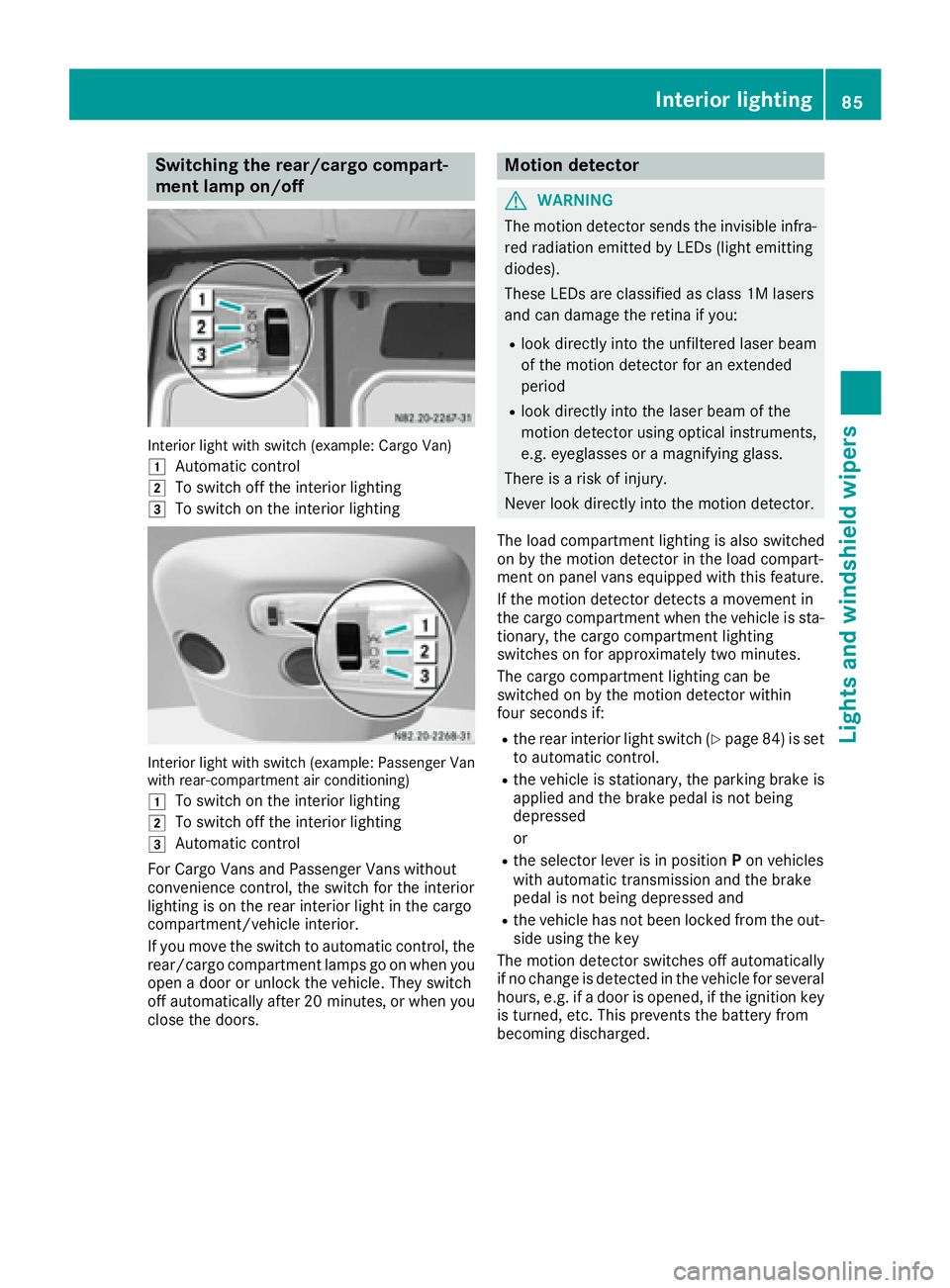
Switching the rear/cargo compart-
ment lamp on/off
Interior light with switch (example: Cargo Van)
1
Automatic control
2To switch off the interior lighting
3To switch on the interior lighting
Interior light with switch (example: Passenger Van
with rear-compartment air conditioning)
1
To switch on the interior lighting
2To switch off the interior lighting
3Automatic control
For Cargo Vans and Passenger Vans without
convenience control, the switch for the interior
lighting is on the rear interior light in the cargo
compartment/vehicle interior.
If you move the switch to automatic control, the
rear/cargo compartment lamps go on when you
open a door or unlock the vehicle. They switch
off automatically after 20 minutes, or when you
close the doors.
Motion detector
GWARNING
The motion detector sends the invisible infra- red radiation emitted by LEDs (light emitting
diodes).
These LEDs are classified as class 1M lasers
and can damage the retina if you:
Rlook directly into the unfiltered laser beam
of the motion detector for an extended
period
Rlook directly into the laser beam of the
motion detector using optical instruments,
e.g. eyeglasses or a magnifying glass.
There is a risk of injury.
Never look directly into the motion detector.
The load compartment lighting is also switched
on by the motion detector in the load compart-
ment on panel vans equipped with this feature.
If the motion detector detects a movement in
the cargo compartment when the vehicle is sta-
tionary, the cargo compartment lighting
switches on for approximately two minutes.
The cargo compartment lighting can be
switched on by the motion detector within
four seconds if:
Rthe rear interior light switch (Ypage 84) is set
to automatic control.
Rthe vehicle is stationary, the parking brake is
applied and the brake pedal is not being
depressed
or
Rthe selector lever is in position Pon vehicles
with automatic transmission and the brake
pedal is not being depressed and
Rthe vehicle has not been locked from the out-
side using the key
The motion detector switches off automatically
if no change is detected in the vehicle for several
hours, e.g. if a door is opened, if the ignition key
is turned, etc. This prevents the battery from
becoming discharged.
Interior lighting85
Lights and windshield wipers
Z
Page 112 of 290
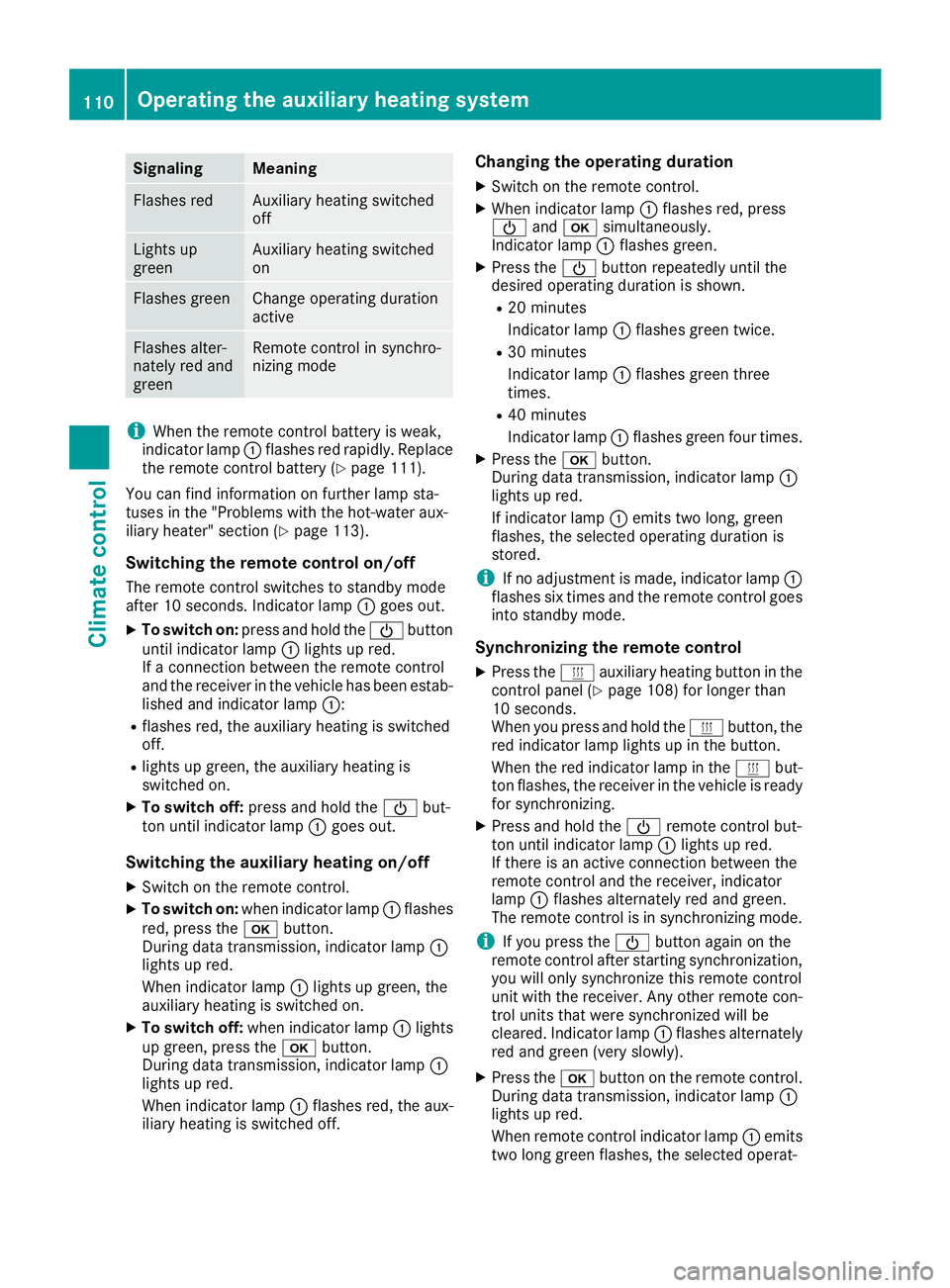
SignalingMeaning
Flashes redAuxiliary heating switched
off
Lights up
greenAuxiliary heating switched
on
Flashes greenChange operating duration
active
Flashes alter-
nately red and
greenRemote control in synchro-
nizing mode
iWhen the remote control battery is weak,
indicator lamp :flashes red rapidly. Replace
the remote control battery (
Ypage 111).
You can find information on further lamp sta-
tuses in the "Problems with the hot-water aux-
iliary heater" section (
Ypage 113).
Switching the remote control on/off
The remote control switches to standby mode
after 10 seconds. Indicator lamp :goes out.
XTo switch on: press and hold the Übutton
until indicator lamp :lights up red.
If a connection between the remote control
and the receiver in the vehicle has been estab-
lished and indicator lamp ::
Rflashes red, the auxiliary heating is switched
off.
Rlights up green, the auxiliary heating is
switched on.
XTo switch off:press and hold the Übut-
ton until indicator lamp :goes out.
Switching the auxiliary heating on/off
XSwitch on the remote control.
XTo switch on: when indicator lamp :flashes
red, press the bbutton.
During data transmission, indicator lamp :
lights up red.
When indicator lamp :lights up green, the
auxiliary heating is switched on.
XTo switch off: when indicator lamp :lights
up green, press the bbutton.
During data transmission, indicator lamp :
lights up red.
When indicator lamp :flashes red, the aux-
iliary heating is switched off.
Changing the operating duration
XSwitch on the remote control.
XWhen indicator lamp :flashes red, press
Ü andb simultaneously.
Indicator lamp :flashes green.
XPress the Übutton repeatedly until the
desired operating duration is shown.
R20 minutes
Indicator lamp :flashes green twice.
R30 minutes
Indicator lamp :flashes green three
times.
R40 minutes
Indicator lamp :flashes green four times.
XPress the bbutton.
During data transmission, indicator lamp :
lights up red.
If indicator lamp :emits two long, green
flashes, the selected operating duration is
stored.
iIf no adjustment is made, indicator lamp :
flashes six times and the remote control goes
into standby mode.
Synchronizing the remote control
XPress the yauxiliary heating button in the
control panel (Ypage 108) for longer than
10 seconds.
When you press and hold the ybutton, the
red indicator lamp lights up in the butt
on.
When the red indicator lamp in the ybut-
ton flashes, the receiver in the vehicle is ready
for synchronizing.
XPress and hold the Üremote control but-
ton until indicator lamp :lights up red.
If there is an active connection between the
remote control and the receiver, indicator
lamp :flashes alternately red and green.
The remote control is in synchronizing mode.
iIf you press the Übutton again on the
remote control after starting synchronization,
you will only synchronize this remote control
unit with the receiver. Any other remote con-
trol units that were synchronized will be
cleared. Indicator lamp :flashes alternately
red and green (very slowly).
XPress the bbutton on the remote control.
During data transmission, indicator lamp :
lights up red.
When remote control indicator lamp :emits
two long green flashes, the selected operat-
110Operating the auxiliary heating system
Climate control
Page 115 of 290
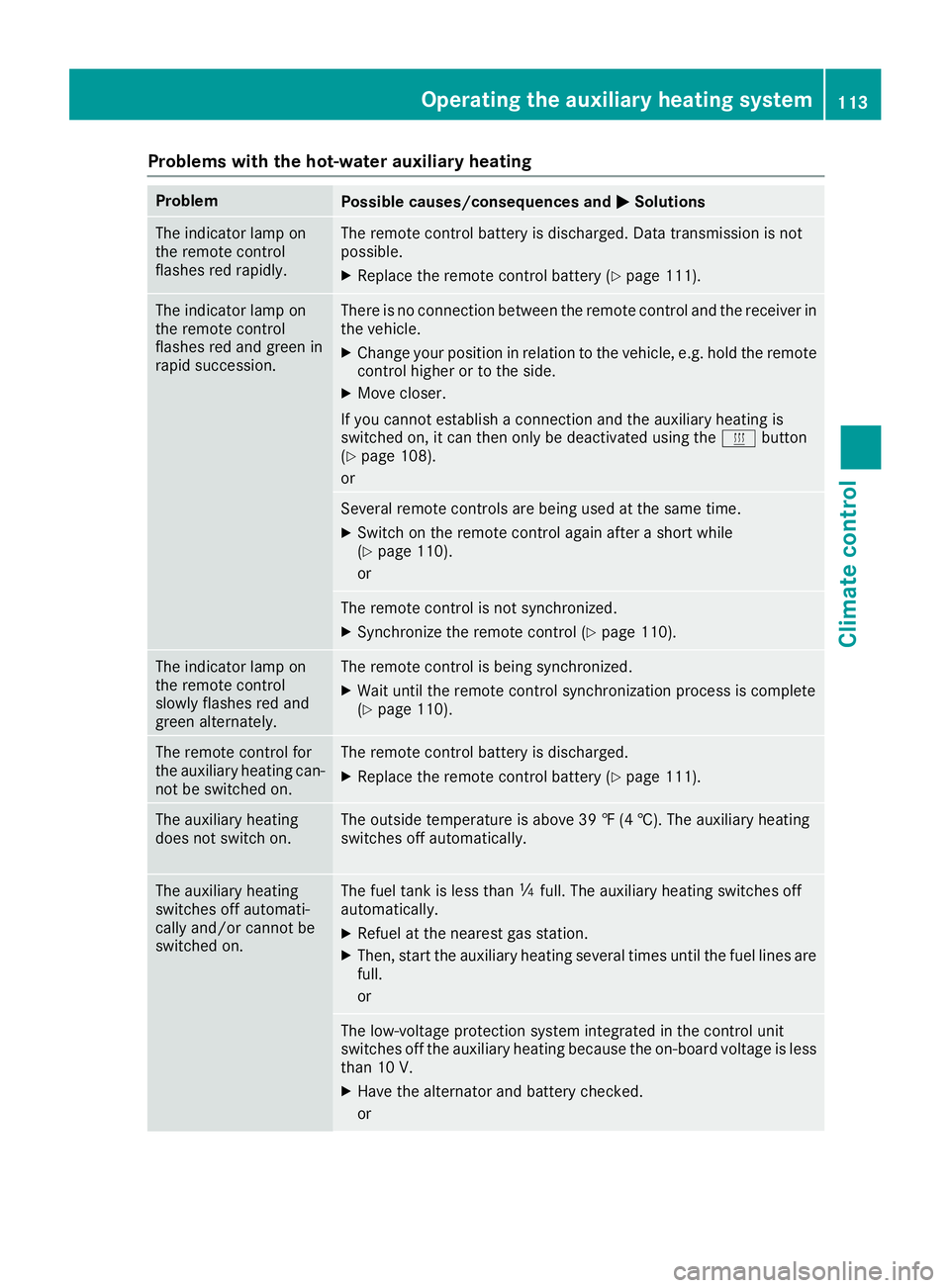
Problems with the hot-water auxiliary heating
ProblemPossible causes/consequences andMSolutions
The indicator lamp on
the remote control
flashes red rapidly.The remote control battery is discharged. Data transmission is not
possible.
XReplace the remote control battery (Ypage 111).
The indicator lamp on
the remote control
flashes red and green in
rapid succession.There is no connection between the remote control and the receiver in
the vehicle.
XChange your position in relation to the vehicle, e.g. hold the remote
control higher or to the side.
XMove closer.
If you cannot establish a connection and the auxiliary heating is
switched on, it can then only be deactivated using the ybutton
(
Ypage 108).
or
Several remote controls are being used at the same time.
XSwitch on the remote control again after a short while
(Ypage 110).
or
The remote control is not synchronized.
XSynchronize the remote control (Ypage 110).
The indicator lamp on
the remote control
slowly flashes red and
green alternately.The remote control is being synchronized.
XWait until the remote control synchronization process is complete
(Ypage 110).
The remote control for
the auxiliary heating can-
not be switched on.The remote control battery is discharged.
XReplace the remote control battery (Ypage 111).
The auxiliary heating
does not switch on.The outside temperature is above 39 ‡ (4 †). The auxiliary heating
switches off automatically.
The auxiliary heating
switches off automati-
cally and/or cannot be
switched on.The fuel tank is less than Õfull. The auxiliary heating switches off
automatically.
XRefuel at the nearest gas station.
XThen, start the auxiliary heating several times until the fuel lines are
full.
or
The low-voltage protection system integrated in the control unit
switches off the auxiliary heating because the on-board voltage is less
than 10 V.
XHave the alternator and battery checked.
or
Operating the auxiliary heating system113
Climate control
Z
Page 123 of 290
Rall the doors are closed.
Rall the vehicle occupants are wearing their
seat belts correctly.
Rthe parking brake is applied.
iIf you depress the brake pedal before start-
ing the engine, the pedal travel is short and
pedal resistance is high.
If you depress the brake pedal again after
starting the engine, pedal travel and resist-
ance will be back to normal again.
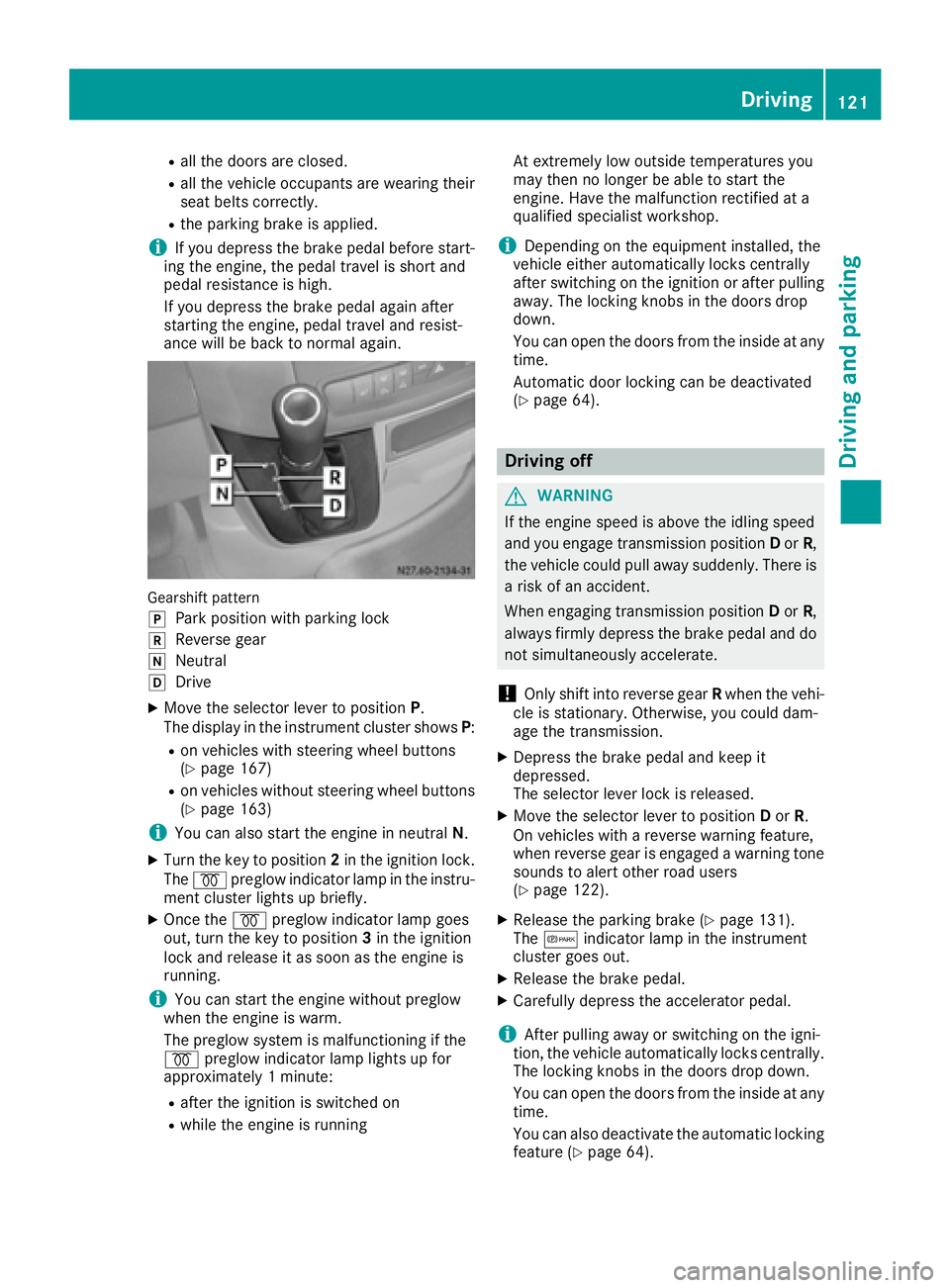
Gearshift pattern
j
Park position with parking lock
kReverse gear
iNeutral
hDrive
XMove the selector lever to position P.
The display in the instrument cluster shows P:
Ron vehicles with steering wheel buttons
(Ypage 167)
Ron vehicles without steering wheel buttons
(Ypage 163)
iYou can also start the engine in neutral N.
XTurn the key to position 2in the ignition lock.
The % preglow indicator lamp in the instru-
ment cluster lights up briefly.
XOnce the %preglow indicator lamp goes
out, turn the key to position 3in the ignition
lock and release it as soon as the engine is
running.
iYou can start the engine without preglow
when the engine is warm.
The preglow system is malfunctioning if the
% preglow indicator lamp lights up for
approximately 1 minute:
Rafter the ignition is switched on
Rwhile the engine is running At extremely low outside temperatures you
may then no longer be able to start the
engine. Have the malfunction rectified at a
qualified specialist workshop.
iDepending on the equipment installed, the
vehicle either automatically locks centrally
after switching on the ignition or after pulling
away. The locking knobs in the doors drop
down.
You can open the doors from the inside at any
time.
Automatic door locking c
an be deactivated
(Ypage 64).
Driving off
GWARNING
If the engine speed is above the idling speed
and you engage transmission position Dor R,
the vehicle could pull away suddenly. There is
a risk of an accident.
When engaging transmission position Dor R,
always firmly depress the brake pedal and do not simultaneously accelerate.
!Only shift into reverse gear Rwhen the vehi-
cle is stationary. Otherwise, you could dam-
age the transmission.
XDepress the brake pedal and keep it
depressed.
The selector lever lock is released.
XMove the selector lever to position Dor R.
On vehicles with a reverse warning feature,
when reverse gear is engaged a warning tone
sounds to alert other road users
(
Ypage 122).
XRelease the parking brake (Ypage 131).
The c indicator lamp in the instrument
cluster goes out.
XRelease the brake pedal.
XCarefully depress the accelerator pedal.
iAfter pulling away or switching on the igni-
tion, the vehicle automatically locks centrally.
The locking knobs in the doors drop down.
You can open the doors from the inside at any
time.
You can also deactivate the automatic locking
feature (
Ypage 64).
Driving121
Driving and parking
Z
Page 126 of 290
ProblemPossible causes/consequences andMSolutions
The engine does not
start.
The starter motor cannot
be heard.The on-board voltage is too low. The battery is too weak or discharged.
XJump-start the vehicle (Ypage 242).
If the engine cannot be jump-started, the starter motor is faulty.
XConsult a qualified specialist workshop.
The engine does not
start.
The starter motor cannot
be heard.The battery is discharged or faulty.
XCheck the battery for damage.
XCharge the battery (Ypage 232).
Automatic transmission
Important safety notes
GWARNING
If the engine speed is above the idling speed
and you engage transmission position Dor R,
the vehicle could pull away suddenly. There is
a risk of an accident.
When engaging transmission position Dor R,
always firmly depress the brake pedal and do not simultaneously accelerate.
!Vehicles with automatic transmission may
roll only briefly in the neutral position N. Pro-
longed rolling of the wheels, e.g. when being
towed, will result in transmission damage.
Towing (
Ypage 243)
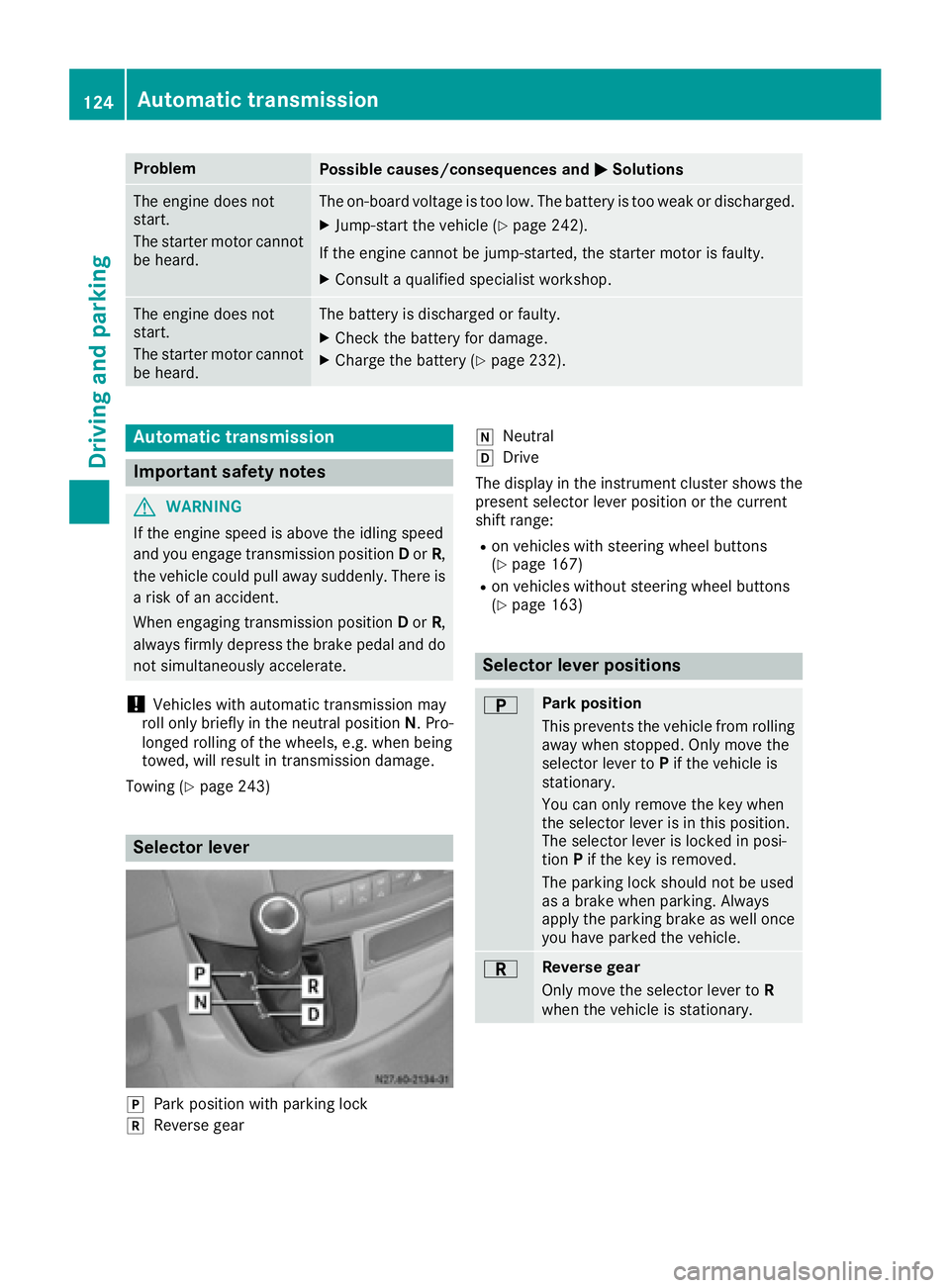
Selector lever
jPark position with parking lock
kReverse gear
iNeutral
hDrive
The display in the instrument cluster shows the
present selector lever position or the current
shift range:
Ron vehicles with steering wheel buttons
(Ypage 167)
Ron vehicles without steering wheel buttons
(Ypage 163)
Selector lever positions
BPark position
This prevents the vehicle from rolling
away when stopped. Only move the
selector lever to Pif the vehicle is
stationary.
You can only remove the key when
the selector lever is in this position.
The selector lever is locked in posi-
tion Pif the key is removed.
The parking lock should not be used
as a brake when parking. Always
apply the parking brake as well once
you have parked the vehicle.
CReverse gear
Only move the selector lever to R
when the vehicle is stationary.
124Automatic transmission
Driving and parking
Page 127 of 290
ANeutral
No power is transmitted from the
engine to the drive wheels. Releasing
the brakes will allow you to move the
vehicle freely, e.g. by pushing.
Do not move the selector lever toN
while driving. The automatic trans-
mission could otherwise be dam-
aged.
If ASR is deactivated or ESP
®has
malfunctioned: only move the selec-
tor lever to Nif the vehicle is in dan-
ger of skidding, e.g. on icy roads.
7Drive
The automatic transmission changes
gear itself. All forward gears are avail-
able.
You can influence the gearshifts and
shift gears yourself or limit the shift
range.
Changing gear
The 5-speed automatic transmission adapts to
your individual driving style by continuously
adjusting its shift points. These shift point
adjustments take into account the current oper-
ating and driving conditions. If the operating or
driving conditions change, the automatic trans-
mission reacts by adjusting the gearshift pro-
gram.
When the selector lever is in position D, the
automatic transmission selects the individual
gears automatically. This depends on:
Rany restriction in the shift range
(Ypage 125)
Rthe position of the accelerator pedal
Rthe road speed
Touchshift
When the selector lever is in position D, you can
perform gearshifts yourself.
XTo shift down: press the selector lever to the
left towards D–.
The automatic transmission shifts to the next gear down, depending on the gear currently
engaged. The shift range is also restricted.
iThe automatic transmission does not shift
down if you press the selector lever towards
D– while traveling at too high a speed. This
protects the engine from overrevving.
XTo shift up: briefly press the selector lever to
the right towards D+.
The automatic transmission shifts to the next
gear up, depending on the current gearshift
program. This also extends the shift range.
XTo derestrict the shift range: press and hold
the selector lever towards D+until D
appears
in the display again.
The automatic transmission shifts from the
current shift range directly to D.
XTo select the optimum shift range: press
and hold the selector lever to the left towards
D– .
The automatic transmission will shift to a
range which allows easy acceleration and
deceleration. To do this, the automatic trans-
mission will shift down one or more gears.
Shift ranges
When the selector lever is in position Dyou can
restrict or derestrict the shift range for the auto- matic transmission.
XTo extend and restrict the shift range:
press the selector lever briefly to the right
towards D+or left towards D–.
The display shows the selected shift range.
The automatic transmission shifts only as far
as the relevant gear.
iIf the maximum engine speed for the restric-
ted shift range is reached and you depress the
accelerator pedal, the automatic transmis-
sion will not shift up.
Automatic transmission125
Driving an d parking
Z