transmission MERCEDES-BENZ SPRINTER 2016 MY16 Operator’s Manual
[x] Cancel search | Manufacturer: MERCEDES-BENZ, Model Year: 2016, Model line: SPRINTER, Model: MERCEDES-BENZ SPRINTER 2016Pages: 290, PDF Size: 6.44 MB
Page 152 of 290
the LOW RANGE transmission ratio is engaged,
only use the cruise control lever to operate DSR.
When the LOW RANGE transmission ratio is dis-
engaged, use cruise control.
Activation conditions
In order to activate DSR, both activation condi-
tions must be fulfilled:
RThe LOW RANGE transmission ratio is
engaged. The+indicator lamp in the
instrument cluster lights up.
RThe vehicle is stationary or you are not driving faster than 11 mph (18 km/h).
Activating DSR
You can activate DSR when the vehicle is sta-
tionary or moving.
XBrake or accelerate the vehicle to the
required speed between 2.5 mph (4 km/h)
and 11 mph (18 km/h).
XBriefly push the cruise control lever up :or
down =.
or
XBriefly pull the cruise control lever towards
you ;.
XRelease the brake or accelerator pedal.
The current speed is stored. When the vehicle
is stationary, the speed is stored at 2.5
(4 km/h). DSR maintains the stored speed on
the downhill gradient and brakes automati-
cally.
When DSR is activated and the vehicle pulls
away, accelerates or brakes, the speed set cor-
responds to the speed at which the accelerator
or brake pedal is released. Thi s i
s only the case
if you are not driving faster than 11 mph
(18 km/h).
DSR status indicator in the on-board com-
puter
Vehicles with steering wheel buttons
LOW RANGE is engaged
RThe DSRmessage is displayed in the status
area of the on-board computer.
RDSR can be activated.
DSR is activated
RThe DSRmessage and the set speed are dis-
played in the status area of the on-board com-
puter. DSR is activated but is not intervening
RYou are driving at between 11 mph (18 km/h)
and 28 mph (45 km/h).
RThe
DSRmessage is displayed in the status
area of the on-board computer. Also, the
speed 11 mph (18 km/h) flashes.
DSR is activated but is not intervening
RYou are driving faster than 28 mph (45 km/h).
RThe DSRmessage is displayed in the status
area of the on-board computer. Also, the ---
message is displayed for 5 seconds.
DSR is activated but is not intervening
RThe DSR---message is displayed in the sta-
tus area of the on-board computer.
There is a malfunction in the Electronic Brak-
ing System (EBS). Visit a qualified specialist
workshop.
Setting the speed whilst driving downhill
You can set the speed to between 2.5 mph
(4 km/h) and 11 mph (18 km/h) using the brake
and accelerator pedals or the cruise control
lever.
XBrake or accelerate the vehicle to the
required speed on the downhill gradient.
XRelease the brake or accelerator pedal. The
current speed is stored.
or
XBriefly push the cruise control lever
upwards :to increase the speed or down-
wards =to reduce the speed.
The last speed stored is increased or reduced
incrementally.
XRelease the cruise control lever. The current
speed is stored.
or
XPress and hold the cruise control lever up :
or down =until the desired speed has been
reached.
XRelease the cruise control lever.
The current speed is stored.
iIt may take a moment before the vehicle
brakes to the set speed. Take this delay into
account when setting the speed with the
cruise control lever.
150Driving system s
Driving an d parking
Page 159 of 290
Weight information can be found in the “Per-
missible trailer and drawbar noseweights” sec-
tion (
Ypage 159).
iThe height of the ball neck changes accord-
ing to the load on the vehicle. If this is case,
use a trailer with a height-adjustable trailer
drawbar.
Driving tips
The maximum permissible speed for vehicle/
trailer combination depends on the type of
trailer. Before setting off, check the vehicle
documents of the your trailer to find out the
permissible maximum speed. Observe the
legally prescribed maximum speed for vehicle/
trailer combinations in the relevant country,
state or Canadian province.
When towing a trailer, your vehicle's handling
characteristics will be different in comparison to when driving without a trailer and it will con-
sume more fuel.
On long, steep downhill slopes you must select
shift range 3,2or 1in good time.
iThis also applies if cruise control is activa-
ted.
This enables you to utilize the engine's braking
effect and you do not need to brake so heavily to
keep the correct speed. which protects the
brake system and prevents the brakes from
overheating and wearing too quickly. If you need to brake additionally, to not depress the brake
pedal constantly, but periodically.
Driving tips
If the trailer begins to swing from side to side:
XDo not accelerate.
XDo not counter-steer.
XBrake if necessary.
iYou can reduce the risk of the trailer swing-
ing and rocking by retrofitting anti-roll bars or trailer stability programs. More information is
available from your authorized Sprinter
Dealer.
RMaintain a greater distance than you would
when driving without towing a trailer.
RAvoid sudden braking. Apply the brakes gen-
tly at first to allow the trailer brake to overrun.
Then, increase the brake force quickly.
RThe figures for the gradient climbing capabil-
ities from a standstill refer to sea level. When
driving in mountainous areas, note that the
power output of the engine, and with it its
gradient climbing capability, decrease with
increasing altitude.
Coupling up a trailer
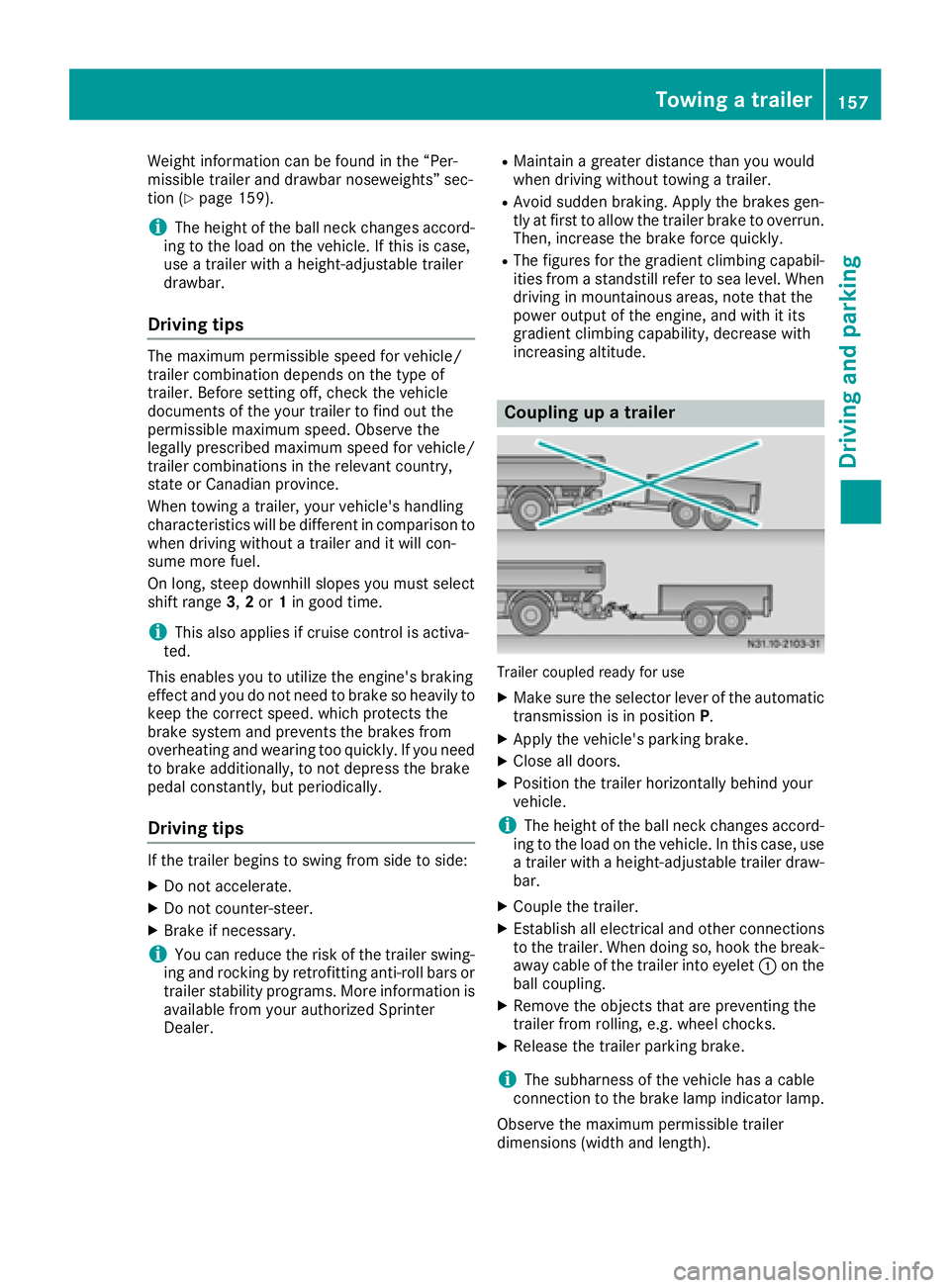
Trailer coupled ready for use
XMake sure the selector lever of the automatic
transmission is in position P.
XApply the vehicle's parking brake.
XClose all doors.
XPosition the trailer horizontally behind your
vehicle.
iThe height of the ball neck changes accord-
ing to the load on the vehicle. In this case, use
a trailer with a height-adjustable trailer draw-
bar.
XCouple the trailer.
XEstablish all electrical and other connections to the trailer. When doing so, hook the break-
away cable of the trailer into eyelet :on the
ball coupling.
XRemove the objects that are preventing the
trailer from rolling, e.g. wheel chocks.
XRelease the trailer parking brake.
iThe subharness of the vehicle has a cable
connection to the brake lamp indicator lamp.
Observe the maximum permissible trailer
dimensions (width and length).
Towing a trailer157
Driving and parking
Z
Page 160 of 290
Most federal states and all Canadian provinces
require by law:
Rsafety chains between the towing vehicle andthe trailer. The chains should be cross-wound
under the trailer drawbar. They must be fas-
tened to the vehicle's trailer coupling, not to
the bumper or the axle.
Leave enough slack in the chains. This allows you to drive round tight corners.
Ra separate brake system for certain types of
trailer.
Ra safety shut-off for braked trailers. Find out
the specific requirements according to the
applicable laws.
If the trailer becomes detached from the tow-
ing vehicle, the safety feature applies the
trailer brakes.
Towing a trailer
There are numerous legal requirements con-
cerning the towing of a trailer, e.g. speed restric-tions. Make sure your vehicle/trailer combina-
tion complies with local laws. This not only
means where you live, but also anywhere you
are driving to. Information is available from the
police and local authorities.
Observe the following when towing a trailer:
RPractice driving around bends, stopping and
backing up at a place where there is no traffic.
This enables you to gain experience and get
used to the new handling characteristics.
RBefore driving, check:
-that the trailer tow hitch and ball coupling
are secure
-that the safety switch for a braked trailer is
functioning properly
-that the safety chains are secure and not
damaged
-that the electrical connections are secure
-that the lights are working
-that the wheels are in good order and the
tire pressure is correct
RAdjust the exterior mirrors to provide an
unobstructed view of the rear section of the
trailer.
RIf the trailer has electronically controlled
brakes, pull the vehicle/trailer combination
away carefully. Brake manually using the
brake controller and check that the brakes
are working.
RSecure the load on the trailer according to the
applicable specifications and current stand-
ards on securing loads (
Ypage 214).
RWhen driving with a trailer, check at regular
intervals that the load is secured and that the
brakes and lights are working.
RBear in mind that the handling will be less
stable when towing a trailer than when driving
without one. Avoid sudden steering move-
ments.
RThe vehicle/trailer combination is heavier,
accelerates more slowly and has a decreased
gradient climbing capability and a longer
braking distance.
It is more susceptible to crosswinds and
requires cautious steering.
RIf possible, do not brake suddenly, but rather
moderately at first so that the trailer can acti-
vate its brakes. Then increase the force on the
brake pedal.
RIf the automatic transmission repeatedly
shifts between gears when driving on inclines,
restrict the shift range. Select shift range 4,3,
2 or 1.
Driving in a low gear and at a low speed
reduces the risk of damaging the engine.
RWhen driving on a downhill gradient, shift to a
low gear and take advantage of the engine's
braking effect.
Avoid continuous brake application as this
may overheat the vehicle brakes and, if inst
al-
led, the trailer brakes.
RIf the coolant temperature increases dramat-
ically while the air-conditioning system is
switched on, switch off the air-conditioning
system.
Coolant heat can also be dissipated by
switching the airflow and the temperature of
the heater/air conditioning to the maximum
level. Open the windows if necessary.
RWhen overtaking, pay particular attention to
the extended length of your vehicle/trailer
combination.
Due to the length of your vehicle/trailer com- bination you need an additional distance
before you can return to your original lane.
158Towing a trailer
Driving and parking
Page 161 of 290
Uncoupling a trailer
GWARNING
If you uncouple a trailer with the overrun
brake engaged, you could trap your hand
between the vehicle and the trailer drawbar.
There is a risk of injury.
Do not uncouple a trailer if the overrun brake
is engaged.
!Do not disconnect a trailer with an engaged
overrun brake. Otherwise, your vehicle could
be damaged by the rebounding of the overrun
brake.
XMake sure the selector lever of the automatic
transmission is in position P.
XApply the parking brake of the vehicle.
XClose all doors.
XApply the parking brake of the trailer.
XIn addition, secure the trailer against rolling
away with a wheel chock or similar object.
XRemove the trailer cable and safety chains
and decouple the trailer.
Permissible trailer loads and trailer
drawbar noseweights
Weight information
!On vehicles with a permissible gross vehicle
weight of 11030 lbs (5003 kg), the permissi-
ble gross combination weight is less than the total of the permissible gross vehicle weight
and the permissible trailer load. Exceeding
the permissible gross combination weight can
lead to damage to the drivetrain, to the trans-
mission or to the trailer tow hitch.
If the vehicle or the trailer is fully laden, the
relevant value for the permissible gross vehi-
cle weight or the permissible trailer load is
therefore lower. In this case, the trailer or the
vehicle may only be partially loaded.
The gross trailer weight (GTW) is calculated by
adding the weight of the trailer to the weight of
the load and equipment.
The maximum gross vehicle weight is vehicle-
specific and equipment-dependent: 5,000 lbs
(2,268 kg) or 7,500 lbs (3,402 kg).
The maximum permissible trailer drawbar nose- weight on the ball coupling is 500 lbs (227 kg) or 750 lbs (340 kg). The actual noseweight may not
exceed the value given on the identification
plates of the trailer tow hitch or the trailer. If the
values vary, the lowest value always applies.
The gross combination weight rating (GCWR) is
calculated by adding the gross weight of the
trailer to the gross vehicle weight including a
driver's weight of approximately 150 lbs (68 kg).
The permissible Gross Combination Weight Rat-
ing is vehicle-specific and depends on the equip-
ment level.
When driving with a trailer, you should not
exceed the permitted Gross Combination
Weight Rating (GCWR).
The permissible values, which must not be
exceeded, can be found in your vehicle docu-
ments and on the trailer tow hitch type plates for
the trailer and the vehicle (
Ypage 276). The
basic values approved by the manufacturer can
also be found in the "Technical data" section
(
Ypage 286). If the values vary, the lowest
value always applies.
Loading a trailer
!Utilize the maximum permissible nose-
weight as fully as possible. Do not allow the
weight to fall below the minimum permissible
noseweight, otherwise the trailer may come
loose.
RYou must distribute the load on the vehicle
and trailer so that the permitted maximum
values for the gross vehicle weight (GVWR),
gross trailer weight (GTW) and gross com-
bined weight (GCWR) as well as permitted
gross axle loads (GAWR) and noseweight
(TWR) of your vehicle are not exceeded.
RAdd the drawbar noseweight on the ball cou-
pling (TWR) to the rear axle load. This will pre-
vent you from exceeding the permissible
gross axle weight (GAWR).
RAdd the drawbar noseweight on the ball cou-
pling (TWR) to the vehicle payload. This will
prevent you from exceeding the permissible
gross vehicle weight (GVWR).
Checking the vehicle and trailer weight
RMake sure the weights of the towing vehicle
and the trailer comply with the maximum per-
missible values. Have the vehicle/trailer com-
bination weighed on a calibrated weigh-
bridge. The vehicle/trailer combination con-
sists of the towing vehicle including the driver,
Towing a trailer159
Driving and parking
Z
Page 165 of 290
If the supply of DEF falls below the reserve range
of 0.8 US gal (3.0l), the StArtS RExxmessage
appears in the display. In addition, the yellow
å DEF indicator lamp lights up in the instru-
ment cluster and three warning tones sound.
In the display, xx
corresponds to the number of
possible remaining engine starts (16to 0).
When the display shows that the number of
remaining starts is 0
, theStArtSIdLEmessage
appears in the display and three warning tones
sound.
In addition, the yellow åDEF indicator lamp
and the ;Check Engine indicator lamp light
up in the instrument cluster and three warning
tones sound.
The engine management only allows speeds of
up to 5 mph (8 km/h).
Add at least 1.5 US gal (5.5 l) of DEF
(
Ypage 129).
The display message only disappears when the
vehicle is stationary, at the latest after
20 seconds as soon as you switch on the ignition or start the engine after refueling.
Vehicles with steering wheel buttons
If the supply of DEF is less than 1.5 US gal
(5.5 l), the Check Diesel Exhaust Fluid
see Operator's Manualmessage appears in
the display.
If the supply of DEF falls below the reserve range
of 0.8 US gal (3.0 l), the XX
startsremainingmessage is displayed.
Three short warning tones also sound.
In the display,xx
corresponds to the number of
possible remaining engine starts (16to 0).
When the display shows that the number of
remaining starts is 0
, theStArtSIdLEmessage
appears in the display.
The yellow ;Check Engine indicator lamp
also lights up and three short warning tones
sound.
The engine management only allows speeds of
up to 5 mph (8 km/h).
Add at least 1.5 US gal (5.5 l) of DEF
(
Ypage 129).
The display message only disappears when the
vehicle is stationary, at the latest after
20 seconds as soon as you switch on the ignition or start the engine after refueling.
On-board computer (vehicles without
steering wheel buttons)
Operating the on-board computer
General notes
The on-board computer is activated as soon as
you turn the key to position 1in the ignition lock.
The on-board computer shows vehicle informa-
tion and settings in the display.
You can control the display and the settings in
the on-board computer using the adjustment
buttons on the instrument cluster.
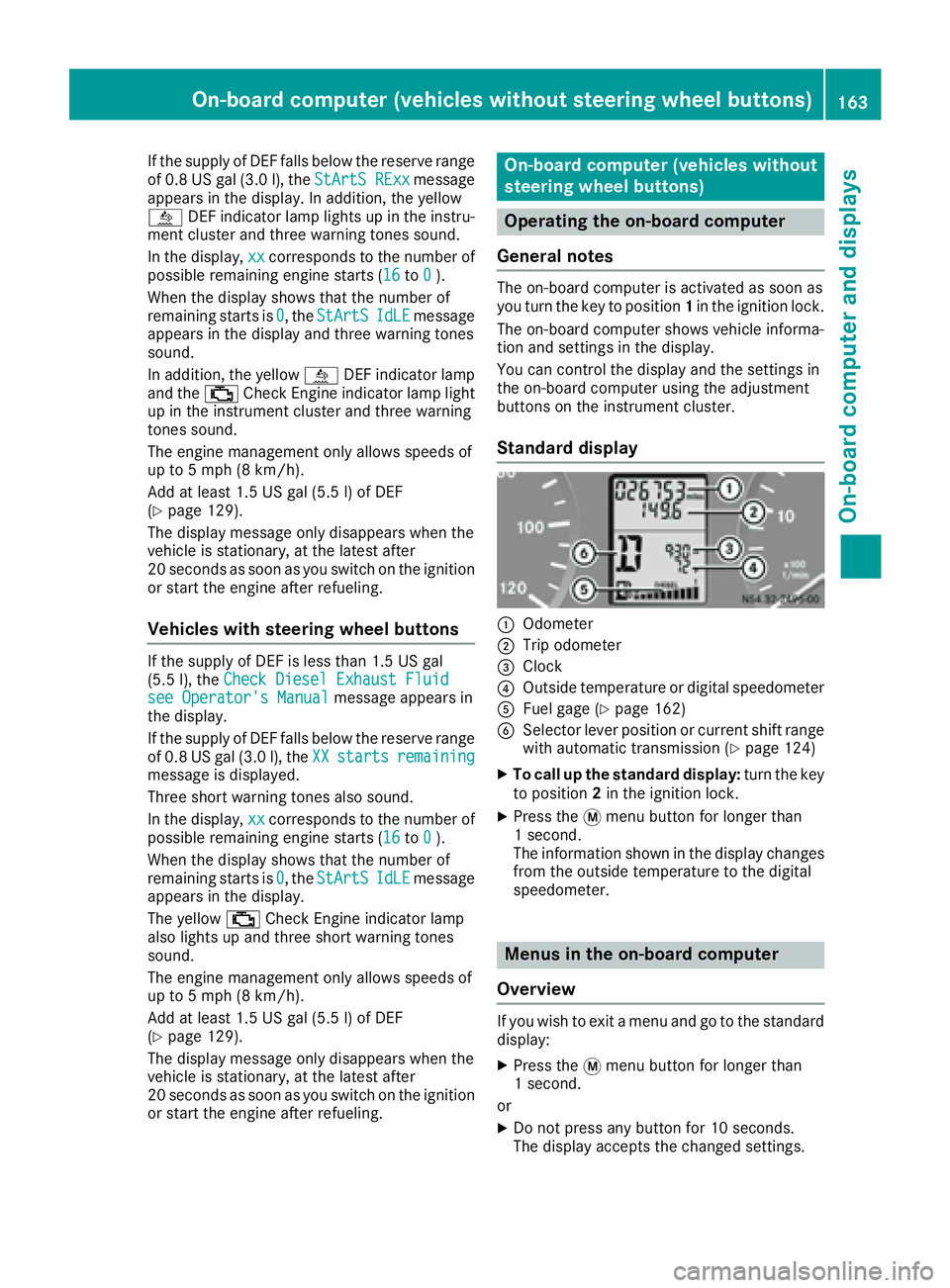
Standard display
:Odometer
;Trip odometer
=Clock
?Outside temperature or digital speedometer
AFuel gage (Ypage 162)
BSelector lever position or current shift range
with automatic transmission (Ypage 124)
XTo call up the standard display: turn the key
to position 2in the ignition lock.
XPress the 4menu button for longer than
1 second.
The information shown in the display changes
from the outside temperature to the digital
speedometer.
Menus in the on-board computer
Overview
If you wish to exit a menu and go to the standard display:
XPress the 4menu button for longer than
1 second.
or
XDo not press any button for 10 seconds.
The display accepts the changed settings.
On-board computer (vehicles without steering wheel buttons)163
On-board computer and displays
Z
Page 177 of 290
Telephone menu
Introduction
GWARNING
If you operate information systems and com-
munication equipment integrated in the vehi-
cle while driving, you will be distracted from
traffic conditions. You could also lose control
of the vehicle. There is a risk of an accident.
Only operate the equipment when the traffic
situation permits. If you are not sure that this
is possible, park the vehicle paying attention
to traffic conditions and operate the equip-
ment when the vehicle is stationary.
You must observe the legal requirements of the
country in which you are currently driving when
operating a mobile phone in the vehicle. If it is
permitted to operate a mobile phone while the
vehicle is in motion, only operate it when road
and traffic conditions permit.
If you have connected a mobile phone to the
Sprinter hands-free system, you can operate it
using the functions in the TEL
menu.
XSwitch on the mobile phone (see the separate
operating instructions).
XSwitch on the audio equipment (see the sep-
arate operating instructions).
XEstablish a Bluetooth®connection between
the mobile phone and the audio equipment
(see the separate operating instructions).
XPress the VorU button on the steering
wheel to select the TELmenu.
XWhenPlease enter PIN:appears in the
display, enter the PIN using the mobile phone
or audio equipment.
The mobile phone will search for a network.
The display remains blank during this time.
You will see the mobile phone operational
readiness display once the mobile phone has
found a network.
iYou can obtain further information about
suitable mobile phones and connecting
mobile phones via Bluetooth
®at any qualified
specialist workshop.
iIf the mobile phone operational readiness
symbol goes out, your vehicle is outside of the
transmission and reception range.
Accepting a call
XPress the 6button on the steering wheel
to accept an incoming call.
The display shows the call duration.
Rejecting or ending a call
XPress ~button on the steering wheel to
reject or end a call.
The caller then hears the engaged tone.
The display shows the mobile phone opera-
tional readiness symbol again.
Dialing a number from the phone book
You can enter new telephone numbers into the
phone book via the mobile phone (see the sep-
arate operating instructions). If your mobile
phone is able to receive calls, you can search for
and dial a number from the phone book.
Using the steering wheel buttons
XUse the VorU button to select the TELmenu.
The display shows the mobile phone opera-
tional readiness symbol.
XPress the9or: button to switch to
the phone book.
The on-board computer reads the phone book
stored on the SIM card or in the mobile phone.
This may take more than a minute.
When the message is no longer displayed,
reading has ended.
XPress the 9or: button to select the
desired name.
or
XTo start rapid scrolling: press and hold the
9 or: button longer than 1 second.
Rapid scrolling stops when you release the
button or reach the end of the list.
Using the steering wheel buttons
XTo start dialing: press the6button.
The on-board computer dials the correspond-
ing phone number.
When a connection is established, the name
of the other person and/or the call duration
appear in the display.
XTo exit the phone book: press the~but-
ton.
On-board computer (vehicles withsteering whee lbu ttons)175
On-board computer and displays
Z
Page 245 of 290
Before connecting the jumper cables
On vehicles with a battery main switch, check
whether the battery main switch is switched on
(
Ypage 118).
XApply the parking brake.
XMove the selector lever of the automatic
transmission to positionP.
XSwitch off all electrical consumers, e.g. audio
equipment, blower.
XTurn the key to position0in the ignition lock
and remove it (Ypage 119).
XOpen the hood (Ypage 218).
Tow-starting and towing away
Important safety notes
GWARNING
Functions relevant to safety are restricted or
no longer available if:
Rthe engine is not running.
Rthe brake system or the power steering is
malfunctioning.
Rthere is a malfunction in the voltage supply or the vehicle's electrical system.
If your vehicle is being towed, much more
force may be necessary to steer or brake.
There is a risk of an accident.
In such cases, use a tow bar. Before towing,
make sure that the steering moves freely.
GWARNING
You can no longer steer the vehicle if the
steering wheel lock has been engaged. There
is a risk of an accident.
Always switch off the ignition when towing the
vehicle with a tow cable or a tow bar.
GWARNING
When towing or tow-starting another vehicle
and its weight is greater than the permissible
gross weight of your vehicle, the:
Rthe towing eye could detach itself
Rthe vehicle/trailer combination could roll-
over.
There is a risk of an accident.
When towing or tow-starting another vehicle,
its weight should not be greater than the per- missible gross weight of your vehicle.
Information on the gross vehicle weight can be
found on the vehicle identification plate
(
Ypage 276).
!Only secure the tow rope or tow bar at the
towing eyes. Otherwise, the vehicle could be
damaged.
!Observe the following points when towing
with a tow rope:
RSecure the tow rope on the same side on
both vehicles.
REnsure that the tow cable is not longer than
legally permitted. Mark the tow cable in the
middle, e.g. with a white cloth (30 x 30 cm).
This will make other road users aware that
the vehicle is being towed.
ROnly secure the tow cable to the towing
eye.
RObserve the brake lamps of the towing
vehicle while driving. Always maintain a dis-
tance so that the tow rope does not sag.
RDo not use steel cables or chains to tow
your vehicle. You could otherwise damage
the vehicle.
!Do not use the towing eye for recovery, this
could damage the vehicle. If in doubt, recover
the vehicl
e with a crane.
!When towing, pull away slowly and
smoothly. If the tractive power is too high, the
vehicles could be damaged.
When towing away, you must observe the legal
requirements for the country in which you are
currently driving.
It is preferable to have the vehicle transported
on a transporter or trailer instead of towing it.
Tow-starting and towing away243
Roadside Assistance
Z
Page 246 of 290
The automatic transmission selector lever must
be in theNposition when towing the vehicle.
The battery must be connected and charged.
Otherwise, you:
Rcannot turn the key in the ignition lock to
position 2
Rcannot move the selector lever to position N
on vehicles with automatic transmission
Before the vehicle is towed, switch off the auto-
matic locking feature (
Ypage 64). You could
otherwise lock yourself out of the vehicle when
pushing or towing away the vehicle.
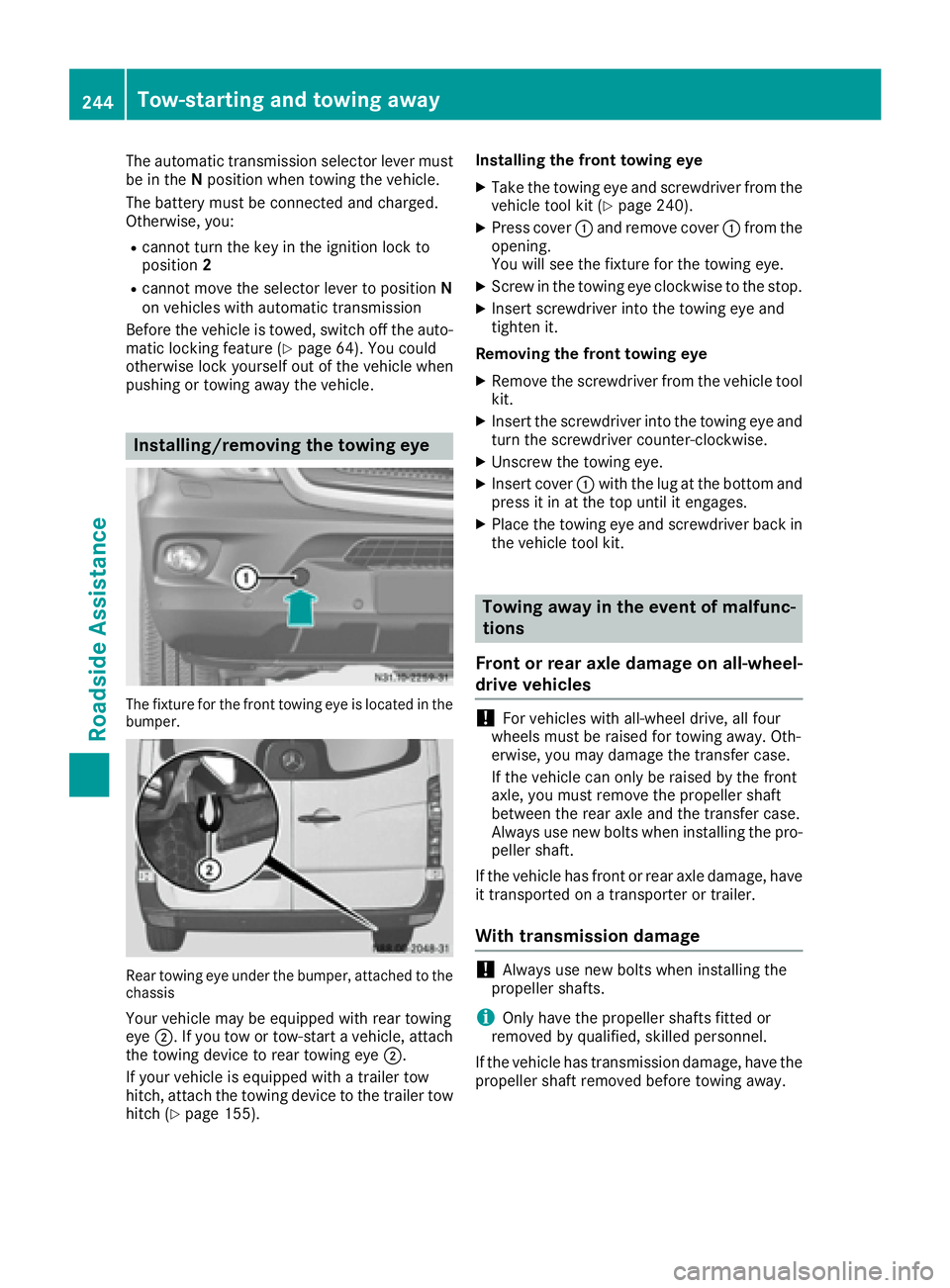
Installing/removing the towing eye
The fixture for the front towing eye is located in the
bumper.
Rear towing eye under the bumper, attached to the
chassis
Your vehicle may be equipped with rear towing
eye ;. If you tow or tow-start a vehicle, attach
the towing device to rear towing eye ;.
If your vehicle is equipped with a trailer tow
hitch, attach the towing device to the trailer tow hitch (
Ypage 155). Installing the front towing eye
XTake the towing eye and screwdriver from the
vehicle tool kit (Ypage 240).
XPress cover
:and remove cover :from the
opening.
You will see the fixture for the towing eye.
XScrew in the towing eye clockwise to the stop.
XInsert screwdriver into the towing eye and
tighten it.
Removing the front towing eye
XRemove the screwdriver from the vehicle tool
kit.
XInsert the screwdriver into the towing eye and
turn the screwdriver counter-clockwise.
XUnscrew the towing eye.
XInsert cover :with the lug at the bottom and
press it in at the top until it engages.
XPlace the towing eye and screwdriver back in
the vehicle tool kit.
Towing away in the event of malfunc-
tions
Front or rear axle damage on all-wheel-
drive vehicles
!For vehicles with all-wheel drive, all four
wheels must be raised for towing away. Oth-
erwise, you may damage the transfer case.
If the vehicle can only be raised by the front
axle, you must remove the propeller shaft
between the rear axle and the transfer case.
Always use new bolts when installing the pro-
peller shaft.
If the vehicle has front or rear axle damage, have
it transported on a transporter or trailer.
With transmission damage
!Always use new bolts when installing the
propeller shafts.
iOnly have the propeller shafts fitted or
removed by qualified, skilled personnel.
If the vehicle has transmission damage, have the
propeller shaft removed before towing away.
244Tow-starting and towing away
Roadside Assistance
Page 247 of 290
Towing with the front or rear axle
raised
General notes
!The ignition must be switched off if the vehi-
cle is being towed with the front or rear axle
raised. Otherwise, ESP
®may intervene and
damage the brake system.
!Always use new bolts when installing the
propeller shafts.
iOnly have the propeller shafts installed and
removed by qualified, skilled personnel.
Observe the following before towing a vehicle
with a raised front or rear axle:
Rthe information on towing in the event of mal-
functions (Ypage 244) and
Rthe important safety notes (Ypage 243).
If the front axle is damaged, raise the vehicle at
the front axle and if the rear axle is damaged,
raise the vehicle at the rear axle.
Towing
If the front axle is raised, the vehicle may be
towed a maximum of 30 miles (50 km). For a
towing distance of over 30 miles (50 km), the
propeller shafts to the driven axles must be
removed.
XTurn the key to position 2in the ignition lock.
XDepress the brake pedal and keep it
depressed.
XShift the automatic transmission to position
N.
XTurn the key to position 1in the ignition lock
and leave it in this position.
XSwitch on the hazard warning lamps
(Ypage 82).
XRelease the brake pedal.
XRelease the parking brake.
XIf the front axle is raised, do not exceed the
towing speed of 30 mph (50 km/h) and the
towing distance of 30 miles (50 km).
Towing the vehicle with both axles on
the ground
Important safety notes
GWARNING
You can no longer steer the vehicle if the
steering wheel lock has been engaged. There
is a risk of an accident.
Always switch off the ignition when towing the
vehicle with a tow cable or a tow bar.
!Do not exceed a towing speed of 31 mph
(50 km/h). You could otherwise damage the
transmission.
iOnly have the propeller shafts fitted and
removed by qualified, skilled personnel.
Before towing the vehicle, observe the follow-
ing:
Rthe information on towing in the event of mal-
functions (Ypage 244) and
Rthe important safety notes (Ypage 243).
Towing
You may only tow the vehicle a maximum dis-
tance of 30 miles (50 km). For a towing distance
of over 30 miles (50 km), the propeller shafts to the driven axles must be removed.
XTurn the key to position 2in the ignition lock.
XDepress the brake pedal and keep it
depressed.
XShift the automatic transmission to position
N.
XRelease the brake pedal.
XRelease the parking brake.
XLeave the key in position 2in the ignition lock.
XSwitch on the hazard warning lamps
(Ypage 82).
XDo not exceed the towing speed of 30 mph
(50 km/h) and the towing distance of
30 miles (50 km).
Recovering a vehicle that is stuck
!
When recovering a vehicle that has become
stuck, pull it as smoothly and evenly as pos-
sible. Excessive tractive power could damage
the vehicles.
Tow-starting and towing away245
Roadside Assistance
Z
Page 248 of 290
If the drive wheels get trapped on loose or
muddy ground, recover the vehicle with the
utmost care. This is especially the case if the
vehicle is laden.
Never attempt to recover a vehicle with a trailer
attached.
Pull out the vehicle backwards, if possible, using
the tracks it made when it became stuck.
Transporting the vehicle
!
You may only secure the vehicle by the
wheels, not by parts of the vehicle such as
axle or steering components. Otherwise, the
vehicle could be damaged.
Tow-starting (emergency engine
starting)
Vehicles with automatic transmission
!Vehicles with automatic transmission must
not be tow-started. You could otherwise dam-
age the automatic transmission.
You can find information on jump-starting under
"Jump-starting“ (
Ypage 242).
Electrical fuses
The fuse allocation chart and further information
on the electric fuses and relays can be found in the "Fuse allocation chart" supplement.
246Electrical fuses
Roadside Assistance