service MERCEDES-BENZ SPRINTER 2018 MY18 Operator’s Manual
[x] Cancel search | Manufacturer: MERCEDES-BENZ, Model Year: 2018, Model line: SPRINTER, Model: MERCEDES-BENZ SPRINTER 2018Pages: 294, PDF Size: 4.36 MB
Page 29 of 294
When driving off road or on unpaved roads,
check the vehicle's underside regularly. In
particular, remove parts of plants or other
flammable materials which have become
trapped. In the case of damage, contact a
qualified specialist workshop.
Have the vehicle checked and repaired immedi-
ately at a qualified specialist workshop. If you
become aware when continuing the journey that
driving safety has been effected, stop as soon as
possible in accordance with the traffic condi-
tions. In such cases, consult a qualified special- ist workshop.
Declaration of conformity
Radio-based vehicle components
USA: "The wireless devices of this vehicle com-
ply with Part 15 of the FCC Rules. Operation is
subject to the following two conditions: 1) These
devices may not cause harmful interference. 2.
This device must accept any interference
received, including interference that may cause
undesired operation. Changes or modifications
not expressly approved by the party responsible
for compliance could void the user’s authority to
operate the equipment."
Canada: "The wireless devices of this vehicle
comply with Industry Canada license-exempt
RSS standard(s). Operation is subject to the fol-
lowing two conditions: 1) These devices may not
cause interference, and 2) these devices must
accept any interference received, including
interference that may cause undesired opera-
tion of the device".
Diagnostics connection
The diagnostics connection is only intended for the connection of diagnostic equipment at a
qualified specialist workshop.
GWARNING
If you connect equipment to a diagnostics
connection in the vehicle, it may affect the
operation of vehicle systems. As a result, the
operating safety of the vehicle could be affec-
ted. There is a risk of an accident.
Only connect equipment to a diagnostics con-
nection in the vehicle, which is approved for
your vehicle by Mercedes-Benz.
Changing the engine power output
!
Increases in engine power can:
Rchange the emission values
Rcause malfunctions
Rcause consequential damage
The operating reliability of the engine is not
guaranteed in all cases.
Any tampering with the engine management
system in order to increase the engine power
output will lead to the loss of the New Vehicle
Limited Warranty and other warranty entitle-
ments.
If you sell the vehicle, inform the purchaser
about the changes to the engine power output of
the vehicle. If you do not inform the buyer, this
may constitute a punishable offense under
national legislation.
Qualified specialist workshops
An authorized Sprinter Dealer is a qualified spe-
cialist workshop.
A qualified specialist workshop has the neces-
sary specialist knowledge, tools and qualifica-
tions to correctly carry out the work required on
the vehicle.
This is especially the case for work relevant to
safety. Observe the notes in the Maintenance or
Service Booklet.
The following work should always be carried out
at qualified specialist workshop:
Rwork relevant to safety
Rservice and maintenance work
Rrepair work
Rmodifications as well as installations and
alterations
Rwork on electronic components
For this reason, we recommend an authorized
Sprinter Dealer.
!Only have work carried out on the engine
electronics and its associated parts, such as
control units, sensors, actuating components
and connector leads, at a qualified specialist
Introduction27
Z
Page 32 of 294
The operating safety of the vehicle could be
jeopardized if you use parts, tires and wheels as
well as accessories relevant to safety which
have not been approved by Mercedes-Benz. This
could lead to malfunctions in safety-relevant
systems, e.g. the brake system. Only use genu-
ine Mercedes-Benz parts or parts of equal qual-ity. Only use tires, wheels and accessories that
have been specifically approved for your vehi-
cle.
We test genuine Sprinter parts, as well as con-
version parts and accessories that have been
specifically approved for the type of vehicle, for:
RReliability
RSafety
RSuitability
Despite ongoing market research, Mercedes-
Benz is unable to assess other parts. Therefore,
we accept no responsibility for the use of such
parts in Sprinter vehicles, even if they have been
officially approved or independently approved
by a testing center.
In some countries, certain parts are only offi-
cially approved for installation or modification if
they comply with legal requirements. All genu-
ine Sprinter parts satisfy these requirements.
Make sure that all parts are suitable for your
vehicle.
Always specify the vehicle identification number
(VIN) and engine number when ordering genuine Sprinter parts (
Ypage 276).
QR code for rescue card
The QR Code stickers are affixed to the B-pillar
on the driver's and front-passenger side.
In the event of an accident the rescue services
use the QR Code to quickly find the rescue card
for your vehicle. The current rescue card con-
tains the most important information on your
vehicle, e.g. the electric cable routes, in a com-
pact form.
Further information can be found at http://
www.mercedes-benz.de/qr-code.
Data stored in the vehicle
Information from electronic control
units
There are electronic control units installed in
your vehicle. Some of these are necessary for
your vehicle to operate safely, while some offer
support during driving (driver assistance sys-
tems). In addition, your vehicle offers comfort
and entertainment functions that are also made
possible by electronic control units.
Electronic control units contain data storage
systems that can temporarily or permanently
save technical information concerning the vehi-
cle's condition, component stress and mainte-
nance requirements as well as technical events
and malfunctions.
This information generally documents the con-
dition of a component, a module, a system or the
surroundings, for example:
ROperating conditions of system components
(e.g. levels, battery status, tire pressure)
RStatus messages concerning the vehicle or its
individual components (e.g. wheel revolution
number / speed, deceleration in movement,
lateral acceleration, display showing fastened
belts)
RMalfunctions and defects in key system com-
ponents (e.g. lights, brakes)
RInformation about events leading to vehicle
damage
RSystem responses in special driving situa-
tions (e.g. air bag deployment, intervention of
stability control systems)
RAmbient conditions (e.g. temperature, rain
sensor)
In addition to performing the actual control unit function, these data are used by manufacturers
to detect and rectify malfunctions and to opti-
mize vehicle functions. Most of these data are
volatile and processed only in the vehicle itself.
Only a small part of the data is stored in event or
malfunction memories.
When you use services, the technical data from
the vehicle can be read out by service network
employees or third parties. Service activities
include repairs, maintenance, warranty claims
and quality assurance measures. The data are
read out via the connection for OBD (on-board
diagnostics) in the vehicle, which is required by
law. The relevant offices in the service network
or third parties collect, process and use the
30Introduction
Page 33 of 294
data. These data document the vehicle's tech-
nical states, are used to help in finding malfunc-
tions and improving quality and are sent to the
manufacturer where necessary. In addition, the
manufacturer is subject to product liability. The
manufacturer needs technical data from vehi-
cles for this purpose.
Malfunction memories in the vehicle can be
reset by a service center during repair or service
work.
You can incorporate data into the vehicle's com-
fort and infotainment functions yourself as part
of the selected equipment.
These include:
RMultimedia data such as music, films or pho-
tos for playback in an integrated multimedia
system
RAddress book data for use in conjunction with
an integrated hands-free system or an inte-
grated navigation system
RNavigation destinations that have been
entered
RData about using Internet services
These data can be saved locally in the vehicle or are located on a device that you have connected
to the vehicle. If these data are saved in the
vehicle, you can delete them at any time. These data are sent to third parties only at your
request, particularly when you use online serv-
ices in accordance with the settings that you
have selected.
You can save and change comfort settings/
customizations in the vehicle at any time.
Depending on the equipment, these settings
include:
RSeat and steering wheel position settings
RSuspension and climate control settings
RCustom settings such as interior lighting
If your vehicle is equipped appropriately, you
can connect your smartphone or another mobile terminal to the vehicle. You can control this by
means of the control elements integrated in the
vehicle. The smartphone's picture and sound
can be output via the multimedia system. Spe-
cific items of information are also sent to your
smartphone.
Depending on the type of integration, such infor-
mation includes:
RGeneral vehicle information
RPosition data This allows you to use selected apps on your
smartphon
e, such as navigation or music play-
back. There is no additional interaction between
the smartphone and the vehicle, particularly
active access to vehicle data. The type of addi-
tional data processing is determined by the pro- vider of the app being used. Whether you can
configure settings for it and, if so, which ones,
depends on the app and your smartphone's
operating system.
Service provider
Wireless network connection
If your vehicle has a wireless network connec-
tion, it enables data to be exchanged between
your vehicle and other systems. The wireless
network connection is enabled by either an in-
vehicle transmitter and receiver or your own
mobile end device (e.g. smartphone). Online
functions can be used via this wireless connec-
tion. These include online services and applica-
tions/apps provided by the manufacturer or
other providers.
Manufacturer's own services
In the case of the manufacturer's online serv-
ices, the manufacturer describes the functions
in a suitable place and the associated informa-
tion subject to data protection legislation. Per-
sonal data can be used in the provision of online
services. Data are exchanged via a secure con-
nection (e.g. using the IT system specially pro-
vided for this purpose by the manufacturer).
Collecting, processing and using personal data
beyond the provision of services is permitted
only on the basis of a statutory permit or decla-
ration of consent.
You can usually activate and deactivate the serv-
ices and functions (some of which are subject to
charge). In many cases, this also applies to the
vehicle's entire data connection. However, this
does not apply in particular to legally prescribed
functions and services such as the "eCall" emer-
gency call system.
Services from third parties
If it is possible to use online services from other
providers, these services are the responsibility
of the provider in question and subject to that
provider's data protection conditions and terms
Introduction31
Z
Page 34 of 294

of use. The manufacturer has no influence over
the content exchanged here.
For this reason, please ask the service provider
for information about the type, extent and pur-
pose of the collection and use of personal data
when services are provided by third parties.
32Introduction
Page 36 of 294
Instrument cluster
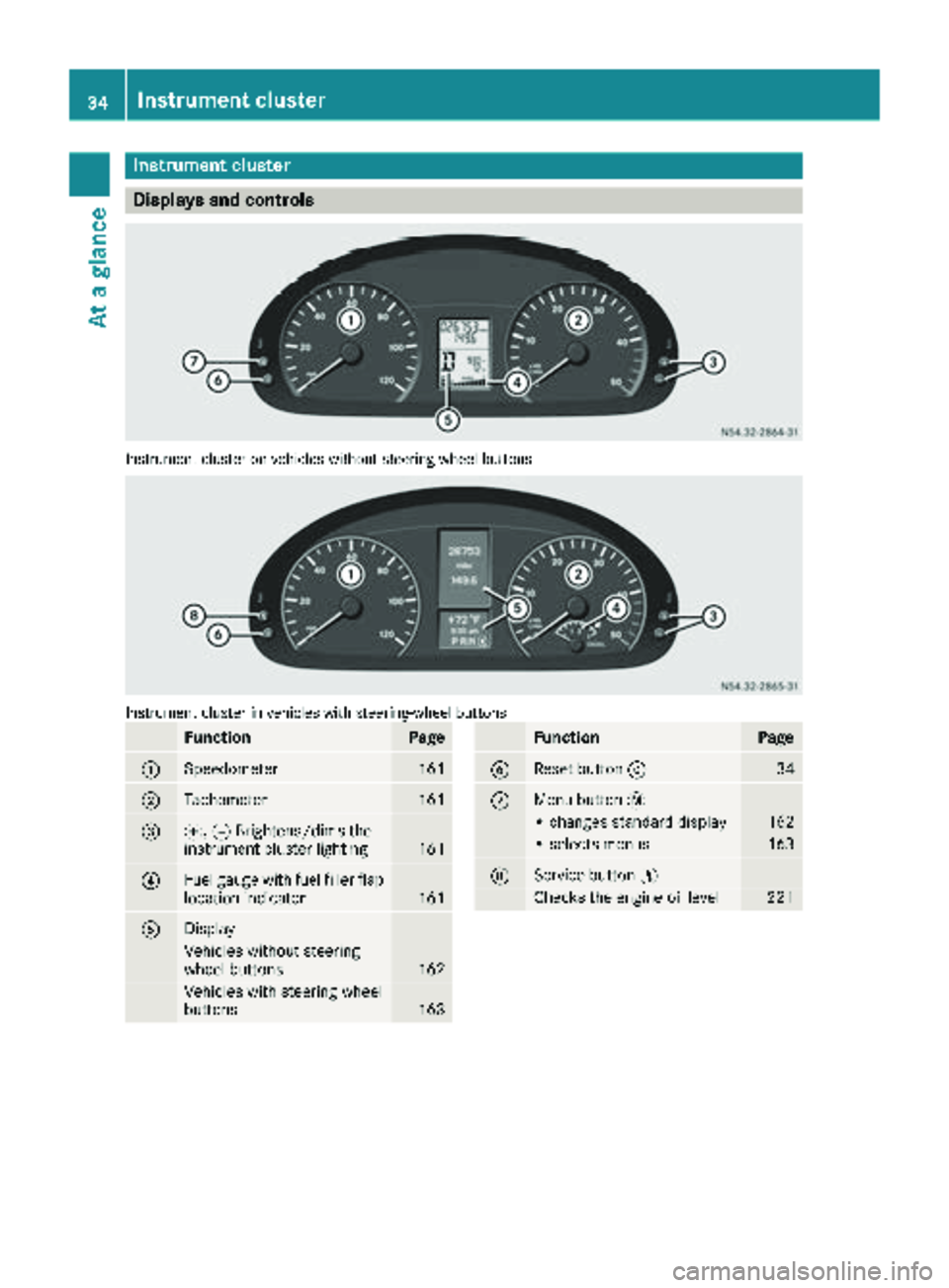
Displays and controls
Instrumentcluste ron vehicles without steering whee lbuttons
Instrumen tcluste rin vehicles wit hsteering-wheel buttons
FunctionPag e
:Speedometer161
;Tachometer161
=f, gBrightens/dims th e
instrumen tcluste rlighting16 1
?Fue lgauge wit hfuel filler flap
location indicator16 1
ADisplay
Vehicles without steering
whee lbuttons16 2
Vehicles wit hsteering whee l
buttons16 3
FunctionPag e
BReset butto n934
CMen ubutto n4
• changes standard display16 2
•select smenus16 3
DService butto nË
Checks th eengin eoil level22 1
34Instrument cluster
At a glance
Page 91 of 294
Changing bulbs
Important safety notes
GDANGER
Xenon bulbs carry a high voltage. You can get an electric shock if you remove the cover of
the Xenon bulb and touch the electrical con-
tacts. There is a risk of fatal injury.
Never touch the parts or the electrical con-
tacts of the Xenon bulb. Always have work on
the Xenon bulbs carried out at a qualified spe-
cialist workshop.
GWARNING
Bulbs, lamps and connectors can get very hot
when operating. If you change a bulb, you
could burn yourself on these components.
There is a risk of injury.
Allow these components to cool down before
changing a bulb.
!Make sure the bulbs are always securely
installed.
If your vehicle is equipped with Bi-Xenon bulbs,
you can recognize this by the following: the cone
of light from the Xenon bulbs moves from the
top to the bottom and back again when you start
the engine. For this to be observed, the low-
beam headlamps must be switched on before
starting the engine.
The bulbs and lamps are an essential compo-
nent of vehicle safety. You must therefore make
sure that these function correctly at all times.
Have the headlamp setting checked regularly.
RAlways switch off the vehicle's lighting sys-
tem before changing a bulb.
This will prevent a short circuit.
RDo not touch the glass tube of new bulbs with your bare hands. Always use a clean, lint-free
cloth or only touch the base of the bulb when
installing.
Even minor contamination can burn into the
glass surface and reduce the service life of the
bulbs.
RDo not use a bulb that has been dropped or
that has scratches on its glass tube.
The bulb could explode.
ROnly use bulbs in closed lamps which have
been designed for this purpose.
ROnly use spare bulbs of the same type and
with the prescribed voltage
RProtect the bulbs from moisture when in use.
If the new bulb still does not light up, consult a
qualified specialist workshop.
RHave the LEDs and bulbs of the following
lamps changed at a qualified specialist work-
shop:
-the additional turn signals in the exterior
mirrors
-the high-mounted brake lamp
-LED daytime running lamps (Bi-Xenon
headlamps)
-Bi-Xenon lamps (Bi-Xenon headlamps)
-front fog lamps
If you require assistance changing bulbs, con-
sult a qualified specialist workshop.
Front bulbs
Overview of bulb replacement – bulb
types
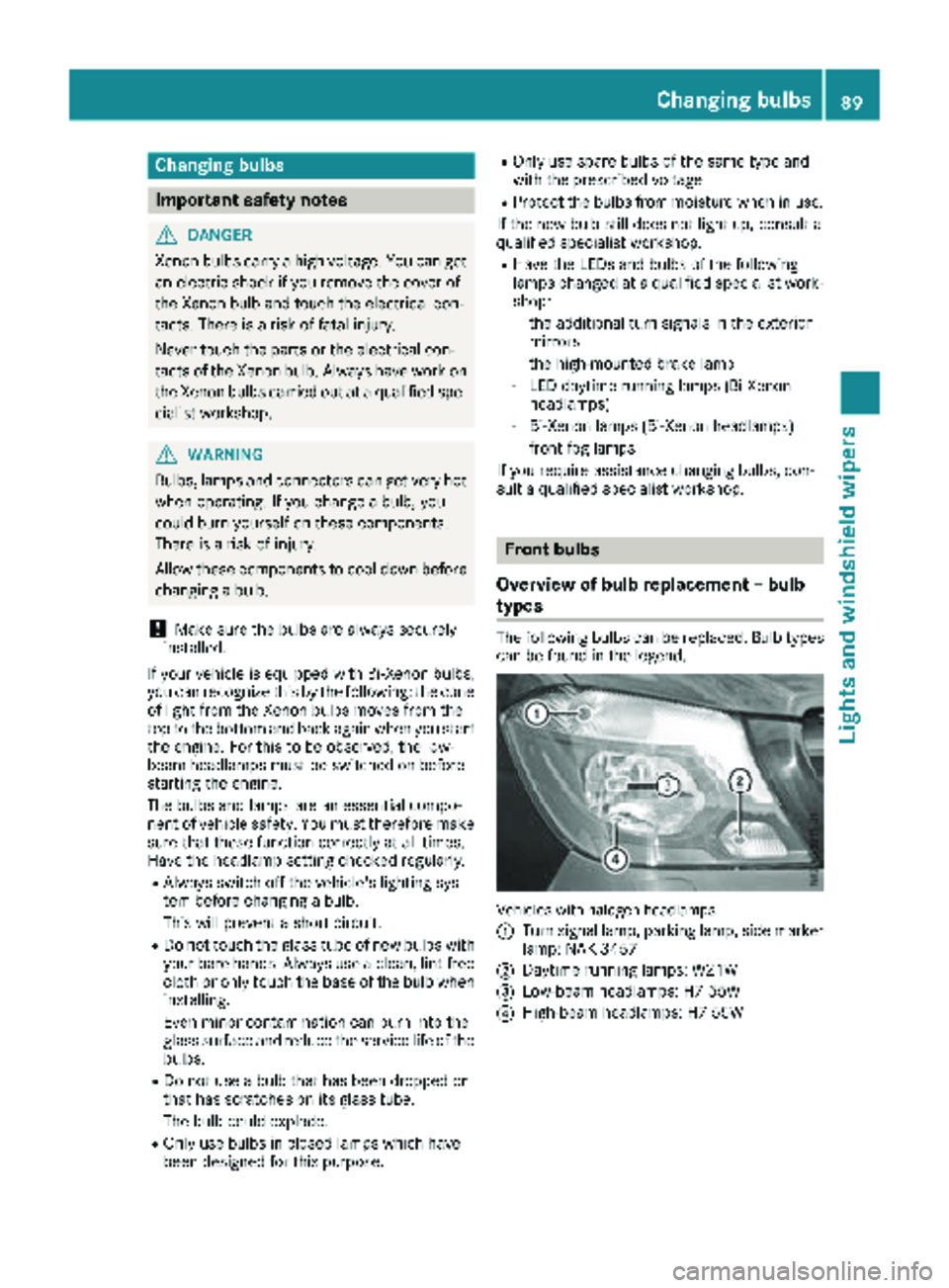
The following bulbs can be replaced. Bulb types can be found in the legend.
Vehicle swit hhalogen headlamps
:
Turn signal lamp, parking lamp, side marker
lamp: NAK 3457
;Daytime running lamps: W21W
=Low-beam headlamps: H7 55W
?High-beam headlamps: H7 55W
Changing bulbs89
Lights and windshield wipers
Z
Page 120 of 294
Useful information
This Operator's Manual describes all models as
well as standard and optional equipment of your
vehicle that were available at the time of going
to print. Country-specific variations are possi-
ble. Note that your vehicle may not be equipped
with all of the described functions. This also
applies to systems and functions relevant to
safety.
Read the information on qualified specialist
workshops (
Ypage 27).
Breaking-in notes
The first 1000 miles (1500 km)
New or replaced brake pads and brake disks
only reach their optimum braking effect after a
few 100 miles (a few 100 kilometers). Until then,
compensate for this by applying greater force to
the brake pedal.
For the service life and economy of your vehicle
it is crucial that you break in the engine with due
care.
RTherefore, protect the engine for the first
1000 miles (1500 km) by driving at varying
vehicle and engine speeds.
RAvoid overstraining the vehicle and high
engine speeds during this period, e.g. driving
at full throttle. Do not exceed Øof the max-
imum speed for each gear.
RDo not change down a gear manually in order to brake.
RTry to avoid depressing the accelerator pedal
beyond the point of resistance (kickdown).
RThe shift ranges 3,2or 1should only be
engaged when driving slowly, e.g. when driv-
ing in mountainous terrain.
After 1000 miles (1500 km), you can increase
the engine speed gradually and accelerate the
vehicle to full speed.
iYou should also observe these notes on
breaking-in if the engine or parts of the drive
train on your vehicle have been replaced.
Driving
Important safety notes
GWARNING
If you switch off the ignition while driving,
safety-relevant functions are only available
with limitations, or not at all. This could affect, for example, the power steering and the brake
boosting effect. You will require considerably
more effort to steer and brake. There is a risk
of an accident.
Do not switch off the ignition while driving.
GWARNING
If the parking brake has not been fully
released when driving, the parking brake can:
Roverheat and cause a fire
Rlose its hold function.
There is a risk of fire and an accident. Release
the parking brake fully before driving off.
If you park the vehicle for more than
three weeks:
Rconnect the batteries to a trickle charger or
Rdisconnect the vehicle's starter battery or
Rswitch off the electrical system using the bat-
tery main switch (Ypage 118) and
Rdisconnect the vehicle's auxiliary battery
Otherwise, you need to check the battery's con-
dition of charge every 3 weeks, since standby
power consumption can drain the battery. If the
battery voltage is lower than 12.2 V, the battery
must be charged. Otherwise, the battery may be damaged by exhaustive discharging.
Be sure to observe the notes on disconnecting
and charging the batteries under "Battery"
(
Ypage 228). You can obtain information about
trickle chargers from a qualified specialist work-
shop.
Battery isolating switch
Important safety notes
!Make sure that the key is in position 0in the
ignition lock and that at least five minutes
have passed before removing or reconnecting
118Driving
Driving and parking
Page 130 of 294
Problems with the fuel and fuel tank
If your vehicle is losing fuel, the fuel lines or thefuel tank are defective.
XTurn the key immediately to position 0in the
ignition lock and remove it.
XDo not restart the engine under any circum-
stances.
XConsult a qualified specialist workshop.
If the fuel tank has been run dry, after refueling
carry out the following steps:
XBefore starting the engine: switch on the igni-
tion three or four times.
XTurn the key to position 2in the ignition lock
(Ypage 119).
The % preglow indicator lamp in the instru-
ment cluster lights up briefly.
XOnce the %preglow indicator lamp goes
out, turn the key to position 3in the ignition
lock and release it as soon as the engine is
running.
You can start the diesel engine without preglow
when the engine is warm.
Diesel Exhaust Fluid (DEF)
Important safety notes
!Only use DEF in accordance with
ISO 22241. Never mix DEF with additives or
thin it with tap water. The exhaust gas after-
treatment may otherwise be damaged.
Observe the MB Specifications for Service
Products, Sheet 352.0.
Damage that results from the use of additives
or tap water leads to the loss of the New
Vehicle Limited Warranty.
!If DEF comes into contact with a painted or
aluminum surface, wash the surface off
immediately with plenty of water.
!DEF is not a diesel additive and must not be
mixed with fuel in the tank. Even small
amounts of DEF can cause engine damage.
Damage that results from the blending of DEF
will not be covered by the New Vehicle Limi-
ted Warranty.
iIf the outside temperature is below 12 ‡
( Ò 11 †) it may be difficult to top up. If the DEF
is frozen and there is an active warning indi- cator, topping up may not be possible. Park
the vehicle in a warm place, e.g. in a garage,
until the DEF has become liquid again. Top-
ping up is then possible again. Alternatively,
have the DEF tank refilled at a qualified spe-
cialist workshop.
iIf you add DEF at temperatures below 12 ‡
( Ò 11 †) it is possible that the level is not
shown correctly due to the frozen DEF.
Drive for at least 20 minute s(heating phase in
the tank activated) and then st
op the vehicle
for at least 30 seconds. The level is then
shown correctly.
You will find further information on DEF in the
"Service products" section (
Ypage 278).
Refueling procedure
DEF filler neck
Non-lockable DEF filler cap
Example: DEF filler cap in the engine compartment
XTo open: switch off the ignition.
XOpen the hood (Ypage 219).
XTurn filler cap :counter-clockwise and
remove it.
XTo close: replace cap :on the filler neck and
turn it clockwise.
You will hear a click when cap :is fully
closed.
XClose the hood (Ypage 220).
128Refueling
Driving and parking
Page 132 of 294
Always park your vehicle safely and according to
legal requirements and secure it against rolling
away.
To ensure that the vehicle is properly secured
against rolling away unintentionally:
Rthe parking brake must be firmly applied
Rthe selector lever must be in positionPand
the key must be removed from the ignition
lock
Ron steep uphill or downhill gradients, the front
wheels must be turned towards the curb
Rthe rear axle must be secured, e.g. with a
wheel chock, on steep uphill or downhill gra-
dients
Use the wheel chock (
Ypage 131) to do so.
If you leave the vehicle parked for more than
three weeks:
Rconnect the batteries to a trickle charger or
Rdisconnect the vehicle's starter battery or
Rswitch off the electrical system using the bat-
tery main switch (Ypage 118) and
Rdisconnect the vehicle's auxiliary battery
Otherwise, you need to check the battery's con-
dition of charge every 3 weeks, since standby
power consumption can drain the battery. If the
battery voltage is lower than 12.2 V,the battery
must be charged. Otherwise, the battery may be damaged by exhaustive discharging.
Be sure to observe the notes on disconnecting
and charging the batte
ries under "Bat-
tery“ (Ypage 228). You can obtain information
about trickle chargers from a qualified specialist
workshop.
Parking brake
GWARNING
If you leave children unsupervised in the vehi-
cle, they could set it in motion by, for example:
Rrelease the parking brake.
Rshift the automatic transmission out of the
parking position P.
Rstart the engine.
In addition, they may operate vehicle equip-
ment and become trapped. There is a risk of
an accident and injury.
When leaving the vehicle, always take the
SmartKey with you and lock the vehicle. Never
leave children unsupervised in the vehicle.
GWARNING
If you must brake the vehicle with the parking brake, the braking distance is considerably
longer and the wheels could lock. There is an
increased danger of skidding and accidents.
Only use the parking brake to brake the vehi-
cle when the service brake is faulty. Do not
apply the parking brake too firmly. If the
wheels lock, release the parking brake until
the wheels begin turning again.
The brake lamps are not illuminated when you
brake the vehicle using the parking brake.
As a rule, you may only apply the parking brake
when the vehicle is stationary.
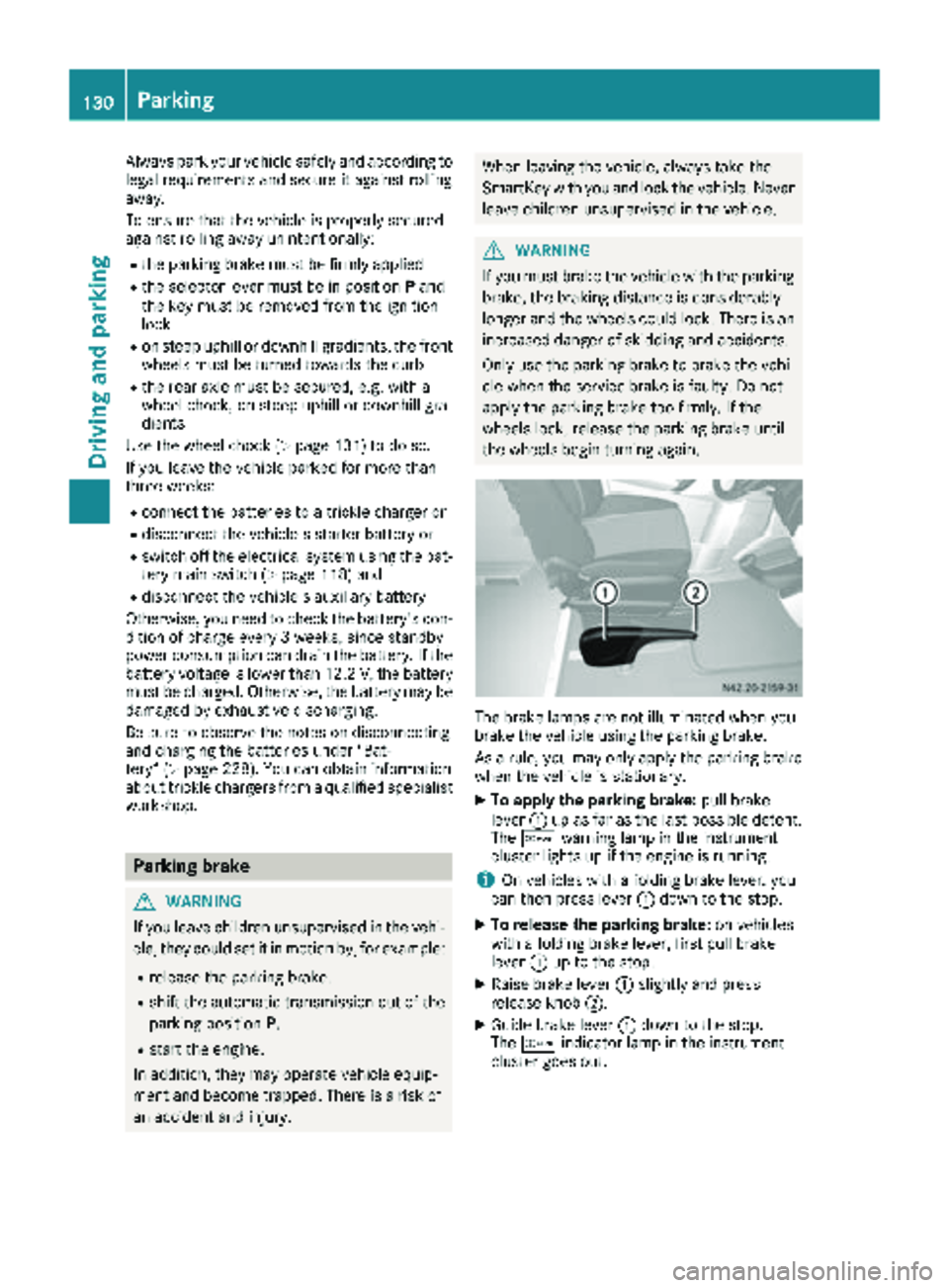
XTo apply the parking brake: pull brake
lever :up as far as the last possible detent.
The c warning lamp in the instrument
cluster lights up if the engine is running.
iOn vehicles with a folding brake lever, you
can then press lever :down to the stop.
XTo release the parking brake: on vehicles
with a folding brake lever, first pull brake
lever :up to the stop.
XRaise brake lever :slightly and press
release knob ;.
XGuide brake lever :down to the stop.
The c indicator lamp in the instrument
cluster goes out.
130Parking
Driving an d parking
Page 133 of 294
Exceptionally, if the service brake fails, the park-
ing brake can be used to brake the vehicle in an
emergency.
XEmergency braking: press and hold release
button ;and carefully apply brake lever :.
Switching off the engine
GWARNING
The automatic transmission switches to neu-
tral position Nwhen you switch off the engine.
The vehicle may roll away. There is a risk of an
accident.
After switching off the engine, always switch
to parking position P. Prevent the parked vehi-
cle from rolling away by applying the parking
brake.
!If the coolant temperature is very high, e.g.
after driving on hilly roads, leave the engine
running at idle speed for about two minutes
before turning it off.
This allows the coolant temperature to return
to normal.
XStop the vehicle.
XShift the automatic transmission to position
P .
XApply the parking brake.
XTurn the key to position 0in the ignition lock
and remove it.
The immobilizer is activated.
XSecure the vehicle to prevent it from rolling
away (Ypage 129).
Wheel chock
Use the wheel chock or a similar object to pre-
vent the vehicle from rolling away, e.g. when
parking or changing a wheel.
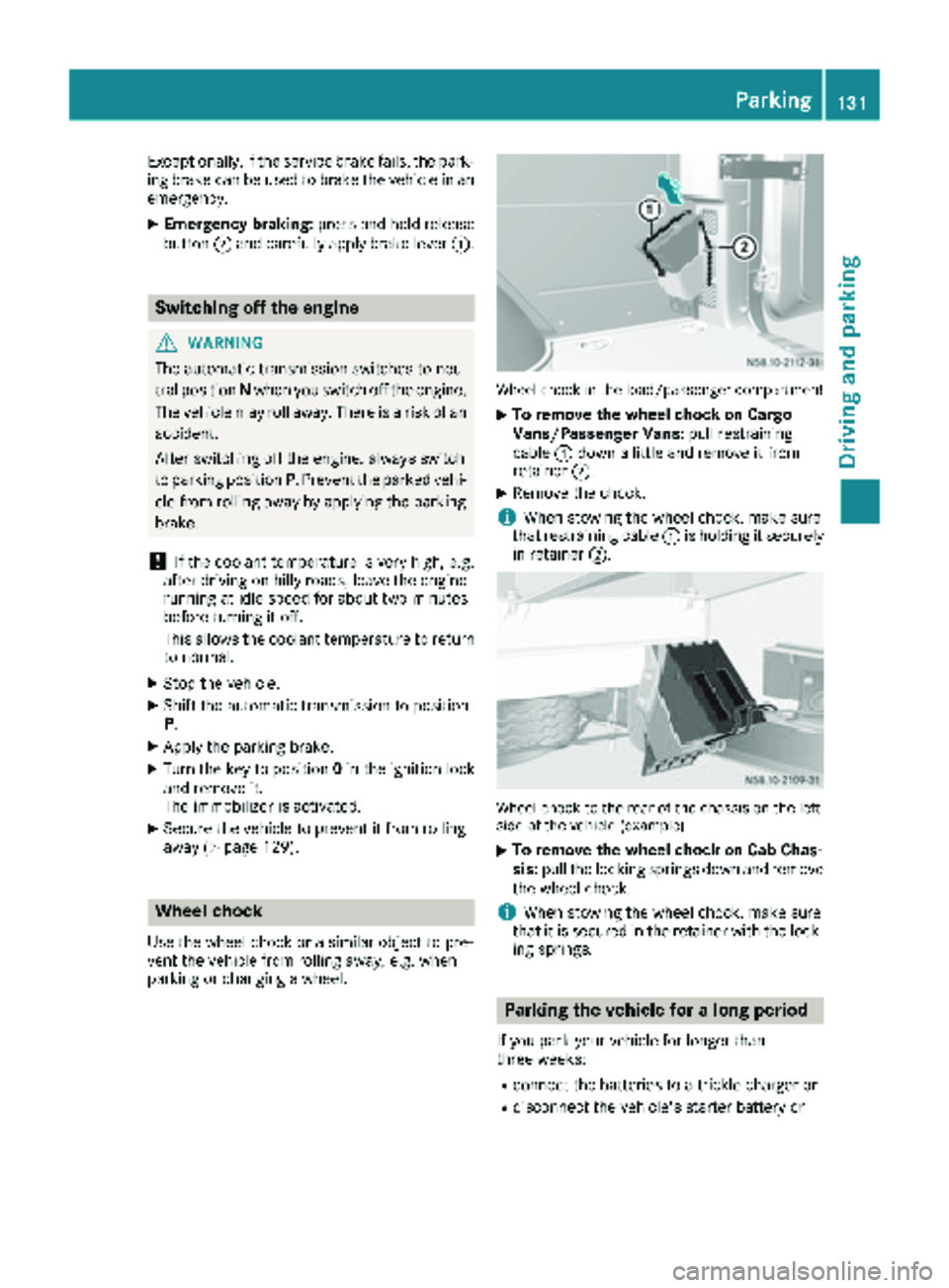
Wheel chock in the load/passenger compartment
XTo remove the wheel chock on Cargo
Vans/Passenger Vans: pull restraining
cable :down a little and remove it from
retainer ;.
XRemove the chock.
iWhen stowing the wheel chock, make sure
that restraining cable :is holding it securely
in retainer ;.
Wheel chock to the rear of the chassis on the left
side of the vehicle (example)
XTo remove the wheel chock on Cab Chas-
sis:pull the locking springs down and remove
the wheel chock.
iWhen stowing the wheel chock, make sure
that it is secured in the retainer with the lock-
ing springs.
Parking the vehicle for a long period
If you park your vehicle for longer than
three weeks:
Rconnect the batteries to a trickle charger or
Rdisconnect the vehicle's starter battery or
Parking131
Driving an d parking
Z