service MERCEDES-BENZ SPRINTER 2018 MY18 Operator’s Manual
[x] Cancel search | Manufacturer: MERCEDES-BENZ, Model Year: 2018, Model line: SPRINTER, Model: MERCEDES-BENZ SPRINTER 2018Pages: 294, PDF Size: 4.36 MB
Page 134 of 294
Rswitch off the electrical system using the bat-
tery main switch (Ypage 118) and
Rdisconnect the vehicle's auxiliary battery
Otherwise, you need to check the battery's con- dition of charge every 3 weeks, since standby
power consumption can drain the battery. If the
battery voltage is lower than 12.2 V, the battery
must be charged. Otherwise, the battery may be
damaged by exhaustive discharging.
Be sure to observe the notes on disconnecting
and charging the batteries under "Battery"
(
Ypage 228). You can obtain information about
trickle chargers from a qualified specialist work-
shop.
If you leave the vehicle parked for longer than
6 weeks, the vehicle may suffer damage as a
result of lack of use. In this event, consult a
qualified specialist workshop.
Driving tips
General notes
Important safety notes
GWARNING
The driver's attention to the road must always be his/her primary focus when driving. For
your safety and the safety of others, we rec-
ommend that you pull over to a safe location
and stop before placing or taking a telephone
call. If you choose to use the telephone while
driving, please use the hands-free device and
only use the telephone when road, weather
and traffic conditions permit.
Some jurisdictions prohibit the driver from
using a mobile phone while driving a vehicle.
Bear in mind that at a speed of just 30 mph
(approximately 50 km/h), your vehicle covers
a distance of 44 feet (approximately 14 m)
every second.
GWARNING
If you switch off the ignition while driving,
safety-relevant functions are only available
with limitations, or not at all. This could affect, for example, the power steering and the brake
boosting effect. You will require considerably
more effort to steer and brake. There is a risk
of an accident.
Do not switch off the ignition while driving.
!Always observe the ground clearance of the
vehicle and avoid obstacles. On vehicles with a step, ground clearance is further restricted.
Obstacles can damage the vehicle.
If you must drive over obstacles, drive espe-
cially slowly and carefully. If necessary, have
another person direct you.
Drive sensibly – save fuel
In order to save fuel, observe the following tips:
XThe tires should always be inflated to the rec-
ommended tire pressure.
XRemove unnecessary loads.
XRemove roof carriers when they are not nee-
ded.
XWarm up the engine at low engine speeds.
XAvoid frequent acceleration or braking.
XHave all maintenance work carried out as
indicated by the service intervals in the Main-
tenance Booklet or by the service interval dis-
play.
Fuel consumption also increases when driving in cold weather, in stop-start traffic and in moun-
tainous terrain.
Overrun cutoff
If you are in overrun mode and take your foot off
the accelerator pedal, the fuel supply is cut off
when the engine speed is out of the idle speed
control range.
Drinking and driving
GWARNING
Drinking and driving and/or taking drugs and driving are very dangerous combinations.
Even a small amount of alcohol or drugs can
affect your reflexes, perceptions and judg-
ment.
The possibility of a serious or even fatal acci-
dent are greatly increased when you drink or
take drugs and drive.
132Driving tips
Driving and parking
Page 135 of 294
Do not drink or take drugs and drive or allow
anyone to drive who has been drinking or tak-ing drugs.
Emission control
GWARNING
Combustion engines emit poisonous exhaust
gases such as carbon monoxide. Inhaling
these exhaust gases leads to poisoning. There
is a risk of fatal injury. Therefore never leave
the engine running in enclosed spaces with-
out sufficient ventilation.
Certain engine systems are designed to keep
the level of poisonous substances in exhaust
fumes within legal limits.
These systems only work optimally if they are
maintained exactly in accordance with the man-
ufacturer's specifications. Any work on the
engine should therefore be carried out by quali-
fied and authorized technicians at a Sprinter
dealer.
The engine settings must not be changed under any circumstances. In addition, all specific
maintenance work must be carried out at regu-
lar intervals and in accordance with the service
requirements of the dealer listed here on the
inside title page. Details can be found in the
Maintenance Booklet.
Short journey
!
If the vehicle is predominantly used for
short-distance driving or is stationary for long
periods, this could lead to a malfunction in the automatic cleaning function for the diesel par-
ticle filter. This can lead to blockage of the
diesel particle filter. This can also result in fuel
collecting in the engine oil and cause engine
failure.
Therefore, if you mainly drive short distances,
drive on a highway or an inter-urban road for
20 minute severy 300 miles (500 km). This facil-
itates the diesel particle filter's burn-off proc-
ess.
Speed limiter
GWARNING
Exceeding the stated tire load-bearing capa-
city and the approved maximum speed could
lead to tire damage or the tire bursting. There is a risk of accident.
Therefore, only use tire types and sizes
approved for your vehicle model. Observe the
tire load rating and speed rating required for
your vehicle.
As the driver, you must find out about the max-
imum speed of the vehicle permitted for the
tires (tire and tire pressure). In particular, also
observe the tire approval regulations for each
country.
You must not exceed the speed limit for the tires
listed in the tire pressure tables. You can find
information on tire pressures in the "Wheels and
tires" section (
Ypage 251).
You can permanently limit the speed of your
vehicle to 65 mph (105 km/h) or 75 mph
(120 km/h).
We recommend that you have the speed limit
programmed at an authorized Sprinter dealer.
Before overtaking, take into consideration that
the engine speed limiter prevents the speed
increasing beyond the programmed speed limit.
Driving abroad
Service
An extensive network of authorized Sprinter
Dealers is also at your disposal when you are
traveling abroad. Nevertheless, please bear in
mind that service facilities or replacement parts may not always be immediately available. You
can obtain a list of workshops at any authorized
Sprinter Dealer.
Fuel
In some countries, only fuels with a higher sulfur
content are available.
Unsuitable fuel can cause engine damage. Infor-
mation on fuel (
Ypage 278).
Driving tips133
Driving and parking
Z
Page 136 of 294
Low-beam headlamps
When driving in countries in which traffic drives
on the opposite side of the road to the country
where the vehicle is registered, the halogen
headlamps must be partially masked. This pre-
vents glare to oncoming traffic and no longer
illuminates the edge of the road to the same
height and distance.
Have the halogen headlamps masked at a quali-fied specialist workshop before you cross the
border, but as close to it as possible.
When returning from your journey, remove the
adhesive surfaces from the halogen headlamps
as close to the border as possible. Clean the
glass of the headlamps if necessary.
It is not necessary to adjust Bi-Xenon head-
lamps. Legal requirements are fulfilled even
without adjustment.
Transport by rail
Transporting your vehicle by rail may be subject
to certain restrictions or require special meas-
ures to be taken in some countries due to vary-ing tunnel heights and loading standards.
You can obtain further information from any
authorized Sprinter dealer.
Braking
Important safety notes
GWARNING
If you shift down on a slippery road surface in an attempt to increase the engine's braking
effect, the drive wheels could lose their grip.
There is an increased danger of skidding and
accidents.
Do not shift down for additional engine brak-
ing on a slippery road surface.
GWARNING
If you rest your foot on the brake pedal while
driving, the braking system can overheat. This increases the stopping distance and can even
cause the braking system to fail. There is a
risk of an accident.
Never use the brake pedal as a footrest. Never
depress the brake pedal and the accelerator
pedal at the same time.
!Depressing the brake pedal constantly
results in excessive and premature wear to
the brake pads.
Downhill gradients
!Depressing the brake pedal constantly
results in excessive and premature wear to
the brake pads.
On long and steep downhill gradients, you
should change down to shift range 2or1 in
good time. This should be observed in particular
when driving with a laden vehicle and when tow-
ing a trailer.
iYou must also change the shift range in
good time when cruise control is switched on.
You thereby make use of the braking effect of
the engine and do not have to brake as often to
maintain the speed. This relieves the load on the
service brake and prevents the brakes from
overheating and wearing too quickly.
Heavy and light loads
GWARNING
If you rest your foot on the brake pedal while
driving, the braking system can overheat. This increases the stopping distance and can even
cause the braking system to fail. There is a
risk of an accident.
Never use the brake pedal as a footrest. Never
depress the brake pedal and the accelerator
pedal at the same time.
!Depressing the brake pedal constantly
results in excessive and premature wear to
the brake pads.
If the brakes have been subjected to a heavy
load, do not stop the vehicle immediately. Drive
on for a short while. The brakes are cooled down
more quickly in the airflow.
134Driving tips
Driving and parking
Page 137 of 294
Wet road surfaces
If you have been driving for a long time in heavy
rain without braking, there may be a delayed
response when you first apply the brakes. This
may also occur after driving through a car wash
or deep water.
You must depress the brake pedal more firmly.
Maintain a longer distance to the vehicle in
front.
While paying attention to the traffic conditions,
you should brake the vehicle firmly after driving
on a wet road surface or through a car wash. This
heats the brake discs, so that they dry more
quickly, which protects them against corrosion.
Limited braking performance on salt-
treated roads
When driving on salted roads, salt may start to
build up on the brake disks and brake pads. Thiscan increase braking distances considerably.
Maintain a greater distance to the vehicle in
front.
To remove any build-up of salt that may have
formed:
XApply the brakes at the start of the journey,
occasionally during journey and at the end of
the journey. Make sure that you do not endan-
ger other road users when doing so.
Checking the brake pad thickness
In addition to monitoring using the brake pad
wear sensor, regularly monitor and check all of
the brake pads by performing a visual inspection
to look for pad material wear.
If you are unable to check the brake wear on the
inside of the wheels, remove the wheels with the tools provided.
Make sure that the brake pad material thickness
never falls below 0.12 in (3 mm). Have the brake pads checked and replaced at a qualified spe-
cialist workshop, if necessary.
Do not solely rely on the brake pad wear sensor.
It is strongly recommended that you have the
brake pads checked at a qualified specialist
workshop at every service displayed in the main-
tenance interval indicator, prior to long journeys
and whenever the wheels are removed.
New brake discs and brake pads/
linings
New brake pads and brake discs only reach their
optimal braking effect after a few
100 kilometers. Until then, compensate for this
by applying greater force to the brake pedal.
For safety reasons, Mercedes-Benz recom-
mends only installing the following brake discs
and brake pads/linings:
Rbrake discs that have been approved by
Mercedes-Benz
Rbrake pads/linings that have been approved
by Mercedes-Benz or are of an equivalent
standard of quality
Other brake discs or brake pads/linings can
compromise the safety of your vehicle.
Always replace all brake discs and brake pads/
linings on an axle at the same time. Always
install new brake pads/linings when replacing
brake discs.
Parking brake
GWARNING
If you must brake the vehicle with the parking brake, the braking distance is considerably
longer and the wheels could lock. There is an
increased danger of skidding and accidents.
Only use the parking brake to brake the vehi-
cle when the service brake is faulty. Do not
apply the parking brake too firmly. If the
wheels lock, release the parking brake until
the wheels begin turning again.
When driving on wet roads or dirt-covered sur-
faces, road salt and/or dirt may get into the
parking brake. This causes corrosion and a
reduction of braking force.
In order to prevent this, drive with the parking
brake lightly applied from time to time. When
doing so, drive for a distance of approximately
110 yds (100 m) at a maximum speed of 12 mph
(20 km/h).
The brake lamps are not illuminated when you
brake the vehicle using the parking brake.
Driving tips135
Driving and parking
Z
Page 139 of 294
longed rolling of the wheels, e.g. when being
towed, will result in transmission damage.
If the vehicle threatens to skid or cannot be
stopped when moving at low speed:
XShift the transmission to neutral position N.
XTry to maintain control of the vehicle using
corrective steering.
Drive particularly carefully on slippery roads.
Avoid sudden acceleration, steering and braking
maneuvers. Do not use cruise control.
You can find further information on winter tires
and snow chains in the "Winter operation" sec-
tion (
Ypage 250).
Driving off-road
Important safety notes
GWARNING
If you drive on a steep incline at an angle or
turn when driving on an incline, the vehicle
could slip sideways, tip and rollover. There is a risk of an accident.
Always drive on a steep incline in the line of
fall (straight up or down) and do not turn the
vehicle.
GWARNING
When driving off-road, your body is subject to
forces from all directions, due to the uneven
surface. You could be thrown from your seat,
for instance. There is a risk of injury.
Always wear a seat belt, even when driving off-
road.
GWARNING
If you drive over obstacles or in ruts, the steer-
ing wheel may jerk out of your grip, causing
injury to your hands.
Always hold the steering wheel firmly with
both hands. When driving over obstacles, you
must expect steering forces to increase
briefly and suddenly.
GWARNING
Flammable material such as leaves, grass or
twigs may ignite if they come into contact with
hot parts of the exhaust system. There is a risk of fire.
When driving off road or on unpaved roads,
check the vehicle's underside regularly. In
particular, remove parts of plants or other
flammable materials which have become
trapped. In the case of damage, contact a
qualified specialist workshop.
!When driving off-road or on unpaved surfa-
ces, check the underside of the vehicle and
the wheels and tires at regular intervals. In
particular, remove any trapped foreign
objects, e.g. stones and branches.
Such foreign objects may:
Rdamage the chassis, the fuel tank or the
brake system
Rcause imbalances and thus vibrations
Rbe flung out when you continue driving
If there is any damage, inform a qualified spe-
cialist workshop.
When driving off-road and on construction sites,
sand, mud and water mixed with oil, for exam-
ple, may get into the brakes. This may lead to a
reduction in braking performance or total brake
failure, also as a result of increased wear. The
braking characteristics will vary depending on
the material that has got into the system. Clean
the brakes after driving off-road. If you then
notice reduced braking performance or hear
scraping noises, have the brake system checked
at a qualified specialist workshop. Adjust your
driving style to the changed braking character-
istics.
Driving off-road or on construction sites increa-
ses the possibility of vehicle damage which may
in turn lead to the failure of certain assemblies
and systems. Adapt your driving style to the off- road driving c
onditions. Drive carefully. Have
any vehicle damage rectified at a qualified spe-
cialist workshop as soon as possible.
When driving on rough terrain, do not shift the
transmission into the neutral position. You could
lose control when attempting to brake the vehi-
cle with the service brake. If your vehicle cannot
manage an uphill slope, drive back down the
slope in reverse gear.
Driving tips137
Driving and parking
Z
Page 141 of 294
XCheck the wheels and tires and wheel archesfor trapped foreign objects and remove them.
Trapped foreign objects can damage the
wheels and tires or may beflung out from the
veh icle when you continue driving.
XCheck the underbo dyfor trapped branches or
other parts of plants and remove them.
XClean the brake disks, brake padsand axle
jo ints, particular lyafter operation insand,
mud, grit and gravel, water or similarly dirt y
conditions.
XCheck the entire floor assembly, the tires,
wheels, bodywork structure, brakes, steering,
chassis and exhaust system for any damage.
XCheck the service brake for operating safety,
e.g. carry out a brake test.
XIf you notice strong vibrations after driving off-
road, check the wheels and drive train for for-
eign objects again. Remove any foreign
objects which can lead to imbalances and
thus cause vibrations.
Driving systems
Cruise control
General notes
Cruise control maintains the speed of the veh i-
cle for you.
Use cruise control ifroad and traff icconditions
make itappropriate to maintain a steady speed
for a prolonged period. You can set any speed
from 20 mph upwards inincrements of 1 mph.
iIfyou have set km /has the unit for the dig-
ital speedometer (Ypage 168), you can set
any speed from 30 km /hupwards inincre-
ments of 1 km/h.
Cruise control should not beactivated when
driv ing off-road or on construction sites.
Cruise control may not be ableto maintain the
stored speed on uphillordownhill gradients. If
the gradient evens out and the veh icle's speed
does not fall below 20 mph (30 km/h), the
stored speed is resumed.
iThe speed shown in the speedometer may
differ slightly from the speed stored by cruise
control.
Important safety notes
If you fail to adapt your driving style or if you are
inattentive, cruise control can neither reduce
the risk of an accident nor override the laws of
physics. Cruise control cannot take road,
weather and traffic conditions into account.
Cruise control is only an aid. You are responsible
for the distance to the vehicle in front, for vehi-
cle speed, for braking in good time and for stay-
ing in lane.
Do not use cruise control:
Rin traffic conditions that are unsuitable for
driving at a constant speed, e.g. in heavy traf-
fic, on winding roads or off-road
Ron slippery roads. Braking or accelerating can
cause the drive wheels to lose traction and
the vehicle could then skid
Rwhen visibility is poor, e.g. due to fog, heavy
rain or snow
If there is a change of drivers, make sure that
you inform the new driver about the set cruise
speed.
Cruise control lever
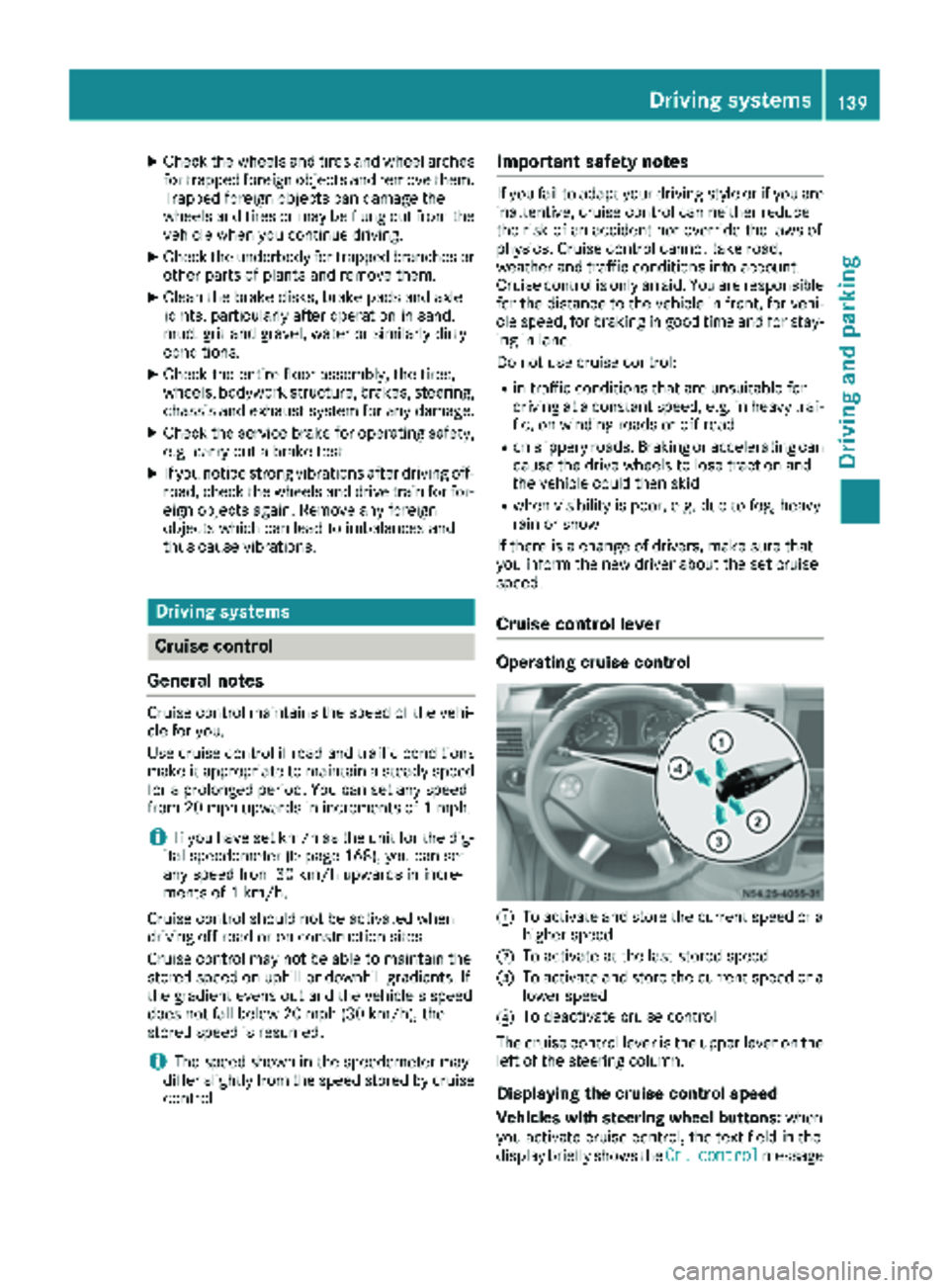
Operating cruise control
:To activate and store the current speed or a
higher speed
;To activate at the last stored speed
=To activate and store the current speed or a
lower speed
?To deactivate cruise control
The cruise control lever is the upper lever on the
left of the steering column.
Displaying the cruise control speed
Vehicles with steering wheel buttons: when
you activate cruise control, the text field in the
display briefly shows the Cr.
controlmessage
Driving systems139
Driving and parking
Z
Page 162 of 294
Useful information
This Operator's Manual describes all models as
well as standard and optional equipment of your
vehicle that were available at the time of going
to print. Country-specific variations are possi-
ble. Note that your vehicle may not be equipped
with all of the described functions. This also
applies to systems and functions relevant to
safety.
Read the information on qualified specialist
workshops (
Ypage 27).
Important safety notes
GWARNING
If you are driving and reach through the steer- ing wheel to operate the adjustment knob,
you could lose control of the vehicle. There is
a risk of an accident and injury.
Only operate the adjustment knobs when thevehicle is stationary. Do not reach through the
steering wheel when driving.
GWARNING
If you operate information systems and com-
munication equipment integrated in the vehi-
cle while driving, you will be distracted from
traffic conditions. You could also lose control
of the vehicle. There is a risk of an accident.
Only operate the equipment when the traffic
situation permits. If you are not sure that this
is possible, park the vehicle paying attention
to traffic conditions and operate the equip-
ment when the vehicle is stationary.
GWARNING
If the instrument cluster has failed or mal-
functioned, you may not recognize function
restrictions in systems relevant to safety. The
operating safety of your vehicle may be
impaired. There is a risk of an accident.
Drive on carefully. Have the vehicle checked
at a qualified specialist workshop immedi-
ately. You must observe the legal requirements for the
country in which you are currently driving when
operating the on-board computer.
The on-board computer display only shows mes-
sages and warnings from certain systems. You
should therefore make sure your vehicle is oper-
ating safely at all times. If the operating safety of
your vehicle is impaired, stop the vehicle as
soon as possible, paying attention to road and
traffic conditions. Then consult a qualified spe-
cialist workshop.
Instrument cluster
Overview
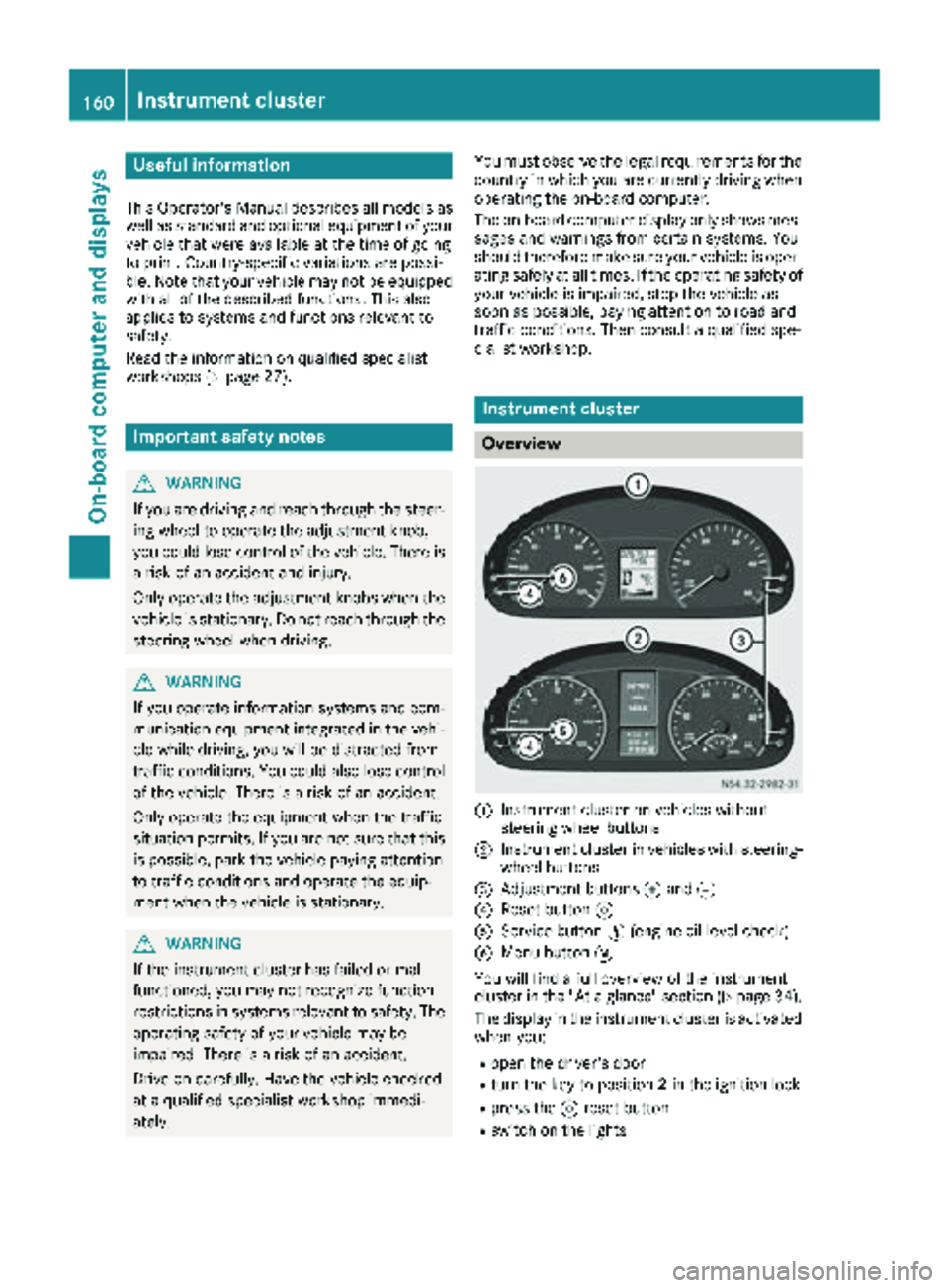
:Instrument cluster on vehicles without
steering wheel buttons
;Instrument cluster in vehicles with steering-
wheel buttons
=Adjustment buttons fand g
?Reset button 9
AService button Ë(engine oil level check)
BMenu button 4
You will find a full overview of the instrument
cluster in the "At a glance" section (
Ypage 34).
The display in the instrument cluster is activated when you:
Ropen the driver's door
Rturn the key to position 2in the ignition lock
Rpress the 9reset button
Rswitch on the lights
160Instrument cluster
On-board computer and displays
Page 165 of 294
Using thef,g,4or9 buttons you can
select the following functions:
RCalling up the service due date
(Ypage 227)
RChecking the oil level (Ypage 221)
RChecking the DEF level (Ypage 161)
RPreselecting/setting the auxiliary heating
switch-on time (Ypage 109)
RTire pressure monitor(Ypage 254)
RSetting the time (Ypage 163)
RActivating/deactivating Highbeam Assist
(Ypage 170)
RSetting the daytime running lamps
(Ypage 82)
Setting the time
XTurn the key to position 2in the ignition lock.
XPress the 4menu button repeatedly until the
hours figure flashes.
XPress the forg button to set the hour.
XPress the 9reset button.
The minute display flashes.
XPress the forg button to set the minute.
iIf you keep the forg button pressed, the
value will change continuously.
Activating/deactivating Highbeam
Assist
XTurn the key to position 2in the ignition lock.
XPress the 4menu button repeatedly until the
_ indicator lamp flashes and the onorOFFmessage appears in the display.
XUse the forg button to switch Highbeam
Assist on/off.
Switching the daytime running lamps
on/off
If you switch the daytime running lamps on, the
daytime running lamps will automatically light
up when the engine is running.
For safety reasons, it is only possible to change
this setting when the vehicle is stationary. The
factory setting is on
in countries in which day-
time running lamp mode or daytime running
lamps are mandatory.
XTurn the key to position 2in the ignition lock.
XPress the 4menu button repeatedly until the
L indicator lamp flashes and the onorOFFmessage appears in the display.
XPress the forg button to activate or deac-
tivate the daytime running lamps.
iUSA only:
If you turn the light switch to TorL,
the corresponding light switches on. If you
turn the light switch to Ã, the daytime
running lamps remain switched on.
Canada only:
If you turn the light switch to L, the low-
beam headlamps switch on. If you turn the
light switch to TorÃ, the daytime run-
ning lamps remain switched on.
On-board computer (vehicles with
steering wheel buttons)
Operating the on-board computer
Overview
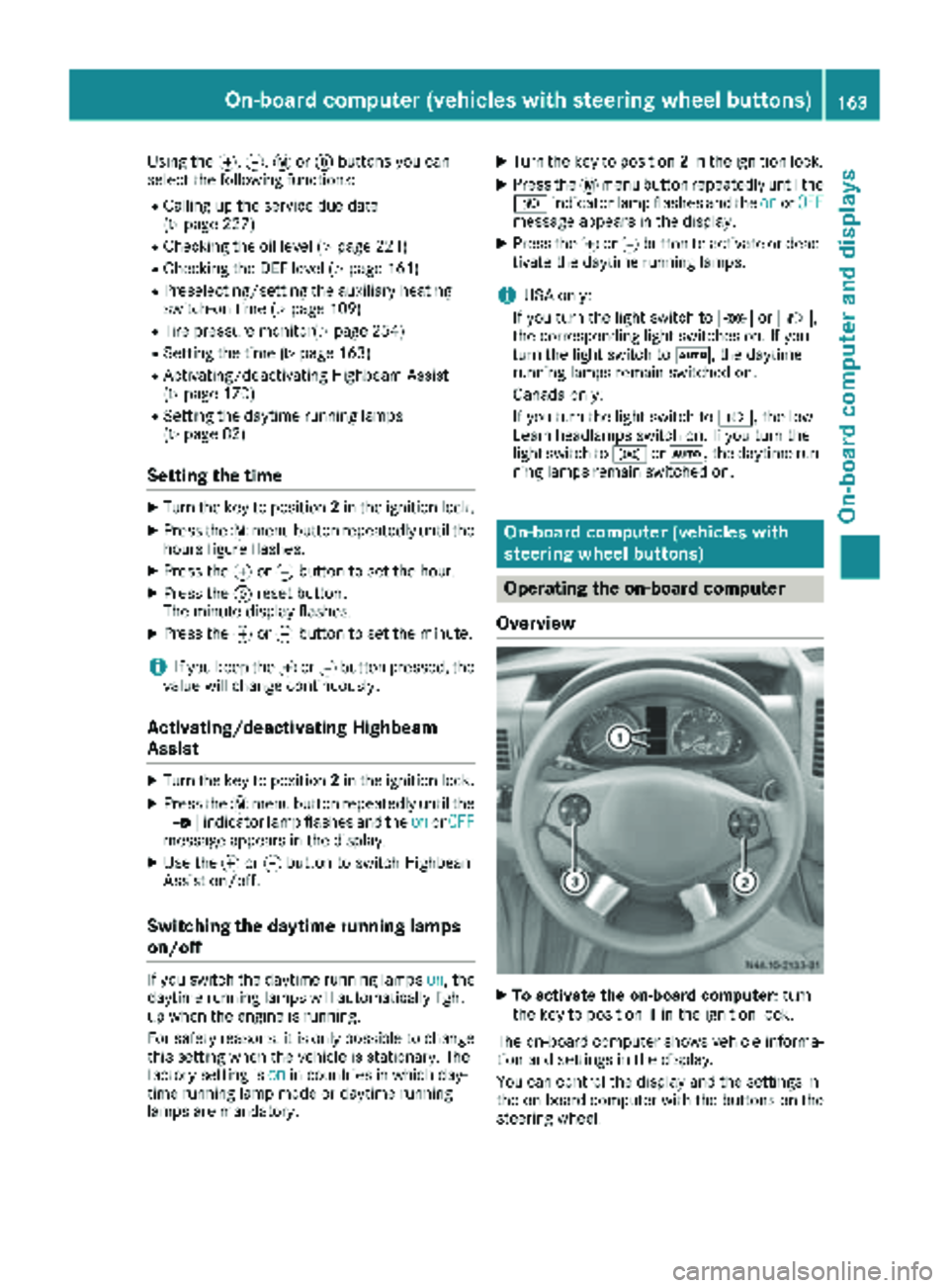
XTo activate the on-board computer: turn
the key to position 1in the ignition lock.
The on-board computer shows vehicle informa-
tion and settings in the display.
You can control the display and the settings in
the on-board computer with the buttons on the
steering wheel.
On-board computer (vehicles with steering wheel buttons)163
On-board computer and displays
Z
Page 167 of 294
Menu overview
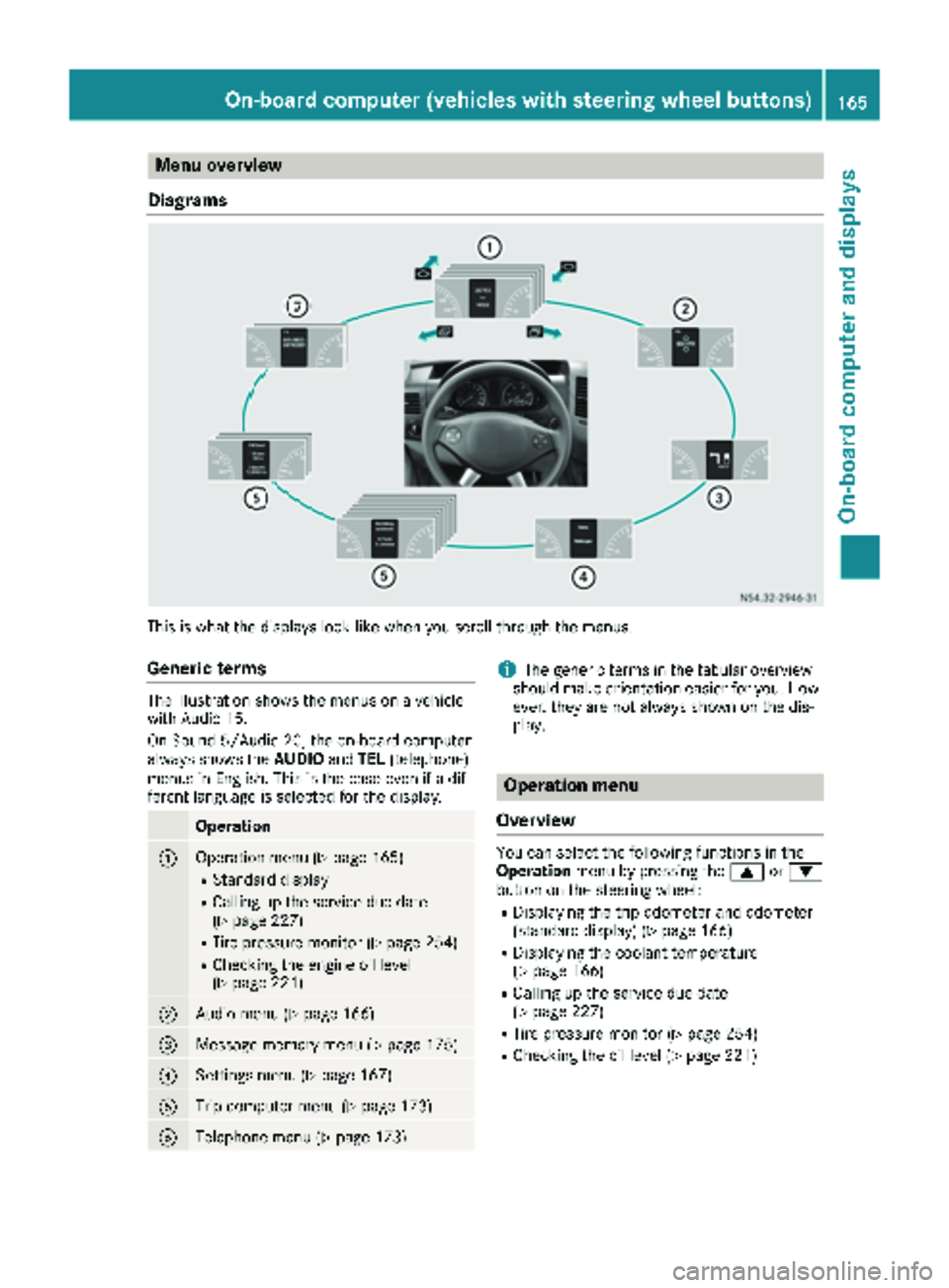
Diagrams
This is what the displays look like when you scroll through the menus.
Generic terms
The illustration shows the menus on a vehicle
with Audio 15.
On Sound 5/Audio 20, the on-board computer
always shows the AUDIOandTEL (telephone)
menus in English. This is the case even if a dif-
ferent language is selected for the display.
Operation
:Operation menu (Ypage 165)
RStandard display
RCalling up the service due date
(Ypage 227)
RTire pressure monitor (Ypage 254)
RChecking the engine oil level
(Ypage 221)
;Audio menu (Ypage 166)
=Message memory menu (Ypage 175)
?Settings menu (Ypage 167)
ATrip computer menu (Ypage 173)
BTelephone menu (Ypage 173)
iThe generic terms in the tabular overview
should make orientation easier for you. How-
ever, they are not always shown on the dis-
play.
Operation menu
Overview
You can select the following functions in the
Operation menu by pressing the 9or:
button on the steering wheel:
RDisplaying the trip odometer and odometer
(standard display) (Ypage 166)
RDisplaying the coolant temperature
(Ypage 166)
RCalling up the service due date
(Ypage 227)
RTire pressure monitor (Ypage 254)
RChecking the oil level (Ypage 221)
On-board computer (vehicles with steering wheel buttons)165
On-board computer and displays
Z
Page 204 of 294
ProblemPossible causes/consequences andMSolutions
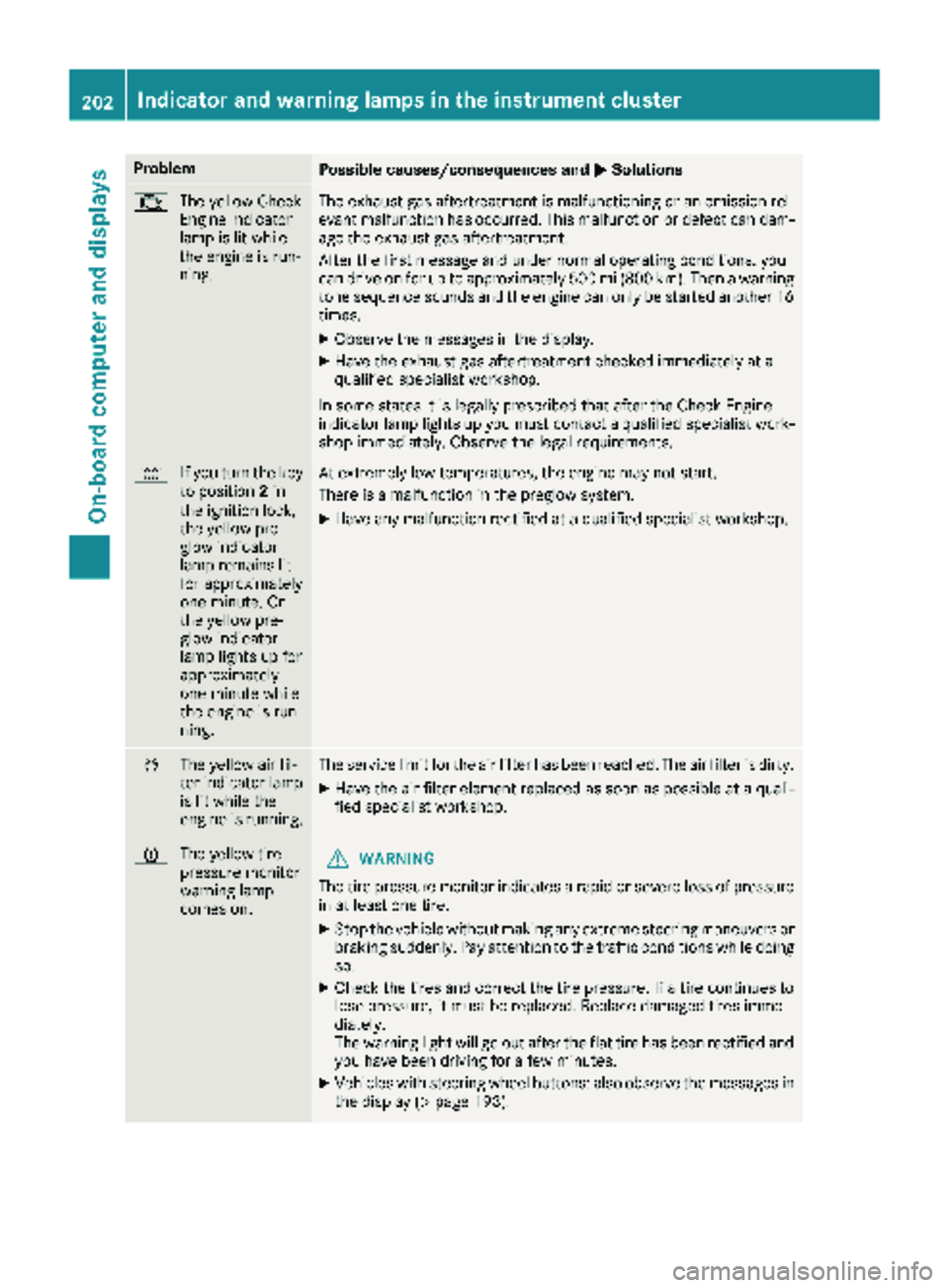
;
The yellow Check
Engine indicator
lamp is lit while
the engine is run-
ning.The exhaust gas aftertreatment is malfunctioning or an emission rel-
evant malfunction has occurred. This malfunction or defect can dam-
age the exhaust gas aftertreatment.
After the first message and under normal operating conditions, you
can drive on for up to approximately 500 mi (800 km). Then a warning
tone sequence sounds and the engine can only be started another 16
times.
XObserve the messages in the display.
XHave the exhaust gas aftertreatment checked immediately at a
qualified specialist workshop.
In some states it is legally prescribed that after the Check Engine
indicator lamp lights up you must contact a qualified specialist work-
shop immediately. Observe the legal requirements.
% If you turn the key
to position 2in
the ignition lock,
the yellow pre-
glow indicator
lamp remains lit
for approximately
one minute. Or
the yellow pre-
glow indicator
lamp lights up for
approximately
one minute while
the engine is run-
ning.At extremely low temperatures, the engine may not start.
There is a malfunction in the preglow system.
XHave any malfunction rectified at a qualified specialist workshop.
È The yellow air fil-
ter indicator lamp
is lit while the
engine is running.The service limit for the air filter has been reached. The air filter is dirty.
XHave the air filter element replaced as soon as possible at a quali-
fied specialist workshop.
hThe yellow tire
pressure monitor
warning lamp
comes on.GWARNING
The tire pressure monitor indicates a rapid or severe loss of pressure
in at least one tire.
XStop the vehicle without making any extreme steering maneuvers or
braking suddenly. Pay attention to the traffic conditions while doing
so.
XCheck the tires and correct the tire pressure. If a tire continues to
lose pressure, it must be replaced. Replace damaged tires imme-
diately.
The warning light will go out after the flat tire has been rectified and
you have been driving for a few minutes.
XVehicles with steering wheel buttons: also observe the messages in the display (Ypage 193).
202Indicator and warning lamps in the instrument cluster
On-board computer and displays