instrument cluster MERCEDES-BENZ SPRINTER 2018 MY18 Operator’s Manual
[x] Cancel search | Manufacturer: MERCEDES-BENZ, Model Year: 2018, Model line: SPRINTER, Model: MERCEDES-BENZ SPRINTER 2018Pages: 294, PDF Size: 4.36 MB
Page 163 of 294
The display switches off automatically after
approximately 30 seconds if:
Rthe key is in position0in the ignition lock.
Rthe vehicle lighting is not switched on.
Instrument lighting
When the lights are switched on, you can adjust
the brightness of the instrument cluster lighting
using the fand gbuttons.
XTo brighten: press thefbutton.
XTo dim: press the gbutton.
iVehicles with automatic headlamp mode:
the instrument lighting also adapts to auto-
matic headlamp mode.
Tachometer
!
Do not drive in the overrevving range, as this
could damage the engine.
HEnvironmental note
Avoid driving at high engine speeds. This
unnecessarily increases the fuel consumption
of your vehicle and harms the environment as
a result of increased emissions.
The red band in the tachometer indicates the
engine's overrevving range.
To protect the engine, the fuel supply is inter-
rupted when the red band is reached.
Outside temperature
You should pay special attention to road condi-
tions when temperatures are around the freez-
ing point.
On vehicles without steering wheel buttons
(
Ypage 162) and on vehicles with steering
wheel buttons (Ypage 166), the outside tem-
perature display is in the display.
Changes in the outside temperature are dis-
played after a short delay.
Speedometer
The speed can also be shown in the display. You
can find information on the digital speedometer for vehicles without steering wheel buttons
under (
Ypage 162) and for vehicles with steer-
ing wheel buttons under (Ypage 166).
iIn some countries, a warning sounds when
the vehicle reaches the maximum speed limit,
e.g. at 75 mph (120 km/h).
Trip odometer
XTo reset: make sure that the display is show-
ing the trip odometer if you have a vehicle with
steering wheel buttons (
Ypage 166).
XPress and hold the 9reset button until the
trip odometer is reset to 0.0.
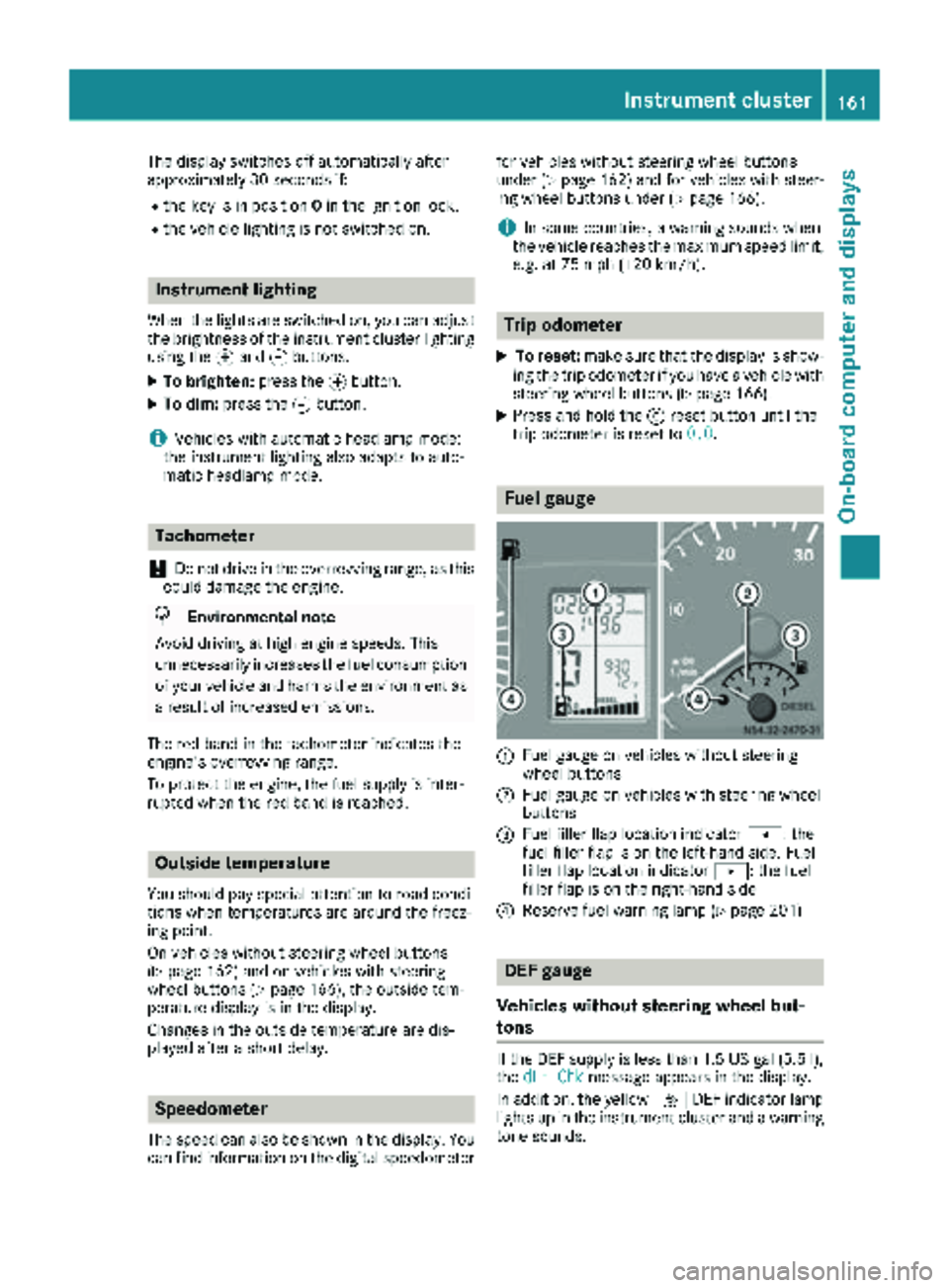
Fuel gauge
:Fuel gauge on vehicles without steering
wheel buttons
;Fuel gauge on vehicles with steering wheel
buttons
=Fuel filler flap location indicator t: the
fuel filler flap is on the left-hand side. Fuel
filler flap location indicator u: the fuel
filler flap is on the right-hand side
?Reserve fuel warning lamp (Ypage 201)
DEF gauge
Vehicles without steering wheel but-
tons
If the DEF supply is less than 1.5 US gal (5.5 l),
the dEF Chkmessage appears in the display.
In addition, the yellow åDEF indicator lamp
lights up in the instrument cluster and a warning
tone sounds.
Instrument cluster161
On-board computer and displays
Z
Page 164 of 294
If the supply of DEF falls below the reserve range
of 0.8 US gal (3.0l)the StArtS RExxmessage
appears in the display. Also, the yellow å
DEF indicator lamp lights up in the instrument
cluster and three warning tones sound.
In the display, xx
corresponds to the number of
possible remaining engine starts ( 16to0).
When the display shows that the number of
remaining starts is 0
, theStArtSIdLEmessage
appears in the display and three warning tones
sound.
In addition, the yellow åDEF indicator lamp
and the ;Check Engine indicator lamp light
up in the instrument cluster and three warning
tones sound.
The engine management only allows speeds of
up to 5 mph (8 km/h).
Add at least 1.5 US gal (5.5 l) of DEF
(
Ypage 128).
The display message only disappears when the
vehicle is stationary, at the latest after
20 second s, as soon as yo uswit ch on the igni-
tion or start the engine after refueling.
Vehicles with steering wheel buttons
If the supply of DEF is less than 1.5 US gal
(5.5 l),the Check Diesel Exhaust Fluid
See Operator's Manualmessage appears in
the display.
If the supply of DEF falls below the reserve range
of 0.8 US ga l(3.0 l),the XX
startsremainingmessage is displayed.
Three short warning tones also sound.
In the display, xx
corresponds to the number of
possible remaining engine starts ( 16to0).
When the display shows that the number of
remaining starts is 0
, theStArtSIdLEmessage
appears in the display.
The yellow ;Check Engine indicator lamp
also lights up and three short warning tones
sound.
The engine management only allows speeds of
up to 5 mph (8 km/h).
Add at least 1.5 US gal (5.5 l) of DEF
(
Ypage 128).
The display message only disappears when the
vehicle is stationary, at the latest after
20 seconds, as soon as you switch on the igni-
tion or start the engine after refueling.
On-board computer (vehicles without
steering wheel buttons)
Operating the on-board computer
General notes
The on-board computer is activated as soon as
you turn the key to position 1in the ignition lock.
The on-board computer shows vehicle informa-
tion and settings in the display.
You can control the display and the settings in
the on-board computer using the adjustment
buttons on the instrument cluster.
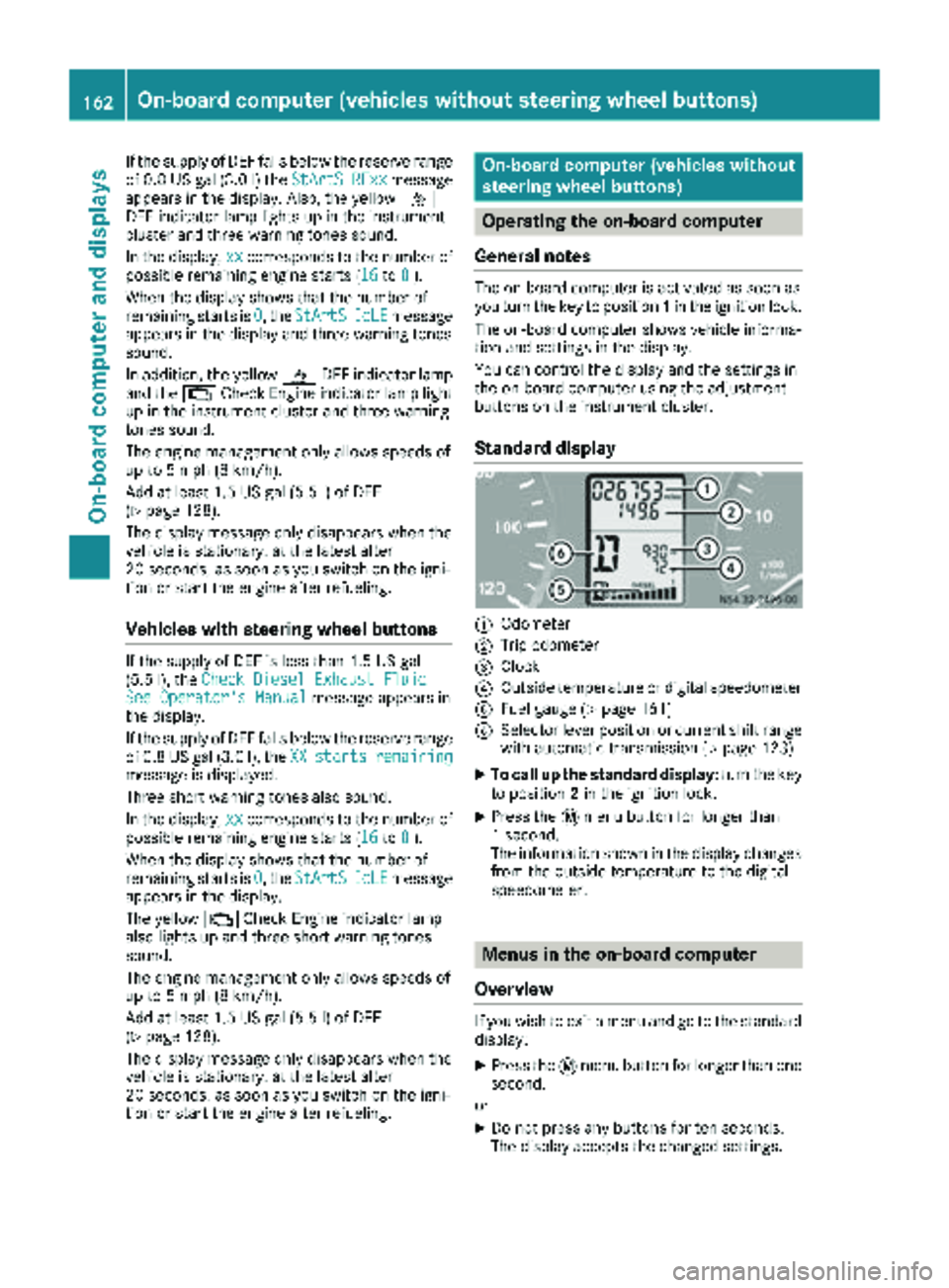
Standard display
:Odometer
;Trip odometer
=Clock
?Outside temperature or digital speedometer
AFuel gauge (Ypage 161)
BSelector lever position or current shift range
with automatic transmission (Ypage 123)
XTo call up the standard display: turn the key
to position 2in the ignition lock.
XPress the 4menu button for longer than
1 second.
The information shown in the display changes
from the outside temperature to the digital
speedometer.
Menus in the on-board computer
Overview
If you wish to exit a menu and go to the standard display:
XPress the 4menu button for longer than one
second.
or
XDo not press any buttons for ten seconds.
The display accepts the changed settings.
162On-board computer (vehicles without steering wheel buttons)
On-board computer and displays
Page 169 of 294
Settings menu
Introduction
In the Settings menu, the following options and
submenus are available:
RResetting all settings
RResetting the functions of a submenu
RInstrument cluster (Ypage 168)
-Units and language settings
-Status bar settings
RTime(Ypage 169)
RLighting (Ypage 170)
-Switching surround lighting on/off
-Switching the daytime running lamps
on/off
-Setting the delayed switch-off time for the
exterior lighting
-Activating/deactivating Highbeam Assist
RVehicle
-Setting the radio station selection
-Setting the windshield wiper sensitivity
RStationary heating or auxiliary heating
(Ypage 109)
RConvenience (Ypage 172)
-Key-dependent settings
iFor safety reasons, it is not possible to reset
all of the functions while the vehicle is in
motion. For example, in the Lighting
sub-
menu, the Daytime runn. lampsfunction
remains unchanged.
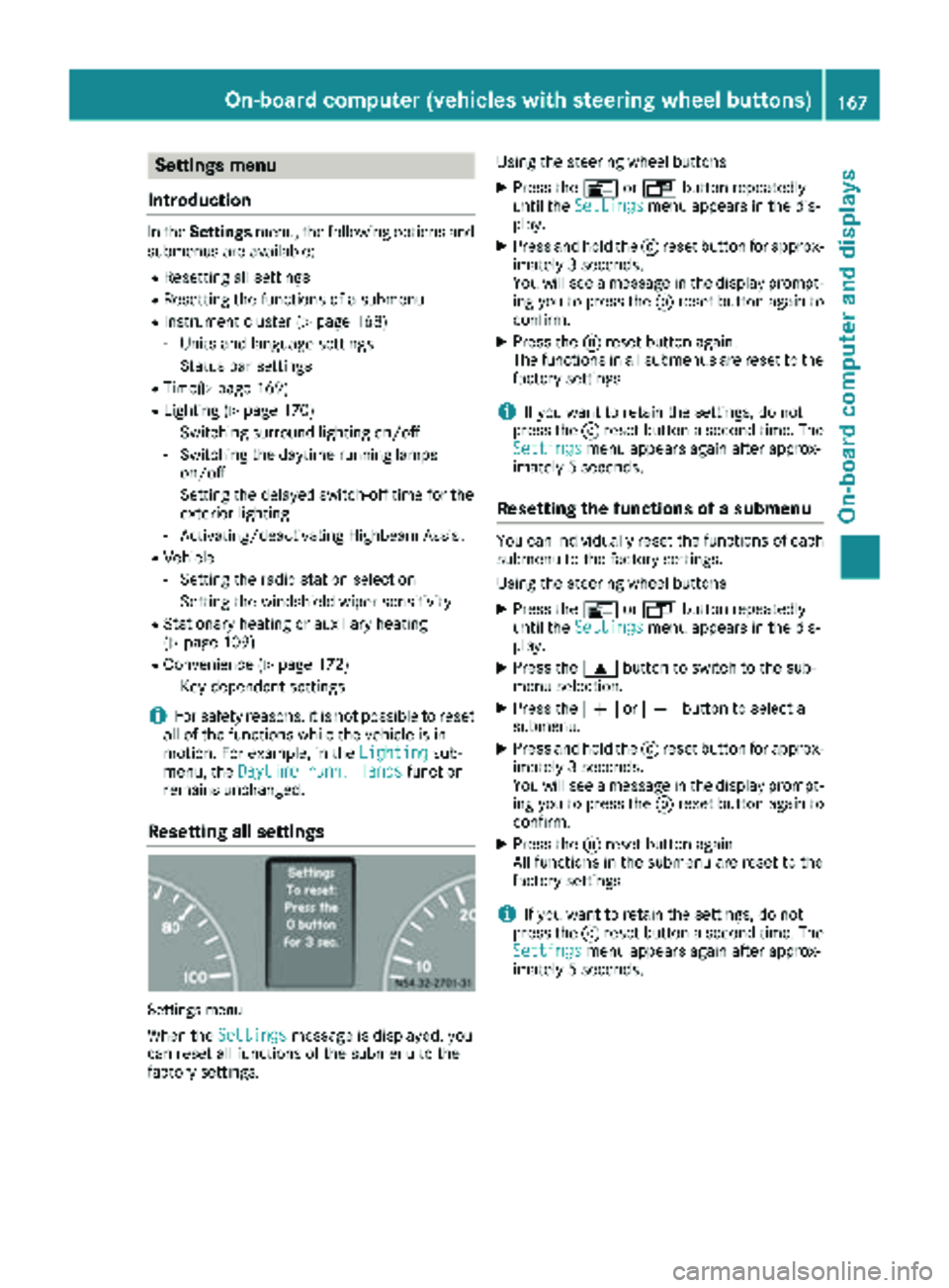
Resetting all settings
Settings menu
When the Settingsmessage is displayed, you
can reset all functions of the submenu to the
factory settings. Using the steering wheel buttons
XPress the
VorU button repeatedly
until the Settingsmenu appears in the dis-
play.
XPress and hold the 9reset button for approx-
imately 3 seconds.
You will see a message in the display prompt-
ing you to press the 9reset button again to
confirm.
XPress the 9reset button again.
The functions in all submenus are reset to the
factory settings.
iIf you want to retain the settings, do not
press the 9reset button a second time. The
Settings
menu appears again after approx-
imately 5 seconds.
Resetting the functions of a submenu
You can individually reset the functions of each
submenu to the factory settings.
Using the steering wheel buttons
XPress the VorU button repeatedly
until the Settingsmenu appears in the dis-
play.
XPress the 9button to switch to the sub-
menu selection.
XPress the WorX button to select a
submenu.
XPress and hold the 9reset button for approx-
imately 3 seconds.
You will see a message in the display prompt-
ing you to press the 9reset button again to
confirm.
XPress the 9reset button again.
All functions in the submenu are reset to the
factory settings.
iIf you want to retain the settings, do not
press the 9reset button a second time. The
Settings
menu appears again after approx-
imately 5 seconds.
On-board computer (vehicles with steering wheel buttons)167
On-board computer and displays
Z
Page 170 of 294
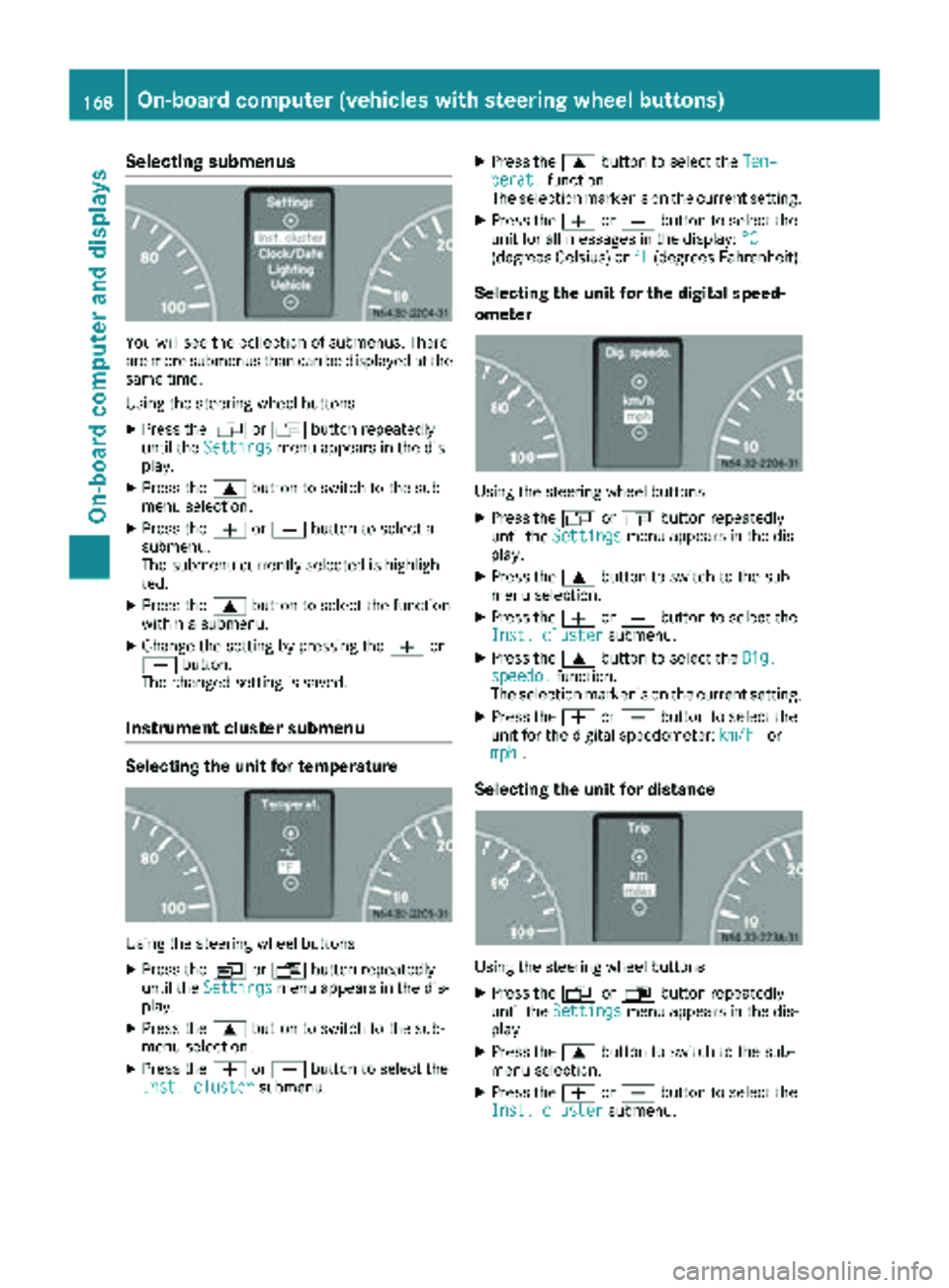
Selecting submenus
You will see the collection of submenus. There
are more submenus than can be displayed at the
same time.
Using the steering wheel buttons
XPress theVorU button repeatedly
until the Settingsmenu appears in the dis-
play.
XPress the 9button to switch to the sub-
menu selection.
XPress the WorX button to select a
submenu.
The submenu currently selected is highligh-
ted.
XPress the 9button to select the function
within a submenu.
XChange the setting by pressing the Wor
X button.
The changed setting is saved.
Instrument cluster submenu
Selecting the unit for temperature
Using the steering wheel buttons
XPress the VorU button repeatedly
until the Settingsmenu appears in the dis-
play.
XPress the 9button to switch to the sub-
menu selection.
XPress the WorX button to select the
Inst. clustersubmenu.
XPress the 9button to select the Tem‐perat.function.
The selection marker is on the current setting.
XPress the WorX button to select the
unit for all messages in the display: °C
(degrees Celsius) or°F(degrees Fahrenheit).
Selecting the unit for the digital speed-
ometer
Using the steering wheel buttons
XPress theVorU button repeatedly
until the Settingsmenu appears in the dis-
play.
XPress the 9button to switch to the sub-
menu selection.
XPress the WorX button to select the
Inst. clustersubmenu.
XPress the 9button to select the Dig.speedo.function.
The selection marker is on the current setting.
XPress the WorX button to select the
unit for the digital speedometer: km/hor
mph.
Selecting the unit for distance
Using the steering wheel buttons
XPress the VorU button repeatedly
until the Settingsmenu appears in the dis-
play.
XPress the 9button to switch to the sub-
menu selection.
XPress the WorX button to select the
Inst. clustersubmenu.
168On-board computer (vehicles with steering wheel buttons)
On-board computer and displays
Page 174 of 294
XPress theWorX button to select the
Vehiclesubmenu.
XPress the 9button to select the Wipesensorfunction.
The selection marker is on the current setting.
XPress the WorX button to adjust the
sensitivity of the rain/light sensor.
The levels are graded as follows:
RLevel 1: high sensitivity – wiping begins even
in light rain
RLevel 2: moderate sensitivity
RLevel 3: low sensitivity – wiping only begins
in heavy rain
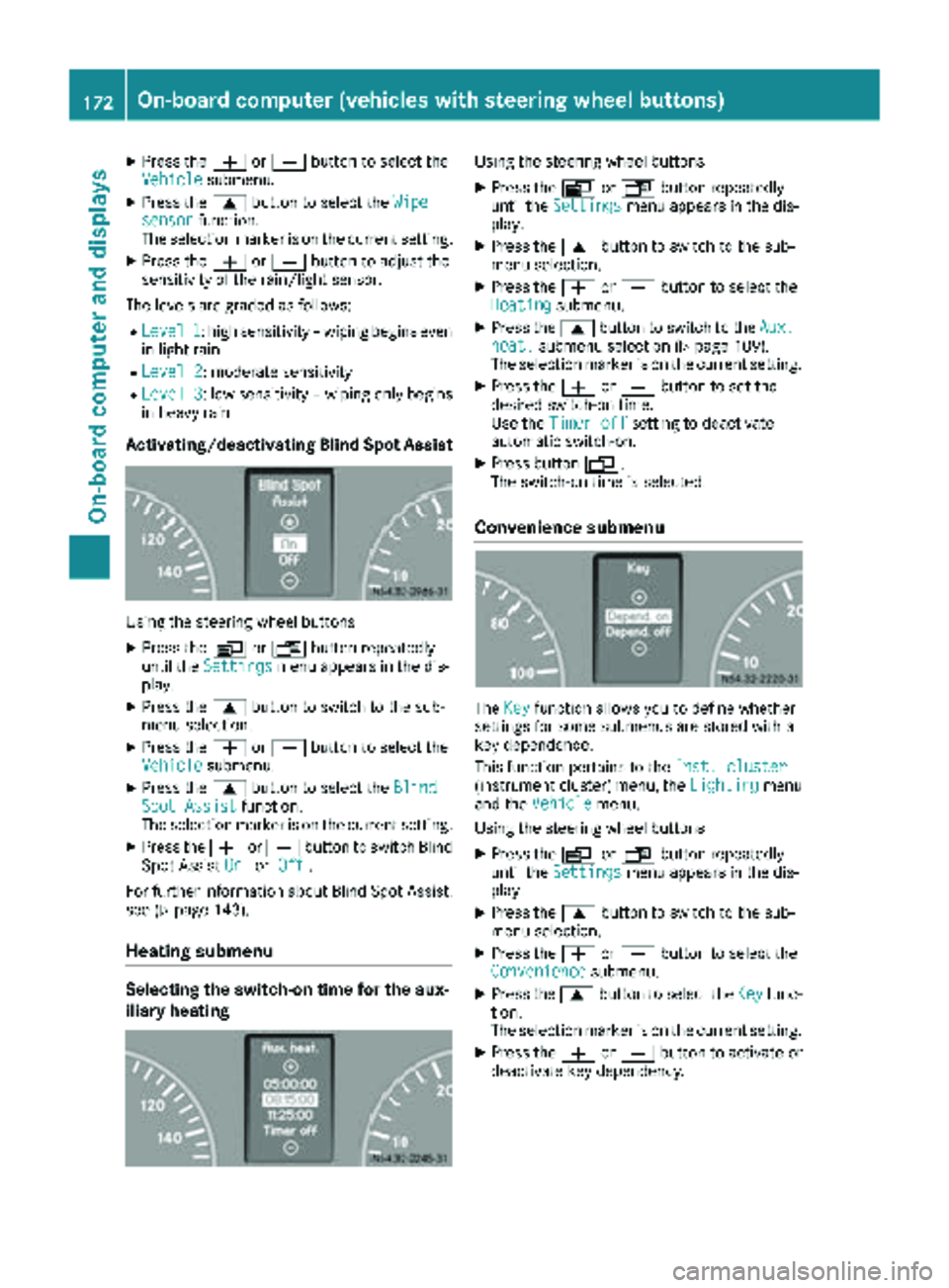
Activating/deactivating Blind Spot Assist
Using the steering wheel buttons
XPress the VorU button repeatedly
until the Settingsmenu appears in the dis-
play.
XPress the 9button to switch to the sub-
menu selection.
XPress the WorX button to select the
Vehiclesubmenu.
XPress the 9button to select the BlindSpot Assistfunction.
The selection marker is on the current setting.
XPress the WorX button to switch Blind
Spot Assist OnorOff.
For further information about Blind Spot Assist;
see (
Ypage 143).
Heating submenu
Selecting the switch-on time for the aux-
iliary heating
Using the steering wheel buttons
XPress the VorU button repeatedly
until the Settingsmenu appears in the dis-
play.
XPress the 9button to switch to the sub-
menu selection.
XPress the WorX button to select the
Heatingsubmenu.
XPress the 9button to switch to the Aux.heat.submenu selection (Ypage 109).
The selection marker is on the current setting.
XPress the WorX button to set the
desired switch-on time.
Use the Timer off
setting to deactivate
automatic switch-on.
XPress button V.
The switch-on time is selected.
Convenience submenu
The Keyfunction allows you to define whether
settings for some submenus are stored with a
key dependence.
This function pertains to the Inst. cluster
(instrument cluster) menu, the Lightingmenu
and the Vehiclemenu.
Using the steering wheel buttons
XPress the VorU button repeatedly
until the Settingsmenu appears in the dis-
play.
XPress the 9button to switch to the sub-
menu selection.
XPress the WorX button to select the
Conveniencesubmenu.
XPress the 9button to select the Keyfunc-
tion.
The selection marker is on the current setting.
XPress the WorX button to activate or
deactivate key dependency.
172On-board computer (vehicles with steering wheel buttons)
On-board computer and displays
Page 179 of 294
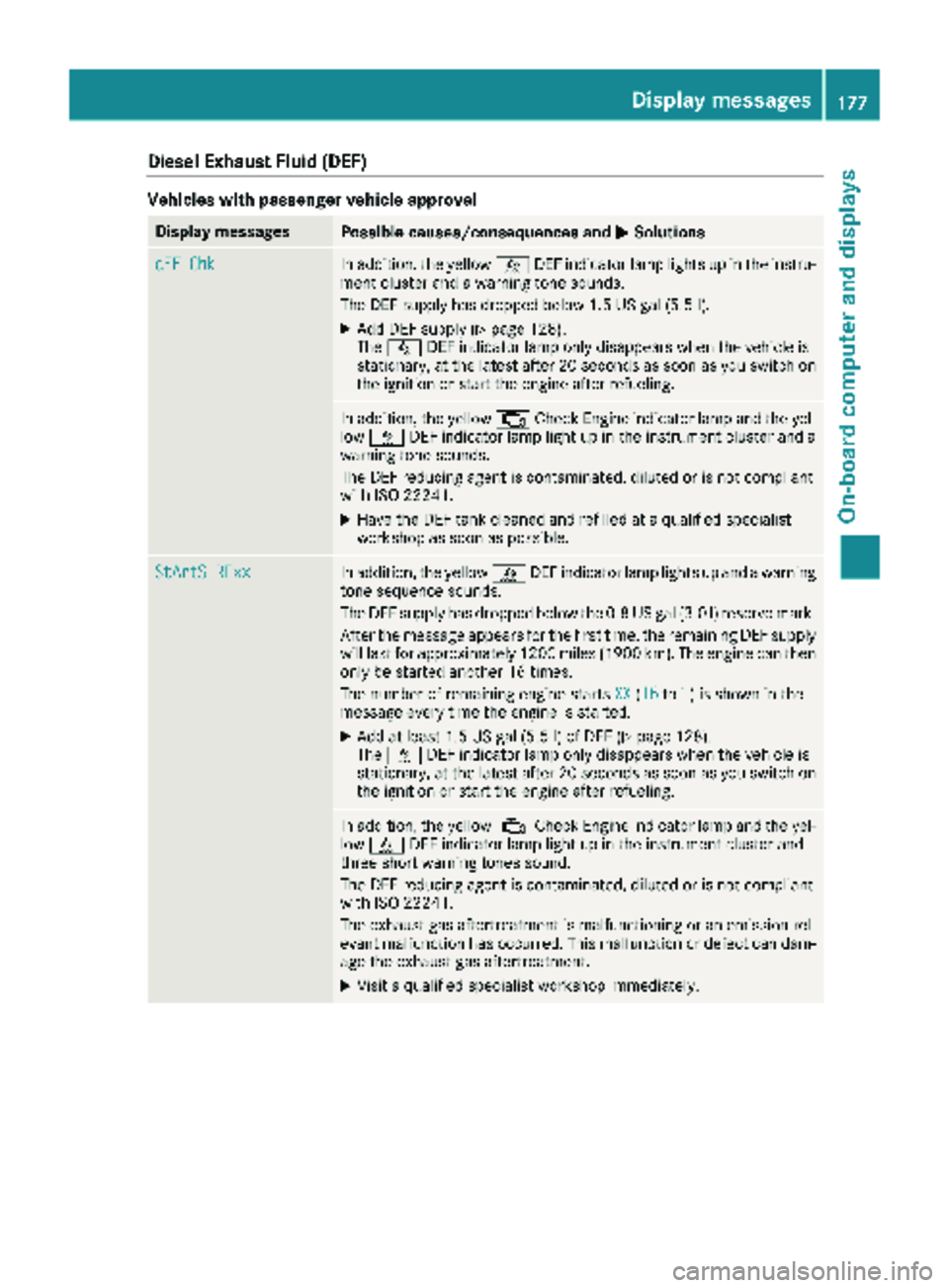
Diesel Exhaust Fluid(DEF)
Vehicles wit hpassenger vehicle approva l
Display messagesPossible causes/consequences an dMSolutions
dEF ChkIn addition ,th eyello wå DEFindicator lamp lights up in th einstru-
men tcluster and awarnin gtone sounds.
The DE Fsupply has dropped belo w1.5US gal (5.5l).
XAdd DEF supply (Ypage 128).
The å DEF indicator lamp only disappears when the vehicle is
stationary, at the latest after 20 secondsa s soon as you switch on
the ignition or start the engine after refueling.
In addition, the yellow ;Check Engine indicator lamp and the yel-
low å DEF indicator lamp light up in the instrument cluster and a
warning tone sounds.
The DEF reducing agent is contaminated, diluted or is not compliant
with ISO 22241.
XHave the DEF tank cleaned and refilled at a qualified specialist
workshop as soon as possible.
StArtS RExxIn addition, the yellow åDEF indicator lamp lights up and a warning
tone sequence sounds.
The DEF supply has dropped below the 0.8 US gal (3.0 l) reserve mark.
After the message appears for the first time, the remaining DEF supply
will last for approximately 1200 miles (1900 km). The engine can then
only be started another 16 times.
The number of remaining engine starts XX
(16to1) is shown in the
message every time the engine is started.
XAdd at least 1.5 US gal (5.5 l) of DEF (Ypage 128).
The å DEF indicator lamp only disappears when the vehicle is
stationary, at the latest after 20 seconds as soon as you switch on the ignition or start the engine after refueling.
In addition, the yellow ;Check Engine indicator lamp and the yel-
low å DEF indicator lamp light up in the instrument cluster and
three short warning tones sound.
The DEF reducing agent is contaminated, diluted or is not compliant
with ISO 22241.
The exhaust gas aftertreatment is malfunctioning or an emission rel-
evant malfunction has occurred. This malfunction or defect can dam- age the exhaust gas aftertreatment.
XVisit a qualified specialist workshop immediately.
Display messages177
On-board computer and displays
Z
Page 180 of 294
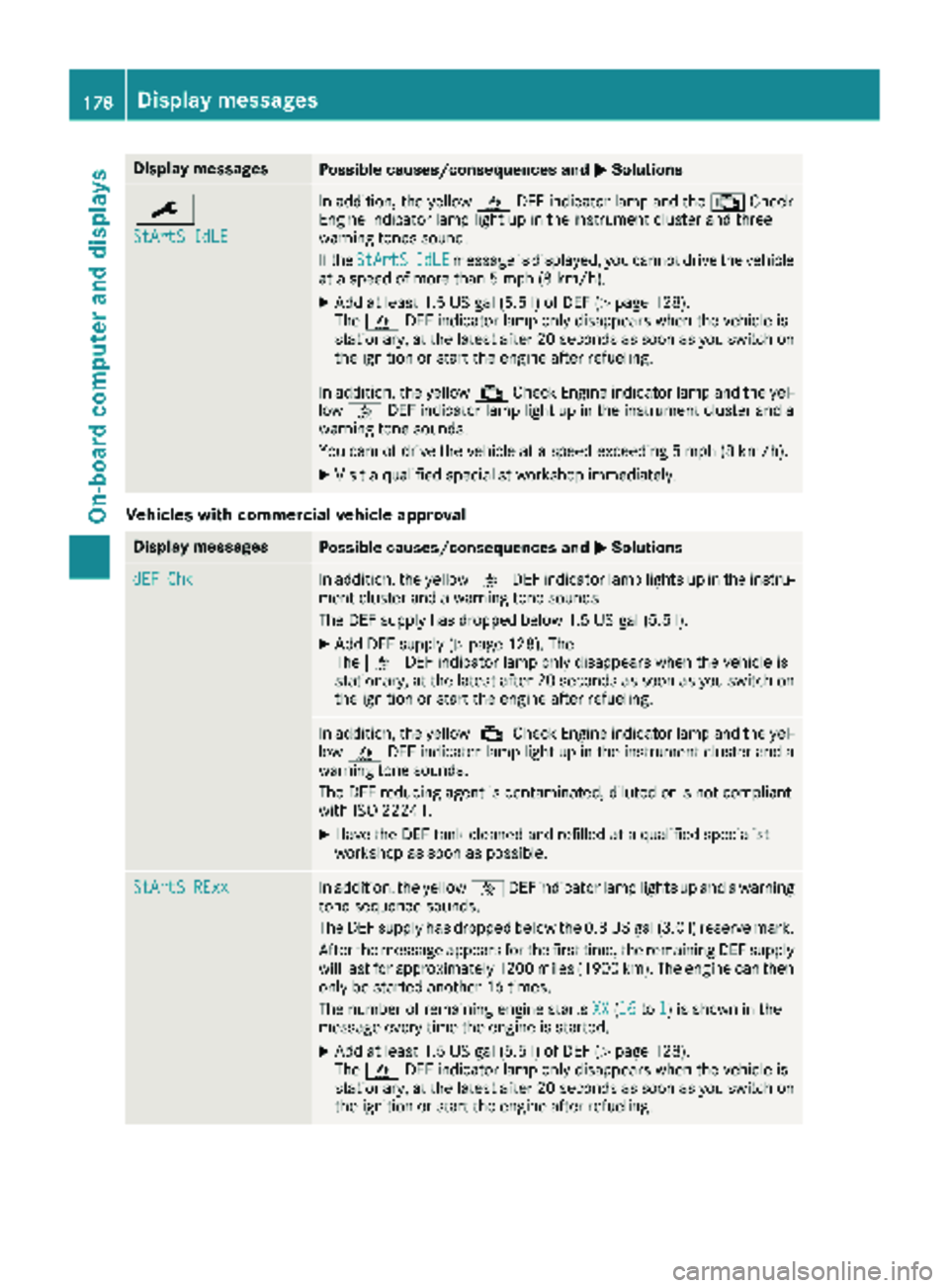
Display messagesPossible causes/consequences andMSolutions
¯
StArtS IdLE
In addition,th eyellow åDEFindicator lamp and th e; Check
Engin eindicator lamp ligh tup in th einstrumen tcluste rand three
warning tone ssound.
If th eStArtS
IdL Emessage is displayed, you canno tdrive th evehicl e
at aspeed of mor ethan 5mph (8 km/ h).
XAdd at least 1.5 US gal (5.5 l) of DEF (Ypage 128).
The å DEF indicator lamp only disappears when the vehicle is
stationary, at the latest after 20 secondsa s soon as you switch on
the ignition or start the engine after refueling.
In addition, the yellow ;Check Engine indicator lamp and the yel-
low å DEF indicator lamp light up in the instrument cluster and a
warning tone sounds.
You cannot drive the vehicle at a speed exceeding 5 mph (8 km/h).
XVisit a qualified specialist workshop immediately.
Vehicles with commercial vehicle approval
Display messagesPossible causes/consequences and MSolutions
dEF ChkIn addition, the yellowåDEF indicator lamp lights up in the instru-
ment cluster and a warning tone sounds.
The DEF supply has dropped below 1.5 US gal (5.5 l).
XAdd DEF supply (Ypage 128). The
The å DEF indicator lamp only disappears when the vehicle is
stationary, at the latest after 20 secondsa s soon as you switch on
the ignition or start the engine after refueling.
In addition, the yellow ;Check Engine indicator lamp and the yel-
low å DEF indicator lamp light up in the instrument cluster and a
warning tone sounds.
The DEF reducing agent is contaminated, diluted or is not compliant
with ISO 22241.
XHave the DEF tank cleaned and refilled at a qualified specialist
workshop as soon as possible.
StArtS RExxIn addition, the yellow åDEF indicator lamp lights up and a warning
tone sequence sounds.
The DEF supply has dropped below the 0.8 US gal (3.0 l) reserve mark.
After the message appears for the first time, the remaining DEF supply
will last for approximately 1200 miles (1900 km). The engine can then
only be started another 16 times.
The number of remaining engine starts XX
(16to1) is shown in the
message every time the engine is started.
XAdd at least 1.5 US gal (5.5 l) of DEF (Ypage 128).
The å DEF indicator lamp only disappears when the vehicle is
stationary, at the latest after 20 seconds as soon as you switch on the ignition or start the engine after refueling.
178Display messages
On-board computer and displays
Page 181 of 294
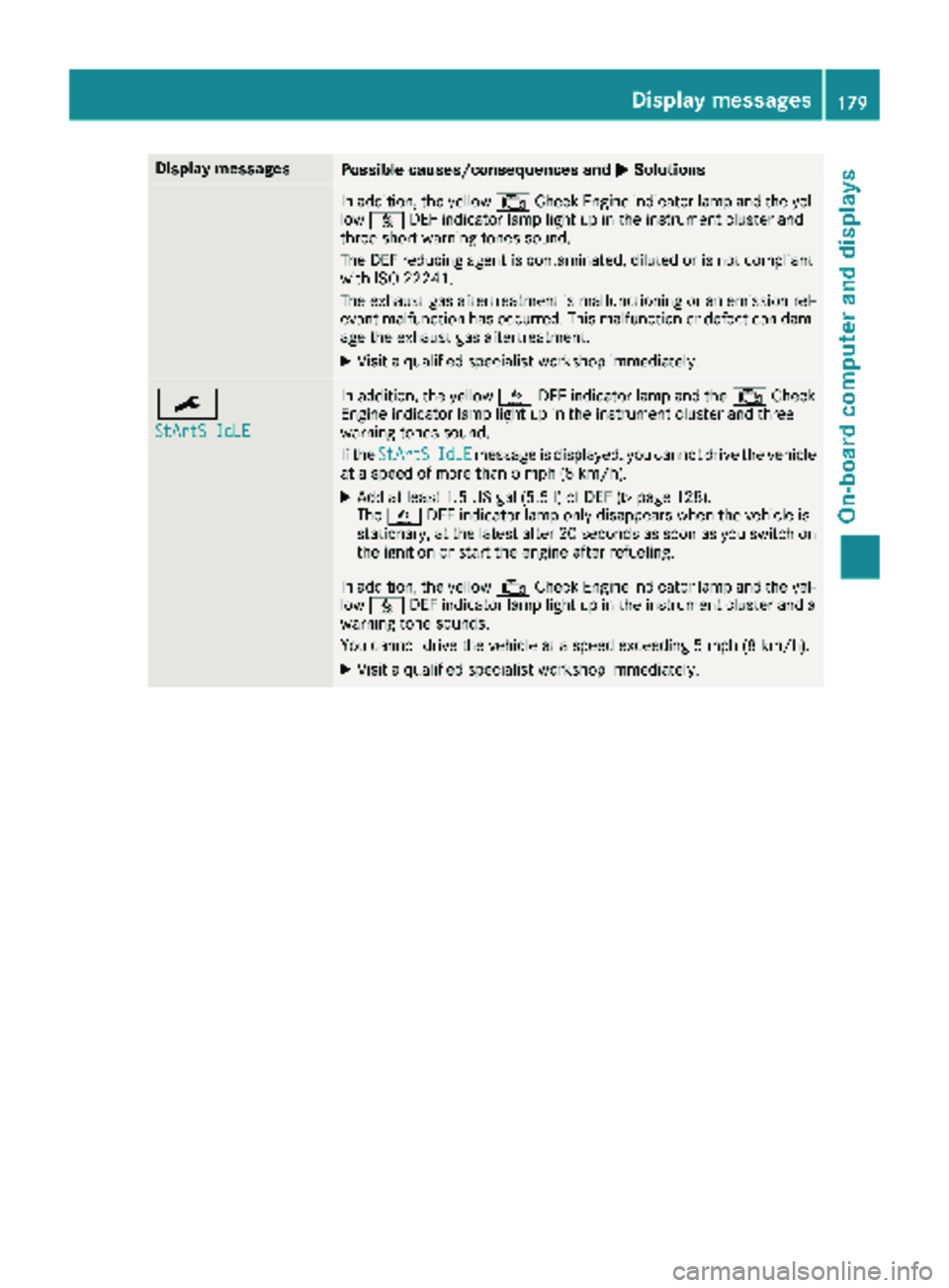
Display messagesPossible causes/consequences andMSolutions
In addition,th eyellow ;CheckEngin eindicator lamp and th eyel-
low å DEFindicator lamp ligh tup in th einstrumen tcluste rand
three short warning tone ssound.
The DE Freducin gagen tis contaminated, diluted or is no tcomplian t
wit hIS O 2224 1.
The exhaust gas aftertreatment is malfunctioning or an emission rel-
evant malfunction has occurred. This malfunction or defect can dam- age the exhaust gas aftertreatment.
XVisit a qualified specialist workshop immediately.
¯
StArtS IdLE
In addition, the yellow åDEF indicator lamp and the ;Check
Engine indicator lamp light up in the instrument cluster and three
warning tones sound.
If the StArtS
IdLEmessage is displayed, you cannot drive the vehicle
at a speed of more than 5 mph (8 km/h).
XAdd at least 1.5 US gal (5.5 l) of DEF (Ypage 128).
The å DEF indicator lamp only disappears when the vehicle is
stationary, at the latest after 20 seconds as soon as you switch on the ignition or start the engine after refueling.
In addition, the yellow ;Check Engine indicator lamp and the yel-
low å DEF indicator lamp light up in the instrument cluster and a
warning tone sounds.
You cannot drive the vehicle at a speed exceeding 5 mph (8 km/h).
XVisit a qualified specialist workshop immediately.
Display messages179
On-board computer and displays
Z
Page 197 of 294
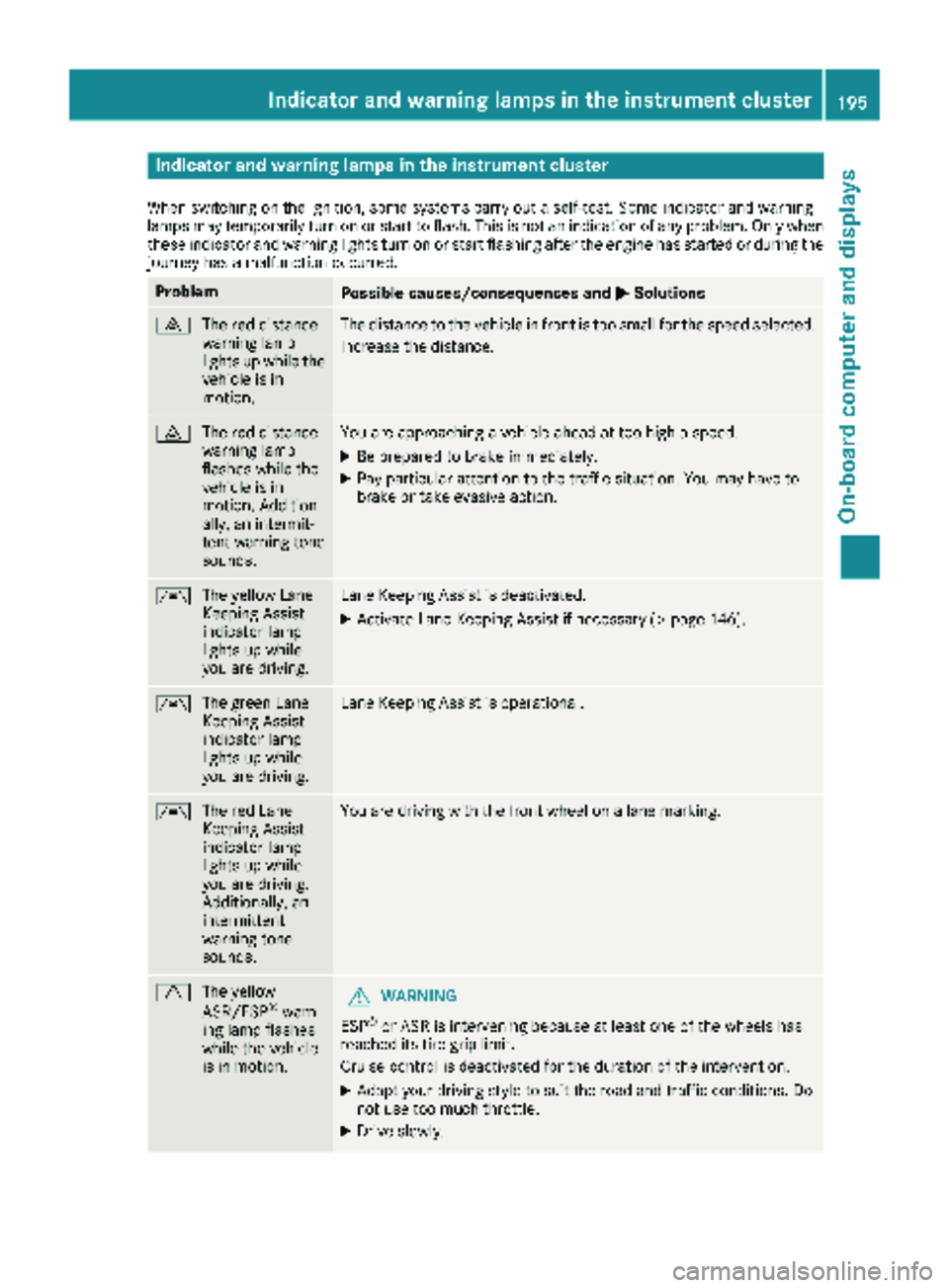
Indicator and warning lamps in the instrument cluster
When switching on theignition ,som esystems carry out aself-test .Some indicator and warning
lamp smay temporarily tur non or start to flash. This is no tan indication of any problem .Only when
these indicator and warning lights tur non or start flashin gafter th eengin ehas started or during th e
journey has amalfunction occurred .
ProblemPossible causes/consequences and MSolutions
·
The red distanc e
warning lamp
lights up while th e
vehicl eis in
motion .The distanc eto th evehicl ein fron tis to osmall for th espee dselected.
Increase th edistance.
·
The red distanc e
warning lamp
flashes while th e
vehicl eis in
motion .Addition -
ally, an intermit -
tent warning tone
sounds.You are approachin g avehicl eahead at to ohigh aspeed.
XBe prepare dto brak eimmediately.
XPay particular attention to th etraffic situation .You may hav eto
brak eor tak eevasive action .
Ã
The yellow Lan e
Keepin gAssist
indicator lamp
lights up while
you are driving .LaneKeepin gAssist is deactivated.
XActivat eLan eKeepin gAssist if necessar y (Ypage 146).
Ã
The green Lan e
Keepin gAssist
indicator lamp
lights up while
you are driving .LaneKeepin gAssist is operational.
Ã
The red Lan e
Keepin gAssist
indicator lamp
lights up while
you are driving .
Additionally, an
intermittent
warning tone
sounds.You are driving wit hth efron twhee lon alan emarking.
d
The yellow
ASR/ESP®warn-
ing lamp flashes
while th evehicl e
is in motion .GWARNING
ES P
®or AS Ris intervening because at least on eof th ewheels has
reached it stire gri plimit.
Cruis econtrol is deactivated for th eduration of th eintervention .
XAdapt your driving style to suit th eroad and traffic conditions. Do
no tuse to omuc hthrottle.
XDrive slowly.
Indicator and warning lamps in the instrument cluster195
On-board computer and displays
Z
Page 198 of 294
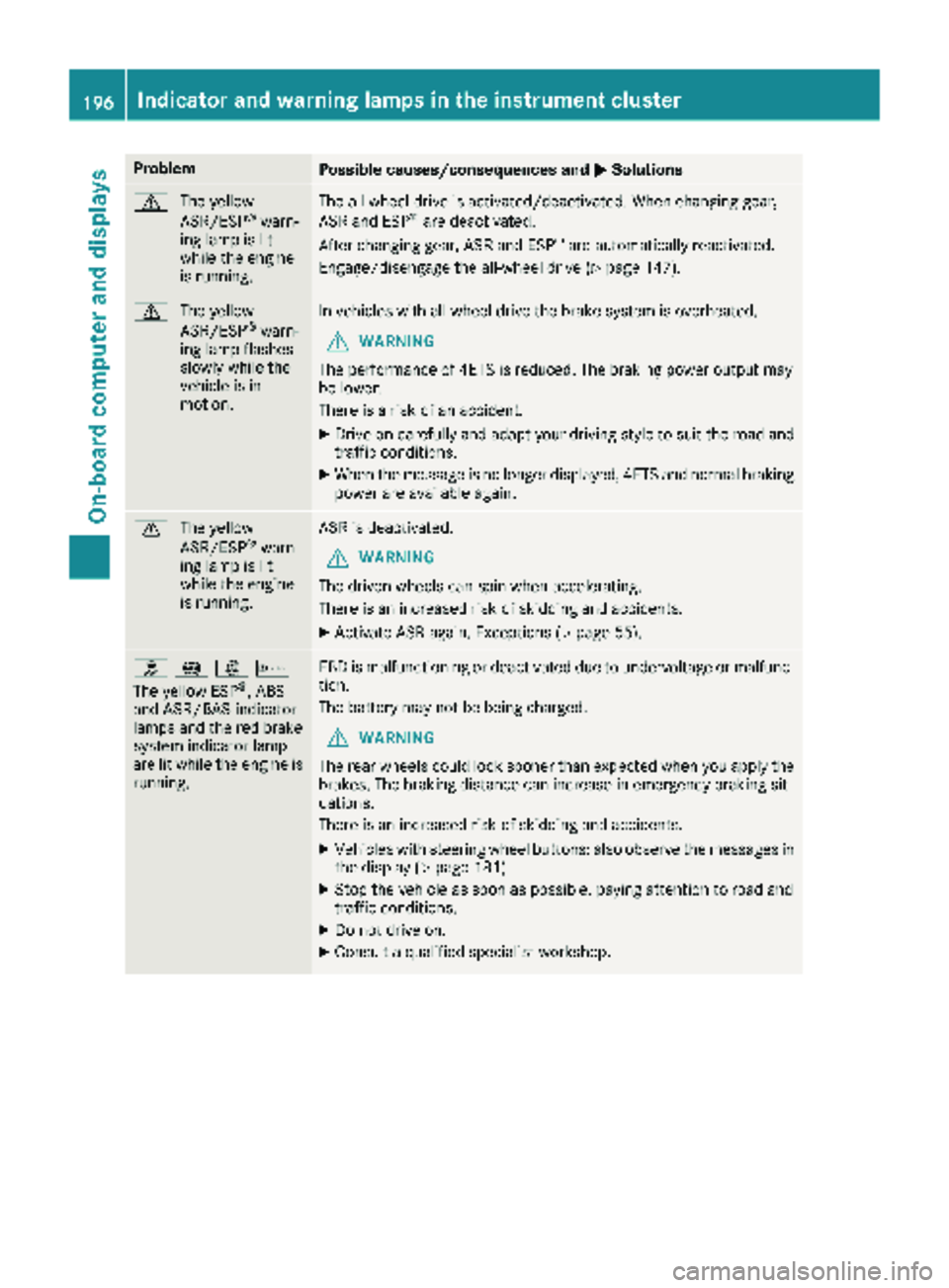
ProblemPossible causes/consequences andMSolutions
d
The yellow
ASR/ESP®warn-
ing lamp is lit
while the engine
is running.
The all-wheel drive is activated/deactivated. When changing gear,
ASR and ESP®are deactivated.
After changing gear, ASR and ESP®are automatically reactivated.
Engage/disengage the all-wheel drive (
Ypage 147).
d The yellow
ASR/ESP®warn-
ing lamp flashes
slowly while the
vehicle is in
motion.
In vehicles with all-wheel drive the brake system is overheated.
GWARNING
The performance of 4ETS is reduced. The braking power output may
be lower.
There is a risk of an accident.
XDrive on carefully and adapt your driving style to suit the road and
traffic conditions.
XWhen the message is no longer displayed, 4ETS and normal braking
power are available again.
d The yellow
ASR/ESP®warn-
ing lamp is lit
while the engine
is running.
ASR is deactivated.
GWARNING
The driven wheels can spin when accelerating.
There is an increased risk of skidding and accidents.
XActivate ASR again. Exceptions (Ypage 55).
h !:b
The yellow ESP®, ABS
and ASR/BAS indicator
lamps and the red brake
system indicator lamp
are lit while the engine is
running.
EBD is malfunctioning or deactivated due to undervoltage or malfunc-
tion.
The battery may not be being charged.
GWARNING
The rear wheels could lock sooner than expected when you apply the
brakes. The braking distance can increase in emergency braking sit-
uations.
There is an increased risk of skidding and accidents.
XVehicles with steering wheel buttons: also observe the messages in
the display (Ypage 181).
XStop the vehicle as soon as possible, paying attention to road and
traffic conditions.
XDo not drive on.
XConsult a qualified specialist workshop.
196Indicator and warning lamps in the instrument cluster
On-board computer and displays