instrument cluster MERCEDES-BENZ SPRINTER 2018 MY18 Operator’s Manual
[x] Cancel search | Manufacturer: MERCEDES-BENZ, Model Year: 2018, Model line: SPRINTER, Model: MERCEDES-BENZ SPRINTER 2018Pages: 294, PDF Size: 4.36 MB
Page 228 of 294
If the: indicator lamp in the instrument
cluster goes on, drain the fuel filter with the
water separator immediately.
iWe recommend that you have this mainte-
nance work carried out at a qualified special-
ist workshop.
XPark the vehicle safely and secure it from roll-
ing away.
XSwitch off the auxiliary heating system .
XSwitch off the engine.
XOpen the hood (Ypage 219).
XPlace a suitable receptacle under drain
hose :.
XTurn the key to position 2in the ignition lock.
XOpen drain plug ;immediately until the
water/fuel mixture flows out of drain hose :.
XScrew in drain plug;as soon as approx-
imately 0.2 qt (0.2 l)of the water/fuel mixture
has been collected.
The electrical fuel pump automatically halts
the flow of the water/fuel mixture after
30 seconds.
XAfter draining, turn the key back to position 0
in the ignition lock.
XDispose of the collected water/fuel mixture
in an environmentally responsible manner,
e.g. at a qualified specialist workshop.
XCheck drain plug ;. The drain plug must be
closed.
When the engine is running and drain hose ;
is open, fuel is lost through drain hose :.
XClose the hood (Ypage 220).
If the : indicator lamp does not go out after
draining:
XDrain the fuel filter again.
XIf the : indicator lamp does not go out
after draining for the second time, have the
cause checked immediately at a qualified spe-
cialist workshop.
Vehicle interior
Air filter for the rear-compartment air
conditioning
!
Regularly check the air filters for visible dirt.
Clean or replace a dirty filter mat. The dirt may
otherwise lead to damage to the air-condi-
tioning system.
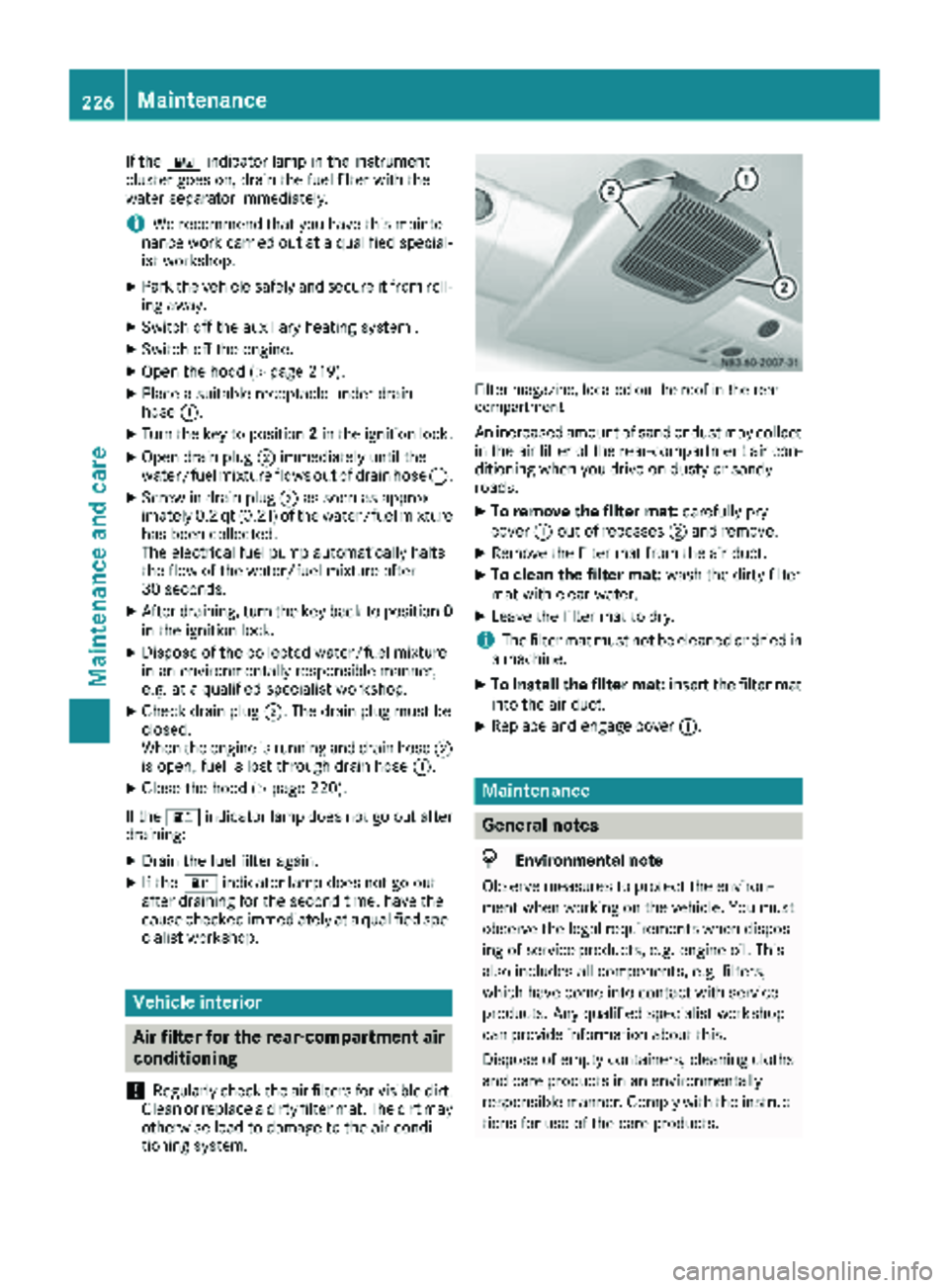
Filter magazine, located on the roof in the rear
compartment
An increased amount of sand or dust may collect in the air filter of the rear-compartment air con-
ditioning when you drive on dusty or sandy
roads.
XTo remove the filter mat: carefully pry
cover :out of recesses ;and remove.
XRemove the filter mat from the air duct.
XTo clean the filter mat: wash the dirty filter
mat with clear water.
XLeave the filter mat to dry.
iThe filter mat must not be cleaned or dried in
a machine.
XTo install the filter mat: insert the filter mat
into the air duct.
XReplace and engage cover :.
Maintenance
General notes
HEnvironmental note
Observe measures to protect the environ-
ment when working on the vehicle. You must
observe the legal requirements when dispos-
ing of service products, e.g. engine oil. This
also includes all components, e.g. filters,
which have come into contact with service
products. Any qualified specialist workshop
can provide information about this.
Dispose of empty containers, cleaning cloths
and care products in an environmentally
responsible manner. Comply with the instruc-
tions for use of the care products.
226Maintenance
Maintenance and care
Page 229 of 294
Do not run the engine for longer than neces-
sary when the vehicle is stationary.
Before having maintenance and repairs per-
formed, it is essential to read the materials rela-
ted to the maintenance and repairs:
Rthe applicable sections of the technical doc-
umentation, e.g. the Operator's Manual and
workshop information.
Rregulations such as industrial safety regula-
tions and accident prevention regulations.
While working under the vehicle, you must
secure the vehicle on jack stands with sufficient load capacity.
Never use the jack as a substitute. The vehicle's
jack is intended only to raise the vehicle for a
short time when changing a wheel. It is not
suited for performing maintenance work under
the vehicle.
Please also refer to the notes about qualified
specialist workshops (
Ypage 27).
The scope and regularity of the inspection and
maintenance work primarily depend on the
often diverse operating conditions. Specialist
knowledge beyond the scope of this Operator's
Manual is required when carrying out testing
and maintenance work. This work should only be
carried out by trained staff.
The vehicle Maintenance Booklet describes the scope and fre que
ncy of maintenance work and
contains additional notes on the New Vehicle
Limited Warranty and on service products.
Maintenance services must be carried out in
accordance with the provisions and recommen-
dations in the Maintenance Booklet. Not doing
so could void the warranty claim and lead to
refusal of goodwill gestures after the manufac-
turer has submitted a damage report.
iObserve the notes on genuine Sprinter parts
(Ypage 29).
Service interval display
General notes
A service that is due is displayed in the service
interval display about one month in advance. A
message is then displayed while the vehicle is in
motion or when the ignition is switched on.
iThe service interval display does not provide
information about the engine oil level. The service interval display should therefore not
be confused with the
5engine oil level
display.
The service due date is displayed in days or
miles (kilometers), depending on the total dis-
tance driven.
The symbols or letters on the service display
show the type of service that is due.
¯ orA
for a minor service
° orB
for a major service
Service due date display
Vehicles with steering wheel buttons: the
following messages may be displayed.
R¯ Service A due in ... days
R¯Service A due in ... mi(km)
R¯ Service A Carry out now
Vehicles without steering wheel buttons:
the following messages may be displayed.
R¯for service A
R°for Service B
Additionally, you will see the remaining distance
in miles ( mi
) or kilometers ( km) or the remaining
time in days ( d).
Service due date has been exceeded
Vehicles with steering wheel buttons: if you
have missed the service due date, one of the
following messages appears in the display and
warning tone also sounds.
R¯ Service A overdue by ... days
R¯Service A overdue by ... km(km)
Vehicles without steering wheel buttons: if
you have missed the service due date, the ¯
or ° symbol for the service flashes for ten
seconds after the ignition is switched on. A
minus sign also appears in front of the service
due date.
Calling up the service due date
XTurn the key to position 2in the ignition lock.
The display is activated.
Vehicles without steering wheel buttons
XPress the 4menu button on the instrument
cluster repeatedly until the ¯or°
symbol for the service appears in the display.
Maintenance227
Maintenance and care
Z
Page 257 of 294
flated tire causes the tire to overheat and canlead to tire failure. Underinflation also
reduces fuel efficiency and tire tread life, and
may affect the vehicle's handling and stop-
ping ability.
Please note that the TPMS is not a substitute
for proper tire maintenance, and it is the driv-
er's responsibility to maintain correct tire
pressure, even if underinflation has not
reached the level to trigger illumination of the
TPMS low tire pressure telltale.
USA only:
Your vehicle has also been equipped with a
TPMS malfunction indicator to indicate if the
system is not operating properly. The TPMS
malfunction indicator is combined with the
low tire pressure telltale. When the system
detects a malfunction, the warning lamp will
flash for approximately a minute and then
remain continuously illuminated. This
sequence will be repeated every time the vehi-
cle is started as long as the malfunction
exists.
When the malfunction indicator is illuminated,
the system may not be able to detect or signal
low tire pressure as intended. TPMS malfunc-
tions may occur for a variety of reasons,
including the mounting of incompatible
replacement or alternate tires or wheels on
the vehicle that prevent the TPMS from func-
tioning properly. Always check the TPMS mal-
function telltale after replacing one or more
tires or wheels on your vehicle to ensure that
the replacement or alternate tires and wheels
allow the TPMS to continue to function prop-
erly.
Vehicles with a tire pressure monitor are equip-
ped with sensors in the wheels that monitor the
tire pressure of all four tires. The tire pressure
monitor monitors the pressure in all four tires;
you set this pressure when you activate the tire pressure monitor. The tire pressure monitor
warns you when the pressure drops in one or
more of the ti
res. The tire pressure monitor only
functions if the corresponding sensors are
installed on all wheels. You should always adjust the tire pressure
according to the vehicle load. Restart the tire
pressure monitor if you change the tire pres-
sure.
The tire pressure monitor does not warn you if a
tire pressure is incorrect. Observe the notes on the recommended tire pressure (
Ypage 251).
The tire pressure monitor is not able to warn you
of a sudden loss of pressure, e.g. following pen- etration by a foreign object. In this event, brake
the vehicle until it comes to a standstill. Do not
carry out any sudden steering maneuvers.
The tire pressure monitor has a yellow h
warning lamp in the instrument cluster for indi-
cating pressure loss/malfunctions (USA) or
pressure loss (Canada). Depending on how the
warning lamp flashes or lights up, an underin-
flated tire or a malfunction in the tire pressure
monitor is displayed:
Rif the h warning lamp is lit continuously,
the tire pressure on one or more tires is sig-
nificantly too low. The tire pressure monitor is
not malfunctioning.
RUSA only: if the hwarning lamp flashes for
60 seconds and then remains lit constantly,
the tire pressure monitor is malfunctioning.
Only vehicles with steering wheel buttons: the
on-board computer displays information on tire
pressure. After a few minutes of driving, the cur-
rent tire pressure of each tire is shown in the on-
board computer.
USA only: if the tire pressure monitor is mal-
functioning, it may be more than 10 minutes
before the malfunction is shown. The htire
pressure warning lamp flashes for 60 seconds
and then remains lit. When the malfunction has been rectified, the htire pressure warning
lam p goes ou
t after a few minutes of driving.
The tire pressure values indicated by the on-
board computer may differ from those meas-
ured at a gas station with a pressure gauge. The
tire pressures shown by the on-board computer
refer to those measured at sea level. At high
altitudes, the tire pressure values indicated by a pressure gauge are higher than those shown by
the on-board computer. In this case, do not
reduce the tire pressures.
If radio transmitting equipment (e.g. wireless
headphones, two-way radios) is operated inside
the vehicle or in the vicinity of the vehicle, this
can interfere with the operation of the tire pres-
sure monitor.
Tire pressure255
Wheels and tires
Z
Page 258 of 294
Checking the tire pressure electroni-
cally (vehicles with steering wheel but-
tons)
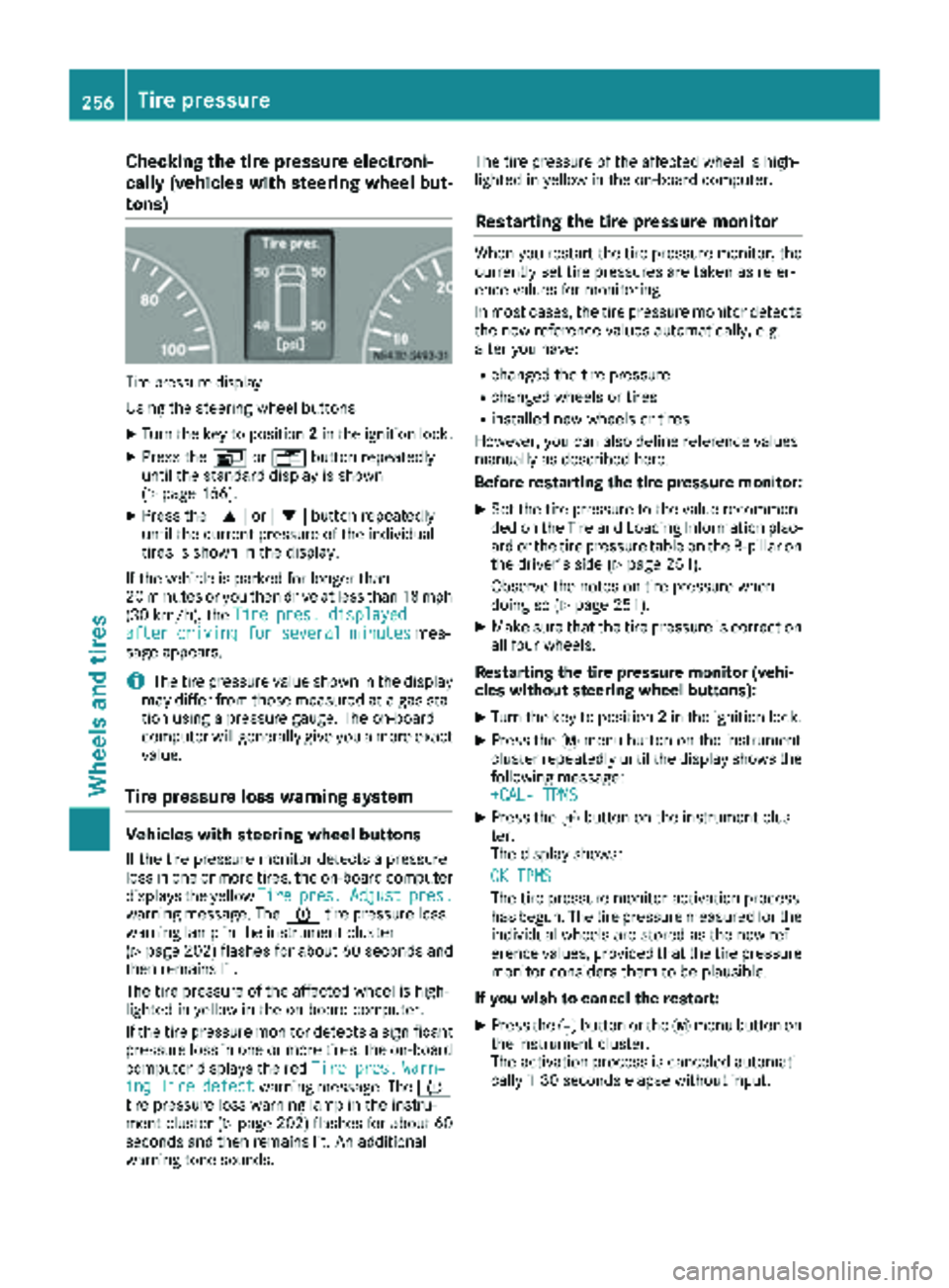
Tire pressuredisplay
Using the steering wheel buttons
XTurn the key to position 2in the ignition lock.
XPress the VorU button repeatedly
until the standard display is shown
(
Ypage 166).
XPress the 9or: button repeatedly
until the current pressure of the individual
tires is shown in the display.
If the vehicle is parked for longer than
20 minutes or you then drive at less than 18 mph
(30 km/h), the Tire pres. displayed
after driving for several minutesmes-
sage appears.
iThe tire pressure value shown in the display
may differ from those measured at a gas sta-
tion using a pressure gauge. The on-board
computer will generally give you a more exact
value.
Tire pressure loss warning system
Vehicles with steering wheel buttons
If the tire pressure monitor detects a pressure
loss in one or more tires, the on-board computer
displays the yellow Tire
pres.Adjustpres.warning message. The htire pressure loss
warning lamp in the instrument cluster
(
Ypage 202) flashes for about 60 seconds and
then remains lit.
The tire pressure of the affected wheel is high-
lighted in yellow in the on-board computer.
If the tire pressure monitor detects a significant
pressure loss in one or more tires, the on-board
computer displays the red Tire pres.
Warn‐ingTiredefectwarning message. Theh
tire pressure loss warning lamp in the instru-
ment cluster (
Ypage 202) flashes for about 60
seconds and then remains lit. An additional
warning tone sounds. The tire pressure of the affected wheel is high-
lighted in yellow in the on-board computer.
Restarting the tire pressure monitor
When you restart the tire pressure monitor, the
currently set tire pressures are taken as refer-
ence values for monitoring.
In most cases, the tire pressure monitor detects
the new reference values automatically, e.g.
after you have:
Rchanged the tire pressure
Rchanged wheels or tires
Rinstalled new wheels or tires
However, you can also define reference values
manually as described here.
Before restarting the tire pressure monitor:
XSet the tire pressure to the value recommen- ded on the Tire and Loading Information plac-
ard or the tire pressure table on the B-pillar on
the driver's side (
Ypage 251).
Observe the notes on tire pressure when
doing so (
Ypage 251).
XMake sure that the tire pressure is correct on
all four wheels.
Restarting the tire pressure monitor (vehi-
cles without steering wheel buttons):
XTurn the key to position 2in the ignition lock.
XPress the 4menu button on the instrument
cluster repeatedly until the display shows the
following message:
+CAL- TPMS
XPress the fbutton on the instrument clus-
ter.
The display shows:
OK TPMS
The tire pressure monitor activation process
has begun. The tire pressure measured for the individual wheels are stored as the new ref-
erence values, provided that the tire pressure
monitor considers them to be plausible.
If you wish to cancel the restart:
XPress the gbutton or the 4menu button on
the instrument cluster.
The activation process is canceled automati-
cally if 30 seconds elapse without input.
256Tire pressure
Wheels and tires
Page 259 of 294
Restarting the tire pressure monitor (vehi-
cles with steering wheel buttons):
XTurn the key to position2in the ignition lock.
XPress the VorU button on the steering
wheel until the standard display (Ypage 166)
appears in the display.
XPress the 9or: button on the steering
wheel repeatedly until the current pressure of
the individual tires is displayed or the display
shows the following message:
Tire pres. displayed after driving
for several minutes
XPress the 9reset button on the instrument
cluster.
The display shows the following message: Monitor current tire pressure?
XPress the
Wbutton on the steering wheel.
The display shows the following message:
Tire pres. monitor reactivated
The tire pressure monitor activation process
has begun. The tire pressure measured for the individual wheels are stored as the new ref-
erence values, provided that the tire pressure
monitor considers them to be plausible.
If you wish to cancel the restart:
XPress the Xbutton on the steering wheel.
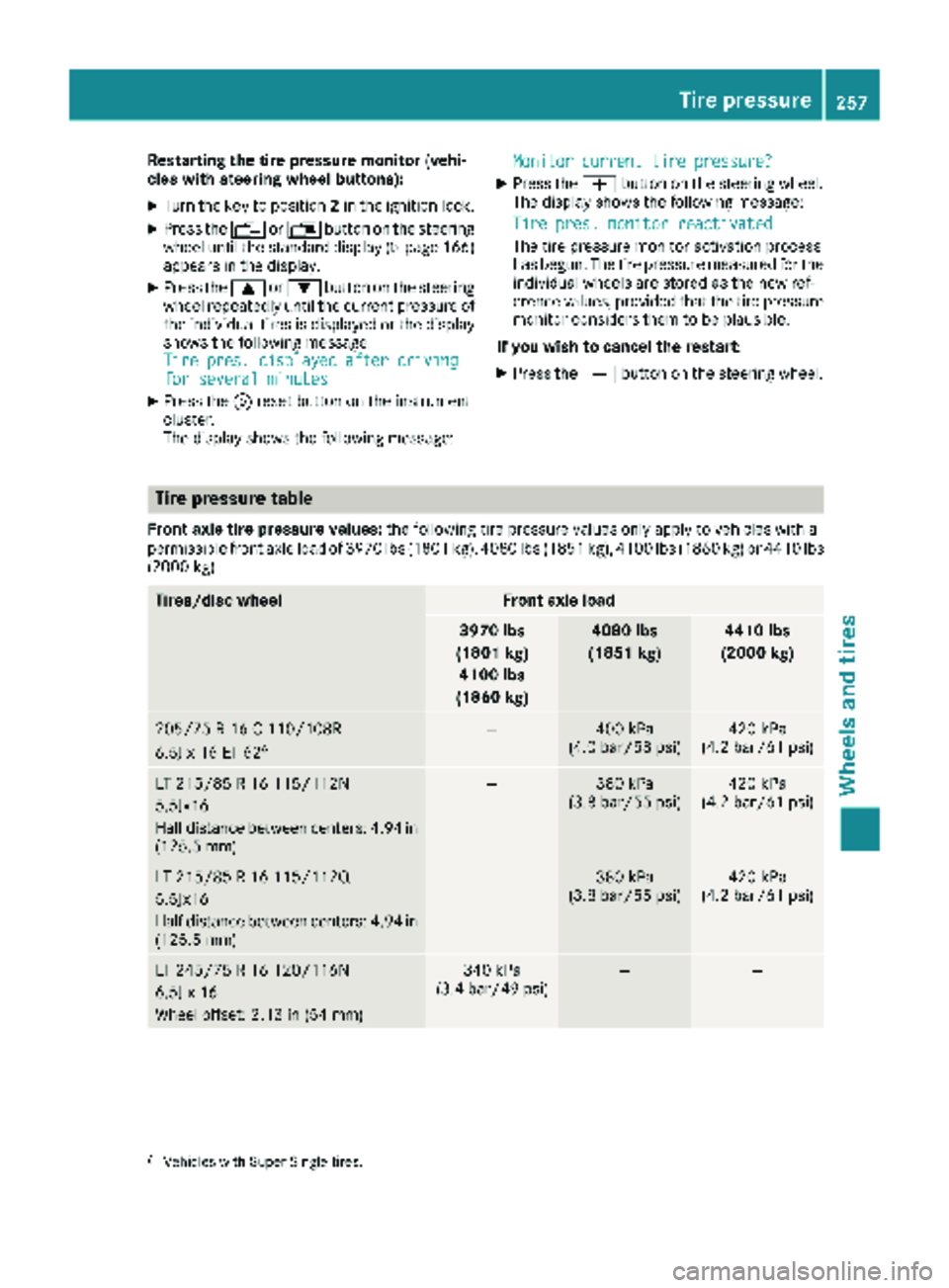
Tire pressure table
Front axle tire pressure values: the following tire pressure values only apply to vehicles with a
permissible front axle load of 3970 lb s(1801 kg), 4080 lbs (1851 kg), 4100 lbs (1860 kg) or 4410 lbs
(2000 kg).
Tires/disc wheelFront axle load
3970 lbs
(1801 kg) 4100 lbs
(1860 kg)4080 lbs
(1851 kg)4410 lbs
(2000 kg)
205/75 R 16 C 110/108R
6.5J x 16 ET 626—400 kPa
(4.0 bar/58 psi)420 kPa
(4.2 bar/61 psi)
LT 215/85 R 16 115/112N
5.5Jx16
Half distance between centers: 4.94 in
(125.5 mm)—380 kPa
(3.8 bar/55 psi)420 kPa
(4.2 bar/61 psi)
LT 215/85 R 16 115/112Q
5.5Jx16
Half distance between centers: 4.94 in
(125.5 mm)—380 kPa
(3.8 bar/55 psi)420 kPa
(4.2 bar/61 psi)
LT 245/75 R 16 120/116N
6.5J x 16
Wheel offset: 2.13 in (54 mm)340 kPa
(3.4 bar/49 psi)——
6Vehicles with Super Single tires.
Tire pressure257
Wheels and tires
Z
Page 282 of 294
To prevent operating problems, diesel with bet-
ter flow qualities is available during the winter
months. You can obtain information at the gas
station or from your fuel supplier.
Your vehicle is equipped with a fuel preheating
system. This improves the flow properties of the
diesel by approximately 14.5 ‡ (8 †). ULTRA-
LOW SULFUR DIESEL can be used without risk
of malfunction down to an outside temperature
of approximately 14 ‡ (Ò10 †).
Fuel additives
!Do not add gasoline or kerosene to diesel
fuel to improve its flow characteristics. Gas-
oline or kerosene impairs the lubricating
properties of the diesel fuel. This can result in
damage to the fuel injection system, for
example.
B20 fuels with bio-diesel content
!Continuous use of fuels with bio-diesel con-
tent over 5% (B20 fuels) can lead to fuel filter
clogging. Deposits may also form on the fuel
injector. This may reduce the engine output.
Unburned fuel can get into the oil pan. This
causes the engine oil level to rise. This can
cause engine mechanical damage.
To avoid damages and performance degrada-
tion, observe the following points:
RFill up with fuels with bio-diesel content of
5% (ULSD) or less, whenever possible.
RRegularly monitor your engine oil level if
you use B20 fuels on a regular basis.
RStrictly follow the oil change intervals quo-
ted in the instrument cluster and within
your maintenance booklet.
RUse only engine oils and filters approved for
use in your vehicle.
RIf you do not plan to drive your vehicle for
several weeks, completely fill the fuel tank
in advance with ULSD fuel.
For more information, consult the gas station
staff. The identification of fuels with bio-diesel
content (ULSD or B20) must be clear. If the
marking does not make this clear, do not refuel
from that pump.
Do not refuel with any fuels that have not been
approved for your vehicle.
For more information about refueling
(
Ypage 127).
Information on fuel consumption
HEnvironmental note
CO
2(carbon dioxide) is the gas which scien-
tists believe to be principally responsible for
global warming (the greenhouse effect). Your
vehicle's CO
2emissions are directly related to
fuel consumption and therefore depend on:
Refficient use of the fuel by the engine
Rdriving style
Rother non-technical factors, such as envi-
ronmental influences, road conditions or
traffic flow
You can minimize your vehicle's CO
2emis-
sions by driving carefully and having it serv-
iced regularly.
Fuel consumption depends on:
Rthe vehicle version
Rthe style of driving
Rthe operating conditions
Rthe type or quality of the fuel used
The vehicle will use more fuel than usual in the
following situations:
Rat very low outside temperatures
Rin city traffic
Rduring short journeys
Ron mountainous terrain
Rwhen towing a trailer
To keep fuel consumption low, observe the
advice in the "Protection of the environment"
section (
Ypage 25).
The following components of the different vehi-
cle versions influence fuel consumption:
Rtire sizes, tire tread, tire pressure, tire condi-
tion
Rbody
Rtransmission ratios for the drive assemblies
Radditional equipment (e.g. air-conditioning
system, auxiliary heating system)
For these reasons, the actual consumption fig-
ures for your vehicle may deviate from the con-
sumption figures determined according to EU
Directive 80/1268/EE C.
Data concerning fuel consumption are recorded in the on-board computer; use the steering
280Service products and capacities
Technical data