ESP MERCEDES-BENZ SPRINTER 2019 MY19 with 7” screen
[x] Cancel search | Manufacturer: MERCEDES-BENZ, Model Year: 2019, Model line: SPRINTER, Model: MERCEDES-BENZ SPRINTER 2019Pages: 354, PDF Size: 6.15 MB
Page 51 of 354
Va
ns US A,LLC ("DVUSA") expressly disclaims
any and all liability arising from theex traction of
th is information byunauthorized Mercedes-Benz
personnel.
DV USA will not share EDR data with others with‐
out the consent of theve hicle owners or, if the
ve hicle is leased, without the consent of the les‐
see. Exceptions tothis representation include
re sponses tosubpoenas bylaw enforcement; by
fe deral, state or local go vernment; in connection
with or arising out of litigation in volvin gDV USA or
its subsidiaries and af filiates; or, as requ ired by
la w.
Wa rning: The EDR is a component of the
Re stra int Sy stem Module. Tamp ering with, alter‐
ing, modifying or removing the EDR component
may result in a malfunction of theRe stra int Sys‐
te m Module and other sy stems.
St ate la wsorregulations rega rding EDRs that
con flict with federal regulation are pre-em pted.
This means that in theev ent of such conflict, the
fe deral regulation go verns. As of December 20 16 ,
17 states ha veenacted la wsrelating toEDRs. Co
pyright Information on free and open-source software
Information on license
for free and open-sou rce
software used in your vehicle can be found on the
data storage medium in your vehicle document
wa llet and with updates on thefo llowing website:
http://www.mercedes-benz.com/opensource. Information on
regis tere d trademar ks R
Bluetoo th®
is a regis tere d trademark of Blue‐
toot h SIG Inc.
R DTS™ is a regis tere d trademark of DTS, Inc.
R Dolby ®
and MLP™ are regis tere d trademar ks
of DOLBY Laboratories.
R BabySmart™, ESP ®
and PRE-SAFE ®
are regis‐
te re d trademar ksof Daimler AG.
R HomeLink ®
is a regis tere d trademark of John‐
son Controls.
R iPod ®
and iTunes ®
are regis tere d trademar ks
of Apple Inc.
R Burmes ter®
is a regis tere d trademark of
Burmes terAu diosy steme GmbH.
R Microsoft ®
and Windo wsMedia ®
are regis‐
te re d trademar ksof Microsoft Corporation. R
SIRIUS ®
is a regis tere d trademark of Sirius
XM Radio Inc.
R HD Radio™ is a regis tere d trademark of iBiq‐
uity Digital Corporation.
R Graceno te®
is a regis tere d trademark of
Graceno te, Inc.
R ZAGA TSurvey ®
and related brands are regis‐
te re d trademar ksof ZagatSur vey, LLC. General no
tes27
Page 66 of 354
Do not
keep the SmartK eytoge ther with elec‐
tronic devices or me tallic objects. This can af fect
th e SmartK ey's functionality.
% If
th e battery check lamp does not light up
when you press the0036 or0037 button, the
battery is dischar ged.
Re place the SmartK eybattery (/ page 42). Ac
tivating/deactivating the acoustic lo cking
ve rification signal Multimedia sy
stem:
4 © 5
Settings 5
Vehicle #
Switch Acoustic Lock on or off. Changing
the unlocking settings The
key has thefo llowing adjus table unlocking
functions:
R unlock cent rally
R unlock driver's and front-passenger door
(Cargo Van)
R unlock driver's door (Passenger Van,chassis
ve rsion) #
Toswitch between the settings: press and
hold the0036 and0037 buttons at the same
time for appro ximately six seconds until the
battery check lamp flashes twice.
When the locking function is selected forth e driv‐
er's door or the driver's and front-passenger
door:
R pressing the0036 button a second time
unloc kstheve hicle centra lly Re
ducing the energy consum ption of the
SmartK ey If
yo u do not use theve hicle or a SmartK ey for an
ex tended pe riod, you may deactivate the KEY‐
LESS START function of the SmartK ey. #
Todeactivate: pressthe0037 button on the
SmartK eytwice in quick succession.
The battery check lamp on the SmartK ey
lights up twice quickly and once for longer. #
Toactivate: press any button on the Smart‐
Ke y.
When starting theve hicle with the SmartK eyin
th e slot in the shift console, the SmartK eyfunc‐
tions are activated auto matically. Re
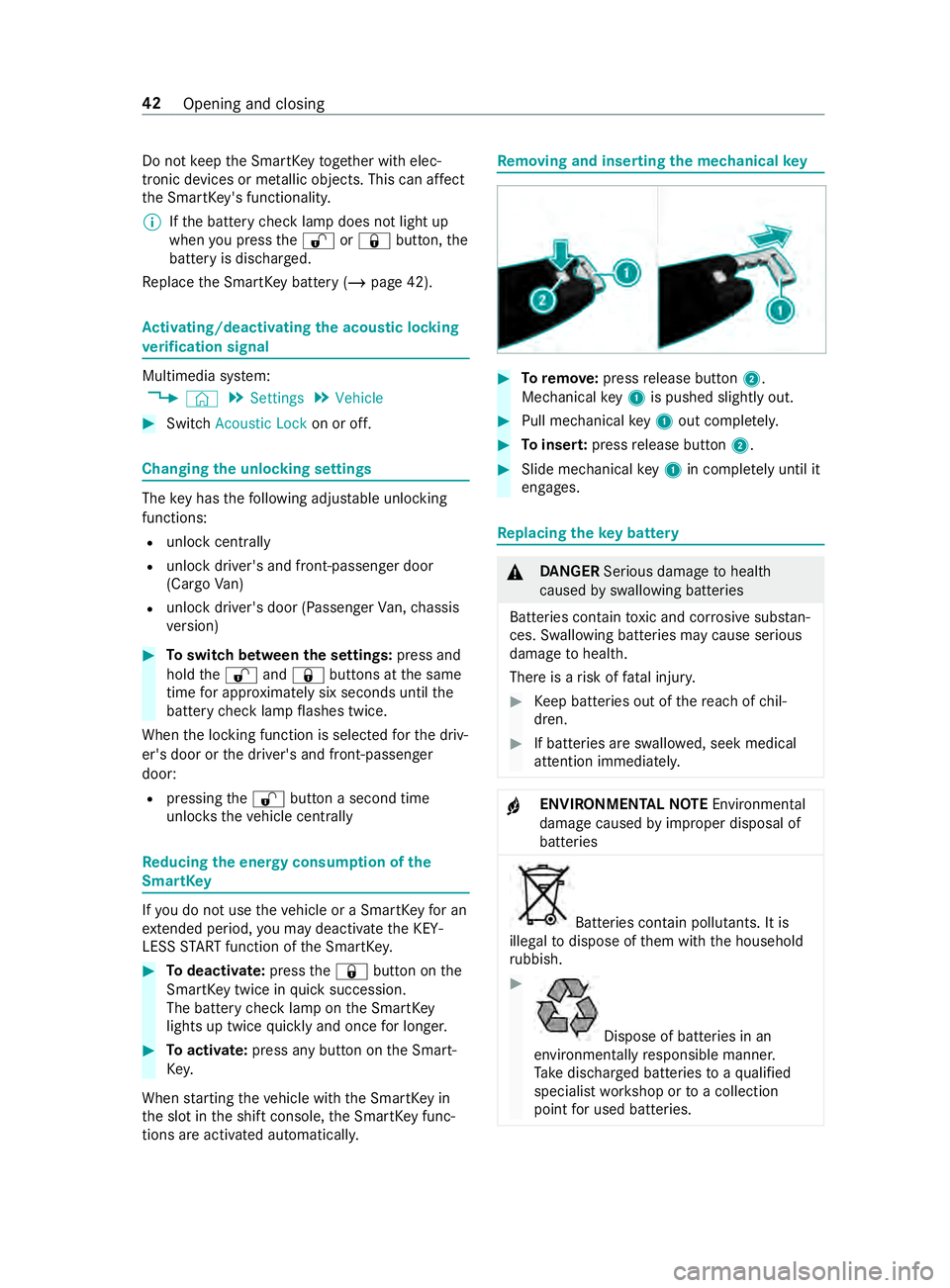
moving and inse rting the mechanical key #
Toremo ve:press release button 2.
Mechanical key1 is pushed slight ly out. #
Pull me chanical key1 out co mplete ly. #
Toinser t:press release button 2. #
Slide mechanical key1 in co mplete ly until it
engages. Re
placing the key battery &
DANG ER Serious damage tohealth
caused byswallowing batteries
Batteries contain toxic and cor rosive subs tan‐
ces. Swallowing batteries may cause serious
damage tohealth.
There is a risk of fata l injur y. #
Keep batteries out of there ach of chil‐
dren. #
If batteries are swallo wed, seek medical
attention immediately. +
ENVIRONMEN
TALNO TEEnvironmental
damage caused byimproper disposal of
batteries Bat
teries contain pollutants. It is
illegal todispose of them with the household
ru bbish. #
Dispose of batteries in an
environmen tally responsible manner.
Ta ke dischar ged batteries toaqu alified
specialist workshop or toa collection
point for used batteries. 42
Opening and closing
Page 71 of 354
Yo
u can operate the electric sliding door in the
fo llowing ways:
R bypressing the sliding door buttons on the
center console
R bypressing the sliding door button on the
door sill (B-pillar)
R using the door handle (inside or outside)
R using thekey
If th e electric sliding door is obstructed while
opening, it mo ves a few centim eters in the oppo‐
site direction and stops.
If th e sliding door is obstructed during the closing
procedure, it opens fully again.
If th e electric mo tor of the sliding door is in dan‐
ge r of overheating, e.g. due tofrequent opening
and closing within a short period, the sliding door
opens fully. The sliding door is then loc ked in
place. The sliding door is operational again af ter
appr oximately 30 seconds.
If th ere has been a malfunction or if the battery
has been disconnected, you can use there lease
cat chtodisconnect the sliding door from the
electric mo tor.Then you can open or close the
door manually (/ page 48). Opening/closing
the electric sliding door
with the but ton &
WARNING Risk of entrapment byopen
sliding door which is not engaged
When you open the sliding door, the sliding
door could hit other people as it mo ves back‐
wa rds. #
Only open the sliding door when tra ffic
conditions permit. &
WARNING Risk of inju rydespite obs tacle
de tection
Obs tacle de tection does not react tosoft,
light and thin objects, such as fingers. These
or other parts of the body could be pressed
against the door frame, for ins tance. Obs tacle
de tection cannot pr event entrapment in these
ins tances. #
When opening and closing the electric
sliding door, make sure that nobody is
within the operating range of the sliding
door. #
If someone becomes trapped, press the
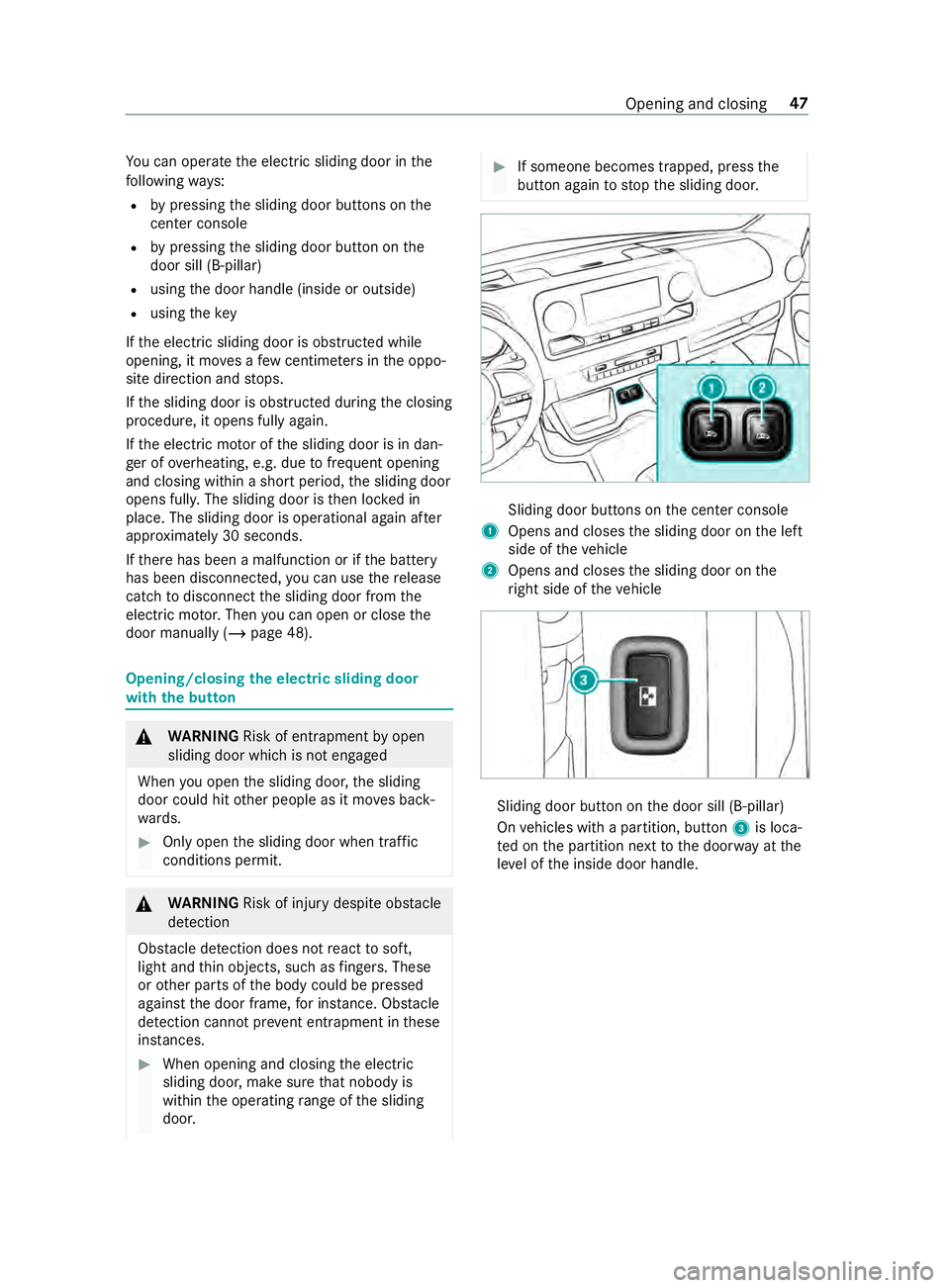
button again tostop the sliding door. Sliding door buttons on
the center console
1 Opens and closes the sliding door on the left
side of theve hicle
2 Opens and closes the sliding door on the
ri ght side of theve hicle Sliding door button on
the door sill (B-pillar)
On vehicles with a partition, button 3is loca‐
te d on the partition next tothe door way at the
le ve l of the inside door handle. Opening and closing
47
Page 72 of 354
When
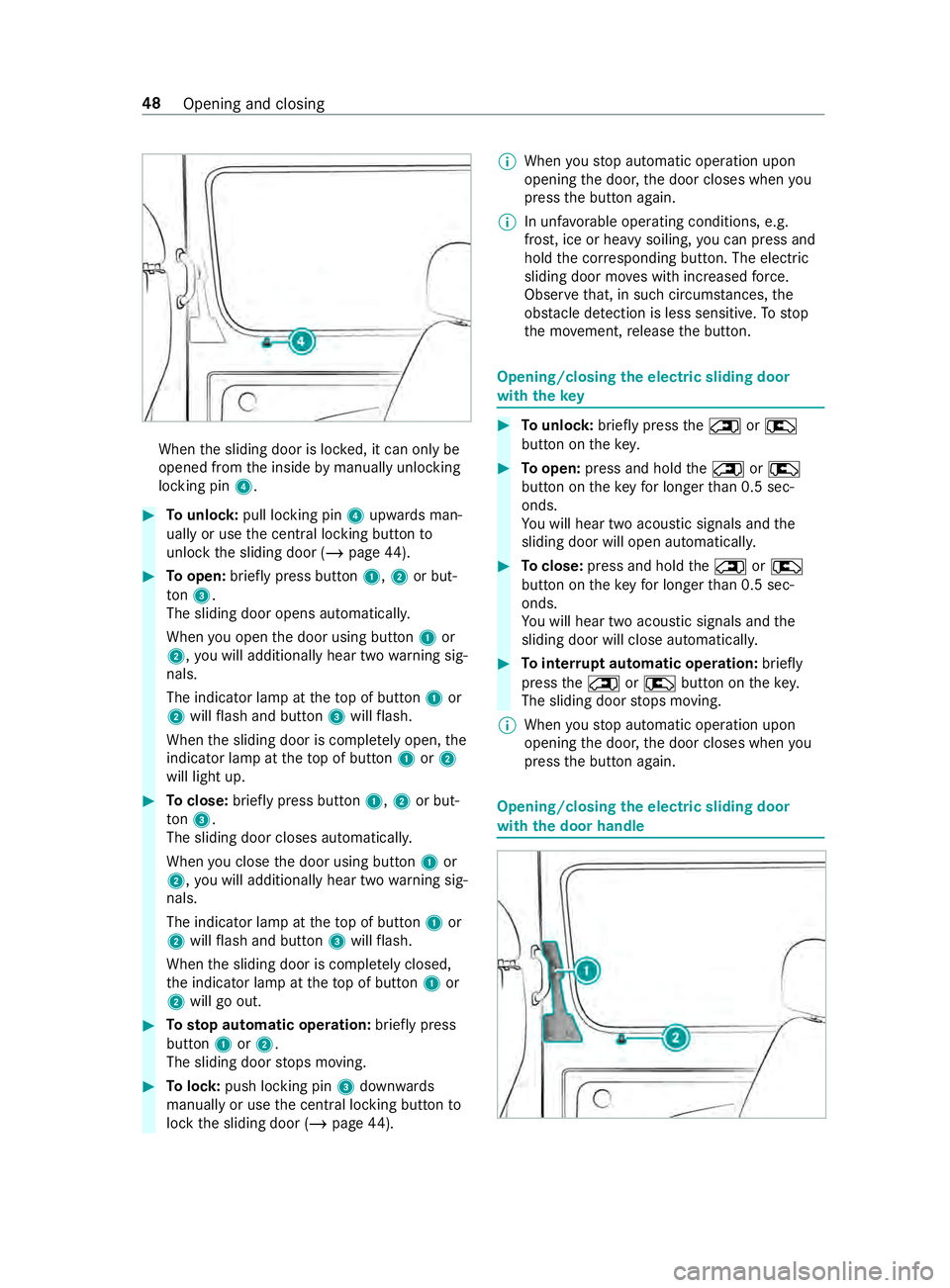
the sliding door is loc ked, it can only be
opened from the inside bymanually unlocking
locking pin 4. #
Tounlo ck:pull lo cking pin 4upwards man‐
ually or use the cent ral locking button to
unlo ckthe sliding door (/ page44). #
Toopen: briefly press button 1,2or but‐
to n3.
The sliding door opens au tomatical ly.
When you open the door using button 1or
2, you will additionally hear two warning sig‐
nals.
The indicator lamp at theto p of button 1or
2 will flash and button 3will flash.
When the sliding door is comple tely open, the
indicator lamp at theto p of button 1or2
will light up. #
Toclose: briefly press button 1,2or but‐
to n3.
The sliding door closes au tomatical ly.
When you close the door using button 1or
2, you will additionally hear two warning sig‐
nals.
The indicator lamp at theto p of button 1or
2 will flash and button 3will flash.
When the sliding door is comple tely closed,
th e indicator lamp at theto p of button 1or
2 will go out. #
Tosto p automatic ope ration: briefly press
but ton1 or2.
The sliding door stops moving. #
Tolock: push locking pin 3down wards
manually or use the cent ral locking button to
lock the sliding door (/ page44). %
When
youstop automatic operation upon
opening the door, the door closes when you
press the button again.
% In unf
avorable operating conditions, e.g.
frost, ice or heavy soiling, you can press and
hold the cor responding button. The electric
sliding door mo ves with increased forc e.
Obser vethat, in such circum stances, the
obs tacle de tection is less sensitive. Tostop
th e mo vement, release the button. Opening/closing
the electric sliding door
with thekey #
Tounlo ck:brie fly press the0042 or0041
button on thekey. #
Toopen: press and hold the0042 or0041
button on theke yfo r longer than 0.5 sec‐
onds.
Yo u will hear two acoustic signals and the
sliding door will open automaticall y. #
Toclose: press and hold the0042 or0041
button on theke yfo r longer than 0.5 sec‐
onds.
Yo u will hear two acoustic signals and the
sliding door will close automaticall y. #
Tointer rupt automatic operation: briefly
press the0042 or0041 button on theke y.
The sliding door stops moving.
% When
youstop automatic operation upon
opening the door, the door closes when you
press the button again. Opening/closing
the electric sliding door
with the door handle 48
Opening and closing
Page 78 of 354
The windo
wsinthe front doors can also be oper‐
ated automaticall y. #
Toopen comple tely: briefly press button 1
or 2 beyond the point of resis tance.
Au tomatic operation will start. #
Toclose comple tely: briefly pull button 1
or 2 beyond the point of resis tance.
Au tomatic operation will start. #
Tointer rupt automatic operation: briefly
press or pull button 1or2 again.
% If an object bloc
ksa side wind owduring the
automatic closing process, the side window
will open again automaticall y.The automatic
re ve rsing function is only an aid and is not a
substitute foryo ur attentiveness.
% If automatic operation of
the side windo ws
does not work,th ere is no anti-entra pment
function.
Au tomatic reve rsing function of the side win‐
do ws
If an object bloc ksa side wind owduring the clos‐
ing process, the side window will open again
automaticall y.The automatic reve rsing function is
only an aid and is not a substitute foryo ur atten‐
tiveness. #
During the closing process, make sure that no
body parts are in the closing area. &
WARNING Risk of becoming trapped
despite there being reve rse pr otection on
th e side window
The reve rse function does not react:
R Tosoft, light and thin objects, e.g. fingers
R Over the last 00CFin (4 mm) of the closing
path
R During resetting
R When the side window is closed again
manually immediately af ter automatic
re ve rsing
This means that there ve rse function cann ot
pr eve nt someone from becoming trapped in
th ese situations. #
During the closing process, make sure
th at no body parts are in the closing
area. #
If someone becomes trapped, press the
0062 button toopen the side window
again. Ve
ntilating theve hicle before starting a jour‐
ney (co nvenience opening) &
WARNING Risk of entrapment when
opening a side window
When opening a side windo w,parts of the
body could be dr awn in or become trapped
between the side window and window frame. #
When opening, make sure that nobody
is touching the side windo w. #
Release the button immediately if some‐
body becomes trapped. Yo
u can ventilate theve hicle before youstart
driving.
To do this, theke y is used tocar ryout thefo llow‐
ing functions simultaneously:
R unlock theve hicle
R open the side windo ws
The "con venience opening" function can only be
ope rated using thekey. Thekey must be in close
pr ox imity tothe driver's or front-passen ger door. #
Press and hold the0036 button on thekey.
The following functions are per form ed:
R theve hicle is unloc ked
R the side windo wsare opened #
Tointer rupt convenience opening: release
th e0036 button. Closing side windo
wsfrom the outside (con‐
ve nience closing) &
WARNING Risk of entrapment caused by
inadver tent con venience closing
When the con venience closing feature is
operating, parts of the body could become
trapped in the closing area of the side win‐
do ws. #
Obser vethe comple teclosing proce‐
du re when using con venience closing. #
When closing, make su rethat no body
parts are in the closing area. #
Press and hold the0037 button on thekey.
The following functions are per form ed:
R The vehicle is loc ked
R The side windo wsare closed 54
Opening and closing
Page 79 of 354
#
Tointer rupt convenience closing: release
th e0037 button. Re
setting the side windo ws The side windo
wsmust be reset af ter a malfunc‐
tion or a voltage supply inter ruption. #
Swit chon the ignition (/ page103). #
Push bo thwindow lif ter buttons and hold for
appr oximately one second af terth e side win‐
dow has closed. Problems with
the side windo ws Problem
Possible causes/consequences and 0050 0050Solutions
A side window cann otbe
closed and the cause is
not obvious. #
Check tosee if there are any objects in the window guide.
& WARNING Risk of becoming trapped or fata lly injured if reve rs‐
ing pr otection is not activated
If yo u close a side wind owagain immediately af ter it has been
bloc ked, the side window will close with increased or maximum
fo rc e. The reve rsing feature will then not be active.
Pa rts of the body could become trapped in the closing area in the
process. #
Make sure that no parts of the body are in the closing area. #
Tostop the closing process, release the button or press the
button again tore-open the side windo w. If a side window is obstructed during closing, and
reopens again slightl y,
yo u can proceed as follo ws: #
Immedia tely afte rth e window is obstructed, pull the cor responding
button again until the side window has closed, and hold the button
fo r an additional second.
The side window is closed with increased forc e.
If th e side window is obstructed again and reopens slightl y,yo u can pro‐
ceed as follo ws: #
Repeat the pr evious step.
The side window is closed without the automatic reve rsing function.
The side windo wscannot
be opened or closed
using the con venience
opening feature. The SmartK
eybattery is weak or dischar ged. #
Check the battery with the battery check lamp and replace if neces‐
sary (/ page 42). Anti-theft pr
otection Fu
nction of the immobilizer The immobilizer pr
events your vehicle from being
st ar ted without the cor rect key.
The immobilizer is automatically activated when
th e ignition is switched off, and deactivated when
th e ignition is switched on. When leaving
theve hicle, alw aysta ke thekey
with you and lock theve hicle. If theke y is left
inside theve hicle, an yone can start the engine.
% In
theeve ntthe engine does not start despi te
th eve hicle's star ter battery having suf ficient
ch arge ,th e immobilizer is defective. Contact
a qu alified specialist workshop or call
1-800-367-63 72(inthe USA) or
1-800-387-0 100(in Canada). Opening and closing
55
Page 96 of 354
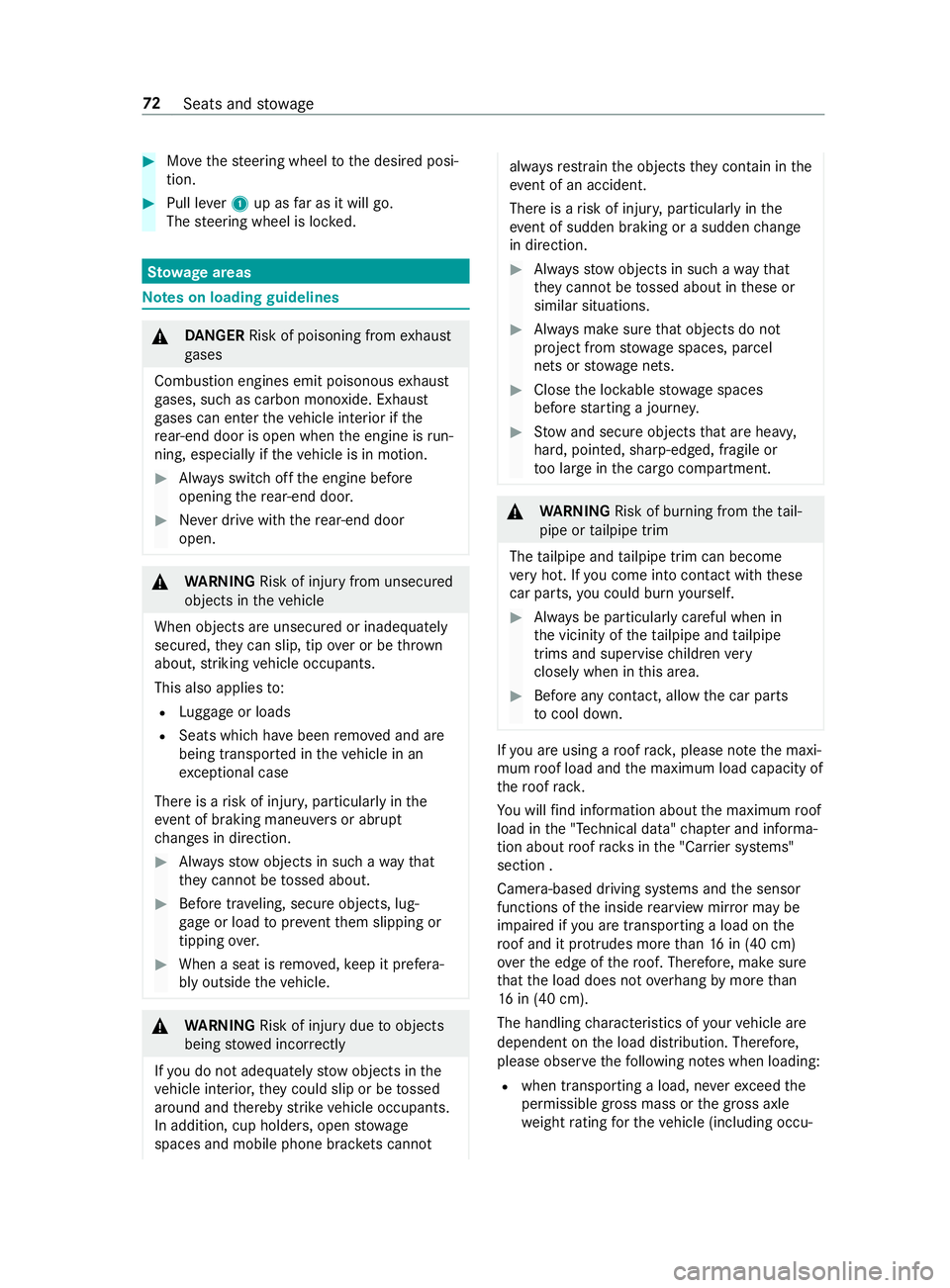
#
Movethesteering wheel tothe desired posi‐
tion. #
Pull le ver1 up as far as it will go.
The steering wheel is loc ked. St
ow age areas Note
s on loading guidelines &
DANG ER Risk of poisoning from exhaust
ga ses
Combustion engines emit poisonous exhaust
ga ses, such as carbon monoxide. Exhaust
ga ses can enter theve hicle interior if the
re ar-end door is open when the engine is run‐
ning, especially if theve hicle is in motion. #
Always switch off the engine before
opening there ar-end door. #
Never drive with there ar-end door
open. &
WARNING Risk of inju ryfrom unsecu red
objects in theve hicle
When objects are unsecured or inadequately
secured, they can slip, tip over or be thro wn
about, striking vehicle occupants.
This also applies to:
R Luggage or loads
R Seats which ha vebeen remo ved and are
being transpor ted in theve hicle in an
ex ceptional case
The reis a risk of injur y,particular lyin the
eve nt of braking maneuvers or ab rupt
ch anges in direction. #
Alwaysstow objects in such a wayth at
th ey cannot be tossed about. #
Before tr aveling, secure objects, lug‐
ga ge or load topreve ntthem slipping or
tipping over. #
When a seat is remo ved, keep it prefera‐
bly outside theve hicle. &
WARNING Risk of inju rydue toobjects
being stowed incor rectly
If yo u do not adequately stowobjects in the
ve hicle interior, they could slip or be tossed
around and thereby strike vehicle occupants.
In addition, cup holders, open stowage
spaces and mobile phone brac kets cannot al
wa ys restra in the objects they contain in the
eve nt of an accident.
The reis a risk of injur y,particular lyin the
eve nt of sudden braking or a sudden change
in direction. #
Alwaysstow objects in such a wayth at
th ey cannot be tossed about in these or
similar situations. #
Always make sure that objects do not
project from stowage spaces, parcel
nets or stowage nets. #
Close the loc kable stow age spaces
before starting a journe y. #
Stow and secure objects that are heavy,
hard, poin ted, sharp-edged, fragile or
to o lar geinthe cargo compartment. &
WARNING Risk of bu rning from theta il‐
pipe or tailpipe trim
The tailpipe and tailpipe trim can become
ve ry hot. If you come into con tact wi th these
car parts, you could burn yourself. #
Always be particularly careful when in
th e vicinity of theta ilpipe and tailpipe
trims and supervise children very
closely when in this area. #
Before any con tact, allow the car parts
to cool down. If
yo u are using a roof rack , please no tethe maxi‐
mum roof load and the maximum load capacity of
th ero of rack.
Yo u will find information about the maximum roof
load in the "Technical data" chap ter and informa‐
tion about roof rack s in the "Car rier sy stems"
section .
Camera-based driving sy stems and the sensor
functions of the inside rearview mir ror may be
impaire d ifyou are transpo rting a load on the
ro of and it pr otru des more than 16 in (40 cm)
ove rth e edge of thero of. Therefore, make sure
th at the load does not overhang bymore than
16 in (40 cm).
The handling characteristics of your vehicle are
dependent on the load distribution. Therefore,
please obser vethefo llowing no tes when loading:
R when transporting a load, ne verex ceed the
permissible gross mass or the gross axle
we ight rating forth eve hicle (including occu‐ 72
Seats and stowage
Page 101 of 354
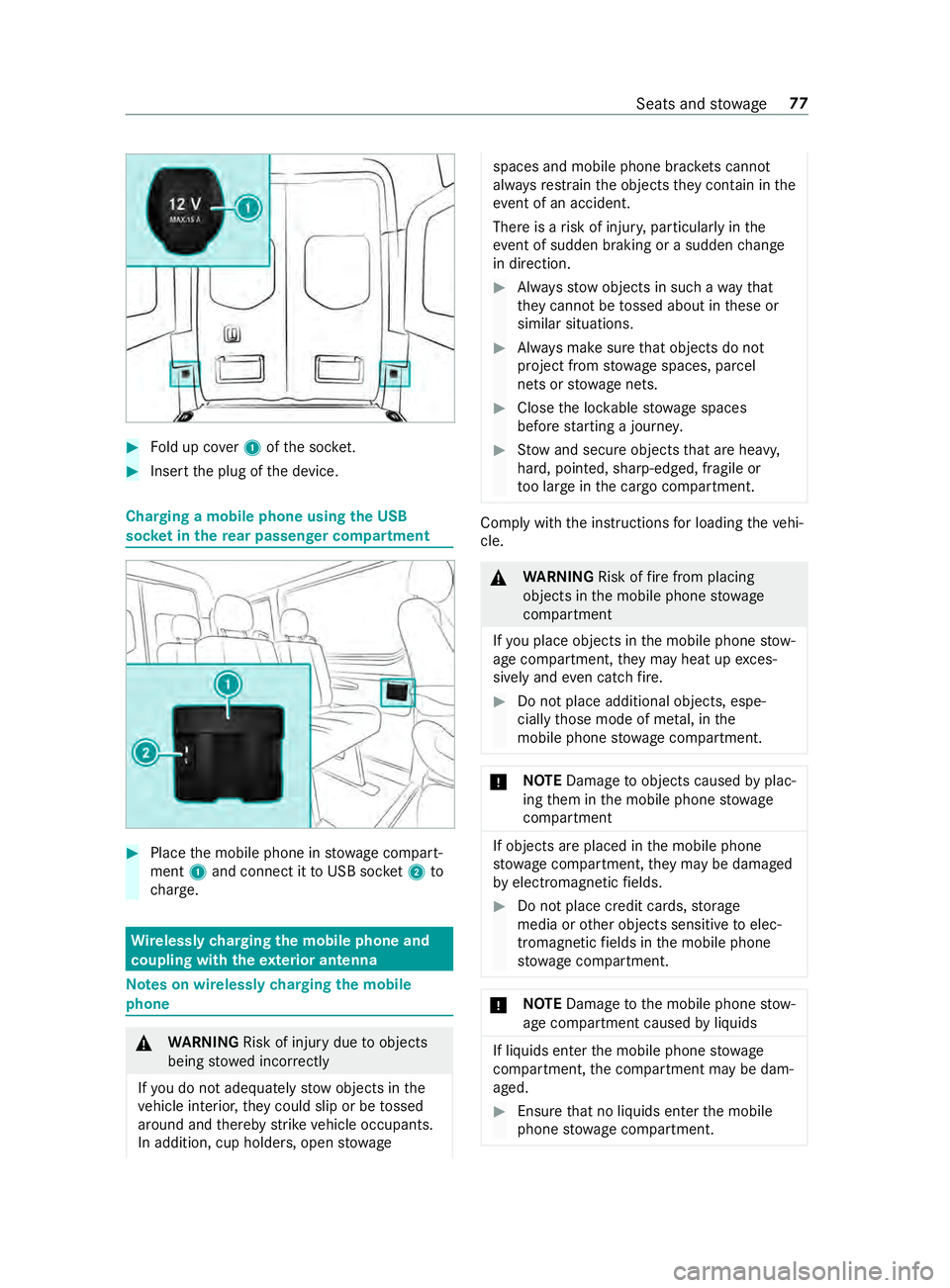
#
Fold up co ver1 ofthe soc ket. #
Inse rtthe plug of the device. Charging a mobile phone using
the USB
soc ket in the rear passen ger co mpartment #
Place the mobile phone in stowage compart‐
ment 1and connect it toUSB soc ket2 to
ch arge. Wire
lessly charging the mobile phone and
coupling with theex terior antenna Note
s on wirelessly charging the mobile
phone &
WARNING Risk of inju rydue toobjects
being stowed incor rectly
If yo u do not adequately stowobjects in the
ve hicle interior, they could slip or be tossed
around and thereby strike vehicle occupants.
In addition, cup holders, open stowage spaces and mobile phone brac
kets cannot
al wa ys restra in the objects they contain in the
eve nt of an accident.
The reis a risk of injur y,particular lyin the
eve nt of sudden braking or a sudden change
in direction. #
Alwaysstow objects in such a wayth at
th ey cannot be tossed about in these or
similar situations. #
Always make sure that objects do not
project from stowage spaces, parcel
nets or stowage nets. #
Close the loc kable stow age spaces
before starting a journe y. #
Stow and secure objects that are heavy,
hard, poin ted, sharp-edged, fragile or
to o lar geinthe cargo compartment. Comply with
the instructions for loading theve hi‐
cle. &
WARNING Risk offire from placing
objects in the mobile phone stowage
compartment
If yo u place objects in the mobile phone stow‐
age compartment, they may heat up exces‐
sively and even catch fire. #
Do not place additional objects, espe‐
cially those mode of me tal, in the
mobile phone stowage compartment. *
NO
TEDama getoobjects caused byplac‐
ing them in the mobile phone stowage
compartment If objects are placed in
the mobile phone
stow age compartment, they may be dama ged
by electromagnetic fields. #
Do not place credit cards, storage
media or other objects sensitive toelec‐
tromagnetic fields in the mobile phone
stow age compartment. *
NO
TEDama getothe mobile phone stow‐
age compartment caused byliquids If liquids enter
the mobile phone stowage
compartment, the compartment may be dam‐
aged. #
Ensure that no liquids enter the mobile
phone stowage compartment. Seats and
stowage 77
Page 103 of 354
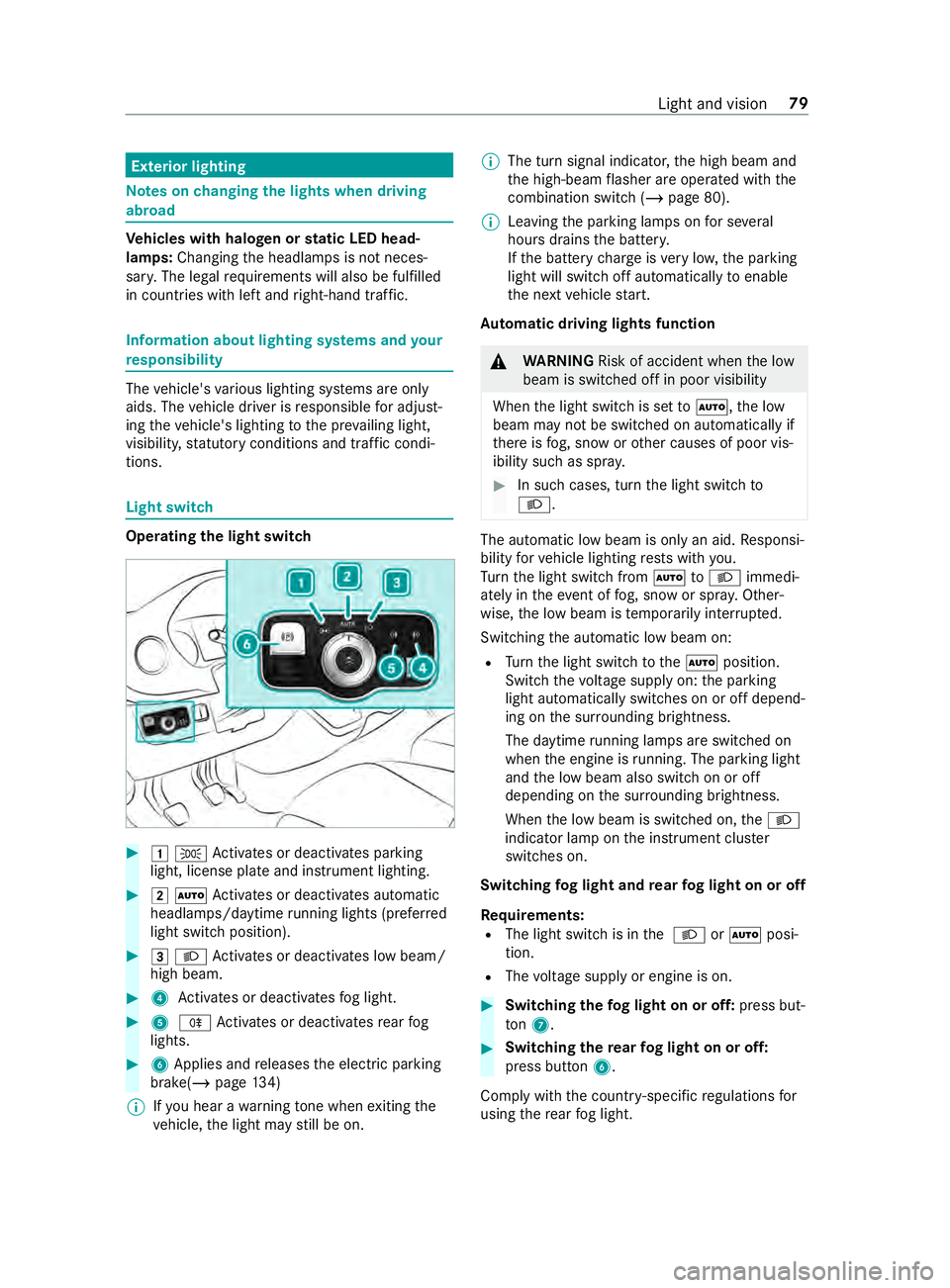
Exterior lighting
Note
s onchanging the lights when driving
abroad Ve
hicles with halogen or static LED head‐
lamps: Changing the headlamps is not neces‐
sar y.The legal requ irements will also be fulfilled
in countries with left and right-hand traf fic. In
fo rm ation about lighting sy stems and your
re sponsibility The
vehicle's various lighting sy stems are only
aids. The vehicle driver is responsible for adjust‐
ing theve hicle's lighting tothe pr evailing light,
visibilit y,statutory conditions and traf fic condi‐
tions. Light switch
Operating the light switch
#
00470060 Activates or deacti vates parking
light, license plate and instrument lighting. #
00480058 Activates or deacti vates automatic
headlamp s/daytime running lights (p referred
light switch position). #
00490058 Activates or deacti vates low beam/
high beam. #
4 Activates or deacti vatesfo g light. #
5 005E Activates or deacti vatesre ar fog
lights. #
6Applies and releases the electric parking
brake(/ page134)
% If
yo u hear a warning tone when exiting the
ve hicle, the light may still be on. %
The turn signal indicator,
the high beam and
th e high-beam flasher are operated with the
combination switch (/ page 80).
% Leaving
the parking lamps on for se veral
hours drains the batter y.
If th e battery charge isvery low, the parking
light will switch off automatically toenable
th e next vehicle start.
Au tomatic driving lights function &
WARNING Risk of accident when the low
beam is switched off in poor visibility
When the light switch is set to0058 ,th e low
beam may not be switched on automatically if
th ere is fog, snow or other causes of poor vis‐
ibility such as spr ay. #
In such cases, turn the light switch to
0058 . The automatic low beam is only an aid.
Responsi‐
bility forve hicle lighting rests with you.
Tu rn the light switch from 0058to0058 immedi‐
ately in theev ent of fog, snow or spr ay. Other‐
wise, the low beam is temp orarily inter rupte d.
Switching the automatic low beam on:
R Turn the light switch tothe0058 position.
Switch thevo ltage supply on: the parking
light automatically switches on or off depend‐
ing on the sur rounding brightness.
The daytime running la mps are switched on
when the engine is running. The pa rking light
and the low beam also switch on or off
depending on the sur rounding brightness.
When the low beam is switched on, the0058
indicator lamp on the instrument clus ter
switches on.
Switching fog light and rear fog light on or off
Requ irements:
R The light switch is in the 0058 or0058 posi‐
tion.
R The voltage supply or engine is on. #
Switching thefo g light on or off: press but‐
to n7. #
Switching the rear fog light on or off:
press button 6.
Comply with the count ry-specific regulations for
using there ar fog light. Light and vision
79
Page 104 of 354
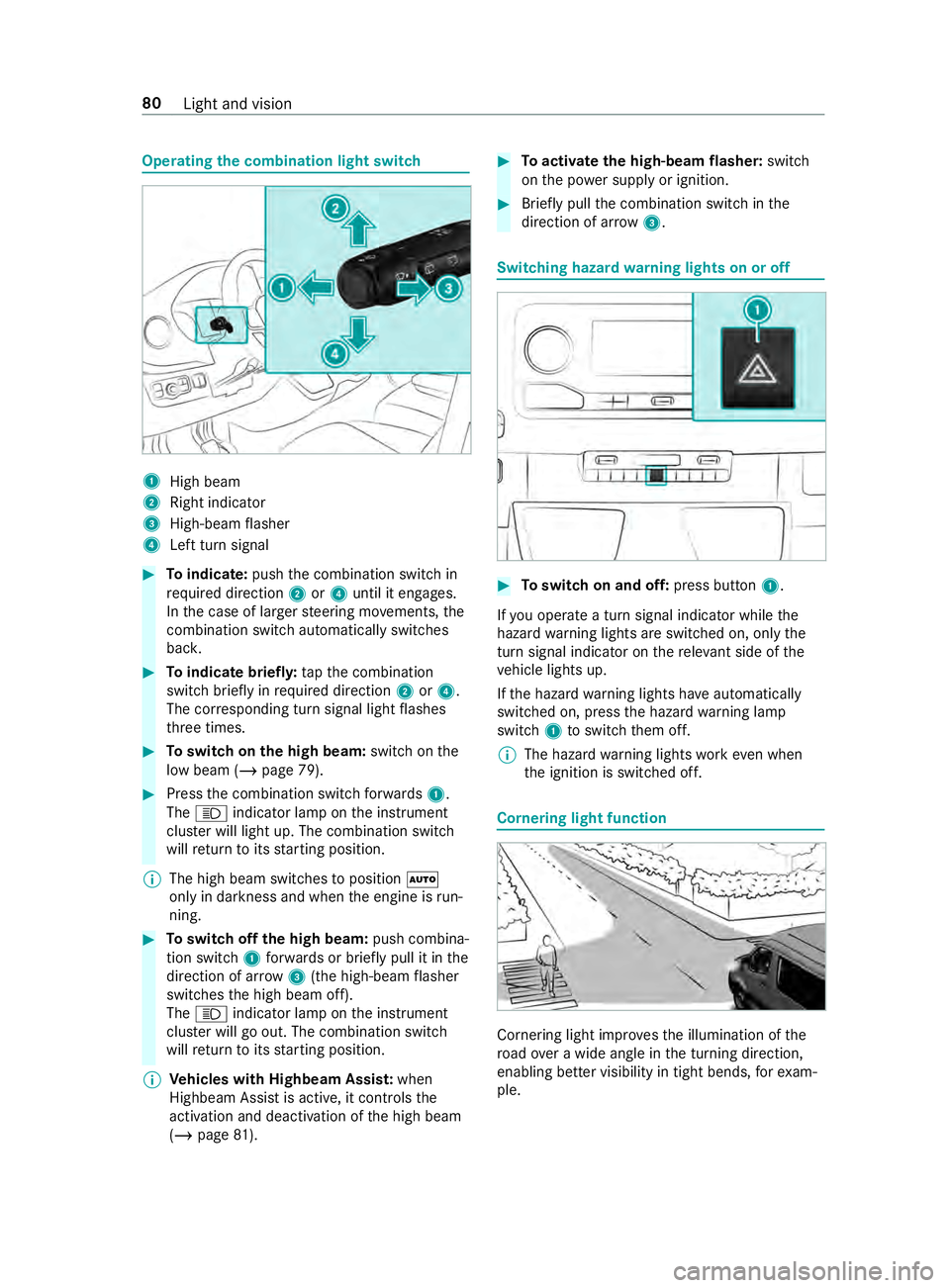
Operating
the combination light switch 1
High beam
2 Right indicator
3 High-beam flasher
4 Left turn signal #
Toindicate: pushthe combination switch in
re qu ired direction 2or4 until it engages.
In the case of larger steering mo vements, the
combination switch au tomatically switches
bac k. #
Toindicate briefl y:tapth e combination
switch briefly in required direction 2or4.
The cor responding turn signal light flashes
th re e times. #
Toswitch on the high beam: switchon the
low beam (/ page 79). #
Press the combination switch forw ards 1.
The 0057 indicator lamp on the instrument
clus ter will light up. The combination switch
will return toits starting position.
% The high beam swit ches toposition 0058
only in darkness and when the engine is run‐
ning. #
Toswitch off the high beam: push combina‐
tion swit ch1 forw ards or briefly pull it in the
direction of ar row3(the high-beam flasher
swit ches the high beam off).
The 0057 indicator lamp on the instrument
clus ter will go out. The combination switch
will return toits starting position.
% Ve
hicles with Highbeam Assis t:when
Highbeam Assist is active, it controls the
activation and deactivation of the high beam
(/ page 81). #
Toactivate the high-beam flasher: switch
on the po wer supp lyor ignition. #
Brief lypull the combination switch in the
direction of ar row3. Switching hazard
warning lights on or off #
Toswitch on and off: press button1.
If yo u operate a turn signal indicator while the
hazard warning lights are switched on, only the
turn signal indica tor on there leva nt side of the
ve hicle lights up.
If th e hazard warning lights ha veautomatically
swit ched on, press the hazard warning lamp
switch 1toswitch them off.
% The hazard
warning lights workeve n when
th e ignition is switched off. Cornering light function
Cornering light impr
ovesth e illumination of the
ro ad ove r a wide angle in the turning direction,
enabling better visibility in tight bends, forex am‐
ple. 80
Light and vision