steering MERCEDES-BENZ SPRINTER 2019 MY19 with 7” screen
[x] Cancel search | Manufacturer: MERCEDES-BENZ, Model Year: 2019, Model line: SPRINTER, Model: MERCEDES-BENZ SPRINTER 2019Pages: 354, PDF Size: 6.15 MB
Page 89 of 354
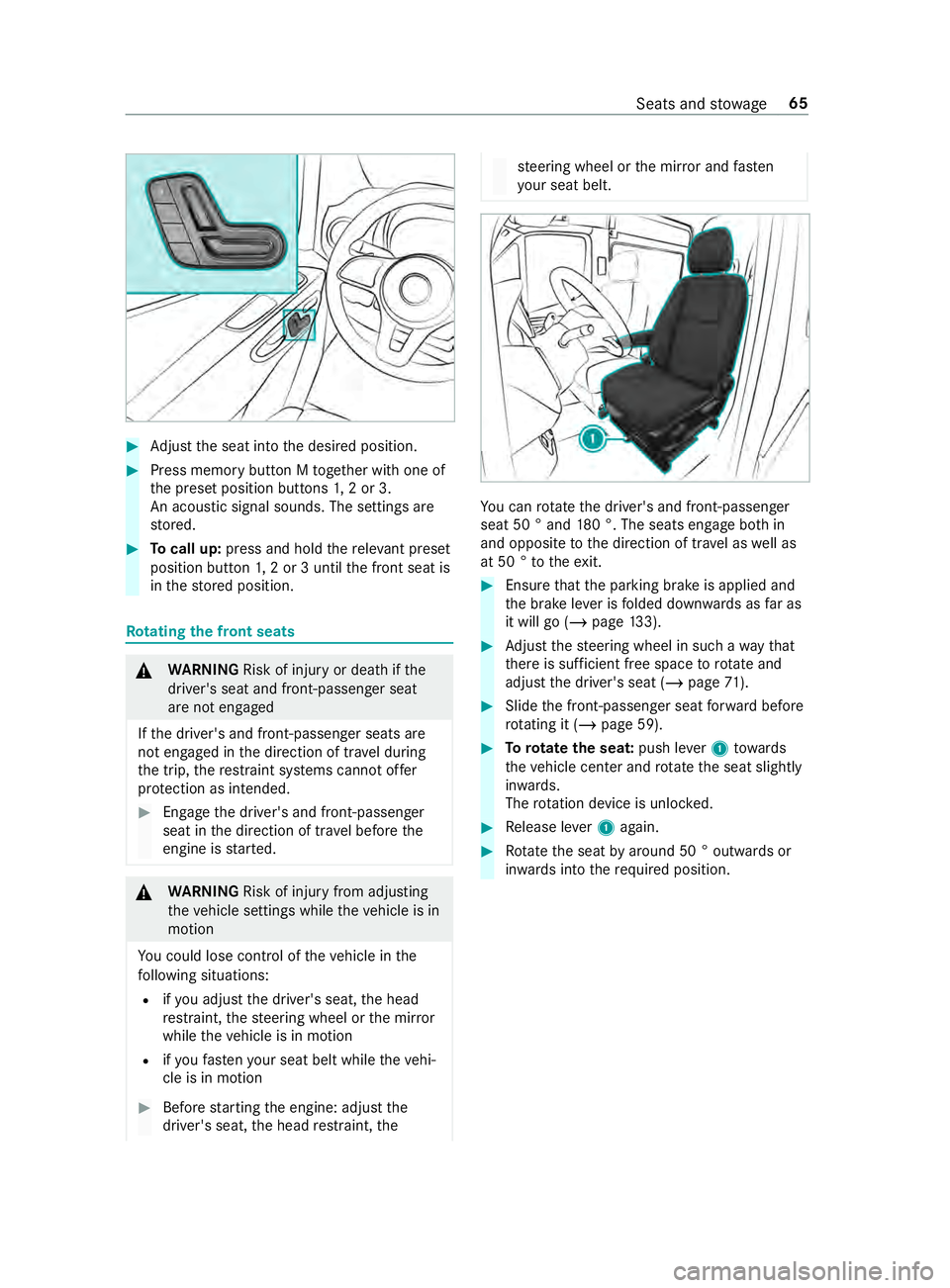
#
Adjust the seat into the desired position. #
Press memory button M toge ther with one of
th e preset position buttons 1,2 or 3.
An acou stic signal sounds. The settings are
st ored. #
Tocall up: press and hold there leva nt preset
position button 1,2 or 3 until the front seat is
in thestored position. Ro
tating the front seats &
WARNING Risk of inju ryor death if the
driver's seat and front-passen ger seat
are not engaged
If th e driver's and front-passenger seats are
not engaged in the direction of tr avel during
th e trip, there stra int sy stems cann otoffer
pr otection as intended. #
Enga gethe driver's and front-passenger
seat in the direction of tr avel before the
engine is star ted. &
WARNING Risk of inju ryfrom adju sting
th eve hicle settings while theve hicle is in
motion
Yo u could lose control of theve hicle in the
fo llowing situations:
R ifyo u adjust the driver's seat, the head
re stra int, thesteering wheel or the mir ror
while theve hicle is in motion
R ifyo ufast enyour seat belt while theve hi‐
cle is in motion #
Before starting the engine: adjust the
driver's seat, the head restra int, the st
eering wheel or the mir ror and fasten
yo ur seat belt. Yo
u can rotate the driver's and front-passenger
seat 50 ° and 180 °. The seats engage bo thin
and opposite tothe direction of tra vel as well as
at 50 ° totheex it. #
Ensure that the parking brake is applied and
th e brake le ver is folded down wards as far as
it will go (/ page133). #
Adjust thesteering wheel in such a wayth at
th ere is suf ficient free space torotate and
adjust the driver's seat (/ page71). #
Slide the front-passen ger seat forw ard before
ro tating it (/ page 59). #
Torotate the seat: push lever1 towa rds
th eve hicle center and rotat eth e seat slightly
in wa rds.
The rotation device is unloc ked. #
Release le ver1 again. #
Rotate the seat byaround 50 ° out wards or
in wa rds into therequ ired position. Seats and
stowage 65
Page 94 of 354
#
Pull release handle 1forth e seat backrest
upwards and hold it in position. #
Movethe seat backrest tothe desired posi‐
tion. #
Let go of release handle 1forth e seat back‐
re st and mo vethe seat backrest slightl y.
The seat backrest engages in position. Head
restra ints Ad
justing the head restra ints manually &
WARNING Risk of inju ryfrom adju sting
th eve hicle settings while theve hicle is in
motion
Yo u could lose control of theve hicle in the
fo llowing situations:
R ifyo u adjust the driver's seat, the head
re stra int, thesteering wheel or the mir ror
while theve hicle is in motion
R ifyo ufast enyour seat belt while theve hi‐
cle is in motion #
Before starting the engine: adjust the
driver's seat, the head restra int, the
st eering wheel or the mir ror and fasten
yo ur seat belt. &
WARNING Risk of inju rydue tohead
re stra ints which are not ins talled or are
adjus ted incor rectly
If head restra ints are not ins talled or are
adjus ted incor rectly, the head restra ints can‐
not pr ovide pr otection as intended.
There is an increased risk of injury in the
head and neck area, e.g. in theeve nt of an
accident or when braking. #
Always drive with the head restra ints
ins talled. #
Before driving off, make sure forev ery
ve hicle occupant that the center of the
head restra int supports the back of the
head at about eye le vel. Do not swap
the head restra ints of the front and
re ar seats. Otherwise, you will not be able toset
th e height and inclination of the head restra ints
to the cor rect position.
Using the head restra int fore /aft adjustment,
adjust the head restra int in such a wayth at it is
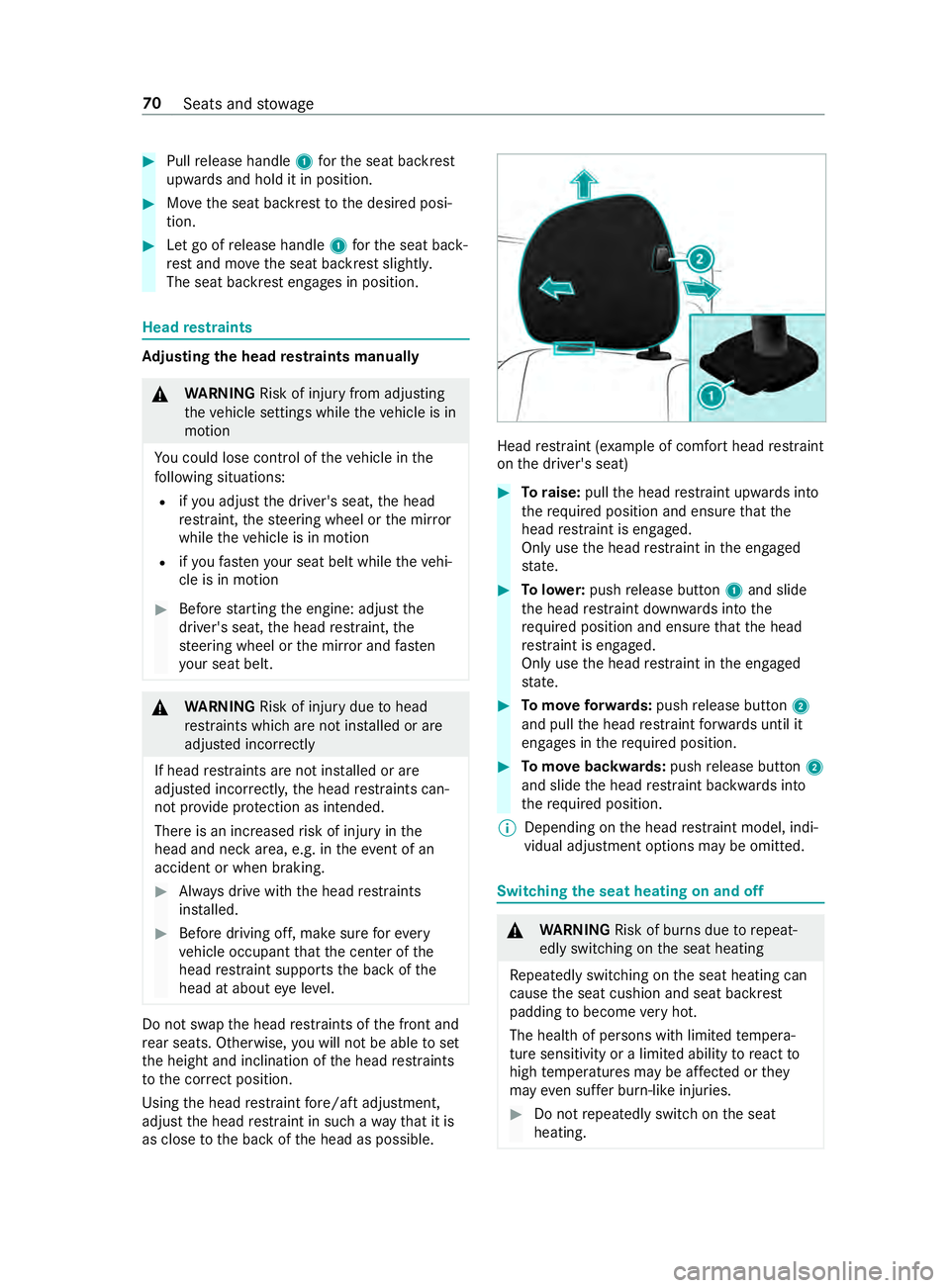
as close tothe back of the head as possible. Head
restra int (e xamp le of com fort head restra int
on the driver's seat) #
Toraise: pullthe head restra int upwards into
th ere qu ired position and ensure that the
head restra int is engaged.
Only use the head restra int in the engaged
st ate. #
Tolowe r:push release button 1and slide
th e head restra int down wards into the
re qu ired position and ensure that the head
re stra int is engaged.
Only use the head restra int in the engaged
st ate. #
Tomo veforw ards: pushrelease button 2
and pull the head restra int forw ards until it
engages in there qu ired position. #
Tomo vebackwards: pushrelease button 2
and slide the head restra int backwards into
th ere qu ired position.
% Depending on
the head restra int model, indi‐
vidual adjustment options may be omit ted. Switching
the seat heating on and off &
WARNING Risk of bu rns due torepeat‐
edly switching on the seat heating
Re peatedly switching on the seat heating can
cause the seat cushion and seat backrest
padding tobecome very hot.
The health of persons with limited temp era‐
ture sensitivity or a limited ability toreact to
high temp eratures may be af fected or they
may even su ffer burn-like injuries. #
Do not repeatedly switch on the seat
heating. 70
Seats and stowage
Page 95 of 354
To
protect against overheating, the seat heating
may be temp orarily deactivated af ter it is
switched on repeatedly.
* NO
TEDama getothe seats caused by
objects or documents when the seat
heater is switched on When
the seat heater is switched on, over‐
heating can occur due toobjects or docu‐
ments placed on the seats e.g. seat cushions
or child seats. This could cause damage to
th e seat sur face. #
Make sure that no objects or docu‐
ments are on the seats when the seat
heater is switched on. Re
quirements:
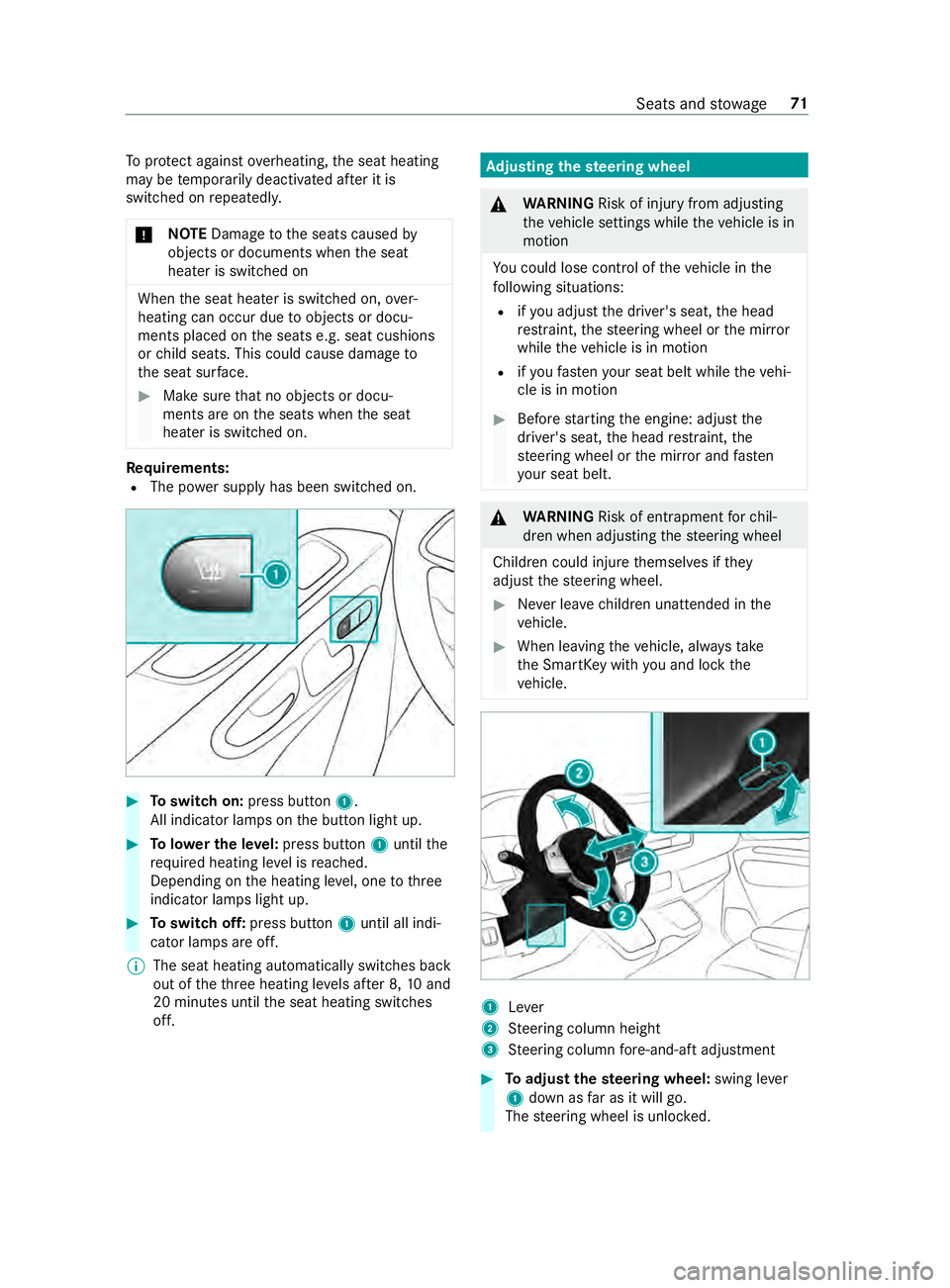
R The po wer supp lyhas been switched on. #
Toswitch on: press button 1.
All indicator lamps on the button light up. #
Tolowe r the le vel:press button 1until the
re qu ired heating le vel is reached.
Depending on the heating le vel, one tothree
indicator lamps light up. #
Toswitch off: press button 1until all indi‐
cator lamps are off.
% The seat heating automatically switches back
out of
theth re e heating le vels af ter 8, 10and
20 minutes until the seat heating switches
off. Ad
justing the steering wheel &
WARNING Risk of inju ryfrom adju sting
th eve hicle settings while theve hicle is in
motion
Yo u could lose control of theve hicle in the
fo llowing situations:
R ifyo u adjust the driver's seat, the head
re stra int, thesteering wheel or the mir ror
while theve hicle is in motion
R ifyo ufast enyour seat belt while theve hi‐
cle is in motion #
Before starting the engine: adjust the
driver's seat, the head restra int, the
st eering wheel or the mir ror and fasten
yo ur seat belt. &
WARNING Risk of entrapment forch il‐
dren when adjusting thesteering wheel
Children could injure themselves if they
adjust thesteering wheel. #
Never lea vechildren unat tended in the
ve hicle. #
When leaving theve hicle, alw aysta ke
th e SmartK eywith you and lock the
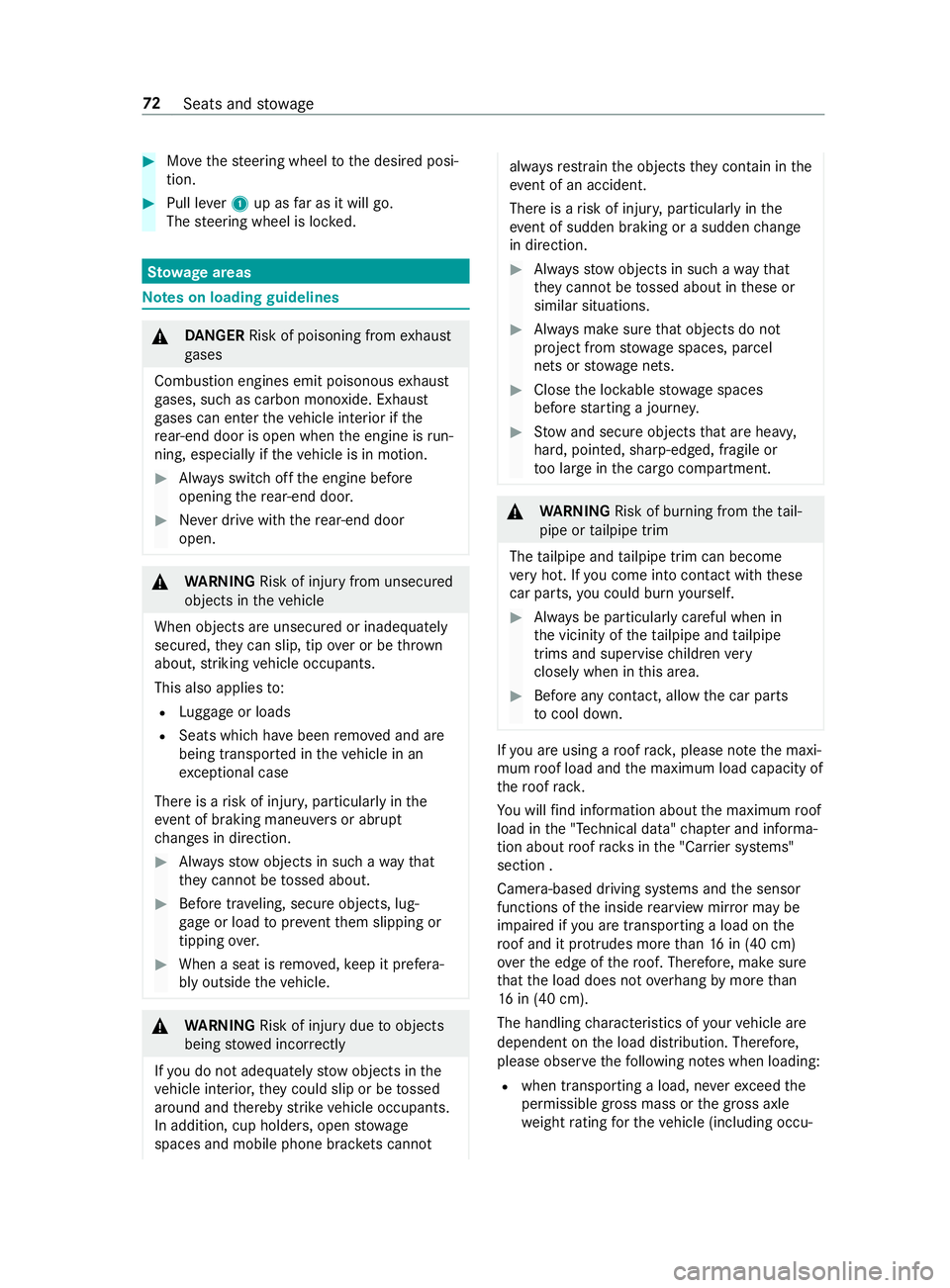
ve hicle. 1
Lever
2 Steering column height
3 Steering column fore -and-aft adjustment #
Toadjust thest eering wheel: swing lever
1 down as far as it will go.
The steering wheel is unloc ked. Seats and
stowage 71
Page 96 of 354
#
Movethesteering wheel tothe desired posi‐
tion. #
Pull le ver1 up as far as it will go.
The steering wheel is loc ked. St
ow age areas Note
s on loading guidelines &
DANG ER Risk of poisoning from exhaust
ga ses
Combustion engines emit poisonous exhaust
ga ses, such as carbon monoxide. Exhaust
ga ses can enter theve hicle interior if the
re ar-end door is open when the engine is run‐
ning, especially if theve hicle is in motion. #
Always switch off the engine before
opening there ar-end door. #
Never drive with there ar-end door
open. &
WARNING Risk of inju ryfrom unsecu red
objects in theve hicle
When objects are unsecured or inadequately
secured, they can slip, tip over or be thro wn
about, striking vehicle occupants.
This also applies to:
R Luggage or loads
R Seats which ha vebeen remo ved and are
being transpor ted in theve hicle in an
ex ceptional case
The reis a risk of injur y,particular lyin the
eve nt of braking maneuvers or ab rupt
ch anges in direction. #
Alwaysstow objects in such a wayth at
th ey cannot be tossed about. #
Before tr aveling, secure objects, lug‐
ga ge or load topreve ntthem slipping or
tipping over. #
When a seat is remo ved, keep it prefera‐
bly outside theve hicle. &
WARNING Risk of inju rydue toobjects
being stowed incor rectly
If yo u do not adequately stowobjects in the
ve hicle interior, they could slip or be tossed
around and thereby strike vehicle occupants.
In addition, cup holders, open stowage
spaces and mobile phone brac kets cannot al
wa ys restra in the objects they contain in the
eve nt of an accident.
The reis a risk of injur y,particular lyin the
eve nt of sudden braking or a sudden change
in direction. #
Alwaysstow objects in such a wayth at
th ey cannot be tossed about in these or
similar situations. #
Always make sure that objects do not
project from stowage spaces, parcel
nets or stowage nets. #
Close the loc kable stow age spaces
before starting a journe y. #
Stow and secure objects that are heavy,
hard, poin ted, sharp-edged, fragile or
to o lar geinthe cargo compartment. &
WARNING Risk of bu rning from theta il‐
pipe or tailpipe trim
The tailpipe and tailpipe trim can become
ve ry hot. If you come into con tact wi th these
car parts, you could burn yourself. #
Always be particularly careful when in
th e vicinity of theta ilpipe and tailpipe
trims and supervise children very
closely when in this area. #
Before any con tact, allow the car parts
to cool down. If
yo u are using a roof rack , please no tethe maxi‐
mum roof load and the maximum load capacity of
th ero of rack.
Yo u will find information about the maximum roof
load in the "Technical data" chap ter and informa‐
tion about roof rack s in the "Car rier sy stems"
section .
Camera-based driving sy stems and the sensor
functions of the inside rearview mir ror may be
impaire d ifyou are transpo rting a load on the
ro of and it pr otru des more than 16 in (40 cm)
ove rth e edge of thero of. Therefore, make sure
th at the load does not overhang bymore than
16 in (40 cm).
The handling characteristics of your vehicle are
dependent on the load distribution. Therefore,
please obser vethefo llowing no tes when loading:
R when transporting a load, ne verex ceed the
permissible gross mass or the gross axle
we ight rating forth eve hicle (including occu‐ 72
Seats and stowage
Page 104 of 354
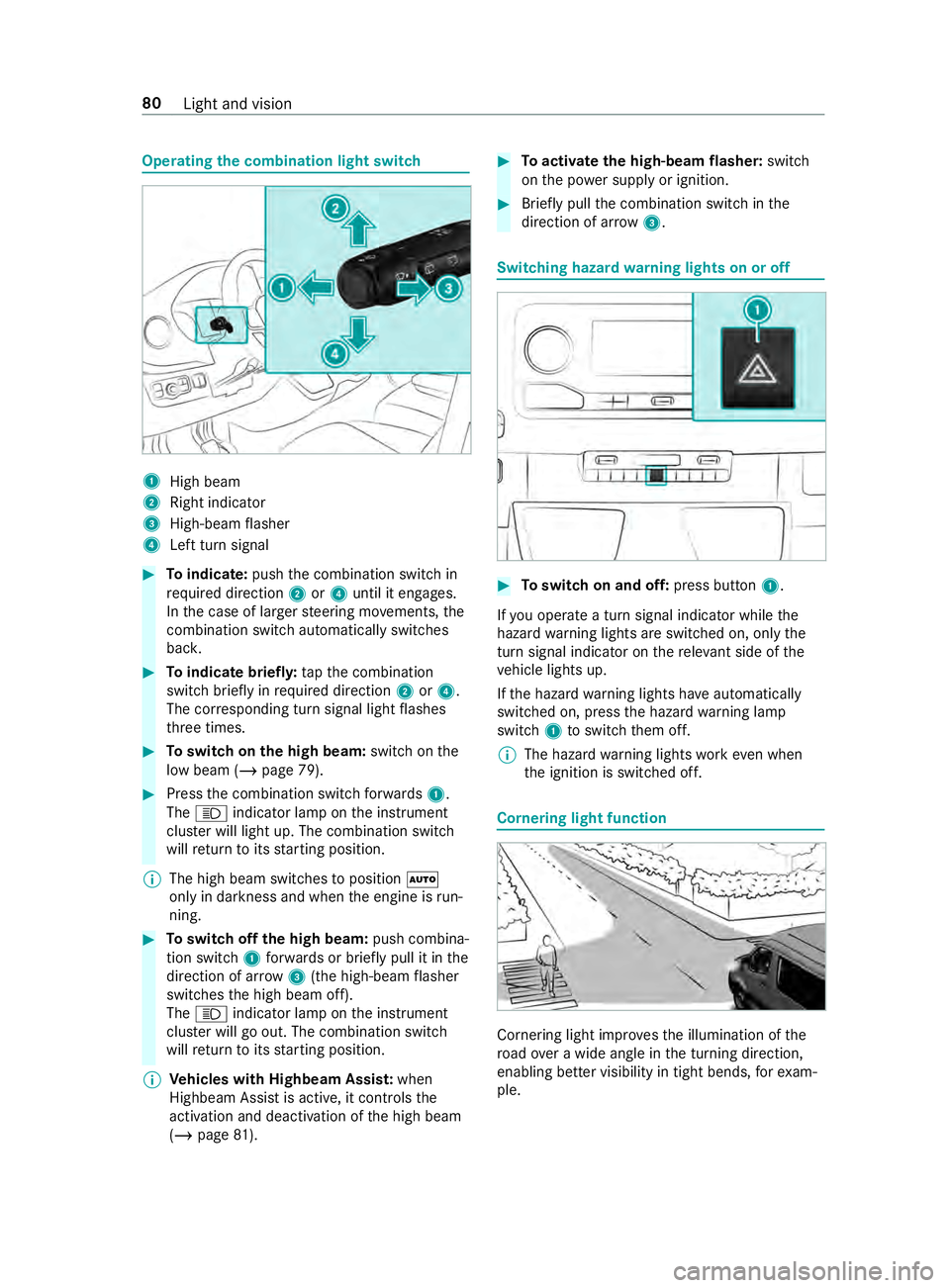
Operating
the combination light switch 1
High beam
2 Right indicator
3 High-beam flasher
4 Left turn signal #
Toindicate: pushthe combination switch in
re qu ired direction 2or4 until it engages.
In the case of larger steering mo vements, the
combination switch au tomatically switches
bac k. #
Toindicate briefl y:tapth e combination
switch briefly in required direction 2or4.
The cor responding turn signal light flashes
th re e times. #
Toswitch on the high beam: switchon the
low beam (/ page 79). #
Press the combination switch forw ards 1.
The 0057 indicator lamp on the instrument
clus ter will light up. The combination switch
will return toits starting position.
% The high beam swit ches toposition 0058
only in darkness and when the engine is run‐
ning. #
Toswitch off the high beam: push combina‐
tion swit ch1 forw ards or briefly pull it in the
direction of ar row3(the high-beam flasher
swit ches the high beam off).
The 0057 indicator lamp on the instrument
clus ter will go out. The combination switch
will return toits starting position.
% Ve
hicles with Highbeam Assis t:when
Highbeam Assist is active, it controls the
activation and deactivation of the high beam
(/ page 81). #
Toactivate the high-beam flasher: switch
on the po wer supp lyor ignition. #
Brief lypull the combination switch in the
direction of ar row3. Switching hazard
warning lights on or off #
Toswitch on and off: press button1.
If yo u operate a turn signal indicator while the
hazard warning lights are switched on, only the
turn signal indica tor on there leva nt side of the
ve hicle lights up.
If th e hazard warning lights ha veautomatically
swit ched on, press the hazard warning lamp
switch 1toswitch them off.
% The hazard
warning lights workeve n when
th e ignition is switched off. Cornering light function
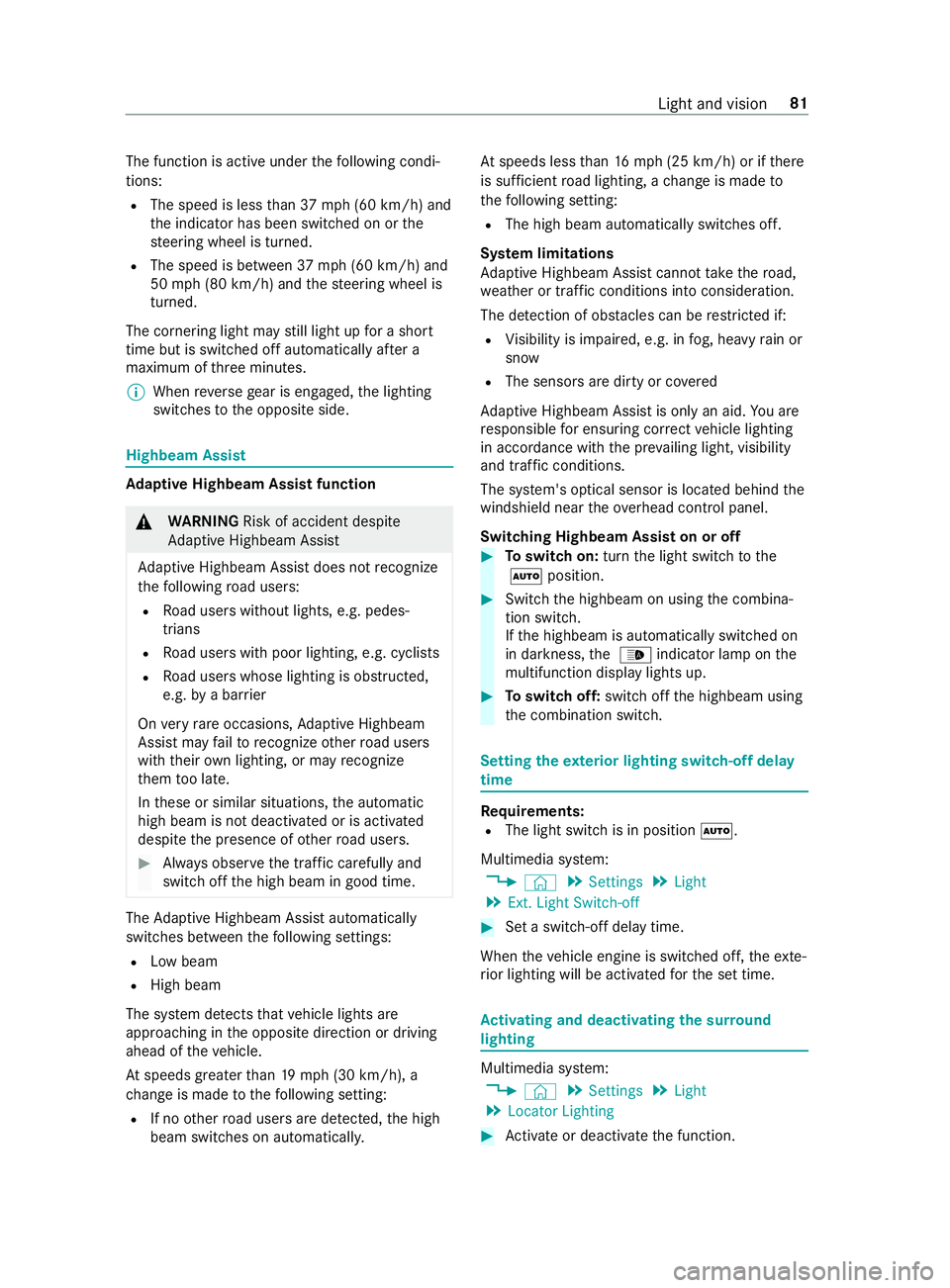
Cornering light impr
ovesth e illumination of the
ro ad ove r a wide angle in the turning direction,
enabling better visibility in tight bends, forex am‐
ple. 80
Light and vision
Page 105 of 354
The function is active under
thefo llowing condi‐
tions:
R The speed is less than 37 mph (60 km/h) and
th e indicator has been switched on or the
st eering wheel is turned.
R The speed is between 37mph (60 km/h) and
50 mph (8 0 km/h) and thesteering wheel is
turned.
The cornering light may still light up for a short
time but is switched off automatically af ter a
maximum of thre e minutes.
% When
reve rsege ar is engaged, the lighting
switches tothe opposite side. Highbeam Assist
Ad
aptive Highbeam Assist function &
WARNING Risk of accident despite
Ad aptive Highbeam Assist
Ad aptive Highbeam Assist does not recognize
th efo llowing road users:
R Road users without lights, e.g. pedes‐
trians
R Road users with poor lighting, e.g. cyclists
R Road users whose lighting is obstructed,
e.g. bya bar rier
On very rare occasions, Adaptive Highbeam
Assist may failto recognize other road users
with their own lighting, or may recognize
th em too late.
In these or similar situations, the automatic
high beam is not deactivated or is activated
despite the presence of other road users. #
Always obser vethe tra ffic carefully and
switch off the high beam in good time. The
Adaptive Highbeam Assist automatically
swit ches between thefo llowing settings:
R Low beam
R High beam
The sy stem de tects that vehicle lights are
approaching in the opposite direction or driving
ahead of theve hicle.
At speeds greater than 19 mp h (30 km/h), a
ch ange is made tothefo llowing setting:
R If no other road users are de tected, the high
beam switches on automaticall y.At
speeds less than 16 mp h (25 km/h) or if there
is suf ficient road lighting, a change is made to
th efo llowing setting:
R The high beam automatically switches off.
Sy stem limitations
Ad aptive Highbeam Assist cannot take thero ad,
we ather or traf fic conditions into consideration.
The de tection of obs tacles can be restricted if:
R Visibility is impaired, e.g. in fog, heavy rain or
snow
R The sensors are dirty or co vered
Ad aptive Highbeam Assist is only an aid. You are
re sponsible for ensuring cor rect vehicle lighting
in accordance with the pr evailing light, visibility
and traf fic conditions.
The sy stem's optical sensor is located behind the
windshield near theove rhead cont rol panel.
Switching Highbeam Assist on or off #
Toswitch on: turnthe light switch tothe
0058 position. #
Switch the highbeam on using the combina‐
tion switch.
If th e highbeam is automatically switched on
in darkness, the 00CE indicator lamp on the
multifunction display lights up. #
Toswitch off: switch offthe highbeam using
th e combination switch. Setting
theex terior lighting switch-off delay
time Re
quirements:
R The light switch is in position 0058.
Multimedia sy stem:
4 © 5
Settings 5
Light
5 Ext. Light Switch-off #
Set a switch-off delay time.
When theve hicle engine is switched off, theex te‐
ri or lighting will be activated forth e set time. Ac
tivating and deactivating the sur round
lighting Multimedia sy
stem:
4 © 5
Settings 5
Light
5 Locator Lighting #
Activate or deacti vate the function. Light and vision
81
Page 114 of 354
&
WARNING Risk of inju ryfrom using the
windshield wipers while the engine hood
is open
When the engine hood is open and the wind‐
shield wipers are set in motion, you can be
trapped bythe wiper linkage. #
Always switch off the windshield wipers
and ignition before opening the engine
hood. %
If
th e wiper blades are wornout, they will not
wipe the windshield proper ly.Re place the
wiper blades twice a year, preferably in
spring and fall. #
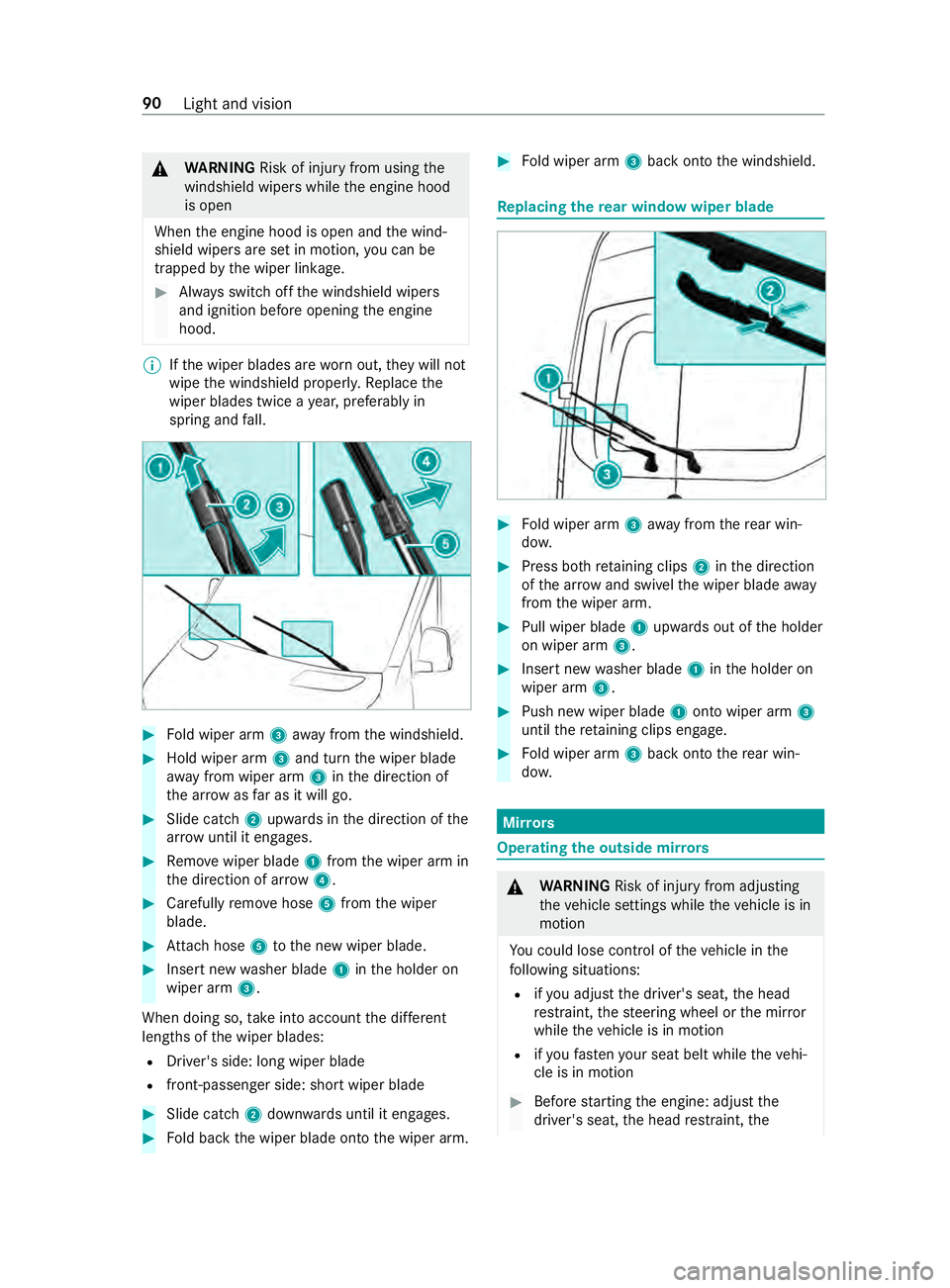
Fold wiper arm 3away from the windshield. #
Hold wiper arm 3and turn the wiper blade
aw ay from wiper arm 3inthe direction of
th e ar row asfar as it will go. #
Slide catch 2upwards in the direction of the
ar row until it engages. #
Remo vewiper blade 1from the wiper arm in
th e direction of ar row4. #
Carefully remo vehose 5from the wiper
blade. #
Attach hose 5tothe new wiper blade. #
Insert new washer blade 1inthe holder on
wiper arm 3.
When doing so, take into account the dif fere nt
lengths of the wiper blades:
R Driver's side: long wiper blade
R front-passenger side: short wiper blade #
Slide catch 2down wards until it engages. #
Fold back the wiper blade onto the wiper arm. #
Fold wiper arm 3back onto the windshield. Re
placing the rear window wiper blade #
Fold wiper arm 3away from there ar win‐
do w. #
Press bo thretaining clips 2inthe direction
of the ar row and swivel the wiper blade away
from the wiper arm. #
Pull wiper blade 1upwards out of the holder
on wiper arm 3. #
Insert new washer blade 1inthe holder on
wiper arm 3. #
Push new wiper blade 1onto wiper arm 3
until there taining clips engage. #
Fold wiper arm 3back onto there ar win‐
do w. Mir
rors Operating
the outside mir rors &
WARNING Risk of inju ryfrom adju sting
th eve hicle settings while theve hicle is in
motion
Yo u could lose control of theve hicle in the
fo llowing situations:
R ifyo u adjust the driver's seat, the head
re stra int, thesteering wheel or the mir ror
while theve hicle is in motion
R ifyo ufast enyour seat belt while theve hi‐
cle is in motion #
Before starting the engine: adjust the
driver's seat, the head restra int, the 90
Light and vision
Page 134 of 354
Information about driving in winter
&
DANG ER Risk of fata l injury due topoi‐
sonous exhaust gases
If th eta ilpipe is bloc ked or suf ficient ventila‐
tion is not possible, poisonous exhaust gases
such as carbon monoxide may enter theve hi‐
cle. This is the case if theve hicle getsst uck
in sn ow,fo rex ample. #
Keep theta ilpipe and the area around
th eve hicle free from snow when the
engine or thest ationary heater are run‐
ning. #
Open a window on the windward side of
th eve hicle toensure an adequate sup‐
ply of fresh air. &
WARNING Risk of skidding and of an
accident due toshifting down on slippery
ro ad sur faces
If yo u shift down on slippery road sur faces to
inc rease the engine braking ef fect, the drive
wheels may lose traction. #
Do not shift down on slippery road sur‐
fa ces toinc rease the engine braking
ef fect. Ve
hicles with automatic transmissions may roll in
neut ral position 005Cfor only a short time. Allowing
th e wheels torollfo r longer, e.g. when towing,
causes transmission damage.
If th eve hicle thre atens toskid, or cannot be stop‐
ped when tr aveling at a low speed, you can stabi‐
lize theve hicle using thefo llowing measures:
R Shift the automatic transmission toneutral
position 005C.
R Tryto maintain control of theve hicle using
cor rective steering.
Drive particularly carefully on slippery roads.
Av oid sudden acceleration, steering and braking
maneuver.
Ha ve your vehicle winterized at a qualified spe‐
cialist workshop in good time at the onset of win‐
te r.
Obser vethe instructions in the section "No tes on
snow chains" (/ page 233).
Re gular lych eck theve hicle and remo vesnow or
ice when tr aveling in wintry conditions. An accumulation of snow and ice, particular
ly
when frozen, in the area around the air intake,
moving parts, the axles and the wheel housing,
may cause thefo llowing problems:
R Obstruction of the air intake
R Damage tovehicle parts
R Malfunctions due torestriction of mobility
intended bythe design (e.g. reduced steering
mo vement)
If th ere is any damage, inform a qualified special‐
ist workshop.
Information about driving off-road &
WARNING Risk of accident if you do not
ke ep toline of fall on inclines
If yo u drive at an angle or turn on an incline,
th eve hicle could slip side ways, tip and roll‐
ove r. #
Always drive on inclines in the line of fall
(straight up or down) and do not turn. &
WARNING Risk of inju rydue toacceler‐
ating forc e during off-road driving
When driving off-road on une ven su rfaces,
th efo rc e of theve hicle's acceleration af fects
yo ur body from all directions.
Yo u could, forex ample, be thro wn from your
seat. #
Alwayswe ar a seat belt when driving
off- road. &
WARNING Risk of inju ryto the hands
when driving over obs tacles
If yo u drive over obs tacles or in tire ruts, the
st eering wheel may fold back and cause inju‐
ri es tothe hands. #
Steering wheel must alw ays be held
securely with bo thhands. #
When driving over obs tacles, expect
increased steering forc es at short
notice. &
WARNING Risk offire due toflammable
materials on hot parts of theex haust sys‐
tem
Flammable material such as lea ves, grass or
twigs may ignite if they come into contact
wi th hot parts of theex haust sy stem. 11 0
Driving and pa rking
Page 137 of 354
This increases
road adhesion, especially on
we tro adw ays.
R Check the wheels and tires and wheel wells
fo r trapped fore ign objects and remo vethem.
Tr apped fore ign objects can damage the
wheels and tires or may be flung out from the
ve hicle when continuing the journe y.
R Check the underbody for trapped branches or
ot her parts of plants and remo vethem.
R Clean the brake discs, brakepads and axle
joints, particularly af ter operation in sand,
mud, grit and gr avel,wa ter or similar lydirty
conditions.
R Check the entire floor assembly, the tires,
wheels, bodywork stru cture, brakes, steering,
suspension and exhaust sy stem for any dam‐
age.
R Check the service brake for operating saf ety,
e.g. car ryout a brake test.
R Ifyo u notice strong vib rations af ter driving
off-road, check the wheels and driv etra in for
fo re ign objects again. Remo veany fore ign
objects which can lead toimbalances and
th us cause vibrations. In theeve nt of damage
to the wheels and the drive train, visit a quali‐
fi ed specialist workshop immediately. ECO display function
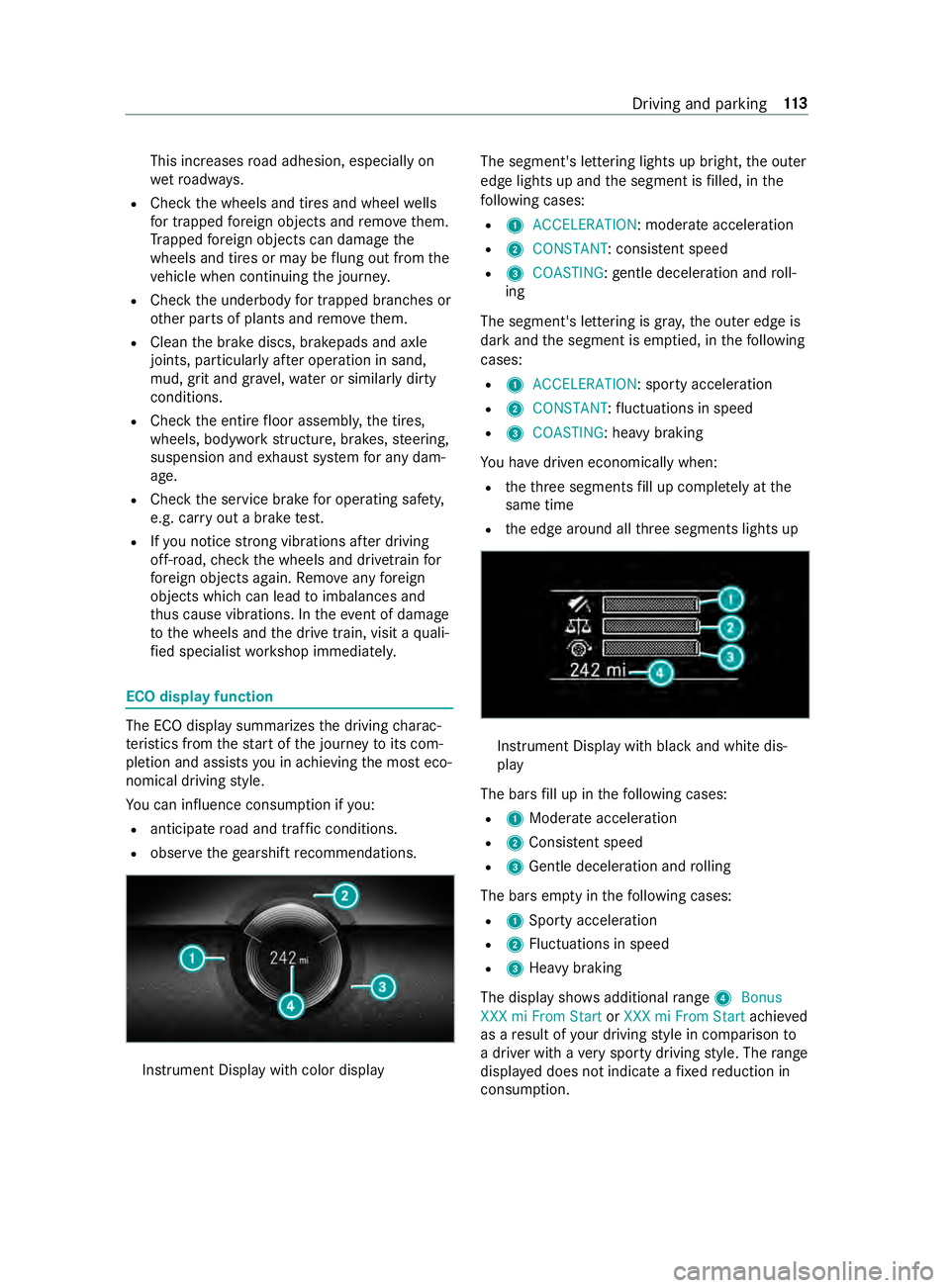
The ECO display summarizes
the driving charac‐
te rist ics from thest art of the journey toits com‐
pletion and assists you in achieving the most eco‐
nomical driving style.
Yo u can influence consum ption if you:
R anticipate road and traf fic conditions.
R obser vethege arshift recommendations. Instrument Display wi
thcolor display The segment's lettering lights up bright,
the outer
edge lights up and the segment is filled, in the
fo llowing cases:
R 1 ACCELERATION : moderate acceleration
R 2 CONSTANT: consis tent speed
R 3 COASTING: gentle deceleration and roll‐
ing
The segment's lettering is gray ,th e outer edge is
dark and the segment is em ptied, in thefo llowing
cases:
R 1 ACCELERATION: sporty acceleration
R 2 CONSTANT :fl uctuations in speed
R 3 COASTING: heavy braking
Yo u ha vedriven economically when:
R theth re e segments fill up comple tely at the
same time
R the edge around all thre e segments lights up Instrument Display with black and white dis‐
play
The bars fill up in thefo llowing cases:
R 1Moderate acceleration
R 2Consis tent speed
R 3Gentle deceleration and rolling
The bars em pty in thefo llowing cases:
R 1Sporty acceleration
R 2Fluctuations in speed
R 3Heavy braking
The display sho wsadditional range 4Bonus
XXX mi From Start orXXX mi From Start achieved
as a result of your driving style in comparison to
a driver with a very sporty driving style. The range
displ ayed does not indicate a fixe dre duction in
consum ption. Driving and parking
11 3
Page 141 of 354
Engaging drive position D
#
Dep ress the brake pedal and push the
DIRECT SELECT le ver down wards past the
fi rs t point of resis tance.
Tr ansmission position display 005Bis shown in
th e multifunction displa y.
The automatic transmission shifts thro ugh the
individual gears automatically when it is in trans‐
mission position 005B. This is determ ined bythe
fo llowing factors:
R Position of the accelerator pedal
R Driving speed Re
stricting the shift range Re
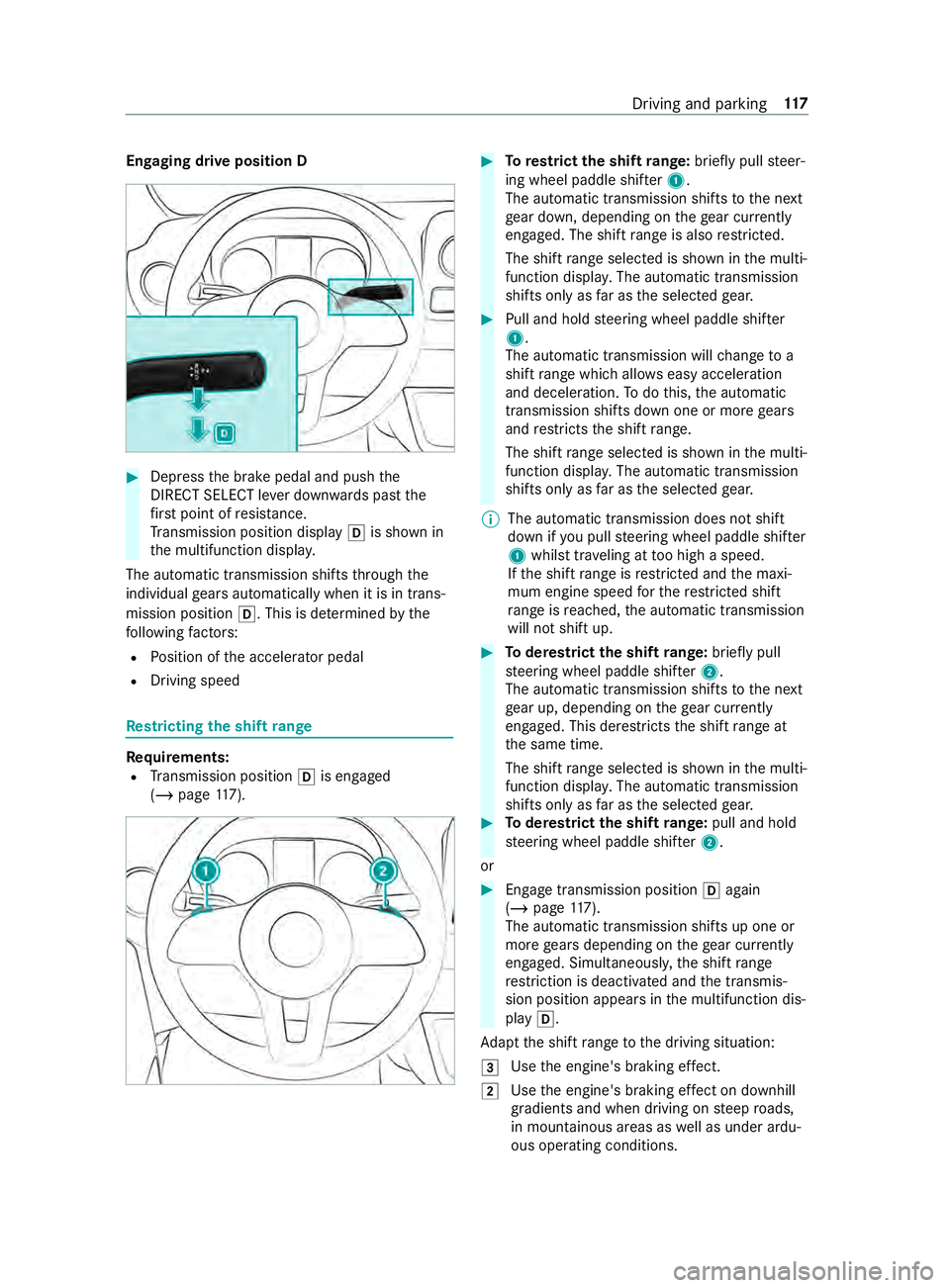
quirements:
R Transmission position 005Bis engaged
(/ page 117). #
Torestrict the shift range: briefly pull steer‐
ing wheel paddle shif ter1.
The automatic transmission shifts tothe next
ge ar down, depending on thege ar cur rently
engaged. The shi ftrange is also restricted.
The shi ftrange selected is shown in the multi‐
function displa y.The automatic transmission
shifts only as far as the selected gear. #
Pull and hold steering wheel paddle shif ter
1 .
The automatic transmission will change to a
shift range which allo wseasy acceleration
and deceleration. Todo this, the automatic
transmission shifts down one or more gears
and restricts the shift range.
The shi ftrange selected is shown in the multi‐
function displa y.The automatic transmission
shifts only as far as the selected gear.
% The automatic transmission does not shift
down if
you pull steering wheel paddle shif ter
1 whilst tr aveling at too high a speed.
If th e shift range is restricted and the maxi‐
mum engine speed forth ere stricted shi ft
ra nge is reached, the automatic transmission
will not shift up. #
Toderestrict the shi ftrange: briefly pull
st eering wheel paddle shif ter2.
The automatic transmission shifts tothe next
ge ar up, depending on thege ar cur rently
engaged. This de restricts the shift range at
th e same time.
The shift range selected is shown in the multi‐
function displa y.The automatic transmission
shifts only as far as the selected gear. #
Toderestrict the shi ftrange: pull and hold
st eering wheel paddle shif ter2.
or #
Engage transmission position 005Bagain
(/ page 117).
The automatic transmission shi fts up one or
more gears depending on thege ar cur rently
engaged. Simultaneously, the shift range
re striction is deactivated and the transmis‐
sion position appears in the multifunction dis‐
play 005B.
Ad apt the shift range tothe driving situation:
0049 Use
the engine's braking ef fect.
0048 Use
the engine's braking ef fect on downhill
gradients and when driving on steep roads,
in mountainous areas as well as under ardu‐
ous operating conditions. Driving and parking
117