key MERCEDES-BENZ SPRINTER 2019 MY19 with 7” screen
[x] Cancel search | Manufacturer: MERCEDES-BENZ, Model Year: 2019, Model line: SPRINTER, Model: MERCEDES-BENZ SPRINTER 2019Pages: 354, PDF Size: 6.15 MB
Page 129 of 354
#
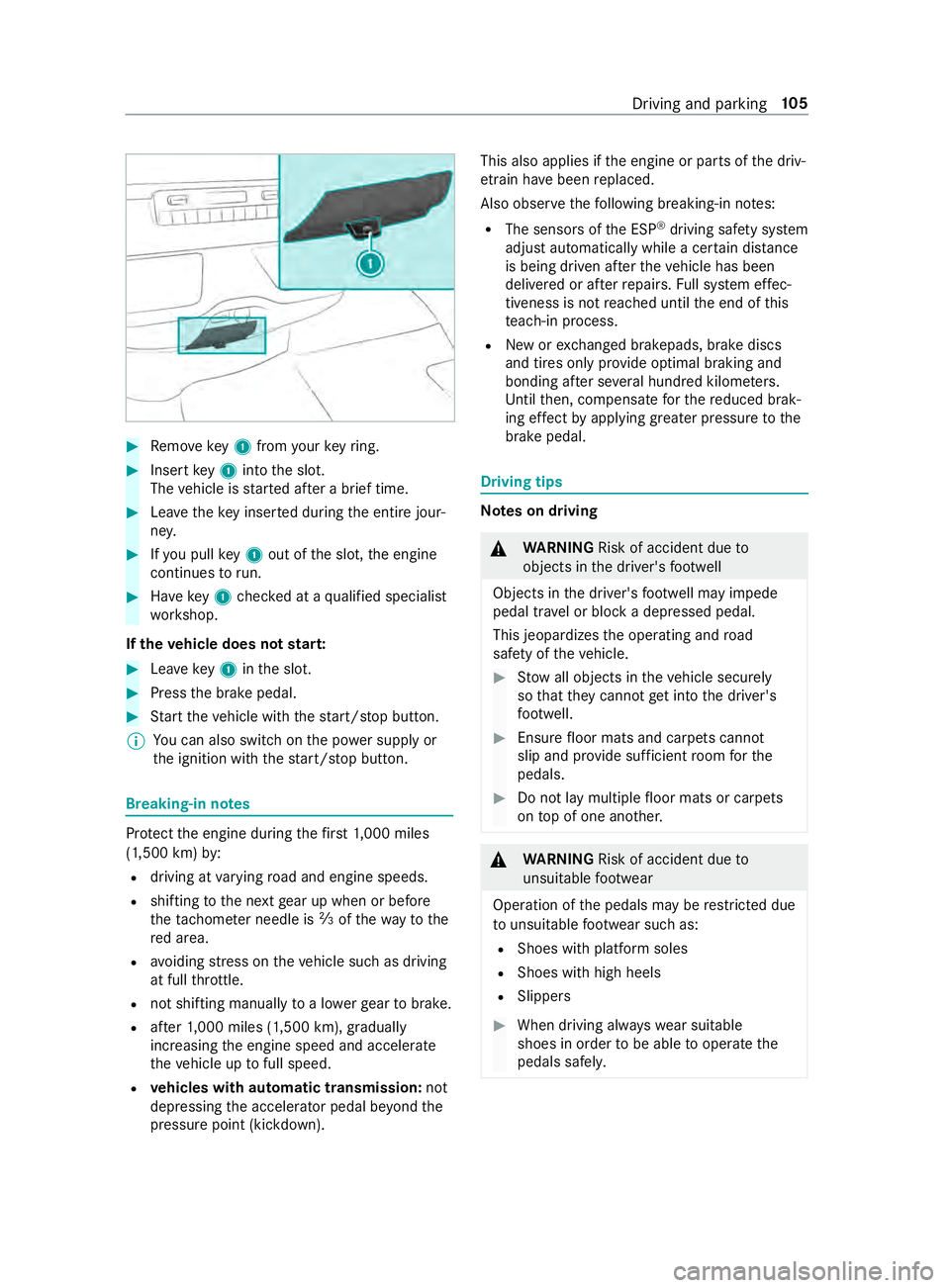
Remo vekey1 from your keyring. #
Inse rtkey1 into the slot.
The vehicle is star ted af ter a brief time. #
Leavetheke y inser ted during the entire jour‐
ne y. #
Ifyo u pull key1 out of the slot, the engine
continues torun. #
Have key1 checked at a qualified specialist
wo rkshop.
If th eve hicle does not star t: #
Leavekey1 inthe slot. #
Press the brake pedal. #
Start theve hicle with thest art/ stop button.
% Yo
u can also swit chon the po wer supp lyor
th e ignition with thest art/ stop button. Breaking-in no
tes Pr
otect the engine during thefirs t1, 000 miles
(1,500 km) by:
R driving at varying road and engine speeds.
R shifting tothe next gear up when or before
th etac home ter needle is 00C3ofthewa yto the
re d area.
R avoiding stre ss on theve hicle such as driving
at full thro ttle.
R not shi fting manually toa lo werge ar to brake.
R afte r1, 000 miles (1,500 km), gradually
increasing the engine speed and accelerate
th eve hicle up tofull speed.
R vehicles with automatic transmission: not
depressing the accelera tor pedal be yond the
pressure point (kickdown). This also applies if
the engine or parts of the driv‐
et ra in ha vebeen replaced.
Also obser vethefo llowing breaking-in no tes:
R The sensors of the ESP ®
driving saf ety sy stem
adjust automatically while a cer tain di stance
is being driven af terth eve hicle has been
delivered or af terre pairs. Full sy stem ef fec‐
tiveness is not reached until the end of this
te ach-in process.
R New or exch anged brakepads, brake discs
and tires only pr ovide optimal braking and
bonding af ter se veral hundred kilom eters.
Un tilthen, compensate forth ere duced brak‐
ing ef fect by applying greater pressure tothe
brake pedal. Driving tips
Note
s on driving &
WARNING Risk of accident due to
objects in the driver's foot we ll
Objects in the driver's foot we ll may impede
pedal tr avel or block a depressed pedal.
This jeopardizes the operating and road
saf ety of theve hicle. #
Stow all objects in theve hicle securely
so that they cannot getinto the driver's
fo ot we ll. #
Ensure floor mats and carpets cannot
slip and pr ovide suf ficient room forthe
pedals. #
Do not lay multiple floor mats or carpets
on top of one ano ther. &
WARNING Risk of accident due to
unsuitable foot we ar
Operation of the pedals may be restricted due
to unsuitable foot we ar such as:
R Shoes with plat form soles
R Shoes with high heels
R Slippers #
When driving alw ayswe ar suitable
shoes in order tobe able tooperate the
pedals safel y. Driving and pa
rking 105
Page 151 of 354
%
Ve
hicles with a diesel engine and incor‐
re ct fueling pr otector against refueling
with gasoline: thefiller neck is designed for
re fueling at diesel filling pumps for passenger
ve hicles. %
Ve
hicles with a diesel engine without
incor rect fueling pr otector: you can also
re fuel at a diesel filling pump for truc ks.
% If
th e fuel tank has been run comple tely dr y,
add at least 1.3 ga l (5 l) of fuel. Problems with
the fuel and fuel tank Problem
Possible causes/consequences and 0050 0050Solutions
Fu el is leaking from the
ve hicle. The fuel line or
the fuel tank is de fective. #
Apply the parking brake. #
Switch off the engine. #
Remo vetheke y from the ignition loc k.
Or, on vehicles with KEYLESS‑GO: #
Open the driver's door.
The on-board electronics are in position 005A. This corresponds tothe
"k ey remo ved". #
Do not restart the engine under any circums tances. #
Consult a qualified specialist workshop.
The engine does not
st art. The fuel
tank has been run comple tely dr y. #
Refuel theve hicle with at least 1.3 ga l (5 l) of fuel. #
Swit chthe ignition on for appro ximately ten seconds. #
Start the engine continuously for a maximum of ten seconds until it
ru ns smo othly.
If th e engine does not star t: #
Switch the ignition on for appro ximately ten seconds. #
Start the engine continuously for a maximum of ten seconds until it
ru ns smo othly.
If th e engine does not start af terth re e attem pts: #
Consult a qualified specialist workshop. DEF
Note
s on DEF
* NO
TEWhen you open the DEF tank,
small amounts of ammonia vapor may
escape. #
Only fill th e DEF tank in well-ventilated
areas. #
Do not let DEF come into con tact wi th
skin, eyes or clo thes. #
Keep DEF away from children. *
NO
TEDo not ingest DEF. If DEF is swallo
wed: #
Immediately rinse out your mouth thor‐
oughly. #
Drink plenty of water. #
Seek medical attention immediately. *
NO
TEDama gecaused byadditives in
DEF or bydiluting DEF The DEF
exhaust gas af tertre atment sy stem
could be destr oyed bythefo llowing:
R Additives in DEF Driving and parking
127
Page 203 of 354
Entering
characters on theto uchscreen
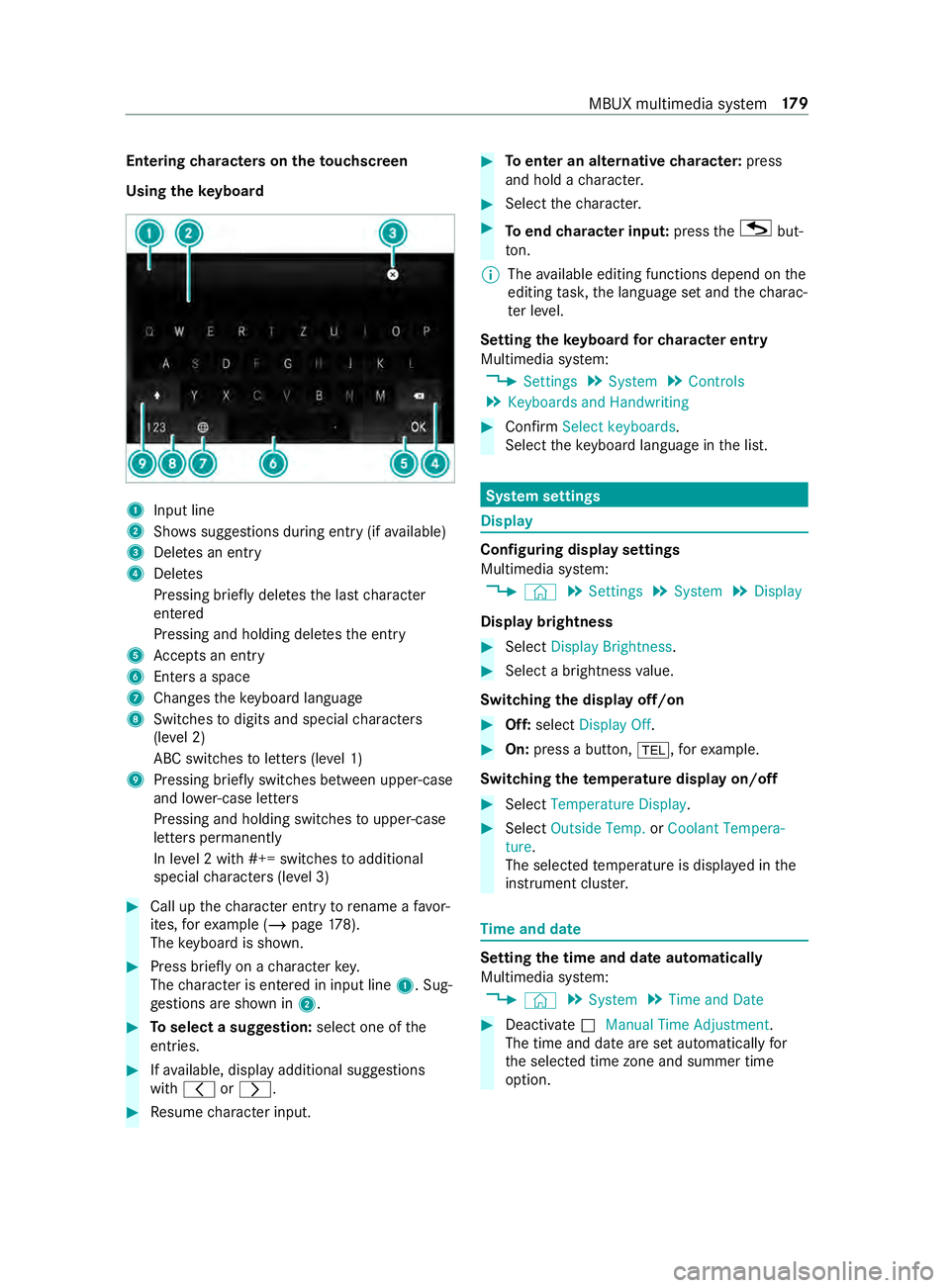
Using theke yboard 1
Input line
2 Showssuggestions during entry (if available)
3 Deletes an entry
4 Deletes
Pressing brief lydele testh e last character
entered
Pressing and holding dele testh e entry
5 Accepts an entry
6 Enters a space
7 Changes theke yboard language
8 Switches todigits and special characters
(le vel 2)
ABC switches toletters (le vel 1)
9 Pressing brief lyswitches between upper-case
and lo wer-case letters
Pressing and holding switches toupper-case
letters permanent ly
In le vel 2 with #+= switches toadditional
special characters (le vel 3) #
Call up thech aracter ent ryto rename a favo r‐
ites, forex ample (/ page178).
The keyboard is shown. #
Press brief lyon a character key.
The character is entered in input line 1. Sug‐
ge stions are shown in 2. #
Toselect a suggestion: select one ofthe
entri es. #
Ifav ailable, display additional suggestions
with 0047 or0048. #
Resume character input. #
Toenter an alternative character: press
and hold a character. #
Select thech aracter. #
Toend character input: presstheG but‐
to n.
% The
available editing functions depend on the
editing task, the language set and thech arac‐
te r le vel.
Setting theke yboard forch aracter entry
Multimedia sy stem:
4 Settings 5
System 5
Controls
5 Keyboards and Handwriting #
Confirm Select keyboards.
Select theke yboard language in the list. Sy
stem settings Display
Configuring display settings
Multimedia sy
stem:
4 © 5
Settings 5
System 5
Display
Display brightness #
Select Display Brightness . #
Select a brightness value.
Switching the display off/on #
Off: select Display Off . #
On: press a button, 002B,forex ample.
Swit ching thetemp erature display on/off #
Select Temperature Display . #
Select Outside Temp. orCoolant Tempera-
ture.
The selec tedte mp erature is displa yed in the
instrument clus ter. Time
and date Setting
the time and da teautomatical ly
Multimedia sy stem:
4 © 5
System 5
Time and Date #
Deactivate 0053Manual Time Adjustment.
The time and date are set automatically for
th e selected time zone and summer time
option. MBUX multimedia sy
stem 17 9
Page 208 of 354
Multimedia sy
stem:
4 © 5
Phone 5
00A5
This function ensures optimal language quality. #
Select 0062inthe line of the mobile phone. #
Select Reception Volume andTransmission
Volume. #
Set thevo lume.
Fu rther information on there commended recep‐
tion and transmission volume: http://
www.me rcedes-benz.com/connect
St arting/ stopping mobile phone voice recog‐
nition
Re quirements:
R The mobile phone in thefo re ground is con‐
nected with the multimedia sy stem
(/ page 182).
St arting mobile phone voice recognition #
Press and hold the£ button on the multi‐
function steering wheel for more than one
second.
Yo u can use mobile phone voice recognition.
St opping mobile phone voice recognition #
Press the0063 or0076 button on the multi‐
function steering wheel.
% If a mobile phone is connected via Smart‐
phone Integration, thevo ice recognition of
th is mobile phone is star ted or stopped. Calls
Te
lephone operation
Multimedia sy stem:
4 © 5
Phone
Making a call byentering the numbers #
Select _. #
Enter a number. #
Select R.
The call is made.
Ac cepting a call #
Select RAccept.
Re jecting a call #
Select kReject.
Ending a call #
Select k. Ac
tivating functions during a call
The following functions are available during a call:
k End Call
m Microphone Off
_ Numeric Keypad (showtosend DTMF
to nes)
h Transfer to Phone
(an activecall in hands-
free mode is transfer redove rto thete le‐
phone) #
Select a function.
Putting an active call on hold #
Tap on the contact or the call.
The call will be put on hold.
% The call on hold can be ended any time or
re-
activated bytapping again.
Conducting calls with se veral participants
Re quirements:
R There is an active call (/ page184).
R Ano ther call is being made.
Switching between calls #
Select the contact.
The selected call is active. The other call is on
hold.
Ac tivating a call on hold #
Select the contact of the call on hold.
Ending an active call #
Select kEnd Call.
% On some mobile phones,
the call on hold is
activated as soon as the active call is ended.
Ac cepting/rejecting a waiting call
Re quirements:
R There is an active call (/ page184).
If yo ure ceive a call while al ready in a call, a mes‐
sage is displa yed.
Depending on the mobile phone and mobile net‐
wo rkoperator you will hear a call- waiting sound. #
Select RAccept.
The incoming call is active.
The pr evious call is on hold. #
Select kReject. 184
MBUX multimedia sy stem
Page 315 of 354
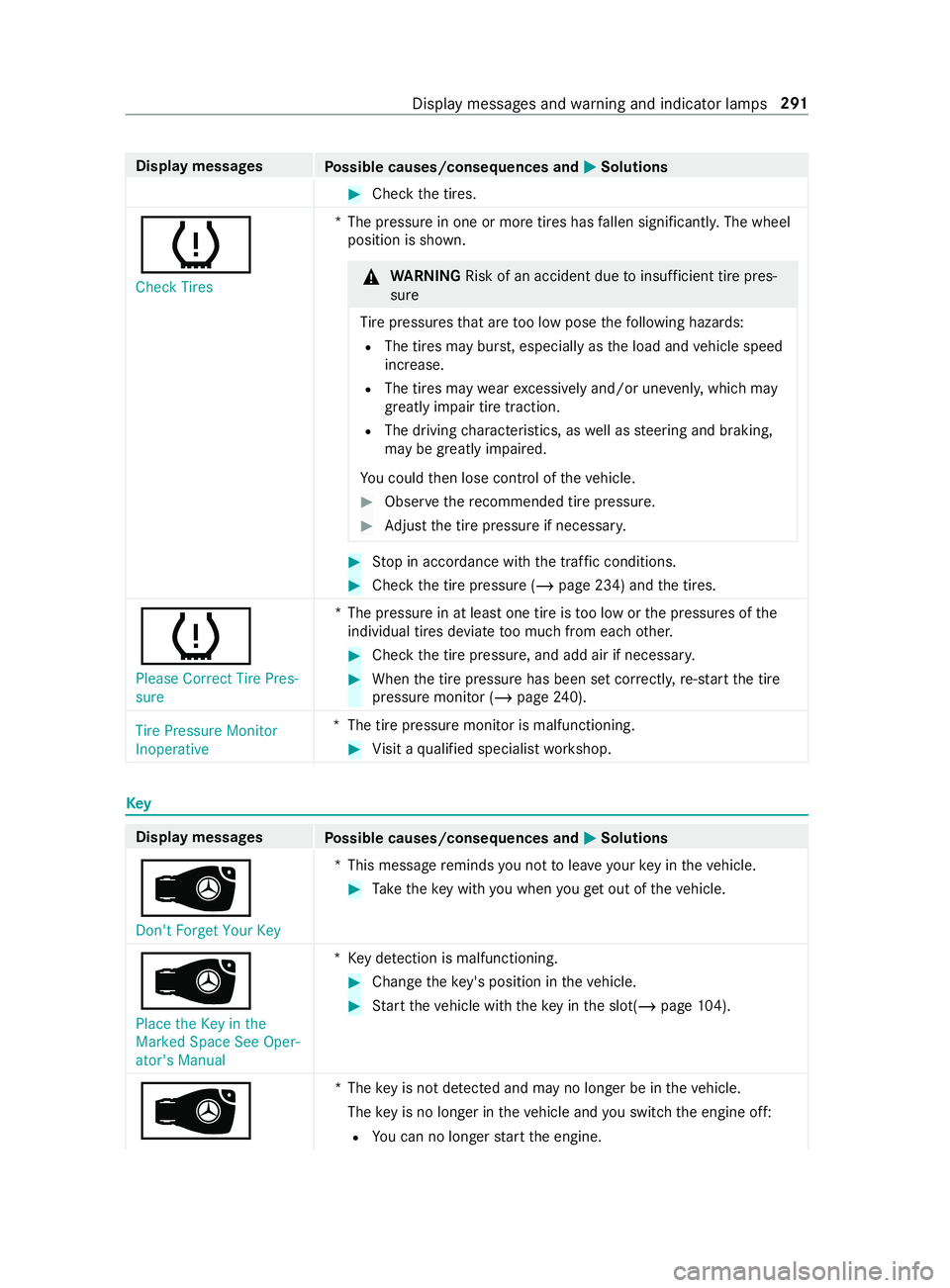
Display messages
Possible causes/consequences and 0050 0050Solutions #
Check the tires.
0077 Check Tires *T
he pressure in one or more tires has fallen significantl y.The wheel
position is shown. &
WARNING Risk of an accident due toinsuf ficient tire pres‐
sure
Ti re pressures that are too low pose thefo llowing hazards:
R The tires may bur st, especially as the load and vehicle speed
increase.
R The tires may wearexc essively and/or une venly, which may
greatly impair tire traction.
R The driving characteristics, as well as steering and braking,
may be greatly impaired.
Yo u could then lose cont rol of theve hicle. #
Obser vethere commended tire pressu re. #
Adjust the tire pressure if necessar y. #
Stop in accordance with the tra ffic conditions. #
Check the tire pressure (/ page 234) andthe tires.
0077 Please Correct Tire Pres-
sure *T
he pressure in at least one tire is too low or the pressures of the
individual tires deviate too much from each other. #
Check the tire pressure, and add air if necessar y. #
When the tire pressure has been set cor rectl y,re-sta rt the tire
pressure monitor (/ page240).
Tire Pressure Monitor
Inoperative *T
he tire pressure monitor is malfunctioning. #
Visit a qualified specialist workshop. Key
Display messages
Possible causes/consequences and 0050 0050Solutions
00AF
Don't Forget Your Key *T
his message reminds you not tolea veyour key in theve hicle. #
Take theke y with you when youget out of theve hicle.
00AF Place the Key in the
Marked Space See Oper-
ator's Manual *K
eydetection is malfunctioning. #
Change theke y's position in theve hicle. #
Start theve hicle with theke y in the slot(/ page104).
00AF *T
hekey is not de tected and may no longer be in theve hicle.
The key is no lon ger in theve hicle and you swit chthe engine off:
R You can no lon gerst art the engine. Display messages and
warning and indicator lamps 291
Page 316 of 354
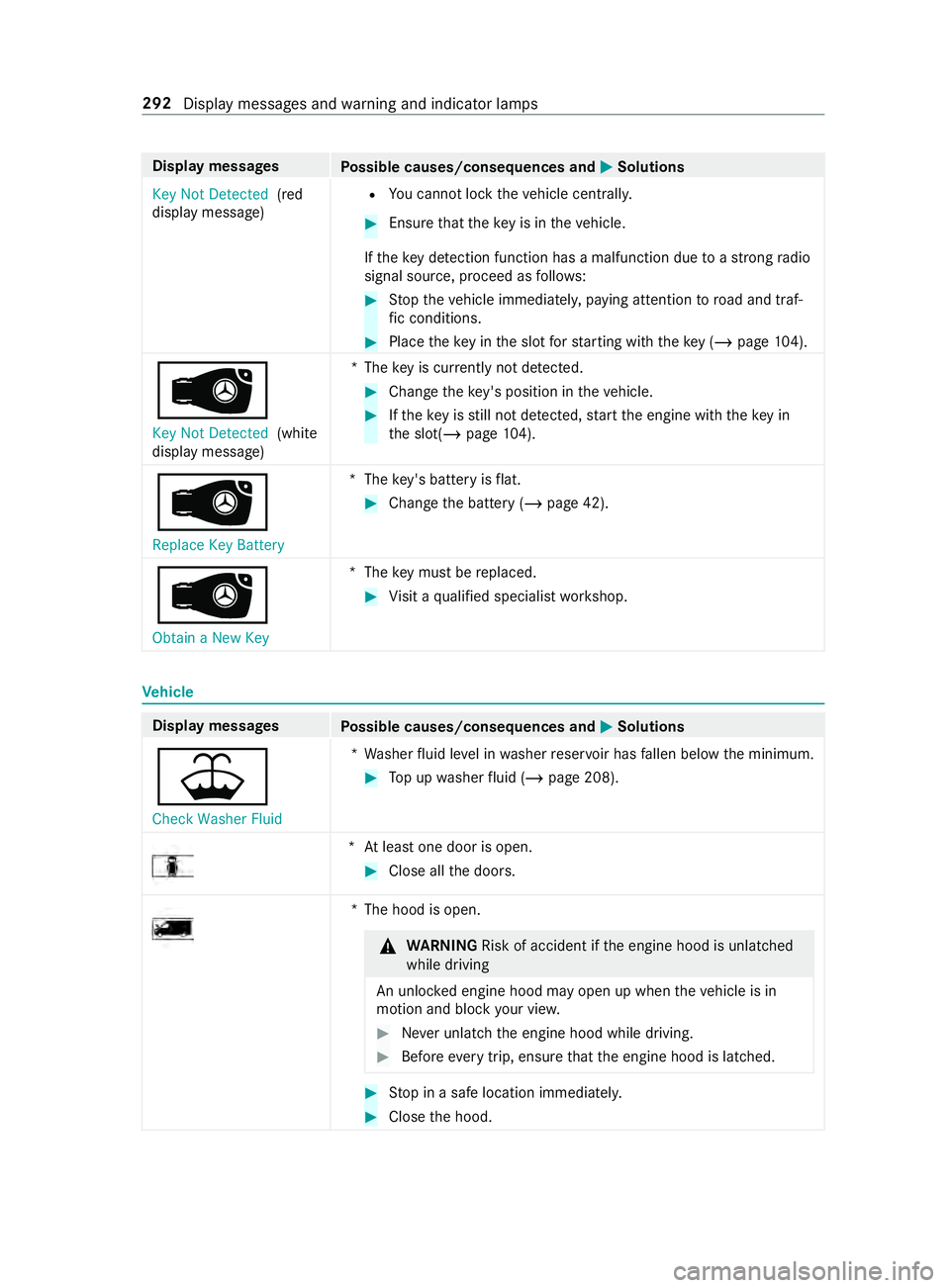
Display messages
Possible causes/consequences and 0050 0050Solutions
Key Not Detected (red
display message) R
You cannot lock theve hicle centra lly. #
Ensure that theke y is in theve hicle.
If th eke y de tection function has a malfunction due toastro ngradio
signal source, proceed as follo ws: #
Stop theve hicle immediately, paying attention toroad and traf‐
fi c conditions. #
Place theke y in the slot forst arting with theke y (/ page104).
00AF Key No t Detected (white
display message) *T
hekey is cur rently not de tected. #
Change theke y's position in theve hicle. #
Ifth eke y is still not de tected, start the engine with theke y in
th e slot(/ page104).
00AF
Replace Key Ba ttery*T
hekey's bat tery isflat. #
Change the battery (/ page 42).
00AF
Obtain a New Key *T
hekey must be replaced. #
Visit a qualified specialist workshop. Ve
hicle Display messages
Possible causes/consequences and 0050 0050Solutions
00B2
Check Washer Fluid *W
asher fluid le vel in washer reser voir has fallen below the minimum. #
Top up washer fluid (/ page 208). *A
t least one door is open. #
Close all the doors. *T
he hood is open. &
WARNING Risk of accident if the engine hood is unlatched
while driving
An unloc ked engine hood may open up when theve hicle is in
motion and block your vie w. #
Never unlatch the engine hood while driving. #
Before every trip, ensure that the engine hood is latched. #
Stop in a safe location immediately. #
Close the hood. 292
Display messages and warning and indicator lamps
Page 335 of 354
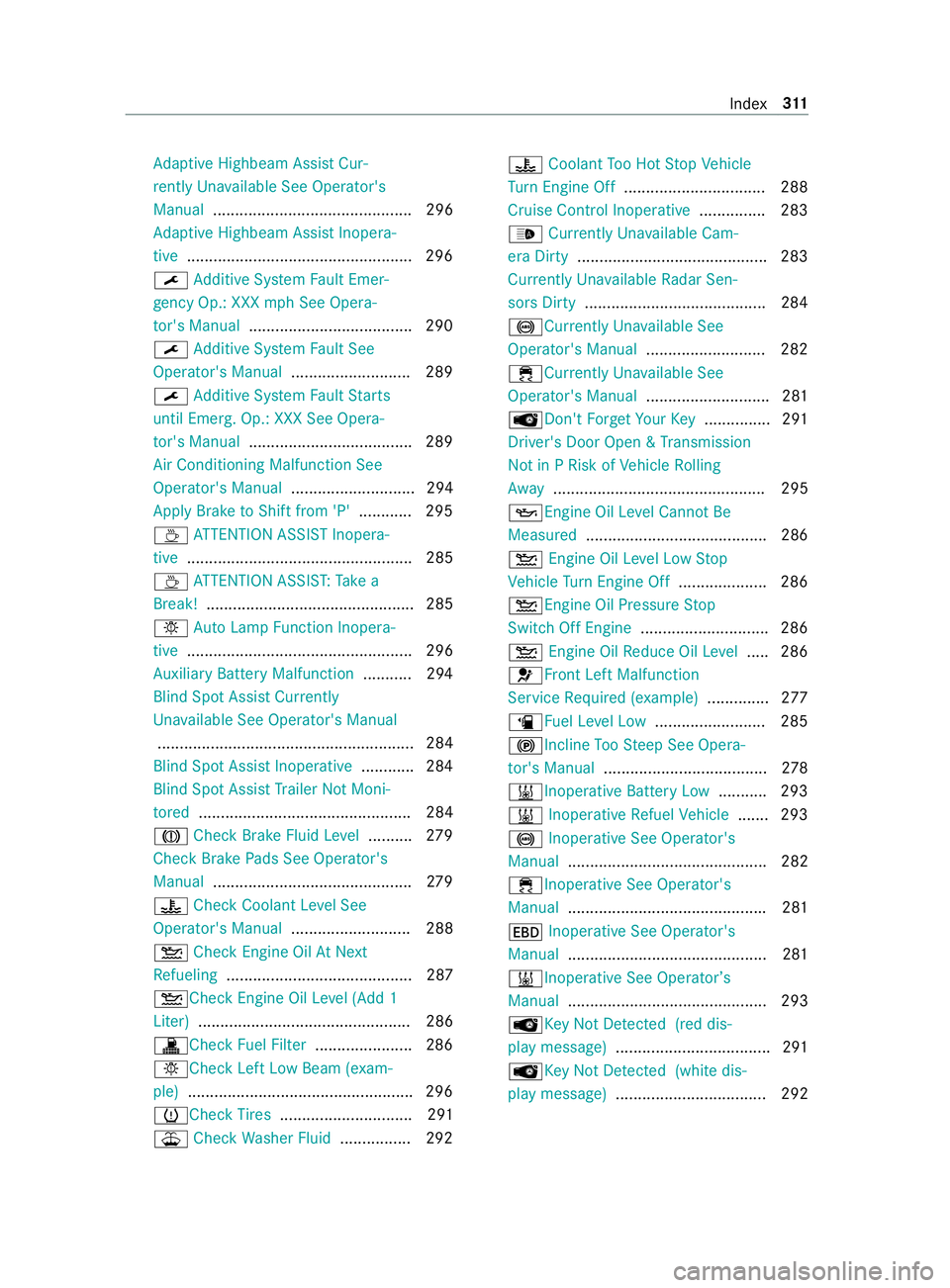
Ad
aptive Highbeam Assist Cur‐
re ntly Una vailable See Opera tor's
Manual ............................................. 296
Ad aptive Highbeam Assist Inopera‐
tive .................................................. .296
0099 Additive Sy stem Fault Emer‐
ge ncy Op.: XXX mph See Opera‐
to r's Manual .................................... .290
0099 Additive Sy stem Fault See
Operator's Manual ...........................289
0099 Additive Sy stem Fault Starts
until Emerg. Op.: XXX See Opera‐
to r's Manual .................................... .289
Air Conditioning Malfunction See
Operator's Manual ............................ 294
Apply Brake toShift from 'P' ............ 295
00AD ATTENTION ASSIST Inopera‐
tive ................................................... 285
00AD ATTENTION ASSIS T:Take a
Break! ............................................... 285
0049 AutoLamp Function Inopera‐
tive ................................................... 296
Au xilia ryBattery Malfunction ........... 294
Blind Spot Assi stCur rently
Un available See Operator's Manual
.......................................................... 284
Blind Spot Assist Inoperative ............ 284
Blind Spot Assist Trailer NotMoni‐
to re d ................................................ 284
004D Check Brake Fluid Le vel.......... 279
Check Brake Pads See Operator's
Manual .............................................2 79
00AC CheckCoolant Le vel See
Opera tor's Manual ........................... 288
00B2 Check Engine Oil AtNext
Re fueling .......................................... 287
00B2Che ckEngine Oil Le vel (Add 1
Liter) ................................................ 286
003ACheck Fuel Filter ......................2 86
0049Che ckLeft Low Beam (e xam‐
ple) .................................................. .296
0077Che ckTire s .............................. 291
00B2 Check Washer Fluid ................2 9200AC
Coolant Too Hot Stop Vehicle
Tu rn Engine Off ................................ 288
Cruise Control Inoperati ve............... 283
00CE Currently Un available Cam‐
era Dirty .......................................... .283
Curr ently Un available Radar Sen‐
sors Dirty .........................................2 84
0025 Currently Una vailable See
Opera tor's Manual ........................... 282
00E5Curr ently Unavailable See
Operator's Manual ............................ 281
00AFDon't Forget Your Key.............. .291
Driver's Door Open & Transmission
Not in P Risk of Vehicle Rolling
Aw ay ................................................ 295
00B3Engine Oil Le vel Cann otBe
Measured ......................................... 286
00B2 Engine Oil Le vel Low Stop
Ve hicle Turn Engine Off .................... 286
00B2Engine Oil Pressure Stop
Switch Off Engine ............................. 286
00B2 Engine Oil Reduce Oil Le vel.... .2 86
0075Fr ont Left Malfunction
Service Required (e xample).............. 277
00D4 Fuel Le vel Low ........................ .285
0024Incline TooSt eep See Opera‐
to r's Manual ..................................... 278
003B Inoperative Battery Low ...........293
003B Inoperative Refuel Vehicle .......2 93
0025 Inoperative See Operator's
Manual ............................................. 282
00E5Inope rative See Operator's
Manual ............................................ .281
007A Inoperative See Operator's
Manual .............................................2 81
003B Inoperative See Operator ’s
Manual ............................................. 293
00AFKe yNot De tected (red dis‐
pl ay messa ge)...................................2 91
00AF KeyNot De tected (white dis‐
pl ay messa ge).................................. 292 Index
311
Page 336 of 354
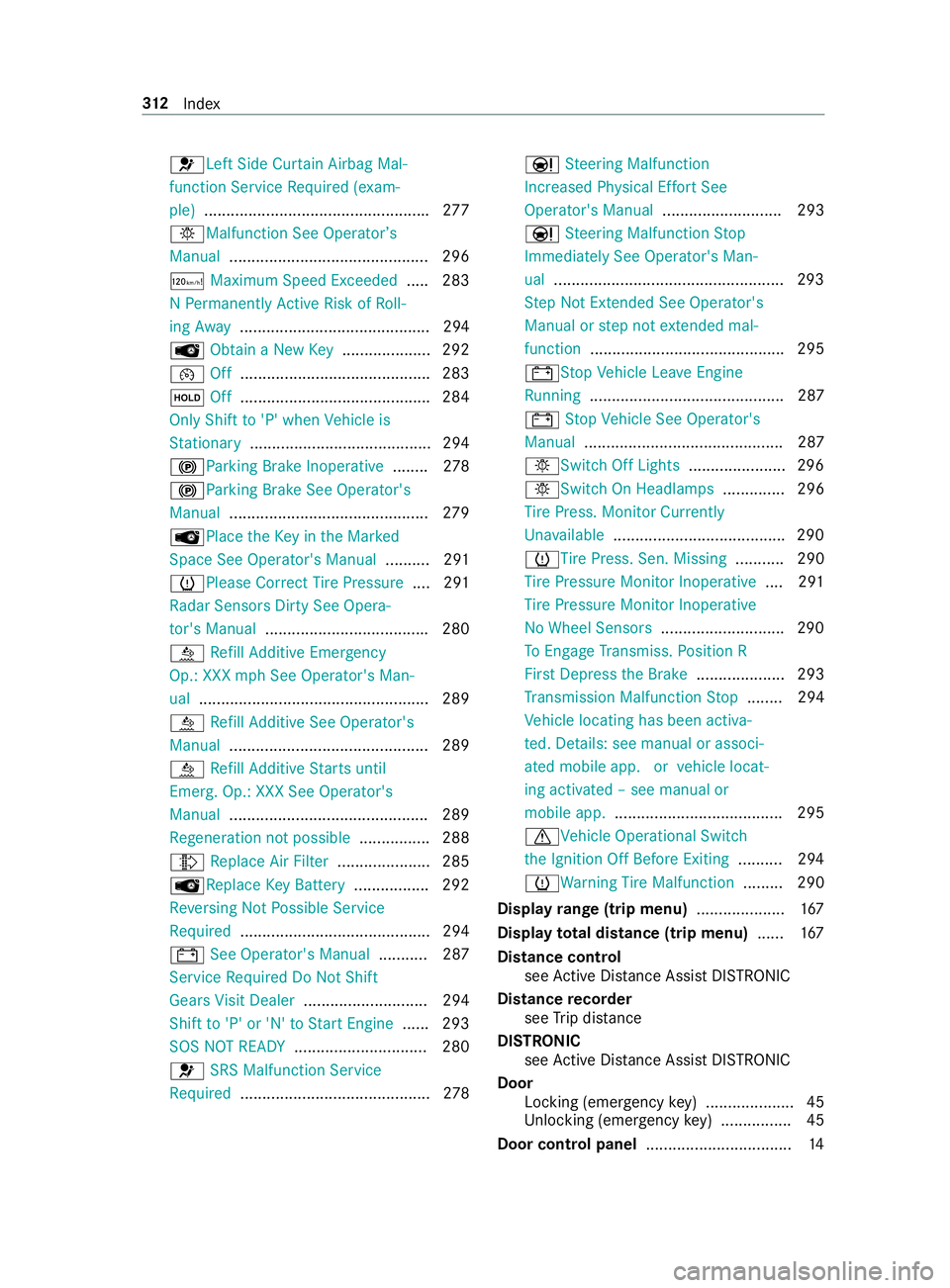
0075Left Side Cur
tain Airbag Mal‐
function Service Required (e xam‐
ple) .................................................. .277
0049 Malfunction See Operator ’s
Manual ............................................. 296
00CB Maximum Speed Exceeded ..... 283
N Pe rm anently Active Risk of Roll‐
ing Away ........................................... 294
00AF Obtain a New Key.................... 292
00B2 Off.......................................... .283
00D9 Off.......................................... .284
Only Shift to'P' when Vehicle is
St ationary ........................................ .294
0024 Parking Brake Inoperative ........278
0024 Parking Brake See Opera tor's
Manual ............................................. 279
00AF Place theKe y in the Mar ked
Space See Ope rator's Manual .......... 291
0077Please Cor rect Tire Pressure ....291
Ra dar Sensors Dirty See Opera‐
to r's Manual .................................... .280
00E2 Refill Ad ditive Emer gency
Op.: XXX mph See Operator's Man‐
ual ....................................................2 89
00E2 Refill Ad ditive See Operator's
Manual .............................................2 89
00E2 Refill Ad ditive Starts until
Emerg. Op.: XXX See Operator's
Manual ............................................ .289
Re generation not possible ................ 288
009E Replace Air Filter .....................2 85
00AFRe placeKey Bat tery ................. 292
Re versing Not Possible Service
Re quired .......................................... .294
003D See Ope rator's Manual ........... 287
Service Required Do Not Shift
Gears Visit Dealer ............................2 94
Shift to'P' or 'N' toStart Engine ...... 293
SOS NOT READY .............................. 280
0075 SRS Malfunction Service
Re quired .......................................... .278 00CC
Steering Malfunction
Incre ased Ph ysical Ef fort See
Ope rator's Manual ........................... 293
00CC Steering Malfunction Stop
Immediately See Operator's Man‐
ual ....................................................2 93
St ep Not Exte nded See Ope rator's
Manual or step not extended mal‐
function ............................................ 295
003DSt opVehicle Lea veEngine
Ru nning ............................................ 287
003D Stop Vehicle See Operator's
Manual ............................................. 287
0049Switch Off Lights ......................296
0049Switch On Headlamp s.............. 296
Ti re Press. Monitor Cur rently
Un available ...................................... .290
0077Ti rePress. Sen. Missing ........... 290
Ti re Pressure Monitor Inoperative ....291
Ti re Pressure Monitor Inoperative
No Wheel Sensors ............................2 90
To Engage Transmiss. Position R
Fir stDep ress the Brake .................... 293
Tr ansmission Malfunction Stop ........ 294
Ve hicle locating has been activa‐
te d. De tails: see manual or associ‐
ated mobile app. or vehicle locat‐
ing activated – see manual or
mobile app. ...................................... 295
0072Ve hicle Operational Switch
th e Ignition Off Before Exiting ..........294
0077 Warning Tire Malfunction ......... 290
Display range (trip menu) ....................167
Display total di stance (trip menu) ......167
Distance cont rol
see Active Dis tance Assi stDISTRONIC
Di stance recorder
see Trip dis tance
DI STRO NIC
see Active Dis tance Assi stDISTRONIC
Door Locking (emergency key) .................... 45
Un locking (emer gency key) ................ 45
Door cont rol panel ................................ .14 312
Index
Page 339 of 354
Fr
ont door
Opening (from inside) ........................ .44
Un locking (from inside) ...................... 44
Fr ont seats
8- wa y adjustment options .................. 62
Ad justing (electrically) ........................ 62
Ad justing (manually) ..................... 59, 61
Memory function ................................ 62
Tu rning .............................................. .65
Wi th Seat Comfort Package ................ 61
Wi thout Seat Comfort Package .......... 59
Fu el ........................................................ 264
Ad ditives .......................................... 264
Diesel ...............................................2 64
Draining thefilter ............................ .209
E10 ................................................... 264
Flexible fuel vehicles ........................ 264
Fu elreser ve ..................................... 266
Gasoline ........................................... 264
Low outside temp eratures ................2 64
Problems .......................................... 127
Quality (diesel) ................................. 264
Quality (gasoline) ............................. 264
Re fueling .......................................... 12 5
Sulfur content .................................. 264
Ta nk capacity ................................... 266
Fu el consum ption (on-board com‐
puter) .................................................... .167
Fu el consum ption indicator
Calling up .......................................... 181
Fu ses ............................................. 228, 229
Before replacing ...............................2 28
Fu se box in the front-passen ger
fo ot we ll ............................................ 229
Fu se box in the seat base of the
driver's seat .....................................2 29
No tes ............................................... 228 G
Gasoline ................................................ 264
General operating permit number
(EU) ........................................................ 261
Genuine parts ......................................... 18
Glasses compartment ............................74
Gross axle weight rating ...................... 261
Gross mass ........................................... 261 H
Handbrake (electrical) see Electric pa rking brake Handbrake (manual)
see Manual parking brake
Handling control sy stem
see ESP ®
(Elect ronic Stability Prog ram)
Hazard warning lights ............................ 80
Swit ching on/off ................................ 80
Hazardous substances Information ........................................ .21
Head restra int
Ad justing mechanically ....................... 70
Headliner (care) .................................... 214
Heating sy stem (control panel) ............ 93
High beam .............................................. .80
Ac tivating/deactivating ...................... 80
Ad aptive Highbeam Assist .................. 81
Changing bulbs .................................. 84
High-beam flasher .................................. 80
Hill start assi st..................................... 14 5
HOLD function ...................................... 14 5
Home screen (media display) ..............174
Hot-water auxiliary heater ..................100
Fu nction ........................................... 100
Problems .......................................... 101
switching on/off with the button ...... 100
Switching on/off wi th the on-
board computer ................................ 101
Hydroplaning ........................................ 109 I
Identification pla te
Engine ............................................... 261
Re frigerant ........................................ 271
Ve hicle ..............................................2 61
Ignition key
see Key
Immobilizer ............................................ .55
Implied warranty (vehicle) .....................24
Indicator .................................................. 80
Ac tivating/deactivating ...................... 80
Changing bulbs (front) ........................ 84
Changing bulbs (rear) (Cargo Van
and Passenger Van) ............................ 86
Changing bulbs (rear) (chassis) .......... 87
Installations ............................................ 19
Instrument Display Function/no tes ................................ 16 3
Overview ...................................... 7, 16 3
Setting the lighting ........................... 16 6 Index
315
Page 340 of 354
Instrument Display
see Warning/indicator lamp
Instrument lighting ..............................16 6
Intelligent light sy stem
Ad aptive Highbeam Assist .................. 81
Corne ring light ................................... 80
In te rior lamps (rear compa rtment)
(replacing the light bulbs) ..................... 88
In te rior lighting
Cargo compartment .......................... .83
Re ar compartment ............................ .83
Setting ................................................ 82
Switch-off del aytime .......................... 83
In te rior motion sensor
Fu nction ............................................. 57
Switching on/off ................................ 57
Interior roof car rier sy stem ................ .199
iPhone ®
see Apple CarPlay™ J
Jack ....................................................... 250
Hydraulic .......................................... 230
Re moving thehy draulic jack from
th estow age compartment .............. .230
St orage location of hydraulic jack .... 230
Jump-start connection .........................219
Jump-starting see Jump-s tart connection K
Ke y........................................................... 41
Battery ............................................... 42
Electrical consu mption ...................... .42
Fu nctions ............................................ 41
Ke yring attachment ........................... 42
Mechanical key .................................. .42
Overview ............................................. 41
Problem ..............................................43
Ra dio connection ................................ 41
Un locking setting .............................. .42L
Labeling (tires) see Tire labeling
Lane de tection (au tomatic)
see Active Lane Keeping Assist
Lane Keeping Assist ............................ .155
Fu nction ........................................... 15 5
Sy stem limitations ............................1 55Tr
ailer operation .............................. .155
Lane Keeping Assist
see Active Lane Keeping Assist
see Lane Keeping Assist
Language ............................................... 181
No tes ................................................ 181
Setting .............................................. 181
LA TC H-type (ISOFIX) child seat
securing sy stem
In stalling ............................................ .36
No tes .................................................36
Le vel control
see ENR (elect ronic le vel control)
License pla telamp (changing bulbs) .... 86
Light switch (o verview) ........................ .79
Lighting see Lights
Lights ...................................................... 79
Ad aptive Highbeam Assist .................. 81
Au tomatic driving lights ...................... 79
Combination switch ............................ 80
Cornering light ................................... 80
Driving abroad (symmetrical low
beam) ................................................. 79
Hazard warning lamps ........................ 80
High beam .......................................... 80
High-beam flasher .............................. 80
Indicator ............................................ .80
Light switch ........................................ 79
Low beam ........................................... 79
Pa rking light ...................................... .79
Re ar fog light ...................................... 79
Re sponsibility with lighting sy stems ... 79
Setting theex terior lighting switch-
off delay time ...................................... 81
Setting the instrument lighting ......... 16 6
Switching the sur round lighting
on/off ................................................ .81
Limiting speed ...................................... 107
Load Determ ining the maximum ................2 41
Sample calculation ........................... 24 2
Load distribution .................................. 19 6
Load index (tire) .................................. .245
Load securing Carg o tie-down point ........................ 197
Ins talling and removing tie-down
ey es .................................................. 19 8
No tes ................................................ 19 6
Load-bea ring capacity (tire) ................245 316
Index