center console MERCEDES-BENZ SPRINTER 2019 MY19 with 7” screen
[x] Cancel search | Manufacturer: MERCEDES-BENZ, Model Year: 2019, Model line: SPRINTER, Model: MERCEDES-BENZ SPRINTER 2019Pages: 354, PDF Size: 6.15 MB
Page 42 of 354
Environmental pr
otection
+ ENVIRONMENTAL
NOTEEnvironmental
damage due tooperating conditions and
personal driving style The pollutant emission of
your vehicle is
directly related totheve hicle's operation.
Yo u can make a contribution toenvironmen tal
pr otection byoperating your vehicle in an
environmentally responsible manner. Todo
th is, obser vethefo llowing recommendations
on ope rating conditions and your personal
driving style.
Operating conditions: #
Make sure that the tire pressures are
alw ays cor rect. #
Do not transport any unnecessa ry
we ight (e.g. a roof rack which is no lon‐
ge rre qu ired). #
Obser vethe service inter vals.
A regularly serviced vehicle will contri b‐
ute toenvironmen tal pr otection. #
Always ha vemaintenance workcar ried
out at a qualified specialist workshop.
Pe rsonal driving style: #
Do not depress the accelera tor pedal
when starting the engine. #
Do not warm upthe engine while sta‐
tionar y. #
Drive carefully and maintain a su fficient
dis tance to ot hervehicles. #
Avoid frequent, sudden acceleration and
braking. #
Shift gears in good time and use each
ge ar only up to00C3 of its maximum
engine speed. #
Switch off the engine when in stationary
traf fic fo r a prolonged time. #
Drive in a fuel-ef ficient manne r.Pay
attention tothe ECO display for a fuel-
ef ficient driving style. Environmental issues and
recommendations
It is recommended torege nerate and recycle sub‐
st ances ins tead of immediately disposing of
th em.
The releva nt environmental guidelines and regula‐
tions ser vetoprotect the environment and
should be follo we d carefully. Mercedes-Benz Genuine
Parts
+ ENVIRONMENTAL
NOTEEnvironmental
damage caused bynot using recycled
re conditioned components Daimler
AGoffers recycled reconditioned
components and pa rts with the same quality
as new parts. The same entitlement from the
Limited Warranty is valid as for new parts. #
Use recycled reconditioned components
and pa rts from Daimler AG. *
NO
TEThe ef fectiveness of there stra int
sy stems can be impaired byinstalling
accessory parts, per form ing repairs or
we lding operations Airbags, Emer
gency Tensioning Devices as
we ll as control units and sensors forthe
re stra int sy stems can be ins talled in thefo l‐
lowing areas of theve hicle:
R Door frames
R Roof frames
R Doors
R Door pillars
R Door sills
R Seats
R Cockpit
R Instrument clus ter
R Center console #
Do not ins tall any accessories such as
audio sy stems in these areas. #
Do not per form repairs or welding oper‐
ations. #
Have accesso ryparts ins talled at a
qu alified specialist workshop. If
yo u use parts, tires, wheels or saf ety-re leva nt
accesso ries which ha venot been appr ovedby
Mercedes-Benz, the operating saf ety of theve hi‐
cle may be jeopardized. Saf ety-re leva nt sy stems,
e.g. the brake sy stem, may malfunction. Only use
Mercedes-Benz Genuine Parts or parts of equal
qu ality. Use only tires, wheels and accesso ry
parts that are appr oved foryo ur vehicle model.
Mercedes-Benz tests original parts, con version
parts and accessory parts that ha vebeen
appr ovedfo ryo ur vehicle model forre liability,
saf ety and suitabilit y.Despite ongoing ma rket
re sear ch,we are unable toassess other parts. 18
General no tes
Page 63 of 354
R
If necessar y,adjust the seat belt outlet and
th e front-passenger seat as appropriate.
R Never place objects under or behind thech ild
re stra int sy stem, e.g. cushions.
Alw ays obser vethe manufacturer's ins tallation
and operating instructions forth ech ild restra int
sy stem being used. Ac
tivating/deactivating child saf ety loc ksfor
th e doors &
WARNING Risk of accident and inju ry
due tochildren left unat tended in the
ve hicle
If ch ildren are left unat tended in theve hicle,
th ey could:
R Open doo rs,th ereby endangering other
persons or road users.
R Get out and be stru ck byoncoming traf‐
fi c.
R Ope rate ve hicle equipment and become
trapped, forex ample.
In addition, thech ildren could also set the
ve hicle in motion, forex ample by:
R Releasing the parking brake.
R Changing the transmission position.
R Starting theve hicle. #
Never lea vechildren unat tended in the
ve hicle. #
When leaving theve hicle, alw aysta ke
th eke y with you and lock theve hicle. #
Keep theve hicle key out of reach of
ch ildren. &
WARNING Risk offata l injury due to
ex posure toextreme heat or cold in the
ve hicle
If people – particular lych ildren – are exposed
to extreme temp eratures over an extended
pe riod of time, there is a risk of serious or
eve nfa ta l injur y. #
Never lea veanyone – pa rticularly chil‐
dren – unat tended in theve hicle. #
Never lea veanimals in theve hicle unat‐
te nded. &
WARNING Risk of accident and injury
due tochildren left unat tended in the
ve hicle
When children are tra veling in theve hicle,
th ey could:
R open doo rs,th ereby endangering other
people or road users
R getout of theve hicle and be hit bytraf fic
R operate vehicle equipment and become
trapped, forex ample #
When children are tra veling in theve hi‐
cle, alw ays activate theav ailable child
saf ety loc ks. #
Never lea vechildren unat tended in the
ve hicle. #
When leaving theve hicle, alw aysta ke
th eke y with you and lock theve hicle. The
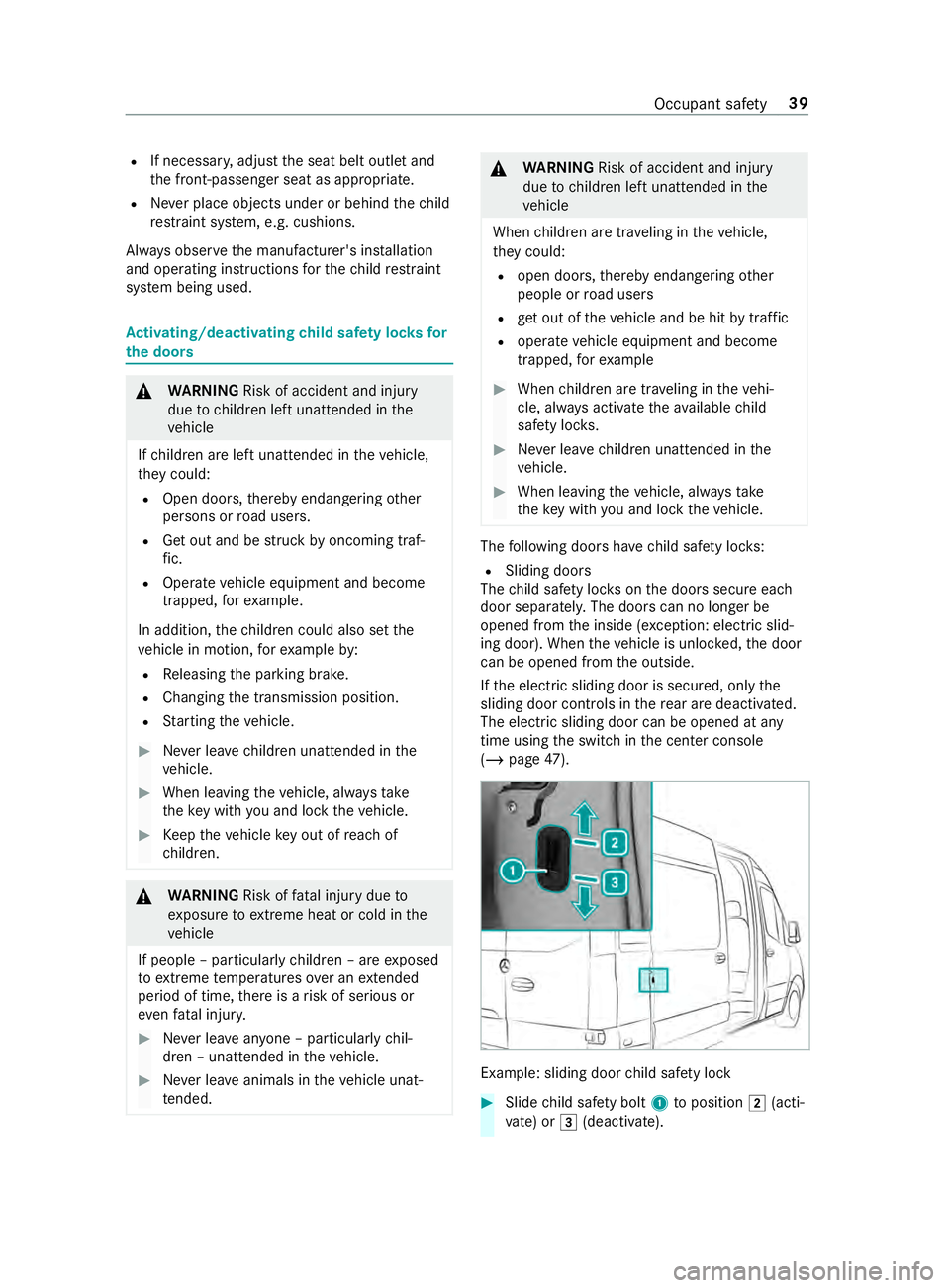
following doors ha vechild saf ety loc ks:
R Sliding doo rs
The child saf ety loc kson the doors secure each
door separatel y.The doors can no longer be
opened from the inside (e xception: electric slid‐
ing door). When theve hicle is unloc ked, the door
can be opened from the outside.
If th e electric sliding door is secured, only the
sliding door contro ls inthere ar are deactivated.
The electric sliding door can be opened at any
time using the switch in the center console
(/ page 47). Example: sliding door
child saf ety lock #
Slide child saf ety bolt 1toposition 0048(acti‐
va te) or 0049(deactivate). Occupant saf
ety39
Page 71 of 354
Yo
u can operate the electric sliding door in the
fo llowing ways:
R bypressing the sliding door buttons on the
center console
R bypressing the sliding door button on the
door sill (B-pillar)
R using the door handle (inside or outside)
R using thekey
If th e electric sliding door is obstructed while
opening, it mo ves a few centim eters in the oppo‐
site direction and stops.
If th e sliding door is obstructed during the closing
procedure, it opens fully again.
If th e electric mo tor of the sliding door is in dan‐
ge r of overheating, e.g. due tofrequent opening
and closing within a short period, the sliding door
opens fully. The sliding door is then loc ked in
place. The sliding door is operational again af ter
appr oximately 30 seconds.
If th ere has been a malfunction or if the battery
has been disconnected, you can use there lease
cat chtodisconnect the sliding door from the
electric mo tor.Then you can open or close the
door manually (/ page 48). Opening/closing
the electric sliding door
with the but ton &
WARNING Risk of entrapment byopen
sliding door which is not engaged
When you open the sliding door, the sliding
door could hit other people as it mo ves back‐
wa rds. #
Only open the sliding door when tra ffic
conditions permit. &
WARNING Risk of inju rydespite obs tacle
de tection
Obs tacle de tection does not react tosoft,
light and thin objects, such as fingers. These
or other parts of the body could be pressed
against the door frame, for ins tance. Obs tacle
de tection cannot pr event entrapment in these
ins tances. #
When opening and closing the electric
sliding door, make sure that nobody is
within the operating range of the sliding
door. #
If someone becomes trapped, press the
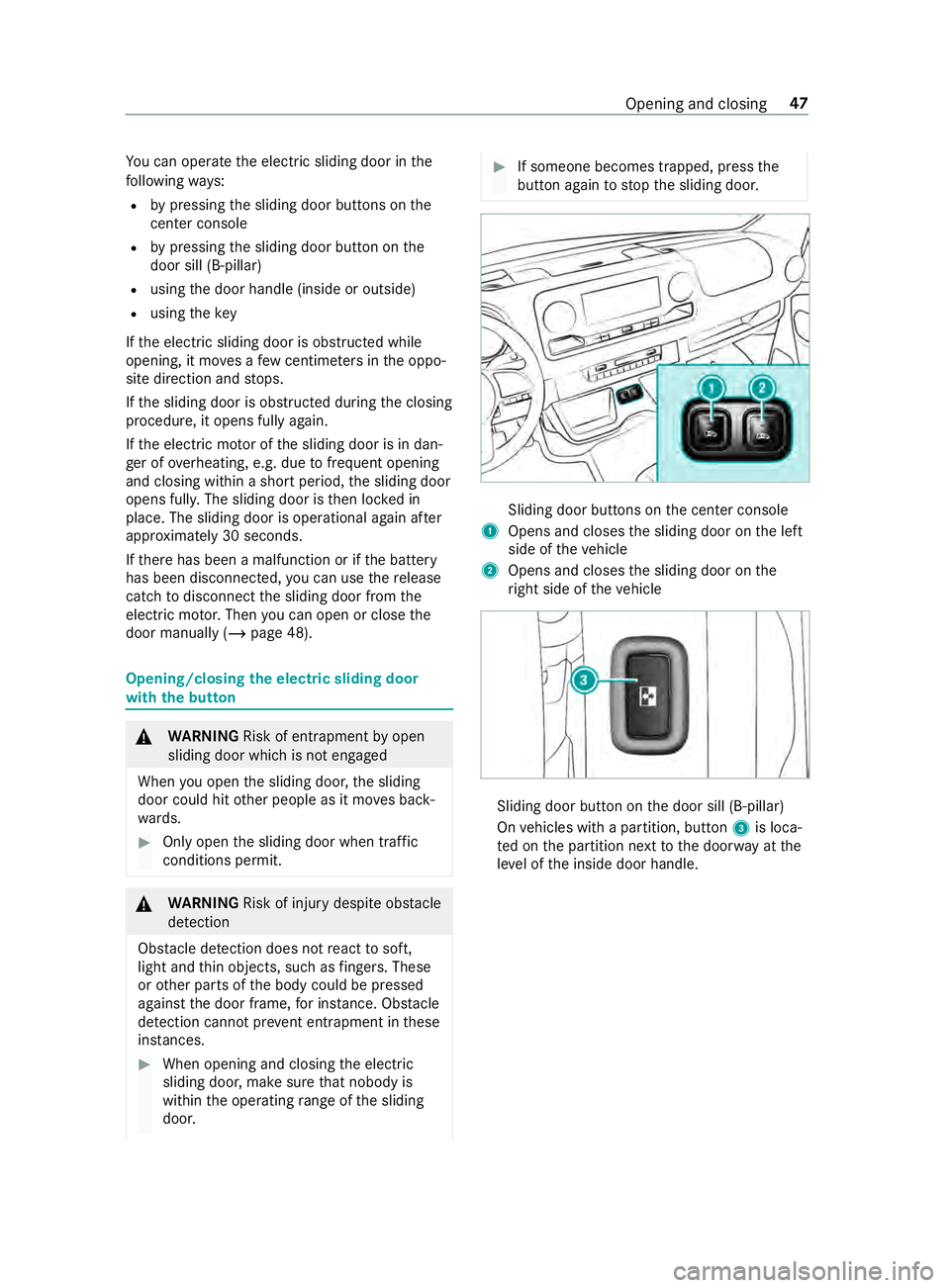
button again tostop the sliding door. Sliding door buttons on
the center console
1 Opens and closes the sliding door on the left
side of theve hicle
2 Opens and closes the sliding door on the
ri ght side of theve hicle Sliding door button on
the door sill (B-pillar)
On vehicles with a partition, button 3is loca‐
te d on the partition next tothe door way at the
le ve l of the inside door handle. Opening and closing
47
Page 73 of 354

#
Tounlo ck:pull lo cking pin 2upwards man‐
ually or use the cent ral locking button to
unlo ckthe sliding door (/ page44). #
Press button 1or pull outside handle 3.
The sliding door opens or closes. #
Press button 1again or pull outside handle
3.
The sliding door stops moving. Un
locking the electric sliding door manually If
th ere has been a malfunction or if the battery
has been disconnected, you can use release
cat ch2 todisconnect the sliding door from the
electric mo tor.Then, you can open or close the
door manually. #
Vehicles with comple tesliding door trim:
re mo vethe co ver from release cat ch2.
Service ope ration is accessible. #
Todisconnect the sliding door from the
electric mo tor:turn release cat ch2 180°
clockwise.
The "MAN" position is set. #
Tounlo ck:pull lo cking pin 3upwards man‐
ually or use the cent ral locking button to
unlo ckthe sliding door (/ page44). #
Press button 1. #
Open or close the sliding door with the out‐
side/inside door handle. #
Toconnect the sliding door tothe electric
mo tor:turn release cat ch2 180° counter-
clockwise.
The "AUTO" position is set. #
Adjust the sliding door (/ page 49).
If it is not possible to rectify the malfunction: #
Visit a qualified specialist workshop. Re
setting the electric sliding door Sliding door buttons on
the center console Sliding door button on
the door sill (B-pillar)
Yo u must reset the sliding door if there has been
a malfunction or a voltage supply inter ruption. Opening and closing
49
Page 74 of 354
#
Ifth e sliding door is open: press button 1or
2 onthe center console or sliding door but‐
to n3 onthe door sill (B-pillar) and hold until
th e door is closed.
or #
Close the sliding door with the door handle
(/ page 48). #
Then brief lypress button 1or2 onthe
center console or sliding door button 3on
th e door sill (B-pillar) once, or pull the door
handle (/ page 48)tocomple tely open the
sliding door.
The sliding door is operational. Re
ar-end doors Opening and closing
there ar-end doors from
outside &
WARNING Risk of accident and inju ry
when opening there ar-end door in poor
traf fic conditions
When you open a rear-end door, thefo llowing
is possible:
R Other people or road users may be endan‐
ge red
R You may be caught byoncoming traf fic
This is particular lythe case if you open the
re ar-end door more than 90°. #
Only open there ar-end doors when traf‐
fi c conditions permit. #
Always make sure that there ar-end
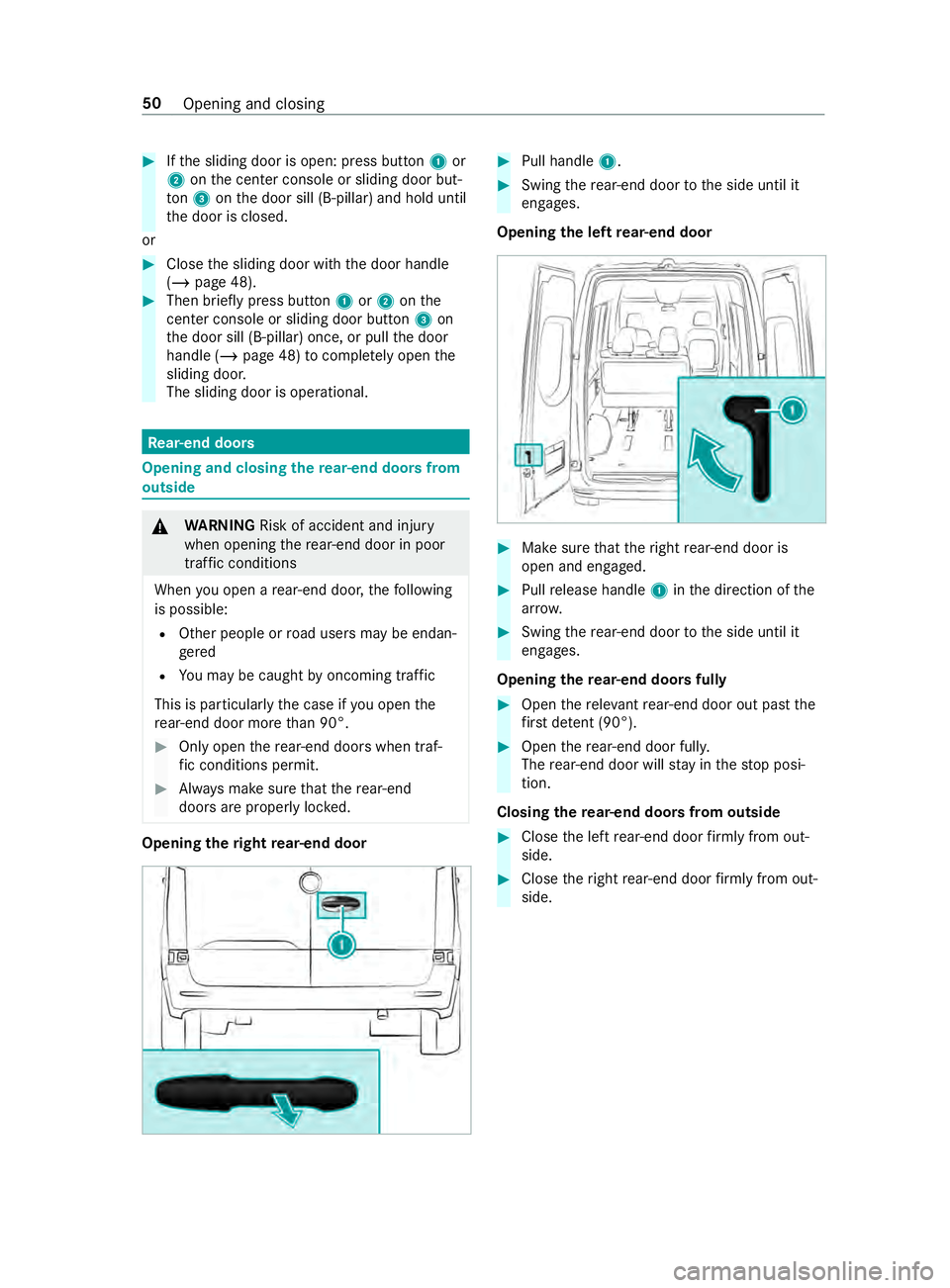
doors are proper lyloc ked. Opening
theright rear-end door #
Pull handle 1. #
Swing there ar-end door tothe side until it
engages.
Opening the left rear-end door #
Make sure that theright rear-end door is
open and engaged. #
Pull release handle 1inthe direction of the
ar row. #
Swing there ar-end door tothe side until it
engages.
Opening there ar-end doors fully #
Open there leva nt rear-end door out past the
fi rs t de tent (90°). #
Open there ar-end door full y.
The rear-end door will stay inthestop posi‐
tion.
Closing there ar-end doors from outside #
Close the left rear-end door firm ly from out‐
side. #
Close theright rear-end door firm ly from out‐
side. 50
Opening and closing
Page 97 of 354
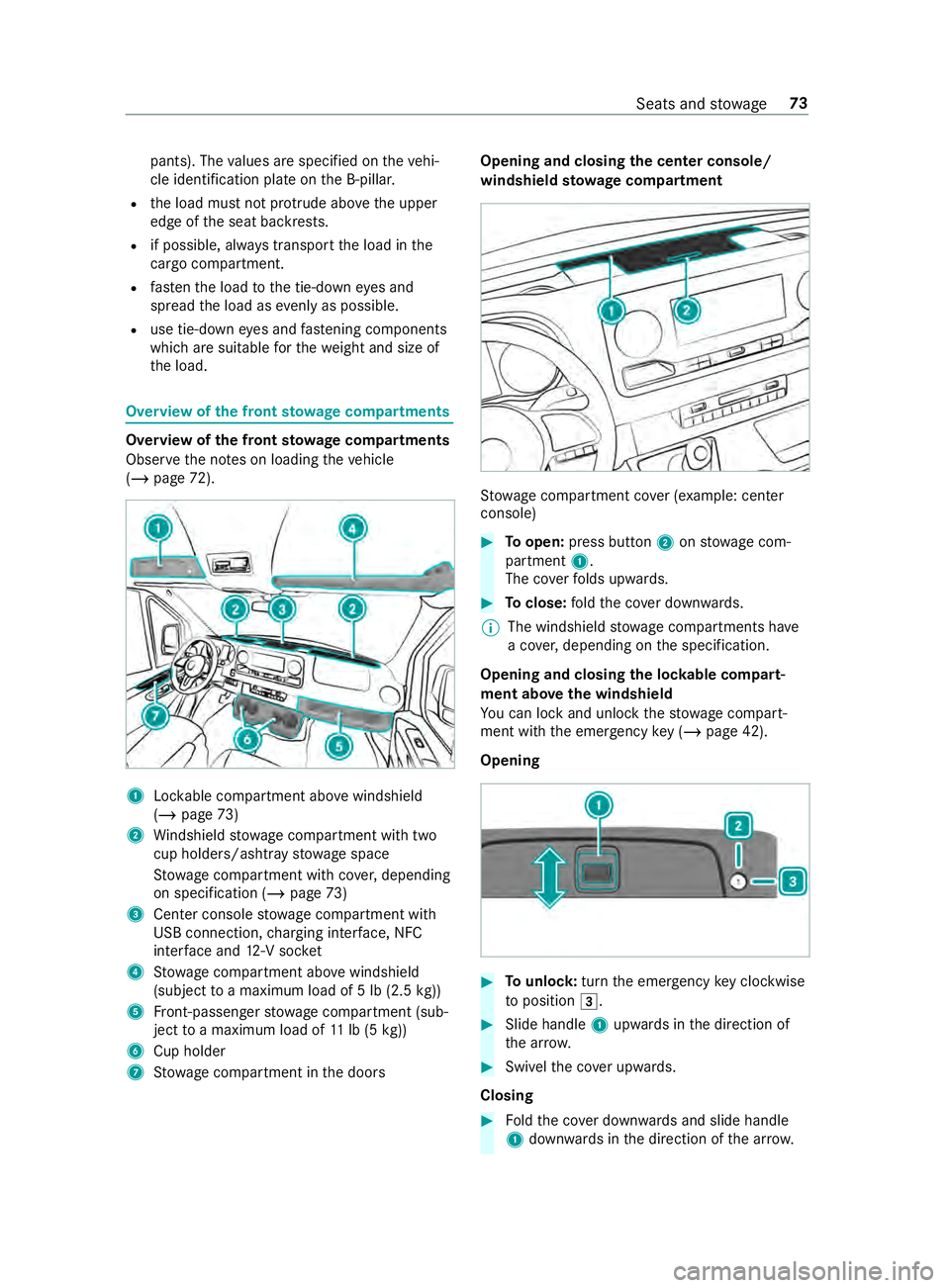
pants). The
values are specified on theve hi‐
cle identification plate on the B-pillar.
R the load must not pr otru de abo vethe upper
edge of the seat backrests.
R if possible, alw ays transport the load in the
cargo compa rtment.
R fastenthe load tothe tie-down eyes and
spread the load as evenly as possible.
R use tie-down eyes and fastening components
which are suitable forth ewe ight and size of
th e load. Overview of
the front stowage compa rtments Overvi
ewofthe front stowage compa rtments
Obser vethe no tes on loading theve hicle
(/ page 72). 1
Lockable compartment abo vewindshield
(/ page 73)
2 Windshield stowage compartment with two
cup holde rs/ashtr aystow age space
St ow age compartment with co ver,depending
on specification (/ page73)
3 Center console stowage compartment with
USB connection, charging inter face, NFC
inter face and 12-V soc ket
4 Stow age compartment abo vewindshield
(subject toa maximum load of 5 lb (2.5 kg))
5 Front-passenger stowage compartment (sub‐
ject toa maximum load of 11lb (5 kg))
6 Cup holder
7 Stow age compartment in the doors Opening and closing
the center console/
windshield stowage compa rtment St
ow age compartment co ver (e xamp le: cen ter
console) #
Toopen: press button 2onstow age com‐
partment 1.
The co verfo lds upwards. #
Toclose: fold the co ver down wards.
% The windshield
stowage compartments ha ve
a co ver,depending on the specification.
Opening and closing the loc kable compart‐
ment abo vethe windshield
Yo u can lock and unlo ck thestow age compart‐
ment with the emer gency key (/ page 42).
Opening #
Tounlo ck:turn the emer gency key clo ckwise
to position 0049. #
Slide handle 1upwards in the direction of
th e ar row. #
Swivelth e co ver upwards.
Closing #
Foldthe co ver down wards and slide handle
1 down wards inthe direction of the ar row. Seats and
stowage 73
Page 99 of 354
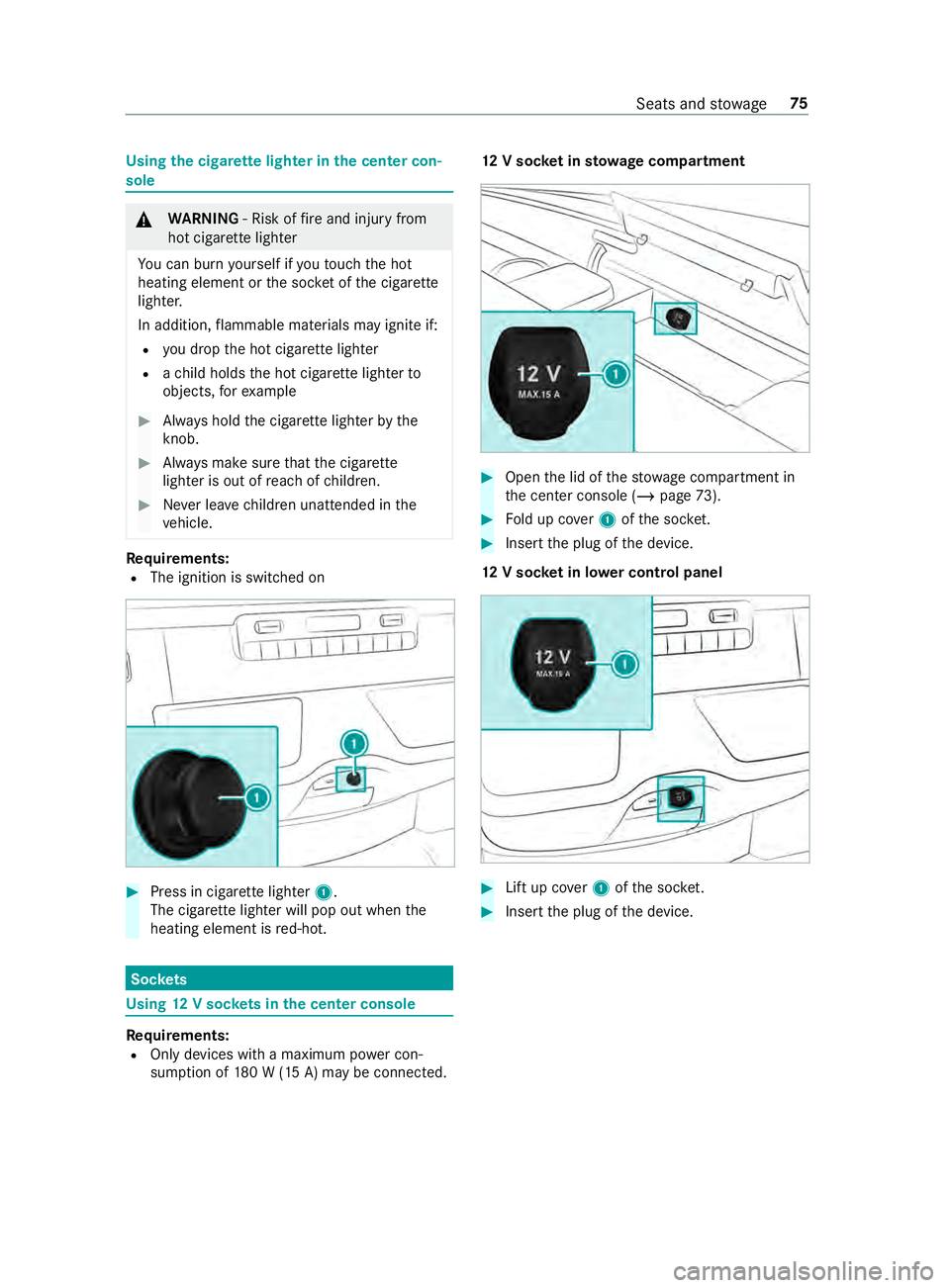
Using
the cigar ette lighter in the center con‐
sole &
WARNING ‑ Risk of fire and injury from
hot cigar ette lighter
Yo u can burn yourself if youto uch the hot
heating element or the soc ket of the cigar ette
lighter.
In addition, flammable materials may ignite if:
R you drop the hot cigar ette lighter
R ach ild holds the hot cigar ette lighter to
objects, forex ample #
Always hold the cigar ette lighter bythe
knob. #
Always make sure that the cigar ette
lighter is out of reach of children. #
Never lea vechildren unat tended in the
ve hicle. Re
quirements:
R The ignition is switched on #
Press in cigar ette lighter 1.
The cigar ette lighter will pop out when the
heating element is red-hot. Soc
kets Using
12V so ckets in the center console Re
quirements:
R Only devices with a maximum po wer con‐
sum ption of 180 W (15 A) may be connected. 12
V so cket insto wage compa rtment #
Open the lid of thestow age compartment in
th e center console (/ page73). #
Fold up co ver1 ofthe soc ket. #
Inse rtthe plug of the device.
12 V so cket in lo wer control panel #
Lift up co ver1 ofthe soc ket. #
Inse rtthe plug of the device. Seats and
stowage 75
Page 197 of 354
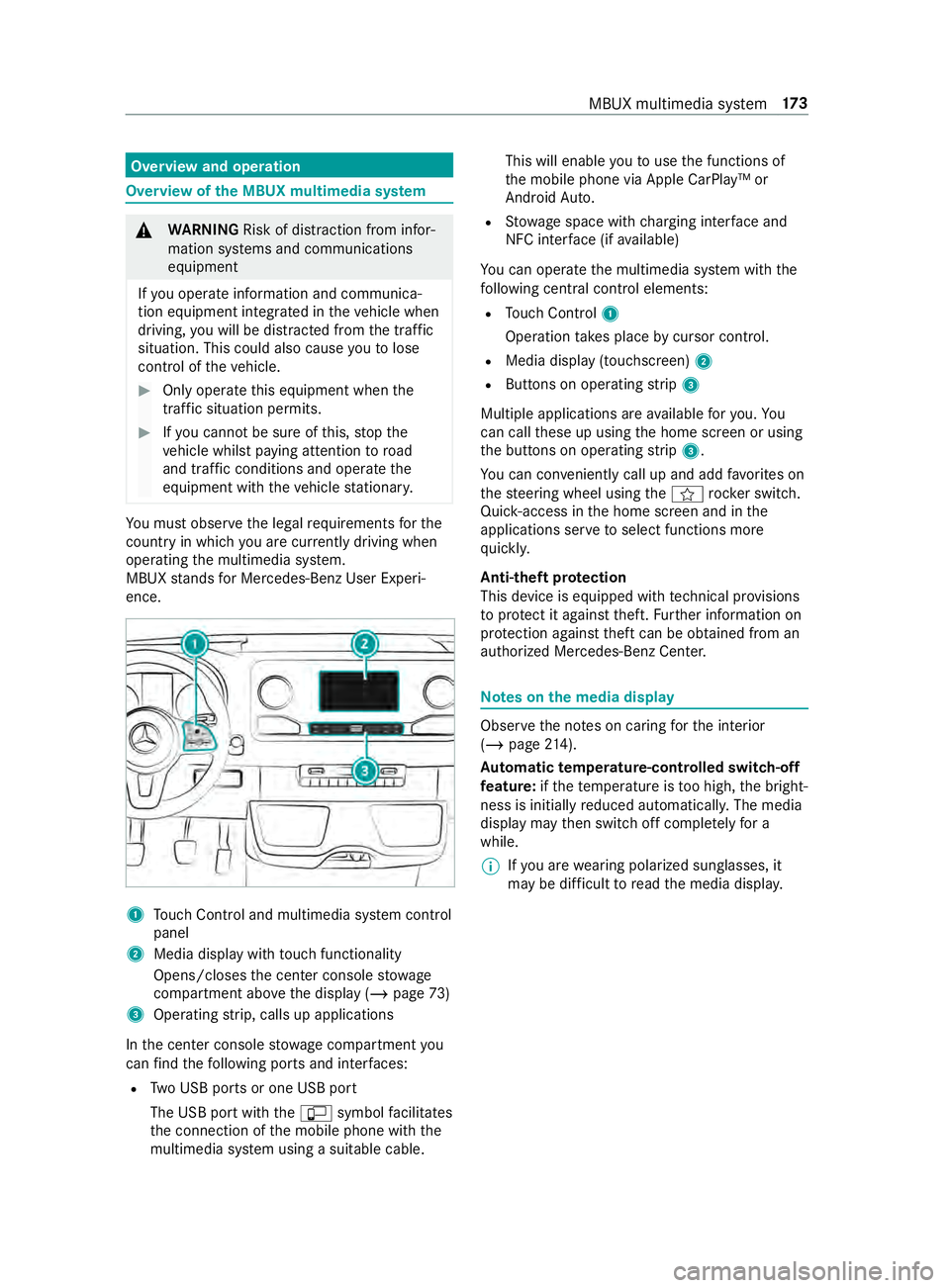
Overview and operation
Overview of
the MBUX multimedia sy stem &
WARNING Risk of distraction from infor‐
mation sy stems and communications
equipment
If yo u operate information and communica‐
tion equipment integ rated in theve hicle when
driving, you will be distracted from the tra ffic
situation. This could also cause youto lose
control of theve hicle. #
Only operate this equipment when the
traf fic situation permits. #
Ifyo u cannot be sure of this, stop the
ve hicle whilst paying attention toroad
and traf fic conditions and ope rate the
equipment with theve hicle stationar y. Yo
u must obse rveth e legal requirements forthe
country in whi chyou are cur rently driving when
ope rating the multimedia sy stem.
MBUX stands for Mercedes-Benz User Experi‐
ence. 1
Touch Control and multimedia sy stem cont rol
panel
2 Media display with touch functionality
Opens/closes the center console stowage
compartment abo vethe display (/ page73)
3 Operating strip, calls up applications
In the center console stowage compartment you
can find thefo llowing ports and inter faces:
R Two USB ports or one USB port
The USB port with the00C2 symbol facilitates
th e connection of the mobile phone with the
multimedia sy stem using a suitable cable. This will enable
youto use the functions of
th e mobile phone via Apple CarPlay™ or
Android Auto.
R Stow age space with charging inter face and
NFC inter face (if available)
Yo u can operate the multimedia sy stem with the
fo llowing central control elements:
R Touch Control 1
Operation takes place bycursor control.
R Media display (tou chscreen) 2
R Buttons on operating strip 3
Multiple applications are available foryo u. Yo u
can call these up using the home screen or using
th e buttons on operating strip 3.
Yo u can con veniently call up and add favo rite s on
th esteering wheel using the004B rock er switch.
Quic k-access in the home screen and in the
applications ser vetoselect functions more
qu ickl y.
Anti-theft pr otection
This device is equipped with tech nical pr ovisions
to protect it against theft. Further information on
pr otection against theft can be obtained from an
authorized Mercedes-Benz Center. Note
s onthe media display Obser
vethe no tes on caring forth e interior
(/ page 214).
Au tomatic temperature-cont rolled switch-off
fe ature: ifth ete mp erature is too high, the bright‐
ness is initially reduced automaticall y.The media
display may then switch off comple tely for a
while.
% If
yo u are wearing polarized sun glasses, it
may be dif ficult toread the media displa y. MBUX multimedia sy
stem 17 3
Page 214 of 354
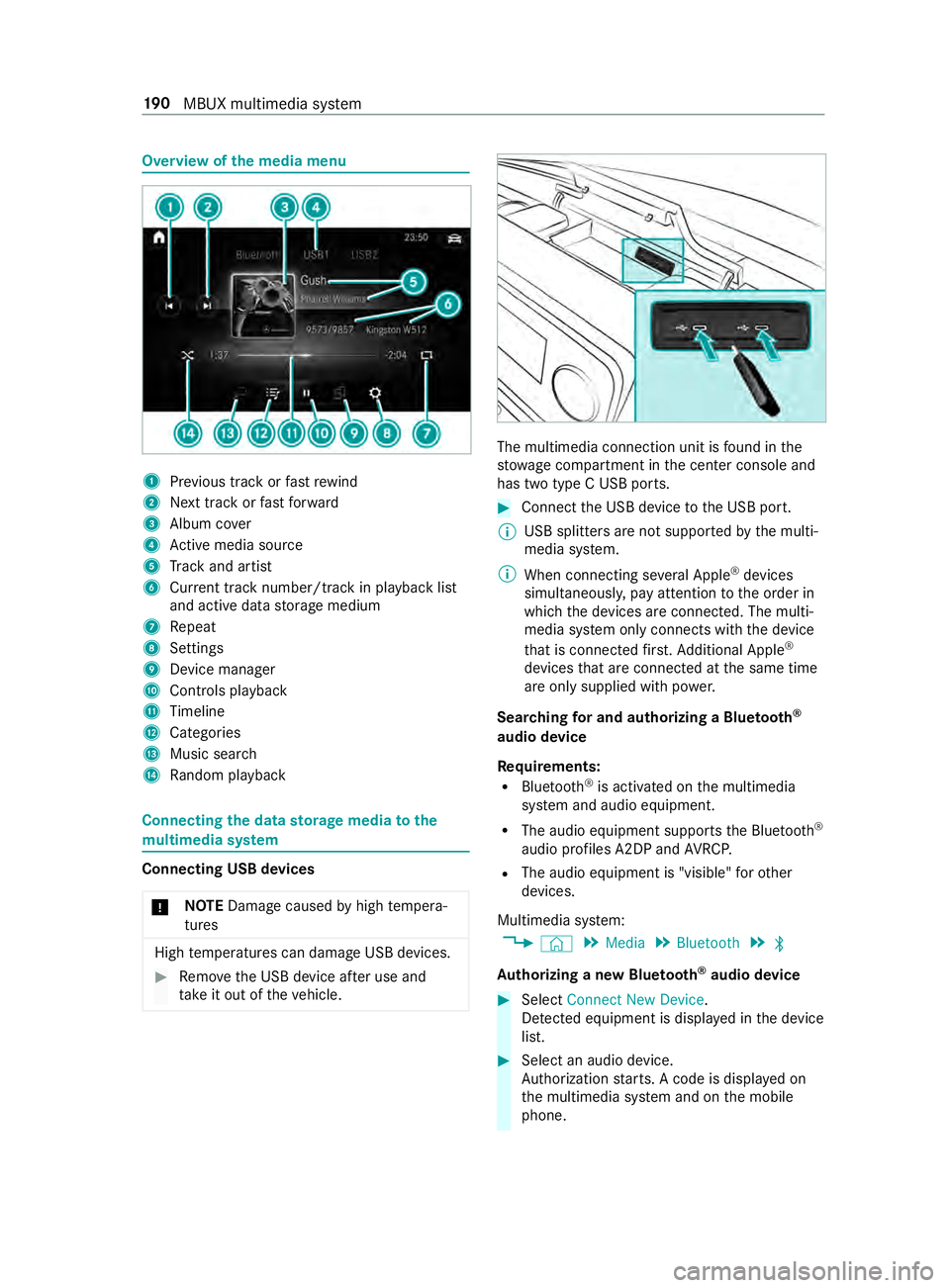
Overview of
the media menu 1
Prev ious track or fastrewind
2 Next track or fastforw ard
3 Album co ver
4 Active media sou rce
5 Track and artist
6 Current track number/track in pl ayback list
and active data storage medium
7 Repeat
8 Settings
9 Device manager
A Controls playback
B Timeline
C Categories
D Music search
E Random pl ayback Connecting
the data storage media tothe
mu ltimedia sy stem Connecting USB devices
* NO
TEDama gecaused byhigh temp era‐
tures High
temp eratures can damage USB devices. #
Remo vethe USB device af ter use and
ta ke it out of theve hicle. The multimedia connection unit is
found in the
stow age compartment in the center console and
has two type C USB ports. #
Connect the USB device tothe USB port.
% USB splitters are not suppor
tedby the multi‐
media sy stem.
% When connecting se veral Apple ®
devices
simultaneousl y,pay attention tothe order in
which the devices are connected. The multi‐
media sy stem only connects with the device
th at is connec tedfirs t. Ad ditional Apple ®
devices that are connec ted at the same time
are only supplied with po wer.
Sear ching for and authorizing a Blue tooth ®
audio device
Requ irements:
R Blue tooth ®
is activated on the multimedia
sy stem and audio equipment.
R The audio equipment supports the Blue tooth ®
audio profiles A2DP and AVRC P.
R The audio equipment is "visible" forot her
devices.
Multimedia sy stem:
4 © 5
Media 5
Bluetooth 5
00A5
Au thorizing a new Blu etoo th®
audio device #
Select Connect New Device.
De tected equipment is displa yed in the device
list. #
Select an audio device.
Auth orization starts. A code is displa yed on
th e multimedia sy stem and on the mobile
phone. 19 0
MBUX multimedia sy stem
Page 345 of 354
Settings (on-board computer)
.............170
Short-distance trips .............................107
Side airbag ..............................................32
Side window ...........................................53
Closing .............................................. .53
Closing (all) ........................................ 53
Closing using theke y ........................ .54
Con venience closing ......................... .54
Con venience opening ......................... 54
Opening ..............................................53
Opening (all) ....................................... 53
Opening with theke y .......................... 54
Side windo ws
Problem ..............................................55
Re setting ............................................ 55
Size designation (tire) ..........................24 5
Sliding door B-pillar door sill (button) ..................... 47
Cen ter console (button) ...................... 47
Child saf ety lock ................................ .39
Closing (from inside) .......................... 46
Closing (from outside) ........................ 45
Opening (from inside) ........................ .46
Opening (from outside) ......................45
SmartK ey
Ac oustic locking verification signal .... 42
Smartphone see Android Auto
see Apple CarPlay™
see Telephone
Snow chains ......................................... 233
Soc ket (12 V) ........................................... 75
Cargo co mpartment .......................... .76
Driver's seat ....................................... 76
Fr ont center console .......................... 75
Soc ket (1 15V) ......................................... 76
Lo we r control panel ............................ 76
Sound see Sound settings
Sound settings ...................................... 194
Ad justing the balance/fader .............1 94
Ad justing treble, mid-range and
bass settings .................................... 194
Au tomatic volume adjustment .......... 194
Calls up the sound menu .................. 194
Information ....................................... 194
Spare wheel Installing/ removing ......................... .256
No tes ............................................... 255
Special seat belt retractor ..................... 35 Speciali
stwo rkshop .............................. 23
Speed rating (ti re)................................ 24 5
Speedome ter (digital) .......................... 167
St andby mode
Ac tivating/deactivating .................... 13 6
St art/s top button
Pa rking theve hicle ........................... 13 2
St arting theve hicle .......................... 104
Switching on the po wer supply or
th e ignition ....................................... 103
St arting
see Vehicle
St arting-o ffaid
see Hill start assist
St ation
Deleting ............................................ 19 3
Direct frequency entry ...................... 19 3
Moving ..............................................1 93
Sear ching ........................................ .193
Setting .............................................. 19 3
St oring ..............................................1 93
St ation list
Calling up ......................................... 19 3
St ation presets
Modifying ......................................... 19 3
St ationary heating
Problems .......................................... 101
St ationary heating/ventilation
Ad justing (on-board computer) ......... 101
St ationary heating/ventilation
see Auxilia ryheating
see Hot-water auxiliary heater
Ste ering wheel ...................................... 16 4
Ad justing ............................................ 71
Buttons ............................................. 16 4
St opping the ala rm(ATA )...................... .56
St ow age areas
see Stow age space
St ow age comp artments
see Stow age space
St ow age space ........................................ 73
Armrest .............................................. 73
Cen ter console ................................... 73
Cockpit .............................................. .73
Door ................................................... 73
Glasses compartment ........................ .74
Glo vebox ...........................................73
Sulfur content ...................................... 264
Summer tires ........................................2 32 Index
321