light MERCEDES-BENZ SPRINTER 2019 MY19 with 7” screen
[x] Cancel search | Manufacturer: MERCEDES-BENZ, Model Year: 2019, Model line: SPRINTER, Model: MERCEDES-BENZ SPRINTER 2019Pages: 354, PDF Size: 6.15 MB
Page 26 of 354
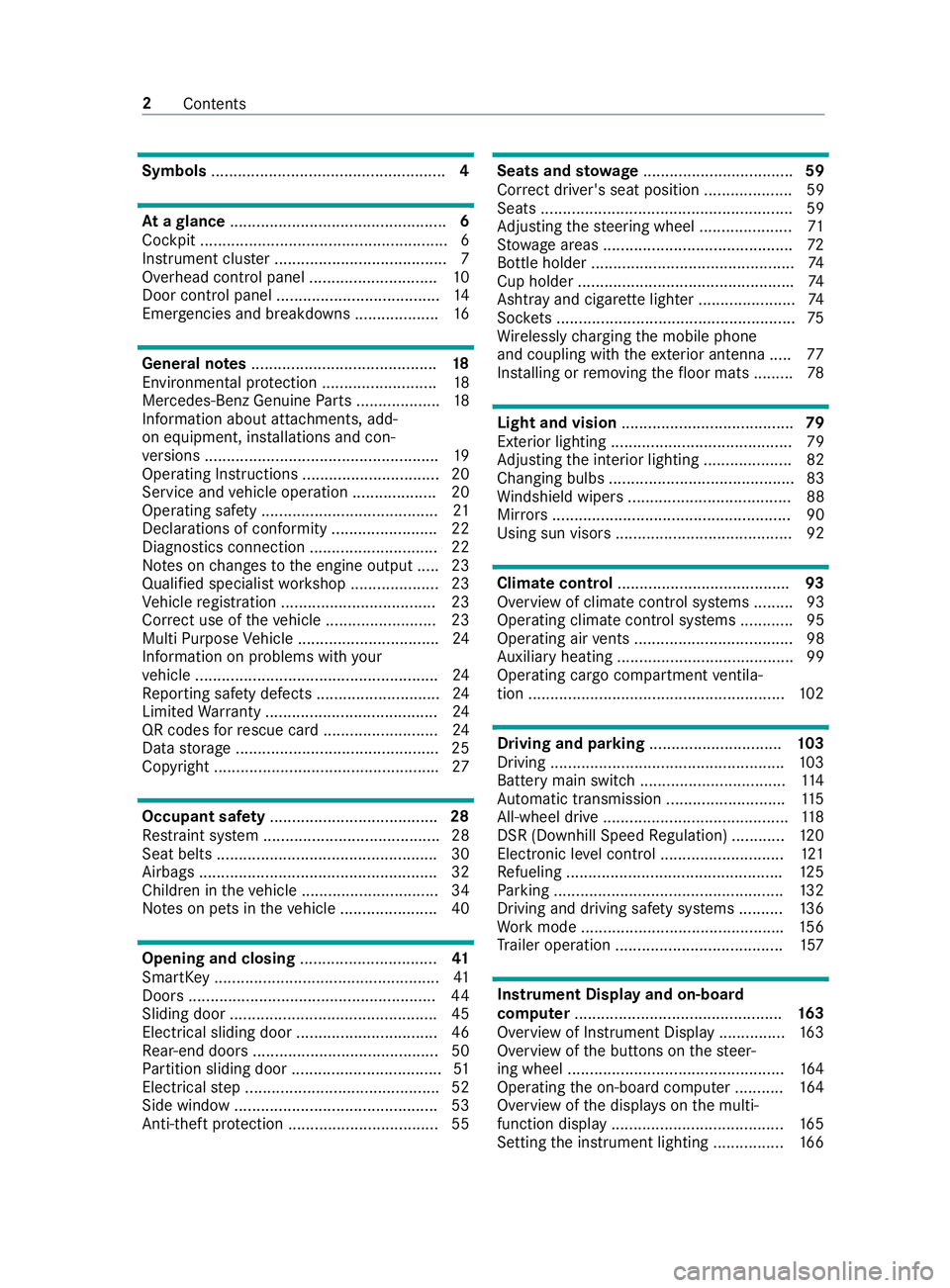
Symbols
..................................................... 4At
agl ance ................................................. 6
Cockpit ........................................................ 6
Instrument clus ter ....................................... 7
Overhead control panel ............................. 10
Door control panel .................................... .14
Emergencies and breakdowns ................... 16Genera
l notes.......................................... 18
Environmental pr otection .......................... 18
Mercedes-Benz Genuine Parts ...................18
Information about attachments, add-
on equipment, ins tallations and con‐
ve rsions .................................................... .19
Operating Instructions ...............................20
Service and vehicle operation ...................20
Operating saf ety ........................................ 21
Declarations of conformity ........................ 22
Diagno stics connection ............................ .22
No tes on changes tothe engine output ..... 23
Qualified specialist workshop .................... 23
Ve hicle registration ................................... 23
Cor rect use of theve hicle .........................23
Multi Purpose Vehicle ................................ 24
Information on problems with your
ve hicle .......................................................24
Re porting saf ety defects ............................ 24
Limited Warranty ...................................... .24
QR codes forre scue card .......................... 24
Data storage ..............................................25
Copyright .................................................. .27Occupant saf
ety...................................... 28
Re stra int sy stem ........................................28
Seat belts .................................................. 30
Airbags ...................................................... 32
Children in theve hicle ...............................34
No tes on pets in theve hicle ......................40 Opening and closing
...............................41
SmartK ey................................................... 41
Doo rs........................................................ 44
Sliding door ............................................... 45
Electrical sliding door ................................ 46
Re ar-end doors .......................................... 50
Pa rtition sliding door .................................. 51
Electrical step ............................................ 52
Side window ..............................................53
Anti-theft pr otection ..................................55 Seats and
stowage .................................. 59
Co rrect driver's seat position .................... 59
Seats ......................................................... 59
Ad justing thesteering wheel ..................... 71
St ow age areas .......................................... .72
Bottle holder .............................................. 74
Cup holder ................................................ .74
Ashtr ayand cigar ette lighter ...................... 74
Soc kets ...................................................... 75
Wi relessly charging the mobile phone
and coupling with theex terior antenna ..... 77
Ins talling or removing thefloor mats ......... 78 Light and vision
....................................... 79
Ex terior lighting ......................................... 79
Ad justing the interior lighting .................... 82
Changing bulbs .......................................... 83
Wi ndshield wipe rs..................................... 88
Mir rors ...................................................... 90
Using sun visors ........................................ 92 Climate control
....................................... 93
Overview of climate control sy stems ......... 93
Operating climate control sy stems ............ 95
Operating air vents .................................... 98
Au xilia ryheating ........................................99
Operating cargo compartment ventila‐
tion .......................................................... 102 Driving and pa
rking .............................. 103
Driving .................................................... .103
Battery main switch ................................. 11 4
Au tomatic transmission ........................... 11 5
All-wheel drive .......................................... 11 8
DSR (Downhill Speed Regulation) ............ 12 0
Electronic le vel control ............................ 121
Re fueling ................................................ .125
Pa rking .................................................... 13 2
Driving and driving sa fety sy stems ..........1 36
Wo rkmode ............................................. .156
Tr ailer operation ...................................... 157 Instrument Display and on-board
compu
ter............................................... 16 3
Overview of Instrument Display ............... 16 3
Overview of the buttons on thesteer‐
ing wheel .................................................1 64
Operating the on-board computer ........... 16 4
Overview of the displa yson the multi‐
function display ....................................... 16 5
Setting the instrument lighting ................1 662
Contents
Page 30 of 354
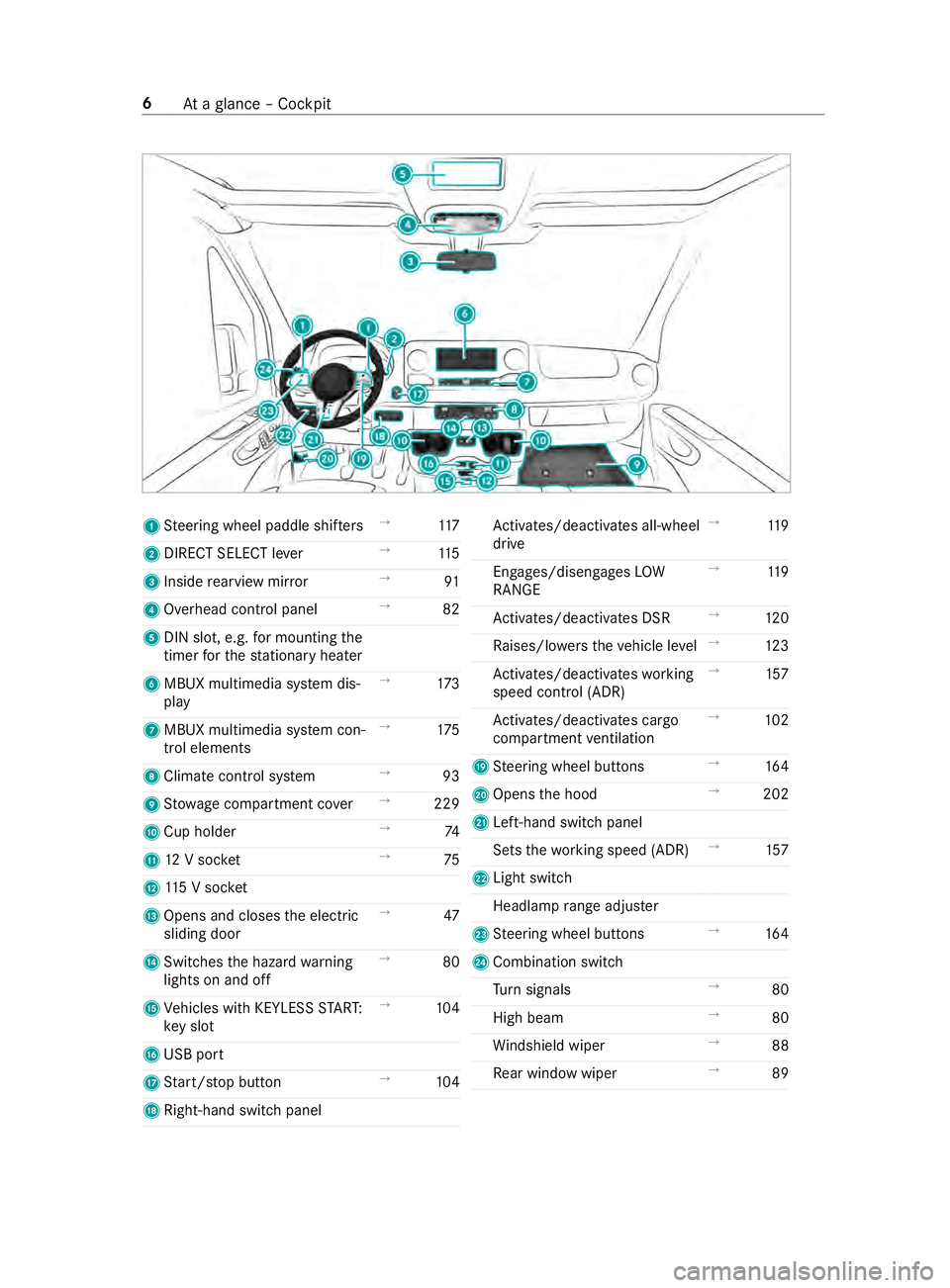
1
Steering wheel paddle shif ters →
11 7
2 DIRECT SELECT le ver→
11 5
3 Inside rearview mir ror →
91
4 Overhead control panel →
82
5 DIN slot, e.g. for mounting the
timer forth est ationary heater
6 MBUX multimedia sy stem dis‐
play →
173
7 MBUX multimedia sy stem con‐
trol elements →
175
8 Climate control sy stem →
93
9 Stow age compartment co ver→
229
A Cup holder →
74
B 12V soc ket →
75
C 115 V soc ket
D Opens and closes the electric
sliding door →
47
E Switches the hazard warning
lights on and off →
80
F Vehicles with KEYLESS STAR T:
ke y slot →
104
G USB port
H Start/ stop button →
104
I Right-hand swit chpanel Ac
tivates/deacti vates all-wheel
drive →
11 9
Engages/disengages LOW
RANGE →
11 9
Ac tivates/deacti vates DSR →
12 0
Ra ises/lo werstheve hicle le vel→
12 3
Ac tivates/deacti vateswo rking
speed control (ADR) →
157
Ac tivates/deacti vates cargo
compartment ventilation →
102
J Steering wheel buttons →
16 4
K Opens the hood →
202
L Left-hand switch panel
Sets thewo rking speed (ADR) →
157
M Light switch
Headlamp range adjus ter
N Steering wheel buttons →
16 4
O Combination swit ch
Tu rn signals →
80
High beam →
80
Wi ndshield wiper →
88
Re ar wind owwiper →
89 6
Ataglance – Cockpit
Page 31 of 354
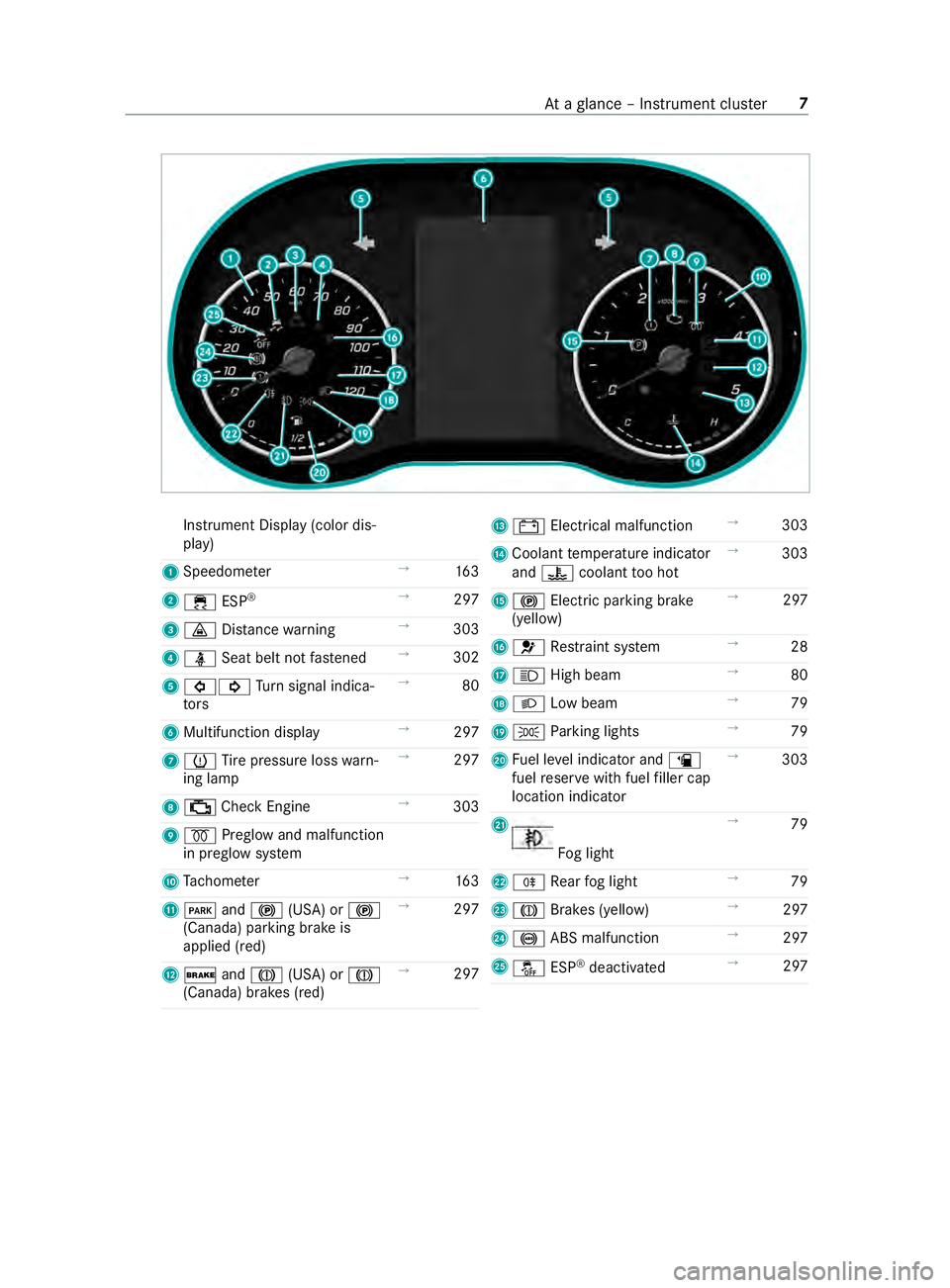
Instrument Display (color dis‐
play)
1 Speedome ter →
16 3
2 00E5 ESP®
→
297
3 00BA Distance warning →
303
4 00E9 Seat belt not fastened →
302
5 003E003D Turn signal indica‐
to rs →
80
6 Multifunction display →
297
7 0077 Tire pressure loss warn‐
ing lamp →
297
8 00B9 Check Engine →
303
9 0028 Preglow and malfunction
in preglow sy stem
A Tach ome ter →
16 3
B 0049 and0024 (USA) or 0024
(Canada) parking brake is
applied (red) →
297
C 0027 and004D (USA) or 004D
(Canada) brakes (red) →
297 D
003D Electrical malfunction →
303
E Coolant temp erature indicator
and 00AC coolant too hot →
303
F 0024 Electri c parking brake
(yellow) →
297
G 0075 Restra int sy stem →
28
H 0057 High beam →
80
I 0058 Low beam →
79
J 0060 Parking lights →
79
K Fuel le vel indicator and 00D4
fuel reser vewith fuel filler cap
location indicator →
303
L Fo
g light →
79
M 005E Rear fog light →
79
N 004D Brakes (yellow) →
297
O 0025 ABS malfunction →
297
P 00BB ESP®
deactivated →
297 At
aglance – In stru ment clus ter7
Page 32 of 354
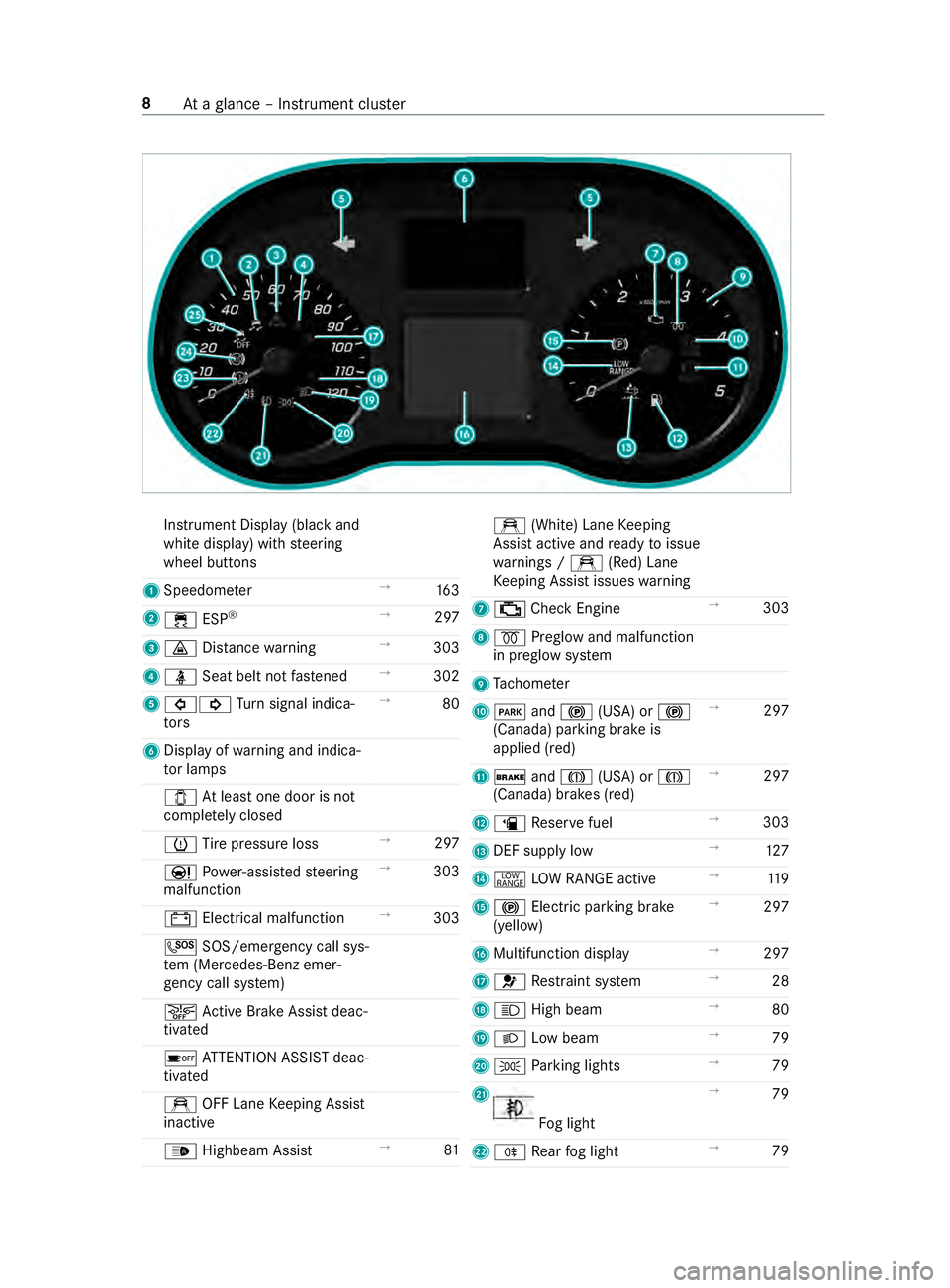
Instrument Display (black
and
white display) with steering
wheel buttons
1 Speedome ter →
16 3
2 00E5 ESP®
→
297
3 00BA Distance warning →
303
4 00E9 Seat belt not fastened →
302
5 003E003D Turn signal indica‐
to rs →
80
6 Displ ayofwa rning and indica‐
to r lamps
003E Atleast one door is not
comple tely closed
0077 Tire pressure loss →
297
00CC Powe r-assis tedsteering
malfunction →
303
003D Electrical malfunction →
303
0053 SOS/emergency call sys‐
te m (Mercedes-Benz emer‐
ge ncy call sy stem)
00D4 Active Brake Assi stdeac‐
tivated
00D7 ATTENTION ASSIST deac‐
tivated
e OFF Lane Keeping Assist
inactive
00CE Highbeam Assist →
81 e
(White) Lane Keeping
Assist active and ready toissue
wa rnings / e(Red) Lane
Ke eping Assist issues warning
7 00B9 Check Engine →
303
8 0028 Preglow and malfunction
in preglow sy stem
9 Tach ome ter
A 0049 and0024 (USA) or 0024
(Canada) parking brake is
applied (red) →
297
B 0027 and004D (USA) or 004D
(Canada) brakes (red) →
297
C 00D4 Reser vefuel →
303
D DEF supply low →
127
E 002E LOW RANGE active →
11 9
F 0024 Electric pa rking brake
(yellow) →
297
G Multifunction display →
297
H 0075 Restra int sy stem →
28
I 0057 High beam →
80
J 0058 Low beam →
79
K 0060 Parking lights →
79
L Fo
g light →
79
M 005E Rear fog light →
79 8
Ataglance – In stru ment clus ter
Page 34 of 354
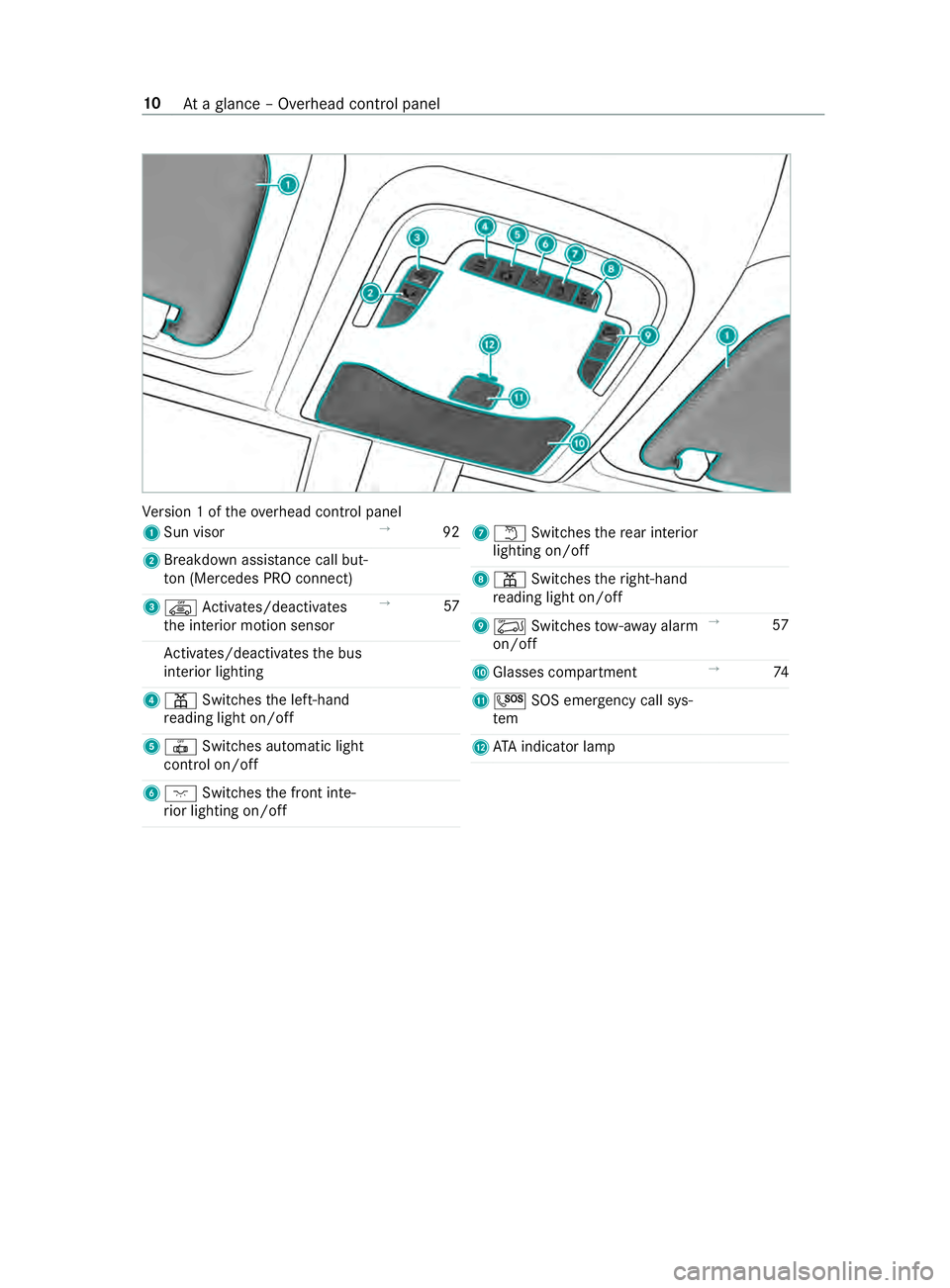
Ve
rsion 1 of theove rhead cont rol panel
1 Sun visor →
92
2 Breakdown assis tance call but‐
to n (Me rcedes PRO connect)
3 00A7 Activates/deacti vates
th e interior motion sensor →
57
Ac tivates/deacti vatesth e bus
interior lighting
4 003D Switches the left-hand
re ading light on/off
5 0033 Switches automatic light
cont rol on/off
6 004A Switches the front inte‐
ri or lighting on/off 7
0044 Switches there ar interior
lighting on/off
8 003D Switches theright-hand
re ading light on/off
9 00A6 Switches tow- aw ay alarm
on/off →
57
A Glasses compartment →
74
B 0053 SOS emergency call sys‐
tem
C ATA indica tor lamp 10
Ataglance – Overhead control panel
Page 35 of 354
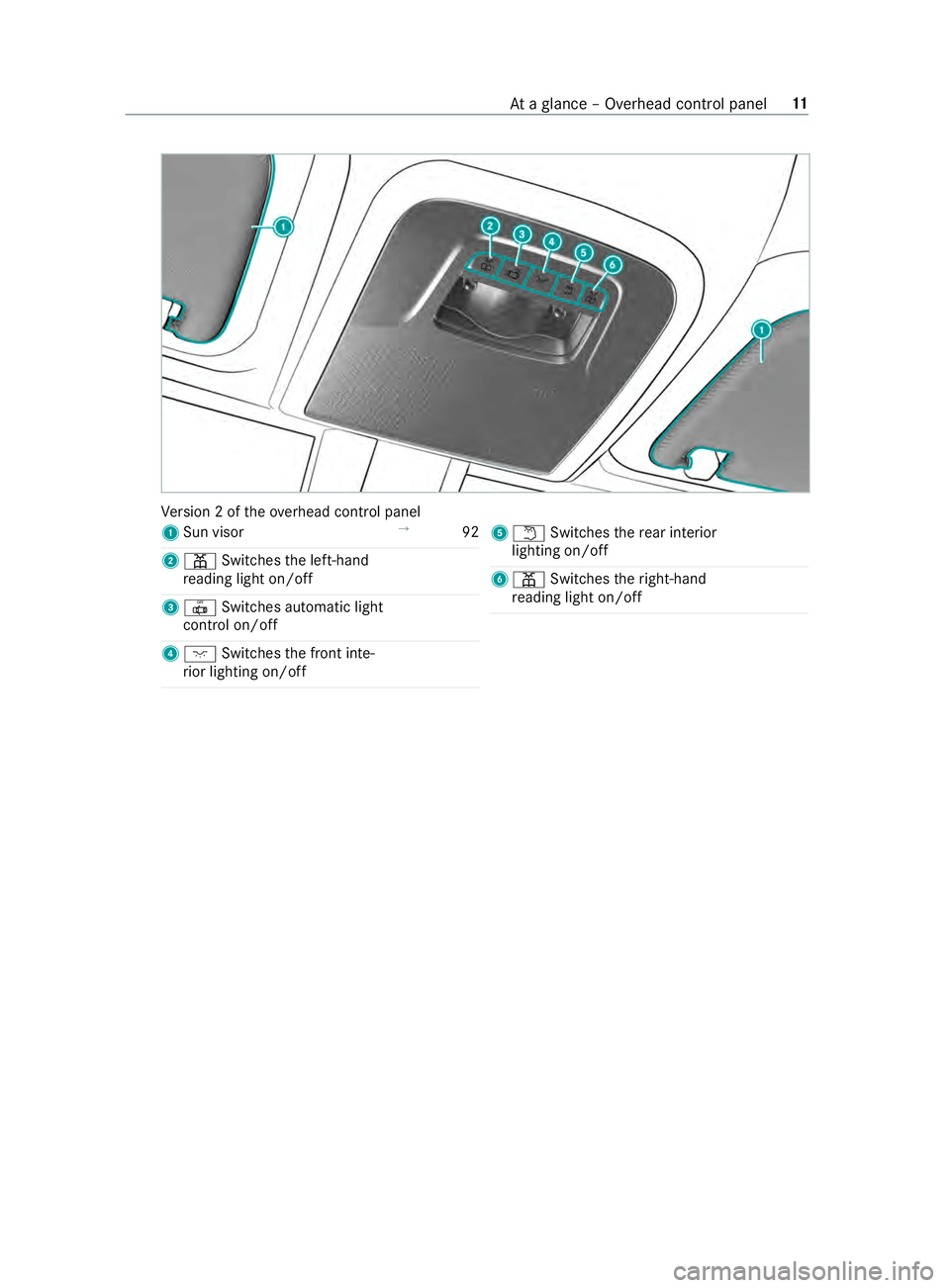
Ve
rsion 2 of theove rhead cont rol panel
1 Sun visor →
92
2 003D Switches the left-hand
re ading light on/off
3 0033 Switches automatic light
cont rol on/off
4 004A Switches the front inte‐
ri or lighting on/off 5
0044 Switches there ar interior
lighting on/off
6 003D Switches theright-hand
re ading light on/off At
aglance – Overhead control panel 11
Page 36 of 354
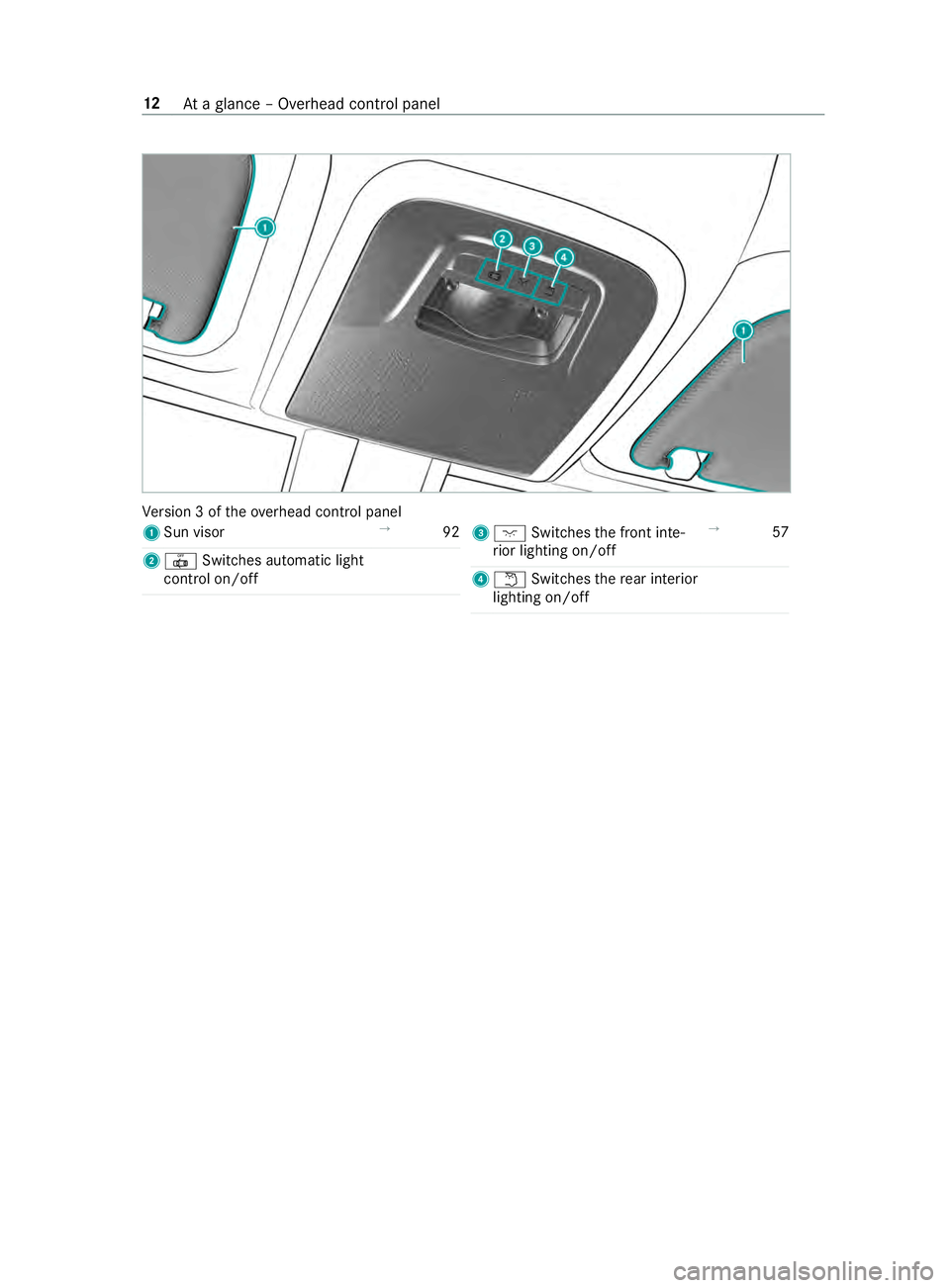
Ve
rsion 3 of theove rhead cont rol panel
1 Sun visor →
92
2 0033 Switches automatic light
cont rol on/off 3
004A Switches the front inte‐
ri or lighting on/off →
57
4 0044 Switches there ar interior
lighting on/off 12
Ataglance – Overhead control panel
Page 37 of 354
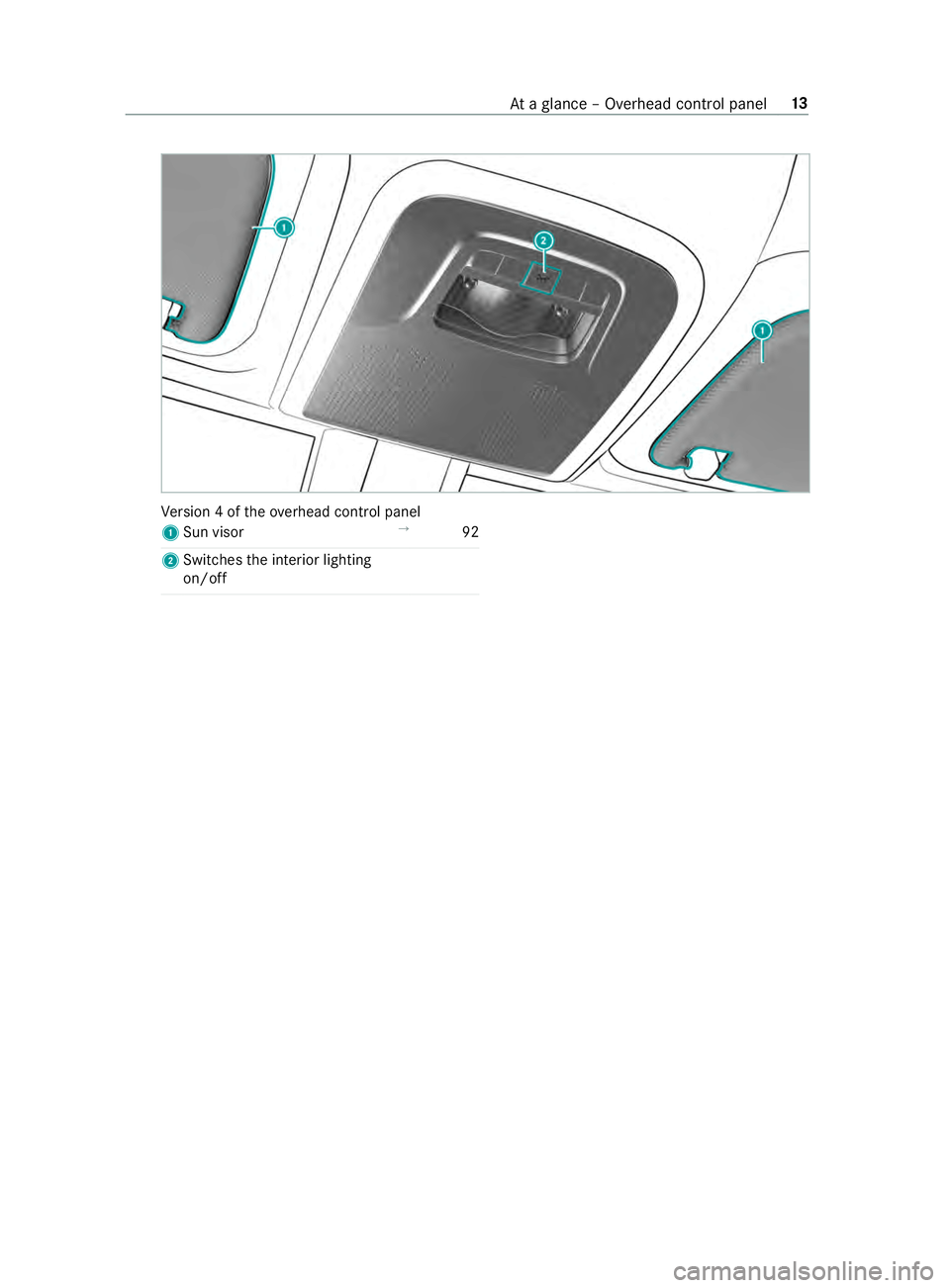
Ve
rsion 4 of theove rhead cont rol panel
1 Sun visor →
92
2 Swit ches the interior lighting
on/o ff At
aglance – Overhead control panel 13
Page 40 of 354
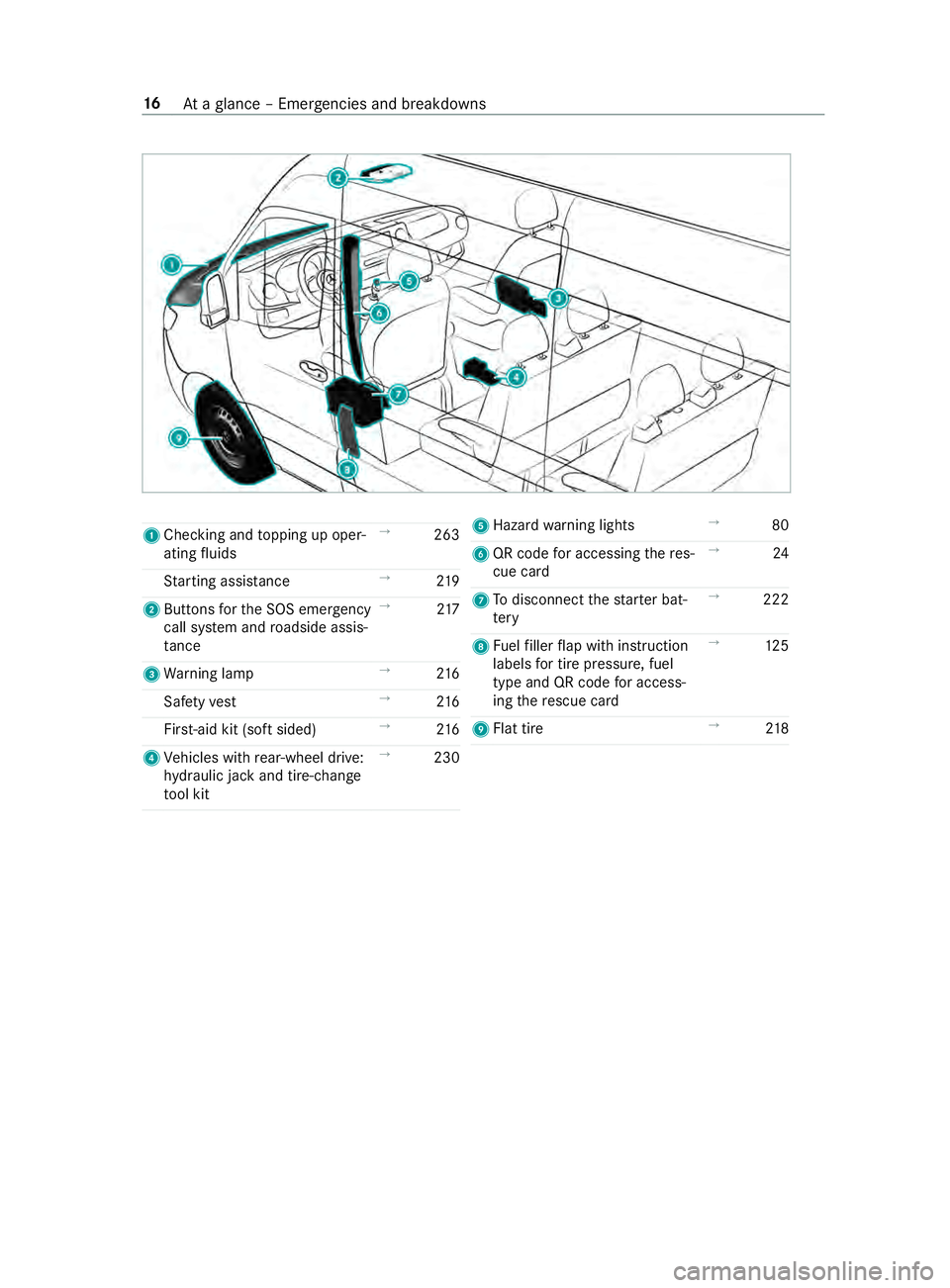
1
Checking and topping up oper‐
ating fluids →
263
St arting assis tance →
219
2 Buttons forth e SOS emer gency
call sy stem and roadside assis‐
ta nce →
217
3 Warning lamp →
216
Saf etyve st →
216
Fir st-aid kit (so ftsided) →
216
4 Vehicles with rear-wheel drive:
hy draulic jack and tire-change
to ol kit →
230 5
Hazard warning lights →
80
6 QR code for accessing there s‐
cue card →
24
7 Todisconnect thest ar ter bat‐
te ry →
222
8 Fuelfiller flap with instruction
labels for tire pressu re, fuel
type and QR code for access‐
ing there scue card →
12 5
9 Flat tire →
218 16
Ataglance – Emer gencies and breakdowns
Page 49 of 354
card contains, in compact
form ,th e most impor‐
ta nt information about your vehicle e.g. thero ut‐
ing of electric cables.
Fu rther information can be found at http://
www.mercedes-benz.de/qr-code. Data
storage Electronic control units
Electronic control units are ins
talled in your vehi‐
cle. Some of these are necessary forth e safe
operation of your vehicle, while some assist you
when driving (driver assis tance sy stems). In addi‐
tion, your vehicle pr ovides com fort and enter tain‐
ment functions, which are also made possible by
electronic cont rol units.
The elect ronic control units contain da tamemo‐
ri es which can temp orarily or permanently store
te ch nical information about theve hicle's operat‐
ing state, component loads, main tenance requ ire‐
ments and tech nical events or malfunctions.
In general, this information documents thest ate
of a component part, a module, a sy stem or the
sur roundings such as:
R operating states of sy stem components (e.g.
fl uid le vels, battery status, tire pressure)
R status messages concerning theve hicle and
its individual components (e.g. number of
wheel revo lutions/speed, deceleration, lateral
acceleration, display of thefast ened seat
belts)
R malfunctions or defects in impor tant sy stem
components (e.g. lights, brakes)
R information on events leading tovehicle dam‐
age
R system reactions in special driving situations
(e.g. airbag deployment, inter vention of sta‐
bility control sy stems)
R ambient conditions (e.g. temp erature, rain
sensor)
In addition toprov iding the actual cont rol unit
function, this data assists the manufacturer in
de tecting and rectifying malfunctions and opti‐
mizing vehicle functions. The majority of this data
is temp orary and is only processed in theve hicle
itself. Only a small portion of the data is stored in
th eeve nt or malfunction memo ry.
When your vehicle is serviced, tech nical da ta
from theve hicle can be read out byservice net‐
wo rkemplo yees (e.g. workshops, manufacturers)
or third parties (e.g. breakdown services). Serv‐ ices include
repair services, maintenance pro‐
cesses, warranty claims and quality assurance
measures, forex ample. The read out is per‐
fo rm ed via the legally prescribed port forthe
diagnostics connection in theve hicle. The
re spective service network locations or third par‐
ties collect, process and use this data. They
document tech nical statuses of theve hicle,
assist in finding malfunctions and impr oving qual‐
ity and are transmitted tothe manufacturer, if
necessar y.Fu rthermore, the manufacturer is sub‐
ject toproduct liability. Forth is, the manufacturer
re qu ires tech nical da tafrom vehicles.
Malfunction memories in theve hicle can be reset
by a service outlet as part of repair or mainte‐
nance work.
Depending on the selected equipment, you can
import data into vehicle con venience and info‐
ta inment functions yourself.
This includes, forex ample:
R multimedia data such as music, films or pho‐
to sfo r playback in an integrated multimedia
sy stem
R address book data for use in connection with
an integrated hands-free sy stem or an inte‐
grated navigation sy stem
R entered navigation destinations
R data about the use of Internet services
This data can be sa ved locally in theve hicle or it
is located on a device which you ha veconnected
to theve hicle (e.g. smartphone, USB flash drive
or MP3 pla yer). If this data is stored in theve hi‐
cle, you can dele teit at any time. This data is
sent tothird parties only at your requ est, particu‐
lar lywhen you use online services in accordance
with the settings that you ha veselected.
Yo u can store or change con venience settings/
individualization in theve hicle at any time.
Depending on the equipment, this includes, for
ex ample:
R seat and steering wheel position settings
R suspension and climate cont rol settings
R Individualization such as interior lighting
If yo ur vehicle is accordingly equipped, you can
connect your smartphone or ano ther mobile end
device totheve hicle. You can control this by
means of the cont rol elements integrated in the
ve hicle. Images and audio from the smartphone
can be output via the multimedia sy stem. Cer tain General no
tes25