lights MERCEDES-BENZ SPRINTER 2019 MY19 with no MMS Operator’s Manual
[x] Cancel search | Manufacturer: MERCEDES-BENZ, Model Year: 2019, Model line: SPRINTER, Model: MERCEDES-BENZ SPRINTER 2019Pages: 322, PDF Size: 5.91 MB
Page 31 of 322
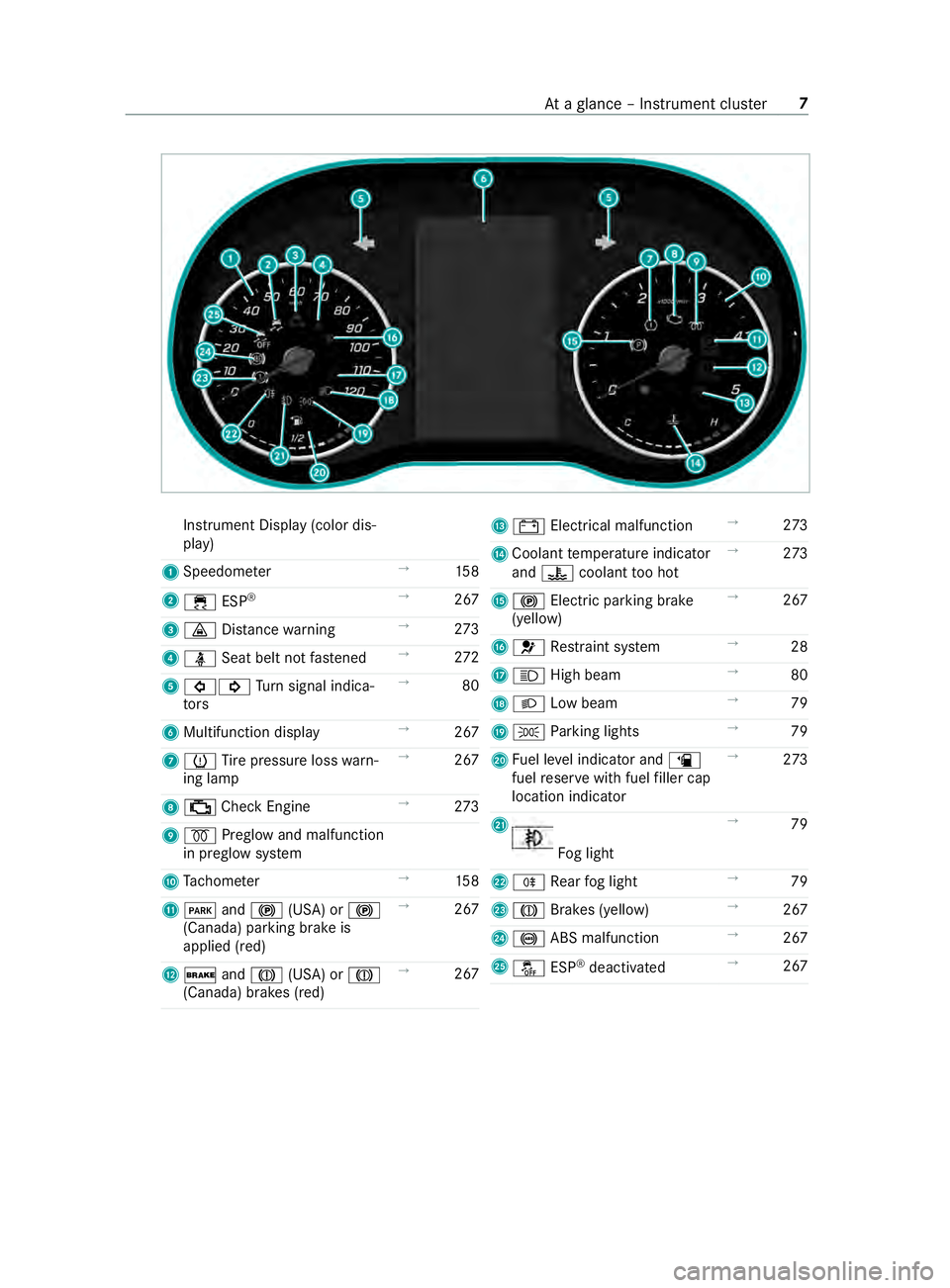
Instrument Displa
y(color dis‐
play)
1 Speedome ter →
15 8
2 00E5 ESP®
→
267
3 00BA Distance warning →
273
4 00E9 Seatbeltn otfastened →
272
5 003E003D Turn signal indica‐
to rs →
80
6 Multifunction display →
267
7 0077 Tire pressur eloss warn‐
ing lamp →
267
8 00B9 CheckEngine →
273
9 0028 Preglo wand malfunction
in preglo wsystem
A Tach ome ter →
15 8
B 0049 and0024 (USA) or 0024
(Canada) parkin gbrake is
applied (red) →
267
C 0027 and004D (USA) or 004D
(Canada) brakes (red) →
267 D
003D Electrical malfunction →
273
E Coolan ttemperatur eindicator
and 00AC coolant tooh ot →
273
F 0024 Electric pa rking brake
(yellow) →
267
G 0075 Restra int sy stem →
28
H 0057 High beam →
80
I 0058 Lowb eam →
79
J 0060 Parking lights →
79
K Fuel le velindicator and 00D4
fuel reser vewit hfuel filler cap
location indicator →
273
L Fo
glight →
79
M 005E Rear fogl ight →
79
N 004D Brakes (yellow) →
267
O 0025 ABS malfunction →
267
P 00BB ESP®
deactivated →
267 At
ag lanc e–I nstrument clus ter7
Page 32 of 322
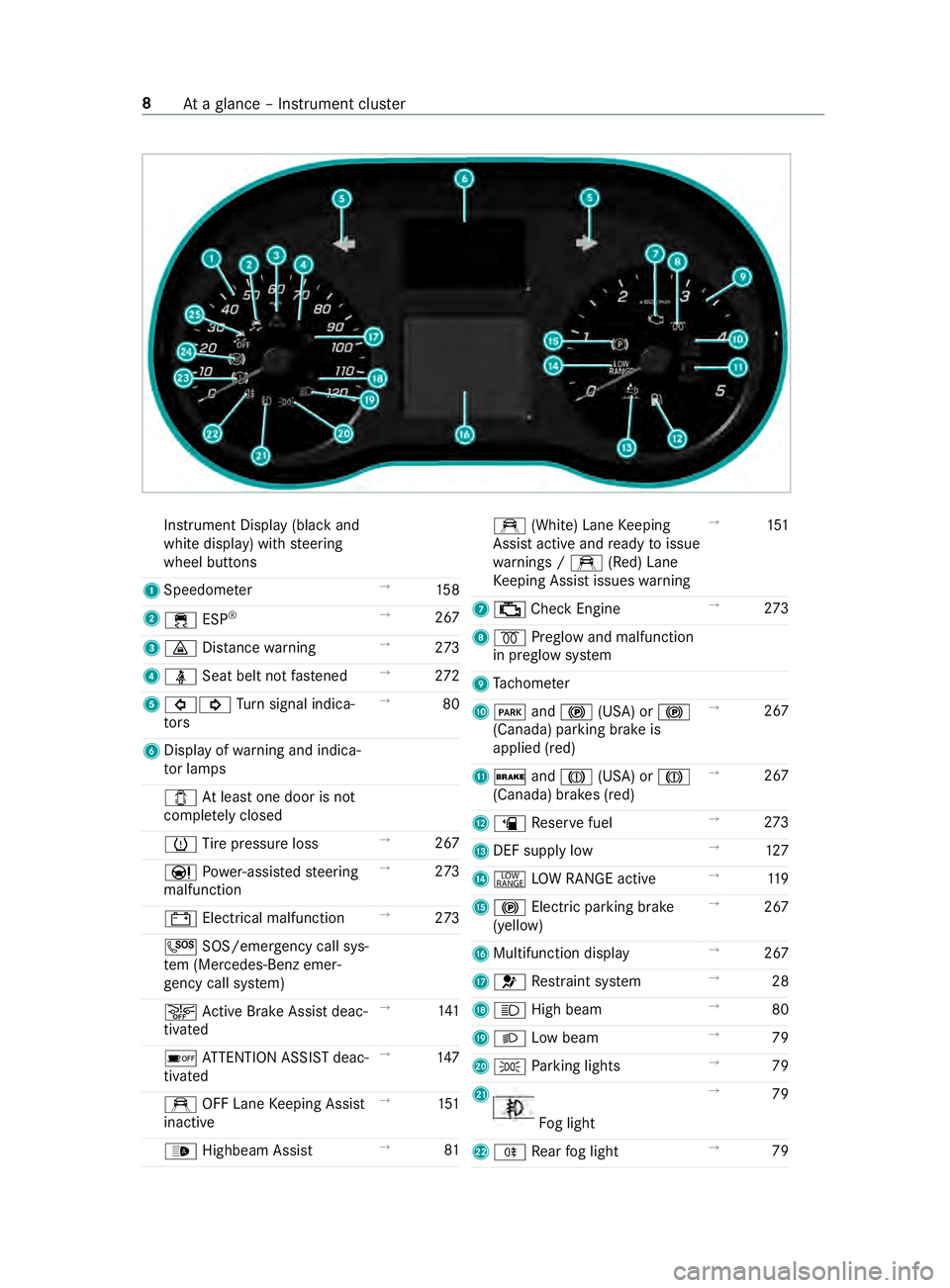
Instrument Displa
y(bla ckand
whit edisplay) wit hsteering
wheel buttons
1 Speedome ter →
15 8
2 00E5 ESP®
→
267
3 00BA Distance warning →
273
4 00E9 Seatbeltn otfastened →
272
5 003E003D Turn signal indica‐
to rs →
80
6 Displ ayofwa rning and indica‐
to rlamps
003E Atleas tone door is not
comple tely closed
0077 Tire pressur eloss →
267
00CC Powe r-assis teds teering
malfunction →
273
003D Electrica lmalfunction →
273
0053 SOS/emergency cal lsys‐
te m( Mercedes-Benz emer‐
ge ncy cal lsyst em)
00D4 ActiveB rake Assi stdeac‐
tivated →
141
00D7 ATTENTION ASSIS Tdeac‐
tivated →
147
e OFF Lane Keeping Assist
inactive →
151
00CE Highbea mAssist →
81 e
(White) Lane Keeping
Assis tactiv eand ready toissue
wa rnings / e(Red) Lane
Ke eping Assis tissues warning →
151
7 00B9 CheckEngine →
273
8 0028 Preglo wand malfunction
in preglo wsystem
9 Tach ome ter
A 0049 and0024 (USA) or 0024
(Canada) parkin gbrake is
applied (red) →
267
B 0027 and004D (USA) or 004D
(Canada) brakes (red) →
267
C 00D4 Reser vefuel →
273
D DEF supply low →
127
E 002E LOWR ANGE active →
11 9
F 0024 Electric pa rking brake
(yellow) →
267
G Multifunction display →
267
H 0075 Restra int sy stem →
28
I 0057 High beam →
80
J 0058 Lowb eam →
79
K 0060 Parking lights →
79
L Fo
glight →
79
M 005E Rear fogl ight →
79 8
Atag lanc e–Instru ment clus ter
Page 40 of 322
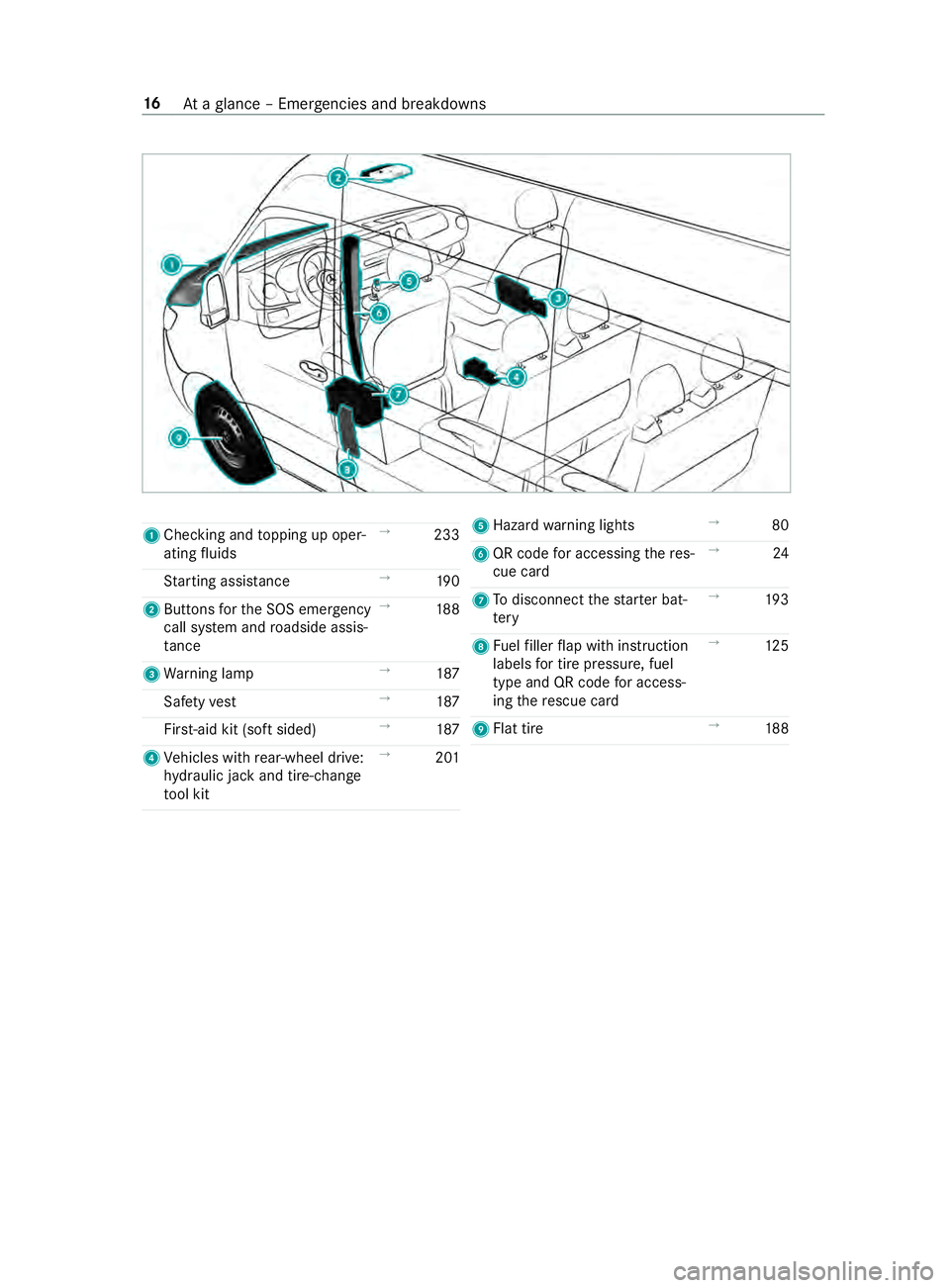
1
Checkin gand topping up oper‐
ating fluids →
233
St artin gassis tance →
19 0
2 Buttons fort he SOS emergency
call sy stem and roadside assis‐
ta nce →
188
3 Warning lamp →
187
Saf etyv est →
187
Fir st-ai dk it (so ftsided) →
187
4 Vehicles wit hrear-wheel drive:
hy draulic jac kand tire-change
to ol kit →
201 5
Hazar dwarning lights →
80
6 QR code fora ccessing ther es‐
cue card →
24
7 Todisconnect thes tarter bat‐
te ry →
19 3
8 Fuelfiller flap wit hinstruction
labels fort irep ressu re,fuel
type and QR code fora ccess‐
ing ther escue card →
12 5
9 Flattire →
188 16
Atag lanc e–Emer gencie sand breakdowns
Page 49 of 322
card contains, in compact
form ,the mos timp or‐
ta nt information abou tyour vehicle e.g. ther out‐
ing of electric cables.
Fu rther information can be found at http://
www.mercedes-benz.de/qr-code. Data
storage Electronic control units
Electronic control unit
sareins talled in your vehi‐
cle. Some of these ar enecessar yfor thes afe
operation of your vehicle, while some assis tyou
when driving (driver assis tance sy stems). In addi‐
tion, your vehicle pr ovides com fort and enter tain‐
men tfunctions, whic harealso made possible by
electronic cont rolu nits.
The elect ronic control units contai ndatam emo‐
ri es whic hcan temp orarily or permanently store
te ch nica linformation abou tthe vehicle's operat‐
ing state, component loads, main tenance requ ire‐
ments and tech nica leventsorm alfunctions.
In general ,this information documents thes tate
of ac omponent part, amodule, asystemort he
sur rounding ssucha s:
R operatin gstatesofs ystemc omponents (e.g.
fl uid le vels, batter ystatus ,tirep ressure)
R status messages concernin gthe vehicle and
its individual components (e.g. number of
wheel revo lutions/speed, deceleration, lateral
acceleration ,displa yoft hefast ened seat
belts)
R malfunctions or defects in impor tant sy stem
components (e.g. lights, brakes)
R information on events leading tovehicle dam‐
age
R system reaction sinspecial drivin gsituations
(e.g. airbag deployment, inter vention of sta‐
bilit ycontrol sy stems)
R ambient conditions (e.g. temp erature, rain
sensor)
In addition toprov iding thea ctual cont rolu nit
function ,this dat aassists them anufacturer in
de tecting and rectifying malfunctions and opti‐
mizing vehicle functions. The majority of this data
is temp orar yand is onl yprocessed in thev ehicle
itself. Onl yasmall portion of thed ataiss tore din
th ee vent or malfunction memo ry.
When your vehicle is serviced, tech nica ldata
from thev ehicle can be read out byservice net‐
wo rkemplo yees (e.g. workshops, manufacturers)
or thirdp arties (e.g. breakdown services). Serv‐ ices include
repair services, maintenanc epro‐
cesses, warrant yclaim sand quality assurance
measures, fore xamp le. The read out is per‐
fo rm ed via thel egally prescribed por tfor the
diagnostics connection in thev ehicle. The
re spectiv eservice networ klocations or thirdp ar‐
ties collect, proces sand use this data. They
document tech nica lstatuses of thev ehicle,
assis tinfinding malfunctions an dimp roving qual‐
ity and ar etransmitted tothem anufacturer ,if
necessar y.Fu rthermore, them anufacturer is sub‐
ject toproduct liability .For this, them anufacturer
re qu ires tech nica ldataf romv ehicles.
Malfunction memories in thev ehicle can be reset
by aservic eoutle tasp artofr epair or mainte‐
nanc ework.
Depending on thes elected equipment, youc an
impor tdatai ntov ehicle con venience and info‐
ta inment function syourself.
This includes, fore xamp le:
R multimedi adatas uchasm usic,films or pho‐
to sf or playbac kinanintegratedm ultimedia
sy stem
R address book dat afor use in connection with
an integrated hands-free sy stem or an inte‐
grated navigation sy stem
R entered navigation destinations
R dataabout theu se of Interne tservices
This dat acan be sa vedl ocall yint hevehicle or it
is located on adevice whic hyou ha veconnected
to thev ehicle (e.g. smartphone, USB flash drive
or MP3 pla yer). If this dat aisstore dint hevehi‐
cle, youc an dele teit at an ytime. This dat ais
sent tothirdp arties onl yatyourrequ est, particu‐
lar lywhen youu se online services in accordance
wit hthe settings that youh ave selected.
Yo uc an stor eorc hangeconvenience settings/
individualization in thev ehicle at an ytime.
Depending on thee quipment, this includes, for
ex ample:
R seat and steering wheel position settings
R suspension and climat econt rols ettings
R Individualization suc hasinterior lighting
If yo ur vehicle is accordingly equipped,y ou can
connec tyour smartphone or ano ther mobile end
device tothev ehicle. Youc an control this by
means of thec ont role lements integrated in the
ve hicle. Images and audio from thes martphone
can be output via them ultimedia sy stem. Cer tain General no
tes25
Page 81 of 322

Arming/disarmin
gthe tow- aw ay alarm Arming/disarming
#
Lockthe vehicle wit hthe key.
The tow- aw ay alar misa utomaticall yarmed
af te ra bou t40s econds: #
Open thev ehicle wit hthe key.
The tow- aw ay alar misd eactivated.
The tow- aw ay alar miso nlya rmed when thef ol‐
lowing components ar eclosed:
R thed rive r's door and thef ront-passenger
door
R thes ide doors
R ther ear-end doors
Deactivating #
Switc hoffthep ower supply (/ page103). #
Press bu tton 1.
When theb utton is released, indicator lamp
2 intheb utton lights up fora pproxima tely
fi ve seconds. #
Lockthe vehicle wit hthe key.
The tow- aw ay alar misd eactivated.
The tow- aw ay alar mremain sdeactivated until
yo ul ockt he vehicle again.
Deactivat ethe tow- aw ay alar mw hen lockin gyour
ve hicle in thef ollowing situations:
R when loadinga nd/or transportin gthe vehicle
on aferry or car transpor ter,fo re xamp le
R when parkin gthe vehicle on amovable sur‐
fa ce, suc hasas plit-levelg arage
This will pr eventfalse alarms. Interior motion sensor
Fu
nction
If th ea ctivated thei nterior motion sensor de tects
motion in thev ehicle interior ,avisual and acous‐
tic alar mistriggered. This can happen if some‐
one reaches int othe vehicle interior ,for example. Ac
tivating/deactivatin gthe in terior motion
sensor Ac
tivating #
Close thes ide windo ws. #
Mak esuret hat no thing (suc hasmascotsor
coat hangers) is hanging on thei nside rear‐
vie wm irro roront he grab handles on the
headliner .This will pr event false alarms. #
Lockthe vehicle wit hthe key.
The interior motion sensor is activated af ter
appr oximately 30 seconds.
The interior motion sensor is onl yactivated when
th ef ollowing components ar eclosed:
R thed rive r's door and thec o-driver door
R thes ide doors
R ther ear-end doors
Deactivating #
Unloc kthe vehicle wit hthe key.
The interior motion sensor automatically
switches off.
Deactivating #
Switc hoffthep ower supply (/ page103). Opening and closing
57
Page 82 of 322

#
Press button 1.
When theb utton is released, indicator lamp
2 intheb utton lights up fora bou tfives ec‐
onds. #
Lockthe vehicle wit hthe key.
The interior motion sensor is deactivated.
The interior motion sensor remains deactivated
until youl ockt he vehicle again.
Deactivat ethe interior motion sensor when lock‐
ing your vehicle in thef ollowing situations:
R ifth er ea repeople or animals remaining
inside
R ifth es ide windo wsremain open
R when transporting thev ehicle on aferry or
car transpor ter,fo re xamp le
This will pr eventfalse alarms. 58
Opening and closing
Page 103 of 322
Exterior lighting
Note
sonc hanging thel ight swhen driving
abroad Ve
hicles with halogen or static LED head‐
lamps: Changing theh eadlamps is no tneces‐
sar y.The legal requ irements will also be fulfilled
in countries wit hlefta nd right-han dtraffic. Informatio
nabout lighting sy stems and your
re sponsibility The
vehicle's various lighting sy stems ar eonly
aids. The vehicle driver is responsible fora djust‐
ing thev ehicle's lighting tothep reva ilin glight,
visibilit y,statutor ycondition sand traf ficc ondi‐
tions. Light switch
Operating the light switch
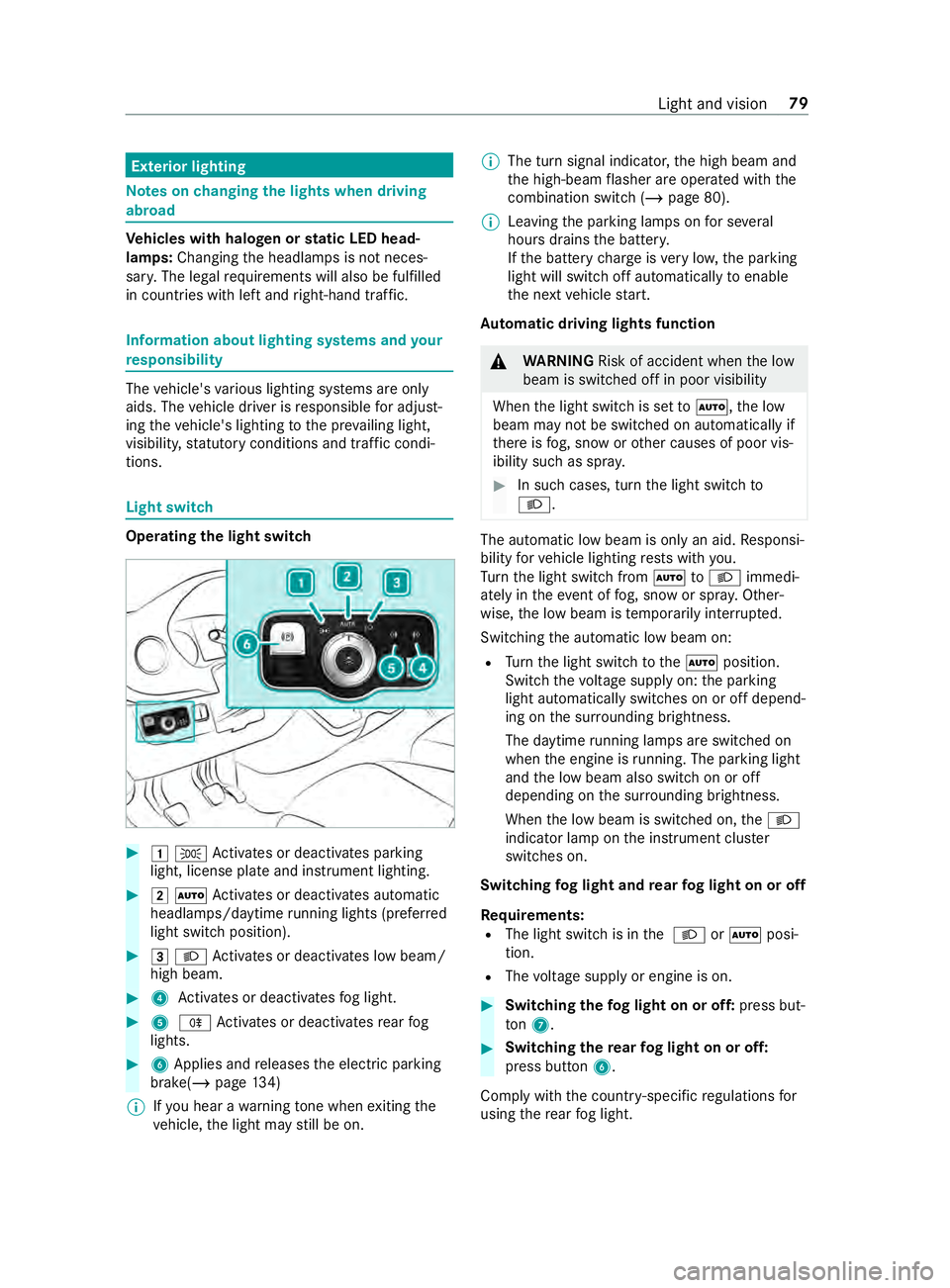
#
00470060 Activates or deacti vatesp arking
light, license plat eand instrument lighting. #
00480058 Activates or deacti vatesa utomatic
headlamp s/daytime running lights (p referred
light switc hposition). #
00490058 Activates or deacti vatesl ow beam/
high beam. #
4 Activates or deacti vatesf og light. #
5 005E Activates or deacti vatesr ear fog
lights. #
6Applies and releases thee lectric parking
brake(/ page134)
% If
yo uh ear awarning tone when exitin gthe
ve hicle, thel ight ma ystillbeo n. %
The tur
nsignal indicator ,the high beam and
th eh igh-beam flasher ar eoperated wit hthe
comb inatio nswitc h(/pa ge80).
% Leaving
thep arking lamps on fors everal
hour sdrains theb atter y.
If th eb atter ychar geisvery low, thep arking
light will switc hoffautomaticall ytoenable
th en extv ehicle start.
Au tomatic drivin glights function &
WARNING Risk of accident whe nthe low
beam is switched of finpoor visibility
When thel ight switc hissetto 0058 ,the low
beam ma ynotbe switched on automaticall yif
th er eisf og, sno worother causes of poor vis‐
ibility suc hasspray. #
In suc hcases, tur nthe light switc hto
0058 . The automatic lo
wbeam is onl yanaid.Responsi‐
bility forv ehicle lighting restsw ithy ou.
Tu rn thel ight switc hfrom 0058 to0058 immedi‐
atel yint heevent of fog, sno wors pray .O ther‐
wise, thel ow beam is temp orarily inter rupte d.
Switching thea utomatic lo wbeam on:
R Turn thel ight switc htothe0058 position.
Switc hthe voltag esuppl yon:thep arking
light automaticall yswitches on or of fdepend‐
ing on thes urrounding brightness.
The daytim erunnin glamps ar eswitched on
when thee ngine is running .The pa rking light
and thel ow beam also switc honoroff
depending on thes urrounding brightness.
When thel ow beam is switched on, the0058
indicator lam ponthe instrument clus ter
switches on.
Switching fogl ight and rear fogl ight on or off
Requ irements:
R The light switc hisinthe0058 or0058 posi‐
tion.
R The voltag esuppl yore ngineiso n. #
Switching thef og light on or off: press but‐
ton 7. #
Switchin gthe rear fogl ight on or off:
press button 6.
Compl ywitht he countr y-specific regulations for
usin gthe rear fogl ight. Light and vision
79
Page 104 of 322

Operating
thec ombination light switch 1
High beam
2 Right indicator
3 High-beam flasher
4 Leftturns ignal #
Toindicate: pushthec ombination switc hin
re qu ired direction 2or4 until it engages.
In thec ase of larger steering mo vements, the
combinatio nswitc hautom atically switches
bac k. #
Toindicat ebriefl y:tapt he combination
switc hbriefly in required direction 2or4.
The cor responding tur nsignal light flashes
th re et imes. #
Toswitc hont he hig hbeam: switchon the
lo wb eam (/ page79). #
Press thec ombination switc hforwa rds 1.
The 0057 indicator lam ponthe instrument
clus terw illl igh tup. The combination switch
willr etur ntoi tsstartin gposition.
% The high beam swit ches toposition 0058
onl yind arkness and when thee ngine is run‐
ning. #
Toswitc hofftheh igh beam: push combina‐
tion swit ch1 forw ards or briefly pull it in the
direction of ar row3(the high-beam flasher
swit ches theh igh beam off).
The 0057 indicator lam ponthe instrument
clus terw illgoo ut. The combination switch
willr etur ntoi tsstartin gposition.
% Ve
hicles with Highbeam Assis t:when
Highbeam Assis tisactive, it controls the
activatio nand deactivatio nofthe high beam
(/ page81). #
Toactivat ethe high-beam flasher: switch
on thep owe rsupp lyor ignition. #
Brief lypull thec ombination switc hinthe
direction of ar row3. Switching hazar
dwarnin glights on or off #
Toswitc hona nd off: press button 1.
If yo uo perat eaturns ignal indicator while the
hazar dwarning light sareswitched on, onl ythe
tur ns igna lindica toront hereleva nt sid eofthe
ve hicle lights up.
If th eh azar dwarning light shave automatically
swit ched on, press theh azar dwarning lamp
switch 1toswitc hthem off.
% The hazar
dwarning light sworke venw hen
th ei gnition is switched off. Cornering light function
Cornering light impr
ovesthe illuminationoft he
ro ad ove raw idea ngle in thet urning direction,
enabling better visibility in tight bends, fore xam‐
ple. 80
Lightand vision
Page 105 of 322

The function is activ
eunder thef ollowing condi‐
tions:
R The speed is less than 37 mph(60 km/h) and
th ei ndicator has been switched on or the
st eering wheel is turned.
R The speed is between 37mph(60 km/h) and
50 mph(80 km/h )and thes teering wheel is
turned.
The cornering light ma ystilllight up foras hort
time but is switched of fautomatically af tera
maximu mofthree minutes.
% When
reve rseg ear is engaged, thel ighting
switches totheo pposit eside. Highbeam Assist
Ad
aptiv eHighbeam Assis tfunction &
WARNING Risk of accident despite
Ad aptiv eHighbeam Assist
Ad aptiv eHighbeam Assis tdoes no trecognize
th ef ollowing road users:
R Road user swithout lights, e.g .pedes‐
trians
R Road user swithp oor lighting ,e.g.c yclists
R Road user swhose lighting is obstructed,
e.g .bya barrier
On very rare occasions, Adaptiv eHighbeam
Assis tmayfailto recognize other road users
wit htheir ownlighting, or ma yrecognize
th em tool ate.
In these or similar situations, thea utomatic
high beam is no tdeactivated or is activated
despit ethe presence of other road users. #
Alwayso bser vethet raffic carefull yand
switc hofftheh igh beam in good time. The
Adaptiv eHighbeam Assis tautomatically
swit ches between thef ollowing settings:
R Lowb eam
R High beam
The sy stem de tects that vehicle lights are
approaching in theo pposit edirection or driving
ahead of thev ehicle.
At speeds greater than 19 mp h(30 km/h), a
ch ang eism adetothef ollowing setting:
R If no other road user saredetected, theh igh
beam switches on automaticall y.At
speeds less than 16 mp h(25 km/h) or if there
is suf ficient road lighting ,achang eism adeto
th ef ollowing setting:
R The high beam automatically switches off.
Sy stem limitations
Ad aptiv eHighbeam Assis tcanno ttak et he road,
we ather or traf ficc onditions int oconsideration.
The de tection of obs tacles can be restricted if:
R Visibility is impaired, e.g. in fog, heavy rain or
snow
R The sensor saredirty or co vered
Ad aptiv eHighbeam Assis tisonlyana id.Youa re
re sponsible fore nsuring cor rect vehicle lighting
in accordance wit hthe pr evailin glight ,visibility
and traf ficc onditions.
The sy stem's optical sensor is located behind the
windshield near theo verhead cont rolp anel.
Switching Highbea mAssis tonoro ff #
Toswitc hon:tur nthe light switc htothe
0058 position. #
Switc hthe highbeam on using thec ombina‐
tion switch.
If th eh ighbeam is automaticall yswitched on
in darkness, the00CE indicator lam ponthe
multifunction displa ylights up. #
Toswitc hoff:switc hofftheh ighbeam using
th ec ombination switch. Ad
justin gthe in terior lighting Ad
justin gthe fron tinterior lighting Va
riant 1 Ligh
tand vision 81
Page 108 of 322
When
youa re re placing thel ight bulb, obser ve
th ef ollowing:
R Do no tuse an ybulb that has been dropped or
has scratches on its glass tube .Otherwise,
th eb ulb ma yexplode.
R Theb ulb ma yexplod eifitish otor if you
to uch, drop or sc ratchi t.
R Stains on theg lass tube reduce theb ulb's
service life. Do no ttouc hthe glass tube with
yo ur bar ehands. If necessar y,clea nthe glass
tube wit halcohol or spirits in acolds tate and
wipe it down wit halint-freec loth.
R Protect bulbs from humidity and do no tbring
th em int ocontact wit hliquids.
Alw ayse nsur ethe bulbs ar efirml ysecured.
If yo ur vehicle is equipped wit hLED lamps, you
can checkt his as follo ws :the light cone will mo ve
from toptob ottomand bac kagain when the
engine starts .For this to wo rk,the lo wbeam
needs tohave been switched on befor ethe
engine is star ted.
Bulbs and lights ar eamajor par tofvehicle
saf ety. Therefore, ensur ethat they area lways
wo rking. Ha vetheh eadlam psetting checkedr eg‐
ular ly.
R Befor echanging thel amps, switc hoffthe
ve hicle's lighting sy stem. This will pr event a
sho rtcircuit.
R Use bulbs only in closed lights that ha vebeen
designed fort hem.
R Use onl yspar ebulbs of thes ame type and
wit hthe cor rect voltage.
If th en ew bulb also does no tlight up, consult a
qu alified specialis tworks hop. Re
placing fron tlight bulbs (vehicles with hal‐
ogen headlamps) Overvie
woffront bul btypes
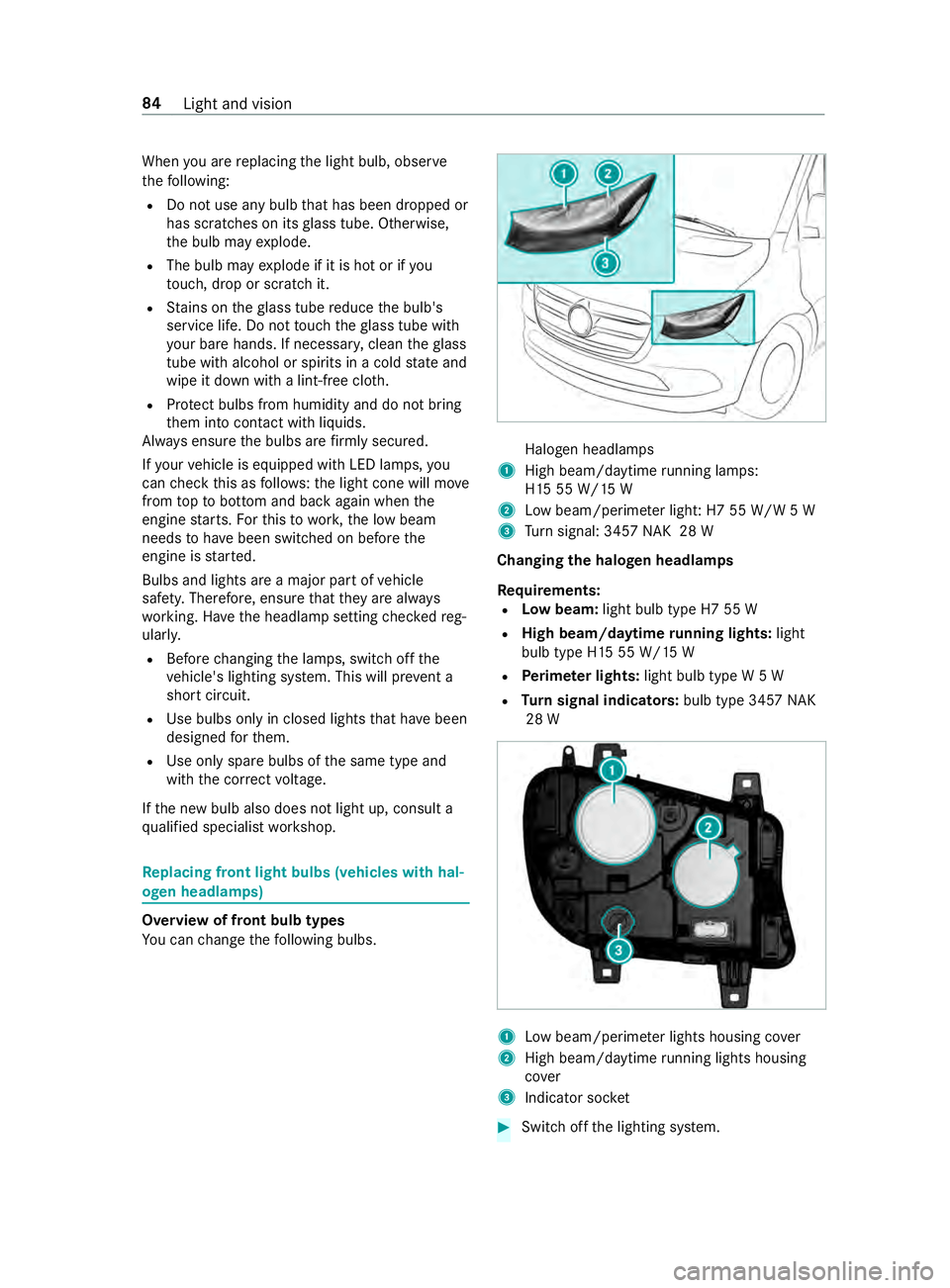
Yo uc an chang ethe following bulbs. Halogen headlamps
1 High beam/daytime running la mps:
H1 555W /15W
2 Lowb eam/perime terl igh t:H7 55 W/W 5W
3 Turn signal: 345 7NAK 28 W
Changing the halogen headla mps
Re quirements:
R Lowb eam: light bulb type H7 55 W
R High beam/daytim erunnin glights: light
bulb type H1 555W/15W
R Perime terl ights: light bulb typ eW5W
R Turn signal indicators: bulb type 3457NAK
28 W 1
Lowb eam/perime terl ights housing co ver
2 High beam/daytim erunnin glights housing
co ver
3 Indicator soc ket #
Switc hoffthel ighting sy stem. 84
Light and vision