wheel MERCEDES-BENZ SPRINTER 2020 MY20 with 7” screen
[x] Cancel search | Manufacturer: MERCEDES-BENZ, Model Year: 2020, Model line: SPRINTER, Model: MERCEDES-BENZ SPRINTER 2020Pages: 348, PDF Size: 5.84 MB
Page 150 of 348
Ac
tivating/deactivatin gESP®
(Electronic Sta‐
bility Prog ram) Multimedia sy
stem:
4 © 5
Settings 5
Quick Access
5 ESP
% ESP®
can onl ybeactivated and deactivated
via quicka ccess when at leas tone other
function is available in quicka ccess. Other‐
wise, youc an find ESP ®
in the Assistance
menu. #
Select ESP.
Ap romp tappears. #
Select Onor00BB Off.
If the 00BB ESP®
OFF warning lam plight supc on‐
st antly in thei nstrument clus ter,ESP ®
is deacti‐
va ted.
Obser vethei nformation on warning lamps and
displa ymessages whic hmayappear in thei nstru‐
ment clus ter. Fu
nctions of ESP ®
Crosswind Assist Crosswind Assis
tdoes no treact under thef ollow‐
ing conditions:
R The vehicle is subjected tosevere jolts and
vib rations, e.g .asar esult of une vens urfaces
or po tholes.
R The vehicle loses traction, e.g. on sno worice
or when hydroplaning.
R The driver is per form ing sudden and lar ge
st eering mo vements.
Crosswind Assis tisoperational again as soon as
th ed riving conditions retur nton ormal.
Crosswind Assi stdetects stro ng crosswind gu sts
th at can impair abilit yofyourvehicle todrive
st ra ight ahead. Crosswin dAssis tinter venes
depending on thed irection and stre ngt hoft he
crosswind.
As tabilizing brak eapplicatio nhelps youtok eep
th ev ehicle on trac k.
Information is shown in thei nstrument clus terin
th ee vent of aclearly discernible inter vention by
Crosswind Assist.
Crosswind Assis tisactiveabove avehicle speed
of 50 mph(80 km/h )when driving stra ight or
slight lycornering. Fu
nction of ESP ®
trailer stabilization &
WARNING Risk of accident in poo rroad
and weather conditions
In poor road and weather conditions, the
traile rstabilizatio ncanno tpreve nt lu rching of
th ev ehicle/trailer combination .Trailer sw ith
ah igh cen terofg ravity ma ytipover before
ESP ®
de tects this. #
Alwaysa dap tyour driving styletos uit
th ec urrent road and weather condi‐
tions. ESP
®
trailer stabilizatio ncoun tera cts critica ldriv‐
ing situations in goo dtime and thereb yprovides
conside rable assis tance when driving wi th a
traile r. Trailer stabilizatio nispartofE SP®
.
If th es ensor sy stem and evaluatio nlogic de tect
trailer swinging mo vements, ESP ®
trailer stabili‐
zation initiall ybrake sindividual vehicle wheels in
at arge tedm anner .Itthus cou nteracts swinging
mo vements. If thes winging mo vements do not
st op, thev ehicle is braked until thev ehicle/
trailer combination is stabilized. If necessar y,the
ve hicle's engine output is limited.
If yo ur vehicle wit htrailer (vehicle/trailer combi‐
nation) starts toswer ve,y ou ar eable tostabilize
th ev ehicle/trailer combination onl ybybraking.
ESP ®
trailer stabilizatio nhelps youtos tabilize
th ev ehicle/trailer combination in this situation.
ESP ®
trailer stabilizatio nisactiveats peeds
abo veappr oximately 40 mph(65 km/h).
If ESP ®
is de activated because of amalfunction,
trailer stabilizatio nwill no tfunction. Fu
nction of EBD (electronic brak eforce distri‐
bution) EB
Dh asthef ollowing characteristics:
R monitoring and controllin gthe braking force
on ther ear wheels
R impr oving driving stabilizatio nwhen braking,
especiall yonb ends 14 8
Driving and pa rking
Page 153 of 348
%
It is
recommended that ActiveB rake Assi stis
alw aysl efta ctivated. #
Select asetting.
The las tactiv esetting is selected automatically
eve rytime thee ngine is star ted.
Exception :ifthe las tsetting was Off,t heMedium
setting will be automatically activated then ext
time thee ngine is star ted.
Deactivating Activ eB rake Assi st
% It is
recommended that ActiveB rake Assi stis
alw aysl efta ctivated. #
Select Off.
The dis tance warning function and autono‐
mous brakin gfunction ar edeactivated.
The next tim ethe engine is star ted, the Medium
setting will be automaticall yactivated.
% When
ActiveB rake Assi stis deactivated, the
00D4 symbol appears inthes tatus area of
th em ultifunction displa y. Cruise control
Fu
nction of cruise control
Cruise cont rola ccelerates and brakes thev ehicle
automaticall yinorder tomaintain apreviously
st ored speed.
If yo ua ccelerat etoovertake, fore xamp le,the
st ored speed is no tdele ted. If your emo veyour
fo ot from thea ccelerator pedal af tero vertaking,
cruise control will resume speed regulation back
to thes tore ds peed.
Cruise contro lisoperated using thec orrespond‐
ing steering wheel buttons. Youc an stor ea ny
ro ad speed abo ve15 mp h(20 km/h).
If yo uf ail toadap tyour driving style, cruise con‐
trol can neither reduce ther isk of an accident nor
ove rride thel aws of ph ysics. It canno ttak ei nto
account road, weather or traf ficc onditions.
Cruise control is only an aid. Youa re re sponsible
fo rt he dis tance tothev ehicle in front, forv ehicle
speed, braking in good time and fors taying in
yo ur lane.
Displa ysinthem ultifunction display
The status of cruise control and thes tore ds peed
ar es hown in them ultifunction displa y. Displ
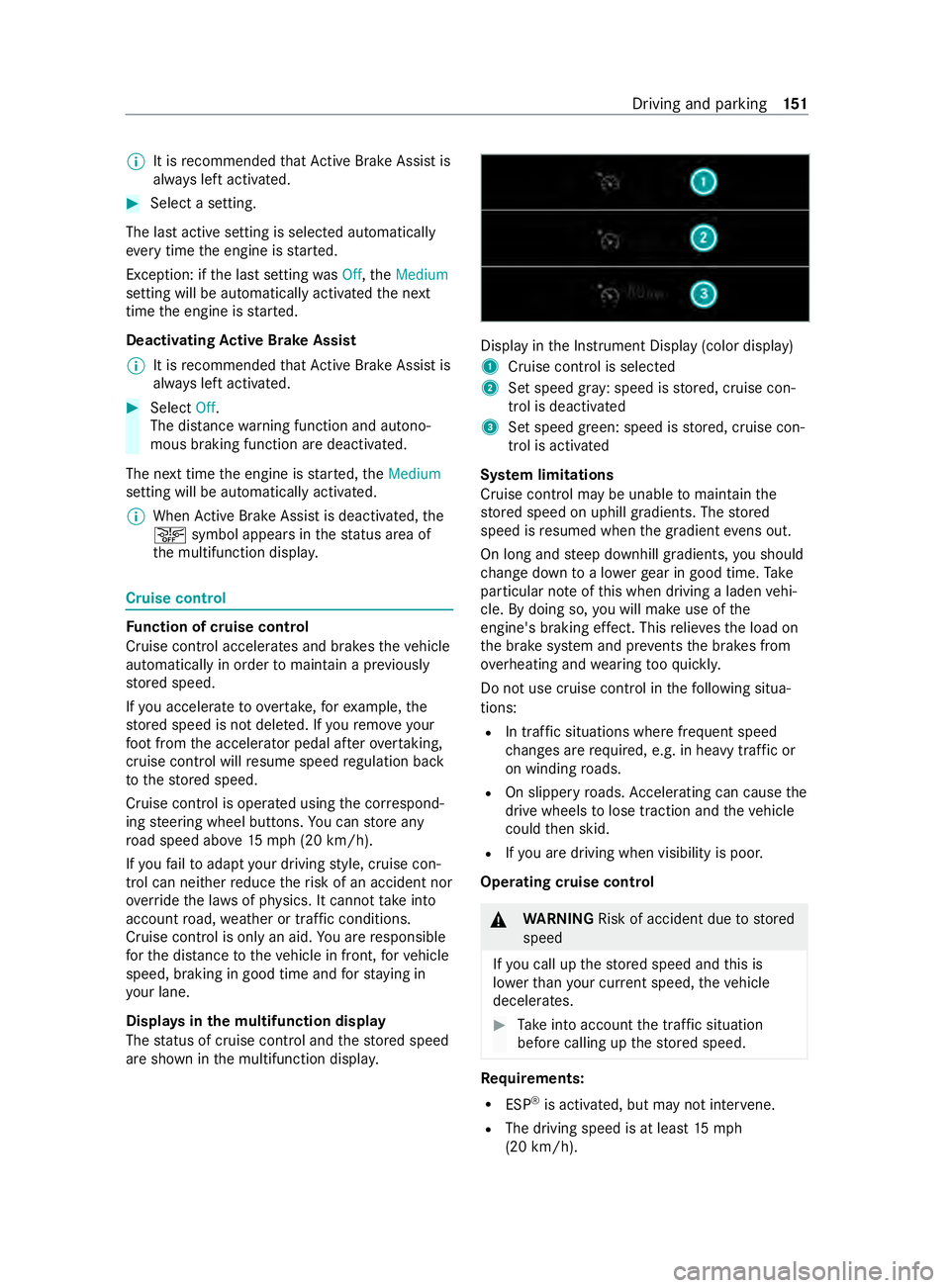
ayintheI nstrument Displa y(color display)
1 Cruise cont roliss elected
2 Setspeed gr ay:s peed is stored, cruise con‐
trol is deactivated
3 Setspeed green: speed is stored, cruise con‐
trol is activated
Sy stem limitations
Cruise control ma ybeunable tomaintain the
st ored speed on uphill gradients. The stored
speed is resumed when theg radient evens out.
On long and steep downhill gradients, yous hould
ch ang edowntoa lowe rgear in good time. Take
particular no teofthis when driving aladen vehi‐
cle. By doing so, youw ill mak euse of the
engine' sbraking ef fect. Thi srelie vest he load on
th eb rake system and pr events theb rake sf rom
ove rheating and wearing tooq uickl y.
Do no tuse cruise control in thef ollowing situa‐
tions:
R In traf fics ituations whe refrequent speed
ch anges ar erequired, e.g. in heavy traf ficor
on winding roads.
R On slippe ryroads. Accele rating can cause the
driv ewheels tolose traction and thev ehicle
could then skid.
R Ifyo ua redrivin gwhen visibilit yispoor.
Operating cruise cont rol &
WARNING Risk of accident du etostored
speed
If yo uc all up thes tore ds peed and this is
lo we rthan your cur rent speed ,the vehicle
decelerates. #
Take intoa ccount thet raffic situation
befor ecallin gupt hestored speed. Re
quirements:
R ESP ®
is activated, but ma ynotinter vene.
R The driving speed is at leas t15m ph
(20 km/h). Driving and parking
151
Page 154 of 348
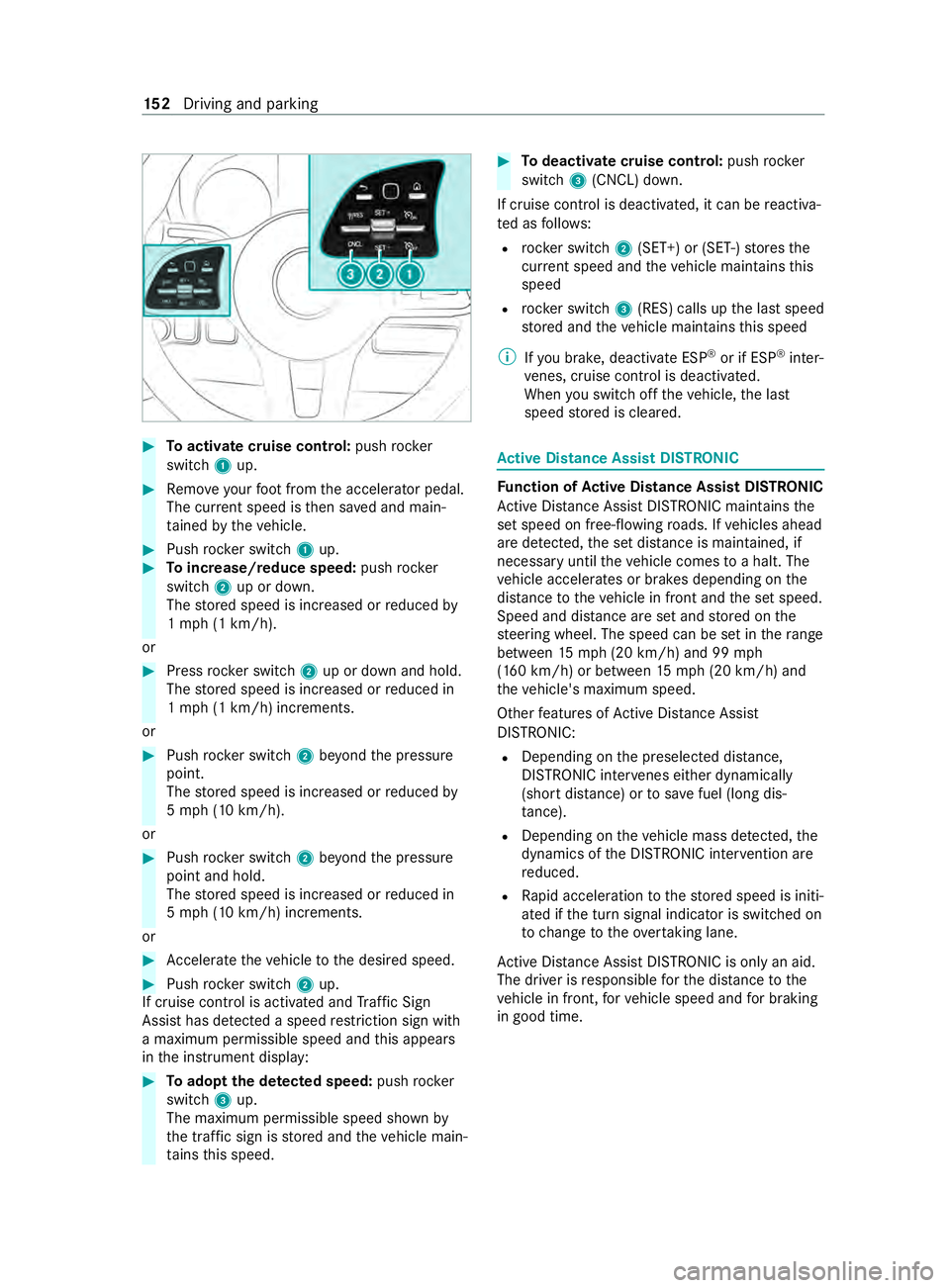
#
Toactivat ecruise control: pushrocker
switch 1up. #
Remo veyour foot from thea ccelerator pedal.
The cur rent speed is then sa veda nd main‐
ta ined bythev ehicle. #
Push rocker switch 1up. #
Toincrease/reduce speed: pushrock er
switch 2up or down.
The stored speed is increased or reduced by
1m ph (1 km/h).
or #
Press rocker switch 2up or down and hold.
The stored speed is increased or reduced in
1m ph (1 km/h) increments.
or #
Push rocker switch 2beyond thep ressure
point.
The stored speed is increased or reduced by
5m ph (1 0km/h).
or #
Push rocker switch 2beyond thep ressure
point and hold.
The stored speed is increased or reduced in
5m ph (1 0km/h) increments.
or #
Accele rate thev ehicle tothed esired speed. #
Push rocker switch 2up.
If cruise cont rolisa ctivated and Traf ficS ign
Assi sthas de tected aspeed restriction sig nwith
am aximum permissible speed and this appears
in thei nstrument display: #
Toadop tthe de tected speed: pushrocker
switch 3up.
The maximum permissible speed shown by
th et raffic sign is stored and thev ehicle main‐
ta ins this speed. #
Todeactivat ecruisec ontrol: push rock er
switch 3(CNCL) down.
If cruise cont rolisd eactivated, it can be reactiva‐
te dasf ollows:
R rock er switch 2(SET+ )or(SET-) stores the
cur rent speed and thev ehicle maintains this
speed
R rock er switch 3(RES) calls up thel asts peed
st ored and thev ehicle maintains this speed
% Ifyo ub rake, deactivat eESP®
or if ESP ®
inter‐
ve nes, cruise control is deacti vated.
When yous wit ch offt he vehicle, thel ast
speed stored is cleared. Ac
tiv eD ista nce Assis tDISTRONIC Fu
nction of Activ eD ista nce Assis tDISTRONIC
Ac tiveD ista nce Assi stDISTRONI Cmaintains the
se ts peed on free-flowing roads. If vehicles ahead
ar ed etected, thes etdis tance is maintained ,if
necessa ryuntil thev ehicle comes toah alt.The
ve hicle accelerates or brakes depending on the
dis tance tothev ehicle in front and thes etspeed.
Speed and dis tance ar esetand stored on the
st eering wheel. The speed can be se tintherange
between 15mp h(20 km/h) and 99 mph
(160 km/h) or between 15mp h(20 km/h) and
th ev ehicle's maximum speed.
Other features of ActiveD ista nce Assi st
DISTRONIC:
R Depending on thep reselected dis tance,
DISTRONIC inter venes ei ther dynamically
(shor tdista nce) or tosave fuel (long dis‐
ta nce).
R Depending on thev ehicle mass de tected, the
dynamics of theD ISTRONIC inter vention are
re duced.
R Rapid acceleration tothes tore ds peed is initi‐
ated if thet urns ignal indicator is switched on
to chang etot heovertak ing lane.
Ac tiveD ista nce Assi stDISTRONI Cisonly an aid.
The driver is responsible fort he dis tancetothe
ve hicle in front, forv ehicle speed and forb raking
in good time. 15 2
Driving and pa rking
Page 155 of 348
Sy
stem limitations
The sy stem ma ybeimpaired or ma ynotfunction
in thef ollowing ins tances:
R The radar sensor sareaffected bysno w,rain,
fo g, heavy spr ay,g lare, direct sunlight or
greatly varying ambien tlight.
R The radar sensor smaymalfunction in parking
ga rage soronr oads wit hsteep uphill or
downhill gradients.
R Ifth er adar sensor saredirty or co vered.
R On icy or slipper yroads, braking or accelerat‐
ing can caus ethe driv ewheels tolose trac‐
tion and thev ehicle could then skid.
R Stationar yobject sarenotd etected if these
we renotp reviousl ydetected as moving.
R On bends, target vehicles ma ybelostorn ot
re cognized cor rectl y.As aresult, atarget
ve hicle is no tused toregulat ethe speed
whic hmaylead tounwa nted accele ration.
Do no tuse ActiveD ista nce Assi stDISTRONI Cin
th ese situations. &
WARNING Risk of accident from acceler‐
ation or braking byActiveD ista nce Assi st
DISTRONIC
Ac tiveD ista nce Assi stDISTRONI Cmayaccel‐
erat eorb rake inthef ollowing cases, for
ex ample:
R Ifth ev ehicle pulls away usin gActiv eDis‐
ta nce Assi stDISTRONIC.
R Ifth es tore ds peed is called up and is con‐
siderably faster or slo werthan thec ur‐
re ntly driven speed.
R IfAc tiveD ista nce Assi stDISTRONI Cno
longer de tects avehicle in front or does
no treact toreleva nt objects. #
Alwaysc arefully obser vethet raffic con‐
ditions an dbereadytobrak eata ll
times. #
Take intoa ccount thet raffic situation
befor ecallin gupt hestored speed. &
WARNING Risk of accident du etoinsuf‐
fi cient deceleration byActiveD ista nce
Assi stDISTRONIC
Ac tiveD ista nce Assi stDISTRONI Cbrakes
yo ur vehicle wit hupto5 0% ofthem aximum
possible deceleration. If this deceleration is no
ts ufficient, ActiveD ista nce Assi st
DISTRONI Calertsy ou wit havisualand
acoustic warning. #
Inthese cases, adjus tyour speed and
ke ep asufficient dis tance. #
Brak ethe vehicle yourself and/or take
ev asiv eaction. &
WARNING Risk of accident if de tection
function of ActiveD istan ce Assi st
DISTRONI Cisimpaired
Ac tiveD ista nce Assi stDISTRONI Cdoesn ot
re act or has alimited reaction:
R when drivin gonadiffe re nt lane or when
ch anging lanes
R topedestrians, animals, bicycles or sta‐
tionar yvehicles, or unexpected obs tacles
R tocomple xtraffic conditions
R tooncomin gvehicles and crossing traf fic
As aresult, ActiveD ista nce Assi stDISTRONIC
ma yneith er giv ewarnings nor inter vene in
su ch situations. #
Alwayso bser vethet raffic conditions
carefull yand react according ly. Ac
tiveD ista nce Assi stDISTRONI Cmaynotd etect
nar row vehicles driving in front, e.g. mo torcyc les
and vehicles driving on adiffe re nt line.
Ope ratin gA ctive Distance Assis tDISTRONIC
Re quirements:
R The vehicle has been star ted.
R The parking brak ehas been released.
R ESP ®
is activated and is no tinter vening.
R The transmissio nisinposition005B.
R The driver' sand thef ront-passen gerd oor are
closed.
R The seat occupancy recognition on thed riv‐
er's seat has de tected that thed rive rh as fas‐
te ned thes eat belt.
R The checkoft heradar sensor sy stem has
been successfully comple ted. Driving and parking
15 3
Page 159 of 348
#
Adjus tthe value.
Ad justin gthe pitc hofthewarning tones #
Select Warning Tone Pitch.
Ad jus tthe value.
Specifying thes tarting point fort he warning
to nes
Yo uc an specify whe ther theP arking Assist
PA RKTRONI Cwarning tones shoul dcommence
when thev ehicle is fur ther aw ay from an obs ta‐
cle. #
Select Warn Earl yAll Around. #
Activat eord eacti vate thef unction.
Ac tivatin gordeactivatin gaudi ofadeout
Yo uc an specify whe ther thev olume of amedia
source in them ultimedia sy stem is tobe reduced
when Parking Assis tPARKTRONIC gi vesaw arn‐
ing tone. #
Select Audio Fadeou tDuring Warning Tones. #
Activat eord eacti vate thef unction. Re
ar vie wcamera Fu
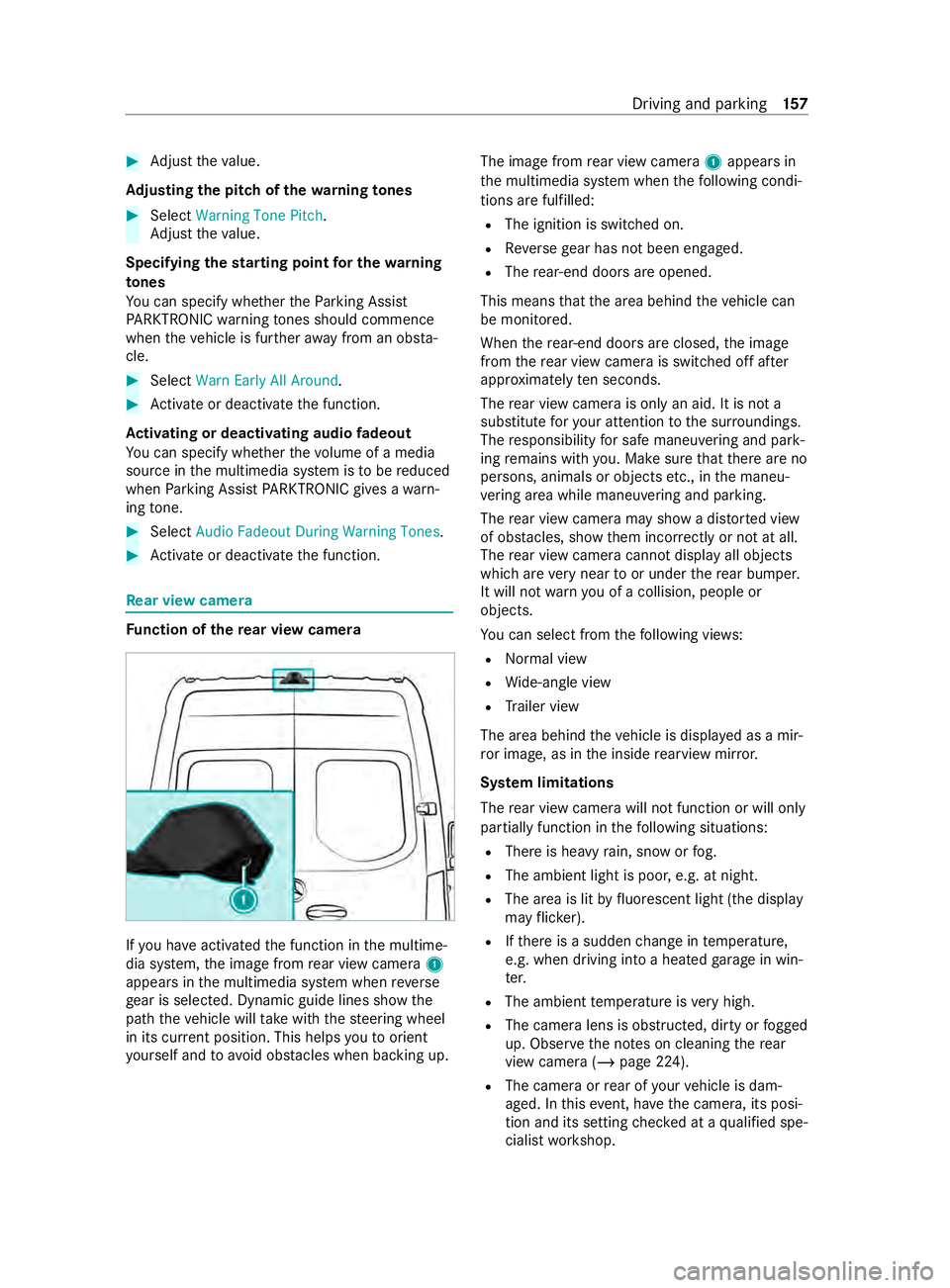
nction of ther ear vie wcamera If
yo uh ave activated thef unction in them ultime‐
dia sy stem, thei mag efromr ear vie wcamera 1
appear sinthe multimedia sy stem when reve rse
ge ar is selec ted. Dynamic guide lines sho wthe
pat hthe vehicle will take wit hthe steering wheel
in its cur rent position. Thi shelps youtoo rient
yo urself and toavo id obs tacles whe nbackin gu p. The imag
efromr ear vie wcamera 1appear sin
th em ultimedia sy stem when thef ollowing condi‐
tions ar efulfilled:
R The ignition is switched on.
R Reverseg ear has no tbeen engaged.
R The rear-en ddoor sareopened.
This mean sthat thea reab ehind thev ehicle can
be monitored.
When ther ear-end door sareclosed, thei mage
from ther ear vie wcamer aiss witched of fafter
appr oximatel yten seconds.
The rear vie wcamer aiso nlyana id. It is no ta
substitut efor your attention tothes urroundings.
The responsibility fors afem aneu vering and pa rk‐
ing remains wit hyou. Mak esuret hat ther ea reno
persons, animals or object setc., in them aneu‐
ve ring area whil emaneuvering and pa rking.
The rear vie wcamer amaysho wad isto rted view
of obs tacles ,sho wt hem incor rectly or no tatall.
The rear vie wcamer acanno tdispla yall objects
whic harevery nea rtooru nderther ear bumper.
It will no twarny ou of acollision, peopl eor
objects.
Yo uc an selec tfromt hefollowing vie ws:
R Norma lview
R Wide-angle view
R Trailer view
The area behin dthe vehicle is displa yedasam ir‐
ro rimage, as in thei nside rearvie wmirro r.
Sy stem limitations
The rear vie wcamer awill no tfunction or will only
partiall yfunction in thef ollowing situations:
R Ther eish eavyrain, sno worfog.
R The ambient light is poor ,e.g. at night.
R The area is lit byfluorescent light (the displ ay
ma yflicke r).
R Ifth er eisas uddenchang eint emperature,
e.g. when driving int oaheated garage in win‐
te r.
R The ambient temp eratur eisveryh igh.
R The camer alens is obstructed, dirty or fogged
up. Obser vethen otes on cleaning ther ear
vie wc amer a(/pag e224).
R The camer aorrear of your vehicle is dam‐
aged. In this event,h avethec amera ,its posi‐
tion and its setting checkedataq ualified spe‐
cialis tworks hop. Driving and parking
157
Page 160 of 348
The
field of vision and other functions of ther ear
vie wc amer amaybe restricted du etoadditional
accesso ries on ther ear of thev ehicle (e.g. a
loading tailgate).
% The displa
ycontras tmaybe impaired due to
incident sunligh torother light sources. In
th is case, pa yparticular attention.
% Ha
ve thed ispla yrepaired or replaced if, for
ex ample, pixel er rors considerably restrict its
use.
% Objects that ar enotat ground le vela ppear
fur ther aw ay than they actuall yare.T his
includes, fore xamp le:
R The bumper of avehicle par kedb ehind.
R The dr awbar of atrailer.
R The ball nec kofatrailer coupling.
R The rear end of atruck.
R Slanted posts.
Only us ethe guide lines of thec amera image
fo ro rientation. Do no ttrave lfur ther than the
lo west horizontal guide line when approach‐
ing objects. Youm ayotherwise damag eyour
ve hicle and/or theo bject.
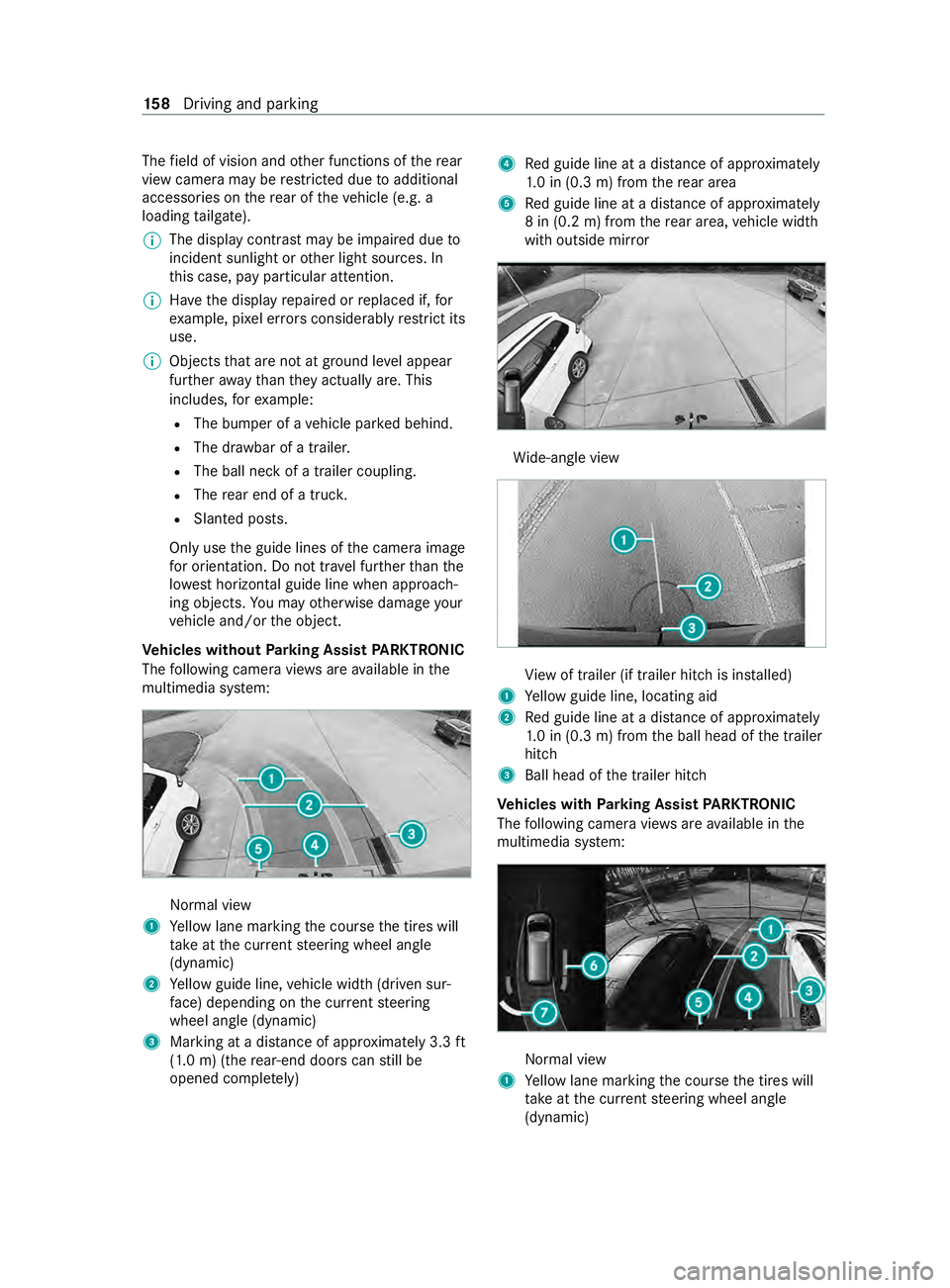
Ve hicles without Parking Assis tPARKTRONIC
Th ef ollowing camer aviews area vailable in the
multimedia sy stem: Normal view
1 Yello wl ane markin gthe course thet ires will
ta ke atthec urrent steering wheel angle
(dynamic)
2 Yello wg uide line, vehicle widt h(driven sur‐
fa ce) depending on thec urrent steering
wheel angle (dynamic)
3 Marking at adistan ce of appr oximatel y3.3ft
(1.0 m) (the rear-en ddoor scan still be
opene dcomple tely) 4
Redg uide line at adista nce of appr oximately
1. 0i n( 0.3 m) from ther ear area
5 Redg uide line at adista nce of appr oximately
8in( 0.2m)f romt herear area, vehicle width
wit ho utside mir ror Wi
de-angle view Vi
ew of trailer (if trailer hitc hisinstalled)
1 Yello wg uide line, locating aid
2 Redg uide line at adista nce of appr oximately
1. 0i n( 0.3 m) from theb all head of thet railer
hitch
3 Ball head of thet railer hitch
Ve hicles with Parking Assis tPARKTRONIC
Th ef ollowing camera vie wsarea vailable in the
multimedia sy stem: Normal view
1 Yello wl ane markin gthe course thet ires will
ta ke atthec urrent steering wheel angle
(dynamic) 15 8
Driving and pa rking
Page 161 of 348
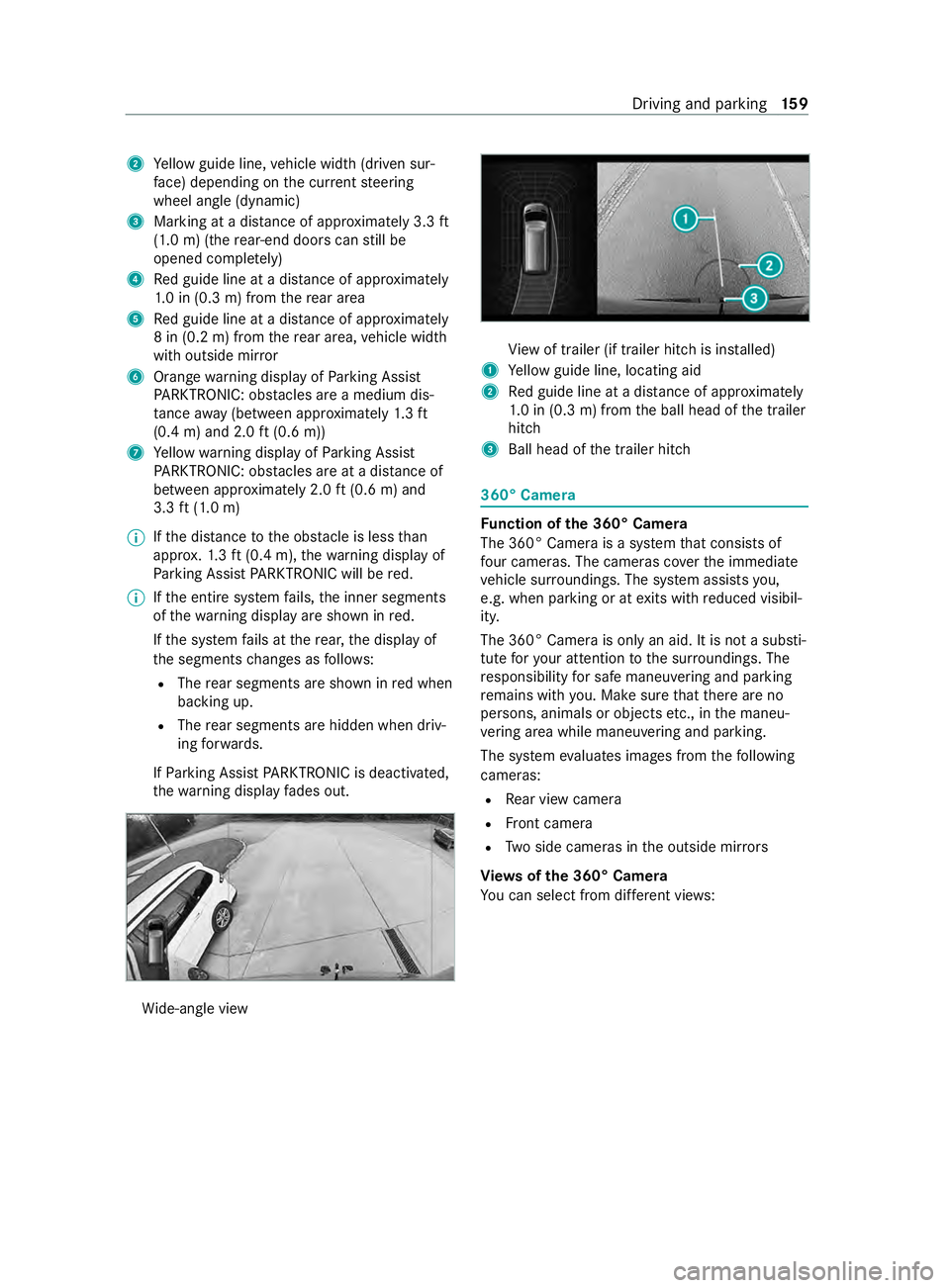
2
Yello wg uide line, vehicle widt h(driven sur‐
fa ce) depending on thec urrent steering
wheel angle (dynamic)
3 Marking at adistan ce of appr oximatel y3.3ft
(1.0 m) (the rear-en ddoor scan still be
opene dcomple tely)
4 Redg uide line at adista nce of appr oximately
1. 0i n( 0.3 m) from ther ear area
5 Redg uide line at adista nce of appr oximately
8in( 0.2m)f romt herear area, vehicle width
wit ho utside mir ror
6 Orang ewarning displa yofParking Assist
PA RKTRONIC: obstacles ar eamedium dis‐
ta nce away (between appr oximately 1.3ft
(0.4 m) and 2.0 ft(0.6 m))
7 Yello ww arning displa yofParking Assist
PA RKTRONIC: obstacles ar eatadista nce of
between appr oximatel y2.0ft(0.6 m) and
3.3 ft(1.0 m)
% If
th ed ista nce totheo bstacle is les sthan
appr ox.1 .3 ft(0.4 m), thew arning displa yof
Pa rking Assis tPARKTRONIC will be red.
% If
th ee ntir esystemf ails, thei nner segments
of thew arning displa yareshown in red.
If th es ystemf ails at ther ear ,the displa yof
th es egment schanges as follo ws:
R The rear segment sareshown in redw hen
backing up.
R The rear segment sarehidde nwhen driv‐
ing forw ards.
If Pa rking Assis tPARKTRONIC is deactivated,
th ew arning displa yfades out. Wi
de-angle view Vi
ew of trailer (if trailer hitc hisinstalled)
1 Yello wg uide line, locating aid
2 Redg uide line at adista nce of appr oximately
1. 0i n( 0.3 m) from theb all head of thet railer
hitch
3 Ball head of thet railer hitch 360° Camera
Fu
nction of the3 60° Camera
The 360 °Camera is asyst em that consists of
fo ur cameras. The cameras co verthe immediate
ve hicle sur roundings. The sy stem assists you,
e.g .when parkin goratexitsw ithr educed visibil‐
ity.
The 360° Camer aisonlyana id. It is no tasubsti‐
tut efor your attention tothes urroundings. The
re sponsibility fors afem aneu vering and pa rking
re mains wit hyou. Mak esuret hat ther ea reno
persons, animals or object setc., in them aneu‐
ve ring area whil emaneuvering and pa rking.
The sy stem evaluates images from thef ollowing
cameras:
R Rear vie wcamera
R Front camera
R Twos ide cameras in theo utside mir rors
Vi ew soft he 360 °Camera
Yo uc an selec tfromd iffe re nt vie ws: Driving and pa
rking 15 9
Page 162 of 348
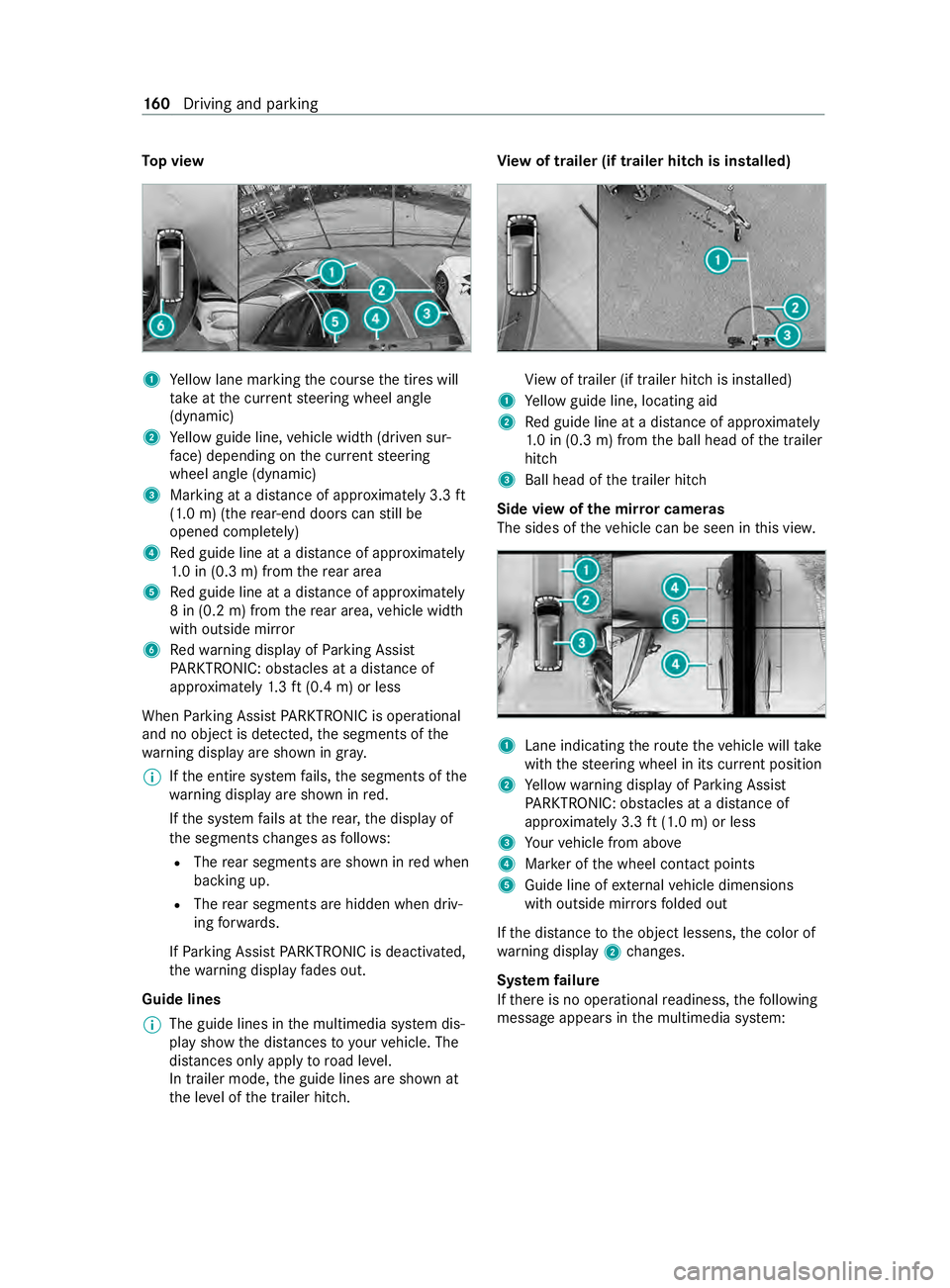
To
pv iew 1
Yello wl ane markin gthe course thet ires will
ta ke atthec urrent steering wheel angle
(dynamic)
2 Yello wg uide line, vehicle widt h(driven sur‐
fa ce) depending on thec urrent steering
wheel angle (dynamic)
3 Marking at adistan ce of appr oximatel y3.3ft
(1.0 m) (the rear-en ddoor scan still be
opene dcomple tely)
4 Redg uide line at adista nce of appr oximately
1. 0i n( 0.3 m) from ther ear area
5 Redg uide line at adista nce of appr oximately
8in( 0.2m)f romt herear area, vehicle width
wit ho utside mir ror
6 Redw arning displa yofParking Assist
PA RKTRONIC: obstacles at adista nce of
appr oximately 1.3f t(0.4 m) or less
When Parking Assis tPARKTRONIC is operational
an dnoo bject is de tected, thes egment softhe
wa rning displa yareshown in gray.
% If
th ee ntir esystemf ails, thes egment softhe
wa rning displa yareshown in red.
If th es ystemf ails at ther ear ,the displa yof
th es egment schanges as follo ws:
R The rear segment sareshown in redw hen
backing up.
R The rear segment sarehidde nwhen driv‐
ing forw ards.
If Pa rking Assis tPARKTRONIC is deactivated,
th ew arning displa yfades out.
Guide lines
% The guide lines in
them ultimedia sy stem dis‐
pla yshowt he dis tances toyour vehicle. The
dis tances only apply toroad le vel.
In trailer mode, theg uide lines ar eshown at
th el eve loft he trailer hitch. Vi
ew of trailer (if trailer hit chis installed) Vi
ew of trailer (if trailer hitc hisinstalled)
1 Yello wg uide line, locating aid
2 Redg uide line at adista nce of appr oximately
1. 0i n( 0.3 m) from theb all head of thet railer
hitch
3 Ball head of thet railer hitch
Side vie wofthe mir rorc ame ras
The sides of thev ehicle can be seen in this vie w. 1
Lane indicating ther out ethe vehicle will take
wit hthe steering wheel in its cur rent position
2 Yello ww arning displa yofParking Assist
PA RKTRONIC: obstacles at adista nce of
appr oximately 3.3 ft(1.0 m) or less
3 Your vehicle from abo ve
4 Markeroft he wheel contact points
5 Guide line of extern al vehicle dimensions
wit ho utside mir rors folded out
If th ed ista nce totheo bject lessens, thec olor of
wa rning display 2changes.
Sy stem failure
If th er eisnoo perational readiness, thef ollowing
messag eappear sinthe multimedia sy stem: 16 0
Driving and pa rking
Page 167 of 348
Ar
isk of acollision ma yarise in thef ollowing sit‐
uations, fore xamp le:
R Ifth ed rive rm ixes up thea ccelerator and
brak epedals.
R Ifth ew rong gear is selec ted.
The Driv eAwayA ssistfunction is activ eunder the
fo llowing conditions:
R IfPa rking Assis tPARKTRONIC is activated.
R Ever ytimet he gear is changed to005E or005B
when thev ehicle is at astandstill.
R Ifth ed etected obs tacle is les sthan appr ox‐
imately 3.3 ft(1.0 m) away.
R Ifth em aneuvering assis tance function is acti‐
va tedint he multimedia sy stem.
Sy stem limits
Driv eAwayA ssistis una vailable on inclines and
when driving wit hatrailer. Re
ar Cross Traf ficA lert Fu
nction of Rear Cross Traf ficA lert
The radar sensor sinthe bumper ar eused fort he
sy stem. This waythe area adjacent tothev ehicle
is continually monitored. If ther adar sensor sare
obscured byvehicles or other objects, de tection
is no tpossible.
% Also
read then otes on Blind Spo tAssist
(/ page163).
Ve hicles with Blind Spo tAssis t:driver scan
also be warned of an ycrossing tra ffic when back‐
ing up out of aparkin gspace. If avehicle is
de tected, thew arning lam pinthe outside mir ror
on thec orresponding side lights up red. If it
de tects acritica lsituation, awarning tone also
sounds.
Ve hicles with Blind Spo tAssis tand Parking
Assis tPARKTRONIC: driverscan also be warned
of an ycrossing tra ffic when backin gupout of a
parkin gspace. If acritical situation is de tected, a
wa rning symbol appear sonthe camera imag eof
th em ultimedia sy stem. If thed rive rd oes not
re spond tothew arning ,the vehicle's brakes can
be applieda utomatically.Inthis case, awarning
to ne sounds. The
Rear Cross Traf ficA lertfunction is acti ve
unde rthe following conditions:
R BlindSpotA ssis tisa ctivated.
R Reverseg ear is engaged or thev ehicle is
backing up at walkin gpace.
R Ifth em aneuvering assis tance function is acti‐
va tedint he multimedia sy stem.
The Rear Cross Traf ficA lertfunction is una vaila‐
ble when driving wit hatrailer. Lane
Keeping Assis tand Activ eL aneK eeping
Assist Fu
nctions of Lane Keeping Assist Lane
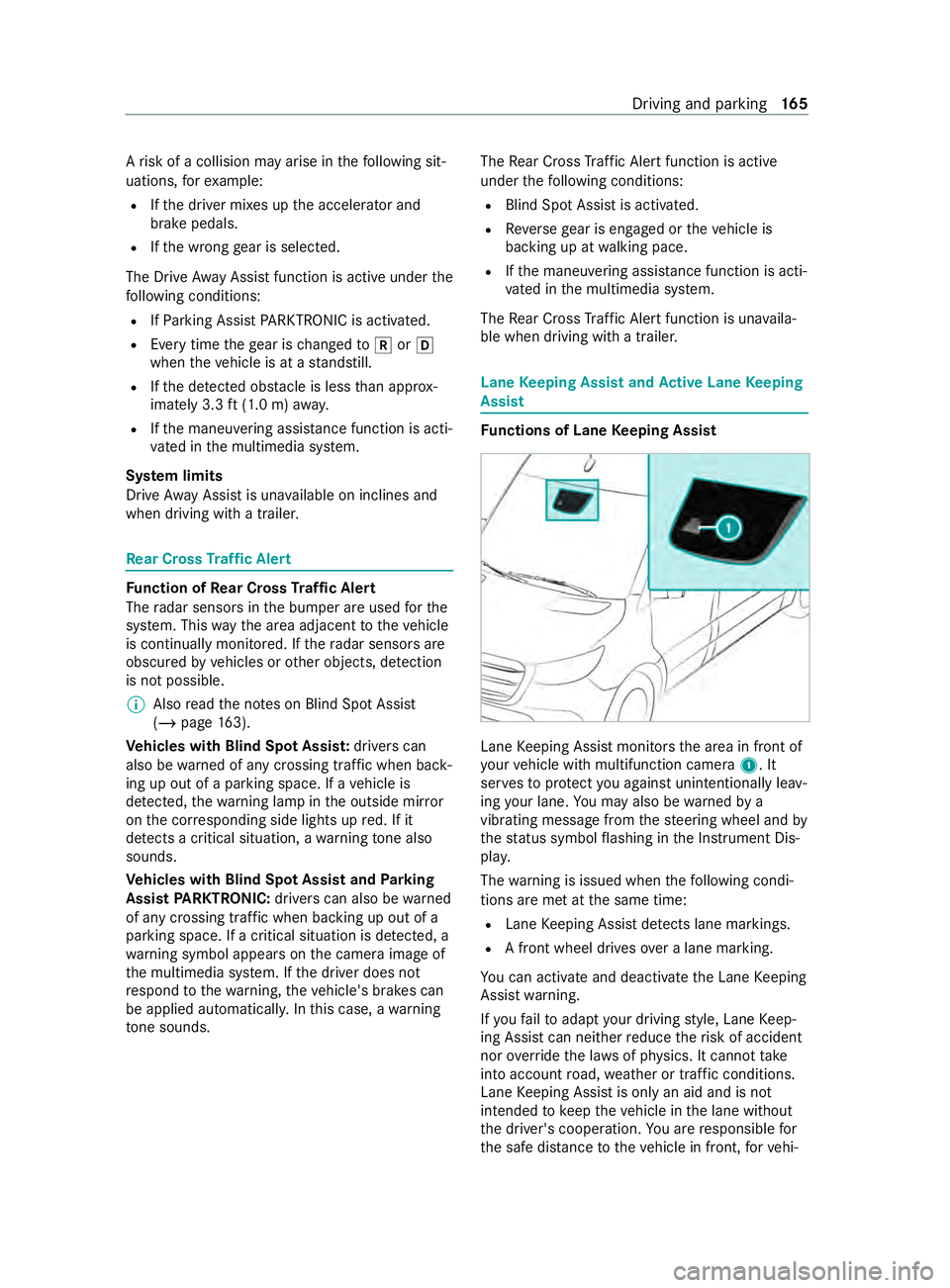
Keeping Assis tmonitor sthe area in front of
yo ur vehicle wit hmultifunction camera 1.It
ser vestop rotect youa gains tunin tentionally le av‐
ing your lane .You ma yalso be warned by a
vibrating messa gefrom thes teering wheel and by
th es tatus symbo lflashing in theI nstrument Dis‐
pla y.
The warning is issued when thef ollowing condi‐
tions ar emetat thes ame time:
R Lane Keeping Assis tdetects lane markings.
R Afront wheel drives overal ane marking.
Yo uc an activat eand deactivat ethe Lane Keeping
Assis twarning.
If yo uf ail toadap tyour driving style, Lane Keep‐
ing Assis tcan neither reduce ther isk of accident
nor override thel aw sofp hysics. It canno ttake
int oa ccount road, weather or traf ficc onditions.
Lane Keeping Assis tisonlyana id and is not
intended tokeep thev ehicle in thel ane without
th ed rive r's cooperation. Youa re re sponsible for
th es afed ista nce tothev ehicle in front, forv ehi‐ Driving and parking
16 5
Page 168 of 348
cle speed, braking in goo
dtime and fors taying in
yo ur lane.
Sy stem limits
The sy stem ma ybeimpaired or ma ynotfunction
in thef ollowing situations:
R Ther eisp oor visibilit y,e.g. due toinsuf ficient
illumination of ther oad, if ther ea rehighly
va riable shade condition sorinrain, sno w,fog
or spr ay.
R Glar efromo ncomin gtraf fic, direct sunligh tor
re flections.
R Ther eisd irtont he windshield in thev icinity
of them ultifunction camer aorthe camera is
fo gged up, damaged or obscured.
R No or se veralu nclear lane markings ar epres‐
ent foro ne lane, e.g. in aconstruction area.
R The lane markings ar eworn, dar korcovered.
R The dis tance tothev ehicle driving in front is
to os hor tand thus thel ane markings cann ot
be de tected.
R The lane markings chang equickl y,e.g. lanes
branc hoff,c ross one ano ther or mer ge.
R The road is very nar row and winding.
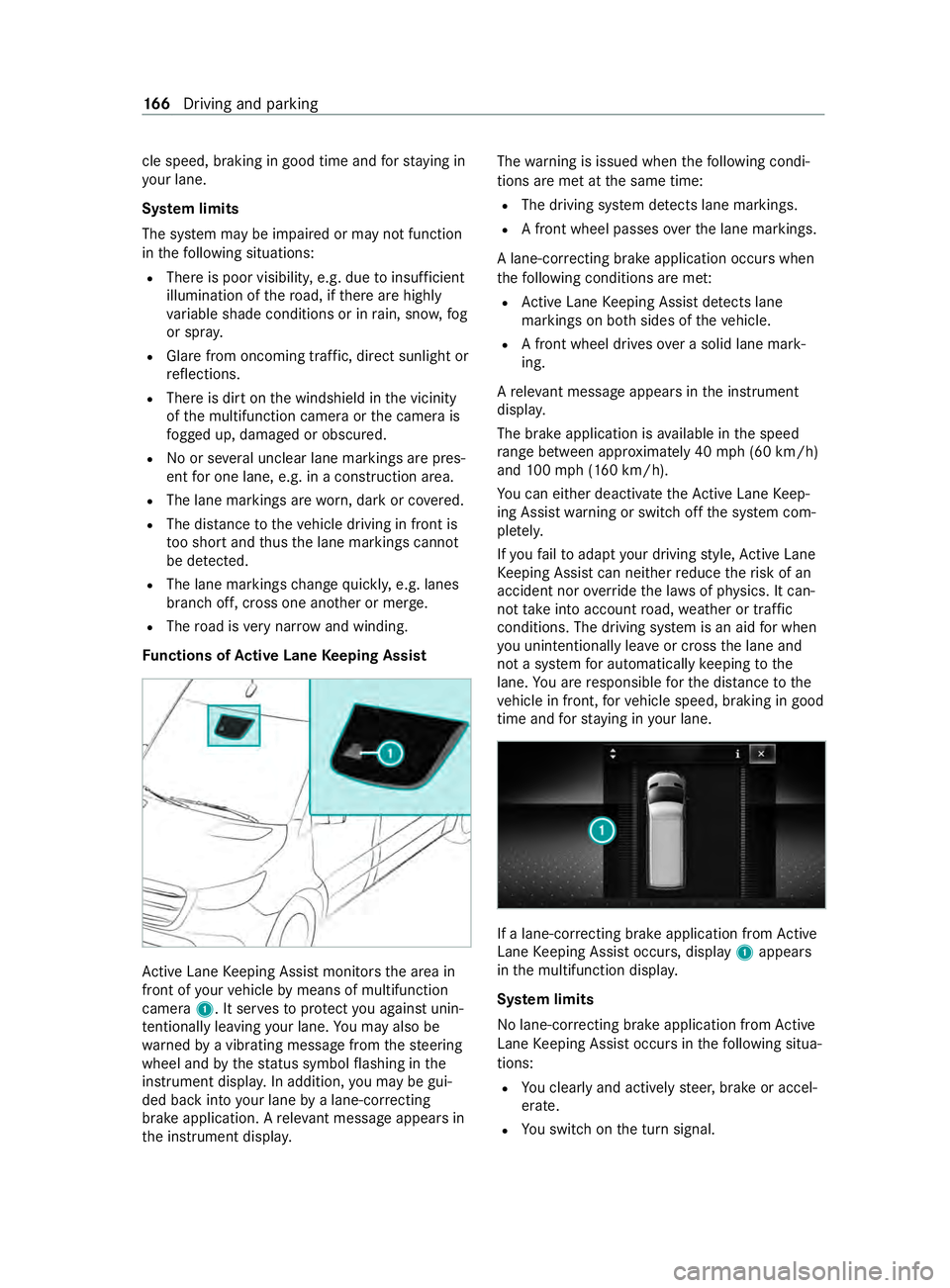
Fu nctions of Activ eL aneK eeping Assist Ac
tiveL aneK eeping Assis tmonitor sthe area in
front of your vehicle bymeans of multifunction
camera 1.Itserve stop rotect youa gains tunin‐
te ntionally le aving your lane .You ma yalso be
wa rned byavibratin gmessag efromt hesteering
wheel and bythes tatus symbo lflashing in the
instrument displa y.In addition, youm aybe gui‐
ded bac kintoy our lane byalane-cor recting
brak eapplication. Arele vant messa geappear sin
th ei nstrument displa y. The
warning is issued when thef ollowing condi‐
tions ar emetat thes ame time:
R The driving sy stem de tects lane markings.
R Afront wheel passes overthe lane markings.
Al ane-cor recting brak eapplication occu rswhen
th ef ollowing condition sareme t:
R ActiveL aneK eeping Assis tdetects lane
markings on bo thsides of thev ehicle.
R Afront wheel drives overas olidl ane mark‐
ing.
Ar ele vant messa geappear sinthe instrument
displa y.
The brak eapplication is available in thes peed
ra ng eb etwe en appr oximately 40 mph(60 km/h)
and 100m ph (160 km/h).
Yo uc an either deactivat ethe ActiveL aneK eep‐
ing Assis twarning or switc hoffthes ystem com‐
ple tely.
If yo uf ail toadap tyour driving style, Ac tiveL ane
Ke eping Assis tcan neither reduce ther isk of an
accident nor override thel aw sofp hysics. It can‐
no ttak ei ntoa ccount road, weather or traf fic
conditions. The driving sy stem is an aid forw hen
yo uu nintentionally le aveor cross thel ane and
no tas ystem fora utomatically keeping tothe
lane. Youa re re sponsible fort he dis tance tothe
ve hicle in front, forv ehicle speed, braking in good
time and fors taying in your lane. If
al ane-cor recting brak eapplication from Active
Lane Keeping Assis toccurs, display 1appears
in them ultifunction displa y.
Sy stem limits
No lane-cor recting brak eapplication from Active
Lane Keeping Assis toccur sint hefollowing situa‐
tions:
R Youc learly and activel ysteer,b rake or accel‐
erate.
R Yous wit ch on thet urns ignal. 16 6
Driving and pa rking