ESP MERCEDES-BENZ WAGON 2016 Workshop Manual
[x] Cancel search | Manufacturer: MERCEDES-BENZ, Model Year: 2016, Model line: WAGON, Model: MERCEDES-BENZ WAGON 2016Pages: 350, PDF Size: 6.71 MB
Page 163 of 350
When DISTRONIC PLUS is activated, the
transmission is shifted automatically to posi-
tionPif:
Rthe driver's door is open and the driver's
seat belt is unfastened.
Rthe engine is switched off, unless it is auto-
matically switched off by the ECO start/
stop function.
Ra system malfunction occurs.
Rthe power supply is not sufficient.
Information in the Digital Operator's
Manual
In the Digital Operator's Manual you will find
information on the following topics:
RSetting a speed
RSetting the specified minimum distance
RDISTRONIC PLUS displays in the instru-
ment cluster
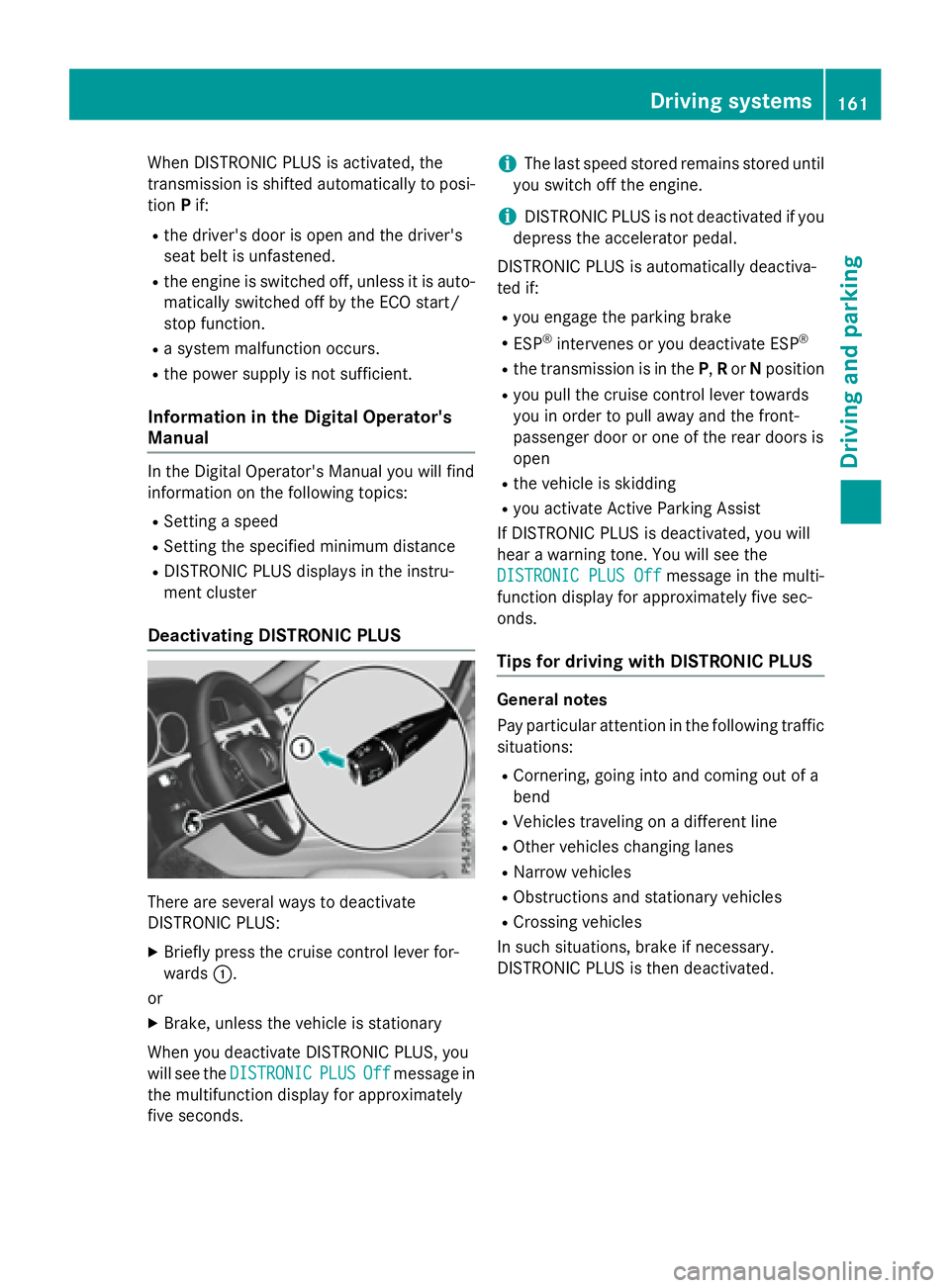
Deactivating DISTRONIC PLUS
There are several ways to deactivate
DISTRONIC PLUS:
XBriefly press the cruise control lever for-
wards :.
or
XBrake, unless the vehicle is stationary
When you deactivate DISTRONIC PLUS, you
will see the DISTRONIC
PLUSOffmessage in
the multifunction display for approximately
five seconds.
iThe last speed stored remains stored until
you switch off the engine.
iDISTRONIC PLUS is not deactivated if you
depress the accelerator pedal.
DISTRONIC PLUS is automatically deactiva-
ted if:
Ryou engage the parking brake
RESP®intervenes or you deactivate ESP®
Rthe transmission is in the P,Ror Nposition
Ryou pull the cruise control lever towards
you in order to pull away and the front-
passenger door or one of the rear doors is
open
Rthe vehicle is skidding
Ryou activate Active Parking Assist
If DISTRONIC PLUS is deactivated, you will
hear a warning tone. You will see the
DISTRONIC PLUS Off
message in the multi-
function display for approximately five sec-
onds.
Tips for driving with DISTRONIC PLUS
General notes
Pay particular attention in the following traffic
situations:
RCornering, going into and coming out of a
bend
RVehicles traveling on a different line
ROther vehicles changing lanes
RNarrow vehicles
RObstructions and stationary vehicles
RCrossing vehicles
In such situations, brake if necessary.
DISTRONIC PLUS is then deactivated.
Driving systems161
Driving and parking
Z
Page 165 of 350
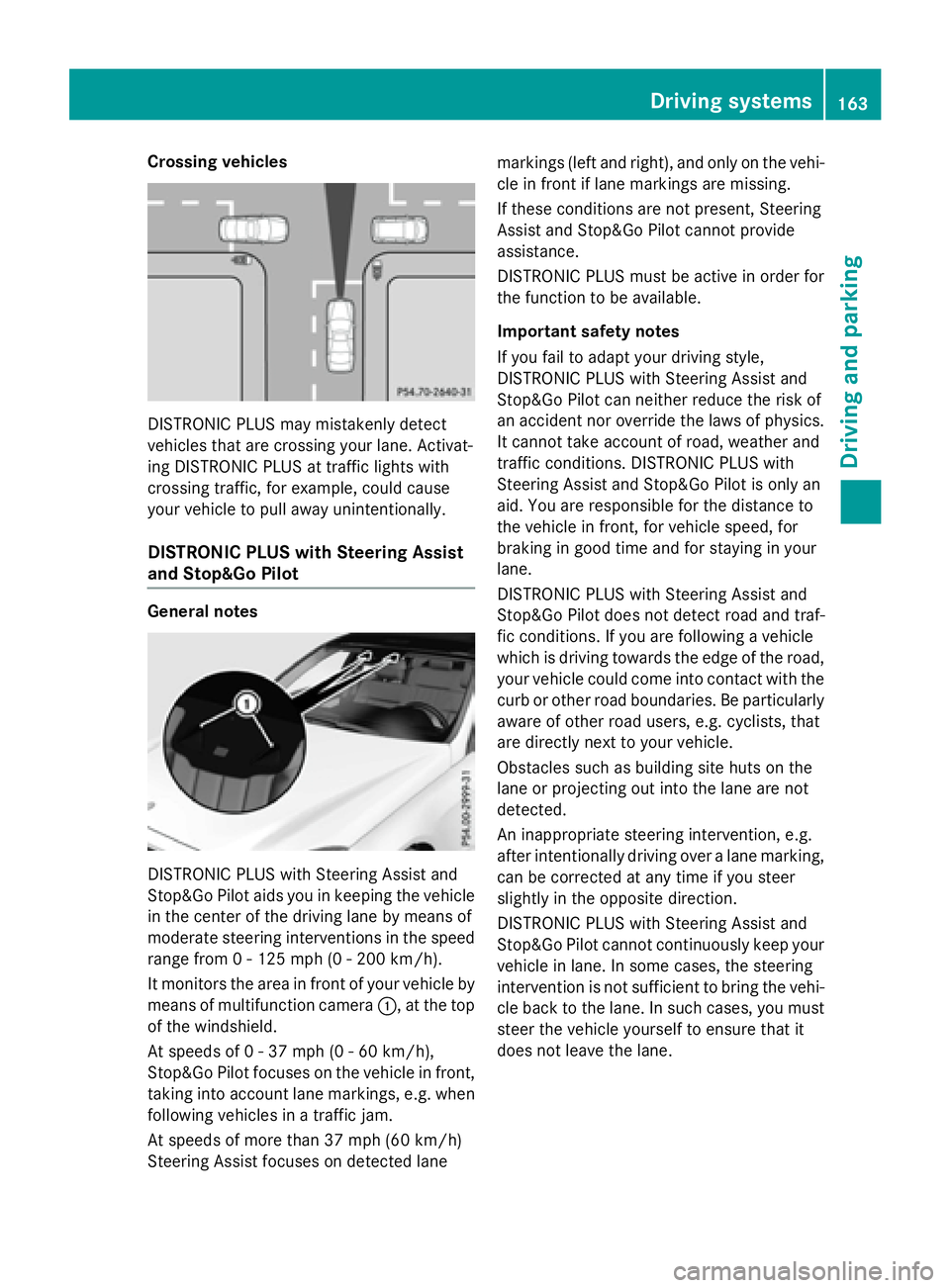
Crossing vehicles
DISTRONIC PLUS may mistakenly detect
vehicles that are crossing your lane. Activat-
ing DISTRONIC PLUS at traffic lights with
crossing traffic, for example, could cause
your vehicle to pull away unintentionally.
DISTRONIC PLUS with Steering Assist
and Stop&Go Pilot
General notes
DISTRONIC PLUS with Steering Assist and
Stop&Go Pilot aids you in keeping the vehicle
in the center of the driving lane by means of
moderate steering interventions in the speed
range from 0 - 125 mph(0-20 0km/ h).
It monitors the area in front of your vehicle by
means of multifunction camera :, at the top
of the windshield.
At speeds of 0 - 37 mph (0 - 60 km/h),
Stop&Go Pilot focuses on the vehicle in front,
taking into account lane markings, e.g. when
following vehicles in a traffic jam.
At speeds of more than 37 mph (60 km/h)
Steering Assist focuses on detected lane markings (left and right), and only on the vehi-
cle in front if lane markings are missing.
If these conditions are not present, Steering
Assist and Stop&Go Pilot cannot provide
assistance.
DISTRONIC PLUS must be active in order for
the function to be available.
Important safety notes
If you fail to adapt your driving style,
DISTRONIC PLUS with Steering Assist and
Stop&Go Pilot can neither reduce the risk of
an accident nor override the laws of physics.
It cannot take account of road, weather and
traffic conditions. DISTRONIC PLUS with
Steering Assist and Stop&Go Pilot is only an
aid. You are responsible for the distance to
the vehicle in front, for vehicle speed, for
braking in good time and for staying in your
lane.
DISTRONIC PLUS with Steering Assist and
Stop&Go Pilot does not detect road and traf-
fic conditions. If you are following a vehicle
which is driving towards the edge of the road,
your vehicle could come into contact with the
curb or other road boundaries. Be particularly
aware of other road users, e.g. cyclists, that
are directly next to your vehicle.
Obstacles such as building site huts on the
lane or projecting out into the lane are not
detected.
An inappropriate steering intervention, e.g.
after intentionally driving over a lane marking,
can be corrected at any time if you steer
slightly in the opposite direction.
DISTR
ONIC PLUS with Steering Assist and
Stop&Go Pilot cannot continuously keep your
vehicle in lane. In some cases, the steering
intervention is not sufficient to bring the vehi-
cle back to the lane. In such cases, you must
steer the vehicle yourself to ensure that it
does not leave the lane.
Driving systems163
Driving and parking
Z
Page 167 of 350
play. Steering Assist and Stop&Go Pilot are
deactivated.
When DISTRONIC PLUS is deactivated or not
available, Steering Assist and Stop&Go Pilot
are deactivated automatically.
HOLD function
General notes
The HOLD function can assist the driver in the
following situations:
Rwhen pulling away, especially on steep
slopes
Rwhen maneuvering on steep slopes
Rwhen waiting in traffic
The vehicle is kept stationary without the
driver having to depress the brake pedal.
The braking effect is canceled and the HOLD
function deactivated when you depress the
accelerator pedal to pull away.
Important safety notes
GWARNING
When leaving the vehicle, it can still roll away despite being braked by the HOLD function if:
Rthere is a malfunction in the system or in
the voltage supply.
Rthe HOLD function has been deactivated by
pressing the accelerator pedal or the brake
pedal, e.g. by a vehicle occupant.
Rthe electrical system in the engine com-
partment, the battery or the fuses have
been tampered with.
Rthe battery is disconnected
There is a risk of an accident.
If you wish to exit the vehicle, always turn off the HOLD function and secure the vehicle
against rolling away.
!If DISTRONIC PLUS or the HOLD function
is activated, the vehicle brakes automati-
cally in certain situations. To prevent damage to the vehicle, deacti-
vate DISTRONIC PLUS and the HOLD func-
tion in the following or other similar situa-
tions:
Rwhen towing the vehicle
Rin the car wash
Activation conditions
You can activate the HOLD function if:
Rthe vehicle is stationary
Rthe engine is running or if it has been auto-
matically switched off by the ECO start/
stop function
Rthe driver's door is closed or your seat beltis fastened
Rthe parking brake is released
Rthe transmission is in position D,Ror N
RDISTRONIC PLUS is deactivated
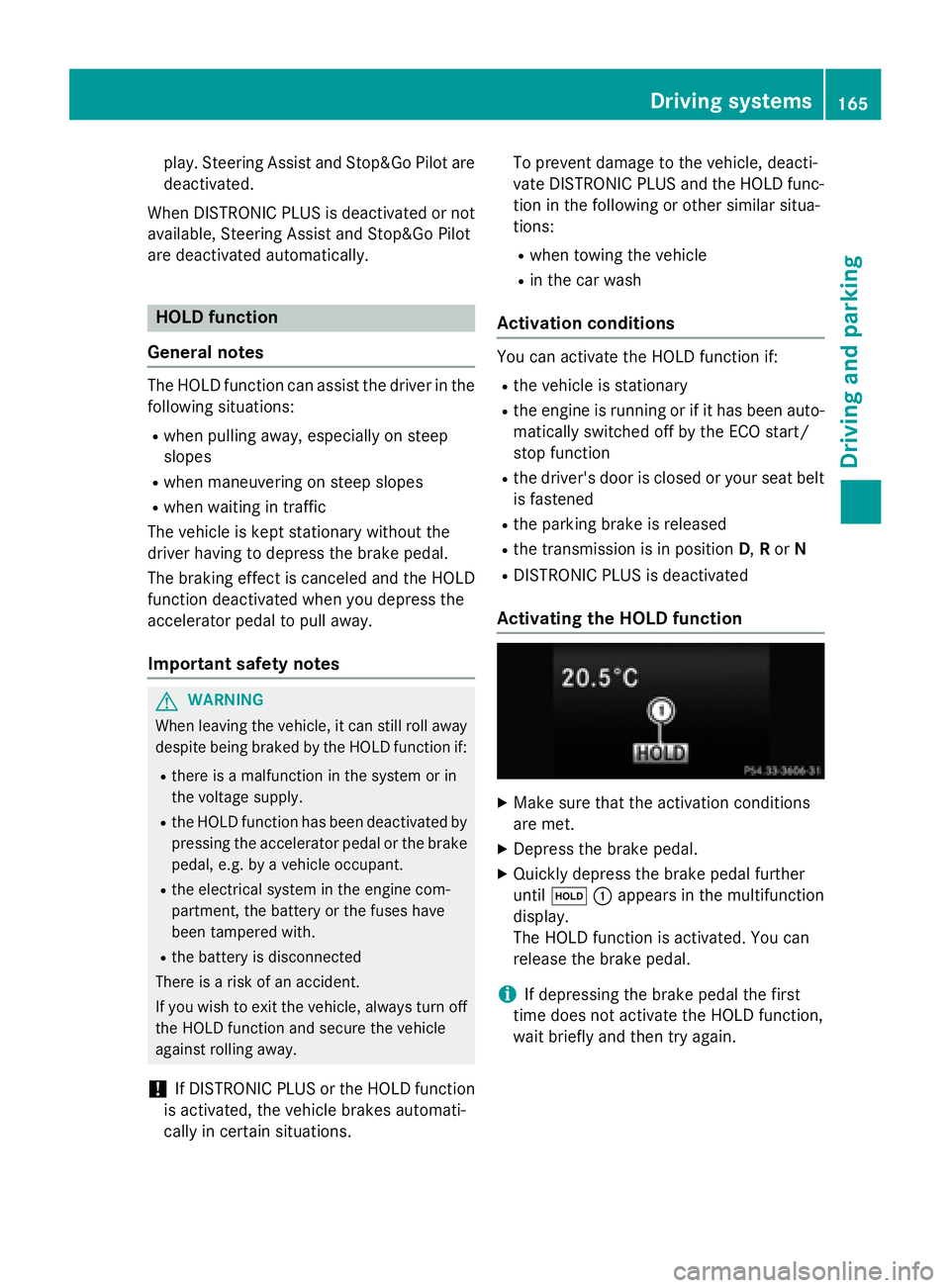
Activating the HOLD function
XMake sure that the activation conditions
are met.
XDepress the brake pedal.
XQuickly depress the brake pedal further
until ë :appears in the multifunction
display.
The HOLD function is activated. You can
release the brake pedal.
iIf depressing the brake pedal the first
time does not activate the HOLD function,
wait briefly and then try again.
Driving systems165
Driving and parking
Z
Page 168 of 350
Deactivating theHOL Dfunction
The HOLD function is deactivated automati-
cally if:
Ryou accelerat eand th etransmissio nis in
position Dor R.
Ryou shift th etransmissio nto position P.
Ryou depress th ebrake peda lagain wit h a
certain amount of pressure until ëdis-
appears from th emultifunction display.
Ryou activat eDISTRONIC PLUS.
Whe nth eHOLD function is activated, th e
transmissio nis shifted automatically to posi-
tion Pif:
Rthedriver's doo ris ope nand th edriver's
seat belt is unfastened.
Rth eengin eis switched off, unless it is auto-
matically switched of fby th eEC Ostart /
stop function .
Rasystem malfunction occurs.
Rth epowe rsupply is no tsufficient.
RACE START
Important safet ynotes
iObserv eth esafet ynote sfo rth eSPORT
handlin gmode (
Ypage 82).
RAC ESTART is intended solely fo ractivation
on dedicated rac ecircuits.
RAC ESTART enables optimal acceleration
from astandin gstart .The precondition fo r
this is asuitable high-grip road surface.
iRAC ESTART is only available in AM Gvehi-
cles.
Information in th eDigital Operator's
Manual
In th eDigital Operator's Manual you will fin d
information on th efollowing topics:
RCondition sfo ractivation
RActivatin gRAC ESTART
AIRMATI C
Vehicl elevel
Important safet ynotes
GWARNING
Whe nth evehicle is bein glowered ,people
could becom etrappe dif their limbs are
between th evehicle bod yand th ewheels or
underneat hth evehicle. There is aris kof
injury.
Mak esur eno on eis underneat hth evehicle or
in th eimmediate vicinit yof th ewhee larches
when th evehicle is bein glowered .
GWARNING
Vehicles wit hlevel control:
The vehicle is slightly lowered if:
Ryou hav eselecte dcomfor tsuspensio ntun-
in g and
Ryou loc kth evehicle within approximately
60 seconds of switchin gof fth eengin e
You and people in th evicinit yof th ewhee l
arc hor th eunderbody may thus becom etrap-
ped. There is aris kof injury.
Mak esur ethat nobod yis in th evicinit yof th e
whee larc hor th eunderbody when you loc k
th evehicle.
!The vehicle is lowered by about 15 mm if:
Ryou hav eselecte d"Comfort tuning "
Ryou switch offth eengin eand then
Ryou loc kth evehicle within approximately
60 seconds
Whe nparking ,position your vehicle so that
it doe sno tmak econtact wit hth ecur bas
th evehicle is lowered .Your vehicle could
otherwise be damaged .
If you unloc kth evehicle within 60 seconds of
havin gswitched th eengin eoff, th evehicle is
lowered slightly when Comfort suspensio n
mode is selected.
Your vehicle regulates it sheight automati-
cally. All-round level contro lensures th ebes t
possible suspensio nand constant groun d
166Driving systems
Driving and parking
Page 170 of 350
!The vehicle is lowered by about 0.8 in
(20 mm) if:
Ryou have selected "Comfortable tuning"
Ryou switch off the engine and then
Ryou lock the vehicle within approximately
60 seconds
When parking, position your vehicle so that
it does not make contact with the curb as
the vehicle is lowered. Your vehicle could
otherwise be damaged.
Vehicle level
Important safety notes
GWARNING
When the vehicle is being lowered, people
could become trapped if their limbs are
between the vehicle body and the wheels or
underneath the vehicle. There is a risk of
injury.
Make sure no one is underneath the vehicle or
in the immediate vicinity of the wheel arches
when the vehicle is being lowered.
The vehicle may be lowered if you press the
suspension setting selector button or the
AMG button. The vehicle also lowers if it is
stationary.
!If Sport or Sport + suspension tuning has
been selected, the vehicle's ground clear-
ance decreases. Make sure that no objects
become trapped or that the vehicle does
not become damaged, for example, on the
curb.
iThe vehicle level may change visibly at the
rear axle if you park the vehicle and the
outside temperature changes. If the tem-
perature drops, the vehicle level lowers;
with an increase in temperature, the vehi-
cle level rises.
4MATIC (permanent four-wheel drive)
If you fail to adapt your driving style, 4MATIC
can neither reduce the risk of accident nor override the laws of physics. 4MATIC cannot
take account of road, weather and traffic con-
ditions. 4MATIC is only an aid. You are
responsible for the distance to the vehicle in
front, for vehicle speed, for braking in good
time and for staying in your lane.
If a drive wheel spins due to insufficient grip:
ROnly depress the accelerator pedal as far as
necessary when pulling away.
RAccelerate less when driving.
!Never tow the vehicle with one axle
raised. This may damage the transfer case.
Damage of this sort is not covered by the
Mercedes-Benz Limited Warranty. All
wheels must remain either on the ground or be fully raised. Observe the instructions for
towing the vehicle with all wheels in full
contact with the ground.
iIn wintry driving conditions, the maximum
effect of 4MATIC can only be achieved if
you use winter tires (M+S tires), with snow
chains if necessary.
4MATIC ensures that all four wheels are per-
manently driven. Together with ESP
®, it
improves the traction of your vehicle when-
ever a drive wheel spins due to insufficient
grip.
PARKTRONIC
Important safety notes
PARKTRONIC is an electronic parking aid with
ultrasonic sensors. It monitors the area
around your vehicle using six sensors in the
front bumper and six sensors in the rear
bumper. PARKTRONIC indicates visually and
audibly the distance between your vehicle
and an object.
PARKTRONIC is only an aid. It is not a replace-
ment for your attention to your immediate
surroundings. You are always responsible for
safe maneuvering, parking and exiting a park- ing space. When maneuvering, parking or
pulling out of a parking space, make sure that
168Driving systems
Driving and parking
Page 172 of 350
Front sensors
CenterApprox. 40 in (approx.
100 cm)
CornersApprox. 24 in (approx.
60 cm)
Rear sensors
CenterApprox. 48 in (approx.
120 cm)
CornersApprox. 32 in (approx.
80 cm)
Minimum distance
CenterApprox. 8 in (approx.
20 cm)
CornersApprox. 6 in (approx.
15 cm)
If there is an obstacle within this range, the
relevant warning displays light up and a warn-
ing tone sounds. If the distance falls below
the minimum, the distance may no longer be
shown.
Information in the Digital Operator's
Manual
In the Digital Operator's Manual you will find
information on the following topics:
RWarning displays
RDeactivating/activating PARKTRONIC
RProblems with PARKTRONIC
Active Parking Assist
General notes
Active Parking Assist is an electronic parking
aid with ultrasound. It measures the road on
both sides of the vehicle. A parking symbol
indicates a suitable parking space. Active
steering intervention and brake application can assist you during parking. You may also
use PARKTRONIC (
Ypage 168).
iThe active braking application is only
available on vehicles with automatic trans-
mission.
Important safety notes
Active Parking Assist is merely an aid. It is not
a replacement for your attention to your
immediate surroundings. You are always
responsible for safe maneuvering, parking
and exiting a parking space. Make sure that
no persons, animals or objects are in the
maneuvering range.
When PARKTRONIC is switched off, Active
Parking Assist is also unavailable.
GWARNING
If there are objects above the detection range:
RActive Park Assist may steer too early
Rthe vehicle may not stop in front of these
objects.
You may cause a collision as a result. There is
a risk of an accident.
If there are objects above the detection range,
stop and deactivate Active Parking Assist.
GWARNING
While parking or pulling out of a parking
space, the vehicle swings out and can drive
onto areas of the oncoming lane. This could
result in a collision with another road user.
There is a risk of an accident.
Pay attention to other road users. Stop the
vehicle if necessary or cancel the Active Park- ing Assist parking procedure.
!If unavoidable, you should drive over
obstacles such as curbs slowly and not at a
sharp angle. Otherwise, you may damage
the wheels or tires.
170Driving systems
Driving and parking
Page 173 of 350
Active Parking Assist may possibly indicate
parking spaces which are not suitable for
parking, for example:
Rwhere parking or stopping is prohibited
Rin front of driveways or entrances and exits
Ron unsuitable surfaces
Parking tips:
ROn narrow roads, drive as close to the park-
ing space as possible.
RParking spaces that are littered or over-
grown might be identified or measured
incorrectly.
RParking spaces that are partially occupied
by trailer drawbars might not be identified
as such or be measured incorrectly.
RSnowfall or heavy rain may lead to a parking
space being measured inaccurately.
RPay attention to the PARKTRONIC
(
Ypage 170 )warning messages during the
parking procedure.
RYou can intervene in the steering procedure
to correct it at any time. Active Parking
Assist will then be canceled.
RWhen transporting a load which protrudes
from your vehicle, you should not use
Active Parking Assist.
RNever use Active Parking Assist when snow
chains are installed.
RMake sure that the tire pressures are
always correct. This has a direct influence
on the parking characteristics of the vehi-
cle.
Use Active Parking Assist for parking spaces:
Rparallel or at right angles to the direction of
travel
Rthat are on straight roads, not bends
Rthat are on the same level as the road, e.g.
not on the pavement
Information in the Digital Operator's
Manual
In the Digital Operator's Manual you will find
information on the following topics:
RDetecting parking spaces
RParking
RExiting a parking space
RCanceling Active Parking Assist
Rear view camera
General notes
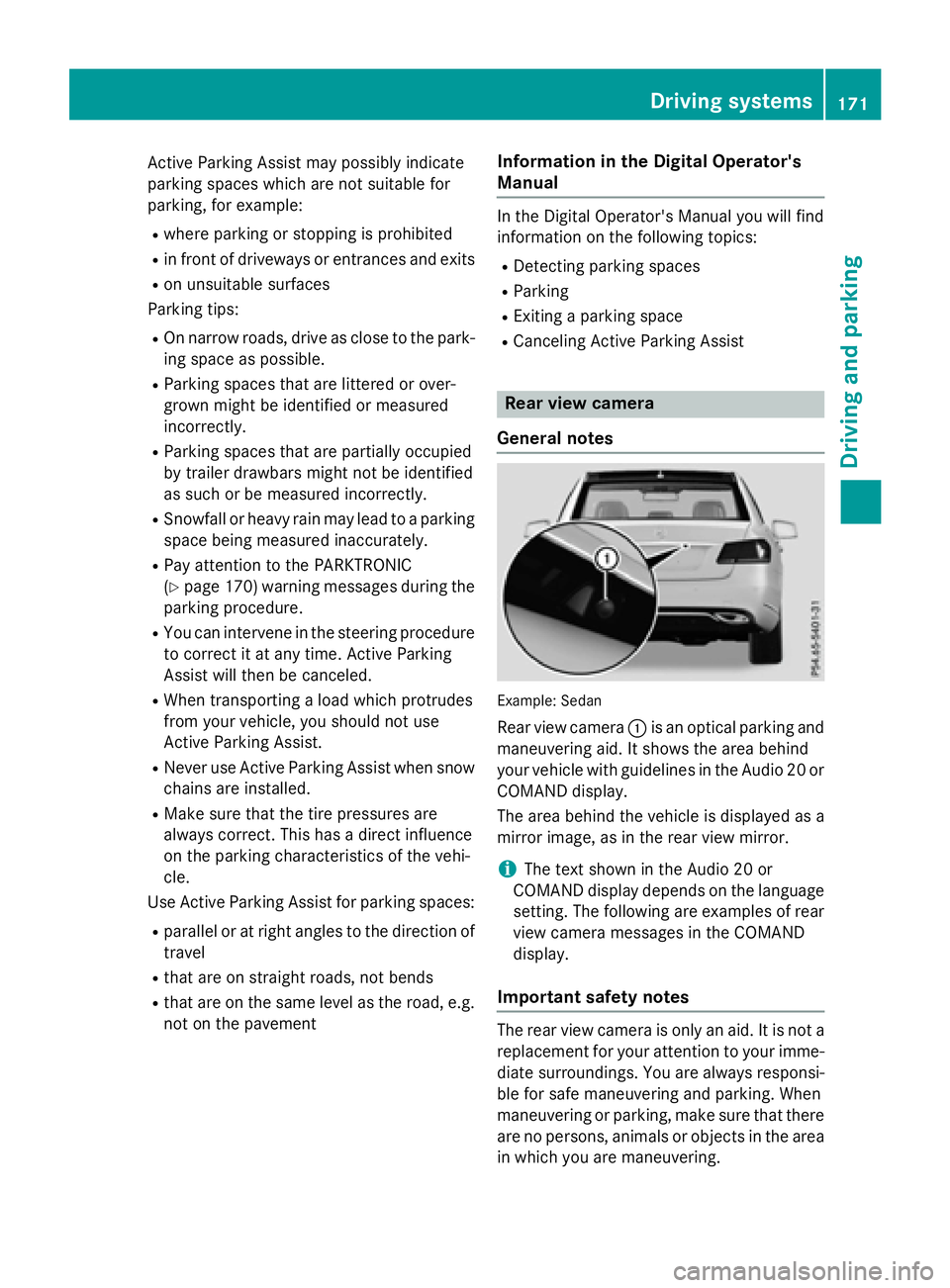
Example :Sedan
Rear view camera :is an optical parking and
maneuvering aid. It shows the area behind
your vehicle with guidelines in the Audio 20 or
COMAND display.
The area behind the vehicle is displayed as a
mirror image, as in the rear view mirror.
iThe text shown in the Audio 20 or
COMAND display depends on the language
setting. The following are examples of rear
view camera messages in the COMAND
display.
Important safety notes
The rear view camera is only an aid. It is not a
replacement for your attention to your imme- diate surroundings. You are always responsi-
ble for safe maneuvering and parking. When
maneuvering or parking, make sure that there
are no persons, animals or objects in the area
in which you are maneuvering.
Driving systems171
Driving and parking
Z
Page 175 of 350
Information in the Digital Operator's
Manual
Inthe Digital Operator's Manual you willfind
information on the following topics:
RMessages inthe Audio 20 or COMAND dis-
play
R"Reverse parking" function
RWide-ang lefunction
360° camera
General notes
The 360° camera isa system consisting of
four cameras.
The system analyzes images from the fol low-
ing cameras:
RRear view camera
RFront camera
RTwo cameras inthe exterior rear view mir-
rors
The cameras capture the immediate sur-
roun dings of the vehicle. The system sup-
ports you, e.g. when parking or if vision is
restricted at an exit.
You can show pictures from the 360° camera
in full-screen mode or in six different split-
screen views on the COMAND/A udio20 dis-
play. A split-screen view also includes a top
view of the vehicle. This view iscalculated
from the data supplied by the installed cam-
eras (virtual camera).
The six split-screen views are:
Rtop view and picture from the rear view
camera (130° viewing angle)
Rtop view and image from the front camera
(130° viewing angle without displaying the
maximum steering wheel angle)
Rtop view and enlarged rear view
Rtop view and enlarged front view
Rtop view and images from the side mirror
cameras (rear wheel view)
Rtop view and images from the sidemirror
cameras (front wheel view) When the function
isactive and you shift the
transmission from Dor Rto N, the dynamic
guidelines are hidden.
When you change between transmission
posit ionsDand R, you see the prev
iously
selected front or rear view.
Distances measured byPARKTRONIC will
also beoptical lydisplayed:
Rin split screen viewas red or yellow brack-
ets around the vehicle icon inthe top view,
or
Rat the bottom right as red or yellow brack-
ets around the vehicle symbol infull-screen
mode
The line thickness and color of the brackets
show how far the vehicle isfrom an object.
Ryellow brackets with th inlines:
PARKTRONIC isactive
Ryellow brackets with normal lines: an
object ispresent inclose range of the veh i-
cle
Rred line: an object ispresent inthe imme-
diat e close range of the vehicle
Important safety notes
The 360°camera isonly an aid and may show
a distorted viewof obstacles, show them
incorrectly or not at all. The 360°camera is
not a substitute for attenti vedriving.
You are always responsible for safe maneu-
vering and parking. When maneuvering or
parking, make sure that there are no persons,
animals or objects inthe area in which you are
maneuvering.
You are always responsible for safety, and
must always pay attention to your surround-
ings when parking and maneuvering. This
applie s to the areas behind, infront of and
beside the vehicle. You could otherwise
endanger yourself and others.
The 360° camera willnot function or will
function ina limited manner:
Rifthe doors are open
Rifthe exterior mirrors are folded in
Driving systems173
Driving and parking
Z
Page 178 of 350
You can have current status information dis-
played in the assistance menu (
Ypage 190)
of the on-board computer.
XSelect the Assistance display for ATTEN-
TION ASSIST using the on-board computer
(
Ypage 190).
The following information is displayed:
Rlength of the journey since the last break.
Rthe attention level determined by ATTEN-
TION ASSIST, displayed in a bar display in
five levels from high to low.
Rif ATTENTION ASSIST is unable to calculate
the attention level and cannot output a
warning, the System Suspended
message
appears. The bar display then changes the
display, e.g. if you are driving at a speed
below 37 mph (60 km/h) or above 124 mph
(200 km/h).
Activating ATTENTION ASSIST
XActivate ATTENTION ASSIST using the on-
board computer (
Ypage 190).
The system determines the attention level
of the driver depending on the setting
selected:
Standard selected: the sensitivity with
which the system determines the attention
level is set to normal.
Sensitive selected: the sensitivity is set
higher. The attention level detected by Atten-
tion Assist is adapted accordingly and the
driver is warned earlier.
When ATTENTION ASSIST is deactivated, the
À symbol and OFF appear in the multi-
function display in the assistance display
when the engine is running.
When ATTENTION ASSIST has been deactiva-
ted, it is automatically reactivated after the
engine has been stopped. The sensitivity
selected corresponds to the last selection
activated (standard/sensitive).
Warning in the multifunction display
If fatigue or increasing lapses in concentra-
tion are detected, a warning appears in the
multifunction display: Attention Assist:
Take a Break!
In addition to the message shown in the mul-
tifunction display, you will then hear a warn-
ing tone.
XIf necessary, take a break.
XConfirm the message by pressing the a
button on the steering wheel.
On long journeys, take regular breaks in good
time to allow yourself to rest properly. If you
do not take a break, you will be warned again
after 15 minutes at the earliest. This will only
happen if ATTENTION ASSIST still detects
typical indicators of fatigue or increasing lap-
ses in concentration.
Traffic Sign Assist
General notes
Traffic Sign Assist displays the maximum
speed permitted to the driver in the instru-
ment cluster. The data and general traffic reg-
ulations stored in the navigation system are
used to determine the current speed limit.
As Traffic Sign Assist is a map-based system,
traffic signs put up temporarily (e.g. near
roadworks) are not detected.
If a traffic sign that is relevant to your vehicle
is passed, the display of the speed limits is
updated.
Traffic signs with a restriction indicated by an
additional sign (e.g. in wet conditions) are
also shown.
The traffic signs are only displayed with the
restrictions if:
Rthe regulation must be observed with the
restriction, or
RTraffic Sign Assist is unable to determine
whether the restriction applies
If Traffic Sign Assist is unable to determine a
maximum permitted speed from any of the
176Driving systems
Driving and parking
Page 180 of 350
Blind Spot Assist
General notes
Blind Spot Assist uses a radar sensor system
to monitor the areas on both sides of your
vehicle. It supports you from a speed of
approximately 20 mph (30 km/h). A warning
display in the exterior mirrors draws your
attention to vehicles detected in the moni-
tored area. If you then switch on the corre-
sponding turn signal to change lanes, you will
also receive an optical and audible collision
warning. Blind Spot Assist uses sensors in the
rear bumper for monitoring purposes.
Important safety notes
GWARNING
Blind Spot Assist does not react to:
Rvehicles overtaken too closely on the side,
placing them in the blind spot area
Rvehicles which approach with a large speed
differential and overtake your vehicle
As a result, Blind Spot Assist may not give
warnings in such situations. There is a risk of
an accident.
Always observe the traffic conditions care-
fully, and maintain a safe lateral distance.
Blind Spot Assist is only an aid. It may fail to
detect some vehicles and is no substitute for
attentive driving. Always ensure that there is
sufficient distance to the side for other road
users and obstacles.
iUSA only:
This device has been approved by the FCC
as a "Vehicular Radar System". The radar
sensor is intended for use in an automotive
radar system only. Removing, tampering
with, or altering the device will void any
warranties, and is not permitted by the
FCC. Do not tamper with, alter, or use in
any non-approved way.
Any unauthorized modification to this
device could void the user’s authority to
operate the equipment. Monitoring range of the sensors
In particular, the detection of obstacles can
be impaired if:
Rthere is dirt on the sensors or anything else
covering the
senso
rs
Rthere is poor visibility, e.g. due to fog, heavy
rain, snow or spray
Rthere are narrow vehicles, e.g. motorcycles
or bicycles
Rthe road has very wide lanes
Rthe road has narrow lanes
Ryou are not driving in the middle of the lane
Rthere are barriers or similar lane borders
Vehicles in the monitoring range are then not
indicated.
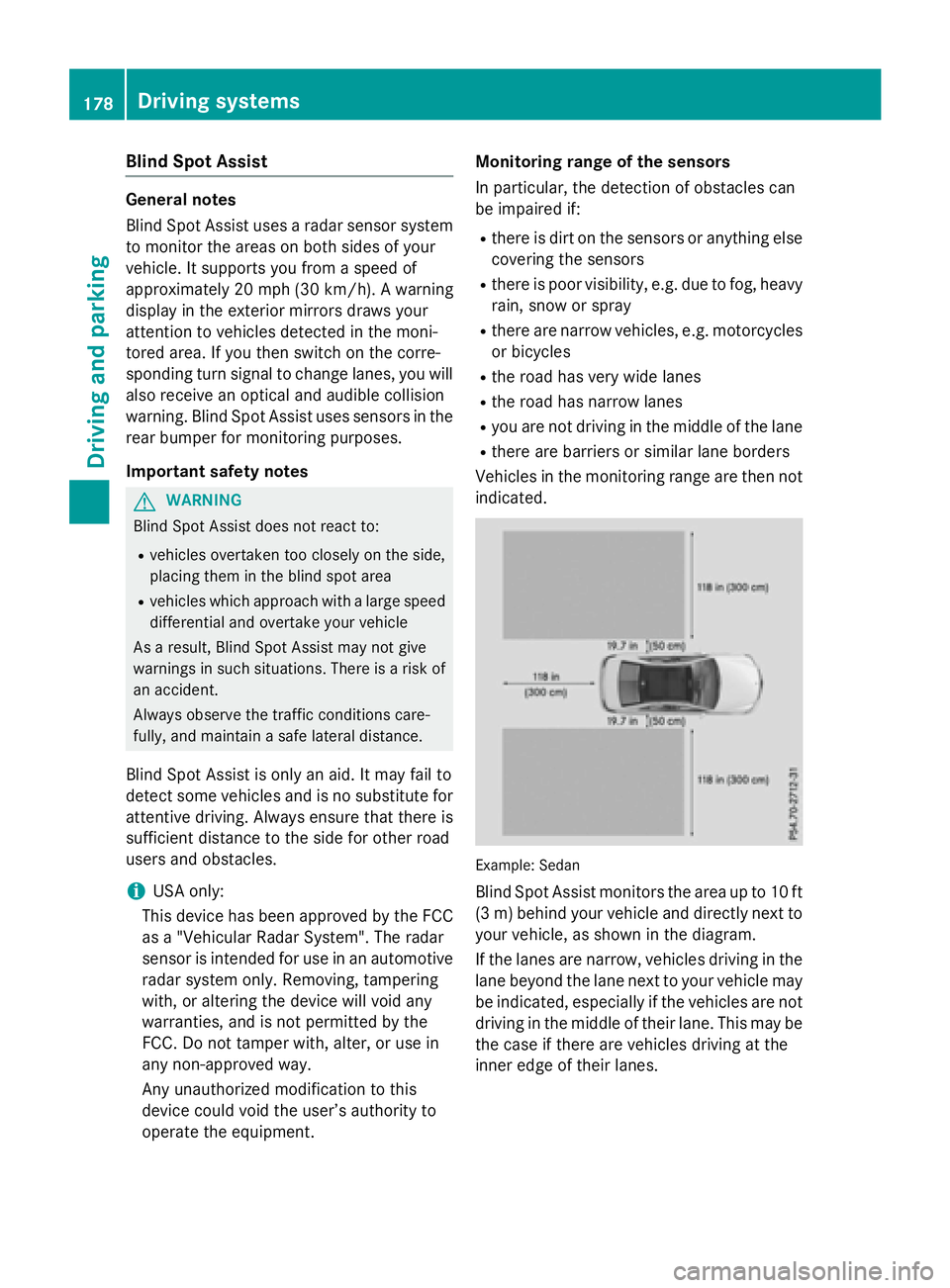
Example: Sedan
Blind Spot Assist monitors the area up to 10 ft
(3 m) behind your vehicle and directly next to
your vehicle, as shown in the diagram.
If the lanes are narrow, vehicles driving in the
lane beyond the lane next to your vehicle may
be indicated, especially if the vehicles are not
driving in the middle of their lane. This may be
the case if there are vehicles driving at the
inner edge of their lanes.
178Driving systems
Driving an d parking