warning MITSUBISHI 3000GT 1991 Repair Manual
[x] Cancel search | Manufacturer: MITSUBISHI, Model Year: 1991, Model line: 3000GT, Model: MITSUBISHI 3000GT 1991Pages: 1146, PDF Size: 76.68 MB
Page 1038 of 1146
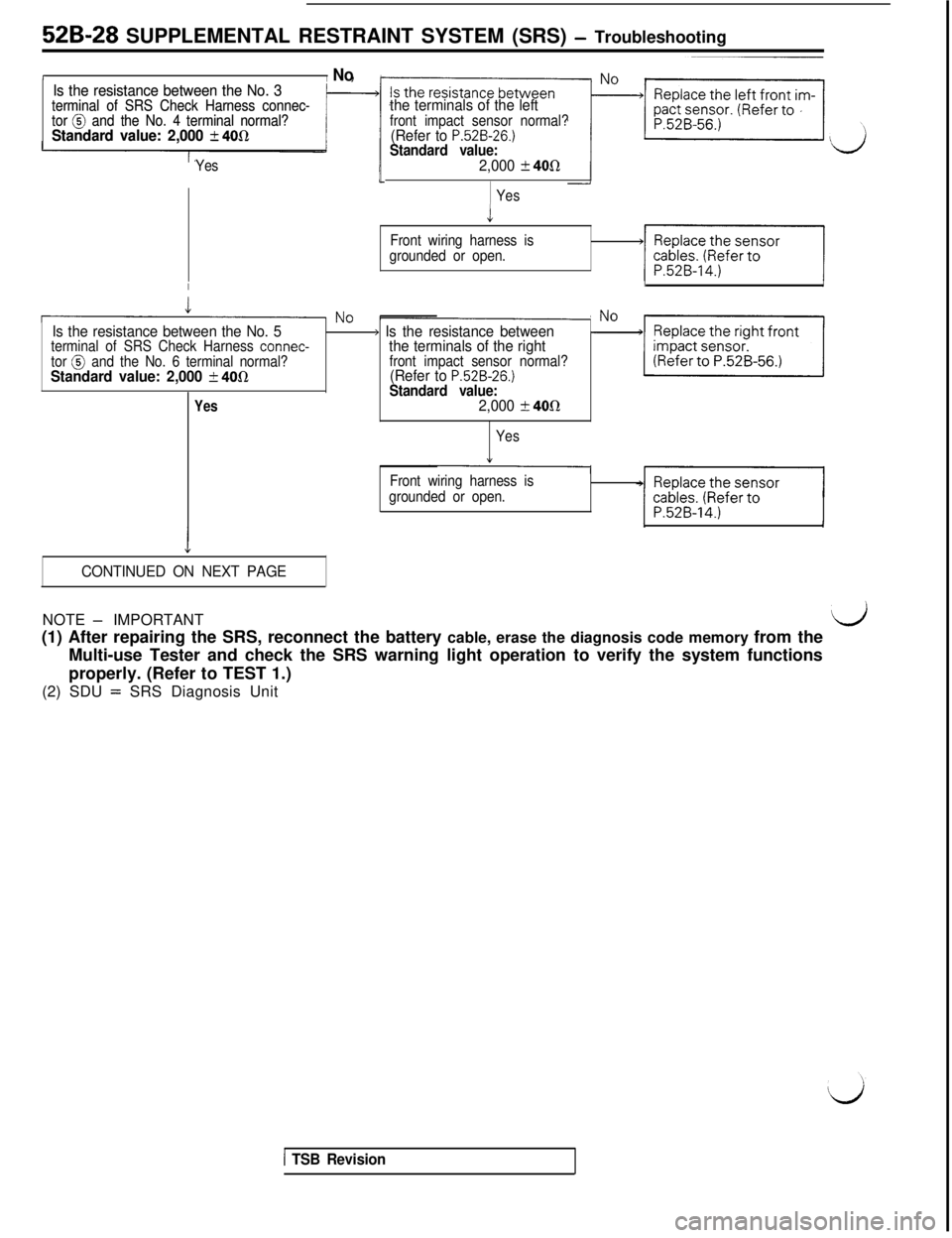
529-28 SUPPLEMENTAL RESTRAINT SYSTEM (SRS) - TroubleshootingI
I NoIs the resistance between the No. 3 Is the resistance between the No. 3terminal of SRS Check Harness connec- terminal of SRS Check Harness connec-
tor @ and the No. 4 terminal normal? tor @ and the No. 4 terminal normal?Standard value: 2,000 k 400Standard value: 2,000 k 400
Yes
the terminals of the leftfront impact sensor normal?(Refer to P.526-26.)Standard value:2,000 k 40R
Yes
i
Front wiring harness is
grounded or open.
IIJ
?No -Is the resistance between the No. 5) Is the resistance between-Noterminal of SRS Check Harness connec-tor @ and the No. 6 terminal normal?the terminals of the right
Standard value: 2,000 2 4Oflfront impact sensor normal?(Refer to P.52B-26.)Standard value:Yes2,000 t 40R
Yes
Front wiring harness is
grounded or open.
I
J
4
CONTINUED ON NEXT PAGENOTE
- IMPORTANT
(1) After repairing the SRS, reconnect the battery cable, erase the diagnosis code memory from thedMulti-use Tester and check the SRS warning light operation to verify the system functions
properly. (Refer to TEST 1.)
(2) SDU
= SRS Diagnosis Unit
1 TSB Revision
Page 1039 of 1146
LSUPPLEMENTAL RESTRAINT SYSTEM (SRS)
- Troub!eshooting 529-29
/ CONTINUED FROM PREVIOUS PAGE/*
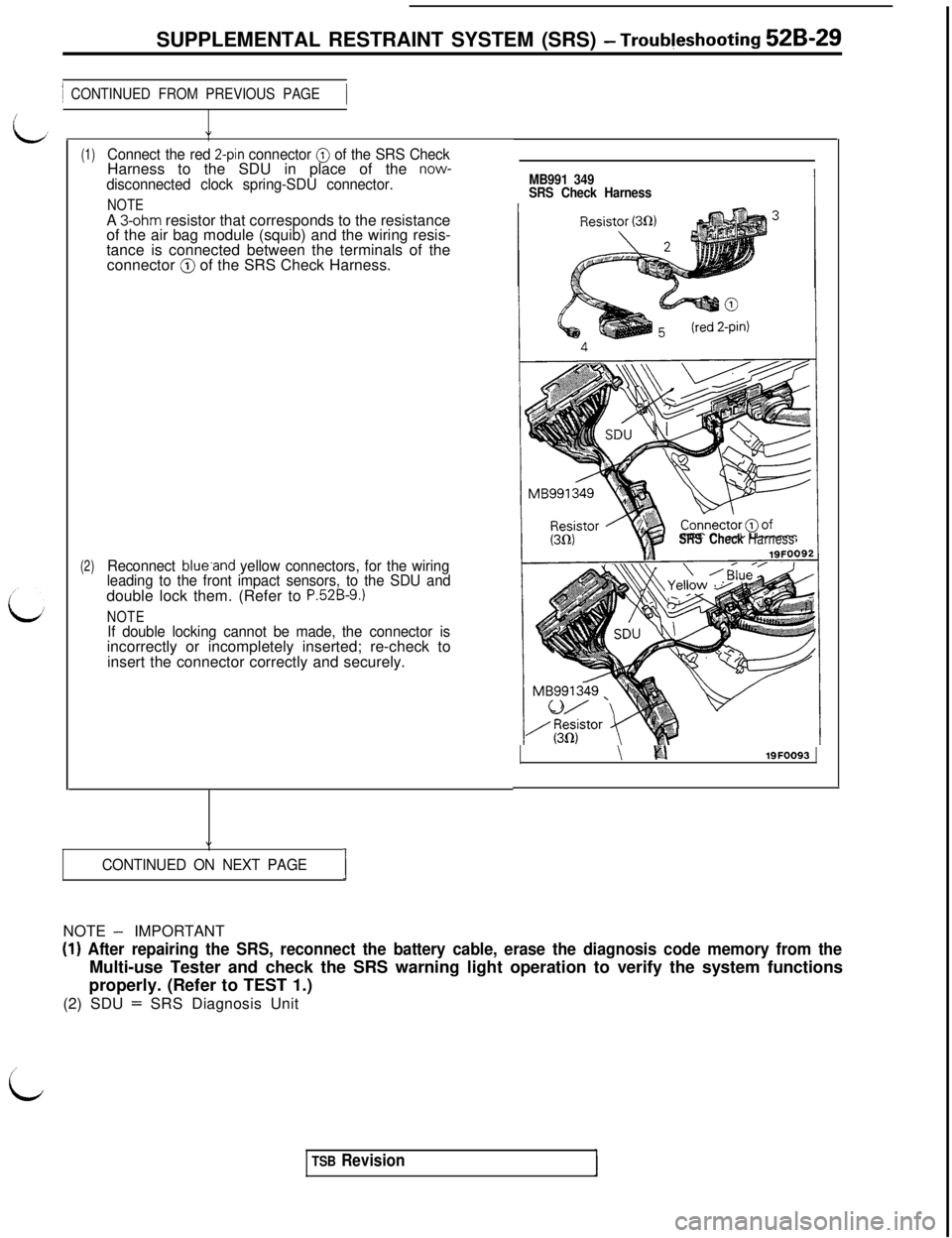
(1)Connect the red 2-pin connector @ of the SRS CheckHarness to the SDU in place of the now-disconnected clock spring-SDU connector.
NOTEA 3-ohm resistor that corresponds to the resistance
of the air bag module (squib) and the wiring resis-
tance is connected between the terminals of the
connector
@ of the SRS Check Harness.
(2)Reconnect blue.and yellow connectors, for the wiring
leading to the front impact sensors, to the SDU anddouble lock them. (Refer to
P.52B-9.)
NOTEIf double locking cannot be made, the connector isincorrectly or incompletely inserted; re-check to
insert the connector correctly and securely.
”
CONTINUED ON NEXT PAGEIMB991 349
SRS Check Harness
SRS CheckHarness
\ ii%\19FOO93NOTE
- IMPORTANT
(I) After repairing the SRS, reconnect the battery cable, erase the diagnosis code memory from theMulti-use Tester and check the SRS warning light operation to verify the system functions
properly. (Refer to TEST 1.)
(2) SDU
= SRS Diagnosis Unit
i
TSB Revision
Page 1040 of 1146
52B-30 SUPPLEMENTAL RESTRAINT SYSTEM (SRS) - Troubleshooting
1 CONTINUED FROM PREVIOUS PAGE-1
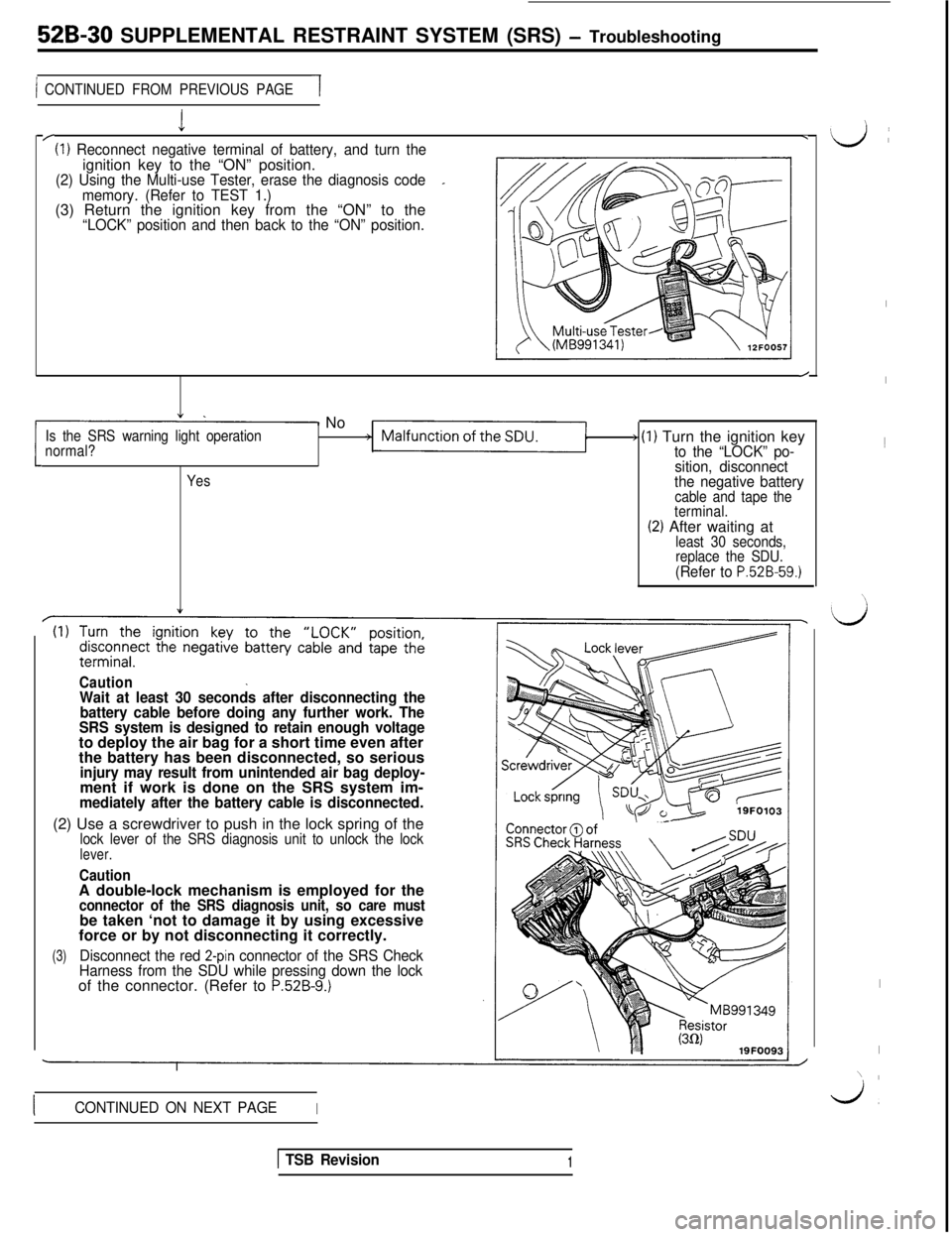
I/(I) Reconnect negative terminal of battery, and turn the.ignition key to the “ON” position.
(2) Using the Multi-use Tester, erase the diagnosis code_
memory. (Refer to TEST 1.)(3) Return the ignition key from the “ON” to the
“LOCK” position and then back to the “ON” position.
/
1 NoIs the SRS warning light operation
normal?) (1) Turn the ignition keyto the “LOCK” po-
Yessition, disconnect
the negative battery
cable and tape the
terminal.
(2) After waiting atleast 30 seconds,
replace the SDU.
(Refer to P.528-59.)
CautionWait at least 30 seconds after disconnecting the
battery cable before doing any further work. The
SRS system is designed to retain enough voltageto deploy the air bag for a short time even after
the battery has been disconnected, so serious
injury may result from unintended air bag deploy-ment if work is done on the SRS system im-
mediately after the battery cable is disconnected.(2) Use a screwdriver to push in the lock spring of the
lock lever of the SRS diagnosis unit to unlock the locklever.
CautionA double-lock mechanism is employed for the
connector of the SRS diagnosis unit, so care mustbe taken ‘not to damage it by using excessive
force or by not disconnecting it correctly.
(3)Disconnect the red 2-pin connector of the SRS Check
Harness from the SDU while pressing down the lockof the connector. (Refer to
P.52B-9.)
ICONTINUED ON NEXT PAGEI
I
I1
\\
;Ls
I
I
’ I\cj,
1 TSB Revision1
Page 1042 of 1146
52B-32 SUPPLEMENTAL RESTRAINT SYSTEM (SRS) - Troubleshooting
CONTINUED FROM PREVIOUS PAGE
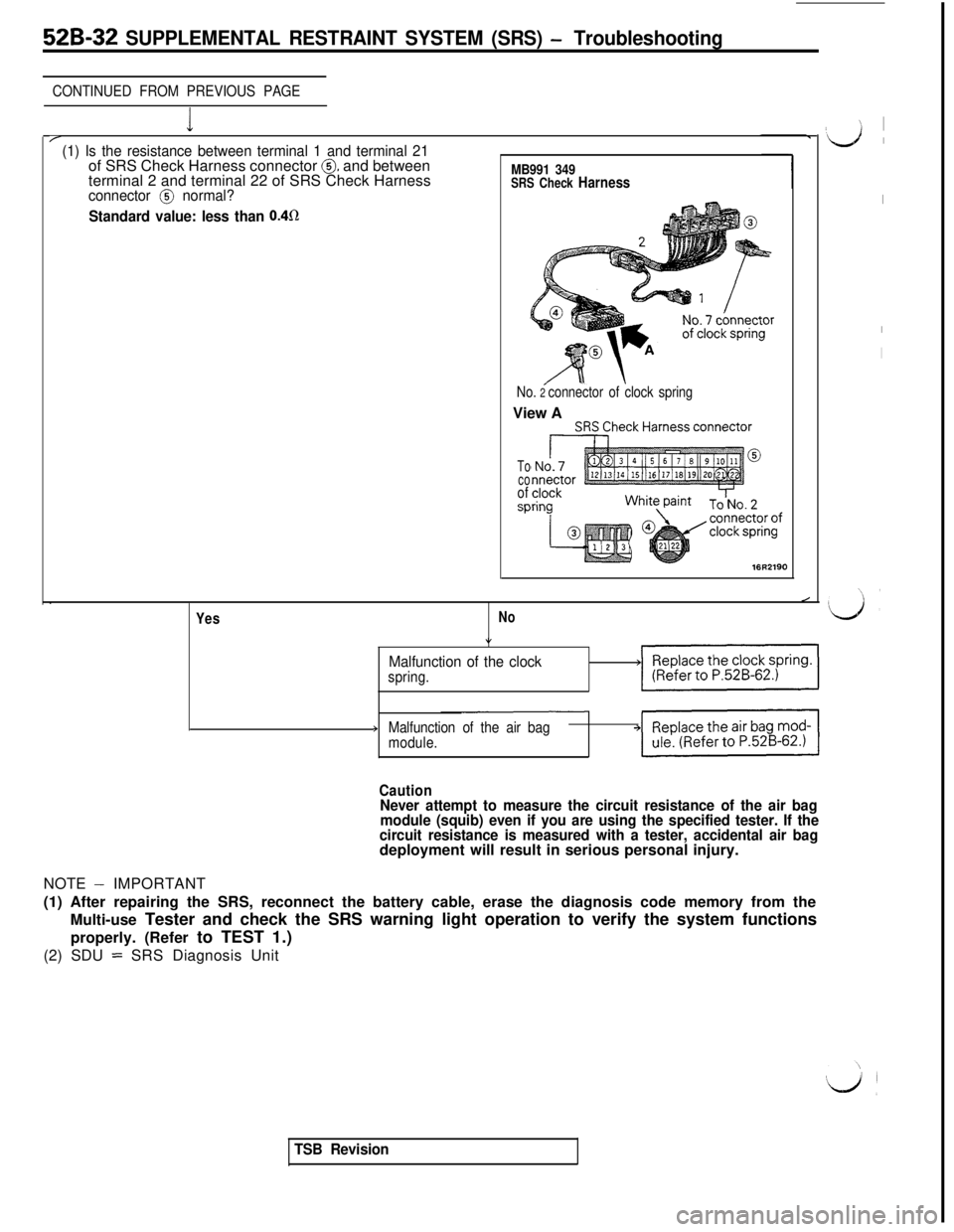
I/(1) Is the resistance between terminal 1 and terminal 21of SRS Check Harness connector @ and between
terminal 2 and terminal 22 of SRS Check HarnessMB991 349SRS Check Harnessconnector @ normal?
Standard value: less than 0.4R
No. 2 connector of clock springView A
To
co
of
SP
16R2190.
Yes
/
No
*
Malfunction of the clockspring.>V/
>Malfunction of the air bag
module.
CautionNever attempt to measure the circuit resistance of the air bag
module (squib) even if you are using the specified tester. If the
circuit resistance is measured with a tester, accidental air bagdeployment will result in serious personal injury.
NOTE
- IMPORTANT
(1) After repairing the SRS, reconnect the battery cable, erase the diagnosis code memory from the
Multi-use Tester and check the SRS warning light operation to verify the system functions
properly. (Refer to TEST 1.)
(2) SDU
= SRS Diagnosis Unit
TSB Revision
’ I
‘d ’
I
I
I
Page 1045 of 1146
I
L
:
L;
1’SUPPLEMENTAL RESTRAINT SYSTEM (SRS)
- Troubleshooting 526-35
1 CONTINUED FROM PREVIOUS PAr/
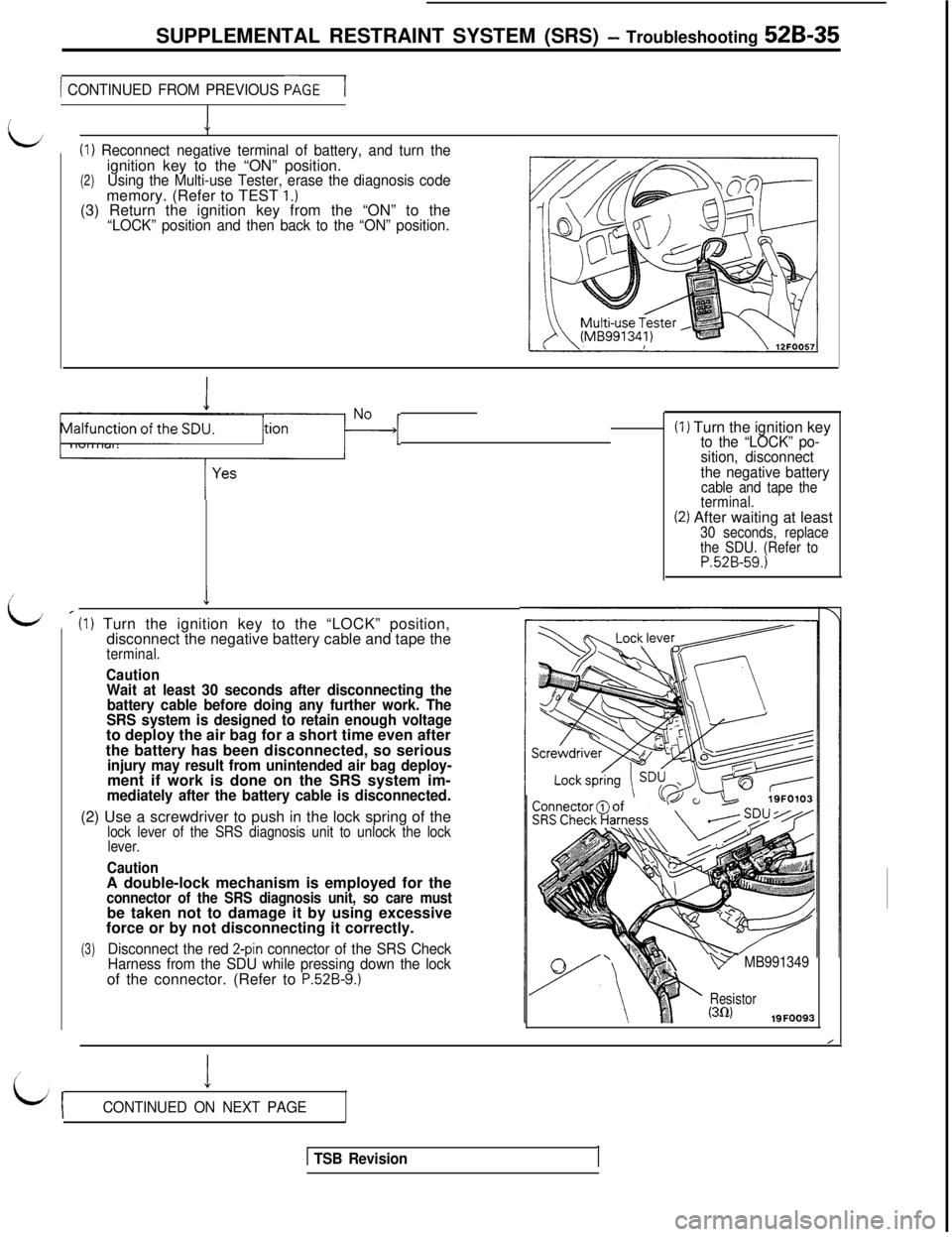
J(I)
Reconnect negative terminal of battery, and turn the
(2)ignition key to the “ON” position.Using the Multi-use Tester, erase the diagnosis codememory. (Refer to TEST 1.)(3) Return the ignition key from the “ON” to the
“LOCK” position and then back to the “ON” position.
Is the SRS warning light operation)?IMalfunction-[
_Iv
’ (I) Turn the ignition key to the “LOCK” position,
disconnect the negative battery cable and tape the
terminal.
CautionWait at least 30 seconds after disconnecting the
battery cable before doing any further work. The
SRS system is designed to retain enough voltageto deploy the air bag for a short time even after
the battery has been disconnected, so serious
injury may result from unintended air bag deploy-ment if work is done on the SRS system im-
mediately after the battery cable is disconnected.(2) Use a screwdriver to push in the lock spring of the
lock lever of the SRS diagnosis unit to unlock the lock
lever.
CautionA double-lock mechanism is employed for the
connector of the SRS diagnosis unit, so care mustbe taken not to damage it by using excessive
force or by not disconnecting it correctly.
(3)Disconnect the red 2-pin connector of the SRS Check
Harness from the SDU while pressing down the lockof the connector. (Refer to
P.52B-9.)(I) Turn the ignition key
to the “LOCK” po-
sition, disconnect
the negative battery
cable and tape the
terminal.
(2) After waiting at least30 seconds, replace
the SDU. (Refer to
P.52B-59.)4
v MB991349
Resistor(302)19FOO93
I
LijCONTINUED ON NEXT PAGE
1 TSB RevisionI
Page 1047 of 1146
LSUPPLEMENTAL RESTRAINT SYSTEM (SRS)
- Troubleshooting 52B-37
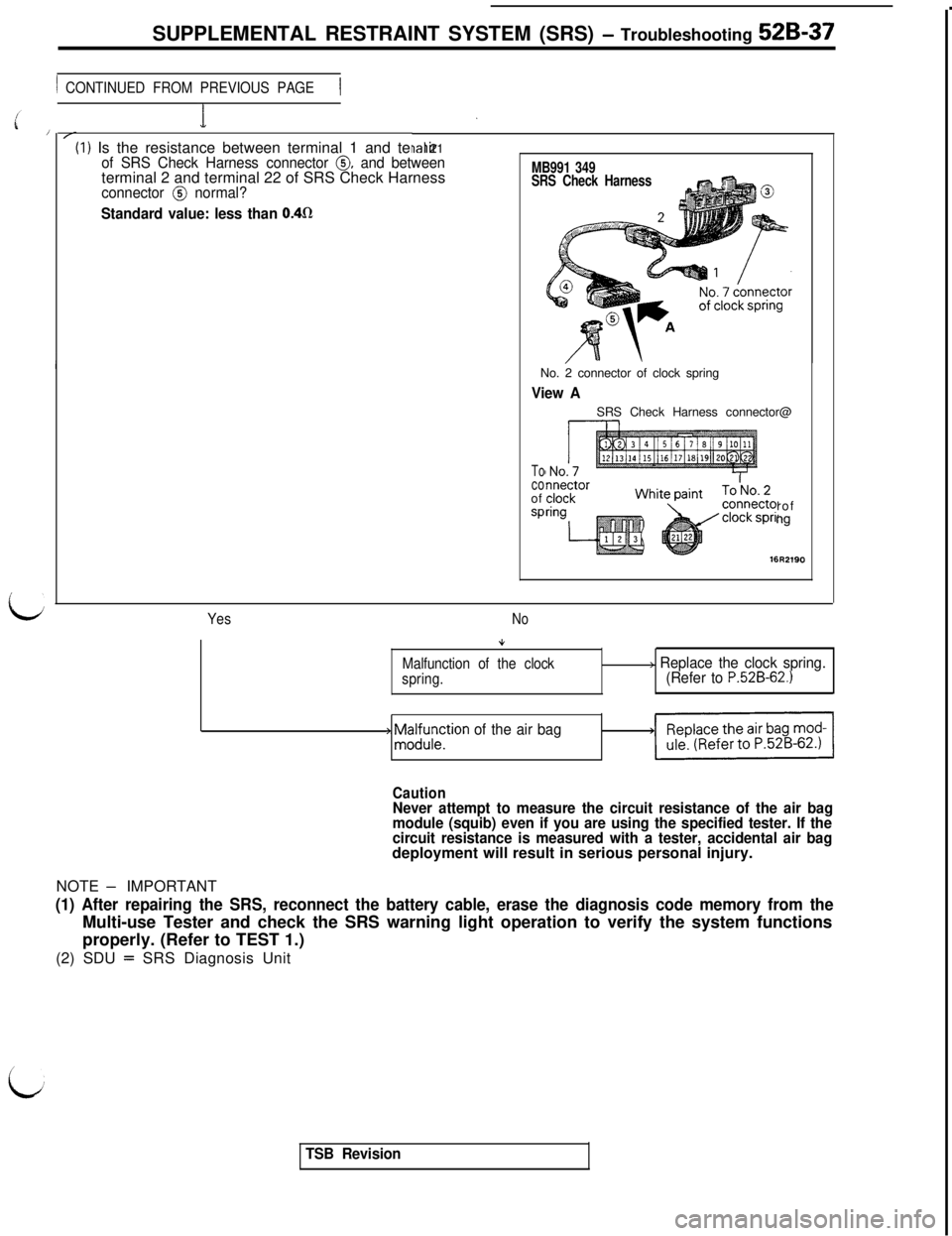
1 CONTINUED FROM PREVIOUS PAGE1(I) Is the resistance between terminal 1 and termir
ial 21of SRS Check Harness connector 0, and betweenterminal 2 and terminal 22 of SRS Check Harness
connector @ normal?
Standard value: less than 0.4fl
MB991 349
SRS Check HarnessNo. 2 connector of clock spring
View ASRS Check Harness connector@
Tocoof
sProfng
YesNo
Malfunction of the clock
spring.
+ ;z;;;tion of the air bag
> Replace the clock spring.
(Refer to P.52B-62.)
CautionNever attempt to measure the circuit resistance of the air bag
module (squib) even if you are using the specified tester. If the
circuit resistance is measured with a tester, accidental air bagdeployment will result in serious personal injury.
NOTE
- IMPORTANT
(1) After repairing the SRS, reconnect the battery cable, erase the diagnosis code memory from theMulti-use Tester and check the SRS warning light operation to verify the system functions
properly. (Refer to TEST 1.)
(2) SDU
= SRS Diagnosis Unit
i
TSB Revision
Page 1049 of 1146
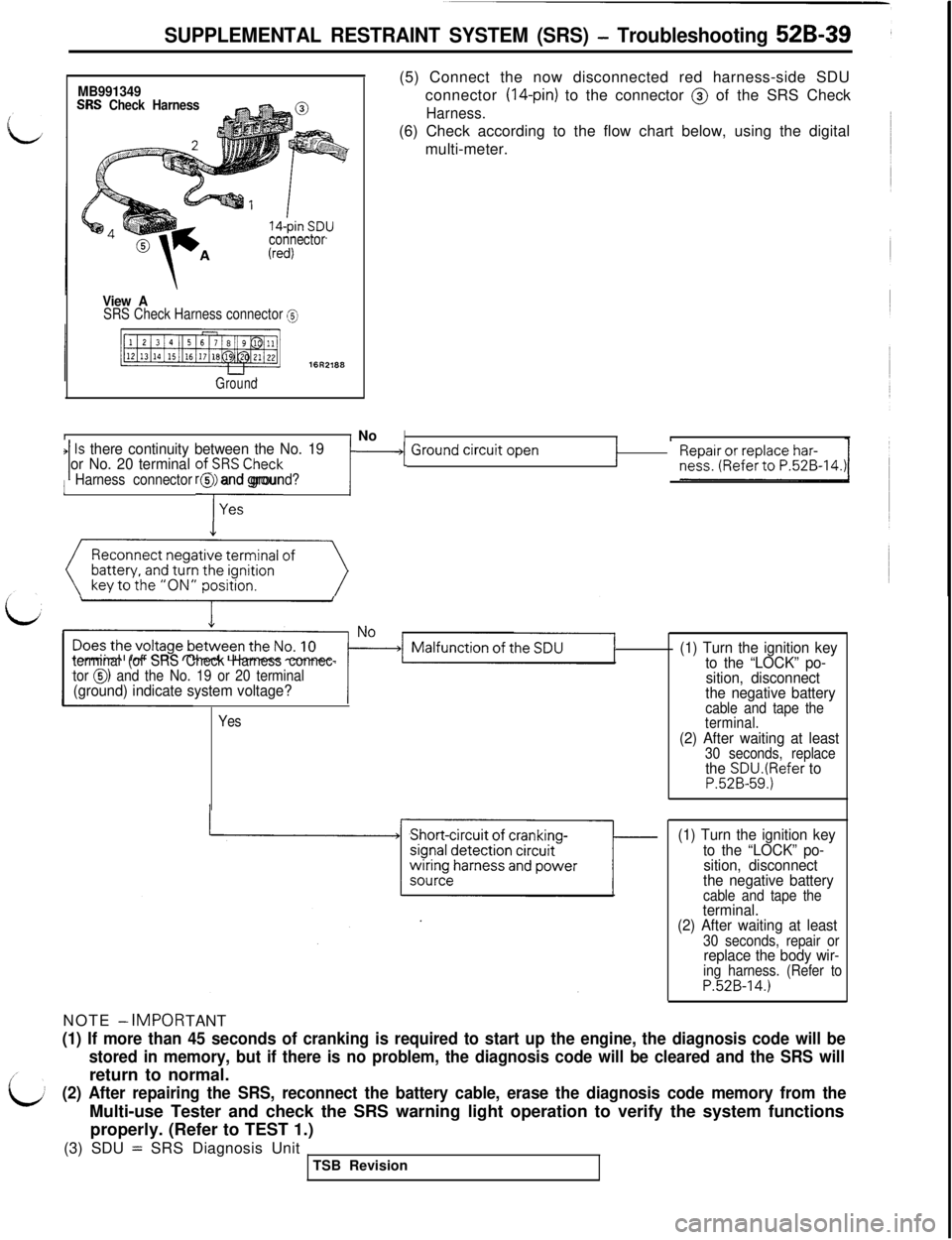
SUPPLEMENTAL RESTRAINT SYSTEM (SRS) - Troubleshooting 52B-39
MB991349SRS Check Harness
connector
View ASRS Check Harness connector @
Ground
II No(5) Connect the now disconnected red harness-side SDU
connector
(14-pin) to the connector @ of the SRS Check
Harness.(6) Check according to the flow chart below, using the digital
multi-meter.
IIIIs there continuity between the No. 191 or No. 20 terminal ofi;RSCheck‘1 ~~~~~;,0~~~~~~.~~~-14.~r1 Ground ‘jrcuit Open1Harness connector @ and ground?
Reconnect negative terminal of
(()
terminal (of SRS Check Harness connec-
tor 0) and the No. 19 or 20 terminal(ground) indicate system voltage?NOTE
- IMPOR
TANT
Yes
(1) Turn the ignition key
to the “LOCK” po-
sition, disconnect
the negative battery
cable and tape the
terminal.
(2) After waiting at least30 seconds, replacethe SDU.(Refer toP.52B-59.)
(1) Turn the ignition key
to the “LOCK” po-
sition, disconnect
the negative battery
cable and tape theterminal.
(2) After waiting at least
30 seconds, repair orreplace the body wir-ing harness. (Refer toP.52B-14.)
(1) If more than 45 seconds of cranking is required to start up the engine, the diagnosis code will be
stored in memory, but if there is no problem, the diagnosis code will be cleared and the SRS willreturn to normal.
(2) After repairing the SRS, reconnect the battery cable, erase the diagnosis code memory from theMulti-use Tester and check the SRS warning light operation to verify the system functions
properly. (Refer to TEST 1.)
(3) SDU
= SRS Diagnosis Unit
TSB Revision
Page 1050 of 1146
52B-40 SUPPLEMENTAL ,RESTRAINT SYSTEM (SRS) - Troubleshooting
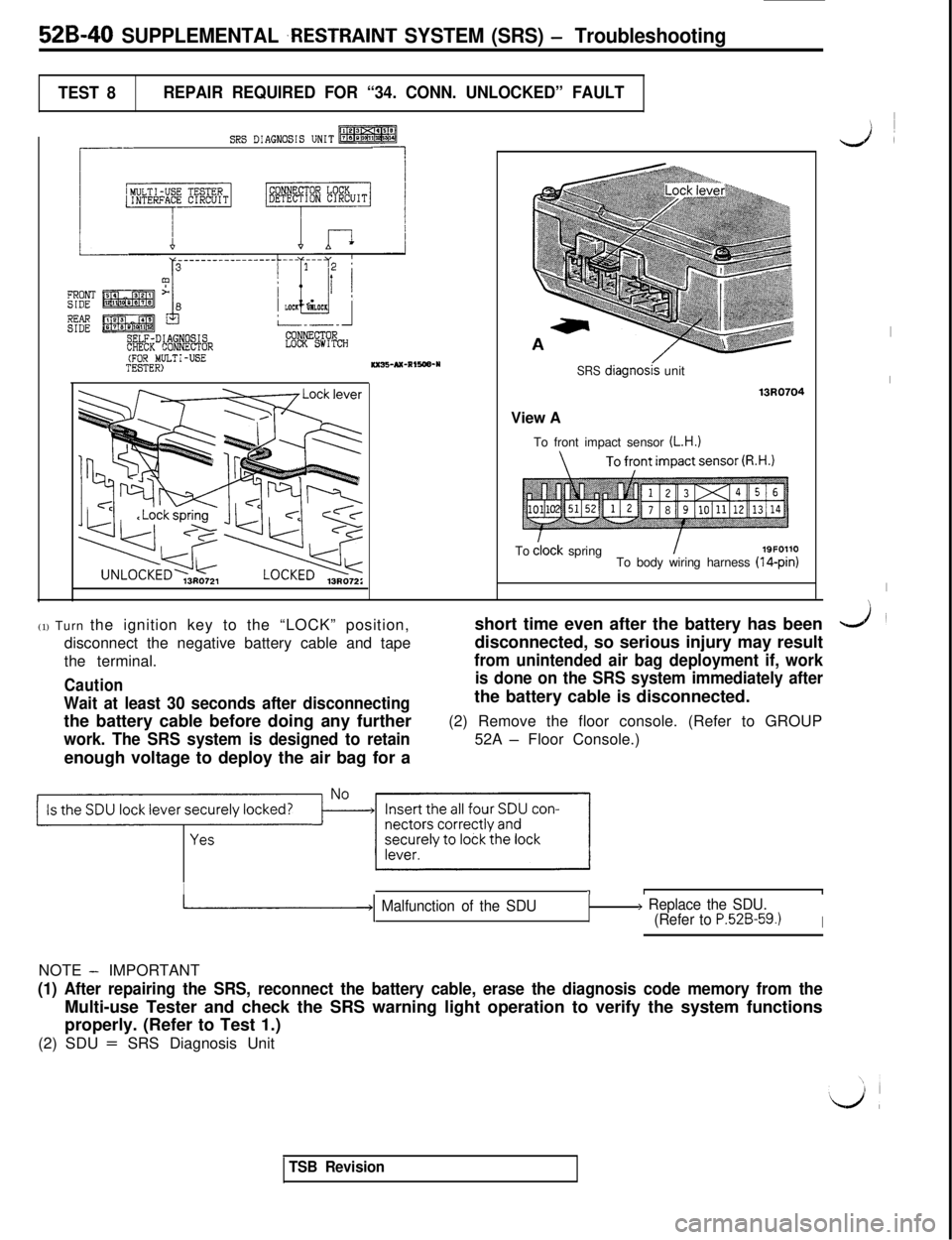
TEST 8REPAIR REQUIRED FOR “34. CONN. UNLOCKED” FAULT
SRS DIAGNOSIS UNIT-
r
--
L
FRONTSIDE
EESELF-DIAGNOSISCHECK CONNECTORLOCK SWITCH(FOR MULTI-USETESTER)KXB-AX-RIRW-YSRS diagnoskunit
13RQ7Q4View A
To front impact sensor
(L.H.)Todlock spring
I19F0110
To body wiring harness (14-pin)
(1) Turn the ignition key to the “LOCK” position,
disconnect the negative battery cable and tape
the terminal.
Caution
Wait at least 30 seconds after disconnectingthe battery cable before doing any further
work. The SRS system is designed to retainenough voltage to deploy the air bag for ashort time even after the battery has been
disconnected, so serious injury may result
from unintended air bag deployment if, work
is done on the SRS system immediately afterthe battery cable is disconnected.
(2) Remove the floor console. (Refer to GROUP
52A
- Floor Console.)
Is the SDU lock lever securely locked?~JII’~~
I11I
-1 Malfunction of the SDU> Replace the SDU.
(Refer to P.52B-59.1INOTE
- IMPORTANT
(1) After repairing the SRS, reconnect the battery cable, erase the diagnosis code memory from theMulti-use Tester and check the SRS warning light operation to verify the system functions
properly. (Refer to Test 1.)
(2) SDU
= SRS Diagnosis Unit
I
LA
I
I
I
J
TSB Revision
Page 1052 of 1146
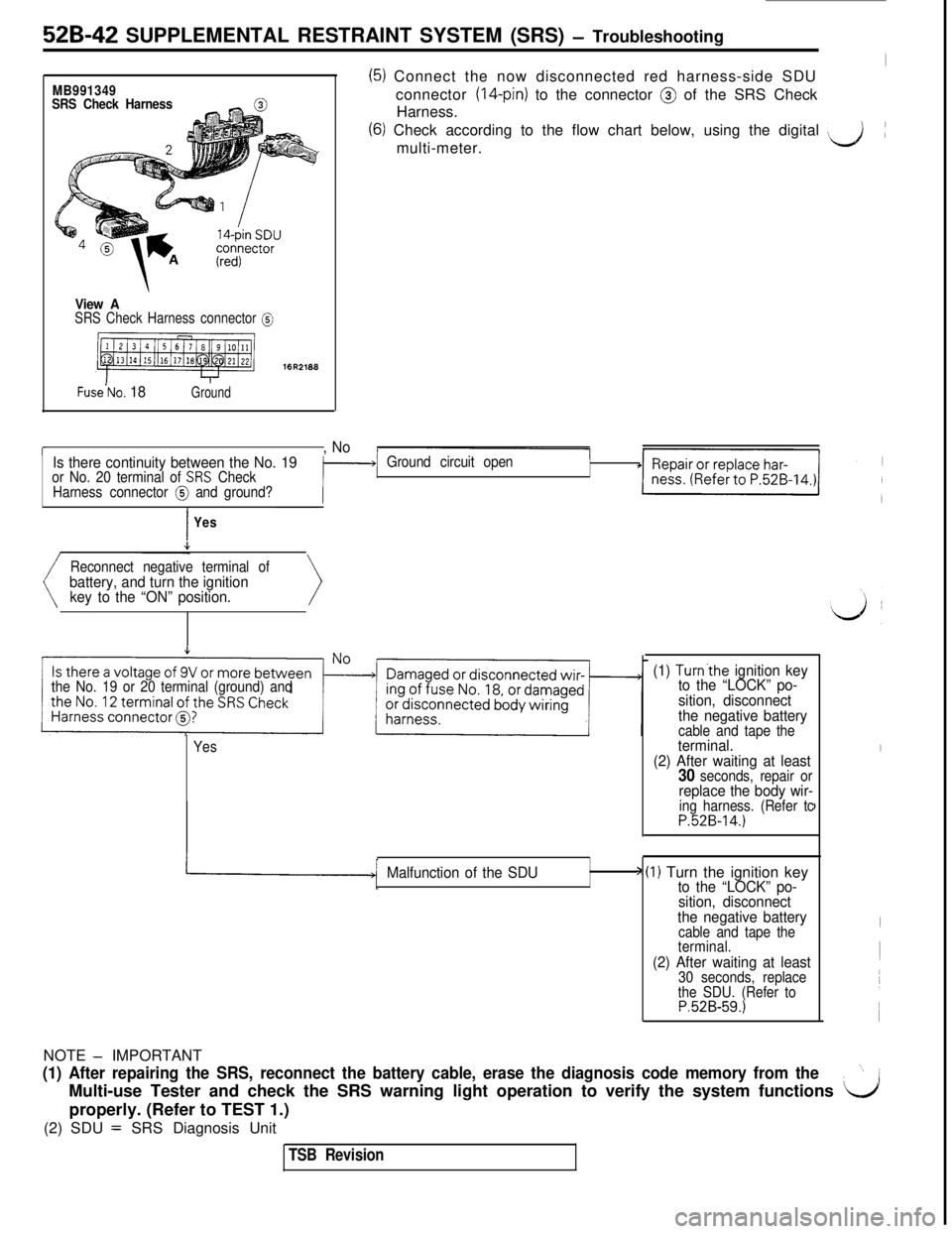
52B-42 SUPPLEMENTAL RESTRAINT SYSTEM (SRS) - Troubleshooting
MB991349
SRS Check Harness
View ASRS Check Harness connector @
16R2188
Fuse’No. 18Ground
(5) Connect the now disconnected red harness-side SDUIconnector
(14-pin) to the connector @ of the SRS Check
Harness.
(6) Check according to the flow chart below, using the digital ‘&multi-meter.(
r, No
Is there continuity between the No. 19
or No. 20 terminal of SRS Check
Harness connector @ and ground?Ground circuit open
IYes
Reconnect negative terminal of
battery, and turn the ignition
key to the “ON” position.
the No. 19 or 20 terminal (ground) and
Yes
(1) Turn’the ignition key
to the “LOCK” po-
sition, disconnect
the negative battery
cable and tape theterminal.
(2) After waiting at least
30 seconds, repair orreplace the body wir-ing harness. (Refer tcP.52B-14.)
I
I
Malfunction of the SDU> (I) Turn the ignition keyto the “LOCK” po-
sition, disconnect
the negative battery
cable and tape the
terminal.
(2) After waiting at least30 seconds, replace
the SDU. (Refer to
P.52B-59.)NOTE
- IMPORTANT
(1) After repairing the SRS, reconnect the battery cable, erase the diagnosis code memory from the”~
Multi-use Tester and check the SRS warning light operation to verify the system functions
L/1properly. (Refer to TEST 1.)
(2) SDU
= SRS Diagnosis Unit
TSB Revision
Page 1054 of 1146
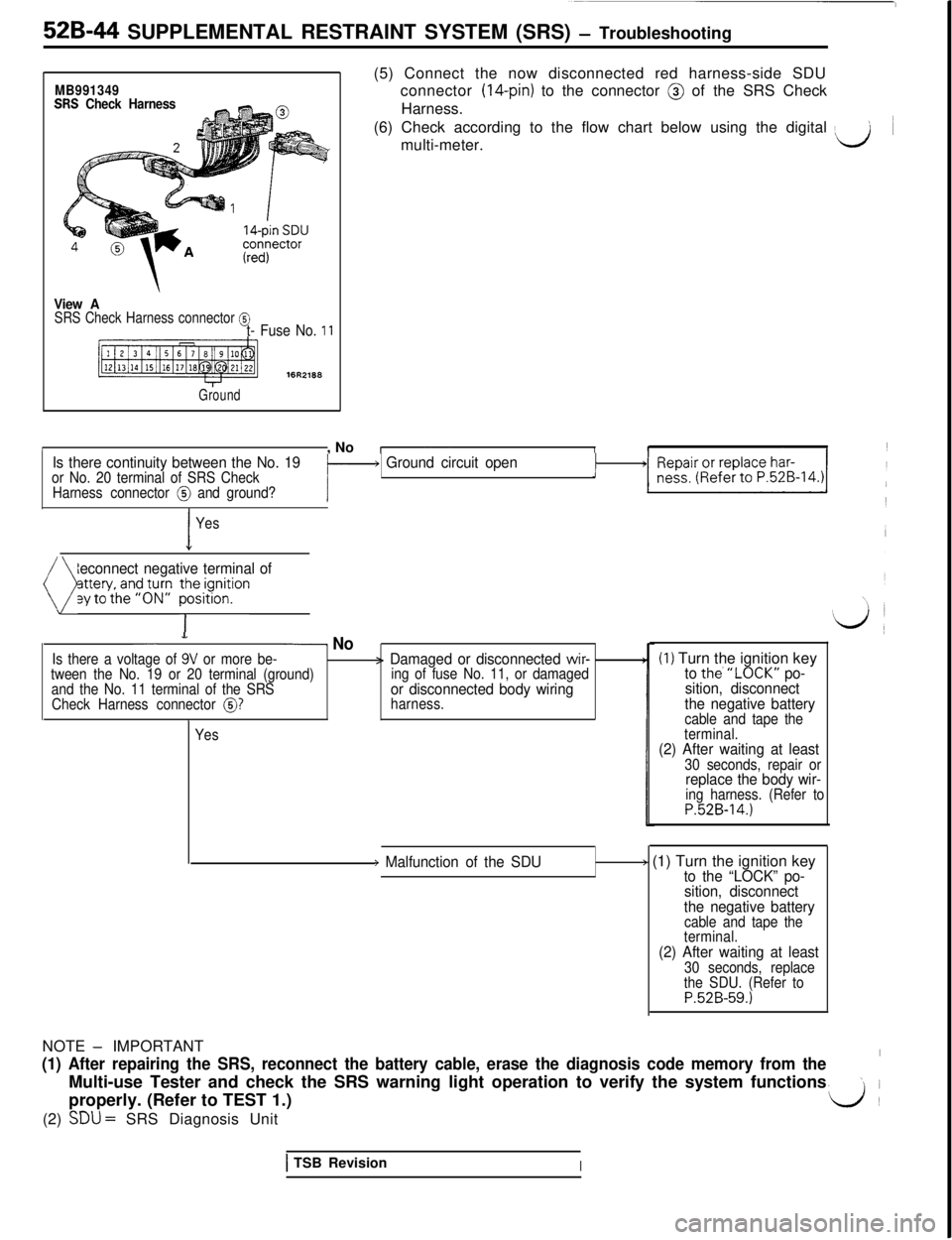
52B-44 SUPPLEMENTAL RESTRAINT SYSTEM (SRS) - Troubleshooting
MB991349SRS Check Harness(5) Connect the now disconnected red harness-side SDU
connector (14-pin) to the connector @ of the SRS Check
Harness.
(6) Check according to the flow chart below using the digital
> ~
multi-meter.d
View ASRS Check Harness connector @t- Fuse No. 11
Ground
/, NoIs there continuity between the No. 19or No. 20 terminal of SRS Checki- Ground circuit open1
Harness connector @ and ground?i
I
Yes
Reconnect negative terminal of
( py;;;;fgJ;p ~~y~~on>
- NoIs there a voltage of 9V or more be-> Damaged or disconnected wir-tween the No. 19 or 20 terminal (ground)
and the No. 11 terminal of the SRSing of fuse No. 11, or damaged
Check Harness connector
@?or disconnected body wiringharness.
Yes
(1) Turn the ignition keyto the.“LOCK” po-
sition, disconnect
the negative battery
cable and tape the
terminal.
(2) After waiting at least30 seconds, repair orreplace the body wir-ing harness. (Refer toP.52B-14.)
) Malfunction of the SDU> (1) Turn the ignition keyto the “LOCK” po-
sition, disconnect
the negative battery
cable and tape the
terminal.
(2) After waiting at least30 seconds, replace
the SDU. (Refer to
P.52B-59.)
1 TSB RevisionINOTE
- IMPORTANT
(1) After repairing the SRS, reconnect the battery cable, erase the diagnosis code memory from the’Multi-use Tester and check the SRS warning light operation to verify the system functions
\iproperly. (Refer to TEST 1.)
d(2)
SDU = SRS Diagnosis Unit