battery MITSUBISHI 3000GT 1991 Manual Online
[x] Cancel search | Manufacturer: MITSUBISHI, Model Year: 1991, Model line: 3000GT, Model: MITSUBISHI 3000GT 1991Pages: 1146, PDF Size: 76.68 MB
Page 924 of 1146
42-52BODY - Power Window
18FOO6
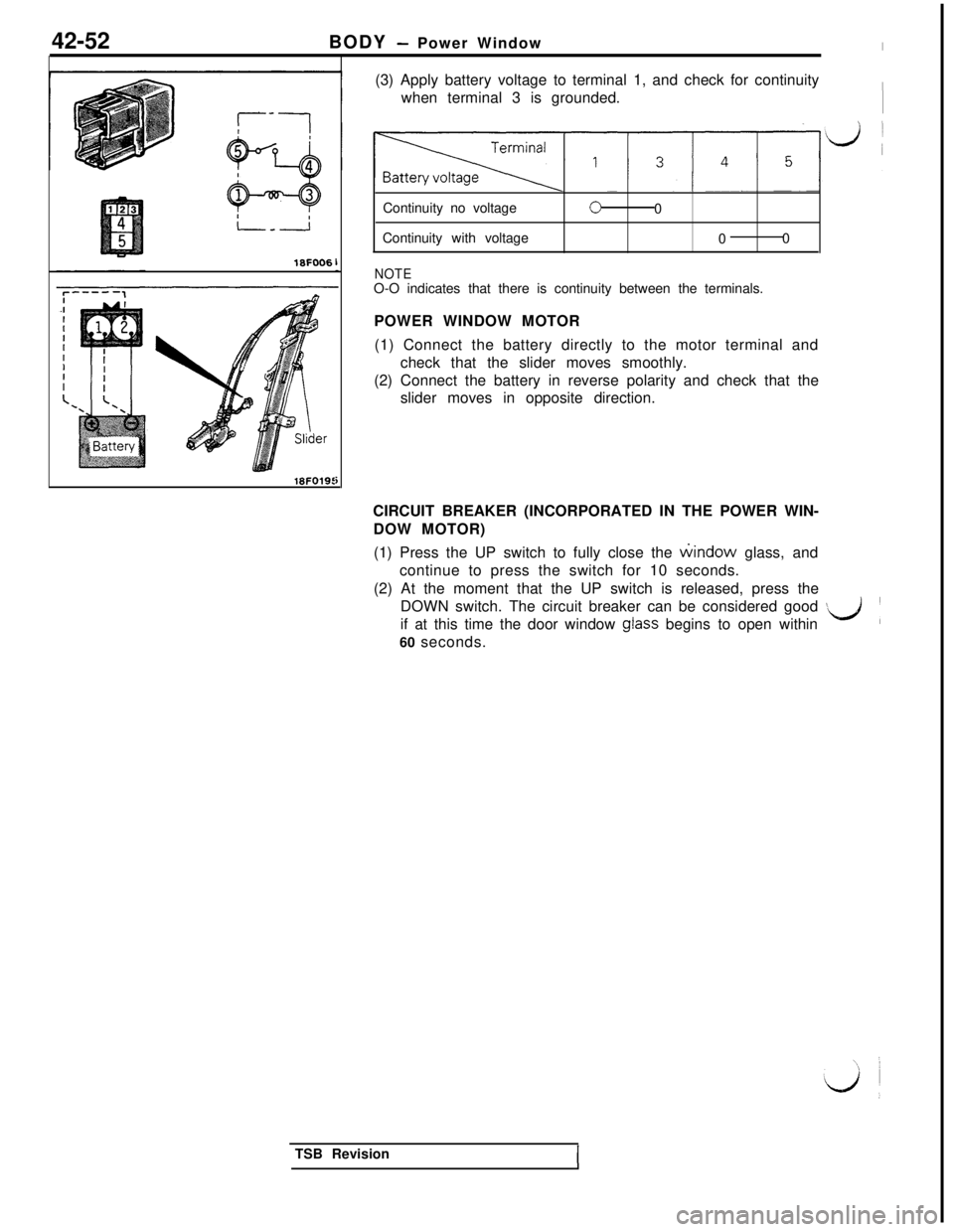
18FO191(3) Apply battery voltage to terminal 1, and check for continuity
when terminal 3 is grounded.
IContinuity no voltage
c0
Continuity with voltage
00
NOTEO-O indicates that there is continuity between the terminals.
POWER WINDOW MOTOR
(1) Connect the battery directly to the motor terminal and
check that the slider moves smoothly.
(2) Connect the battery in reverse polarity and check that the
slider moves in opposite direction.
CIRCUIT BREAKER (INCORPORATED IN THE POWER WIN-
DOW MOTOR)
(1) Press the UP switch to fully close the
vjindow glass, and
continue to press the switch for 10 seconds.
(2) At the moment that the UP switch is released, press the
DOWN switch. The circuit breaker can be considered good
!if at this time the door window
g!ass begins to open withinL&J60 seconds.
TSB Revision
Page 928 of 1146
42-56BODY - Central Door Locking System
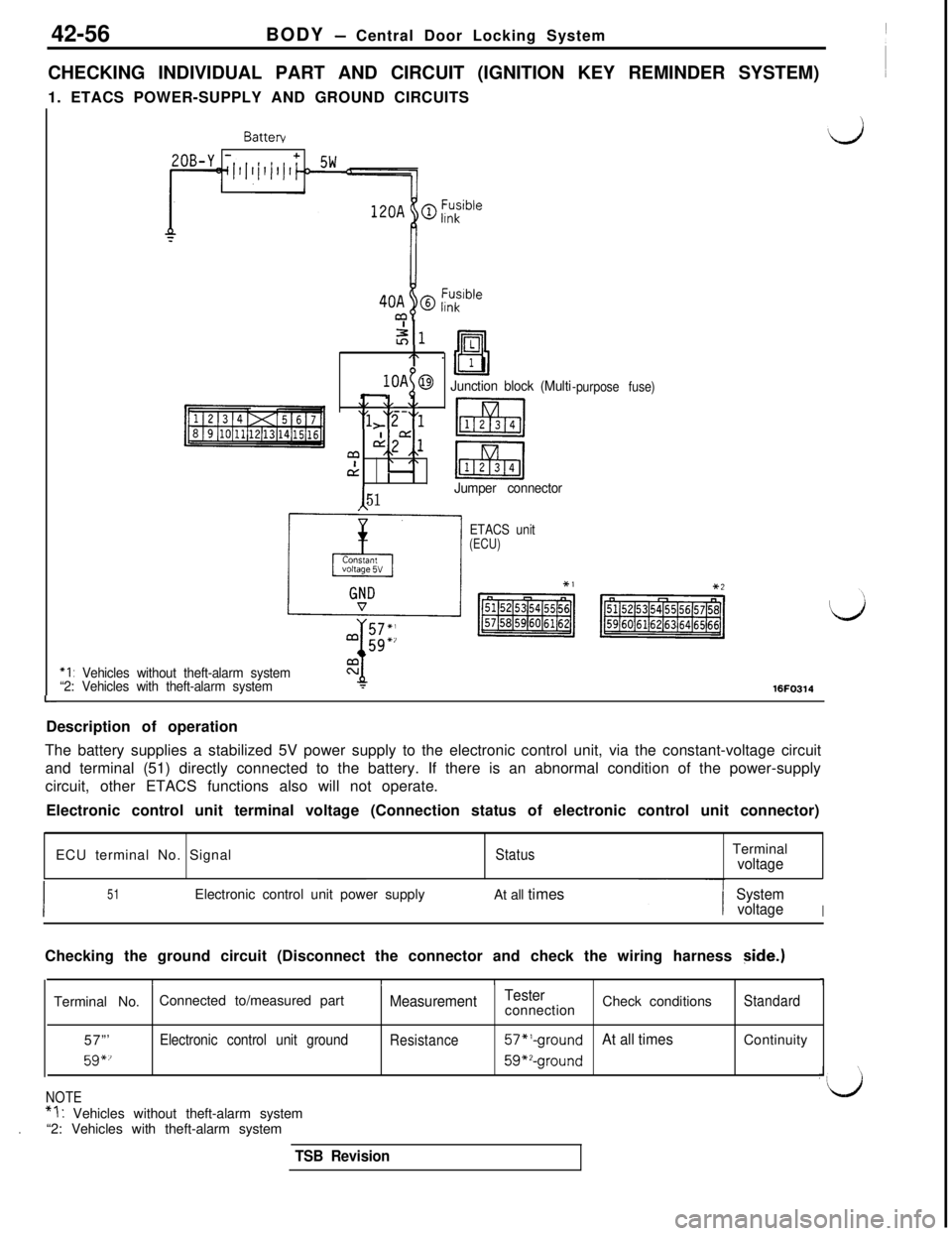
CHECKING INDIVIDUAL PART AND CIRCUIT (IGNITION KEY REMINDER SYSTEM)
1. ETACS POWER-SUPPLY AND GROUND CIRCUITS
L-
Batterv
$1,\ .
\I \/ \I
‘/1,\/2-“1
m+,2T.,l\ ,.c.i -
151
Junction block (Multi-purpose fuse)
Jumper connector
ETACS unit(ECU)
“I : Vehicles without theft-alarm system
“2: Vehicles with theft-alarm systemz1116FO314Description of operation
The battery supplies a stabilized 5V power supply to the electronic control unit, via the constant-voltage circuit
and terminal (51) directly connected to the battery. If there is an abnormal condition of the power-supply
circuit, other ETACS functions also will not operate.
Electronic control unit terminal voltage (Connection status of electronic control unit connector)
ECU terminal No. Signal
StatusTerminalvoltage
I
51Electronic control unit power supply
At all timesSystem
voltage
IChecking the ground circuit (Disconnect the connector and check the wiring harness side.)
IIII1Terminal No.Connected to/measured part
MeasurementTesterconnectionCheck conditionsStandard57”’
Electronic control unit ground
Resistance57*‘-groundAt all timesContinuity
59”)59*2-ground
NOTE
“I : Vehicles without theft-alarm system.“2: Vehicles with theft-alarm system
TSB Revision
Page 934 of 1146
42-62BODY - Central Door Locking System
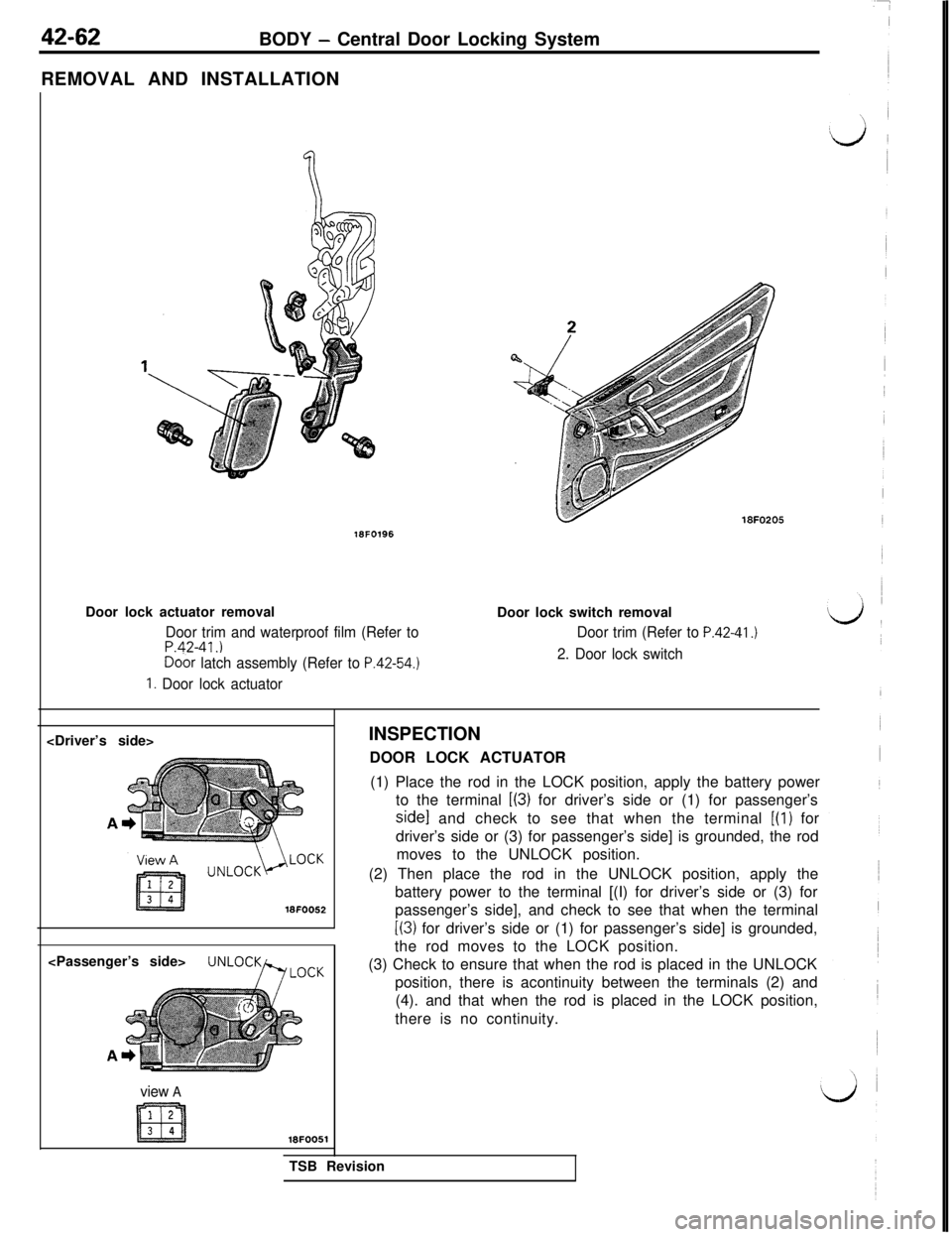
REMOVAL AND INSTALLATION16FO196
Door lock actuator removal
Door trim and waterproof film (Refer toP.42-41.)Do&
latch assembly (Refer to P.42-54.)
1. Door lock actuator
18FO205Door lock switch removal
Door trim (Refer to P.42-41.)
2. Door lock switch
view A16FOO51INSPECTION
DOOR LOCK ACTUATOR
(1) Place the rod in the LOCK position, apply the battery power
to the terminal
L(3) for driver’s side or (1) for passenger’s
side1 and check to see that when the terminal [(l) for
driver’s side or (3) for passenger’s side] is grounded, the rod
moves to the UNLOCK position.
(2) Then place the rod in the UNLOCK position, apply the
battery power to the terminal [(I) for driver’s side or (3) for
passenger’s side], and check to see that when the terminal
[(3) for driver’s side or (1) for passenger’s side] is grounded,
the rod moves to the LOCK position.
(3) Check to ensure that when the rod is placed in the UNLOCK
position, there is acontinuity between the terminals (2) and
(4). and that when the rod is placed in the LOCK position,
there is no continuity.
TSB Revision
Page 936 of 1146
42-64BODY - Central Door Locking System
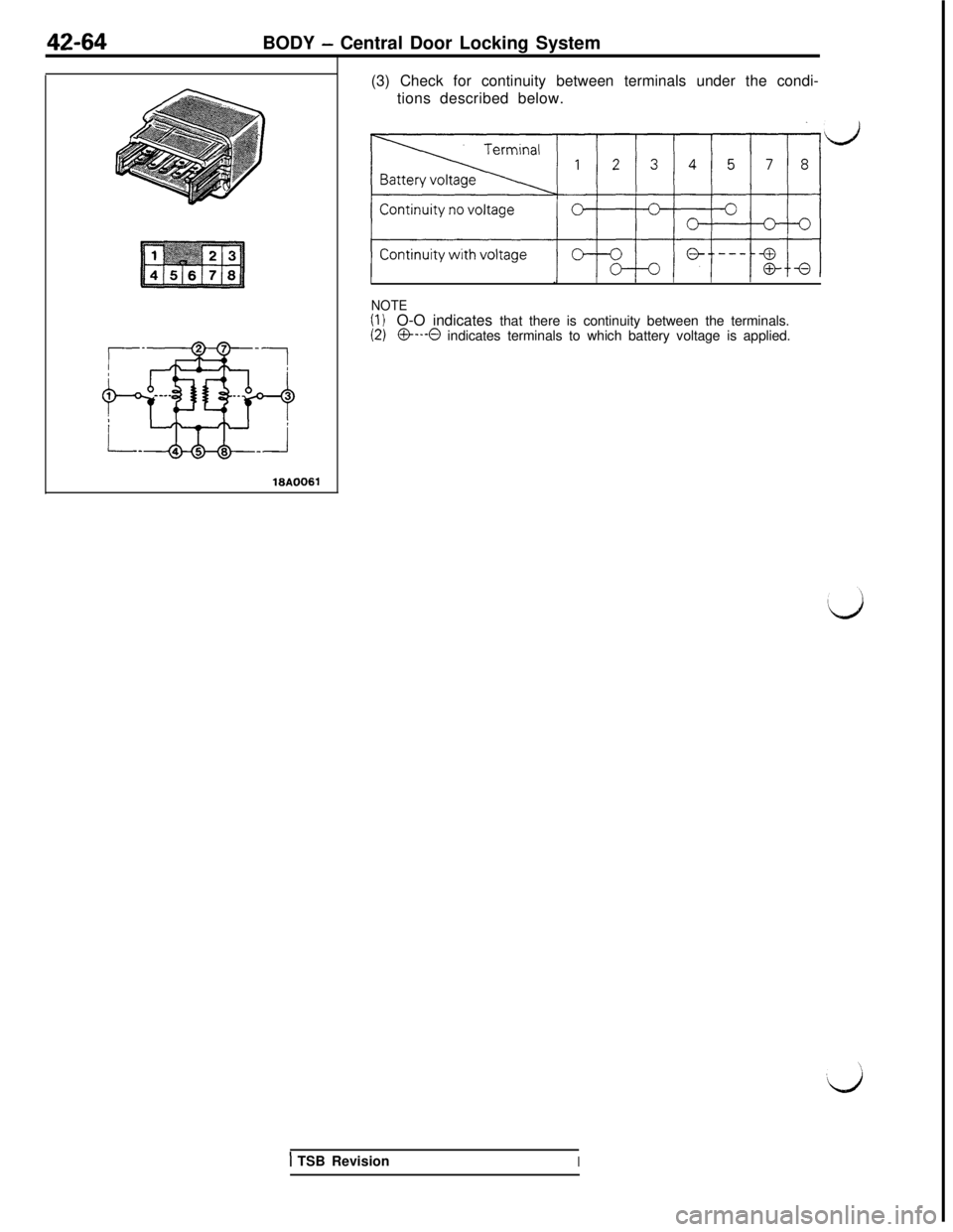
(3) Check for continuity between terminals under the condi-
tions described below.
I.IIIIII
NOTE(I )O-O indicates that there is continuity between the terminals.(2)O---O indicates terminals to which battery voltage is applied.
1 TSB RevisionI
Page 960 of 1146
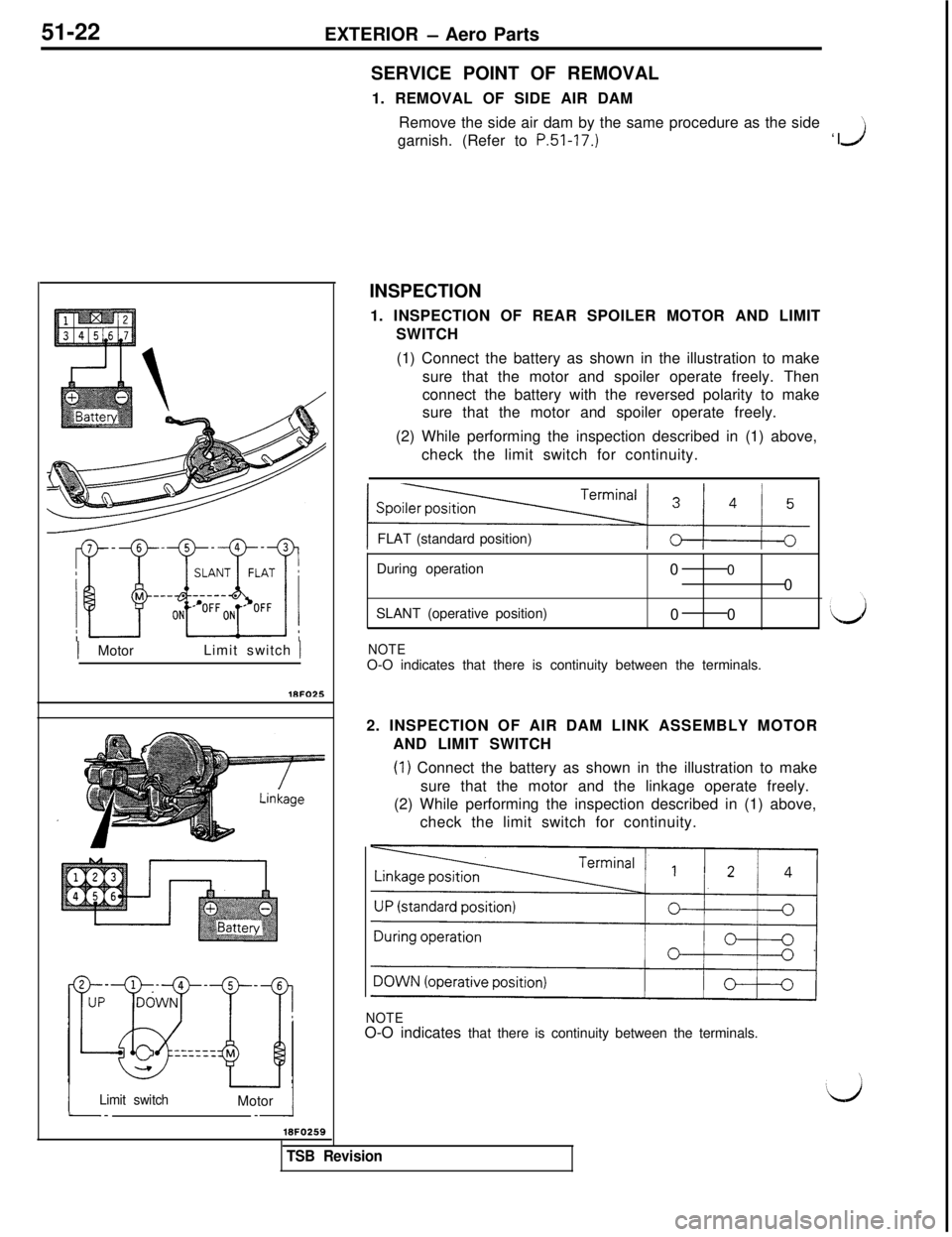
51-22
EXTERIOR - Aero Parts
1 MotorLimit switch )
iLimit switch--Motor /_I
18FO259SERVICE POINT OF REMOVAL
1. REMOVAL OF SIDE AIR DAM
Remove the side air dam by the same procedure as the side
’garnish. (Refer to P.51-17.)‘IJINSPECTION
1. INSPECTION OF REAR SPOILER MOTOR AND LIMIT
SWITCH
(1) Connect the battery as shown in the illustration to make
sure that the motor and spoiler operate freely. Then
connect the battery with the reversed polarity to make
sure that the motor and spoiler operate freely.
(2) While performing the inspection described in (1) above,
check the limit switch for continuity.
FLAT (standard position)
During operation
00
0
SLANT (operative position)
00
NOTEO-O indicates that there is continuity between the terminals.
2. INSPECTION OF AIR DAM LINK ASSEMBLY MOTOR
AND LIMIT SWITCH
(1) Connect the battery as shown in the illustration to make
sure that the motor and the linkage operate freely.
(2) While performing the inspection described in (1) above,
check the limit switch for continuity.
NOTEO-O indicates that there is continuity between the terminals.
TSB Revision
Page 965 of 1146
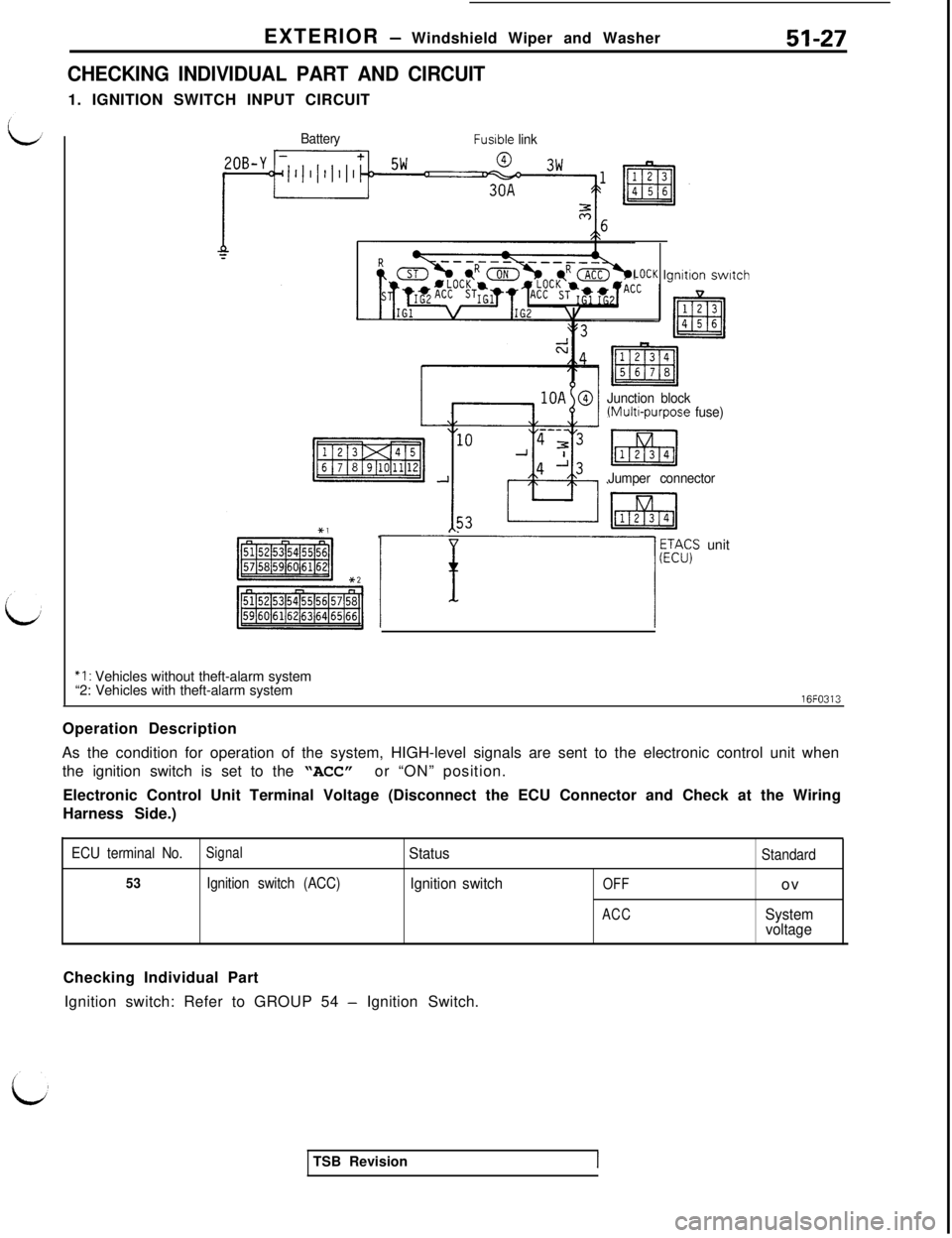
EXTERIOR - Windshield Wiper and Washer
CHECKING INDIVIDUAL PART AND CIRCUIT1. IGNITION SWITCH INPUT CIRCUIT51-27
BatteryFusible link
LOCK lgnitlon switch
Junction block
(Multl-purpose fuse)
Jumper connector
i! ~~A$ unit
“I : Vehicles without theft-alarm system
“2: Vehicles with theft-alarm system16FO313
Operation Description
As the condition for operation of the system, HIGH-level signals are sent to the electronic control unit when
the ignition switch is set to the “ACC” or “ON” position.
Electronic Control Unit Terminal Voltage (Disconnect the ECU Connector and Check at the Wiring
Harness Side.)
ECU terminal No.SignalStatusStandard
53Ignition switch (ACC)Ignition switchOFFov
ACCSystem
voltageChecking Individual Part
Ignition switch: Refer to GROUP 54
- Ignition Switch.
TSB Revision
Page 970 of 1146
* 2. Wiper arm
3. Front deck garnish
4. Air inlet garnish
(R")
EXTERIOR - Windshield Wiper and Washer
MOVAL AND INSTALLATIONY5lK.JAR
I
‘LJ (
I
\
9Nm7 ft.lbs.
3emoval steps of linkage
I. Wiper blade
I)* 2. Wiper arm
3. Front deck garnish
4. Air inlet garnish
(RH)5. Hole cover
a*6. Wiper motor16FO103
7. Linkage
Removal steps of wiper motor
1. Wiper blade
l *2. Wiper arm
5. Hole cover
*I)6. Wiper motorRemoval steps of washer tank
8. Battery
9. Battery tray
10. Washer tank
11. Washer motor
12. Washer fluid level sensor
Removal of column switch (wiper and washer
switch)
15. Column switch (Refer to GROUP 54
-Column Switch.)
TSB RevisionRemoval steps of washer tube
8. Battery
9. Battery tray
13. Washer nozzle
14. Washer tube
Page 971 of 1146
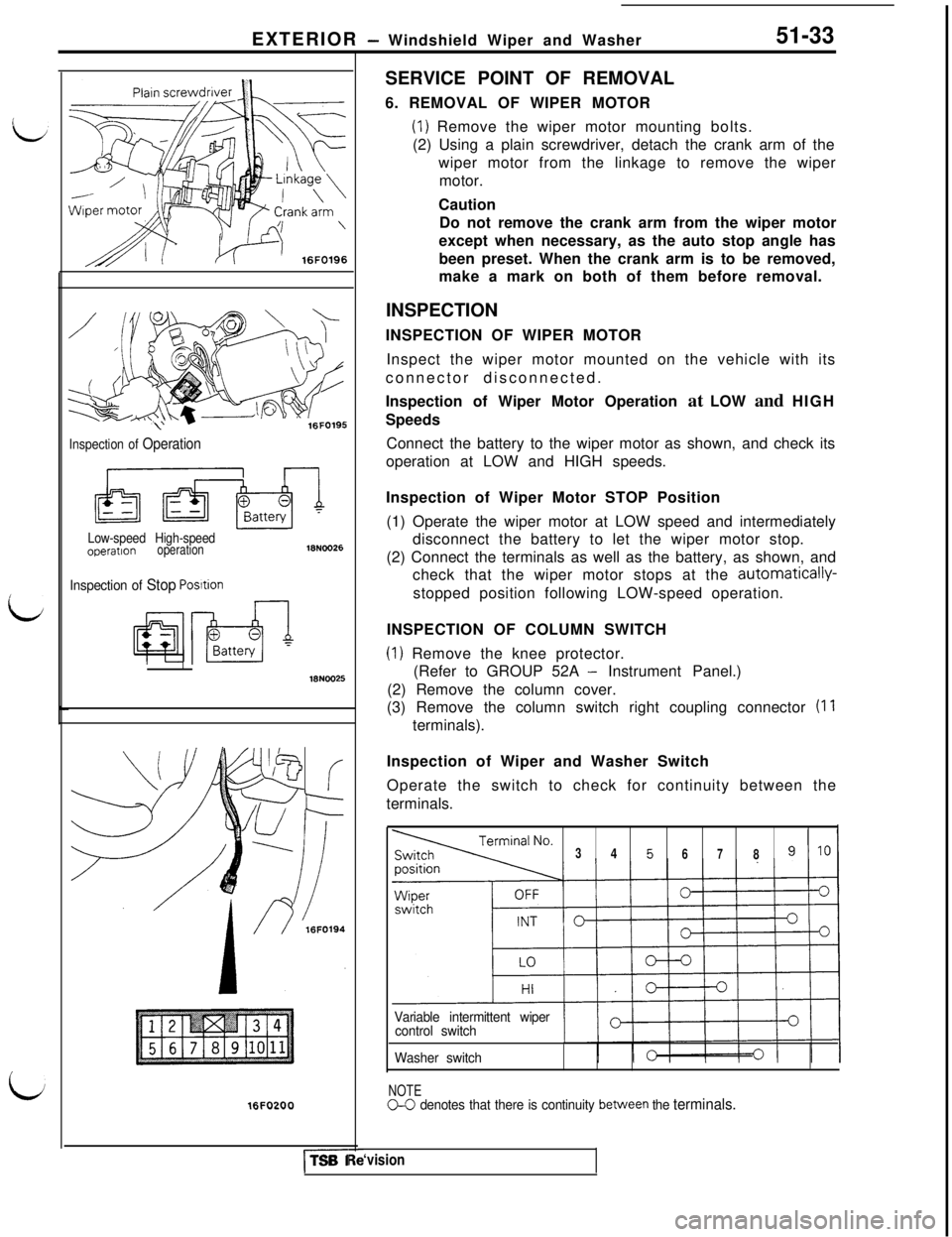
EXTERIOR - Windshield Wiper and Washer51-33
L
lj
Inspection of Operation
Low-speed High-speedoperationoperation1610026
Inspection of Stop Posltion
n
16NOO25
16FO200
ITSB ISERVICE POINT OF REMOVAL
6. REMOVAL OF WIPER MOTOR
(1) Remove the wiper motor mounting bolts.
(2) Using a plain screwdriver, detach the crank arm of the
wiper motor from the linkage to remove the wiper
motor.
Caution
Do not remove the crank arm from the wiper motor
except when necessary, as the auto stop angle has
been preset. When the crank arm is to be removed,
make a mark on both of them before removal.
INSPECTION
INSPECTION OF WIPER MOTOR
Inspect the wiper motor mounted on the vehicle with its
connector disconnected.
Inspection of Wiper Motor Operation at LOW and HIGH
Speeds
Connect the battery to the wiper motor as shown, and check its
operation at LOW and HIGH speeds.
Inspection of Wiper Motor STOP Position
(1) Operate the wiper motor at LOW speed and intermediately
disconnect the battery to let the wiper motor stop.
(2) Connect the terminals as well as the battery, as shown, and
check that the wiper motor stops at the automatically-
stopped position following LOW-speed operation.
INSPECTION OF COLUMN SWITCH
(1) Remove the knee protector.
(Refer to GROUP 52A
- Instrument Panel.)
(2) Remove the column cover.
(3) Remove the column switch right coupling connector
(11terminals).
Inspection of Wiper and Washer Switch
Operate the switch to check for continuity between the
terminals.
345678
Variable intermittent wiper
control switch
Washer switch
NOTEC-0 denotes that there is continuity between the terminals.
‘vision
Page 972 of 1146
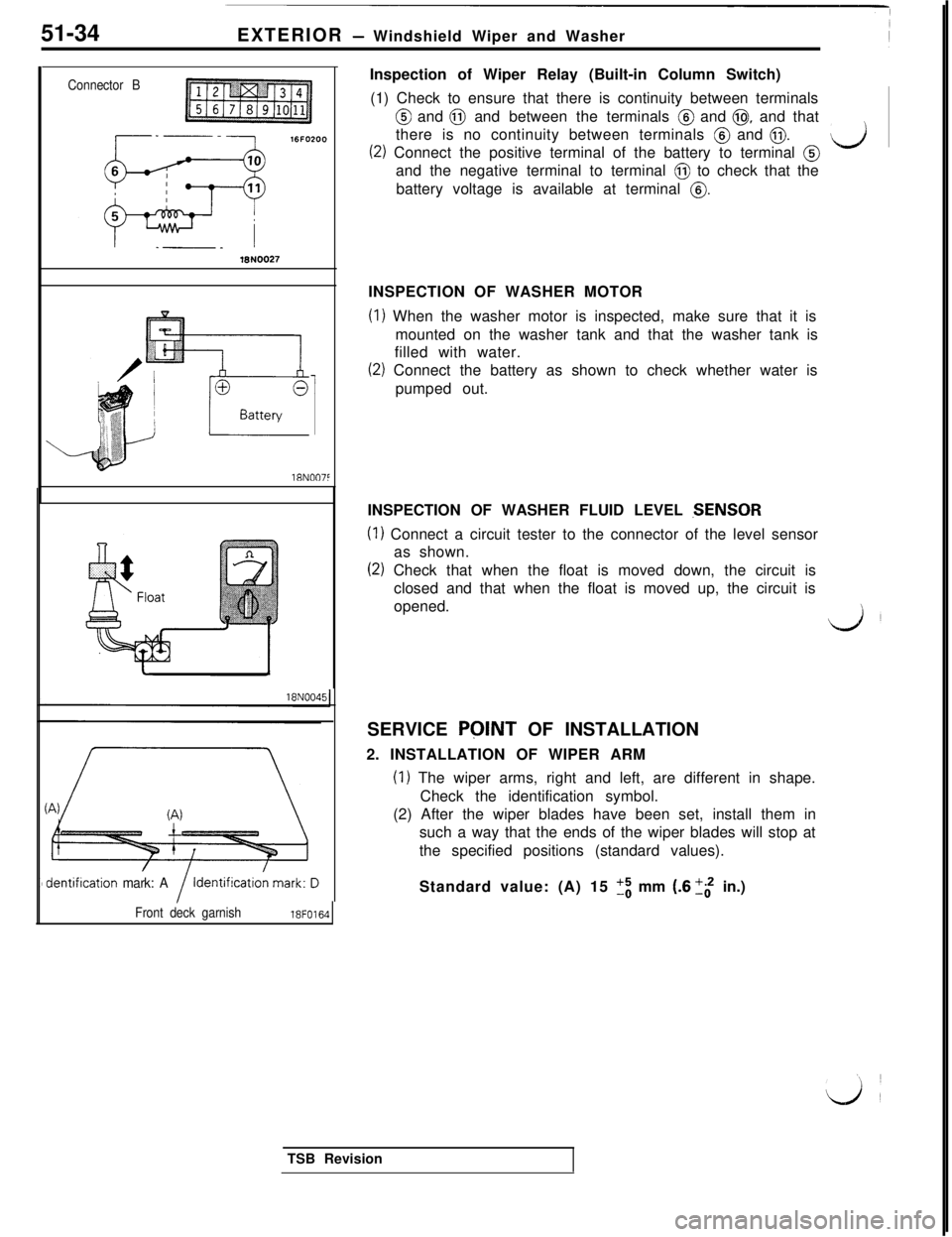
51-34
EXTERIOR - Windshield Wiper and Washer
Connector B
-____1.310027lXN007t
1
dentification mark: AInspection of Wiper Relay (Built-in Column Switch)
(1) Check to ensure that there is continuity between terminals@ and @ and between the terminals @ and
@, and that
there is no continuity between terminals @ and
@.
(2) Connect the positive terminal of the battery to terminal @dand the negative terminal to terminal @ to check that the
battery voltage is available at terminal
@.INSPECTION OF WASHER MOTOR
(I) When the washer motor is inspected, make sure that it is
mounted on the washer tank and that the washer tank is
filled with water.
(2) Connect the battery as shown to check whether water is
pumped out.
INSPECTION OF WASHER FLUID LEVEL
,SENSOR
(1) Connect a circuit tester to the connector of the level sensor
as shown.
(2) Check that when the float is moved down, the circuit is
closed and that when the float is moved up, the circuit is
opened.
Front deck garnish18FO164SERVICE POINT OF INSTALLATION
2. INSTALLATION OF WIPER ARM
(1) The wiper arms, right and left, are different in shape.
Check the identification symbol.
(2) After the wiper blades have been set, install them in
such a way that the ends of the wiper blades will stop at
the specified positions (standard values).
Standard value: (A) 15
tz mm (.6 tf in.)
dTSB Revision
Page 974 of 1146
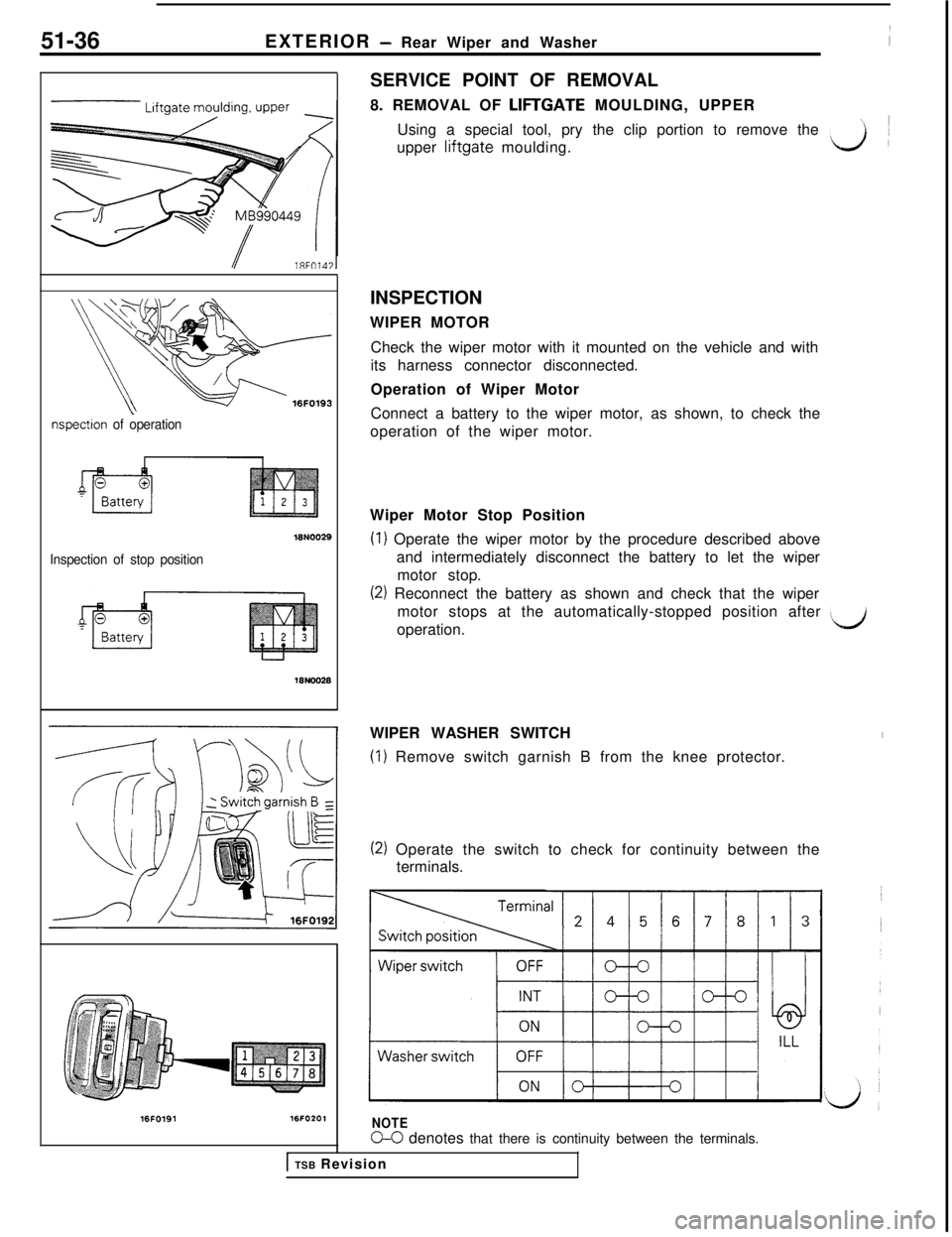
51-36EXTERIOR - Rear Wiper and Washer
nspection of operation16N0029
Inspection of stop position
16FO19116FO201SERVICE POINT OF REMOVAL
8. REMOVAL OF LIFTGATE MOULDING, UPPER
Using a special tool, pry the clip portion to remove the
’~
upper liftgate moulding.
INSPECTION
WIPER MOTOR
Check the wiper motor with it mounted on the vehicle and with
its harness connector disconnected.
Operation of Wiper Motor
Connect a battery to the wiper motor, as shown, to check the
operation of the wiper motor.
Wiper Motor Stop Position
(1) Operate the wiper motor by the procedure described above
and intermediately disconnect the battery to let the wiper
motor stop.
(2) Reconnect the battery as shown and check that the wiper
motor stops at the automatically-stopped position after
operation.
‘dWIPER WASHER SWITCH
(I) Remove switch garnish B from the knee protector.
(2) Operate the switch to check for continuity between the
terminals.
NOTEO-0 denotes that there is continuity between the terminals.
1 TSB Revision