diagnostic MITSUBISHI 380 2005 Workshop Manual
[x] Cancel search | Manufacturer: MITSUBISHI, Model Year: 2005, Model line: 380, Model: MITSUBISHI 380 2005Pages: 1500, PDF Size: 47.87 MB
Page 219 of 1500
SYMPTOM PROCEDURES
SIMPLIFIED WIRING SYSTEM (SWS)54B-219
INSPECTION PROCEDURE F-2: Sunroof: Any of the sunroof switch positions is defective.
.
TECHNICAL DESCRIPTION (COMMENT)
The sunroof switch or the sunroof motor assembly
may be defective.
.
TROUBLESHOOTING HINTS
Refer to circuit diagrams GROUP-90
Refer to configuration diagrams GROUP-80
The sunroof switch may be defective
The sunroof motor assembly may be defective
The wiring harness or connectors may have
loose, corroded, or damaged terminals, or termi-
nals pushed back in the connector
DIAGNOSIS
Required Special Tools:
MB991223: Harness Set
MB991958: diagnostic tool (MUT-III Sub Assembly)
MB991824: Vehicle Communication Interface (V.C.I.)
MB991827: MUT-III USB Cable
MB991910: MUT-III Main Harness A
Check the input signal (by using the pulse check mode of
the monitor).
Check the input signals from the sunroof switch.
To prevent damage to diagnostic tool MB991958, always
turn the ignition switch to the "LOCK" (OFF) position
before connecting or disconnecting diagnostic tool
MB991958.
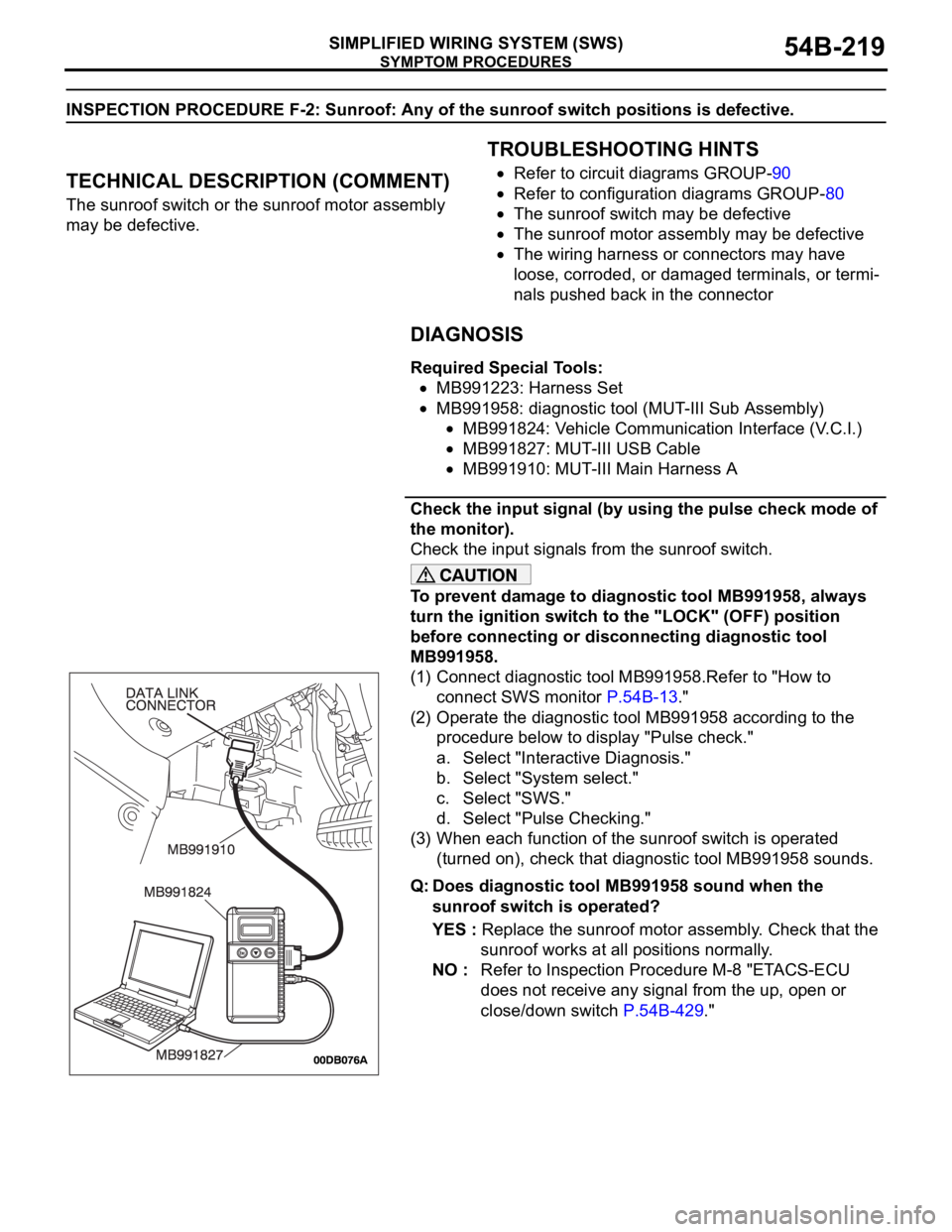
(1) Connect diagnostic tool MB991958.Refer to "How to
connect SWS monitor P.54B-13."
(2) Operate the diagnostic tool MB991958 according to the
procedure below to display "Pulse check."
a. Select "Interactive Diagnosis."
b. Select "System select."
c. Select "SWS."
d. Select "Pulse Checking."
(3) When each function of the sunroof switch is operated
(turned on), check that diagnostic tool MB991958 sounds.
Q: Does diagnostic tool MB991958 sound when the
sunroof switch is operated?
YES : Replace the sunroof motor assembly. Check that the
sunroof works at all positions normally.
NO : Refer to Inspection Procedure M-8 "ETACS-ECU
does not receive any signal from the up, open or
close/down switch P.54B-429."
Page 220 of 1500
SYMPTOM PROCEDURES
SIMPLIFIED WIRING SYSTEM (SWS)54B-220
INSPECTION PROCEDURE F-3: Sunroof: Sunroof Timer Function does not Work Normally.
NOTE: This troubleshooting requires use of
diagnostic tool MB991958 and SWS monitor kit
MB991813. For details of how to use the SWS moni-
tor, refer to "How to connect SWS monitor
P.54B-13."
.
CIRCUIT OPERATION
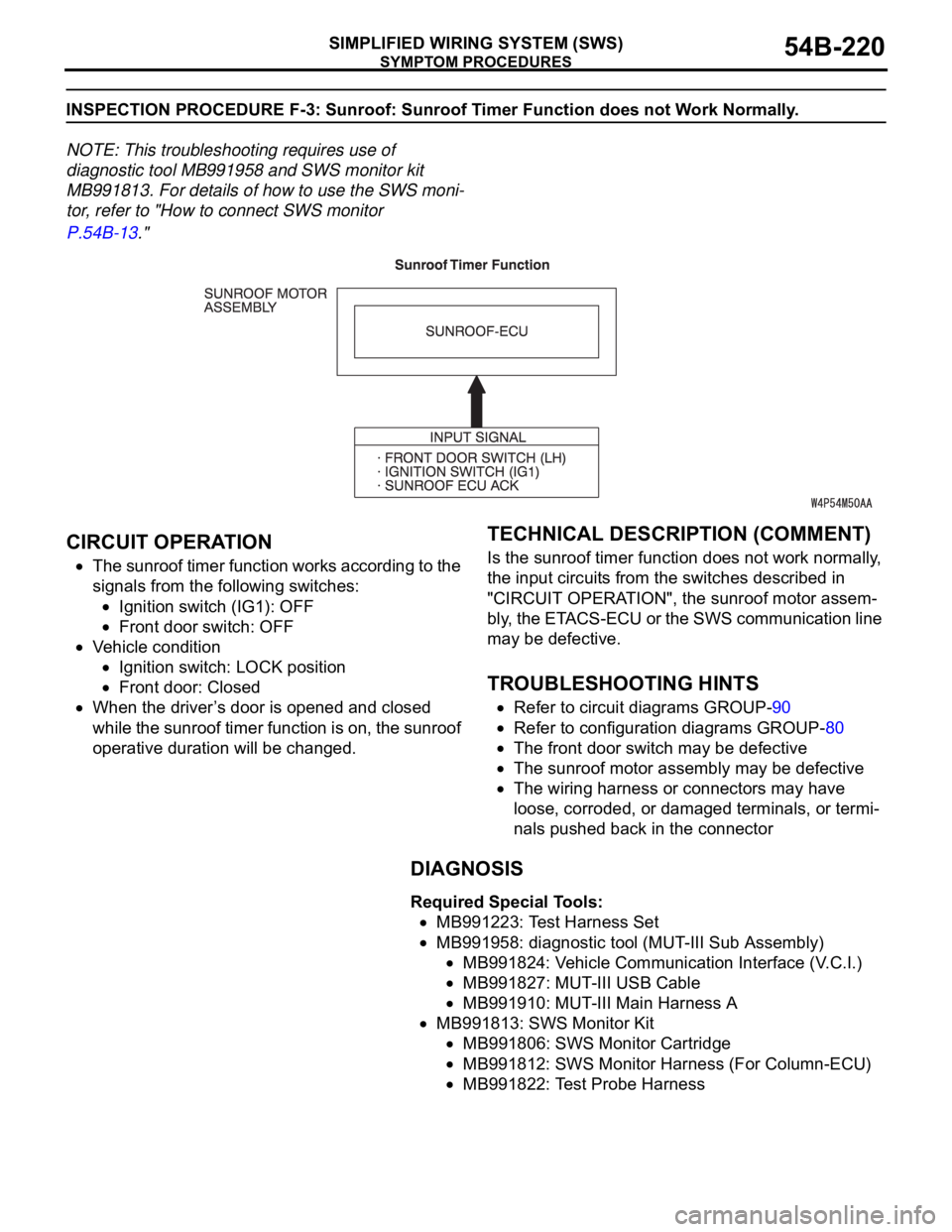
The sunroof timer function works according to the
signals from the following switches:
Ignition switch (IG1): OFF
Front door switch: OFF
Vehicle condition
Ignition switch: LOCK position
Front door: Closed
When the driver’s door is opened and closed
while the sunroof timer function is on, the sunroof
operative duration will be changed.
.
TECHNICAL DESCRIPTION (COMMENT)
Is the sunroof timer function does not work normally,
the input circuits from the switches described in
"CIRCUIT OPERATION", the sunroof motor assem-
bly, the ETACS-ECU or the SWS communication line
may be defective.
.
TROUBLESHOOTING HINTS
Refer to circuit diagrams GROUP-90
Refer to configuration diagrams GROUP-80
The front door switch may be defective
The sunroof motor assembly may be defective
The wiring harness or connectors may have
loose, corroded, or damaged terminals, or termi-
nals pushed back in the connector
DIAGNOSIS
Required Special Tools:
MB991223: Test Harness Set
MB991958: diagnostic tool (MUT-III Sub Assembly)
MB991824: Vehicle Communication Interface (V.C.I.)
MB991827: MUT-III USB Cable
MB991910: MUT-III Main Harness A
MB991813: SWS Monitor Kit
MB991806: SWS Monitor Cartridge
MB991812: SWS Monitor Harness (For Column-ECU)
MB991822: Test Probe Harness
Page 221 of 1500
SYMPTOM PROCEDURES
SIMPLIFIED WIRING SYSTEM (SWS)54B-221
STEP 1. Use diagnostic tool MB991958 to select "ECU
COMM Check" on the SWS monitor display.
Check the following ECUs:
ETACS-ECU
Sunroof-ECU
To prevent damage to diagnostic tool MB991958, always
turn the ignition switch to the "LOCK" (OFF) position
before connecting or disconnecting diagnostic tool
MB991958. Connect special tool MB991910 before con-
necting special tool MB991812. Be sure to connect special
tool MB991806 after turning on special tool MB991824.
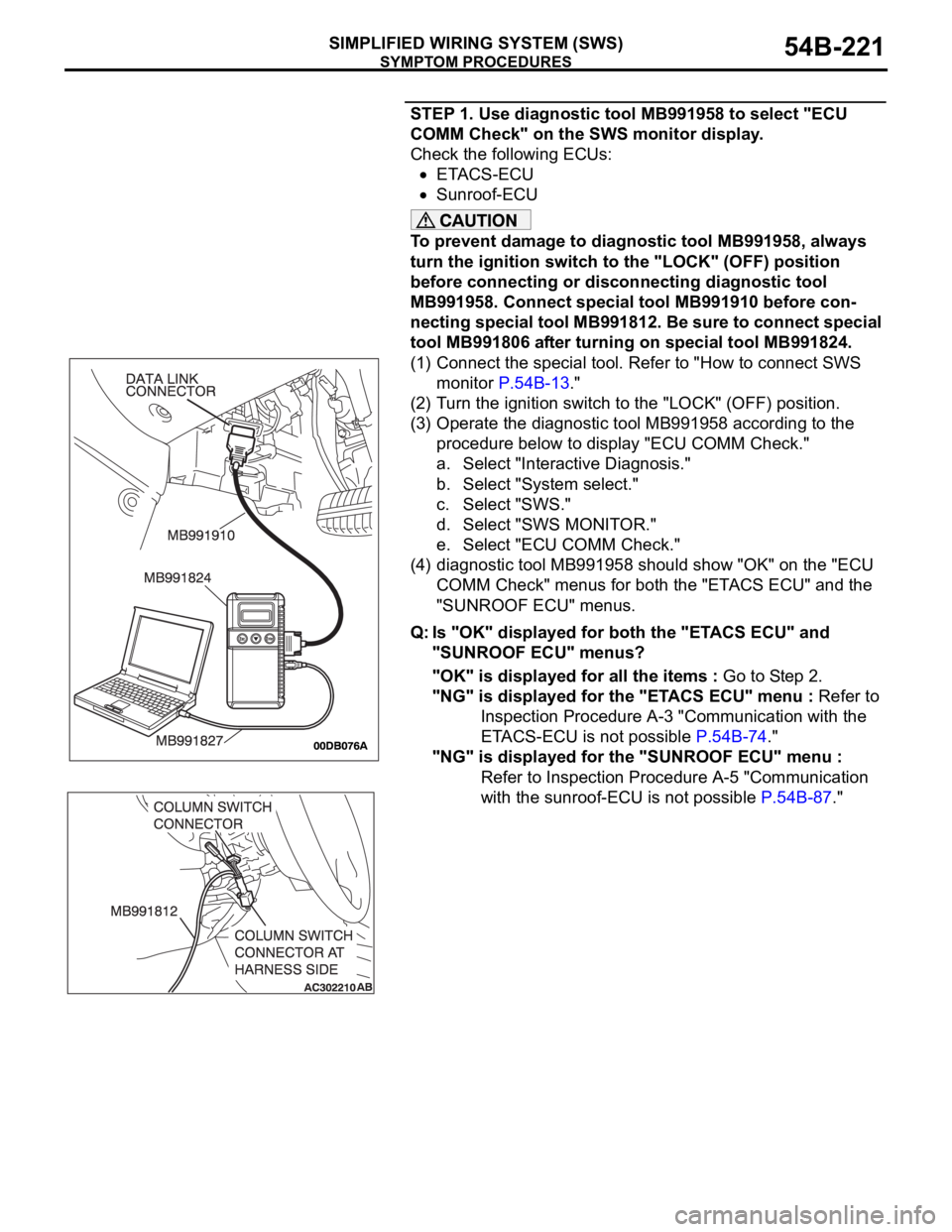
(1) Connect the special tool. Refer to "How to connect SWS
monitor P.54B-13."
(2) Turn the ignition switch to the "LOCK" (OFF) position.
(3) Operate the diagnostic tool MB991958 according to the
procedure below to display "ECU COMM Check."
a. Select "Interactive Diagnosis."
b. Select "System select."
c. Select "SWS."
d. Select "SWS MONITOR."
e. Select "ECU COMM Check."
(4) diagnostic tool MB991958 should show "OK" on the "ECU
COMM Check" menus for both the "ETACS ECU" and the
"SUNROOF ECU" menus.
Q: Is "OK" displayed for both the "ETACS ECU" and
"SUNROOF ECU" menus?
"OK" is displayed for all the items : Go to Step 2.
"NG" is displayed for the "ETACS ECU" menu : Refer to
Inspection Procedure A-3 "Communication with the
ETACS-ECU is not possible P.54B-74."
"NG" is displayed for the "SUNROOF ECU" menu :
Refer to Inspection Procedure A-5 "Communication
with the sunroof-ECU is not possible P.54B-87."
Page 226 of 1500
SYMPTOM PROCEDURES
SIMPLIFIED WIRING SYSTEM (SWS)54B-226
INSPECTION PROCEDURE G-1: Windshield Wiper and Washer: The windshield wiper do not work at
all.
NOTE: This troubleshooting procedure requires use
of Diagnostic Tool MB991958 and SWS monitor kit
MB991813. For details on how to use the SWS mon-
itor, refer to "How to connect SWS monitor
P.54B-13."
.
CIRCUIT OPERATION
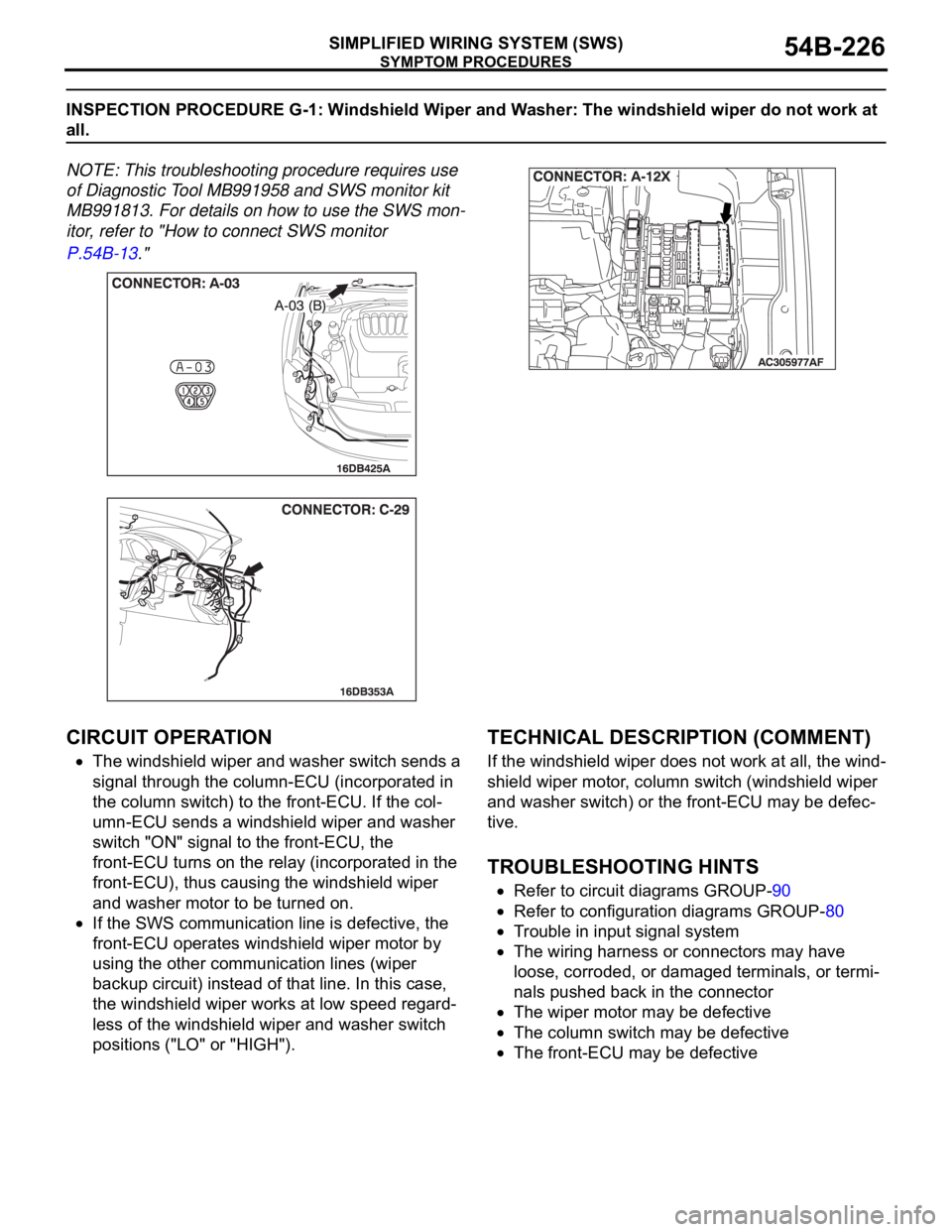
The windshield wiper and washer switch sends a
signal through the column-ECU (incorporated in
the column switch) to the front-ECU. If the col-
umn-ECU sends a windshield wiper and washer
switch "ON" signal to the front-ECU, the
front-ECU turns on the relay (incorporated in the
front-ECU), thus causing the windshield wiper
and washer motor to be turned on.
If the SWS communication line is defective, the
front-ECU operates windshield wiper motor by
using the other communication lines (wiper
backup circuit) instead of that line. In this case,
the windshield wiper works at low speed regard-
less of the windshield wiper and washer switch
positions ("LO" or "HIGH").
.
TECHNICAL DESCRIPTION (COMMENT)
If the windshield wiper does not work at all, the wind-
shield wiper motor, column switch (windshield wiper
and washer switch) or the front-ECU may be defec-
tive.
.
TROUBLESHOOTING HINTS
Refer to circuit diagrams GROUP-90
Refer to configuration diagrams GROUP-80
Trouble in input signal system
The wiring harness or connectors may have
loose, corroded, or damaged terminals, or termi-
nals pushed back in the connector
The wiper motor may be defective
The column switch may be defective
The front-ECU may be defective
Page 227 of 1500

SYMPTOM PROCEDURES
SIMPLIFIED WIRING SYSTEM (SWS)54B-227
DIAGNOSIS
Required Special Tools:
MB991223: Harness Set
MB991958: Diagnostic Tool (MUT-III Sub Assembly)
MB991824: Vehicle Communication Interface (V.C.I.)
MB991827: MUT-III USB Cable
MB991910: MUT-III Main Harness A
MB991813: SWS Monitor Kit
MB991806: SWS Monitor Cartridge
MB991812: SWS Monitor Harness (For Column-ECU)
MB991822: Test Probe Harness
Page 228 of 1500
SYMPTOM PROCEDURES
SIMPLIFIED WIRING SYSTEM (SWS)54B-228
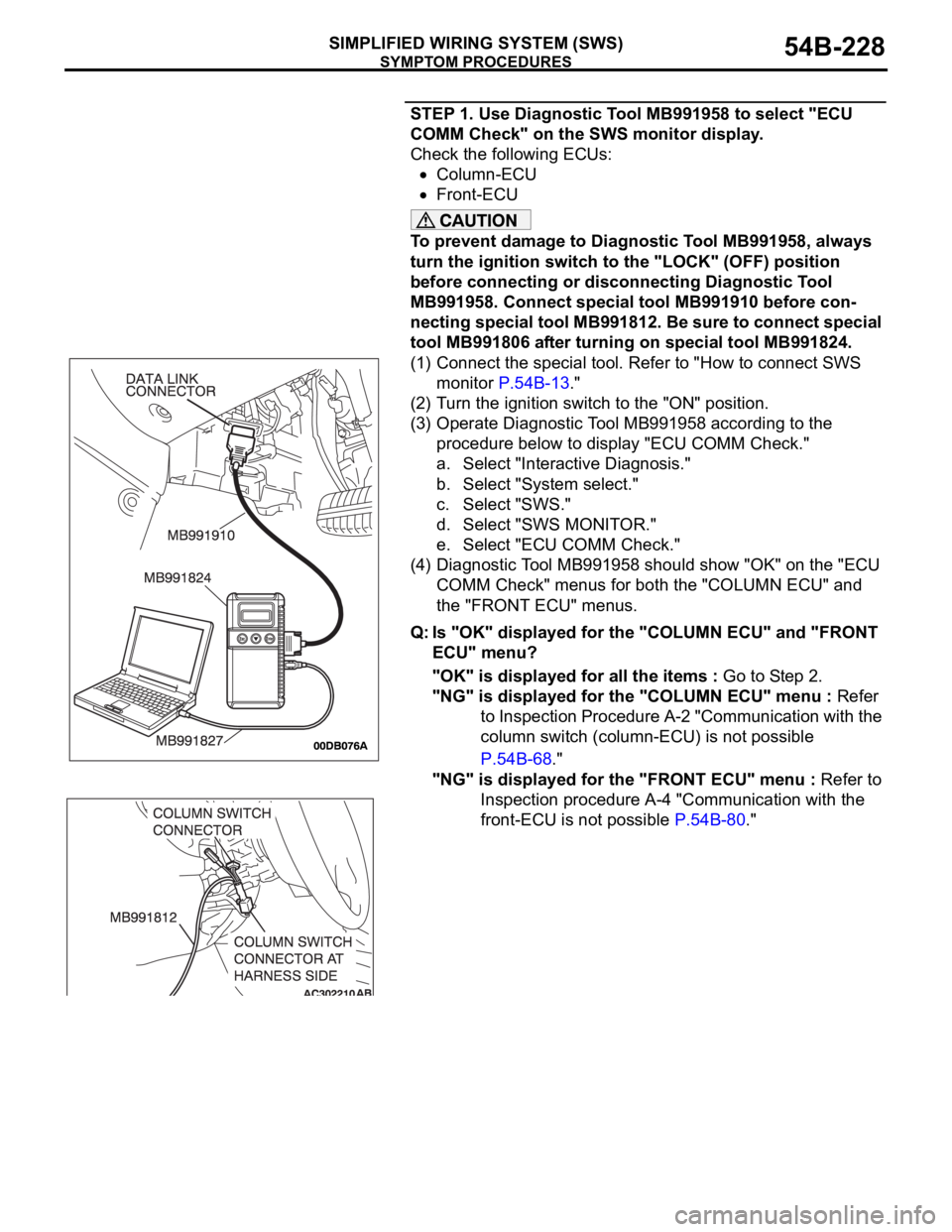
STEP 1. Use Diagnostic Tool MB991958 to select "ECU
COMM Check" on the SWS monitor display.
Check the following ECUs:
Column-ECU
Front-ECU
To prevent damage to Diagnostic Tool MB991958, always
turn the ignition switch to the "LOCK" (OFF) position
before connecting or disconnecting Diagnostic Tool
MB991958. Connect special tool MB991910 before con-
necting special tool MB991812. Be sure to connect special
tool MB991806 after turning on special tool MB991824.
(1) Connect the special tool. Refer to "How to connect SWS
monitor P.54B-13."
(2) Turn the ignition switch to the "ON" position.
(3) Operate Diagnostic Tool MB991958 according to the
procedure below to display "ECU COMM Check."
a. Select "Interactive Diagnosis."
b. Select "System select."
c. Select "SWS."
d. Select "SWS MONITOR."
e. Select "ECU COMM Check."
(4) Diagnostic Tool MB991958 should show "OK" on the "ECU
COMM Check" menus for both the "COLUMN ECU" and
the "FRONT ECU" menus.
Q: Is "OK" displayed for the "COLUMN ECU" and "FRONT
ECU" menu?
"OK" is displayed for all the items : Go to Step 2.
"NG" is displayed for the "COLUMN ECU" menu : Refer
to Inspection Procedure A-2 "Communication with the
column switch (column-ECU) is not possible
P.54B-68."
"NG" is displayed for the "FRONT ECU" menu : Refer to
Inspection procedure A-4 "Communication with the
front-ECU is not possible P.54B-80."
Page 234 of 1500

SYMPTOM PROCEDURES
SIMPLIFIED WIRING SYSTEM (SWS)54B-234
INSPECTION PROCEDURE G-2: Windshield Wiper and Washer: The windshield wipers do not work
when the windshield wiper switch is at "INT" or "MIST" position or the windshield washer switch is at
"ON" position. However, the wipers work at low speed when the windshield wiper switch is at "LO" or
"HI."
NOTE: This troubleshooting procedure requires use
of Diagnostic Tool MB991958 and SWS monitor kit
MB991813. For details on how to use the SWS mon-
itor, refer to "How to connect SWS monitor
P.54B-13."
.
TECHNICAL DESCRIPTION (COMMENT)
This system may be at fail-safe mode as the SWS
communication line is defective.
If the system cannot receive any signal from the col-
umn switch (windshield wiper and washer switch)
due to a open circuit in the SWS communication line
or other reasons, the system will enter the fail-safe
mode when the ignition switch is at the "ACC" posi-
tion.
.
TROUBLESHOOTING HINTS
Refer to circuit diagrams GROUP-90
Refer to configuration diagrams GROUP-80
The wiring harness or connectors may have
loose, corroded, or damaged terminals, or termi-
nals pushed back in the connector
The column switch may be defective
The front-ECU may be defective
DIAGNOSIS
Required Special Tools:
MB991223: Harness Set
MB991958: Diagnostic Tool (MUT-III Sub Assembly)
MB991824: Vehicle Communication Interface (V.C.I.)
MB991827: MUT-III USB Cable
MB991910: MUT-III Main Harness A
MB991813: SWS Monitor Kit
MB991806: SWS Monitor Cartridge
MB991812: SWS Monitor Harness (For Column-ECU)
MB991822: Test Probe Harness
Page 235 of 1500
SYMPTOM PROCEDURES
SIMPLIFIED WIRING SYSTEM (SWS)54B-235
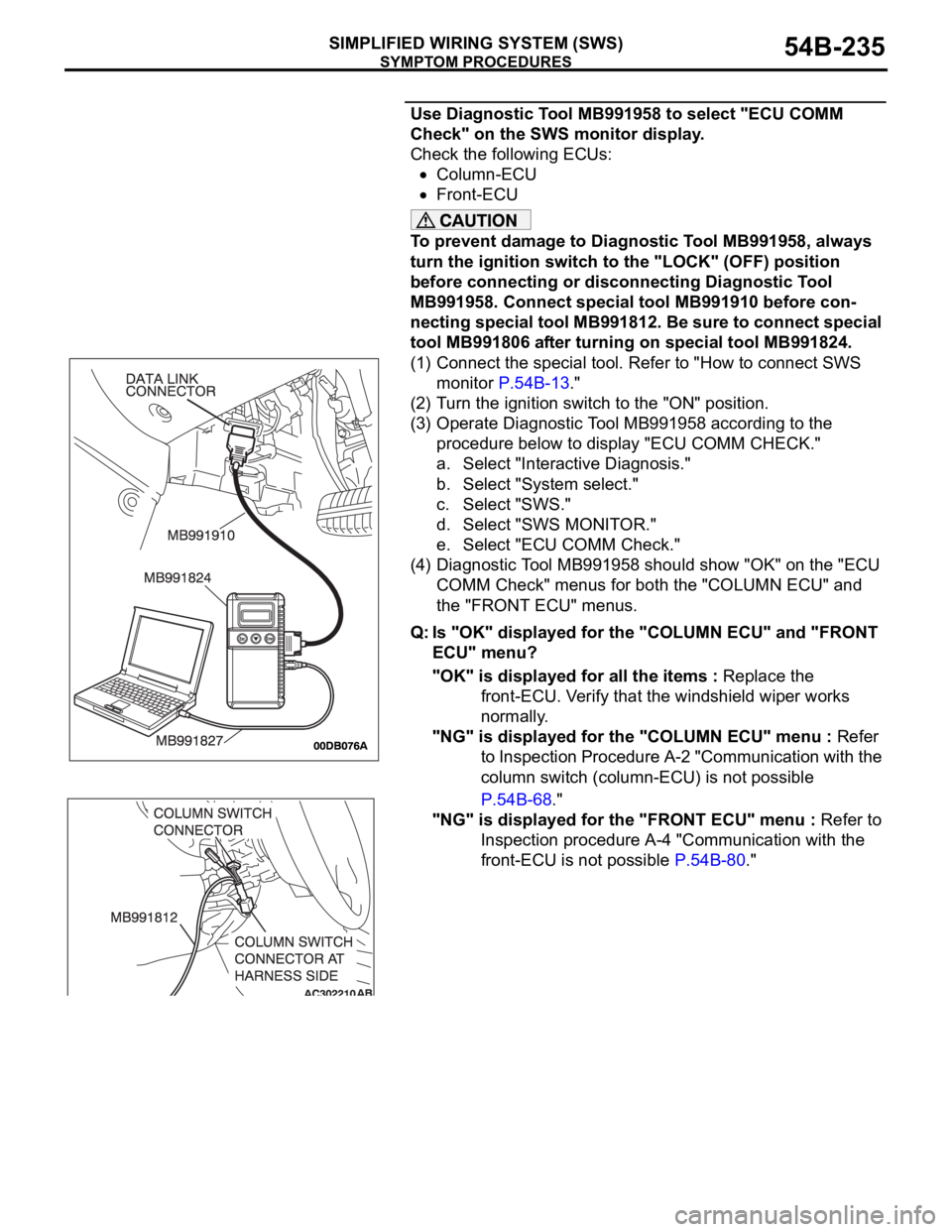
Use Diagnostic Tool MB991958 to select "ECU COMM
Check" on the SWS monitor display.
Check the following ECUs:
Column-ECU
Front-ECU
To prevent damage to Diagnostic Tool MB991958, always
turn the ignition switch to the "LOCK" (OFF) position
before connecting or disconnecting Diagnostic Tool
MB991958. Connect special tool MB991910 before con-
necting special tool MB991812. Be sure to connect special
tool MB991806 after turning on special tool MB991824.
(1) Connect the special tool. Refer to "How to connect SWS
monitor P.54B-13."
(2) Turn the ignition switch to the "ON" position.
(3) Operate Diagnostic Tool MB991958 according to the
procedure below to display "ECU COMM CHECK."
a. Select "Interactive Diagnosis."
b. Select "System select."
c. Select "SWS."
d. Select "SWS MONITOR."
e. Select "ECU COMM Check."
(4) Diagnostic Tool MB991958 should show "OK" on the "ECU
COMM Check" menus for both the "COLUMN ECU" and
the "FRONT ECU" menus.
Q: Is "OK" displayed for the "COLUMN ECU" and "FRONT
ECU" menu?
"OK" is displayed for all the items : Replace the
front-ECU. Verify that the windshield wiper works
normally.
"NG" is displayed for the "COLUMN ECU" menu : Refer
to Inspection Procedure A-2 "Communication with the
column switch (column-ECU) is not possible
P.54B-68."
"NG" is displayed for the "FRONT ECU" menu : Refer to
Inspection procedure A-4 "Communication with the
front-ECU is not possible P.54B-80."
Page 236 of 1500
SYMPTOM PROCEDURES
SIMPLIFIED WIRING SYSTEM (SWS)54B-236
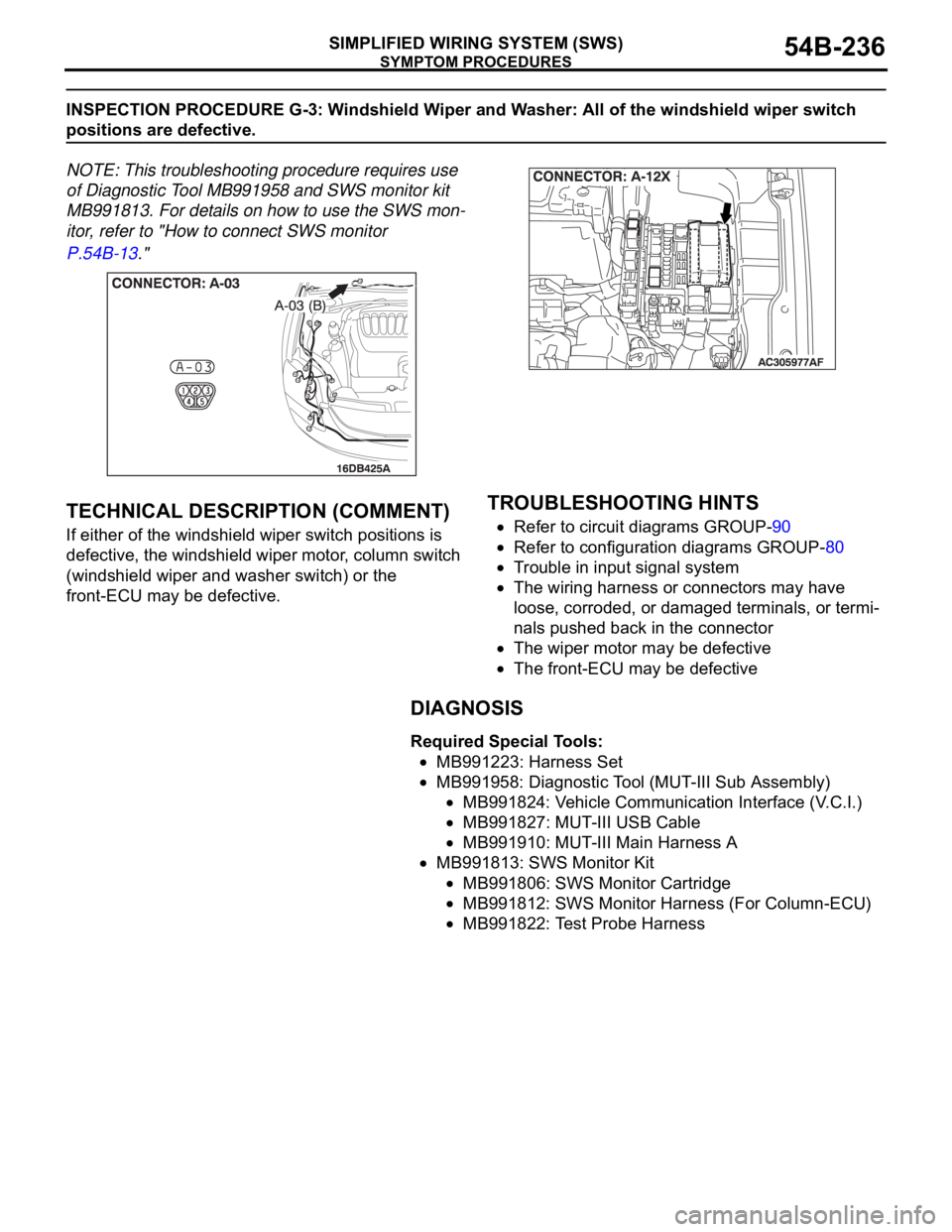
INSPECTION PROCEDURE G-3: Windshield Wiper and Washer: All of the windshield wiper switch
positions are defective.
NOTE: This troubleshooting procedure requires use
of Diagnostic Tool MB991958 and SWS monitor kit
MB991813. For details on how to use the SWS mon-
itor, refer to "How to connect SWS monitor
P.54B-13."
.
TECHNICAL DESCRIPTION (COMMENT)
If either of the windshield wiper switch positions is
defective, the windshield wiper motor, column switch
(windshield wiper and washer switch) or the
front-ECU may be defective.
.
TROUBLESHOOTING HINTS
Refer to circuit diagrams GROUP-90
Refer to configuration diagrams GROUP-80
Trouble in input signal system
The wiring harness or connectors may have
loose, corroded, or damaged terminals, or termi-
nals pushed back in the connector
The wiper motor may be defective
The front-ECU may be defective
DIAGNOSIS
Required Special Tools:
MB991223: Harness Set
MB991958: Diagnostic Tool (MUT-III Sub Assembly)
MB991824: Vehicle Communication Interface (V.C.I.)
MB991827: MUT-III USB Cable
MB991910: MUT-III Main Harness A
MB991813: SWS Monitor Kit
MB991806: SWS Monitor Cartridge
MB991812: SWS Monitor Harness (For Column-ECU)
MB991822: Test Probe Harness
Page 237 of 1500
SYMPTOM PROCEDURES
SIMPLIFIED WIRING SYSTEM (SWS)54B-237
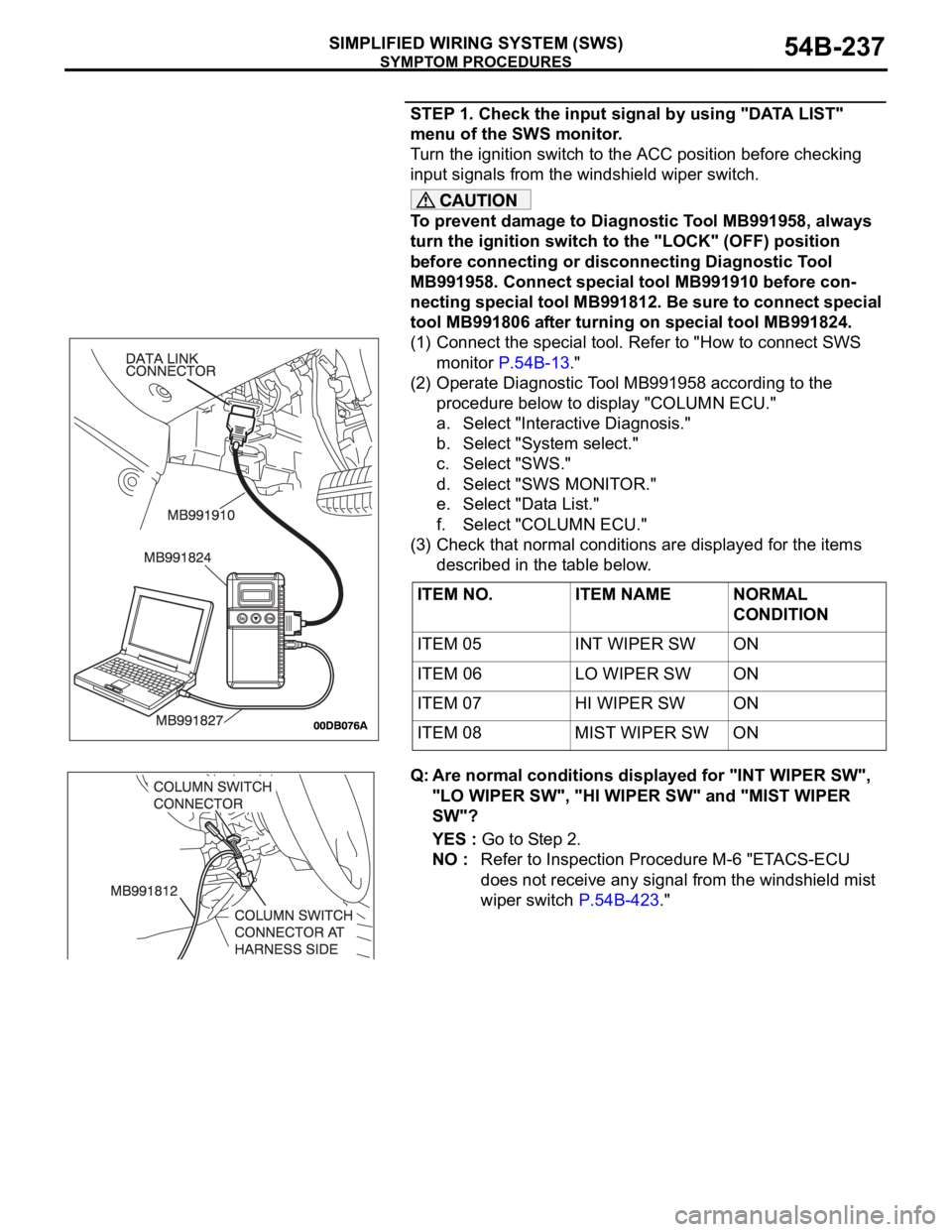
STEP 1. Check the input signal by using "DATA LIST"
menu of the SWS monitor.
Turn the ignition switch to the ACC position before checking
input signals from the windshield wiper switch.
To prevent damage to Diagnostic Tool MB991958, always
turn the ignition switch to the "LOCK" (OFF) position
before connecting or disconnecting Diagnostic Tool
MB991958. Connect special tool MB991910 before con-
necting special tool MB991812. Be sure to connect special
tool MB991806 after turning on special tool MB991824.
(1) Connect the special tool. Refer to "How to connect SWS
monitor P.54B-13."
(2) Operate Diagnostic Tool MB991958 according to the
procedure below to display "COLUMN ECU."
a. Select "Interactive Diagnosis."
b. Select "System select."
c. Select "SWS."
d. Select "SWS MONITOR."
e. Select "Data List."
f. Select "COLUMN ECU."
(3) Check that normal conditions are displayed for the items
described in the table below.
Q: Are normal conditions displayed for "INT WIPER SW",
"LO WIPER SW", "HI WIPER SW" and "MIST WIPER
SW"?
YES : Go to Step 2.
NO : Refer to Inspection Procedure M-6 "ETACS-ECU
does not receive any signal from the windshield mist
wiper switch P.54B-423." ITEM NO. ITEM NAME NORMAL
CONDITION
ITEM 05 INT WIPER SW ON
ITEM 06 LO WIPER SW ON
ITEM 07 HI WIPER SW ON
ITEM 08 MIST WIPER SW ON