lock MITSUBISHI 380 2005 Workshop Manual
[x] Cancel search | Manufacturer: MITSUBISHI, Model Year: 2005, Model line: 380, Model: MITSUBISHI 380 2005Pages: 1500, PDF Size: 47.87 MB
Page 417 of 1500
INPUT SIGNAL PROCEDURES
SIMPLIFIED WIRING SYSTEM (SWS)54B-417
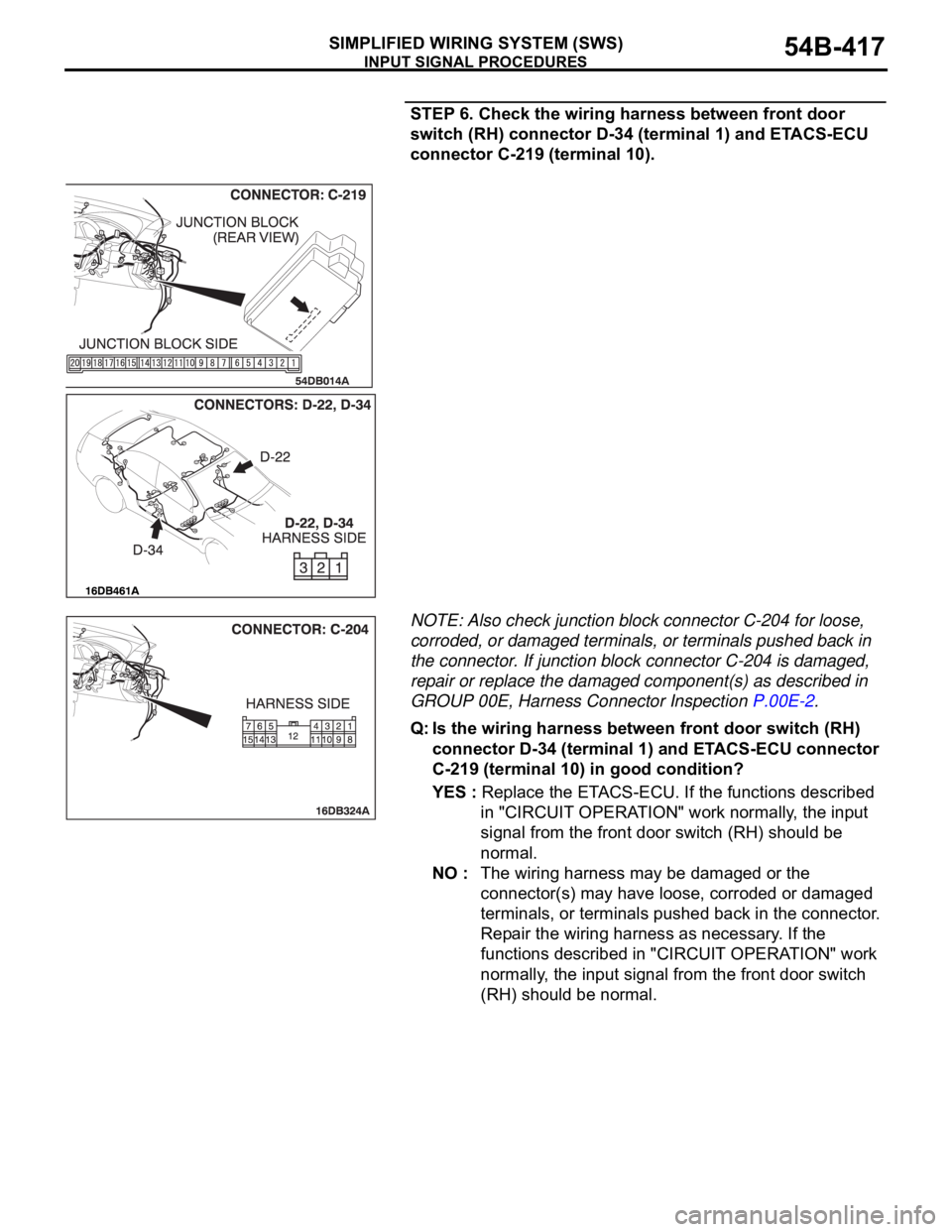
STEP 6. Check the wiring harness between front door
switch (RH) connector D-34 (terminal 1) and ETACS-ECU
connector C-219 (terminal 10).
NOTE: Also check junction block connector C-204 for loose,
corroded, or damaged terminals, or terminals pushed back in
the connector. If junction block connector C-204 is damaged,
repair or replace the damaged component(s) as described in
GROUP 00E, Harness Connector Inspection P.00E-2.
Q: Is the wiring harness between front door switch (RH)
connector D-34 (terminal 1) and ETACS-ECU connector
C-219 (terminal 10) in good condition?
YES : Replace the ETACS-ECU. If the functions described
in "CIRCUIT OPERATION" work normally, the input
signal from the front door switch (RH) should be
normal.
NO : The wiring harness may be damaged or the
connector(s) may have loose, corroded or damaged
terminals, or terminals pushed back in the connector.
Repair the wiring harness as necessary. If the
functions described in "CIRCUIT OPERATION" work
normally, the input signal from the front door switch
(RH) should be normal.
Page 421 of 1500
INPUT SIGNAL PROCEDURES
SIMPLIFIED WIRING SYSTEM (SWS)54B-421
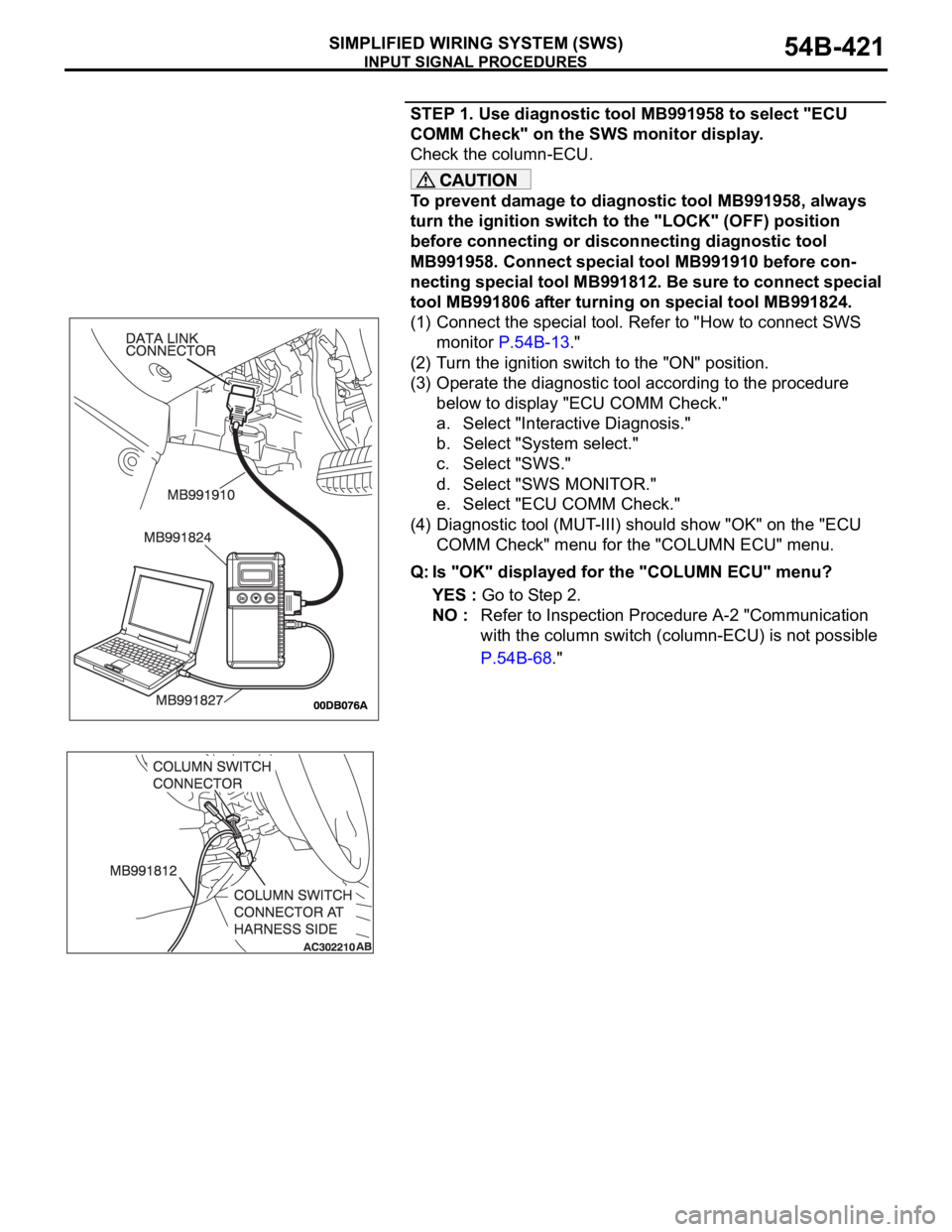
STEP 1. Use diagnostic tool MB991958 to select "ECU
COMM Check" on the SWS monitor display.
Check the column-ECU.
To prevent damage to diagnostic tool MB991958, always
turn the ignition switch to the "LOCK" (OFF) position
before connecting or disconnecting diagnostic tool
MB991958. Connect special tool MB991910 before con-
necting special tool MB991812. Be sure to connect special
tool MB991806 after turning on special tool MB991824.
(1) Connect the special tool. Refer to "How to connect SWS
monitor P.54B-13."
(2) Turn the ignition switch to the "ON" position.
(3) Operate the diagnostic tool according to the procedure
below to display "ECU COMM Check."
a. Select "Interactive Diagnosis."
b. Select "System select."
c. Select "SWS."
d. Select "SWS MONITOR."
e. Select "ECU COMM Check."
(4) Diagnostic tool (MUT-III) should show "OK" on the "ECU
COMM Check" menu for the "COLUMN ECU" menu.
Q: Is "OK" displayed for the "COLUMN ECU" menu?
YES : Go to Step 2.
NO : Refer to Inspection Procedure A-2 "Communication
with the column switch (column-ECU) is not possible
P.54B-68."
Page 424 of 1500
INPUT SIGNAL PROCEDURES
SIMPLIFIED WIRING SYSTEM (SWS)54B-424
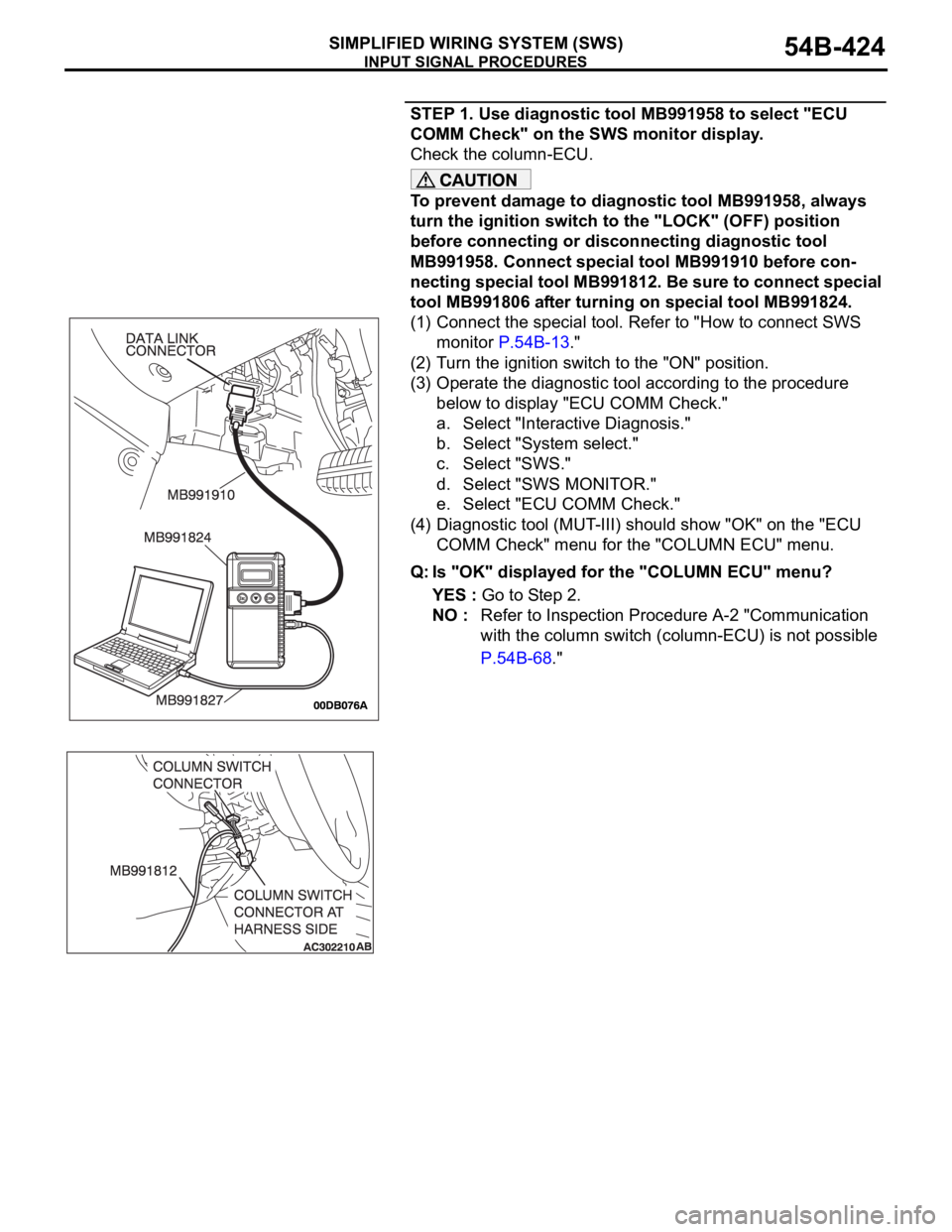
STEP 1. Use diagnostic tool MB991958 to select "ECU
COMM Check" on the SWS monitor display.
Check the column-ECU.
To prevent damage to diagnostic tool MB991958, always
turn the ignition switch to the "LOCK" (OFF) position
before connecting or disconnecting diagnostic tool
MB991958. Connect special tool MB991910 before con-
necting special tool MB991812. Be sure to connect special
tool MB991806 after turning on special tool MB991824.
(1) Connect the special tool. Refer to "How to connect SWS
monitor P.54B-13."
(2) Turn the ignition switch to the "ON" position.
(3) Operate the diagnostic tool according to the procedure
below to display "ECU COMM Check."
a. Select "Interactive Diagnosis."
b. Select "System select."
c. Select "SWS."
d. Select "SWS MONITOR."
e. Select "ECU COMM Check."
(4) Diagnostic tool (MUT-III) should show "OK" on the "ECU
COMM Check" menu for the "COLUMN ECU" menu.
Q: Is "OK" displayed for the "COLUMN ECU" menu?
YES : Go to Step 2.
NO : Refer to Inspection Procedure A-2 "Communication
with the column switch (column-ECU) is not possible
P.54B-68."
Page 432 of 1500
INPUT SIGNAL PROCEDURES
SIMPLIFIED WIRING SYSTEM (SWS)54B-432
INSPECTION PROCEDURE N-1: ETACS-ECU does not receive any signal from the key reminder
switch.
.
CIRCUIT OPERATION
The ETACS-ECU operates the following functions or
systems according to signal from the key reminder
switch:
Forgotten key reminder
Keyless entry system
Timed locking mechanism
Dome lamp dimming function
Ignition key hole illumination lamp
.
TECHNICAL DESCRIPTION (COMMENT)
If the signal is not normal, the functions or systems
described in "CIRCUIT OPERATION" do not work
normally.
.
TROUBLESHOOTING HINTS
Refer to circuit diagrams GROUP-90
Refer to configuration diagrams GROUP-80
The key reminder switch may be defective
The wiring harness or connectors may have
loose, corroded, or damaged terminals, or termi-
nals pushed back in the connector
The ETACS-ECU may be defective
DIAGNOSIS
Required Special Tool:
MB991223: Harness Set
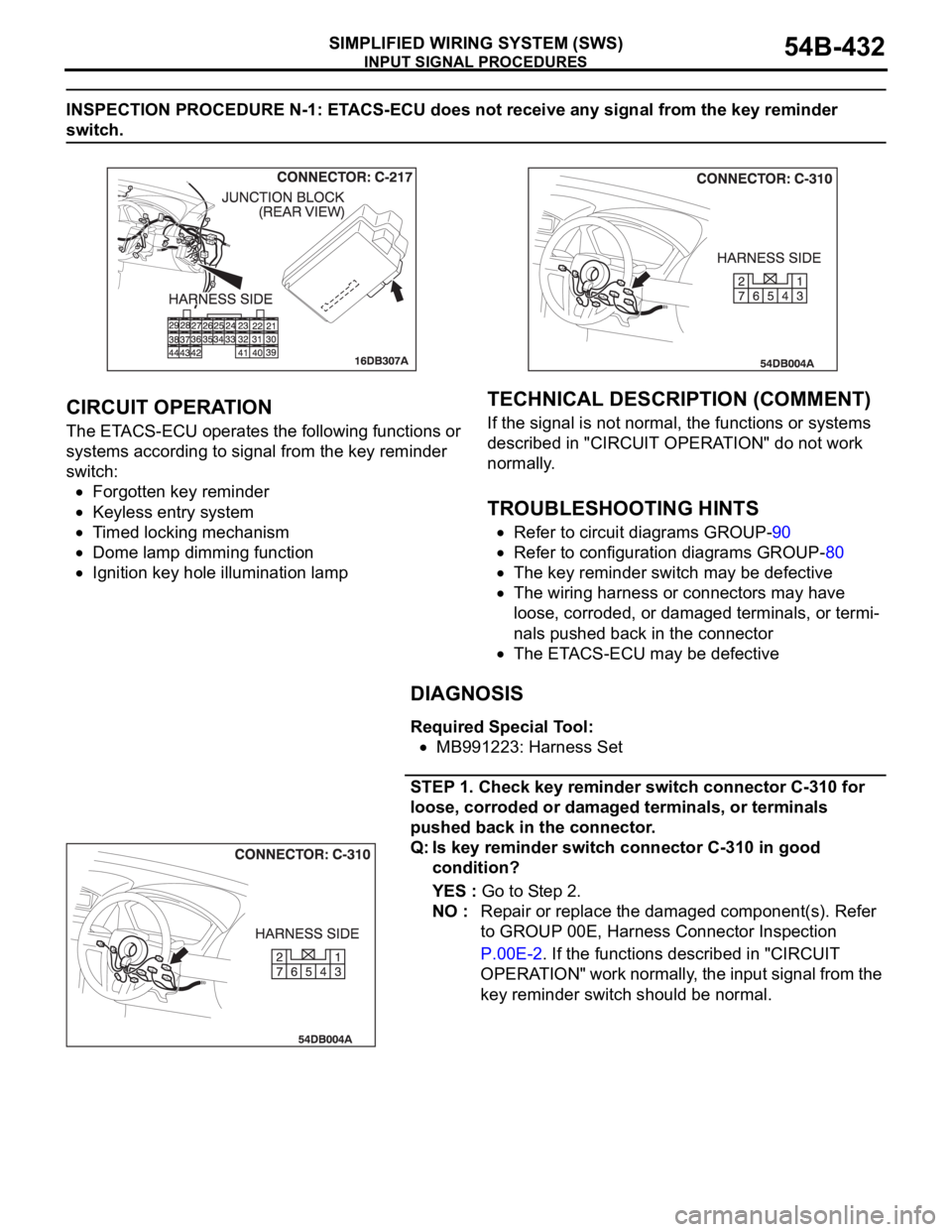
STEP 1. Check key reminder switch connector C-310 for
loose, corroded or damaged terminals, or terminals
pushed back in the connector.
Q: Is key reminder switch connector C-310 in good
condition?
YES : Go to Step 2.
NO : Repair or replace the damaged component(s). Refer
to GROUP 00E, Harness Connector Inspection
P.00E-2. If the functions described in "CIRCUIT
OPERATION" work normally, the input signal from the
key reminder switch should be normal.
Page 440 of 1500
INPUT SIGNAL PROCEDURES
SIMPLIFIED WIRING SYSTEM (SWS)54B-440
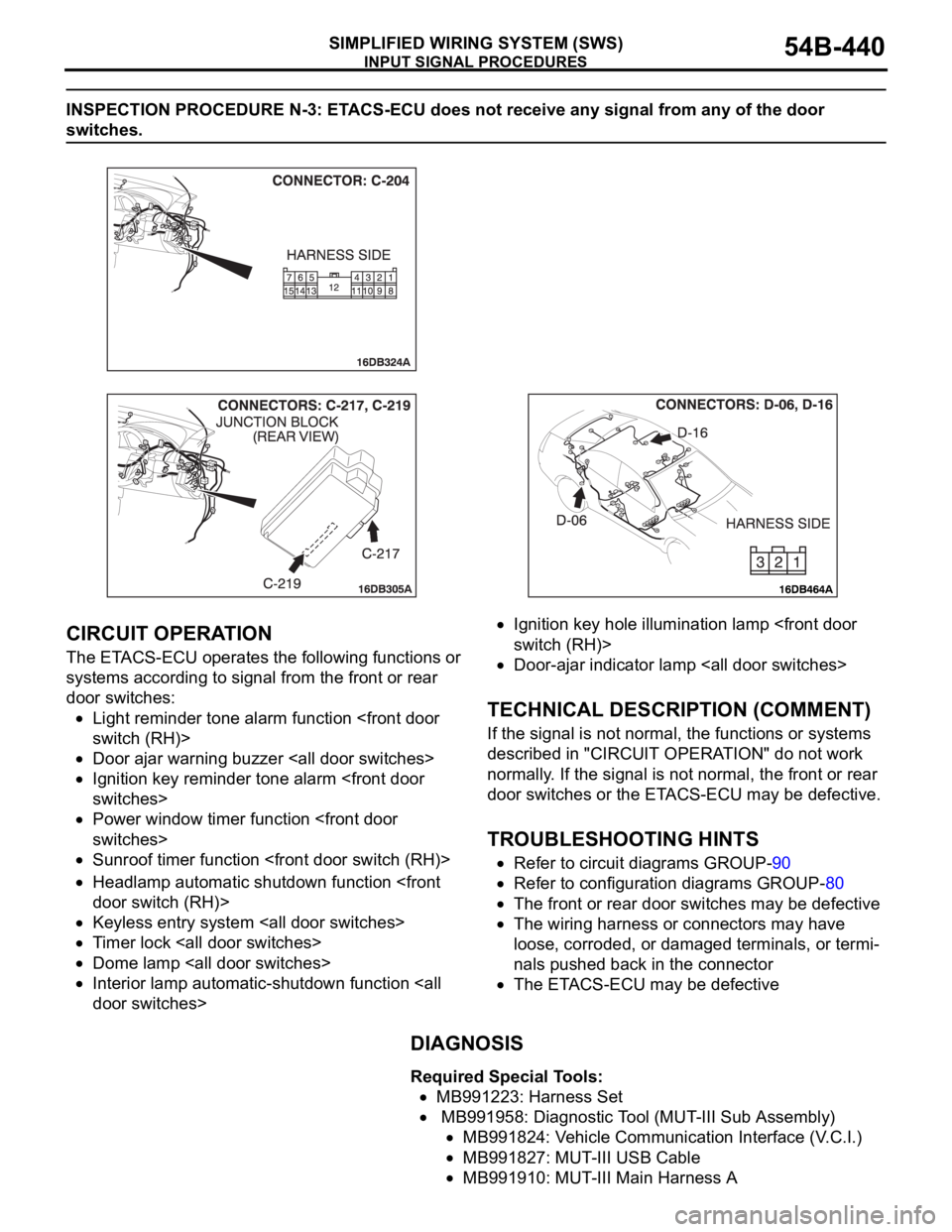
INSPECTION PROCEDURE N-3: ETACS-ECU does not receive any signal from any of the door
switches.
.
CIRCUIT OPERATION
The ETACS-ECU operates the following functions or
systems according to signal from the front or rear
door switches:
Light reminder tone alarm function
Door ajar warning buzzer
Ignition key reminder tone alarm
Power window timer function
Sunroof timer function
Headlamp automatic shutdown function
Keyless entry system
Timer lock
Dome lamp
Interior lamp automatic-shutdown function
Ignition key hole illumination lamp
Door-ajar indicator lamp
.
TECHNICAL DESCRIPTION (COMMENT)
If the signal is not normal, the functions or systems
described in "CIRCUIT OPERATION" do not work
normally. If the signal is not normal, the front or rear
door switches or the ETACS-ECU may be defective.
.
TROUBLESHOOTING HINTS
Refer to circuit diagrams GROUP-90
Refer to configuration diagrams GROUP-80
The front or rear door switches may be defective
The wiring harness or connectors may have
loose, corroded, or damaged terminals, or termi-
nals pushed back in the connector
The ETACS-ECU may be defective
DIAGNOSIS
Required Special Tools:
MB991223: Harness Set
MB991958: Diagnostic Tool (MUT-III Sub Assembly)
MB991824: Vehicle Communication Interface (V.C.I.)
MB991827: MUT-III USB Cable
MB991910: MUT-III Main Harness A
Page 441 of 1500
INPUT SIGNAL PROCEDURES
SIMPLIFIED WIRING SYSTEM (SWS)54B-441
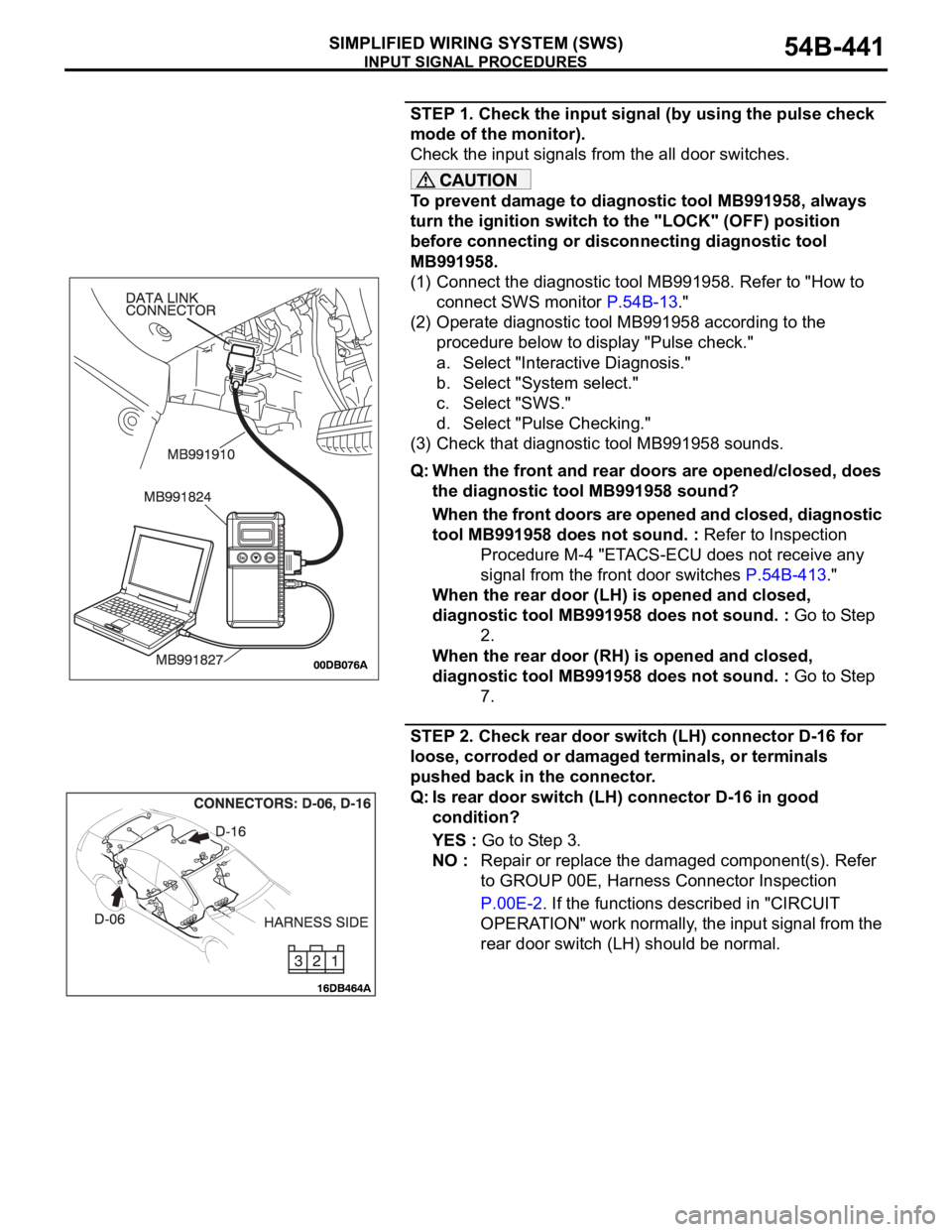
STEP 1. Check the input signal (by using the pulse check
mode of the monitor).
Check the input signals from the all door switches.
To prevent damage to diagnostic tool MB991958, always
turn the ignition switch to the "LOCK" (OFF) position
before connecting or disconnecting diagnostic tool
MB991958.
(1) Connect the diagnostic tool MB991958. Refer to "How to
connect SWS monitor P.54B-13."
(2) Operate diagnostic tool MB991958 according to the
procedure below to display "Pulse check."
a. Select "Interactive Diagnosis."
b. Select "System select."
c. Select "SWS."
d. Select "Pulse Checking."
(3) Check that diagnostic tool MB991958 sounds.
Q: When the front and rear doors are opened/closed, does
the diagnostic tool MB991958 sound?
When the front doors are opened and closed, diagnostic
tool MB991958 does not sound. : Refer to Inspection
Procedure M-4 "ETACS-ECU does not receive any
signal from the front door switches P.54B-413."
When the rear door (LH) is opened and closed,
diagnostic tool MB991958 does not sound. : Go to Step
2.
When the rear door (RH) is opened and closed,
diagnostic tool MB991958 does not sound. : Go to Step
7.
STEP 2. Check rear door switch (LH) connector D-16 for
loose, corroded or damaged terminals, or terminals
pushed back in the connector.
Q: Is rear door switch (LH) connector D-16 in good
condition?
YES : Go to Step 3.
NO : Repair or replace the damaged component(s). Refer
to GROUP 00E, Harness Connector Inspection
P.00E-2. If the functions described in "CIRCUIT
OPERATION" work normally, the input signal from the
rear door switch (LH) should be normal.
Page 443 of 1500
INPUT SIGNAL PROCEDURES
SIMPLIFIED WIRING SYSTEM (SWS)54B-443
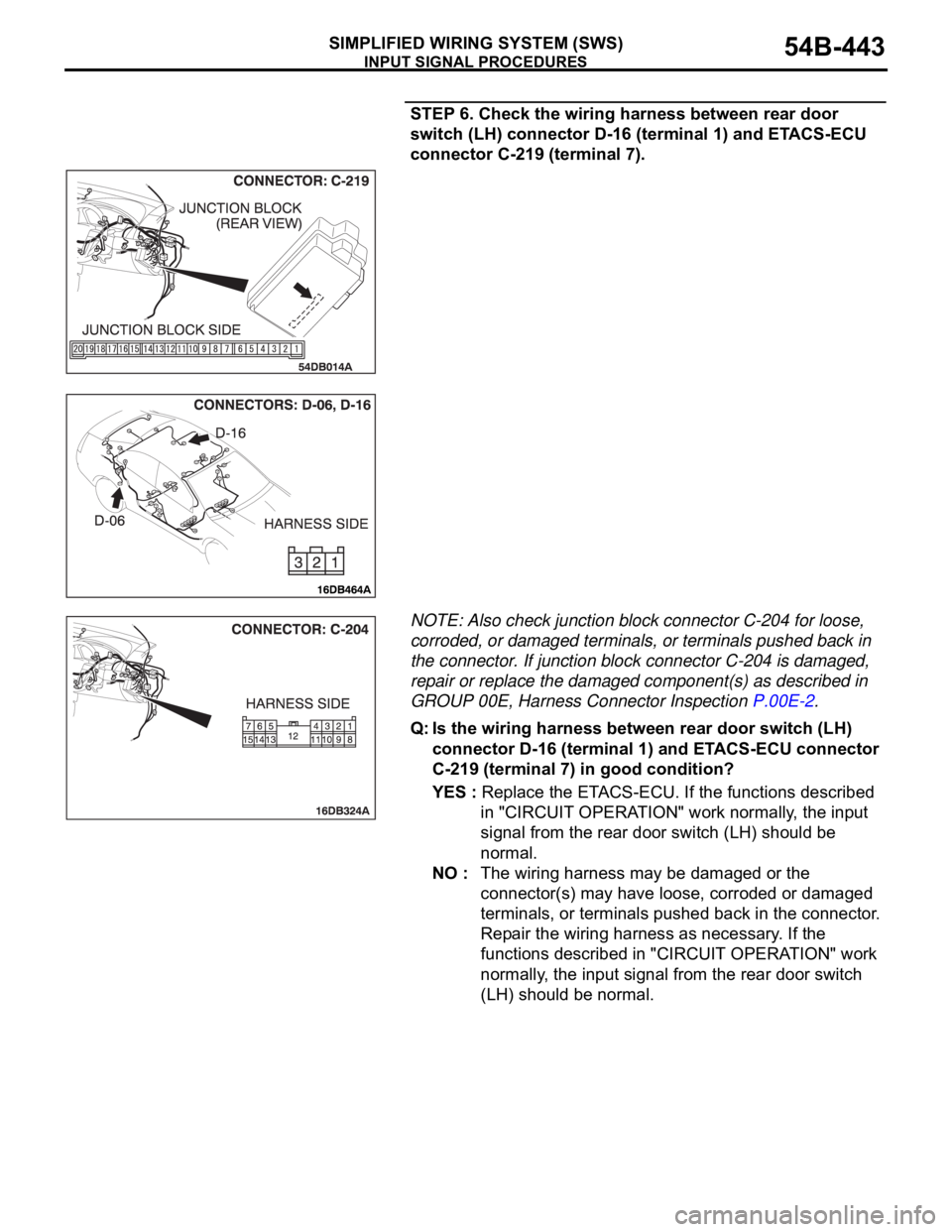
STEP 6. Check the wiring harness between rear door
switch (LH) connector D-16 (terminal 1) and ETACS-ECU
connector C-219 (terminal 7).
NOTE: Also check junction block connector C-204 for loose,
corroded, or damaged terminals, or terminals pushed back in
the connector. If junction block connector C-204 is damaged,
repair or replace the damaged component(s) as described in
GROUP 00E, Harness Connector Inspection P.00E-2.
Q: Is the wiring harness between rear door switch (LH)
connector D-16 (terminal 1) and ETACS-ECU connector
C-219 (terminal 7) in good condition?
YES : Replace the ETACS-ECU. If the functions described
in "CIRCUIT OPERATION" work normally, the input
signal from the rear door switch (LH) should be
normal.
NO : The wiring harness may be damaged or the
connector(s) may have loose, corroded or damaged
terminals, or terminals pushed back in the connector.
Repair the wiring harness as necessary. If the
functions described in "CIRCUIT OPERATION" work
normally, the input signal from the rear door switch
(LH) should be normal.
Page 446 of 1500
INPUT SIGNAL PROCEDURES
SIMPLIFIED WIRING SYSTEM (SWS)54B-446
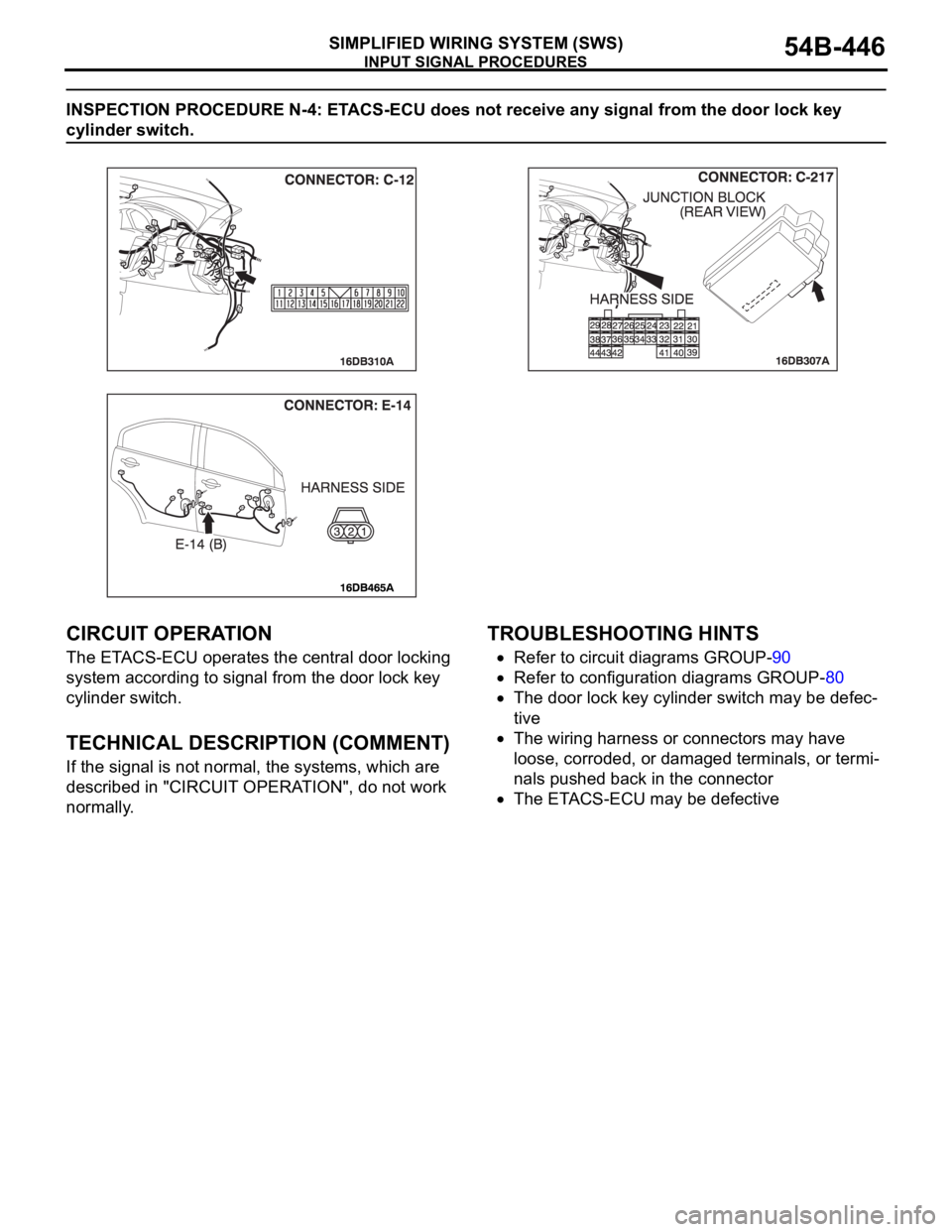
INSPECTION PROCEDURE N-4: ETACS-ECU does not receive any signal from the door lock key
cylinder switch.
.
CIRCUIT OPERATION
The ETACS-ECU operates the central door locking
system according to signal from the door lock key
cylinder switch.
.
TECHNICAL DESCRIPTION (COMMENT)
If the signal is not normal, the systems, which are
described in "CIRCUIT OPERATION", do not work
normally.
.
TROUBLESHOOTING HINTS
Refer to circuit diagrams GROUP-90
Refer to configuration diagrams GROUP-80
The door lock key cylinder switch may be defec-
tive
The wiring harness or connectors may have
loose, corroded, or damaged terminals, or termi-
nals pushed back in the connector
The ETACS-ECU may be defective
Page 447 of 1500
INPUT SIGNAL PROCEDURES
SIMPLIFIED WIRING SYSTEM (SWS)54B-447
DIAGNOSIS
Required Special Tool:
MB991223: Harness Set
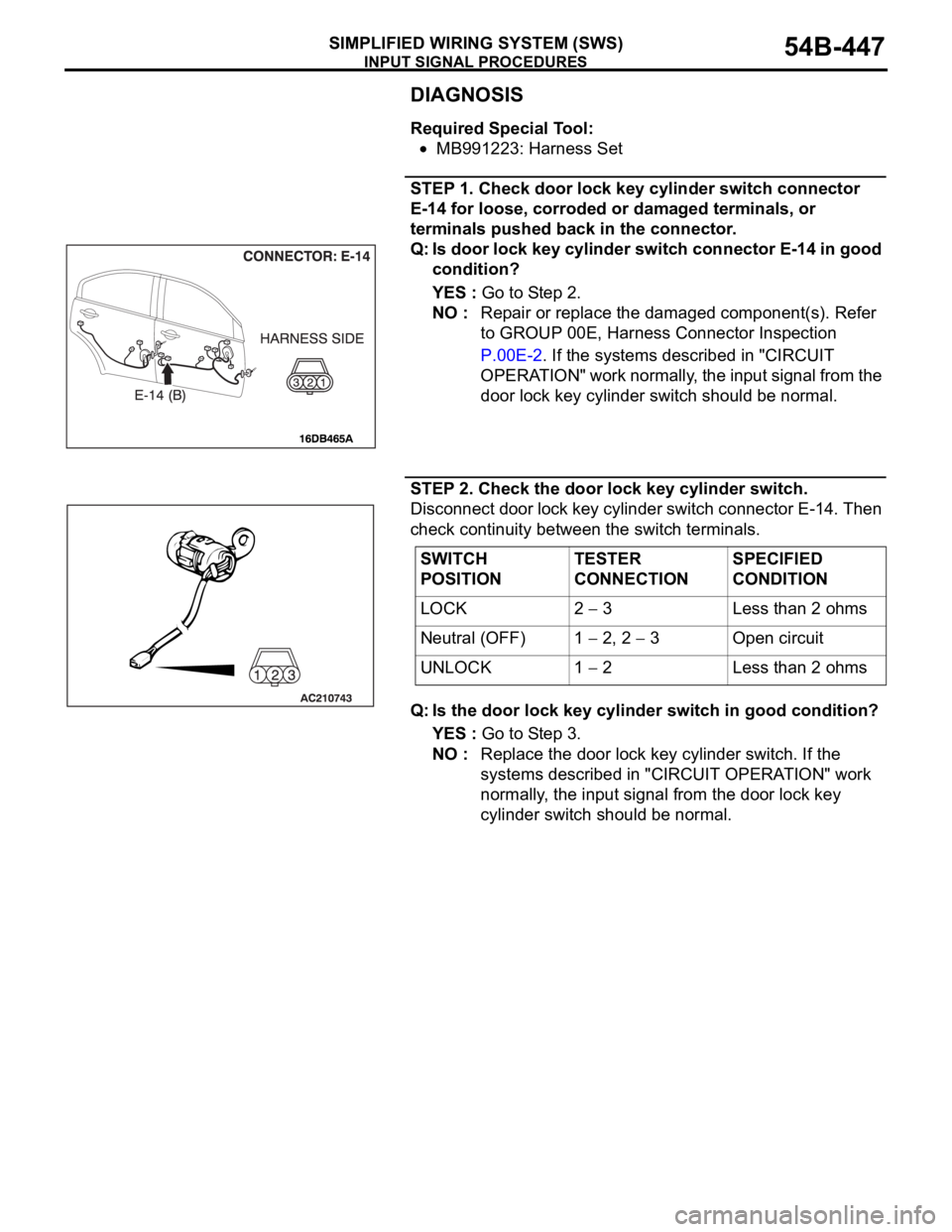
STEP 1. Check door lock key cylinder switch connector
E-14 for loose, corroded or damaged terminals, or
terminals pushed back in the connector.
Q: Is door lock key cylinder switch connector E-14 in good
condition?
YES : Go to Step 2.
NO : Repair or replace the damaged component(s). Refer
to GROUP 00E, Harness Connector Inspection
P.00E-2. If the systems described in "CIRCUIT
OPERATION" work normally, the input signal from the
door lock key cylinder switch should be normal.
STEP 2. Check the door lock key cylinder switch.
Disconnect door lock key cylinder switch connector E-14. Then
check continuity between the switch terminals.
Q: Is the door lock key cylinder switch in good condition?
YES : Go to Step 3.
NO : Replace the door lock key cylinder switch. If the
systems described in "CIRCUIT OPERATION" work
normally, the input signal from the door lock key
cylinder switch should be normal.
SWITCH
POSITIONTESTER
CONNECTIONSPECIFIED
CONDITION
LOCK 2
3 Less than 2 ohms
Neutral (OFF) 1
2, 2 3 Open circuit
UNLOCK 1
2 Less than 2 ohms
Page 448 of 1500
INPUT SIGNAL PROCEDURES
SIMPLIFIED WIRING SYSTEM (SWS)54B-448
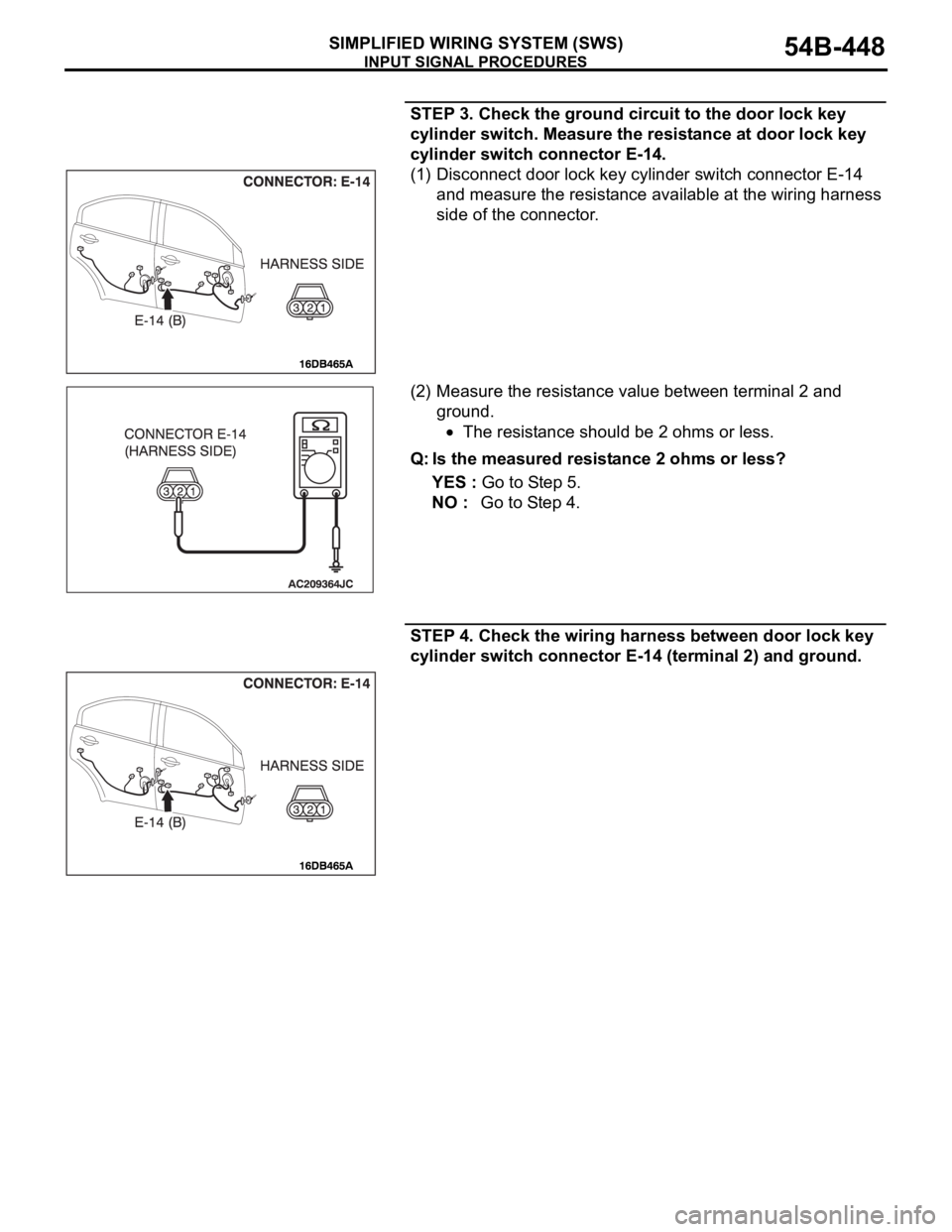
STEP 3. Check the ground circuit to the door lock key
cylinder switch. Measure the resistance at door lock key
cylinder switch connector E-14.
(1) Disconnect door lock key cylinder switch connector E-14
and measure the resistance available at the wiring harness
side of the connector.
(2) Measure the resistance value between terminal 2 and
ground.
The resistance should be 2 ohms or less.
Q: Is the measured resistance 2 ohms or less?
YES : Go to Step 5.
NO : Go to Step 4.
STEP 4. Check the wiring harness between door lock key
cylinder switch connector E-14 (terminal 2) and ground.