diagnostic MITSUBISHI 380 2005 Workshop Manual
[x] Cancel search | Manufacturer: MITSUBISHI, Model Year: 2005, Model line: 380, Model: MITSUBISHI 380 2005Pages: 1500, PDF Size: 47.87 MB
Page 423 of 1500

INPUT SIGNAL PROCEDURES
SIMPLIFIED WIRING SYSTEM (SWS)54B-423
INSPECTION PROCEDURE M-6: Column switch: ETACS-ECU does not receive any signal from the
windshield mist wiper switch, the windshield intermittent wiper switch, the windshield low-speed
wiper switch, the windshield high-speed wiper switch or the windshield washer switch.
NOTE: This troubleshooting procedure requires the
use of diagnostic tool MB991958 and SWS monitor
kit MB991813. For details on how to use the SWS
monitor, refer to "How to connect SWS monitor
P.54B-13."
.
CIRCUIT OPERATION
The ETACS-ECU operates the windshield wiper and
washer according to signal from the windshield wiper
and washer switch.
.
TECHNICAL DESCRIPTION (COMMENT)
If the signal is not normal, the windshield wiper and
washer do not work normally.
.
TROUBLESHOOTING HINTS
Refer to circuit diagrams GROUP-90
Refer to configuration diagrams GROUP-80
The column switch may be defective (windshield
wiper and washer switch)
The ETACS-ECU may be defective
DIAGNOSIS
Required Special Tools:
MB991223: Harness Set
MB991958: Diagnostic Tool (MUT-III Sub Assembly)
MB991824: Vehicle Communication Interface (V.C.I.)
MB991827: MUT-III USB Cable
MB991910: MUT-III Main Harness A
MB991813: SWS Monitor Kit
MB991806: SWS Monitor Cartridge
MB991812: SWS Monitor Harness (For Column-ECU)
MB991822: Test Probe Harness
Page 424 of 1500
INPUT SIGNAL PROCEDURES
SIMPLIFIED WIRING SYSTEM (SWS)54B-424
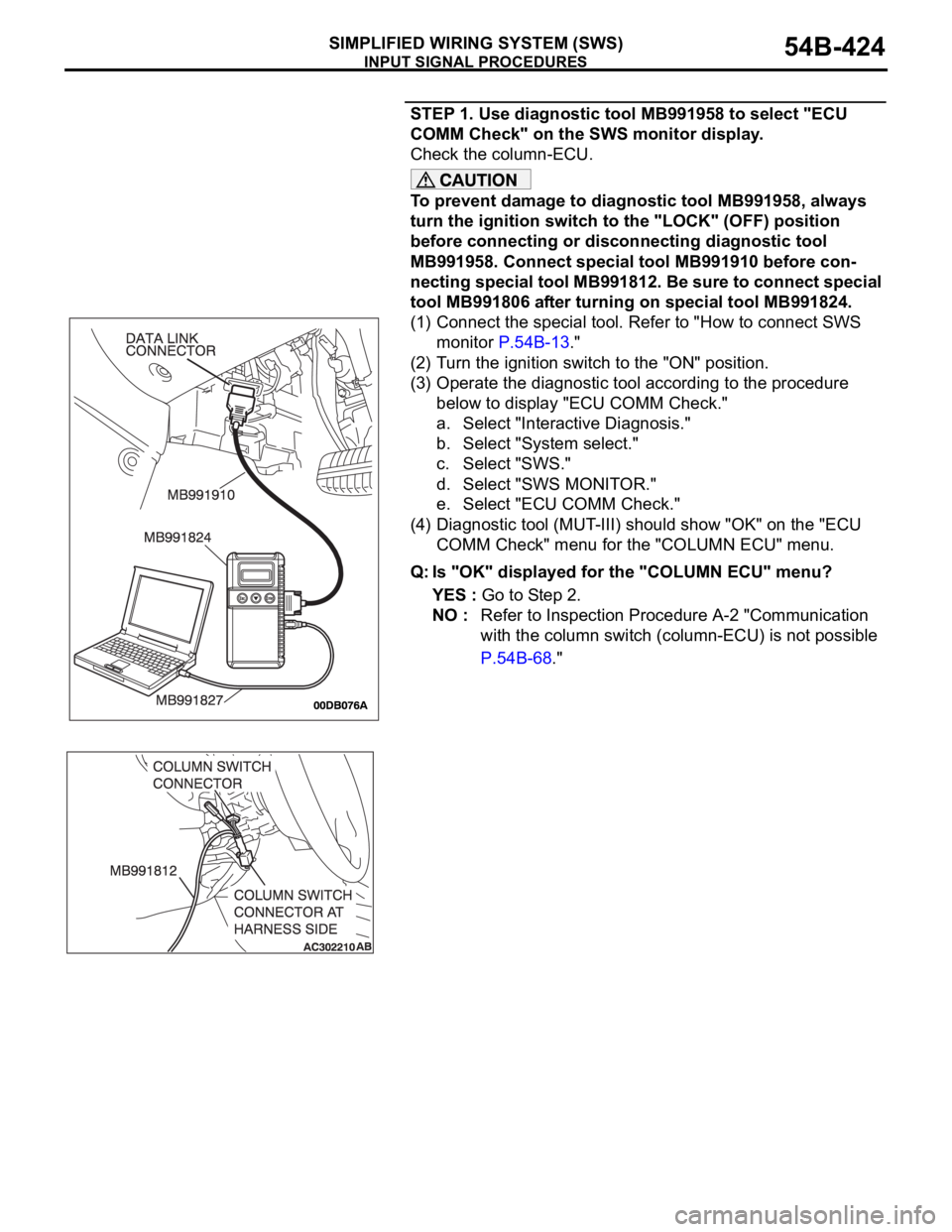
STEP 1. Use diagnostic tool MB991958 to select "ECU
COMM Check" on the SWS monitor display.
Check the column-ECU.
To prevent damage to diagnostic tool MB991958, always
turn the ignition switch to the "LOCK" (OFF) position
before connecting or disconnecting diagnostic tool
MB991958. Connect special tool MB991910 before con-
necting special tool MB991812. Be sure to connect special
tool MB991806 after turning on special tool MB991824.
(1) Connect the special tool. Refer to "How to connect SWS
monitor P.54B-13."
(2) Turn the ignition switch to the "ON" position.
(3) Operate the diagnostic tool according to the procedure
below to display "ECU COMM Check."
a. Select "Interactive Diagnosis."
b. Select "System select."
c. Select "SWS."
d. Select "SWS MONITOR."
e. Select "ECU COMM Check."
(4) Diagnostic tool (MUT-III) should show "OK" on the "ECU
COMM Check" menu for the "COLUMN ECU" menu.
Q: Is "OK" displayed for the "COLUMN ECU" menu?
YES : Go to Step 2.
NO : Refer to Inspection Procedure A-2 "Communication
with the column switch (column-ECU) is not possible
P.54B-68."
Page 440 of 1500
INPUT SIGNAL PROCEDURES
SIMPLIFIED WIRING SYSTEM (SWS)54B-440
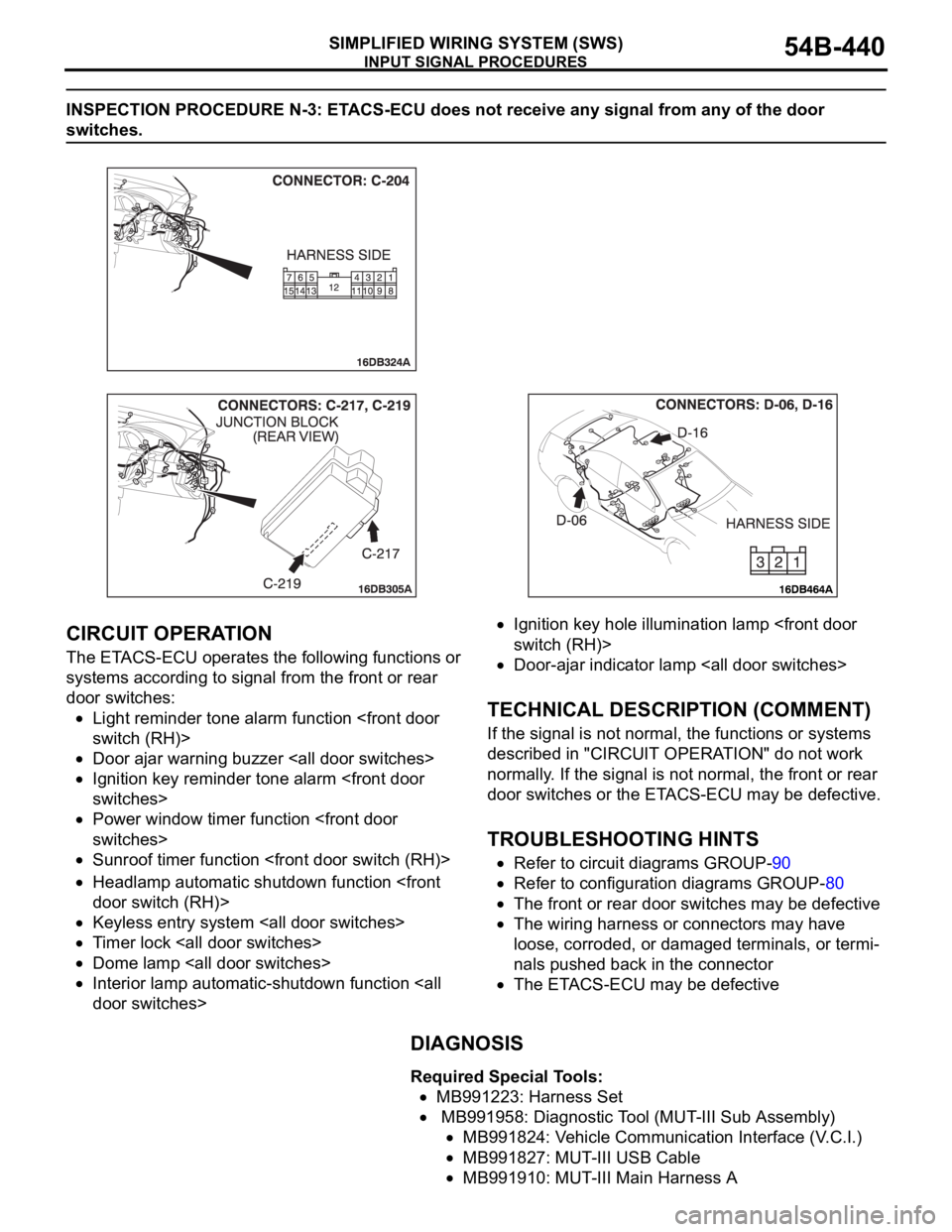
INSPECTION PROCEDURE N-3: ETACS-ECU does not receive any signal from any of the door
switches.
.
CIRCUIT OPERATION
The ETACS-ECU operates the following functions or
systems according to signal from the front or rear
door switches:
Light reminder tone alarm function
Door ajar warning buzzer
Ignition key reminder tone alarm
Power window timer function
Sunroof timer function
Headlamp automatic shutdown function
Keyless entry system
Timer lock
Dome lamp
Interior lamp automatic-shutdown function
Ignition key hole illumination lamp
Door-ajar indicator lamp
.
TECHNICAL DESCRIPTION (COMMENT)
If the signal is not normal, the functions or systems
described in "CIRCUIT OPERATION" do not work
normally. If the signal is not normal, the front or rear
door switches or the ETACS-ECU may be defective.
.
TROUBLESHOOTING HINTS
Refer to circuit diagrams GROUP-90
Refer to configuration diagrams GROUP-80
The front or rear door switches may be defective
The wiring harness or connectors may have
loose, corroded, or damaged terminals, or termi-
nals pushed back in the connector
The ETACS-ECU may be defective
DIAGNOSIS
Required Special Tools:
MB991223: Harness Set
MB991958: Diagnostic Tool (MUT-III Sub Assembly)
MB991824: Vehicle Communication Interface (V.C.I.)
MB991827: MUT-III USB Cable
MB991910: MUT-III Main Harness A
Page 441 of 1500
INPUT SIGNAL PROCEDURES
SIMPLIFIED WIRING SYSTEM (SWS)54B-441
STEP 1. Check the input signal (by using the pulse check
mode of the monitor).
Check the input signals from the all door switches.
To prevent damage to diagnostic tool MB991958, always
turn the ignition switch to the "LOCK" (OFF) position
before connecting or disconnecting diagnostic tool
MB991958.
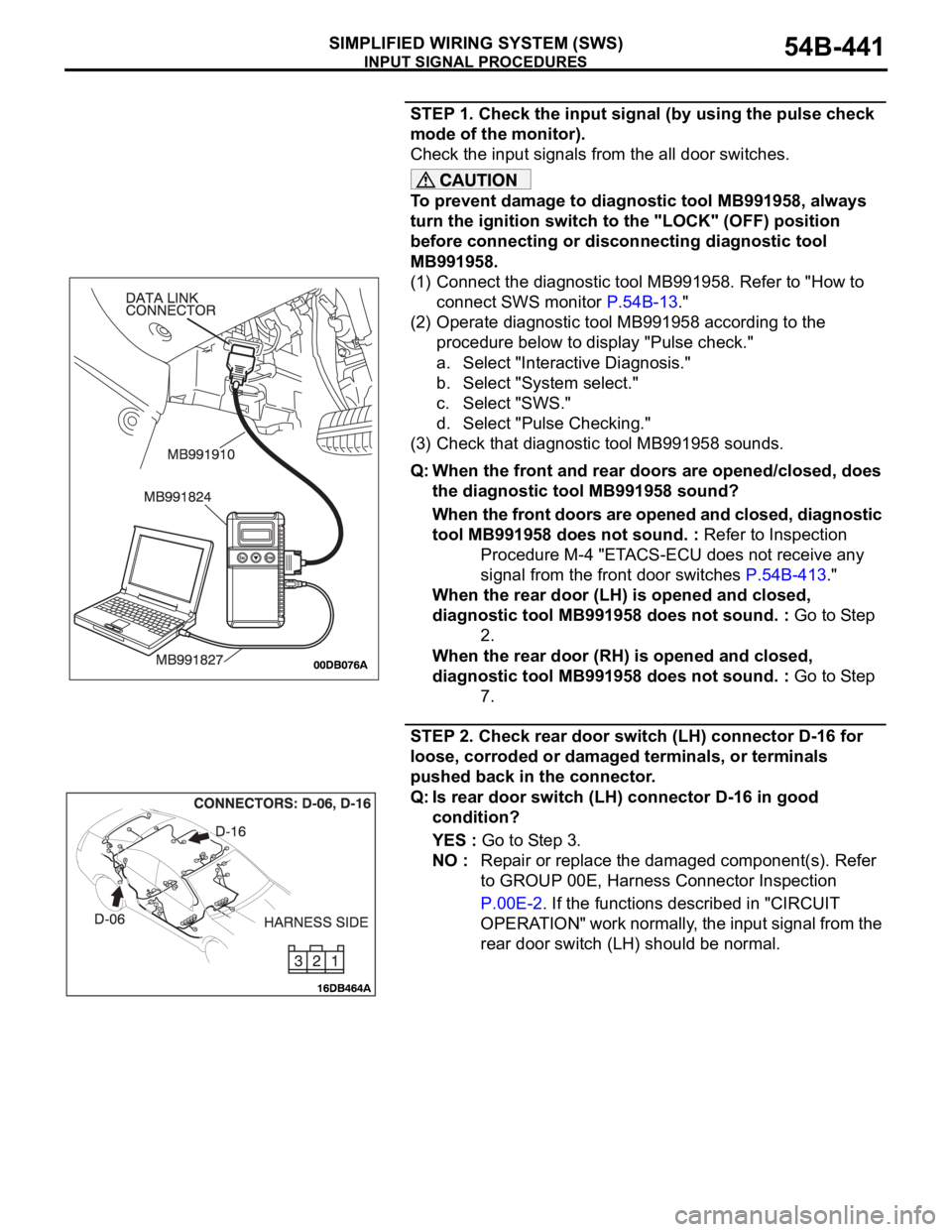
(1) Connect the diagnostic tool MB991958. Refer to "How to
connect SWS monitor P.54B-13."
(2) Operate diagnostic tool MB991958 according to the
procedure below to display "Pulse check."
a. Select "Interactive Diagnosis."
b. Select "System select."
c. Select "SWS."
d. Select "Pulse Checking."
(3) Check that diagnostic tool MB991958 sounds.
Q: When the front and rear doors are opened/closed, does
the diagnostic tool MB991958 sound?
When the front doors are opened and closed, diagnostic
tool MB991958 does not sound. : Refer to Inspection
Procedure M-4 "ETACS-ECU does not receive any
signal from the front door switches P.54B-413."
When the rear door (LH) is opened and closed,
diagnostic tool MB991958 does not sound. : Go to Step
2.
When the rear door (RH) is opened and closed,
diagnostic tool MB991958 does not sound. : Go to Step
7.
STEP 2. Check rear door switch (LH) connector D-16 for
loose, corroded or damaged terminals, or terminals
pushed back in the connector.
Q: Is rear door switch (LH) connector D-16 in good
condition?
YES : Go to Step 3.
NO : Repair or replace the damaged component(s). Refer
to GROUP 00E, Harness Connector Inspection
P.00E-2. If the functions described in "CIRCUIT
OPERATION" work normally, the input signal from the
rear door switch (LH) should be normal.
Page 452 of 1500
INPUT SIGNAL PROCEDURES
SIMPLIFIED WIRING SYSTEM (SWS)54B-452
DIAGNOSIS
Required Special Tools:
MB991223: Harness Set
MB991958: Diagnostic Tool (MUT-III Sub Assembly)
MB991824: Vehicle Communication Interface (V.C.I.)
MB991827: MUT-III USB Cable
MB991910: MUT-III Main Harness A
STEP 1. Check the input signal (by using the pulse check
mode of the monitor).
Check the input signals from the front door lock actuators.
To prevent damage to diagnostic tool MB991958, always
turn the ignition switch to the "LOCK" (OFF) position
before connecting or disconnecting diagnostic tool
MB991958.
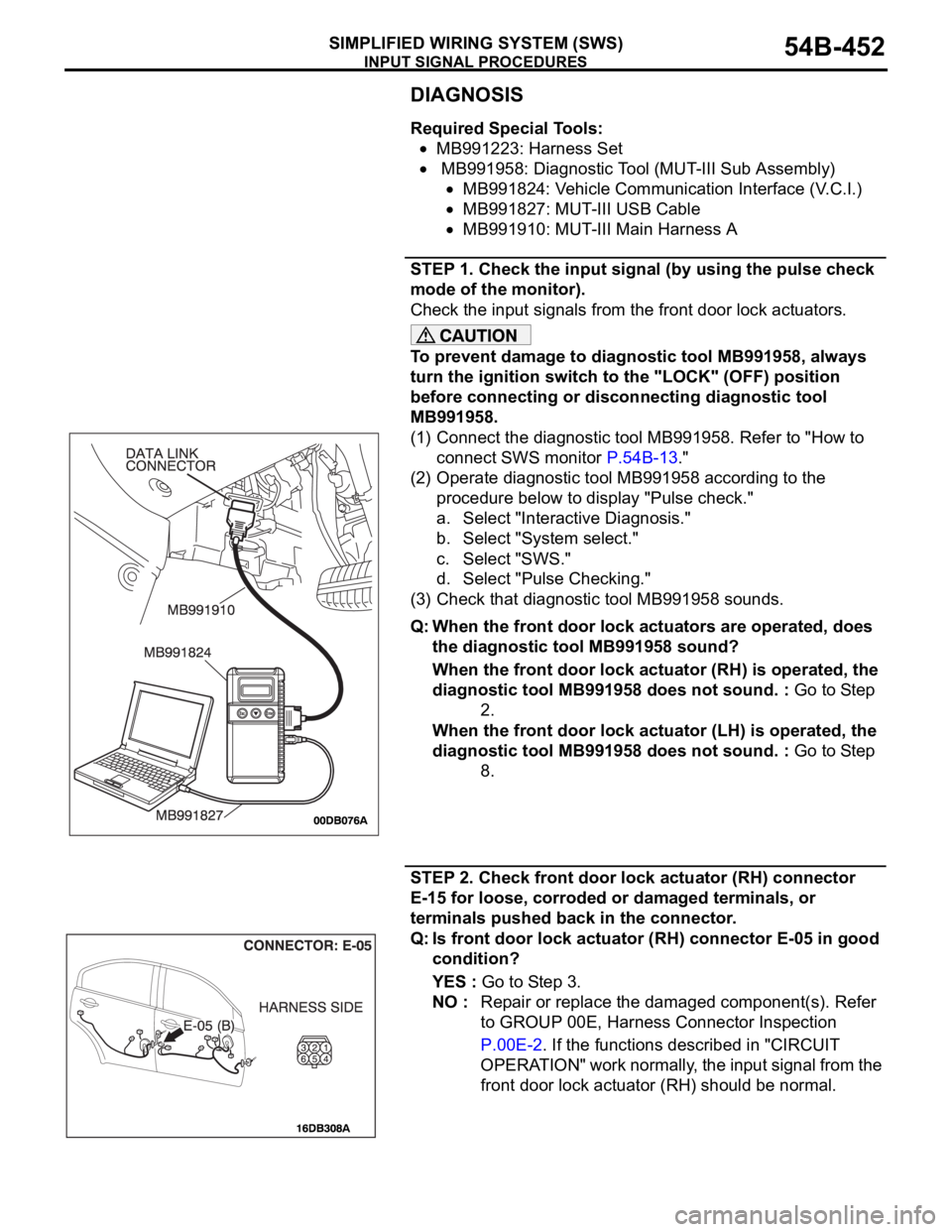
(1) Connect the diagnostic tool MB991958. Refer to "How to
connect SWS monitor P.54B-13."
(2) Operate diagnostic tool MB991958 according to the
procedure below to display "Pulse check."
a. Select "Interactive Diagnosis."
b. Select "System select."
c. Select "SWS."
d. Select "Pulse Checking."
(3) Check that diagnostic tool MB991958 sounds.
Q: When the front door lock actuators are operated, does
the diagnostic tool MB991958 sound?
When the front door lock actuator (RH) is operated, the
diagnostic tool MB991958 does not sound. : Go to Step
2.
When the front door lock actuator (LH) is operated, the
diagnostic tool MB991958 does not sound. : Go to Step
8.
STEP 2. Check front door lock actuator (RH) connector
E-15 for loose, corroded or damaged terminals, or
terminals pushed back in the connector.
Q: Is front door lock actuator (RH) connector E-05 in good
condition?
YES : Go to Step 3.
NO : Repair or replace the damaged component(s). Refer
to GROUP 00E, Harness Connector Inspection
P.00E-2. If the functions described in "CIRCUIT
OPERATION" work normally, the input signal from the
front door lock actuator (RH) should be normal.
Page 461 of 1500
INPUT SIGNAL PROCEDURES
SIMPLIFIED WIRING SYSTEM (SWS)54B-461
DIAGNOSIS
Required Special Tool:
MB991223: Harness Set
MB991958: Diagnostic Tool (MUT-III Sub Assembly)
MB991824: Vehicle Communication Interface (V.C.I.)
MB991827: MUT-III USB Cable
MB991910: MUT-III Main Harness A
STEP 1. Check the input signal (by using the pulse check
mode of the monitor).
Check the input signals from the door lock switch (incorporated
in the power window main switch and front power window sub
switch).
To prevent damage to diagnostic tool MB991958, always
turn the ignition switch to the "LOCK" (OFF) position
before connecting or disconnecting diagnostic tool
MB991958.
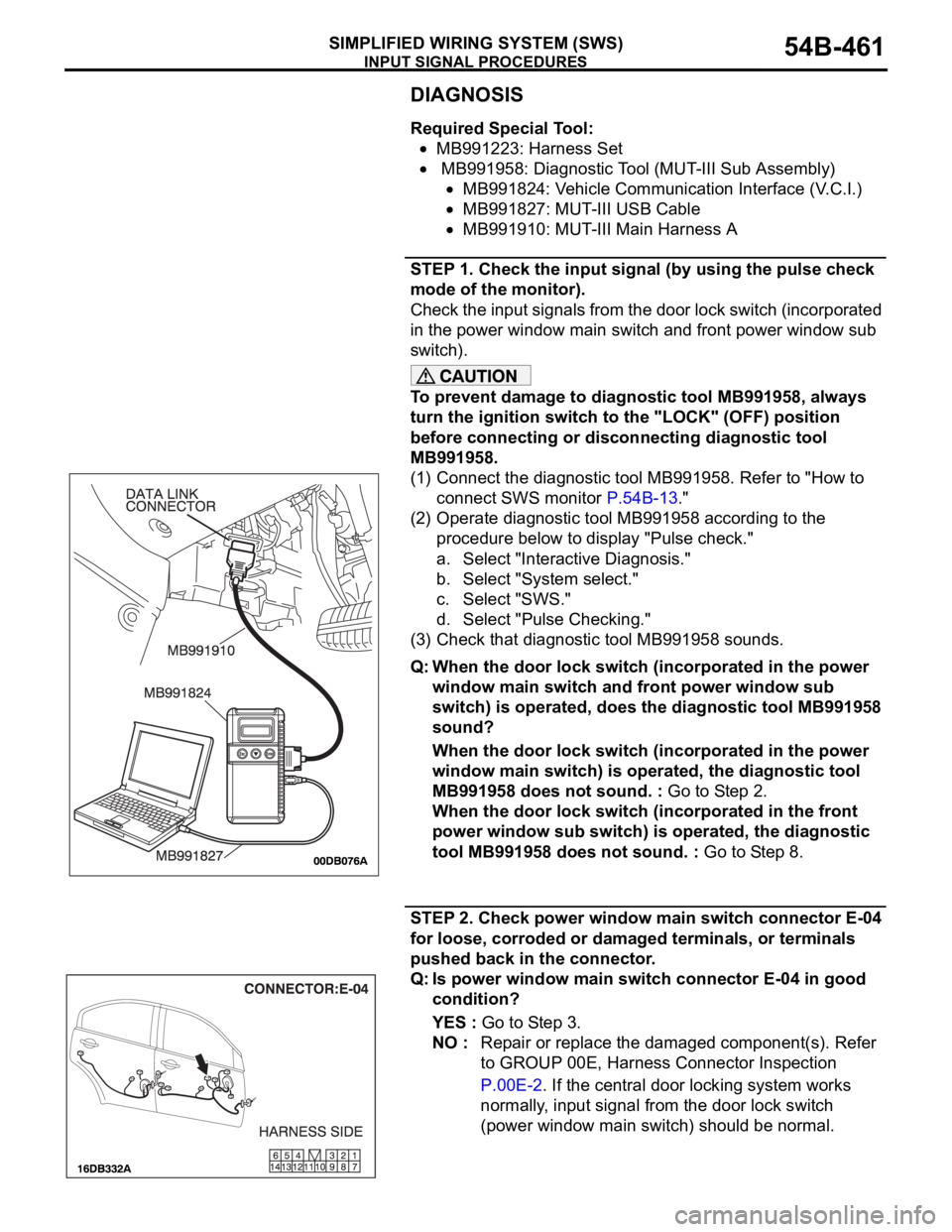
(1) Connect the diagnostic tool MB991958. Refer to "How to
connect SWS monitor P.54B-13."
(2) Operate diagnostic tool MB991958 according to the
procedure below to display "Pulse check."
a. Select "Interactive Diagnosis."
b. Select "System select."
c. Select "SWS."
d. Select "Pulse Checking."
(3) Check that diagnostic tool MB991958 sounds.
Q: When the door lock switch (incorporated in the power
window main switch and front power window sub
switch) is operated, does the diagnostic tool MB991958
sound?
When the door lock switch (incorporated in the power
window main switch) is operated, the diagnostic tool
MB991958 does not sound. : Go to Step 2.
When the door lock switch (incorporated in the front
power window sub switch) is operated, the diagnostic
tool MB991958 does not sound. : Go to Step 8.
STEP 2. Check power window main switch connector E-04
for loose, corroded or damaged terminals, or terminals
pushed back in the connector.
Q: Is power window main switch connector E-04 in good
condition?
YES : Go to Step 3.
NO : Repair or replace the damaged component(s). Refer
to GROUP 00E, Harness Connector Inspection
P.00E-2. If the central door locking system works
normally, input signal from the door lock switch
(power window main switch) should be normal.
Page 473 of 1500
INPUT SIGNAL PROCEDURES
SIMPLIFIED WIRING SYSTEM (SWS)54B-473
DIAGNOSTIC PROCEDURE
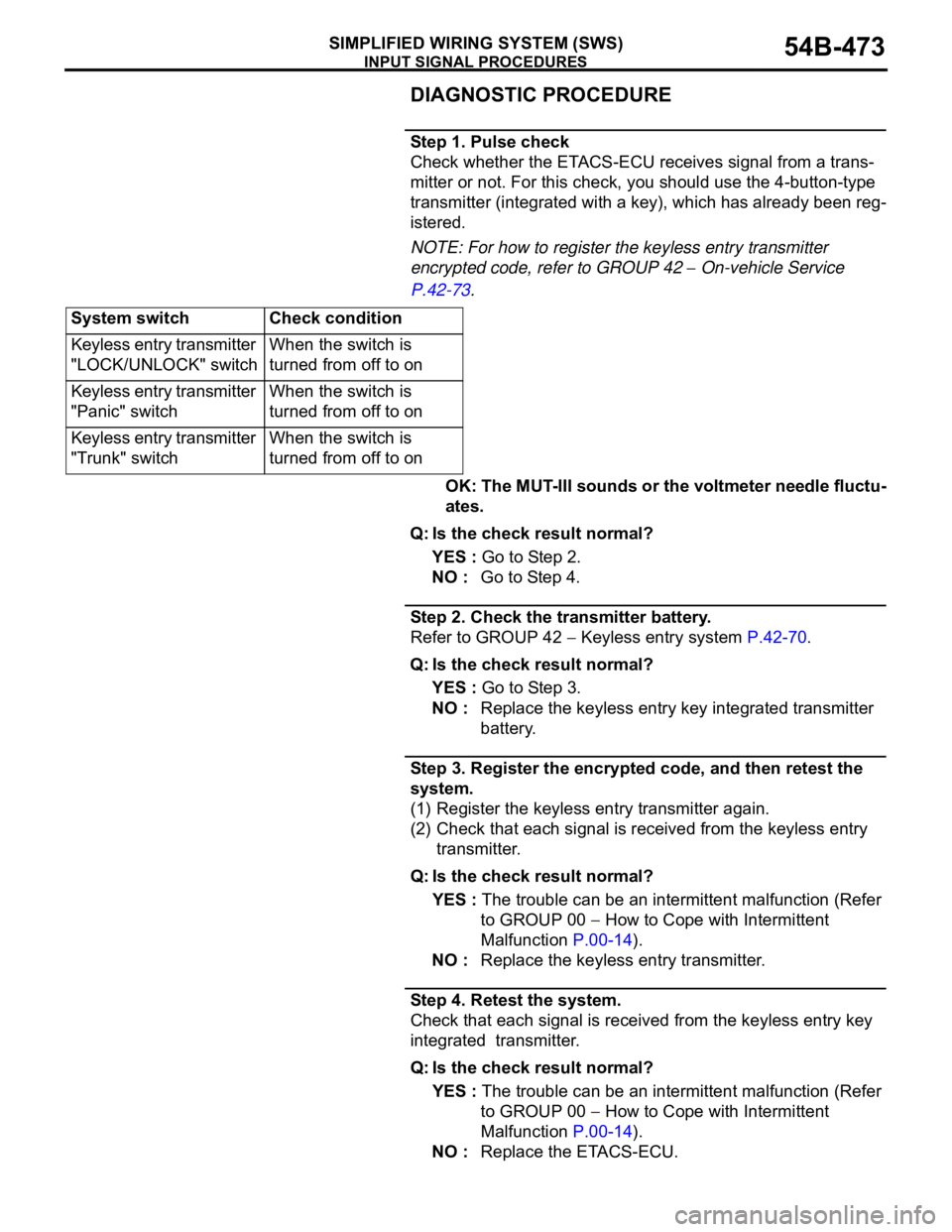
Step 1. Pulse check
Check whether the ETACS-ECU receives signal from a trans-
mitter or not. For this check, you should use the 4-button-type
transmitter (integrated with a key), which has already been reg-
istered.
NOTE: For how to register the keyless entry transmitter
encrypted code, refer to GROUP 42
On-vehicle Service
P.42-73.
OK: The MUT-III sounds or the voltmeter needle fluctu-
ates.
Q: Is the check result normal?
YES : Go to Step 2.
NO : Go to Step 4.
Step 2. Check the transmitter battery.
Refer to GROUP 42
Keyless entry system P.42-70.
Q: Is the check result normal?
YES : Go to Step 3.
NO : Replace the keyless entry key integrated transmitter
battery.
Step 3. Register the encrypted code, and then retest the
system.
(1) Register the keyless entry transmitter again.
(2) Check that each signal is received from the keyless entry
transmitter.
Q: Is the check result normal?
YES : The trouble can be an intermittent malfunction (Refer
to GROUP 00
How to Cope with Intermittent
Malfunction P.00-14).
NO : Replace the keyless entry transmitter.
Step 4. Retest the system.
Check that each signal is received from the keyless entry key
integrated transmitter.
Q: Is the check result normal?
YES : The trouble can be an intermittent malfunction (Refer
to GROUP 00
How to Cope with Intermittent
Malfunction P.00-14).
NO : Replace the ETACS-ECU. System switch Check condition
Keyless entry transmitter
"LOCK/UNLOCK" switchWhen the switch is
turned from off to on
Keyless entry transmitter
"Panic" switchWhen the switch is
turned from off to on
Keyless entry transmitter
"Trunk" switchWhen the switch is
turned from off to on
Page 482 of 1500

CHECK AT ECU TERMINAL
SIMPLIFIED WIRING SYSTEM (SWS)54B-482
54 58
59 Input from front passenger's door
switchFront passenger's door switch:
ON (front passenger's door
open)0 V
60 Input of signal from variable
intermittent wiper control switchIgnition switch: "ACC,"
Variable intermittent wiper
control switch: "FAST" to
"SLOW"0
2.5 V
61 Input of diagnosis indication
selectionWhen diagnostic tool is
connected0 V
62 Output of data request signal Always 0
12 V (pulse signal)
63 Output to ignition key hole
illumination lampWhen ignition key hole
illumination lamp is on0 V
64
65
66 CAN HI Always 60 10
67 CAN LO Always 60 10
68 Output to security lamp 0 V TERMINAL
NO.INSPECTION ITEM INSPECTION CONDITION NORMAL VALUE
Page 491 of 1500
INTERIOR52A-2
FRONT SEAT ASSEMBLY* . . . . . . .52A-21
REMOVAL AND INSTALLATION . . . . . . . . 52A-21
INSPECTION . . . . . . . . . . . . . . . . . . . . . . . 52A-23
POWER SEAT CONTINUITY AND
DIAGNOSTIC CHECKS . . . . . . . . . . . . . . . 52A-23
OPERATION CHECK OF POWER
SEAT MOTOR . . . . . . . . . . . . . . . . . . . . . . 52A-29
MEMORY SEAT CONTROLLER (MSC). . . 52A-31
DISASSEMBLY AND ASSEMBLY RH SIDE52A-33
DISASSEMBLY AND ASSEMBLY LH SIDE52A-37
REMOVAL SERVICE POINT . . . . . . . . . . . 52A-42
FRONT SEAT TRIM COVER
REMOVAL AND FITMENT . . . . . . . . . . . . . 52A-43
REAR SEAT CUSHION TRIM COVER
REMOVAL AND FITMENT . . . . . . . . . . . . . 52A-46
REAR SEAT BACK TRIM COVERREMOVAL AND FITMENT . . . . . . . . . . . . . 52A-49
REAR SEAT ASSEMBLY . . . . . . . . . .52A-55
REMOVAL AND INSTALLATION . . . . . . . . 52A-55
DISASSEMBLY AND REASSEMBLY . . . . . 52A-57
FRONT SEAT BELT* . . . . . . . . . . . . .52A-58
REMOVAL AND INSTALLATION . . . . . . . . 52A-58
INSPECTION. . . . . . . . . . . . . . . . . . . . . . . . 52A-59
REAR SEAT BELT . . . . . . . . . . . . . . .52A-59
REMOVAL AND INSTALLATION . . . . . . . . 52A-59
SPECIFICATIONS . . . . . . . . . . . . . . .52A-60
FASTENER TIGHTENING
SPECIFICATIONS. . . . . . . . . . . . . . . . . . . . 52A-60
Page 520 of 1500
FRONT SEAT ASSEMBLY
INTERIOR52A-31
FAULT DIAGNOSIS
MEMORY SEAT CONTROLLER (MSC)
OPERATION OF DIAGNOSTICS:
The memory seat controller (MSC) stores specific fault codes
for all functions of the (MSC). The diagnostics are specifically
used to identify faults within the seat assembly, and as such will
hinder the operation of the seat.
When a fault is detected in the (MSC), the system will automat-
ically enter into diagnostic mode.
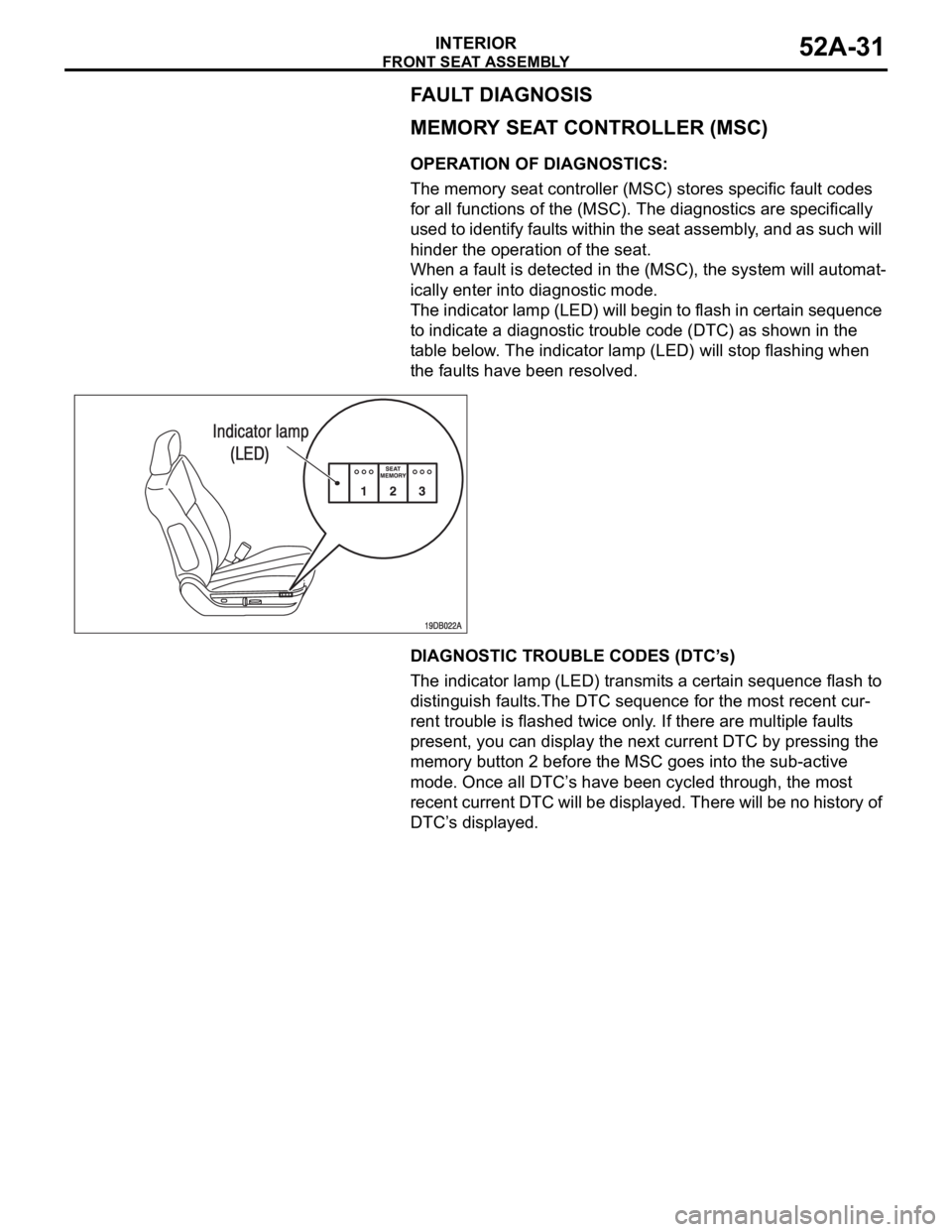
The indicator lamp (LED) will begin to flash in certain sequence
to indicate a diagnostic trouble code (DTC) as shown in the
table below. The indicator lamp (LED) will stop flashing when
the faults have been resolved.
DIAGNOSTIC TROUBLE CODES (DTC’s)
The indicator lamp (LED) transmits a certain sequence flash to
distinguish faults.The DTC sequence for the most recent cur-
rent trouble is flashed twice only. If there are multiple faults
present, you can display the next current DTC by pressing the
memory button 2 before the MSC goes into the sub-active
mode. Once all DTC’s have been cycled through, the most
recent current DTC will be displayed. There will be no history of
DTC’s displayed.