diagnostic MITSUBISHI 380 2005 Repair Manual
[x] Cancel search | Manufacturer: MITSUBISHI, Model Year: 2005, Model line: 380, Model: MITSUBISHI 380 2005Pages: 1500, PDF Size: 47.87 MB
Page 64 of 1500
SYMPTOM PROCEDURES
SIMPLIFIED WIRING SYSTEM (SWS)54B-64
STEP 1. Verify SWS monitor kit MB991813 for proper
connection.
Q: Is SWS monitor kit MB991813 connected with the
column switch properly?
YES : Go to Step 2.
NO : Connect SWS monitor kit MB991813 to the column
switch securely.
STEP 2. Verify the power supply circuit to the ETACS-ECU.
Q: Does the system communicate with diagnostic tool
MB991958 when the ignition switch is turned to the
"ON" position?
YES : Refer to Inspection Procedure A-3 "Communication
with the ETACS-ECU is not possible P.54B-74."
NO : Go to Step 3.
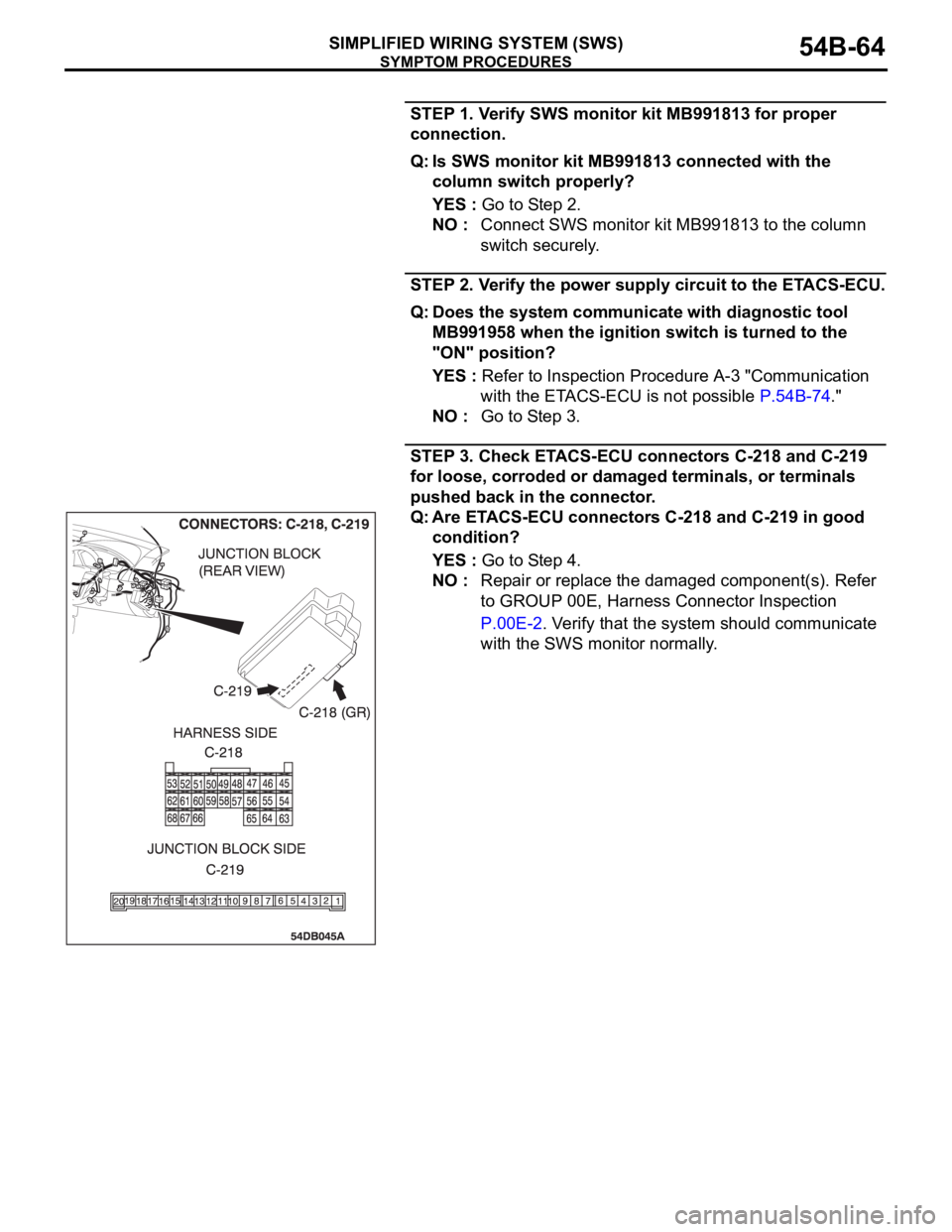
STEP 3. Check ETACS-ECU connectors C-218 and C-219
for loose, corroded or damaged terminals, or terminals
pushed back in the connector.
Q: Are ETACS-ECU connectors C-218 and C-219 in good
condition?
YES : Go to Step 4.
NO : Repair or replace the damaged component(s). Refer
to GROUP 00E, Harness Connector Inspection
P.00E-2. Verify that the system should communicate
with the SWS monitor normally.
Page 68 of 1500
SYMPTOM PROCEDURES
SIMPLIFIED WIRING SYSTEM (SWS)54B-68
INSPECTION PROCEDURE A-2: Communication with the Column Switch (column-ECU) is not
Possible.
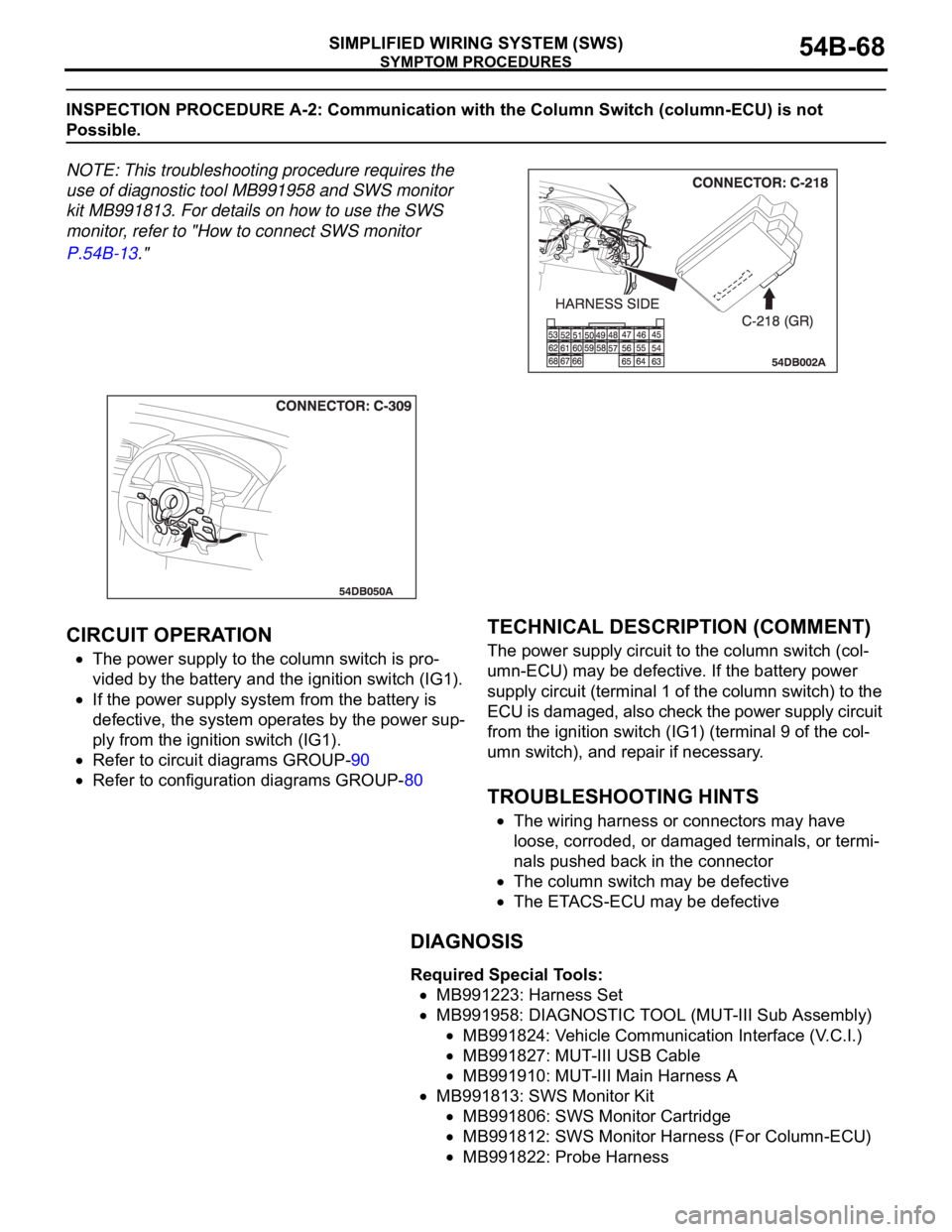
NOTE: This troubleshooting procedure requires the
use of diagnostic tool MB991958 and SWS monitor
kit MB991813. For details on how to use the SWS
monitor, refer to "How to connect SWS monitor
P.54B-13."
.
CIRCUIT OPERATION
The power supply to the column switch is pro-
vided by the battery and the ignition switch (IG1).
If the power supply system from the battery is
defective, the system operates by the power sup-
ply from the ignition switch (IG1).
Refer to circuit diagrams GROUP-90
Refer to configuration diagrams GROUP-80
.
TECHNICAL DESCRIPTION (COMMENT)
The power supply circuit to the column switch (col-
umn-ECU) may be defective. If the battery power
supply circuit (terminal 1 of the column switch) to the
ECU is damaged, also check the power supply circuit
from the ignition switch (IG1) (terminal 9 of the col-
umn switch), and repair if necessary.
.
TROUBLESHOOTING HINTS
The wiring harness or connectors may have
loose, corroded, or damaged terminals, or termi-
nals pushed back in the connector
The column switch may be defective
The ETACS-ECU may be defective
DIAGNOSIS
Required Special Tools:
MB991223: Harness Set
MB991958: DIAGNOSTIC TOOL (MUT-III Sub Assembly)
MB991824: Vehicle Communication Interface (V.C.I.)
MB991827: MUT-III USB Cable
MB991910: MUT-III Main Harness A
MB991813: SWS Monitor Kit
MB991806: SWS Monitor Cartridge
MB991812: SWS Monitor Harness (For Column-ECU)
MB991822: Probe Harness
Page 69 of 1500
SYMPTOM PROCEDURES
SIMPLIFIED WIRING SYSTEM (SWS)54B-69
STEP 1. Use diagnostic tool MB991958 to select "ECU
COMM Check" on the SWS monitor display.
Check the following ECUs:
ETACS-ECU
Column-ECU
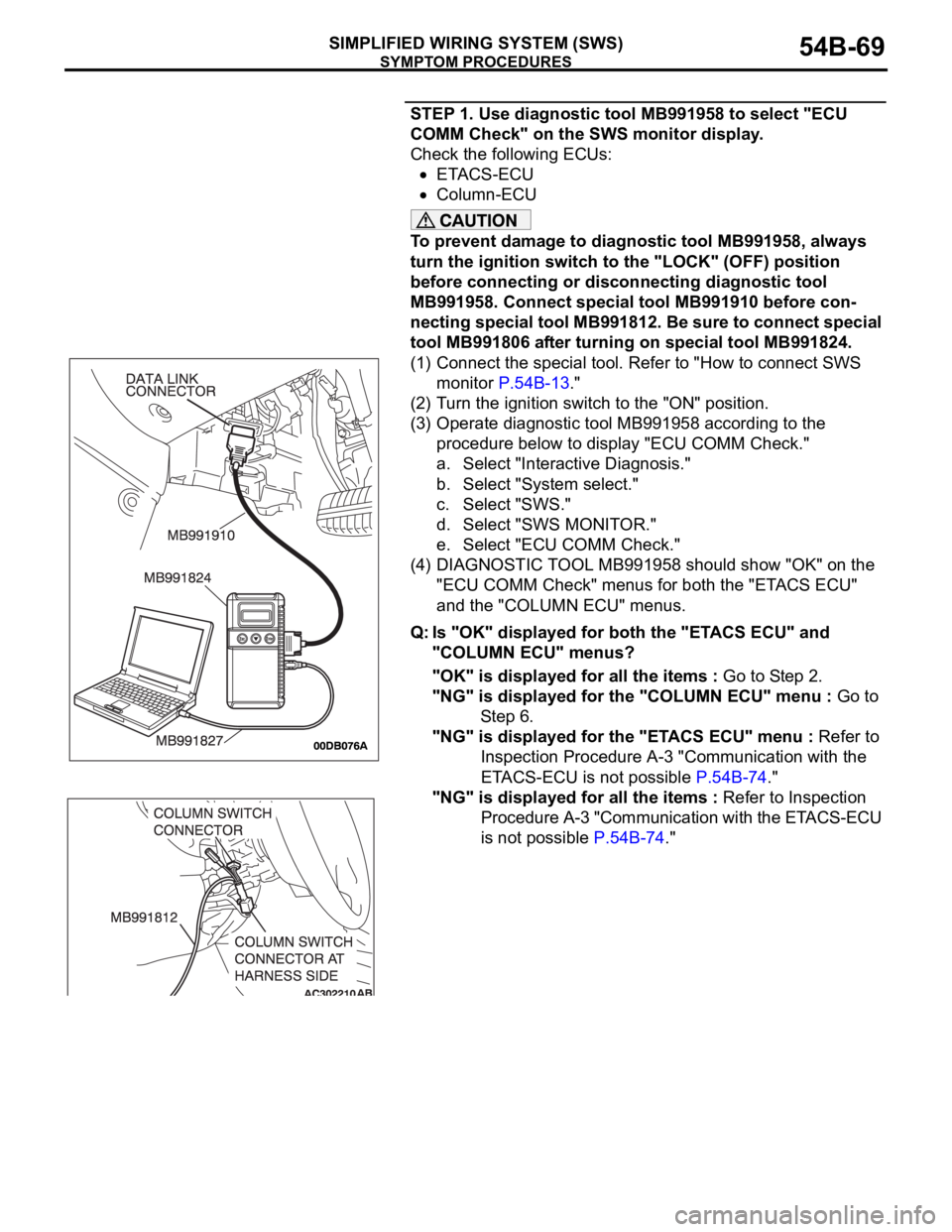
To prevent damage to diagnostic tool MB991958, always
turn the ignition switch to the "LOCK" (OFF) position
before connecting or disconnecting diagnostic tool
MB991958. Connect special tool MB991910 before con-
necting special tool MB991812. Be sure to connect special
tool MB991806 after turning on special tool MB991824.
(1) Connect the special tool. Refer to "How to connect SWS
monitor P.54B-13."
(2) Turn the ignition switch to the "ON" position.
(3) Operate diagnostic tool MB991958 according to the
procedure below to display "ECU COMM Check."
a. Select "Interactive Diagnosis."
b. Select "System select."
c. Select "SWS."
d. Select "SWS MONITOR."
e. Select "ECU COMM Check."
(4) DIAGNOSTIC TOOL MB991958 should show "OK" on the
"ECU COMM Check" menus for both the "ETACS ECU"
and the "COLUMN ECU" menus.
Q: Is "OK" displayed for both the "ETACS ECU" and
"COLUMN ECU" menus?
"OK" is displayed for all the items : Go to Step 2.
"NG" is displayed for the "COLUMN ECU" menu : Go to
St e p 6 .
"NG" is displayed for the "ETACS ECU" menu : Refer to
Inspection Procedure A-3 "Communication with the
ETACS-ECU is not possible P.54B-74."
"NG" is displayed for all the items : Refer to Inspection
Procedure A-3 "Communication with the ETACS-ECU
is not possible P.54B-74."
Page 74 of 1500
SYMPTOM PROCEDURES
SIMPLIFIED WIRING SYSTEM (SWS)54B-74
INSPECTION PROCEDURE A-3: Communication with the ETACS-ECU is not Possible.
.
CIRCUIT OPERATION
The power supply to the ETACS-ECU is provided
by the battery and the ignition switch (IG1).
If the power supply system from the battery is
defective, the system operates by the power sup-
ply from the ignition switch (IG1).
Refer to circuit diagrams GROUP-90
Refer to configuration diagrams GROUP-80
.
TECHNICAL DESCRIPTION (COMMENT)
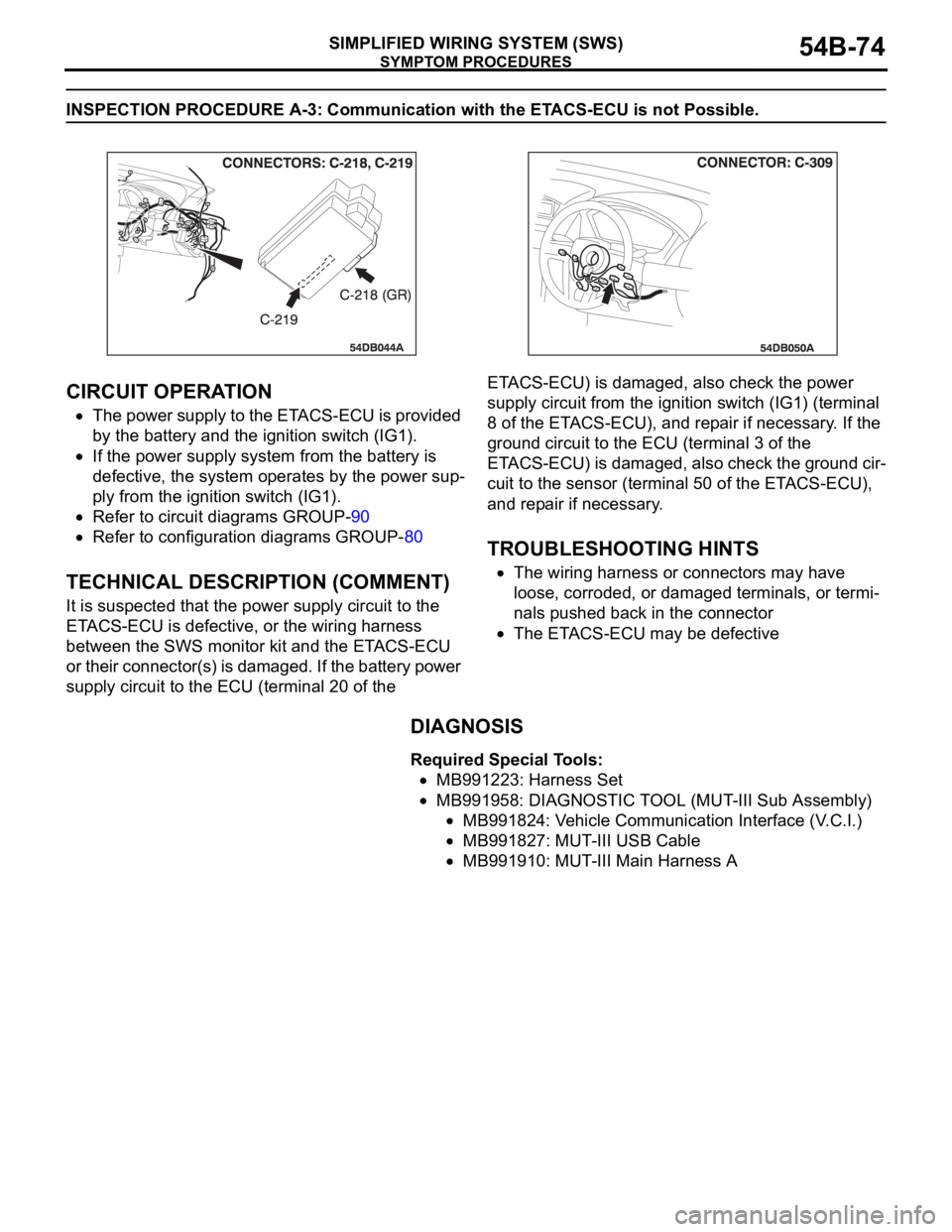
It is suspected that the power supply circuit to the
ETACS-ECU is defective, or the wiring harness
between the SWS monitor kit and the ETACS-ECU
or their connector(s) is damaged. If the battery power
supply circuit to the ECU (terminal 20 of the ETACS-ECU) is damaged, also check the power
supply circuit from the ignition switch (IG1) (terminal
8 of the ETACS-ECU), and repair if necessary. If the
ground circuit to the ECU (terminal 3 of the
ETACS-ECU) is damaged, also check the ground cir-
cuit to the sensor (terminal 50 of the ETACS-ECU),
and repair if necessary.
.
TROUBLESHOOTING HINTS
The wiring harness or connectors may have
loose, corroded, or damaged terminals, or termi-
nals pushed back in the connector
The ETACS-ECU may be defective
DIAGNOSIS
Required Special Tools:
MB991223: Harness Set
MB991958: DIAGNOSTIC TOOL (MUT-III Sub Assembly)
MB991824: Vehicle Communication Interface (V.C.I.)
MB991827: MUT-III USB Cable
MB991910: MUT-III Main Harness A
Page 80 of 1500
SYMPTOM PROCEDURES
SIMPLIFIED WIRING SYSTEM (SWS)54B-80
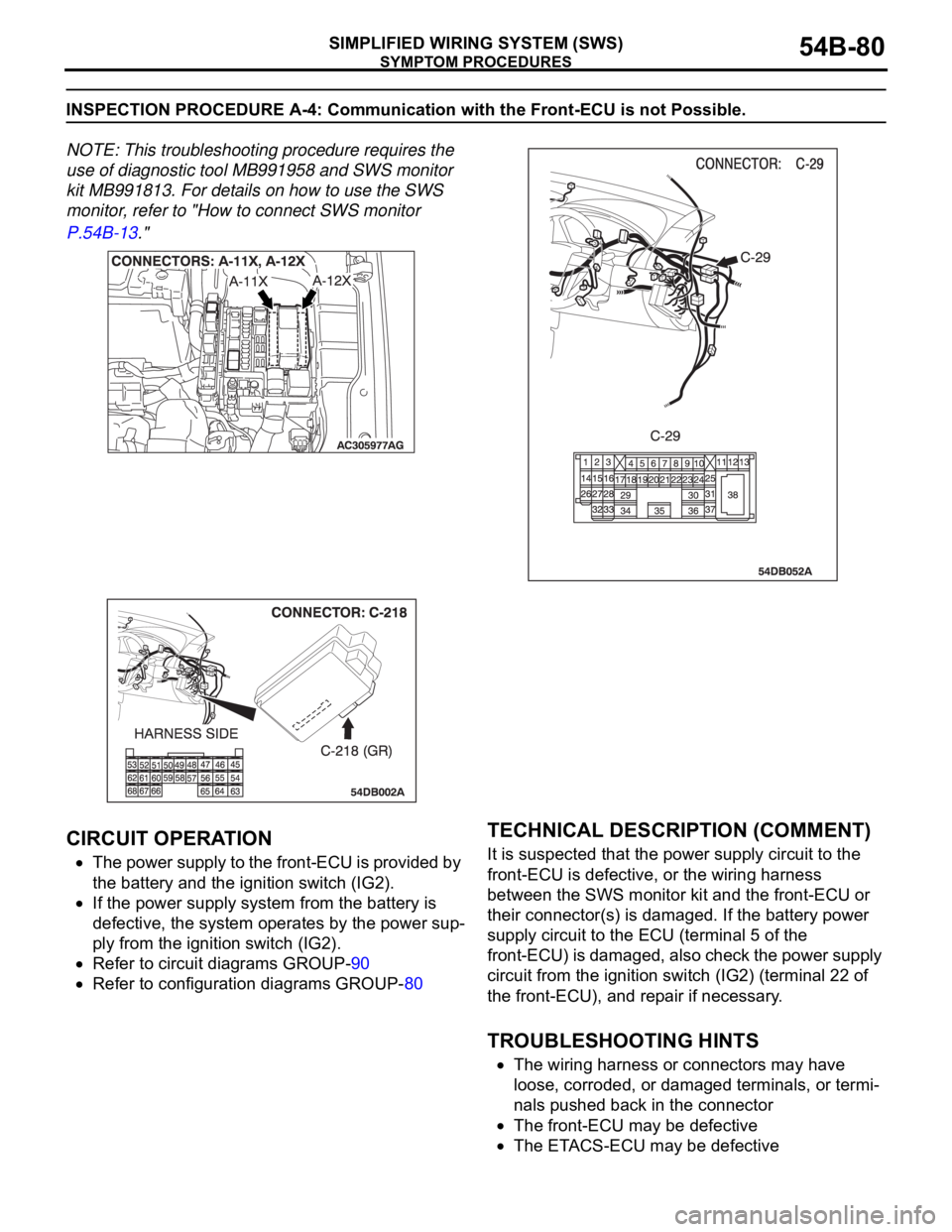
INSPECTION PROCEDURE A-4: Communication with the Front-ECU is not Possible.
NOTE: This troubleshooting procedure requires the
use of diagnostic tool MB991958 and SWS monitor
kit MB991813. For details on how to use the SWS
monitor, refer to "How to connect SWS monitor
P.54B-13."
.
CIRCUIT OPERATION
The power supply to the front-ECU is provided by
the battery and the ignition switch (IG2).
If the power supply system from the battery is
defective, the system operates by the power sup-
ply from the ignition switch (IG2).
Refer to circuit diagrams GROUP-90
Refer to configuration diagrams GROUP-80
.
TECHNICAL DESCRIPTION (COMMENT)
It is suspected that the power supply circuit to the
front-ECU is defective, or the wiring harness
between the SWS monitor kit and the front-ECU or
their connector(s) is damaged. If the battery power
supply circuit to the ECU (terminal 5 of the
front-ECU) is damaged, also check the power supply
circuit from the ignition switch (IG2) (terminal 22 of
the front-ECU), and repair if necessary.
.
TROUBLESHOOTING HINTS
The wiring harness or connectors may have
loose, corroded, or damaged terminals, or termi-
nals pushed back in the connector
The front-ECU may be defective
The ETACS-ECU may be defective
Page 81 of 1500

SYMPTOM PROCEDURES
SIMPLIFIED WIRING SYSTEM (SWS)54B-81
DIAGNOSIS
Required Special Tools:
MB991223: Harness Set
MB991958: DIAGNOSTIC TOOL (MUT-III Sub Assembly)
MB991824: Vehicle Communication Interface (V.C.I.)
MB991827: MUT-III USB Cable
MB991910: MUT-III Main Harness A
MB991813: SWS Monitor Kit
MB991806: SWS Monitor Cartridge
MB991812: SWS Monitor Harness (For Column-ECU)
MB991822: Probe Harness
Page 82 of 1500
SYMPTOM PROCEDURES
SIMPLIFIED WIRING SYSTEM (SWS)54B-82
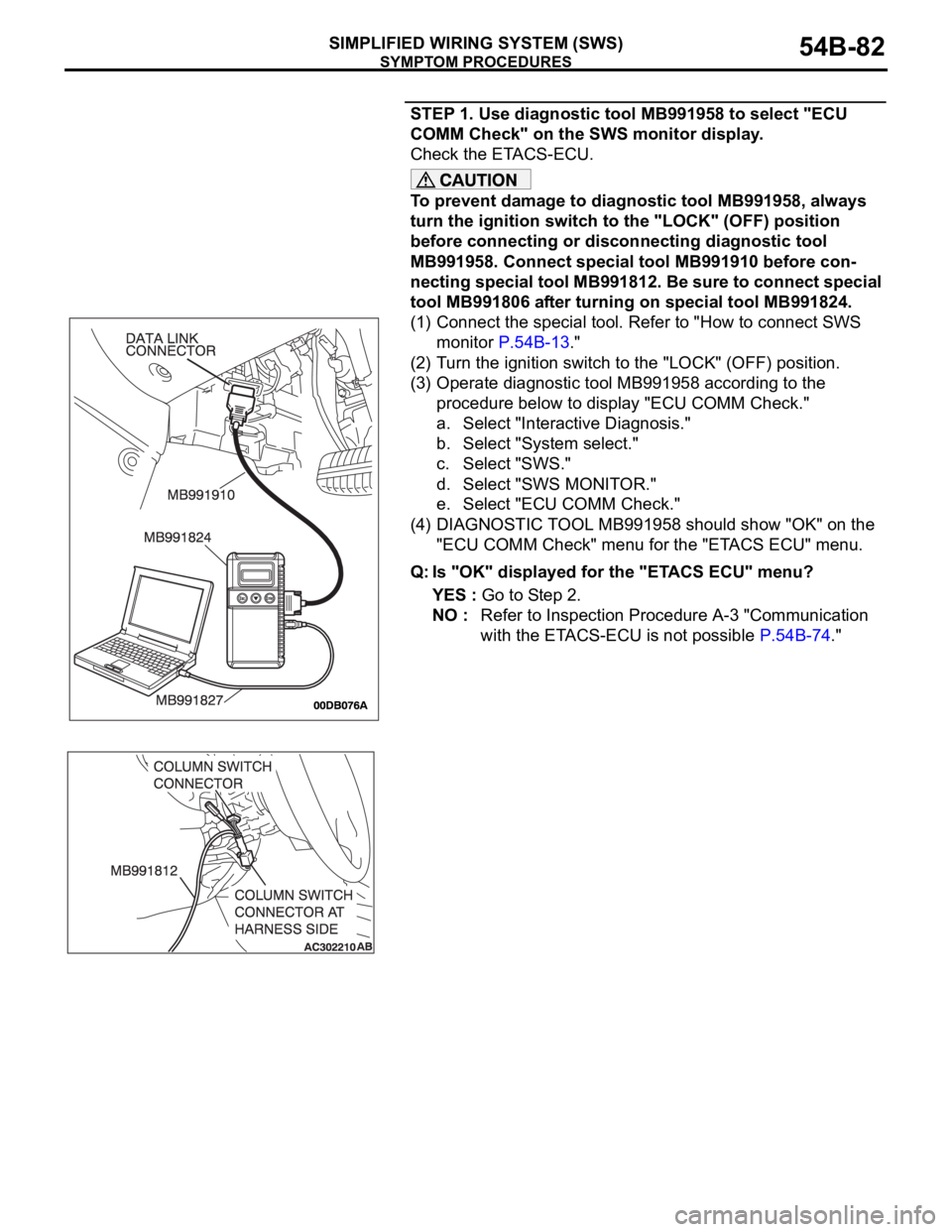
STEP 1. Use diagnostic tool MB991958 to select "ECU
COMM Check" on the SWS monitor display.
Check the ETACS-ECU.
To prevent damage to diagnostic tool MB991958, always
turn the ignition switch to the "LOCK" (OFF) position
before connecting or disconnecting diagnostic tool
MB991958. Connect special tool MB991910 before con-
necting special tool MB991812. Be sure to connect special
tool MB991806 after turning on special tool MB991824.
(1) Connect the special tool. Refer to "How to connect SWS
monitor P.54B-13."
(2) Turn the ignition switch to the "LOCK" (OFF) position.
(3) Operate diagnostic tool MB991958 according to the
procedure below to display "ECU COMM Check."
a. Select "Interactive Diagnosis."
b. Select "System select."
c. Select "SWS."
d. Select "SWS MONITOR."
e. Select "ECU COMM Check."
(4) DIAGNOSTIC TOOL MB991958 should show "OK" on the
"ECU COMM Check" menu for the "ETACS ECU" menu.
Q: Is "OK" displayed for the "ETACS ECU" menu?
YES : Go to Step 2.
NO : Refer to Inspection Procedure A-3 "Communication
with the ETACS-ECU is not possible P.54B-74."
Page 88 of 1500
SYMPTOM PROCEDURES
SIMPLIFIED WIRING SYSTEM (SWS)54B-88
DIAGNOSIS
Required Special Tools:
MB991223: Harness Set
MB991958: DIAGNOSTIC TOOL (MUT-III Sub Assembly)
MB991824: Vehicle Communication Interface (V.C.I.)
MB991827: MUT-III USB Cable
MB991910: MUT-III Main Harness A
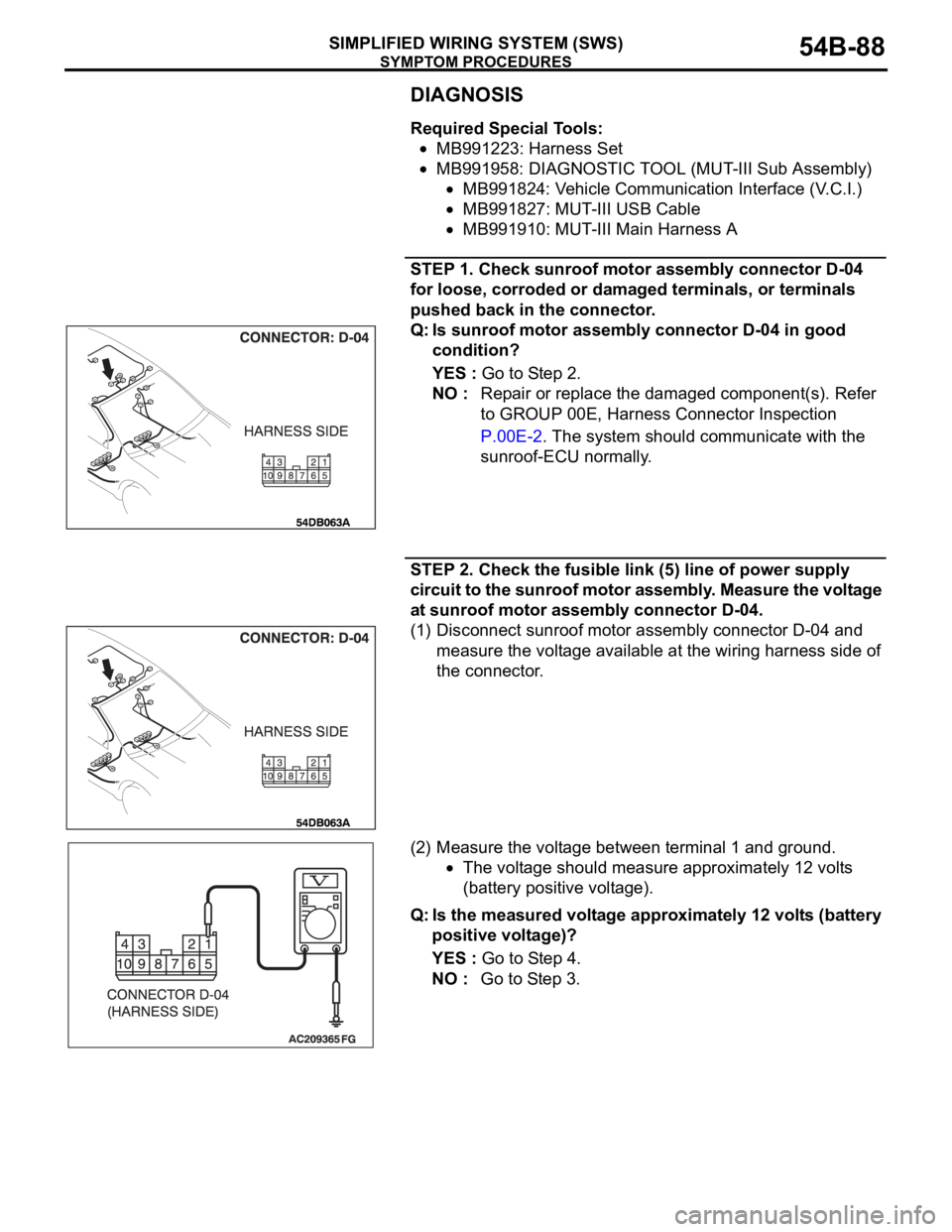
STEP 1. Check sunroof motor assembly connector D-04
for loose, corroded or damaged terminals, or terminals
pushed back in the connector.
Q: Is sunroof motor assembly connector D-04 in good
condition?
YES : Go to Step 2.
NO : Repair or replace the damaged component(s). Refer
to GROUP 00E, Harness Connector Inspection
P.00E-2. The system should communicate with the
sunroof-ECU normally.
STEP 2. Check the fusible link (5) line of power supply
circuit to the sunroof motor assembly. Measure the voltage
at sunroof motor assembly connector D-04.
(1) Disconnect sunroof motor assembly connector D-04 and
measure the voltage available at the wiring harness side of
the connector.
(2) Measure the voltage between terminal 1 and ground.
The voltage should measure approximately 12 volts
(battery positive voltage).
Q: Is the measured voltage approximately 12 volts (battery
positive voltage)?
YES : Go to Step 4.
NO : Go to Step 3.
Page 98 of 1500
SYMPTOM PROCEDURES
SIMPLIFIED WIRING SYSTEM (SWS)54B-98
54B
INSPECTION PROCEDURE B-2: Tone Alarm: Light Reminder Tone Alarm Function does not Work
Normally.
NOTE: This troubleshooting procedure requires the
use of diagnostic tool MB991958 and SWS monitor
kit MB991813. For details on how to use the SWS
monitor, refer to "How to connect SWS monitor
P.54B-13."
.
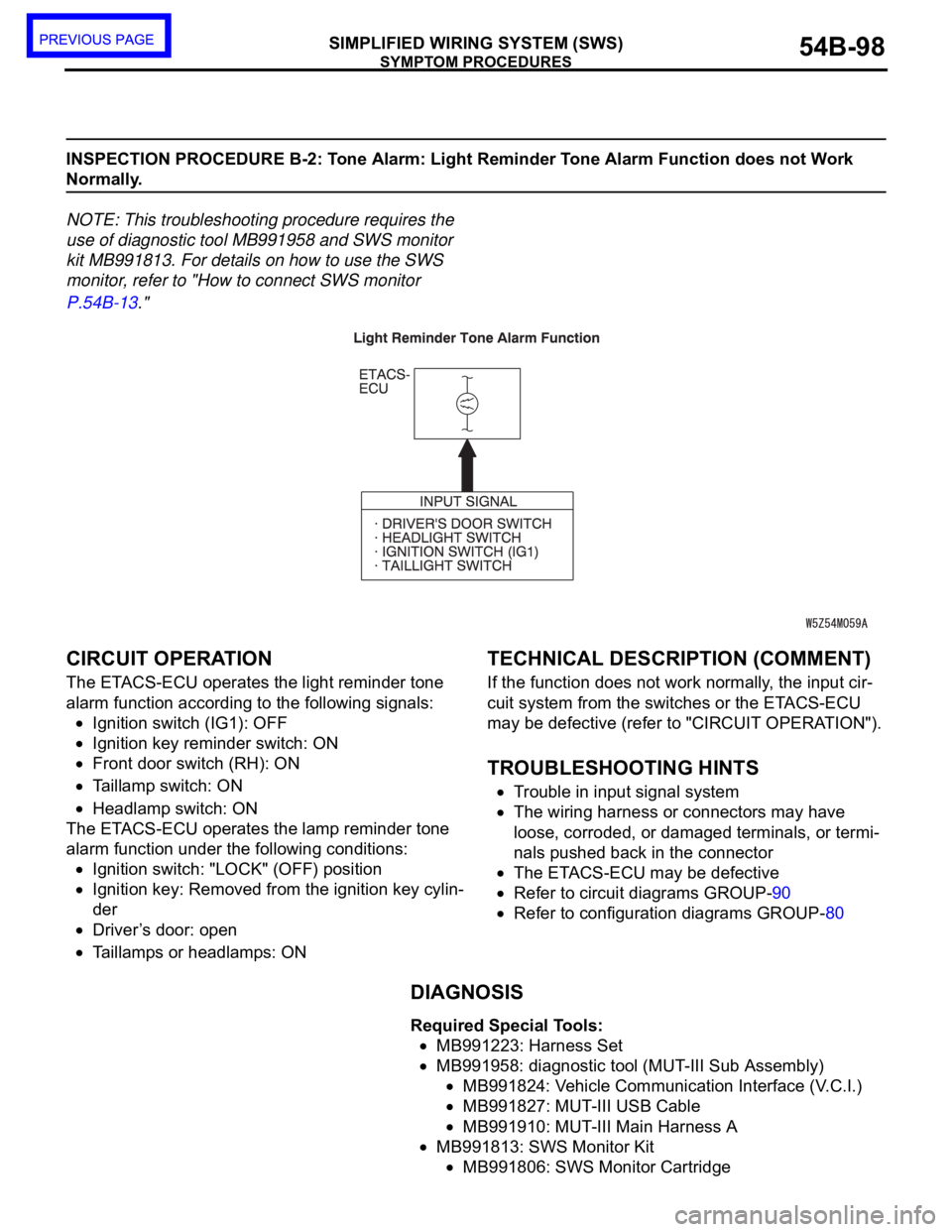
CIRCUIT OPERATION
The ETACS-ECU operates the light reminder tone
alarm function according to the following signals:
Ignition switch (IG1): OFF
Ignition key reminder switch: ON
Front door switch (RH): ON
Taillamp switch: ON
Headlamp switch: ON
The ETACS-ECU operates the lamp reminder tone
alarm function under the following conditions:
Ignition switch: "LOCK" (OFF) position
Ignition key: Removed from the ignition key cylin-
der
Driver’s door: open
Taillamps or headlamps: ON
.
TECHNICAL DESCRIPTION (COMMENT)
If the function does not work normally, the input cir-
cuit system from the switches or the ETACS-ECU
may be defective (refer to "CIRCUIT OPERATION").
.
TROUBLESHOOTING HINTS
Trouble in input signal system
The wiring harness or connectors may have
loose, corroded, or damaged terminals, or termi-
nals pushed back in the connector
The ETACS-ECU may be defective
Refer to circuit diagrams GROUP-90
Refer to configuration diagrams GROUP-80
DIAGNOSIS
Required Special Tools:
MB991223: Harness Set
MB991958: diagnostic tool (MUT-III Sub Assembly)
MB991824: Vehicle Communication Interface (V.C.I.)
MB991827: MUT-III USB Cable
MB991910: MUT-III Main Harness A
MB991813: SWS Monitor Kit
MB991806: SWS Monitor Cartridge
Page 99 of 1500
SYMPTOM PROCEDURES
SIMPLIFIED WIRING SYSTEM (SWS)54B-99
MB991812: SWS Monitor Harness (For Column-ECU)
MB991822: Test Probe Harness
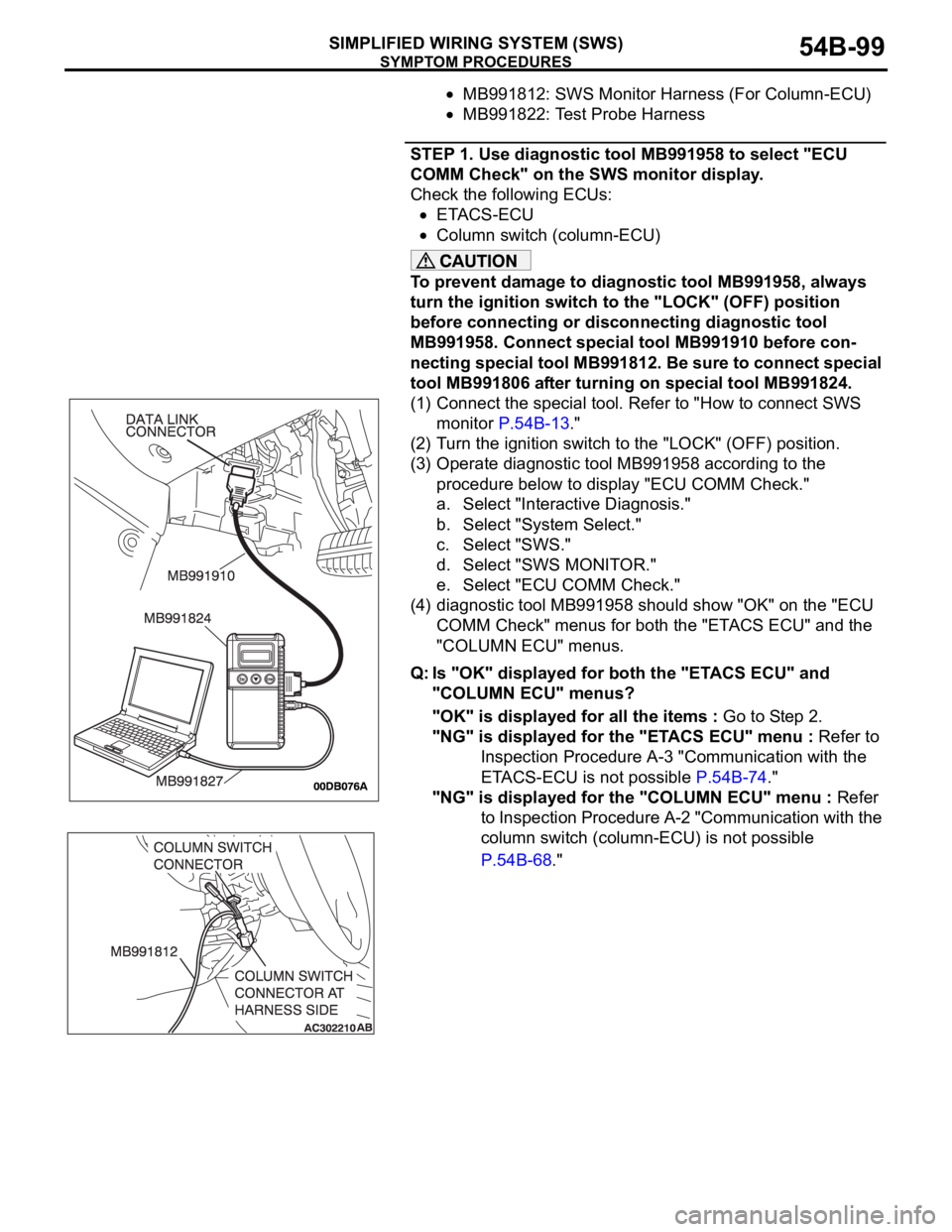
STEP 1. Use diagnostic tool MB991958 to select "ECU
COMM Check" on the SWS monitor display.
Check the following ECUs:
ETACS-ECU
Column switch (column-ECU)
To prevent damage to diagnostic tool MB991958, always
turn the ignition switch to the "LOCK" (OFF) position
before connecting or disconnecting diagnostic tool
MB991958. Connect special tool MB991910 before con-
necting special tool MB991812. Be sure to connect special
tool MB991806 after turning on special tool MB991824.
(1) Connect the special tool. Refer to "How to connect SWS
monitor P.54B-13."
(2) Turn the ignition switch to the "LOCK" (OFF) position.
(3) Operate diagnostic tool MB991958 according to the
procedure below to display "ECU COMM Check."
a. Select "Interactive Diagnosis."
b. Select "System Select."
c. Select "SWS."
d. Select "SWS MONITOR."
e. Select "ECU COMM Check."
(4) diagnostic tool MB991958 should show "OK" on the "ECU
COMM Check" menus for both the "ETACS ECU" and the
"COLUMN ECU" menus.
Q: Is "OK" displayed for both the "ETACS ECU" and
"COLUMN ECU" menus?
"OK" is displayed for all the items : Go to Step 2.
"NG" is displayed for the "ETACS ECU" menu : Refer to
Inspection Procedure A-3 "Communication with the
ETACS-ECU is not possible P.54B-74."
"NG" is displayed for the "COLUMN ECU" menu : Refer
to Inspection Procedure A-2 "Communication with the
column switch (column-ECU) is not possible
P.54B-68."