ECU MITSUBISHI ASX 2012 (in English) Owner's Guide
[x] Cancel search | Manufacturer: MITSUBISHI, Model Year: 2012, Model line: ASX, Model: MITSUBISHI ASX 2012Pages: 378, PDF Size: 18.2 MB
Page 190 of 378
WARNING
l Do not leave any objects near the brake
pedal or let a floor mat slide under it; do-
ing so could prevent the full pedal stroke
that would be necessary in an emergency.
Make sure that the pedal can be operated
freely at all times. Make sure the floor
mat is securely held in place.
Brake pad l Avoid hard braking situations.
New
brakes need to be broken-in by moder-
ate use for the first 200 km (124 miles).
l The disc brakes are provided with a warning
device which emits a shrieking metallic
sound while braking if the brake pads have
reached their wear limit. If you hear this
sound, have the brake pads replaced immedi-
ately. WARNING
l Driving
with worn brake pads will make
it harder to stop, and can cause an acci-
dent. Hill start assist*
E00628000155
The
hill start assist makes it easy to start off on a
steep uphill slope by preventing the vehicle from
moving backwards. It keeps the braking force for
about 2 seconds when you move your foot from the
brake pedal to the accelerator pedal. CAUTION
l
Do
not overly rely on the hill start assist
to prevent backwards movement of the ve-
hicle. Under certain circumstances, even
when hill start assist is activated, the vehi-
cle may move backwards if the brake ped-
al is not sufficiently depressed, if the vehi-
cle is heavily loaded, or if the road is very
steep or slippery.
l The hill start assist is not designed to
keep the vehicle stopped in place on up-
hill slopes for more than 2 seconds.
l When facing uphill, do not rely on using
the hill start assist to maintain a stopped
position as an alternative to depressing
the brake pedal.
Doing so could result in an accident.
l Do not perform the following operation
while the hill start assist is operating.
[Except for vehicles equipped with key-
less operation system]
Turn the ignition switch to the “LOCK”
or “ACC” position.
[Vehicles equipped with keyless operation
system]
Put the operation mode in OFF or ACC.
The hill start assist could stop operating,
which could result in an accident. To operate
E00628100172
1. Stop
the vehicle completely using the brake
pedal.
2. On vehicles equipped with M/T, place the
gearshift lever into the 1 st
position.
On vehicles equipped with CVT, place the se-
lector lever into the “D” position.
NOTE l When reversing on an uphill slope, place the
gearshift lever or the selector lever into the
“R” position.
3. Release the brake pedal and the hill start as- sist will maintain the braking force applied
while stopping for approximately 2 seconds.
4. Depress the accelerator pedal and the hill start assist gradually will decrease the brak-
ing force as the vehicle starts moving.
NOTE l The hill start assist is activated when all of
the following conditions are met.
• The engine is running.(The hill start assist will not be activated
while the engine is starting or immediate-
ly after the engine is started.) Starting and driving
4-36
4
OGWE12E1
Page 210 of 378
Roof carrier precaution
CAUTION
l
Make sure that the weight of the luggage
does not exceed the allowable roof load.
If the allowable roof load is exceeded, this
may cause damage to the vehicle.
The roof load is the total allowable load
on the roof (the weight of the roof carrier
plus the weight of luggage placed on the
roof carrier).
For the specific value, refer to “Maxi-
mum roof load” on page 9-07.
l When luggage is loaded onto the vehicle,
please make sure to drive slowly and
avoid excessive manoeuvres such as sud-
den braking or quick turning.
In addition, place the luggage on the car-
rier so that its weight is distributed even-
ly with the heaviest items on the bottom.
Do not load items that are wider than the
roof carrier.
The additional weight on the roof could
raise the vehicle’s centre of gravity and af-
fect vehicle handling characteristics.
As a result, driving errors or emergency
manoeuvres could lead to a loss of control
and result in an accident.
l Before driving and after travelling a
short distance, always check the load to
make sure it is securely fastened to the
roof carrier.
Check periodically during your travel
that the load remains secure. NOTE
l To
prevent wind noise or reduction in fuel
economy, remove the roof carrier when not
in use.
l Remove the roof carrier before using an auto-
matic car wash.
l Be sure that adequate clearance is main-
tained for raising the tailgate when installing
a roof carrier. Trailer towing
E00610000534
In
order to tow a trailer with your vehicle, have a
trailer towing device that meets all relevant regula-
tions in your area, mounted consult a
MITSUBISHI MOTORS Authorized Service Point.
The regulations concerning the towing of a trailer
may differ from country to country. You are ad-
vised to obey the regulations in each area. CAUTION
l
Danger of Accident!
A
towing bar should be fitted according
to MITSUBISHI MOTORS guidelines.
Maximum towable weight with brake
and maximum trailer-nose weight
Never
exceed the maximum towable weight with
brake and the maximum trailer-nose weight as lis-
ted in the specifications.
(Refer to page 9-07.)
If you tow a trailer at an altitude of more than
1,000 m above sea-level, reduce your weight by
10 % of the gross combination weight for every in-
crease of 1,000 m above sea-level, as the engine out-
put is lowered owing to decrease in atmospheric
pressure. Starting and driving
4-56
4
OGWE12E1
Page 230 of 378
1. Press the PWR switch to turn the audio sys-
tem ON and OFF. The audio system turns on
in the last mode used.
2. Press the CD button to enter CD mode. The CD changer will start playback if the
CD is already in the CD changer.
3. To stop the CD, turn off the power by press- ing the PWR switch, or change over to the ra-
dio mode by pressing the AM/FM button, or
eject the disc by pressing the eject button.
NOTE l For information on adjusting the volume and
tone, refer to “To adjust the volume” on page
5-11 and “To adjust the tone” on page 5-11.
l As many as 6 CDs can be inserted into the
CD changer.
l 8 cm CDs cannot be played on this CD chang-
er.
l For information concerning the handling of
compact discs, refer to “Handling of compact
discs” on page 5-38.
To set a single disc 1. Press the LOAD button briefly.
2. The CD changer will show “WAIT” on thedisplay and start making itself ready for disc
loading.
3. When the CD changer is ready for disc load- ing, the LOAD indicator will illuminate and
the display will show “LOAD DISC No.
(1-6)”.
4. When a disc is inserted into the CD slot, the disc will begin to play. NOTE
l If
there are multiple empty slots, you can se-
lect your desired slot by pressing the DISC
buttons.
l If you do not insert a disc for about 15 sec-
onds after the CD changer starts standing by
for loading, the loading standby mode will
be cancelled.
To set all the discs 1. Press the LOAD button for 2 seconds or lon-ger (until you hear a beep).
2. The CD changer will select the lowest-num- bered empty slot and switch to loading stand-
by mode.
3. When the display shows “LOAD DISC No. (1-6)” insert a disc. The CD changer will
then automatically select the next empty slot
and enter loading standby mode.
4. Repeat the above-described steps until every slot contains a disc. Playback will then begin
with the disc that you inserted last.
NOTE l If you press the LOAD button again while
the CD changer is in loading standby mode,
the loading standby mode will be cancelled.
To select a desired disc
You can select your desired disc by using the DISC
button. The active disc will be indicated on the dis-
play.
Press the DISC (Disc up) button repeatedly until
the desired disc number appears on the display.
Press the DISC (Disc down) button repeatedly until
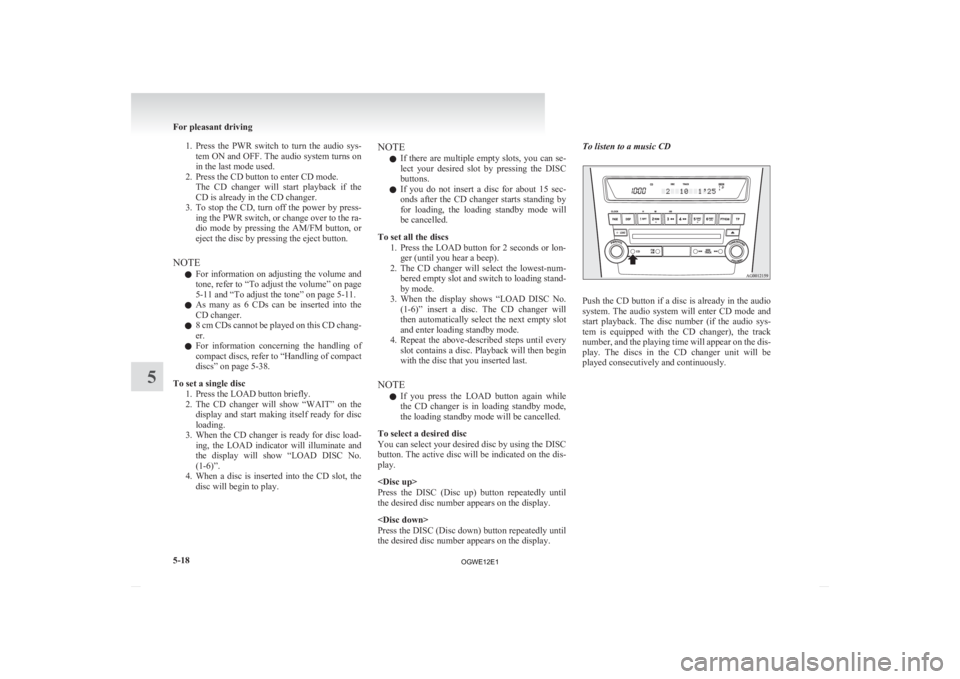
the desired disc number appears on the display. To listen to a music CD
Push the CD button if a disc is already in the audio
system.
The audio system will enter CD mode and
start playback. The disc number (if the audio sys-
tem is equipped with the CD changer), the track
number, and the playing time will appear on the dis-
play. The discs in the CD changer unit will be
played consecutively and continuously. For pleasant driving
5-18
5
OGWE12E1
Page 251 of 378
Notes on CD-Rs/RWs
E00725100055
l You
may have trouble playing back some
CD-R/RW discs recorded on CD recorders
(CD-R/RW drives), either due to their record-
ing characteristics or dirt, fingerprints,
scratches, etc. on the disc surface.
l CD-R/RW discs are less resistant to high tem-
peratures and high humidity than ordinary mu-
sic CDs and can therefore be damaged and
rendered unplayable if left inside your vehi-
cle for a long time.
l Depending on the combination of the writing
software, the CD recorder (CD-R/RW drive),
and the disc used to create a CD-R/RW, the
disc might not play successfully.
l This player cannot play the CD-R/RW discs
if the session is not closed.
l This player cannot play CD-R/RW discs
which contain other than CD-DA or MP3 da-
ta (Video CD, etc.).
l Be sure to observe the handling instructions
for the CD-R/RW disc. WARNING
l Operating
the CD player in a manner oth-
er than specifically instructed herein may
result in hazardous radiation exposure.
Do not remove the cover and attempt to
repair the CD player by yourself. There
are no user serviceable parts inside. If the
CD player is not working correctly, it is
recommended that you have it inspected. Antenna
E00710500543
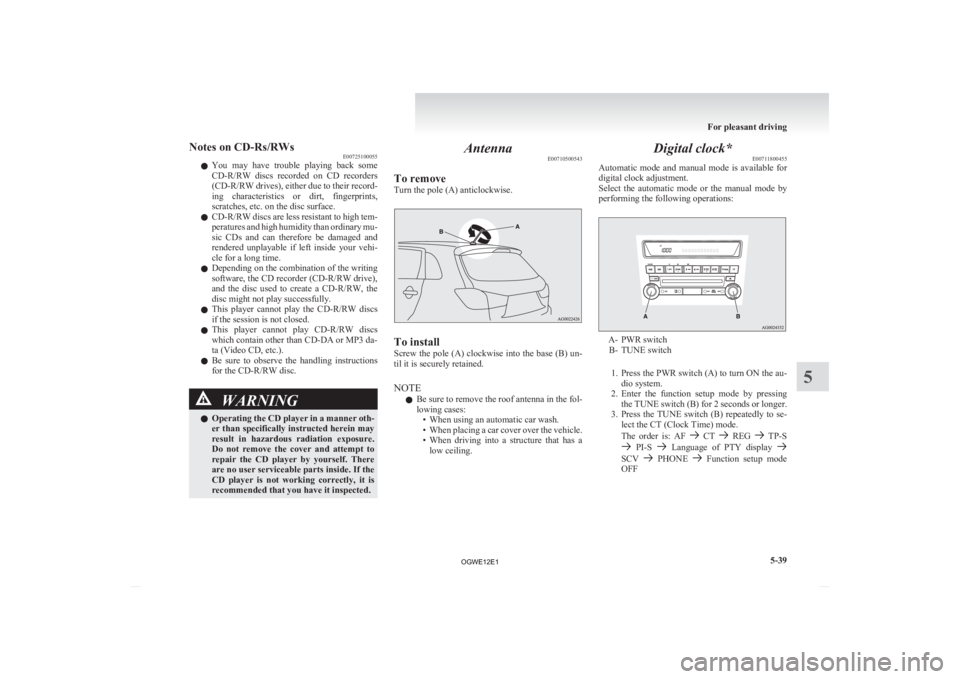
To remove
Turn the pole (A) anticlockwise. To install
Screw
the pole (A) clockwise into the base (B) un-
til it is securely retained.
NOTE
l Be sure to remove the roof antenna in the fol-
lowing cases:
• When using an automatic car wash.
• When placing a car cover over the vehicle.
• When driving into a structure that has alow ceiling. Digital clock*
E00711800455
Automatic
mode and manual mode is available for
digital clock adjustment.
Select the automatic mode or the manual mode by
performing the following operations: A- PWR switch
B-
TUNE switch
1. Press the PWR switch (A) to turn ON the au- dio system.
2. Enter the function setup mode by pressing the TUNE switch (B) for 2 seconds or longer.
3. Press the TUNE switch (B) repeatedly to se- lect the CT (Clock Time) mode.
The order is: AF CT REG TP-S
PI-S Language of PTY display
SCV PHONE Function setup mode
OFF For pleasant driving
5-39 5
OGWE12E1
Page 256 of 378
Confirmation function setting
E00760400013
The
Bluetooth ®
2.0 interface is equipped with a con-
firmation function.
With the confirmation function activated, you are
given more opportunities than normal to confirm a
command when making various settings to Blue-
tooth ®
2.0 interface. This allows you to decrease
the possibility that a setting is accidentally changed.
The confirmation function can be turned on or off
by following the steps below. 1. Press the SPEECH button.
2. Say “Setup”.
3. Say “Confirmation prompts”.
4. The voice guide will say “Confirmationprompts are
confirmation prompts
Answer “Yes” to change the setting or an-
swer “No” to keep the current setting.
5. The voice guide will say “Confirmation prompts are
will return to the main menu.
Security function E00760500043
It is possible to use a password as a security func-
tion
by setting a password of your choice for the
Bluetooth ®
2.0 interface.
When the security function is turned on, it is neces-
sary to make a voice input of a 4-digit password in
order to use all functions of the Bluetooth ®
2.0 in-
terface, except for reception.
Setting the password
Use the following procedure to turn on the security
function by setting a password. 1. Press the SPEECH button.
2. Say “Setup”.
3. Say “Password.” 4. The
voice guide will say “Password is disa-
bled. Would you like to enable it?” Answer
“Yes.”
Answer “No” to cancel the setting of the pass-
word and return to the main menu.
5. The voice guide will say “Please say a 4-dig- it password. Remember this password. It will
be required to use this system”.
Say a 4-digit number which you want to set
as a password.
6. For confirmation purposes, the voice guide will say “Password <4-digit password>. Is
this correct?” Answer “Yes.”
Answer “No” to return to the password input
in Step 5.
7. When the registration of the password is com- pleted, the voice guide will say “Password is
enabled” and the system will return to the
main menu.
NOTE l Password will be required to access the sys-
tem after the next ignition cycle.
l It is required for a little time after engine
stop that the entered password is actually re-
corded in the system.
If the ignition switch or the operation mode
is made to ACC or ON or the engine is star-
ted immediately after engine stop, there is a
case when the entered password is not recor-
ded in the system. At this time, please try to
enter the password again. Entering the password
If
a password has been set and the security function
is enabled, the voice guide will say “Hands-free sys-
tem is locked. State the password to continue”
when the SPEECH button is pressed to enter voice
recognition mode. Say the 4-digit password num-
ber to enter the password.
If the entered password is wrong, the voice guide
will say “<4- digit password>, Incorrect password.
Please try again”. Enter the correct password.
NOTE
l You can re-enter the password as many times
as you want.
l If you have forgotten your password, say
“Cancel” to quit the voice input mode and
then check with a MITSUBISHI MOTORS
Authorized Service Point.
Disabling the password
Use the following procedure to turn off the security
function by disabling the password.
NOTE l System must be unlocked to disable the pass-
word.
1. Press the SPEECH button.
2. Say “Setup”.
3. Say “Password.”
4. The voice guide will say “Password is en- abled. Would you like to disable it?” An-
swer “Yes.”
Answer “No” to cancel the disabling of
the password and return to the main menu. For pleasant driving
5-44
5
OGWE12E1
Page 265 of 378
5. The voice guide will say “Home, work, mo-
bile or other?”
Select and say the location where the tele-
phone number you want to change or add is
registered.
When the confirmation function is on, the sys-
tem will check the target name and location
again. Answer “Yes” if you want to continue
with the editing.
Answer “No” to return to Step 3.
6. The voice guide will say “Number please.” Say the telephone number you want to register.
NOTE l If the telephone number is already registered
in the selected location, the voice guide will
say “The current number is
phone number to change the current number.
7. The voice guide will repeat the telephone number.
When the confirmation function is on, the sys-
tem will ask if the number is correct. Answer
“Yes.”
Answer “No” to return to Step 3.
8. Once the telephone number is registered, the voice guide will say “Number saved” and
then the system will return to the main menu.
NOTE l If the location where a telephone number
was already registered has been overwritten
with a new number, the voice guide will say
“Number changed” and then the system will
return to the main menu.
[Editing a name] 1. Press the SPEECH button.
2.
Say “Phone book.”
3. The voice guide will say “Select one of the following: new entry, edit number, edit
name, list names, delete, erase all, or import
contact.” Say “Edit name.”
4. The voice guide will say “Please say the name of the entry you would like to edit, or
say list names.” Say the name you want to edit.
NOTE l Say “List names,” and the names registered
in the phone book will be read out in order.
Refer to “Vehicle phone book: Listening to
the list of registered names” on page 5-50.
5. The voice guide will say “Changing
tem will ask if the name is correct. Answer
“Yes” if you want to continue with the edit-
ing based on this information.
Answer “No” to return to Step 4.
6. The voice guide will say “Name please.” Say the new name you want to register.
7. The registered name will be changed. When the change is complete, the system
will return to the main menu.
[Listening to the list of registered names] 1. Press the SPEECH button.
2. Say “Phone book.”
3. The voice guide will say “Select one of thefollowing: new entry, edit number, edit
name, list names, delete, erase all, or import
contact.” Say “List names.”
4. Bluetooth ®
2.0 interface will read out the en-
tries in the phone book in order. 5. When the voice guide is done reading the
list, it will say “End of list, would you like to
start from the beginning?”
When you want to check the list again from
the beginning, answer “Yes.”
When you are done, answer “No” to return to
the previous or main menu.
NOTE l You can call, edit or delete a name that is be-
ing read out.
Press the SPEECH button and say “Call” to
call the name, “Edit name” to edit it, or “De-
lete” to delete it.
The system will beep and then execute your
command.
l If you press the SPEECH button and say “Con-
tinue” or “Previous” while the list is being
read, the system will advance or rewind the
list. Say “Continue” to proceed to the next en-
try or “Previous” to return to the previous en-
try.
[Deleting a telephone number] 1. Press the SPEECH button.
2. Say “Phone book.”
3. The voice guide will say “Select one of thefollowing: new entry, edit number, edit
name, list names, delete, erase all, or import
contact.” Say “Delete.”
4. The voice guide will say “Please say the name of the entry you would like to delete,
or say list names.” Say the name of the
phone book entry in which the telephone num-
ber you want to delete is registered. For pleasant driving
5-53 5
OGWE12E1
Page 272 of 378
Ashtray*
E00711401009CAUTION
l
Put out matches and cigarettes before
they are placed in the ashtray.
l Don’t put papers and other things that
burn into your ashtrays. If you do, ciga-
rettes or other smoking materials could
set them on fire, causing damage.
l Always close the ashtray. If left open, oth-
er cigarette butts in the ashtray may be re-
kindled.
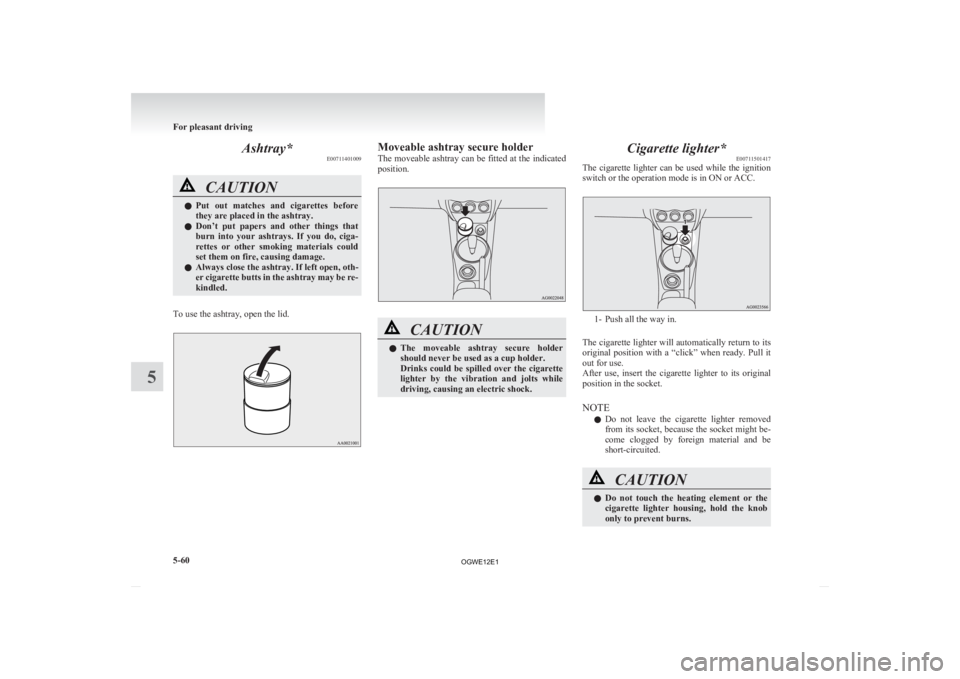
To use the ashtray, open the lid. Moveable ashtray secure holder
The
moveable ashtray can be fitted at the indicated
position. CAUTION
l
The
moveable ashtray secure holder
should never be used as a cup holder.
Drinks could be spilled over the cigarette
lighter by the vibration and jolts while
driving, causing an electric shock. Cigarette lighter*
E00711501417
The
cigarette lighter can be used while the ignition
switch or the operation mode is in ON or ACC. 1- Push all the way in.
The
cigarette lighter will automatically return to its
original position with a “click” when ready. Pull it
out for use.
After use, insert the cigarette lighter to its original
position in the socket.
NOTE
l Do not leave the cigarette lighter removed
from its socket, because the socket might be-
come clogged by foreign material and be
short-circuited. CAUTION
l
Do
not touch the heating element or the
cigarette lighter housing, hold the knob
only to prevent burns. For pleasant driving
5-60
5
OGWE12E1
Page 281 of 378
Bottle holder
E00718200328CAUTION
l
Do not drink beverages while driving.
This is distracting and could cause an ac-
cident.
l Drinks could be spilled by the vibration
and jolts while driving. If the spilt drink
is very hot, you could be burnt.
There are bottle holders located on the front doors. NOTE
l Tightly
close the cap on drink bottles before
storing them.
l Some bottles may be too big or the wrong
shape to fit in the holder. Rear shelf panel*
E00715400114 CAUTION
l
Do
not place luggage or other items on
the rear shelf panel. Any items on the
rear shelf panel would obstruct your rear-
ward view, and they could fly forward
and cause injuries or other mishap in the
event of hard braking.
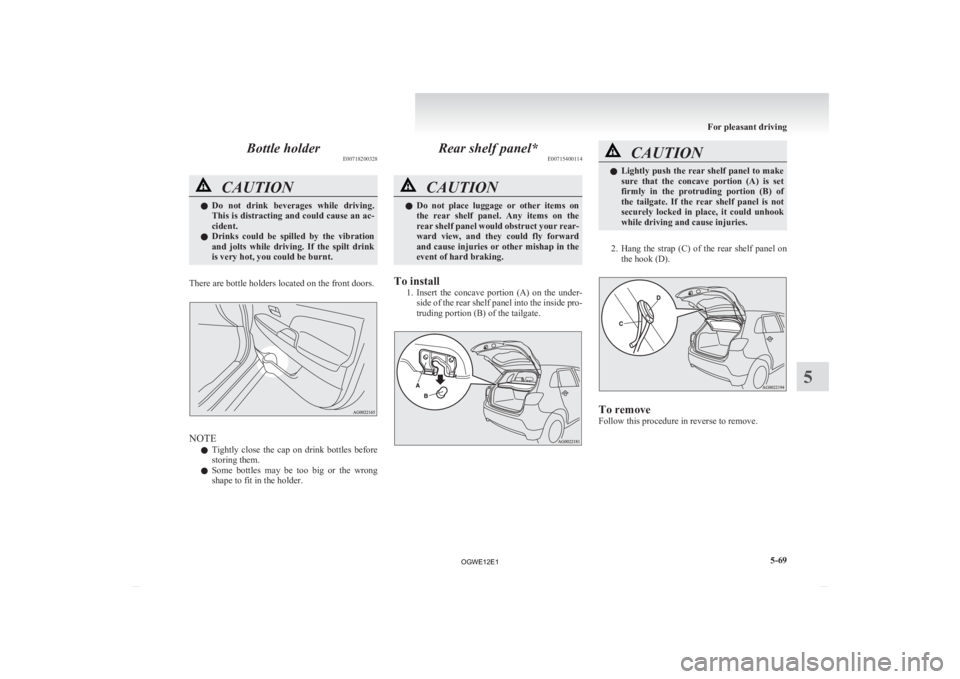
To install 1. Insert
the concave portion (A) on the under-
side of the rear shelf panel into the inside pro-
truding portion (B) of the tailgate. CAUTION
l
Lightly
push the rear shelf panel to make
sure that the concave portion (A) is set
firmly in the protruding portion (B) of
the tailgate. If the rear shelf panel is not
securely locked in place, it could unhook
while driving and cause injuries.
2. Hang
the strap (C) of the rear shelf panel on the hook (D). To remove
Follow this procedure in reverse to remove. For pleasant driving
5-69 5
OGWE12E1
Page 282 of 378
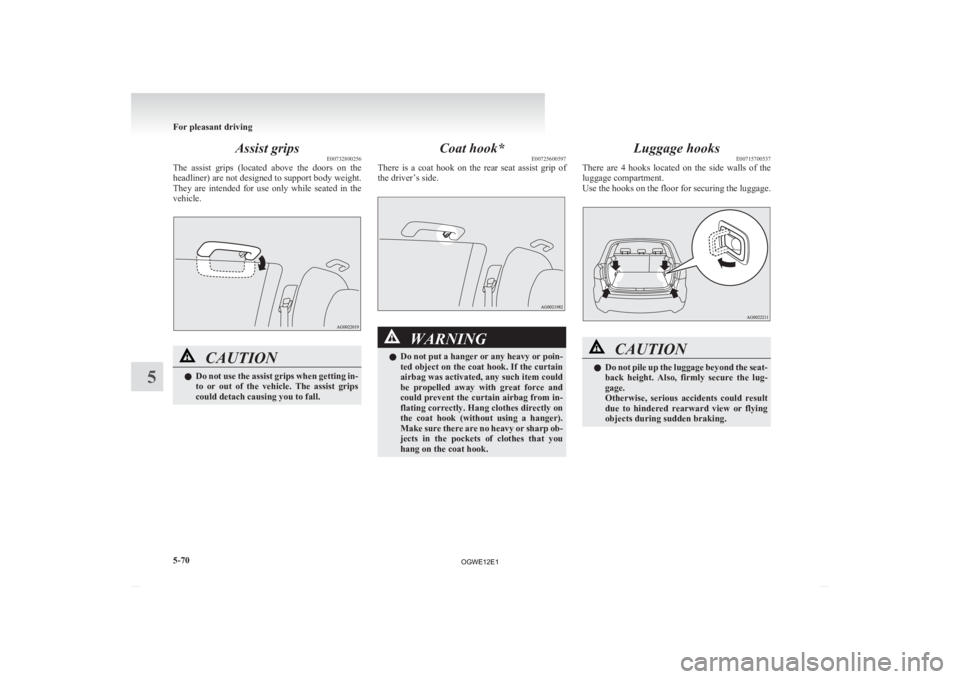
Assist grips
E00732800256
The
assist grips (located above the doors on the
headliner) are not designed to support body weight.
They are intended for use only while seated in the
vehicle. CAUTION
l
Do
not use the assist grips when getting in-
to or out of the vehicle. The assist grips
could detach causing you to fall. Coat hook*
E00725600597
There
is a coat hook on the rear seat assist grip of
the driver’s side. WARNING
l Do
not put a hanger or any heavy or poin-
ted object on the coat hook. If the curtain
airbag was activated, any such item could
be propelled away with great force and
could prevent the curtain airbag from in-
flating correctly. Hang clothes directly on
the coat hook (without using a hanger).
Make sure there are no heavy or sharp ob-
jects in the pockets of clothes that you
hang on the coat hook. Luggage hooks
E00715700537
There
are 4 hooks located on the side walls of the
luggage compartment.
Use the hooks on the floor for securing the luggage. CAUTION
l
Do
not pile up the luggage beyond the seat-
back height. Also, firmly secure the lug-
gage.
Otherwise, serious accidents could result
due to hindered rearward view or flying
objects during sudden braking. For pleasant driving
5-70
5
OGWE12E1
Page 291 of 378
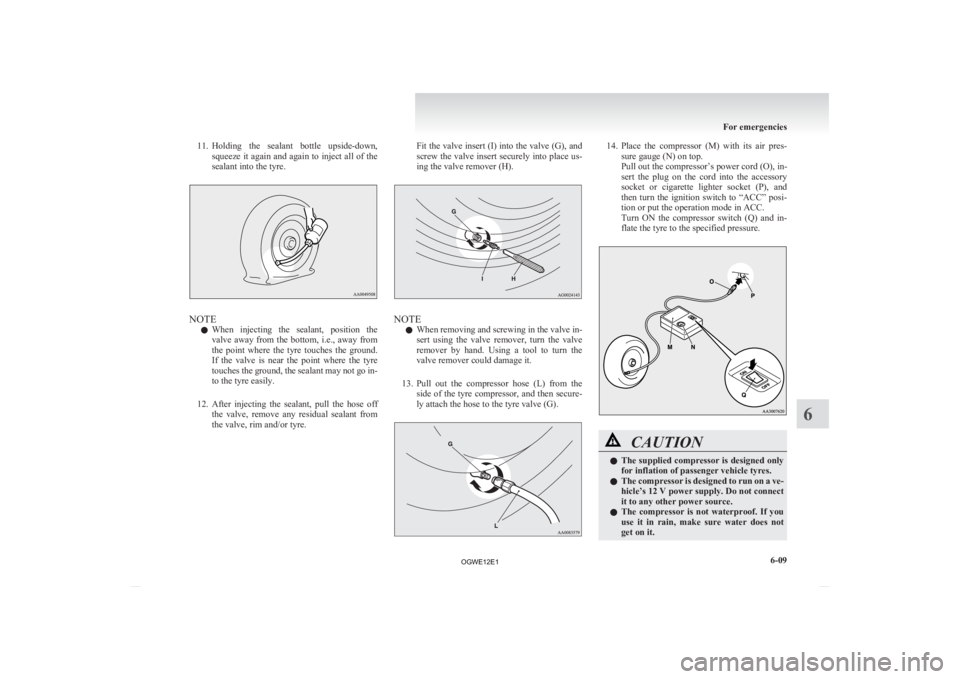
11. Holding
the sealant bottle upside-down,
squeeze it again and again to inject all of the
sealant into the tyre. NOTE
l When
injecting the sealant, position the
valve away from the bottom, i.e., away from
the point where the tyre touches the ground.
If the valve is near the point where the tyre
touches the ground, the sealant may not go in-
to the tyre easily.
12. After injecting the sealant, pull the hose off the valve, remove any residual sealant from
the valve, rim and/or tyre. Fit the valve insert (I) into the valve (G), and
screw
the valve insert securely into place us-
ing the valve remover (H). NOTE
l When
removing and screwing in the valve in-
sert using the valve remover, turn the valve
remover by hand. Using a tool to turn the
valve remover could damage it.
13. Pull out the compressor hose (L) from the side of the tyre compressor, and then secure-
ly attach the hose to the tyre valve (G). 14. Place
the compressor (M) with its air pres-
sure gauge (N) on top.
Pull out the compressor’s power cord (O), in-
sert the plug on the cord into the accessory
socket or cigarette lighter socket (P), and
then turn the ignition switch to “ACC” posi-
tion or put the operation mode in ACC.
Turn ON the compressor switch (Q) and in-
flate the tyre to the specified pressure. CAUTION
l
The
supplied compressor is designed only
for inflation of passenger vehicle tyres.
l The compressor is designed to run on a ve-
hicle’s 12 V power supply. Do not connect
it to any other power source.
l The compressor is not waterproof. If you
use it in rain, make sure water does not
get on it. For emergencies
6-09 6
OGWE12E1