automatic transmission MITSUBISHI CARISMA 2000 1.G User Guide
[x] Cancel search | Manufacturer: MITSUBISHI, Model Year: 2000, Model line: CARISMA, Model: MITSUBISHI CARISMA 2000 1.GPages: 280, PDF Size: 2.32 MB
Page 116 of 280
STARTING AND DRIVING
5–16
Changing gearsEI03CMKg
Always use care to change the gear with the
vehicle speed matched to the engine speed.
Proper shifting will improve fuel economy
and prolong engine life.
Avoid shifting down at high speed, as this
may cause excessive engine speed (on ve-
hicles with a tachometer, the tachometer
needle into the red zone) and damage the
engine.
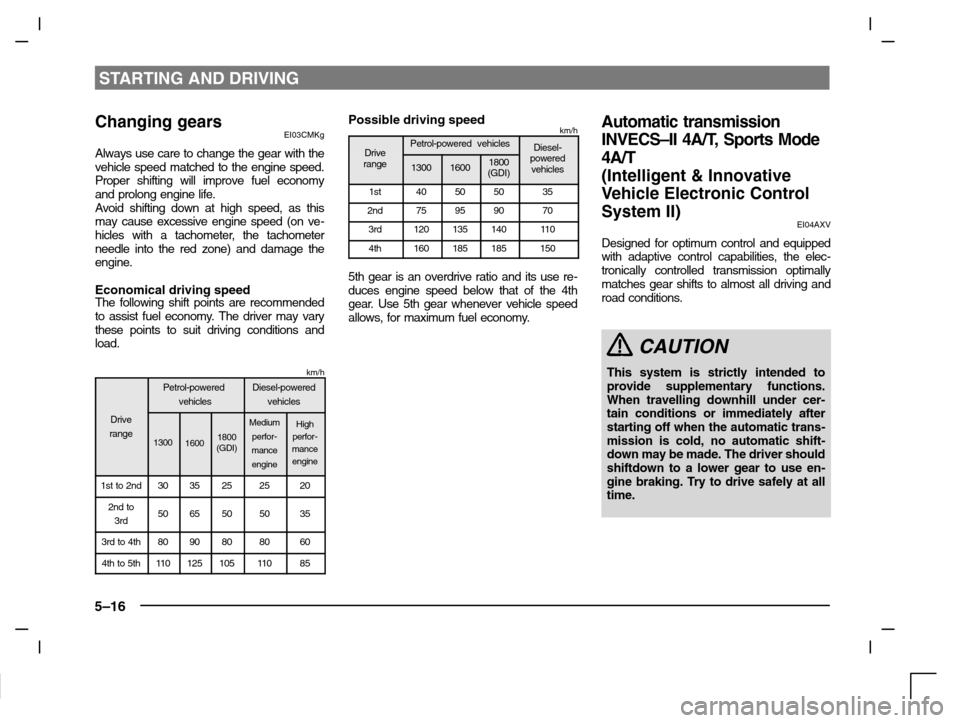
Economical driving speedThe following shift points are recommended
to assist fuel economy. The driver may vary
these points to suit driving conditions and
load.
km/h
Petrol-powered
vehiclesDiesel-powered
vehicles
Drive
range
130016001800
(GDI)
Medium
perfor-
mance
engineHigh
perfor-
mance
engine
1st to 2nd3035252520
2nd to
3rd5065505035
3rd to 4th8090808060
4th to 5th11 012510511 085
Possible driving speedkm/h
DrivePetrol-powered vehiclesDiesel-Driverange130016001800
(GDI)powered
vehicles
1st40505035
2nd75959070
3rd12013514011 0
4th160185185150
5th gear is an overdrive ratio and its use re-
duces engine speed below that of the 4th
gear. Use 5th gear whenever vehicle speed
allows, for maximum fuel economy.
Automatic transmission
INVECS–II 4A/T, Sports Mode
4A/T
(Intelligent & Innovative
Vehicle Electronic Control
System II)
EI04AXV
Designed for optimum control and equipped
with adaptive control capabilities, the elec-
tronically controlled transmission optimally
matches gear shifts to almost all driving and
road conditions.
CAUTION
This system is strictly intended to
provide supplementary functions.
When travelling downhill under cer-
tain conditions or immediately after
starting off when the automatic trans-
mission is cold, no automatic shift-
down may be made. The driver should
shiftdown to a lower gear to use en-
gine braking. Try to drive safely at all
time.
Page 119 of 280
STARTING AND DRIVING
5–19
Except for vehicles with Sports mode
I04A229a
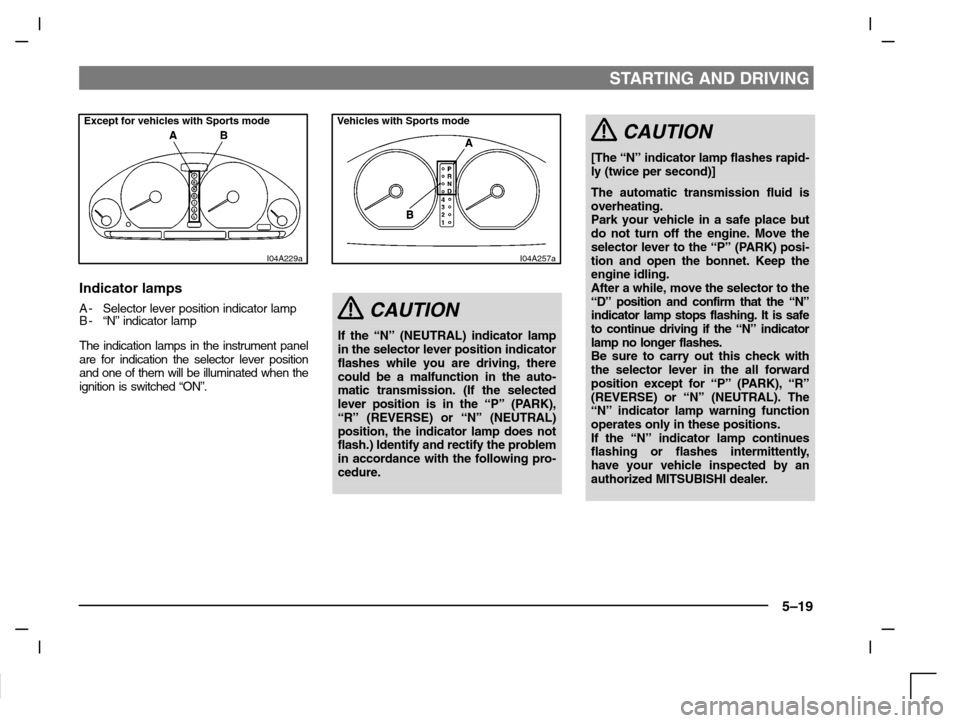
Indicator lamps
A- Selector lever position indicator lamp
B- “N” indicator lamp
The indication lamps in the instrument panel
are for indication the selector lever position
and one of them will be illuminated when the
ignition is switched “ON”.
I04A257a
Vehicles with Sports mode
CAUTION
If the “N” (NEUTRAL) indicator lamp
in the selector lever position indicator
flashes while you are driving, there
could be a malfunction in the auto-
matic transmission. (If the selected
lever position is in the “P” (PARK),
“R” (REVERSE) or “N” (NEUTRAL)
position, the indicator lamp does not
flash.) Identify and rectify the problem
in accordance with the following pro-
cedure.
CAUTION
[The “N” indicator lamp flashes rapid-
ly (twice per second)]
The automatic transmission fluid is
overheating.
Park your vehicle in a safe place but
do not turn off the engine. Move the
selector lever to the “P” (PARK) posi-
tion and open the bonnet. Keep the
engine idling.
After a while, move the selector to the
“D” position and confirm that the “N”
indicator lamp stops flashing. It is safe
to continue driving if the “N” indicator
lamp no longer flashes.
Be sure to carry out this check with
the selector lever in the all forward
position except for “P” (PARK), “R”
(REVERSE) or “N” (NEUTRAL). The
“N” indicator lamp warning function
operates only in these positions.
If the “N” indicator lamp continues
flashing or flashes intermittently,
have your vehicle inspected by an
authorized MITSUBISHI dealer.
Page 120 of 280
![MITSUBISHI CARISMA 2000 1.G User Guide STARTING AND DRIVING
5–20
CAUTION
[The “N” indicator lamp flashes slow-
ly (once per second)]
The automatic transmission safety
device may be operating due to a mal-
function.
Have your vehicle](/img/19/7563/w960_7563-119.png "MITSUBISHI CARISMA 2000 1.G User Guide STARTING AND DRIVING
5–20
CAUTION
[The “N” indicator lamp flashes slow-
ly (once per second)]
The automatic transmission safety
device may be operating due to a mal-
function.
Have your vehicle")
STARTING AND DRIVING
5–20
CAUTION
[The “N” indicator lamp flashes slow-
ly (once per second)]
The automatic transmission safety
device may be operating due to a mal-
function.
Have your vehicle inspected by an
authorized MITSUBISHI dealer as
soon as possible.
Selector positionsEI04BALb
P - PARKThis position locks the transmission to pre-
vent the vehicle from moving. The engine
can be started in this position.
R - REVERSEMove the lever to this position only after the
vehicle has come to a complete stop.
CAUTION
Never shift into the “P” (PARK) or “R”
(REVERSE) position while the vehicle
is in motion. If the lever is shifted into
the “P” or “R” position while the ve-
hicle is in motion, the transmission
may be damaged.
N - NEUTRALAt this position, the transmission is disen-
gaged. It is the same as the neutral position
on a manual transmission, and should be
used when the vehicle is stationary for an ex-
tended length of time during driving, such as
in a traffic jam.
WARNING
(1) Never move the selector lever to
the “N” position while driving.
A serious accident could occur
since you could accidentally
move the lever into the “P” or “R”
position and engine braking
would be lost.
(2) On a slope gradient, the engine
should be started in the “P”
(PARK) position, not in the “N”
(NEUTRAL) position.
(3) Always keep your right foot on
the brake pedal when the vehicle
is in “N” (NEUTRAL), or when
shifting into or out of “N” (NEU-
TRAL), to minimize the risk of
loss of control.
D - DRIVEThis position is for normal driving.
The transmission automatically selects a
suitable gear for your speed and acceler-
ation.
Engine braking is automatically applied
when necessary, depending on road condi-
tions.
Please refer to “Uphill/downhill driving” on
page 5–24.
Page 122 of 280
STARTING AND DRIVING
5–22
I04S040a
Sports mode
(Vehicles with Sports mode)
EI04S-Oa
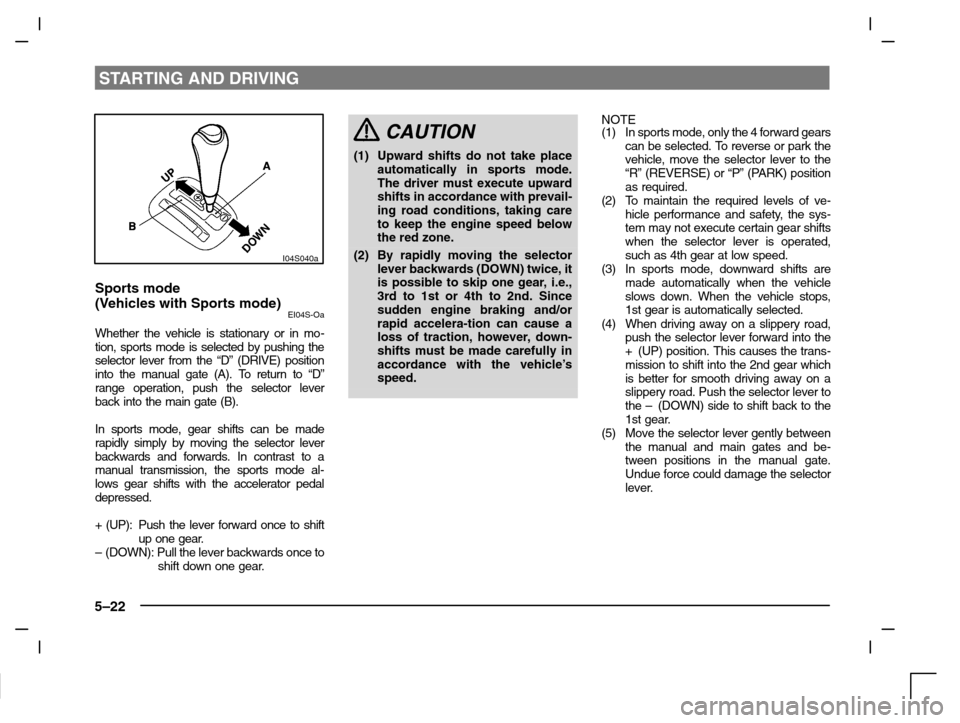
Whether the vehicle is stationary or in mo-
tion, sports mode is selected by pushing the
selector lever from the “D” (DRIVE) position
into the manual gate (A). To return to “D”
range operation, push the selector lever
back into the main gate (B).
In sports mode, gear shifts can be made
rapidly simply by moving the selector lever
backwards and forwards. In contrast to a
manual transmission, the sports mode al-
lows gear shifts with the accelerator pedal
depressed.
+ (UP): Push the lever forward once to shift
up one gear.
– (DOWN): Pull the lever backwards once to
shift down one gear.
CAUTION
(1) Upward shifts do not take place
automatically in sports mode.
The driver must execute upward
shifts in accordance with prevail-
ing road conditions, taking care
to keep the engine speed below
the red zone.
(2) By rapidly moving the selector
lever backwards (DOWN) twice, it
is possible to skip one gear, i.e.,
3rd to 1st or 4th to 2nd. Since
sudden engine braking and/or
rapid accelera-tion can cause a
loss of traction, however, down-
shifts must be made carefully in
accordance with the vehicle’s
speed.
NOTE
(1) In sports mode, only the 4 forward gears
can be selected. To reverse or park the
vehicle, move the selector lever to the
“R” (REVERSE) or “P” (PARK) position
as required.
(2) To maintain the required levels of ve-
hicle performance and safety, the sys-
tem may not execute certain gear shifts
when the selector lever is operated,
such as 4th gear at low speed.
(3) In sports mode, downward shifts are
made automatically when the vehicle
slows down. When the vehicle stops,
1st gear is automatically selected.
(4) When driving away on a slippery road,
push the selector lever forward into the
+(UP) position. This causes the trans-
mission to shift into the 2nd gear which
is better for smooth driving away on a
slippery road. Push the selector lever to
the – (DOWN) side to shift back to the
1st gear.
(5) Move the selector lever gently between
the manual and main gates and be-
tween positions in the manual gate.
Undue force could damage the selector
lever.
Page 123 of 280
STARTING AND DRIVING
5–23
I04S037a
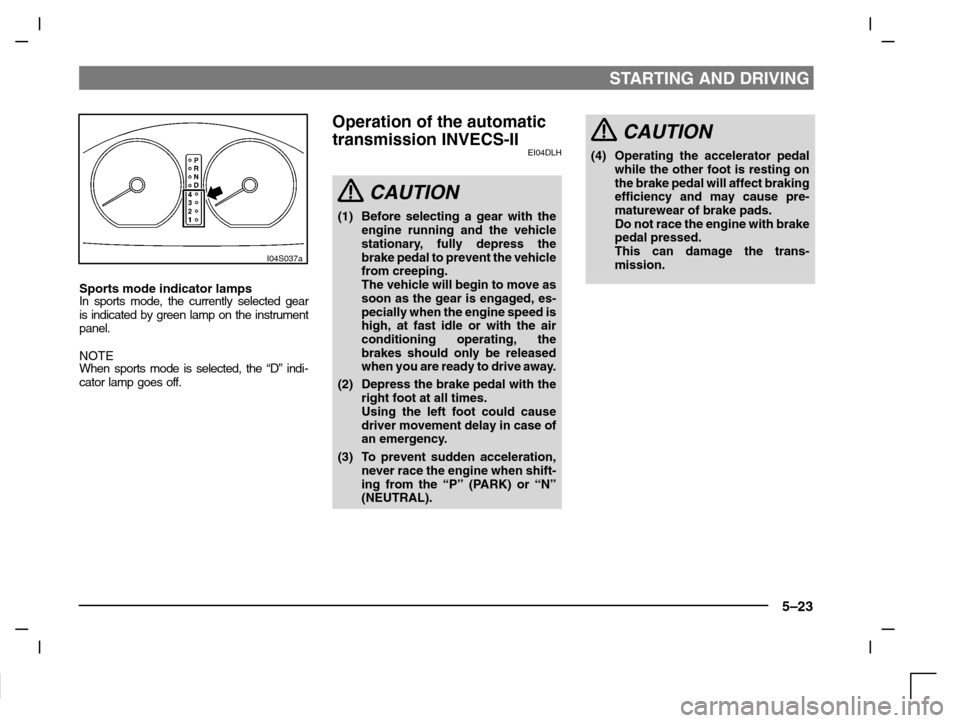
Sports mode indicator lampsIn sports mode, the currently selected gear
is indicated by green lamp on the instrument
panel.
NOTE
When sports mode is selected, the “D” indi-
cator lamp goes off.
Operation of the automatic
transmission INVECS-II
EI04DLH
CAUTION
(1) Before selecting a gear with the
engine running and the vehicle
stationary, fully depress the
brake pedal to prevent the vehicle
from creeping.
The vehicle will begin to move as
soon as the gear is engaged, es-
pecially when the engine speed is
high, at fast idle or with the air
conditioning operating, the
brakes should only be released
when you are ready to drive away.
(2) Depress the brake pedal with the
right foot at all times.
Using the left foot could cause
driver movement delay in case of
an emergency.
(3) To prevent sudden acceleration,
never race the engine when shift-
ing from the “P” (PARK) or “N”
(NEUTRAL).
CAUTION
(4) Operating the accelerator pedal
while the other foot is resting on
the brake pedal will affect braking
efficiency and may cause pre-
maturewear of brake pads.
Do not race the engine with brake
pedal pressed.
This can damage the trans-
mission.
Page 124 of 280
STARTING AND DRIVING
5–24
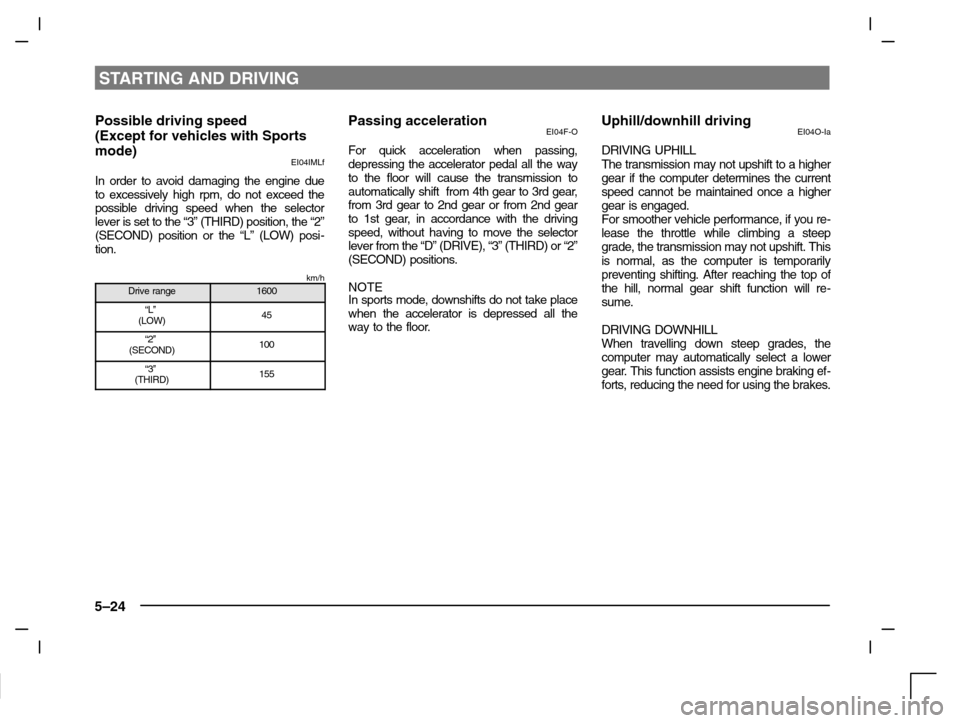
Possible driving speed
(Except for vehicles with Sports
mode)
EI04IMLf
In order to avoid damaging the engine due
to excessively high rpm, do not exceed the
possible driving speed when the selector
lever is set to the “3” (THIRD) position, the “2”
(SECOND) position or the “L” (LOW) posi-
tion.
km/hDrive range1600
“L”
(LOW)45
“2”
(SECOND)100
“3”
(THIRD)155
Passing accelerationEI04F-O
For quick acceleration when passing,
depressing the accelerator pedal all the way
to the floor will cause the transmission to
automatically shift from 4th gear to 3rd gear,
from 3rd gear to 2nd gear or from 2nd gear
to 1st gear, in accordance with the driving
speed, without having to move the selector
lever from the “D” (DRIVE), “3” (THIRD) or “2”
(SECOND) positions.
NOTE
In sports mode, downshifts do not take place
when the accelerator is depressed all the
way to the floor.
Uphill/downhill drivingEI04O-Ia
DRIVING UPHILL
The transmission may not upshift to a higher
gear if the computer determines the current
speed cannot be maintained once a higher
gear is engaged.
For smoother vehicle performance, if you re-
lease the throttle while climbing a steep
grade, the transmission may not upshift. This
is normal, as the computer is temporarily
preventing shifting. After reaching the top of
the hill, normal gear shift function will re-
sume.
DRIVING DOWNHILL
When travelling down steep grades, the
computer may automatically select a lower
gear. This function assists engine braking ef-
forts, reducing the need for using the brakes.
Page 125 of 280
STARTING AND DRIVING
5–25
WaitingEI04G-Ee
For short waiting periods, such as at traffic
lights, the vehicle can be left in gear and held
stationary with the service brake.
For longer waiting periods with the engine
running, the selector lever should be placed
in the “N” (NEUTRAL) position.
CAUTION
(1)Never hold the vehicle stationary
while in gear on a hill with the accel-
erator, always apply the parking
brake and/or service brake.
(2)Unexpected acceleration may occur
if the selector lever is in a position
other than “P” (PARK) or “N” (NEU-
TRAL).
Prior to moving off after having
stopped the vehicle, make sure that
the selector lever is in “D” (DRIVE)
or “Sports mode” position.
ParkingEI04H-Be
To park the vehicle, first bring it to a complete
stop, fully engage the parking brake and
then move the selector lever to the “P”
(PARK) position.
If you are going to leave the vehicle unat-
tended, always switch off the engine and re-
move the ignition key.
NOTE
On a slope, be sure to apply the parking
brake before moving the selector lever to the
“P” (PARK) position. If you move the selector
lever to the “P” (PARK) position without first
applying the parking brake, a stronger than
normal resistance force may be encoun-
tered. In this situation, move the selector
lever strongly when you next wish to drive.
I27A052a
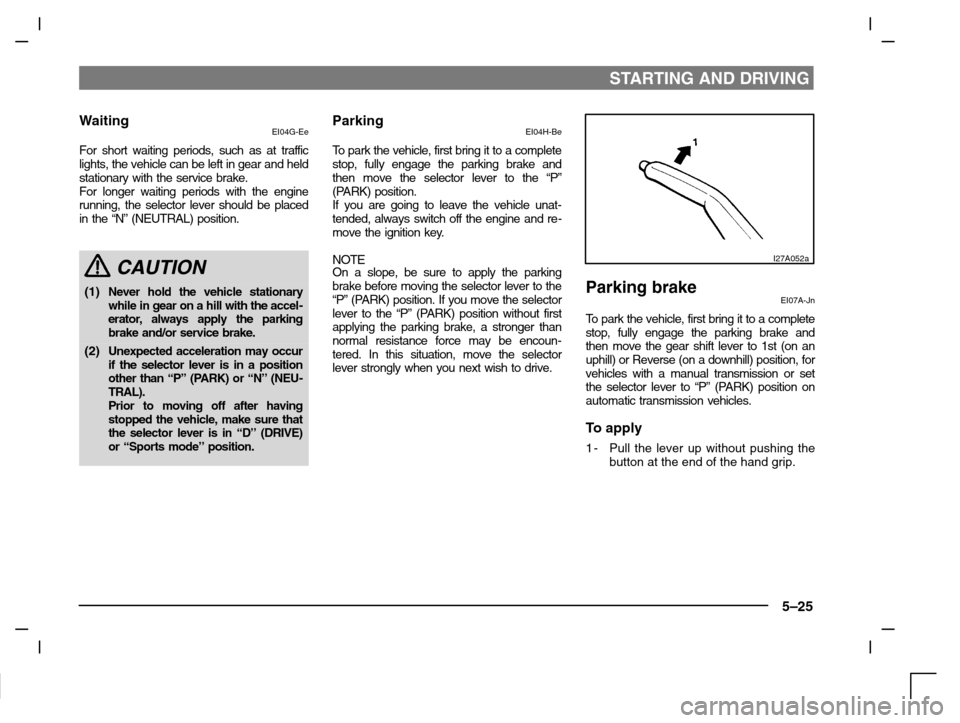
Parking brakeEI07A-Jn
To park the vehicle, first bring it to a complete
stop, fully engage the parking brake and
then move the gear shift lever to 1st (on an
uphill) or Reverse (on a downhill) position, for
vehicles with a manual transmission or set
the selector lever to “P” (PARK) position on
automatic transmission vehicles.
To apply
1-Pull the lever up without pushing the
button at the end of the hand grip.
Page 126 of 280
STARTING AND DRIVING
5–26
I07A045a
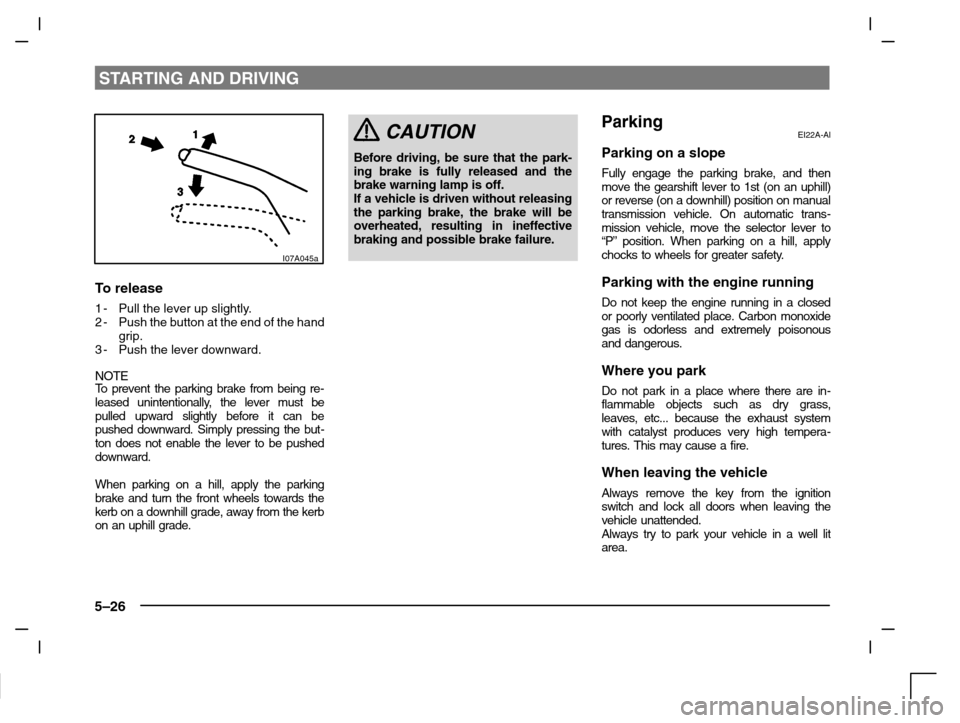
To release
1-Pull the lever up slightly.
2-Push the button at the end of the hand
grip.
3-Push the lever downward.
NOTETo prevent the parking brake from being re-
leased unintentionally, the lever must be
pulled upward slightly before it can be
pushed downward. Simply pressing the but-
ton does not enable the lever to be pushed
downward.
When parking on a hill, apply the parking
brake and turn the front wheels towards the
kerb on a downhill grade, away from the kerb
on an uphill grade.
CAUTION
Before driving, be sure that the park-
ing brake is fully released and the
brake warning lamp is off.
If a vehicle is driven without releasing
the parking brake, the brake will be
overheated, resulting in ineffective
braking and possible brake failure.
ParkingEI22A-Al
Parking on a slope
Fully engage the parking brake, and then
move the gearshift lever to 1st (on an uphill)
or reverse (on a downhill) position on manual
transmission vehicle. On automatic trans-
mission vehicle, move the selector lever to
“P” position. When parking on a hill, apply
chocks to wheels for greater safety.
Parking with the engine running
Do not keep the engine running in a closed
or poorly ventilated place. Carbon monoxide
gas is odorless and extremely poisonous
and dangerous.
Where you park
Do not park in a place where there are in-
flammable objects such as dry grass,
leaves, etc... because the exhaust system
with catalyst produces very high tempera-
tures. This may cause a fire.
When leaving the vehicle
Always remove the key from the ignition
switch and lock all doors when leaving the
vehicle unattended.
Always try to park your vehicle in a well lit
area.
Page 139 of 280
STARTING AND DRIVING
5–39
I10A123a
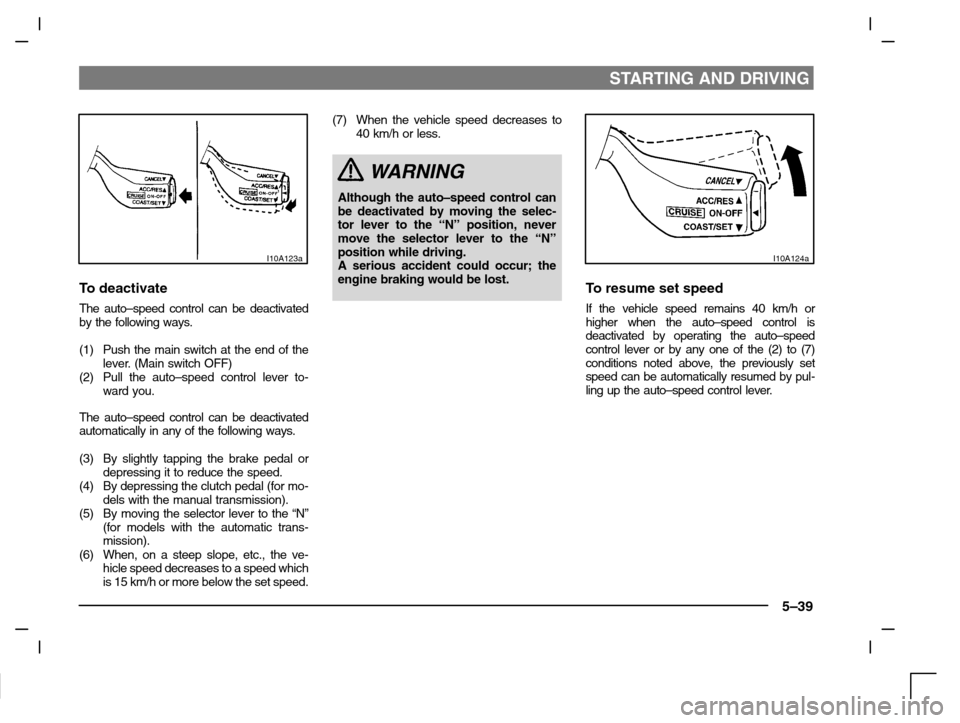
To deactivate
The auto–speed control can be deactivated
by the following ways.
(1) Push the main switch at the end of the
lever. (Main switch OFF)
(2) Pull the auto–speed control lever to-
ward you.
The auto–speed control can be deactivated
automatically in any of the following ways.
(3) By slightly tapping the brake pedal or
depressing it to reduce the speed.
(4) By depressing the clutch pedal (for mo-
dels with the manual transmission).
(5) By moving the selector lever to the “N”
(for models with the automatic trans-
mission).
(6) When, on a steep slope, etc., the ve-
hicle speed decreases to a speed which
is 15 km/h or more below the set speed.(7) When the vehicle speed decreases to
40 km/h or less.
WARNING
Although the auto–speed control can
be deactivated by moving the selec-
tor lever to the “N” position, never
move the selector lever to the “N”
position while driving.
A serious accident could occur; the
engine braking would be lost.
I10A124a
To resume set speed
If the vehicle speed remains 40 km/h or
higher when the auto–speed control is
deactivated by operating the auto–speed
control lever or by any one of the (2) to (7)
conditions noted above, the previously set
speed can be automatically resumed by pul-
ling up the auto–speed control lever.
Page 170 of 280
FOR PLEASANT DRIVING
6–30
Side
H16A063a
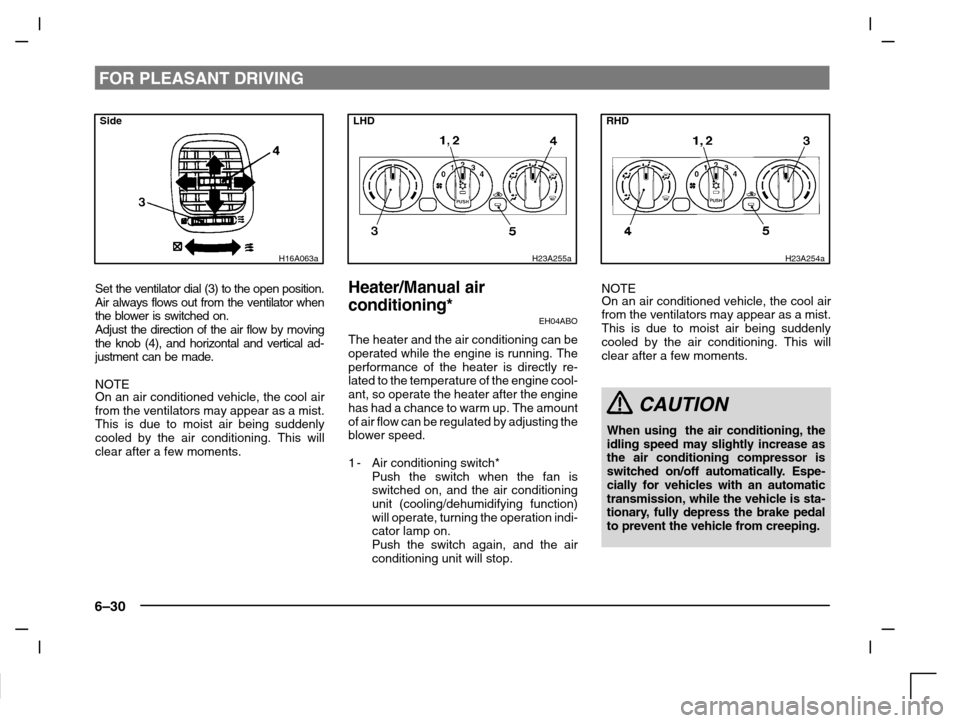
Set the ventilator dial (3) to the open position.
Air always flows out from the ventilator when
the blower is switched on.
Adjust the direction of the air flow by moving
the knob (4), and horizontal and vertical ad-
justment can be made.
NOTE
On an air conditioned vehicle, the cool air
from the ventilators may appear as a mist.
This is due to moist air being suddenly
cooled by the air conditioning. This will
clear after a few moments.
LHD
H23A255a
Heater/Manual air
conditioning*
EH04ABO
The heater and the air conditioning can be
operated while the engine is running. The
performance of the heater is directly re-
lated to the temperature of the engine cool-
ant, so operate the heater after the engine
has had a chance to warm up. The amount
of air flow can be regulated by adjusting the
blower speed.
1-Air conditioning switch*
Push the switch when the fan is
switched on, and the air conditioning
unit (cooling/dehumidifying function)
will operate, turning the operation indi-
cator lamp on.
Push the switch again, and the air
conditioning unit will stop.
RHD
H23A254a
NOTE
On an air conditioned vehicle, the cool air
from the ventilators may appear as a mist.
This is due to moist air being suddenly
cooled by the air conditioning. This will
clear after a few moments.
CAUTION
When using the air conditioning, the
idling speed may slightly increase as
the air conditioning compressor is
switched on/off automatically. Espe-
cially for vehicles with an automatic
transmission, while the vehicle is sta-
tionary, fully depress the brake pedal
to prevent the vehicle from creeping.