window MITSUBISHI CARISMA 2000 1.G Owner's Guide
[x] Cancel search | Manufacturer: MITSUBISHI, Model Year: 2000, Model line: CARISMA, Model: MITSUBISHI CARISMA 2000 1.GPages: 280, PDF Size: 2.32 MB
Page 165 of 280
![MITSUBISHI CARISMA 2000 1.G Owners Guide FOR PLEASANT DRIVING
6–25
To listen to a CD
[With a CD player]
1. Insert the disc with the label facing up-
ward.
When a disc is inserted, the CD player
will begin playing even if the radio or
tape](/img/19/7563/w960_7563-164.png "MITSUBISHI CARISMA 2000 1.G Owners Guide FOR PLEASANT DRIVING
6–25
To listen to a CD
[With a CD player]
1. Insert the disc with the label facing up-
ward.
When a disc is inserted, the CD player
will begin playing even if the radio or
tape")
FOR PLEASANT DRIVING
6–25
To listen to a CD
[With a CD player]
1. Insert the disc with the label facing up-
ward.
When a disc is inserted, the CD player
will begin playing even if the radio or
tape player is being used.
The CD player will also start the play-
back when the CD button (3) is
pressed with a disc in the player even
if the radio or tape player is being
used.
NOTE
If the system is equipped with CD auto-
changer, the system operation is changed
over from the CD player mode to the CD
autochanger mode and vice versa each time
the CD button (3) is pressed.
2. To adjust the volume and tone, refer to
the section “How to adjust the volume”
and “How to adjust the tone” on page
6–17.
3. When the CD eject button (5) on the
CD player is pressed, the disc will
automatically stop and be ejected.
4. When a 3-inch compact disc is used,
playback can be made without using
the adapter. Insert the disc about in the
centre of the discloading slot.5. For information concerning the handl-
ing of compact discs, refer to the sec-
tion “Handling of compact discs” on
page 6–27.
[With a CD autochanger]
1. Press the CD button (3), and the CD
autochanger mode will be selected,
starting a playback. Each time the CD
button is pressed, one in the auto-
changer is played back alternately.
NOTE
To l i s t e n to another disc in the CD auto-
changer, press the DISC button (6), to select
the disc. Every time the
side of the DISC
button is pressed, the next disc is selected.
Every time the
side of the button is
pressed, changeover to the previous disc is
made.
2. To adjust the volume and tone, refer to
the section “How to adjust the volume”
and “How to adjust the tone” on page
6–17.
3. To stop the CD, turn off the power by
pressing the PWR switch (1) or make
changeover to the other mode by
pressing the U/M/L button (2).
4. For information concerning the handl-
ing of compact discs, refer to the sec-
tion “Handling of compact discs” on
page 6–27.
To find the start of a desired track
The start of each track on a disc can be
found by using the
or button (7 or 8).
Track up:Press the button (8) the number of tracks
to skip over.
The frequency-display window will display
the number of tracks thus selected.
Track down:Press the button (7) the number of tracks
to skip over.
The frequency-display window will display
the number of tracks thus selected.
How to repeat the same track
You can repeatedly listen to the same track
by pressing the RPT button (10).
Press the RPT button, and the RPT indicator
(15) will come on.
To r e lease, press the button again.
Page 171 of 280
FOR PLEASANT DRIVING
6–31
2-Blower speed selection dial
There are 4 blower speeds for control
of the amount of air flow.
Adjust the blower speed by turning the
blower speed selection dial clockwise
or anticlockwise. The setting for ordi-
nary use should be the first or second
speed.
3-Temperature control dial
The heater will not operate if the dial is
set all the way to the left.
The air flow temperature will gradually
increase as the dial is turned to the
right.
NOTE
When the engine coolant temperature is
low, temperature of air introduced into the
passenger compartment does not change
even if the temperature control dial is
moved to the high temperature side.
H04A013a
Mode selectionAir outlets
B
B, C, D
A*, B*, C, D
A, B*, C, D
A, B*
A: From front and side demister
B: From centre and side ventilators
C: From under the instrument panel
D: From under the front seat
* : means a small amount of air flow
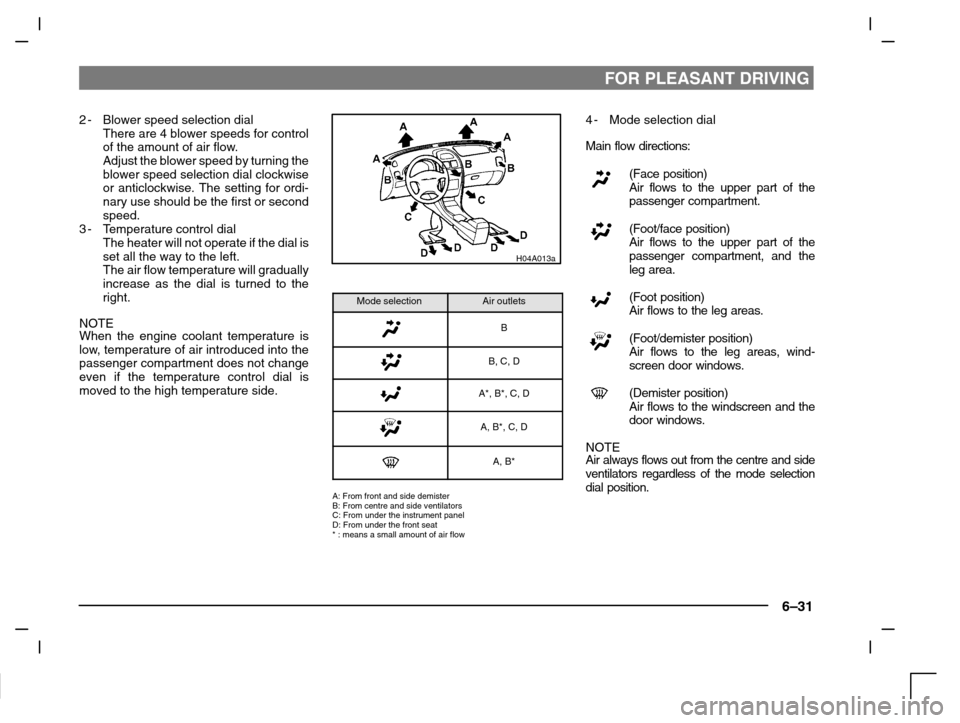
4-Mode selection dial
Main flow directions:
(Face position)
Air flows to the upper part of the
passenger compartment.
(Foot/face position)
Air flows to the upper part of the
passenger compartment, and the
leg area.
(Foot position)
Air flows to the leg areas.
(Foot/demister position)
Air flows to the leg areas, wind-
screen door windows.
(Demister position)
Air flows to the windscreen and the
door windows.
NOTE
Air always flows out from the centre and side
ventilators regardless of the mode selection
dial position.
Page 172 of 280
FOR PLEASANT DRIVING
6–32
5-Air selection switch
Every time the switch is pressed, alter-
ation is made between outside air
introduction and inside air recircula-
tion.
When inside air is recirculated, the in-
dicator lamp comes on.
(Outside position)
Outside air is introduced into the
passenger compartment.
(Recirculation position)
Air is recirculated inside the pas-
senger compartment.
NOTE
Normally, use the outside position to keep
the windscreen and side windows clear
and quickly remove fog or frost from the
windscreen.
If high cooling performance is desired or if
the outside air is dusty or otherwise con-
taminated, use the recirculation position.
But in this case, switch to the outside posi-
tion periodically to ventilate so that the win-
dow does not become fogged up.
CAUTION
Use of the recirculation position for
extended time causes the windows to
fog up.
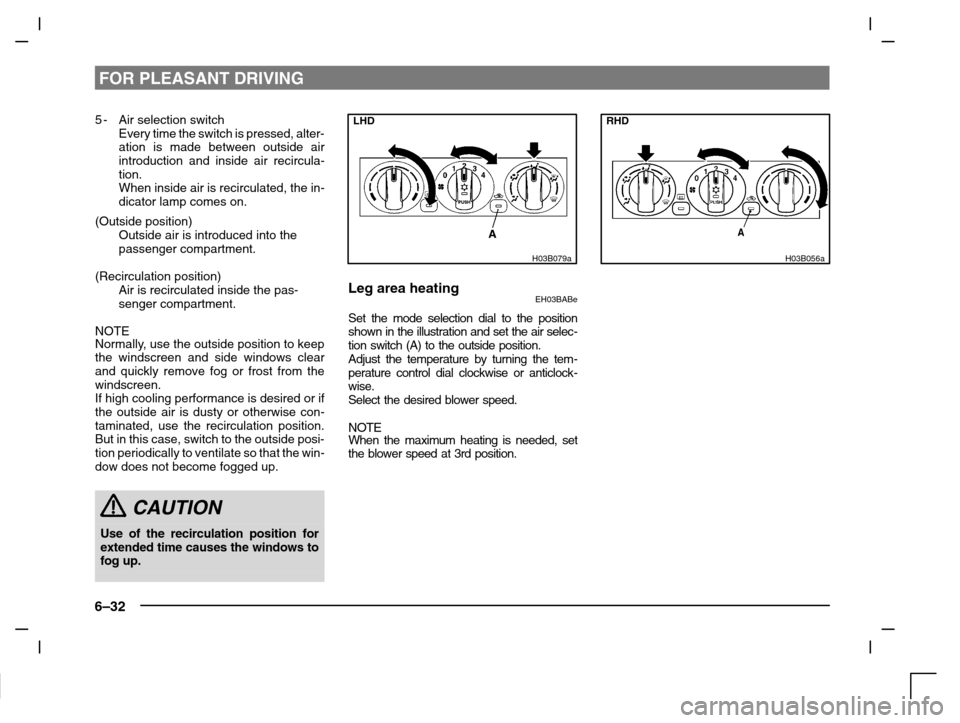
LHD
H03B079a
Leg area heatingEH03BABe
Set the mode selection dial to the position
shown in the illustration and set the air selec-
tion switch (A) to the outside position.
Adjust the temperature by turning the tem-
perature control dial clockwise or anticlock-
wise.
Select the desired blower speed.
NOTEWhen the maximum heating is needed, set
the blower speed at 3rd position.
RHD
H03B056a
Page 173 of 280
FOR PLEASANT DRIVING
6–33
LHD
H03C076a
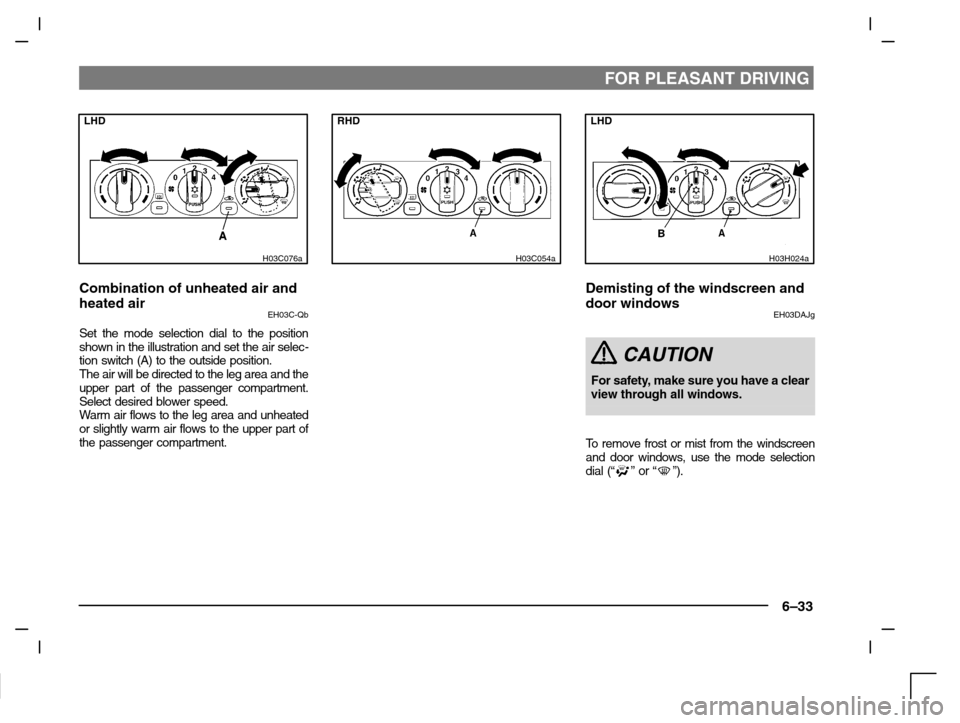
Combination of unheated air and
heated air
EH03C-Qb
Set the mode selection dial to the position
shown in the illustration and set the air selec-
tion switch (A) to the outside position.
The air will be directed to the leg area and the
upper part of the passenger compartment.
Select desired blower speed.
Warm air flows to the leg area and unheated
or slightly warm air flows to the upper part of
the passenger compartment.
RHD
H03C054a
LHD
H03H024a
Demisting of the windscreen and
door windows
EH03DAJg
CAUTION
For safety, make sure you have a clear
view through all windows.
To remove frost or mist from the windscreen
and door windows, use the mode selection
dial
(“” or “”).
Page 174 of 280
FOR PLEASANT DRIVING
6–34
RHD
H03H023a
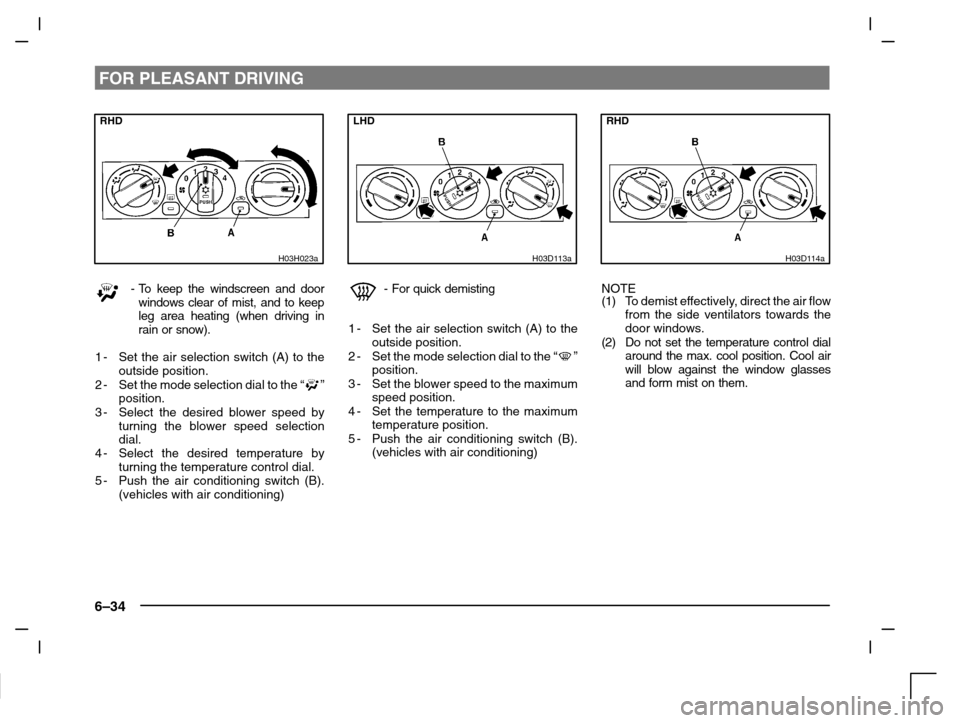
-To keep the windscreen and door
windows clear of mist, and to keep
leg area heating (when driving in
rain or snow).
1-Set the air selection switch (A) to the
outside position.
2-Set the mode selection dial to the “
”
position.
3-Select the desired blower speed by
turning the blower speed selection
dial.
4-Select the desired temperature by
turning the temperature control dial.
5-Push the air conditioning switch (B).
(vehicles with air conditioning)
LHD
H03D113a
-For quick demisting
1-Set the air selection switch (A) to the
outside position.
2-Set the mode selection dial to the “
”
position.
3-Set the blower speed to the maximum
speed position.
4-Set the temperature to the maximum
temperature position.
5-Push the air conditioning switch (B).
(vehicles with air conditioning)
RHD
H03D114a
NOTE
(1)To demist effectively, direct the air flow
from the side ventilators towards the
door windows.
(2) Do not set the temperature control dial
around the max. cool position. Cool air
will blow against the window glasses
and form mist on them.
Page 175 of 280
FOR PLEASANT DRIVING
6–35
LHD
H03E059a
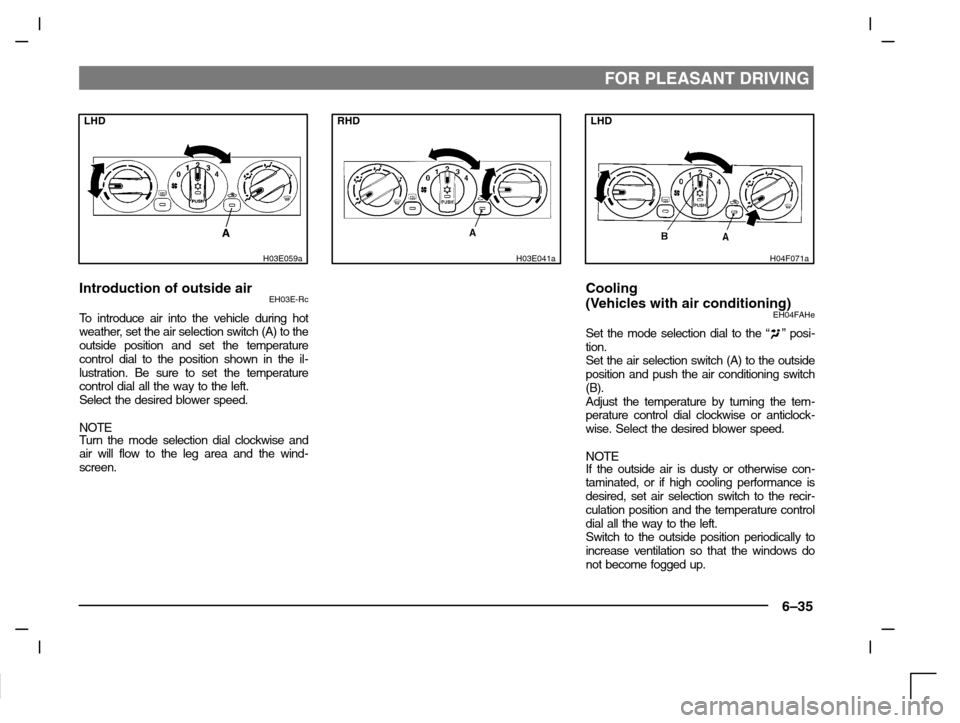
Introduction of outside airEH03E-Rc
To introduce air into the vehicle during hot
weather, set the air selection switch (A) to the
outside position and set the temperature
control dial to the position shown in the il-
lustration. Be sure to set the temperature
control dial all the way to the left.
Select the desired blower speed.
NOTE
Turn the mode selection dial clockwise and
air will flow to the leg area and the wind-
screen.
RHD
H03E041a
LHD
H04F071a
Cooling
(Vehicles with air conditioning)
EH04FAHe
Set the mode selection dial to the “” posi-
tion.
Set the air selection switch (A) to the outside
position and push the air conditioning switch
(B).
Adjust the temperature by turning the tem-
perature control dial clockwise or anticlock-
wise. Select the desired blower speed.
NOTEIf the outside air is dusty or otherwise con-
taminated, or if high cooling performance is
desired, set air selection switch to the recir-
culation position and the temperature control
dial all the way to the left.
Switch to the outside position periodically to
increase ventilation so that the windows do
not become fogged up.
Page 179 of 280
FOR PLEASANT DRIVING
6–39
H14D102a
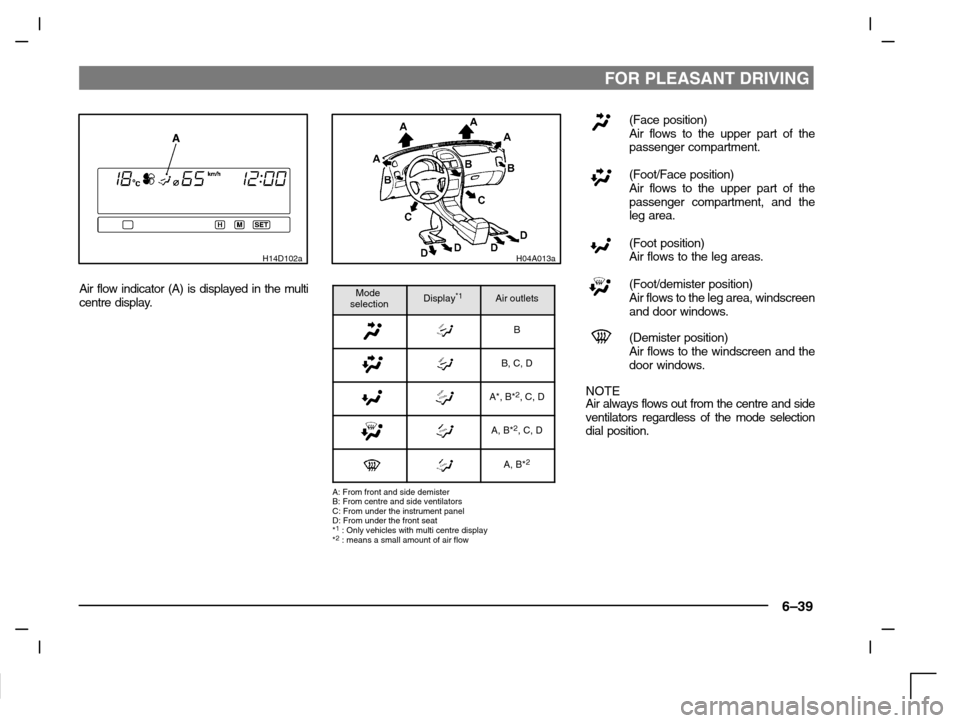
Air flow indicator (A) is displayed in the multi
centre display.
H04A013a
Mode
selectionDisplay*1Air outlets
B
B, C, D
A*, B*2, C, D
A, B*2, C, D
A, B*2
A: From front and side demister
B: From centre and side ventilators
C: From under the instrument panel
D: From under the front seat
*
1 : Only vehicles with multi centre display
*2 : means a small amount of air flow
(Face position)
Air flows to the upper part of the
passenger compartment.
(Foot/Face position)
Air flows to the upper part of the
passenger compartment, and the
leg area.
(Foot position)
Air flows to the leg areas.
(Foot/demister position)
Air flows to the leg area, windscreen
and door windows.
(Demister position)
Air flows to the windscreen and the
door windows.
NOTE
Air always flows out from the centre and side
ventilators regardless of the mode selection
dial position.
Page 180 of 280
FOR PLEASANT DRIVING
6–40
H14E019a
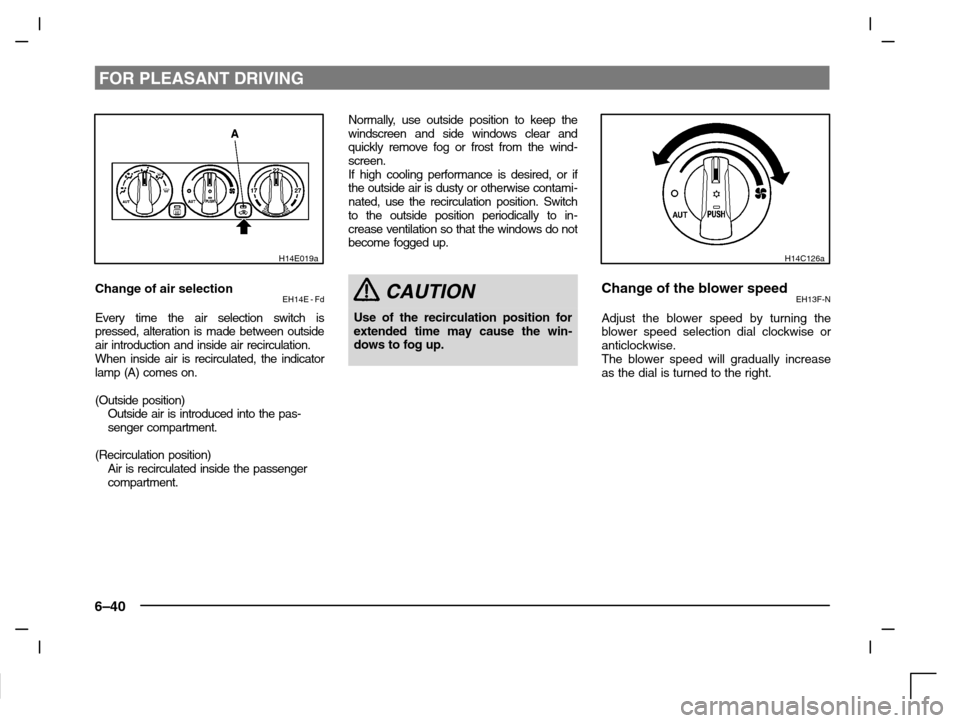
Change of air selectionEH14E - Fd
Every time the air selection switch is
pressed, alteration is made between outside
air introduction and inside air recirculation.
When inside air is recirculated, the indicator
lamp (A) comes on.
(Outside position)
Outside air is introduced into the pas-
senger compartment.
(Recirculation position)
Air is recirculated inside the passenger
compartment.Normally, use outside position to keep the
windscreen and side windows clear and
quickly remove fog or frost from the wind-
screen.
If high cooling performance is desired, or if
the outside air is dusty or otherwise contami-
nated, use the recirculation position. Switch
to the outside position periodically to in-
crease ventilation so that the windows do not
become fogged up.
CAUTION
Use of the recirculation position for
extended time may cause the win-
dows to fog up.
H14C126a
Change of the blower speedEH13F-N
Adjust the blower speed by turning the
blower speed selection dial clockwise or
anticlockwise.
The blower speed will gradually increase
as the dial is turned to the right.
Page 181 of 280
FOR PLEASANT DRIVING
6–41
H14C081a
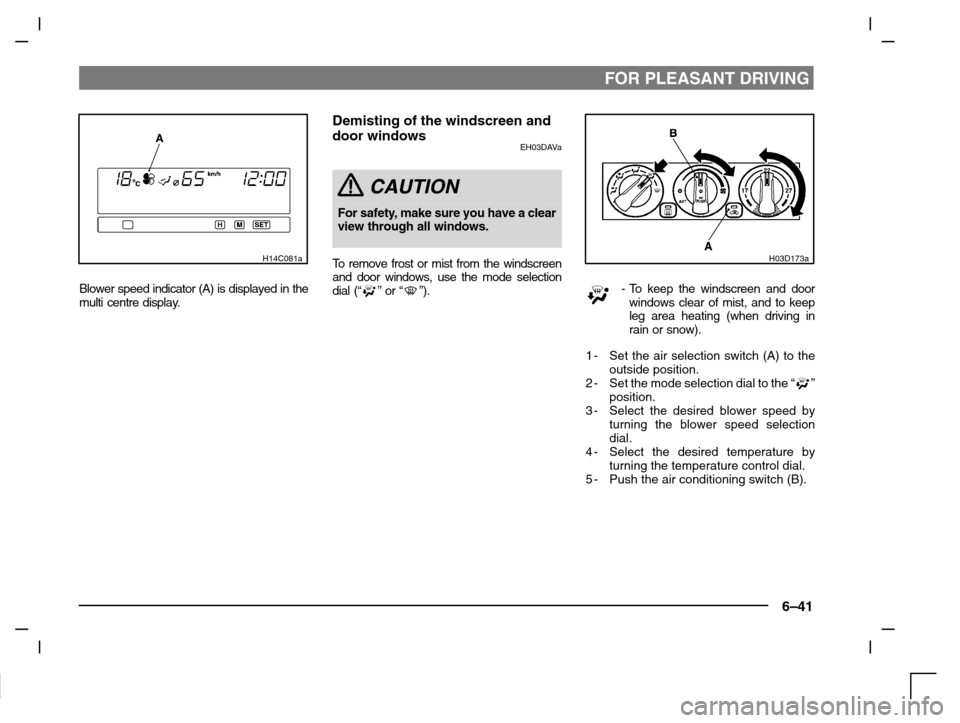
Blower speed indicator (A) is displayed in the
multi centre display.
Demisting of the windscreen and
door windows
EH03DAVa
CAUTION
For safety, make sure you have a clear
view through all windows.
To remove frost or mist from the windscreen
and door windows, use the mode selection
dial (“
” or “”).
H03D173a
-To keep the windscreen and door
windows clear of mist, and to keep
leg area heating (when driving in
rain or snow).
1-Set the air selection switch (A) to the
outside position.
2-Set the mode selection dial to the “
”
position.
3-Select the desired blower speed by
turning the blower speed selection
dial.
4-Select the desired temperature by
turning the temperature control dial.
5-Push the air conditioning switch (B).
Page 182 of 280
FOR PLEASANT DRIVING
6–42
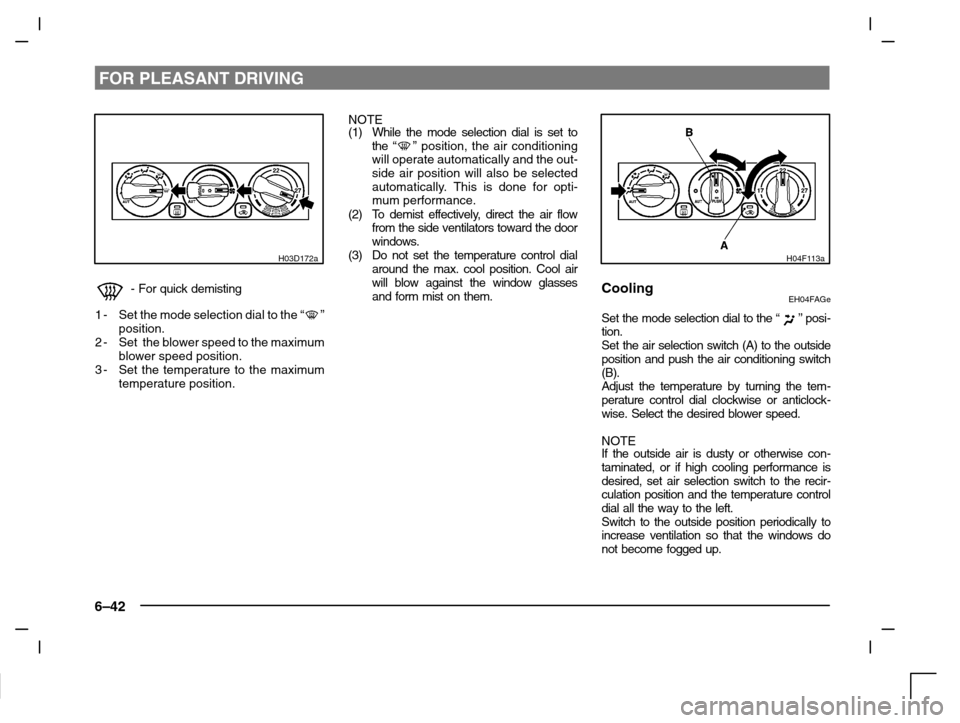
H03D172a
-For quick demisting
1-Set the mode selection dial to the “
”
position.
2-Set the blower speed to the maximum
blower speed position.
3-Set the temperature to the maximum
temperature position.NOTE
(1) While the mode selection dial is set to
the “
” position, the air conditioning
will operate automatically and the out-
side air position will also be selected
automatically. This is done for opti-
mum performance.
(2) To demist effectively, direct the air flow
from the side ventilators toward the door
windows.
(3) Do not set the temperature control dial
around the max. cool position. Cool air
will blow against the window glasses
and form mist on them.
H04F113a
CoolingEH04FAGe
Set the mode selection dial to the “” posi-
tion.
Set the air selection switch (A) to the outside
position and push the air conditioning switch
(B).
Adjust the temperature by turning the tem-
perature control dial clockwise or anticlock-
wise. Select the desired blower speed.
NOTE
If the outside air is dusty or otherwise con-
taminated, or if high cooling performance is
desired, set air selection switch to the recir-
culation position and the temperature control
dial all the way to the left.
Switch to the outside position periodically to
increase ventilation so that the windows do
not become fogged up.