ECU MITSUBISHI iMiEV 2014 1.G Owner's Manual
[x] Cancel search | Manufacturer: MITSUBISHI, Model Year: 2014, Model line: iMiEV, Model: MITSUBISHI iMiEV 2014 1.GPages: 262, PDF Size: 26.84 MB
Page 116 of 262
Liftgate
Features and controls 5-11
5
door can be opened using the inside door han- dle.
N00510100230
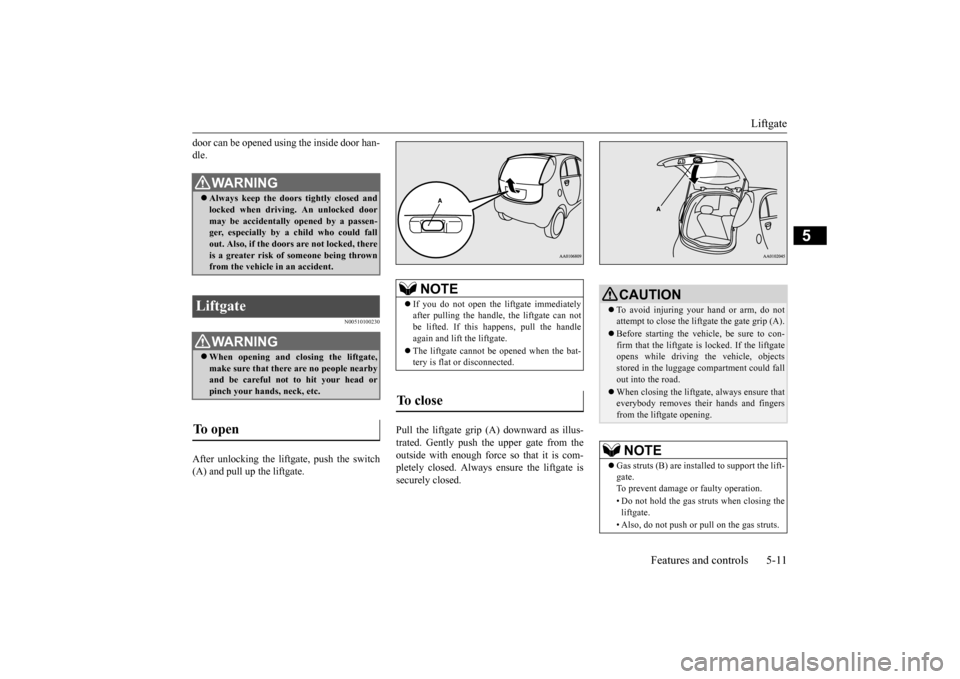
After unlocking the liftgate, push the switch(A) and pull up the liftgate.
Pull the liftgate grip (A) downward as illus- trated. Gently push the upper gate from the outside with enough force so that it is com- pletely closed. Always ensure the liftgate issecurely closed.
WA R N I N G Always keep the door
s tightly closed and
locked when driving. An unlocked door may be accidentally
opened by a passen-
ger, especially by
a child who could fall
out. Also, if the doors are not locked, there is a greater risk of
someone being thrown
from the vehicle
in an accident.
Liftgate
WA R N I N GWhen opening and closing the liftgate, make sure that there are no people nearby and be careful not to hit your head or pinch your hands, neck, etc.
To open
NOTE
If you do not open the li
ftgate immediately
after pulling the handle,
the liftgate can not
be lifted. If this happens, pull the handle again and lift
the liftgate.
The liftgate cannot be opened when the bat- tery is flat or disconnected.
To close
CAUTION To avoid injuring your hand or arm, do not attempt to close the liftgate the gate grip (A). Before starting the vehi
cle, be sure to con-
firm that the liftgate is locked. If the liftgate opens while driving the vehicle, objectsstored in the luggage compartment could fall out into the road. When closing the liftga
te, always ensure that
everybody removes their hands and fingers from the liftgate opening.NOTE
Gas struts (B) are instal
led to support the lift-
gate.To prevent damage or faulty operation. • Do not hold the gas struts when closing the liftgate. • Also, do not push or pull on the gas struts.
BK0209800US.book 11 ページ 2014年1月14日 火曜日 午前9時26分
Page 129 of 262
Service brake 5-24 Features and controls
5
When the vehicle sp
eed is approximately
2-22 mph (3-35 km/h).
The system will not operate under the follow- ing conditions: When the vehicle sp
eed is approximately
2 mph (3 km/h) or less and the brake pedal is depressed. When the vehicle sp
eed is approximately
22 mph (35 km/h) or more. When the selector lever is in the “P” (PARK) position.
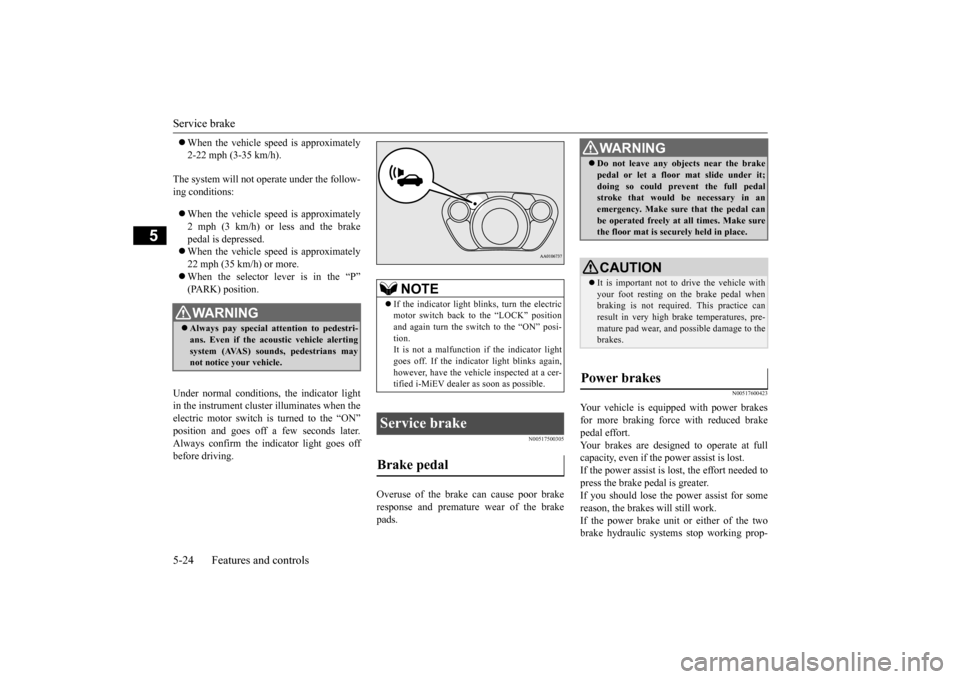
Under normal conditions, the indicator light in the instrument cluster illuminates when theelectric motor switch is turned to the “ON” position and goes off a
few seconds later.
Always confirm the indicator light goes offbefore driving.
N00517500305
Overuse of the brake can cause poor brakeresponse and premature wear of the brakepads.
N00517600423
Your vehicle is equipped with power brakesfor more braking force with reduced brakepedal effort. Your brakes are designed to operate at full capacity, even if the power assist is lost.If the power assist is lost, the effort needed to press the brake pedal is greater. If you should lose the power assist for somereason, the brakes will still work. If the power brake unit or either of the two brake hydraulic systems stop working prop-
WA R N I N G Always pay special attention to pedestri- ans. Even if the acou
stic vehicle alerting
system (AVAS) sounds, pedestrians may not notice your vehicle.
NOTE
If the indicator light blinks, turn the electric motor switch back to the “LOCK” positionand again turn the switch to the “ON” posi- tion. It is not a malfunction if the indicator lightgoes off. If the indica
tor light blinks again,
however, have the vehicl
e inspected at a cer-
tified i-MiEV dealer as soon as possible.
Service brake Brake pedal
WA R N I N G Do not leave any obje
cts near the brake
pedal or let a floor
mat slide under it;
doing so could prevent the full pedalstroke that would be necessary in an emergency. Make sure that the pedal can be operated freely at
all times. Make sure
the floor mat is securely held in place.CAUTION It is important not to drive the vehicle with your foot resting on the brake pedal when braking is not required.
This practice can
result in very high brake temperatures, pre- mature pad wear, and pos
sible damage to the
brakes.
Power brakes
BK0209800US.book 24 ページ 2014年1月14日 火曜日 午前9時26分
Page 160 of 262
Cup holder
Features and controls 5-55
5
N00551500259
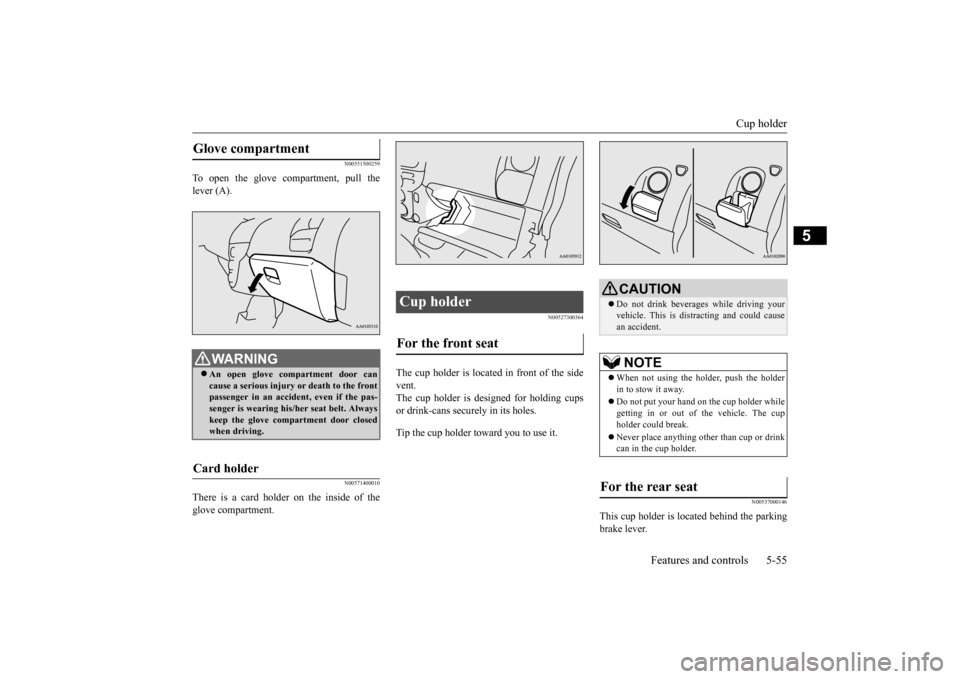
To open the glove compartment, pull the lever (A).
N00571400010
There is a card holder on the inside of theglove compartment.
N00527300364
The cup holder is located in front of the side vent. The cup holder is de
signed for holding cups
or drink-cans secu
rely in its holes.
Tip the cup holder toward you to use it.
N00537000146
This cup holder is located behind the parking brake lever.
Glove compartment
WA R N I N G An open glove compartment door can cause a serious injury or death to the frontpassenger in an accident, even if the pas- senger is wearing his/her seat belt. Always keep the glove comp
artment door closed
when driving.
Card holder
Cup holder For the front seat
CAUTION Do not drink beverages while driving your vehicle. This is dist
racting and could cause
an accident.NOTE
When not using the holder, push the holder in to stow it away. Do not put your hand on the cup holder while getting in or out of
the vehicle. The cup
holder could break. Never place anything other than cup or drink can in the cup holder.
For the rear seat
BK0209800US.book 55 ページ 2014年1月14日 火曜日 午前9時26分
Page 163 of 262
Economical driving 6-2 Driving safety
6
N00628500029
For economical driving,
there are some tech-
nical requirements that
have to be met. In
order to achieve longer life of the vehicle andthe most economical
operation, we recom-
mend you to have the vehicle checked at reg- ular intervals according to the “WARRANTYAND MAINTENANCE MANUAL”. Avoid driving with the
accelerator pedal fully
depressed, such as for unnecessarily sudden starts, accelerati
on and deceleration.
Smoothly depress the
accelerator pedal.
Observe the speed limit and keep the speed as constant as possi
ble while driving.
Parking for a long period with the ready indi- cator illuminated will shorten the cruisingrange. At higher the vehicle speed the more main drive lithium-ion battery
is consumed. Avoid
driving at full speed. Even a slight release of the accelerator pedal wi
ll save a significant
amount of main drive lithium-ion battery charge. Check the tire inflation pressures at regular intervals Low tire inflat
ion pressure increases
road resistance. In addi
tion, low tire pressures
adversely affect tire we
ar and driving stabil-
ity. Do not drive with unnecessary articles in the luggage compartment. Too much cooling/heating can affect the cruising range, so maintain an appropriatetemperature to exte
nd the cruising range.
N00628900010
Drunk driving is one of the most frequent causes of accidents.
Your driving ability ca
n be seriously impaired
even with blood alcohol levels far below thelegal minimum. If you
have been drinking,
don’t drive. Ride with a designated non- drinking driver, call a cab or a friend, or usepublic transportation. Drinking coffee or tak- ing a cold shower will not make you sober. Similarly, prescription and nonprescriptiondrugs affect your aler
tness, perception and
reaction time. Consul
t with your doctor or
pharmacist before dr
iving while under the
influence of any of
these medications.
N00628600017
The original equipmen
t floor mat provided
with your vehicle was
specifically designed
for your vehicle. Always properly position the floor mat and assure it does not interfere with operation of the pedals. Always use theretaining clip on the driver’s floorboard to secure the floor mat. When used, this clip will help prevent the floor mat from moving for-ward and possibly interfering with the opera- tion of the pedals. To prevent the floor mat
Economical driving Starting and acceleration Idling Speed
Tire inflation pressure Cargo loads Air conditioning Driving, alcohol and drugs
WA R N I N G NEVER DRINK AND DRIVE. Your perceptions ar
e less accurate, your
reflexes are slower and your judgment is impaired.
Floor mat
BK0209800US.book 2 ページ 2014年1月14日 火曜日 午前9時26分
Page 164 of 262
Vehicle preparatio
n before driving
Driving safety 6-3
6
from moving forward
and possibly interfering
with the operation of the pedals, Mitsubishigenuine floor mats are recommended.
N00628700063
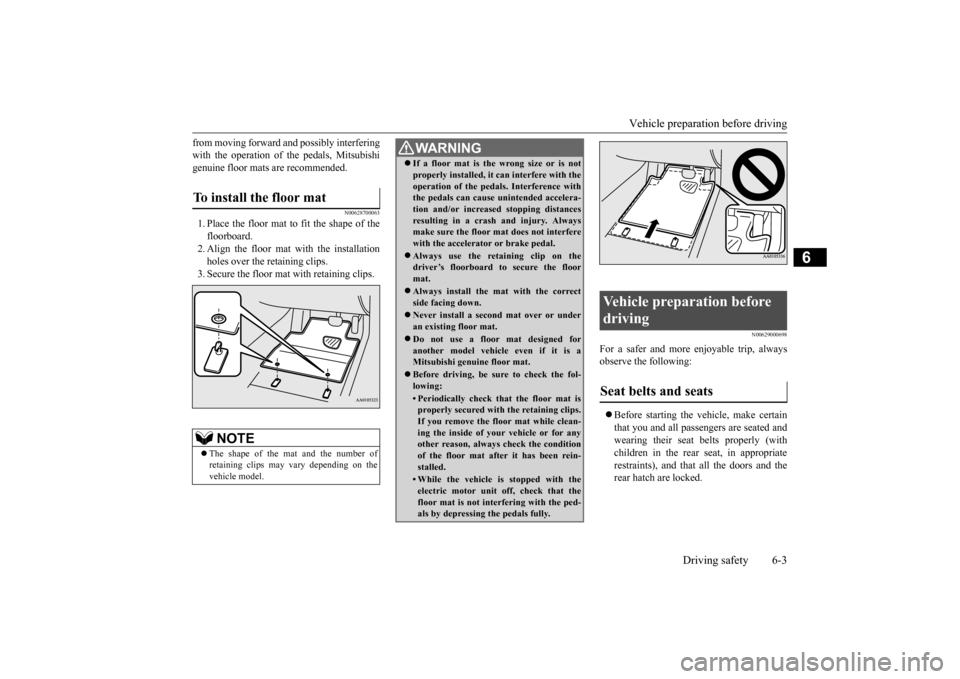
1. Place the floor mat to fit the shape of thefloorboard. 2. Align the floor mat with the installation holes over the retaining clips. 3. Secure the floor mat with retaining clips.
N00629000698
For a safer and more enjoyable trip, always observe the following: Before starting the ve
hicle, make certain
that you and all passengers are seated andwearing their seat belts properly (with children in the rear seat, in appropriate restraints), and that all the doors and therear hatch are locked.
To install the floor mat
NOTE
The shape of the mat and the number of retaining clips may
vary depending on the
vehicle model.
WA R N I N G If a floor mat is the
wrong size or is not
properly installed, it can interfere with theoperation of the pedals. Interference withthe pedals can cause unintended accelera- tion and/or increased stopping distances resulting in a cras
h and injury. Always
make sure the floor mat does not interfere with the accelerator or brake pedal. Always use the reta
ining clip on the
driver’s floorboard to secure the floor mat. Always install the mat with the correct side facing down. Never install a second
mat over or under
an existing floor mat. Do not use a floor mat designed for another model vehicle even if it is aMitsubishi genuine floor mat. Before driving, be sure to check the fol- lowing:• Periodically check that the floor mat isproperly secured with the retaining clips. If you remove the floor mat while clean- ing the inside of you
r vehicle or for any
other reason, always check the condition of the floor mat after it has been rein- stalled.• While the vehicle is stopped with theelectric motor unit off, check that thefloor mat is not interfering with the ped- als by depressing the pedals fully.
Vehicle preparation before driving Seat belts and seats
BK0209800US.book 3 ページ 2014年1月14日 火曜日 午前9時26分
Page 187 of 262
AM/FM electronically tune
d radio with CD player
7-14 Comfort controls
7
3. Press the SEEK button
to tune to a station,
or press the MEMORY button either or to tune in to a station memorized. Refer to “Automatic tuning”, “Manualtuning” or “To enter frequencies into the memory”.
After pressing the SEEK button, a receivable station will be automatically selected andreception of the st
ation will begin.
Press the SCAN button.
The radio will tune
consecutively to each
available station for
about 5 seconds per stat
ion. If you want to
stop scanning, press the SCAN button again. The frequency display of the current stationflashes once per second during SCAN. The frequency changes every time the SEEK button is pressed. Press the button to select the desired station.
As many as 6 AM and 12 FM stations can be entered into the memory. To store a frequency in the memory, follow these steps: 1. Press the SEEK button to tune to the fre- quency you wish to keep in the memory. 2. Press the MEMORY button either or
until it beeps. The sound will be momentarily inter- rupted while the frequency is beingentered into the memory. 3. To recall a frequency
that has been saved
in memory, press the MEMORY button briefly for no longer than about 1 second.
N00735300743
Automatic tuning SCAN functionManual tuning
To enter frequencies into the mem- ory
NOTE
Disconnecting the 12V st
arter battery cables
erases all the radio stat
ion settings stored in
the memory.
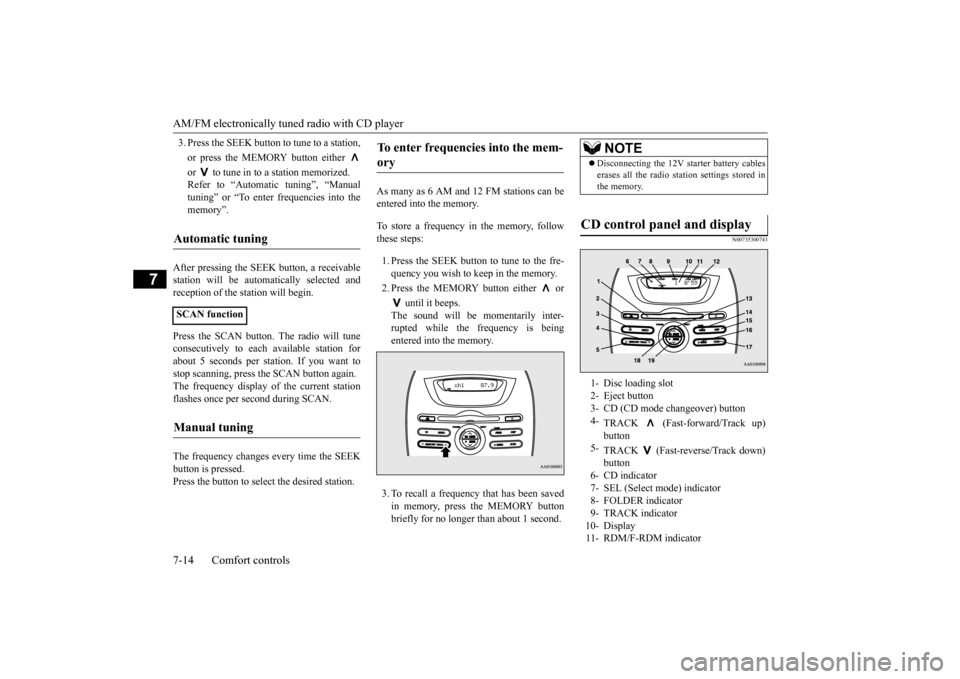
CD control panel and display 1- Disc loading slot 2- Eject button3- CD (CD mode changeover) button 4-
TRACK (Fast-forward/Track up) button
5-
TRACK (Fast-reverse/Track down) button
6- CD indicator 7- SEL (Select mode) indicator 8- FOLDER indicator9- TRACK indicator 10- Display 11- RDM/F-RDM indicator
BK0209800US.book 14 ページ 2014年1月14日 火曜日 午前9時26分
Page 188 of 262
AM/FM electronically tuned radio with CD player
Comfort controls 7-15
7
N00735502097
1. Press the POWER button until it beeps to turn the audio system ON and OFF. The system turns on in the last mode used. 2. Insert the disc with the label facing up.When a disc is inserted, the CD indicator will come on and the CD player will begin playing even if the radio is being used.The CD player will also begin playing when the CD button is pressed with a disc set in the CD player or in the disc loadingslot, even if the radio is being used.
When the eject button is pressed, the disc automatically stops and is ejected. The sys-tem automatically switches to radio mode.
Push the CD button if a disc is already in the CD player. The audio
system will enter CD
mode and start playba
ck. The track number
and the playing time wi
ll appear on the dis-
play. The tracks in the disc will be played consecutively a
nd continuously.
This CD player allows you to play MP3 (MPEG Audio Layer-3) files recorded on CD-ROMs, CD-Rs (recordable CDs), andCD-RWs (rewritable CDs) in ISO9660 Level 1/Level 2, Joliet, and Romeo formats. Each disc may have a maximum of 16 trees, 100folders and 255 files.
During MP3 playback,
the unit can display ID3 tag information. For information concerning ID3 tag, refer to “CD
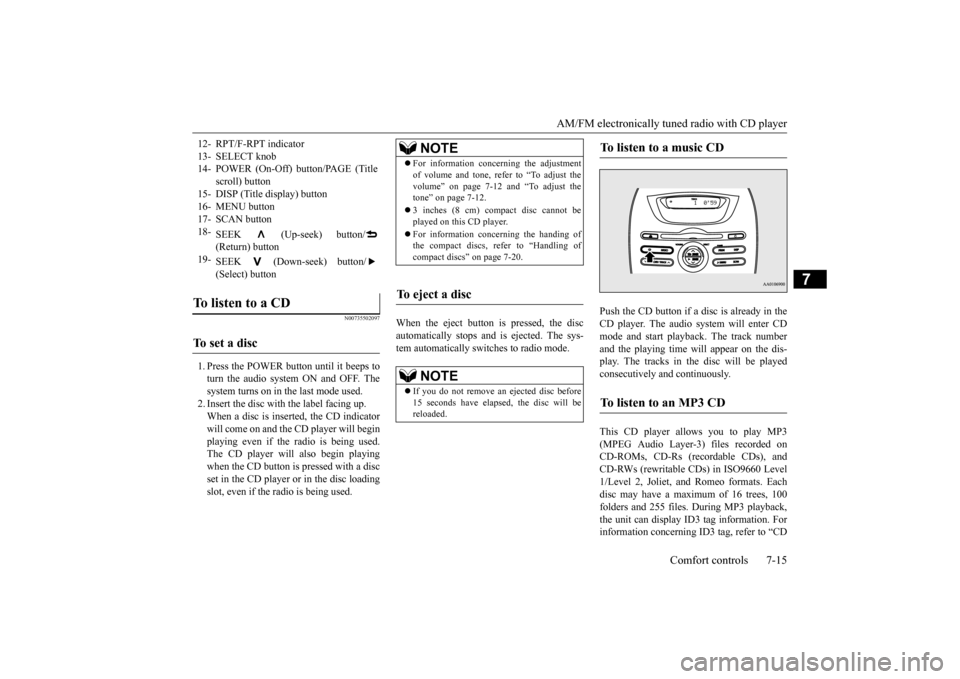
12- RPT/F-RPT indicator 13- SELECT knob 14- POWER (On-Off) button/PAGE (Title
scroll) button
15- DISP (Title display) button 16- MENU button17- SCAN button 18-
SEEK (Up-seek) button/ (Return) button
19-
SEEK (Down-seek) button/ (Select) button
To listen to a CD To set a disc
NOTE
For information concerning the adjustment of volume and tone, refer to “To adjust thevolume” on page 7-12 and “To adjust thetone” on page 7-12. 3 inches (8 cm) compact disc cannot be played on this CD player. For information concerning the handing of the compact discs, re
fer to “Handling of
compact discs” on page 7-20.
To eject a disc
NOTE
If you do not remove an ejected disc before 15 seconds have elapse
d, the disc will be
reloaded.
To listen to a music CD To listen to an MP3 CD
BK0209800US.book 15 ページ 2014年1月14日 火曜日 午前9時26分
Page 195 of 262
Antenna 7-22 Comfort controls
7
Be sure to observe the handling instruc- tions for the CD-R/RW disc.
N00734200471
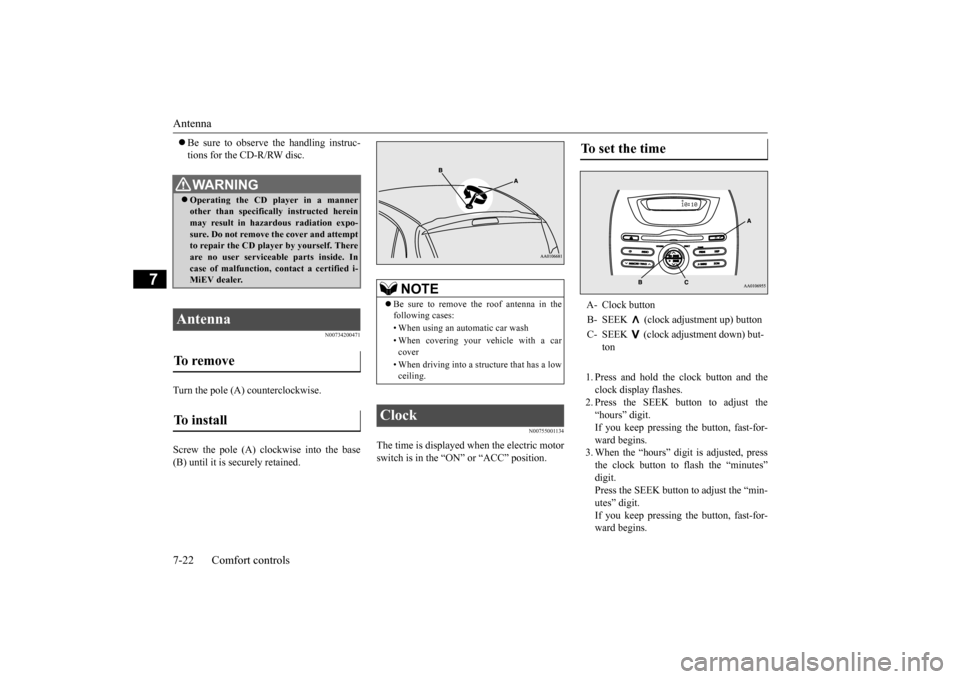
Turn the pole (A) counterclockwise. Screw the pole (A) clockwise into the base (B) until it is securely retained.
N00755001134
The time is displayed when the electric motorswitch is in the “ON” or “ACC” position.
1. Press and hold the clock button and the clock display flashes. 2. Press the SEEK button to adjust the“hours” digit. If you keep pressing the button, fast-for- ward begins.3. When the “hours” digit is adjusted, press the clock button to flash the “minutes” digit.Press the SEEK button to adjust the “min- utes” digit. If you keep pressing the button, fast-for-ward begins.
WA R N I N G Operating the CD player in a manner other than specifically instructed herein may result in hazardous radiation expo- sure. Do not remove the cover and attemptto repair the CD playe
r by yourself. There
are no user serviceable parts inside. In case of malfunction, contact a certified i-MiEV dealer.
Antenna To remove To install
NOTE
Be sure to remove the roof antenna in the following cases: • When using an automatic car wash • When covering your ve
hicle with a car
cover • When driving into a structure that has a low ceiling.
Clock
To set the time A- Clock button B- SEEK (clock adjustment up) buttonC- SEEK (clock adjustment down) but-
ton
BK0209800US.book 22 ページ 2014年1月14日 火曜日 午前9時26分
Page 206 of 262
Tire repair kit
For emergencies 8-9
8
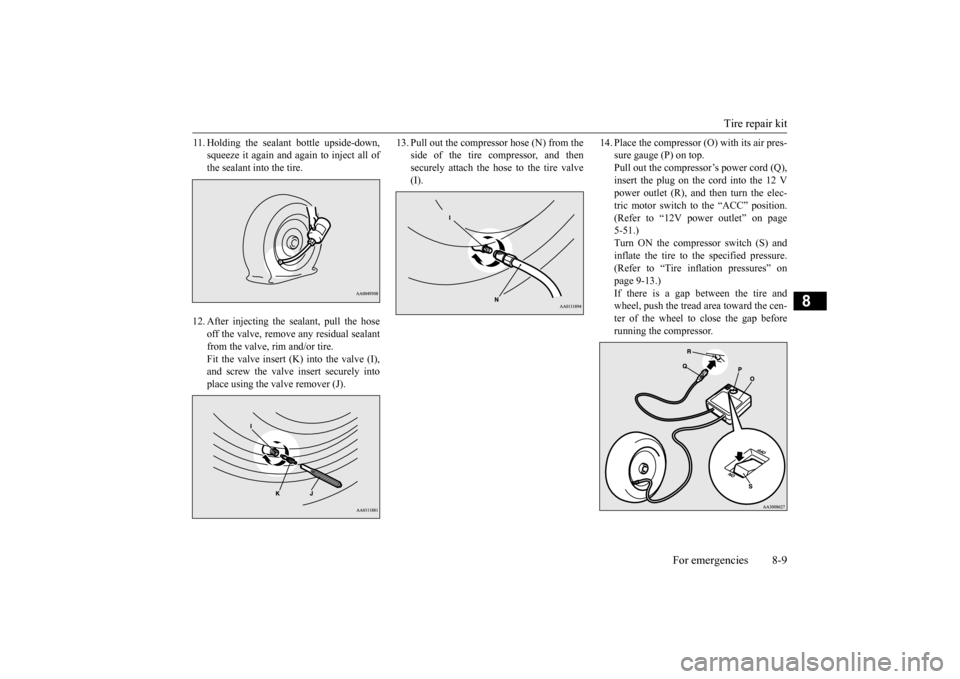
11. Holding the sealant bottle upside-down,
squeeze it again and again to inject all ofthe sealant into the tire.
12. After injecting the sealant, pull the hose
off the valve, remove any residual sealant from the valve, rim and/or tire. Fit the valve insert (K) into the valve (I),and screw the valve insert securely into place using the valve remover (J).
13. Pull out the compre
ssor hose (N) from the
side of the tire compressor, and thensecurely attach the hose to the tire valve (I).
14. Place the compressor (O) with its air pres-
sure gauge (P) on top.Pull out the compressor’s power cord (Q), insert the plug on the cord into the 12 V power outlet (R), and then turn the elec-tric motor switch to the “ACC” position. (Refer to “12V power outlet” on page 5-51.)Turn ON the compressor switch (S) and inflate the tire to the specified pressure. (Refer to “Tire inflation pressures” on page 9-13.) If there is a gap between the tire andwheel, push the tread area toward the cen- ter of the wheel to close the gap before running the compressor.
BK0209800US.book 9 ページ 2014年1月14日 火曜日 午前9時26分
Page 208 of 262
Tire repair kit
For emergencies 8-11
8
18. When you have inflated the tire to the
specified pressure, stow the compressor,bottle, and other item
s in the vehicle and
make sure that the seat cushion is properly secured. (Refer to “Tire repair kit storage”on page 8-5.) Promptly start driving the vehicle so that the tire sealant can spread evenly in the tire. Drive with great care.Do not exceed a speed of 50 mph (80 km/h). Observe local speed limits.
19. After driving for 10 minutes or 3 miles (5
km), park the vehicle in safe place.Remove the air compressor from the stowed position. Check the tire pressure using the air pressure gauge on the com-pressor. If the tire pressure has apparently not dropped, the emergency repair proce- dure is complete. Continue the processfrom step 21. If the tire pressure is not sufficient, inflate the tire to the specified pressure again and drive the vehicle carefully without exceeding a speed of 50 mph (80 km/h).Before driving, stow
the compressor and
make sure that the rear seat cushion is properly secured.
20. After driving for 10 minutes or 3 miles (5
km) again, check the tire pressure usingthe air pressure gauge on the compressor. If the tire pressure has apparently not dropped, the emergency repair procedureis complete. Before driving, make sure that the compressor is stowed and the seat cushion is properly secured. You muststill not exceed a speed of 50 mph (80 km/h). Observe local speed limits.
CAUTION If you sense any abnormality while driving, stop the vehicle and c
ontact a certified i-
MiEV dealer. Otherwise the tire pressure may drop before the em
ergency repair proce-
dure is completed,
rendering the vehicle
unsafe to drive.
CAUTION If the tire pressure is lower than the mini- mum permitted pressure
(18 psi {130 kPa}),
the tire cannot successful
ly be repaired with
the tire sealant. Do not drive the vehicle any further. Contact a certified i-MiEV dealer.
NOTE
If the tire pressure has dropped below the specified level when you check it at the endof the repair procedure, do not drive the vehicle any further.
Contact a certified i-
MiEV dealer. In cold conditions (when the ambient tem- perature is 32 °F {0 °C} or lower), the timeand driving distance
necessary unt
il comple-
tion of the repair can become longer than in warmer conditions, and th
e tire pressure may
drop below the specified level even after you have inflated the tire
the second time and
subsequently driven the
vehicle. If this hap-
pens, inflate the tire to the specified pressure once more, drive for about 10 minutes or 3 miles (5 km), then check the tire pressureagain. If the tire pressure has again dropped below the specified level, stop driving the vehicle and contact a certified i-MiEVdealer.
BK0209800US.book 11 ページ 2014年1月14日 火曜日 午前9時26分