battery MITSUBISHI L200 2015 (in English) Owner's Guide
[x] Cancel search | Manufacturer: MITSUBISHI, Model Year: 2015, Model line: L200, Model: MITSUBISHI L200 2015Pages: 418, PDF Size: 25.8 MB
Page 275 of 418
WARNINGlRefer to and comply with all state and lo-
cal laws in your area regarding cellular phone usage while driving.NOTEl The Bluetooth ®
2.0 interface cannot be used
if the Bluetooth ®
device has a flat battery or
the device power is turned off.
l Hands-free calls will not be possible if your
phone does not have service available.
l If you place the Bluetooth ®
device in the
cargo area, you may not be able to use the
Bluetooth ®
2.0 interface.
l Some Bluetooth ®
devices are not compatible
with the Bluetooth ®
2.0 interface.
l You can confirm the Link System software
version by pressing the HANG-UP button 3
times (press and hold 2 times and then press
briefly) within 10 seconds.
l For details on the Bluetooth ®
2.0 interface,
you can see them by accessing the
MITSUBISHI MOTORS website.
Please read and agree on the “Warning about Links to the Web Sites of Other Companies”
because it connects to other than MITSUBISHI MOTORS website.
http://www.mitsubishi-motors.com/en/prod-
ucts/index.html
l Software updates by cellular phone/digital
audio device manufacturers may change/ alter device connectivity.Steering control switch and microphone
® p. 7-85
Voice recognition function ® p. 7-86
Useful voice commands ® p. 7-87
Speaker enrollment function ® p. 7-89
Connecting the Bluetooth® 2.0 interface and Bluetooth® device ® p. 7-90
Operating a music player connected via Blue-
tooth® ® p. 7-94
How to make or receive hands-free calls ® p. 7-94
Phone book function ® p. 7-96Steering control switch and mi-
crophone
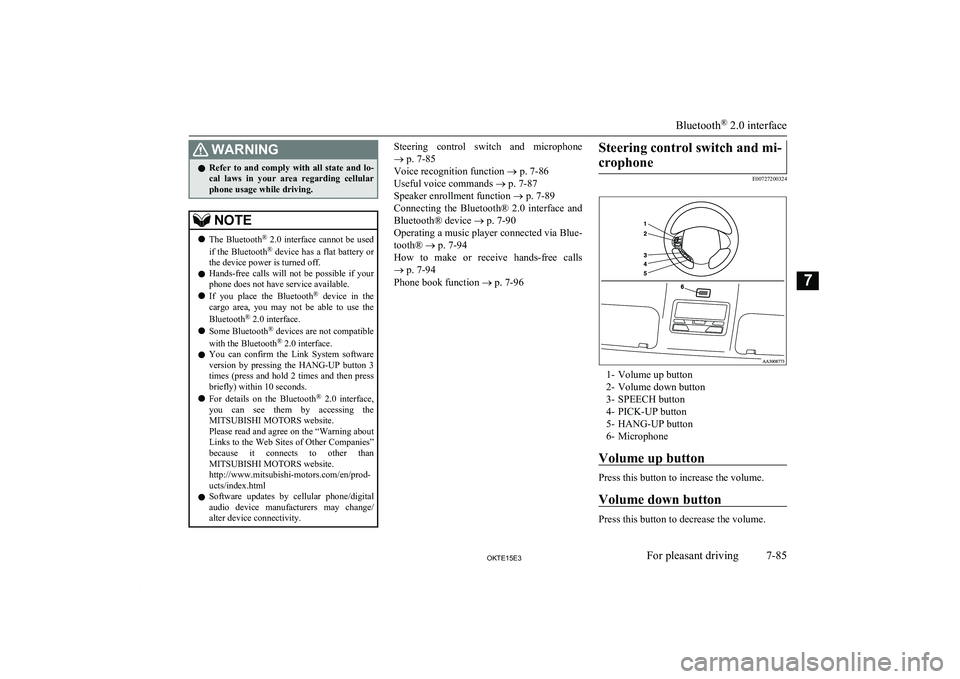
E00727200324
1- Volume up button
2- Volume down button
3- SPEECH button
4- PICK-UP button
5- HANG-UP button
6- Microphone
Volume up button
Press this button to increase the volume.
Volume down button
Press this button to decrease the volume.
Bluetooth ®
2.0 interface
7-85OKTE15E3For pleasant driving7
Page 276 of 418
SPEECH button
lPress this button to change to voice rec-
ognition mode.
While the system is in voice recognition
mode, “Listening” will appear on the au- dio display.
l If you press the button briefly while in
voice recognition mode, it will interrupt prompting and allow voice command in-
put.
Pressing the button longer will deacti-
vate the voice recognition mode.
l Pressing this button briefly during a call
will enable voice recognition and allow voice command input.
PICK-UP button
l Press this button when an incoming call
is received to answer the telephone.
l When another call is received during a
call, press this button to put the first call-
er on hold and talk to the new caller. • In such circumstances, you can press
the button briefly to switch between
callers. You will switch to the first
caller and the other caller will be put on hold.
• To establish a three-way call in such
situations, press the SPEECH button
to enter voice recognition mode and then say “Join calls”.
HANG-UP button
l Press this button when an incoming call
is received to refuse the call.
l Press this button during a call to end the
current call.
When another call is on hold, you will switch to that call.
l If this button is pressed in the voice rec-
ognition mode, the voice recognition
mode will be deactivated.
NOTEl When you press the SPEECH button to enter
voice recognition mode with a cellular
phone paired to the system, current informa- tion on the cellular phone, such as “remain- ing battery life,” “signal strength” or “roam-
ing,” will be displayed on the audio dis-
play.*
*: Some cellular phones will not send this
information to the Bluetooth ®
2.0 interface.
l Call waiting and three-way calls can be used
by the Bluetooth ®
2.0 interface, only if it is
possible to use those services with your cel- lular phone.
Microphone
Your voice will be recognized by a micro-
phone in the overhead console, allowing you to make hands-free calls with voice com-
mands.
NOTEl If a cellular phone is brought close to the mi-
crophone, it may create noise in the voice on
the phone. In such a case, take the cellular phone at a place as far as possible from the
microphone.Voice recognition function
E00727300527
The Bluetooth ®
2.0 interface is equipped
with a voice recognition function.
Simply say voice commands and you can
perform various operations and make or re- ceive hands-free calls.
With the Bluetooth ®
2.0 interface, voice rec-
ognition is possible for English, French,
Spanish, Italian, German, Dutch, Portuguese and Russian. The factory setting is “English” or “Russian.”
NOTEl If the voice command that you say differs
from the predefined command or cannot be recognised due to ambient noise or some
other reason, the Bluetooth ®
2.0 interface
will ask you for the voice command again up
to 3 times.
Bluetooth ®
2.0 interface
7-86OKTE15E3For pleasant driving7
Page 286 of 418
6.The voice guide will say “Calling
tem will dial the telephone number.NOTEl When the confirmation function is on, the
system will ask if the name and location of the receiver are correct.
If the name is correct, answer “Yes.”
To change the name or location to call, an- swer “No.” The system will return to Step 3.
Redialing
You can redial the last number called, based
on the history of dialed calls in the paired cel-
lular phone.
Use the following procedure to redial. 1. Press the SPEECH button.
2. Say “Redial.”
SEND function
E00761300035
During a call, press the SPEECH button to
enter voice recognition mode, then say “
For example, if during a call you need to sim- ulate the press of a phone button as a re-
sponse to an automated system, press the SPEECH button and speak “1 2 3 4 pound SEND” and the 1234# will be sent on your
cellular phone.
Receiving calls
E00761600012
If an incoming phone call is received while
the ignition switch is in the “ACC” or “ON”
position, the audio system will be automati- cally turned on and switched to the incomingcall, even when the audio system was origi-
nally off.
The voice guide announcement for the in- coming call will be output from the front pas- senger’s seat speaker.
If the CD player or radio was playing when
the incoming call was received, the audio
system will mute the sound from the CD player or radio and output only the incomingcall.
To receive the call, press the PICK-UP but- ton on the steering wheel control switch.
When the call is over, the audio system will
return to its previous state.
MUTE function
E00760300041
At any time during a call, you can mute the
vehicle microphone.
Pressing the SPEECH button and then saying
“Mute” during a call will turn ON the MUTE
function and mute the microphone.
Saying “Mute off” in the same way will turn off the MUTE function and cancel the muteon the microphone.
Switching between hands-free
mode and private mode
E00761400036
The Bluetooth ®
2.0 interface can switch be-
tween Hands-free mode (Hands-free calls) and private mode (calls using cellular phone).If you press the SPEECH button and say “Transfer call” during a Hands-free call, you
can stop the Hands-free mode and talk in pri-
vate mode.
To return to Hands-free mode, press the SPEECH button again and say “Transfer
call”.
Phone book function
E00763700017
The Bluetooth ®
2.0 interface has 2 types of
unique phone books that are different from
the phone book stored in the cellular phone. They are the vehicle phone book and the mo-
bile phone book.
These phone books are used to register tele- phone numbers and to make calls to desired
numbers via the voice recognition function.
NOTEl Disconnecting the battery cable will not de-
lete information registered in the phone
book.
Bluetooth ®
2.0 interface
7-96OKTE15E3For pleasant driving7
Page 299 of 418
CAUTIONlWhen the cigarette lighter socket is used as a
power source for an electric appliance, be sure that the electric appliance operates at
12 V and has an electric capacity of 120 W or less. In addition, long use of the electricappliance without running the engine may
run down the battery.Accessory socket*
E00711601160
The accessory socket can be used while theignition switch is in the “ON” or “ACC” po-
sition.
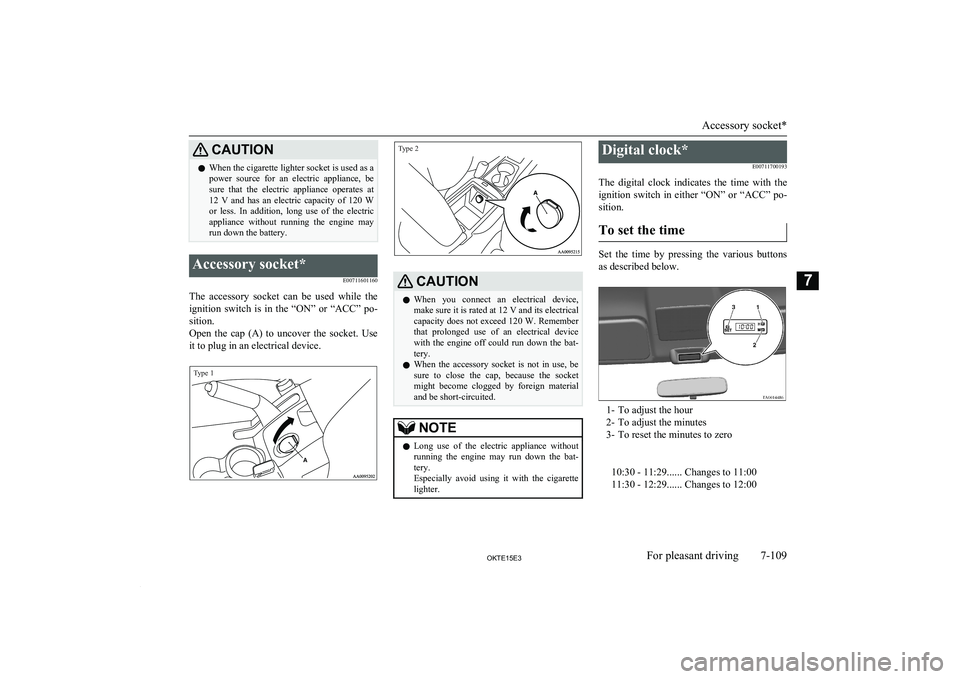
Open the cap (A) to uncover the socket. Use it to plug in an electrical device.
Type 1Type 2
CAUTIONl When you connect an electrical device,
make sure it is rated at 12 V and its electrical
capacity does not exceed 120 W. Remember
that prolonged use of an electrical device with the engine off could run down the bat-
tery.
l When the accessory socket is not in use, be
sure to close the cap, because the socket might become clogged by foreign materialand be short-circuited.NOTEl Long use of the electric appliance without
running the engine may run down the bat-
tery.
Especially avoid using it with the cigarette lighter.Digital clock*
E00711700193
The digital clock indicates the time with the
ignition switch in either “ON” or “ACC” po- sition.
To set the time
Set the time by pressing the various buttons
as described below.
1- To adjust the hour
2- To adjust the minutes
3- To reset the minutes to zero
10:30 - 11:29...... Changes to 11:00
11:30 - 12:29...... Changes to 12:00
Accessory socket*
7-109OKTE15E3For pleasant driving7
Page 300 of 418
NOTElIf the battery cables are disconnected during
repairs or for any other reason, reset the
clock to the correct time after they are recon-
nected.Interior lamps
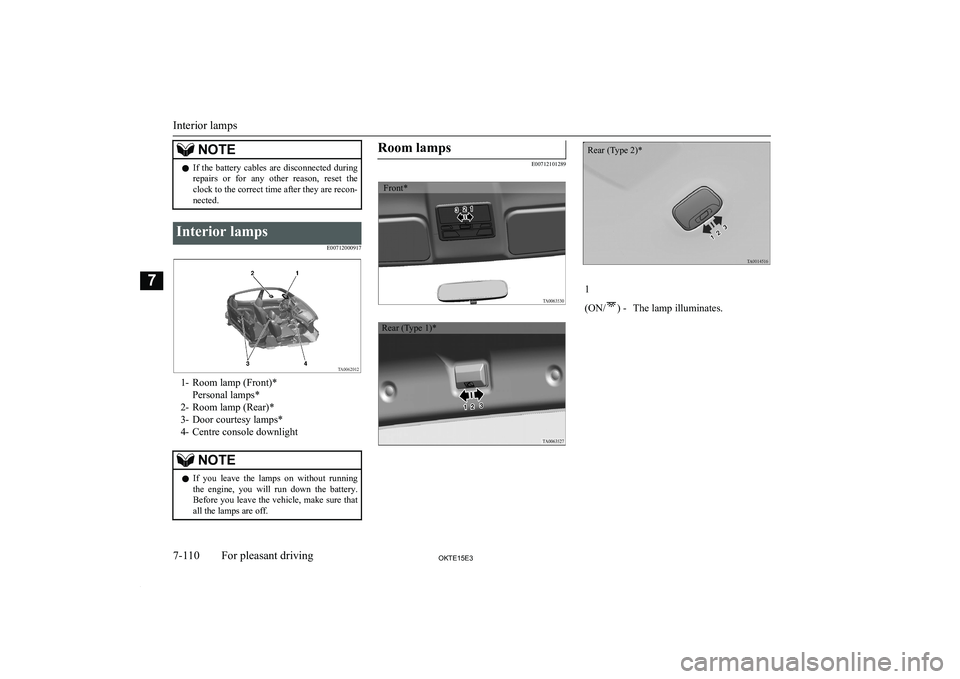
E00712000917
1- Room lamp (Front)*Personal lamps*
2- Room lamp (Rear)*
3- Door courtesy lamps*
4- Centre console downlight
NOTEl If you leave the lamps on without running
the engine, you will run down the battery.
Before you leave the vehicle, make sure that
all the lamps are off.Room lamps
E00712101289
1
(ON/
) -The lamp illuminates.Interior lamps
7-110OKTE15E3For pleasant driving7 Front* Rear (Type 1)* Rear (Type 2)*
Page 310 of 418
If the vehicle breaks downE00800101166
If the vehicle breaks down on the road, move it to the shoulder and use the hazard warning
flashers and/or the warning triangle etc.
Refer to “Hazard warning flasher switch” on page 5-37.
If the engine stops/fails
Vehicle operation and control are affected if
the engine stops.
Before moving the vehicle to a safe area, be aware of the following:
l The brake booster becomes inoperative
and the pedal effort will increase. Press
down the brake pedal harder than usual.
l Since the power steering pump is no lon-
ger operative, the steering wheel feels
heavy when turning it.
Emergency starting
E00800502112
If the engine cannot be started because thebattery is weak or dead, the battery from an-other vehicle can be used with jumper cables to start the engine.
WARNINGl To start the engine using jumper cables
connected from another vehicle, perform
the correct procedures according to the instruction manual. Incorrect procedures could result in a fire or explosion or dam-
age to the vehicles.
1. Get the vehicles close enough so the
jumper cables can reach, but be sure the vehicles aren’t touching each other.If they are, it could cause a ground con-
nection you don’t want. The vehicle will not start, and the bad grounding could
damage the electrical systems.
CAUTIONl Check the other vehicle. It must have a 12-
volt battery.
If the other system isn’t 12-volt, shorting can damage both vehicles.
2. You could be injured if the vehicles
move. Set the parking brake firmly on
each vehicle. Put an automatic transmis-
sion in “P” (PARK) or a manual trans- mission in “N” (Neutral). Turn off the
ignition switch.
WARNINGl Turn off the ignition on both vehicles be-
forehand.
Make sure that the cables or your clothes cannot be caught by the fan or drive belt.
Personal injury could result.NOTEl Turn off all lamps, heater and other electri-
cal loads. This will avoid sparks and help
save both batteries.
3. Make sure battery electrolyte is at the
proper level.
Refer to “Battery” on page 10-10.
WARNINGl If electrolyte fluid is not visible, or ap-
pears to be frozen, Do Not Attempt Jump
Starting!
A battery might rupture or explode if the temperature is below the freezing point orif it is not filled to the proper level.
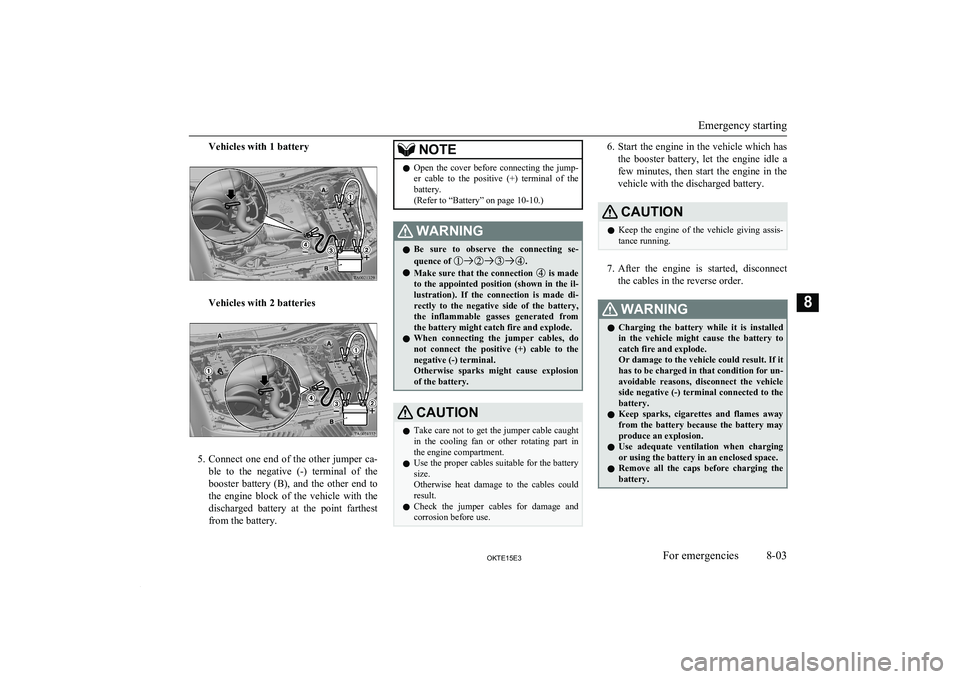
4. Connect one end of one jumper cable to
the positive (+) terminal of the dis-charged battery (A), and the other end to
the positive (+) terminal of the booster
battery (B).
If the vehicle breaks down
8-02OKTE15E3For emergencies8
Page 311 of 418
Vehicles with 1 battery
Vehicles with 2 batteries
5.Connect one end of the other jumper ca-
ble to the negative (-) terminal of the
booster battery (B), and the other end to
the engine block of the vehicle with the
discharged battery at the point farthest from the battery.
NOTEl Open the cover before connecting the jump-
er cable to the positive (+) terminal of thebattery.
(Refer to “Battery” on page 10-10.)WARNINGl Be sure to observe the connecting se-
quence of .
l Make sure that the connection
is made
to the appointed position (shown in the il-
lustration). If the connection is made di-
rectly to the negative side of the battery, the inflammable gasses generated from the battery might catch fire and explode.
l When connecting the jumper cables, do
not connect the positive (+) cable to the
negative (-) terminal.
Otherwise sparks might cause explosion
of the battery.
CAUTIONl Take care not to get the jumper cable caught
in the cooling fan or other rotating part in
the engine compartment.
l Use the proper cables suitable for the battery
size.
Otherwise heat damage to the cables could
result.
l Check the jumper cables for damage and
corrosion before use.6. Start the engine in the vehicle which has
the booster battery, let the engine idle a
few minutes, then start the engine in the vehicle with the discharged battery.CAUTIONl Keep the engine of the vehicle giving assis-
tance running.
7. After the engine is started, disconnect
the cables in the reverse order.
WARNINGl Charging the battery while it is installed
in the vehicle might cause the battery to
catch fire and explode.
Or damage to the vehicle could result. If it has to be charged in that condition for un- avoidable reasons, disconnect the vehicle
side negative (-) terminal connected to the
battery.
l Keep sparks, cigarettes and flames away
from the battery because the battery may
produce an explosion.
l Use adequate ventilation when charging
or using the battery in an enclosed space.
l Remove all the caps before charging the
battery.
Emergency starting
8-03OKTE15E3For emergencies8
Page 312 of 418
WARNINGlElectrolyte is corrosive diluted sulphuric
acid.
If electrolyte (battery acid) comes into contact with your hands, eyes, clothes and
the painted surface of your vehicle, it should be thoroughly flushed with water.If electrolyte gets in your eyes, flush them
with water immediately and thoroughly, and get prompt medical attention.CAUTIONl Do not attempt to start the engine by pulling
or pushing the vehicle.
It could damage your vehicle.
l Always wear protective eye goggles when
working near the battery.
l Keep the battery out of the reach of children.NOTEl
On vehicles with anti-lock brake system, if
the vehicle is put in motion without fully charging the battery, it might cause the loss
of smooth engine operation and the antilock brake warning lamp to illuminate.
Refer to “Anti-lock brake system (ABS)” on
page 6-45.Engine overheating
E00800602777
If the water temperature gauge indication re-
mains in the overheating zone for a long
time, the engine may be overheating. If this occurs, take the following corrective meas-
ures: 1. Stop the vehicle in a safe place.
2. Check whether steam is coming from the
engine compartment.
[If steam does not come from the engine
compartment]
With the engine still running, raise the bonnet to ventilate the engine compart-
ment.
[If steam is coming from the engine
compartment]
Stop the engine, and when the steam
stops, raise the bonnet to ventilate the engine compartment. Restart the engine.WARNINGl Do not open the bonnet while steam is
coming from the engine compartment. It
could cause steam or hot water to spurt out, causing burns. Hot water could spurt
out even when there is no steam coming out, and some parts will be very hot. Be
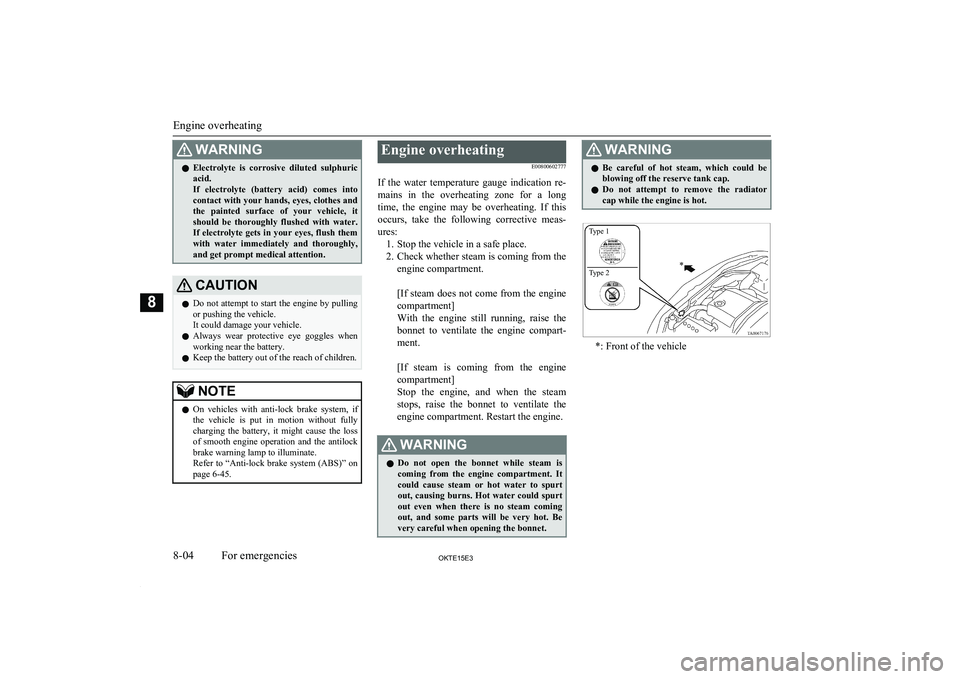
very careful when opening the bonnet.WARNINGl Be careful of hot steam, which could be
blowing off the reserve tank cap.
l Do not attempt to remove the radiator
cap while the engine is hot.
*: Front of the vehicle
Engine overheating
8-04OKTE15E3For emergencies8 Type 1
Type 2
Page 341 of 418
Damaged paint
E00901200155
Small cracks and scratches in the paint coat
should be touched up as soon as possible
with MITSUBISHI touch-up paint to prevent
corrosion.
Check body areas facing the road or the tyres
carefully for damage to the paint coat caused
by flying stones, etc. The paint code number
for your vehicle can be found on the vehicle information code plate. (Refer to “Vehicle la-
beling” on page 11-02.)
Cleaning plastic parts
E00901300446
Use a sponge or chamois leather.
If a car wax adheres on a grey or black rough surface of the bumper, moulding or lamps, the surface becomes white. In such a case,
wipe it off using lukewarm water and soft cloth or chamois leather.
CAUTIONl Do not use a scrubbing brush or other hard
tools as they may damage the plastic part surface.
l Do not use wax containing compound (pol-
ishing powder) which may damage the plas-
tic part surface.CAUTIONl Do not bring the plastic parts into contact
with petrol, light oil, brake fluids, engine
oils, greases, paint thinners, and sulphuric acid (battery electrolyte) which may crack,stain or discolour the plastic parts.
If they touch the plastic parts, wipe them off
with soft cloth, chamois or the like and an aqueous solution of neutral detergent thenimmediately rinse the affected parts with
water.Chrome parts
E00901400014
In order to prevent spots and corrosion of
chrome parts, wash with water, dry thorough-
ly, and apply a special protective coating.
This should be done more frequently in win- ter.
Aluminium wheels*
E00901500116
1. Remove dirt using a sponge while sprin-
kling water on the vehicle.
2. Use neutral detergent on any dirt that
cannot be removed easily with water.
Rinse off the neutral detergent after
washing the vehicle.
3. Dry the vehicle thoroughly using a cha-
mois leather or a soft cloth.
CAUTIONl Do not use a brush or other hard implement
on the wheels.
Doing so could scratch the wheels.
l Do not use any cleaner that contains an abra-
sive substance or is acidic or alkaline. Doing
so could cause the coating on the wheels to peel or become discoloured or stained.
l Do not directly apply hot water using a
steam cleaner or by any other means.
l Contact with seawater and road deicer can
cause corrosion. Rinse off such substances as soon as possible.Window glass
E00901600058
The window glass can normally be cleaned
using only a sponge and water.
Glass cleaner can be used to remove oil, grease, dead insects, etc. After washing the
glass, wipe dry with a clean, dry, soft cloth. Never use the same cloth to wipe the window glass as would be used to wipe the paint-
work; wax from the painted surfaces could
adhere to the glass and reduce its transparen-
cy and visibility.
Cleaning the exterior of your vehicle
9-05OKTE15E3Vehicle care9
Page 342 of 418
NOTElTo clean the inside of the rear window, al-
ways use a soft cloth and wipe the window
glass along the demister heater element so as not to cause damage.Wiper blades
E00901700017
Use a soft cloth and glass cleaner to remove
grease, dead insects, etc., from the wiper blades. Replace the wiper blades when they
no longer wipe properly. (Refer to page “Wiper blades” on page 10-17.)
Cleaning the sunroof*
E00901800180
Clean the inside of the sunroof with a soft cloth. Hard deposits should be wiped away
with a cloth dipped in warm, neutral deter- gent solution. Wipe away the solution with a
sponge dipped in fresh water.
NOTEl The surface treatment on the inside of the
glass may be removed if hard cloth or organ-
ic solvent (benzine, kerosene, thinner, etc.) is used.Engine compartment
E00902100265
Clean the engine compartment at the begin-
ning and end of winter. Pay particular atten- tion to flanges, crevices and peripheral parts where dust containing road chemicals and
other corrosive materials might collect.
If salt and other chemicals are used on the roads in your area, clean the engine compart- ment at least every three months.
Never spray or splash water on the electrical
components in the engine compartment, as
this may cause damage.
Do not bring the nearby parts, the plastic parts and so on into contact with sulphuric
acid (battery electrolyte) which may crack,
stain or discolour them.
If they are in contact, wipe off with soft cloth, chamois or the like and an aqueous sol-
ution of neutral detergent then immediately rinse the affected parts with plenty of water.
Cleaning the exterior of your vehicle
9-06OKTE15E3Vehicle care9