fuel MITSUBISHI LANCER 2016 8.G User Guide
[x] Cancel search | Manufacturer: MITSUBISHI, Model Year: 2016, Model line: LANCER, Model: MITSUBISHI LANCER 2016 8.GPages: 392, PDF Size: 13.12 MB
Page 87 of 392
Free-hand Advanced Security Transmit
ter (F.A.S.T.-key) (if so equipped)
Features and controls
5-25
5
Turn
the
eme
rgency
key
to the
“LO
CK
” pos
i-
tion.Turn the steering wheel until it is locked.Turn
the
emer
gency
key
to
the
“ACC”
posi-
tion
while
moving
the
steering
wheel
slightly
.
Tips for starting
Do not
operate
the
starter
motor
continu-
ously
for
longer
than
15
seconds
as
this
could
run
the
battery
down
or damage
the
starter
motor
. If the
engine
does
not
start,
turn
the
eme
rgency
key
back
to
the
“LO
CK
” pos
ition,
wait a few
seconds
,
and
then
try
again.
Trying
repeatedly
with
the
engine
or
starter
motor
still
turning
will damage the starter mechanism.If the
engine
will
not
start
because
the
bat-
tery
is
weak
or
dischar
ged,
refer
to
“Jump-starting
the
engine”
on
page
8-2
for instructions.A longer
warm
up
period
will
only
con-
sume
extra
fuel.
The
engine
is warmed
up
enough
for
driving
when
the
bar
graph
of
the
engine
coolant
temperature
display
starts
to move.
Refer
to “Interrupt
display
screen
(W
ith
ignition
switch
in the
“ON”
position)” on page 5-101.
Starting the engineYour
vehicle
is equipped
with
an
electroni-
cally
controlled
fuel
injection
system.
This
is
a system
that
automatically
controls
the
fuel
injection.
There
is
no
need
to
depress
the
accelerator pedal when starting the engine.The starter
mo
tor sho
uld
not
be run
for
mo
re
than
15
seconds
at a time.
To prevent
battery
drain,
wait
a few
seconds
between attempts to restart the engine.1.Make
sure
all
occupants
are
properly
seated with seat belts fastened.2.Make sure the parking brake is applied.3.While
pushing
the
lock
release
buttons
(A),
remove
the
cover
of
the
ignition
switch.
To lock
To u
nlock
CAUTIONRemove
the emer
gency key whe
n leav
ing
the
vehicle.
If your
vehicle
needs
to be
towed,
turn
the
emer
gency
key to the
“ACC”
position
to
unlock the steering wheel.NOTE
If the
front
wheels
are
turned,
the
anti-theft
lock
may
sometimes
make
it difficult
to turn
the
emer
gency
key
from
“LO
CK” to “ACC”.
Firmly
turn
the steer
ing
wheel
to the left or
to the right
as you t
urn
the emer
gency ke
y.
Starting
W
AR
NING
Never
run
the engin
e in a clos
ed or poorly
ven
tilated
area
any lon
ger
than is need
ed
to move
you
r veh
icle
out of the area.
Car-
bon
monoxi
de gas,
which
is odorless
and
extr
emely
poi
sonous,
coul
d build
up
and
cause
serious
injur
y or
death.
CAUTIONDo not push-star
t the vehicle.
Do
not run
the engin
e at high
rpms
or drive
at high
speeds
until
the
engine
has
had
a
chance to
warm up.
Releas
e the
emer
gency
key
as soon
as the
engine
starts
. It
will
damage
the
starter
motor.
CAUTION
Page 117 of 392
Starting and stopping the engine Features and controls 5-55
5
N00542101096
Do not operate the starter motor continu- ously for longer than
15 seconds as this
could run the battery down or damage thestarter motor. If the engine does not start,turn the ignition switch back to the “LOCK” position, wait a few seconds, and then try again. Trying repeatedly withthe engine or starter motor still turning will damage the starter mechanism. If the engine will not start because the bat- tery is weak or discharged, refer to “Jump-starting the engine” (on page 8-2) for instructions. The engine is warmed up enough for driv- ing when the bar graph of engine coolant temperature display starts to move. A lon-ger warm up period will only consume extra fuel.
N00542201198
[For vehicles equipped with the F.A.S.T.- key.]For information on operation for vehicles equipped with the F.A.S.T.-key, refer to “F.A.S.T.-key: Starting the engine” on page5-20. [Except for vehicles equipped with the F. A . S . T. - k e y. ]Your vehicle is equipped with an electroni- cally controlled fuel injection system, which automatically controls the release of fuel.
There is usually no need to depress the accel- erator pedal when starting the engine. The starter should not be run for more than 15 seconds at a time.To prevent battery drain, wait a few seconds between attempts to restart the engine. 1. Make sure all occupants are properly seated with seat belts fastened 2. Insert the ignition key. 3. Make sure the parking brake is applied.4. Press and hold the brake pedal downfirmly with your right foot. 5. Press and hold the clutch pedal all the way down (manual transaxle). 6. On vehicles with manual transaxle, place the gearshift lever in the “N” (Neutral) position.On vehicles with continuously variable transmission (CVT), make sure the selec- tor lever is in the “P” (PARK) position.
Starting and stopping the engine Tips for starting
WA R N I N G Never run the engine in a closed or poorly ventilated area any longer than is needed to move your vehicle out of the area. Car- bon monoxide gas, which is odorless and extremely poisonous, could build up andcause serious injury or death.CAUTION Do not push-start the vehicle.Do not run the engine
at high rpms or drive
at high speeds until the engine has had a chance to warm up. Release the ignition switch as soon as the engine starts. Otherwise, the starter motorwill be damaged.
Starting the engine
NOTE
For models equipped with a manual trans- axle, the starter will not operate unless the clutch pedal is fully depressed (Clutch inter-lock). This is a safety feature.
BK0230300US.bo
ok 55 ページ 2015年7月30日 木曜日 午後8時38分
Page 119 of 392
Manual transaxle (if so equipped)
Features and controls 5-57
5
For vehicles with continuously variable transmission (CVT), place the selector lever in the “P” (PARK) position, and then turn the ignition switch to the“LOCK” position to stop the engine.
N00512701165
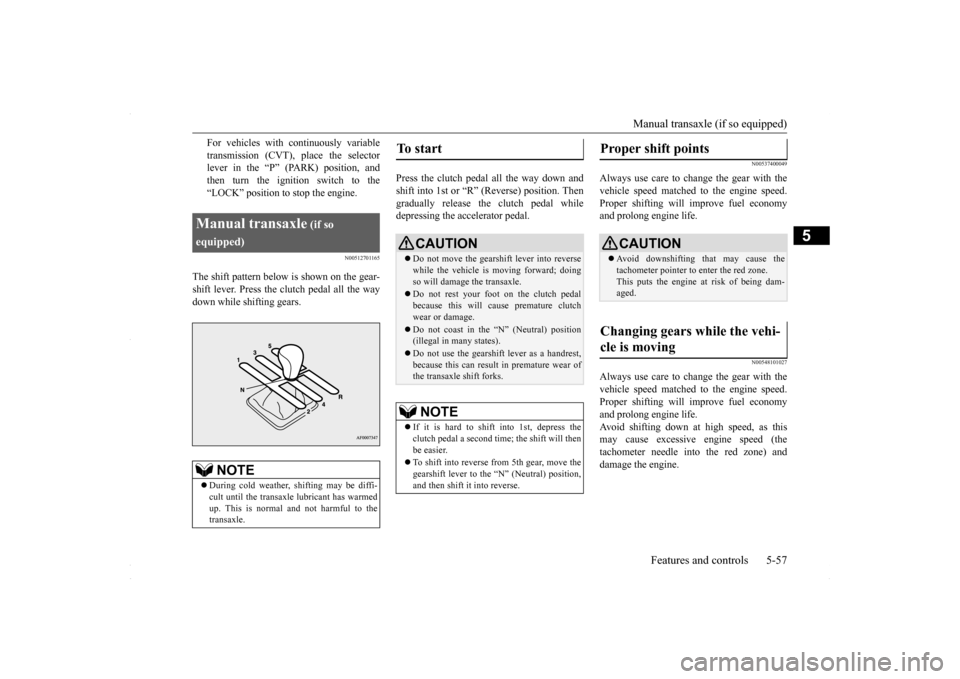
The shift pattern below is shown on the gear-shift lever. Press the clutch pedal all the way down while shifting gears.
Press the clutch pedal all the way down and shift into 1st or “R” (Reverse) position. Thengradually release the clutch pedal while depressing the accelerator pedal.
N00537400049
Always use care to change the gear with the vehicle speed matched to the engine speed.Proper shifting will improve fuel economy and prolong engine life.
N00548101027
Always use care to change the gear with thevehicle speed matched to the engine speed. Proper shifting will improve fuel economyand prolong engine life. Avoid shifting down at high speed, as this may cause excessive engine speed (thetachometer needle into the red zone) and damage the engine.
Manual transaxle
(if so
equipped)
NOTE
During cold weather, shifting may be diffi- cult until the transaxle lubricant has warmed up. This is normal and not harmful to the transaxle.
To start
CAUTION Do not move the gearshift lever into reverse while the vehicle is moving forward; doing so will damage the transaxle. Do not rest your foot on the clutch pedal because this will cause premature clutch wear or damage. Do not coast in the “N” (Neutral) position (illegal in many states). Do not use the gearshift lever as a handrest, because this can result in premature wear ofthe transaxle shift forks.NOTE
If it is hard to shift into 1st, depress the clutch pedal a second time; the shift will then be easier. To shift into reverse from 5th gear, move the gearshift lever to the “N” (Neutral) position, and then shift it into reverse.
Proper shift points
CAUTION Avoid downshifting that may cause the tachometer pointer to enter the red zone. This puts the engine at risk of being dam- aged.
Changing gears while the vehi- cle is moving
BK0230300US.bo
ok 57 ページ 2015年7月30日 木曜日 午後8時38分
Page 120 of 392
Manual transaxle (if so equipped) 5-58 Features and controls
5
N00512900131
For the best fuel economy and performance in using your manual transaxle, upshift as listed below. At low altitude locations, shift at the vehicle speeds listed. Upshifting earlier during cruiseconditions (relatively steady speeds) will improve your fuel economy.
At high altitude locations, upshift as listed below.
N00513000096
It is recommended that you downshift to alower gear when needed to maintain thedesired speed, according to the table.Avoid downshifting at too high a speed. The engine may suffer damage.
To maintain a safe speed and prolong brake life, shift down to 2nd or 1st when descend- ing a steep hill. Downshifting is also important to avoid “lug-ging” the engine at too low a speed, such as when turning a corner or when driving up a steep hill.
N00513100215
The table below shows the maximum recom- mended driving speed for in each gear. Do not drive near or at these speeds for pro-longed periods of time.
NOTE
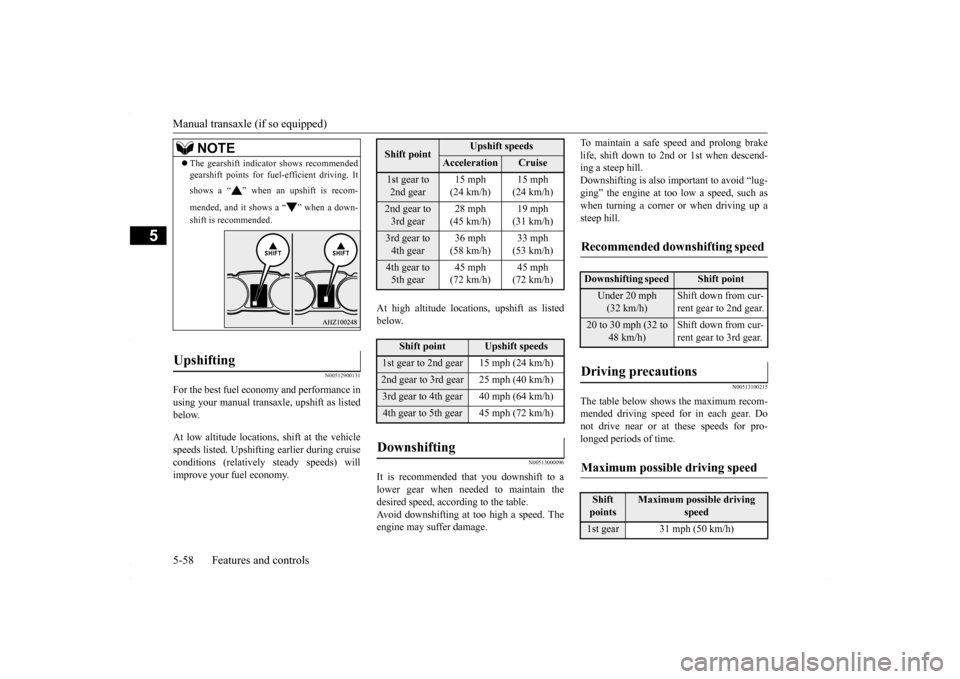
The gearshift indicator shows recommended gearshift points for fuel-efficient driving. It shows a “ ” when an upshift is recom- mended, and it shows a “ ” when a down- shift is recommended.
Upshifting
Shift point
Upshift speeds
Acceleration
Cruise
1st gear to 2nd gear
15 mph (24 km/h)
15 mph (24 km/h)
2nd gear to 3rd gear
28 mph (45 km/h)
19 mph (31 km/h)
3rd gear to 4th gear
36 mph (58 km/h)
33 mph (53 km/h)
4th gear to 5th gear
45 mph (72 km/h)
45 mph (72 km/h)
Shift point
Upshift speeds
1st gear to 2nd gear 15 mph (24 km/h)2nd gear to 3rd gear 25 mph (40 km/h)3rd gear to 4th gear 40 mph (64 km/h)4th gear to 5th gear 45 mph (72 km/h)Downshifting
Recommended downshifting speed
Downshifting speed
Shift point
Under 20 mph (32 km/h)
Shift down from cur- rent gear to 2nd gear.
20 to 30 mph (32 to
48 km/h)
Shift down from cur- rent gear to 3rd gear.
Driving precautions
Maximum possible driving speed
Shift points
Maximum possible driving
speed
1st gear 31 mph (50 km/h)
BK0230300US.bo
ok 58 ページ 2015年7月30日 木曜日 午後8時38分
Page 121 of 392
Continuously variable transmission (CVT) (if so equipped)
Features and controls 5-59
5
Do not use the gearshift lever as a handrest. This can result in premature wear of the transaxle shift forks.
N00513200229
The CVT will automatically and continuouslychange its gear ratio depending on road and driving conditions. This helps achievesmooth driving and excellent fuel efficiency. Also you can manually shift up and shift down the transmission. Refer to “Sportsmode” on page 5-64. The transmission prevents unnecessary upshifts even when the accelerator pedal is released and ensures smooth driving.
According to the condi
tions, the transmission
will automatically shift to a lower gear ratioto achieve stronger engine braking. This may help reduce your need to use the service brake.
N00513800384
As an additional safe
ty precaution, models
equipped with a continuously variable trans- mission have a shift-lock device that holdsthe selector lever in the “P” (PARK) position. To move the selector lever from the “P” (PARK) position to another position, followthe steps below. 1. Press and hold the brake pedal down. 2. Move the selector lever to the desired position.
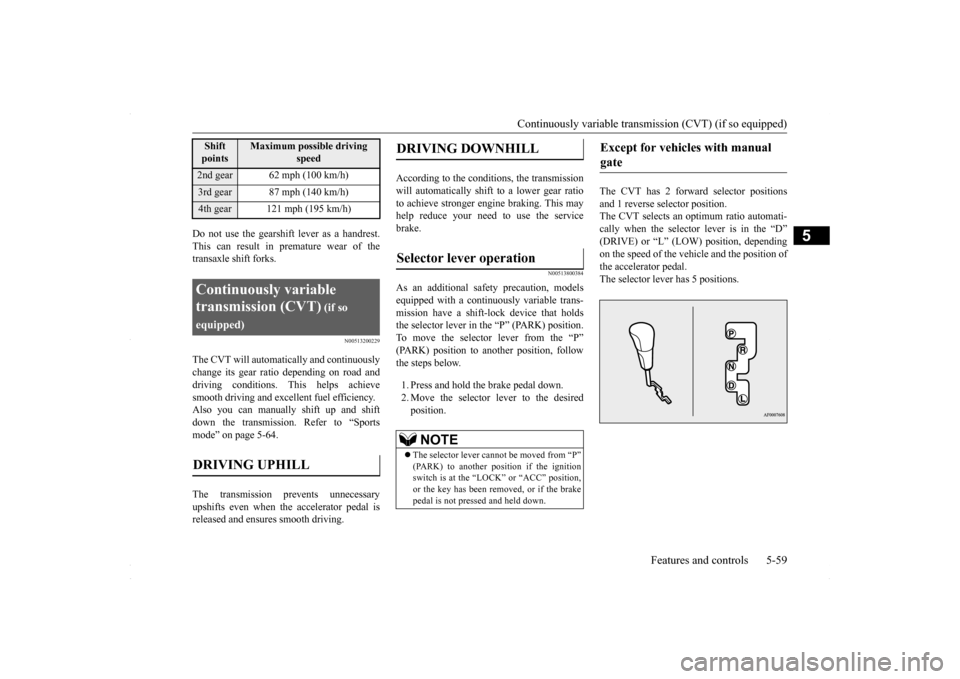
The CVT has 2 forward selector positions and 1 reverse selector position. The CVT selects an optimum ratio automati-cally when the selector lever is in the “D” (DRIVE) or “L” (LOW) position, depending on the speed of the vehicle and the position ofthe accelerator pedal.The selector lever has 5 positions.
2nd gear 62 mph (100 km/h)3rd gear 87 mph (140 km/h)4th gear 121 mph (195 km/h)Continuously variable transmission (CVT)
(if so
equipped)DRIVING UPHILL
Shift points
Maximum possible driving
speed
DRIVING DOWNHILL
Selector lever operation
NOTE
The selector lever cannot be moved from “P” (PARK) to another position if the ignitionswitch is at the “LOCK” or “ACC” position, or the key has been removed, or if the brake pedal is not pressed and held down.
Except for vehicles with manual gate
BK0230300US.bo
ok 59 ページ 2015年7月30日 木曜日 午後8時38分
Page 131 of 392
Electronically controlled 4WD system (if so equipped)
Features and controls 5-69
5
N00549400017
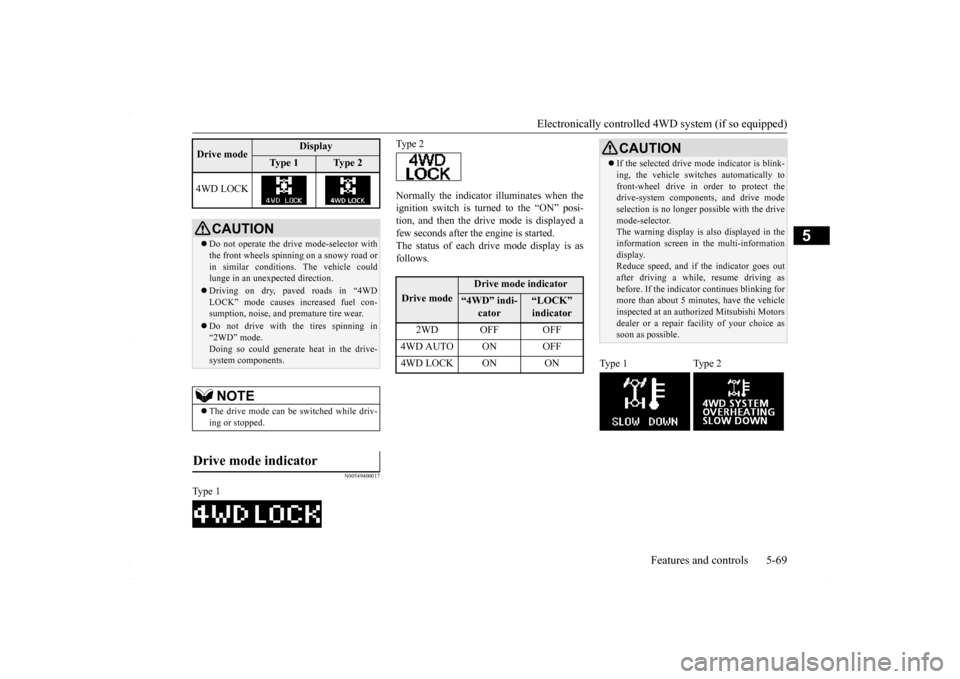
Normally the indicator illuminates when the ignition switch is turned to the “ON” posi- tion, and then the drive mode is displayed afew seconds after the engine is started. The status of each drive mode display is as follows.
4WD LOCK
CAUTION Do not operate the drive mode-selector with the front wheels spinning on a snowy road or in similar conditions. The vehicle couldlunge in an unexpected direction. Driving on dry, paved roads in “4WD LOCK” mode causes increased fuel con- sumption, noise, and premature tire wear. Do not drive with the tires spinning in “2WD” mode. Doing so could generate heat in the drive-system components.NOTE
The drive mode can be switched while driv- ing or stopped.
Drive mode indicator
Type 1Drive mode
Display
Ty p e 1
Ty p e 2
Type 2Drive mode
Drive mode indicator
“4WD” indi-
cator
“LOCK” indicator
2WD OFF OFF
4WD AUTO ON OFF4WD LOCK ON ON
CAUTION If the selected drive m
ode indicator is blink-
ing, the vehicle switches automatically to front-wheel drive in order to protect the drive-system components, and drive mode selection is no longer pos
sible with the drive
mode-selector. The warning display is also displayed in the information screen in the multi-informationdisplay. Reduce speed, and if the indicator goes out after driving a while, resume driving asbefore. If the indicator continues blinking for more than about 5 minutes, have the vehicle inspected at an authorized Mitsubishi Motorsdealer or a repair facility of your choice as soon as possible.
Type 1 Type 2
BK0230300US.bo
ok 69 ページ 2015年7月30日 木曜日 午後8時38分
Page 148 of 392
Tire pressure monitoring system 5-86 Features and controls
5
Accordingly, when the low tire pressure tell- tale illuminates, you should stop and check your tires as soon as possible, and inflate them to the proper pressure. Driving on a sig-nificantly under-inflated tire causes the tire to overheat and can lead to tire failure. Under-inflation also reduces fuel efficiencyand tire tread life, and may affect the vehi- cle’s handling and stopping ability. Please note that the TPMS is not a substitute forproper tire maintenance, and it is the driver’sresponsibility to maintain correct tire pres- sure, even if under-inflation has not reached the level to trigger illumination of the TPMSlow tire pressure telltale. Your vehicle has also been equipped with a TPMS malfunction indicator to indicate whenthe system is not operating properly. The TPMS malfunction indicator is combined with the low tire pressure telltale.When the system detects a malfunction, the telltale will flash for approximately one min- ute and then remain continuously illuminated.This sequence will continue upon subsequent vehicle start-ups as long as the malfunction exists.When the malfunction indicator is illumi- nated, the system may not be able to detect or signal low tire pressure as intended.TPMS malfunctions may occur for a variety of reasons, including the installation of replacement or alternate tires or wheels on the
vehicle that prevent the TPMS from function- ing properly. Always check the TPMS mal- function telltale after replacing one or more tires or wheels on your vehicle to ensure thatthe replacement or alternate tires and wheels allow the TPMS to continue to function prop- erly.
N00532800439
1. If the tire pressure monitoring systemwarning light illuminates, avoid hardbraking, sharp steering maneuvers and high speeds. You should stop and adjust the tires to the proper inflation pressure assoon as possible. Adjust the spare tire at the same time. Refer to “Tires” on page 9-14.
2. If the tire pressure monitoring system warning light remains illuminated afteryou have been driving for about 20 min- utes after you adjust the tire inflation pres- sure, one or more of the tires may have apuncture. Inspect the tire and if it has a puncture, have it repaired by an autho- rized Mitsubishi Motors dealer as soon aspossible.
If the warning light/display illu- minates while driving
NOTE
In addition, the warning display is displayed on the information screen in the multi-infor-mation display. When inspecting or adjusting the tire pres- sure, do not apply excessive force to the valve stem to avoid breakage.
After inspecting or adjusting the tire pres- sure, always reinstall the valve cap on the valve stem. Without the valve cap, dirt or moisture could get into the valve, resulting in damage to thetire inflation pressure sensor. Do not use metal valve caps, which may cause a metal reaction, resulting in corrosion and damage of the tire inflation pressure sen- sors. Once adjustments have been made, the warn- ing light will go off after a few minutes ofdriving.WA R N I N G If the warning light/display illuminates while you are driving, avoid hard braking, sharp steering maneuvers and highspeeds. Driving with an under-inflated tire adversely affects vehicle performance and can result in an accident.NOTE
BK0230300US.bo
ok 86 ページ 2015年8月4日 火曜日 午後3時5分
Page 154 of 392
Multi-information display 5-92 Features and controls
5
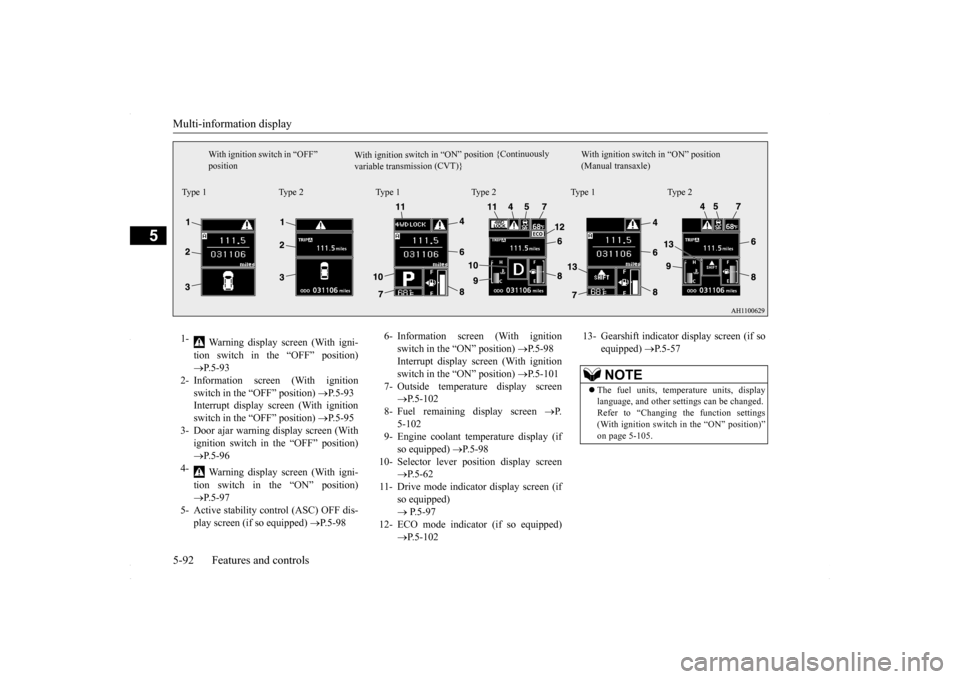
W i t h i g n i t i o n s w i t c h i n “ O N ” p os i t i o n { C o n t i n u o us l y
v a r i a b l e t r a n s m i s s i o n ( C V T ) }
With ignition switch in “OFF” position
With ignition switch in “ON” position (Manual transaxle)
Type 1 Type 2 Type 1 Type 2 Type 1 Type 21-
Warning display screen (With igni- tion switch in the “OFF” position) P.5-93
2- Information screen (With ignition
switch in the “OFF” position)
P.5-93
Interrupt display screen (With ignition switch in the “OFF” position)
P.5-95
3- Door ajar warning display screen (With
ignition switch in the “OFF” position) P.5-96
4-
Warning display screen (With igni- tion switch in the “ON” position) P.5-97
5- Active stability control (ASC) OFF dis-
play screen (if so equipped)
P.5-98
6- Information screen (With ignition
switch in the “ON” position)
P.5-98
Interrupt display screen (With ignition switch in the “ON” position)
P.5-101
7- Outside temperature display screen
P.5-102
8- Fuel remaining display screen
P.
5-102
9- Engine coolant temperature display (if
so equipped)
P.5-98
10- Selector lever position display screen
P.5-62
11- Drive mode indicator display screen (if
so equipped) P.5-97
12- ECO mode indicator (if so equipped)
P.5-102
13- Gearshift indicator display screen (if so
equipped)
P.5-57
NOTE
The fuel units, temperature units, display language, and other settings can be changed. Refer to “Changing the function settings (With ignition switch in the “ON” position)” on page 5-105.
BK0230300US.bo
ok 92 ページ 2015年7月30日 木曜日 午後8時38分
Page 155 of 392
Multi-information display
Features and controls 5-93
5
N00555101218
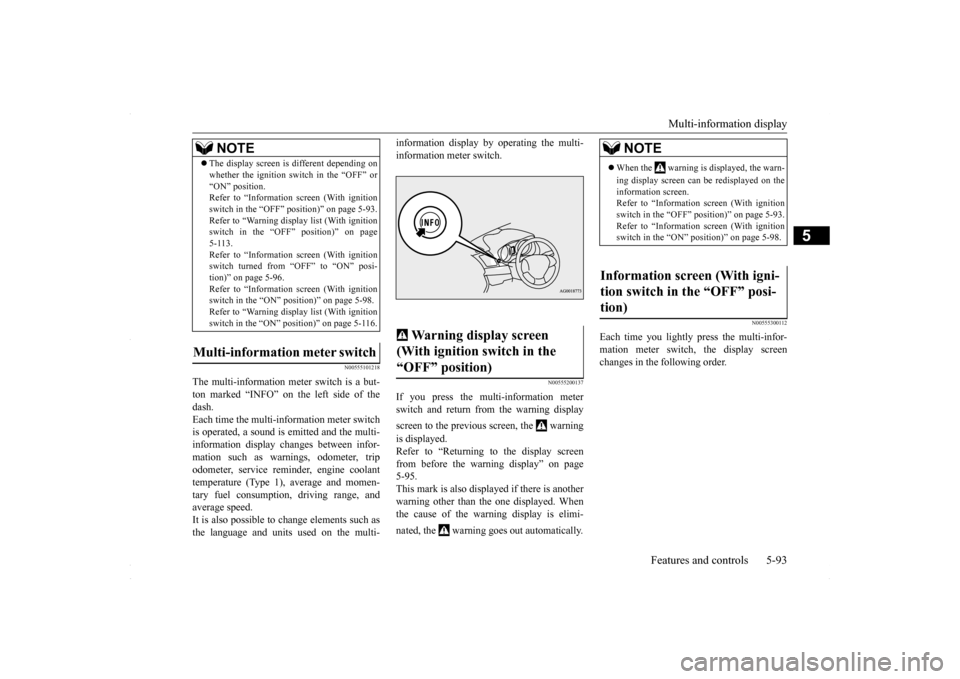
The multi-information meter switch is a but- ton marked “INFO” on the left side of the dash.Each time the multi-information meter switch is operated, a sound is emitted and the multi- information display changes between infor-mation such as warnings, odometer, trip odometer, service reminder, engine coolant temperature (Type 1), average and momen-tary fuel consumption, driving range, and average speed. It is also possible to
change elements such as
the language and units used on the multi-
information display by operating the multi- information meter switch.
N00555200137
If you press the multi-information meter switch and return from the warning display screen to the previous screen, the warning is displayed. Refer to “Returning to the display screen from before the warning display” on page5-95. This mark is also displayed if there is another warning other than the one displayed. Whenthe cause of the warning display is elimi- nated, the warning goes out automatically.
N00555300112
Each time you lightly press the multi-infor- mation meter switch, the display screenchanges in the following order.
The display screen is different depending on whether the ignition switch in the “OFF” or “ON” position. Refer to “Information screen (With ignition switch in the “OFF” position)” on page 5-93.Refer to “Warning displa
y list (With ignition
switch in the “OFF” position)” on page 5-113.Refer to “Information screen (With ignition switch turned from “OFF” to “ON” posi- tion)” on page 5-96.Refer to “Information screen (With ignition switch in the “ON” position)” on page 5-98. Refer to “Warning displa
y list (With ignition
switch in the “ON” position)” on page 5-116.
Multi-information meter switch
NOTE
Warning display screen (With ignition switch in the “OFF” position)
NOTE
When the warning is displayed, the warn- ing display screen can be redisplayed on the information screen. Refer to “Information screen (With ignitionswitch in the “OFF” position)” on page 5-93. Refer to “Information screen (With ignition switch in the “ON” position)” on page 5-98.
Information screen (With igni- tion switch in the “OFF” posi- tion)
BK0230300US.bo
ok 93 ページ 2015年7月30日 木曜日 午後8時38分
Page 160 of 392

Multi-information display 5-98 Features and controls
5
N00556100074
This is displayed when the Active stability control (ASC) is turned “OFF” with the“ASC OFF” switch. Also, if an abnormal condition is occurred in the ASC while driving, the “ASC OFF” dis-play illuminates.Refer to “ASC OFF switch” on page 5-77.
N00556200176
Each time you lightly press the multi-infor-mation meter switch, the display screenchanges in the following order.
The operation method is the same as when the ignition switch is in the “OFF” position.For further details, refer to “Odometer/Trip odometer” on page 5-94.
“Active stability control (ASC) OFF” display screen
(if so
equipped)Information screen (With igni- tion switch in the “ON” posi- tion)
1-
Odometer (Type 1)/Trip odometer
2-
Odometer (Type 1)/Trip odometer
3- Service reminder4- Engine coolant temperature display
(Type 1)
5- Driving range display (Type 1)6- Average speed display, average fuel
consumption display, momentary fuel consumption display (Type 1)
7- Driving range display, momentary fuel
consumption display (Type 2)
Ty p e 1
When there is no warning display When there is a warning display
Type 2
When there is no warning display When there is a warning display
8- Average fuel consumption display,
momentary fuel consumption display(Type 2)
9- Average speed display, momentary fuel
consumption display (Type 2)
10- Function setting screen 11- Redisplay of a warning display screen
NOTE
While driving, the function setting screen is not displayed even if you operate the multi- information meter switch. Always park the vehicle in a safe place before operating.Refer to “Changing the function settings (With ignition switch in the “ON” position)” on page 5-105. When there is information to be announced, such as a system fault, the tone sounds andthe screen display is changed. Refer to “Interrupt display screen (With igni- tion switch in the “ON” position)” on page5-101.
Odometer/Trip odometer
BK0230300US.bo
ok 98 ページ 2015年7月30日 木曜日 午後8時38分