ignition MITSUBISHI LANCER 2016 8.G User Guide
[x] Cancel search | Manufacturer: MITSUBISHI, Model Year: 2016, Model line: LANCER, Model: MITSUBISHI LANCER 2016 8.GPages: 392, PDF Size: 13.12 MB
Page 68 of 392
Electronic immobilizer (Anti-theft starting system)5-6
Features and controls
5
For
you
to register
the
ID
code
yourself,
fol-
low
the
“Customer
key
programming”
proce-
dure belo
w.
If you
choose
to
have
your
authorized
Mit-
subishi
Motors
dealer
register
the
ID
code,
take
your
vehicle
and
all remaining
keys
to
your authorized Mitsubishi Motors dealer
.
N005622
01136
You
can
program
new
keys
to
the
system
if
you
have
two
valid
(already
registered)
keys
and
blank
(not
registered)
immobilizer
key
(specially
cut
for
your
vehicle
at
your
Mit-
subishi
Motors
dealer)
by
doing
the
follow-
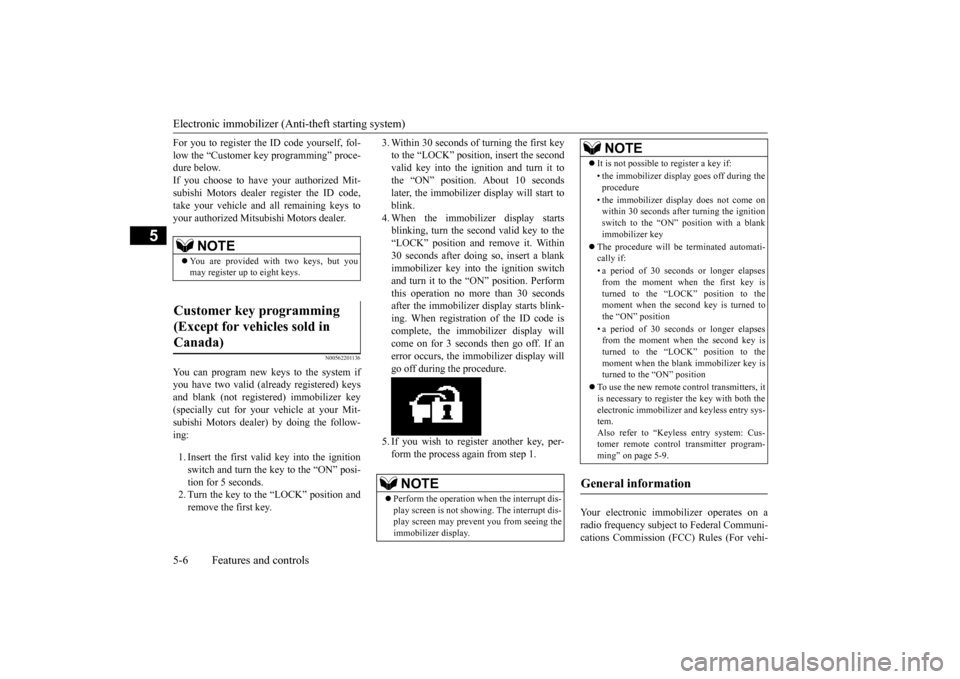
ing:1.Insert
the
first
valid
key
into
the
ignition
switch
and
turn
the
key
to the
“ON”
posi-
tion for 5 seconds.2.Turn
the
key
to the
“LOCK”
position
and
remove the first key
.
3.Within
30
seconds
of
turning
the
first
key
to the
“LOCK”
position,
insert
the
second
valid
key
into
the
ignition
and
turn
it to
the
“ON”
position.
About
10
seconds
late
r, the
immobilizer
display
will
start
to
blink.4.When
the
immobilizer
display
starts
blinking,
turn
the
second
valid
key
to the
“LOCK”
position
and
remove
it.
Within
30
seconds
after
doing
so,
insert
a blank
immobilizer
key
into
the
ignition
switch
and
turn
it to the
“ON”
position.
Perform
this
operation
no
more
than
30
seconds
after
the
immobilizer
display
starts
blink-
ing.
When
registration
of
the
ID
code
is
complete,
the
immobilizer
display
will
come
on
for
3 seconds
then
go
off. If an
error
occurs,
the
immobilizer
display
will
go of
f during the procedure.
5.If you
wish
to
register
another
key
, per
-
form the process again from step 1.
Your
electronic
immobilizer
operates
on
a
radio
frequency
subject
to Federal
Communi-
cations
Commission
(FCC)
Rules
(For
vehi-
NOTE
You are pro
vided
with two keys,
but
you
may r
egister up
to eight k
eys.
Customer
key
pr
ogramming
(Except for vehicles sold in Canada)
NOTE
Perform
the
operation
when
the
interrupt
dis-
play
screen
is not
showing.
The
interrupt
dis-
play
screen
may
prevent
you
from
seeing
the
immobilizer
display
.
It is not possible to register a key if:•the
immob
ilizer
display
goe
s off during
the
procedure•the
immob
ilizer
display
doe
s not
come
on
within 30 seconds
after turning
the
ignitio
n
switch
to the “ON”
positio
n with
a blan
k
immobilizer
key
The procedure
will
be
termin
ated
automati-
cally
if:
•a period
of
30
seconds
or
longer
elapses
from
the
moment
when
the
firs
t key
is
turned
to
the
“LO
CK” pos
ition
to
the
moment
when
the
second
key
is turned
to
the “ON” pos
ition
•a period
of
30
seconds
or
longer
elapses
from
the
moment
when
the
second
key
is
turned
to
the
“LO
CK” pos
ition
to
the
moment
when
the
blank
immobilizer
key
is
turned
to the
“ON”
position
To use
the
new
remote
control
transmitters,
it
is necessary
to register
the
key
with
both
the
electronic
immobilizer
and
keyless
entry
sys-
tem. Also
refer to “Keyless
entry
system:
Cus-
tomer
remo
te
cont
rol transmitter
program-
ming” on page 5-9.
General
information
NOTE
Page 70 of 392
Keyless
entry
system
(if
so
equipped)
5-8
Features and controls
5
N0054350
1084
Setting
of
the
horn,
turn
signal
lights
and
buzzer
of
the
keyless
entry
system
answer
-
back
function
can
be
changed
as
required.
This is done
with
the key remo
ved
from
the
ignition switch.The
horn
answerback
function
can
be
set
to
the
following
three
conditions.
Each
time
the
horn
answerback
function
is
set,
a chime
will
sound
to tell
you
the
condi-
tion of the answerback function.
1.Remove the key from the ignition switch.2.Open
the
driver
’s door
and
turn
the
com-
bination
headlights
and
dimmer
switch
to
the “OFF” position.3.Press
the
LOCK
button
(1)
for
4 to 10
sec-
onds
and
press
the
UNLOCK
button
(2)
during this time.4.Release
in
sequence
the
UNLOCK
and
LOCK
buttons
within
10
seconds
of
pressing the UNLOCK button in step 3.
The
turn
signal
lights
answerback
function
can be set to the following seven conditions.Each
time
the
turn
signal
lights
answerback
function
is set,
a chime
will
sound
to tell
you
the condition of the answerback function.
1.Remove the key from the ignition switch.2.Open
the
driver
’s door
and
turn
the
com-
bination
headlights
and
dimmer
switch
to
the “OFF” position.3.Press
the
UNLO
CK
button
(2)
for
4 to 10
seconds
and
press
the
LOCK
button
(1)
during this time.4.Release
in
sequence
the
UNLOCK
and
LOCK
buttons
within
10
seconds
of
pressing the LOCK button in step 3.
The
buzzer
answerback
function
can
be
turned ON or OFF as required.
Answerback function
NOTE
The
answerback
function
does
not
operate
when
the
key
is in the
ignition
switch
or any
doors
is ope
ned.
Horn
deactivation/r
eactivation
Number
of chimes
Condition
One chime
The horn will not sound.
Two
chimes
The horn will sound.
Four chimes
The horn will sound if the LOCK button is pressed twice quickl
y.
Changing the setting of the turn signal lights answerback function
Number of chimes
Condition
To lock
To un
lock
One chime
One flash
Two flashes
Number
of chimes
Condition
Two chime
s
One flash
No flash
Three chime
sNo flash
Two flashes
Four chime
s
Two flashes
One flash
Five chime
s
No flash
One flash
Six chime
s
Two flashes
No flash
Seven chimes
No flash
No flash
Buzzer
deactivation/r
eactivation
Number of chimes
Condition
To lock
To un
lock
Page 71 of 392
Keyless
entry
system
(if
so
equipped)
Features and controls
5-9
5
N0054360
1131
The
door
unlock
function
can
be set
to the
following two conditions. Each
time
the
door
unlock
function
is set,
a
chime
will
sound
to tell you
the conditi
on
of
the door unlock function.1.Remove the key from the ignition switch.2.Open
the
driver
’s door
and
turn
the
com-
bination
headlights
and
dimmer
switch
to
the “OFF” position.3.Press
the
LOCK
button
(1)
for
4 to 10
sec-
onds
and
press
the
UNLOCK
button
(2)
during this time.4.Release
in
sequence
the
LOCK
and
UNLO
CK
buttons
within
10
seconds
of
pressing the LOCK button in step 3.
N00543700
018
If you
are
near
your
vehicle
and
feel
threat-
ened,
you
may
activate
the
alarm
to call
atten-
tion as follows:
1.Press
the
PANIC
button
(4)
for
more
than
1 s
econd.
2.The
headlights
will
blink
on
and
off and
the
horn
will
sound
intermittently
for
about
3 minutes.
3.To turn
off the
alarm,
press
any
button
on
the remote control transmitte
r.
N00543800
019
Only
remote
control
transmitters
pro-
grammed
with
the
vehicle’
s electronics
can
lock or unlock all doors.If you
lose
the
remote
control
transmitter
, you
can
order
a remote
control
transmitter
from
your
authorized
Mitsubishi
Motors
dealer
by
referring
to the
key
number
.
To prevent
vehicle
theft,
the
ID
codes
for
all
the
remote
control
transmitters
except
the
one
for the lost key must be programmed again.Take
your
vehicle
and
all
the
remaining
remote
control
transmitters
to your
authorized
Mitsubishi
Motors
dealer
to
have
your
ID
codes
programmed
again.
N00543900
010
To add
a remote
control
transmitte
r, you
must
already
have
one
registered
remote
control
transmitte
r.
Registering
the
ID
code
can
be
done
by
your
-
self
or
by
your
authorized
Mitsubishi
Motors
deale
r. For
you
to
register
the
ID
code
your
-
self,
follow
the
“Customer
remote
control
transmitter programming” procedure below
.
If you
choose
to
have
your
authorized
Mit-
subishi
Motors
dealer
register
the
ID
code,
take
your
vehicle
and
all
remaining
keys
to
your authorized Mitsubishi Motors dealer
.
N0054400
1174
You
can
program
new
remote
control
trans-
mitters
to
the
system
if you
have
one
valid
(already
registered)
remote
control
transmit-
ter
by
doing
the
following:
Setting of door unlock function
Number
of
chimes
Condition
One chim
e
All doors unlock
Two chimes
Driver
’s door unlock only
Using the panic alarm
Replacement r
emote contr
ol
transmitters
Additional r
emote contr
ol
transmitters
NOTE
You
are
provided
with
two
remote
control
transmitters,
but
you
may
register
up
to eight
remote
control
trans
mitters
.
Customer r
emote contr
ol trans-
mitter pr
ogramming (Except
for vehicles sold in Canada)
Page 72 of 392
Keyless
entry
system
(if
so
equipped)
5-10
Features and controls
5
1.Have
available
all (current
and
new)
remote
control
transmitters
you
wish
to
registe
r.
2.With
a valid
(already
registered)
remote
control
transmitte
r, press
the
UNLOCK
button
(2)
for
4 to 10
seconds.
Then
press
and hold the LOCK button (1).3.Within
10
seconds
of
pressing
the
LOCK
button,
release
the
LOCK
and
UNLOCK
buttons in sequence.At
this
time,
ID
codes
for
all
remote
con-
trol
transmitters
except
for
the
transmitter
used
in
steps
2 and
3 are
erased
and
the
answerback
function
(door
is locked
and
unlocked)
informs
you
that
the
registra-
tion mode has been activated.4.Within
60
seconds
after
step
3, complete
the
following
ID
code
registration
opera-
tion
using
the
next
remote
control
trans-
mitter
you
wish
to
register
within
4seconds.i.Press
both
the
LOCK
and
UNLOCK
buttons
for
2 seconds.
ii.Release
both
the
LOCK
and
UNLOCK
buttons
for
1 second.
iii.
Press the UNLOCK button.The
answerback
function
informs
you
that
the
ID
code
registration
of
the
transmitter is completed.
5.To register
the
ID
codes
of
additional
remote
control
transmitters,
repeat
step
4
within 60 seconds after step 4.
6.If no
ID
code
of
a remote
control
trans-
mitter
is
registered
within
60
seconds
after
step
4, the
registration
mode
is can-
celed
and
the
normal
mode
returns.
N00546
101111
Your
keyless
entry
system
operates
on
a radio
frequency
subject
to
Federal
Communica-
tions
Commission
(FCC)
Rules
(For
vehicles
sold
in
U.S.A.)
and
Industry
Canada
Rules
(For
vehicles
sold
in
Canada).
This
device
complies
with
Part
15
of
FCC
Rules
and
Industry
Canada
licence-exempt
RSS
stan-
dard(s).Operation
is subject
to the
following
two
con-
ditions
.
This
device
may
not
cause
harmful
inter
-
ference.
NOTE
For
verification
purpose
s, try
to lock and
unl
ock the doors
after the registration
is
completed
.
The
indicator
light
(5)
comes
on
each
time
a
button
is pressed.
The keyless
entry
system
doe
s not
work
if
the key is in the ignition switch
.
The
remo
te con
trol trans
mitter
can
be use
d
from
about
40 feet
(12 m) away. However
,
this
distan
ce
may
change
if your
vehicle
is
near
a TV
transmitting
tower
, a power
sta-
tion, or a radio station.If the UNL
OCK
button
(2)
is pre
ssed whe
n
all
doors
are
locked
and
no
doors
are
opened
within about
30
seconds,
the doors
will auto-
matically
re-lock.
If the
following
conditions
are
observed
after
pressing
the
buttons
on
the
remote
control
transmitter
, the battery
in the remo
te cont
rol
transmitter
may need
to be
replaced
.
•The doors
cannot
be locked or unl
ocked.
•The trunk
lid cannot
be ope
ned.
•The panic
alarm
cannot
be operated.
•The
indicator
light
(5)
is dim
or
does
not
come
on.
If you
lose
your
remote
control
transmitter
,
pleas
e contact
an authorized
Mitsubi
shi
Motors dealer for a replacement.If you
wish to obtain
an additional
remote
control
transmitter
, please
contact
an
autho-
rized
Mitsubishi Motors
dealer
. A max
imu
m
of
eight
remote
control
transmitters
can
be
programmed for your vehicle.To use
the
new
remote
control
transmitters,
it
is necessary
to register
the
key
with
both
the
electronic
immobilizer
and
keyless
entry
sys-
tem. Also refer to “Electr
onic
immobilizer
(Anti-
theft starting
system)
: Cust
omer
key pro-
gramming”
on
page
5-6.
General information
NOTE
Page 77 of 392
Free-hand Advanced Security Transmit
ter (F.A.S.T.-key) (if so equipped)
Features and controls
5-15
5
While
carrying
the
F.A.S.T
.-key
within
the
operating
range,
you
can
unlock
the
doors
by
F.A.S.T
-key operation.
The
dome
light
will
turn
on
for
30
seconds.
The
turn
signal
lights
will
blink
twice
and
the
buzzer will sound twice. Also
refer
to
“Door
locks”
and
“Power
door
locks” on pages 5-34 and 5-37 respectively
.
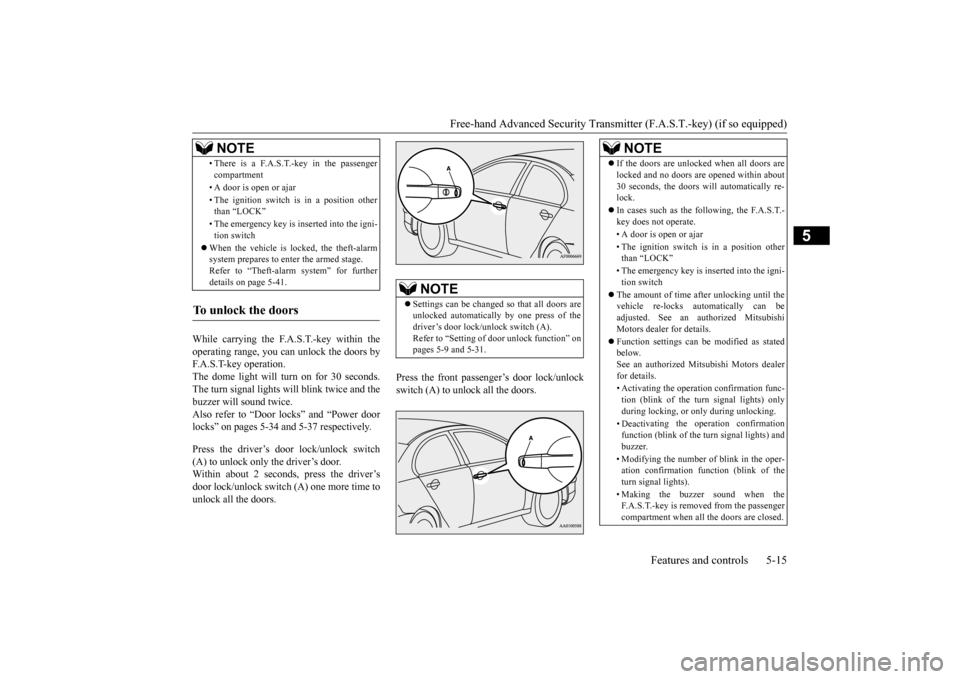
Press
the
driver
’s door
lock/unlock
switch
(A) to unlock only the driver
’s door
.
Within
about
2 seconds,
press
the
driver
’s
door
lock/unlock
switch
(A)
one
more
time
to
unlock all the doors.
Press
the
front
passenger
’s door
lock/unlock
switch
(A)
to unlock
all
the
doors.
•There is a F.A.S.T
.-ke
y in the passenge
r
compartment•A door is
open or ajar
•The
ignition
switch
is in a position
other
than
“LO
CK”
•The emer
gency
key
is inserted
into
the
igni-
tion
switch
When the vehicle
is locked, the theft-alar
m
system
pre
pares to enter the ar
med
stag
e.
Refer to “Th
eft-alar
m system”
for
furt
her
details
on
page
5-41.
To unlock the doors
NOTE
NOTE
Settings
can
be
changed
so that
all
doors
are
unlocked
automatically
by
one
press
of
the
driver
’s doo
r lock
/un
lock switch (A).
Refer
to “Setting
of door
unlock
function”
on
pages
5-9
and
5-31.
NOTE
If the doo
rs are unl
ocked
whe
n all
doors
are
locked and no
doors
are ope
ned within about
30
seconds,
the
doors
will
automatically
re-
lock.In cases
such
as the
following,
the
F.A.S.T
.-
key doe
s not
ope
rate.
•A door i
s ope
n or ajar
•The ignition
switch
is in a position
other
than “LOCK”
•The emer
gency key is inse
rted
into the igni
-
tion
switch
The
amount
of time
after
unlocking
until
the
vehicle
re-locks
automatically
can
be
adjusted.
See
an
authorized
Mitsubishi
Motors dealer fo
r details
.
Function
settings
can
be modi
fied
as stated
below
.
See
an authorized
Mitsubishi Mot
ors
dealer
for
details.
•Activ
ating
the ope
ration
confi
rmation
func
-
tion
(blink
of
the turn
signal
light
s) onl
y
duri
ng
locking, or onl
y duri
ng unl
ocking.
•Deacti
vating
the ope
ration
confi
rmatio
n
function
(blink
of the
turn
signal
lights
) and
buzzer
.
•Modifying
the
number
of blink
in the
oper
-
ation
confirmation
function
(blink
of
the
turn
signal
lights).
•Making
the buzzer
sound
whe
n the
F.A.S.T
.-ke
y is remove
d from
the passenge
r
compartment
when
all
the
doors
are
clos
ed.
Page 78 of 392
Free-hand Advanced Security Transmitter (F.A.S.T.-key) (if so equipped)5-16
Features and controls
5
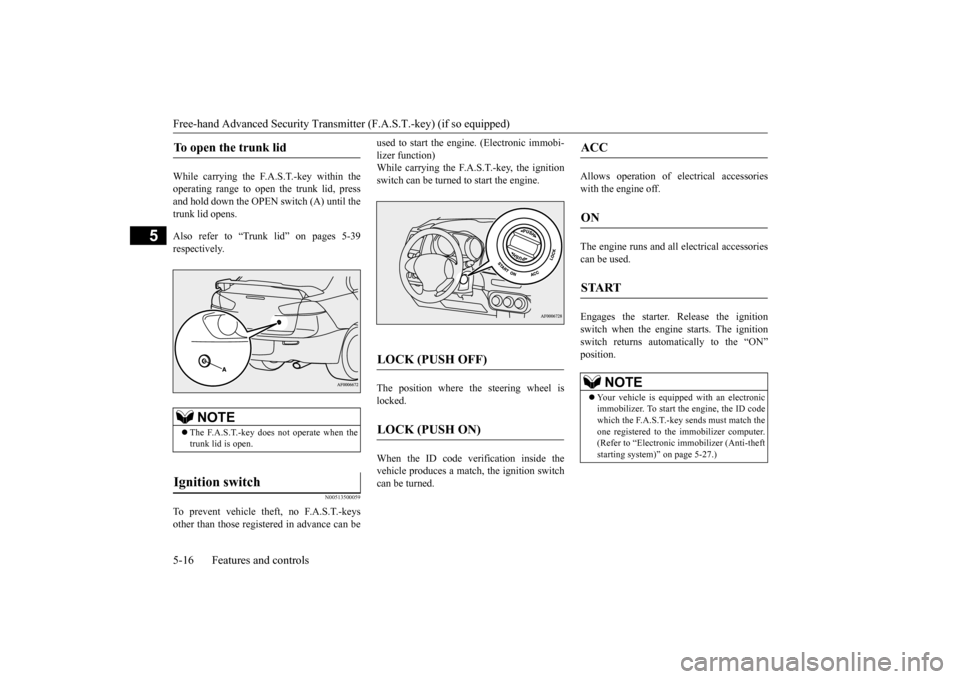
While
carrying
the
F.A.S.T
.-key
within
the
operating
range
to
open
the
trunk
lid,
press
and
hold
down
the OPEN
switch
(A)
until
the
trunk lid open
s.
Also
refer
to
“Trunk
lid”
on
pages
5-39
respectivel
y.
N0051350
0059
To prevent
vehicle
theft,
no
F.A.S.T
.-keys
other
than
those
registered
in advance
can
be
used
to start
the
engine.
(Electronic
immobi-
lizer function)While
carrying
the
F.A.S.T
.-key
, the
ignition
switch can be turned to start the engine.The
position
where
the
steering
wheel
is
locked. When
the
ID
code
verification
inside
the
vehicle
produces
a match,
the
ignition
switch
can be turned.
Allows
operation
of
electrical
accessories
with the engine o
ff.
The
engine
runs
and
all
electrical
accessories
can be used. Engages
the
starter
. Release
the
ignition
switch
when
the
engine
starts.
The
ignition
switch
returns
automatically
to
the
“ON”
positi
on.
To open the trunk lid
NOTE
The
F.A.S.T
.-key
does
not
operate
when
the
trunk lid is open.
Ignition switch
LOCK (PUSH OFF)
LOCK (PUSH ON)
ACC
ON
START
NOTE
Your vehicle
is equipp
ed with an electr
onic
immobilizer
. To start the engi
ne, the ID
code
which
the
F.A.S.T
.-key
sends
must
match
the
one
registered
to the
immobilizer
computer
.
(Refer
to “Electronic
immobilizer
(Anti-theft
starting system)” on page 5-27.)
Page 79 of 392
Free-hand Advanced Security Transmit
ter (F.A.S.T.-key) (if so equipped)
Features and controls
5-17
5
N00513600
021
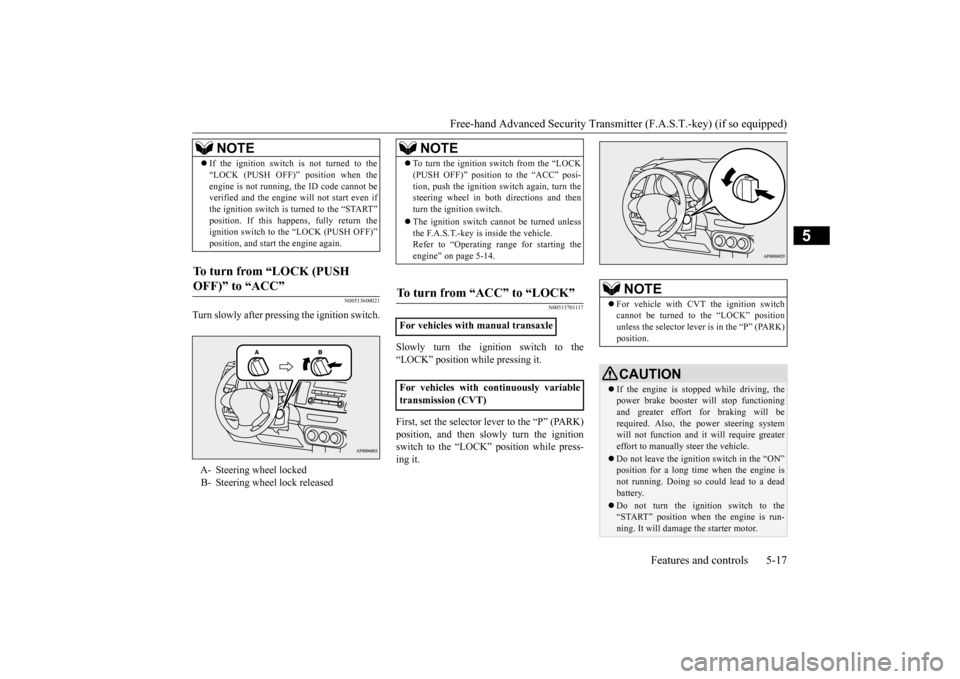
Turn
slowly
after
pressing
the
ignition
switch.
N005137
01117
Slowly
turn
the
ignition
switch
to
the
“LOCK” position while pressing it.First,
set
the
selector
lever
to the
“P”
(PARK)
position,
and
then
slowly
turn
the
ignition
switch
to
the
“LOCK”
position
while
press-
ing it.
If the
ignition
switch
is not
turned
to
the
“LOCK
(PUSH
OFF)”
position
whe
n the
engi
ne is not
runni
ng,
the ID
code
cannot
be
verified
and
the engi
ne will not
start even if
the ignition
switch
is turne
d to the “START”
position.
If
this happe
ns,
fully
return
the
ignition
switch
to the “LOCK
(PUSH
OFF)”
position,
and star
t the engi
ne again
.
To turn
from
“LOCK
(PUSH
OFF)” to “ACC”
A-
Steering wheel locked
B-
Steering wheel lock releasedNOTE
NOTE
To turn
the
ignition
switch
from
the
“LO
CK
(PUSH
OFF)”
pos
ition
to the
“ACC”
pos
i-
tion,
pus
h the
ignition
switch
again,
turn
the
steering
wheel
in
both
directions
and
then
turn
the
ignition
switch.
The ignition
switch
cannot
be turne
d unles
s
the F.A.S.T
.-ke
y is inside the vehicle.
Refer to “Ope
rating
range
for
starting
the
engi
ne” on pa
ge 5-14.
To turn fr
om “ACC” to “LOCK”
For vehicles with manual transaxleFor
vehicles
with
continuously
variable
transmission (CVT)
NOTE
For
vehicle
with
CVT the ignition
switch
cannot
be
turned
to
the
“LOCK”
position
unless
the
selector
lever
is in the
“P” (PARK)
pos
ition.CAUTIONIf the eng
ine is stoppe
d while
driving, the
power bra
ke booster
will
stop functio
nin
g
and
greater
effort
for
braking
will
be
requi
red. Also, the powe
r steer
ing system
will
not
function
and
it will
requi
re greater
effort to manually s
teer
the vehicle.
Do
not
leav
e the
ign
itio
n switch
in the “ON”
position
for
a long time
when
the
eng
ine is
not
running.
Doing
so
could
lead
to a dead
batter
y.
Do
not
turn
the
ignition
switch
to the
“START” positio
n whe
n the
engi
ne is run-
ning. It
will d
amage
the s
tarter
moto
r.
Page 80 of 392
Free-hand Advanced Security Transmitter (F.A.S.T.-key) (if so equipped)5-18
Features and controls
5
N0050350
0160
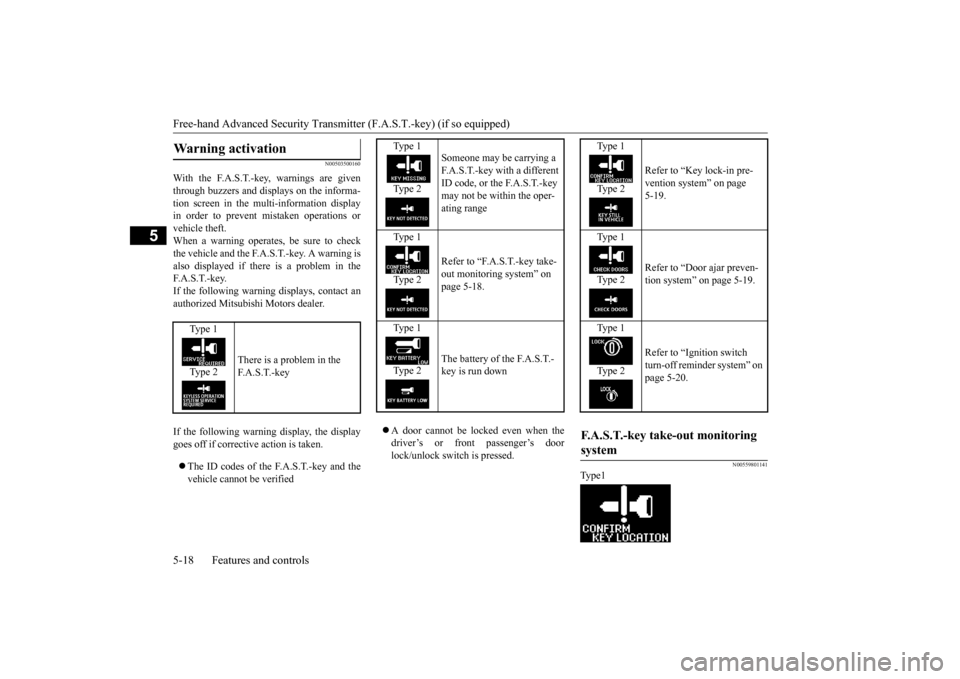
With
the
F.A.S.T
.-key
, warnings
are
given
through
buzzers
and
displays
on
the
informa-
tion
screen
in
the
multi-information
display
in
order
to
prevent
mistaken
operations
or
vehicle theft. When
a warning
operates,
be
sure
to
check
the
vehicle
and
the
F.A.S.T
.-key
. A warning
is
also
displayed
if there
is
a problem
in
the
F.A.S.T
.-key
.
If the
following
warning
displays,
contact
an
authorized
Mitsubishi
Motors
dealer
.
If the
following
warning
display
, the
display
goes of
f if corrective action is taken.
The
ID
codes
of
the
F.A.S.T
.-key
and
the
vehicle cannot be verified
A
door
cannot
be
locked
even
when
the
driver
’s
or
front
passenger
’s
door
lock/unlock
switch
is pressed.
N005598
01141
Type1
W
arning activation
Type 1Type 2
There is a problem in the F.A.S.T
.-key
Type 1
Type 2
Someone may be carrying a F.A.S.T
.-key
with
a different
ID code, or the F
.A.S.T
.-key
may not be within the ope
r-
ating
range
Type 1Type 2
Refer to “
F.A.S.T
.-key take-
out monitoring system” on page 5-18.
Type 1Type 2
The
battery
of the
F.A.S.T
.-
key is run down
Type 1Type 2
Refer to “Key lock-in pre-vention system” on page 5-19.
Type 1Type 2
Refer to “Door ajar preven-tion system” on page 5-19.
Type 1Type 2
Refer to “Ignition switch turn-of
f reminder
system”
on
page 5-20.
F.A.S.T
.-key take-out monitoring
system
Page 81 of 392

Free-hand Advanced Security Transmit
ter (F.A.S.T.-key) (if so equipped)
Features and controls
5-19
5
Type 2When
the
ignition
switch
is
in
a position
other
than
the
“LOCK
(PUSH
OFF)”,
if the
door(s)
are
opened,
the
F.A.S.T
. - key
is
removed
from
the
passenger
compartment,
and
then
the
door(s)
are
closed,
the
warning
display
is displayed
and
the
buzzer
sounds
4
times
as
a warning
since
it’s impossible
to
verify
the
ID
codes
of
the
F.A.S.T
.-key
and
vehicle.
N00559900
103
Type 1Type 2When
the
ignition
switch
is
in
the
“LOCK
(PUSH
OFF)”
position,
the
F.A.S.T
.-key
is
left
in
the
passenger
compartment,
all
the
doors
are
closed,
and
someone
tries
to
lock
the
vehicle
by
pressing
the
driver
’s or
front
passenger
’s
door
lock/unlock
switch,
the
warning
display
is displayed
and
the
buzzer
sounds
for
about
3 seconds
as a warning,
and
the doors cannot be locked.If
all
the
doors
are
manually
locked
and
closed
while
the
ignition
switch
is
in
the
“LOCK
(PUSH
OFF)”
position
and
the
F.A.S.T
.-key
is left
in
the
car
, the
doors
will
automatically
unlock
and
a buzzer
will
sound
for
about
3 seconds.
N00560000
104
Type 1Type 2When
the
ignition
switch
is
in
the
“LOCK
(PUSH
OFF)”
position,
and
someone
tries
to
lock
the
vehicle
by
pressing
the
driver
’s or
front
passenger
’s door
lock/unlock
switch
while
one
of the
doors
is not
fully
closed,
the
warning
display
is displayed
and
the
buzzer
sounds
for
about
3 seconds
as a warning,
and
the doors cannot be locked.
NOTE
The F.A.S.
T.-key
tak
e-out
monitor
ing
system
does
not
function
if the F.A.S.T
.-key
is
remo
ved
throug
h a window
without openin
g
a door
. This settin
g can
be changed.
See
an authorized
Mitsubishi Mot
ors
dealer
for
details.
The warning
may
display
even if the
F.A.S.T
.-key
is in
the
operating
range
for
starting
the
engine.
The
surrounding
envi-
ronment
or
electromagnetic
waves
may
make
it impossible
to verify
the
ID
codes
of
the
F.A.S.T
.-key
and
vehicle.
Key lock-in pr
evention system
Door ajar pr
evention system
Page 82 of 392

Free-hand Advanced Security Transmitter (F.A.S.T.-key) (if so equipped) 5-20
Features and controls
5
N005601
00105
Type 1
Type 2
When
the
ignition
switch
is
in
a position
other than “LO
CK
(PUSH
OFF)
”, all
the
doors
are
closed,
and
someone
tries
to
lock
the
vehicle
by
pressing
the
drive
r’s or front
passenger
’s
door
lock/unlock
switch,
the
warning
display
is displayed
and
the
buzzer
sounds
for
about
3 seconds
as a warning,
and
the doors cannot be locked.
N0051430
0025
Turn
the
ignition
switch
to the
“LOCK”
posi-
tion.Turn the steering wheel until it is locked.Turn
the ignition
switch
to
the “AC
C”
posi-
tion
while
moving
the
steering
wheel
slightl
y.
N0051460
1386
Do
not
operate
the
starter
motor
for
longer
than
15
seconds
as
this
could
run
the
bat-
tery
down
or
damage
the
starter
motor
. If
the
engine
does
not
start,
turn
the
ignition
switch
back
to the
“LOCK”
position,
wait
a few
seconds,
and
then
try
again.
Trying
repeatedly
with
the
engine
or starter
motor
still
turning
will
damage
the
starter
mechanism.
Ignition switch turn-off
reminder
system
Steering wheel lock
To loc
k
To unloc
k
CAUTIONCarry the key with you when leaving the
vehicle
.
If your veh
icle
need
s to be tow
ed, turn the
ignition switch to the “ACC”
position to
unlock the steer
ing wheel
.
NOTE
If the fron
t wheels are turned, the anti-theft
lock may
sometime
s mak
e it difficu
lt to turn
the ignition switch from “LOCK” to “ACC”
position
. Firmly
turn the steer
ing wheel
to
the left or to the right as you turn the ignitio
n
switch
.
Startin
g
Tips for starting
CAUTION