Top MITSUBISHI LANCER 2016 8.G Owner's Manual
[x] Cancel search | Manufacturer: MITSUBISHI, Model Year: 2016, Model line: LANCER, Model: MITSUBISHI LANCER 2016 8.GPages: 392, PDF Size: 13.12 MB
Page 79 of 392
Free-hand Advanced Security Transmit
ter (F.A.S.T.-key) (if so equipped)
Features and controls
5-17
5
N00513600
021
Turn
slowly
after
pressing
the
ignition
switch.
N005137
01117
Slowly
turn
the
ignition
switch
to
the
“LOCK” position while pressing it.First,
set
the
selector
lever
to the
“P”
(PARK)
position,
and
then
slowly
turn
the
ignition
switch
to
the
“LOCK”
position
while
press-
ing it.
If the
ignition
switch
is not
turned
to
the
“LOCK
(PUSH
OFF)”
position
whe
n the
engi
ne is not
runni
ng,
the ID
code
cannot
be
verified
and
the engi
ne will not
start even if
the ignition
switch
is turne
d to the “START”
position.
If
this happe
ns,
fully
return
the
ignition
switch
to the “LOCK
(PUSH
OFF)”
position,
and star
t the engi
ne again
.
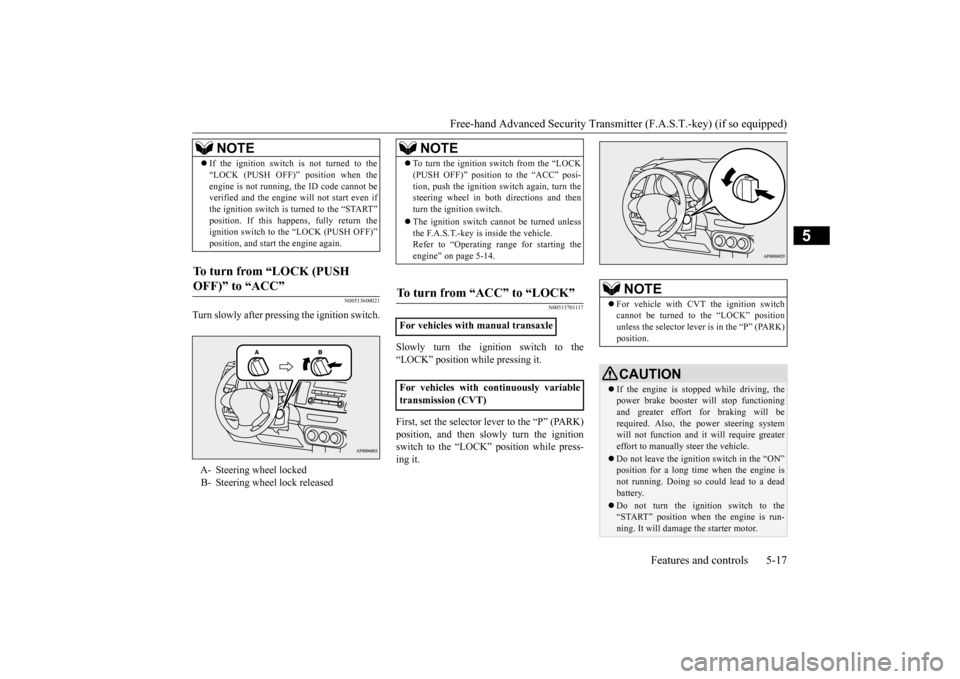
To turn
from
“LOCK
(PUSH
OFF)” to “ACC”
A-
Steering wheel locked
B-
Steering wheel lock releasedNOTE
NOTE
To turn
the
ignition
switch
from
the
“LO
CK
(PUSH
OFF)”
pos
ition
to the
“ACC”
pos
i-
tion,
pus
h the
ignition
switch
again,
turn
the
steering
wheel
in
both
directions
and
then
turn
the
ignition
switch.
The ignition
switch
cannot
be turne
d unles
s
the F.A.S.T
.-ke
y is inside the vehicle.
Refer to “Ope
rating
range
for
starting
the
engi
ne” on pa
ge 5-14.
To turn fr
om “ACC” to “LOCK”
For vehicles with manual transaxleFor
vehicles
with
continuously
variable
transmission (CVT)
NOTE
For
vehicle
with
CVT the ignition
switch
cannot
be
turned
to
the
“LOCK”
position
unless
the
selector
lever
is in the
“P” (PARK)
pos
ition.CAUTIONIf the eng
ine is stoppe
d while
driving, the
power bra
ke booster
will
stop functio
nin
g
and
greater
effort
for
braking
will
be
requi
red. Also, the powe
r steer
ing system
will
not
function
and
it will
requi
re greater
effort to manually s
teer
the vehicle.
Do
not
leav
e the
ign
itio
n switch
in the “ON”
position
for
a long time
when
the
eng
ine is
not
running.
Doing
so
could
lead
to a dead
batter
y.
Do
not
turn
the
ignition
switch
to the
“START” positio
n whe
n the
engi
ne is run-
ning. It
will d
amage
the s
tarter
moto
r.
Page 86 of 392
![MITSUBISHI LANCER 2016 8.G Owners Manual Free-hand Advanced Security Transmitter (F.A.S.T.-key) (if so equipped)5-24
Features and controls
5
1.[For vehicles with manual transaxle]Push
the
emer
gency
key
in at the
“ACC”
position
and](/img/19/7463/w960_7463-85.png "MITSUBISHI LANCER 2016 8.G Owners Manual Free-hand Advanced Security Transmitter (F.A.S.T.-key) (if so equipped)5-24
Features and controls
5
1.[For vehicles with manual transaxle]Push
the
emer
gency
key
in at the
“ACC”
position
and")
Free-hand Advanced Security Transmitter (F.A.S.T.-key) (if so equipped)5-24
Features and controls
5
1.[For vehicles with manual transaxle]Push
the
emer
gency
key
in at the
“ACC”
position
and
keep
it depressed
until
it is
turned
to
the
“LOCK”
position,
and
remove. [For
vehicles
with
continuously
variable
transmission (CVT)]First,
set
the
selector
lever
to
the
“P”
(PARK)
position,
and
then
slowly
turn
the
ignition
switch
to
the
“LOCK”
position
while
pressing
it.
2.Install the cover of the ignition switch.3.Reinsert
the
emer
gency
key
into
the
F.A.S.T.-key.
Steering wheel lock
NOTE
When
the
ignition
switch
cannot
be
turned
from
the “LOCK”
position
to the “ACC”
position,
turn
the ignition
switch
while
turn-
ing
the steer
ing
wheel
in bot
h directions.
To turn fr
om “ACC” to “LOCK”
NOTE
For
vehicles
with
CVT, the
emer
gency
key
cannot
be remove
d unless
the selector
lev
er
is set
to the “P” (PARK) position.
NOTE
Always
install
the
cover
of
the
ignition
switch
when
not
using
the
emer
gency
key
.
Not
doing
so could
cause
damage
if foreign
mater
ial
such
as dust gets into the keyhole
of
the
ignition
switch.
CAUTIONDo
not
turn
the ignition
switch
to the LOCK
position
while
the vehicle
is movi
ng.
This
will cause
the steer
ing
wheel
to lock, mak
ing
it impossible to operate the vehicle. If the
engine
is stopped
while
driving,
the
pow
er
brake
boos
ter
will
stop
functioning
and
greater
effort
for
braking
will
be
requi
red.
Also,
the powe
r steer
ing
system
will
not
function
and
it will
requi
re greater
effort
to manually steer
the vehicle.
Do
not
leav
e the ignition
switch
in the “ON”
position
for
a long
time
whe
n the engi
ne is
not
runni
ng.
The battery will run down.
Do
not
turn
the ignition
switch
to the
“START” position
whe
n the engi
ne is run-
ning.
It will damag
e the starter motor.
Page 97 of 392
Door locks
Features and controls
5-35
5
Turn
the
key
toward
the
front
of the
vehicle
to
lock
the
door
. After
checking
that
the
door
is
locked,
turn
the
key
back
to
the
center
and
remove it.
Move
the
lock
knob
to
the
lock
position
to
lock the doo
r.
All
doors
should
be
kept
locked
while
driv-
ing.The
driver
’s door
can
be
unlocked
without
using
the
lock
knob
by
pulling
on
the
inside
door handle.1.Move
the
inside
lock
knob
to
the
locked
position.
•Locked door
s can
help
prevent outsi
ders
from
gain
ing access
to you
r veh
icle
whe
n
you
slow
or come
to a stop.
Lock
your vehicle
whe
never
you
leav
e it.
Childr
en who
get
into
unlocked
vehicles
may
not
be
able
to
get
out.
Childr
en
trapped
inside
vehicles
can
quickly
be
ove
rcome
by
heat
and
suffer
serious
injur
y or death
due
to he
at str
oke.
Never
lea
ve
children unatte
nde
d insi
de a
vehicle.
In
addition
to
the
risk
of
heat
stroke,
childr
en can
activate
switches
and
contr
ols,
resulting
in
an
injury
or
fatal
accident.NOTE
When
locking
or unlo
cking
with
the key,
only
the driver’s door
will
be
locked or
unlocked. To lock
or
unlock
all
doors
, use the
pow
er
door
lock
switches,
the
keyless
entry
system,
the
F.A.S.T
-key
or the
remote
control
trans-
mitter of the F
.A.S.T
.-key
.
Refer to “Powe
r door l
ocks”
on pa
ge 5-37,
“Keyless
entry
system”
on
page 5-7
and
5-30,
and
“To ope
rate
using
the F.A.S.T
.-
key” on pa
ge 5-14.
In
vehicles
equipped
with
the
F.A.S.T
.-key
,
the
driver
’s door
can
be locked
and
unlocked
using
the
emer
gency
key
.
Refer
to “Emer
gency
key”
on
page
5-22.
W
AR
NING
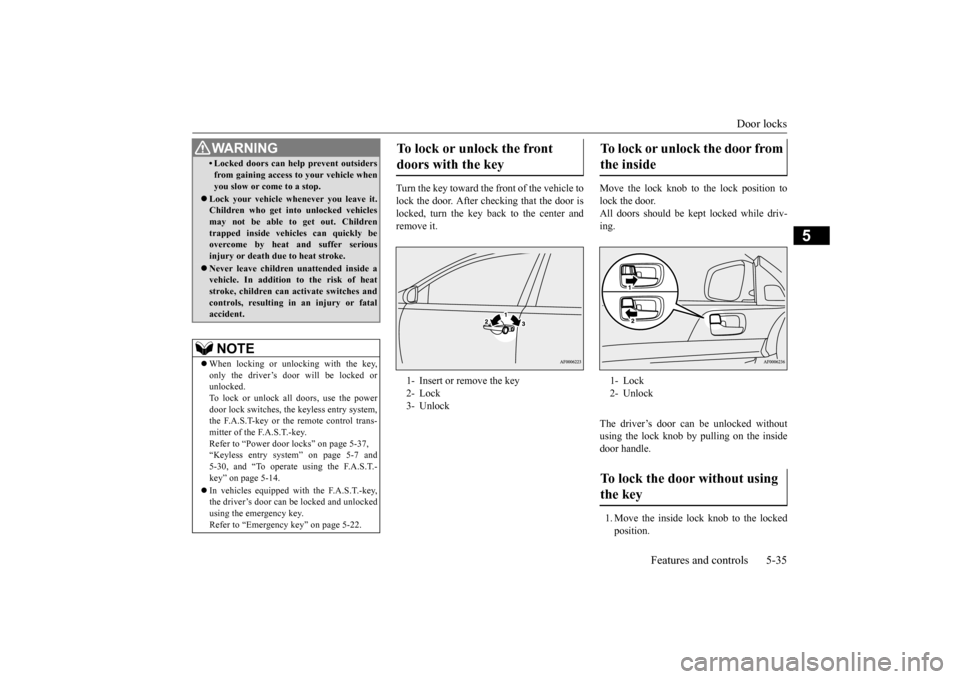
To lock or unlock the fr
ont
doors with the key 1-
Insert or remove the key
2-
Lock
3-
Unlock
To lock
or
unlock
the
door
from
the inside 1-
Lock
2-
Unlock
To lock the door without using the key
Page 103 of 392
Theft-alarm system
Features and controls 5-41
5
To open the trunk from the inside, move the lever (A) in the direction of the arrow on the lever. Push up on the trunk lid to open the trunk and climb out.
N00510200185
The theft-alarm system is designed to provideprotection from unauthorized entry into the vehicle. This system is operated in three stages: the first is the “armed” stage, the sec-ond is the “alarm” stage,
and third is the “dis-
armed” stage. If triggered, the system provides both audible and visual alarm sig-nals.
N00510301183
Park the vehicle and stop the engine. Arm the system as described below.
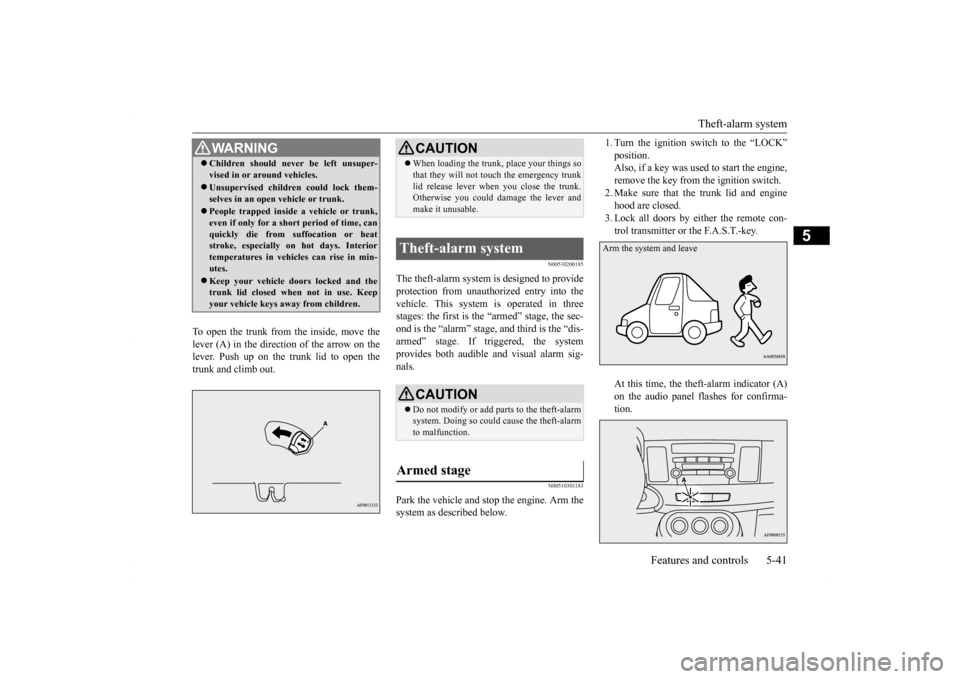
1. Turn the ignition switch to the “LOCK” position. Also, if a key was used to start the engine, remove the key from the ignition switch.2. Make sure that the trunk lid and engine hood are closed. 3. Lock all doors by either the remote con-trol transmitter or the F.A.S.T.-key. At this time, the theft-alarm indicator (A) on the audio panel flashes for confirma-tion.
WA R N I N G Children should never be left unsuper- vised in or around vehicles. Unsupervised children could lock them- selves in an open vehicle or trunk. People trapped inside a vehicle or trunk, even if only for a short period of time, canquickly die from suffocation or heat stroke, especially on hot days. Interior temperatures in vehicles can rise in min-utes. Keep your vehicle doors locked and the trunk lid closed when not in use. Keep your vehicle keys away from children.
CAUTION When loading the trunk, place your things so that they will not touch the emergency trunk lid release lever when you close the trunk. Otherwise you could damage the lever and make it unusable.
Theft-alarm system
CAUTION Do not modify or add parts to the theft-alarm system. Doing so could cause the theft-alarm to malfunction.
Armed stage
Arm the system and leave
BK0230300US.bo
ok 41 ページ 2015年7月30日 木曜日 午後8時38分
Page 104 of 392
Theft-alarm system 5-42 Features and controls
5
4. The system has entered the armed stage after about 20 seconds, when the theft- alarm indicator (A) flashing becomes slower.The theft-alarm indicator (A) continues to flash while the system is in the armed stage.
N00510401197
The alarm will be activated if any of the fol-lowing occur while the vehicle is parked andthe system is armed.
One of the doors is opened without using the remote control transmitter or the F. A . S . T. - k e y. The engine hood or the trunk lid is opened.
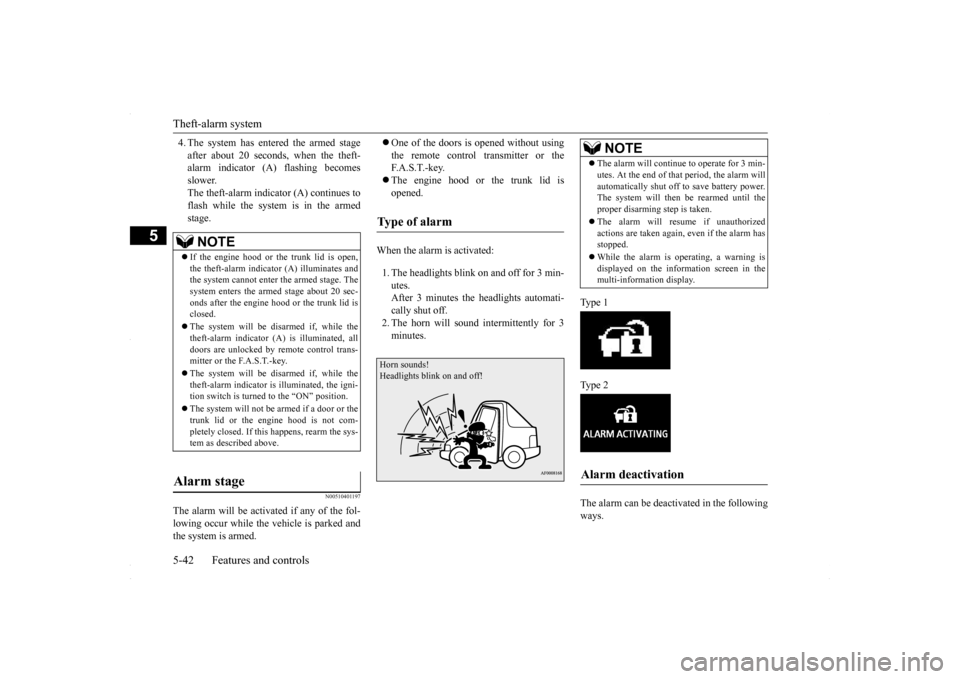
When the alarm is activated: 1. The headlights blink on and off for 3 min- utes.After 3 minutes the headlights automati- cally shut off. 2. The horn will sound intermittently for 3minutes.
Ty p e 1 Ty p e 2 The alarm can be deactivated in the following ways.
NOTE
If the engine hood or the trunk lid is open, the theft-alarm indicator (A) illuminates and the system cannot enter the armed stage. The system enters the armed stage about 20 sec-onds after the engine hood or the trunk lid is closed. The system will be disarmed if, while the theft-alarm indicator (A) is illuminated, all doors are unlocked by remote control trans-mitter or the F.A.S.T.-key. The system will be disarmed if, while the theft-alarm indicator is illuminated, the igni- tion switch is turned to the “ON” position. The system will not be
armed if a door or the
trunk lid or the engine hood is not com- pletely closed. If this happens, rearm the sys-tem as described above.
Alarm stage
Type of alarm Horn sounds!Headlights blink on and off!
NOTE
The alarm will continue to operate for 3 min- utes. At the end of that period, the alarm will automatically shut off to save battery power. The system will then
be rearmed until the
proper disarming step is taken. The alarm will resume if unauthorized actions are taken again, even if the alarm hasstopped. While the alarm is operating, a warning is displayed on the information screen in the multi-information display.
Alarm deactivation
BK0230300US.bo
ok 42 ページ 2015年7月30日 木曜日 午後8時38分
Page 105 of 392
Power windows
Features and controls 5-43
5
By using the remote control transmitter or the F.A.S.T.-key to lock or unlock the door. Turn the ignition switch to the “ON” posi- tion.
N00510501169
The system will be disarmed if the followingoperation is performed. The ignition switch is turned to the “ON” position. All doors are unlocked by the remote con- trol transmitter or the F.A.S.T.-key.
N00510601128
Use the following procedure to test the sys-tem: 1. Lower the driver’s window. 2. Arm the system as explained in “Armed stage”. 3. Make sure that the theft-alarm indicatorcomes on and flashes for approximately 20 seconds. 4. Wait a few seconds and then unlock thedriver’s side door by using the inside door lock knob and open the door. 5. Check to be sure that the horn soundsintermittently and the headlights blink on and off when a door is opened. 6. Disarm the system by unlocking all doorsby the remote control transmitter or the F. A . S . T. - k e y.
N00510800367
Disarmed stage
NOTE
If the UNLOCK button is pressed when all doors are closed and no door is openedwithin approximately 30 seconds, re-arming will automatically occur.Disarm...by remote control transmitter or F. A . S . T. - k e y
The amount of time after unlocking until the vehicle relocks automatically can be adjusted. See an authorized Mitsubishi Motors dealer for details. Once the system has been disarmed, it can- not be rearmed except by repeating the arm- ing procedure.
Testing the theft-alarm system
NOTE
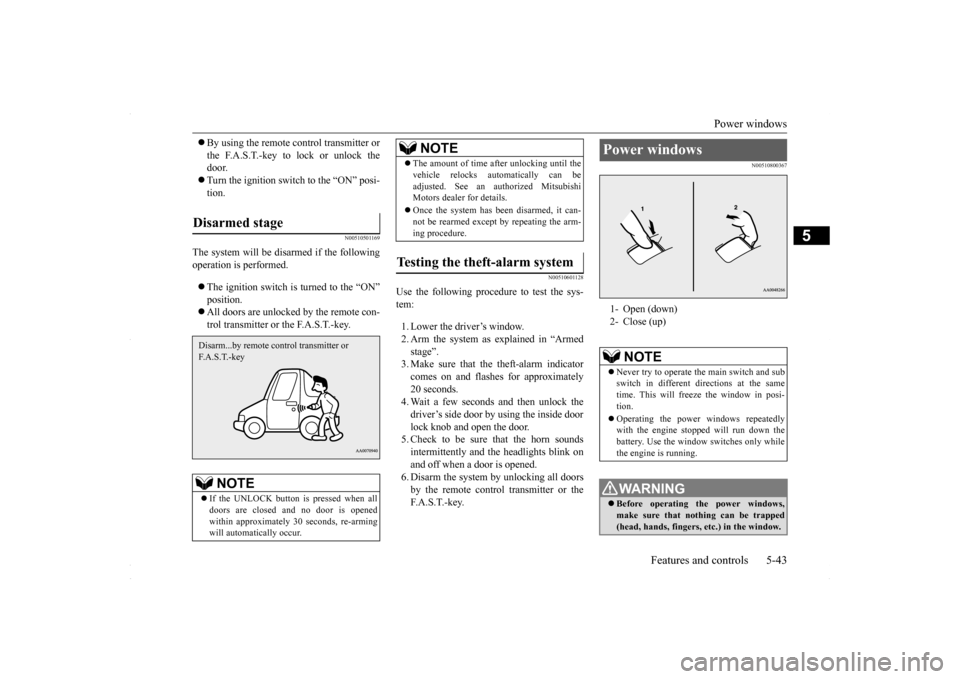
Power windows 1- Open (down) 2- Close (up)
NOTE
Never try to operate the main switch and sub switch in different directions at the sametime. This will freeze the window in posi- tion. Operating the power windows repeatedly with the engine stopped will run down the battery. Use the window switches only whilethe engine is running. WA R N I N G Before operating the power windows, make sure that nothing can be trapped(head, hands, fingers, etc.) in the window.
BK0230300US.bo
ok 43 ページ 2015年7月30日 木曜日 午後8時38分
Page 106 of 392
Power windows 5-44 Features and controls
5
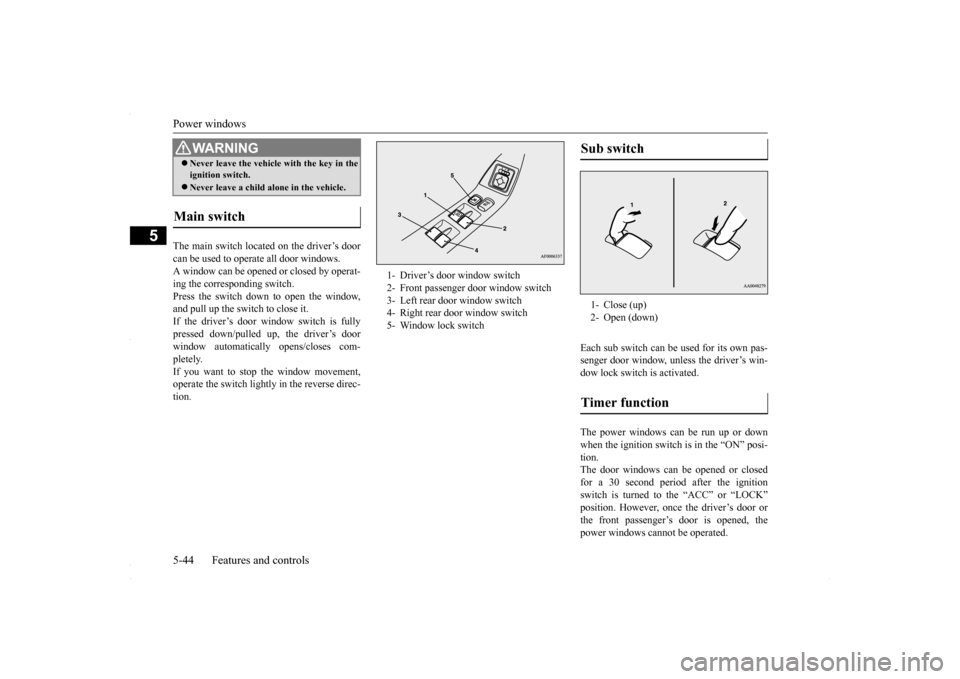
The main switch located on the driver’s door can be used to operate all door windows. A window can be opened or closed by operat-ing the corresponding switch.Press the switch down to open the window, and pull up the switch to close it. If the driver’s door window switch is fullypressed down/pulled up, the driver’s door window automatically opens/closes com- pletely.If you want to stop the window movement, operate the switch lightly in the reverse direc- tion.
Each sub switch can be used for its own pas- senger door window, unless the driver’s win-dow lock switch is activated. The power windows can be run up or down when the ignition switch is in the “ON” posi- tion. The door windows can be opened or closedfor a 30 second period after the ignition switch is turned to the “ACC” or “LOCK” position. However, once the driver’s door orthe front passenger’s door is opened, the power windows cannot be operated.
Never leave the vehicle with the key in the ignition switch. Never leave a child alone in the vehicle.
Main switch
WA R N I N G
1- Driver’s door window switch 2- Front passenger door window switch 3- Left rear door window switch 4- Right rear door window switch 5- Window lock switch
Sub switch 1- Close (up)2- Open (down)Timer function
BK0230300US.bo
ok 44 ページ 2015年7月30日 木曜日 午後8時38分
Page 108 of 392
Sunroof (if so equipped) 5-46 Features and controls
5
N00551400014
Wind buffeting can be described as the per- ception of pressure on the ears or a booming or rumbling sound. Your vehicle may exhibit wind buffeting when driving with one or bothrear door windows down or partially opened. This is a normal occurrence that can be mini- mized. If the buffeting occurs with the reardoor windows open, open the front door win-dows as well as the rear door windows to minimize the condition.
N00511000656
The sunroof can be opened and closed with the ignition switch in the “ON” position.
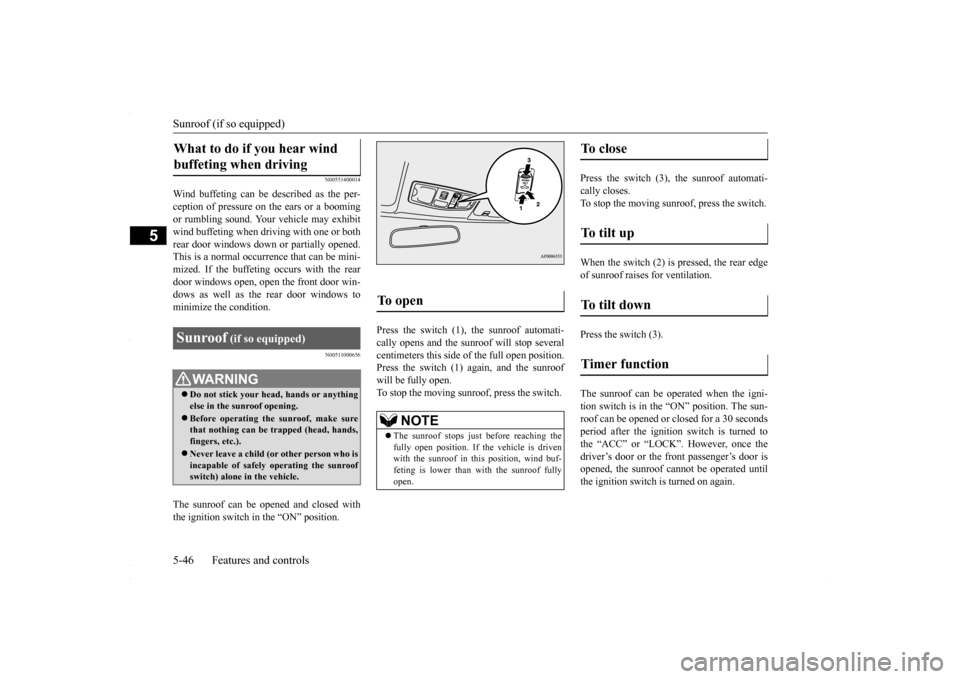
Press the switch (1), the sunroof automati- cally opens and the sunroof will stop several centimeters this side of the full open position. Press the switch (1) again, and the sunroofwill be fully open.To stop the moving sunroo
f, press the switch.
Press the switch (3), the sunroof automati- cally closes.To stop the moving sunroof, press the switch. When the switch (2) is pressed, the rear edge of sunroof raises for ventilation. Press the switch (3). The sunroof can be oper
ated when the igni-
tion switch is in the “ON” position. The sun- roof can be opened or closed for a 30 secondsperiod after the ignition switch is turned to the “ACC” or “LOCK”. However, once the driver’s door or the front passenger’s door isopened, the sunroof cannot be operated until the ignition switch is turned on again.
What to do if you hear wind buffeting when driving Sunroof
(if so equipped)
WA R N I N G Do not stick your head, hands or anything else in the sunroof opening. Before operating the sunroof, make sure that nothing can be trapped (head, hands,fingers, etc.). Never leave a child (or other person who is incapable of safely operating the sunroof switch) alone in the vehicle.
To open
NOTE
The sunroof stops just before reaching the fully open position. If the vehicle is driven with the sunroof in this position, wind buf- feting is lower than with the sunroof fullyopen.
To close
To tilt up
To tilt down
Timer function
BK0230300US.bo
ok 46 ページ 2015年7月30日 木曜日 午後8時38分
Page 110 of 392
Parking brake 5-48 Features and controls
5
N00511401439
To park the vehicle, first bring it to a com- plete stop and fully engage the parking brake.For vehicles with a manual transaxle, move the gear shift lever to 1st (on a uphill) or “R” (Reverse) (on a downhill) position.For vehicles with a continuously variable transmission (CVT), set the selector lever to “P” (PARK) position.
When parking on a hill, apply the parking brake and turn the front wheels toward thecurb on a downhill grade, away from the curb on an uphill grade.
Be sure to close the sunroof completely when washing the vehicle or when leaving the vehicle. Do not put any wax on the weatherstrip (black rubber) around the sunroof opening. If it is waxed, the weatherstrip cannot maintain a weatherproof seal with the sunroof. After washing the vehicle or after rain be sure to wipe off any water that is on the sun-roof before operating it. Operating the sunroof repeatedly with the engine turned off will run down the battery. Operate the sunroof only while the engine is running.
Parking brake
NOTE
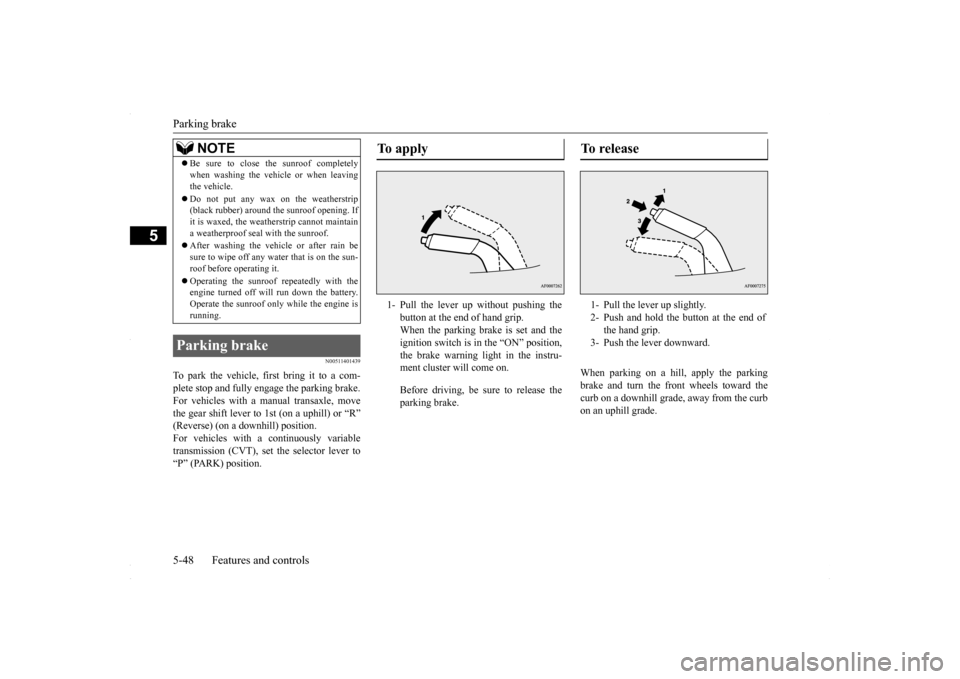
To apply 1- Pull the lever up without pushing the
button at the end of hand grip. When the parking brake is set and theignition switch is in the “ON” position, the brake warning light in the instru- ment cluster will come on. Before driving, be sure to release the parking brake.
To r e l e a s e 1- Pull the lever up slightly. 2- Push and hold the button at the end of
the hand grip.
3- Push the lever downward.
BK0230300US.bo
ok 48 ページ 2015年7月30日 木曜日 午後8時38分
Page 116 of 392
![MITSUBISHI LANCER 2016 8.G Owners Manual Steering wheel lock 5-54 Features and controls
5
position, and then turn the key to the “LOCK” position and remove it.
N00512500195
[For vehicles equipped with the F.A.S.T.-key]For information on](/img/19/7463/w960_7463-115.png "MITSUBISHI LANCER 2016 8.G Owners Manual Steering wheel lock 5-54 Features and controls
5
position, and then turn the key to the “LOCK” position and remove it.
N00512500195
[For vehicles equipped with the F.A.S.T.-key]For information on")
Steering wheel lock 5-54 Features and controls
5
position, and then turn the key to the “LOCK” position and remove it.
N00512500195
[For vehicles equipped with the F.A.S.T.-key]For information on operations for vehicles equipped with the F.A.S.T.-key, refer to “F.A.S.T.-key: Steering wheel lock” on page5-20. [Except for vehicles equipped with the F. A . S . T. - k e y ]
Remove the key at the “LOCK” position. Turn the steering wheel until it is locked. Turn the key to the “ACC” position while moving the steering wheel slightly.
NOTE
For vehicles with a CVT, the key cannot be removed unless the selector lever is set to the“P” (PARK) position, wh
ich allows the igni-
tion switch to turn to the “LOCK” position.CAUTION Do not remove the ignition key from the ignition switch while driving. The steering wheel will lock, causing loss of control. If the engine is turned off while driving, the power brake booster will stop functioning and braking efficiency will be reduced. Also,the power steering system will not function and it will require greater effort to manually steer the vehicle.CVT
Do not leave the key in the “ON” position for a long time when the engine is not running. This will cause the battery to run down. Do not turn the key to the “START” position when the engine is running. It will damage the starter motor.
Steering wheel lock
CAUTION
To l o c k To u n l o c k
CAUTION Remove the key when leaving the vehicle.NOTE
If the front wheels are turned, the anti-theft lock may sometimes make it difficult to turn the key from “LOCK” position to “ACC” position. Firmly turn the steering wheel tothe left or to the right as you turn the key.
BK0230300US.bo
ok 54 ページ 2015年7月30日 木曜日 午後8時38分