air condition MITSUBISHI LANCER 2017 8.G Owner's Manual
[x] Cancel search | Manufacturer: MITSUBISHI, Model Year: 2017, Model line: LANCER, Model: MITSUBISHI LANCER 2017 8.GPages: 385, PDF Size: 14.34 MB
Page 149 of 385
Tire pressure monitoring system 5-84 Features and controls
5
N00518901358
If the cruise control is deactivated by any of the conditions described in “To deactivate”on page 5-83, you can return to the previously set speed by pressing the “ACC RES” switch (C) while driving at a speed of approximately25 mph (40 km/h) or greater. However, you must repeat the speed setting procedure under either of the following con- ditions: The ignition switch is turned to the “OFF” position. The cruise control is turned OFF. “CRUISE” indicator light is turned off.
N00530201579
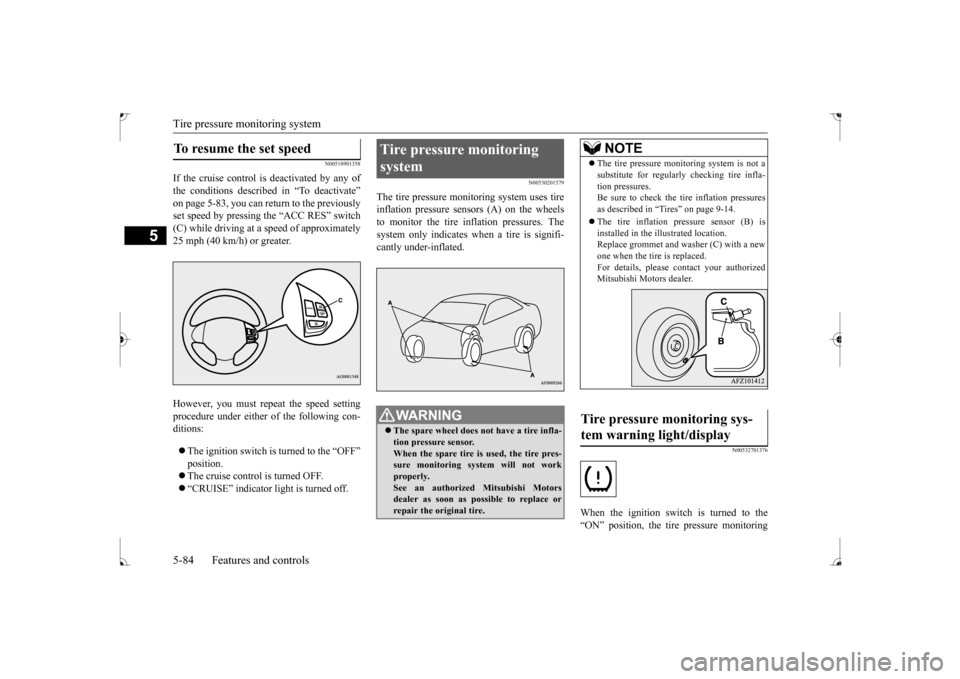
The tire pressure monitoring system uses tire inflation pressure sensors (A) on the wheelsto monitor the tire inflation pressures. The system only indicates when a tire is signifi- cantly under-inflated.
N00532701376
When the ignition switch is turned to the“ON” position, the tire pressure monitoring
To resume the set speed
Tire pressure monitoring system
WA R N I N G The spare wheel does not have a tire infla- tion pressure sensor. When the spare tire is used, the tire pres- sure monitoring system will not workproperly. See an authorized Mitsubishi Motors dealer as soon as possible to replace orrepair the original tire.
NOTE
The tire pressure monitoring system is not a substitute for regularly checking tire infla- tion pressures. Be sure to check the tire inflation pressures as described in “Tires” on page 9-14. The tire inflation pressure sensor (B) is installed in the illustrated location.Replace grommet and washer (C) with a new one when the tire is replaced. For details, please contact your authorizedMitsubishi Motors dealer.
Tire pressure monitoring sys- tem warning light/display
BK0237700US.bo
ok 84 ページ 2016年4月15日 金曜日 午前11時28分
Page 189 of 385
Warning lights 5-124 Features and controls
5
N00520300147 N00520400467
When the ignition switch is turned to the “ON” position, this indicator normally comeson and goes out a few seconds later. A warn- ing is also displayed in the multi-information display.The warning light also illuminates after start-ing the engine under the following condi- tions: When the parking brake is still applied. When the brake fluid level is low. When the brake force distribution func- tion is not operating correctly.
Before driving, be sure that the parking brake is fully released and brake warning light isoff.
N00520501830
This indicator is a part of the onboard diag- nostic (OBD) system which monitors the emissions, engine contro
l system or continu-
ously variable transmission (CVT) control system. If a problem is detected in one of these systems, this indicator illuminates orflashes. When the ignition switch is turned tothe “ON” position, this indicator normally comes on and goes off after the engine has started. This indicator will come on if the fuel tank filler cap is not properly tightened. If this indicator comes on and stays on after refuel- ing, stop the engine and check that the cap isproperly tightened. (Turn the cap clockwise until you hear clicking sounds.) If this indicator does not go off after severalseconds or lights up while driving, have the system checked as soon as possible at an authorized Mitsubishi Motors dealer or arepair facility of your choice.
Warning lights Brake warning light
CAUTION If the brake warning light and the anti-lock braking system warning light are illuminated at the same time, the braking force distribu-tion function will not operate, so the vehicle may be destabilized during sudden braking under the following conditions.
• When the brake warning light does not go out even when the parking brake is released.• When the brake warning light stays onwhile driving.• If the above occurs, avoid sudden brakingand high-speed driving. Park the vehicle in a safe place, and contact an authorized Mit- subishi Motors dealer or a repair facility ofyour choice as soon as possible.
The vehicle should be brought to a halt in the following manner when brake performance is deteriorated.• Confirm that the vehicle slows down whenyou press down on the brake pedal harder than usual. In some cases, the brake pedalmay go all the way to the floor.• Should the brakes fail, use engine brakingto reduce your speed and slowly apply the parking brake. Depress the brake pedal to illuminate thestop lights to alert the vehicles behind you.
Do not suddenly apply the parking brake while driving. This may cause the rear wheels to lock and cause an accident.CAUTION
Engine malfunction indicator (“SERVICE ENGINE SOON” or “Check engine light”)
BK0237700US.book
124 ページ 2016年4月15日 金曜日 午前11時28分
Page 192 of 385
Combination headlights and dimmer switch
Features and controls 5-127
5
Type 2 If the engine oil pressure drops while the engine is running, the warning display is dis- played on the information screen in the multi-information display.
N00522501850
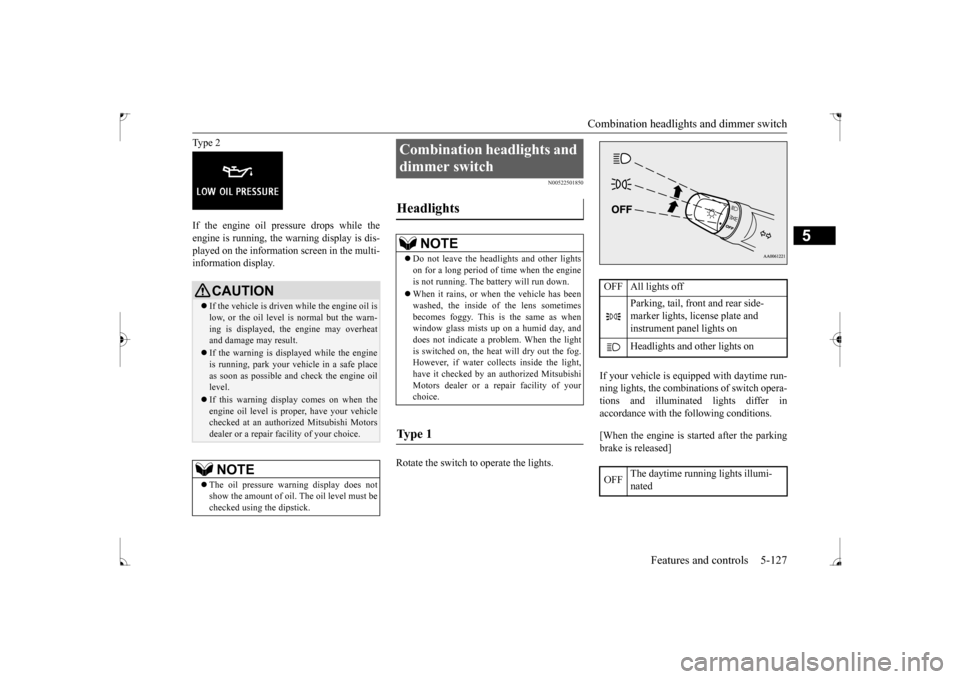
Rotate the switch to operate the lights.
If your vehicle is equipped with daytime run- ning lights, the combinations of switch opera- tions and illuminated lights differ inaccordance with the following conditions. [When the engine is started after the parking brake is released]
CAUTION If the vehicle is driven while the engine oil is low, or the oil level is normal but the warn- ing is displayed, the engine may overheat and damage may result. If the warning is displayed while the engine is running, park your vehicle in a safe place as soon as possible and check the engine oil level. If this warning display comes on when the engine oil level is proper, have your vehiclechecked at an authorized Mitsubishi Motors dealer or a repair facility of your choice.NOTE
The oil pressure warning display does not show the amount of oil. The oil level must be checked using the dipstick.
Combination headlights and dimmer switch Headlights
NOTE
Do not leave the headlights and other lights on for a long period of time when the engine is not running. The battery will run down. When it rains, or when the vehicle has been washed, the inside of the lens sometimes becomes foggy. This is the same as whenwindow glass mists up on a humid day, and does not indicate a problem. When the light is switched on, the heat will dry out the fog.However, if water collects inside the light, have it checked by an authorized Mitsubishi Motors dealer or a repair facility of yourchoice.
Ty p e 1
OFF All lights off
Parking, tail, front and rear side- marker lights, license plate and instrument panel lights on Headlights and other lights on
OFF
The daytime running lights illumi- nated
BK0237700US.book
127 ページ 2016年4月15日 金曜日 午前11時28分
Page 201 of 385
Wiper and washer switch 5-136 Features and controls
5
Keep the lever in the “OFF” position if the windshield is dirty and the weather is dry. Wiper operation under these conditions can scratch the windshield and damage the wip-ers.
N00569601038
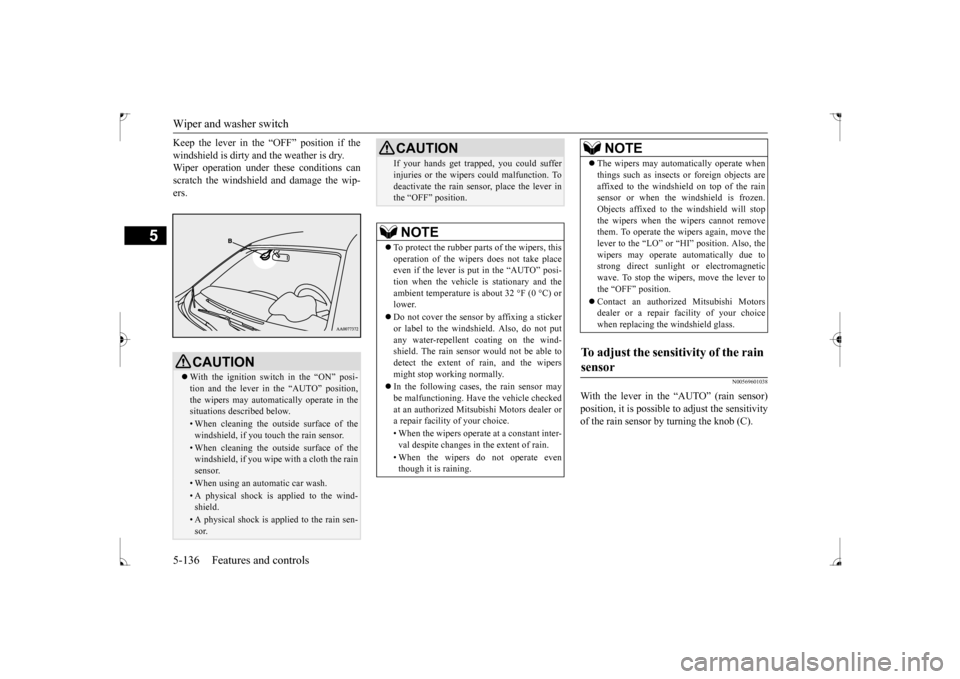
With the lever in the “AUTO” (rain sensor)position, it is possible to adjust the sensitivityof the rain sensor by turning the knob (C).
CAUTION With the ignition switch in the “ON” posi- tion and the lever in the “AUTO” position, the wipers may automatically operate in thesituations described below.• When cleaning the outside surface of thewindshield, if you touch the rain sensor.• When cleaning the outside surface of thewindshield, if you wipe with a cloth the rain sensor.• When using an automatic car wash.• A physical shock is applied to the wind- shield.• A physical shock is applied to the rain sen-sor.
If your hands get trapped, you could suffer injuries or the wipers could malfunction. To deactivate the rain sensor, place the lever in the “OFF” position.NOTE
To protect the rubber parts of the wipers, this operation of the wipers does not take placeeven if the lever is put in the “AUTO” posi- tion when the vehicle is stationary and the ambient temperature is about 32 °F (0 °C) orlower. Do not cover the sensor by affixing a sticker or label to the windshield. Also, do not put any water-repellent coating on the wind- shield. The rain sensor would not be able todetect the extent of rain, and the wipers might stop working normally. In the following cases, the rain sensor may be malfunctioning. Have the vehicle checked at an authorized Mitsubishi Motors dealer ora repair facility of your choice. • When the wipers operate at a constant inter- val despite changes in the extent of rain. • When the wipers do not operate even though it is raining.CAUTION
The wipers may automatically operate when things such as insects or foreign objects are affixed to the windshield on top of the rain sensor or when the windshield is frozen. Objects affixed to the windshield will stopthe wipers when the wipers cannot remove them. To operate the wipers again, move the lever to the “LO” or “HI” position. Also, thewipers may operate automatically due to strong direct sunlight or electromagnetic wave. To stop the wipers, move the lever tothe “OFF” position. Contact an authorized Mitsubishi Motors dealer or a repair
facility of your choice
when replacing the windshield glass.
To adjust the sensitivity of the rain sensor
NOTE
BK0237700US.book
136 ページ 2016年4月15日 金曜日 午前11時28分
Page 237 of 385
Fuel economy 6-2 Driving safety
6
N00628800165
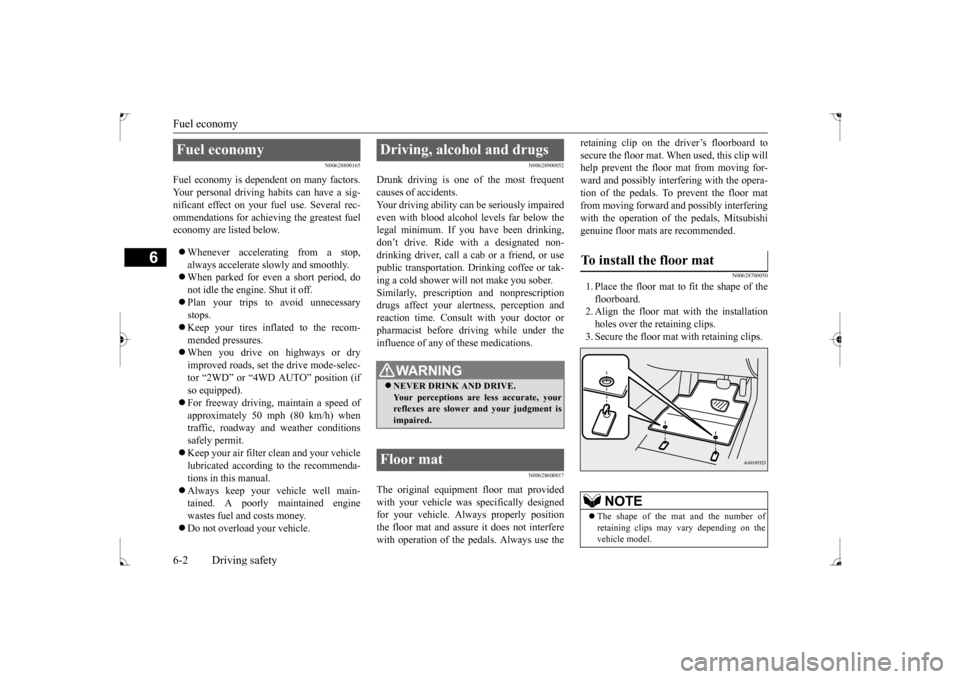
Fuel economy is dependent on many factors. Your personal driving habits can have a sig-nificant effect on your fuel use. Several rec- ommendations for achieving the greatest fuel economy are listed below. Whenever accelerating from a stop, always accelerate slowly and smoothly. When parked for even a short period, do not idle the engine. Shut it off. Plan your trips to avoid unnecessary stops. Keep your tires inflated to the recom- mended pressures. When you drive on highways or dry improved roads, set the drive mode-selec- tor “2WD” or “4WD AUTO” position (ifso equipped). For freeway driving, maintain a speed of approximately 50 mph (80 km/h) whentraffic, roadway and weather conditions safely permit. Keep your air filter clean and your vehicle lubricated according to the recommenda- tions in this manual. Always keep your vehicle well main- tained. A poorly maintained engine wastes fuel and costs money. Do not overload your vehicle.
N00628900052
Drunk driving is one of the most frequent causes of accidents.Your driving ability can be seriously impaired even with blood alcohol levels far below the legal minimum. If you have been drinking,don’t drive. Ride with a designated non- drinking driver, call a cab or a friend, or use public transportation. Drinking coffee or tak-ing a cold shower will not make you sober.Similarly, prescription and nonprescription drugs affect your alertness, perception and reaction time. Consult with your doctor orpharmacist before driving while under the influence of any of these medications.
N00628600017
The original equipment floor mat providedwith your vehicle was specifically designed for your vehicle. Always properly positionthe floor mat and assure it does not interfere with operation of the pedals. Always use the
retaining clip on the driver’s floorboard to secure the floor mat. When used, this clip will help prevent the floor mat from moving for- ward and possibly interfering with the opera-tion of the pedals. To prevent the floor mat from moving forward and possibly interfering with the operation of the pedals, Mitsubishigenuine floor mats are recommended.
N00628700050
1. Place the floor mat to fit the shape of thefloorboard.2. Align the floor mat with the installation holes over the retaining clips. 3. Secure the floor mat with retaining clips.
Fuel economy
Driving, alcohol and drugs
WA R N I N G NEVER DRINK AND DRIVE. Your perceptions are less accurate, yourreflexes are slower and your judgment is impaired.
Floor mat
To install the floor mat
NOTE
The shape of the mat and the number of retaining clips may vary depending on the vehicle model.
BK0237700US.bo
ok 2 ページ 2016年4月15日 金曜日 午前11時28分
Page 238 of 385
Vehicle preparation before driving
Driving safety 6-3
6
N00629001796
For a safer and more enjoyable trip, always observe the following: Before starting the vehicle, make certain that you and all passengers are seated and wearing their seat belts properly (with children in the rear seat, in appropriaterestraints), and that all the doors are locked.
Move the driver’s seat as far backward as possible, while still keeping good visibil- ity, and good control of the steering wheel, brakes, accelerator, and controls.Check the instrument panel indicators and multi-information display for any possible problem. Move the front passenger seat as far back as possible. Make sure that infants and small children are properly restrained in accordance withall laws and regulations.
Check these by selecting the defroster mode, and set the blower switch on high. You should be able to feel the air blowing against the windshield. (Refer to “Defrosting or defogging the wind- shield and door windows” on page 7-8, 7-13.) Check all the tires for heavy tread wear or uneven wear patterns. Look for stones, nails, glass, or other objects stuck in the tread. Lookfor any tread cuts or sidewall cracks. Check the wheel nuts for tightness, and the tires (including spare tire) for proper pressures.
WA R N I N G If a floor mat is the wrong size or is not properly installed, it can interfere with the operation of the pedals. Interference with the pedals can cause unintended accelera- tion and/or increased stopping distancesresulting in a crash and injury. Always make sure the floor mat does not interfere with the accelerator or brake pedal. Always use the retaining clip on the driver’s floorboard to secure the floormat. Always install the mat with the correct side facing down. Never install a second mat over or under an existing floor mat. Do not use a floor mat designed for another model vehicle ev
en if it is a Mit-
subishi genuine floor mat. Before driving, be sure to check the fol- lowing:• Periodically check that the floor mat isproperly secured with the retaining clips. If you remove the floor mat while clean-ing the inside of your vehicle or for any other reason, always check the condition of the floor mat after it has been rein-stalled.• While the vehicle is stopped with the engine off, check that the floor mat is not interfering with the pedals by depressingthe pedals fully.
Vehicle preparation before driving Seat belts and seats
Defrosters Tires
BK0237700US.bo
ok 3 ページ 2016年4月15日 金曜日 午前11時28分
Page 240 of 385
Braking
Driving safety 6-5
6
Please read this section in conjunction with the “Engine coolant” on page 9-7.
N00629500446
All the parts of the brake system are criticalto safety. Have the vehicle serviced by anauthorized Mitsubishi Motors dealer or a repair facility of your choice at regular inter- vals according to the “WARRANTY ANDMAINTENANCE MANUAL”. Check the brake system while driving at a low speed immediately after starting, espe- cially when the brakes are wet, to confirm they work normally.A film of water can be formed on the brake discs or brake drums and prevent normal braking after driving in heavy rain or throughlarge puddles, or after the vehicle is washed. If this occurs, dry the brakes out by driving slowly while lightly depressing the brakepedal.
On snowy roads, ice can form on the braking system, making the brakes less effective.While driving in such conditions, pay close attention to preceding and following vehicles and to the condition of
the road surface. From
time to time, lightly depress the brake pedal and check how effective the brakes are. It is important to take advantage of the engine braking by shifting to a lower gear while driving on steep downhill roads in order to prevent the brakes from overheating.
N00629601356
When parking on a hill, set the parking brake,and turn the front wheels toward the curb on adownhill, or away from the curb on an uphill. If necessary, apply chocks to wheels.
Place the gearshift lever into the “R” (Reverse) position when parking on a down- hill slope, into the 1s
t position when parking
on an uphill slope. Be sure that the parking brake is firmly set when parked and that the selector lever is in the “P” (PARK) position.When parking on a hill, it is important to set the parking brake before moving the selector lever to the “P” (PARK) position. This pre-vents loading the parking brake against the transaxle gear. When this happens, it is diffi- cult to move the selector lever out of the “P”(PARK) position. Never leave the engine running while you take a short sleep/rest. Also, never leave the engine running in a closed or poorly venti-lated place.
WA R N I N G Never open the radiator cap when the radiator is hot. You could be seriouslyburned.
Braking When brakes are wet
When driving in cold weather When driving downhill Parking Parking on a hill
For vehicles with manual trans- axle For vehicles with continuously variable transmission (CVT) Parking with the engine run- ning
BK0237700US.bo
ok 5 ページ 2016年4月15日 金曜日 午前11時28分
Page 248 of 385
7
Comfort controlsVents .........................................
.......................................................7-2
Automatic air conditioning
with Fahrenheit scale
(if so equipped) .
.................................................
..........................7-4
Automatic air conditioning with Cels
ius scale (if so equipped) .......7-9
Important air conditioning op
erating tips ......................................7-14
Air purifier ......................
...............................................................7-15
AM/FM radio/CD player (if so equipped) .....................................7-15Handling of Discs .
.................................................
........................7-18
Audio Files (MP3/WMA/
AAC) ....................................................7-20
Important Points on Safety fo
r the Customer ................................7-24
Operation Keys ...............
...............................................................7-24
Listen to Radio ......
.................................................
........................7-28
Listen to Satellite Radio (if so equipped) .......................................7-29Listen to CDs ..................
...............................................................7-31
Listen to MP3s ......
.................................................
........................7-32
Listen to an iPod ...
.................................................
........................7-33
Listen to Audio Files on
a USB Device .........................................7-35
To play iPod/USB memory device tracks via voice operation (vehicles with Bluetooth 2.0
interface) ......................................7-38
Listen to Bluetooth Audio (i
f so equipped) ....................................7-41
Display Indicator ..
.................................................
........................7-43
Audio Quality and Volume Balance Adjustment ...........................7-44System Settings .....
.................................................
........................7-45
Troubleshooting ..............
...............................................................7-49
Antenna .....................................
.....................................................7-51
Clock (if so equipped)
............................................
........................7-52
General information about
your radio ...........................................7-53
BK0237700US.bo
ok 1 ページ 2016年4月15日 金曜日 午前11時28分
Page 249 of 385
Vents 7-2 Comfort controls
7
N00729900210 N00730200301
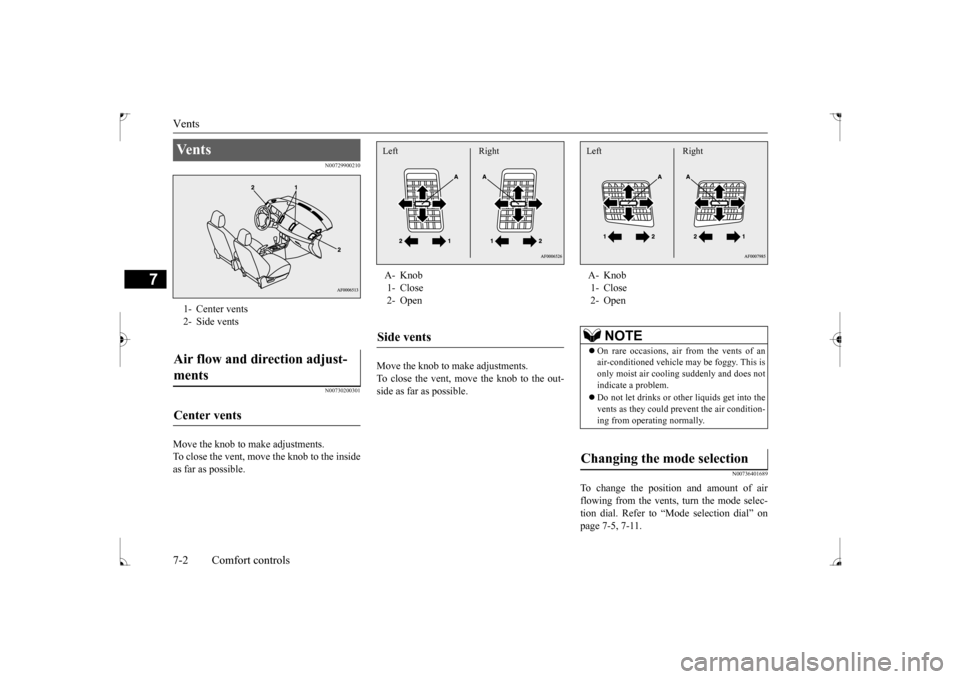
Move the knob to make adjustments. To close the vent, move the knob to the inside as far as possible.
Move the knob to make adjustments. To close the vent, move the knob to the out-side as far as possible.
N00736401689
To change the position and amount of airflowing from the vents, turn the mode selec- tion dial. Refer to “Mode selection dial” on page 7-5, 7-11.
Ve n t s 1- Center vents2- Side ventsAir flow and direction adjust- ments Center vents
A- Knob 1- Close 2- OpenSide vents Left Right
A- Knob 1- Close 2- Open
NOTE
On rare occasions, air from the vents of an air-conditioned vehicle may be foggy. This isonly moist air cooling suddenly and does not indicate a problem. Do not let drinks or ot
her liquids get into the
vents as they could prevent the air condition- ing from operating normally.
Changing the mode selection Left Right
BK0237700US.bo
ok 2 ページ 2016年4月15日 金曜日 午前11時28分
Page 251 of 385
Automatic air conditioning with
Fahrenheit scale (if so equipped)
7-4 Comfort controls
7
Air flows mainly to the windshield and the door windows.
N00731501382
The air conditioning can only be used whilethe engine is running.
N00711801653
N00736900094
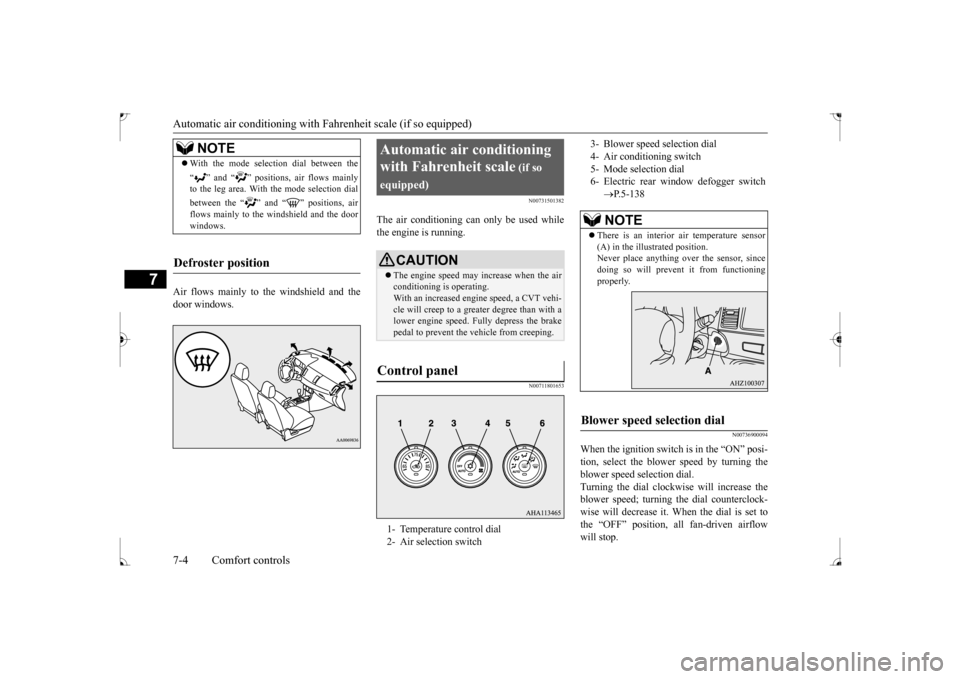
When the ignition switch is in the “ON” posi- tion, select the blower speed by turning the blower speed selection dial. Turning the dial clockwise will increase theblower speed; turning the dial counterclock- wise will decrease it. When the dial is set to the “OFF” position, all fan-driven airflowwill stop.
NOTE
With the mode selection dial between the “ ” and “ ” positions, air flows mainly to the leg area. With the mode selection dial between the “ ” and “ ” positions, air flows mainly to the windshield and the door windows.
Defroster position
Automatic air conditioning with Fahrenheit scale
(if so
equipped)
CAUTION The engine speed may increase when the air conditioning is operating. With an increased engine speed, a CVT vehi-cle will creep to a greater degree than with a lower engine speed. Fully depress the brake pedal to prevent the vehicle from creeping.
Control panel
1- Temperature control dial 2- Air selection switch
3- Blower speed selection dial4- Air conditioning switch5- Mode selection dial 6- Electric rear window defogger switch
P.5-138NOTE
There is an interior air temperature sensor (A) in the illustrated position.Never place anything over the sensor, since doing so will prevent it from functioning properly.
Blower speed selection dial
BK0237700US.bo
ok 4 ページ 2016年4月15日 金曜日 午前11時28分