key MITSUBISHI LANCER EVOLUTION 2007 Service Owner's Manual
[x] Cancel search | Manufacturer: MITSUBISHI, Model Year: 2007, Model line: LANCER EVOLUTION, Model: MITSUBISHI LANCER EVOLUTION 2007Pages: 1449, PDF Size: 56.82 MB
Page 965 of 1449

REAR AXLE -On-vehicle Service27B-19
FLUID LEVEL CHECK
1. Remove the maintenance lid located in the luggage
compartment.
2.
If the vehicle has been run, leave it for 90 min. or more
in an ordinary temperature (10_C–30_C) to allow the
accumulator internal pressure to drop.
NOTE
If the ambient temperature is 10_C or less, allow more
time to leave the vehicle to stand idle.
Set MUT-IIto 16 pin diagnostic connector. Turn the ignition
switch to the ON position, operate MUT-II, drive the
hydraulic unit (item No.03) forcibly, release the pressure in
the accumulator.
Caution
Turn the ignition switch to the LOCK (OFF) position
before connecting or disconnecting the MUT-II.
NOTE
(1) To drive (oil level check mode) forcibly, turn the
directional valve of the hydraulic unit 20 turns from
side to side, release the differential automatically.
Drive can also be cleared forcibly using the Clear
key of MUT-II.
(2) If the function has been stopped by fail safe, the
hydraulic unit can not be cleared forcibly.
3. Check that the fluid level in the oil reservoir is in the
range between MAX and MIN.
4. If the fluid level is lower than MIN, add the specified
fluid.
Specified fluid: ATF-SP III
5. Reinstall the maintenance lid.
BLEEDING
1. Lift up the vehicle.
2. Set the MUT-IIto the 16-pin diagnosis connector.
Caution
Turn the ignition switch to the LOCK (OFF) position
before connecting or disconnecting the MUT-II.
3. Turn the ignition switch to the ON position.
4. Set the steering wheel in the straight-ahead position.
5. Operating the MUT-II, drive the hydraulic unit (item No.02)
forcibly.
NOTE
(1) Drive the bleeding mode forcibly for 5 minutes, release
the operation automatically. Drive can also be cleared
forcibly using the Clear key of MUT-II.
(2) If the function has been stopped by fail safe, the
hydraulic unit cannot be cleared forcibly.
Page 967 of 1449
REAR AXLE -On-vehicle Service27B-21
5. Operate the MUT-II, drive the torque transfer differential
(item No.06 and 07) forcibly.
NOTE
(1) Drive the clutch operating mode forcibly for 1 minutes,
release the operation automatically. Drive can also
be cleared forcibly using the Clear key of MUT-II.
(2) If the hydraulic unit function has been stopped by
fail-safe, the torque transfer differential cannot be
forcibly driven.
6. Operating the MUT-II, by service data (item no.07 and 08),
check the condition of the wheel speed below.
The left rear wheel is faster 2km/h than right rear wheel.
The right rear wheel is faster 2km/h than left rear wheel.
NOTE
If the above are not satisfied, check the oil pressure as
the system may be faulty.
OIL PRESSURE CHECK
1. Lift up the vehicle.
2. Set the MUT-IIto the 16-pin diagnosis connector.
Caution
Turn the ignition switch to the LOCK (OFF) position
before connecting or disconnecting the MUT-II.
3. Turn the ignition switch to ON.
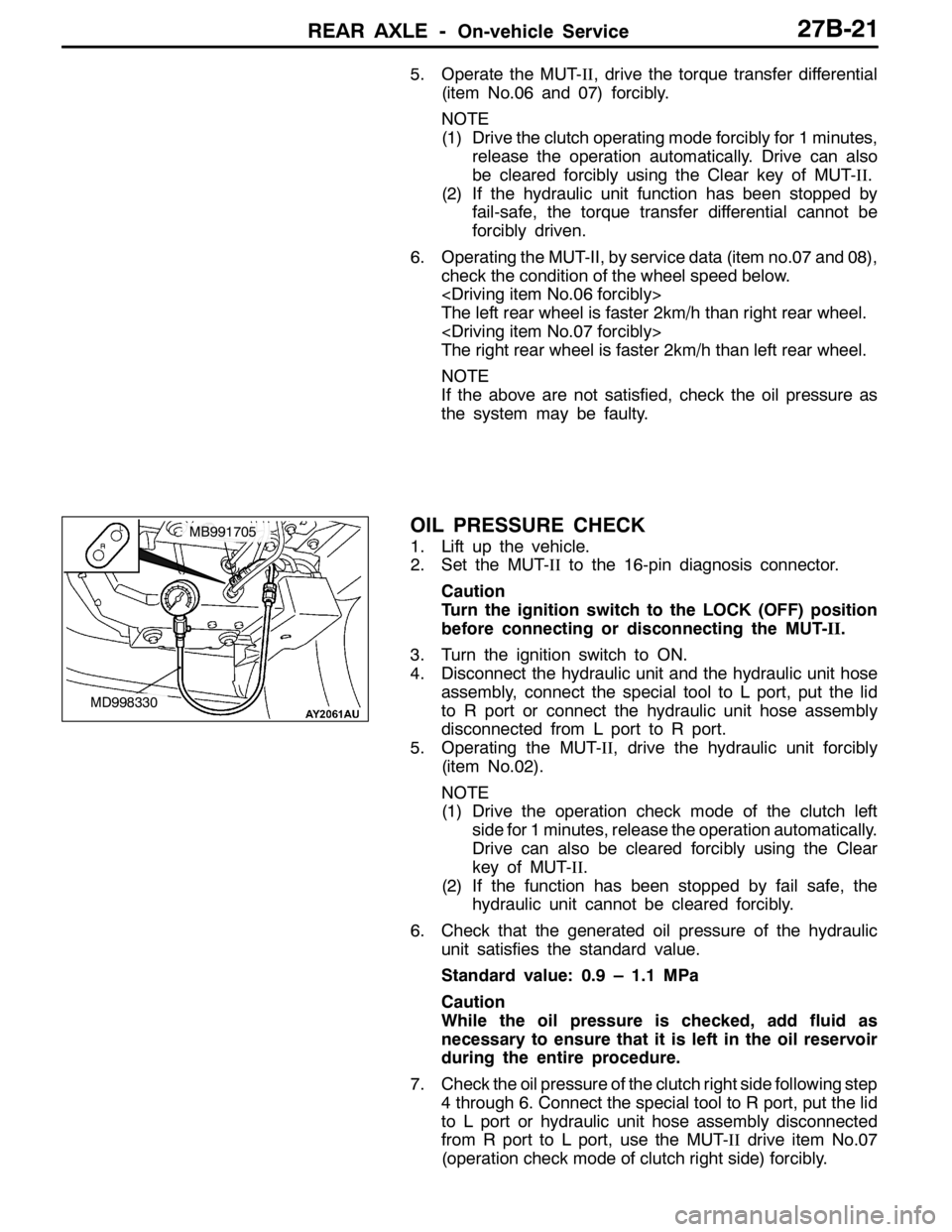
4. Disconnect the hydraulic unit and the hydraulic unit hose
assembly, connect the special tool to L port, put the lid
to R port or connect the hydraulic unit hose assembly
disconnected from L port to R port.
5. Operating the MUT-II, drive the hydraulic unit forcibly
(item No.02).
NOTE
(1) Drive the operation check mode of the clutch left
side for 1 minutes, release the operation automatically.
Drive can also be cleared forcibly using the Clear
key of MUT-II.
(2) If the function has been stopped by fail safe, the
hydraulic unit cannot be cleared forcibly.
6. Check that the generated oil pressure of the hydraulic
unit satisfies the standard value.
Standard value: 0.9 – 1.1 MPa
Caution
While the oil pressure is checked, add fluid as
necessary to ensure that it is left in the oil reservoir
during the entire procedure.
7. Check the oil pressure of the clutch right side following step
4 through 6. Connect the special tool to R port, put the lid
to L port or hydraulic unit hose assembly disconnected
from R port to L port, use the MUT-IIdrive item No.07
(operation check mode of clutch right side) forcibly.
MD998330
MB991705
Page 1022 of 1449

POWER PLANT MOUNT - Crossmember32-8
CROSSMEMBER
REMOVAL AND INSTALLATION
Caution
1. Before removing the steering wheel and air bag module assembly, always refer to GROUP
52B - Service Precautions, Air bag Module and Clock Spring. Also, set the front wheels so
that they are facing straight forward, and remove the ignition key. If you fail to do this, the
SRS clock spring will be damaged, causing the SRS air bag to be inoperative and serious
injury.
2. *
1: Indicates parts which should be initially tightened, and then fully tightened after placing
the vehicle horizontally and loading the full weight of the engine on the vehicle body.
3. *
2: Indicates parts which should be temporarily tightened, and then fully tightened with the
vehicle on the ground in the unladen condition.
Caution
If the vehicle is equipped the Brembo disc brake, during maintenance, take care not to contact
the parts or tools to the caliper because the paint of caliper will be scratched.
Pre-removal Operations
DUnder Cover Removal
(Refer to GROUP 51 - Front Bumper.)
DCentermember, Crossmember Bar Removal
(Refer to P.32-6.)
DFront Exhaust Pipe Removal
(Refer to GROUP 15.)
DSteering Wheel Air Bag Module Assembly Removal
(Refer to GROUP 37A.)
DPower Steering Fluid Draining
(Refer to GROUP 37A - On-vehicle Service.)Post-installation Operations
DCentermember, Crossmember Bar Installation
(Refer to P.32-6.)
DFront Exhaust Pipe Installation
(Refer to GROUP 15.)
DSteering Wheel Air Bag Module Assembly
Installation (Refer to GROUP 37A.)
DPower Steering Fluid Supplying
(Refer to GROUP 37A - On-vehicle Service.)
DPower Steering Fluid Line Bleeding
(Refer to GROUP 37A - On-vehicle Service.)
DPress the dust cover with a finger to check whether
the dust cover is cracked or damaged.
DChecking Steering Wheel Position with Wheels
Straight Ahead
DFront Wheel Alignment Check and Adjustment
(Refer to GROUP 37A - On-vehicle Service.)
DUnder Cover Installation
(Refer to GROUP 51 - Front Bumper.)
Page 1075 of 1449
ABS <4WD> -Troubleshooting35B-5
ABS WARNING LAMP INSPECTION
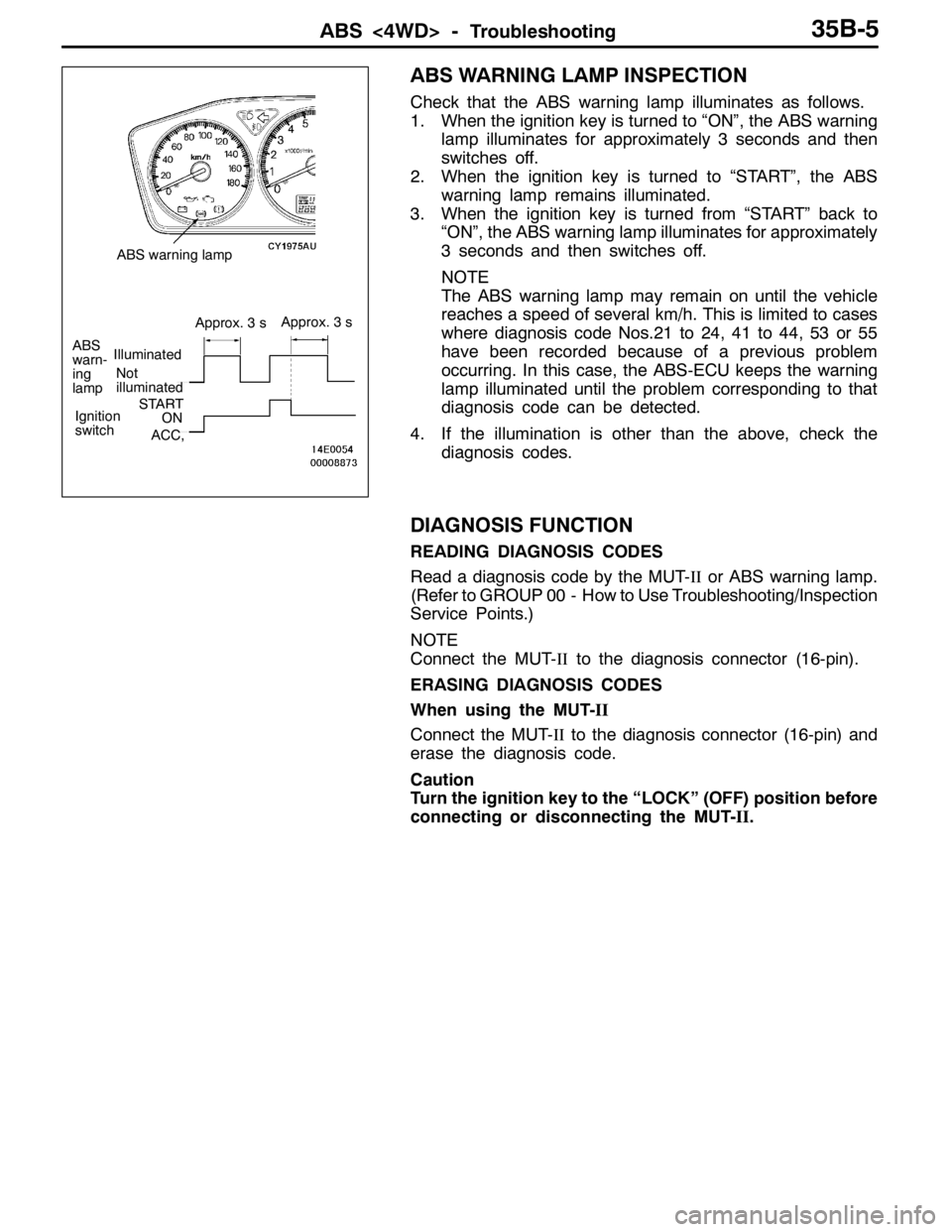
Check that the ABS warning lamp illuminates as follows.
1. When the ignition key is turned to “ON”, the ABS warning
lamp illuminates for approximately 3 seconds and then
switches off.
2. When the ignition key is turned to “START”, the ABS
warning lamp remains illuminated.
3. When the ignition key is turned from “START” back to
“ON”, the ABS warning lamp illuminates for approximately
3 seconds and then switches off.
NOTE
The ABS warning lamp may remain on until the vehicle
reaches a speed of several km/h. This is limited to cases
where diagnosis code Nos.21 to 24, 41 to 44, 53 or 55
have been recorded because of a previous problem
occurring. In this case, the ABS-ECU keeps the warning
lamp illuminated until the problem corresponding to that
diagnosis code can be detected.
4. If the illumination is other than the above, check the
diagnosis codes.
DIAGNOSIS FUNCTION
READING DIAGNOSIS CODES
Read a diagnosis code by the MUT-IIor ABS warning lamp.
(Refer to GROUP 00 - How to Use Troubleshooting/Inspection
Service Points.)
NOTE
Connect the MUT-IIto the diagnosis connector (16-pin).
ERASING DIAGNOSIS CODES
When using the MUT-II
Connect the MUT-IIto the diagnosis connector (16-pin) and
erase the diagnosis code.
Caution
Turn the ignition key to the “LOCK” (OFF) position before
connecting or disconnecting the MUT-II.
Not
illuminated
ABS
warn-
ing
lampIlluminated
Approx. 3 sApprox. 3 s
Ignition
switchSTARTON
ACC,
ABS warning lamp
Page 1085 of 1449

ABS <4WD> -Troubleshooting35B-15
INSPECTION CHART FOR TROUBLE SYMPTOMS
Trouble symptomsInspection procedure
No.Reference page
Communication between the MUT-IIand the whole system is not
possible.135B-16
Communication between the MUT-IIand the ABS-ECU is not possible.235B-17
When the ignition key is turned to “ON” (engine stopped), the ABS
warning lamp does not illuminate.335B-18
Even after the engine is started, the ABS warning lamp remains
illuminated.435B-18
In the inspection with MUT-II service data, the parking brake switch is not
turned ON or turn OFF.535B-19
The neutral position learning of the steering wheel sensor is not finished.635B-20
Faulty ABS operation735B-21
Caution
1. If steering movements are made when driving at high speed, or when driving on road surfaces
with low frictional resistance, or when passing over bumps, the ABS may operate even though
sudden braking is not being applied. Because of this, when getting information from the customer,
check if the problem occurred while driving under such conditions as these.
2. During ABS operation, the brake pedal may vibrate or may not be able to be depressed. Such
phenomena are due to intermittent changes in hydraulic pressure inside the brake line to prevent
the wheels from locking and is not an abnormality.
Page 1088 of 1449
ABS <4WD> -Troubleshooting35B-18
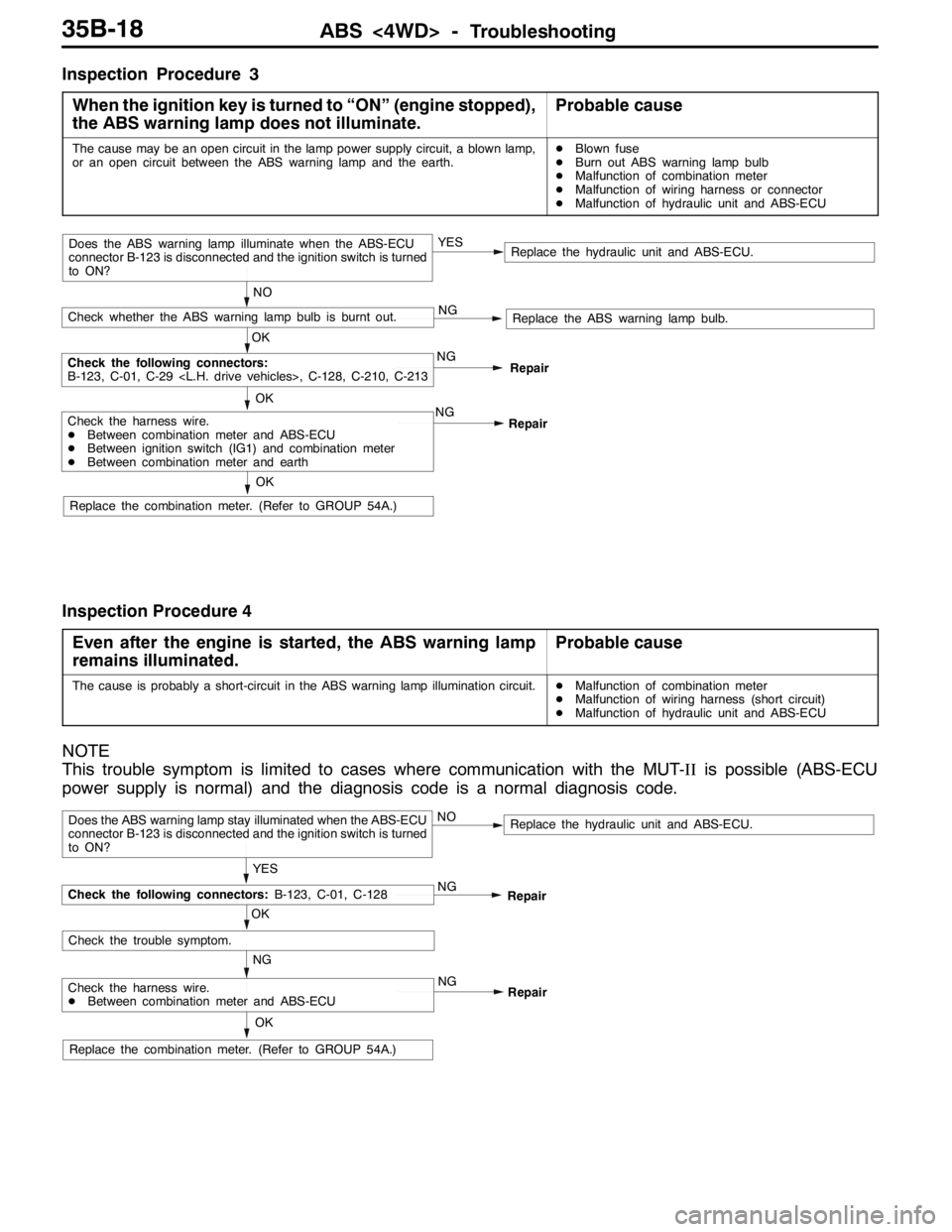
Inspection Procedure 3
When the ignition key is turned to “ON” (engine stopped),
the ABS warning lamp does not illuminate.
Probable cause
The cause may be an open circuit in the lamp power supply circuit, a blown lamp,
or an open circuit between the ABS warning lamp and the earth.DBlown fuse
DBurn out ABS warning lamp bulb
DMalfunction of combination meter
DMalfunction of wiring harness or connector
DMalfunction of hydraulic unit and ABS-ECU
NO
NG
Replace the ABS warning lamp bulb.
Check the harness wire.
DBetween combination meter and ABS-ECU
DBetween ignition switch (IG1) and combination meter
DBetween combination meter and earth
Replace the hydraulic unit and ABS-ECU.
OKNG
OK
Check the following connectors:
B-123, C-01, C-29
OK
Check whether the ABS warning lamp bulb is burnt out.
Does the ABS warning lamp illuminate when the ABS-ECU
connector B-123 is disconnected and the ignition switch is turned
to ON?YES
Repair
Replace the combination meter. (Refer to GROUP 54A.)NG
Repair
Inspection Procedure 4
Even after the engine is started, the ABS warning lamp
remains illuminated.
Probable cause
The cause is probably a short-circuit in the ABS warning lamp illumination circuit.DMalfunction of combination meter
DMalfunction of wiring harness (short circuit)
DMalfunction of hydraulic unit and ABS-ECU
NOTE
This trouble symptom is limited to cases where communication with the MUT-IIis possible (ABS-ECU
power supply is normal) and the diagnosis code is a normal diagnosis code.
YES
NG
Check the harness wire.
DBetween combination meter and ABS-ECU
Replace the hydraulic unit and ABS-ECU.
OK
NG
OK
Check the trouble symptom.
Does the ABS warning lamp stay illuminated when the ABS-ECU
connector B-123 is disconnected and the ignition switch is turned
to ON?NO
Repair
Replace the combination meter. (Refer to GROUP 54A.)NG
Repair
Check the following connectors:B-123, C-01, C-128
Page 1096 of 1449

ABS <4WD> -Troubleshooting/On-vehicle Service35B-26
RESISTANCE AND CONTINUITY BETWEEN
HARNESS-SIDE CONNECTOR TERMINALS
1. Turn the ignition key to the “LOCK” (OFF) position.
2. Disconnect the ABS-ECU connector.
3. Check the resistance and continuity between the terminals
indicated in the table below.
4. The terminal layout is shown in the illustration.
ABS-ECU terminal No.SignalNormal condition
6-7Wheel speed sensor (rear left)1.24 - 1.64 kΩ
8-9Wheel speed sensor (rear right)
22 - 31Wheel speed sensor (front left)
29 - 30Wheel speed sensor (front right)
12 - Body earthEarthContinuity
34 - Body earthEarth
ON-VEHICLE SERVICE
WHEEL SPEED SENSOR OUTPUT VOLTAGE
CHECK
1. Lift up the vehicle and release the parking brake.
2. Move the lock lever of the ABS-ECU connector as shown
in the illustration, and then disconnect the ABS-ECU
connector.
3. Push up and unlock the hooks of the ABS-ECU connector
shown in the illustration, then remove the connector cover.
Lock lever
Page 1098 of 1449

ABS <4WD> -On-vehicle Service35B-28
SymptomRemedy Probable causes
Noisy or disturbed waveformOpen circuit in sensorReplace sensor
Open circuit in harnessCorrect harness
Incorrectly mounted wheel speed sensorMount correctly
ABS rotor with missing or damaged teethReplace ABS rotor
Caution
Because the wheel speed sensor cables move together with the front and rear suspension, they
vibrate greatly when driving over poor road surfaces. As a result, the sensor harnesses should also
be shaken when monitoring of output waveforms of the wheel speed sensors in order to simulate
conditions such as driving over poor road surfaces.
HYDRAULIC UNIT CHECK
1. Jack up the vehicle and support the vehicle with rigid racks placed at the specified jack-up points
or place the wheels which are checked on the rollers of the braking force tester.
Caution
(1) The roller of the braking force tester and the tyre should be dry during testing.
(2) When testing the front brakes, apply the parking brake, and when testing the rear brakes,
stop the front wheels by chocking them.
2. Turn the ignition key to the “LOCK” (OFF) position and set the MUT-II.
Caution
Turn the ignition key to the “LOCK” (OFF) position before connecting or disconnecting the
MUT-II.
3. After checking that the shift lever is in neutral, start the engine.
4. Use the MUT-IIto force-drive the actuator.
NOTE
(1) During the actuator test, the ABS warning lamp will illuminate and the anti-skid control will be
cancelled.
(2) When the ABS has been interrupted by the fail-safe function, the MUT-IIactuator testing cannot
be carried out.
5. Turn the wheel by hand and check the change in braking force when the brake pedal is depressed.
When using the braking force tester, depress the brake pedal until the braking force is at the following
values, and check that the braking force decreases when the actuator is force-driven.
Front wheel785 - 981 N
Rear wheel588 - 784 N
Page 1183 of 1449
BODY -Doors42-35
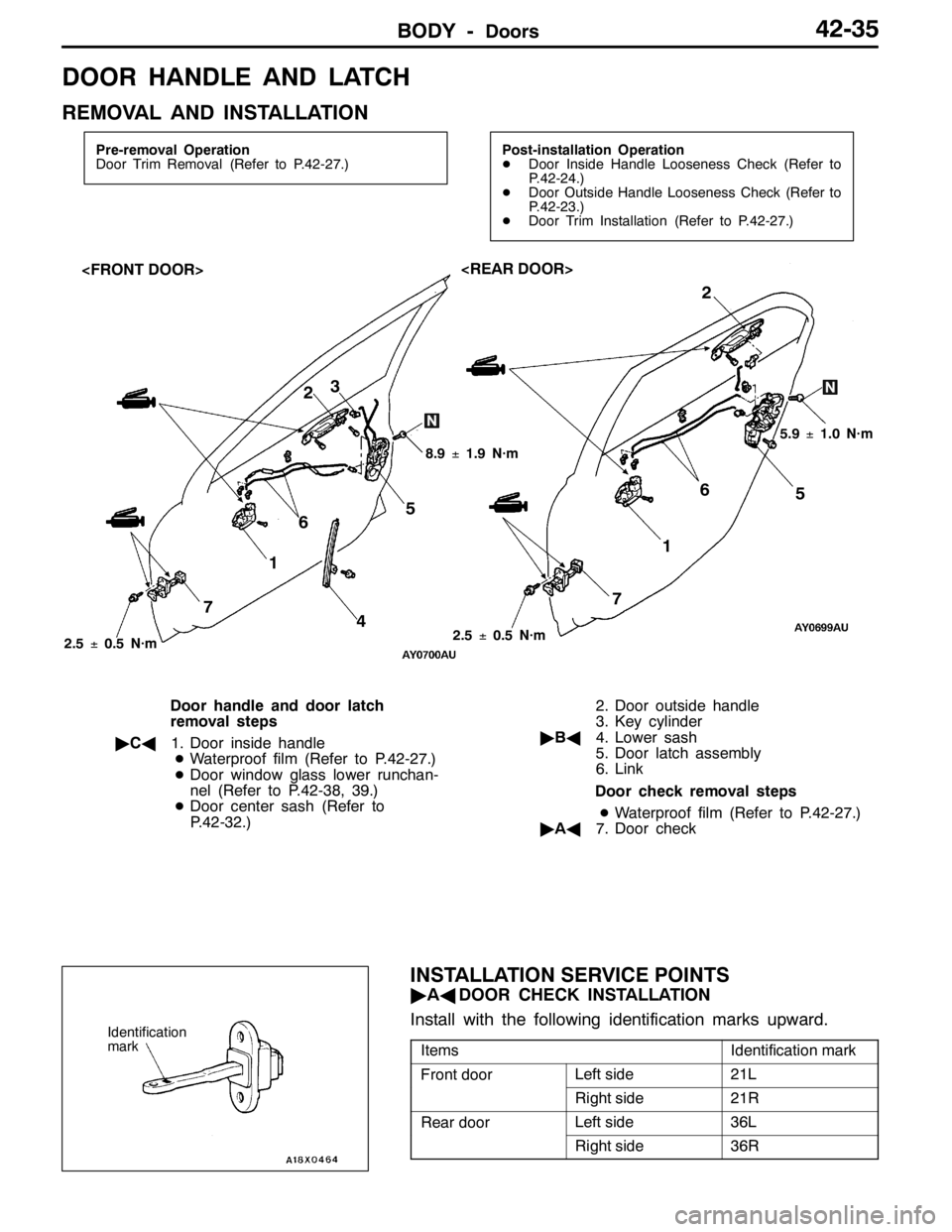
DOOR HANDLE AND LATCH
REMOVAL AND INSTALLATION
Pre-removal Operation
Door Trim Removal (Refer to P.42-27.)Post-installation Operation
DDoor Inside Handle Looseness Check (Refer to
P.42-24.)
DDoor Outside Handle Looseness Check (Refer to
P.42-23.)
DDoor Trim Installation (Refer to P.42-27.)
3
5
4 72
6
1
5.9±1.0 N·m
8.9±1.9 N·m
2
1
75 6
2.5±0.5 N·m
2.5±0.5 N·m
Door handle and door latch
removal steps
"CA1. Door inside handle
DWaterproof film (Refer to P.42-27.)
DDoor window glass lower runchan-
nel (Refer to P.42-38, 39.)
DDoor center sash (Refer to
P.42-32.)2. Door outside handle
3. Key cylinder
"BA4. Lower sash
5. Door latch assembly
6. Link
Door check removal steps
DWaterproof film (Refer to P.42-27.)
"AA7. Door check
INSTALLATION SERVICE POINTS
"AADOOR CHECK INSTALLATION
Install with the following identification marks upward.
ItemsIdentification mark
Front doorLeft side21L
Right side21R
Rear doorLeft side36L
Right side36R
Identification
mark
Page 1185 of 1449

BODY -Doors42-37
Rear door
Rod positionTerminal No.Rod operationp
23
p
LOCKLOCK to UNLOCK
UNLOCKUNLOCK to LOCK
Rod positionTerminal No.Rod operationp
23
p
LOCKLOCK to UNLOCK
UNLOCKUNLOCK to LOCK
DOOR LOCK KEY CYLINDER SWITCH CONTINUITY
CHECK
Switch positionTerminal No.p
123123
LOCK
OFF
UNLOCK
BA
View ALock
Unlock
View B
UnlockLock