Ecu MITSUBISHI LANCER EVOLUTION 2007 Service Repair Manual
[x] Cancel search | Manufacturer: MITSUBISHI, Model Year: 2007, Model line: LANCER EVOLUTION, Model: MITSUBISHI LANCER EVOLUTION 2007Pages: 1449, PDF Size: 56.82 MB
Page 1330 of 1449
CHASSIS ELECTRICAL -Ignition Switch and Immobilizer System54A-10
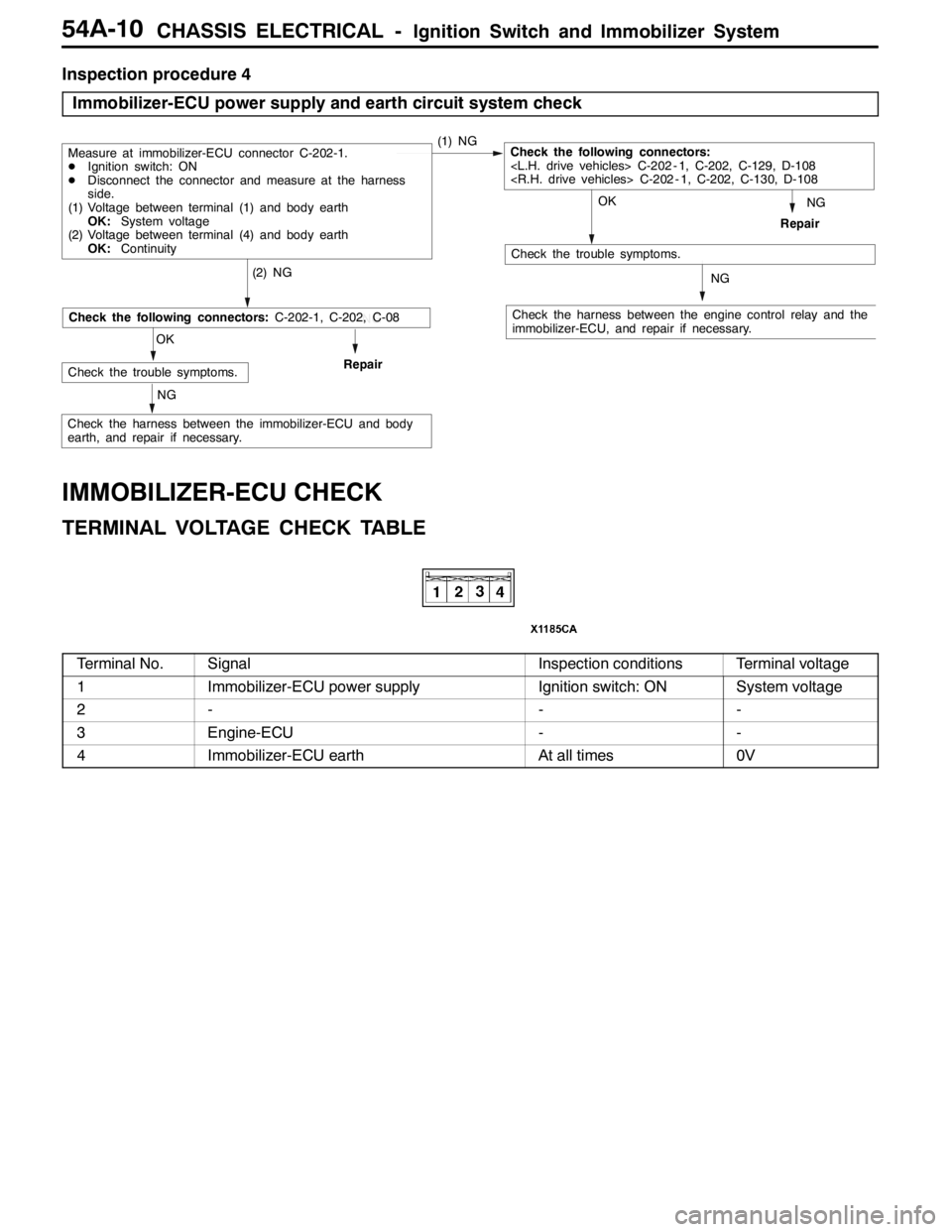
Inspection procedure 4
Immobilizer-ECU power supply and earth circuit system check
NG
Check the harness between the engine control relay and the
immobilizer-ECU, and repair if necessary.
OK
Check the trouble symptoms.
(2) NG
Repair
Measure at immobilizer-ECU connector C-202-1.
DIgnition switch: ON
DDisconnect the connector and measure at the harness
side.
(1) Voltage between terminal (1) and body earth
OK:System voltage
(2) Voltage between terminal (4) and body earth
OK:Continuity(1) NGCheck the following connectors:
NG
NG
OK
Check the trouble symptoms.Repair
NG
Check the following connectors:C-202-1, C-202, C-08
Check the harness between the immobilizer-ECU and body
earth, and repair if necessary.
IMMOBILIZER-ECU CHECK
TERMINAL VOLTAGE CHECK TABLE
Terminal No.SignalInspection conditionsTerminal voltage
1Immobilizer-ECU power supplyIgnition switch: ONSystem voltage
2---
3Engine-ECU--
4Immobilizer-ECU earthAt all times0V
Page 1331 of 1449

CHASSIS ELECTRICAL -Ignition Switch and Immobilizer System54A-11
IGNITION SWITCH
REMOVAL AND INSTALLATION
7
6
15 32
4
8
Removal steps
1. Lower column cover (Refer to GROUP
52A - Instrument Panel.)
2. Upper column cover (Refer to GROUP
52A - Instrument Panel.)
3. Steering Wheel (Refer to GROUP
37A.)
4. Clock spring column switch assembly
(Refer to GROUP 37A - Steering
Shaft.)AA"5. Steering lock cylinder
6. Ignition switch
7. Key reminder switch
8. Immobilizer-ECU
REMOVAL SERVICE POINT
AA"STEERING LOCK CYLINDER REMOVAL
1. Insert key into steering lock cylinder to turn ignition key
to “ACC” position.
2. Insert locking pin with small plus screwdriver, etc., and
remove steering lock cylinder.
Locking pin
Page 1332 of 1449

CHASSIS ELECTRICAL -Ignition Switch and Immobilizer System54A-12
INSPECTION
IGNITION SWITCH CONTINUITY CHECK
With ignition switch installed on the vehicle, disconnect ignition
switch connector for inspection.
Ignition key
iti
Terminal No.gy
position12456
LOCK
ACC
ON
START
KEY REMINDER SWITCH CONTINUITY CHECK
With key reminder switch installed on the vehicle, disconnect
key reminder switch connector for inspection.
Ignition key statusTerminal No.gy
46
Remove
Insert
ENCRYPTED CODE REGISTRATION METHOD
AND RESETTING THE CODE TO THE FACTORY
SETTING
Register the encrypted code in the immobilizer-ECU and then
reset the code to the factory setting after parts have been
replaced.
Replacement partEncrypted code
Ignition keyNecessary
Immobilizer-ECUNecessary
Engine-ECU*Necessary
NOTE
*: If the engine-ECU is replaced, the immobilizer-ECU should
be replaced. Each engine-ECU has an individual information
for immobilizer-ECU, and the individual information is
registered in the immobilizer-ECU.
Page 1333 of 1449

CHASSIS ELECTRICAL -Ignition Switch and Immobilizer System54A-13
ENCRYPTED CODE REGISTRATION METHOD
If using an ignition key that has just been newly purchased,
or if the immobilizer-ECU has been replaced, you will need
to register the encrypted codes for each ignition key being
used into the immobilizer-ECU. (A maximum of eight different
encrypted codes can be registered.)
Moreover, when the immobilizer-ECU has been replaced, you
will need to use the MUT-IIto register the password that
the user specifies into the immobilizer-ECU. (Refer to the
MUT-IIinstruction manual for instructions on using the MUT-II.)
Caution
Because registering of the encrypted codes is carried
out after all previously-registered codes have been
erased, you should have ready all of the ignition keys
that have already been registered.
1. Connect the MUT-IIto the diagnosis connector.
Caution
Turn the ignition switch to LOCK (OFF) position before
connecting or disconnecting the MUT-II.
2. Check that diagnosis code No. P1160 is not being
generated by the each engine-ECU. If it is being generated
check according to the Troubleshooting Procedures.
(Refer to GROUP 13A - Troubleshooting.)
3 Use the ignition key that is to be registered to turn on
the ignition switch.
4. Use the MUT-IIto register the encrypted code. If you
are registering two or more codes, use the next key to
the registered to turn on the ignition switch without
disconnecting the MUT-II.
5. Turn off the ignition switch.
6. Check that the engine can be started with each of the
ignition keys.
7. Check the diagnosis output from the each engine-ECU,
and erase code No. P1160 if it appears. (Refer to GROUP
13A - Troubleshooting.)
8. Disconnect the MUT-II. This completes the registration
operation.
dummy
Page 1336 of 1449
CHASSIS ELECTRICAL -Combination Meter54A-16
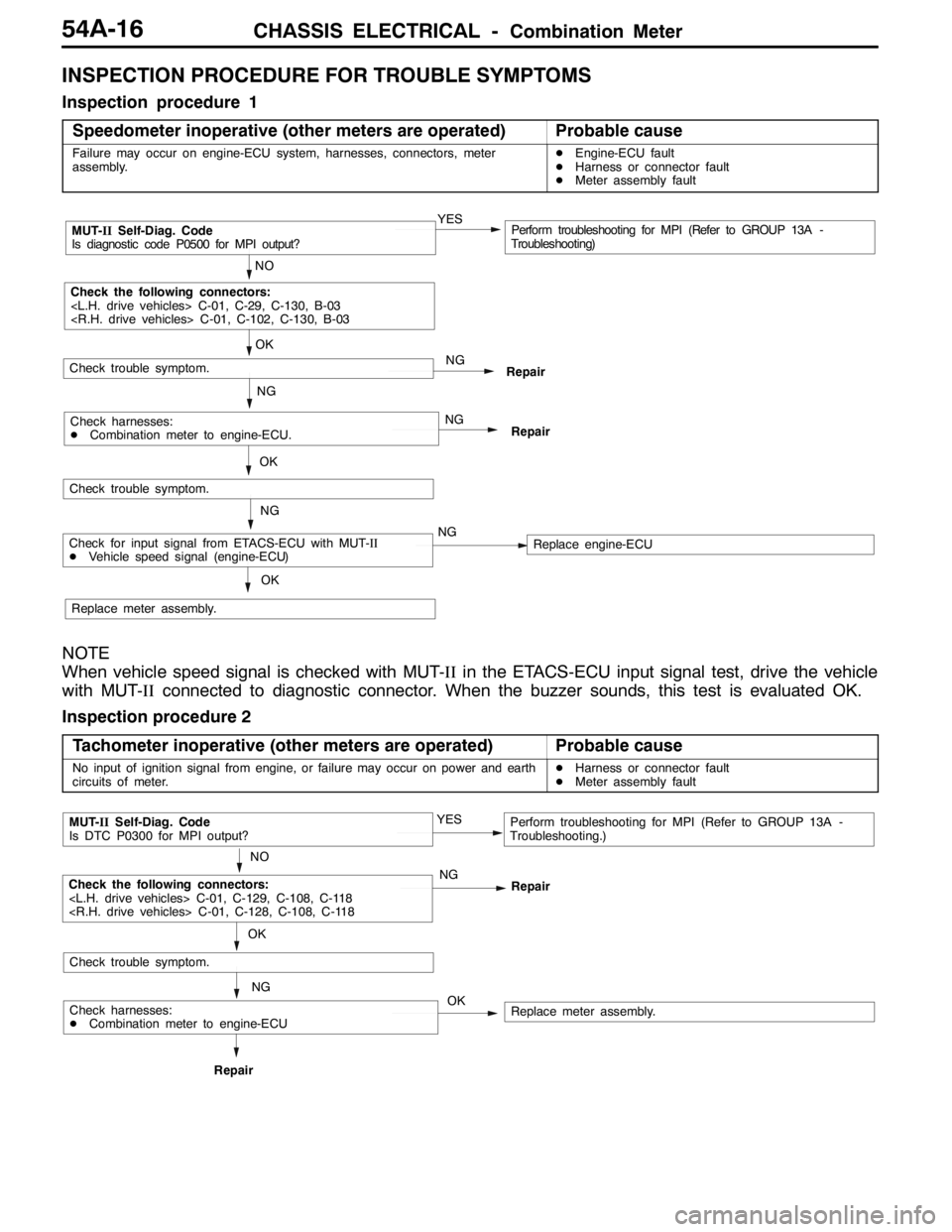
INSPECTION PROCEDURE FOR TROUBLE SYMPTOMS
Inspection procedure 1
Speedometer inoperative (other meters are operated)
Probable cause
Failure may occur on engine-ECU system, harnesses, connectors, meter
assembly.DEngine-ECU fault
DHarness or connector fault
DMeter assembly fault
NO
MUT-IISelf-Diag. Code
Is diagnostic code P0500 for MPI output?YESPerform troubleshooting for MPI (Refer to GROUP 13A -
Troubleshooting)
OK
NG
Check the following connectors:
Repair
OK
Check trouble symptom.
NG
NG
RepairCheck harnesses:
DCombination meter to engine-ECU.
Check trouble symptom.
NG
Replace meter assembly.
OK
Check for input signal from ETACS-ECU with MUT-II
DVehicle speed signal (engine-ECU)NGReplace engine-ECU
NOTE
When vehicle speed signal is checked with MUT-IIin the ETACS-ECU input signal test, drive the vehicle
with MUT-IIconnected to diagnostic connector. When the buzzer sounds, this test is evaluated OK.
Inspection procedure 2
Tachometer inoperative (other meters are operated)
Probable cause
No input of ignition signal from engine, or failure may occur on power and earth
circuits of meter.DHarness or connector fault
DMeter assembly fault
OK
NO
MUT-IISelf-Diag. Code
Is DTC P0300 for MPI output?YESPerform troubleshooting for MPI (Refer to GROUP 13A -
Troubleshooting.)
NG
NG
RepairRepair
Check trouble symptom.
OK
Check the following connectors:
Replace meter assembly.Check harnesses:
DCombination meter to engine-ECU
Page 1339 of 1449
CHASSIS ELECTRICAL -Combination MeterCHASSIS ELECTRICAL -Combination Meter54A-19
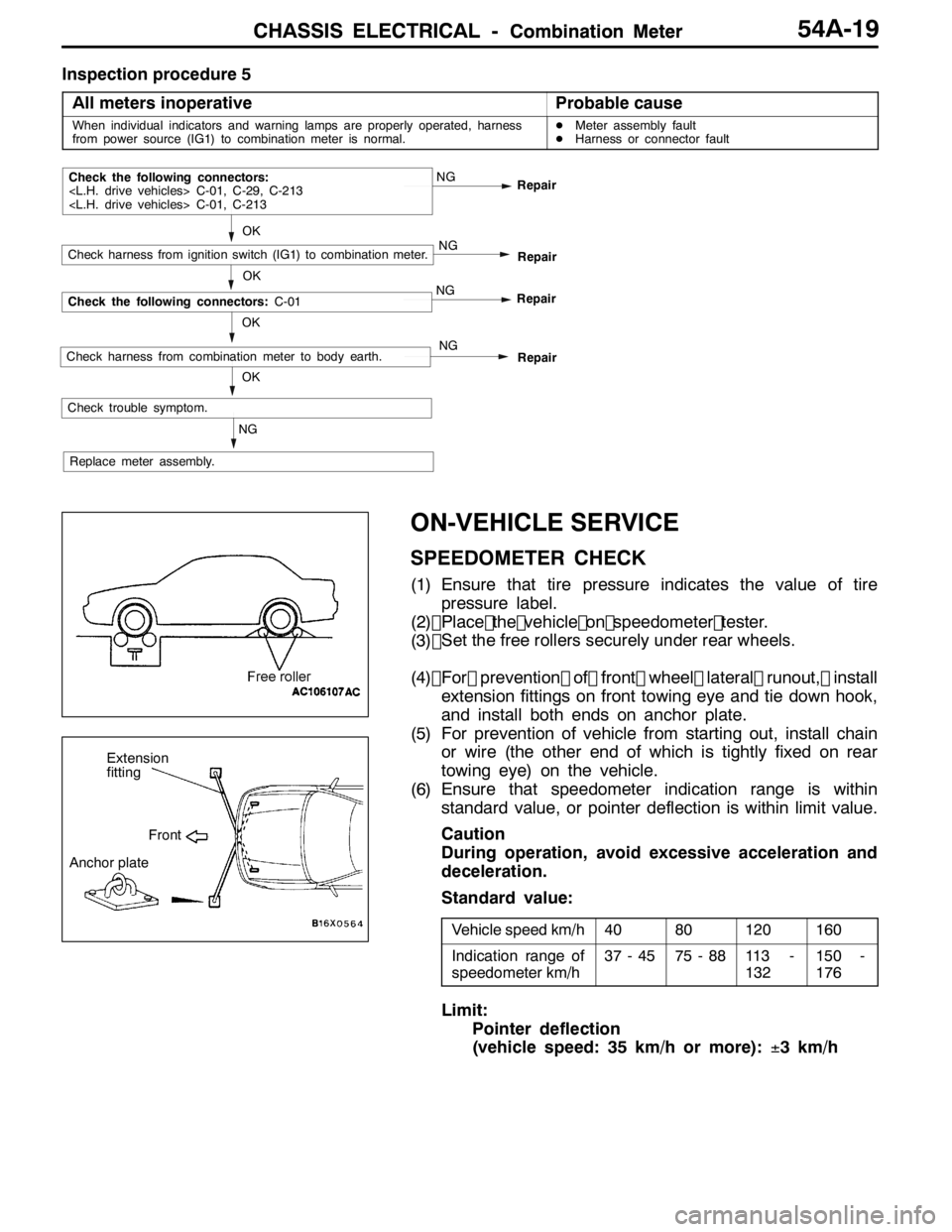
Inspection procedure 5All meters inoperative
Probable cause
When individual indicators and warning lamps are properly operated, harness
from power source (IG1) to combination meter is normal.D Meter assembly fault
D Harness or connector fault
NG Repair
NG
OK
Check trouble symptom. Repair
OK
Check the following connectors:
NG
Check harness from ignition switch (IG1) to combination meter.
Replace meter assembly. Repair
NG
OK
Check the following connectors:
C-01
NG
RepairCheck harness from combination meter to body earth.
ON-VEHICLE SERVICE
SPEEDOMETER CHECK
(1) Ensure that tire pressure indicates the value of tirepressure label.
(2) Place the vehicle on speedometer teste r.
(3)
(4) For prevention of front wheel lateral runout, install
extension fittings on front towing eye and tie down hook,
and install both ends on anchor plate.
(5) For prevention of vehicle from starting out, install chain or wire (the other end of which is tightly fixed on rear
towing eye) on the vehicle.
(6) Ensure that speedometer indication range is within standard value, or pointer deflection is within limit value.
Caution
During operation, avoid excessive acceleration and
deceleration.
Standard value:
Vehicle speed km/h4080120160
Indication range of
speedometer km/h37 - 4575 - 8811 3 -
132150 -
176
Limit:
Pointer deflection
(vehicle speed: 35 km/h or more): ±3 km/h
Extension
fitting
Front
Anchor plate
OK
Set the free rollers securely under rear wheels.
Page 1344 of 1449

CHASSIS ELECTRICAL -Headlamp Assembly54A-24
HEADLAMP ASSEMBLY
SERVICE SPECIFICATIONS
ItemStandard valueLimit
Headlamp aimingLow beamVertical
direction120mm (0.69_) below hor-
izontal line (H)±0.29_
Horizontal
directionPosition at which the
startup point of 15_is
crossed with vertical line
(V)±0.5_
High beamVertical
directionThe center of high intensi-
ty zone is on the point of
intersection of line (H) and
line (V).- 0.5_of the point of
intersection of line (H)
Horizontal
directionThe center of high intensi-
ty zone is on the point of
intersection of line (V).±0.5_of the center of
line (V)
Measurement of headlamp illuminous intensity
(at high beam)–30,000 cd or more per
one headlamp
NOTES ON HEADLAMP ASSEMBLY:
Plastic outer lens are equipped with headlamp assembly. For handling, care should be taken for
the following items:
DHeadlamps should not be illuminated for more than 3 minutes with scratch preventive protectors,
etc. covered on them.
DMasking such as taping should not be attached on outer lens.
DOuter lens surface should not be rubbed with a sharp-edged tool, etc.
DSpecified wax remover should be used for insistently washing.
DAuthorized Mitsubishi Genuine bulbs should be used.
TROUBLESHOOTING
Headlamps are controlled smart wiring system (SWS). For troubleshooting, refer to GROUP 54B.
NOTE
When ETACS-ECU is defective, headlamps can be illuminated only in a low beam mode as fail-safe
function.
ON-VEHICLE SERVICE
HEADLAMP AIMING
PRE-AIMING INSTRUCTION
1. Inspect for badly rusted or faulty headlamp assemblies.
2. These conditions must be corrected before a satisfactory
adjustment can be made.
3. Inspect tyres inflation, and adjust if necessary.
Page 1359 of 1449
CHASSIS ELECTRICAL-Column Switch54A-39
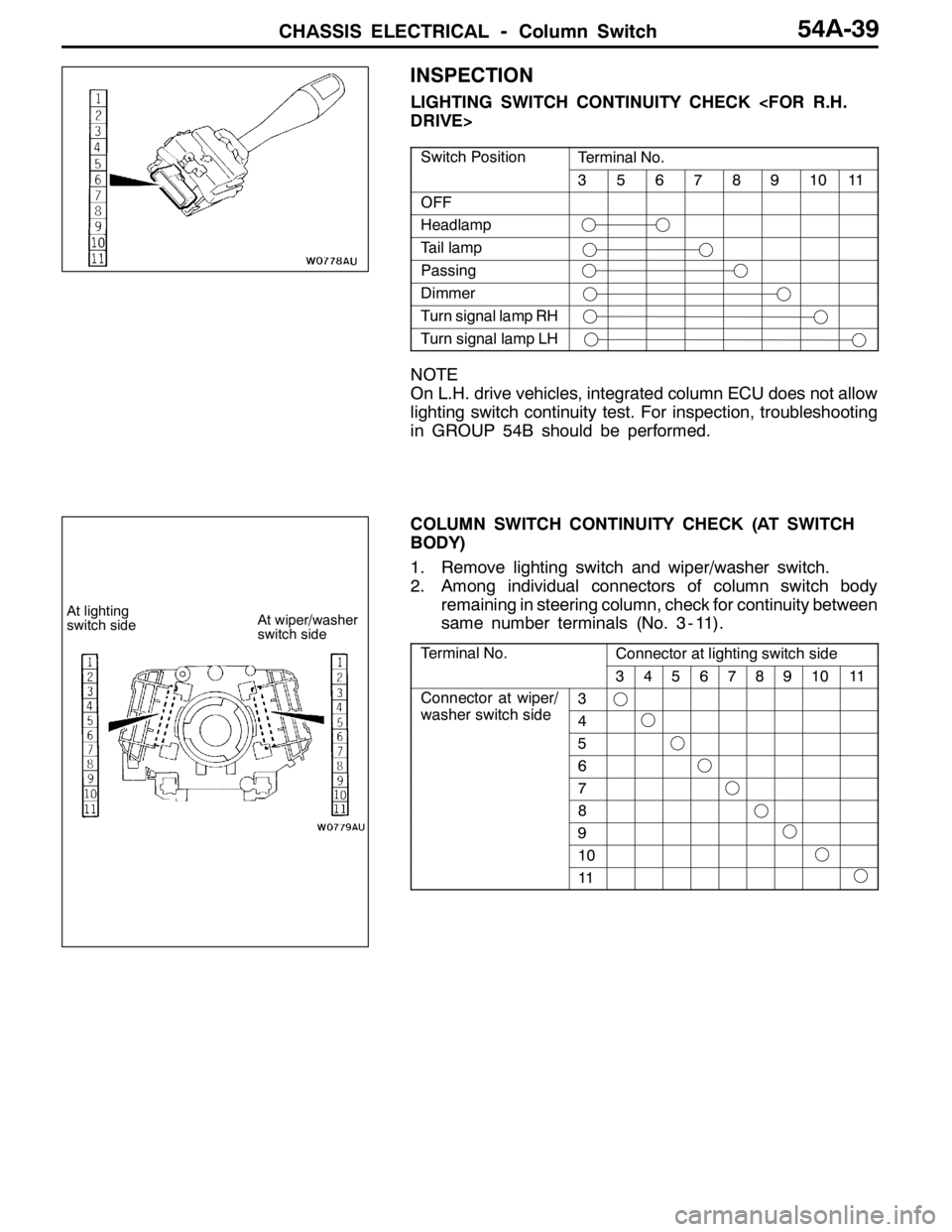
INSPECTION
LIGHTING SWITCH CONTINUITY CHECK
Switch PositionTerminal No.
3567891011
OFF
Headlamp
Tail lamp
Passing
Dimmer
Turn signal lamp RH
Turn signal lamp LH
NOTE
On L.H. drive vehicles, integrated column ECU does not allow
lighting switch continuity test. For inspection, troubleshooting
in GROUP 54B should be performed.
COLUMN SWITCH CONTINUITY CHECK (AT SWITCH
BODY)
1. Remove lighting switch and wiper/washer switch.
2. Among individual connectors of column switch body
remaining in steering column, check for continuity between
same number terminals (No. 3 - 11).
Terminal No.Connector at lighting switch side
34567891011
Connector at wiper/
hit hid
3p
washer switch side4
5
6
7
8
9
10
11
At lighting
switch sideAt wiper/washer
switch side
Page 1365 of 1449

54B-1
SMART WIRING
SYSTEM (SWS)
CONTENTS
SPECIAL TOOLS 2...........................
TROUBLESHOOTING 2.......................
Before Commencing Troubleshooting 2...........
Standard Flow of Diagnostic Troubleshooting 2...
Diagnostic Functions 2.........................Diagnosis Code Chart 3........................
Diagnosis Code Inspection Procedures 4.........
Trouble Symptom Chart 7.......................
Inspection Procedures for Trouble Symptoms 10..
Check at ECU Terminals 34.....................
Page 1366 of 1449

SWS -Special Tools/Troubleshooting54B-2
SPECIAL TOOLS
ToolNumberNameUse
MB991502MUT-II subassem-
blyFor SWS inspections (diagnosis code display
and input signal check by MUT-II)
MB991529Diagnosis code
check harnessFor checking input signals by voltmeter
A
B
C
D
MB991223
A: MB991219
B: MB991220
C: MB991221
D: MB991222Harness set
A: Test harness
B: LED harness
C: LED harness
adapter
D: ProbeFor checking voltage (continuity and value) at
harnesses and connectors
A: For checking connector pin contact voltage
B: For checking power supply circuits
C: For checking power supply circuits
D: For connection to commercially available
testers
TROUBLESHOOTING
BEFORE COMMENCING TROUBLESHOOTING
Before starting troubleshooting, check the following two points to ensure there are no defects.
DCheck the state of the connector couplings to the ETACS-ECU and junction box.
DCheck that the fuses and fusible links relating to all systems are not fused.
STANDARD FLOW OF DIAGNOSTIC TROUBLESHOOTING
Refer to GROUP 00 - How to Use Troubleshooting/Inspection Service Points.
DIAGNOSTIC FUNCTIONS
READING DIAGNOSIS CODES
Read the diagnosis codes using MUT-II. (Refer to GROUP 00 - How to Use Troubleshooting/Inspection
Service Points.)
NOTE
1. Connect MUT-II to the 16-pin diagnosis connector (black).
2. The diagnosis code cannot be read when there is an ETACS-ECU fault or when the power is first
turned ON (voltage rising). In this case, refer to “No Communication with MUT-II” (P. 54B-10) on
Fault Symptom Inspection Procedure, and perform troubleshooting.