ignition MITSUBISHI LANCER EVOLUTION 2014 10.G Owners Manual
[x] Cancel search | Manufacturer: MITSUBISHI, Model Year: 2014, Model line: LANCER EVOLUTION, Model: MITSUBISHI LANCER EVOLUTION 2014 10.GPages: 338, PDF Size: 40.99 MB
Page 190 of 338
Combination headlights and dimmer switch
Features and controls 5-129
5
N00550000185
You can flash the high beams by pulling the lever gently toward you (2). The lights willgo back to normal when you let go. While the high beam is on, you will see a blue light on the instrument panel.
N00563201159
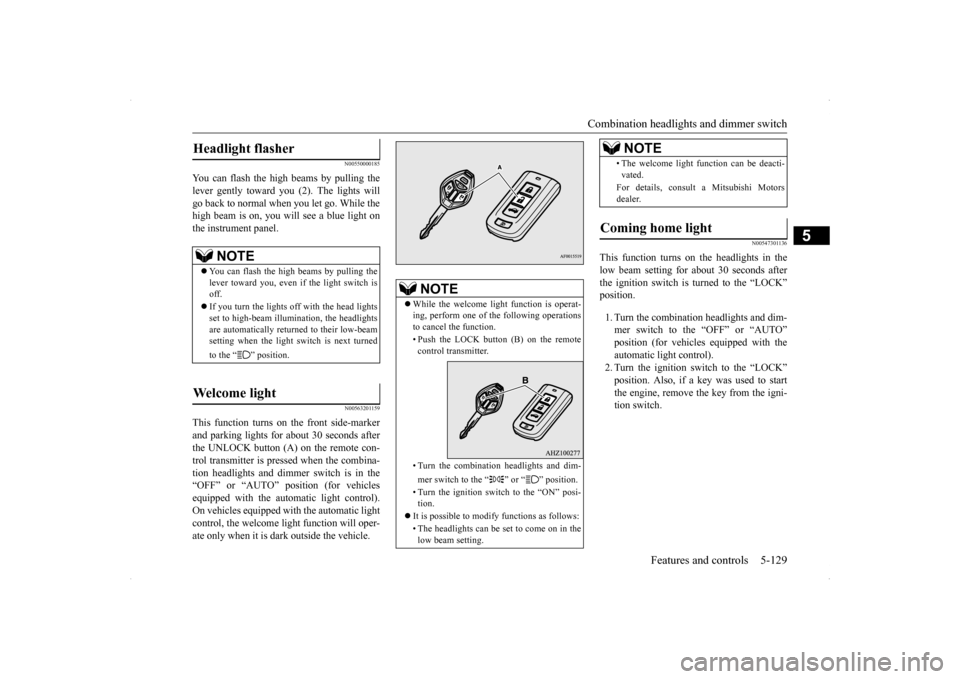
This function turns on the front side-marker and parking lights for about 30 seconds after the UNLOCK button (A) on the remote con-trol transmitter is pressed when the combina-tion headlights and dimmer switch is in the “OFF” or “AUTO” position (for vehicles equipped with the automatic light control).On vehicles equipped with the automatic light control, the welcome light function will oper- ate only when it is dark outside the vehicle.
N00547301136
This function turns on the headlights in thelow beam setting for about 30 seconds afterthe ignition switch is turned to the “LOCK” position. 1. Turn the combination headlights and dim- mer switch to the “OFF” or “AUTO”position (for vehicles equipped with the automatic light control). 2. Turn the ignition switch to the “LOCK”position. Also, if a key was used to start the engine, remove the key from the igni- tion switch.
Headlight flasher
NOTE
You can flash the high beams by pulling the lever toward you, even if the light switch isoff. If you turn the lights off with the head lights set to high-beam illumination, the headlights are automatically returned to their low-beam setting when the light switch is next turned to the “ ” position.
Welcome light
NOTE
While the welcome light function is operat- ing, perform one of the following operations to cancel the function. • Push the LOCK button (B) on the remote control transmitter. • Turn the combination headlights and dim- mer switch to the “ ” or “ ” position. • Turn the ignition switch to the “ON” posi- tion.
It is possible to modify functions as follows: • The headlights can be set to come on in the low beam setting.
• The welcome light function can be deacti- vated. For details, consult a Mitsubishi Motors dealer.
Coming home light
NOTE
BK0200800US.book
129 ページ 2013年2月14日 木曜日 午後2時28分
Page 191 of 338
Combination headlights and dimmer switch 5-130 Features and controls
5
3. Within 60 seconds of turning the ignition switch to the “LOCK” position, pull the turn signal lever toward you. 4. The headlights will come on in the low beam setting for about 30 seconds. Afterthe headlights go off, the headlights can be turned on again in the low beam setting for about 30 seconds by pulling the turnsignal lever toward you within 60 secondsof turning the ignition switch to the “LOCK” position. To turn on the head- lights again after 60 seconds of turningthe ignition switch to the “LOCK” posi- tion, repeat the process from step 1.
N00542800038
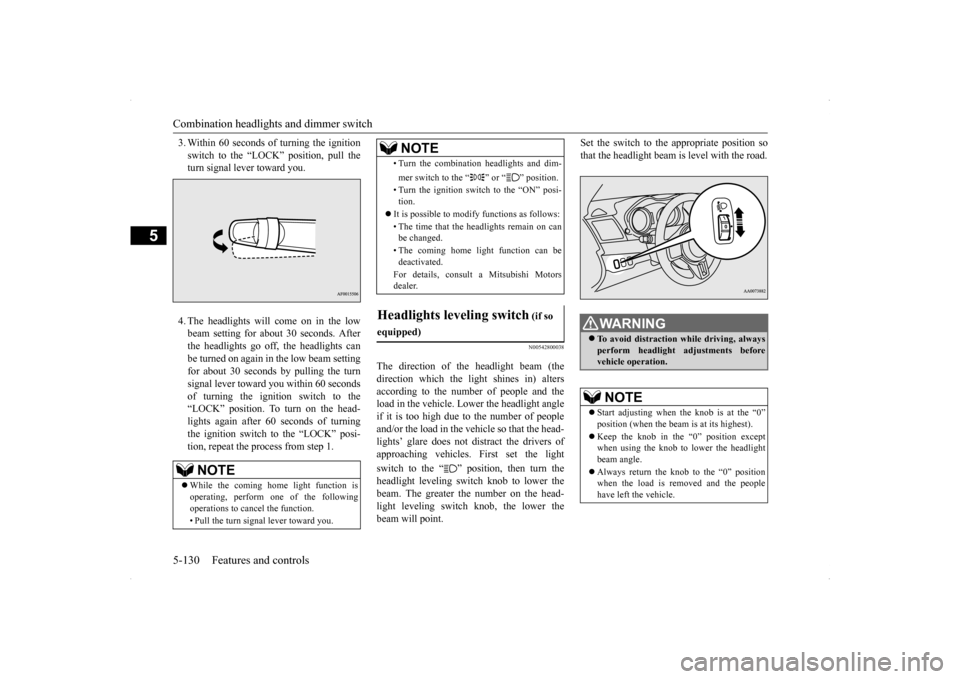
The direction of the headlight beam (thedirection which the light shines in) alters according to the number of people and theload in the vehicle. Lower the headlight angle if it is too high due to the number of people and/or the load in the vehicle so that the head-lights’ glare does not distract the drivers ofapproaching vehicles. First set the light switch to the “ ” position, then turn the headlight leveling switch knob to lower thebeam. The greater the number on the head- light leveling switch knob, the lower the beam will point.
Set the switch to the appropriate position so that the headlight beam is level with the road.
NOTE
While the coming home light function is operating, perform one of the following operations to cancel the function. • Pull the turn signal lever toward you.
• Turn the combination headlights and dim- mer switch to the “ ” or “ ” position. • Turn the ignition switch to the “ON” posi- tion.
It is possible to modify functions as follows: • The time that the headlights remain on can be changed. • The coming home light function can be deactivated. For details, consult a Mitsubishi Motors dealer.
Headlights leveling switch
(if so
equipped)
NOTE
WA R N I N G To avoid distraction while driving, always perform headlight adjustments before vehicle operation.NOTE
Start adjusting when the knob is at the “0” position (when the beam is at its highest). Keep the knob in the “0” position except when using the knob to lower the headlight beam angle. Always return the knob to the “0” position when the load is removed and the people have left the vehicle.
BK0200800US.book
130 ページ 2013年2月14日 木曜日 午後2時28分
Page 192 of 338
Turn signal lever
Features and controls 5-131
5
N00522601558
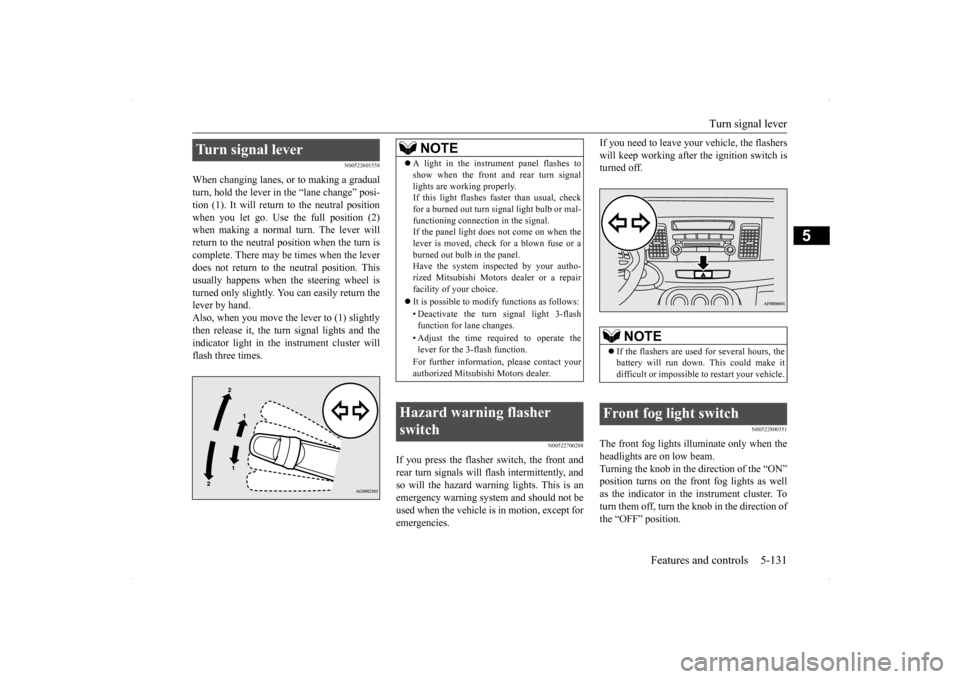
When changing lanes, or to making a gradual turn, hold the lever in
the “lane change” posi-
tion (1). It will return to the neutral position when you let go. Use the full position (2) when making a normal turn. The lever willreturn to the neutral position when the turn is complete. There may be times when the lever does not return to the neutral position. Thisusually happens when the steering wheel isturned only slightly. You can easily return the lever by hand. Also, when you move the lever to (1) slightlythen release it, the turn signal lights and the indicator light in the instrument cluster will flash three times.
N00522700288
If you press the flasher switch, the front andrear turn signals will flash intermittently, and so will the hazard warning lights. This is an emergency warning system and should not beused when the vehicle is in motion, except for emergencies.
If you need to leave your vehicle, the flashers will keep working after the ignition switch is turned off.
N00522800351
The front fog lights illuminate only when the headlights are on low beam. Turning the knob in the direction of the “ON” position turns on the front fog lights as wellas the indicator in the instrument cluster. To turn them off, turn the knob in the direction of the “OFF” position.
Turn signal lever
NOTE
A light in the instrument panel flashes to show when the front and rear turn signal lights are working properly. If this light flashes faster than usual, check for a burned out turn signal light bulb or mal-functioning connection in the signal. If the panel light does not come on when the lever is moved, check for a blown fuse or aburned out bulb in the panel. Have the system inspected by your autho- rized Mitsubishi Motors dealer or a repairfacility of your choice. It is possible to modify functions as follows: • Deactivate the turn signal light 3-flash function for lane changes. • Adjust the time required to operate the lever for the 3-flash function. For further information, please contact your authorized Mitsubishi Motors dealer.
Hazard warning flasher switch
NOTE
If the flashers are used for several hours, the battery will run down. This could make it difficult or impossible to restart your vehicle.
Front fog light switch
BK0200800US.book
131 ページ 2013年2月14日 木曜日 午後2時28分
Page 193 of 338
Wiper and washer switch 5-132 Features and controls
5
The knob will return to the neutral position when it is released.
N00523001692
The windshield wiper and washer can be operated with the ignition switch in the “ON” or “ACC” position.If the blades are frozen to the windshield, do not operate the wipers until the ice has melted and the blades are freed, otherwise the wipermotor may be damaged.
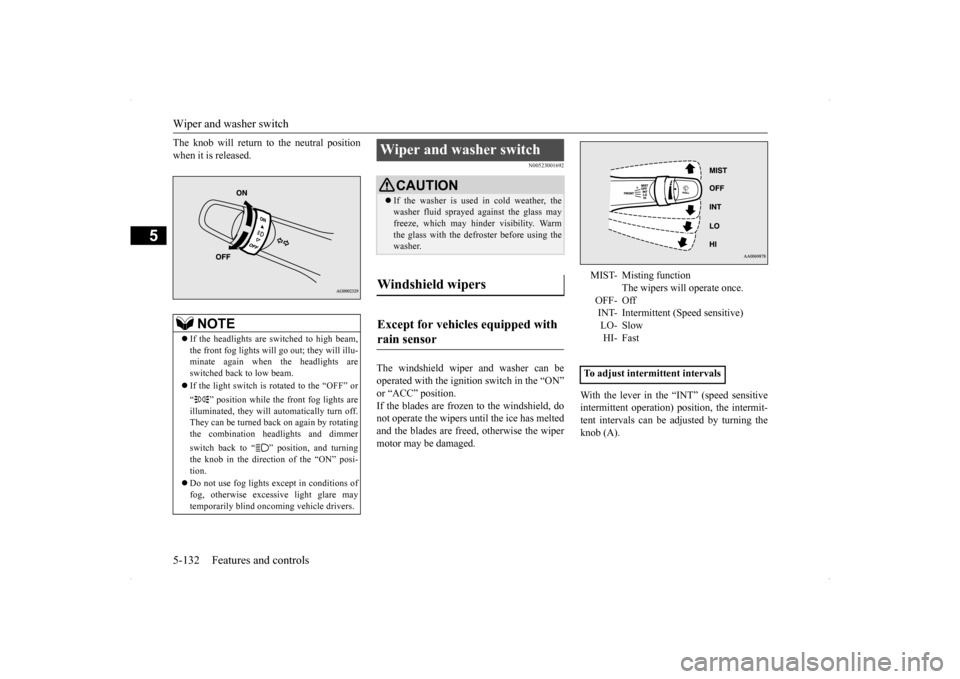
With the lever in the “INT” (speed sensitive intermittent operation) position, the intermit- tent intervals can be adjusted by turning theknob (A).
NOTE
If the headlights are switched to high beam, the front fog lights will go
out; they will illu-
minate again when the headlights are switched back to low beam. If the light switch is rotated to the “OFF” or “ ” position while the front fog lights are illuminated, they will automatically turn off. They can be turned back on again by rotatingthe combination headlights and dimmer switch back to “ ” position, and turning the knob in the direction of the “ON” posi- tion. Do not use fog lights except in conditions of fog, otherwise excessive light glare maytemporarily blind oncoming vehicle drivers.
Wiper and washer switch
CAUTION If the washer is used in cold weather, the washer fluid sprayed against the glass may freeze, which may hinder visibility. Warm the glass with the defroster before using thewasher.
Windshield wipers Except for vehicles equipped with rain sensor
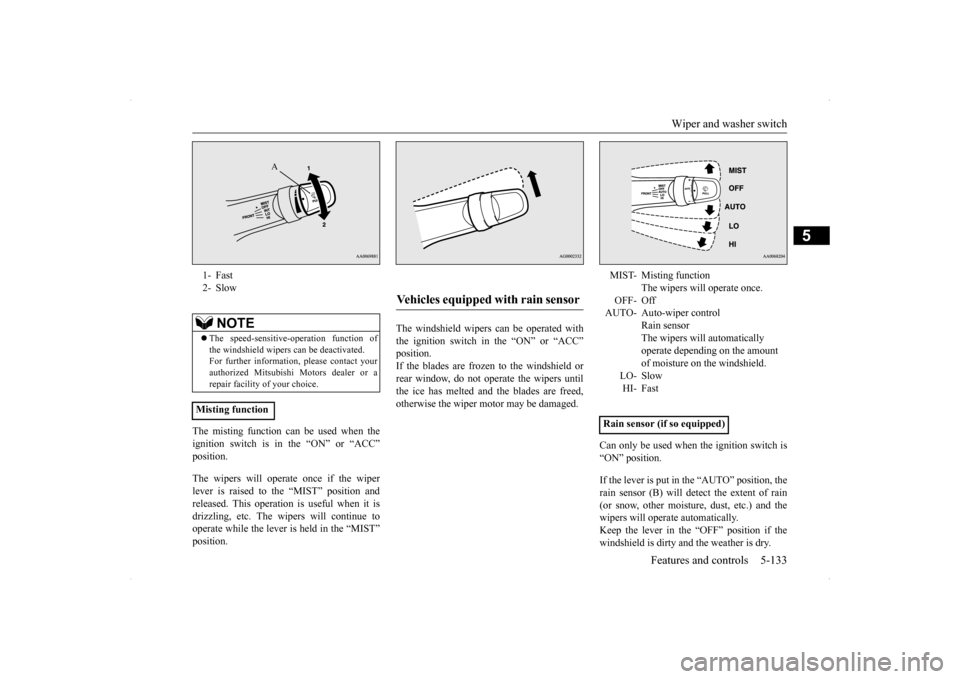
MIST- Misting function
The wipers will operate once.
OFF- Off INT- Intermittent (Speed sensitive) LO- SlowHI- Fast
To adjust intermittent intervals
BK0200800US.book
132 ページ 2013年2月14日 木曜日 午後2時28分
Page 194 of 338
Wiper and washer switch
Features and controls 5-133
5
The misting function can be used when the ignition switch is in the “ON” or “ACC” position. The wipers will operate once if the wiper lever is raised to the “MIST” position and released. This operation is useful when it is drizzling, etc. The wipers will continue tooperate while the lever is held in the “MIST” position.
The windshield wipers can be operated with the ignition switch in the “ON” or “ACC”position. If the blades are frozen to the windshield or rear window, do not operate the wipers untilthe ice has melted and the blades are freed,otherwise the wiper motor may be damaged.
Can only be used when the ignition switch is “ON” position. If the lever is put in the “AUTO” position, the rain sensor (B) will detect the extent of rain (or snow, other moisture, dust, etc.) and the wipers will operate automatically.Keep the lever in the “OFF” position if the windshield is dirty and the weather is dry.
1- Fast 2- Slow
NOTE
The speed-sensitive-operation function of the windshield wipers can be deactivated. For further information, please contact yourauthorized Mitsubishi Motors dealer or a repair facility of your choice.
Misting function
A
Vehicles equipped with rain sensor
MIST- Misting function
The wipers will operate once.
OFF- Off AUTO- Auto-wiper control
Rain sensorThe wipers will automatically operate depending on the amount of moisture on the windshield.
LO- SlowHI- Fast
Rain sensor (if so equipped)
BK0200800US.book
133 ページ 2013年2月14日 木曜日 午後2時28分
Page 195 of 338
Wiper and washer switch 5-134 Features and controls
5
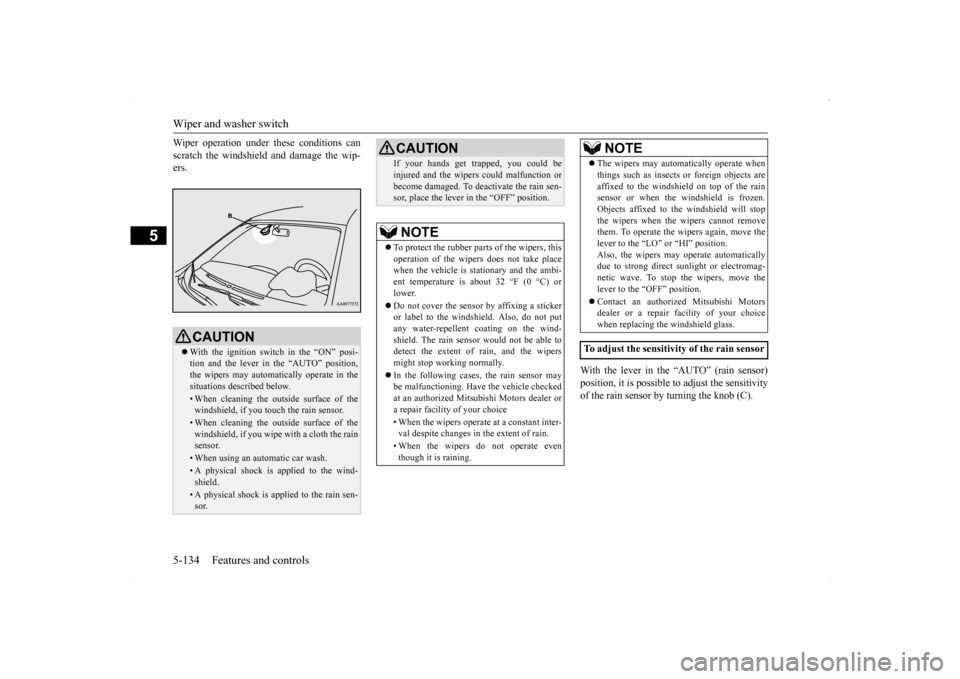
Wiper operation under these conditions can scratch the windshield and damage the wip- ers.
With the lever in the “AUTO” (rain sensor) position, it is possible to adjust the sensitivityof the rain sensor by turning the knob (C).
CAUTION With the ignition switch in the “ON” posi- tion and the lever in the “AUTO” position, the wipers may automatically operate in the situations described below.• When cleaning the outside surface of thewindshield, if you touch the rain sensor.• When cleaning the outside surface of thewindshield, if you wipe with a cloth the rainsensor.• When using an automatic car wash.• A physical shock is applied to the wind-shield.• A physical shock is applied to the rain sen-sor.
If your hands get trapped, you could be injured and the wipers could malfunction or become damaged. To deactivate the rain sen- sor, place the lever in the “OFF” position.NOTE
To protect the rubber parts of the wipers, this operation of the wipers does not take placewhen the vehicle is stationary and the ambi- ent temperature is about 32 °F (0 °C) or lower. Do not cover the sensor by affixing a sticker or label to the windshield. Also, do not putany water-repellent coating on the wind- shield. The rain sensor would not be able to detect the extent of rain, and the wipersmight stop working normally. In the following cases, the rain sensor may be malfunctioning. Have the vehicle checked at an authorized Mitsubishi Motors dealer or a repair facility of your choice • When the wipers operate at a constant inter- val despite changes in the extent of rain. • When the wipers do not operate even though it is raining.CAUTION
The wipers may automatically operate when things such as insects or foreign objects are affixed to the windshield on top of the rain sensor or when the windshield is frozen. Objects affixed to the windshield will stopthe wipers when the wipers cannot remove them. To operate the wipers again, move the lever to the “LO” or “HI” position.Also, the wipers may operate automatically due to strong direct sunlight or electromag- netic wave. To stop the wipers, move thelever to the “OFF” position. Contact an authorized Mitsubishi Motors dealer or a repair
facility of your choice
when replacing the windshield glass.
To adjust the sensitivity of the rain sensor
NOTE
BK0200800US.book
134 ページ 2013年2月14日 木曜日 午後2時28分
Page 196 of 338
Wiper and washer switch
Features and controls 5-135
5
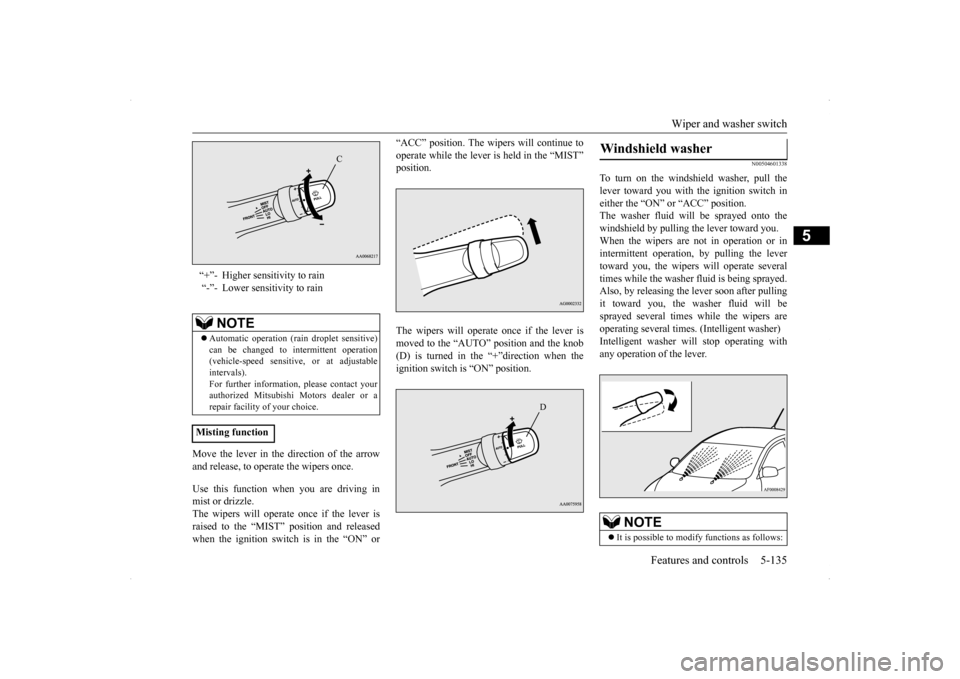
Move the lever in the direction of the arrow and release, to operate the wipers once. Use this function when you are driving in mist or drizzle. The wipers will operate once if the lever is raised to the “MIST” position and releasedwhen the ignition switch is in the “ON” or
“ACC” position. The wipers will continue to operate while the lever is held in the “MIST” position. The wipers will operate once if the lever is moved to the “AUTO” position and the knob (D) is turned in the “+”direction when the ignition switch is “ON” position.
N00504601338
To turn on the windshield washer, pull thelever toward you with the ignition switch ineither the “ON” or “ACC” position. The washer fluid will be sprayed onto the windshield by pulling the lever toward you.When the wipers are not in operation or in intermittent operation, by pulling the lever toward you, the wipers will operate severaltimes while the washer fluid is being sprayed.Also, by releasing the lever soon after pulling it toward you, the washer fluid will be sprayed several times while the wipers areoperating several times. (Intelligent washer) Intelligent washer will stop operating with any operation of the lever.
“+”- Higher sensitivity to rain “-”- Lower sensitivity to rain
NOTE
Automatic operation (rain droplet sensitive) can be changed to intermittent operation (vehicle-speed sensitive, or at adjustableintervals). For further information, please contact your authorized Mitsubishi Motors dealer or arepair facility of your choice.
Misting function
C
D
Windshield washer
NOTE
It is possible to modify functions as follows:
BK0200800US.book
135 ページ 2013年2月14日 木曜日 午後2時28分
Page 198 of 338
Horn switch
Features and controls 5-137
5
N00523800130
To honk the horn, press the “ ” mark on the steering wheel.
N00563701053
The Link System takes overall control of thedevices connected via the USB input terminal or the Bluetooth
® 2.0 interface allowing the
connected devices to be operated by using the switches in the vehicle or voice commands.See the following section for details on how to operate. Refer to “Bluetooth
® 2.0 interface” on page
5-137. Refer to “USB input terminal” on page 5-158.Refer to the separate owner’s manual for a DISPLAY AUDIO. Bluetooth
® is a registered trademark of
BLUETOOTH SIG, INC.
N00563800015
You have acquired a device that includes soft-ware licensed by Mitsubishi Motors Corpora- tion from JOHNSON CONTROLS Inc (the automotive experience business unit), andtheir subsequent 3rd party suppliers. For a complete list of these 3rd party products and their end user license agreements, please goto the following website.
http://www.jciblueconnect.com/faq/fulldis- closure.pdf
N00563901185
The Bluetooth
® 2.0 interface allows for mak-
ing/receiving hands-free calls in the vehicle using a Bluetooth
® compatible cellular phone
based on the wireless communication tech- nology commonly known as Bluetooth
®. It
also allows the user to
play music, saved in a
Bluetooth
® music player, from the vehicle’s
speakers.The system is equipped with a voice recogni- tion function, which allows you to make hands-free calls by simple switch operationsand voice command operations using a defined voice tree. The Bluetooth
® 2.0 interface can be used
when the ignition switch is in the “ON” or“ACC” position. Before you can use the Bluetooth
® 2.0 inter-
face, you must pair the Bluetooth
® device
and Bluetooth
® 2.0 interface. Refer to “Con-
necting the Bluetooth
® 2.0 interface and
Bluetooth
® device” on page 5-144.
Do not place stickers, tape, or other items that are attached with adhesive over the grid wires on the rear window. When cleaning the inside rear window, use a soft cloth and wipe lightly over the grid wires.NOTE
If your vehicle is equipped with heated mir- rors, mist can also be removed from the out-side rearview mirrors when the rear window defogger switch is pressed. (Refer to “Heated mirror” on page 5-50.)
Horn switch
CAUTION
Link System Link System End User License Agreement
Bluetooth
® 2.0 interface
BK0200800US.book
137 ページ 2013年2月14日 木曜日 午後2時28分
Page 199 of 338
Bluetooth® 2.0 interface 5-138 Features and controls
5
Bluetooth
® is a registered trademark of
BLUETOOTH SIG, INC.
Steering control switch and microphone
P.5-138Voice recognition function
P.5-140
Useful voice commands
P.5-141
Speaker enrollment function
P.5-142
Connecting the Bluetooth
® 2.0 interface and
the Bluetooth
® device
P.5-144
Operating a music player connected via Blue- tooth
® P.5-148
How to make or receive hands-free calls
P.5-148Phonebook function
P.5-151
N00564001095
WA R N I N GAlthough the Bluetooth
® 2.0 interface
allows you to make hands-free calls, if you choose to use the cellular phone whiledriving, you must not allow yourself to be distracted from the safe operation of your vehicle. Anything, including cellularphone usage, that di
stracts you from the
safe operation of your vehicle increases your risk of an accident. Refer to and comply with all state and local laws in your area regarding cellularphone usage while driving.NOTE
If the ignition switch is left in the “ACC” position, the accessory power will automati- cally turn off after a
certain period of time
and you will no longer be able to use the Bluetooth
® 2.0 interface. The accessory
power comes on again if the ignition switch is turned from the “ACC” position. Refer to“ACC power auto-cutout function” on page 5-51. The Bluetooth
® 2.0 interface cannot be used
if the Bluetooth
® device has a dead battery
or the device power is turned off. Hands-free calls will not be possible if your phone does not have service available.
Some Bluetooth
® devices are not compatible
with the Bluetooth
® 2.0 interface.
You can confirm the Link System software version by pressing the HANG-UP button 3times (press and hold 2 times and then press briefly) within 10 seconds. For detail of the Bluetooth
® 2.0 interface,
refer to the following web site:[For vehicles sold in U.S.A.] You can see to access the MITSUBISHI MOTORS NORTH AMERICA web site.[For vehicles sold in Canada] You can see to access via the MITSUBISHI MOTORS web site.Please read and agree the “Warning about Links to the Web Site
s of Other Companies”
because it connects other than MITSUBISHIMOTORS web site. http://www.mitsubishi-motors.com/en/prod- ucts/index.html Software updates by cellular phone/digital audio device manufacturers maychange/alter device connectivity.NOTE
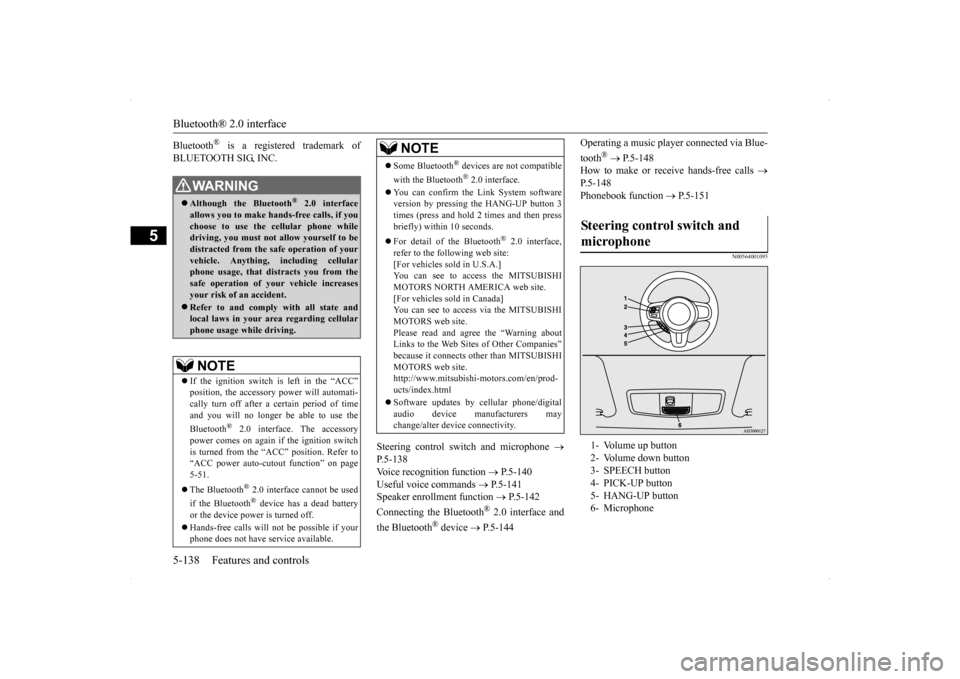
Steering control switch and microphone 1- Volume up button 2- Volume down button 3- SPEECH button 4- PICK-UP button5- HANG-UP button 6- Microphone
BK0200800US.book
138 ページ 2013年2月14日 木曜日 午後2時28分
Page 203 of 338

Bluetooth® 2.0 interface 5-142 Features and controls
5
If a passcode has been set and the security function is enabled, the voice guide will say“Hands-free system is locked. State the pass- code to continue” when the SPEECH button (except for vehicles with Mitsubishi Multi-Communication System) or PICK-UP button (for vehicles with Mi
tsubishi Multi-Commu-
nication System) is pressed to enter voice rec-ognition mode. Say the 4-digit passcode number to enter the passcode. If the entered passcode is wrong, the voice guide will say “<4-digit passcode>, Incorrectpasscode. Please try again.” Enter the correct passcode.
Use the following procedure to turn off the security function by disabling the passcode. 1. Press the SPEECH button (except for vehicles with Mitsubishi Multi-Commu- nication System) or PICK-UP button (forvehicles with Mitsubishi Multi-Commu- nication System). 2. Say “Setup.”3. Say “Passcode.” 4. The voice guide will say “Passcode is enabled. Would you like to disable it?”Answer “Yes.” Answer “No” to cancel the disabling of the passcode and return to the main menu.
5. When the disabling of the passcode is completed, the voice guide will say “Pass- code is disabled” and the system will return to the main menu.
N00564700011
The Bluetooth
® 2.0 interface can use the
speaker enrollment function to create a voicemodel for one person per language. This makes it easier for the Bluetooth
® 2.0
interface to recognise voice commands said by you. You can turn a voice model registered with the speaker enrollment function on and off whenever you want.
N00564801107
It takes about 2 to 3 minutes to complete thespeaker enrollment process.To ensure the best results, run through the process while in the driver’s seat, in an envi- ronment that is as quiet as possible (whenthere is no rain or strong winds and the vehi- cle windows are closed). Please turn off your phone while in speaker enrollment to preventinterruption of the process. Use the following procedure for speaker enrollment.
NOTE
Passcode will be required to access the sys- tem after the next ignition cycle. It is required for a little time after engine stop that the entered passcode is actuallyrecorded in the system. If the ignition switch is made to “ACC” or “ON” or the engine is started immediatelyafter engine stop, there is a case when the entered passcode is not recorded in the sys- tem. At this time, please try to enter the pass-code again.
Entering the passcode
NOTE
You can reenter the passcode as many times as you want. If you have forgotten your passcode, say “Cancel” to quit the voice input mode andthen check with an authorized Mitsubishi Motors dealer.
Disabling the passcode
NOTE
System must be unlocked to disable the pass- code.
Speaker enrollment function Speaker enrollment
BK0200800US.book
142 ページ 2013年2月14日 木曜日 午後2時28分