ignition MITSUBISHI LANCER EVOLUTION 2014 10.G Manual PDF
[x] Cancel search | Manufacturer: MITSUBISHI, Model Year: 2014, Model line: LANCER EVOLUTION, Model: MITSUBISHI LANCER EVOLUTION 2014 10.GPages: 338, PDF Size: 40.99 MB
Page 162 of 338
Multi-information display
Features and controls 5-101
5
N00556500081
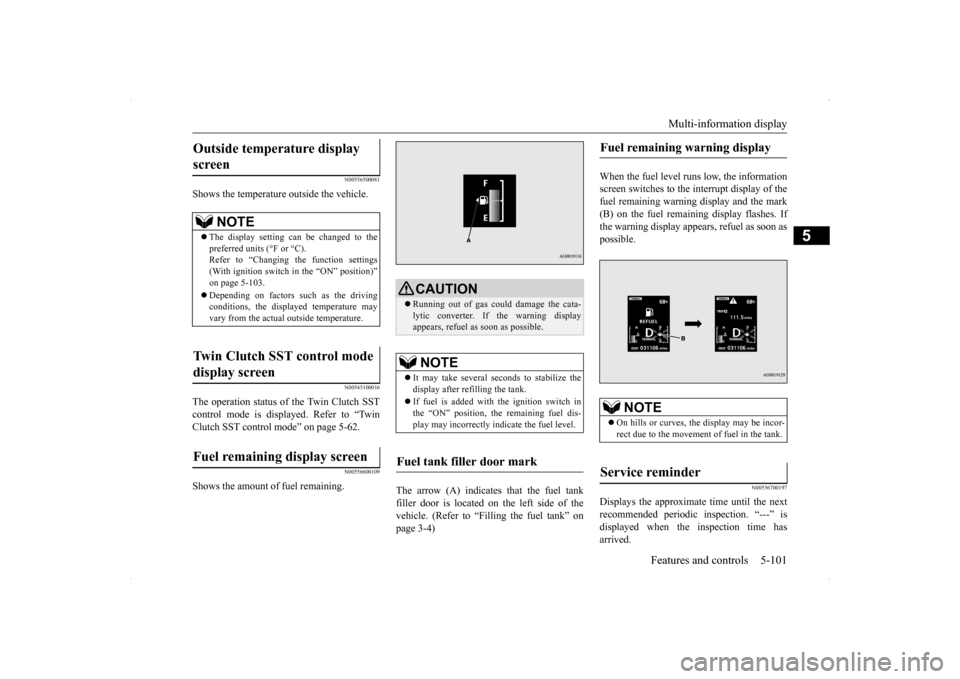
Shows the temperature outside the vehicle.
N00545100016
The operation status of the Twin Clutch SST control mode is displayed. Refer to “Twin Clutch SST control mode” on page 5-62.
N00556600109
Shows the amount of fuel remaining.
The arrow (A) indicates that the fuel tank filler door is located on the left side of the vehicle. (Refer to “Filling the fuel tank” on page 3-4)
When the fuel level runs low, the information screen switches to the interrupt display of thefuel remaining warning display and the mark (B) on the fuel remaining display flashes. If the warning display appears, refuel as soon aspossible.
N00556700197
Displays the approximate time until the nextrecommended periodic inspection. “---” isdisplayed when the inspection time has arrived.
Outside temperature display screen
NOTE
The display setting can be changed to the preferred units (°F or °C).Refer to “Changing the function settings (With ignition switch in the “ON” position)” on page 5-103. Depending on factors such as the driving conditions, the displayed temperature mayvary from the actual outside temperature.
Twin Clutch SST control mode display screen Fuel remaining display screen
CAUTION Running out of gas could damage the cata- lytic converter. If the warning display appears, refuel as soon as possible.NOTE
It may take several seconds to stabilize the display after refilling the tank. If fuel is added with the ignition switch in the “ON” position, the remaining fuel dis- play may incorrectly indicate the fuel level.
Fuel tank filler door mark
Fuel remaining warning display
NOTE
On hills or curves, the display may be incor- rect due to the movement of fuel in the tank.
Service reminder
BK0200800US.book
101 ページ 2013年2月14日 木曜日 午後2時28分
Page 163 of 338
Multi-information display 5-102 Features and controls
5
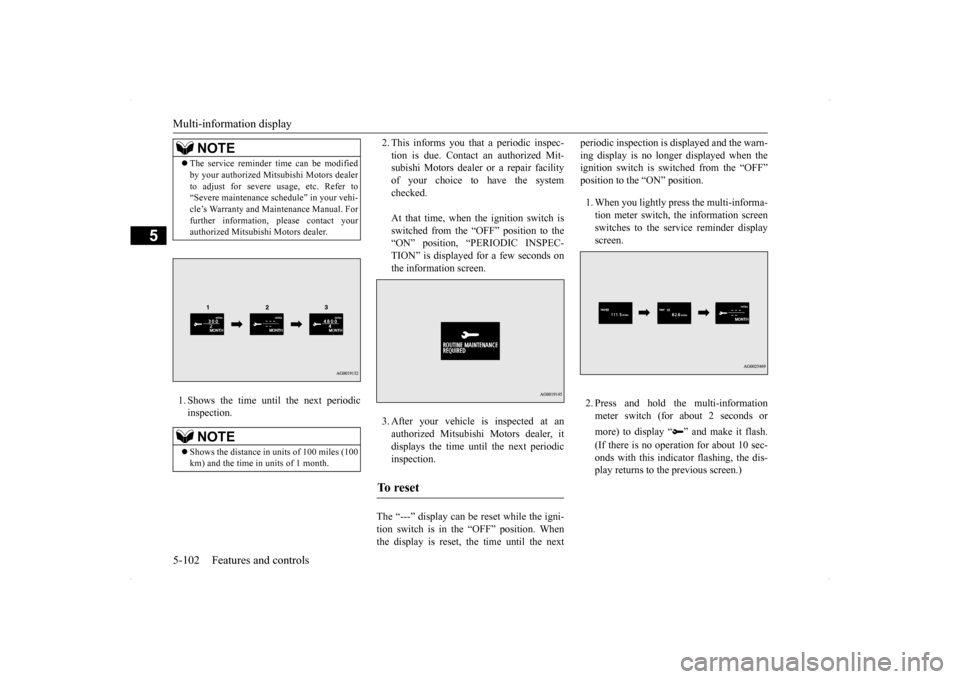
1. Shows the time until the next periodic inspection.
2. This informs you that a periodic inspec- tion is due. Contact an authorized Mit- subishi Motors dealer or a repair facility of your choice to have the systemchecked. At that time, when the ignition switch is switched from the “OFF” position to the “ON” position, “PERIODIC INSPEC- TION” is displayed for a few seconds onthe information screen. 3. After your vehicle is inspected at an authorized Mitsubishi Motors dealer, itdisplays the time until the next periodic inspection.
The “---” display can be reset while the igni- tion switch is in the “OFF” position. When the display is reset, the time until the next
periodic inspection is displayed and the warn- ing display is no longer displayed when the ignition switch is switched from the “OFF” position to the “ON” position. 1. When you lightly press the multi-informa- tion meter switch, the information screen switches to the service reminder display screen. 2. Press and hold the multi-information meter switch (for about 2 seconds or more) to display “ ” and make it flash. (If there is no operation for about 10 sec- onds with this indicator flashing, the dis- play returns to the previous screen.)
NOTE
The service reminder time can be modified by your authorized Mitsubishi Motors dealer to adjust for severe usage, etc. Refer to “Severe maintenance schedule” in your vehi- cle’s Warranty and Maintenance Manual. Forfurther information, please contact your authorized Mitsubishi Motors dealer.NOTE
Shows the distance in uni
ts of 100 miles (100
km) and the time in units of 1 month.
To r e s e t
BK0200800US.book
102 ページ 2013年2月14日 木曜日 午後2時28分
Page 164 of 338
Multi-information display
Features and controls 5-103
5
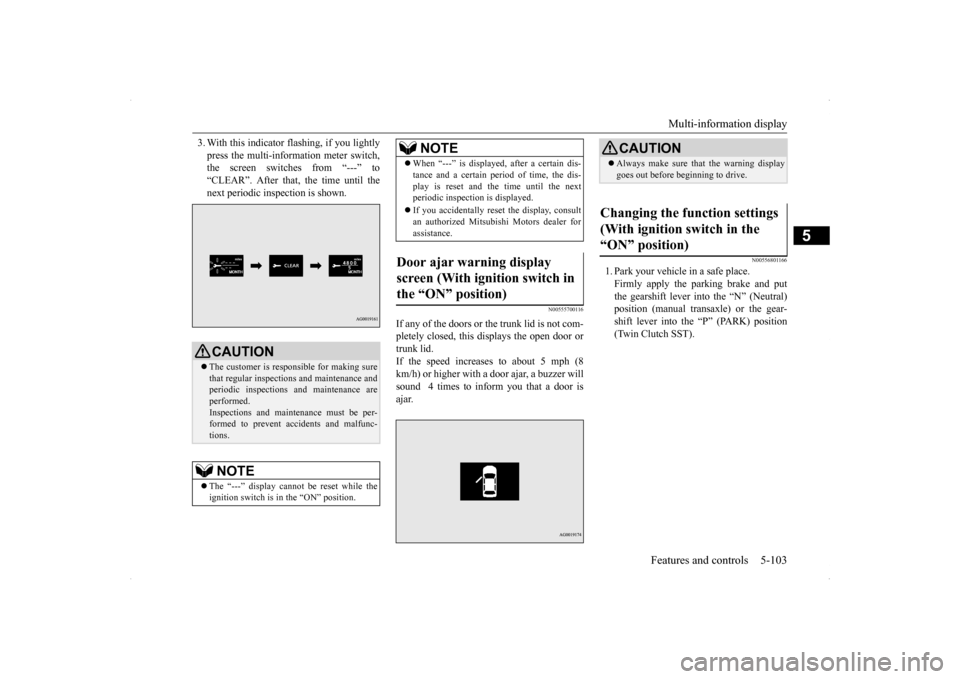
3. With this indicator flashing, if you lightly press the multi-information meter switch, the screen switches from “---” to “CLEAR”. After that, the time until thenext periodic inspection is shown.
N00555700116
If any of the doors or the trunk lid is not com- pletely closed, this displays the open door or trunk lid.If the speed increases to about 5 mph (8 km/h) or higher with a door ajar, a buzzer will sound 4 times to inform you that a door isajar.
N00556801166
1. Park your vehicle in a safe place.Firmly apply the parking brake and putthe gearshift lever into the “N” (Neutral) position (manual transaxle) or the gear- shift lever into the “P” (PARK) position(Twin Clutch SST).
CAUTION The customer is responsible for making sure that regular inspections and maintenance andperiodic inspections and maintenance are performed. Inspections and maintenance must be per-formed to prevent accidents and malfunc- tions.NOTE
The “---” display cannot be reset while the ignition switch is in the “ON” position.
When “---” is displayed, after a certain dis- tance and a certain period of time, the dis- play is reset and the time until the next periodic inspection is displayed. If you accidentally reset the display, consult an authorized Mitsubishi Motors dealer for assistance.
Door ajar warning display screen (With ignition switch in the “ON” position)
NOTE
CAUTION Always make sure that the warning display goes out before beginning to drive.
Changing the function settings (With ignition switch in the “ON” position)
BK0200800US.book
103 ページ 2013年2月14日 木曜日 午後2時28分
Page 166 of 338
Multi-information display
Features and controls 5-105
5
N00557000214
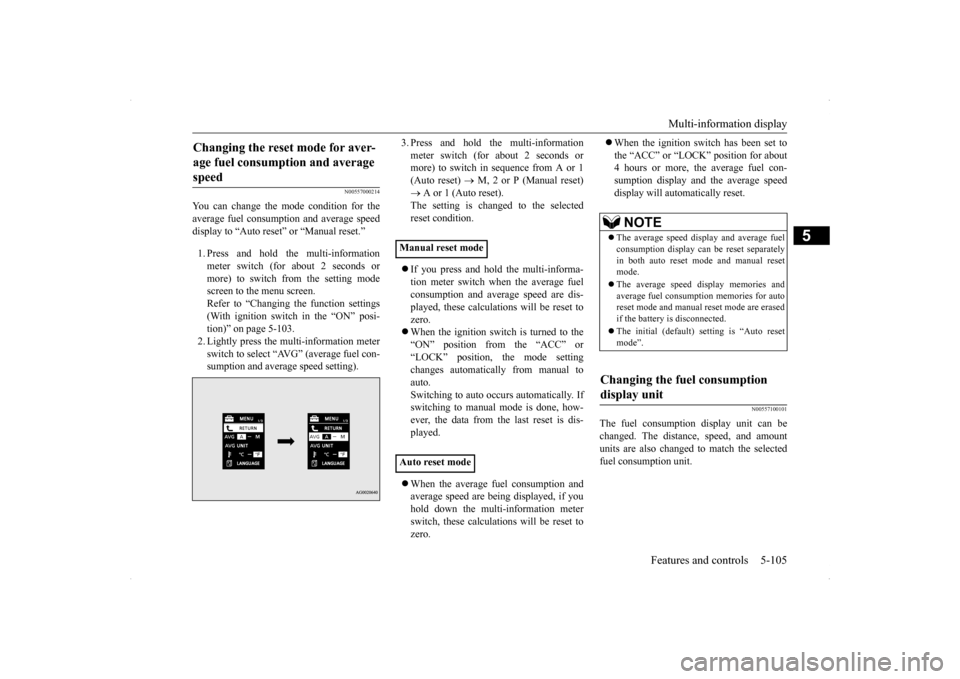
You can change the mode condition for the average fuel consumption and average speed display to “Auto reset” or “Manual reset.” 1. Press and hold the multi-information meter switch (for about 2 seconds ormore) to switch from the setting modescreen to the menu screen. Refer to “Changing the function settings (With ignition switch in the “ON” posi-tion)” on page 5-103. 2. Lightly press the multi-information meter switch to select “AVG” (average fuel con-sumption and average speed setting).
3. Press and hold the multi-information meter switch (for about 2 seconds or more) to switch in sequence from A or 1 (Auto reset)
M, 2 or P (Manual reset)
A or 1 (Auto reset). The setting is changed to the selected reset condition. If you press and hold the multi-informa- tion meter switch when the average fuelconsumption and average speed are dis- played, these calculations will be reset to zero. When the ignition switch is turned to the “ON” position from the “ACC” or “LOCK” position, the mode settingchanges automatically from manual to auto. Switching to auto occurs automatically. Ifswitching to manual mode is done, how- ever, the data from the last reset is dis- played. When the average fuel consumption and average speed are being displayed, if you hold down the multi-information meter switch, these calculations will be reset tozero.
When the ignition switch has been set to the “ACC” or “LOCK” position for about 4 hours or more, the average fuel con- sumption display and the average speeddisplay will automatically reset.
N00557100101
The fuel consumption display unit can bechanged. The distance, speed, and amountunits are also changed to match the selected fuel consumption unit.
Changing the reset mode for aver- age fuel consumption and average speed
Manual reset mode Auto reset mode
NOTE
The average speed display and average fuel consumption display can be reset separately in both auto reset mode and manual resetmode. The average speed display memories and average fuel consumption memories for auto reset mode and manual reset mode are erased if the battery is disconnected. The initial (default) setting is “Auto reset mode”.
Changing the fuel consumption display unit
BK0200800US.book
105 ページ 2013年2月14日 木曜日 午後2時28分
Page 167 of 338
Multi-information display 5-106 Features and controls
5
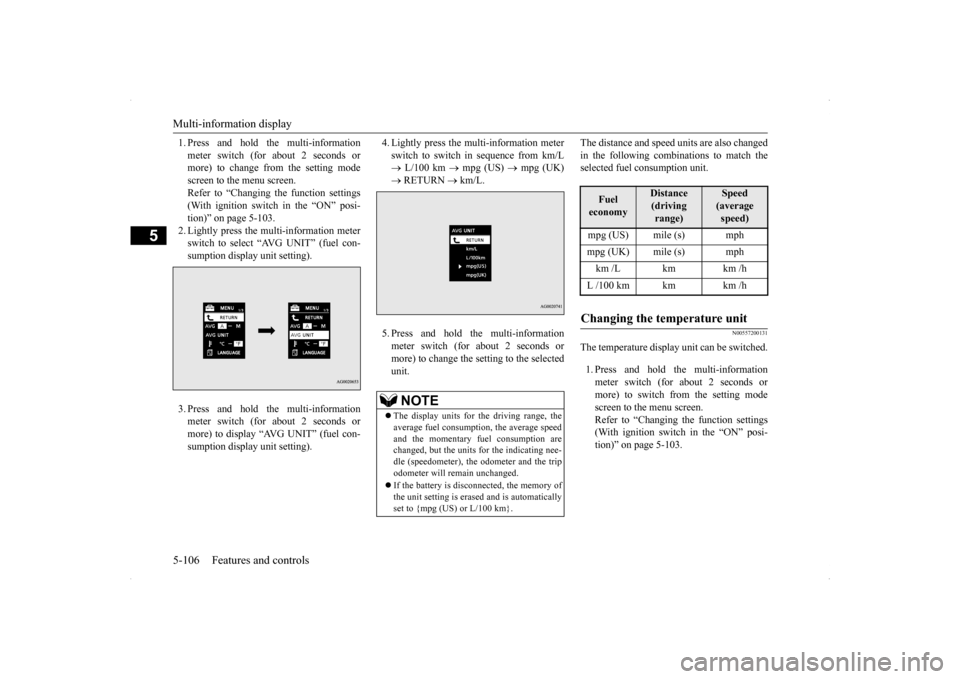
1. Press and hold the multi-information meter switch (for about 2 seconds or more) to change from the setting mode screen to the menu screen.Refer to “Changing the function settings (With ignition switch in the “ON” posi- tion)” on page 5-103.2. Lightly press the multi-information meter switch to select “AVG UNIT” (fuel con- sumption display unit setting). 3. Press and hold the multi-information meter switch (for about 2 seconds or more) to display “AVG UNIT” (fuel con-sumption display unit setting).
4. Lightly press the multi-information meter switch to switch in sequence from km/L L/100 km
mpg (US)
mpg (UK)
RETURN
km/L.
5. Press and hold the multi-information meter switch (for about 2 seconds ormore) to change the setting to the selectedunit.
The distance and speed units are also changed in the following combinations to match the selected fuel consumption unit.
N00557200131
The temperature display unit can be switched. 1. Press and hold the multi-information meter switch (for about 2 seconds ormore) to switch from the setting modescreen to the menu screen. Refer to “Changing the function settings (With ignition switch in the “ON” posi-tion)” on page 5-103.
NOTE
The display units for the driving range, the average fuel consumption, the average speed and the momentary fuel consumption are changed, but the units for the indicating nee-dle (speedometer), the odometer and the trip odometer will remain unchanged. If the battery is disconnected, the memory of the unit setting is erased and is automatically set to {mpg (US) or L/100 km}.
Fuel economy
Distance(driving range)
Speed (average speed)
mpg (US) mile (s) mphmpg (UK) mile (s) mphkm /L km km /hL /100 km km km /hChanging the temperature unit
BK0200800US.book
106 ページ 2013年2月14日 木曜日 午後2時28分
Page 168 of 338
Multi-information display
Features and controls 5-107
5
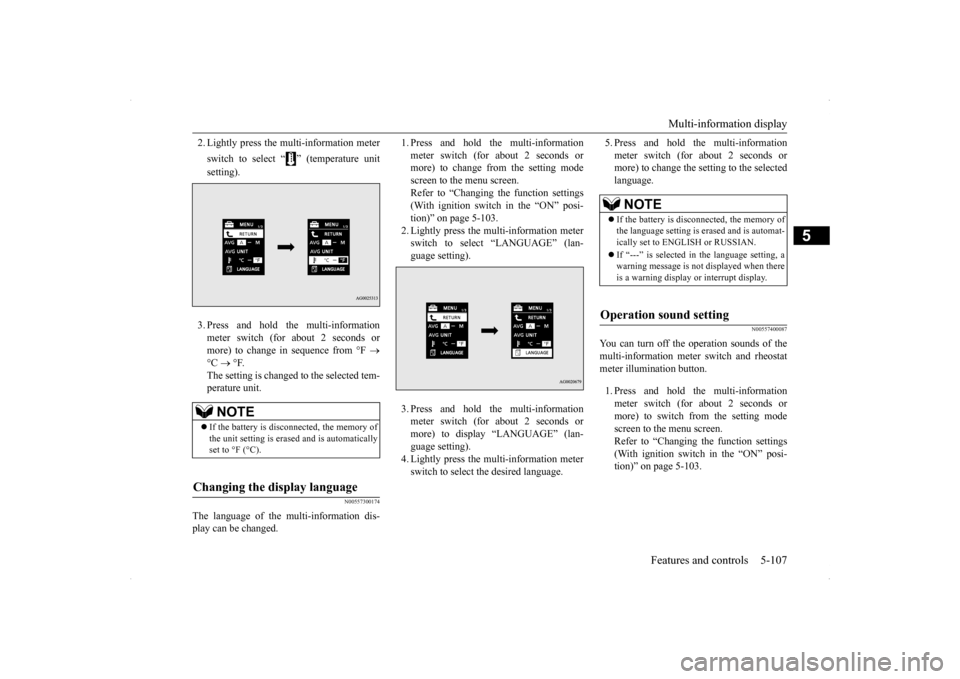
2. Lightly press the multi-information meter switch to select “ ” (temperature unit setting). 3. Press and hold the multi-information meter switch (for about 2 seconds or more) to change in sequence from °F
°C
°F.
The setting is changed to the selected tem- perature unit.
N00557300174
The language of the multi-information dis- play can be changed.
1. Press and hold the multi-information meter switch (for about 2 seconds or more) to change from the setting mode screen to the menu screen.Refer to “Changing the function settings (With ignition switch in the “ON” posi- tion)” on page 5-103.2. Lightly press the multi-information meter switch to select “LANGUAGE” (lan- guage setting). 3. Press and hold the multi-information meter switch (for about 2 seconds or more) to display “LANGUAGE” (lan-guage setting). 4. Lightly press the multi-information meter switch to select the desired language.
5. Press and hold the multi-information meter switch (for about 2 seconds or more) to change the setting to the selected language.
N00557400087
You can turn off the operation sounds of themulti-information meter switch and rheostat meter illumination button. 1. Press and hold the multi-information meter switch (for about 2 seconds ormore) to switch from the setting mode screen to the menu screen. Refer to “Changing the function settings(With ignition switch in the “ON” posi- tion)” on page 5-103.
NOTE
If the battery is disconnected, the memory of the unit setting is erased and is automatically set to °F (°C).
Changing the display language
NOTE
If the battery is disconnected, the memory of the language setting is erased and is automat- ically set to ENGLISH or RUSSIAN. If “---” is selected in the language setting, a warning message is not displayed when there is a warning display or interrupt display.
Operation sound setting
BK0200800US.book
107 ページ 2013年2月14日 木曜日 午後2時28分
Page 169 of 338
Multi-information display 5-108 Features and controls
5
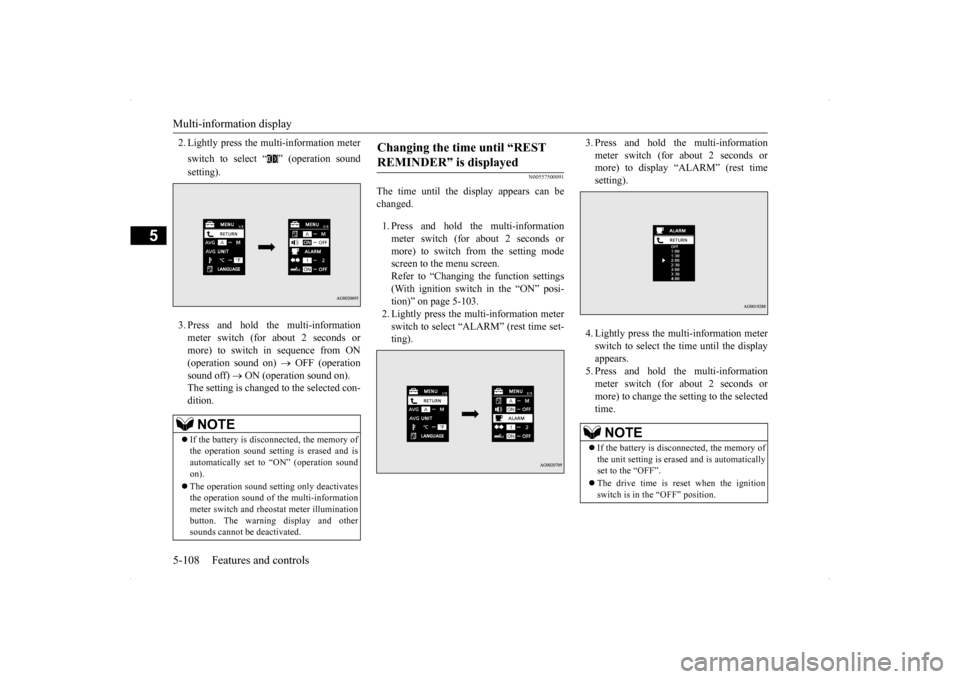
2. Lightly press the multi-information meter switch to select “ ” (operation sound setting). 3. Press and hold the multi-information meter switch (for about 2 seconds or more) to switch in sequence from ON (operation sound on)
OFF (operation
sound off)
ON (operation sound on).
The setting is changed to the selected con- dition.
N00557500091
The time until the display appears can be changed. 1. Press and hold the multi-information meter switch (for about 2 seconds ormore) to switch from the setting mode screen to the menu screen. Refer to “Changing the function settings(With ignition switch in the “ON” posi-tion)” on page 5-103. 2. Lightly press the multi-information meter switch to select “ALARM” (rest time set-ting).
3. Press and hold the multi-information meter switch (for about 2 seconds or more) to display “ALARM” (rest time setting). 4. Lightly press the multi-information meter switch to select the time until the displayappears.5. Press and hold the multi-information meter switch (for about 2 seconds or more) to change the setting to the selectedtime.
NOTE
If the battery is disconnected, the memory of the operation sound setting is erased and is automatically set to “ON” (operation sound on). The operation sound setting only deactivates the operation sound of the multi-informationmeter switch and rheostat meter illumination button. The warning display and other sounds cannot be deactivated.
Changing the time until “REST REMINDER” is displayed
NOTE
If the battery is disconnected, the memory of the unit setting is erased and is automatically set to the “OFF”. The drive time is reset when the ignition switch is in the “OFF” position.
BK0200800US.book
108 ページ 2013年2月14日 木曜日 午後2時28分
Page 170 of 338
Multi-information display
Features and controls 5-109
5
N00563500067
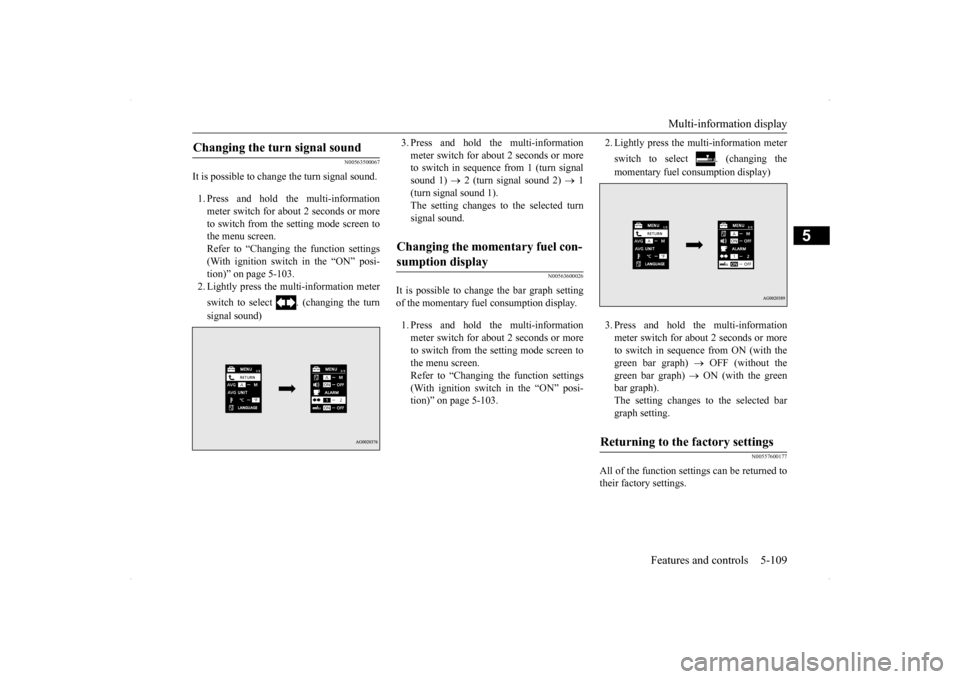
It is possible to change the turn signal sound. 1. Press and hold the multi-information meter switch for about 2 seconds or moreto switch from the setting mode screen to the menu screen. Refer to “Changing the function settings(With ignition switch in the “ON” posi- tion)” on page 5-103. 2. Lightly press the multi-information meter switch to select . (changing the turn signal sound)
3. Press and hold the multi-information meter switch for about 2 seconds or more to switch in sequence from 1 (turn signal sound 1)
2 (turn signal sound 2)
1
(turn signal sound 1). The setting changes to the selected turn signal sound.
N00563600026
It is possible to change the bar graph settingof the momentary fuel consumption display. 1. Press and hold the multi-information meter switch for about 2 seconds or more to switch from the setting mode screen tothe menu screen. Refer to “Changing the function settings (With ignition switch in the “ON” posi-tion)” on page 5-103.
2. Lightly press the multi-information meter switch to select . (changing the momentary fuel consumption display) 3. Press and hold the multi-information meter switch for about 2 seconds or more to switch in sequence from ON (with the green bar graph)
OFF (without the
green bar graph)
ON (with the green
bar graph). The setting changes to the selected bargraph setting.
N00557600177
All of the function settings can be returned totheir factory settings.
Changing the turn signal sound
Changing the momentary fuel con- sumption display
Returning to the factory settings
BK0200800US.book
109 ページ 2013年2月14日 木曜日 午後2時28分
Page 171 of 338
Multi-information display 5-110 Features and controls
5
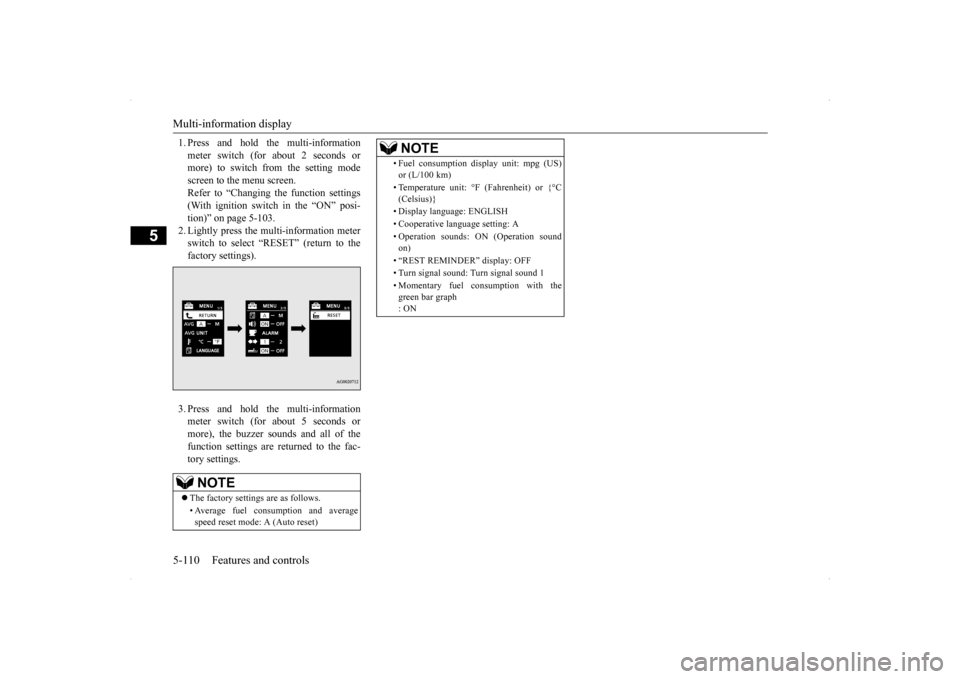
1. Press and hold the multi-information meter switch (for about 2 seconds or more) to switch from the setting mode screen to the menu screen.Refer to “Changing the function settings (With ignition switch in the “ON” posi- tion)” on page 5-103.2. Lightly press the multi-information meter switch to select “RESET” (return to the factory settings). 3. Press and hold the multi-information meter switch (for about 5 seconds or more), the buzzer sounds and all of thefunction settings are returned to the fac- tory settings.NOTE
The factory settings are as follows. • Average fuel consumption and average speed reset mode: A (Auto reset)
• Fuel consumption display unit: mpg (US) or (L/100 km) • Temperature unit: °F (Fahrenheit) or {°C (Celsius)} • Display language: ENGLISH • Cooperative language setting: A • Operation sounds: ON (Operation sound on) • “REST REMINDER” display: OFF• Turn signal sound: Turn signal sound 1 • Momentary fuel consumption with the green bar graph : ONNOTE
BK0200800US.book
110 ページ 2013年2月14日 木曜日 午後2時28分
Page 173 of 338
Indicator light, warning light, an
d information screen display list
5-112 Features and controls
5
N00557900066
When there is information to be announced,
such as light reminder, the tone sounds an
d the screen switches to the displays show
n below. Refer to
the appropriate page and take the necessary measures.When the cause of the warning display is eliminated, the warning display goes out automatically. Refer to “Warning display list (With ignition switch in the “OFF” position)” on page 5-112. Refer to “Warning display list (With ignition
switch in the “ON” position)” on page 5-115.
Refer to “Other interrupt displays (With ignition switch in the “ON” position)” on page 5-119.
N00558000194
Information screen display list
NOTE
In the following cases, a warning may be displayed on the inform
ation screen and the buzzer may
sound for a few seconds, at tim
es.
This is caused by the system picking up interference such as stro
ng electromagnetic waves or nois
e, and is not a functional pro
blem.
• An extremely strong electromagnetic wave is received from a source
such as an illegal radio set,
a spark from a wire, or a rad
ar station.
• Abnormal voltage or a static electricity discharge is genera
ted by the operation of your vehicle’s electronics (including afte
r-market parts).
If the warning display has occurred a number of times, take your vehicle to an authorized Mitsubishi Motors dealer or a repair
facility of your choice and
have the system checked.
Warning display list (With ignition switch in the “OFF” position)
Screen
Cause
Do this (Reference)
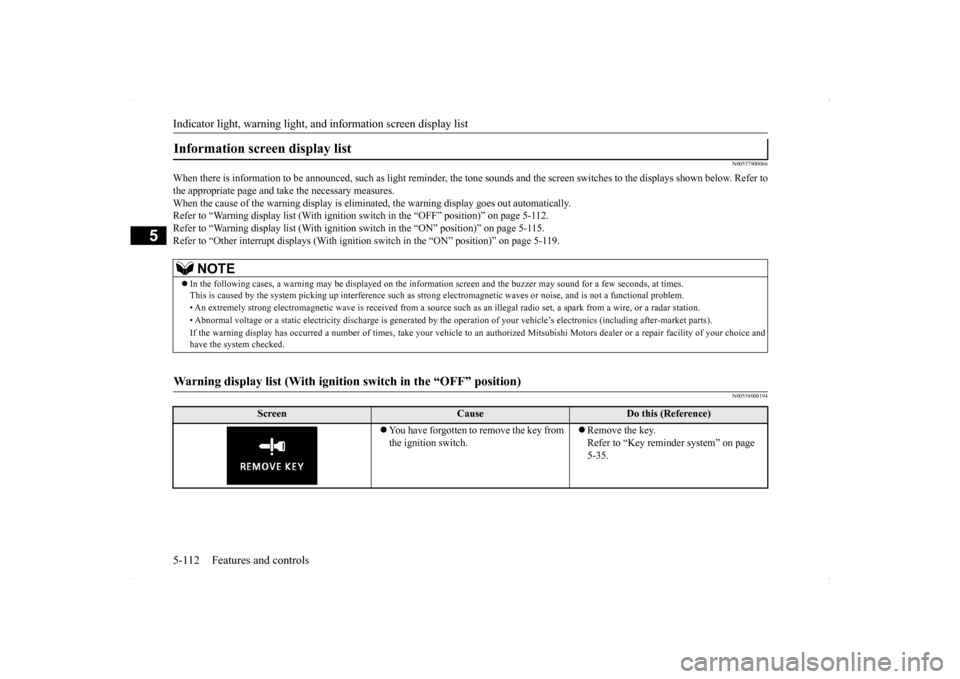
You have forgotten to remove the key from the ignition switch.
Remove the key. Refer to “Key reminder system” on page 5-35.
BK0200800US.book
112 ページ 2013年2月14日 木曜日 午後2時28分