ECO mode MITSUBISHI MIRAGE 2017 6.G Workshop Manual
[x] Cancel search | Manufacturer: MITSUBISHI, Model Year: 2017, Model line: MIRAGE, Model: MITSUBISHI MIRAGE 2017 6.GPages: 307, PDF Size: 9.02 MB
Page 183 of 307
Fuel economy 6-2 Driving safety
6
N00628800178
Fuel economy is depe
ndent on many factors.
Your personal driving habits can have a sig- nificant effect on your
fuel consumption.
Several recommendations
for achieving the
greatest fuel economy are listed below. Whenever accelerating from a stop, always accelerate
slowly and smoothly.
When parked for even a short period, do not idle the engine. Shut it off. Plan your trips to avoid unnecessary stops. Keep your tires inflated to the recom- mended pressures. For freeway driving, maintain a speed of approximately 50 mph (80 km/h) whentraffic, roadway and weather conditions safely permit. Keep your air filter clean and your vehicle lubricated according
to the recommenda-
tions in this manual. Always keep your ve
hicle well main-
tained. A poorly maintained engine wastes fuel and costs money. Never overload your vehicle.
N00628900049
Drunk driving is one of the most frequent causes of accidents. Your driving ability can be seriously impairedeven with blood alcohol levels far below the legal minimum. If you have been drinking, don’t drive. Ride with a designated non-drinking driver, call a cab or a friend, or use public transportation. Drinking coffee or tak- ing a cold shower will not make you sober. Similarly, prescription and nonprescription drugs affect your alertness, perception andreaction time. Consu
lt with your doctor or
pharmacist before driving while under the influence of any of these medications.
N00628600046
The original equipment floor mat providedwith your vehicle was specifically designed for your vehicle. Al
ways properly position
the floor mat and assure it does not interferewith operation of the pedals. Always use the
retaining clip on the driver’s floorboard to secure the floor mat. When used, this clip willhelp prevent the floor mat from moving for- ward and possibly interfering with the opera- tion of the pedals. To prevent the floor matfrom moving forward and possibly interfering with the operation of the pedals, Mitsubishi genuine floor mats are recommended.
N00628700047
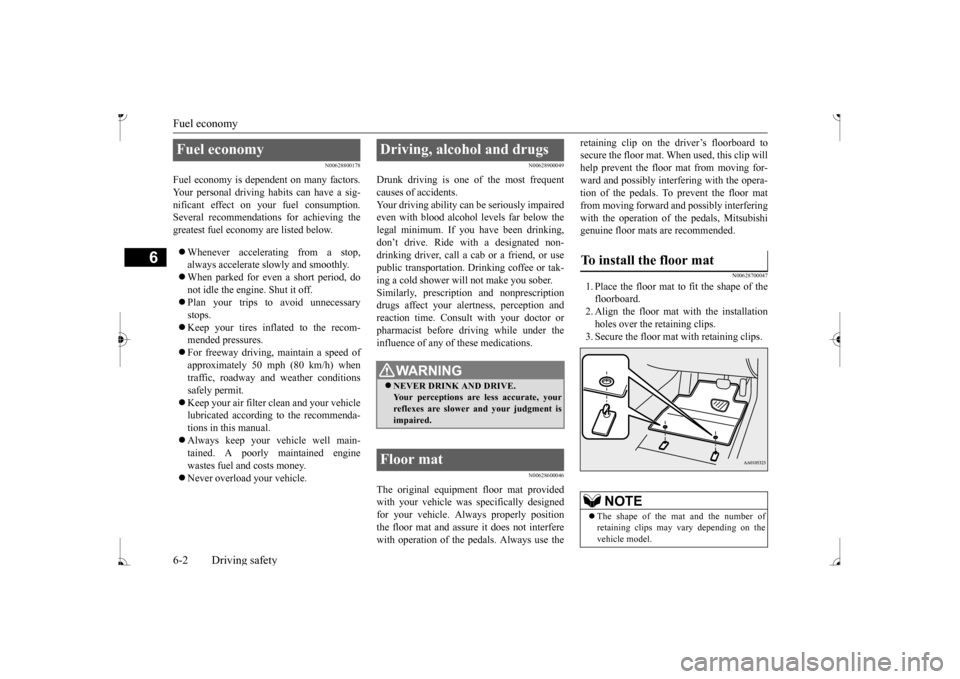
1. Place the floor mat to fit the shape of thefloorboard. 2. Align the floor mat with the installation holes over the retaining clips.3. Secure the floor mat with retaining clips.
Fuel economy
Driving, alcohol and drugs
WA R N I N G NEVER DRINK AND DRIVE. Your perceptions are
less accurate, your
reflexes are slower and your judgment isimpaired.
Floor mat
To install the floor mat
NOTE
The shape of the mat and the number of retaining clips may vary depending on thevehicle model.
BK0236100US.book 2 ページ 2016年2月1日 月曜日 午前10時15分
Page 184 of 307
Vehicle preparatio
n before driving
Driving safety 6-3
6
N00629001770
For a safer and more enjoyable trip, always check for the following: Before starting the vehicle, make certain that you and all passengers are seated andwearing their seat
belts properly (with
children in the rear seat, in appropriate restraints), and that all the doors arelocked.
Move the driver’s seat as far backward as possible, while keeping good visibility,and good control of the steering wheel, brakes, accelerator, and controls. Check the instrument panel indicators and multi-information display for any possible prob- lem. Similarly, the front
passenger seat should
also be moved as fa
r back as possible.
Make sure that infants and small children are properly restrained in accordance with all laws and regulations.
Check these by selectin
g the defroster mode,
and set the blower switch on high. You should be able to feel the air blowing against thewindshield. Refer to “Defrosti
ng or defogging (wind-
shield, door windows)” on page 7-6, 7-10,7-17. Check all the tires for heavy tread wear or uneven wear patterns. Look for stones, nails, glass, or other objects
stuck in the tread. Look
for any tread cuts or
sidewall cracks. Check
the wheel nuts for tightness, and the tires (including spare tire) for proper pressure.
WA R N I N G If a floor mat is the
wrong size or is not
properly installed, it can interfere with theoperation of the pedals. Interference withthe pedals can cause unintended accelera- tion and/or increase
d stopping distances
resulting in a cras
h and injury. Always
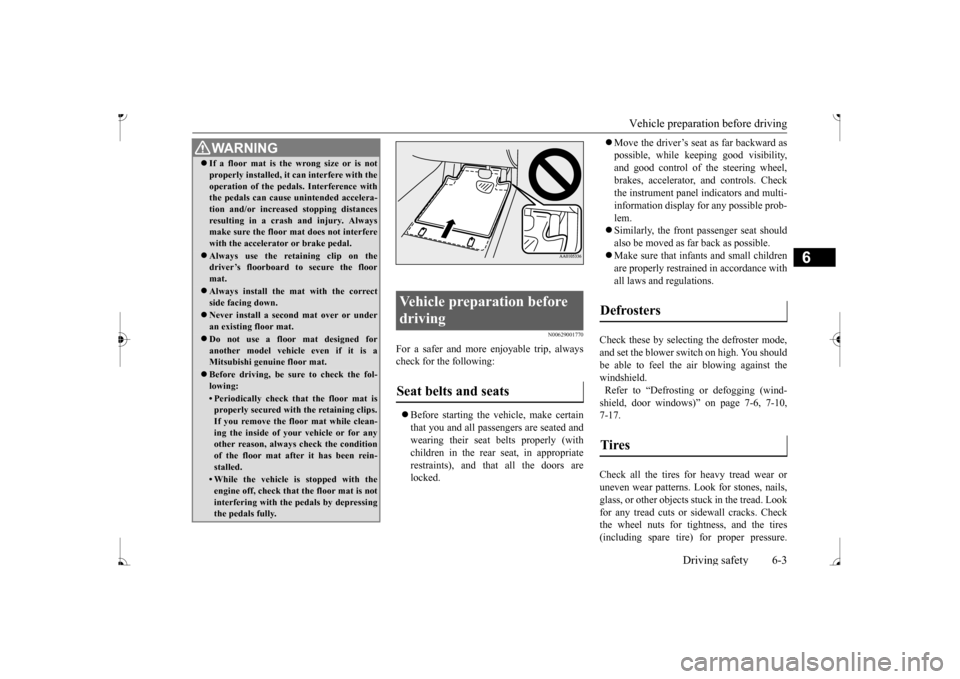
make sure the floor mat does not interfere with the accelerator or brake pedal. Always use the retaining clip on the driver’s floorboard to secure the floor mat. Always install the mat with the correct side facing down. Never install a second mat over or under an existing floor mat. Do not use a floor mat designed for another model vehicle even if it is aMitsubishi genu
ine floor mat.
Before driving, be sure to check the fol- lowing:• Periodically check that the floor mat isproperly secured with the retaining clips. If you remove the fl
oor mat while clean-
ing the inside of you
r vehicle or for any
other reason, always
check the condition
of the floor mat afte
r it has been rein-
stalled.• While the vehicle is stopped with theengine off, check that
the floor mat is not
interfering with the pedals by depressing the pedals fully.
Vehicle preparation before driving Seat belts and seats
Defrosters Tires
BK0236100US.book 3 ページ 2016年2月1日 月曜日 午前10時15分
Page 209 of 307
Automatic air conditioning (if so equipped)
7
N00737301409
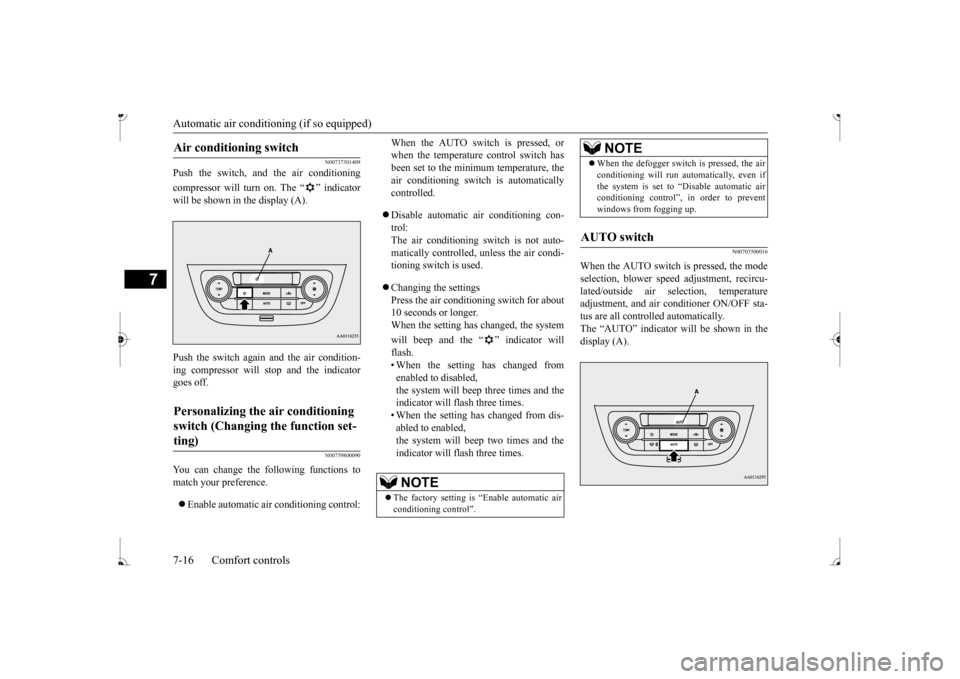
Push the switch, and the air conditioning compressor will turn on. The “ ” indicator will be shown in the display (A). Push the switch again and the air condition- ing compressor will stop and the indicator goes off.
N00759800090
You can change the following functions tomatch your preference. Enable automatic air conditioning control:
When the AUTO switch is pressed, or when the temperature control switch hasbeen set to the minimum temperature, the air conditioning switch
is automatically
controlled. Disable automatic air conditioning con- trol: The air conditioning switch is not auto- matically controlled, unless the air condi-tioning switch is used. Changing the settings Press the air conditi
oning switch for about
10 seconds or longer. When the setting has changed, the system will beep and the “ ” indicator will flash.• When the setting has changed from enabled to disabled, the system will beep three times and theindicator will flash three times. • When the setting has changed from dis- abled to enabled,the system will beep two times and the indicator will flash three times.
N00703500016
When the AUTO switch is pressed, the modeselection, blower spee
d adjustment, recircu-
lated/outside air sele
ction, temperature
adjustment, and air conditioner ON/OFF sta- tus are all controlled automatically. The “AUTO” indicator
will be shown in the
display (A).
Air conditioning switch
Personalizing the air conditioning switch (Changing the function set- ting)
NOTE
The factory setting is
“Enable automatic air
conditioning control”.
When the defogger switch is pressed, the air conditioning will run au
tomatically, even if
the system is set to “Disable automatic airconditioning control”, in order to prevent windows from fogging up.
AUTO switch
NOTE
BK0236100US.book 16 ページ 2016年2月1日 月曜日 午前10時15分
Page 211 of 307
Important air condit
ioning operating tips
7-18 Comfort controls
7
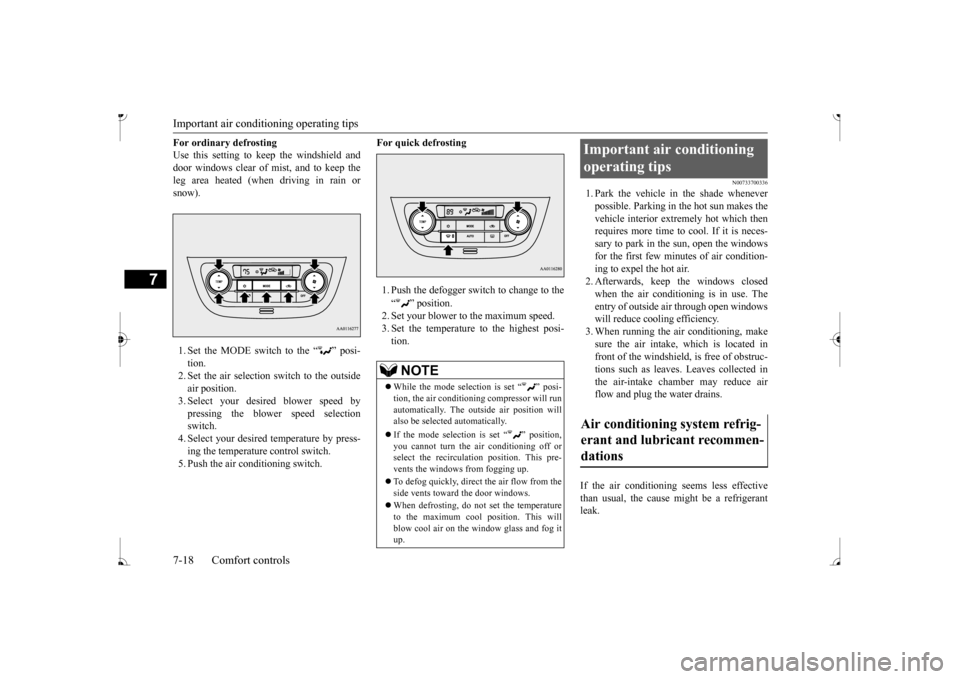
For ordinary defrosting Use this setting to ke
ep the windshield and
door windows clear of mist, and to keep the leg area heated (when driving in rain or snow). 1. Set the MODE switch to the “ ” posi- tion. 2. Set the air selection switch to the outside air position.3. Select your desired blower speed by pressing the blower speed selection switch.4. Select your desired temperature by press- ing the temperature control switch. 5. Push the air conditioning switch.
For quick defrosting 1. Push the defogger switch to change to the “ ” position. 2. Set your blower to the maximum speed. 3. Set the temperature to the highest posi-tion.
N00733700336
1. Park the vehicle in the shade whenever possible. Parking in the hot sun makes the vehicle interior extremely hot which thenrequires more time to
cool. If it is neces-
sary to park in the sun, open the windows for the first few minut
es of air condition-
ing to expel the hot air. 2. Afterwards, keep the windows closed when the air conditioning is in use. The entry of outside air through open windows will reduce cooling efficiency.3. When running the air conditioning, make sure the air intake, which is located in front of the windshield, is free of obstruc-tions such as leaves. Leaves collected in the air-intake chamber may reduce air flow and plug the water drains.
If the air conditioning seems less effective than usual, the cause might be a refrigerant leak.
NOTE
While the mode selection is set “ ” posi- tion, the air conditioni
ng compressor will run
automatically. The out
side air position will
also be selected automatically. If the mode selection is set “ ” position, you cannot turn the air conditioning off or select the recirculati
on position. This pre-
vents the windows from fogging up. To defog quickly, direct the air flow from the side vents toward the door windows. When defrosting, do not set the temperature to the maximum cool position. This will blow cool air on the window glass and fog it up.
Important air conditioning operating tips Air conditioning system refrig- erant and lubricant recommen- dations
BK0236100US.book 18 ページ 2016年2月1日 月曜日 午前10時15分
Page 212 of 307
Air purifier (if so equipped) Comfort controls 7-19
7
Have the system inspected by your authorized Mitsubishi Motors dealer or a repair facilityof your choice. The air conditioning should be operated for at least five minutes each week, even in cold weather. This includes the quick defrosting mode. Operating the
air condition system
weekly maintains lubrication of the compres- sor internal parts to keep the air conditioning in the best operating condition.
N00733800180
The air conditioning system is equipped withan air filter to re
move pollen
and dust.
The air filter’s ability to collect pollen and dirt is reduced as it be
comes dirty, so replace
it periodically. For the maintenance interval,refer to the “WARRANTY AND MAINTE- NANCE MANUAL”.
N00734302131
The audio system can only be used when the ignition switch or the
operation mode is in
ON or ACC.
CAUTION The air conditioning system in your vehicle must be charged with the refrigerant HFC-134a and the lubricant ZXL 200PG. Use of any other refrigerant or lubricant will cause severe damage a
nd may require replac-
ing your vehicle’s en
tire air conditioning
system. The release of refrigerant into the atmo-sphere is not recommended. The new refrigerant HFC-134a in your vehi- cle is designed not to harm the earth’s ozonelayer. However, it may contribute slightly to global warming. It is recommended that the old refrigerant besaved and recycled for future use.
During a long period of disuse
Air purifier
(if so equipped)
NOTE
Operation in certain conditions such as driv- ing on a dusty road and frequent use of the air conditioning ca
n lead to reduction of ser-
vice life of the filter. When you feel that the air flow is lower than normal or when the windshield or windows st
art to fog up easily,
replace the air filter. Contact your Mitsubishi
Motors dealer or a
repair facility of your
choice for assistance.
AM/FM electronically tuned radio with CD player
(if so
equipped)
To listen to the audio system while the engine is not running, turn the ignitionswitch to the “ACC” pos
ition or put the oper-
ation mode in ACC. For vehicles equipped with the F.A.S.T.-key, if the operation mode is left in ACC, theaccessory power will automatically turn off after a certain period
of time and you will no
longer be able to use the audio system. Theaccessory power comes on again if the engine switch is operated with it in the “ACC” position. Refer
to “ACC power auto-
cutout function” on page 5-14. If a cellular phone is
used inside the vehicle,
it may create noise in the audio equipment. This does not mean that anything is wrong with your audio equipment. In such a case,use the cellular phone at
a place as
far away
as possible from the audio equipment. If foreign objects or wa
ter get into the audio
equipment, or if smoke or a strange odor comes from it, immediately turn off theaudio system and have
it checked at an
authorized Mitsubishi Motors dealer or a repair facility of your choice. Never try torepair it yourself. Avoid using the audio sys- tem until it is inspected by a qualified per- son. If the audio system is damaged by foreign objects, water, or fire, have the systemchecked by a qualified Mitsubishi Motors technician.
BK0236100US.book 19 ページ 2016年2月1日 月曜日 午前10時15分
Page 214 of 307
AM/FM electronically tuned radio with CD player (if so equipped)
Comfort controls 7-21
7
N00735001936
1. Press the PWR switch or the RADIO but- ton to turn on the radio. Press and hold the PWR switch for 2 sec- onds or longer to turn off the radio. 2. Press the RADIO but
ton to select the
desired band (AM/FM1/FM2). 3. Press the seek button to tune to a station, or press one of the memory select buttonsto tune in to a station memorized for that button. Refer to “Automatic
tuning”, “Manual
tuning” or “To enter frequencies into the memory”.
The frequency changes every time the seek button is pressed. Pre
ss the button to select
the desired station.
After keeping the seek button depressed until it beeps, release the button, and the selectedstation reception will start. As many as 6 AM and
12 FM stations can be
entered into the memory. To store a frequency in the memory, follow these steps: 1. Press the seek button to tune to the fre- quency you wish to keep in the memory.2. Press and hold one of the memory select buttons until it beeps. The sound will be momentarily inter-rupted while the frequency is being entered into the memory. The number of the button matching the entry in memoryas well as the frequency is displayed. 3. The preset memory setting is retrieved by pressing the button and then releasing itwithin 1 second.
N00735301766
3- Display 4- Seek (Down-seek) button 5- Seek (Up-seek) button6- Memory select buttonsTo listen to the radio
To tune the radio
Manual tuning
Automatic tuningTo enter frequencies into the mem- ory
CD control panel and display
1- MEDIA button 2- RADIO button3- INFO button 4- CD eject button 5- CD indicator6- Disc-loading slot 7- FOLDER indicator 8- TRACK indicator9- Display 10- RPT (Repeat)/F-RPT (Folder repeat
mode) indicator
11- RDM (Random mode)/F-RDM (Folder
random mode) indicator
12- SEL (Select)
indicator
13- PAGE (Title scroll) button 14- (Fast-reverse/Track down) button15- (Fast-forward/Track up) button 16-
(Return) button
17- PWR (On-Off)/SEL (Select) switch
BK0236100US.book 21 ページ 2016年2月1日 月曜日 午前10時15分
Page 215 of 307
AM/FM electronically tuned radio with CD player (if so equipped) 7-22 Comfort controls
7
N00735502127
1. Insert the disc with the label facing up. When a disc is inserted, the CD indicator will come on and the CD player will begin playing even if the radio is being used. The CD player will also start playbackwhen the MEDIA button is pressed with a disc in the player or with a disc set in the Disc-loading slot, even if the radio isbeing used. 2. To stop the CD, turn off the power by pressing the PWR switch for 2 seconds orlonger, or change over to the radio mode by pressing the RADIO button, or eject the disc by pressi
ng the eject button.
When the CD eject button is pressed, the disc automatically stops and is ejected. Press the MEDIA button if
a disc is already in
the CD player. The CD player will start play- back. The track number and the playing timewill appear on the display. The tracks in the disc will be
played continuously.
This CD player allows you to play MP3 (MPEG Audio Layer-3) files recorded on CD-ROMs, CD-Rs (recordable CDs), andCD-RWs (rewritable CDs) in ISO9660 Level 1/Level 2, Joliet, an
d Romeo formats. Each
disc can hold up to 255 files in up to 100 fold-ers, up to a maximum of 16 levels. The ID3 tag information can be
displayed during MP3
playback. For inform
ation concerning ID3
tags, refer to “CD text
and MP3 title display”
1. Insert a disc containing MP3 files into the slot.2. Press the MEDIA button if a disc is already in the CD player. The display shows “READING”, thenplayback will begin.
18- RPT (Repeat) button 19- RDM (Random) buttonTo listen to a CD
To load a disc
NOTE
For information on adjusting the volume and tone, refer to “To adjust the volume” on page 7-20 and “To adjust the tone” on page 7-20. 3 inch (8 cm) compact discs cannot be played on this CD player. For information concerning the handling of compact discs, refer
to “Handling of com-
pact discs” on page 7-42.
To eject a disc
NOTE
If you do not remove the disc before 15 sec- onds have elapsed, the
CD player will auto-
matically reload
the disc and stop.
To listen to a music CD
To listen to an MP3 CD
NOTE
While listening to a
disc on which CD-DA
(CD-Digital Audio) a
nd MP3 files have both
been recorded, you can switch between read- ing of the CD-DA, reading of the MP3 files, and the external audio
input mode by press-
ing the MEDIA button for 2 seconds or lon- ger (until you hear a beep). For information on the
external audio input,
refer to “To use the external audio input function” on page 7-28. With a disc that contains both CD-DA and MP3 files, the CD-DA files are automati- cally played first. The playback sound quality differs depend- ing on the encoding software and the bit rate.For details, refer to
the user manual of your
encoding software. Depending on file/folder
configurations on a
disc, it may take some
time before playback
starts. MP3 encode software
and writing software
are not supplied with this unit.
BK0236100US.book 22 ページ 2016年2月1日 月曜日 午前10時15分
Page 216 of 307
AM/FM electronically tuned radio with CD player (if so equipped)
Comfort controls 7-23
7
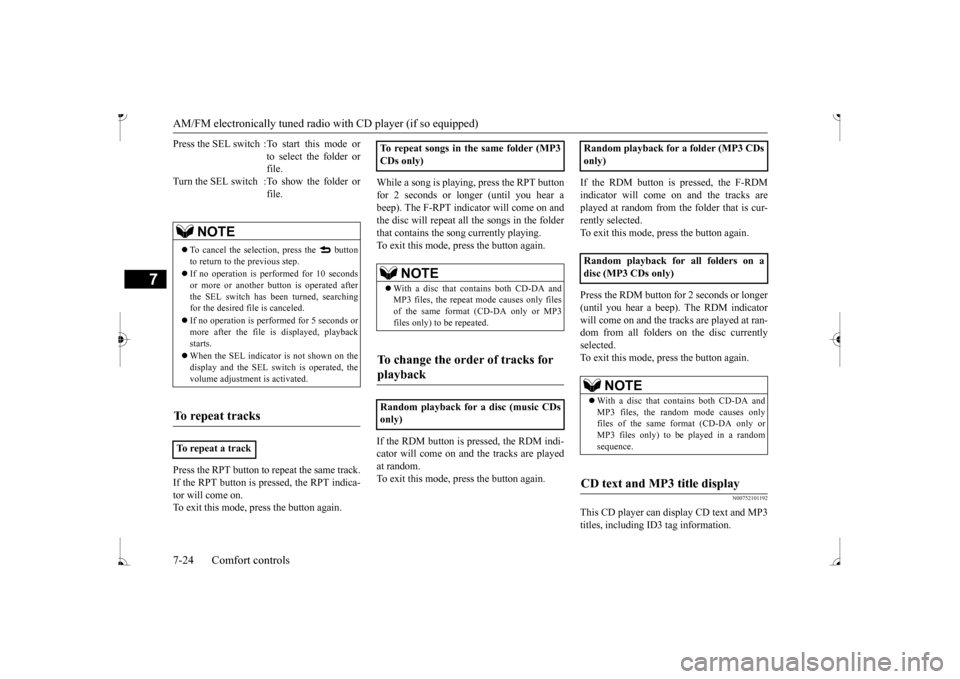
Folder selection orde
r/MP3 file playback
order (Example) The disc is fast-forwarded while the but- ton is held down. Playback will begin once the button is released.
The disc is fast-reversed while the button is held down. Playback will begi
n once the button is
released. The disc will skip as
many songs as the num-
ber of times the button is pressed. The display window will show the track num- ber of the track selected. The disc will skip as
many songs as the num-
ber of times the button is pressed. The display window will show the track num-ber of the track selected. Operate the SEL switch to select desired file. When this mode is activated by pressing the SEL switch, the SEL indicator will be appear on the display.
You may encounter trouble in playing an MP3 or displaying the information of MP3files recorded with certain writing softwareor CD recorders (CD-R/RW drivers). If you record too many folders or files other than MP3 onto a disc, it
may take some time
before playback starts. This unit does not record MP3 files. For information on CD-Rs/RWs, refer to “Notes on CD-Rs/RWs” on page 7-43.CAUTION Attempting to play a fi
le not in the MP3 for-
mat which has the “.m
p3” file name may
produce noise from the speakers and speaker damage, and can da
mage your hearing.
NOTE
Folder selection in the order File selection in the orderTo fast-forward/reverse the disc
Fast-forward
Root folder (Root directory)
Level 1 Level 3 Level 4
Level 2
Fast-reverseTo select a desired track
Tr a c k u p Tr a c k d o w nTo find a file (MP3 CDs only)
BK0236100US.book 23 ページ 2016年2月1日 月曜日 午前10時15分
Page 217 of 307
AM/FM electronically tuned radio with CD player (if so equipped) 7-24 Comfort controls
7
Press the RPT button to repeat the same track. If the RPT button is pressed, the RPT indica- tor will come on. To exit this mode, press the button again.
While a song is playing, press the RPT button for 2 seconds or longer (until you hear a beep). The F-RPT indicator will come on and the disc will repeat all the songs in the folderthat contains the s
ong currently playing.
To exit this mode, press the button again. If the RDM button is pr
essed, the RDM indi-
cator will come on and the tracks are playedat random. To exit this mode, press the button again.
If the RDM button is pressed, the F-RDM indicator will come on and the tracks are played at random from the folder that is cur- rently selected.To exit this mode, press the button again. Press the RDM button for 2 seconds or longer (until you hear a beep). The RDM indicator will come on and the tracks are played at ran- dom from all folders on the disc currentlyselected. To exit this mode, press the button again.
N00752101192
This CD player can display CD text and MP3titles, including ID
3 tag information.
Press the SEL switch :To start this mode or
to select the folder or file.
Turn the SEL switch :To show the folder or
file.
NOTE
To cancel the selection, press the button to return to the previous step. If no operation is perfo
rmed for 10 seconds
or more or another bu
tton is operated after
the SEL switch has been turned, searching for the desired file is canceled. If no operation is performed for 5 seconds or more after the file is
displayed, playback
starts. When the SEL indicato
r is not shown on the
display and the SEL switch is operated, thevolume adjustment is activated.
To repeat tracks
To repeat a track
To repeat songs in the same folder (MP3 CDs only)
NOTE
With a disc that contains both CD-DA and MP3 files, the repeat
mode causes only files
of the same format (CD-DA only or MP3files only) to be repeated.
To change the order of tracks for playback
Random playback for a disc (music CDs only)
only) Random playback for all folders on a disc (MP3 CDs only)
NOTE
With a disc that contains both CD-DA and MP3 files, the random mode causes onlyfiles of the same fo
rmat (CD-DA only or
MP3 files only) to be played in a random sequence.
CD text and MP3 title display
BK0236100US.book 24 ページ 2016年2月1日 月曜日 午前10時15分
Page 218 of 307
AM/FM electronically tuned radio with CD player (if so equipped)
Comfort controls 7-25
7
The CD player can display disc and track titles. Press the INFO
button repeatedly to
make selections in
the following sequence:
disc name
track name
normal display
mode. The CD player can display folder and file titles. Press the INFO
button repeatedly to
make selections in
the following sequence:
folder name
file name
normal display
mode. The CD player can display ID3 tag informa- tion for files that have been recorded withID3 tag information.
1. Press the INFO button for 2 seconds or longer to switch to
the ID3 tag informa-
tion. 2. Press the INFO button repeatedly to make selections in the following sequence:album TAG
track TAG
artist TAG
normal display mode.
N00702600010
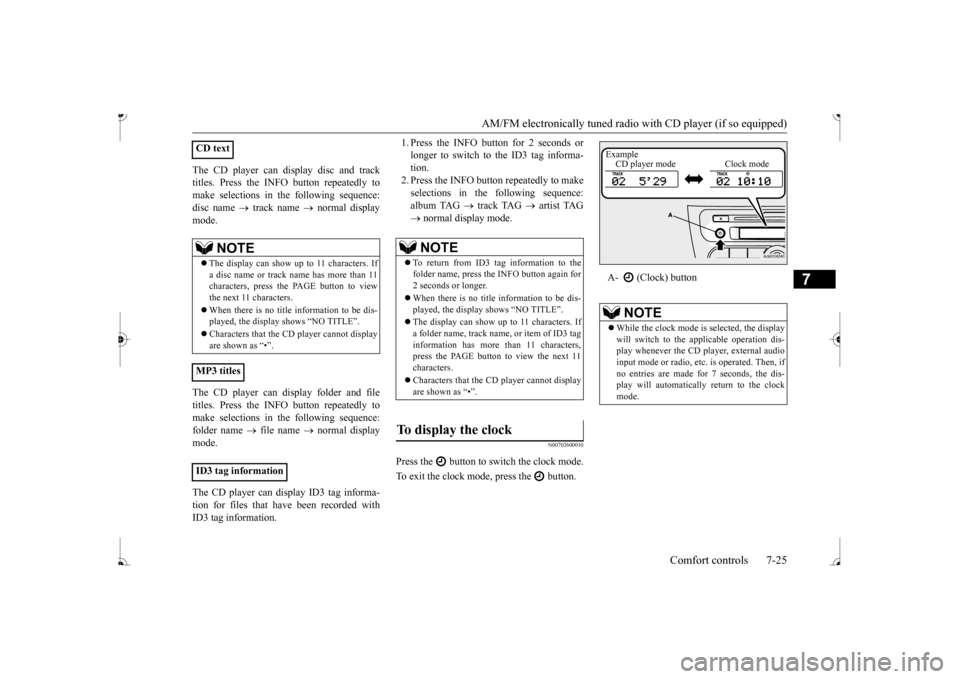
Press the button to switch the clock mode. To exit the clock mode, press the button.
CD text
NOTE
The display can show up to 11 characters. If a disc name or track name has more than 11 characters, press the PAGE button to view the next 11 characters. When there is no title information to be dis- played, the display
shows “NO TITLE”.
player cannot display
are shown as “•”.
MP3 titles ID3 tag information
NOTE
To return from ID3 tag information to the folder name, press the INFO button again for 2 seconds or longer. When there is no title information to be dis- played, the display shows “NO TITLE”. The display can show up to 11 characters. If a folder name, track name
, or item of ID3 tag
information has more than 11 characters, press the PAGE button to view the next 11 characters. Characters that the CD
player cannot display
are shown as “•”.
To display the clock
A- (Clock) button
NOTE
While the clock mode is
selected, the display
will switch to the a
pplicable operation dis-
play whenever the CD player, external audioinput mode or radio, et
c. is operated. Then, if
no entries are made for 7 seconds, the dis- play will automatically return to the clockmode.Example CD player mode Clock mode
BK0236100US.book 25 ページ 2016年2月1日 月曜日 午前10時15分