window MITSUBISHI MONTERO 1998 User Guide
[x] Cancel search | Manufacturer: MITSUBISHI, Model Year: 1998, Model line: MONTERO, Model: MITSUBISHI MONTERO 1998Pages: 1501, PDF Size: 25.81 MB
Page 355 of 1501
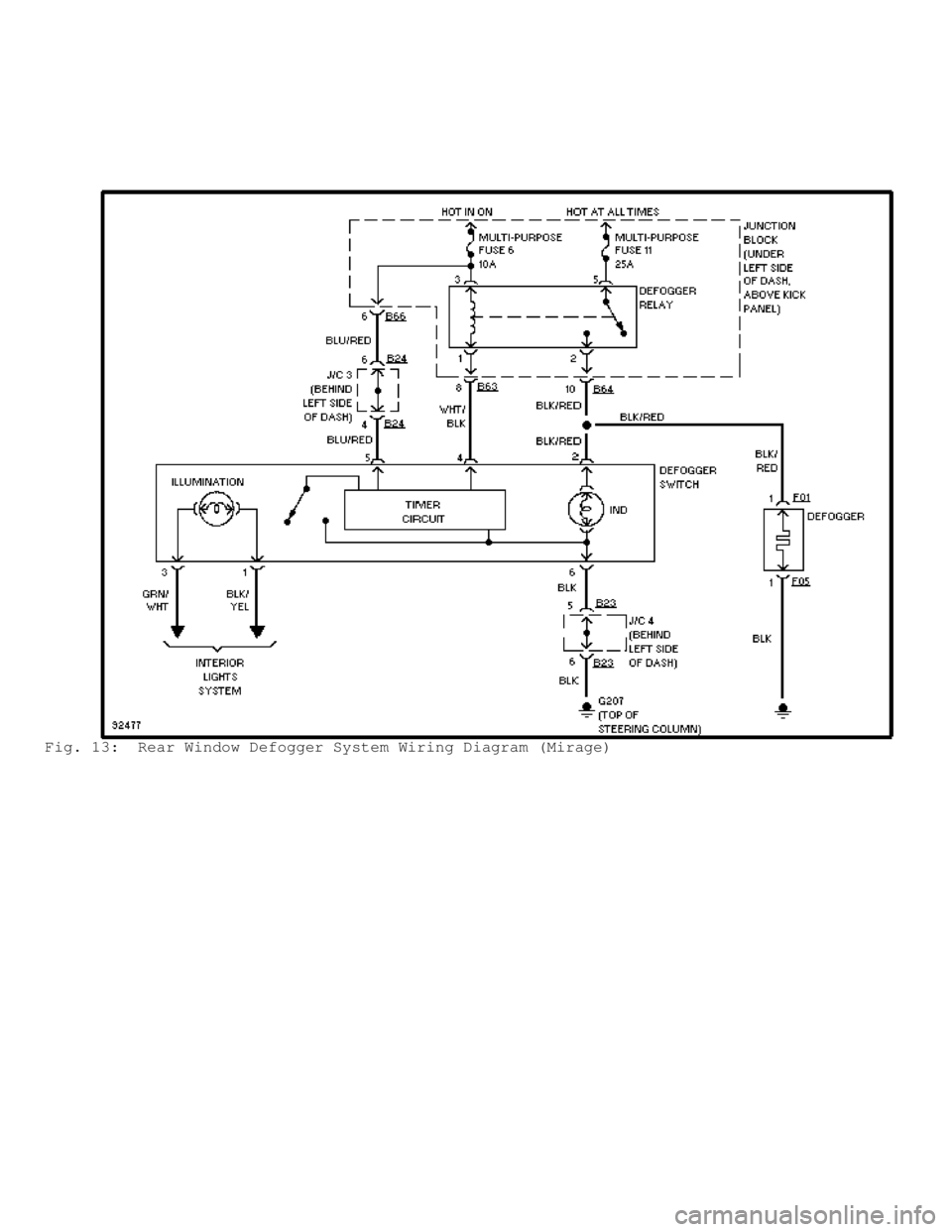
Fig. 13: Rear Window Defogger System Wiring Diagram (Mirage)
Page 356 of 1501
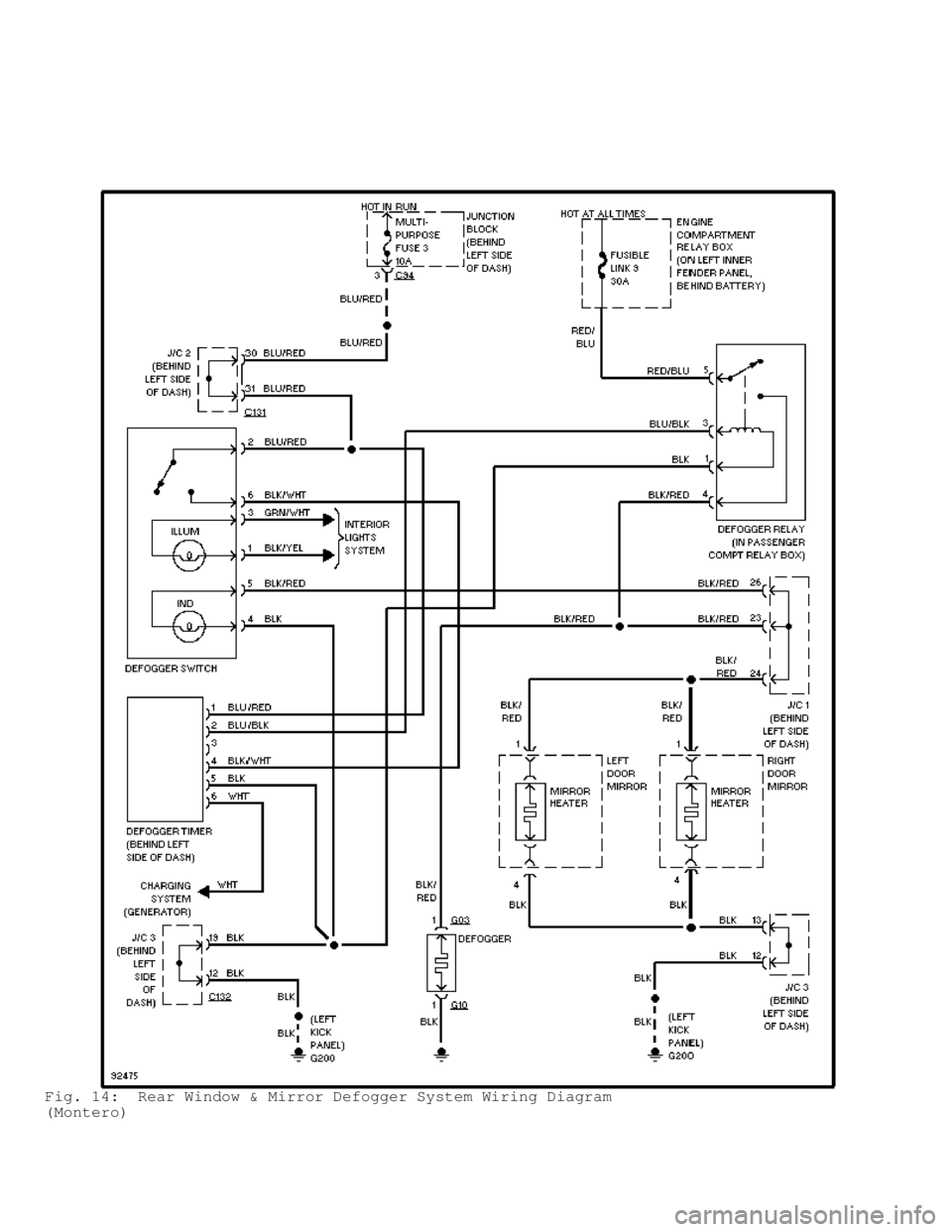
Fig. 14: Rear Window & Mirror Defogger System Wiring Diagram
(Montero)
Page 357 of 1501
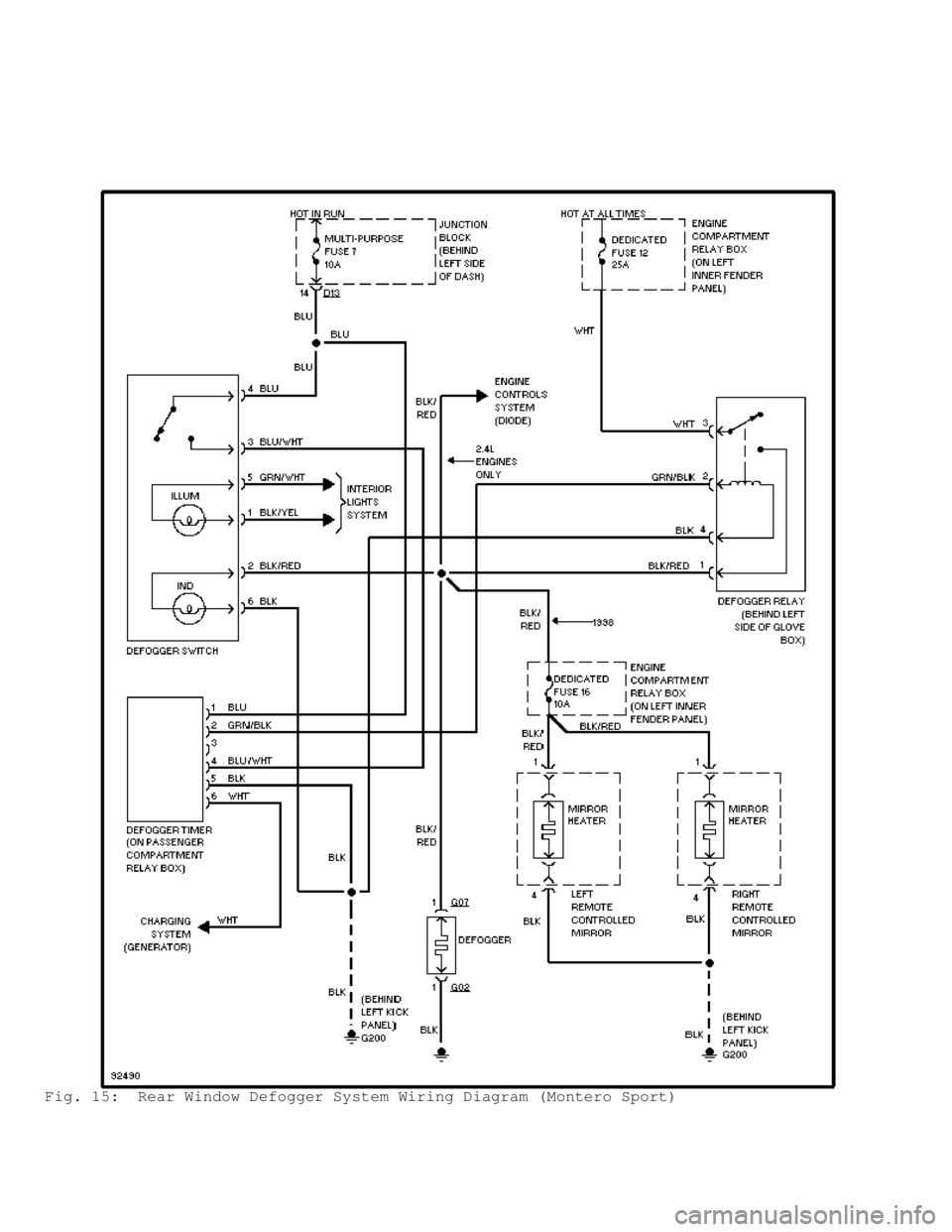
Fig. 15: Rear Window Defogger System Wiring Diagram (Montero Sport)
Page 358 of 1501
\")
Fig. 16: Rear Window & Mirror Defogger System Wiring Diagram (3000GT)\
Page 399 of 1501

Scan Tool Method (3000GT)
Turn ignition off. Connect scan tool to DLC. Follow scan tool
manufacturer's instructions. Turn ignition on. Perform ON/OFF
operation of each door lock or power window switch. If scan tool
buzzer sounds once, ECU input signal to corresponding switch circuit
is normal.
Voltmeter Method (3000GT)
Using Diagnostic Trouble Code Check Harness (MB991529),
connect harness to DLC terminals No. 4 and 5. Connect voltmeter to
harness. Turn ignition on. Perform ON/OFF operation of each door lock
or power window switch. If voltmeter pointer moves once, ECU input
signal from corresponding switch circuit is normal.
COMPONENT TESTS
* PLEASE READ THIS FIRST *
NOTE: If after all testing procedures are completed, system is not
functioning properly, substitute with a known-good ETACS-ECU
and retest.
DOOR LOCK ACTUATOR
Left Front Door (Montero & 3000GT)
1) Access left front door lock actuator. See
DOOR LOCK ACTUATOR R & I under REMOVAL & INSTALLATION. Disconnect
harness connector. Set actuator in LOCK position. Connect positive
lead of 12-volt power source to actuator terminal No. 1 (Blue/Red
wire) on Montero or terminal No. 3 (Blue/Red wire) on 3000GT. See
WIRING DIAGRAMS . Actuator should move to UNLOCK position when terminal
No. 3 (White/Black wire) on Montero or terminal No. 1 (Blue/Black
wire) on 3000GT is connected to ground.
2) With actuator set in UNLOCK position, connect positive
lead of 12-volt power source to actuator terminal No. 3 (White/Black
wire) on Montero or terminal No. 1 (Blue/Black wire) on 3000GT. See
WIRING DIAGRAMS . Actuator should move to LOCK position when terminal
No. 1 (Blue/Red wire) on Montero or terminal No. 3 (Blue/Red wire) o\
n
3000GT is connected to ground.
3) On 3000GT, check for continuity between actuator terminals
No. 2 (Brown/Yellow wire) and No. 4 (Black wire). See WIRING DIAGRAMS.
Continuity should be present with actuator set in UNLOCK position.
Continuity should not be present with actuator set to LOCK position.
Right Front Door (Montero & 3000GT)
1) Access right front door lock actuator. See
DOOR LOCK ACTUATOR R & I under REMOVAL & INSTALLATION. Disconnect
harness connector. Set actuator in LOCK position. Connect positive
lead of 12-volt power source to actuator terminal No. 3 (Blue/Red
wire) on Montero or terminal No. 1 (Blue/Red wire) on 3000GT. See
WIRING DIAGRAMS . Actuator should move to UNLOCK position when terminal
No. 1 (White/Black wire) on Montero or terminal No. 3 (Blue/Black
wire) on 3000GT is connected to ground.
2) With actuator set in UNLOCK position, connect positive
lead of 12-volt power source to actuator terminal No. 1 (White/Black
wire) on Montero or terminal No. 3 (Blue/Black wire) on 3000GT. See
WIRING DIAGRAMS . Actuator should move to LOCK position when terminal
No. 3 (Blue/Red wire) on Montero or terminal No. 1 (Blue/Red wire) o\
n
3000GT is connected to ground.
3) On 3000GT, check for continuity between actuator terminals
No. 2 (Brown wire) and No. 4 (Black wire). See WIRING DIAGRAMS.
Continuity should be present with actuator set in UNLOCK position.
Page 401 of 1501

Montero
1) Disconnect door lock cylinder switch connector. Set door
lock switch in UNLOCK position. Continuity should be present between
switch terminals No. 1 (Black/Blue wire) and No. 2 (Black wire).
2) Set door lock switch in LOCK position. Continuity should
be present between switch terminals No. 2 (Black wire) and No. 3
(Black/Red wire). Continuity should not be present in any of the
terminals with switch in OFF position.
3000GT (Left Side)
1) Disconnect door lock cylinder switch connector. Set door
lock switch in LOCK position. Continuity should be present between
switch terminals No. 2 (Black wire) and No. 3 (Light Green/White
wire).
2) Set door lock switch in UNLOCK position. Continuity should
be present between switch terminals No. 1 (Green/Blue wire) and No. 2
(Black wire). Continuity should not be present in any of the terminals\
with switch in OFF position.
3000GT (Right Side)
1) Disconnect door lock cylinder switch connector. Set door
lock switch in LOCK position. Continuity should be present between
switch terminals No. 1 (Green/White wire) and No. 2 (Black wire).
2) Set door lock switch in UNLOCK position. Continuity should
be present between switch terminals No. 2 (Black wire) and No. 3
(Green/White wire). Continuity should not be present in any of the
terminals with switch in OFF position.
DOOR LOCK SWITCH
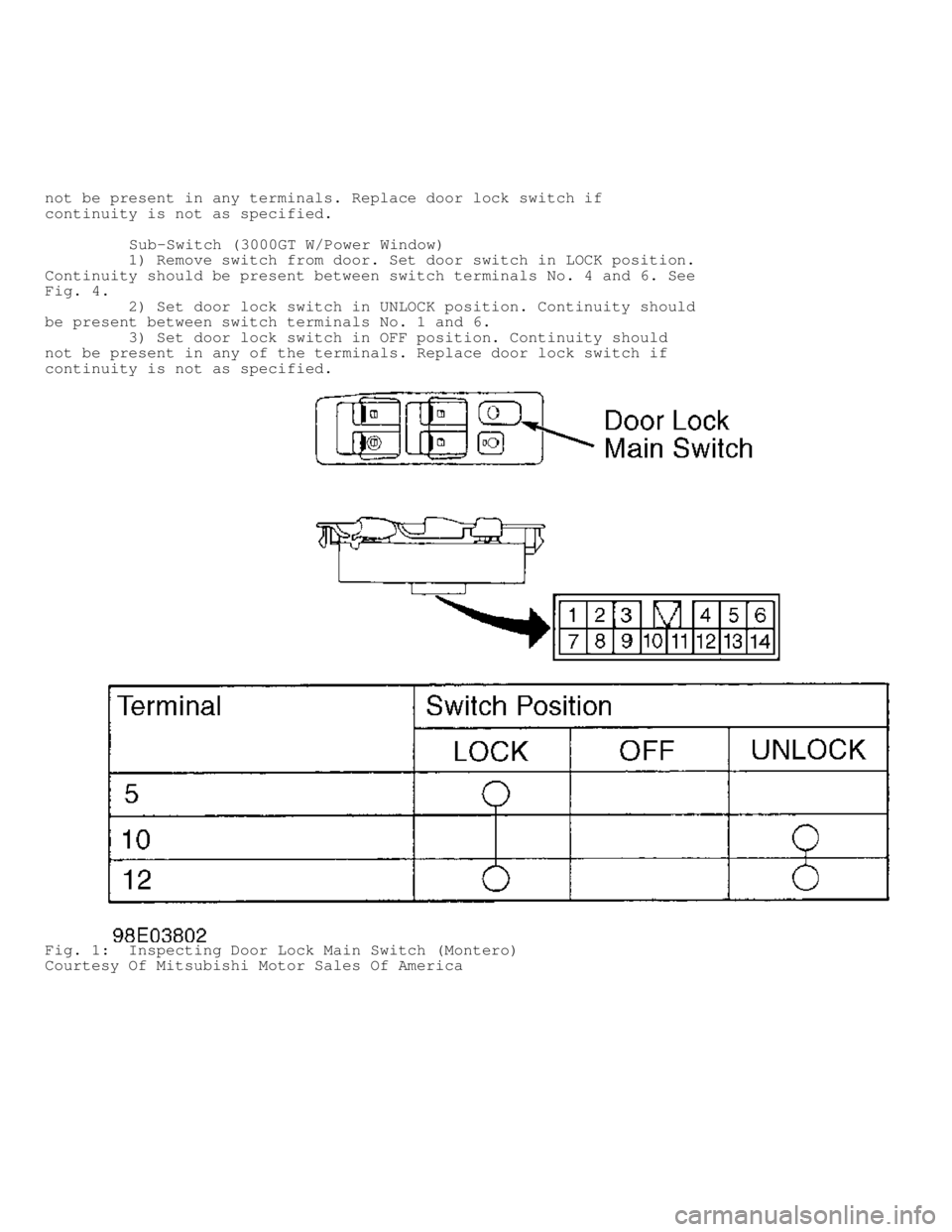
Main Switch (Montero)
1) Remove door lock switch from door. Set door switch in LOCK
position. Continuity should be present between switch terminals No. 5
and 12. See Fig. 1.
2) Set door lock switch in UNLOCK position. Continuity should
be present between switch terminals No. 10 and 12.
3) Set door lock switch in OFF position. Continuity should
not be present in any terminals. Replace main door lock switch if
continuity is not as specified.
Main Switch (3000GT W/Power Window)
1) Disconnect door lock switch connector. Set door lock
switch in LOCK position. Continuity should be present between switch
terminals No. 6 and 7. See Fig. 3.
2) Set door lock switch in UNLOCK position. Continuity should
be present between switch terminals No. 5 and 6. Continuity should not
be present in any of the terminals with switch in OFF position.
Main Switch (3000GT W/O Power Window)
1) Disconnect door lock switch connector. Set door lock
switch in LOCK position. Continuity should be present between switch
terminals No. 2 and 3. See Fig. 5.
2) Set door lock switch in UNLOCK position. Continuity should
be present between switch terminals No. 2 and 5. Continuity should not
be present in any of the terminals with switch in OFF position.
Sub-Switch (Montero)
1) Remove switch from door. Set door switch in LOCK position.
Continuity should be present between switch terminals No. 1 and 2. See
Fig. 2 .
2) Set door lock switch in UNLOCK position. Continuity should
be present between switch terminals No. 2 and 3.
3) Set door lock switch in OFF position. Continuity should
Page 402 of 1501
not be present in any terminals. Replace door lock switch if
continuity is not as specified.
Sub-Switch (3000GT W/Power Window)
1) Remove switch from door. Set door switch in LOCK position.
Continuity should be present between switch terminals No. 4 and 6. See
Fig. 4 .
2) Set door lock switch in UNLOCK position. Continuity should
be present between switch terminals No. 1 and 6.
3) Set door lock switch in OFF position. Continuity should
not be present in any of the terminals. Replace door lock switch if
continuity is not as specified.
Fig. 1: Inspecting Door Lock Main Switch (Montero)
Courtesy Of Mitsubishi Motor Sales Of America
Page 403 of 1501
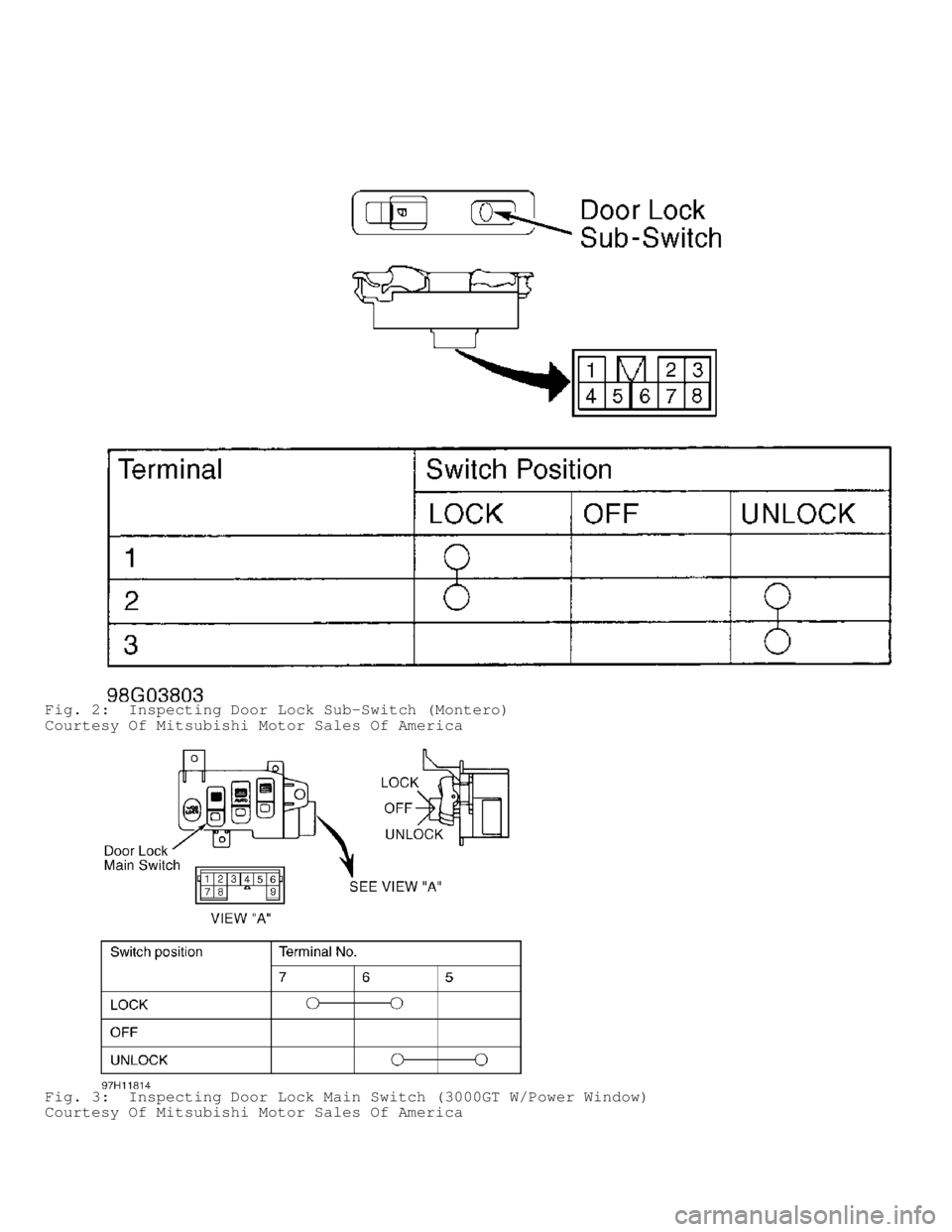
Fig. 2: Inspecting Door Lock Sub-Switch (Montero)
Courtesy Of Mitsubishi Motor Sales Of America
Fig. 3: Inspecting Door Lock Main Switch (3000GT W/Power Window)
Courtesy Of Mitsubishi Motor Sales Of America
Page 404 of 1501
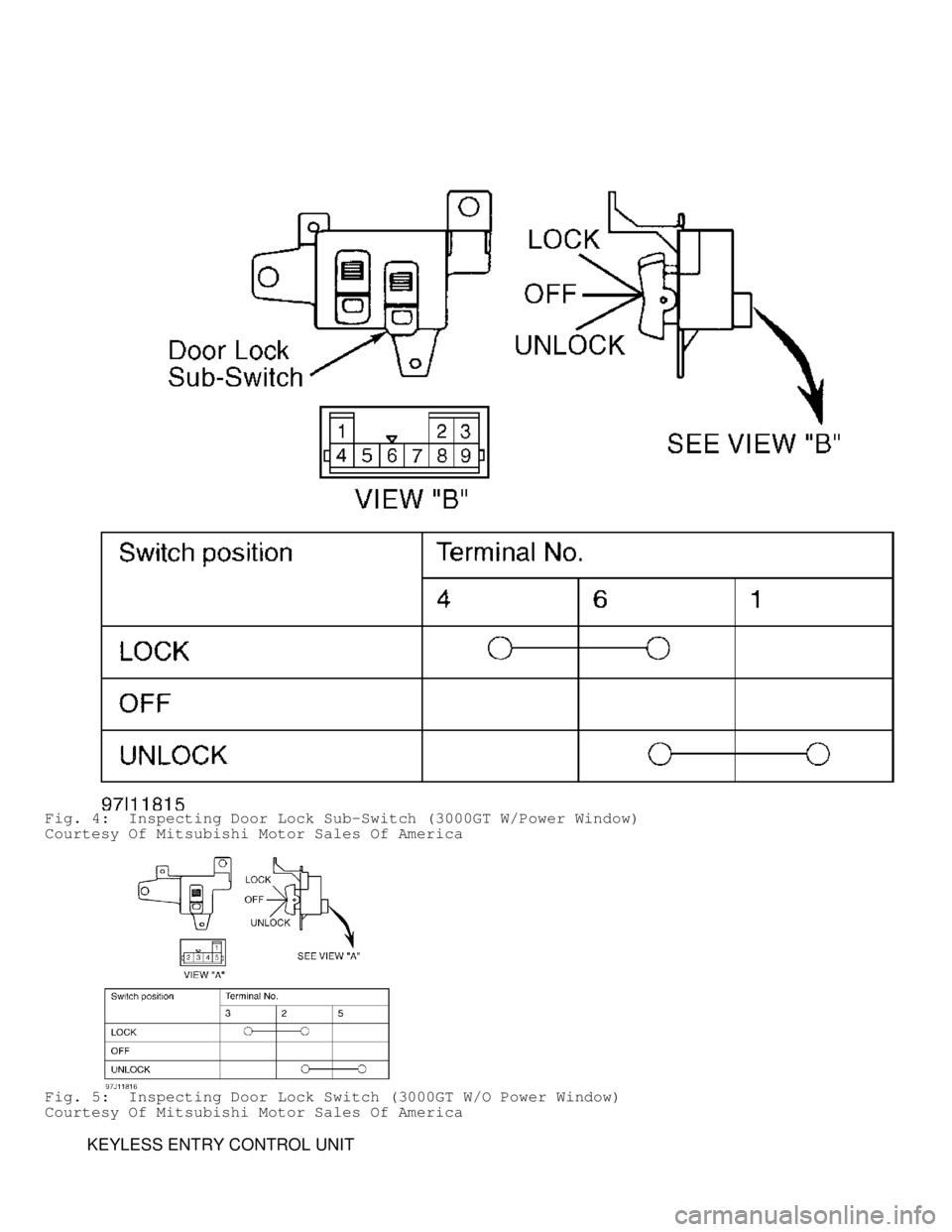
Fig. 4: Inspecting Door Lock Sub-Switch (3000GT W/Power Window)
Courtesy Of Mitsubishi Motor Sales Of America
Fig. 5: Inspecting Door Lock Switch (3000GT W/O Power Window)
Courtesy Of Mitsubishi Motor Sales Of America
KEYLESS ENTRY CONTROL UNIT
Page 408 of 1501

DOOR LOCK ACTUATOR R & I
Removal & Installation (Except Back Door)
Remove inner door panel. Remove delta cover (access to mirror
mounting). Remove door light, switch panel and armrest. Remove
mounting screws, and slide panel up to remove. Remove waterproof film.
Remove actuator. To install, reverse removal procedure.
Removal & Installation (Back Door)
Remove door pull handle. Remove window trim. Remove door
release handle trim. Remove tool kit (if equipped). Remove door panel
and waterproof film. Remove actuator. To install, reverse removal
procedure.
WIRING DIAGRAMS